Chapter 14
Information Technology Auditing
INTRODUCTION THE AUDIT FUNCTION Internal versus External Auditing Information Technology Auditing
Evaluating the Effectiveness of Information Systems Controls
THE INFORMATION TECHNOLOGY AUDITOR’S TOOLKIT
Auditing Software People Skills
AUDITING COMPUTERIZED ACCOUNTING INFORMATION SYSTEMS
Testing Computer Programs Validating Computer Programs Review of Systems Software
Validating Users and Access Privileges Continuous Auditing
INFORMATION TECHNOLOGY AUDITING TODAY
Information Technology Governance
Auditing for Fraud: Statement on Auditing Standards No. 99
The Sarbanes-Oxley Act of 2002
Third-Party and Information Systems Reliability Assurances
AIS AT WORK—AN INTERNAL AUDIT ‘‘404’’
REVIEW SUMMARY
KEY TERMS YOU SHOULD KNOW TEST YOURSELF
DISCUSSION QUESTIONS PROBLEMS
CASE ANALYSES
IT Auditing at Merriman, Davenport, and Walker, P.C.
Basic Requirements Tiffany Martin, CPA The Linz Company
REFERENCES AND RECOMMENDED READINGS
ANSWERS TO TEST YOURSELF
After reading this chapter, you will:
1. Knowhow external auditing differs from inter- nal auditing.
2. Understand the information technology audit process and types of careers in technology audit- ing.
3. Understand the software and people skills needed by information technology auditors.
4. Know how to determine the effectiveness of internal controls over specific information sys- tems.
5. Be familiar with various techniques auditors use to evaluate computerized information sys- tems.
6. Understandthat IT governance is not just about security.
7. Appreciatehow auditors can use IT to prevent and discover fraudulent activities.
8. Knowhow the Sarbanes-Oxley Act of 2002 influ- ences the role of IT auditors.
9. Be familiar with various types of third assur- ance services related to IT.
449
‘‘Information Systems auditors, who evaluate how a company’s computer systems safeguard assets and maintain data integrity, are in hot demand in the wake of corporate scandals in recent years.’’
Sarah E. Needleman, ‘‘Sarbanes-Oxley Creates Special Demand; Need for Veteran IT Auditors Intensifies Amid Tightened Financial-Reporting Rules,’’
Wall Street Journal(Eastern edition). New York, NY, May 16, 2006, p. B8.
INTRODUCTION
Chapters 11 and 12 stressed the importance of control procedures in the efficient operation of an AIS. To make sure that these controls are functioning properly and that additional controls are not needed, business organizations perform examinations or audits of their accounting systems. Auditing is usually taught in one or more separate courses within the typical accounting curriculum, and a single chapter of a book is not sufficient to cover the spectrum of topics involved in a complete audit of an organization. This chapter will be merely introductory and limited to areas of immediate consequence to AISs and the IT audit.
The discussion in this chapter is likely to complement, rather than repeat, the coverage within a financial auditing course. An accountant who specializes in auditing computerized AISs is referred to as either an information systems (IS) auditor or an information technology (IT)auditor. Both designations imply the same work, but we will use IT auditor in this chapter as we describe the tasks done by such a person.
We begin our discussion with introductory comments about the nature of auditing, including a discussion that emphasizes the distinction between internal and external auditing. We then describe the relationship between an IT audit and a financial audit.
Next, we discuss tools an IT auditor uses. Perhaps surprisingly, people and social skills are as important as technical ones. The chapter next describes a variety of approaches for evaluating internal controls in a computerized AIS.
We end Chapter 14 with several topics related to IT auditing today. These include dis- cussion of information technology governance, fraud auditing, the impact of Sarbanes-Oxley on IT audits, and discussion of third party and systems reliability assurance services.
THE AUDIT FUNCTION
To audit is to examine and to assure. The nature of auditing differs according to the subject under examination. We can differentiate auditing in other ways as well. This section discusses internal, external, and IT auditing.
Internal versus External Auditing
Conventionally, we distinguish between two types of audits: an internal audit and an external audit. In aninternal audit, a company’s own accounting employees perform the audit, whereas accountants working for an independent CPA firm conduct an external
audit. Generally, internal auditing positions are staff positions reporting to top management and/or the Audit Committee of the Board of Directors. Whereas an audit might be internal to a company, it is invariably external to the corporate department or division being audited. Thus, the auditing function preserves its objectivity and professionalism.
An internal audit investigates two matters: (1) employee compliance with organizational policies and procedures, and (2) the development and evaluation of internal controls. It is relatively broad in scope, including such activities as auditing for fraud and ensuring that employees are not copying software programs illegally. Internal auditors can provide assurance to a company’s top management about the efficiency and effectiveness of almost any aspect of its organization.
The emphasis on internal control resulting from recent corporate scandals creates more demand for internal auditors. These auditors often work as consultants, helping their organizations to develop effective internal control systems and to comply with various regulations.
Case-in-Point 14.1 A 2005/2006 survey conducted by the Institute of Internal Auditors found that subsequent to the Sarbanes-Oxley Act of 2002, audit committees of Boards of Directors are relying on internal auditors to tell them more about a company’s finances and operations. The survey also showed that internal auditors act as in-house consultants and are helping management to detect fraud, design information systems, and develop control systems. As a result, internal auditor salaries have increased significantly each year between 2004 and 2006.1
In contrast to the broad perspective of internal auditors, the chief purpose of an external audit is the attest function,—i.e., giving an opinion on the accuracy and fairness of financial statements. This fairness evaluation is conducted in the context of generally accepted accounting principles (GAAP) and requires application of generalized auditing standards. In the past few years, the external auditor’s role has expanded with respect to auditing for fraud.Statement on Auditing Standards (SAS) No. 99 Consideration of Fraud in a Financial Statement Audit, requires auditors working for public accounting firms to undertake a number of specific actions to ensure that an organization’s financial statements are free of erroneous or fraudulent material misstatements. (We discuss SAS 99 later in the chapter.)
Today there are specialized auditors called fraud auditors or forensic accountants (described in Chapter 10). These auditors specialize in investigating fraud, and they often work closely with internal auditors and attorneys. The fraud investigation units of the FBI, large public accounting firms, the IRS, insurance organizations, and other types of large corporations employ fraud auditors.
As mentioned in Chapter 1, external auditors are expanding the services they offer to include a variety ofassurance services. Many of these services involve IT in some way.
However, the attest function remains the external auditor’s main responsibility. Although the primary goals of external and internal audits differ, they are complementary within the context of an AIS. For example, the controls that internal auditors examine within a company’s IT environment are in part designed to increase the accuracy of the external financial reports of interest to the external auditors. Similarly, the use of an acceptable method of inventory valuation, as required by the external auditors, is likely to be an important corporate policy falling under the domain of the internal auditors.
1Oxner, Tom & Karen Oxner. ‘‘Boom Time for Internal Audit Professionals,’’The Internal AuditorVol. 63, Iss, 3 (June 2006), pp. 50– 57.
Despite the difference in purpose between internal audits and external audits, internal auditors and external auditors perform a number of similar functions in the area of auditing computerized AISs. Therefore, most of the following discussion applies to both internal and external auditors. We use the termauditorbroadly to encompass both types of auditors.
Even though internal and external auditors perform a number of similar functions, this is not to say that much audit work is duplicated. Instead, a large degree of cooperation and interaction often exists between a company’s internal auditors and a public accounting firm’s external auditors. For example, external auditors frequently review, and often rely upon, the work of internal auditors as they assess an organization’s financial statements.
Information Technology Auditing
Information technology (IT) auditing involves evaluating the computer’s role in achieving audit and control objectives. The assurance aspect of IT auditing means proving that data and information are reliable, confidential, secure, and available as needed.
Traditional financial audit objectives are also present in information technology auditing.
These include attest objectives such as the safeguarding of assets and data integrity, and management objectives such as operational effectiveness.
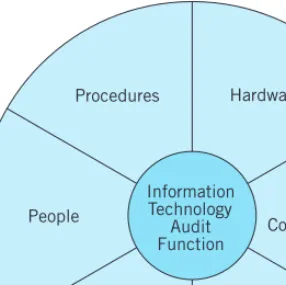
The Information Technology Audit Process. As illustrated in Figure 14-1, the IT audit function encompasses all the components of a computer-based AIS: people, procedures, hardware, data communications, software, and databases. These components are a system of interacting elements that auditors examine to accomplish the purposes of their audits described above.
External auditors examine an organization’s computer-based AIS primarily to evaluate how the organization’s control procedures over computer processing affect the financial statements (attest objectives). The controls in place will directly influence the scope of the audit. For instance, if computer controls are weak or nonexistent, auditors will need to
Databases Software
People Data
Communications Procedures Hardware
Information Technology
Audit Function
FIGURE 14-1 The six components of a computer-based AIS examined in an information tech- nology audit.
Preliminary review of information systems controls
Rely on IT controls?
YES NO
Audit around the computer
Audit through the computer Review general
and application controls
Perform compliance tests of computer
controls
Perform substantive test of account balances
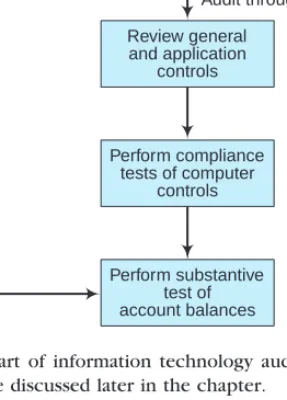
FIGURE 14-2 Flowchart of information technology audit process. Auditingthrough and aroundthe computer are discussed later in the chapter.
do moresubstantive testing—i.e., detailed tests of transactions and account balances. An example of substantive testing is the confirmation of accounts receivable with customers.
If the control procedures over a company’s computerized financial accounting system are strong, the auditors may limit the scope of their audit by examining fewer transactions underlying accounts receivable account balances. For our example, this would mean contacting fewer customers to confirm accounts receivable than would be the case if little or no reliance could be placed on the computer-based controls.
Figure 14-2 shows a flowchart of the steps that generally take place in IT auditing.
These steps are similar to those performed in any financial audit. What is different is that the auditor’s examination in this case concerns acomputer-basedAIS. In Figure 14-2, the process begins with a preliminary evaluation of the system. The auditor will first decide if computer processing of accounting data is significant or complex enough to warrant an examination of the computer-based information system itself. Sometimes, if the system is neither large nor complex, the audit might proceed as it would in a manual data processing environment. Most often, computer-based processing warrants a preliminary review by the IT auditor to make a quick assessment of the control environment.
Typically, an auditor will find enough computer-based controls in place to warrant further examination. In this situation, an auditor will want to make a more detailed analysis of both general and application controls (discussed in Chapter 11). After examining these controls in some detail, the auditors will perform compliance testing to ensure that the controls are in place and working as prescribed. This may entail using some computer-assisted audit techniques (CAATs) to audit the computerized AIS. These involve the use of computer processes or controls to perform audit functions, such as sorting data to detect duplicate accounts payable invoice numbers. Finally, the auditor
will need to substantively test some account balances. As explained earlier, the results of the previous analysis and testing affect the scope of this testing. Auditors often make use of CAATs at this stage in auditingwiththe computer. Auditingthroughandwiththe computer are discussed later in this chapter.
Careers in Information Technology Auditing. As organizations increasingly rely on computer-based AISs and as these systems become more technologically complex, the demand for IT auditors is growing. The recent passage of the Sarbanes-Oxley bill has also created a need for more IT auditors. IT auditing requires a variety of skills. Some information technology auditors have college degrees in computer science or information systems, and others have accounting degrees with perhaps some general audit experience. The ideal background includes a combination of accounting and information systems or computer science skills.
As Chapter 1 noted, IT auditors may choose to obtain a professional certification such asCertified Information System Auditor (CISA). Applicants achieve this certification by successfully completing an examination given by the Information Systems Audit and Control Association a (ISACA), meeting specific experience requirements, complying with a Code of Professional Ethics, undergoing continuing professional education, and complying with the Information Systems Auditing Standards. Figure 14-3 describes the content areas covered on the CISA examination. Notice that they not only concern evaluation of IT, but also IT governance and the protection of IT assets.
A more general certification for experienced information security professionals is the Certified Information Security Manager (CISM), also granted by ISACA. Those seeking a CISM designation need to have a business orientation and to understand risk management and security from a conceptual viewpoint. The CISM evaluates knowledge in information security governance, information security program management, risk management, infor- mation security management, and response management. The CISA designation has been granted since 1978, but the CISM is only a few years old.
IT auditors may be employed as either internal or external auditors. In both cases, these professionals focus on evaluating control procedures rather than substantive testing.
Evaluating controls over information systems hardware and various AIS applications requires a high level of expertise. As an example, an IT auditor evaluating controls that limit access to certain information needs to be familiar with the way a particular application organizes its access security. Compared to external auditors, internal auditors can more easily specialize in knowledge about their particular organization’s hardware, operating system platform, and application programs.
Job Practice Domains Coverage
IS Audit Process 10%
IT Governance 15%
Systems and Infrastructure Lifecycle Management 16%
IT Service Delivery and Support 14%
Protection of Information Assets 31%
Business Continuity and Disaster Recovery 14%
FIGURE 14-3 Job practice domains covered on the Certified Information Systems Auditor examination (www.isaca.org, effective 2006).
An external auditor is likely to audit the information systems of many different client organizations, Alternately, however, an external auditor may specialize in a particular operating system platform, security software package, or mainframe system. To perform IT auditing effectively requires both specialized skills and a broad-based set of technical knowledge. The external information systems auditor may or may not be part of the regular financial audit team. In some cases, the financial audit team only calls on external infor- mation systems auditors when a special risk assessment appears warranted. The Big Four public accounting firms all employ IT auditors, and perform a variety of assurance-related IT services for clients.
Case-in-Point 14.2 An IT auditor at Ernst & Young LLP may work within the Technology and Security Risk Services (TSRS) practice within the Assurance and Business Advisory Services area. These professionals help clients to evaluate their IT risk, improve the value of IT, and provide IT security. Ernst & Young also offers specialized services that protect data and systems from threats, such as cyber terrorism.
Evaluating the Effectiveness of Information Systems Controls
The more confidence auditors have (as a result of strong controls) that data are input and processed accurately in a computer-based system, the less substantive testing they perform. On the other hand, a computer-based system with weak controls over data input and processing will call for more detailed testing of financial transactions.
Risk Assessment. An external auditor’s main objective in reviewing information systems control procedures is to evaluate therisks(associated with any control weaknesses) to the integrity of accounting data presented in financial reports. Control strengths and weaknesses will affect the scope of the audit. A secondary objective of the external auditor’s review is to make recommendations to managers about improving these controls. This secondary objective is also an objective of internal auditors.
Under a risk-based audit approach to evaluating a company’s internal control procedures, the following four steps provide a logical framework for performing the risk-based audit of the company’s AIS:
1. Determine the threats (i.e., errors and irregularities) facing the AIS.
2. Identify the control procedures that should be in place to minimize each of these threats and thereby prevent or detect the errors and irregularities.
3. Evaluate the control procedures within the AIS. The process of reviewing system documentation and interviewing appropriate personnel to determine whether the necessary control procedures are in place is called a systems review. In addition, auditors investigate whether these control procedures are satisfactorily followed. The tests include such activities as observing system operations; inspecting documents, records, and reports; checking samples of system inputs and outputs; and tracing transactions through the system.
4. Evaluate weaknesses (i.e., errors and irregularities not covered by control procedures) within the AIS to ascertain their effect on the nature, timing, or extent of auditing procedures. This step focuses on thecontrol risksand whether a company’s control system as a whole adequately addresses the risks. If a control deficiency is identified, the auditor should determine whether there are compensating controls or procedures that
make up for the deficiency. Control weaknesses in one area of an AIS may be acceptable if control strengths in other areas of the AIS compensate for them.
The risk-based audit approach provides auditors with a good understanding of the errors and irregularities that can occur in a company’s AIS environment and the related risks and exposures. This understanding provides a sound basis for the auditors’ development of recommendations to the company’s management on how its AIS control system should be improved.
The desirability of an internal control procedure is a function of its ability toreduce business risk. In fact, it is the business risk itself that is important, not the internal control system. For example, natural disasters such as floods or earthquakes pose a risk to an organization’s ability to continue its business without interruption. Adisaster recoveryorbusiness continuity planis an internal control procedure designed to reduce this risk. Focusing on business risk ensures implementing only those controls that are absolutely necessary and also cost-effective. One method by which an auditor can evaluate the desirability of IT-related controls for a particular aspect of business risk is through an information systems risk assessment. (Chapter 9 introduced the subject of risk assessment and described the Enterprise Risk Management Framework.)
In addition to the risk of fraud or intentional manipulation, auditors must also consider risk with respect to errors or accidents. Not only are assets vulnerable as a result of intentional fraud, but mistakes impact them too. For instance, inputting data incorrectly can lead to misrepresentation on financial statements in the form of incorrect asset valuations. An information systems risk assessment should take into account the risks associated with errors or accidents as well as fraud.
The loss of company secrets, unauthorized manipulation of company files, and inter- rupted computer access are all business risks in an IT environment. Although it is easier to value a tangible asset, such as cash, than to place a value on information, it must be done.
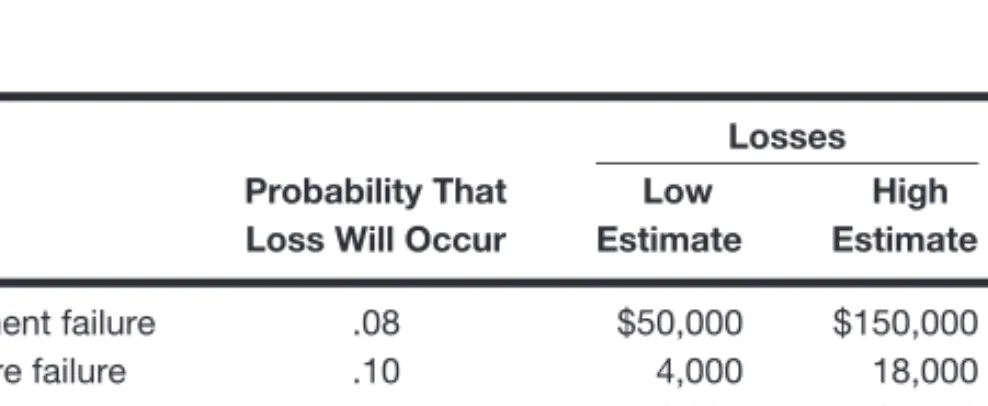
Auditors make their best judgments about the probability of losses. For those areas where estimated costs of protection are less than anticipated losses, the auditor recommends implementing control procedures. In areas in which the costs of protection are greater than anticipated losses, the auditor may recommend against installing the specific controls.
Sometimes companies assess their information systems risks by employing ethical hackers to conduct penetration testing. We discussed hacking in Chapter 10 as a computer crime. However, when an IT auditor employs ‘‘white hat’’ hacking techniques, the purpose is to evaluate risk and design controls to protect against unauthorized access.
We call this type of ethical hacking penetration testing because the auditor is trying to penetrate the system to gain access to resources or sensitive information.
Guidance in Designing and Evaluating IT Controls. Two guides are available to IT auditors for designing and evaluating internal controls related to IT. The Institute of Internal Auditors first issued the Systems Auditability and Control (SAC) report in 1977. Advances in IT led to revisions in 1991 and 1994, and the 2001 issuance of a new model, Electronic Systems Assurance and Control (eSAC), that provides a framework for evaluating e-business controls. The SAC report identifies important information technologies and the specific risks related to these technologies. It also recommends controls to mitigate risks and suggests audit procedures to validate the existence and effectiveness of these controls. The SAC report consists of a set of reference volumes that identify risk, controls, and audit techniques for a variety of areas, such as telecommunications, end-user systems, and emerging technologies. The 1994 SAC report added object technology, document management, and multimedia technologies sections.
Both internal and external auditors rely on the SAC report for guidance on controls over IT and in auditing computer-based applications.
Chapter 11 pointed out that the Information Systems Audit and Control Foundation developed theControl Objectives for Information and Related Technology (COBIT) framework. This framework provides auditors and businesses with guidance in managing and controlling for business risk associated with IT environments. COBIT, version 4.1, includes control objectives and control outcomes tests for evaluating the effectiveness of controls. Using the framework, management and auditors can design a cost-effective control system for IT resources and processes. COBIT benefits business and IT managers, as well as auditors. For auditors, the model helps in advising management on internal controls and can provide substantive support for audit opinions. The next case describes one company’s use of COBIT.
Case-in-Point 14.3 Sun Microsystems is a world-wide provider of hardware and software solutions. In order to improve the strategic value of IT and to comply with Sarbanes-Oxley, Sun’s IT department decided to use the COBIT framework to evaluate and measure the relationship of IT to corporate strategy. The framework enabled Sun to successfully evaluate six data centers and more than 600 IT applications, and enabled senior IT executives to create a Sun IT/COBIT Activities Listing that mapped Sun’s IT processes and activities to COBIT.2
THE INFORMATION TECHNOLOGY AUDITOR’S TOOLKIT
Auditors can use computer-assisted audit techniques (CAATs) to help them in various auditing tasks. In an automated AIS,auditing with the computer(i.e., using the computer itself as an audit tool) is virtually mandatory because data are stored on computer media and manual access is impossible. However, there are many reasons for auditing with the computer beyond the need to access computerized accounting data. One of the most important is that computer-based AISs are rapidly increasing in sophistication. Another is that CAATs save time. Imagine footing and cross-footing large spreadsheets or schedules without using a computer.
Auditing Software
Auditors can use a variety of software when auditing with the computer. Examples include general-use softwaresuch as word processing programs, spreadsheet software, and database management systems. Other software that we discuss here such asgeneralized audit software (GAS)andautomated workpaper softwareis more specifically oriented toward auditor tasks
General-Use Software. Auditors employgeneral-use softwareas productivity tools that can improve their work. For instance, word processing programs improve effectiveness when writing reports because built-in spell checks can significantly reduce spelling errors.
Similarly, an auditor can write a customer confirmation letter with a word processing program and mail-merge it with an address file so that each letter appears to have been individually prepared.
2Source: www.isaca.org (COBIT and IT Governance Case Study: Sun Microsystems) Accessed: September 6, 2008.
Spreadsheet software allows both accountants and auditors to make complex calcula- tions automatically. It also allows the user to change one number and update all related numbers at the click of a mouse. One of the most common uses of electronic spreadsheets by accountants and auditors is for making mathematical calculations, such as interest and depreciation. Spreadsheet software can also be used to perform analytical procedures, such as computing ratios. Different presentation formats for data contained in spreadsheets contribute to the usefulness of these data for management decision-making and other managerial functions.
Accountants and auditors can use adatabase management system (DBMS)to perform some of the same functions as spreadsheet software. For instance, DBMSs can sort data and make certain mathematical computations. However, they are distinguished from spreadsheet software by their ability to manipulatelargesets of data in fairly simple ways.
As a general rule, accountants and auditors use spreadsheet software to make complex calculations with relatively small sets of data, whereas they will use DBMSs for simpler calculations or manipulations, such as sorting, on large data sets.
A DBMS controls almost all organizational accounting systems. The auditor can select subsets of a client company’s data for manipulation purposes. This can be done either on the client’s computer system, or, after the data are downloaded, on the auditor’s computer.
A valuable tool for retrieving and manipulating data is Structured Query Language (SQL), a popular data manipulation language. Auditors can use SQL to retrieve a client’s data and display these data in a variety of formats for audit purposes. As an example, an auditor may use the SELECT command to retrieve inventory items meeting certain criteria, such as minimum dollar amount. Other data manipulation capabilities of SQL include: (1) selecting records matching specified criteria, (2) deleting records from a file based on established criteria, (3) generating customized reports based on all or a subset of data, and (4) rearranging file records in sequential order.
Generalized Audit Software. Generalized audit software (GAS)packages (or pro- grams) enable auditors to review computer files without continually rewriting processing programs. Large CPA firms have developed some of these packages in-house; many other programs are available from various software suppliers. GAS packages are available to run on microcomputers, minicomputers, or mainframes. GAS programs are capable of the basic data manipulation tasks that spreadsheet or DBMS software might also perform.
These include mathematical computations, cross footing, categorizing, summarizing, merg- ing files, sorting records, statistical sampling, and printing reports. The advantage GAS packages have over other software is that these programs are specifically tailored to auditor tasks. Auditors can use GAS programs in a variety of ways in specific application areas, such as accounts receivable, inventory, and accounts payable. Figure 14-4 shows some of the ways auditors might use GAS to audit inventory applications.
Case-in-Point 14.4 Benford’s Law is based on the observation that the lead digit in a set of naturally-ocurring numbers is not uniform, but actually varies in frequency. For example, Frank Benford noticed in 1938 that the digit ‘‘1’’ was likely to occur about 30% of the time—much greater than the 10% you might expect. The other digits decline in probability of occurrence, with the digit ‘‘2’’ occurring about 17% of the time and the digit ‘‘9’’ occurring less than 5% of the time. GAS software can examine huge sets of such number sequences as vendor payments to determine if they conform to this law.
Two popular GAS packages used by auditors areAudit Command Language (ACL) and Interactive Data Extraction and Analysis (IDEA). These programs allow auditors to examine a company’s data in a variety of formats. They include commands such as
• Merge last year’s inventory file with this year’s and list those items with unit costs greater than a certain dollar amount and that have increased by more than a specified percentage.
• List inventory quantities on hand in excess of units sold during a specified period and list those inventory items with a last sales date prior to a specified date to identify possible obsolete inventory items.
• Select a sample of inventory tag numbers and print the sample selection.
• Scan the sequence of inventory tag numbers and print any missing or duplicate numbers.
• Select a random sample of inventory items for price testing on a dollar-value basis, and list all items with an extended value in excess of a specified amount.
• Perform a net-realizable-value test on year-end inventory quantities, and list any items where inventory cost exceeds net-realizable value.
FIGURE 14-4 Various ways to use generalized audit software packages to audit inventory.
STRATIFY, EXTRACT, and JOIN. Each of these commands provides an auditor with a different view of the data. For example, thestratifycommand lets an auditor group data into categories. This is useful, for example, in sorting inventories into various classes based on their cost. Stratification lets an auditor concentrate on high-dollar-value inventory items.
Another example of data stratification is in auditing accounts receivable. Auditors will want to verify balances of customers owing large dollar amounts in greater proportion than small accounts receivable balances owed by customers. Most GAS packages allow auditors toextract data according to some specification. This capability is an invaluable audit tool. Auditors can extract data to detect a variety of exception conditions, such as duplicate invoice numbers, inventory items that have not been sold in more than one year, and customers with negative accounts receivable balances. Byjoiningfiles, auditors can compare data. For example, combining the employee file with the vendor file may show that an employee has perpetrated a fraud by creating a fictitious vendor. The following case describes how an accounting firm used ACL to uncover a significant fraud.
Case-in-Point 14.5 Summerford Accountancy employs fraud examiners who help organi- zations discover and deter fraudulent activities. The Los Angeles Unified School District hired them to examine a construction project for a high school, the Belmont Learning Complex. The fraud experts used ACL software to discover duplicate payments to vendors, fake vendors, and fraudulent transactions. One specific example of the software’s use is that it found 48 budget transfers an employee authorized that were for $49,999. This allowed the employee to avoid the school district policy that required Board of Education approval for any spending greater than $50,000.3
Automated Workpaper Software. Automated workpaper softwareis similar to general ledger software. The difference is that automated workpaper software handles accounts for many organizations in a flexible manner. The functions of automated workpa- per software vary with specific programs. Some of the features of this software are its ability to: (1) generate trial balances, (2) make adjusting entries, (3) perform consolidations, and (4) conduct analytical procedures. The advantage of using automated workpaper software is that it automates footing, cross footing, and reconciliation to schedules. Auditors can use this software to prepare consolidated trial balances and financial statements (that combine accounts of multiple companies). Automated workpaper software can also help auditors
3Source: www.acl.com–Success Stories –Summerford Accountancy PC (accessed June 8, 2006).
create common-size income statements and balance sheets that show account balances as percentages. In addition, automated workpaper software can easily calculate financial statement ratios and measurements, such as thecurrent ratio, theworking capital, the inventory turnover rate, and theprice-earnings ratio.
The Internet can also be a valuable resource for IT auditors. There are many websites that offer useful advice and guidance. These include software vendor sites with patches for software security holes, sites with alerts about security threats, and websites that have special tools that may be used free of charge or purchased.
Case-in-Point 14.6 AuditNet (wwww.auditnet.org) describes itself as a ‘‘global resource for auditors.’’ Registered users can subscribe to download audit programs for a variety of application areas, such as accounts payable. These programs include detailed audit procedures. There is a Sarbanes-Oxley resource center, a discussion forum, a virtual library, and a list of audit terminology and definitions.
People Skills
Arguably the most important skills that auditors need are people skills. After all, they must work as a team as well as be able to interact with clients. For example, to understand the organizational structure of the IT function, the IT auditor will need to interview the CIO.
Interviews are a mainstay of IT auditing. Similarly, they are also likely to find that many of the audit steps in their evaluation of internal controls have more to do with human behavior than technology. For example, one of the best protections against programmed threats such as viruses and worms is regularly updated anti-virus software. Although it may be important to understand the capabilities of the software, it is even more important to see if the security administrator is checking for virus updates and patches on a regular basis.
Case-in-Point 14.7 The MyDoom worm, unleashed in early 2004, posed a particularly serious threat to systems, as it had the potential to launch denial-of-service attacks from infected computer systems. Shortly after the virus was launched, several anti-virus software vendors updated their software to protect against it. However, many IT security personnel do not monitor security sites or take the time to update anti-virus software regularly. An IT auditor should check to see that the IT function is scanning alerts, applying patches, and updating security software regularly.
AUDITING COMPUTERIZED ACCOUNTING INFORMATION SYSTEMS
When computers were first used for accounting data processing functions, the typical auditor knew very little about automated data processing. The basic auditing approach, therefore, was to follow theaudit trailup to the point at which accounting data entered the computer and to pick these data up again when they reappeared in processed form as computer output. This is calledauditing around the computer. It assumes that the presence of accurate output verifies proper processing operations. This type of auditing pays little or no attention to the control procedures within the IT environment. Auditing around the computer is not generally an effective approach to auditing a computerized environment, in part because it tests normal transactions but ignores the exceptions. It is the exceptions that are of primary interest to the auditor.
When auditing the computerized AIS, an auditor usually follows the audit trail through the internal computer operations phase of automated data processing. This approach, auditing through the computer, attempts to verify that the processing controls involved in the AIS programs are functioning properly. It also attempts to verify that the accounting data processed are accurate. Because this type of auditing tests the existence and functioning of control procedures, it normally occurs during the compliance phase of the flowchart in Figure 14-2.
Auditing through the computer usually assumes that the CPU and other hardware are functioning properly. This leaves the auditor the principal task of verifying processing and control logic as opposed to computer accuracy. Five techniques that auditors use to audit a computerized AIS are: (1) use of test data, integrated test facility, and parallel simulation to test programs, (2) use of audit techniques tovalidate computer programs, (3) use of logs and specialized control software toreview systems software, (4) use of documentation and CAATs to validate user accounts and access privileges, and (5) use of embedded audit modules to achievecontinuous auditing.
Testing Computer Programs
In testing computer programs, the objective is to ensure that the programs accomplish their goals and that the data are input and processed accurately. Three techniques that auditors may employ to test computer programs are: (1) test data, (2) integrated test facility, and (3) parallel simulation.
Test Data. It is the auditor’s responsibility to develop a set of transactions that tests, as completely as possible, the range of exception situations that might occur under normal processing conditions. Conventionally, these transactions are called test data. Possible exception situations for a payroll application, for example, include out-of-sequence payroll checks, duplicate time cards, negative hours worked, invalid employee numbers, invalid dates, invalid pay rates, invalid deduction codes, and use of alphabetic data in numeric codes.
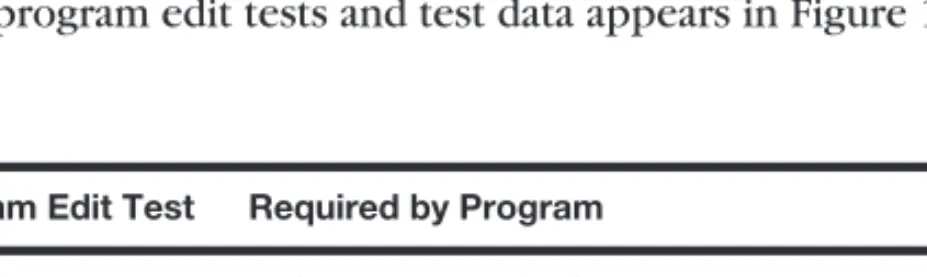
Once an auditor has assembled appropriate sample data (usually transactions of some type), these data are arranged into test sequence in preparation for computerized data processing. To complete the audit test, an auditor will compare the results obtained from processing test data with a predetermined set of answers on an audit work sheet. If processing results and worksheet results do not agree, further investigation is necessary. A sample set of program edit tests and test data appears in Figure 14-5.
Program Edit Test Required by Program Test Data
Completeness 6 characters required 12345
Numeric Field Numeric characters only 123C45
Sign Positive numbers only −123456
Reasonableness Hours worked should not exceed 80 per week 110 Valid Code Accept only I (invoice), P (payment), M (memo) C Range Accept only dates between 01/01/01 and 12/31/02 09/07/99
FIGURE 14-5 Program edit tests and test data.
Integrated Test Facility. Although test data work well in validating an application’s input controls, they are not so effective in evaluating integrated online systems or complex programming logic. In these situations, it may be better to use a more comprehensive test technique such as an integrated test facility (ITF). The purpose of an ITF is to audit an AIS in an operational setting. This involves: (1) establishing a fictitious entity such as a department, branch, customer, or employee, (2) entering transactions for that entity, and (3) observing how these transactions are processed. For example, an auditor might create a number of fictitious credit customers and place appropriate accounts receivable master records on the company’s accounts receivable computer files. From the standpoint of the auditor, of course, the information contained on these records is for test purposes only.
To most of the employees of the company, however, these records represent bona fide customers entitled to purchase company merchandise inventory or services on credit.
To use the ITF, an auditor will introduceartificial transactionsinto the data processing stream of the AIS and have the company routinely handle the business involved. In a truly integrated test facility, this may mean actually shipping merchandise (not ordered by anyone) to designated addresses or billing customers for services not rendered. Because of the amount of work involved, however, it may be necessary to intercept the ordered merchandise at the shipping department and reverse the billing transactions at the managerial level.
Parallel Simulation. Withparallel simulation, the auditor usesliveinput data, rather than test data, in a program actually written or controlled by the auditor. The auditor’s program simulates all or some of the operations of the real program that is actually in use. In order for this method to be effective, an auditor must thoroughly understand the audited organization’s computer system and know-how to predict the results. The latter is necessary to intelligently compare the results of processing data using the test programs with those results from using the real programs.
As you might imagine, it can be very time-consuming and thus cost-prohibitive for an auditor to write computer programs entirely replicating those of the client. For this reason, parallel simulation usually involves replicating only certain critical functions of a program. For example, a program that replicates payroll processing might just calculate net pay for employees rather than making all the payroll distributions that exist in the entire payroll program.
Validating Computer Programs
A clever programmer can thwart the use of test data by substituting a legitimate, but unused, program for a dishonest one when an auditor asks for the processing routine(s) required for the audit. Therefore, an auditor must validate any program with which he or she is presented. Although there is no 100% foolproof way of validating a computer program, several procedures may be used to assist in this task, including tests of program change control and program comparison.
Tests of Program Change Control. The process by which a newly developed program or program modification is put into actual use should be subject to program change control. It is a set of internal control procedures developed to protect against unauthorized program changes. Sound program change control requires documentation of every request for application program changes. It also requires computer programmers to
develop and implement changes in a separate test environment rather than a live processing environment.
Depending on the size of an organization, the change control process might be one of many duties performed by one individual. Alternatively, responsibility might be assigned to more than one individual. The basic procedures in program change control include testing program changes and obtaining proper authorizations as programs move from a testing stage to actual production (live) use. The auditor’s responsibility is to ensure that a company’s management establishes and executes proper authorization procedures and that the company’s employees observe these procedures.
A test of program change control begins with an inspection of the documentation maintained by the information processing subsystem. It is not unusual for an organization to have on hand a flowchart of its change control process. The organization should also have special forms that authorize a change to an existing program or development of new programs. Included on theseprogram authorization formsshould be the name of the individual responsible for the work and the signature of the supervisor responsible for approving the final programs. Similarly, there should be forms that show the work has been completed and a signature authorizing the use of the program(s) for present data processing. These authorizing signatures affix responsibility for the data processing routines and ensure accountability when problems arise. We call this aresponsibility system of computer program development and maintenance. Figure 14-6 describes the processes in this system that an auditor should validate.
The chief purpose of a responsibility system at the computer center is not to affix blame in the event of program failures but to ensure accountability and adequate supervisory controls in the critical area of data processing. Tighter control over both the development of new programs and changes to existing programs is likely to result in better computer software, because individuals tend to do better when they are responsible for a given piece of work.
Program Comparison. To guard against unauthorized program tampering, such as the insertion of a Trojan Horse (see Chapter 10), it is possible to perform certaincontrol total testsof program authenticity. One is atest of length. To perform this test, an auditor obtains the latest version of an accounting computer program to be verified and compares the number of bytes of computer memory it requires with an entry in a security table of length counts of all valid accounting programs. If the accounting program’s length count fails to
• Programmers document all program changes on the proper change-request forms.
• Users and accountants properly cost all program change requests and the planning committee reviews high-cost projects.
• Both computer development committee personnel and users sign the outline specification form, thereby establishing authorization for the programming work.
• Program changes match those in the programs in the production load library (where currently used programs are stored).
• Documentation matches the production version of a computer program.
• Information systems personnel property carry out librarian functions, especially a review of the paperwork involved with the documentation of program change requests.
FIGURE 14-6 Each of the above processes is checked by an auditor in reviewing a responsibil- ity system of computer program development and maintenance.
match its control total, the program is then further scrutinized. (This process is similar to comparing the word count in two similar documents produced by Microsoft Word.)
Another way to ensure consistency between the authorized version of an accounting computer program and the program version currently in use is to compare the code directly on a line-by-line basis using a comparison program. A comparison program will detect any changes that a programmer might have made, even if the programmer has been clever enough to ensure that the program length for the two versions is the same. Auditors must evaluate the tradeoff between efficiency and effectiveness in choosing whether to use control totals, perform detailed program comparison, or rely on general controls over program changes to prevent unauthorized tampering with computer programs.
Review of Systems Software
Systems software controls include: (1) operating system software, (2) utility programs that do basic ‘‘housekeeping’’ chores such as sorting and copying, (3) program library software that controls and monitors storage of programs, and (4) access control software that controls logical access to programs and data files.
When auditing through the computer, auditors will want to review the systems software documentation. In addition, auditors will request management to provide certain output or runs from the software. For instance, the auditor, in reviewing how passwords within the system are set, will ask the information systems manager for a listing of all parametersor password characteristics designated in the system. Figure 14-7 lists some of the characteristics of passwords that the auditor will examine.
Parameter Definition Sample Setting Risk
Minimum password length Minimum number of characters required
6 digits Short passwords are more easily guessed
Required password change
Require users to change passwords at specific intervals
60 days Compromised passwords can be used forever Minimum interval before
password change
Minimum number of days before user can change password
1 day If a user believes someone has learned the password, how much time must pass before it can be changed?
Maximum number of repeating characters allowed
Specifies how many characters may be repeated within the password
2 characters Passwords such as
‘‘AAAAAA’’ are easily guessed
Alphabetic characters Passwords may not consist of only numbers
Alpha Protects against use of birthdates or other easily guessed numbers Dictionary entries Passwords cannot be
dictionary words
ROOTTOOT Hackers use standard dictionaries to find passwords Assignment Only bona fide users are
given passwords
Employee Passwords ensure accountability in addition to providing access
FIGURE 14-7 Examples of parameters that might be set to control passwords.
Auditors may choose to use software tools to review systems software. A number of tools are available, ranging from user-written programs to commercial packages such as CA-Examine. There are also general analysis types of software tools, such as SAS, SPSS, andFOCUS. These software tools can query operating system files to analyze the system parameters.
Systems software usually generates automatic outputs that are important for monitoring a company’s computer system. In auditing the company’s system, an auditor will want to inspect these outputs, which include logs and incident reports. The company’s management uses logs for accounting purposes and for scheduling the use of computer resources efficiently. Auditors will make use of these logs to evaluate system security. Unusual occurrences, such as programs run at odd times or programs run with greater frequency than usual, are noted and subsequently investigated. Management may manually maintain incident reports, or systems software may automatically generate these reports. The reports list events encountered by the system that are unusual or interrupt operations. Incidents typically recorded are security violations (such as unauthorized access attempts), hardware failures, and software failures.
Validating Users and Access Privileges
An IT auditor needs to make sure that all computer-system users are valid and that each has access privileges appropriate to his or her job responsibilities. Systems software generally includes access control software that determines how the system administrator sets up and controls User IDs, user profiles, and passwords. The IT auditor should verify not only that the software parameters are set appropriately, but that IT staff are using them appropriately. For example, one audit task is to make sure that employee accounts are closed immediately after someone leaves the organization. To accomplish this, the IT auditor might request a list of current personnel from Human Resources. Another approach would be to obtain a current phone directory and compare names with those in the listing of user accounts.
IT Auditors should also look at user listings to see if there are any Group IDs assigned.
For example, there may be an ID named AP_Clerk. Sometimes managers decide to issue these IDs to cut down on paperwork when making personnel changes. However, this type of ID prevents assigning responsibility to an individual. If one AP clerk were to make a mistake or commit fraud, the use of a Group ID would make it difficult to identify which of the accounts payable clerks was responsible.
An IT auditor can visually inspect printouts from databases and software documentation to verify users, appropriateness of passwords, and spot Group IDs. However, a variety of auditor software tools are available to make the work more efficient. As an example, such software might examine login times. If a user has not logged in for several months, it may be that the account should have been deleted. Users logging on at odd hours may also provide information that something is not quite right. As we noted earlier in the chapter, it is the exception conditions or irregularities that the IT auditor wants to identify.
Continuous Auditing
Some audit tools can be installed within an information system itself to achievecontinuous auditingor real-time assurance. Continuous auditing is increasingly important as we move toward real-time financial reporting. There is also increasing pressure to reduce the time span between the production of financial information and the audit of the information, known as the audit cycle. Stakeholders want audited information quickly as decision time
frames are becoming shorter. Many businesses report their financial information over the Internet and many more are likely to do so as XBRL enhances this form of reporting.
Five specific approaches for continuous auditing are: (1) embedded audit modules or audit hooks, (2) exception reporting, (3) transaction tagging, (4) snapshot technique, and (5) continuous and intermittent simulation. These tools allow auditing to occur even when an auditor is not present. Withembedded audit modules, application subroutines capture data for audit purposes. These data usually are related to a high-risk area. For example, an application program for payroll would include a code that causes transactions meeting pre-specified criteria to be written to a special log. Possible transactions that might be recorded in a log include those affecting inactive accounts, deviating from company policy, or involving write-downs of asset values. For payroll applications, these transactions could reflect situations where, for instance, employees worked more than a predetermined number of hours. Another example might be recording related transactions occurring in a particular sequence.
The practice of exception reporting is also a form of continuous auditing. If the information system includes mechanisms to reject certain transactions that fall outside predefined specifications (such as an unusually large vendor check), then the ongoing reporting of exception transactions allows the system to continually monitor itself.
Usingtransaction tagging, auditors can tag certain transactions with a special identifier so that they can be recorded as they pass through the information system. For example, a specific number of employees can have tags attached to their transaction records so that an auditor can verify the processing logic in the payroll system. Tagging in this instance could also check to see that controls within the system are operating. Suppose that a control procedure requires rejection of payroll transactions if the number of hours worked during a pay period is too high. Auditors can review tagged transactions to make sure that this control procedure is functioning properly.
The snapshot technique examines the way transactions are processed. Selected transactions are marked with a special code that triggers the snapshot process. Audit mod- ules in the computer program record these transactions and their master file records before and after processing activities. Snapshot data are recorded in a special file and reviewed by the auditor to verify that all processing steps have been properly performed.
Continuous and intermittent simulation(CIS) embeds an audit module in a database management system (DBMS). The CIS module examines all transactions that update the DBMS. If a transaction has special audit significance, the audit module independently processes the data (in a manner similar to parallel simulation), records the results, and compares them with those results obtained by the DBMS. If any discrepancies exist, the details of these discrepancies are written onto an audit log for subsequent investigation.
If serious discrepancies are discovered, the CIS may prevent the DBMS from executing the update process. A challenge for continuous auditing is that the data in complex organizations may be located in multiple DBMS. To effectively conduct real-time assurance, auditors may need to create a data mart or subset of the data warehouse, specifically for audit purposes.
An example of continuous auditing on a smaller scale is embedding audit modules in spreadsheets. For example, the Excel payroll spreadsheet in Figure 14-8 computes the regular and overtime earnings for the employees of a construction company. Most such spreadsheets would only include the first few lines shown in the figure, plus perhaps the ‘‘Total’’ line in row 11. But this spreadsheet includes several additional rows, an auditing module that can help an accountant audit the application and check its validity and accuracy. The figure in the ‘‘Counts’’ row uses Excel’s COUNTIF function to count the number of positive values in columns B, C, and D of the spreadsheet. An auditor can
Microsoft Excel - Excel Example.xls
File Edit View Insert Format Tools Data Window Help
TimesNew Roman 10 B U a $
= 14
A B C D E F G
1 2 3
5 6 7 4
Choi Construction Company
8 9 10 11 12
Adams
Payrate
Regular Hours
Payroll for Week Ending: 3/15/XX Overtime
Hours
Regular Pay
Overtime Pay Total Baker
Carlton Daniels Englert Franklin Griffin Hartford Totals:
8.90 12.55 9.60 10.20 9.60 11.55 10.80 9.90
40 35 40 35 40 40 35 40
3 0 2 0 5 0 0 10
8 8 4
12.55 40.00 10.00 356.00 502.00 384.00 408.00 384.00 462.00 432.00 396.00
$4,016.00
40.05 0.00 38.80 0.00 72.00 0.00 0.00 148.50
$ 753.00
396.05 502.00 422.80 408.00 456.00 462.00 432.00 544.50 305 20 $3,324.00 $ 299.35 $3,623.35
$3,623.35 13
14 15
Totals:
Counts:
Maximums:
Sum: Reg + O'time Max Regular Pay:
Max Overtime Pay:
16 17 18 19 20 21 22
FIGURE 14-8 This simple spreadsheet to compute regular and overtime payments contains sev- eral errors.
compare the largest of these numbers to the total number of employees known to work for the company. If we assume that this company has upper limits for the pay rate ($13), regular hours (40), and overtime hours (10), an auditor can also compare the values in the
‘‘Maximums’’ row against these upper limits to determine if any entries are too large.
INFORMATION TECHNOLOGY AUDITING TODAY
IT auditing is actually a component of information technology (IT) governance. In this section, we discuss the issue of IT governance and other important recent developments that impact IT auditing. These include the use of technology to deter fraud, the impact of the 2002 Sarbanes-Oxley legislation on IT auditing, and third party and systems reliability assurance.
Information Technology Governance
IT governance is the process of using IT resources effectively to meet organizational objectives. It includes using IT efficiently, responsibly, and strategically. The IT Governance Institute, an affiliation of the Information Systems Audit and Control Association (ISACA), was created in 1998 in recognition that IT was more than a tool an organization could use to meet objectives. Rather, strategic use of IT can drive a business and make the difference between success or failure.
The objectives of IT governance are really twofold. The first set of objectives focus on using IT strategically to fulfill the organizational mission and to compete effectively.
Top management and the Board of Directors are responsible for ensuring these IT governance objectives. The second set of IT governance objectives involves making sure that the organization’s IT resources are managed effectively and that management controls IT-related risks. Meeting these objectives is the concern of the Chief Information Officer (CIO), the auditors, and often top management.
Case-in-Point 14.8 The City of Mesa, Arizona provides government services to almost 400,000 people. The city has an IT steering committee that prioritizes IT projects for all departmental units. The committee uses techniques such as portfolio management to create the priorities. The IT governance program helps to facilitate communication between the IT function and the departmental users of IT. The governance structure also creates interdisciplinary teams that make sure IT projects fulfill the city’s strategic objectives.4
Auditing for Fraud: Statement on Auditing Standards No. 99
The financial statement audits mandated by the Securities and Exchange Commission require auditors to attest to the fairness of a company’s financial statements. They do not require auditors to detect fraudulent activities. This has long been seen as a problem by many investors and other business stakeholders who believe that an auditor report meant that a company was ‘‘clean,’’ or that there was no fraud taking place by management or other employees. As a result, the AICPA’s Auditing Standards Board issued Statement on Auditing Standards (SAS) No. 99Consideration of Fraud in a Financial Statement Audit.
SAS No. 99 superseded SAS No. 82. Although the earlier rule had the same name, the 2002 fraud standard provides more guidance for auditors to proactively prevent and deter fraud. The standard is part of a corporate responsibility and anti-fraud initiative of the AICPA. It encourages auditors to adopt a professional skepticism that will make them alert for signs of fraud, such as those in thefraud triangledepicted in Figure 14-9. This triangle
Rationalization (Ethics, values,
character deficiencies) Incentive/
Pressure (Motivation for
fraud)
Opportunity (Circumstances enabling
fraud)
FIGURE 14-9 The fraud triangle. Three conditions required for fraud.
4Source: www.itgi.org –Case Studies. (March 19, 2004)