77■EIGHT KEY DRIVERS OF YOUR EMAIL CAMPAIGN
5
Eight Key Drivers of Your Email Campaign
In this chapter, we will review key drivers to building a successful email campaign. Make sure you have that highlighter in hand because we’ll show you how to apply general email tactics to specifi c types of businesses and business models.
Underlying all the key macro drivers is your over- all email marketing strategy. We will continue to reinforce the strategy guidance that we laid out in previous chapters, but now it is time for you to examine the nuances of the tactics that will be the foundation of your email marketing program.
Chapter Contents
Key Driver 1: Email Address Acquisition Key Driver 2: Creative/Copy
Key Driver 3: Making the Data Work Key Driver 4: Multichannel Integration Key Driver 5: Technology (Delivery,
Deployment, and Design) Key Driver 6: Reporting/Analytics Key Driver 7: Privacy/Governmental Control Key Driver 8: Reactivation
86736c05.indd 77
86736c05.indd 77 10/15/08 7:25:28 PM10/15/08 7:25:28 PM
78
CHAPTER 5:EIGHT KEY DRIVERS OF YOUR EMAIL CAMPAIGN ■
Key Driver 1: Email Address Acquisition
Acquiring an email address can be one of your easier tasks as an email marketer; how- ever, ensuring that you are adhering to best practices to leverage your site traffi c to its fullest for email acquisition will take some trial and error. Besides your own website traffi c, you can use a variety of channels and sources, such as list rental, to grow your email list. Additionally, it is necessary to capture the source of the email address—did it come via your website, via your call center, or through some other means? You can capture this information with a simple code that is hidden to the user but that allows you to measure the effectiveness of your different acquisition sources. Paramount to your email marketing success is balancing the quantity of the email addresses that you will acquire with their quality. Simply acquiring or renting a large list of email addresses may not deliver the return that you are seeking compared to methodically growing your own list over time. Both methods serve a purpose, and this section will provide you with all the necessary tactics to understand acquisition.
Your Website
Site registration and email acquisition should be a prominent part of your website.
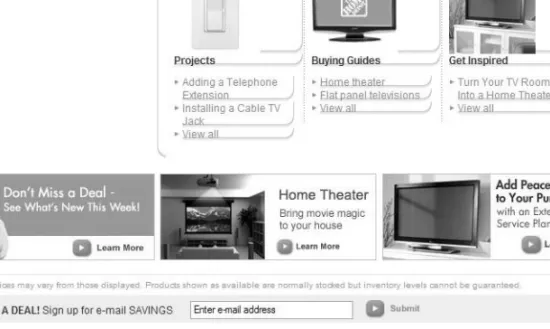
Many successful marketers, such as Lands’ End (Figure 5.1), dedicate a portion of their home pages that is “above the fold” (meaning the primary area of focus on a web page that does not require the user to scroll down) to highlighting and promoting the link or form to acquire email addresses. Others, such as The Home Depot (Figure 5.2), ensure that email address opt-in boxes are on every page of the website. Both approaches can be successful as long as you put those acquisition links at the top of the web page or a place of prominence on the landing page.
Figure 5.1 The Lands’ End website places an acquisition link near the top of its home page.
Wr i t e T h i s D o w n:
As of April 2008, 40 percent of online consumers in the United States opt in to receive email newsletters. (Source: JupiterResearch)86736c05.indd 78
86736c05.indd 78 10/15/08 7:25:28 PM10/15/08 7:25:28 PM
79■KEY DRIVER 1: EMAIL ADDRESS ACQUISITION
Figure 5.2 The Home Depot site includes an email opt-in box on every page.
When building email acquisition on your site, keep these tactics in mind:
A
• sk for and collect only the data you will use to segment your subscribers.
Consumers are leery of providing too much personal information, particularly for a brand with which they are just beginning to form a relationship. Although data such as geographic information can help multichannel retailers target email subscribers who live close to their stores, for others such information may never be used. Map out the three to five pieces of information that will inform your email segmentation strategy over the next twelve months. Common data points to collect on the registration form are email address, name, address, and gender.
We recommend you take an incremental approach to data collection: capture what you need up-front without presenting more than five fields. Later you can use surveys and polling questions to capture additional information that can be used for more detailed segmentation.
E
• nsure that your site registration complies with the Children’s Online Privacy Protection Act (COPPA). For sites that cater to children or an “online service that is directed to children,” COPPA requires that sites do not collect person- ally identifiable information from children younger than 13. The Federal Trade Commission governs this law, and you should become familiar with these guide- lines particularly if your business caters to or could potentially attract children.
For additional information, see www.coppa.org.
86736c05.indd 79
86736c05.indd 79 10/15/08 7:25:28 PM10/15/08 7:25:28 PM
80
CHAPTER 5:EIGHT KEY DRIVERS OF YOUR EMAIL CAMPAIGN ■
L
• everage traffic from search engines and dynamic landing pages. When consum- ers use search engines to find websites, they are increasingly being exposed to results that take them to dynamic landing pages, which are pages that are specif- ically engineered to display the product that is being queried. In these instances, whether they are dynamically generated or static, landing pages ensure that email registration is a noticeable component of that page. A best practice is to leverage the search phrase that is used to drive the dynamic landing page and use that search phrase in the context of the promotion of your email registration form. For example, if the search phrase is flat-panel TVs, as in Figure 5.3, use that language to suggest that the site visitor sign up for a newsletter on selecting and purchasing flat-panel TVs. Such an approach also recognizes that the online consumer rarely makes an impulse purchase and makes repeated site visits before purchasing.
Search Engine Product Detail Page
Search Phrase: Flat-Panel TV Buy Flat-Panel TVs
Search Result 2 Search Result 3
Sign up for information on how to select the flat-panel TV that’s right for you.
Email Registration Page
Figure 5.3 Leveraging search engine traffic U
• se standard form field names. When building your email registration form, ensure that you are following the guidelines laid out by Microsoft and standards bodies, such as the HTML Writers Guild, to name the fields using the standard names. This allows autocomplete features in Internet Explorer or the Google Toolbar to populate that form easily, thus improving the site experience for the visitor.
86736c05.indd 80
86736c05.indd 80 10/15/08 7:25:28 PM10/15/08 7:25:28 PM
81■KEY DRIVER 1: EMAIL ADDRESS ACQUISITION
A
• sk for permission. When combining email registration with shopping or site registration forms, ensure that you add a check box that allows the visitor to opt into the email newsletter or marketing piece. This single check box should be unchecked, allowing the visitor to express their permission to receive such messages.
P
• rovide expectations. This is where you begin selling the subscriber on the notion that they should be subscribing to your email newsletter. Give them a general idea of how often they will receive email messages from you.
P
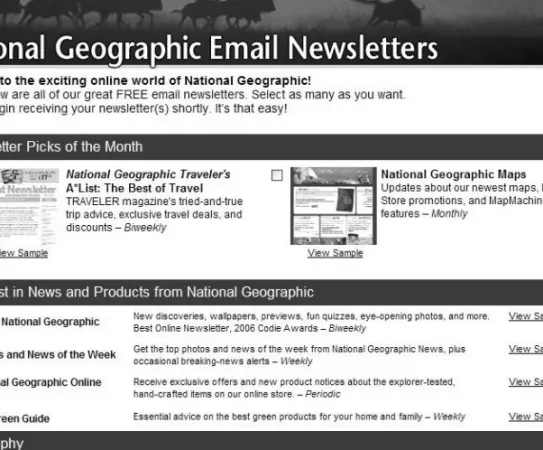
• rovide an example. To show potential subscribers exactly what they are sign- ing up for, provide a link to your most recent email newsletter or a thumbnail snapshot of the newsletter. As you can see in Figure 5.4, National Geographic is a good example of a marketer that provides subscribers with insight into what they will be receiving.
Figure 5.4 National Geographic provides links to examples of each type of subscription.
86736c05.indd 81
86736c05.indd 81 10/15/08 7:25:28 PM10/15/08 7:25:28 PM
82
CHAPTER 5:EIGHT KEY DRIVERS OF YOUR EMAIL CAMPAIGN ■
P
• rovide a link to your privacy policy. Although industry research from Jupiter- Research and others has found that consumers are clearly concerned with pri- vacy, few actually take the time to read privacy policies. Nonetheless, provide a link to your full privacy policy, and to allay concerns, highlight key elements in the policy. For example, state you will not share data with third parties on the email subscription form.
B
• uild a list-scrubbing routine to remove harmful addresses. It is not unheard of that malicious site visitors will attempt to register with abuse@ or complaint@
email addresses, which will likely land you in the spam folder. Check with your ESP to ensure that it has a standard scrubbing procedure that automatically suppresses harmful names or allows you to add domain-level suppression to your email list to remove, for example, competitors from joining your email list.
Additionally, your email service provider should be scrubbing your list against wireless email domains, as mandated by the FCC. (Note that this restriction does not apply to domains that consumers may pull down on their wireless device, such as an AOL account on a BlackBerry, but it does prohibit messages to wireless email boxes, including domains such as @mail.verizonwireless.com. This provision does not ban transactional messages, but “sending unwanted email messages to wireless devices” applies to all “commercial messages.”) Later in this chapter we will provide additional information about regulations related to permission and what can be done with the email addresses once you acquire them. In some instances, companies enlist double opt-in (see the glossary) to further underscore legal requirements and embrace best practices. Double opt-in is not a legal requirement, and marketers who have used it have indicated in interviews that as much as 30 percent of the initial registrants drop off—that is, they fail to confi rm their per- mission the second time. It may be worthwhile for marketers who have had list hygiene and delivery issues to explore double opt-in to improve list quality as well as qualify for reputation management and accreditation services. It is also important to ensure good delivery practices, such as list seeding, on the confi rmation messages to ensure that they are not getting blocked and that consumers do receive them.
Other Channels
If you have a call center, physical store, or kiosk, or if you run events or have other offl ine means of interacting with your customers and prospects, then email address acquisition must be part of that strategy. Here are a variety of helpful examples of how you can integrate email into those channels:
Call Center Asking for an email address adds five to ten seconds to a phone call, but the value of an email address can offset the cost of the longer phone call and justify the decision. Call center phone agents should be scripted and trained to ask each client
86736c05.indd 82
86736c05.indd 82 10/15/08 7:25:28 PM10/15/08 7:25:28 PM
83■KEY DRIVER 1: EMAIL ADDRESS ACQUISITION
for an email address and to ask them for permission to send emails. Most call center client interaction systems can easily facilitate adding such a field, and extracting that data from those systems does not require direct integration with your email marketing software. Simply pull a text file of that information daily or weekly and merge it (while suppressing duplicates) into your email house list. In some call centers, the representa- tives are spot-checked and graded to ensure that they are asking for the client’s email address on every call.
In-Person Email Acquisition This can take a variety of forms, including at the point of sale, at a self-service kiosk, or at a marketing event such as a trade show. With all these forms there is a cost of adding the email address request to the transaction time or infrastructure that is required to achieve it. Multichannel retailers such as Borders and Office Depot do a good job at the point of sale of asking for or confirming the email address that they might already have on file for the customer. In these instances, the email address is so valuable to these companies that they actually give incentives to the cashiers to ring up sales that are accompanied by the customer’s email address. In these instances, the email address is often used as the primary customer identifier to run loyalty and rewards programs. Evaluate the costs, and do not dismiss the awesome opportunity that face-to-face interactions with clients and prospects offer to grow your email list.
Print and Magazine Advertisements A useful way to gauge the effectiveness of print cam- paigns is to promote email registration. As you’ll see in Chapter 6, the cosmetics manu- facturer Sephora runs ads in major fashion magazines promoting its newsletters that detail a URL to a specific landing page (or micro site). This allows Sephora to maxi- mize its advertising spending, and at the same time it provides a directional measure of success to that print ad, which is quantified by the number of email subscriptions that were generated by the advertisement.
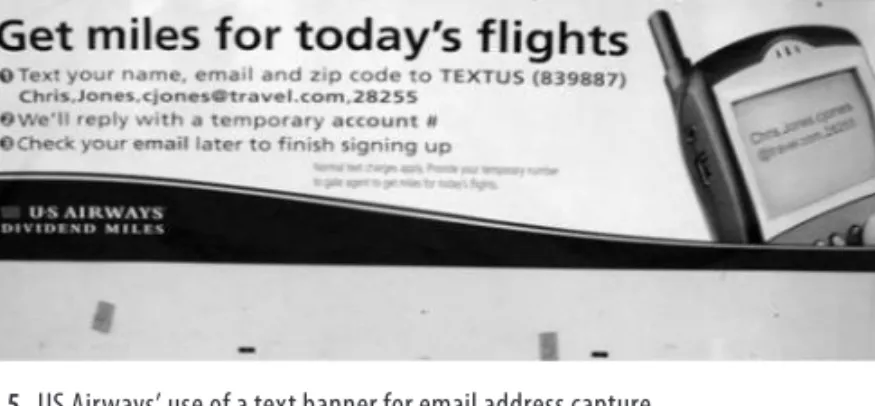
Texting on In-Store Banners “In-store” means any place where both your customers may be found and a banner can be placed. For example, US Airways puts the banner shown in Figure 5.5 in the bag collection area of a major airport, where one of us was a cap- tive audience. It simply asks people to text their names and email addresses to a short code in order to get miles for the trip they just completed. Even though the only camera we had was a cell phone, it was such a good use of text messaging to support email address acquisition that we had to capture it for this book.
Service-Related Email Messages Consumers largely use email to contact customer service on pre- and post-sale bases. Although these email addresses can be captured for the pur- pose of outbound email marketing with the customer’s consent (in other words, opt-in), the outbound service reply should include a reminder in the footer that promotes email registration for marketing messages and/or newsletters.
86736c05.indd 83
86736c05.indd 83 10/15/08 7:25:28 PM10/15/08 7:25:28 PM
84
CHAPTER 5:EIGHT KEY DRIVERS OF YOUR EMAIL CAMPAIGN ■
Figure 5.5 US Airways’ use of a text banner for email address capture
Third-Party Sources
There are multiple means to acquire email addresses from other sources, including co- registration, email appends, list rental, and sponsorship. Although these forms of email address collection can all be effective, a 2006 JupiterResearch study titled “E-mail Acquisition: Aligning Budgets to Effective Acquisition Opportunities” found that these forms of acquisition were less satisfying in terms of quality to marketers than their own site registration. In each of these third-party forms of email acquisition, you must scrutinize the source where the provider is getting the email addresses, the manner in which they are collecting the data, and the age of the email data you would be acquir- ing. Quality can be a costly drain here because a high number of bad or old email addresses can drive your bounce rate so high that it may end up blocking your email messages on particular ISPs. To guard against this, you should send your mailings from a different IP address and over time migrate the email addresses that are responsive to your primary IP sending address. Even in this instance, however, you should continue to maintain these email addresses on a separate list so that you can monitor the qual- ity and performance over time. With those caveats in mind, here are some options to acquire email addresses from third-party sources.
Wr i t e T h i s D o w n:
Email service provider ExactTarget reports the following co-registration results on programs that its clients ran in 2004 and 2005:Open and click rates are consistently less than half those for in-house lists.
•
Recipients acquired through co-registration unsubscribe from the email programs faster.
•
Co-registration conversion rates are much lower than those for in-house lists.
•
86736c05.indd 84
86736c05.indd 84 10/15/08 7:25:28 PM10/15/08 7:25:28 PM
85■KEY DRIVER 1: EMAIL ADDRESS ACQUISITION
Co-Registration
When your email opt-in box rides alongside another advertiser’s, usually on a publish- er’s website, that is co-registration. Examples can be found on portal and news pub- lisher sites. On the MSNBC.com weather page, for instance, you will see an opt-in box from an advertiser such as the Weather Channel to get its forecasts sent by email. The Weather Channel is also a publisher, and on its opt-in page, you will see relevant offers from retailers that sell products dependent on the weather, such as lawn care products.
As you can see, it’s a best practice to pick a co-registration partner that is contextually relevant to what your newsletter or email marketing offer provides. In these instances, co-registration can be effective. However, based on our experience, the cost can be as high as 50 cents per name, so in many instances co-registration results do not provide the necessary return on the money spent to acquire the names because the results typi- cally underperform the names acquired directly from your own website. There are many fi ne co-registration vendors; for example, Prospectiv focuses on business-to-con- sumer co-registration, and Return Path has a Postmaster Direct offering oriented more toward business-to-business marketers.
Wr i t e T h i s D o w n:
As of April 2008, 54 percent of consumers in the United States have provided their email addresses as part of a sweepstakes. (Source: JupiterResearch)Sweepstakes
This is a subset of co-registration, where the publisher provides a sweepstake for the advertiser to drive email subscriptions. Although consumers will participate in them, these sweepstakes typically underperform other methods of acquisition. You should be leery of using sweepstakes (for example, “Free iPod”) to entice subscribers to par- ticipate in your co-registration program, because people tend to use secondary email addresses to sign up for those types of programs. A 2006 JupiterReseach study found that sweepstakes programs performed the worst compared to other forms of email acquisition.
Email Appending
Email address appending is the process of adding a consumer’s email address to the consumer’s record in your database. The email address is obtained by matching records from the marketer’s database against a third-party database to produce a correspond- ing email address. The number of addresses that match your data is called the match rate and is a point of negotiation with email appends vendors. Vendors will charge
86736c05.indd 85
86736c05.indd 85 10/15/08 7:25:28 PM10/15/08 7:25:28 PM
86
CHAPTER 5:EIGHT KEY DRIVERS OF YOUR EMAIL CAMPAIGN ■
based on how many of those names opt into your mailing. This fee can be similar to the price of co-registration or as high as $4 per email address if the vendor refreshes its email list more often, which should result in newer email addresses. Like co-regis- tration, append programs often underperform the email addresses you would acquire through your own means. It is important to understand a potential appends vendor’s acquisition source of email addresses and the age of these addresses. For customers with a very high lifetime value or for companies that do a high amount of postal direct mailing, such as credit card companies, appending additional customer data can be a valuable tactic to employ. Consult your ESP for vendors that provide this service.
List Rental
Renting third-party lists is one of the most common ways to acquire customers and/or build an in-house email list. However, this is also one of the more common ways that you can get into spam trouble if the list you are renting was built in a less-than-pristine manner. You should insist that any list you rent was built using either confi rmed opt-in or double opt-in.
You should only rent names of people who have already expressly indicated to the source that they want to hear from a third party. As with other third-party forms of acquisition, be sure to fi nd out from the prospective vendor the source of the email addresses, the age of the list, and how it processes bounces (how many times an email address bounces before it’s removed from the list). Additionally, determine what level of targeting can be achieved by selecting lists that match only the demographics or segments you are seeking to acquire. The price should be determined by the quality of these addresses. Email to this list should be sent from a separate IP address than your primary house list. In most cases, the list provider will send the email for you, making it necessary to investigate its reporting capabilities and reputation as a sender. You can usually fi nd this information publicly via tools such as www.senderbase.org. In recent years, list rental has fallen out of favor because of the high number of spam complaints that are associated with the practice. Consult your ESP to determine whether list rental is an appropriate way for you to grow your list as well as determine the most suitable appends vendors.
Email Newsletter Sponsorship
This is one of the most prevalent email acquisition tactics, with email sponsorship accounting for nearly half of the billons of dollars that will be spent on email mar- keting in the United States over the next fi ve years. Rates for advertisements in a
Wr i t e T h i s D o w n:
According to an email marketing forecast for 2007–2012, spending on sponsored email will total more than $600 million in 2012. (Source: JupiterResearch)86736c05.indd 86
86736c05.indd 86 10/15/08 7:25:29 PM10/15/08 7:25:29 PM
87■KEY DRIVER 1: EMAIL ADDRESS ACQUISITION
publisher’s newsletter vary dramatically based on the distribution size of the list and the degree to which it is aimed at your target market. Newsletter sponsorship is typi- cally charged on a performance basis, with contracts built around cost-per-open, cost- per-click, cost-per-registration, and cost-per-thousand emails sent. The registration model is the most relevant approach to defi ning the value of acquisition campaigns.
Vendors such as Datran Media offer a variety of these performance sponsorship oppor- tunities across a wide variety of publishers’ newsletters. Your advertisement in these newsletters should be compelling and informative, but keep the subscriber guessing just enough to drive interest and thus propel them to click through. Landing pages for your ads should prominently highlight email registration.
Welcome to the Campaign!
A key part of email acquisition is the follow-up mailing or set of mailings that happen immediately after the subscriber opts in. In bricks-and-mortar retail, a store merchant will treat a returning customer differently than a new prospect who walks into their store for the very fi rst time; you should do the same. This simple analogy provides the primary lesson that you should follow when acquiring new subscribers via email.
A common mistake of marketers is immediately lumping new subscribers in with old subscribers and sending them the same weekly email communication. A better practice is to set up a string of three to four messages that ease the subscriber into the typical mailing fl ow. This is commonly referred to as the welcome campaign. Here are some ideas on how to approach and build a welcome campaign:
Welcome Message This message should be sent immediately after the subscription takes place and should serve to both confirm the subscription and welcome the subscriber to your email marketing program. It should also contain the following elements:
Add to the Address Book To further protect their subscribers, most ISPs and email client software, such as Microsoft Outlook, turn off the images in emails by default. Image rendering issues impact the ability to accurately measure open rates and certainly undermine the creative aspect to email marketing. These image-rendering issues and the erroneous labeling of messages as spam plague all email marketers. To minimize image rendering issues, ask the subscriber to add your email address to their address book. This should be an element in every email marketing message, but with the introductory welcome message, more cre- ative emphasis should be placed on this part of the message. One important con- sideration with this tactic is to not change the From address across your email marketing campaigns, because the benefits of a subscriber adding your address to their address book can be leveraged only if you continue to use the same From address across all your mailings.
Click to View An additional way to get around image-rendering problems is to include a “View This Email in Your Web Browser” link at the top of your email.
86736c05.indd 87
86736c05.indd 87 10/15/08 7:25:29 PM10/15/08 7:25:29 PM
88
CHAPTER 5:EIGHT KEY DRIVERS OF YOUR EMAIL CAMPAIGN ■
This link will take the user to a hosted version of your email newsletter. Your ESP should offer this functionality by default, typically as a link that can be added just before you deploy your message. As with the Add to the Address Book feature, this element should be in every message but highlighted with a bit more prominence in the welcome message.
Set and Reinforce Expectations As with the subscription page, best practices remind your subscribers how often they will be receiving your email messages.
Federal Compliance We will cover CAN-SPAM requirements in greater depth later in this chapter. Your welcome message should contain the federally mandated opt-out provisions.
Welcome Message No. 2 This should be a slight variation on the message that the cus- tomer signed up to receive. In a retail or newsletter context, it should emphasize that the subscriber can forward this message to friends, making them a conduit to further grow your list. Some marketers experiment with placing new subscriber incentives on this second welcome message, such as free shipping on the first order or 10 percent off for new subscribers. For business-to-business marketers, the call to action in the email creative may be to download a white paper or request further information from a salesperson. Such an approach helps to further qualify the business prospect as more engaged or “hot” than a subscriber who chooses not to click.
Welcome Message No. 3 At this point, you should be integrating the new subscriber into the normal weekly flow of your marketing messages, but this additional message offers an opportunity to collect additional feedback. As described in our registration best prac- tices, such a message provides you with the opportunity to collect incremental demo- graphic or other valuable segmentation data from the subscriber. You can do this easily by embedding a polling question or a link to the subscriber’s preference center that requests additional information.
As you can see, there are many components and options to getting email acquisi- tion correct. Your ability to test these concepts through mailings such as the welcome campaign will ultimately determine the success of your email marketing program.
Key Driver 2: Creative/Copy
Beauty is in the eye of the beholder, and that concept is nowhere more important than in properly designed email creative and copy. There are many moving parts when con- structing email, and using colors, images, and HTML are often the fi rst things that can trip up an email marketer. The wonderful thing here, however, is that you have the ability to be creative, to strive to make your message stand out from the pack, and to illuminate and reinforce your brand image. Achieving all of this starts with a strong From fi eld and subject line.
86736c05.indd 88
86736c05.indd 88 10/15/08 7:25:29 PM10/15/08 7:25:29 PM
89■KEY DRIVER 2: CREATIVE/COPY
The From Line
We’ve already mentioned the importance of the From line and the need to keep the address the same in all your mailings. It’s also crucial to have a “friendly” From address. Make sure your From line does not look like [email protected].
bunny.com, a practice that would certainly lead to delivery headaches. Use your brand name, and in a business-to-business context use personalization fi elds to insert the salesperson’s name into the From address so that the email appears to come from the salesperson and not the corporation (for example, [email protected]). Once you have settled on a From line, stick with it.
Subject Lines
With most images turned off by default, email recipients begin forming their opinions about the relevance of your message based upon the subject line. Use this line to sum- marize the email content. You want to tell the email content, not sell the email content.
Here are some subject line do’s and don’ts to keep in mind:
Do’s L
• imit. Keep your subject line to 50 characters or less. Keep it simple; less is more when it comes to the subject line.
T
• est. Test the effectiveness of multiple subject lines by using A/B split testing techniques. For example, retailers will often test a subject line by sending half the list a subject line that includes the words free shipping and the other half a subject line that includes the words 10% off. Testing is important, but be careful not to sound too much like a stereotypical used car salesperson, and be particu- larly cautious with words such as free because they can often raise the content’s spam score.
U
• se personalization. Although putting the person’s first name in the subject line may provide a slight improvement, over time the effectiveness of this form of subject line personalization often diminishes. Multichannel businesses, such as retailers, may want to experiment with location instead, such as “One-day sale this weekend in Albany.”
C
• onvey urgency and importance. Airlines have higher open rates when using simple subject lines, such as “Trip Alert” or “Special Weather Advisory.”
M
• ake it personal. “Your order confirmation” and “Your May statement is now available” are two transaction-oriented subject lines that often have high open rates.
M
• ake it special. “Be the first to see our new fall collection” or “Must have styles for spring” teases the reader but makes the product and subscriber feel special, like an “email insider.”
86736c05.indd 89
86736c05.indd 89 10/15/08 7:25:29 PM10/15/08 7:25:29 PM
90
CHAPTER 5:EIGHT KEY DRIVERS OF YOUR EMAIL CAMPAIGN ■
R
• einforce the From. Use your brand name in the subject line, such as
“[Company Name] April Newsletter.”
B
• e honest. Set expectations that are appropriate, and be clear and concise. Put yourself in the subscriber’s shoes, and think of what would make you consider taking a look at this message. Stay true to the expectations that you set up on your registration page.
B
• e smart; stay relevant. As an industry we talk a lot about relevancy, and we will dig into this secret sauce more in upcoming chapters. However if you are promoting purses to a list that is largely made up of men and it is not Valentine’s Day, Mother’s Day, or the holiday season, chances are your audience will not see it as relevant.
Don’ts D
• on’t use any capital letters. Avoid writing your subject text with capital letters.
D
• on’t use symbols. Avoid symbols or exclamation marks that overhype your message. Often these punctuation characters will raise the spam score or “spam- iness” factor of your message that could send it to the junk folder.
A
• void repetition. Avoid using the same subject line on repeated mailings; keep changing it. This is one case that when you find something that works, don’t always stick with it. Continue to test new variations.
D
• o not mislead. Never be misleading with your subject line or header informa- tion. This is particularly important because it is mandated in the federal CAN- SPAM guidelines described later in this chapter. For example, a subject line that reads “Your Order Details” for a message that is nothing but a promotion is deceptive and breaks the letter of the law.
The Spam Check
In the early part of the 21st century, spam—unsolicited commercial email—was at its peak. To combat the spammers, ISPs began to score the content of message by using tools such as SpamAssassin to read the message and look for trigger words that matched previous spam messages they had already identifi ed. These trigger words include the likes of Free, %, !, Winner, and many, many others. If the program sees too many of them, it will deem the message spam and change its disposition, either blocking it or sending it to the junk folder. Most ESPs offer tools to screen your mes- sage for these words and give you a score using the same technology that the ISPs use.
Wr i t e T h i s D o w n:
According to 2007 data, 69 percent of consumers decide to click the Report Spam or Junk button based on what is in the subject line. (Source: Email Sender and Provider Coalition)86736c05.indd 90
86736c05.indd 90 10/15/08 7:25:29 PM10/15/08 7:25:29 PM
91■KEY DRIVER 2: CREATIVE/COPY
Additionally, tools from such providers as Return Path, Pivotal Veracity, Lyris, and Habeas go further and score your message on a number of other attributes, includ- ing the formation of links and your sending infrastructure. These valuable tools also provide you with data on how many of your messages made it into the primary inbox.
However, content-based scoring, although still important, is no longer the primary tool that ISPs use to determine your “spaminess” factor, because spammers have matured.
Although we cannot provide you with the entire history of spam here, you know that the tactics that we must use as legitimate marketers to ensure that our messages render correctly and reach inboxes are required in part because of the ever-increasing safeguards that the ISPs need to put in place. Spammers have gotten increasingly smarter about getting their emails delivered. For example, they began to fool content- based fi lters by using HTML tables—putting words like Viagra into columns, the V in column 1, the i in column 2, and so on. When that no longer worked, they simply started using images to get around the content-based fi lters. To combat that, ISPs began turning off images by default, which certainly has a huge impact on us as mar- keters, because, after all, what marketer doesn’t love a pretty picture?
We suggest you explore the necessary best practices for avoiding spam traps with your ESP or one of the aforementioned delivery service providers, because that topic is a moving one, and it’s one that is likely to morph again and again as the market con- tinues to mature. So with those basics in hand, you are ready to dig into some creative best practices that encapsulate the body of the message.
The Width of Your Email Template
Although most consumers use monitors with resolutions of 1024×768, email readers often do not take up the entire screen. This is in part because of vertical ads running down the side of the inbox in environments such as Yahoo or the way applications such as Outlook are laid out on the screen. The fi rst thing to consider when building an email template is the width and length of that template. Consider the following when mapping out your template.
The newest version of Yahoo Mail overlays a vertical ad starting 601 pixels from the left side of the email, which means recipients have to scroll to view the right side of the email. So if your email is wider than 600 pixels, these recipients have to take an extra step to view the content.
So, is a 600-pixel width the right answer? Maybe—and certainly yes if Yahoo domains account for the majority of your email list. If your list is like most marketers’, domains such as AOL.com, Yahoo.com, MSN.com, Hotmail.com, and Gmail.com will make up the bulk of it. A simple solution but one that involves quite a bit more up- front work is to segment your list by domain and format each template to the appropri- ate domain. However, we do not recommend this because you have no guarantee that the subscribers using these domains are actually reading the email in the online client
86736c05.indd 91
86736c05.indd 91 10/15/08 7:25:29 PM10/15/08 7:25:29 PM
92
CHAPTER 5:EIGHT KEY DRIVERS OF YOUR EMAIL CAMPAIGN ■
such as Yahoo Mail. That is, all these webmail services allow their users to pull their email to an external email application (for example, Outlook or Thunderbird) or to an external device such as a Treo or BlackBerry.
The best way to determine the width that is most appropriate for your list is to test. Gary Bauman, former email marketing director with Red Envelope, suggests splitting your fi le into two, three, or more groups and testing, for example, 600 pixels versus 650 pixels versus 700 pixels across several mailings, rotating the three groups so that each group gets one of each size. Then look at the aggregate results and the results by email domain. The revenue you lose from having the right side of emails covered by ads in Yahoo might be outweighed by having more content above the fold in other email clients. If there’s a huge drop-off when Yahoo recipients get wider emails and a huge pick-up when other domains get wider emails, then it might be worthwhile to deliver separate creative for Yahoo subscribers. Let the return on this test mailing decide the best strategy for email template width.
Another tool for optimizing your email template is to seek out the aforemen- tioned delivery service providers (DSPs), such as Return Path, Pivotal Veracity, or Lyris, because they offer applications that can render your email across multiple email clients.
See Appendix A for contact information for these and other vendors.
The Length of Your Email Template: Work Above the Fold
As for the length of your email template, brevity is best here. We suggest doing what you can to fi t it all on one page, two pages maximum. Use hyperlinks to cut down on verbose content to send your subscribers to your website to gather more information.
Again, email is the trigger to inspire the recipient to learn more about a topic or begin a transaction. Think of your email like the front page of a newspaper, where the headline is the most important piece of information. Work above the fold, ensuring that your call to action is clear and near the top of the email; or at the very least, make sure the primary focus is on your creative.
Email Creative Best Practices
Considering the image-rendering challenges that are presented by today’s email inbox environment, it is necessary to adhere to the following best practices.
Multipart-MIME A multipart-MIME message is essentially a package of your message—
your HTML markup and a text version. The assumption here is that your subscriber’s
Wr i t e T h i s D o w n:
A 700-pixel width is acceptable for Apple users, but that is only about 5 percent of the population.86736c05.indd 92
86736c05.indd 92 10/15/08 7:25:29 PM10/15/08 7:25:29 PM
93■KEY DRIVER 3: MAKING THE DATA WORK
email client will determine which one it can render and display the message because it is best formatted for that email client. This works particularly well in today’s envi- ronment given the increasing number of people who use their handheld devices (Treo, BlackBerry, and so on) to access their primary email accounts. Although multipart- MIME might sound terribly technical to pull off, in practice it is quite easy because most ESPs and email marketing applications provide you with the simple ability to create a text version of your message and an HTML message. Once you input those versions into the application, the provider and/or software stitches these versions to create one multipart message. In most cases and deployments, multi means two.
However, the language provisions allow you to write and form the version that is best.
Alt Tags Ensure that all images have alt tags. These tags should include action-oriented text that paraphrases offers captured in images. Additionally, avoid using images for critical elements, such as federally prescribed CAN-SPAM language.
Wr i t e T h i s D o w n:
As of 2007, fewer than one-quarter of online users (21 percent) turn on images in email messages, creating mailing measurement and performance issues for marketers. (Source: JupiterResearch)Click to View and Add to Address Book Options As mentioned earlier with welcome campaigns, ensure that your email creative includes reminders to add senders to the address book and provides a hyperlink so that the entire email can be viewed in a web browser.
Key Driver 3: Making the Data Work
Your ability to segment and target your list will help to make your mailings more suc- cessful. Additionally, you need to ensure that your organization is collecting data con- sistently across all touch points throughout the organization to normalize the data that is collected. Here are some best practices to ensure that your data strategy is effective:
U
• se a unique customer identifier other than the email address. Using a cus- tomer record key other than the client’s email address will allow you to have a unique number in which to roll up a variety of customer data. For example, when linking to offline customer data, or enlisting address correction or appending services, it will give you a unique identifier to match the customer record against in the event the subscriber’s email address is different from the one you have on file. Additionally, this will allow what is referred to as house- holding—rolling up a variety of email addresses in order to understand that they represent the customer or a number of customers who are residing at the same address. This is becoming increasingly necessary because most customers have at least two email addresses.
86736c05.indd 93
86736c05.indd 93 10/15/08 7:25:29 PM10/15/08 7:25:29 PM
94
CHAPTER 5:EIGHT KEY DRIVERS OF YOUR EMAIL CAMPAIGN ■
C
• ollect exactly the same information from your customers and prospects at every acquisition source. Always collecting the same amount and type of infor- mation ensures that you will be able to normalize your segmentation schemes across all those customers.
U
• nderstand language and subscriber location. Increasingly, email addresses from around the world are being added to email marketers’ mailing lists. Use the country domain information that is embedded in the email address, or simply ask what the customer language preference is. This is particularly necessary when launching localized language versions of your website for use in foreign countries.
Having language associated with this data will allow you to tie it to the most appropriate foreign language character set when your message is deployed.
U
• se customer behavior as a segmentation attribute wherever possible. Although the addition of website clickstream behavior to your email segmentation can be very useful, it is necessary to at least use the email click behavior as an attribute to segment customers over time. You will begin to see patterns emerge of sub- scribers who are repeatedly clicking your links and those who are not. This will highlight a level of engagement and can be an effective way to create groups of subscribers—those who are engaged and those who are not. Tailoring your mes- sage to the list of subscribers who are not engaged is a good tactic to spur your subscribers into action. Popular methods to get this segment’s attention are to send them polls, contests, and more discount-laden messages. Although contests and sweepstakes typically don’t garner great results, they can be effective with dormant subscribers as a means to spur these inactive recipients into action. This approach should be tested cautiously to determine whether contests can drive a high number of valuable subscribers back into action.
Your email service provider and/or technology will have a standard data map- ping scheme as well as additional best practices to ensure that you are collecting appro- priate data and that they are formatted correctly. However, ensure you are working with them to craft your segmentation strategy because targeted email mailings consis- tently perform better than broadcast (that is, one message to all) mailings.
Wr i t e T h i s D o w n:
According to a 2007 email consumer survey, 70 percent of all consumers online have two personal email addresses that they regularly use. (Source: JupiterResearch)Wr i t e T h i s D o w n:
The use of web analytics to target email campaigns improves revenue by nine times more than does the use of broadcast mailings. Despite additional campaign costs, relevant campaigns increase net profits by an average of 18 times more than do broadcast mailings. (Source: JupiterResearch)86736c05.indd 94
86736c05.indd 94 10/15/08 7:25:29 PM10/15/08 7:25:29 PM
95■KEY DRIVER 4: MULTICHANNEL INTEGRATION
Key Driver 4: Multichannel Integration
As you’ve seen, there are many strategies to collect and validate the customer’s email address at the point of customer interaction. However, several additional steps after acquisition can dramatically engage your audience when done correctly. The Internet is a massive driver of infl uence because it is the primary tool that consumers use to make purchasing decisions regardless of channel. In fact, JupiterResearch reports that by 2012 the number of dollars actually spent online will be dwarfed by the number of offl ine dollars that are infl uenced from this online research.
Wr i t e T h i s D o w n:
According to a 2007 email marketing consumer survey, nearly half of email subscribers make at least one offline purchase every year that was influenced by an email marketing offer.(Source: JupiterResearch)
The primary goal of shoe retailer Nine West’s email marketing program is to drive the consumer into its stores. Nine West has realized that its average order value is higher for those people who shop in their physical stores and that return rates are lower for those customers. Accordingly, Nine West has had success in its email market- ing by offering coupons that are redeemable only at its offl ine stores. Similarly, Borders uses the same tactic to drive customers into its stores every week with discounts that are larger in store.
As mentioned previously, it’s particularly important with multichannel integra- tion to organize your database around a unique record identifi er other than email addresses so that additional offl ine data can be associated with the subscriber, such as geography. One of the main data elements that you will use here is the customer’s geography. Keep this in mind particularly if you sell items online that might not be appropriate for every region. For example, one multichannel retailer recently sent an email advertising spring lawn care products and lawnmowers to subscribers living in Manhattan. Oops! Clearly this was a wasted marketing expenditure and further underscored how out of touch the retailer was with the needs of that particular cus- tomer segment.
Perfecting the use of multichannel data depends on the capabilities of the mar- keting applications that are being used. To integrate online and offl ine data success- fully, you need all of the following: a marketing platform that can automate the receipt and storage of this data so that it can be analyzed and used as a whole rather than sep- arately, a set of processes to enable this effi ciently as an ongoing activity, and experts who have done this before and know what the hurdles and issues are. Expertise can be acquired through consultants and vendor services, but your processes and platform will make the most difference.
86736c05.indd 95
86736c05.indd 95 10/15/08 7:25:29 PM10/15/08 7:25:29 PM
96
CHAPTER 5:EIGHT KEY DRIVERS OF YOUR EMAIL CAMPAIGN ■
Consider the following when mapping out your multichannel strategy:
Process At what interval will offline and online data be aggregated? Most marketers run these routines daily, but some merchants have near-real-time capability to make this data actionable across channels. Seek out your competitors, walk into their stores, and see what they are collecting from the customer at the point of sale and how quickly they are acting on it. Office Depot, for example, stunned us when minutes after sign- ing up for its email loyalty program at its cash register, it sent a welcome message to us before there was even time to get to the car and load its goods in the trunk.
Which Data? Again, using our rules of acquisition, there is no need to move and aggre- gate client data that you have no immediate plans to use. Be sure to focus only on the data that will be immediately actionable to you.
Break Down the Silos Often multichannel integration and coordination is stymied by polit- ical issues of competing interests or different factions within an organization. Speak with the offline peers, and understand how your email program can help them. What would they really like to know about your customers? We often find that the offline marketers are in search of survey data on their clients or cannot analyze their offline marketing tests as quickly as they would like. Surveys and testing are two key areas where the email marketer can help their offline counterpart. In both cases, the results from an email marketing change will be back and available for study long before any- thing could ever be achieved in an offline store.
Technology This is a critical key to ensuring multichannel data success, so much so that it is the fifth key driver to your email marketing success.
Key Driver 5: Technology (Delivery, Deployment, and Design)
In previous chapters, we provided a good deal of insight into selecting an email service provider or email marketing technology. You should expect the vendor evaluation stage to take at least three months; for many organizations, it can take as long as six months to ensure that the solution meets all organizational requirements. Once you have selected a vendor (and particularly if it is a hosted ESP-based solution), the deployment can take as little as a month. In some cases, based upon your requirements, it can be deployed in a matter of days. On-premise technology—software or hardware that will reside at your company—can typically take up to a month to deploy and confi gure.
However, one of the key drivers that will aid in the faster selection and deployment of
Wr i t e T h i s D o w n:
Integrating customer data is the greatest challenge for marketers, according to a 2007 survey of marketing industry executives’ database/marketing service providers. (Source: Alterian)86736c05.indd 96
86736c05.indd 96 10/15/08 7:25:29 PM10/15/08 7:25:29 PM
97■KEY DRIVER 5: TECHNOLOGY (DELIVERY, DEPLOYMENT, AND DESIGN)
your solution will be how well you have designed your requirements. Accordingly, keep these design requirements in mind:
User Rights and Privileges Determine how many people will be using the application and what their roles will be in using it. For example, you will likely want individuals on your senior management team to have access only to reporting, while other members of your team will require access to the entire application. Make sure one of your selec- tion criteria is that the solution has the ability to provide different user rights and privi- leges based upon the tasks that user is responsible for.
Integration to Key Applications If you are a business-to-business marketer, you likely are already using a customer relationship management tool such as Salesforce.com or Microsoft Dynamics CRM. You will at some point want to integrate the behavioral data from your website into your email marketing application, or vice versa, to bet- ter inform segmentation schemes. Integration is a key part of technology deployment that marketers often fail to emphasize enough in the selection process. Investigate the prospective vendor’s integration history and the number of deployments it has with the vendor you are seeking to integrate with.
Wr i t e T h i s D o w n:
Just 28 percent of email marketers cite the ability for an ESP to have out-of-the- box integration capabilities to other applications as an important aspect of the vendor selection process. (Source:JupiterResearch)
Data Storage Although all vendors offer the ability to store your data and marketing results, many of them purge this data at preset intervals. Ensure that your data is avail- able for trending and that the time period is married to your sales process or the type of historical analysis that your organization typically does.
Bounce Handling No mailing will reach everyone on your list. There might be a soft bounce when an inbox is full or a hard bounce, indicating that the address is no longer valid. You will have to determine, with the guidance of your ESP, how many times and at what interval to retry soft bounces until they become hard bounces. This element of consideration will vary greatly between business-to-business and business-to-consumer marketing, and it also depends on the domain composition of your list and the fre- quency of your mailings.
In the coming chapters, as we guide you through the fi rst several months of your email deployment, we will explore the actionable tactical portions of these technology design concepts.
86736c05.indd 97
86736c05.indd 97 10/15/08 7:25:29 PM10/15/08 7:25:29 PM
98
CHAPTER 5:EIGHT KEY DRIVERS OF YOUR EMAIL CAMPAIGN ■
Key Driver 6: Reporting/Analytics
Reporting and analytics are the lifeblood of email marketing. The discovery of what is working and what is not working, and the subsequent optimization, are made possible by your reporting and analytics capabilities. Reporting is often complicated by the lack of integrated data from other reporting systems, which is why designing your multi- channel data and integration strategies is imperative.
Early on in evaluating a potential email marketing technology provider, you should not only understand its analytical capabilities and tools but also investigate its metrics methodology. It seems that each ESP has a different approach for calculating email delivery and all of the metrics that follow, such as open rate, click-through rate, and so on. This makes comparing your mailing performance to industry benchmarks impossible, because any reported industry benchmarks collected across marketers that use different vendors is a muddied apples-and-oranges exercise. This is one of the industry issues that we have both identifi ed, and it’s why we are working to develop a standard metric framework for every vendor to use. Such a standard may take years for the industry to adopt. Until that happens, it is best to benchmark your metrics only against your own previous marketing performance and not concern yourself with the open and click rates of others, because they are directional indicators of your perfor- mance at best. Regardless, it is important for you to understand how your vendor or technology is calculating your performance, and you can do so by investigating your vendor’s metrics methodology.
Beyond understanding the metric methodology, consider the following data analysis elements when you are designing your email marketing program:
E
• nsure that you have the ability to drill down into your data. Most email mar- keting applications simply offer reporting, which is a static view of what hap- pened, identifying common metrics such as delivered, clicked, and converted.
Fewer email marketing applications have true analysis capabilities, that is, the ability to drill down into the data and understand patterns that are distinct to subsets of subscribers—women, men living in Chicago, and so on. At the very least, your email marketing application should report and display not only the subscribers who did what you wanted them to do (click, convert, and so on), but also those who did not perform those actions. The ability to easily access those subscribers is even more important so that you can remarket to them the same message or identify them over time as a group that is not engaged.
Wr i t e T h i s D o w n:
In 2007, more than one-third (37 percent) of marketers said they were very satisfied or satisfied with drill-down analysis capabilities for cross-comparing mailing data points. (Source:JupiterResearch)
86736c05.indd 98
86736c05.indd 98 10/15/08 7:25:30 PM10/15/08 7:25:30 PM
99■KEY DRIVER 6: REPORTING/ANALYTICS
I
• dentify your key performance indicators. Create KPIs that detail performance across three distinct categories: barometer measures, engagement measures, and infrastructure/list measures. Barometer measures are those metrics that show in great detail the performance of a mailing and include the following:
A
• ggregate open rate (total number of times the message was opened) A
• ggregate click-through rate R
• evenue generated per subscriber A
• verage order value C
• lick-to-conversion rate P
• rofit margin per mailing
Engagement measures are those more specifi c to subscribers and include the following:
U
• nique open rate (a subscriber-oriented view of the open rate) U
• nique click-through rate U
• nique conversion rate U
• nsubscribe rate F
• orward rate
Infrastructure/list measures detail the operational performance of your list:
O
• pt-in rate V
• alue of email subscriber or address over time A
• ddress churn rate C
• omplaint rate D
• elivery rate B
• ounce rate U
• nknown user rate
Combining these measures into one macro engagement-key-performance indi- cator can be helpful in trending the performance or mailing over time. As you saw in Chapter 3, where we showed one way to calculate such an indicator, an engagement metric or KPI is designed to be a simple number that goes up or down based on the indexing of the aforementioned metrics.
U
• se domain-level reporting. This is a critical report because it will identify deliv- ery issues with specific ISPs or domains. For example, if you see your open rate fall off drastically, it is probably an indicator that a significant portion of your mailing failed to be delivered. This report, which should highlight the top 20 or so domains on your list, will provide the necessary insight to pinpoint the prob- lem domains.
As we roll you into action in the coming chapters, we will provide additional guidance about which reports and data will be essential to analyze.
86736c05.indd 99
86736c05.indd 99 10/15/08 7:25:30 PM10/15/08 7:25:30 PM