SMART HEALTH CARE MANAGEMENT SYSTEM THROUGH WEARABLE DEVICE AND MOBILE APPLICATION
BY Salma Sultana ID: 171-15-8904 Md. Atikur Rahman
ID: 171-15-9259 Sadia Rahman ID: 171-15-8896
This Report Presented in Partial Fulfillment of the Requirements for the Degree of Bachelor of Science in Computer Science and Engineering
Supervised By
Narayan Ranjan Chakraborty Assistant Professor
Department of CSE
Daffodil International University
DAFFODIL INTERNATIONAL UNIVERSITY DHAKA, BANGLADESH
JUN 2021
APPROVAL
This Project/internship titled “SMART HEALTH CARE MANAGEMENT SYSTEM THROUGH WEARABLE DEVICE AND MOBILE APPLICATION”, submitted by Salma Sultana, ID No: 171-15-8904, Md. Atikur Rahman, ID No: 171-15-9259, and Sadia Rahman, ID No: 171-15-8896 to the Department of Computer Science and Engineering, Daffodil International University has been accepted as satisfactory for the partial fulfillment of the requirements for the degree of B.Sc. in Computer Science and Engineering and approved as to its style and contents.
The presentation has been held on 3rd Jun, 2021.
BOARD OF EXAMINERS
________________________
Dr. Touhid Bhuiyan Professor and Head
Department of Computer Science and Engineering Faculty of Science & Information Technology Daffodil International University
Chairman
________________________
Subhenur Latif Assistant Professor
Department of Computer Science and Engineering Faculty of Science & Information Technology Daffodil International University
Internal Examiner
________________________
Md. Abbas Ali Khan Senior Lecturer
Department of Computer Science and Engineering Faculty of Science & Information Technology Daffodil International University
Internal Examiner
________________________
Dr. Md Arshad Ali Associate Professor
Department of Computer Science and Engineering Hajee Mohammad Danesh Science and Technology University
External Examiner
DECLARATION
We hereby declare that, this project has been done by us under the supervision of Mr. Narayan Ranjan Chakraborty, Assistant Professor of CSE Department, and Daffodil International University. We also declare that neither this project nor any part of this project has been submitted elsewhere for award of any degree or diploma.
Supervised by:
Narayan Ranjan Chakraborty
Assistant Professor
Department of CSE
Daffodil International University Submitted by:
(Salma Sultana) ID: 171-15-8904 Department of CSE
Daffodil International University
(Md. Atikur Rahman) ID: 171-15-9259 Department of CSE
Daffodil International University
(Sadia Rahman) ID: 171-15-8896 Department of CSE
Daffodil International University
ACKNOWLEDGEMENT
First, we express our heartiest thanks and gratefulness to almighty God for His divine blessing makes us possible to complete the final year project successfully.
We are really grateful and wish our profound our indebtedness to Narayan Ranjan Chakraborty,
Assistant Professor
, Department of CSE Daffodil International University, and Dhaka. Deep Knowledge & keen interest of our supervisor in the field of IoT & Android app development to carry out this project. His unending tolerance, insightful direction, ceaseless support, steady and enthusiastic management, helpful analysis, important counsel, perusing numerous second-rate drafts and remedying them at all stage have made it conceivable to finish this project.We would like to express our heartiest gratitude to Narayan Ranjan Chakraborty, and Prof. Dr.
Touhid Bhuiyan and Head, Department of CSE, for his kind help to finish my project and also to other faculty member and the staff of CSE department of Daffodil International University.
We might want to thank our whole course mate in Daffodil International University, who participated in this talk about while finishing the course work.
At last, we should recognize with due regard the steady help and patients of our parents.
ABSTRACT
A healthcare monitoring framework based on the Internet of Things (IoT) is proposed. Several sensors are used to collect data from a patient's different health parameters. The collected data is then uploaded to the cloud. The data stored in the cloud will be made available through a mobile application. The doctor will be able to monitor his patients’ health condition on 24/7. The doctor can monitor the patients’ health information and will get notified through a mobile app when any patients’ health deteriorates and make related medical decisions by analyzing the data stored in mobile applications from the wearable device. By this system the patient will be able to take proper treatment on time without physically meeting with the doctor. It will also be easy for a doctor to give suggestions to his patients immediately and doctors will be able to monitor several patients at a time. The safety of the patient’s information will be ensured.
TABLE OF CONTENTS
CONTENTS
PageBoard of examiners i-ii
Declaration iii- iv
Acknowledgements v
Abstract vi
CHAPTER
CHAPTER 1: INTRODUCTION
1-41.1 Introduction 1
1.2 Motivation 1-2
1.3 Rationale of Study 2
1.4 Objective 2-3
1.5 Research Questions 3
1.6 Expected Output 3
1.7 Research Management & Finance 3
1.8 Report Layout 4
CHAPTER 2: BACKGROUND
5-72.1 Introduction 5
2.2 Related Works 5-6
2.3 Comparative Analysis and Summary 6
2.4 Scope of the Problem 6-7
2.5 Challenges 7
CHAPTER 3: RESEARCH METHODOLOGY & DESIGN SPECIFICATION
8-28
3.1 Introduction 8
3.2 Research Subject 8
3.3 Applied Mechanism 8
3.4 Front-end Design 8-14
3.5 Back-end Design 15-17
3.6 Interaction Design & User Experience (UX) 18
3.7 Implementation Requirements 19
3.7.1 NodeMCU (ESP8266) 20
3.7.2 Temperature Sensor 21
3.7.3 Pulse/Heart Rate Sensor 22-23
3.7.4 Jumper Wire 24
3.7.5 Breadboard 25
3.7.6 Development Tools: Android Studio 26
3.7.7 Language: Java 26
3.7.8 SQL (Firebase) 26
3.7.9 Google Material Design 27
3.7.10 Third Party API Library 27-28
3.7.11 API Level 28
CHAPTER 4: EXPERIMENTAL RESULTS AND DISCUSSION
29-39
4.1 Introduction 29
4.2 Implementation of Database 29
4.2.1 Firebase Database 29-32
4.3 Implementation of Front-end Design 33-37
4.4 Experimental Setup (Device) 38
4.5 Experimental Result & Analysis 39
4.6 Discussion 39
CHAPTER 5: IMPACT ON SOCIETY, ENVIRONMENT AND SUSTAINABILITY
40-41
5.1 Introduction 40
5.2 Impact on Society 40
5.3 Impact on Environment 40
5.4 Ethical Aspects 40
5.5 Sustainability Plan 41
CHAPTER 6: SUMMARY, CONCLUSION, AND IMPLICATION FOR FUTURE
RESEARCH
42-43
6.1 Introduction 42
6.2 Conclusion 42
6.3 Limitations 42
6.4 Implication for Further Study 43
REFERENCES
44-45LIST OF FIGURES
FIGURES
3.4.1 Login Page (User App) 10
3.4.2 Home Page (User App) 11
3.4.3 Login Page (Admin App) 12
3.4.4 Home Page (Admin App) 13
3.4.5 Add New Device 14
3.5.1 User Login XML Code 15
3.5.2 User Details XML Code 16
3.5.3 Add New Device XML Code 17
3.6.1 Interaction Design 18
3.7.1 NodeMCU ESP8266 20
3.7.2 LM35 (Temperature Sensor) 21
3.7.3 SEN-11574 Pulse Sensor (Front Side) 22
3.7.4 SEN-11574 Pulse Sensor (Back Side) 23
3.7.5 Jumper Wire 24
3.7.6 Bread Board 25
4.1 Firebase Database Dashboard 30
4.2 Tables of Firebase Database 31
4.3 Firebase Database Table Connection Code 32
4.4 Login Code 34
4.5 Background Notification for Health Status Code 35
4.6 Background Notification for Suggestion Code 36
4.7 IoT Device Setup 38
CHAPTER 1 INTRODUCTION
1.1 Introduction
From an early age we all are known with the sentence that “Health is wealth”. The WHO (World Health Organization) defines health as the state of complete physical, mental, and social wellbeing, not just the lack of disease [1]. Health care is important for all of us. The title of our research based project “A Computer Vision System for Checking Quick Health Condition and Staying under a Doctor’s Monitoring in 24/7 Using IoT Approach.”
Normally we need to go through a lengthy process for taking treatment even if the patient is in serious condition we may not be able to take treatment in a short time at all. The very first thing that comes to our minds is if it becomes possible for a doctor to connect with his patient somehow even if the patient is not present in the doctor’s chamber, then it will be possible for the doctor to give treatment or suggestion to his patients at a very short time.
From that thinking here we are now.
Then we thought if we can make possible a thing that is the doctor and nurse will get notified about the patient's health condition in real time. Then the doctor will be able to give proper treatment to his patients immediately. We need not to be suffered anymore and also need not to be going through a lengthy process. It’s not that unique that we haven’t heard before but it’s also true that there is no system like this in our country so far. So we try to develop such a digital system so that we can use it in real life. Hopefully we will be able to make the system available in the market.
1.2 Motivation
Bangladesh, a developing country, but the health sector is not fully digitalized yet. We need to go through a lengthy process for taking treatment. So we are trying to develop a system which can both digitize our health sector and reduce our hassles. It has been found that
constant patient health monitoring can result in a 50% reduction in hospital admissions, a 73% drop-in emergency room visit, and a 51% reduction in patient costs [2]. Every year many people die or their health becomes worse just because of being unable to get treatment in time. By this system doctors are able to monitor his patients 24/7. So the patients will get immediate treatment by their doctors and hospitalization will also be minimized.
It is difficult to take the elderly and disabled persons to hospital. People who can’t move or talk, suffer most especially when they are in serious condition, to get treatment service in our conventional medical system. To get rid of this problem we have added a real time notification system which works in the background in our mobile application from where the doctor and nurse will be notified about the health condition of their patients on 24/7.
We are hopeful that by using our system, the mortality rate of peoples will be reduced.
1.3 Rationale of the Study
There is no doubt that a lot of work has been done in the IoT-based healthcare sector and this idea is also not that much unique that we haven’t heard before. But there are some unique features which make this project different from previous all other works. So far, no such digital service has been provided in the medical field of Bangladesh where both doctors and nurses are able to monitor the patient 24/7 and at the same time communicate with the doctor or nurse in case of emergency. In addition, if the patient's health condition deteriorates, the doctor or nurse will be notified immediately and will provide treatment accordingly.
1.4 Objective
The main problem that both the doctors and the patients face is with timely treatment. With this system, the patient will get proper treatment in time without having to physically meet with the doctor. It will be easier for a doctor to consult his patients immediately. The cloud can be used to store health information and shown through mobile apps. The doctors will be notified about the health condition of their patients through mobile application.
Features:
Doctor, Nurse and Patient login
Real-time Sensor Data Reading
Showing Health Status
Doctor’s Suggestion
Doctor and Nurse’s details
Contact with Doctors and Nurses
Background Notification System 1.5 Research Questions
What is IoT and how it works in the healthcare area?
How can IoT based sensors detect data from patients’ bodies?
How to send and get data from wearable devices to cloud?
How can IoT be used in real time monitoring?
1.6 Expected Output
Our IoT-based project will monitor patients’ health conditions. The wearable band that patients will carry can measure heart rate, blood pressure and temperature sensors. Both the doctor and the nurse have the access to monitor the health information of the patients 24/7. If the patient's physical condition deteriorates, the doctor and the nurse will be notified instantly through the mobile application. Then the doctor will be able to make treatment decisions by analyzing the data stored on the cloud and from the mobile application and at the same time be able to send suggestions to the patient according to that decision. The security of patient data will be ensured.
1.7 Research Management and Finance
We have completed this work with our own cost so far.
1.8 Report Layout
This report contains six chapters. They are: “Introduction”, “Background”, “Research Methodology & Design Specification'', “Experimental Result and Discussion”, “Impact on Society, Environment and Sustainability”, “Summary, Conclusion, and Implication for Future Research”.
In chapter one, we have mainly discussed the motivation behind our works, which problem we are going to solve and our expected outcome. In Chapter two, we have tried to highlight the work related to our project, which problem we have faced while doing this project and challenges to complete this project. In chapter three, we have mainly focused to describe our research methodology and specification of design. In chapter four, we have talked about the result of our experiment and discussed this. In chapter five, we have discussed the impact of our project on society and environment and also discussed its sustainability.
Chapter six is the last chapter of this report. In the last chapter we have tried to give a total summary of our project and then conclude it by highlighting the limitations of this work and our future plan.
CHAPTER 2 BACKGROUND
2.1 Introduction
This section displays the ideas that address the reason for our proposal's existence. We'll look at related works, research summaries, and challenges related to this research-based project in this section. Other research papers and their works, their processes, comparative studies, including database, programming language, and their project that are related to our work will be discussed in the related works section. In the research summary section we will give the summary of our related works. And the last one is challenges which we face in this project.
2.2 Related Works
Since our work is a research based project, we review a lot of research papers. We try to separate our work from the rest. We show our work through the android app so we look at various healthcare related apps in play stores and we can make sure that our apps and features are more unique and effective than other existing apps.
As we review many papers, in a study, they described a WBAN-based healthcare surveillance system that alerts the department concerned and allows a specialist to make decisions based on the patient's medical history. However, with our solution, the doctor or nurse will be able to track his treatments 24/7 and be alerted via the smartphone app [3].
In another paper they describe the effectiveness of a healthcare management system that monitors the health condition of patients using different criteria. There were several flaws in that scheme. One of the problems was the problem of keeping track of patients [4]. In another study, a human healthcare monitoring system has been proposed that uses raspberry pie to enable doctors and relatives of patients to monitor patients ’health. In the case of our method, the low-cost NodeMCU ESP 8266 is used for this project and the data is displayed through a mobile application [5]. In another paper they proposed a system so that the proposed method uses Arduino Mega to monitor health parameters. The proposed system's main controller is an Arduino Mega. Temperature, blood pressure and heartbeat
are some of the parameters observed by this system. These changes are measured with appropriate sensors and monitored by Arduino Mega. Arduino Mega became a server after being connected to the Internet. The data collected by Arduino Mega is automatically uploaded to the website through their server, so that physicians can track patient progress and provide health advice. Sensors are used to measure parameters in our work and NodeMCU ESP8266 is used to monitor these. You need to purchase a separate WIFI module to use Arduino but NodeMCU ESP8266 provides the default WIFI module [6].
2.3 Comparative Analysis and Summary
In this digital world each and every sector is undergoing a good change due to the IT Sector and the Medical field is also updated day by day like other sectors. We are introducing the package idea to our country. Such a system has been introduced in foreign countries and it has brought them many benefits. We can say that it will be the first if it is introduced in Bangladesh. If we use it in every hospital or clinic then the medical system will be much easier and better. Patients will benefit from treatment easily. We gave a push to accumulate as much information as possible in regards to this IoT project. We nearly followed each paper composed on healthcare topics on the IoT sector. We have proposed a model for advanced treatment using multiple methods: IOT, Cloud-Computing, and Android application. We have studied, reviewed papers on this topic and are able to build our own equipment which will ensure both patients and doctor comfort.
2.4 Scope of the Problem
Our task is generally to monitor the health condition of patients. If any deterioration occurs in the patient's body our app should be aware of them before. In this working process, we need to follow some systematic way. This can be a problem since we collect all the data with the sensor because in the IoT sector, the sensors do not provide 100% accuracy. Which can be a problem for us to show real time data. In our framework, people can easily see the health condition parameter. So, the data implementation is very important for this work, it can show a high percentage result. If the sensor shows wrong data results it will not come purely. In that case, both patients and doctors can be misguided. The Android application
will be critical to the success of our project and raising public awareness, as well as we are trying our best for ensuring the stable data storage.
2.5 Challenges
We have to learn about the working principle of NodeMCU (ESP 8266) Wi-Fi module.
We have to learn about the firebase database system.
We have to learn how to connect the hardware with the database and show the real time result.
Maintaining smoothness is also a major concern as we cannot wait for too long or our project will become sluggish.
We can face some accuracy problems because of devices. That's why we need to be speedy on real time performance otherwise our performance will be a poor one.
The server may cause problems in our project and that can make device failure.
CHAPTER 3
RESEARCH METHODOLOGY & DESCRIPTION OF COMPONENTS
3.1 Introduction
We must investigate the particular subject in order to make something work properly.
Something to that effect is the analysis technique. We needed strategies to create our device. To make the system work, we used the techniques. That necessitated a great deal of knowledge about the techniques we used. We expected to go much further with the intention of not making any mistakes. As a result, we started looking into the techniques.
For our project, both the hardware and software section has played a vital role. We have used various kinds of components to form our idea to be a structure.
3.2 Research Subject
The main target is to simplify the medical system. We build this project to make human life comfortable. In the case of patients, he can take the service sitting at home. They do not have to go to the hospital again and again for regular checkups.In addition, in the case of a doctor, he can monitor the patient's condition from any place. Doctors will monitor a patient's health progress and provide advice on their condition.
3.3 Applied Mechanism
Data collection using a sensor is the first part of our research. After that data stored in the database and data will be shown via the android app. Our proposed concept is making three different parts, two android apps, one for the patient and one for doctor and another is the device which will monitor the patients’ health. We have discussed the parts in the other section of this report which we have used in this project.
3.4 Front-end Design Front-end design requires-
Building the device
Develop mobile application
Connect the device with mobile application
Building the device
To build the device we use ESP 8266 NodeMCU.
As our project is based on IoT devices and mobile applications. So, this is the most important section because front-end design is the mirror of mobile applications. This is called User Interface (UI) in mobile application terms. UI is the medium of interaction between client and framework. So, we must be careful about the UI design. From the beginning, we were always concerned about the UI of the application. We try to design an easy and user friendly UI so that users feel easy and comfortable to use our system. We have also used Google material design for better understanding and good looking.
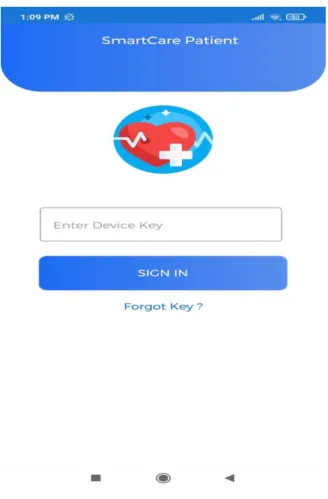
Figure 3.4.1 is the login page of Patient or User app. Users have to login with their key which they will get via SMS when they buy our IoT device. If anyone forgets his/her key, they can request a new key.
Figure 3.4.1: Login Page (User App)
Figure 3.4.2 shows the homepage of the user app. Where the patient details are shown.
Here users show their details like name, age, gender, weight, and phone number. The most important section is here users can see their health condition in real time. Sensor’s real time data will show here. Doctor’s given suggestion will also show here. If a patient needs to contact a doctor then he will contact his doctor through the given mobile number or email.
Figure 3.4.2: Home Page (User App)
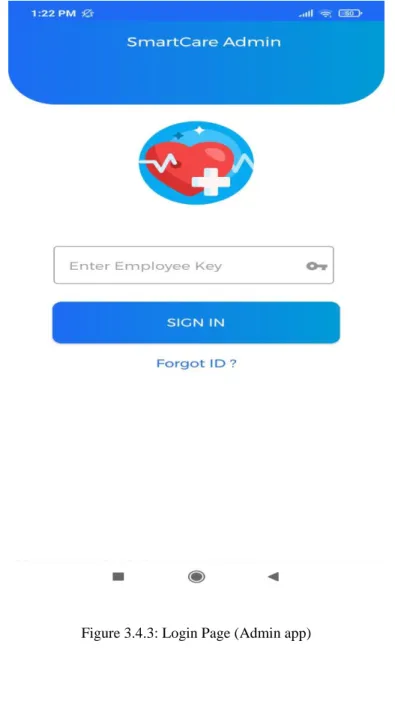
In figure 3.4.3, here we show the login page for the admin, doctor and nurse.
Figure 3.4.3: Login Page (Admin app)
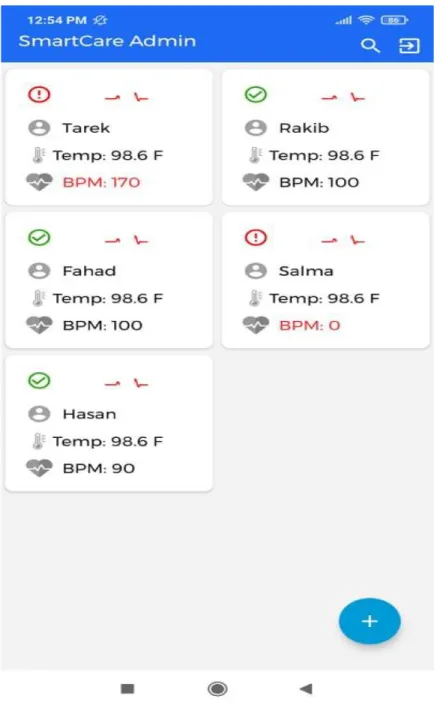
Figure 3.4.4 shows the homepage of the admin app. Our super admin team will be able to show and monitor everything. When the doctor or nurse logs in, only the patient assigned under that doctor or nurse can see their list.
Figure 3.4.4: Homepage of Admin App
We don’t need to go to the database every time to add a new patient manually. Our super admin team is able to add new devices through the admin app. Figure 3.4.5 shows the ‘Add new Device’ page.
Figure: 3.4.5: Add New Device
3.5 Back-end Design
User login xml code is shown in figure 3.5.1.
Figure 3.5.1: User Login XML Code
Figure 3.5.2 shows the xml code for user details.
Figure 3.5.2: User Details XML Code
Figure 3.5.3 shows the ‘Add New Device’ xml code.
Figure 3.5.3: Add New Device XML Code
3.6 Interaction Design & User Experience (UX)
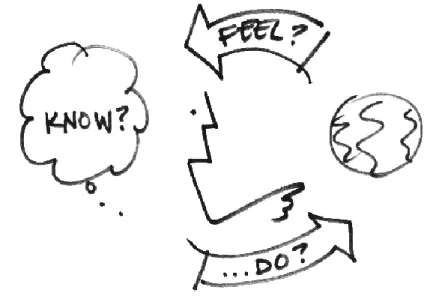
In basic terms, interface design is the process of creating user-product experiences. People typically refer to digital things like apps or websites when they talk about interaction design. The aim of interaction design is to create interactions that help users achieve their objectives in the most effective way possible.
Interaction design is a field that explores how a system interacts with its user (via an interface). It can also include design based on how information should be interpreted within such a structure in order for the user to better understand the information, though this is also considered a separate discipline of "information design" as well [7].
\
Figure 3.6.1: Interaction Design
3.7 Implementation Requirements
We planned to use software and hardware tools and parts to construct our system. It was probably the most difficult part of our project. Dealing with the parts was the most challenging part. In any case, we progressed and fulfilled our requirements thanks to the Almighty's beauty. To build this project we use several equipment.
The Hardware-Based things we needed are:
NodeMCU (ESP8266)
Temperature Sensor
Pulse/Heart Rate Sensor
Jumper Wire
Breadboard
3.7.1 NodeMCU (ESP8266)
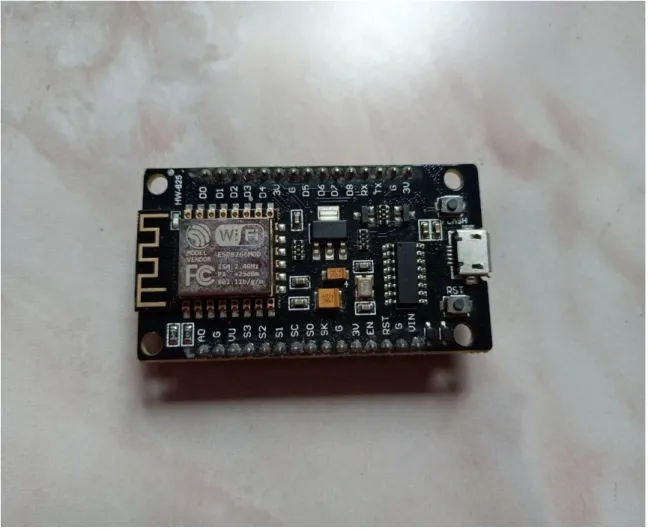
The NodeMCU ESP8266 is a microcontroller device with a Wi-Fi module integrated into it. It functions similarly to a microcontroller unit but adds the ability to link to the internet via Wi-Fi. We use it to simulate code in our project.
Figure 3.7.1: NodeMCU ESP8266
3.7.2 Temperature Sensor
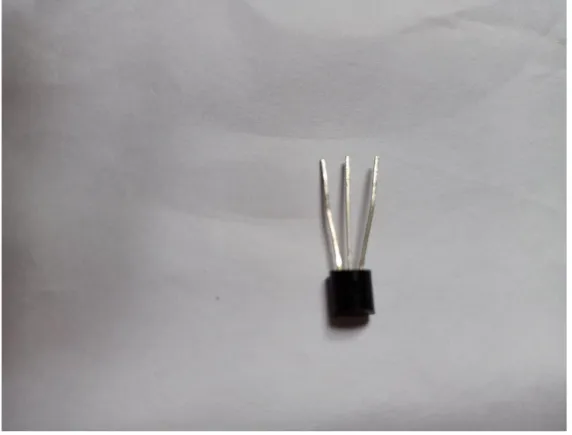
LM35 is a type of temperature sensor. Generally, it is used to measure temperature in Celsius (°C). The output voltage can be easily translated into a Celsius temperature reading.
The lm35 has an advantage over the thermistor in that it does not require external adjustment. By using this we collect body temperature of patients.
Figure 3.7.2: LM35 (Temperature Sensor)
3.7.3 Pulse/Heart Rate Sensor
SEN-11574 is a type of pulse sensor. To measure pulse or heart rate, students or researchers normally use this sensor. The Pulse/Heart sensor's operation is rather straightforward. The light-emitting diode and ambient light sensor are attached on the first surface of this sensor.
Figure 3.7.3: SEN-11574 Pulse Sensor (Front Side)
Figure 3.7.4: SEN-11574 Pulse Sensor (Back Side)
3.7.4 Jumper Wire
A jumper wire is a performing wire used to transfer electrical signals between two points in a circuit. The wires are either to fix the circuit or to diagnose problems in the circuit.
Figure 3.7.5: Jumper Wire
3.7.5 Breadboard
Breadboards are designed to work with hollow electronic components. Long metal leads are designed to be coated with a thin copper coated metal through holes in a printed circuit board, so that the leads of the components can be refreshed to the board.
Figure 3.7.6: Bread Board
The software related things we needed are:
Development Tools: Android Studio
Language: Java
Database Management: SQL(Firebase)
3.7.6 Development Tools: Android Studio
Android Studio is the official Integrated Development Environment (IDE) for Google's Android operating system. Support for extensions like Go, as well as Java, C ++ and all the same programming languages are supported by Android Studio [8].
3.7.7 Java
The majority of native app developers use the java programming language to build their app. We used java in our project as a programming language. It is a commonly used programming language which was first published in 1995. Oracle owns Java, which is used on over 3 billion computers. It is used for mobile applications (especially Android applications), desktop apps, web apps, web servers and application servers as well as database connections. And there are many more. It is one of the most commonly used programming languages worldwide [9].
It's easy to understand and use. It's free and open-source. It is safe, fast, and strong. It has a sizable following in the community. Java is an object-oriented programming language that gives programs a simple structure and allows code reuse, lowering development costs.
3.7.8 SQL (Firebase)
SQL is a database language for storing, editing, and retrieving data. The acronym for Structured Query Language (SQL) stands for Structured Query Language. SQL is a database management system that allows you to access and manipulate data. In 1986, the American National Standards Institute (ANSI) authorized SQL as a standard, and in 1987, the International Organization for Standardization (ISO) approved it [10].
3.7.9 Google Material Design
Material is a flexible collection of standards, modules, and tools that promote user interface design best practices. Material, which is based on open-source code, makes it easier for designers and developers to collaborate and create beautiful products [11].
3.7.10 Third Party API Library
Third-party libraries are commonly used in Android applications to make it easier to improve and update features. The combined libraries, on the other hand, introduce new security and privacy problems to the host application and obscure the accounting between application and library code. In this situation, a precise and reliable library finder is extremely appealing. To be honest, engineers may redo library code during the mix, and code obfuscators may wipe out dead library code during the application build measure.
In our project we have also used some third party API libraries such as retrofit, recycler view, firebase connection, Google material, GSON etc.
Recycler View Library: The ScrollingView interface is implemented by the RecyclerView class, which extends the ViewGroup class. Marshmallow is used to present it. It's a serious update to the ListView, with better performance and a slew of other benefits. RecyclerView is widely used to schedule the UI with fine-grained control over the android application's rundowns and networks. If we use a library, we must have certain lines in the gradle module.
Implementation 'com.google.android.material: material:1.0.0-beta01' Implementation 'androidx.recyclerview: recyclerview:1.1.0-beta0'
GSON: GSON is a Java library that converts JSON objects to native Java objects and vice versa. This simple process makes GSON extremely useful, as certain JSON articles can be difficult to read using the default JSON peruse. When trying to link to RestAPIs that return
JSON, it's especially useful. To use the GSON library in our application, we must add this section.
implementation 'com.google.code.gson:gson:2.8.6'
GIF Drawable Library: For viewing animated GIFs on Android, we use the android-gif- drawable library and drawable.
implementation 'pl.droidsonroids.gif:android-gif-drawable:1.2.19'
Google Material: To use Google material design in our app we need to add dependency on our gradle file.
implementation 'com.google.android.material:material:1.0.0-beta01'
Card View: We use card view in our design. To use the card view we need to add a library on our gradle module.
implementation "androidx.cardview:cardview:1.0.0"
3.7.10 API Level
API Levels suggest that you, as a developer, can interact with the device's inherent capabilities and utility. As the API level rises, so does the utility (albeit some of it can get expostulated). As a consequence, an app developer must use the lowest api level possible;
otherwise, certain functionality or libraries would not operate properly. Android 11 is the most recent Android API level (API level 30).
CHAPTER 4
EXPERIMENTAL RESULTS AND DISCUSSION
4.1 Introduction
We have developed two mobile applications and an IoT device. In this chapter, we will focus on our design and experiment. We will describe and show the design of our apps and also the device. And at the last we will discuss our experimental result.
4.2 Implementation of Database
Databases store all types of data in order to establish a simple stage for ID and power. For the client, the information base makes data access easy, fast, and adaptable. The analysis of relative records is used to create a chart. To plan and store data, we must first assemble the table's layout, which includes the table name, table section names, unfamiliar keys, and essential key.
In our project, we use a firebase database. Because we need real time data update policy and the firebase database works in real time.
4.2.1 Firebase Database
Firebase database is a product provided by Google. It's more safe, fast, and simple to use, and it's a real-time database. One can create a project and then a database using a Google Gmail account. Firebase provides a range of features, including cloud storage, machine learning, cloud functions, user authentication, hoisting, cloud messing, push notifications, and a research lab. This is one of the strongest sites for providing back-end services for any project. Those facilities, however, are not free. After you've met the cap, you must pay Google according to their payment policy. In the meantime, the Firebase database is a parent-child tree.
Since our project works with real time data, we have used the Firebase database. Firebase has been used to show real time data updates in the app and for push notifications to the
background broadcast receiver. We've also signed up for the Firebase cloud messaging service for smartphone push notifications. It also has a use cap beyond which we must pay.
With this service, we can easily send a push notification to all users for any announcement, SMS, or other purpose.
Figure 4.1 shows the dashboard of the firebase database.
Figure 4.1: Firebase Database Dashboard
Figure 4.2 shows the table names of our database. As all the information of our users is authentic so here we hide user details and show only tables’ name.
Figure 4.2: Tables of Firebase Database
Figure 4.3 shows the code of the firebase table connection with the app. This code is for login purposes.
Figure 4.3: Firebase Database Table Connection Code
4.3 Implementation of Front-end Design
Since users communicate with a mobile application on a regular basis, the front-end design is very important. Because if the design is not user satisfactory, people won’t use our app.
Users won't be able to see the code in the backend. People would not use our app no matter how good our code is if the design is bad. The most powerful side of front-end design is responsive design, which ensures that the design would look the same on every phone display size. So, mainly we use constraint layout for xml design. Constraint layout is responsive for any size of display. We have also used linear layout, relative layout etc.
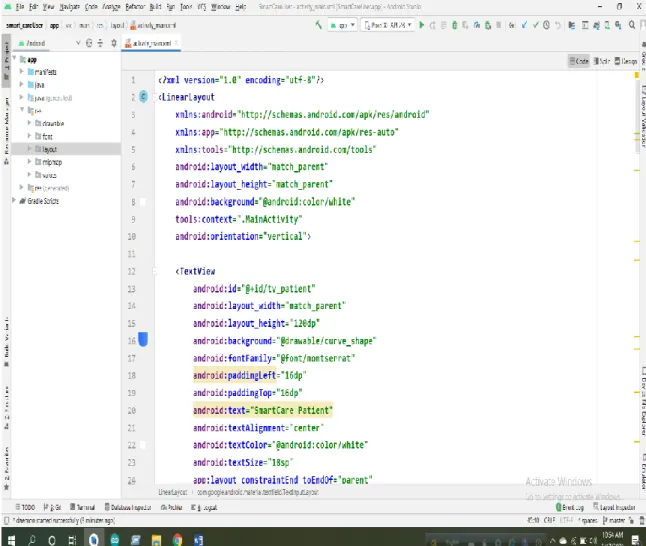
In figure 4.4, here is our user login code.
Figure 4.4: Login Code
Our user will get real time notification when health deteriorates. Here we have added the code of background notification for the patient's health condition in figure 4.5.
Figure: 4.5: Background Notification for Health Status Code
When a doctor sends any suggestion for the patient then the patient gets notification about the suggestion. Figure 4.6 shows the code of background notification for suggestion.
Figure: 4.6: Background Notification for Suggestion Code
Android Layout design: The structure of a User Interface in an application is specified by a layout. A hierarchy of View and ViewGroup objects is used to create all of the layout's elements.
Instead of writing template XML by hand, the Layout Editor helps you to layout assemble formats by dragging UI components into a visual plan manager. The plan proofreader will view your format on a variety of Android devices and adaptations, and you can gradually resize the template to ensure it works well on different screen sizes.
Constraint layout design: The Constraint layout style, which is currently the default in Android Studio, gives us a lot of choices for where to position objects. We may force them to their compartment, to each other, or to follow the rules. In a level chain of command, this helps us to build huge, perplexing, complex, and sensitive perspectives.
4.4 Experimental Setup (Device)
Our Proposed framework investigation procedures are done on a PC which processor is Core-i5, 8250U. Additionally, the framework had 8GB of RAM. For programming we use arduino1.8.13-windows and android studio software.
Figure 4.7: IoT Device Setup
4.5 Experimental Result & Analysis
We use two sensors in our project i.e. temperature sensor, heart rate/pulse rate sensor. For temperature we use LM35 sensor and for heart rate we use SEN-11574 sensor. Both of the sensors give us medium accuracy value.
4.6 Discussion
LM-35 and SEN-11574 sensors are normally used by students for experimenting and making projects. Both of them give medium accuracy. As we have made this project with our own cost so we use normally available and budget friendly sensors. For further research and high accuracy we can use other sensors.
CHAPTER 5
IMPACT ON SOCIETY, ENVIRONMENT AND SUSTAINABILITY
5.1 Introduction
We developed our IoT based Medical Healthcare system that also affects in our society and environment. This section displays what will be the impact of our project on society and environment. Here we will describe impact on society, impact on environment and sustainability of our project.
1.2 Impact on Society
Smart healthcare is an IoT based Wearable Device and whose output will show through the Android Application, for our country there will be benefits for all people in the society especially older people those who have difficulty in movement and cannot go to the hospital for regular check-up. This device will make a good impact in the society and this is the first time Smart Health Care will create this opportunity before there is no system before so that doctors and patients can be connected so easily. So, we hope it will create a significant effect in our society.
5.3 Impact on Environment
In the medical sector IoT performs a major part for public services by the government to make cities environment friendly. Using it will not cause any harm to the environment.
Bringing the IoT into the medical sector to provide patients services becomes healthier and easier.
5.4 Ethical Aspects
We all know that perfection is accomplished by passing on awareness from one generation to the next. This app will inspire both doctors and patients and be user friendly. And the important thing is it will create good communication between doctor and patients.
5.5 Sustainability Plan
Before developing an app or project, always think about the sustainability of the plan. This is the most important part for a project in future. The Smart Health Care concept is very sustainable because the content is medical related. So, in a medical sector it is highly demandable. If the plan or idea is not sustaining then in future the project will not work at all.
CHAPTER 6
SUMMARY, CONCLUSION, RECOMMENDATION AND IMPLICATION FOR FUTURE RESEARCH
6.1 Introduction
There goes a proverb ‘the more you read, the more you learn’. When we start working on an idea, its scope gradually increases. So, every development or innovation has a future scope and plan.
This is the last section of our report. In this section we will give a brief summary of our entire study in the conclusion part and highlight some ideas for our future work. And finally we will figure out some limitations of our existing project.
6.2 Conclusion
The smart healthcare management system has been proposed. Its aim is to help both patients and doctors. Patients can consult anywhere with the doctor. Doctors can follow up patient’s health monitoring data on patients and it helps to reduce distance barriers. It improves the access system in the medical system. It can help in emergency situations in both cities and rural communities. Patients connected all the time via IoT platforms.
Sensing health parameters, calling a doctor, and submitting real-time data are all possible with a mobile application. It is very important for both doctor and patient to connect with each other via the same cloud platform. Our smart healthcare offers the promise of significant advances in medical treatment.
6.3 Limitations
Our device can monitor only temperature and pulse rate.
It cannot store previous data due to insufficient storage.
It does not give 100% accuracy.
6.4 Implication for Further Study
To get high accuracy we will use different sensors in future.
In future, we will add more sensors in our device such as ECG, oximeter, blood glucose detector.
We will add our own database so that we can store more data.
We monitor patients’ health data through mobile apps. In the future, we will add a web based monitoring system too.
We will provide high security in future.
REFERENCE
[1] WHO, "World Health Organization," 2021. [Online]. Available: https://www.who.int/about/who-we- are/constitution#:~:text=Health%20is%20a%20state%20of,belief%2C%20economic%20or%20social
%20condition.. [Accessed 8 April 2021].
[2] S. A. J. I. D. e. a. Ghanavati, "Cloud-assisted IoT-based health status monitoring framework," p.
1843–1853 (2017), 11 April 2017.
[3] S. A. Arshad Ali, "Health Monitoring and Management System by Using Wireless Sensor Network and Internet of Things (IoT)," International Journal of Computer Network and Information Security, vol.
19, pp. 179-184, 12 December 2019.
[4] D. DevashriS.Deshmukh, "A REVIEW ON-ANDROID BASED HEALTH CARE MONITORING SYSTEM,"
International Journal of Innovation in Engineering, Research and Technology [IJIERT] , 7 July 2015.
[5] J. Saha, A. K. Saha, A. Chatterjee, S. Agarwal, A. Saha, A. Kar and H. N. Saha, "Advanced IOT Based Combined Remote Health Monitoring, Home Automation and Alarm System," in 2018 IEEE 8th Annual Computing and Communication Workshop and Conference (CCWC) , 2018.
[6] S. S. T. V. K. Vaishnavi Patil, "Health Monitoring System using Internet of Things," in Second International Conference on Intelligent Computing and Control Systems (ICICCS 2018), 2018.
[7] B. Verplank, "Interaction Design Foundation," [Online]. Available: https://www.interaction- design.org/literature/article/what-is-the-difference-between-interaction-design-and-ux-design.
[Accessed 11 March 2021].
[8] Wikipedia, "Wikipedia," 2021 April 2021. [Online]. Available:
https://en.wikipedia.org/wiki/Android_Studio. [Accessed 9 April 2021].
[9] w3schools, "w3schools.com," 1999-2021. [Online]. Available: https://www.w3schools.com/java/.
[Accessed 14 March 2021].
[10 ]
Wikipedia, "Wikipedia," 25 March 2021. [Online]. Available: https://en.wikipedia.org/wiki/SQL.
[Accessed 9 April 2021].
[11 ]
Material Design, "Material Design," [Online]. Available: https://material.io/design/introduction.
[Accessed 9 April 2021].