DESIGN AND DEVELOPMENT OF WEB APPLICATION ON AUTO ATTEND SYSTEM
DAFFODIL INTERNATIONAL UNIVERSITY
DHAKA, BANGLADESH DECEMBER 2019
©Daffodil International University i DESIGN AND DEVELOPMENT OF WEB APPLICATION ON AUTO ATTEND
SYSTEM
BY
Shah Samrat Fahim ID:153-15-629 AND
Jumana Binte Noor ID:153-15-624
This Report Presented in Partial Fulfillment of the Requirements for the Degree of Bachelor of Science in Computer Science and Engineering.
Supervised By
Nadira Anjum Nipa Lecturer
Department of CSE
Daffodil International University
DAFFODIL INTERNATIONAL UNIVERSITY
DHAKA, BANGLADESH DECEMBER 2019
©Daffodil International University ii
APPROVAL
This Project titled “DESIGN AND DEVELOPMENT OF WEB APPLICATION ON AUTO ATTEND SYSTEM”, submitted by Shah Samrat Fahim ID: 153-15-629 And Jumana Binte Noor ID: 153-15-624 to the Department of Computer Science and Engineering, Daffodil International University, has been accepted as satisfactory for the partial fulfillment of the requirements for the degree of B.Sc. in Computer Science and Engineering (BSc) and approved as to its style and contents. The presentation has been held on 10 December 2019.
BOARD OF EXAMINERS
Dr. Syed Akhter Hossain Chairman Professor and Head
Department of Computer Science and Engineering Faculty of Science & Information Technology Daffodil International University
Dr. S M Aminul Haque Internal Examiner Associate Professor & Associate Head
Department of Computer Science and Engineering Faculty of Science & Information Technology Daffodil International University
Saif Mahmud Parvez Internal Examiner Lecturer
Department of Computer Science and Engineering Faculty of Science & Information Technology Daffodil International University
Dr. Mohammad Shorif Uddin External Examiner Professor
Department of Computer Science and Engineering Jahangirnagar University
©Daffodil International University iii
©Daffodil International University iv
ACKNOWLEDGEMENT
First, we express our heartiest thanks and gratefulness to almighty God for His divine blessing makes us possible to complete the final year project successfully.
We really grateful and wish our profound our indebtedness to Nadira Anjum Nipa, Lecturer, Department of CSE Daffodil International University, Dhaka. Deep Knowledge & keen interest of our supervisor in the field of “Information Technology” to carry out this project. Her endless patience, scholarly guidance, continual encouragement to constant and energetic supervision, constructive criticism, valuable advice, reading many inferior drafts and correcting them at all stage have made it possible to complete this project.
We would like to express our heartiest gratitude to our Supervisor and Head, Department of CSE, for his kind help to finish our project and also to other faculty member and the staff of CSE department of Daffodil International University.
We would like to thank our entire course mate in Daffodil International University, who took part in this discuss while completing the course work.
Finally, we must acknowledge with due respect the constant support and patients of our parents.
©Daffodil International University v
ABSTRACT
The Auto Attend System is a web-based application that leverages the Wi-Fi module of an employee’s mobile device to determine their presence in the office premises. The application works without requiring human intervention and requires no additional configuration on the employee’s mobile. Any mobile that has a Wi-Fi module (regardless of OS type and version) can be used with this application. Each employee’s attendance can be tracked without requiring their fingerprint. The attendance of an employee is taken when his/her Wi-Fi device connects to the network of the organization. The attendance data includes the entry and exit times. Attendance is only counted when the entry time is within a specific time range. The entry and exit times are stored regardless of whether entry happened within the specific time range. This allows our application to collect data in real-time and populate the attendance list automatically. The attendance sheet is stored into the database. Users can request for time-off by submitting leave applications. These leave applications, once approved, are taken into consideration when generating reports for attendance. The report view of attendance data indicates presence, time-off and Fridays on tabular calendar format. The administrator of the organization can access all attendance records through an easy-to-use web interface. In addition to that, the administrator may check the list of defaulters (i.e. employees being absent), search for a particular employee’s attendance records by name, filter by time and date, and generate reports in well-known formats (e.g. Microsoft Excel).
©Daffodil International University vi
Table of Content
CONTENTS PAGES
Title page i
Approval ii
Declaration iii
Acknowledgements iv
Abstract v
Table of content vi-vii List of Figures viii-ix CHAPTER 1: INTRODUCTION 1-3 1.1 Introduction 1
1.2 Motivation 1
1.3 Objectives 1
1.4 Expected Outcome 2
1.5 Report Layout 2
1.6 Summary 3
CHAPTER 2: BACKGROUND
4-5 2.1 Introduction 4
2.2 Project function 4
2.3 Assumption and dependencies 4
2.4 Challenges 5
CHAPTER 3: REQUIREMENT AND SPECIFICATION 6-10 3.1 UML Diagram 6
3.1.1 Use case diagram 6
3.1.2 Description Use case model 7
3.1.3 System flow diagram 8
3.2 Summary 10
©Daffodil International University vii CHAPTER 4: SYSTEM DETAILS 11-27
4.1 Introduction 11
4.2 Application Feature 11
4.2.1 Login 11
4.2.2 Dashboard 12
4.2.3 My Attendance 12
4.2.4 Edit Profile 12
4.2.5 Leave application 12
4.2.6 View attendance 13
4.2.7 User’s list 13
4.2.8 Add user 13
4.2.9 Add device 13
4.3 Front-End Design 14-22 4.4 Back-End Design 23-25 4.5 Implementation Requirements 26
4.6 Hardware Requirement 26
4.7 Software Requirement 26
4.8 Summary 27
CHAPTER 5: CONCLUSION AND FUTURE SCOPE 28
5.1 Discussion and Conclusion 28
5.2 Limitations 28
5.3 Future Scope 28
REFERENCES 29 PLAGAIARISM 30-31
©Daffodil International University viii LIST OF FIGURES 7-25
Figure:3.1.1 Use case diagram of auto attend 7 Figure:3.1.3 System Flow Diagram 9
Figure:4.3.1 User and Admin login system 14
Figure:4.3.2 Users Dashboard 15
Figure:4.3.3 Users own attendance 15
Figure:4.3.4 Edit Profile for user 16
Figure:4.3.5 Applications Form for user 16
Figure:4.3.6 Applications Output 17
Figure:4.3.7 Admin’s Dashboard 17 Figure:4.3.8 Admin’s Attendance 18
Figure:4.3.9 View Attendance of all Users 18
Figure:4.3.10 All Users list 19 Figure:4.3.11 Add User 19
Figure:4.3.12 Add Device 20
Figure:4.3.13 Admin’s Edit profile 20
Figure:4.3.14 Pending Applications 21
Figure:4.3.15 Approved Applications 21
Figure:4.3.16 Declined Applications 22
Figure:4.4.1 Database table 23
©Daffodil International University ix Figure:4.4.2 Database users table 23
Figure:4.4.3 Database devices table 24
Figure:4.4.4 Database attendance table 24
Figure:4.4.5 Database leave_ applications table 25
@Daffodil International University 1
CHAPTER 1 INTRODUCTION
1.1 Introduction
Our Project, The Auto Attend System, is a software that allows an entire organization to track attendance of its employees in a very precise manner. The mechanisms rely on the unique identity associated with every Wi-Fi device. By detecting the presence of the Wi-Fi device of the employee, it is possible to determine when they enter and exit the office premises.
Every employee connects their phone using Wi-Fi. Their attendance is taken when the Wi-Fi device connects to the network of the organization. This allows our application to collect data in real-time and populate the attendance list automatically.
The attendance sheet is stored into the database. The administrator of the organization can access all attendance records through an easy-to-use web interface. In addition to that, the administrator may check the list of defaulters (i.e. employees being absent), search for a particular employee’s attendance records by name, filter by time and date, and generate reports in well-known formats (e.g. Microsoft Excel).
1.2 Motivation
We were searching for an application that would automate the attendance tracking of employees in an organization. Our honorable teacher Nadira Anjum Nipa (Lecturer, DIU-UC) encouraged us to build a web-based application for this purpose so that we can customize it as necessary and ensure that it is a feasible project for organizations of all scales.
1.3 Objectives
To ensure that The Auto Attend System is feasible project and easily customizable, we have set the following goals. We have made our web application about Auto Attend System. By then there are a couple of objectives that we need to fulfill. Here is a segment of the goals of goals that can be gotten by our project.
• To make the application user friendly.
• To make it flexible and full featured employee attendance.
• To operate management tool which allows controlling employees.
• To calculate Attendance by automating time keeping and attendance tracking.
• To collect data from Attendance sheet, and simultaneously allows optional PC entry.
@Daffodil International University 2 1.4 Expected Outcome
This Attendance system will express some outcome. Here we will discuss about it:
• To make a full furnished web application.
• To make it possible for someone using this system easily.
• To enable for the user to check their daily attendance.
• To help users edit their profile.
• To allow users leaving an application form, if they want to leave, they can apply for leave option.
• To help administrators in searching for a particular employee’s attendance records by name, filter by time and date.
• To guide Administrators in generating reports in well-known formats (e.g.
Microsoft Excel).
• To help administrators in approving/rejecting leave applications.
• To help administrators in adding/removing users and devices.
• To guide all user in maintaining the ir profile.
1.5 Report Layout
Here is the report format that used to make this report on web application of The Auto Attend System.
• All the topics are covered with related information.
• All topics are divided with some paragraph thus it can be easy to understand.
• Figures and images are used to get the topics content more easily.
• Required font and size is used to organize all the contents of the report.
• Specific margins and spaces are used to format the content.
• Bullet point are used to describe the content value more exact.
• Required format and menus are used to get all the contents more easily.
@Daffodil International University 3 1.6 Summary
The Auto Attend System project aims to solve a fundamental challenge faced by every organization. Regardless of scale, by automating this aspect, an organization can capture accurate data of attendance records and timings and generate reports as necessary. The system is designed to be user-friendly, flexible and feature rich.
@Daffodil International University 4
CHAPTER 2 BACKGROUND
2.1 Introduction
The fundamental objective of making this attendance system is that it allows the attendance to be taken using the Wi-Fi network. The novelty here is the use of the mobile’s Wi-Fi module to identify the user instead of their RFID card or fingerprint.
This attendance system is a software for an entire organization to record the attendance of all of their employees automatically. When an employee connects their phone to the Wi-Fi network, then their attendance will be recorded. The attendance data is updated in real-time and can be accessed from within the web application.
2.2 Project Function
Our project has two types of using modes:
1. Administrator:
Administrators have the right to manage employee details, update their email addresses, update their passwords, etc. Administrators can change his/her own profile, receive leave applications from employees, add new users, add new devices, etc.
2. User (Employee):
Employees can log in, see his/her profile, update his/her profile, check his/her attendance, and apply for leaves through an application form.
2.3 Assumption and Dependencies
• The server will be connected to the network which will be a part of the office’s Wi-Fi.
• Administrator access should be careful in deleting or modifying any information knowingly or unknowingly which will lead to inconsistency of the database.
• The users of this system are assumed to have basic level of computer knowledge.
@Daffodil International University 5 Challenges
In this attendance system we have confronted such a significant number of difficulties. A few difficulties are too hard to even think about meeting objective and some are absolutely new to us to discover the arrangement like,
• Create the relation to
all the tables in database: To make database tables are too much difficult job to do, we tried our best to normalized the database table for our project.
• Initially we designed a
system that used the IP address to identify devices. But due to the nature of IP addresses (i.e. it being dynamic and modifiable) we changed our system to use the device’s MAC address.
• A standout amongst the
most essential test was gathering proper information for this system and give an easy to understand look the system and make this system dependable.
@Daffodil International University 6
CHAPTER 3
REQUIREMENT AND SPECIFICATION
3.1 UML Diagram
In this section we will examine about UML chart. There are numerous sorts of UML outline. We will talk about two of them. By utilizing what we will talk about our whole system.
3.1.1 Use Case Diagram
Use case diagram represent all the actor whose are related to the system and then show them how they can participate to the system.
@Daffodil International University 7 Figure-3.1.1 shows the use case diagram of our system.
Figure 3.1.1: use case diagram of auto attend.
3.1.2 Description of Use Case Model
In Use case diagram we can see there is two actor and they are (1) Admin (2) User. In this application Admin can login, add users, add devices, edit profile, manage admin &
user attendance and leave application. He can provide user attendance, in-time, out-time, manage holidays, leave applications to every user. The admin may check all attendance data, press a button to see defaulter list, search for particular users’ attendance by name, search time and date attendance and generate excel reports. Admin receive the leave application request. He can approve or decline user leave application request.
Use case of Log in
@Daffodil International University 8
Cases Details
Actors Admin and User
Pre-Condition Log in is needed.
Post-Condition After Successful log in Admin will get
admin panel and user will get user profile.
3.1.3 System Flow Diagram
Now we are going to show our working flow diagram in figure-3.2. The entire system has two fundamental on-screen characters Admin and another is user. Enlistment is must be required for two entertainers Admin and User. To start with, we will discuss user. User must to login into the system, in the event that he login he could check all day attendance.
He can see their current and previous monthly attendance, which date he present and absent and see their in-time, out-time and average time when he presents the office and through it they can see easily get their attendance report. He also edits his own profile and apply for leave else he couldn't apply.
Admin have right to manage employee details, provide email, provide password. Admin can change his profile, receive employee’s application, add user, add device,
admin have two option one is if admin think that users leave apply is acceptable then he approved the leave and two is if admin think that users apply is not acceptable he
declined the leave and user can easily see their result for application approved or declined and until admin check the application, user see pending in his application.
@Daffodil International University 9 Figure-3.1.3 shows systems flow diagram
Figure 3.1.3: Systems Flow Diagram.
@Daffodil International University 10 3.2 Summary
In this chapter we discussed about the full project using use case diagram and system flow chart. We also described them elaborately.
@Daffodil International University 11
CHAPTER 4 SYSTEM DETAILS
4.1 Introduction
In this part we will talk about our system design, including the front-end configuration, back-end database and execution prerequisites. The section will begin with an outline of the high-level features and drill down into them later in the chapter. The contents of this chapter is aimed at those who would like to understand the thought process behind the implementation and development of this application.
4.2 Application Feature
There are various kind of features in our system. At first, we are going to show our features list and we will describe them later.
• User authentication – Different user of an organization can be given different level of access to the records and features.
• Dashboard – Users and administrators can see an overview of the collected data.
• My Attendance – User and administrators both can see their own attendance which date he present or absent.
• Edit Profile-User and administrators both can update their profile like name, mail.
• Leave Application - User can apply for his leave and administrators can check the who are applying and administrator have two option approve and declined if admin think that he want to accept the leave that time administrator approve the leave or he don’t want to accept the leave that time declined the leave .
• View Attendance – Administrators can see the attendance of all employees.
• User’s List – Administrators can see all the all user’s list.
• Add User – Administrators can add the new user.
• Add Device – Administrators can add the new user’s devices.
4.2.1 Log in
Users and administrators cannot log in to the application without using the correct email and password. The password is stored in salted-hashed form in the database to ensure added security. Users can be given different level of access to the application depending on their user type.
@Daffodil International University 12 4.2.2 Dashboard
Users and administrators can see the dates of their presence or absence at the office. They can also see the time of their entry and exit where applicable. The dashboard shows a summary of this information.
4.2.3 My attendance
Users and administrators can both see their own attendance data in the “My Attendance”
section. It shows a tabular calendar and indicates the following for each date: presence, absence, Friday, approved leave.
4.2.4 Edit profile
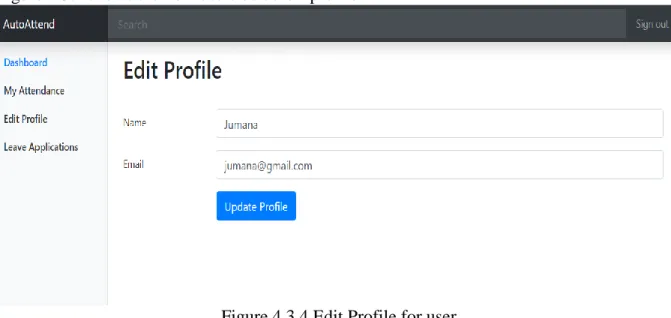
Users and administrators can both edit their profile. If he/she wants to they change their name or email address, then he/she can go to the edit profile option and change their profile data and then click on the update profile button to save the changes.
4.2.5 Leave applications
Leave applications are very important because employees may need to request for time- off without affecting their attendance records. Leave applications are of 3 types. The options are:
i) sick leave ii) official leave iii) yearly leave.
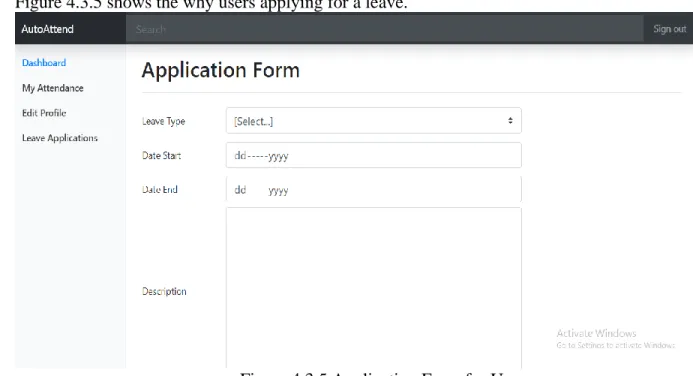
At any time, users may be ill or he may want to leave for official work and may need yearly leave. That time user can go to the leave application option and he select the type of leave which type leave he want and select the start date of leave and select end date of leave and shortly describe the leave reason or problem’s for description option and then he clicks the apply button. Then this application goes to the pending leave applications page that the administrator can access. The administrator can check the application, and do one of the following: if the administrator thinks that the employee’s leave application is acceptable then he can approve the leave. Alternatively, if the administrator thinks that
@Daffodil International University 13 the user’s application is not acceptable, he declined the leave and the user can easily see
the status of their leave application.
4.2.6 View attendance
Only administrator can see this view attendance for all users. This is date wise daily attendance; view attendance is where the administrator can see the name of all users, at which time he/she comes to office and at which time he/she leaves the office. And view attendance also allows the administrator to see past history of attendance for any
employee using the previous/next date option. If the administrator wants to check the previous date of user’s entry and exit time then he can use the previous date option.
4.2.7 Users list
The administrator can see the complete user list in this system; including their user id, name, email and MAC address. The administrator can change the users’ profile data. The administrator can click on the name of any user on this page to be navigated to the user’s attendance data page (i.e. view attendance).
4.2.8 Add user
The administrator of the application can use this form to add new user to the system. A new user can be of administrator or regular type. This form will be used mostly during the on-boarding of new employees. To add a new user, the administrator will have to provide the name of the employee, his/her email address, a password and their role in the application.
4.2.8 Add device
Only the administrator can add the new user’s device. A device can be added for both new users and existing users. When adding a device, the MAC address of the device must be known. To add a new device, it must be given a name and be linked to one of the users in the database.
@Daffodil International University 14 4.3 Front End Design
This is the home page for all users. After giving the valid email and password user, admin or system admin can enter the system. Figure 4.3.1 shows User and Admin login system.
Figure 4.3.1 User and Admin login system.
@Daffodil International University 15 After log in user can see his dashboard. Figure 4.3.2 show the User’s dashboard.
Figure 4.3.2 Users Dashboard.
Click the My Attendance users can see their own attendance time when he entry the office and out the office and also check that which date he absent or present. Figure 4.3.3 shows the users own attendance.
Figure 4.3.3 Users own attendance.
@Daffodil International University 16 If users want to edit their profile, they can easily change their profile through Edit profile.
Figure 4.3.4 shows the how users edit their profile.
Figure 4.3.4 Edit Profile for user.
When users need a leave then they can apply for leave from Leave applications side.
Figure 4.3.5 shows the why users applying for a leave.
Figure 4.3.5 Application Form for User.
@Daffodil International University 17 When admin approved or declined their application then the output shown on the leave
applications side. Figure 4.3.6 shows the how users get their applications output.
Figure 4.3.6 Applications Output.
Same way after log in admin can see his dashboard. Figure 4.3.7 shows the admins dashboard after his log in.
Figure 4.3.7 Admins Dashboard.
@Daffodil International University 18 Same way of users, admin can also see his own attendance time when he entry the office
and out the office and also check that which date he absent or present. Figure 4.3.8 shows the admins own attendance.
Figure 4.3.8 Admin’s Attendance.
Admin check all user’s attendance for View Attendance. Figure 4.3.9 shows the admin check all user’s attendance.
Figure 4.3.9 View Attendance of all users.
@Daffodil International University 19 Users have all users name, email and how users have in this system. Figure 4.3.10 shows
the list of all users.
Figure 4.3.10 All Users list.
Through add user adding the new user. Figure 4.3.11 shows the how admin add the new user.
Figure 4.3.11 Add user.
@Daffodil International University 20 After add the new user then his device is adding through the Add device. Figure 4.3.12
shows the after adding the user then how admin add the new user’s device name and mac address and also add the new users id.
Figure 4.3.12 Add Device.
This page is same to users edit profile admin can also edit his profile. Figure 4.3.13 shows the how admin edit his profile.
Figure 4.3.13 Admin’s Edit profile.
@Daffodil International University 21 When users apply for leave then the application goes to the pending option. Figure 4.3.14
shows the admin can check users leave applications for pending page.
Figure 4.3.14 Pending Applications.
When admin approved the leave then application goes to the approved page. Figure 4.3.15 shows the how many users application is approved and after approved if admin think that he cancelled the leave then he has also a decline option.
Figure 4.3.15 Approved Applications.
@Daffodil International University 22 When declined the leave application then application goes to the declined page. Figure
4.3.16 shows the which users leave application is declined and after declined if admin think that he approved the leave then he has also a approve option.
Figure 4.3.16 Declined Applications.
@Daffodil International University 23 4.4 Backend Design
We create 4 table of our systems database there are attendance, devices, leave- applications and users table. Figure 4.4.1 shows the systems database table.
Figure 4.4.1: Database table.
Users table have all users id, name, email, password and role. Figure 4.4.2 shows the users details.
Figure 4.4.2: Database users table.
@Daffodil International University 24 This is an all user’s devices table and table have device name, devices mac address and
also have which date and time users last seen. Figure 4.4.3 shows the all users devices which date and time their last seen of this system.
Figure 4.4.3: Database devices table.
This table have all data of user’s attendance which date he present or absent and time of his in time and out time. Figure 4.4.4 shows the date wise all users in time and out time of this system.
Figure 4.4.4: Database attendance table.
@Daffodil International University 25 Leave applications table have data of how users applying for leave, start date of leave and
end date of leave, which users’ application is approved and which users’ application are declined. Figure 4.4.5 shows the record of users leave applications.
Figure 4.4.5: Database leave_ applications table.
@Daffodil International University 26 4.5 Implementation Requirements
These are following things and technology that we need to implement this project. Here is the list below:
• Internet Browser
• XAMPP Server
• Task Scheduler
• Text Editor (ex: Atoms, sublime Text)
• PHP 7.2
• HTML 5
• CSS
• jQuery 3.0+
• Bootstrap 4
4.6 Hardware Requirement
• Operating System (Windows, Linux, Mac OS, Android)
• RAM 1 GB or Higher
• HDD 256 GB
• Modem or Broadband (Must have good speed)
4.7 Software Requirement
• Internet Browser (Google chrome v60 or above)
• Internet Browser (Firefox v50 or above)
@Daffodil International University 27 4.8 Summary
This application will automate the process of tracking the attendance of employees at an organization of any scale without needing regular manual intervention. Once the employee list and MAC addresses are added to the database, the application will automatically track the entry and exit times of every employee. The leave application form within the system allows users to file requests for time-off and their requests be
reported in the same attendance interface.
@Daffodil International University 28
CHAPTER 5
CONCLUSION AND FUTURE SCOPE
5.1 Discussion and Conclusion
We were able to implement a simple system to automate attendance tracking. The application is built using familiar technologies and is highly customizable. The design of the system makes it useful for any organization and it helps these organizations reduce paper-based work for attendance taking and improves accuracy in the data traditionally collected as a part of attendance.
The Wi-Fi network-based employee presence detection makes it easy to adopt for organizations as a majority of mobile phones now already support this technology and almost every employee of every organization carries a mobile phone.
5.2 Limitations
Interface is only in English; no other language option is available.
User can login with his assigned username and password, no guest facilities are available.
Attendance tracking depends on a 24x7 available Wi-Fi network.
Improvements will be required to scale for organizations with multiple Wi-Fi network.
5.3 Future Scope
Because of the short time we couldn't add new features to reach to our goal. If we got sufficient opportunity, we had intention to incorporate some more features in our system.
In future we have plan to extend all of the things referenced beforehand. We want to add support for additional display languages. We want to add support for multiple Wi-Fi networks. We want to make sure some of the business rules (e.g. entry/exit time limits) are customizable. We want to implement team hierarchy in user management.
@Daffodil International University 29
REFERENCES
[1] Xampp Server available at: https://www.apachefriends.org/download.html [Last access April 2019]
[2] Sublime text editor available at: https://www.sublimetext.com/3 [Last Access November 2019]
[4] HTML available at: https://www.w3schools.com/html/default.asp [Last access November 2019]
[5] CSS available at: https://www.w3schools.com/css/default.asp [Last November 2019]
[6] Bootstrap available at: https://getbootstrap.com/ [Last access June 2019]
[7] jQuery available at: https://stackoverflow.com/, [Last access July 2019]
@Daffodil International University 30
@Daffodil International University 31
@Daffodil International University 32