Digital Gate Entry Management System (DGEMS)
by
Md.Sazib Sheikh ID: CSE1901016010
Nayem Dhali ID: CSE1901016164
Md Alamin ID: CSE1901016165
Yesmin Akther ID: CSE1901016063
Supervised by Sadia Tasnim Barsha
Submitted in partial fulfillment of the requirements for the degree of Bachelor of Science in Computer Science and Engineering
DEPARTMENT OF COMPUTER SCIENCE AND ENGINEERING SONARGAON UNIVERSITY (SU)
September 2022
Digital Gate Entry Management System (DGEMS)
by
Md.Sazib Sheikh ID: CSE1901016010
Nayem Dhali ID: CSE1901016164
Md Alamin ID: CSE1901016165
Yesmin Akther ID: CSE1901016063
Supervised by Sadia Tasnim Borsha
Submitted in partial fulfillment of the requirements for the degree of Bachelor of Science in Computer Science and Engineering
DEPARTMENT OF COMPUTER SCIENCE AND ENGINEERING SONARGAON UNIVERSITY (SU)
September 2022
APPROVAL
The [thesis/project] titled “Digital Gate Entry Management System (DGEMS) Submitted by, Md. sazib sheikh (CSE1901016010) Nayem Dhali (CSE1901016164), Md.Alamin (CSE1901016165) and Yesmin Akther (CSE1901016063) to the Department of Computer Science and Engineering, Sonargaon University (SU), has been accepted as satisfactory for the partial fulfillment of the requirements for the degree of Bachelor of Science in Computer Science and Engineering and approved as to its style and contents.
Board of Examiners
--- Bulbul Ahamed
Associate Professor & Head,
Department of Computer Science and Engineering Sonargaon University (SU)
Supervisor
--- (Examiner Name & Signature)
Department of Computer Science and Engineering Sonargaon University (SU)
Examiner 1
--- (Examiner Name & Signature)
Department of Computer Science and Engineering Sonargaon University (SU)
Examiner 2
--- (Examiner Name & Signature)
Department of Computer Science and Engineering Sonargaon University (SU)
Examiner 3
Page | iii
DECLARATION
We hereby declare that the work in being presented in this project entitled “Digital Gate Entry Management System (DGEMS)” in partial fulfillment of the requirement for the degree of Bachelor of Science in Computer & Engineering under the faculty of Engineering and Technology, Sonargaon University, Dhaka Bangladesh in authentic record of our own work carried out under the supervisor of Sadia Tasnim Barsha. It is also declared neither this report nor any part of it has been submitted elsewhere for the award of any kind of degree.
Countersigned
--- (Sadia Tasnim Barsha )
Supervisor
Signature
--- Md. Sazib sheikh ID: CSE1901016010
--- Nayem Dhali ID: CSE1901016165
--- Md.Alamin ID: CSE1901016165
--- Yesmin Akther ID: CSE1901016063
Page | iv
ABSTRACT
In this era of digital Bangladesh, like many other developed countries we are growing as a digital nation keeping tremendous pace with the other countries. One of the most trending and talked about sector in this digital revolution is Software and its applications. It is not only limited to Metropolitan cities rather its roots are spreading to the most remote areas of Bangladesh.
In this project, we are developing a fully functioning Digital Gate Entry Management System (DGEMS) which is market ready and it is backed by the most secure and popular CMS of Laravel framework (PHP). Members and non-members can visit the website to the address at https://anasterisk.com
The project’s main intriguing feature is its back-end structure and coding standard and we are proud to say that it is free of many trending vulnerabilities. The site speed, standard and performance has been tested on the benchmark of GT matrix, Google Page Speed and pingdom which results a great score.
Page | v
ACKNOWLEDGMENT
This project has been supervised by Sadia Tasnim Barsha, lecturer, Department of Computer Science and Engineering, Sonargoang University, Dhaka, Bangladesh. We are very much grateful and indebted to him for his kind suggestion, guidance, instructions and overall supervision that he offered us during our project investigation. We also thank him for reviewing the preliminary versions of this project and making useful corrections as well as providing suggestions.
We would also like to express our gratitude to our parents and teachers for bringing us up where we are today. We are thankful to the Department of Computer Science & Engineering, Sonargoang University, for providing us with an excellent educational environment and computing facility. We also offer our best regards Sonargoang University administration, and all other esteemed teachers of the department for their affectionate feelings and encouragement throughout the period of our research work.
Finally, warm thanks to all of our well-wishers and friends for moral support and inspiration.
Page | vi
LIST OF ABBREVIATIONS
API : Application Programing Interface CPU : Central Processing Unit
ERD : Entity relationship diagram HTML : Hyper Text Markup Language PHP : Hypertext Preprocessor HTTP : Hypertext Transfer Protocol ID : Identity Document
JS : JavaScript
LD : Laser Diode
MYSQL : Michael Widenius daughter my, structured query language NPM : Node Package Manager
NID : National Identity Document OTP : One Time Password
PDF : Portable Document Format RAM : Random Access Memory ROM : Read Only Memory SSD : Solid-state drive SMS : Short Message Service
SMTP : Simple Mail Transfer Protocol
SOAP : subjective, objective, assessment, and plan TLS : Transport Layer Security
TABLE OF CONTENTS
Title Page No.
DECLARATION iii
ABSTRACT iv
ACKNOWLEDGEMENT v
LIST OF ABBREVIATION vi
CHAPTER 1 1 – 2
INTRODUCTION TO DIGITAL GET ENTRY MANEGEMENT SYSTEM
1.1 Introduction 1
1.2 Motivation 1
1.3 Tools 1
1.3.1 Hardware 1
1.3.2 Software 2
1.3.3 Languages 2
1.4 Methodology 2
CHAPTER 2 3
PROBLEM STATEMENT
2.1 Problem Statement 3
2.1.1 Downside Of the Traditional Practice 3
CHAPTER 3 4-5
LITERATURE REVIEW
3.1 Project Life Cycle 4
3.1.1 Project Initialization 4
3.1.2 Project Execution 4
3.1.3 System Analysis 4
3.1.4 System Design 4
3.1.5 System Implementation 5
3.2 Project Development 5
CHAPTER 4 6
PROJECT MODULES & SYSTEM ANALYSIS
4.1 PAGES 6-7
4.1.1 Public Pages 6
4.1.2 Admin Account Pages 6
4.1.3 Account Management 6
4.1.4 Operator Account Pages 7
4.1.5 Employee Account Pages 7
4.1.6 Visitor Account Pages 7
4.2 FEATURES AND FUNCTIONALITIES 8-9
4.2.1 Make An Appointment Anonymously 8
4.2.2 Login 8
4.2.3 Forget password. 8
4.2.4 Registerer An Account 8
4.2.5 User Profile 9
4.3 PROJECT MODULE 9-11
4.3.1 Admin Dashboard 9
4.3.2 Operator Dashboard 10
4.3.3 Employee Dashboard 10
4.3.4 Visitor Dashboard 11
4.3.5 Non -Registered Visitor Module 11
4.4 SSYTEM ANALYSIS 11-12
4.4.1 Existing System. 11
4.4.2 Proposed System 11
4.4.3 Feasibility Study 12
CHAPTER 5 13-25 SYSTEM DESIGN
5.1 Diagram 13-14
5.1.1 Data Flow Diagram (PDF) 13
5.2 CONTEXT DIAGRAM OF DGEMS SSYTEM 15-22
5.2.1 Login System 15
5.2.2 Registration System 16
5.2.3 Reset Password 17
5.2.4 Appointment Process from Operator/Admin 18 5.2.5 Appointment Process from Employee 19 5.2.6 Appointment Process from Visitor 20
5.2.7 Appointment From a Public Page 21
5.2.8 Appointment Process for Special Visitor With
NID/DL/Passport from Operator 22
5.3 ENTITY RELATIONSHIP MODEL 23
5.3.1 Entities 23
5.3.2 Relationship 23
5.3.3 Attributes 23
5.4 ER DIAGRAM 23
5.5 SCHEMA DIAGRAM 24
5.6 COMMUNICATION/NOTIFICATION MEDIUM 25
5.7 SUMMARY 25
CHAPTER 6 26-38
PROJECT LAYOUT & SNAPSHOTS
6.1 Project Snapshots 26
6.2 Home Page 26
6.3 About us Page 27
6.4 Public Appointment Page 28
6.5 Login Page 29
6.6 Forget Password 29
6.7 OTP Pages And Set Password 29
6.8 Registration Pages 30
6.9 Registration Verify By OPT 30
6.10 Admin Dashboard 31
6.11 Appointment List 31
6.12 Active Appointment List (Admin/Operator) 32 6.13 Account Management Page from Admin Dashboard 32 6.14 Account Profile Update/Enable/Disable Page 33
6.15 Notifications 33
6.16 Profile show /Update 34
6.17 Operator Dashboard 34
6.18 Appointment Create from Admin/Operator 35
6.19 Special /Entry Direct Access from Admin/Operator 35
6.20 Capture Visitors Images Camera 36
6.21 Employee Dashboard 36
6.22 Appointment List from Employee Dashboard 37
6.23 Visitor Dashboard 37
6.24 Appointment List from Visitor Dashboard 38 6.25 Create Appointment from Visitor Dashboard 38
CHAPTER 7 39-42 TESTING
7.1 Software Testing 39
7.2 Characteristics Of Good Test 39
7.3 Black Box Testing 39
7.4 White Box Testing 39
7.5 Gray Box Testing 40
7.6 Unit Testing 40
7.7 Integration Testing 40
7.8 The Nature of Software Defects 41
7.9 Basis Path Testing 41
7.10 Flow Graphs 41
7.11 The Basis Set 41
7.12 Automating Basis Set Derivation 41
7.13 Loop Testing 42
7.14 Simple Loops 42
7.15 Nested Loops 42
7.16 Concatenated Loops 42
7.17 Unstructured Loops 42
CHAPTER 8 43
LIMITATIONS, PSOT IMPLEMENTATION & CONCLUSION 43
8.1 LIMITATION 43
8.2 FUTURE WORD 43
8.3 CONCLUSION 43
REFERENCES 44
LIST OF FIGURES
Figure No. Title Page No.
Fig 5.1 Login Systems 15
Fig 5.2 Registration system 16
Fig 5.3 Reset password 17
Fig 5.4 Appointment process from Operator/admin 18
Fig 5.5 Appointment process from Employee 19
Fig 5.6 Appointment process from visitor 20
Fig 5.7 Appointment from a public page 21
Fig 5.8 Appointment process for special visitor with NID/DL/Passport
from Operator 22
Fig 5.9 ER Diagram 23
Fig 5.10 Schema diagram 24
Fig 6.1 Homepage 26
Fig 6.2 About page 27
Fig 6.3 Public appointment page 28
Fig 6.4 Login page 29
Fig 6.5 Forget Password 29
Fig 6.6 OTP PAGES AND SET PASSWORD 29
Fig 6.7 Registration pages 30
Fig 6.8 Registration verifies by OTP 30
Fig 6.9 Admin dashboard 31
Fig 6.10 Appointment list 31
Fig 6.11 Active appointment list (Admin/operator) 32
Fig 6.12 Account management page from admin dashboard 32
Fig 6.13 Account profile update/enable/disable page 33
Fig 6.14 Notifications 33
Fig 6.15 Profile show/update 34
Fig 6.16 Operator dashboard 34
Fig 6.17 Appointment creates from admin/operator 35
Fig 6.18 Special Entry/Direct access from admin/operator 35
Fig 6.19 Capture visitor image from camera 36
Fig 6.20 Employee dashboard 36
Fig 6.21 Appointment list from employee dashboard 37
Fig 6.22 Visitor dashboard 37
Fig 6.23 Appointment list from visitor dashboard 38
Fig 6.24 Create appointment from visitor dashboard 38
1
CHAPTER 1
INTRODUCTION TO AUTOMATIC SPEECH RECOGNITION 1.1 Introduction
The main objective of this project is to rectify the weakness lies in the legacy/traditional system of maintaining logbook entries by the security personnel at the gate/entry point. To record visitor entries on housing societies, multi storied buildings, offices, factories etc. where anonymous often make visits and security personnel has no easy way to verify if the visit is preplanned or authorized. To minimize the risk of any inconvenience, a standard practice is being maintained from legacy to keep visitor logbooks manually where security personnel have to make the record.
1.2 MOTIVATION
This project is intended to increase the safety measures of the society and mitigate the increasing rate of mishaps around us specially in big cities and industrial areas. The project of Digital Gate Entry Management System (DGEMS) is not only focused on social cause but it has a very high rate of industrial/commercial prospects and from the research it shows a very promising market share as this portion of market is somewhat untapped till now.
So, the motivation of this project is to promote an industry grade social safety tool to the society.
1.3 TOOLS
1.3.1 Hardware
For demonstration purpose we have deployed the solution in a cloud shared web hosting which holds the below key configuration
PROCESSOR : Intel® Xeon® D-1560 Processor
RAM : 2 GB
HARD DISK : 20 GB
Disk Type : SSD
2
1.3.2 Software
cPanel web hosting management Software VS Code
Git version control tools (GitHub) Node Package Manager (NPM) PHP Composer
1.3.3 Languages:
Front-end:
HTML5 CSS3 LEXA Admin template on Bootstrap 5
JavaScript/ jQuery 3.2 Goggle API
Google font
Font Awesome icons Angular JS as a library Webcam JS
Back-end:
Laravel framework (9.0) PHP 7.2+ as scripting language MariaDB 10.4 database engine
PhpMyAdmin & navigate as database client
1.4 METHODOLOGY
Methodology is a collection of procedure, techniques, tools and documentation aids that help the system development in their effort to implement a new information system. The propose approach is wanted to meet the goal of doing all manual works.
3
CHAPTER 2
PROBLEM STATEMENT 2.1 PROBLEM STATEMENT
In our society we see a general practice of keeping visitor entry log maintained by security personnel/staff to ensure safety of the premises which often comes with many shortcomings.
This project is intended to modernize the legacy and enhance the security measures by keeping the bare minimum operational complexity and dependency. The points have listed below which we intend to take care.
2.1.1 Downside of the traditional practice
• Security personnel is solely responsible to make the record
• Entries in the logbook is not 100 percent trusted
• Record can be manipulated
• No way to verify the information visitor has given
• Logbook can be diminished.
• As the security personnel duty shifts so it needs personal reliability to mitigated any issues if arrived
4
CHAPTER 3
LITERATURE REVIEW 3.1 PROJECT LIFE CYCLE
The project life cycle includes various development phases that occur in the life of project starting right from the inception of the project to its final development at the member’s end. The three development phases in a project life cycle are:
Project initiation Project execution Project deployment
3.1.1 Project initiation
The project initiation phase is first phase of life cycle. This phase involves creating a complete
plan for the project, specifying various activities that will be performed and assigning responsibilities to team members on the basis of their skill set.
3.1.2 Project execution
After the project plan is made and the responsibilities assigned, the actual
development of the project starts. The phase in which the actual development of the project takes place is known as the project execution phase. This is the most crucial phase of any project and is subdivided into the following phases:
3.1.3 System analysis Initial Study
Information Gathering Feasibility Study
3.1.4 System Design Design standard
High level design & design tools Database design
Logical design Construction
5
3.1.5 System Implementation Combination and testing Post execution
3.2 PROJECT DEVELOPMENT
After the undertaking execution stage, the last period of a venture life cycle is the task advancement stage. In this stage the conveyed at the member side. This stage additionally includes giving client backing to the member for some predefined time frame. At the point when undertaking is manufactured it might potentially remain blunder less of additional, in light of the fact that few sort of alteration can happen a few times. So, for the first run through when we run the database site, we discovered couple of issues in instruments segments. We altered this issue including some minor issues quickly, and subsequently the application runs legitimately.
6
CHAPTER 4
PROJECT MODULES & SYSTEM ANLYSIS 4.1 PAGES
4.1.1 Public Pages
• Home page
• About page
• Login page
• Registration page
• Registration OTP validation page
• Password reset page
• Password reset OTP validation page
• Public appointment create page
4.1.2 Admin account Pages
• Dashboard page
• Appointment list show
• Appointment filter/search
• Appointment creates
• Special appointment creates
• Appointment approve/card issue
• Active appointment list
• Appointment end
4.1.3 Account management
• Employee list show
• Employee create/approve
• Employee edit/active/deactivate
• Employee deletes
• Operator list show
• Operator create/approve
• Operator edit/active/deactivate
• Operator deletes
• Visitor list show
• Visitor create/approve
• Visitor edit/active/deactivate
• Visitor deletes
7
4.1.4 Operator account Pages
• Dashboard page
• Appointment list show
• Appointment filter/search
• Appointment creates
• Special appointment creates
• Appointment approve/card issue
• Active appointment list
• Appointment end
4.1.5 Employee account pages
• Dashboard page
• Appointment list show
• Appointment filter/search
• Appointment creates
• Appointment request approve
4.1.6 Visitor account pages
• Dashboard page
• Appointment list show
• Appointment filter/search
• Appointment creates
8
4.2 FEATURES AND FUNCTIONALITIES
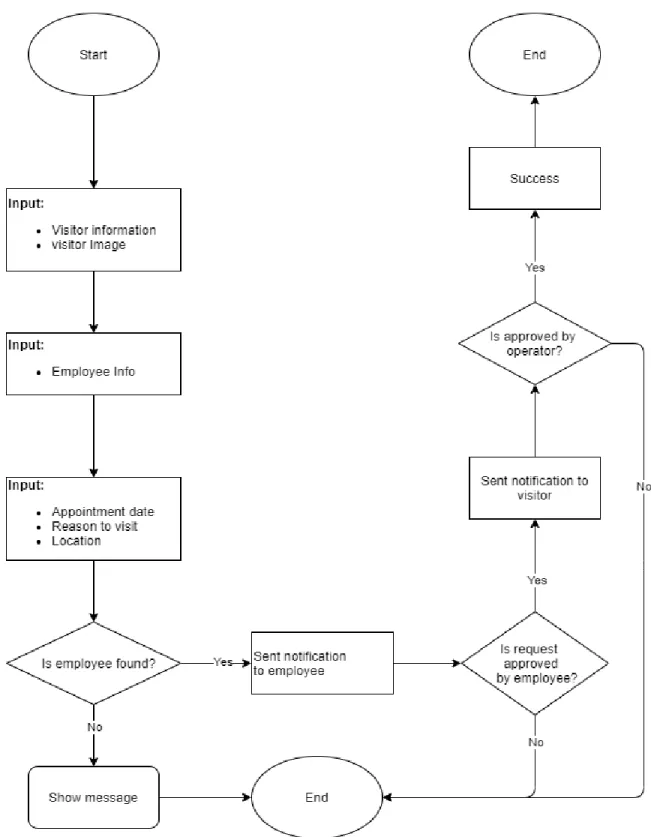
4.2.1 Make an appointment anonymouslyIf a visitor wishes to make an appointment by himself/herself, he/she can do that even without registering an account. The information required to make an appointment:
• Visitor (Who wishes to visit) o phone no *
o name * o email * o Address
o Image/webcam *
• Employee (Who will approve the request)
o Mobile no * (If number found in the DB; appointment will create otherwise not.)
• Appointment information o Date/time *
o Reason to visit * o Location
4.2.2 Login
Users will be able to login into their dashboard using email/phone and password.
4.2.3 Forget Password
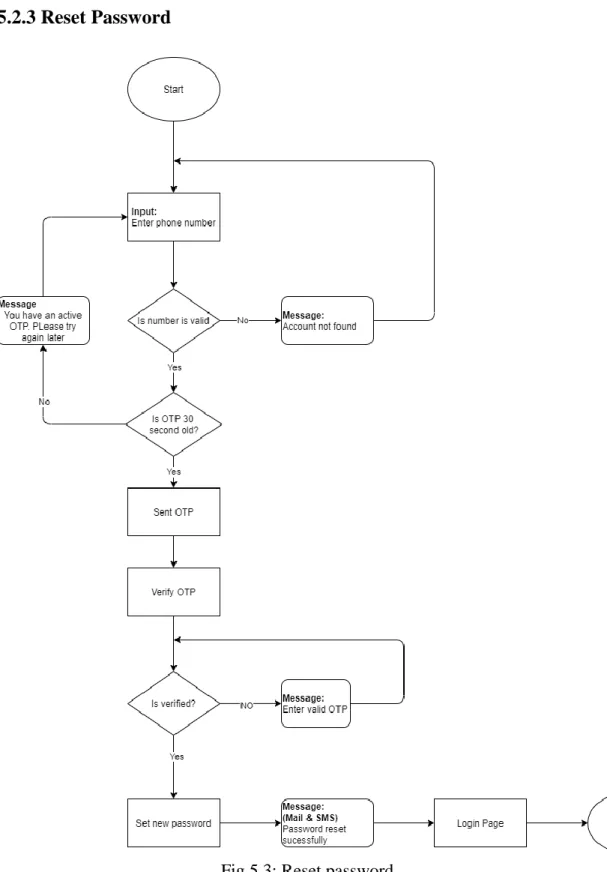
Users can reset their password using OTP. On request of resetting password and OTP will be send to the registered mobile no/email address and the frequency of resend OTP request is bound to 30 seconds due to prevent any flooding attack.
4.2.4 Register an account
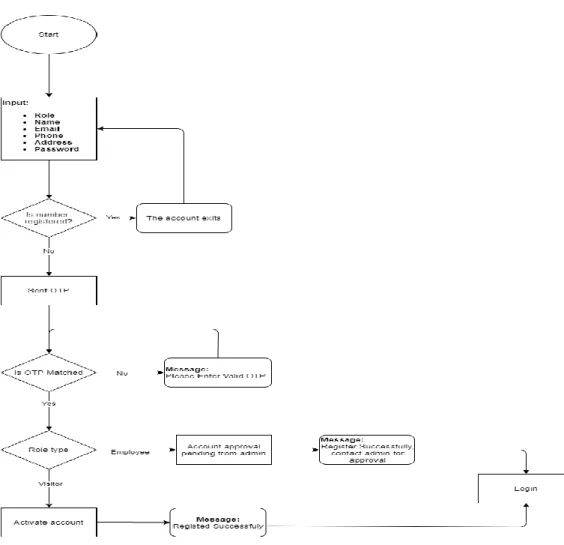
Anyone can register an account in the system as a visitor or as an employee.
However, in both cases they need to verify their mobile number by entering an OTP send to them.
• On successful verification as a visitor, user can login to their account
• On successful verification as an employee, user must wait for admin approval
9
4.2.5 User profile
• Show profile
• Edit/update profile
• Update password
4.3 PROJECT MODULE
The entire project mainly consists of 5 modules, which are Admin module
Operator module (Security staff at the gate) Employee module
Visitor module
Non-registered visitor module
4.3.1 Admin Dashboard
Admin user will have a menu consists of the following navigation
• Notification list on the event of o Registering a new account o Grant a request by an employee
o End of an appointment when visitor exits
o On expiration of an appointment which was not approved by employee
• Dashboard
o Total appointments (count) o Today’s appointments (count) o Total closed appointments (count) o Total opened appointments (count) o Registered employee (count) o Registered visitor (count) o Registration request (count)
• Appointment
o Appointment list (responsive table format) o Make an appointment for visitor
▪ All points as making an appointment anonymously
▪ Employee name suggestion on entering employee mobile no
▪ Can add more than one (loop) guest in an appointment o Make direct access for special entry
o Table data export as excel, pdf
o Data table pagination (25 records pre page) o Search on table (data table)
o Search on DB by date, appointment status
10 o Accept security approval if request granted by employee
o Modal view of guest name, phone no if has multiple guests in an appointment
• Report
o Active appointment list (responsible table format) o Option to end/close an appointment
• Account management
o Employees, Visitors, Operators
▪ List account
▪ Create an account
▪ Edit an account
▪ Active/deactivate account
▪ Delete account
▪ Export list as excel, pdf
4.3.2 Operator Dashboard
An operator will have every permission of an admin except user account management modules and some limited dashboard analytics
4.3.3 Employee Dashboard
Employee user will have a menu consists of the following navigation
• Dashboard
o Total appointments (count) o Today’s appointment (count)
o Appointment request waiting (count)
• Appointment
o Own Appointment list (responsive table format) o Make an advanced appointment for visitor
▪ All points as making an appointment anonymously
▪ Can add more than one (loop) guest in an appointment o Table data export as excel, pdf
o Data table pagination (25 records pre page) o Search on table (data table)
o Search on DB by date, appointment status
o Grant appointment request made by an operator or visitor or anonymously.
o Modal view of guest name, phone no if has multiple guests in an appointment
4.3.4 Visitor Dashboard
Visitor user will have a menu consists of the following navigation
• Dashboard
11 o Total appointments (count)
o Today’s appointment (count)
o Appointment approval waiting (count)
• Appointment
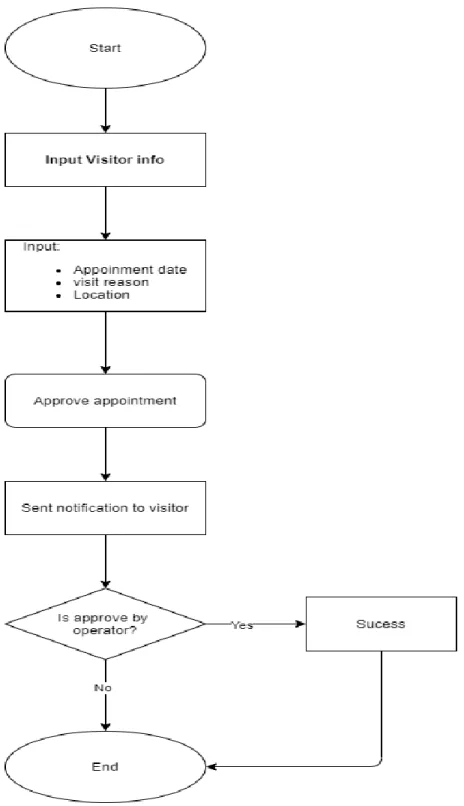
o Own Appointment list (responsive table format) o Make an advanced appointment for visitor
▪ All points as making an appointment anonymously
▪ Can add more than one (loop) guest in an appointment o Table data export as excel, pdf
o Data table pagination (25 records pre page) o Search on table (data table)
o Search on DB by date, appointment status
o Can see access code for all visitor in an appointment if granted by employee o Modal view of guest name, phone no if has multiple guests in an appointment
4.3.5 Non –registered visitor module
A non-registered visitor can make a request for an appointment through this module.
In this case if all the information he/she provided is correct then he will get a confirmation if his request gets accepted.
4.4 SYSTEM ANALYSIS
Existing System Proposed System Feasibility Study
4.4.1 Existing System
In the legacy/traditional system of maintaining logbook entries by the security personnel at the gate/entry point. To record visitor entries on housing societies, multi storied buildings, offices, factories etc. where anonymous often make visits and security personnel has no easy way to verify if the visit is preplanned or authorized. To minimize the risk of any inconvenience, a standard practice is being maintained from legacy to keep visitor logbooks manually where security personnel have to make the record.
4.4.2 Proposed System
This project software is to modernize the legacy and enhance the security measures by keeping the bare minimum operational complexity and dependency
.
12
4.4.3 Feasibility Study Operational Feasibility
✓ Records will be kept digitally in the cloud
o All the visits and visitor records are safe and non-volatile in the cloud system.
✓ No way to manipulate the information
o No records can be manipulated by the guards and is safe for the society/industry
✓ Data availability and reliability is assured
✓ Can be tracked who make the record
✓ Can verify visitor phone number, if the visitor has made any pre visit etc.
✓ Visit can be scheduled
✓ Real-time communication to whom the visitor wishes to visit. No intercom needed
✓ Communication way can be APP, web, email, SMS etc.
✓ Photo identity of the visitor will be preserved Technical feasibility
✓ Employees and visitors can easily visit the site and make necessary appointments of their future visits
✓ Visitor can register accounts for convenience by only using mobile no and email
✓ Visitor can take assistance of the security personnel at the gate.
✓ They do not require registration to request and appointment. They can make an appointment without registering themselves.
✓ Multiple visitors can be added in an appointment.
✓ Individual gate pass code is assigned to the visitor.
✓ A special gate pass can be created.
Social and economic feasibility
Digital Gate Entry Management System can significantly play role to minimize mishaps and mitigate inconvenience if arises by providing the unbiased data to the authority. We believe this project can make a significant contribution to the society as we are
experiencing increasing threats now a day from many aspects.
13
CHAPTER 5
SYSTEM DESIGN
Design is the step in the development phase for any techniques and principles for the purpose of defining a device, a process or system in sufficient detail to permit its physical realization.
Once the software requirements have been analyzed and specified the software design involves three technical activities - design, coding, implementation and testing that are required to build and verify the software.
The design activities are of main importance in this phase, because in this activity, decisions ultimately affecting the success of the software implementation and its ease of maintenance are made. These decisions have the final bearing upon reliability and maintainability of the system. Design is the only way to accurately translate the customer’s requirements into finished software or a system.
Design is the place where quality is fostered in development. Software design is a process through which requirements are translated into a representation of software. Software design is conducted in two steps. Preliminary design is concerned with the transformation of requirements into data.
5.1 DIAGRAM
This chapter includes
✓ DFD (Data Flow Diagram)
✓ ERD (Entity Relationship) and
✓ Schema Diagram
5.1.1 Data Flow Diagram (DFD)
The data flow diagram is one of the improvement tools used by the system analysts.
DE Marco (1978) and Gene Sarson (1979) popularized the use of the data flow diagram as modeling tool through their structured system analysis methodologies.
Data flow diagram illustrates how the data is processed by a system in terms of inputs and outputs. A data flow diagram should be the first tool used by system analyst to model system components. There components are the system processes, the data used by these processes and external entities that interact with the system and the information flow in the system.
Data flow diagram will act as a graphical representation of the system in terms of interaction between the system, external entities, and process and how data stored in certain location.
There are four kinds of system components:
External entities:
✓ They are the repositories in the system, also referred to as files.
14 Data stores:
✓ They are the repositories in the system, also referred to as files.
Process
✓ It transforms the incoming data flow into outgoing data flow.
Data flow
✓ They are pipelines through which packets of information flow. Label the arrows with the name of the data that moves through it.
15
5.2 CONTEXT DIAGRAM OF DGEMS SYSTEM
5.2.1 Login systemFig 5.1: Login system
16
5.2.2 Registration system
Fig 5.2: Registration system
17
5.2.3 Reset Password
Fig 5.3: Reset password
18
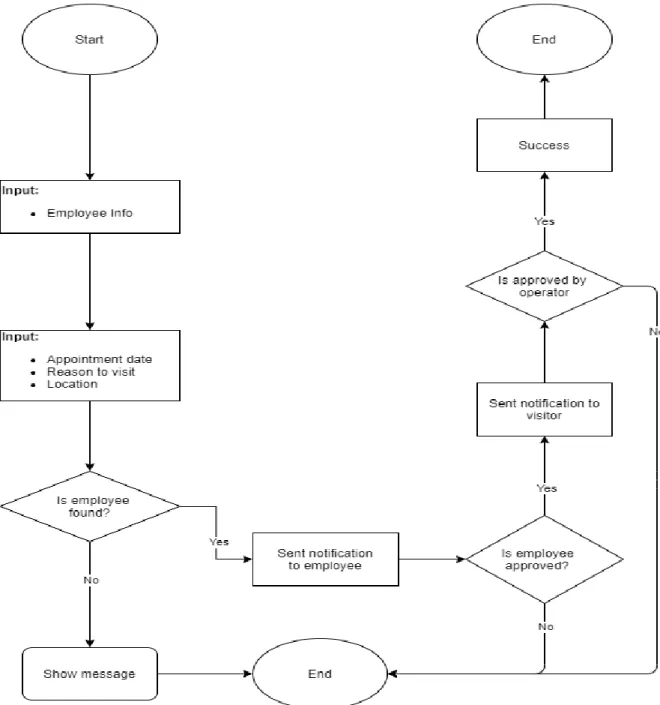
5.2.4 Appointment process from Operator/admin
Fig 5.4: Appointment process from Operator/admin
19
5.2.5 Appointment process from Employee
Fig 5.5: Appointment process from Employee
20
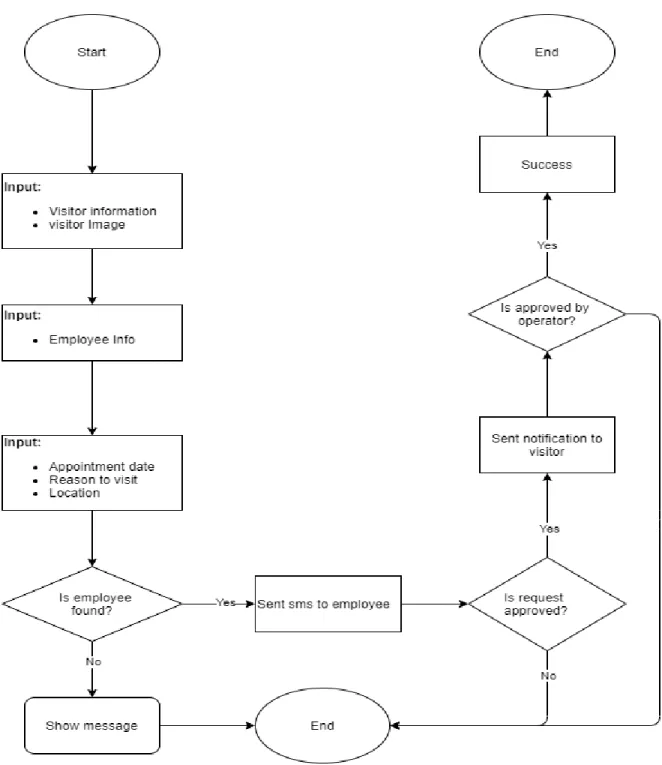
5.2.6 Appointment process from visitor
Fig 5.6: Appointment process from visitor
21
5.2.7 Appointment from a public page
Fig 5.7: Appointment from a public page
22
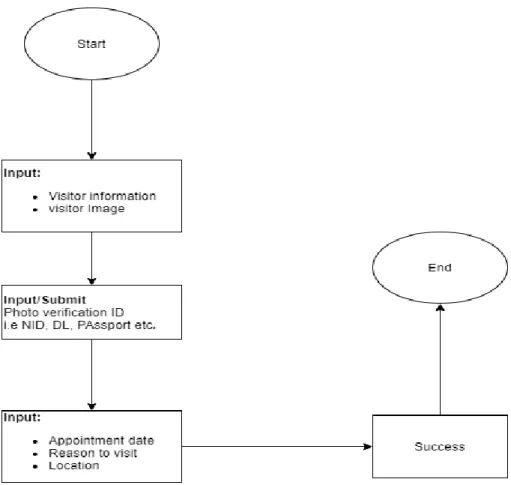
5.2.8 Appointment process for special visitor with NID/DL/Passport from Operator
Fig 5.8: Appointment process for special visitor with NID/DL/Passport from Operator
23
5.3 ENTITY RELATIONSHIP MODEL
Entity Relation model is a graphical representation of the data for an organization. It uses mainly three constructs i.e., data entities, relationship and their associated attributes.
5.3.1 Entities:
An entity is a fundamental thing of an organization about which data may be maintained. An entity has its own identity which distinguishes it from other entity.
5.3.2 Relationships:
A relationship is a reason for associating two entity types and it is called binary relationships because they involved two entity types. Some form of data model allows more than two entity types to be associated. Relationships are represented by diamond notation in the E-R diagram.
5.3.3 Attributes:
Attributes are the descriptive properties possessed by each member of an entity set.
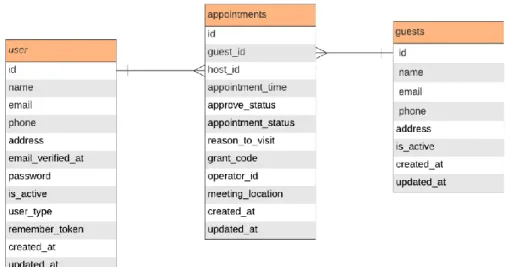
5.4 ER DIAGRAM
Fig 5.9: ER Diagram
24
5.5 SCHEMA DIAGRAM
This is an overview of all the flowchart symbols that you will use when drawing flowcharts and process flow. All these objects are available in create and we can try out a demo or take a look at our sample flowchart for more context.
Fig 5.10: Schema Diagram
25
5.6 COMMUNICATION/NOTIFICATION MEDIUM
• SMS integration (used SOAP client over http) o Provider: Onnorokom SMS (Bangladesh)
• Email integration (used TLS on port 587 for SMTP) o Provider: Google (smtp.gmail.com)
5.7 SUMMARY
When a project is approved then very initial step is planning. Next is to decide project specification and design that where the project scope is to apply. After complete this step need to collect the required equipment that is necessary for approved project. This required equipment is called requirements. Our e-HealthCare management solution project is created by using, MySQL, Nice admin template and HTML5 responsive template.
26
CHAPTER 6
PROJECT LAYOUT & SNAPSHOTS 6.1 PROJECT SNAPSHOTS
Here we are discussing about the whole projects with some snapshots.
6.2 Homepage
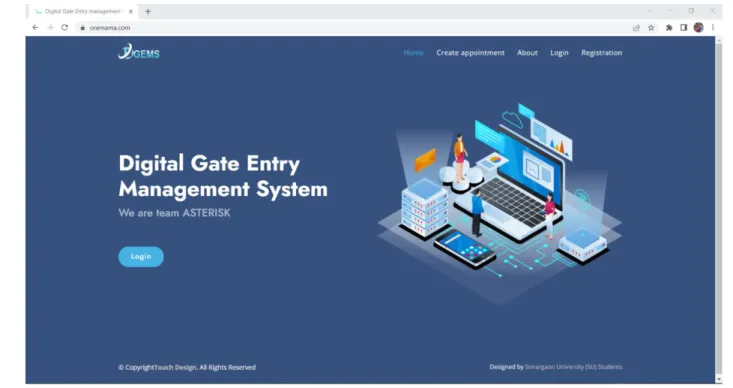
This is a generic landing page for the site. All visitor will see the below page at landing.
Fig 6.1: Homepage
27
6.3 About page
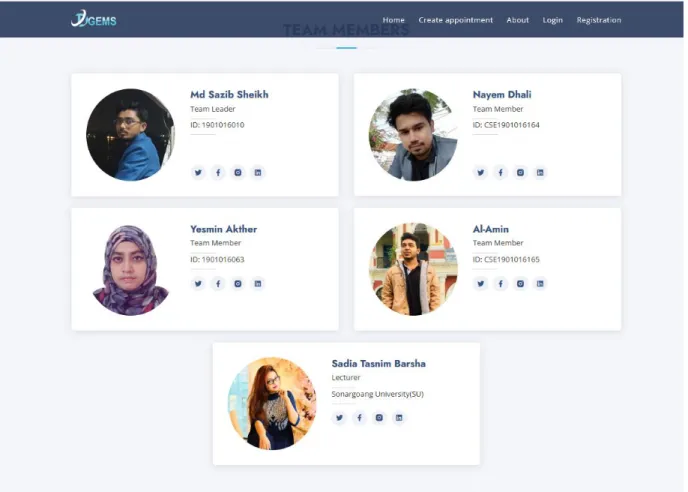
Fig 6.2: About page
28
6.4 Public appointment page
Fig 6.3: Public appointment page
29
6.5 Login page
Fig 6.4: Login page
6.6 Forget Password
Fig 6.5: Forget Password
6.7 OTP PAGES AND SET PASSWORD
Fig 6.6: OTP Pages And Set Password
30
6.8 Registration pages
Fig 6.7: Registration pages
6.9 Registration verify by OTP
Fig 6.8: Registration verify by OTP
31
6.10 Admin dashboard
Fig 6.9: Admin dashboard
6.11 Appointment list
Fig 6.10: Appointment list
32
6.12 Active appointment list (Admin/operator)
Fig 6.11: Active appointment list (Admin/operator)
6.13 Account management page from admin dashboard
Fig 6.12: Account management page from admin dashboard
33
6.14 Account profile update/enable/disable page
Fig 6.13: Account profile update/enable/disable page
6.15 Notifications
Fig 6.14: Notifications
34
6.16 Profile show/update
Fig 6.15: Profile show/update
6.17 Operator dashboard
Fig 6.16: Operator dashboard
35
6.18 Appointment create from admin/operator
Fig 6.17: Appointment create from admin/operator
6.19 Special Entry/Direct access from admin/operator
Fig 6.18: Special Entry/Direct access from admin/operator
36
6.20 Capture visitor image from camera
Fig 6.19: Capture visitor image from camera
6.21 Employee dashboard
Fig 6.20: Employee dashboard
37
6.22 Appointment list from employee dashboard
Fig 6.21: Appointment list from employee dashboard
6.23 Visitor dashboard
Fig 6.22: Visitor dashboard
38
6.24 Appointment list from visitor dashboard
Fig 6.23: Appointment list from visitor dashboard
6.25 Create appointment from visitor dashboard
Fig 6.24: Create appointment from visitor dashboard
39
CHAPTER 7
TESTING 7.1 SOFTWARE TESTING
Software testing is an investigation conducted to provide stakeholders with information about the quality of the product or service under test. Software testing can also provide an objective, independent view of the software to allow the business to appreciate and understand the risks of software implementation. Test techniques include, but are not limited to, the process of executing a program or application with the intent of finding software bugs (error or other effects).
Software testing can be stated as the process of validating and verifying that a computer program/application/product:
1. Meets the requirements that guided its design and development 2. Works as expected
3. Can be implemented with the same characteristics 4. And satisfies the needs of stakeholders
Software testing, depending on the testing method employed, can be implemented at any time in the development process. Traditionally most of the test effort occurs attar the requirements have been defined and the coding process has been completed, but in the Agile approaches most of the test effort is on-going. As such, the methodology of the test is governed by the chosen software development methodology.
7.2 CHARACTERISTICS OF GOOD TEST
An excellent test case satisfies the following criteria:
It has a reasonable probability of catching an error you test to find errors. When searching for ideas for test cases, try working backwards from an idea of how the program might fail. If the program could fail in this way, how could you catch it?
It is not redundant
if two tests look for same error, why run both?
It’s the best of its breed
in a group of similar tests, one can be more effective than the others; you want the best of the breed, the one most likely to find the error.
It is neither too simple nor too complex
You can save testing time by combining two or more tests into one test case.
But don’t create a monster that’s too complicated to execute or understand or that takes too much time to create. It’s often more efficient to run simpler tests. Be cautious when combining invalid inputs.
7.3 BLACK BOX TESTING
The technique of testing without having any knowledge of the interior working of the application is Black Box testing. The tester is oblivious to the system architecture and does not have access to the source code. Typically, when performing a black box test, a tester will interact with the system’s user interface by providing inputs and examining outputs without knowing how and where the inputs are works upon.
7.4 WHITE BOX TESTING
40 White box testing is the detailed investigation of internal logic and structure of the code. White box testing is also called glass testing or open box testing. In order to perform white box testing on an application, the tester needs to possess knowledge of the internal working of the code.
The tester needs to have a look inside the source code and find out which unit/chunk of the code is behaving inappropriately.
7.5 GREY BOX TESTING
Grey box testing is a technique to test the application with limited knowledge of the internal working of an application. In software testing, the term the more you know the batter carries a lot of weight when testing an application. Mastering the domain of a system always gives the tester an edge over someone with limited domain knowledge. Unlike black box testing, where the tester only tests the application’s user interface, in grey box testing, the tester has access to design documents and the database. Having this knowledge, the tester is able to better prepare test data and test scenarios when making the test plan.
7.6 UNIT TESTING
In computer programming, unit testing is a method by which individual units of source code, sets of one or more computer program modules together with associated control data, usage procedures, and Operating procedures, are tested to determine if they are fit for use. Intuitively, one can view a unit as the smallest testable part of an application. In procedural programming a unit could be an entire module but is more commonly an individual function or procedure.
In object-oriented programming a unit is often an entire interface, such as a class, but could be an individual method. Unit tests are created by programmers or occasionally by white box testers during the development process. Ideally, each test case is independent from the others:
substitutes like method stubs, mock objects, fakes and test harnesses can be used to assist testing a module in isolation. Unit tests are typically written and run by software developers to ensure that code meets its design and behaves as intended.
7.7 INTEGRATION TESTING
Integration testing is a logical extension of unit testing. In its simplest form, two units that have already been tested are combined into a component and the interface between them is tested.
A component, in this sense, refers to an integrated aggregate of more than one unit. In a realistic scenario, many units are combined into components, which are in turn aggregated into even larger parts of the program. The idea is to test combinations of pieces and eventually expand the process to test your modules with those of other groups. Eventually all the modules making up a process are tested together. Beyond that, if the program is composed of more than one process, they should be tested in pairs rather than all at once.
Integration Testing identifies problems that occur when units are combined. By using a test plan that requires you to test each unit and ensure you the viability of each before combining units, you know that any errors discovered when combining units are likely related to the interface between units. This meth method reduces the number of possibilities to a far simpler level of analysis.
41
7.8 THE NATURE OF SOFTWARE DEFECTS
Logic errors and incorrect assumptions are inversely proportional to the probability that a program path will be executed. General processing tends to be well understood while special case processing tends to be prone to errors. We often believe that a logical path is not likely to be executed when it may be executed on a regular basis. Our unconscious assumptions about control flow and data lead to design errors that can only be detected by path testing.
Typographical errors are random.
7.9 BASIS PATH TESTING
This method enables the designer to derive a logical complexity measure of a procedural design and use it as a guide for defining a basis set of execution paths. Test cases that exercise the basis set are guaranteed to execute every statement in the program at least once during testing.
7.10 FLOW GRAPHS
Flow graphs can be used to represent control flow in a program and can help in the derivation of the basis set. Each flow graph node represents one or more procedural statements. The edges between nodes represent flow of control. An edge must terminate at a node, even if the node does not represent any useful procedural statements.
A region in a flow graph is an area bounded by edges and nodes. Each node that contains a condition is called a predicate node. Cyclamate complexity is a metric that provides a quantitative measure of the logical complexity of a program. It defines the number of independent paths in the basis set and thus provides an upper bound for the number of tests that must be performed.
7.11 THE BASIS SET
An independent path is any path through a program that introduces at least one new set of processing statements (must move along at least one new edge in the path). The basis set is not unique. Any number of different basis sets can be derived for a given procedural design
7.12 AUTOMATING BASIS SET DERIVATION
The derivation of the flow graph and the set of basis paths are amenable to automation. A software tool to do this can be developed using a data structure called a graph matrix. A graph matrix is a square matrix whose size is equivalent to the number of nodes in the flow graph.
Each row and column corresponds to a particular node and the matrix corresponds to the connections (edges) between nodes. By adding a link weight to each matrix entry, more information about the control flow can be captured. In its simplest form, the link weight is 1 if an edge exists and 0 if it does not. But other types of link weights can be represented:
The probability that an edge will be executed, The processing time expended during link traversal, The memory required during link traversal, or The resources required during link traversal
Graph theory algorithms can be applied to these graph matrices to help in the analysis necessary to produce the basis set.
42
7.13 LOOP TESTING
This white box technique focuses exclusively on the validity of loop constructs. Four different classes of loops can be defined:
Simple loops, Nested loops,
Concatenated loops, and Unstructured loops.
7.14 SIMPLE LOOPS
The following tests should be applied to simple loops where n is the maximum number of allowable passes through the loop:
Skip the loop entirely,
Only pass once through the loop, m passes through the loop where m <n, n – 1, n, n + 1 passes through the loop.
7.15 NESTED LOOPS
The testing of nested loops cannot simply extend the technique of simple loops since this would result in a geometrically increasing number of test cases. One approach for nested loops:
Start at the innermost loop. Set all other loops to minimum values.
Conduct simple loop tests for the innermost loop while holding the outer loops at their
minimums. Add tests for out-of-range or excluded values.
Work outward, conducting tests for the next loop while keeping all other outer loops at
minimums and other nested loops to typical values.
Continue until all loops have been tested.
7.16 CONCATENATED LOOPS
Concatenated loops can be tested as simple loops if each loop is independent of the others. If they are not independent (e.g., the loop counter for one is the loop counter for the other), then the nested approach can be used.
7.17 UNSTRUCTURED LOOPS
This type of loop should be redesigned not tested!!!
43
CHAPTER 8
LIMITATIONS, PSOT IMPLEMENTATIO &CONCLUSION 8.1 LIMITATION
There are few known dependencies in this project concept.
An employee user has to have internet accessibility to grant an appointment request Currently there are few models support of webcam driver which is being used to capture visitor picture while making an appointment.
User interface design should have more convenient for mass user This site is not fully compatible with GDPR compliance.
This model only fits with big, structured and secured premises.
8.2 FUTURE WORK
This idea is a brain child project of us from a very long time. We did market research on this project scope and seems this market of technology is still somewhat untapped. Though some big companies run their own software to maintain the entrance security control but it is not available for mass market commercially. The project is currently hosted in a live domain.
We are working on the enhancement of this project concept and intended to approach to potential client. Before that, we will solidify and enhance the project features, UI and UX more towards commercialization.
8.3 CONCLUSION
This project is intended to demonstrate the acquired knowledge to develop a full stack web-based application. We have used Laravel 7.1 framework based on PHP 7.2+ to develop this project. This project has a very high real field opportunity to implement.
The user interface, the application designed is somewhat conceptual of ours and it should be modified according to the environmental and client requirement. Despite of putting our full effort, there are many portions that can be enhanced and performance can be tuned. We are hoping to bring this project in real life application in the mass industry as a commercial project.
44
REFERENCES
[1] D. Karyono, “Perancangan Sistem Informasi Akademik Berbasis Web Menggunakan XAMPP dan Dreamweaver di SMPN 1 Kauman Ponorogo,” Skripsi, 2013
[2] S. Hossain, “W eb Application Development with Laravel Framework,” p. 34.
[3] C. Supaartagorn, “PHP Framework for Database Management Based on MVC Pattern,” Int. J.
Comput. Sci. Inf. Technol., vol. 3, no. 2, pp.251–258, Apr. 2011, doi: 10.5121/ijcsit.2011.3219.
[4] A. Mishra, “Critical Comparison of PHP And ASP.NET For Web Development,” vol. 3, no.
7, p. 3, 2014.
[5] M. P. Putri, H. Effendi, S. PalComTech, and J. B. R. No, “Implementasi Metode Rapid Application Development Pada Website Service Guide ‘Waterfall Tour South Sumatera,” vol.
07, p. 7, 2018.
[6] Y. A. Binarso and E. A. Sarwoko, “Pembangunan S istem Informasi Alumni Berbasis Web pada Program Studi Teknik Informatika Universitas Diponegoro,” vol. 1, no. 1, p. 13, 2012
[7] M. Laaziri, K. Benmoussa, S. Khoulji, and M. L. Kerkeb, “A Comparative study of PHP frameworks performance,” Procedia Manuf., vol. 32, pp. 864–871, 2019, doi:
10.1016/j.promfg.2019.02.295.