©Daffodil International University i | P a g e Internship on IPTV Broadcasting for Campus TV
Submitted By:
Kazi Md Arifur Rahman
ID: 171-15-9574
This Report Presented in Partial Fulfilment of the Requirements for the Degree of Bachelor of Science in Computer Science and Engineering
Submitted To:
Fahad Faisal
Assistant Professor
Department of Computer Science and Engineering Daffodil International University
DAFFODIL INTERNATIONAL UNIVERSITY
DHAKA, BANGLADESH MAY 2019
©Daffodil International University i | P a g e APPROVAL
This Project/internship titled “Internship on IPTV Broadcasting for Campus TV”, submitted by Kazi Md Arifur Rahman, ID No: 171-15-9574 to the Department of Computer Science and Engineering, Daffodil International University has been accepted as satisfactory for the partial fulfillment of the requirements for the degree of B.Sc. in Computer Science and Engineering and approved as to its style and contents. The presentation has been held on 31 May,2021.
BOARD OF EXAMINERS
________________________
Dr. Touhid Bhuiyan Professor and Head
Department of Computer Science and Engineering Faculty of Science & Information Technology Daffodil International University
Chairman
________________________
Zahid Hasan Assistant Professor
Department of Computer Science and Engineering Faculty of Science & Information Technology Daffodil International University
Internal Examiner
©Daffodil International University ii | P a g e ________________________
Md. Riazur Rahman Assistant Professor
Department of Computer Science and Engineering Faculty of Science & Information Technology Daffodil International University
Internal Examiner
________________________
Dr. Md Arshad Ali Associate Professor
Department of Computer Science and Engineering Hajee Mohammad Danesh Science and Technology University
External Examiner
©Daffodil International University iii | P a g e
DECLARATION
We hereby declare that, this Internship has been done by us under the supervision of Fahad Faisal, Assistant Professor, Department of CSE Daffodil International University. We also declare that neither this project nor any part of this project has been submitted elsewhere for award of any degree or diploma.
Supervised by:
Fahad Faisal Assistant Professor Department of CSE
Daffodil International University
Submitted by:
Kazi Md Arifur Rahman ID: 171-15-9574
Department of CSE
Daffodil International University
©Daffodil International University iv | P a g e
ACKNOWLEDGEMENT
First I express my heartiest thanks and gratefulness to almighty God for His divine blessing makes me possible to complete the final year internship successfully.
I really grateful and wish my profound my indebtedness to Fahad Faisal, Assistant Professor, Department of CSE Daffodil International University, Dhaka. Deep Knowledge
& keen interest of my supervisor in the field of “Internet Television Technical operation”
to carry out this internship. His endless patience ,scholarly guidance ,continual encouragement , constant and energetic supervision, constructive criticism , valuable advice ,reading many inferior draft and correcting them at all stage have made it possible to complete this internship.
I would like to express my heartiest gratitude to Dr. Touhid Bhuiyan, Professor and Head, Department of CSE, for his kind help to finish my internship and also to other faculty member and the staff of CSE department of Daffodil International University.
I would like to thank my entire course mate in Daffodil International University, who took part in this discuss while completing the course work.
Finally, I must acknowledge with due respect the constant support and patients of my parents.
©Daffodil International University v | P a g e
ABSTRACT
Internet technology has now become one of the tools in virtual communication around the world. In today's world, information is being sent from one end of the earth to the other in a matter of seconds through the use of internet technology. Where in many important places of the world such as (health, transportation, communication) has become completely dependent on internet technology, then why the entertainment or media will lag behind?
This is my report on his TV series INTERNET TV. For mobile operators and infrastructure providers, large-scale, Internet-based mobile TV implementation poses both enormous opportunities and challenges. A measurement-based analysis of a large-scale mobile TV service offering in Bangladesh. Over 165.57 million unique mobile devices and 40 million people are used personal computer There were 66.44 million internet users in Bangladesh in January 2020. Mobile viewing habits vary from those of landline-based IPTV and VoD systems. In comparison to landline-based systems, the average viewing time is slightly shorter, and the channel popularity distribution is more skewed towards top-ranked networks.
©Daffodil International University vi | P a g e
TABLE OF CONTENTS
CONTENTS PAGE
Board of Examiners i
Declaration ii
Acknowledgements iii
Abstract v
CHAPTER 1: INTRODUCTION
Introduction 1-2
About Internship 1-2
About Campus TV 2-3
Significance of the Internship 3-4
Work experience of the internship 4-6
Recommendation 6-7
CHAPTER 2: MY WORKS ON CAMPUS TV SERVER SECTION
APPENDIX
8-42Conclusion 43
REFERENCE
44PLAGIARISM REPORT
45©Daffodil International University vii | P a g e
LIST OF FIGURES
FIGURES PAGE NO
Figure 1.1: Streaming Feature 8 Figure 1.2: Server Download Process 9 Figure 1.3: Server installation process 10 Figure 1.4: streaming system working
Process
11 Figure 1.5.1: VOD user Interface 12
Figure 1.5.2: Block Diagram 12
Figure 1.6: Installation Boot Process 17 Figure 1.7: Language selection process 18
Figure 1.8: Keyboard Layout 19
Figure 1.10: Installation Method Selection 20 Figure 1.11 Network configuration 20 Figure 1.12: Storage configuration 21 Figure 1.13: Software installation 22 Figure 1.14: Installation Complete process 22 Figure 1.15: Application installation in
windows
26 Figure 1.16: Install Complete 27 Figure 1.17: Connecting Media 32 Figure 1.18: Blank Interface 34 Figure 1.19: Display Preview for Editing 34 Figure 1.20: Feed Switching Effect Control 35
Figure 1.21: Live Display 35
Figure 1.22: Transition Layer 36 Figure 1.23: Add content in the layer 36 Figure 1.24: Video call option 37
Figure 1.25: Real Time Set 38
©Daffodil International University viii | P a g e Figure 1.26: Countdown Timer 39
Figure 1.27: Carousel Size processing 40 Figure 1.28 :Production Layer Unit 41 Figure: 1.29 Network Content Source 42
©Daffodil International University 1 | P a g e
CHAPTER 1 INTRODUCTION
Mobile users can now watch live streaming TV content thanks to the exponential growth of Internet video apps and the widespread availability of smart phones. Initial deployments of mobile TV, an evolving technology over mobile networks, have been seen all over the world.
To help mobile TV implementations, all digital broadcasting technologies (e.g. DMB, CMMB, MediaFLO) and cellular Internet data (e.g. 3G) related technologies may be used.
Although one-way broadcast is the most similar to two-way broadcast, Traditional broadcast television reception, as well as broadcast-based mobile television services, generated mixed commercial results. FLO TV, a MediaFLO-based channel in the United States, was shut down in March 2011 due to a lack of viewers. The T-DMB-based service gained significant market share in South Korea, with over 25 million devices sold in the third quarter of 2009.
On the other hand, video streaming services based on mobile Internet connections have more versatility and interactivity due to the two-way Internet link. Mobile video traffic is increasingly becoming the dominant medium in mobile networks, thanks to the proliferation of mobile applications with video streaming capabilities. According to a new analysis by Cisco Systems, mobile video accounted for 49.8% of overall mobile traffic in 2010 and would surpass 50% in 2011 [1].
My findings, which are focused on a large amount of calculated data, have a number of important implications for potential mobile TV deployment. First, deploying large-scale mobile TV services over 3G and WiFi networks is both feasible and realistic. Second, because of the extremely skewed channel popularity distribution, an efficient content distribution network (CDN) for the most common channels could be designed. Third, the lognormal distribution of channel sojourn time over a limited period of time means that viewers are aware of traffic volume costs, and television programming must be tailored to
©Daffodil International University 2 | P a g e mobile networks.both in terms of the scale of the screen display and the shorter viewing times
ABOUT INTERNSHIP
An internship is a training and preparation program for technical occupations. Internships are also important educational opportunities for college students and are almost a requirement for any graduate. Employers are looking for "real world" experience from college graduates, and internships are one of the best opportunities for students to get that experience.
Television is one of the most effective means of disseminating information to people in remote areas at the same time. Magazines, in addition to radio and newspapers, are forms of mass media. Television is now the most widely used medium in the world of media.
Only a few moments ago, I was able to complete my internship at Campus TV, and I am very proud of that.
ABOUT CAMPUS TV:
Campus TV (South Asian Television) is a privately owned high definition Internet-Based channel in Bangladesh that first broadcasted on December 20, 2016. Campus TV is a sister concern of the Daffodil Family, a well-known education network and IT logistical support provider in Bangladesh. Campus TV employs cutting-edge technology to broadcast educational content and produce programs over the Internet. The channel promotes World Education system to the mass students via workshop,seminar, Talkshow, Industry academia Lectur Series. Campus TV also hosted the world's largest Educational show on the planet, ICT Cernival, Get in teh Ring, My E-kids, which was at the time one of the most popular series on television. The channel is owned by Daffodil Family, one of the largest Education Network, ISP, Computer Business Company in Bangladesh. The company's head office are located in Dhanmondi, Dhaka.
©Daffodil International University 3 | P a g e News room of Campus TV: The core section of all television networks is the newsroom.
Many computers with internet access are available in the Campus TV channel. Four machines are available for the newsroom editor at the national desk, four for the foreign desk, three for the business desk, two news presents desk, five producers' desks, and ten for assign national desk reporter.
Newsroom are used six computers for the central desk. There is a News Editor who works there. The Ticker headline is shown on one of the computers. Many students of daffodil international university work in different shifts together as an internship. they retain a two- hour time slot. a change Some students work in the morning, some in the evening shift.
In international desk,Campus TV gathers international news from industrialist, Professors and some international motivational speakers. They send mails, to the international students affairs office arrange the seminar, Talk-Show then International affairs arrange on it for recording or live.
The Editing Panel is another segment where footage or videos are edited and screened for playback. In the newsroom of Campus TV, there are fifteen editing tables. The panels' temperature is too low to keep their CPU running. As a result, some editing panel workers come to work dressed in winter attire. Before the news is edited, Reporter on the desk and reporter in the field given their voiceover on captured footage in the editing room.
SIGNIFICANCE OF THE INTERNSHIP:
Internships are one of the best ways to gain professional experience. It opens the text book's doors to the outside world. We read a lot more in our four-year honors program, including history, Computer programming, Software analysis, Networking and many more.
But before arriving in Campus TV many more things were unknown to me. Like what is actually broadcasting system? How to complete a Television center networking. First time I didn’t know how broadcasting system works. But after joining for internship the slowly became very easier for me. If a supervisor helps him/her to understand, any one can easily understand about how the media center runs. I have been in Campus TV for 3 months
©Daffodil International University 4 | P a g e internship. I have selected my work area in Networking and broadcasting section. There is a benefit to work in the Television centre. It helps to know about what is going on virtual life in the world. It also helps to know about many more networking, transmitting, frequency etc. My beat is mainly server section but here is a saying there is no finishing of learning. So I did what I could to learn the thing. And the Campus TV employees are so helpful that they called me and told me a lot of things. It is a valuable learning experience for my potential career. It also enhances the Linux server, Windows Server, Networking, Video Transferring, Video on Demand server and the modern devices. Internships are extremely important in order to meet the requirements for an honours degree and to prepare oneself for a career.
WORK EXPERIENCE OF THE INTERNSHIP:
I have worked mainly at the Server section. I have learned a lot from there. Campus TV is a Educational internet based channel. IT People are work at as shifting time. My office hour is form 09:00am to 5:00 pm. It was 8 hours.
My Tasks at Campus TV:
● Connecting national and international guest using NDI protocol,
● Server configuration and log monitoring.
● FTP Server maintenance.
● VOD server configuration and adaptive video transmission.
● Chromatography.
● Streaming and Networking.
● Mikrotik Router Configuration.
My three-month internship program at Campus TV was full of new experience.I got an opportunity to broaden my horizons as much as possible. Authority give me chance to work with different types of digital equipment’s. In fact, if I recall my first day on the jobthen, it appears to me, until the very last day. I've had many ups and downs on my journey. At Campus TV, I have worked on Real time protocol server, Vlan, Vps, Video on demand
©Daffodil International University 5 | P a g e server, Networking, FTP server, email server, web server, Application and some programming languages.
On the first day of my work at Campus TV, Head of IT Dr. Md Nadir Bin Ali had introduced me to the office's other employees. In fact, I was impressed with their kind demeanor. much more pleasant and unwanted Then there was my boss at Campus TV had provided a task to configure a Real Time protocol server. I had a lot of problems at the time. To begin with, I lacked sufficient knowledge of Linux servers and RAID mirroring at the time. For this reason, on the first day, I can’t complete my task. I had become accustomed to the official environment after a week. Throughout these seven days, whenever I felt mentally down, my supervisor kept me motivated.
I was already aware of the value of IT infrastructure in real life during my academic years, thanks to my teachers. However, in my practice field, I can put everything I've learned throughout my academic career to use. I previously worked at Campus TV in the data center and on the user end. Now I understand the value of information technology logistics.
I am confident in my ability to configure any type of server and re-construct networking in the Data Center. I've encountered several instances where I've had to solve server problems on my own. That is, I spend the entire day analyzing the server to determine what is wrong.
Indeed, it was quite difficult at the time. However, with each passing day, I've gained confidence in my work. Now I am capable of dealing with any type of work pressure and attempting to do so flawlessly.
My supervisor at Campus TV, Dr. Md Nadir Bin Ali, had experimented with my working capacity. That is why, in addition to tropology, he suggested that I add a feature based on the various types of Requirements. At first, it was challenging for me because I was unfamiliar with streaming technology. However, I was gradually improving my ability to add various types of features to the user interface. I obtained a large number of resources from GitHub's free and open-source repositories.
Every operation or piece of equipment at the television center runs like a train. I'm referring to the fact that an IT professional is constantly under pressure to ensure that operations run
©Daffodil International University 6 | P a g e smoothly. I, too, had felt the pressure. Indeed, it was impossible to operate all equipment flawlessly. Throughout my three-month internship, I was constantly confronted with this issue.
Additionally, I had encountered a variety of works. For instance, I've recoded video using a professional camera, live telephone connectivity, audio equipment, chroma background removal, and video editing. Here I've learned that I must be confident and certain about whatever information I obtain from a particular correspondent.
ACHIEVEMENTS FROM INTERNSHIP
Internships are extremely important for computer science and engineering students. A student may use it to chart his or her own path to a successful career. Internships provide students with the opportunity to interact with industry professionals and meet new people.
I began my internship at Campus TV on October 11, 2019 and have gained a great deal of experience. Because of my internship, I was able to learn about various media colleagues, media houses, and media working systems. My communication skills have also developed, which will come in handy in the near future.
Working at a media house such as Campus TV has made me more dynamic than ever. As an IT trainee, I can now evaluate myself as a self-assured, self-contained, and disciplined person.
For this internship project, I had the opportunity to get a firsthand look at the IT industry.
It provided me with the ability to prepare myself. It provided me with motivation to advance my career in this area.
RECOMMANDATION
It's impossible for someone in an internment camp to conceal everything in a short period of time. I was especially unable to use the broadcasting system VSAT at the Frequency.
Interns treated me as a junior, despite my status as a sophomore. Therefore, they're all unsympathetic to me. They gave me very little information. I was unable to locate any running gear in the time allowed. To sum up the points of learning, these are the main
©Daffodil International University 7 | P a g e points. They didn't have much time to give me any type of formal training. Because they are always busy with their work, they are seldom on time. The main problem is that I was not a member of their staff. Since my authority did not grant me access to ongoing operations, I'm unable to work on them. For testing purposes, I employed some of the backup equipment. If things went well, I will make use of this in day-to-day operations.
As a student of CSE, one should have the spirit of preparing for both the indoors and the outdoors. Therefore, I believe that internship experience ought to last at least five (5) or six (6) months. It's also important for students to participate in a variety of projects as part of class assignments. We'll benefit from this as it will increase our confidence and skill level.
Interns should have a basic knowledge of computer programming, operating systems, networking, and information security.
©Daffodil International University 8 | P a g e
CHAPTER 2
MY WORKS ON CAMPUS TV SERVER SECTION Operational Logistics: Three types of logistics are needed for operational 1. Streaming engine server
2. Automation Play out Server 3. Studio Equipments
1.1 Streaming engine server: Wowza is the best server framework for streaming engines.
The Wowza Streaming Engine is designed to provide professional-grade live streams.
Stream high-definition, low-latency video and audio to any user at any scale.
Flexible and Customizable Gain more control over streams and tailor them to
client’s specific requirements. Live, linear, and on-demand content can
all be streamed to any device.
Built to Build On
With a comprehensive suite of tools, services, and APIs,
anyone can shorten your development cycle and build creative streaming solutions..
Optimized for Scalability
Modular architecture, automated management and tracking, strong CDN integration, and versatile deployment options all contribute
to meeting the current and potential scaling requirements.
Figure: 1.1 Streaming Feature
©Daffodil International University 9 | P a g e 1.2 Wowza Video Streaming Engine Download and install.
1.2.1 If your device does not currently have an installed Streaming Engine, go to the Wowza website and click Download button after that open a page and choose the proper operating system from the drop-down box.
Figure: 1.2 Server Download Process
1.2.2 After downloading the installation file , follow the bellow instructions:
Windows operating system: Double-click the installation file Wowza Streaming Engine windows-installer.exe.
©Daffodil International University 10 | P a g e Figure: 1.3 Server installation process
• Mac operating system – Double-click the Wowza Streaming Engine osx-installer.dmg file, then the Wowza Streaming Engine-osx-installer package icon.
• Linux operating system – Go to the directory where you save the wowza streaming package and run installation command following the instructions:
Campus TV is a system that enables the delivery of internet television services through the internet protocol suite's architecture and networking protocols across a packet-switched network infrastructure.
Campus television services are categorized as follows: Live Streaming, Time shifted programming, and video on demand.
This report discusses the Campus TV architecture, network technologies, implementation of campus TV, Hardware and software of Campus TV are described.
©Daffodil International University 11 | P a g e Figure: 1.4 streaming system working Process
Campus TV Features
Campus TV is equipped with a variety of functions. These characteristics include the following:
● Support Live Streaming: Campus TV Allow service standard live streaming, high definition TV(HDTV).
● Time Shifting: Campus TV in conjunction with a digital video recording enables program material to be time-shifted.
● Accessible on multiple devices: Campus TV material may be seen on non-smart TVs as well. Viewers often visit through their own computers and mobile devices.
Video on Demand
This is to enable viewers to watch whatever programming they want, whenever they want.
However, as technology advances and prices fall, video on demand (VOD) becomes increasingly attractive.
©Daffodil International University 12 | P a g e Video on Demand (VOD) is based on video programs being saved and then provided to the viewer whenever necessary. This video is stored to a central server, which is capable of concurrently showing programs to hundreds of viewers while also having its content archived on many locations.
Because Unicast link is required to be established between the customers' STB and the providing streaming server, there is a requirement for such a connection. Real-time streaming protocol offers an easy-to-follow protocol for handling the Trick Play functionalities (pausing, rewinding, and restarting) (RTSP). When it comes to VOD, MPEG-2 and MPEG-4 are the most often utilized codecs.
Figure 1.5.1: VOD user Interface
Figure: 1.5.2: Block Diagram
Server Installation: Campus TV used the wowza streaming server. The server requirements and installation procedure are described below.
Server Requirement:
©Daffodil International University 13 | P a g e Streaming Delivery: Multi-Protocol, Multi-Client
©Daffodil International University 14 | P a g e
©Daffodil International University 15 | P a g e
©Daffodil International University 16 | P a g e
©Daffodil International University 17 | P a g e Operating System Installation: We used Ubuntu server for using Wowza streaming engine.
Ubuntu Installation:
1. Boot from the installation media.
Perform the following steps to start the installation process:
a) Go ahead and use your computer's DVD drive to upload the Ubuntu DVD (or insert the USB stick or other install media).
b) Your machine should be restarted.
After a few seconds, you should see notifications on your phone similar to the ones below...
Figure: 1.6: Installation Boot Process
While most computers are capable of booting automatically from a USB or DVD drive, this feature can be disabled in some cases help speed up boot times. If you do not see the startup will display the message and the subsequent "Welcome" screen, you must configure your machine to boot from the install media.
©Daffodil International University 18 | P a g e When the machine boots, an on-screen message should prompt you to select a key to access settings or a boot menu. Depending on the manufacturer, this may be Escape, F2, F10, or F12. Simply restart your device while holding down this key, select the Ubuntu installation media drive from the boot menu that appears.
2. Select your preferred language.
Following the boot notifications, a 'Language' menu will appear.
Figure: 1.7: Language selection process
To do this, click the Up, down, and Enter keys in the menu to go through the menu and choose the language you wish to use, as the message instructs.
3. Select the appropriate keyboard configuration.
The application will then show a message telling you to choose layout for keyboard and, if necessary, the version before you need to type something in.
©Daffodil International University 19 | P a g e Figure: 1.8 Keyboard Layout
If you're not sure the version you like, using the default installation process; After the Ubuntu Server OS is installed, you'll be able to test and adjust your preferences more easily.
Figure: 1.9
4. Select your installation method.
©Daffodil International University 20 | P a g e Now it's time to choose what you want to install. On the menu, there are three choices:
Figure: 1.10: Installation Method Selection
The bottom two choices are used to mount individual components of an MAAS installation.
If you're downloading MAAS, you can consult the MAAS documentation for clear information! This guide assumes you choose the first choice, Ubuntu Installation.
5. Networking
Any network connections will be automatically detected and attempted to be configured via DHCP by the installer.
Figure: 1.11: Network configuration
©Daffodil International University 21 | P a g e This screen is normally automatic, and you won't have to enter anything; it's only for details.
Set up your storage.
The following move is to set up storage. It is recommended that you dedicate an entire disk or partition to running Ubuntu.
Figure: 1.12: Storage configuration
The manual choice allows you to pick and reorganize partitions on any attached drives if you want to install more complicated system.
6. Software should be installed.
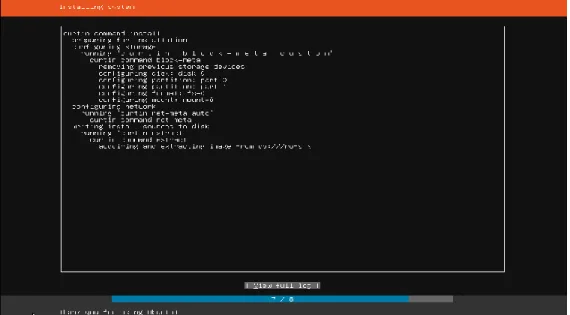
After you've entered all of the necessary details, the screen will display the installer's progress. Ubuntu Server now installs a condensed collection of server-related applications.
This significantly reduces the time required for installation and configuration. Of course, you can integrate any kind of extra software if you need after completing the installation.
©Daffodil International University 22 | P a g e Figure: 1.13: Software installation
7. Completed installation
When the installation is finished, you'll see a message similar to this on your phone.
Figure 1.14: Installation Complete process
Remember to uninstall the installation media before rebooting and starting the server. Hello and welcome to Ubuntu!
©Daffodil International University 23 | P a g e Start the wowza streaming engine installation procedure after you've finished installing the server operating system.
⮚ Wowza Streaming Engine is available for download and installation.
1. Accept the terms of the license agreement through the installation wizard.
2. Enter a wowza streaming engine license key that is legitimate.
If you purchased a new license key, it will be included in the email from Wowza Sales.
Find license key in the directory of [install-dir]/conf/Server.license file if you have a previous version of Wowza Streaming Engine enabled.
3. For an Admin account, need to create a user name and password for first time access. The case of the user name and password is significant.
⮚ Make sure Wowza Streaming Engine is up and running.
Open a web browser and type the following URL to see if Wowza Streaming Engine is up and running:
http://[wowza-server-ip-address]:1935 ,
where [wowza-ip-address] is the Wowza Streaming Engine server's IP address or domain.
Consider the following scenario: http://campustv.ac:1935
The browser shows the Wowza Streaming Engine version number if Wowza Streaming Engine was configured correctly. If it doesn't, make sure the server software is up to date and that TCP port 1935 is available on your router, firewall, and iptables.
⮚ Go to Wowza Streaming Engine Manager and log in.
©Daffodil International University 24 | P a g e Now you have confirmed Streaming Engine is properly installed, log in to the Engine Manager.
Wowza Streaming Engine Manager can be used with many other browser plugins that facilitate HTML5 and Cascading Style Sheets level 3. (CSS 3). For the best performance, we suggest that you're using the most latest version of Google Chrome.
By default, Wowza Streaming Engine wants to accept connections from Wowza Streaming Engine Manager on localhost. For information on connecting to Wowza Streaming Engine on a non-localhost device, see Connect to remote Wowza Streaming Engine instances.
Open your web browser and type your server address like as:
http://[wowza-server-IP-Address ]:8088/enginemanager
where [wowza-server-ip-address] is will be your server's local or public IP address or configuration host address that you want to test. Consider the following scenario:
http://campustv.ac:8088/enginemanager
You specified a login Name and secrete when you installed Wowza Streaming Engine.
Click Sign In.
Now that the server is set up, it's time to set up the real-time streaming workstation.
©Daffodil International University 25 | P a g e 1.2.3 Accept the terms of the license agreement in the installation wizard.
1.2.4 Enter your license key which is provided your purchases time.
The license key should be included with the email from Wowza Sales if you just purchased a new license key. The previous version of Wowza Streaming Engine is enabled if you find the license key in the [install-dir]/conf/Server.license file..
1.2.5 For an Admin access, need to create a user name and password. This set of credentials will be used to gain access to the browser-based Wowza Streaming Engine Manager. It is very important that the password and username case be taken into consideration. Adjust or confirm the installation position.
Wowza Streaming Engine places files in the following locations by default:
● Windows – /Program Files (x86)/Wowza Media Systems/Wowza Streaming Engine 4.8.5/
©Daffodil International University 26 | P a g e Figure: 1.15 Application installation in windows
1.2.6 Make any necessary adjustments or confirmations to the Startup Configuration option you want to use.
Wowza Streaming Engine can be run as a device service or in autonomous mode from a command shell. By default, the Start Wowza Streaming Engine actually scan box is selected, which tells the server program and Wowza Streaming Engine Manager to start as system services.
● System services running as a system service are commonly found in server implementations where the server will automatically restart when the device is rebooted.
● Running the server in standalone mode allows it to be started and stopped easily, which is ideal for building custom applications. For information on starting and stopping Wowza Streaming Engine in standalone mode, see Start and stop Wowza Streaming Engine.
1.2.7 Click Finish.
©Daffodil International University 27 | P a g e Figure: 1.16 Install Complete
Mode of operation: Basically Campus TV conducts activities in following three mode.
1. Recorded Mode 2. Live Mode
Recorded Mode: All recorded program broadcast 24/7 as a weekly SIX hour schedule based from PCR location.
Live Mode: Currently four facilities are available in the live production.
1.1 Live from remote location 1.2 Live from studio
1.3 Recorded Live
1.4 Live from post production room
Live from remote location: Campus tv streamed any live event through over internet from any location using some hardware and software logistics.
a) Streaming software ( Wirecast and OBS ) b) Streaming Engine ( Wowza )
c) Capture card ( Audio and Video )
d) Video switching panel ( For Multi-cam system)
©Daffodil International University 28 | P a g e Streaming Software: Randomly we using basically two software for live event streaming 1. Wirecast Playout
2. OBS ( Open broadcasting system)
Wirecast: wirecast is a popular shot switching streaming software. It’s a user friendly application. Many types of features are available for the live streaming in this software. 29 of streaming destinations source are supported on this software.
Available features:
A. Capture: Unlimited Source (Camera, microphone, webcams, IP Cams). Here we can select separate audio source for separate shot)
B. NDI/Desktop/Web capture: Capture everything on your computer screen or on other computers. Auto-detect NDI and Syphon sources. Web browsers allow you to view live web pages.
C. Professional Audio: Multi-channel audio in, ASIO supported, Core and WASAPI Audio supported devices. Mixing eight different types of audio tracks, and supported FX filtering mood and processing.
D. Remote Conferencing: Rendezvous person-to-person video call conferencing system built-in to Wirecast. Send a link to the guests for join your live broadcast.
E. Shoot Replay, Score boards, Timers: Wirecast is a best application for streaming a sports.
there have many professional features.
F. Title ticker: Wirecast has some built-in lower third virtual studio and title ticker.
Limitation of current version of Wirecast: All available features is amazing for IP TV streaming. But have some of limitation for the user like as this software can’t connect SSL secured streaming server. Example (rtmp://203.190.11.101/live) (rtmps://203.190.11.101/live) For the limitations of wirecast we can’t direct broadcast to facebook or any types of SSL secured destination.
That’s why we use another software OBS for broadcasting to SSL secured destination.
Here you get booth of software user manual.
©Daffodil International University 29 | P a g e 1. wirecast manual
2. OBS Manual
Capture card (Audio and Video): We capture any camera feed to PC using a capture card. There are many types of capture card are available in market. We choose
a) Black Magic
b) Usb3.0 Capture card
Black Magic: Shuttle pro capture card allows you to capture and playback within the most incredible quality video using HDMI and component analog video in both SD and HD.
Thunderbolt™ usb cable
It's simple to add Intensity's incredible consistency to your workstation! Intensity comes in a variety of models that link to PC via USB 3.0 and ThunderboltTM technology for the highest data transfer speeds possible. With portable devices that are operated by a computer link, you can now catch the highest uncompressed 1080HD video! That's a true portable device!
Working with compressed and uncompressed video in standard definition PAL/NTSC up to maximum 1080HD video is possible with Intensity Shuttle.
©Daffodil International University 30 | P a g e Highest Quality Analog Connections The RCA connectors on the Intensity models enable you to use any analog video or audio equipment. Compatibility with analog part, composite, and S-Video in NTSC or PAL, as well as analog audio True HDMI Digital Connections
Intensity comes equipped with the highest- quality HDMI connections, which are the industry norm for consumer digital video equipment. HDMI links TVs and other devices to provide full HD video and digital audio.
Limitation of Intensity Shuttle Pro:This card has a lot of great features. However, this card contains some difficulties. As an example, this card necessitates the use of a firmware program and the constant opening of integration applications, which slows down the workstation. When using streaming software to bind to this computer, the integration software sometimes fails.
Another disadvantage of this unit is that it cannot be used for an extended period of time.
It's a device that generates heat. This system shuts down automatically if it gets too hot.
Usb3.0 Capture card: Usb3.0 Capture lets you capture in the most incredible quality HDMI HD.
©Daffodil International University 31 | P a g e USB 3.0
It’s easy to add the capture card to your laptop, desktop or computer workstation! USB 3.0 capture card is available in different models that connect to computers using USB 3.0 technology with the fastest data transfer speeds. With portable devices that are operated by a computer link, you can now catch the highest uncompressed 1080HD video.
Working with compressed and uncompressed video in standard definition HD up to maximum 1080HD video is possible with a USB 3.0 capture card.
Limitation of USB 3.0: This card has a lot of great features. However, in wirecast and Vmix streaming software, this unit can accommodate HDMI cables up to 5 miter. If you try to use an HDMI cable with a 15-degree bend, it will only work with the OBS streaming app. This unit, on the other hand, can be used for casting all day.
480p HD
How to connect from
©Daffodil International University 32 | P a g e Figure 1.17: Connecting Media
Live from studio: Campus TV streamed any live event (Talk show, News) through over internet from studio using some hardware and software logistics.
My works on Campus TV Operation and Streaming Encoding Section:
Application Requirement:
1. Microsoft .net 3.5 or higher 2. Wirecast , Vmix, OBS etc.
3. Necessary Hardware Driver.
Telestream Wirecast was used in our setup. It is the most popular and user-friendly streaming app. We used this program in our broadcasting system because of this.
Wirecast makes it simple to broadcast and create professional footage. With Wirecast, you can transform your laptop or tablet into a television studio.
Wirecast Workflow: Wirecast is an application for switching live video. Encoding video for multiple platforms supported. It usually sits in the center of a broadcasting workflow due to its flexibility in managing a range of inputs and outputs.
The basic function of Wirecast is in general, you will add live input devices and capture video (such as camera feeds, iOS/Android cameras, Present computer desktops, website feeds, and more), make show for streaming using different types of tools like as (Chroma
©Daffodil International University 33 | P a g e key, titles, graphics, Sports scoring, and more), after that you can stream to the web, LAN, or record it locally.
Cameras, capture cards, and audio devices are all supported by Wirecast. It prepares media before streaming it to the Internet, CDNs, multicast/unicasts via LAN, virtual performance, or a second display locally.
This post is designed to walk you through the process of creating and broadcasting a presentation in as little time as possible. The lecture is only accessible to someone who has bought Wirecast. The quickest way to get help is to open the Solutions were prepared in Wirecast and choose "Tutorial".
©Daffodil International University 34 | P a g e Figure: 1.18 Blank Interface
In Wirecast, you have two major display areas: the Streaming Transmission region and also the Shot List. The Streaming Transmission section is located at the top of the Wirecast window, where you will get the content that you transmit to your audience . The Shot List, located in the bottom part of the player window, lists the shots that are available to stream.
Figure: 1.19 Display Preview for Editing
You will need to do a number of adjustments before the lesson can begin. Ensure the Smooth and Auto-Live modes are enabled (check mark shown) in the Switch submenu, and disable the Live/Preview Switch setting in the Live/Preview Swap submenu .
©Daffodil International University 35 | P a g e Figure: 1.20 Feed Switching Effect Control
Each each shot is shown below Shot List. Fading the picture into the live broadcast area happens when you choose the Ripples shot inside the Shot List and after the transition finishes, the picture displays in the Live Broadcast Area. You may refer to it as “taking a shot on stage”
Figure: 1.21 Live Display
The Layered concept of Wirecast allows you to place multiple shots into in the Preview and Real - time window frames at the same time, displaying them in a stacked order in the order defined by Wirecast's Layered. This is a great method to both add and delete things in your live video feed.
©Daffodil International University 36 | P a g e Figure: 1.22 Transition Layer
Click the Plus (+) Button to add content source. After you've added the content, content will be shown to the preview display. You can adjust the shot as you want to stream to the viewers.
Figure: 1.23 Add content in the layer
©Daffodil International University 37 | P a g e The various types of live video sources are shown here. You need to identify what you need. After selecting the source, then you can select content or devices for displaying the content.
Rendezvous is an option where you can add a live video call. Like as if you want to add a guest from outside of the studio in your live session. You need to create a rendezvous session from wirecast. You got a link and the link needed to send your guest to join the live session.
Figure: 1.24 Video call option
©Daffodil International University 38 | P a g e Using a real-time clock display feature, you may show your readers the correct time of day in different regions of the world. We are able to view each TV broadcast show local time in real time.
Figure: 1.25 Real Time Set
©Daffodil International University 39 | P a g e On the other hand, here you have a second countdown choice for you. There are two different methods to use to show any custom countdown. You may use one of these methods from here.
Also, you have an option to get an advance called Stopwatch. If you are participating in a competitive event, this feature will be advantageous.
Figure: 1.26 Countdown Timer
©Daffodil International University 40 | P a g e Image Carousel is a function that enables you to showcase a sponsor's logo or a special offer randomly.
You may utilize the height and width settings to control the display of the Image Carousel at a certain ratio. If you do not enlarge this carousel picture, you may do so by placing your mouse cursor over it.
Figure: 1.27 Image Carousel processing
©Daffodil International University 41 | P a g e Figure 1.28 Production Layer Unit
©Daffodil International University 42 | P a g e Figure: 1.59 Network Content Source
©Daffodil International University 43 | P a g e
CONCLUSION:
Campus TV is a prominent Internet TV station in Bangladesh Educational Institute. I'm incredibly happy to be working in this company. I learnt an alot on Campus TV. Everyone was incredibly kind. Whenever I requested information, they happily obliged. They simplified things for me. I learnt how to setup and operate a streaming server as well as the tools needed to provide streaming video to users. I was worried about how I would be received before coming to Campus TV since I had never been there before. But thereafter, everything seemed incredible. For all I know, IT-experienced individuals aren't too helpful.
They simply do their own job. Or you may discover newer saying. However, Campus TV's reporters, presenters, editors, and IT experts are exceedingly polite and helpful. They let me know what I desired. Getting experience in a TV channel is the chance to learn about electronic media. That really is an impressive accomplishment.
At last I can say, it was my great opportunity. I enjoyed my internship period in Campus TV. I learned lots of factor and gain many professional knowledge during this period. I think it will be help in my future career.
©Daffodil International University 44 | P a g e
REFERENCE
[1] S.Smith, “Second Life Mixed Reality Broadcasts” Journal of Virtual Worlds Research,
Vol. 1 No. 1 (2008) .https://jvwr-ojs-utexas-
stage.tdl.org/jvwr/index.php/jvwr/article/view/295
[2] Telestream Wirecast Documentation, available at <<
https://www.telestream.net/telestream-support/wire-cast/documentation.htm >> Last access on 01-05-2021 at 11:00 am
[3] Liu, Y., Guo, Y. & Liang, C. A survey on peer-to-peer video streaming systems. Peer- to-Peer Netw. Appl. 1, 18–28 (2008). https://doi.org/10.1007/s12083-007-0006-y
[4] YJ Lee, OG Min, HY Kim –“Performance evaluation technique of the RTSP based streaming server” Fourth Annual ACIS International Conference on Computer and Information Science (ICIS'05), 18 April 2006 - ieeexplore.ieee.org
[5] Y. Tian, R. Babcock, C. Taylor and Y. Ji, "A new live video streaming approach based on Amazon S3 pricing model," 2018 IEEE 8th Annual Computing and Communication Workshop and Conference (CCWC), 2018, pp. 321-328, doi:
10.1109/CCWC.2018.8301615.
[6] P. Pace and G. Aloi, "WEVCast: Practical implementation and testing of effective multicast services for Wi-Fi networks," 2012 IEEE Wireless Communications and Networking Conference (WCNC), 2012, pp. 3233-3238, doi:
10.1109/WCNC.2012.6214365.
[7] Wowza Media System Install and configure available at <<
https://www.wowza.com/docs/wowza-streaming-engine-product-articles >> Last access on 05-05-2021 at 15:00 pm
©Daffodil International University 45 | P a g e