Online Blood Bank
Submitted By:
Tahsin Ahmed ID: 153-35-1323
Department of Software Engineering Daffodil International University
A project submitted in partial fulfillment of the requirement for the degree of Bachelor of Science in Software Engineering.
Supervised By:
Md. Khaled Sohel Assistant Professor
Department of Software Engineering Daffodil International University
Department of Software Engineering
DAFFODIL INTERNATIONAL UNIVERSITY
ii
Approval
This project titled “Online Blood Bank,” submitted by Mr. Tahsin Ahmed, ID: 153- 35-1323 to the Department of Software Engineering, Daffodil International University, has been accepted as adequate for the partial achievement of the specifications for the level of Bachelor of Science in Software Engineering and approval as to its method and contents.
BOARD OF EXAMINERS
………..
Dr. Imran Mahmud
Associate Professor and Head.
Department of Software Engineering Chairman Faculty of Science an Information Technology
Daffodil International University
………
Md Khaled Sohel Assistant Professor Examiner 1
Department of Software Engineering Internal Faculty of Science an Information Technology
Daffodil International University
Dr. Md Mostafijur Rahman
Department of Software Engineering Examiner 2
Department of Software Engineering Faculty of Science an Information Technology External Daffodil International University
iii
Declaration
It hereby declares that I have done this project under the supervision of Md. Khaled Sohel, Assistant Professor, Department of Software Engineering, Daffodil International University. It is also declared that neither this thesis nor any of this has been submitted anywhere else for the award of any degree.
……….
Name: Tahsin Ahmed ID: 153-35-1323 Batch:
Department of Software Engineering
Faculty of Science & Information Technology Daffodil International University
Certified by:
………..
Md Khaled Sohel Assistant Professor
Department of Software Engineering
Faculty of Science & Information Technology Daffodil International University
iv
ACKNOWLEDGEMENT
I would like to be thankful to Daffodil International University for supporting me with my supervisor Md. Khaled Sohel for his constant supervision, guideline and advice. Also, I am grateful to all of my teachers, parents and members of DIU for their support and encouragement.
v
Executive Summary
Blood Bank Project is built by targeting the society, humanity, and the community to manage it from a center.
Users can see the blood donors in a center with details. They can request blood for a date from the donors.
The admin can manage the system; he can either approve or reject the member by checking the details.
Members can register for a donation of blood. Blood seekers can find the donors here.
vi
TABLE OF CONTENTS
APPROVAL...ii
DECLARATION...iii
ACKNOWLEDGEMENT...iv
EXECUTIVE SUMMARY………...v
TABLE OF CONTENTS………...vi
Chapter 1...1
Introduction ... 2
1.1. Project Overview …... 2
1.2. Project Purpose ... 2
1.2.1 Background ...2
1.2.2 Benefits ………...2
1.2.3 Goal ...
.
21.3. Stakeholders ...3
1.4. Proposed System Model ...3
1.4.1. Waterfall-Model ...3
1.4.2 Why and how I used waterfall ...3
1.5. Project Schedule ...4
1.5.1. Gantt Chart ...4
1.5.2. WBS Planning for Development Phase...5
1.6. Related Work ...5
1.7. Problem Statements... 6
1.8. Purpose solution ...6
Chapter 2 ...7
2. Software Requirements Specification ....8
2.1 Functional Requirement for user……..……….….8
2.2 Data Requirements.………....8
2.3 Non-Functional Requirement………...…………..9
Chapter 3 …...11
3.1. Use Case …...12
3.1.1 Use Case Diagram for Admin………...12
3.1.1.1 Use Case Description for Admin………..12
3.1.2 Use Case Diagram for User....………..13
vii
3.1.2.1 Use Case Description for User…...……….….14
3.1.3 Use Case Diagram for Authentication……….….15
3.1.3.1 Use Case Description for Authentication……….15
3.2 Activity Diagram ...16
3.3 Sequence Diagram ...20
3.4. ER Diagram ...22
3.5. Class Diagram ...23
Chapter 4 ...24
4.1. User Interface Technology...25
Chapter 5 ...26
User Interface ………........27
5.1.1 Home Page…………………27
5.1.2 Registration Page…………………..28
5.1.3 Dashboard …………………….…28
5.1.4 My Requests……………..29
5.1.5 Other Requests……….29
5.1.6 Donate……….………….30
5.1.7 Donate Request……….……31
5.1.8 User logout……….….….31
5.1.9 Manager Region……….…..32
5.1.10 Manage Area……….……...32
5.1.11 Manage Members……….33
5.1.12 Manage Blood Requests………..33
5.1.13 Manage Non-active Members………..…34
5.1.14 Active Donors.……….34
5.1.15 Admin Logout.……….35
Chapter 6 ...36
6.1 System Testing………...37
Chapter 7…...40
7.1 Limitations ... 41
7.2 Obstacle & Achievements ... 41
7.3 Future Work .......41
viii
References ……….………...………..…42
1
Chapter I
INTRODUCTION
2
Chapter 1:
Introduction
1.1. Project Overview
Social life is being modernized nowadays with the IoT. Every human are being covered under IT and online. Events are are being organized through online. In this time people need a system to manage and donate blood for humanity.
Though few of the projects cover the area now a days. Those charges money for donating and collecting bloods. This project will help all these people to manage, donate and collect blood for their own or others.
1.2. Project Purpose
The main reason of this system is to help the humanity, so that they can request for blood, collect blood and donate their bloods. This system allows to request for blood for other people who are unable to request directly and help to donate bloods of those people who are unable to use the system directly.
1.2.1 Background:
Before this system people used to go physically to the center or the location to collect or donate blood. Few systems were also helping people to use online system with some charges. This project will provide full free system to the users. Also people can make donate request for other people as well as blood request. From these perspectives of view, I decided to build this project to help in this condition.
1.2.2 Benefits
The system will reduce the problem of blood donation echosystem. This system will help people to manage the blood, donate and blood request easily in any time. It will reduce time, cost and increase the opportunity of helping the humanity.
1.2.3 Goal
Our goal is to automate the Blood Donation management system for all the donors, seekers and helpers who want to help donating and collecting bloods.
3
Requirement Elicitation and Design
Design
Implementation Testing
Deployment
Release and Management
1.3 Stakeholders
There are four types of stakeholders in this system:
1) Development team.
2) Admin
3) Users (Blood Donors) 4) Users (Blood Seekers)
1.4. Proposed System Model
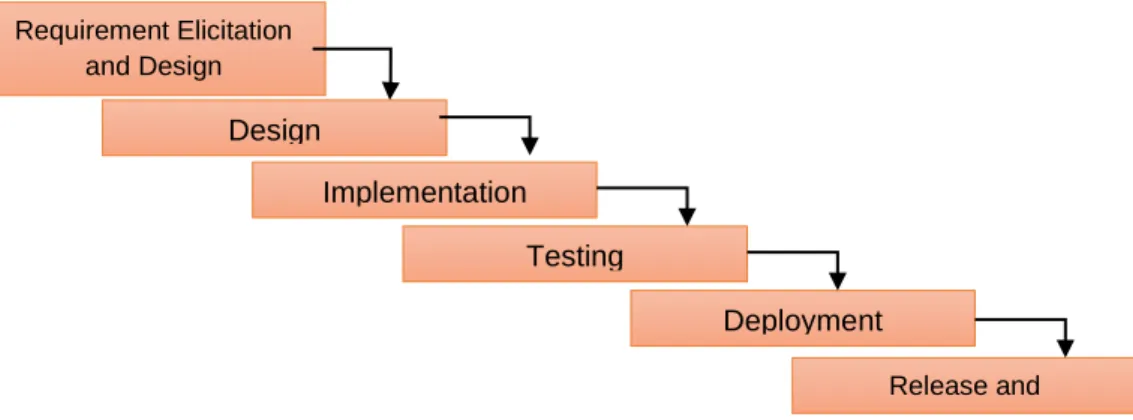
This system is going to hold one of the most excellent blood donating applications for the blood. Firstly some applications exist. Besides, this will give some extra functionalities like free blood donation and collection. This system will be using the waterfall model to get fired easy development and quicker conclusion of required software requirements.
1.4.1. Waterfall-Model
Our proposed system model is the waterfall model because our specifications are fixed.
1.4.2 Why and how I used waterfall
Waterfall is the most familiar variant of the application development life cycle for software engineering and information technology projects. It continues through a sequential, single-direction manner that flows like a waterfall.
I have described the key elements of Waterfall, including its phases, benefits and disadvantages, strategic observations to Agile, and definitions of two essential structures leveraged in Waterfall: work breakdown structure and the critical path method. In extension, I find valuable sources to help create effective Waterfall charts for the next project.
Focus on producing working software regularly. Projects must be based on motivated people.
Figure 1.4.2 : Proposed System Model
4
1.5. Project Schedule
This project schedule is noted below in this project’s Gantt Chart, exercises, and deliverables, with planned begin and complete dates. A schedule is usually used in the project outlining the administration of the project.
1.5.1. Gantt Chart
This Gantt chart here is a result control tool. By using this mechanism, I can track the business which is ended or not.
Figure 1.5.1: Gantt chart
Activity
Name of Task
W 1
W 2
W 3
W 4
W 5
W 6
W 7
W 8
W 9
W 10
W 11
W 12
Planning Idea Problem defining Planning Require
ment
Requirement clarification Requirement analysis System
design
Drawing
Database design
Design specification
Develop ment
Coding Implemen tation Testing
Delivery
5
1.5.2. WBS Planning for Development Phase
1.6 Related Work
There are a few applications for blood donation management systems.
However, no such application can provide free service to both blood donors and blood seekers.
Activity Time Duration Total week
Interview Week 1 1
Brainstorming Week 1 1
Problem Defining 1 Week 1, Week 2 2
Requirement clarification
Week 2 1
Requirement analysis Week 2, week 3 2
Drawing week 3, Week 4 1
Design specification Week 4, Week 5 2
Coding Week 5, Week 6, Week 7,Week 8 4 Implementation Week 6,Week 7, week 8, Week 9 4 Testing Week 5, Week6, Week 7, Week
8,Week9, Week11
7
Delivery Week 12 1
6
1.7 Problem Statements
● There are a few or no options that provide totally free service.
● No system can make the request for blood for another person who needs blood or help donate the blood.
1.8 Proposed Solution
I saw the problems with the existing system. So, I will fix all and develop that
• User-friendly UI layout.
• Free of cost.
• Easy blood management.
• Easy member management.
• Easy blood request.
• Easy blood donation.
7
Chapter II
SOFTWARE REQUIREMENT
SPECIFICATION
8
Chapter 2:
2. Software Requirements Specification:
The Software requirement specification describes the user demands and essence of a project. Usually, the paper is written early in the validation method. It is made for any kind of project or application for preparing the system. Some precepts need to be ensured to prepare the SRS report. This report holds reports of the application, security, and outlining method.
2.1 Functional Requirement:
• Authentication
• Authorization
• Registration for blood donation
• Blood management
• Blood request
• Member management
• Area based blood donation
• On demand searching
2.2 Data Requirements:
2.2.1 User Registration
• Full Name
• Username
• User Email
• User Password 2.2.2 Blood Request
• Patient name
• Sex
• Blood Group
• Unit of blood need
• Hospital name
• Date when blood need
• Contact person for blood donation
• Address where to donate
• Patient contact
• Reason why blood need
9
2.3 Non-Functional Requirements:
●Availability
●Reliability
●Data Sanity
●Recoverability
●Maintainability
●Security
●Data Integrity
●Usability
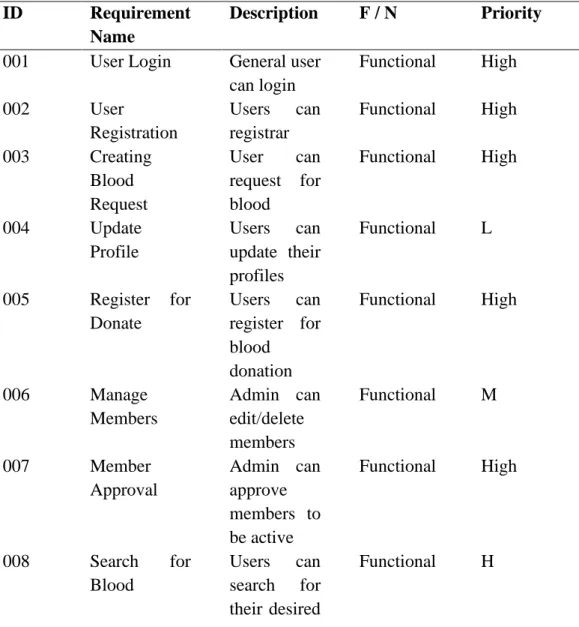
Table 2.3.1: Software Requirements Specification
ID Requirement
Name
Description F / N Priority 001 User Login General user
can login
Functional High
002 User
Registration
Users can registrar
Functional High 003 Creating
Blood Request
User can request for blood
Functional High
004 Update
Profile
Users can update their profiles
Functional L
005 Register for Donate
Users can register for blood donation
Functional High
006 Manage
Members
Admin can edit/delete members
Functional M
007 Member
Approval
Admin can approve members to be active
Functional High
008 Search for
Blood
Users can search for their desired
Functional H
10
blood group and area
009 View Donor
Info
Users can view donors detailed information
Fictional L
010 View Own
Blood Requests
Users can view the requests of blood requested by own
Functional M
011 View others Blood
Request
Users can view other members blood requests
Functional M
012 Add Location Admin can add new location where users can request for blood
Functional L
11
Chapter III
REQUIREMENTS ANALYSIS
12
Chapter 3:
3.1 Use Case Diagram:
3.1.1 Use Case Diagram for Admin:
Figure 3.1.1: Use Case Diagram for Admin
3.1.1.1 Use Case Description for Admin:
Use Case Admin Role
Goal Manage blood requests, members and locations.
Preconditions Must be authenticated with the user id and admin password.
User type must be Admin Post
Condition
Admin can view data and update or delete data.
13
Primary Actors:
Admin Secondary
Actors:
Blood donors and blood seekers Trigger Change data.
Description: Admin view report of all data. Modify user data, blood request and admin can also request for blood. Admin can add, edit approve and delete information.
Alternative Flows
N/A
3.1.2 Use Case Diagram for User:
Figure 3.1.2: Use Case Diagram for General User
14
3.1.2.1 Use Case Description for General User:
Use Case User Role
Goal To request for and donate blood
Preconditions Must be authenticated with own user id and user password.
User type must be general user Post
Condition
Users can view all own info and all blood request
Primary Actors:
General User Secondary
Actors:
Admin
Trigger Login
Description: User can view blood requests, create request for blood and delete own existing request.
Alternative Flows
N/A
15
3.1.3 Use Case Diagram for Login:
Figure 3.1.3: Use Case Diagram for User Authentication
3.1.3.1 Use Case Description for authentication:
Use Case User Role
Goal To be registered as new member and access the system
Preconditions Must have user name , email and passwod Post
Condition
User can access the system
Primary Actors:
User, Admin Secondary
Actors:
Admin
16
Trigger Login/ Registration
Description: Users can access to the system and perform own accessed activities
Alternative Flows
N/A
3.2 Activity Diagram:
Activity diagrams can be practiced in all steps of software construction to describe the flow of application activity.
Figure 3.2.1: Activity diagram (Admin-Dashboard)
This figure represents the activity of admin login to continue to the dashboard of admin.
17
Figure 3.2.2: Activity diagram (User-Blood Request)
This activity represents the new blood request of a user and view old request and the find option.
18
Figure 3.2.3: Activity diagram (Other’s blood requests) Others users request shows all the data of requested bloods of other users along with new request creation and search action.
19
Figure 3.2.4: Activity diagram (Donate-blood)
Donate blood diagram shows the flow of blood donation form filling up system and all the other members who are available to donate bloods and sort by blood groups,
A search button works to find out the result for the desired key-word.
20
3.3 Sequence diagram:
Sequence diagrams are a familiar powerful modeling solution in UML because they precisely focus on lifelines or the manners and things that live simultaneously and the messages transferred between them to perform a function before the lifeline ends. Along with our UML diagramming tool, use this diagram to discover everything there is to know about sequence diagrams in UML.
Figure3.3.1: Admin sequence diagram This diagram shows the sequence of admin workings flow.
21
Figure3.3.2: User sequence diagram
This diagram shows the work sequence of the user.
22
3.4 ER Diagram:
An Entity Relationship Diagram (ERD) is a visible illustration of various entities within a system and how they compare to each other. The entity- relationship diagram represents the entity of the system.
Figure 3.4.1: ER Diagram
23
3.5 Class Diagram:
Class diagrams are one of the common helpful sorts of diagrams to precisely map the construction of a particular system by modeling classes, attributes, functions, and relations between the objects or classes.
Figure 3.5.1: Class diagram
24
Chapter IV
SYSTEM DESIGN SPECIFICATION
25
Chapter 4:
Development Tool & Technology
4.1 User Interface Technology
Tools and technologies are used in this project are stated below:
HTML is used for the base design and browser show. CSS is used for basic designs, colors, fonts, and animations. JavaScript supported to make better functionalities.
Language: PHP is used to develop this project. The reason for using PHP is it’s free and easy to use, developer-friendly. Maximum browsers support the language, including Chrome, Firefox, Brave, Edge, Internet Explorer.
Database: MySQL database is practiced to create this project. MySQL is easy to use, user-friendly, fast, and reliable.
26
Chapter V
USER MANUAL
27
Chapter 5 : 5.1 User Interface
5.1.1 Home Page: Here is the home page of Blood Donor project. When a user hit the URL for it then this page is displayed first to him.
Figure 5.1.1: home page
28
5.1.2 Registration page: Here a user can register for donating blood or for requesting blood.
Figure 5.1.2: User Registration
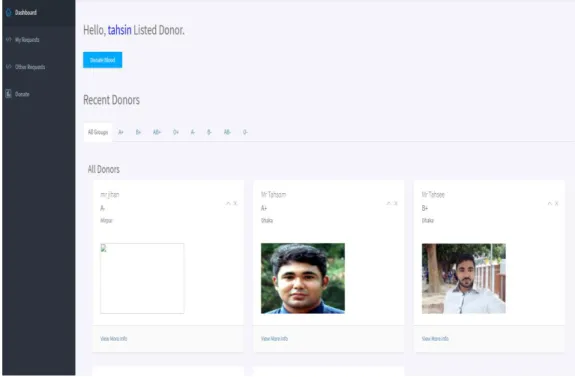
5.1.3 Dashboard: When a user logs in, they enters into the dashboard first.
Figure 5.1.3: User Dashboard
29
5.1.4 My Requests: Here user can view blood requests created by him and can search and manage requests.
Figure 5.1.4: Own blood requests
5.1.5 Others Requests: User can see other users requests here.
Figure 5.1.5: See other users blood requests.
30
5.1.6 Donate: Users can view all donors here and search by blood groups.
Figure 5.1.6: Donor page
31
5.1.7 Donate request: Users can register for blood donation here.
Figure 5.1.7: Donor registration 5.1.8 Logout: Users can log out from here.
Figure 5.1.8: User logout
32
5.1.9 Manage Regions: This option is used to add edit update Regions by admin here.
Figure 5.1.9: Manage Region
5.1.10 Manager Area: Areas can be viewed and managed by Admin here.
Figure 5.1.10: Manager Area
33
5.1.11 Manager Members: Members can be managed from here by admin.
Figure 5.1.11: Manage members
5.1.12 Manager Blood Requests: Admin can manage blood requests here.
Figure 5.1.12: Manage bloods
34
5.1.13 Manager Non Active Members: Admin can make activate of pending users verifying their identity.
Figure 5.1.13: Member approval
5.1.14 Active Donors: Admin can manage active blood donors here.
Figure 5.1.14: Active donors
35
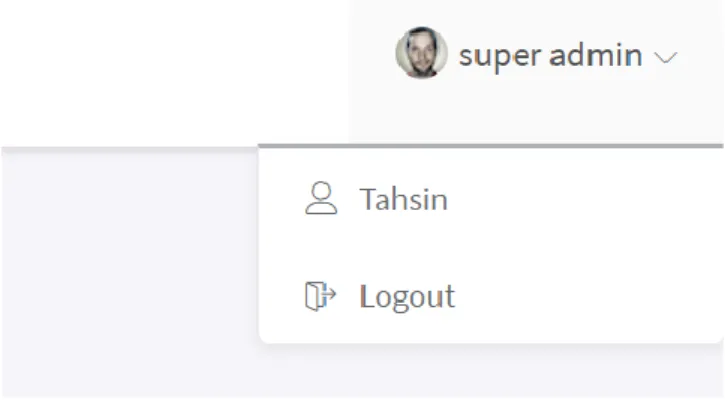
5.1.15 Admin Logout: Admin can log out from the system by clicking the logout button from top right corner of profile.
Figure 5.1.21: Admin logout
36
Chapter VI
TESTING
37
Chapter 6:
6 System Testing 6.1 System Testing
The testing process evaluates the functionality of a software application to get the specifications whether it satisfies the requirement of user and detects the defects in the system.
Importance of system testing:
● System testing is the first level of testing for the entire application.
● We need to see what is happening and the expected outcome as well as actual input.
● When a project does not have a test plan, this means that system produced is low quality. And it’s not acceptable.
● The system will be tested with data to understand whether it can manage suitably or not from simple to severe form to understand the system capacity.
Test Case:
Test case #1 Case name: New User Creation
System: Blood Bank Subsystem: N/A
Designed by: Tahsin Design date: 18-May-2021
Executed by: Executed date:
Short Desc: Target to create new center Precondition: Name, email and password
Step: Action Response Pass/ fail Comment
1 All data
is in case
Application send data to database
Pass
Post Condition: N/A Fail Case: If fails, try again
Test case #2 Case name: Login
System: Blood Bank Subsystem: N/A
Designed by: Tahsin Design date: 18-May-2021
Executed by: Executed date:
Short Desc: Target to login with user id and password Precondition: Registration
Step: Action Response Pass/ fail Comment
38
1 All data
is in case
Application show successful dashboard
Pass
Post Condition: N/A
Fail Case: System will show error
Test case #3 Case name: Create Blood Request
System: Community Center Manager
Subsystem: N/A
Designed by: Tahsin Design date: 21-May-2021
Executed by: Executed date:
Short Desc: Target to create new blood request Precondition: User Login
Step: Action Response Pass/ fail Comment
1 All data
is in case
Application created new blood
request
Pass
Post Condition: N/A
Fail Case: System will show error
Test case #4 Case name: Donate
System: Blood Bank Subsystem: N/A
Designed by: Tahsin Design date: 23-may-2021
Executed by: Executed date:
Short Desc: Target to register for donate blood Precondition: User Register and Login
Step: Action Response Pass/ fail Comment
1 All data
is in case
Donate form created show
Pass
Post Condition: N/A
Fail Case: System will show error
Test case #5 Case name: Search Blood
System: Blood Bank Subsystem: N/A
39
Designed by: Tahsin Design date: 25-May-2021
Executed by: Executed date:
Short Desc: Target to search blood Precondition: Login first.
Step: Action Response Pass/ fail Comment
1 All data
is in case
Show data Pass Post Condition: Show searched data in view.
Fail Case: System will show error
40
Chapter VII
CONCLUSION
41
Chapter 7:
Project Summary
7.1 Limitations
● This system is not prepared absolutely fit for android/ iOS devices.
7.2 Obstacle & Achievements Obstacle:
● Collecting requirements Achievements:
● Learnt a new language
● Successfully build a production level project
7.3 Future Work
Though the system was contracted as fine the future work will include some major changes, as-.
● Plasma donation system will be addes due to corona like situation
● A live chatting system will be added
● Mobile application will be built
42
References:
1. Adarsh, N., Arpitha, J., Ali, M., Charan, N. and Mahendrakar, P., 2014. Effective blood bank management based on RFID in real time systems. 2014 International Conference on Embedded Systems (ICES),.
2. Chaudhari, S., Walekar, S., Ruparel, K. and Pandagale, V., 2018. A Secure Cloud Computing Based Framework for the Blood bank. 2018 International Conference on Smart City and Emerging Technology (ICSCET),.
3. Hegedus, H., Szasz, K., Simon, K., Fazakas, T., Mihaly, A. and Nagy, K., 2019. Blood Notes:
Software System for Promoting and Facilitating Blood Donation. 2019 IEEE 17th International Symposium on Intelligent Systems and Informatics (SISY),.
4. Arif, M., Sreevas, S., Nafseer, K. and Rahul, R., 2021. Automated online Blood bank database.
5. PDF4PRO. 2021. ISSN 2395-1621 Smart Online Blood Bank … / issn-2395-1621-smart- online-blood-bank.pdf / PDF4PRO. [online] Available at:
<https://pdf4pro.com/view/issn-2395-1621-smart-online-blood-bank-2a8661.html>
[Accessed 1 June 2021].
6. V, P. and Ahammed, D., 2021. Design of SMS based Automated Blood Bank using Embedded System. [online] Ijert.org. Available at: <https://www.ijert.org/design-of- sms-based-automated-blood-bank-using-embedded-system> [Accessed 1 June 2021].
7. Baş, S., Carello, G., Lanzarone, E., Ocak, Z. and Yalçındağ, S., 2021. Management of Blood Donation System: Literature Review and Research Perspectives.