USABILITY EVALUATION OF BANGLADESH GOVERNMENT MOBILE APPLICATION
BY
MOHD. IFTIAR HOSSAIN ID: 152-15-5605
MD. MARUF HASAN ID: 152-15-5604
AND
MD. ABID ISLAM RITON ID: 152-15-5806
This Report Presented in Partial Fulfillment of the Requirements for the Degree of Bachelor of Science in Computer Science and Engineering
Supervised By Abdus Sattar Assistant Professor Department of CSE
Daffodil International University Co-Supervised By
Majidur Rahman Lecturer Department of CSE
Daffodil International University
DAFFODIL INTERNATIONAL UNIVERSITY DHAKA, BANGLADESH
MAY 2019
ACKNOWLEDGEMENT
First we express our heartiest thanks and gratefulness to almighty God for His divine blessing makes us possible to complete the final year project successfully.
We really grateful and wish our profound our indebtedness to Abdus Sattar, Assistant Professor, Department of CSE Daffodil International University, Dhaka. Deep Knowledge
& keen interest of our supervisor in the field of “Human Computer Interaction” to carry out this project. His endless patience ,scholarly guidance ,continual encouragement , constant and energetic supervision, constructive criticism , valuable advice ,reading many inferior draft and correcting them at all stage have made it possible to complete this project.
We would like to express our heartiest gratitude to Pro. Dr. Akhter Hossain, Professor, and Head, Department of CSE, for his kind help to finish our project and also to other faculty member and the staff of CSE department of Daffodil International University.
We would like to thank our entire course mate in Daffodil International University, who took part in this discuss while completing the course work.
Finally, we must acknowledge with due respect the constant support and patients of our parents.
ABSTRACT
Usability Evaluation of a Government Mobile Application is too much important for more effective conduct by the users. It is a vital attribute that require a lot of concentration in crucial the assembly of a roaring mobile application. Presently mobile applications for the deaf has exaggerated staggeringly with the rise of the usage of mobile phones. However, usability analysis model that most closely fits the evaluation for mobile application for the deaf is quite very general. Usability of the mobile application for the deaf is incredibly restricted that creates the analysis more difficult. In our document we tend to report our expertise in tracing four Usability Evaluation methods. Heuristic Evaluation, Cognitive Walkthrough, Claims Analysis and CASSM. The previous metrics of usability that was supported, fitted and applied in Bangladeshi Government Mobile Application. We also got that HE and CW solely fixity back view of interface style, While CASSM and CA will facilitate establish strong theoretical niceties. This study will help mobile application developers and evaluators in evaluating and developing mobile application for the deaf.
TABLE OF CONTENTS
CONTETNS PAGE
Board of examiners i
Declaration ii
Acknowledgements iii
Abstract iv
CHAPTER
CHAPTER 1: INTRODUCTION
1-21.1 Introduction 1
1.2 Motivation 1
1.3 Problem Definition 1
1.4 Research Questions 1
1.5 Research Methodology 2
1.6 Report Outline 2
CHAPTER 2: BACKGROUND
2.1 Introduction
2.2 Related Work/Literature Review
3-8
3 3-8
CHAPTER 3: RESEARCH METHODOLOGY 9-11
3.1 Choosing Methodology 9
3.2 Data Collection 9-11
CHAPTER 4: HCI USABILITY EVALUATION METHODS 12-15
4.1 Heuristic Evaluation 12
4.2 Cognitive Walkthrough 12-14
4.3 Claims Analysis 14
4.4 CASSM 15
CHAPTER 5: ANALYSIS AND RESULTS
16-245.1 Heuristic Evaluation Results 16-18
5.2 Cognitive Walkthrough Results 19-20
5.3 Claims Analysis Results 21-23
5.4 CASSM Results 23-24
CHAPTER 6: DISCUSSION AND CONCLUSION
25-27REFERENCES
28-29APPENDIX
30-38Appendix A: Heuristic Evaluation 30-31
Appendix B: Cognitive Walkthrough 32-35
Appendix C: Claims Analysis 36-37
Appendix D: CASSM 38
Plagiarism Report 39
LIST OF FIGURES
FIGURES PAGE NO
Figure 2.1: Summary of Methods used for Usability Evaluation 4
Figure 2.2: PACMAD Model 6
Figure 5.1.1: Usability Score according to application’s rating. 17 Figure 5.1.2: Usability Score according to application’s function. 18
Figure 5.2.1: Request for checking fees payment. 20
LIST OF TABLES
TABLES PAGE NO
Table 1. Name of Applications according to their category. 10-11 Table 2. Applications lists according to their category. 11 Table 3. Applications lists according to their functionality. 18 Table 4. Surface Misfits between User and DL interface. 23
1.1 Introduction
CHAPTER 1 Introduction
With the exponential growth within the use of mobile devices in way of life, a corresponding increase is witnessed in accessing government info and services exploitation mobile devices. As a consequence, several governments worldwide completed the importance of providing mobile applications for his or her info and services that ease citizens' lives and support their quality.
1.2 Motivation
The flip of this century has marked fast growth in smart-phone market. Mobile Applications are currently on the market for nearly all areas of service as several business homes have deployed mobile applications because of competitive environment. The mobile application market has become competitive because of increase in no of providers.
This makes it even a lot of complicated for developer to develop a correct, helpful &
adoptable application. To make sure that the mobile application is correct & helpful one, need to evaluate the usability of mobile applications.
1.3 Problem Definition
Evaluating usability suggests that to measure usability of mobile applications. Rachel, Derek and David has mentioned that measuring usability of mobile applications is once more difficult issue thanks to the comparatively tiny screen, totally different show
resolution, restricted process power & speed, connectivity and restricted input modalities, as all these factors have an excellent impact on usability of mobile applications [1].
1.4 Research Questions
There is no simple analysis of why government mobile applications can be so difficult to use. Bassfar has performed a comparative study to find out the various types of usability analysis methods for mobile application by conducting a comparative study involving totally different previous researches conducted in each field and laboratory environments and located that the foremost usually used strategies for UE of mobile applications [2].
1.5 Research Methodology
There is no unique sight of the development process for mobile applications. Nidhi N Patel and Pankaj Dalal discuss usability evaluation through systematic literature review (SLR).
The analysis of current techniques and former study can lead to a set of chosen usability pointers for mobile applications [3]. We discuss Usability Evaluation of Government Mobile Applications by using 4 UE methods: Heuristic Evaluation, Cognitive Walkthrough, Claims Analysis, and CASSM.
1.6 Report Outline
In this paper we tend to report our try of drafting 4 Usability Evaluation Methods tailored for government mobile applications and apply it on a sample of Bangladeshi government mobile applications. Thus, the remainder of the paper is organized as follows: Chapter 2 discusses some related works add the realm of usability evaluation of mobile applications.
Chapter 3 presents our research methodology and applying it on a sample of Bangladeshi government mobile applications. Chapter 4 discusses the obtained Usability Evaluation Methods. Chapter 5 discusses the obtained 4 Methodologies evaluation results and Chapter 6 concludes the paper with final remarks.
CHAPTER 2 Background
2.1 Introduction
Two main way of exploration avail to our realizing that how we act with Mobile Applications. At first we explore above the action of searching info and then we experimental reads singularly reading Mobile application usability and usage.
Usability depends on user perception concerning the applying development so as to know the matter and rectify it to provide an efficient application. Several mobile applications are being evaluated mistreatment the generic tips like [23] and [8]. However there are several things that required focus in mobile application usability due to the distinction between mobile application and desktop application. Several studies have highlighted this issue since the distinction between mobile and desktop may probably solely give partial data on usability. The mobile device is compact in size with a little computer keyboard that is material. Early analysis on mobiles centered on tiny areas like on style problems and interaction patterns. Presently mobile analysis has been enlarged to wider focus. Some limitations of mobile devices embody restricted information measure, small screen size and tiny memory capability and most significantly short life term of mobile battery [24].
2.2 Related Works
There have a lot of works on Usability Evaluation of mobile application but there have some limitations, mistreatments. Some of them are used only Heuristic Evaluation or PACMAD model or MUSiC Framework or GQM or SUMI. Some of those Evaluation methods are given below:
R. Bernhaupt has classified following Usability Evaluation (UE) methods [5]:
• User testing (in the laboratory and also the field)
• Inspection oriented processes (like heuristic analysis and psychological feature walkthrough)
• Self-reporting and inquiry oriented processes (like diaries and meetings)
• Analytical designing (task design analysis and performance designs)
Ivory has conjointly mentioned the identical ways in his thesis together with techniques utilized in every category, summary of that is shown in Fig -2.1[6].
Figure 2.1 - Summary of Methods used for Usability Evaluation [6]
Bassfar has performed a comparative study to find out the various types of usability analysis methods for mobile application by conducting a comparative study involving totally different previous researches conducted in each field and laboratory environments and located that the foremost normally used strategies for UE of mobile applications are:
heuristic evaluation, cognitive walk-throughs evaluation method, conventional user check, laboratory testing, and field testing and he has conjointly conferred a table of comparison of these strategies in terms of author, object, and assign[2].
The usability evaluation strategies for mobile application dissent from one application to a different based on the amount of complexness [2]. Additionally we will conduct the usability tests in laboratories or in real scenarios that is thought as tryout. Kaikkonen has performed a comparative study of laboratory test & field test and located out that field test
is additional time overwhelming then laboratory check, and tryout should be performed in conjunction with field pilot for some special cases wherever investigation of user behaviour is most vital. He additionally mentioned following points as results of comparison of laboratory test v/s field test [7]:
1. Each laboratory & field test gave up to 46% identical results, whereas there was no difference within the range of issues that occurred within the 2 check settings.
2. On the average the issues within the field were not more severe than those returning in laboratory.
3. Field-testing could be a longer intense method than the laboratory testing.
4. The placement looked as if it would have a bigger impact on qualitative findings of the check.
If it's attainable to make a sensible laboratory setup together with components of context then additional usability issues can be found within the field compared to the research lab.
To address the shortcomings of testing within the laboratory, several methodological variations and mixtures of various strategies are planned.
Zhang and Adipat have known 9 attributes that are most frequently evaluated: learnability, efficiency, memorability, user errors, user satisfaction, effectiveness, simplicity, comprehensibility and learning performance. All nine of them are well outlined and extensively used measures of usability in additional ancient desktop applications [17].
However once it involves mobile applications as advised by Nikolaos varied aspects connected with quality must be thought-about [16]. Whereas in ancient usability studies a standard assumption is that the user is performing arts solely a single task and might thus concentrate completely thereon task. The mobile usage context users can typically be performing arts a second action in addition to victimization the mobile application. For example it's quite potential that user is walking while victimization application on mobile.
This makes user give less attention for victimization application because it requires the user to perform psychological feature process. The usability of application even be measured in this situation and supported by married woman [1]. Rachel has advised a replacement Usability Model – PACMAD Model. The PACMAD model incorporates cognitive load, that is unnoted in existing usability models and psychological feature load
directly impacts the usability of mobile applications [1]. The psychological feature load refers to the number of cognitive process needed by the user to use the application.
The process of choosing acceptable usability attributes to judge a mobile application depends on the character of the mobile application and the objectives of the study. Nikolaos has taken example of Mobile Guide application to elucidate this and instructed some measures like: Route taken and distance traveled, proportion most popular walking speed (PPWS, User satisfaction and preferences and Experimenter observations [16]. Nikolaos has over a reality connected with this study, is that there appear to be lack of thought on problems with quality and therefore the impact of the mobility dimension on the user experience [16]. Once more this is often solved to associate extent by the PACMAD model of Rachel [1]. The PACMAD usability model for mobile applications identifies 3 factors (User, Task and Context of use shown in Fig-2.2).
Figure 2.2 - PACMAD Model [16]
These factors are to be thought-about in coming up with mobile applications for improvement of usability. The word context refers here to the user environment. The context refers to a physical location and additionally includes different options just like the user’s interaction with people or objects and other tasks. The model identifies seven attributes - Effectiveness, Efficiency, Satisfaction, Learnability, Memorability, Errors and psychological feature load. Every of those attributes has an impression on the overall usability of the applying. These may be used to assess the usability metrics.
The next challenge is that the assortment of required knowledge for mensuration the metrics. The traditional tools utilized in UE of desktop applications cannot be applied to tiny screen of mobile devices and most of the time the user is sleeping off the screen. The external camera can’t be accustomed capture the user activities like desktop applications.
An alternative is to use screen capture computer code similar to the desktop. However, because of limitations exhibit by mobile devices, it's quite a challenge to search out such applications that may accurately and with efficiency capture user interaction with the mobile applications being tested [1]. A framework modify the tasks concerned in aggregation usability data for mobile applications was proposed by Florence [18]. As per framework the tasks performed by the developer are often classified into four phases [18]:
Preparation (prepare the applying prototypes to enable work of data necessary for usability evaluation).
Collection (ensure that the system is ready to collect the required knowledge).
Extraction (extract all the logged knowledge & send it to other applications for any analysis).
Analysis (get the processed data from the extraction section and analyze it to search out with which components of the system the users had issue while interaction & a way to improve it) [18].
After data assortment next step of evaluation is to pick applicable metrics. A numbers of models different then PACMAD are available for mensuration usability like QUIM Quality in Use Integrated Model developed by Ahmed [19]. QUIM may be a consolidated model for usability measuring and metric. The model consists of ten factors that are divided into twenty six criteria. The model provides 127 metrics for the measurement of the standards.
However, the model is not optimum nonetheless and wishes to be valid. While the MUSiC - Metrics for Usability Standards in Computing developed by Bevan and Macleod and integrated into the initial ISO 9241 customary [20]. MUSiC framework has given usability metrics like effectiveness, task effectiveness, potency (user potency & corporate potency), productive & unproductive fundamental quantity, etc. Software Usability Measurement Inventory (SUMI) developed by Kirakowski & Corbett may be a part of MUSiC project
[21]. SUMI was developed to give measures of worldwide satisfaction of 5 a lot of specific usability areas, together with effectiveness, efficiency, helpfulness, control, and learnability. Azham and Maria have steered a brand new approach for developing usability metrics, wherever they need applied GQM (Goal Question Metric) approach for developing usability metrics and therefore the resulted metrics are [22]:
• Effectiveness
• Potency
• Satisfaction
All these metrics combinely covers usability tips associated with simplicity, accuracy, time taken, features, safety & attractiveness. However, this model must be valid for future work to make sure all metric we have a tendency to created are applicable to mobile application.
CHAPTER 3 Research Methodology
3.1 Choosing Methodology
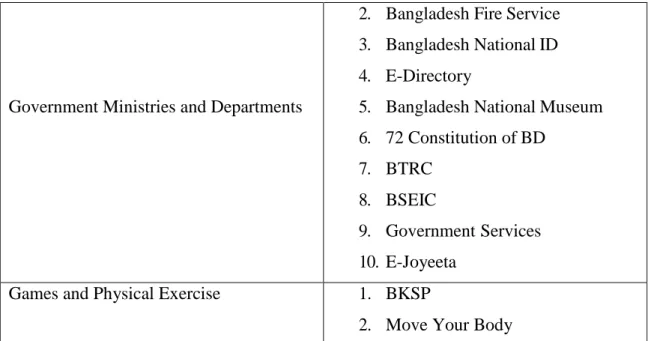
We collected and classified 40 Bangladeshi government mobile applications. We tend to search Google play Store as well as we also visited Bangladeshi government websites to form positive we are downloading the proper application. We tend to then classify the gathered mobile applications looking on their scope and practicality. Scope-wise, we tend to classify the applications into 8 categories: Economy and Business, Education and Training, Travel and Tourism, Housing and Municipal Services, Health and Environment, Work and Hiring, Government Ministries and Departments, Games and Physical Exercise.
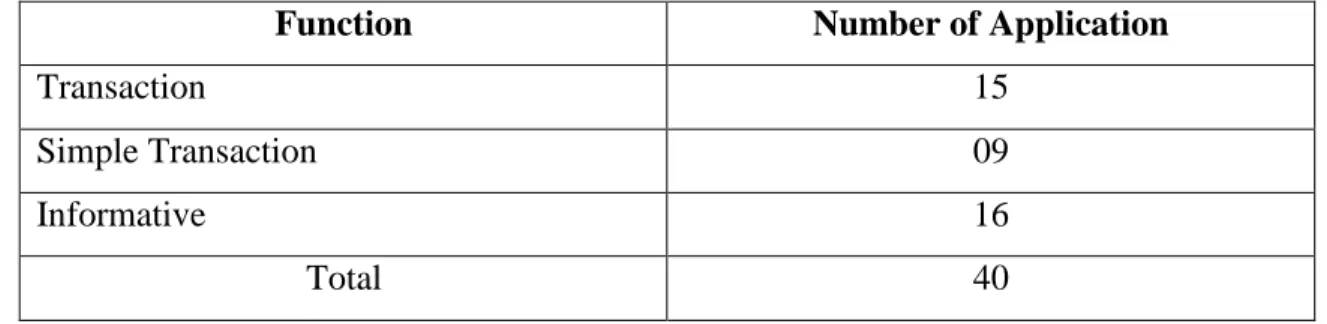
However, functional-wise, we tend to classify the applications into: informative applications, Simple transactional applications and transactional applications [25]. In 3.2(Data Collection) at Table 1 and Table 2 summarizes the distribution of collected Bangladeshi government mobile applications to form of their category.
3.2 Data Collection
We collected our data in 3 steps:
• Random Search: At first, we randomly searched a lot of mobile applications of different categories.
• Finding Government Applications: After random search, we had a lot of mobile applications then we extracted government applications from them. For more sure we also visited government websites.
• Sorting: At the last step of data collection we sorted our government applications into 8 categories and Depending on using and rating applications were taken.
Table 1. Name of Applications according to their category.
Category Name of Applications
Economy and Business
1. NRB Tax Calculator 2. Bangladesh Prize Bond 3. BD Trade Info
4. BD Foreign Currency Converter 5. Textile Mills Information
Education and Training
1. Primary School Monitoring Tool 2. Bangladesh National Portal 3. Jubo Unnoyon
4. NAEM
5. All Exam Results 6. Public Library 7. Text Book 8. Driving License
Travel and Tourism
1. Bangladesh Tourism Corporation 2. Chittagong Hill Tracts
3. Dhaka Zoo 4. Sundarban
Housing and Municipal Services
1. BHBFC 2. ARCH
3. Dhaka City Corporation
Health and Environment
1. Government Allowance 2. Hashpatal
3. Bondhu
4. 24/7 Help Desk 5. Infokosh Tube 6. Pusti Kotha
Work and Hiring 1. Rupali Bank
2. Bidesh Gomon 1. Postal Department
Government Ministries and Departments
2. Bangladesh Fire Service 3. Bangladesh National ID 4. E-Directory
5. Bangladesh National Museum 6. 72 Constitution of BD
7. BTRC 8. BSEIC
9. Government Services 10. E-Joyeeta
Games and Physical Exercise 1. BKSP
2. Move Your Body
Table 2. Applications lists according to their category.
Category Number of applications
Economy and Business 5
Education and Training 8
Travel and Tourism 4
Housing and Municipal Services 3
Health and Environment 6
Work and Hiring 2
Government Ministries and Departments 10
Games and Physical Exercise 2
Total 40
CHAPTER 4
HCI Usability Evaluation Methods
4.1 Heuristic Evaluation
Heuristic analysis [8] is perhaps the foremost wide used usability analysis technique, as a result of it is given the impression to yield reasonable edges for low price.
4.1.1 Overview of the technique
Heuristic Evaluation (HE) may be a checklist-based approach to assessing the usability of an interactive system. Within the original version of this system, the analyst (or team of analysts) works through each page or screen of a system, asking 10 queries about that system. For instance, one in every of the prompts is “Match between system and also the real world”. In different words, the system should use words, phrases and ideas-acquainted to the user, rather than system-oriented terms. It ought to conjointly follow real-world conventions, creating info seem in an exceedingly natural and logical order.
Nielsen [8] suggests that between 3 and 5 analysts ought to assess the system; their notes will then be compared to get a shared perspective on usability issues for the system.
Cockton et al [9] have argued that a smaller variety of analysts will perform better, only if they need a structured thanks to report problems that encourages reflection on their assessments; in particular, fewer analysts generate fewer false positives – i.e. predicted issues that aren't found to be actual issues in empirical studies. They conjointly advocate that, instead of making an attempt to consider each attainable method, exploration is much operative if specialists contemplate a group of consumer jobs and every one the contacts a consumer can expertise in playing persons jobs in order.
4.2 Cognitive Walkthrough
Considering for a methodology which may offer understandings keen on a thinner variety of usability problems, however that stood higher designed, we explored Cognitive Walkthrough (CW) [10], and a method that receipts an expressly user-centred perception
arranged style. Similar HE, CW obsessed, a minimum of to a restricted amount, in industrial software improvement [11].
4.2.1 Overview of the technique
Wharton et al [10] advocate that CW be conducted by a team of analysts. The team has to agree:
1. Who will be the user?
Assumptions regarding previous expertise and data ought to be articulated.
2. What tasks are to be analyzed?
The team ought to agree a group of user tasks to work on, carefully hand-picked to be representative of the broad vary of task the system supports, and to check options of the system as thoroughly as doable.
3. What's the proper action sequence for every task?
4. However is that the interface defined?
For the subsequent stage of study, team members work severally, working through the tasks as united and, for every step of every task, considering the subsequent four questions:
1. Can the user try and deliver the goods the correct effect?
Given what the user is attempting to realize overall, will they identify the proper thanks to deliver the goods it with this system?
2. Can the user notice the proper action is available?
Is the action visible in that interface, or somehow discoverable?
3. Can the user associate the action with the effect?
Is it obvious the action addresses the goal?
4. If the proper action is performed, with the user see that progress is being created towards the goal?
Is the feedback helpful?
Once every team member has worked consistently through the tasks, the team convene to check notes and summarize findings.
4.3 Claims Analysis
Claims Analysis (CA) [12] [13] may be a sort of “psychological style rationale” – that's, a semi-structured approach to considering design from a user perspective. Claims are statements concerning the positive and negative effects of a style on the user at intervals a particular context of use (a ‘scenario’). Claims Analysis is a smaller amount structured than Cognitive Walkthrough. Compared to Heuristic Evaluation, it's less structured in terms of the ten principles, but more structured within the means the context is specific.
4.3.1 Overview of the technique
Claims Analysis is supremely useful throughout style. The method of creating claims jumps by creating consumer eventualities. These are likely to the responsibilities of psychological feature Walkthrough, however could also stand at an advanced equal of concept and comprise a lot of discourse information a couple of user.
For each state of affairs, the specialist (or designing group), effort methodically over the most options of the planning, appealing any appropriate model (e.g. on info pursuing) otherwise experimental outcomes to come up with rights concerning whatever things the article determination take on the consumer. These can embody each affirmative and destructive claims, shimmering the positives and drawbacks of the planned style.
Carroll and Rosson [12] suggest 19 queries which will be questioned concerning every article to attendant the group of statements; Sutcliffe and Carroll [13] contour this, suggesting the Cognitive Walkthrough queries (for example made public overhead) like attendants. We cut down the queries marginally any, arranging claims group in periods of consumer aims, consumer activities and method reaction.
Once destructive claims are known a couple of explicit article, techniques that to alter the strategy that cut back the rejections whereas retentive the positives will remain thought of.
4.4 CASSM
Taking a distinct perspective on bridging the gulf between human factors and software system engineering, we tend to applied CASSM (Concept-based Analysis of Surface and Structural Misfits) to 2 Mobile Application – one together with the developers, the opposite standalone. CASSM may be a regionally developed evaluation technique [14] that is meant to enhance existing strategies, most of that consider design in terms of procedures (tasks, scenarios, etc.).
4.4.1 Overview of the technique
CASSM reflects style in footings of ideas: the ideas the consumer works with, individuals enforced at intervals the method, and individuals delineated at the border. The investigation emphases on the excellence of work among the consumer and method ideas. Ideas are reflected in footings of objects and qualities; the specialist defines however simple it's for a consumer to form or remove an object, or to established or modification the worth of a quality. Additionally, the specialist can establish relations among ideas; within the investigates informed at this point, this phase stood absent.
User ideas are known by provoking information from actual consumers; this might takings the shape of meetings, empirical reading through consider-clearly, or the additional method during which consumers speak in their individual arguments concerning whatever they're undertaking and the way they suppose around their relations with the structure. Structure and border ideas remain known complete structure documents, complete review an enforced structure, complete referring qualifications otherwise questioning inventors – betting on pardon the present phase of progress is. Therefore, the anthropological issues perception is strictly reflected through the attention on consumer ideas, whereas the inventor’s perception is reflected in structure and border ideas.
CHAPTER 5 Analysis and Results
5.1 Heuristic Evaluation Results
To obtain a heuristic listing for evaluating Bangladeshi government mobile applications and supported the review of previous work, we followed these steps:
(1) We analyzed Nielsen [8] generic heuristics and applied it on a sample of mobile applications and found out its limitations for evaluating the usability of mobile applications.
(2) We habituated ourselves with existing domain-specific heuristic sets like [15] and [26]
then derived the initial usability heuristics from David Travis book listing for internet usability guidelines [27]. David Travis book contains 247 elaborate guidelines on many aspects of a usable net application that are suitable to be adopted for mobile applications.
The scale of the guidelines comprises the following: facilitate, Feedback and Error Tolerance, Page Layout and Visual style, Content and search, Trust and quality, Data Entry, Navigation, Task Orientation and Main page. However, we've to revise and customize these dimensions to be appropriate for mobile applications.
(3) A final step was to map the resulted listing with Nielsen heuristics. The principle behind this step is to create positive that our developed heuristics listing is aligned with Nielsen heuristics.
We applied the developed Heuristic's list on 40 Bangladeshi mobile government applications. The applications were evaluated by a team of four graduate students that have a decent information of Human Computer Interaction (HCI). Mobile devices used for the evaluation were Redmi 5plus and Samsung Galaxy S5. The evaluators used the list with 79 pointers to input the evaluation result for every of criterion.
In this section, we tend to review the analysis results of 40 Bangladeshi government applications from 2 aspects, 1st per every application's scope and second per application's function. Before going to the results in details, we'd like to indicate that 10 of the
applications were eliminated because of the rationale that they need login data to utterly get pleasure from their functions that we tend to didn't have at the time of analysis.
5.1.1 Usability Score according to application’s rating
As mentioned before, applications were classified before the analysis into 8 categories in line with their region as shown in Table 1 and Table 2. So, supported our usability heuristic's analysis, Figure 5.1.1 shows that Travel and Tourism applications are the foremost usable applications with a usability score of 88% then Health and Environment applications with 84%. Games and Physical Exercise is available in the third place with 83%. Next, Education and Training applications within the fourth place with 78%, then Government Ministries and Departments applications within the fifth place with 65%
followed by Economy and Business applications with a small distinction, then Housing and Municipal Services applications within the seventh place with 58%. Lastly, Work and Hiring applications return because the least usable applications with 42%.
Figure 5.1.1: Usability Score according to application’s rating.
Work and Hiring
Usability score 0% 10% 20% 30% 40% 50% 60% 70% 80% 90% 100%
Overall usability evaluation of applications according to their function
5.1.2 Usability Score according to application’s functions
All applications that had been evaluated were distributed among 3 categories per their functionality. Table 3 shows how numbers of applications are placed on every group. As figure 5.1.2 reveals, there was a rather distinction between the 3 categories. Supported our analysis, Informative applications come as the most usable applications then transactional application and Simple Transaction applications with minor variations.
Table 3. Applications lists according to their functionality.
Function Number of Application
Transaction 15
Simple Transaction 09
Informative 16
Total 40
Figure 5.1.2: Usability Score according to application’s function.
5.2 Cognitive Walkthrough Results
First of all, we outline consumer expectations. During this circumstance, rational expectations remain that the consumers are instructors and developers who make usage of applications as a part of their effort, that they're capable government mobile application consumers, however don't essentially have subtle looking skills. They're going to typically have smart data of their subject, but not essentially be familiar with what's during this specific application.
CW helps to find problems – like whether or not the user can recognize they need to log in, whether or not applicable nomenclature is employed, whether choices are noticeable and what the standard of response is – that communicate to native options of the communication. Associated to Heuristic Evaluation, it affords a transparent construction used for a way to travel concerning the investigation when consumer outlines and jobs are outlined. Whereas it's a lot of restricted in opportunity than HE a lot of express configuration creates discoveries marginally additional duplicable diagonally specialists.
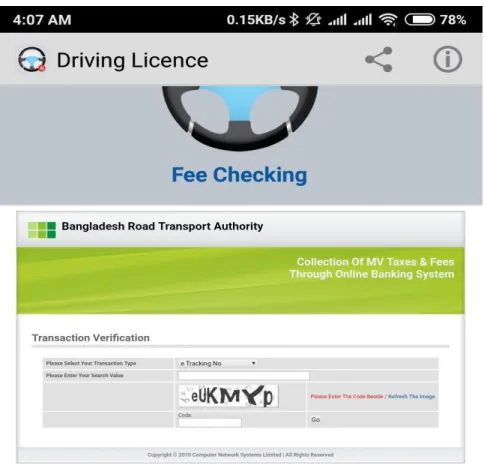
Though, the unkind design of CW confines its opportunity. For instance, CW wasn't appropriate matched for seeing fault orders. On the way to exemplify this, take into account the assignment mentioned overhead: This one is very easy for the consumer to execute a appeal in an application. Now this case, once request for checking fees payment (Driving Licence- Government mobile application), the user can recognize a monitor as displayed in Fig 5.2.1. The single selections observable at this page are to select transaction type, input search values and enter the code. After entering all the values user have to press ‘Go’
button for the next page but in this page all the fields and buttons are not clearly visible to the consumer. The GUI of this page is not suitable. If all the fields, texts and buttons are more highlight that user can easily act with the interface then it will suitable. CW doesn't clearly provision smooth this equality of mistake investigation.
Figure 5.2.1: Request for checking fees payment.
5.3 Claims Analysis Results
Supposing the operator entered at the fees payment checking side of Driving Licence (Fig 5.2.1), we realize that this side has several structures: In the upper, there have the name of application, there have some advertising information, and there have some text field for entering values. For each of those options, we will take into account operator aims, activities and response.
Contemplate the text field. It's terribly perfect to the operator that this is often a residence to enter values in text fields (affirmative claim concerning the user’s aim); but, the operator might consume issue framing a decent question (destructive claim concerning the operator’s aim). When the operator had nominated the text field, writing is simple (affirmative claim concerning the user’s act); but, It’s not clear to the operator that they need to clearly choose the text field previously keying: if the operator entering values while not choosing the text field the text is vanished (destructive claim concerning the operator’s act). As the operator enter the values, the arguments seem so the operator will checked their question construction (affirmative claim concerning response). There's not essentially one affirmative and destructive claim concerning every article; here is also numerous claims or nothing.
We have developed and applied CA together with 2 Mobile Application development groups. Although we've got it harder to learn than HE or CW, we have conjointly found that it supports the analyst in pondering usability issues for Mobile Applications deeply.
Instead of focusing particularly on well outlined tasks and details like interface layout and qualities of feedback, we have a tendency to found that CA provokes thinking about why things are the manner there, and the way they could be completely different. Like HE, completely different analysts tend to find different points within the claims, however the structure of queries and the process of considering options guides the analysis at grade that is acceptable to the present stage of style taking account of high level user activities likewise because the elaborate interaction examined in CW. Conducting CA while not operating with developers raises several of the identical difficulties as operating with HE:
that it's tough to make sure coverage of all application features; in addition, claims are
supposed to replicate the developers’ intentions in planning specific options – intentions which will be not possible to fathom while not access to developers.
One of the actual strengths of CA, in our expertise, is that the use of scenarios. We have a tendency to found it useful to enhance these with personas [28] – descriptions of various people which may use the application. Whereas these people are fictitious, they'll be primarily based on either real people or generalizations drawn from (for example) the knowledge seeking literature. These personas helped to beat one issue for developers:
imagining what real users are possible to try to do and what their previous experiences may be. There's a good tendency to think about users as falling into one in all 2 categories: either they're extremely subtle people who recognize the maximum amount concerning the application because the developers do and are therefore capable of finding materials at intervals it with very little difficulty, or they're beta users who are work what is possible with the application and are ready to undertake something to work out what happens. In apply, whereas each these classes of user exist, the overwhelming majority of users lie between these extremes; in particular, most users don't seem to be data seeking specialists, they may not be notably aware of the options offered by this particular application, however they're going to have a specific data would like, even if, as mentioned higher than (section 5.2), that require isn't nonetheless well formulated.
A substantive gulf of understanding separates human factors specialists and also the Mobile Application developers they work with. Additionally, there may be a fragmentation of responsibility for the user interaction design: those that develop underlying technical infrastructure, those that extend core systems with novel however useful options and people who develop collections for finish users to access are usually operating severally of every different, however all have some responsibility for the interface that the users ultimately work with. Systems developers focus attention on engineering high quality systems; if they are doing not, given the ineluctable complexness of Mobile Applications, systems are riddled with bugs and inconsistencies that will create them not possible to use. However, technical challenges can be therefore demanding that it's extremely difficult for developers to simultaneously be pondering the user’s perspective. In parallel, assortment developers focus their attention on the management of the gathering, as well as its structure,
organization and access rights. Though typically nearer to the tip users than the system developers, it's tough for them to tell apart crucial differences in user skills and understanding of each system and content. Meanwhile, the human factors specialists naturally assume in terms of the user’s expertise, and that they notice it tough to totally grasp the technical constraints that confirm what's and isn't possible in terms of style of the system, and structure imperatives of the gathering. Situations and personas, which were needed before it had been potential to get claims, proved invaluable in bridging this gulf.
5.4 CASSM Results
For finding the result, at first we have to find the misfits. For this purpose we collect some user concept of the application (Driving Licence). User concepts are given below:
➢ Online registration – to save money and time, more safety.
➢ Geographical location – to reach the office in time, to know about the shortest way.
➢ Language – to interact more suitably.
➢ Fields – for entering correct information in correct place and suitably.
➢ Feedback – about problems and satisfaction.
➢ Search facilities – advance search and browsing.
Table 4. Surface Misfits between User and DL interface.
Entity User DL interface
Online registration P Absent
Geographical location P Absent
Language P P
Fields P P
Feedback P Absent
Search facilities P D
Here, in the table ‘P’ for Present, ‘D’ for Difficult.
The main misfits are:-
➢ If the application has the feature of online registration then people does not need to go to the office for registration. In that case their time and money both are saved.
➢ When people has to go for the exam of Driving Licence, they have to face some trouble to reach the office in timely. If there have a Geographical location in the application then they do not have to face this kind of problems.
➢ There have no feedback facility in the system that will may cause some difficulties for new users.
➢ Most of the applications have search facilities but in this application does not have any search facilities, users need to learn to use that option effectively.
CASSM doesn't cope with usability problems at the extent of detail of (for example) Heuristic Evaluation. It takes a lot of broad-brush approach in considering key user and system ideas.
Compared to the 3 analysis techniques represented higher than, CASSM lacks detail. It's conjointly proved harder for novices to learn than either HE or CW. However, it's provided insights that complement those of a lot of ancient analysis techniques.
CHAPTER 6
Discussion and Conclusion
We have explored four usability-leaning style and evaluation methods as applied to Mobile Applications. We have applied a kind of act analysis, within which we've intended to realize usability problems for Mobile Applications and also the submission of user leaning methods by choosing, put on and reflective on methods drawn from the human–computer interaction literature and our own work, to existent Mobile Applications and Mobile Applications underneath enlargement.
Our aim has not been to develop a whole analysis of any particular application, however to analyze the scope and limitations of various techniques, with the long aim of developing a collection of techniques that may usefully be applied to support reasoning regarding usability within the Mobile Application context.
In this work, we've found that to assess the usability of Mobile Applications, knowledge of Mobile Applications and their users is crucial. this could sound obvious, but is, in fact, not expressly acknowledged by techniques such as HE & CW, each of that were originally developed and tested in contexts that are acquainted to most HCI practitioners (such as data processing and net navigation). Thus, HE and CW have been found to deal with superficial aspects of Mobile Applications, however not a lot of complex problems with data seeking and use. For those surface aspects, HE covers broader scope than CW, however offers less support to the analyst in characteristic potential user difficulties.
In distinction, CA and CASSM each probe deeper problems. CA demands that the analyst draw on a theoretical and empirical basis to construct situations and claims, whereas CASSM includes explicit gathering of the user perspective. Of those 2 techniques, CA is each a lot of hard to please of the analyst, and the one that delivers a wider vary of insights.
CASSM covers totally different territory from the opposite 3 techniques investigated, by focusing attention on user and system ideas rather than procedures or – specifically – situations. One purpose that CASSM has shown up regarding several applications is that the concepts of a ‘collection’ and (variable) access rights are alien to most users. These are
neither new nor stunning insights, and yet many existent libraries still embrace these options and to fail to explain them adequately to users, light the continued gulf between users and system development.
One feature that's (broadly) common to CW and CA is that they would like for situations.
In work with Mobile Application developers, we've found the utilization of situations significantly powerful. It seems that more work on developing an application of situations can be fruitful to guide development. Initially, situations can be supported findings from Mobile Applications the data seeking literature; more work is required to develop situations covering alternative aspects of Mobile Applications use, like however people organize, and later work with, information resources (currently enforced in features), however they share data with colleagues and collaborate over data, and the way application creators or collection builders (the those who thus typically mediate between the developers of core technologies and finish users) gather along information and gift it to finish users. These are all necessary aspects of Mobile Applications creation and use that are presently under researched.
In finishing this work, we've got found 2 gulfs that require to be bridged in making Mobile Applications that are each technically sound and additionally responsive to user necessities.
The primary is between user-focused and technology-focused perspectives: the user focus places emphasis on the user expertise, however at the expense of considering technical details, whereas the technology focus addresses technical issues at the expense of user considerations. As noted higher as, scenarios of use offer one promising route to bridging this gulf; approaches like CASSM, which expressly pile up system and user views, additionally show promise.
The second gulf is between problem- and solution-focus in design. Most HCI analysis techniques have historically focused on understanding issues, as a requirement to developing solutions to those issues. In distinction, developers tend to be driven by solutions, needing solely to know enough about a downside to be ready to generate a promising answer thereto. Of the techniques thought-about here, solely CA makes specific its role within in progress style, as a tool to support reflection on style decisions and thus on doable style modifications. There is a clear want for nearer integration between analysis
and re-design – a requirement that's not peculiar simply to metric capacity unit development.
Further work, both empirical and analytical, is required to develop analysis techniques that are grounded in associate degree understanding of users and their info work. The work according here may be a step during this direction.
REFERENCES
[1]. Rachel Harrison and et al, “Usability of mobile applications: literature review and rationale for a new usability model”, Harrison et al. Journal of Interaction Science 2013, 1:1 http://www.journalofinteractionscience.com/content/1/1/1
[2]. Bassfar Zaid and et al, “A Comparative Study of Usability Methods for Mobile Applications”
International Journal of Scientific & Engineering Research Volume 3, Issue 8, August-2012 1 ISSN 2229-5518
[3]. Nidhi N Patel and Pankaj Dalal , “Usability Evaluation of Mobile Applications”, International Journal of Engineering Research & Technology (IJERT) Vol. 2 Issue 11, November – 2013
[4]. Attfield and et al, J. Information seeking in the context of writing: a design psychology interpretation of the ‘problematic situation’. Journal of Documentation. 59.4, 2003, 430 - 453.
[5]. R. Bernhaupt and et al., "Usability evaluation methods for mobile applications," Handbook of research on user interface design and evaluation for mobile technology, vol. 2, pp. 745-758, 2008.
[6]. Melody Yvette Ivory, “An Empirical Foundation for Automated Web Interface Evaluation “, University of California at Berkeley Professor Marti Hearst, Chair
[7]. Anne Kaikkonen and et al “Usability Testing of Mobile Applications: A Comparison between Laboratory and Field Testing”, Journal of Usability Studies-2005.
[8]. Nielsen, J. Heuristic Evaluation. In J. Nielsen & R. Mack (Eds.), Usability Inspection Methods New York: John Wiley, 1994, 25-62.
[9]. Cockton and et al, M. Changing Analysts’ Tunes: the Surprising Impact of a New Instrument for Usability Inspection Method Assessment. In: People and Computers XVII: Proceedings of HCI’03, Springer, 2003, 145-161.
[10]. Wharton and et al, P. The cognitive walkthrough method: A practitioner's guide. In J. Nielsen & R.
Mack (Eds.), Usability inspection methods New York: John Wiley, 1994, 105-140.
[11]. Spencer, R. The Streamlined Cognitive Walkthrough Method, Working Around Social Constraints Encountered in a Software Development Company, Proc. CHI’2000, 2000, 353-359.
[12]. Carroll and et al, M. B. Getting around the taskartifact cycle: how to make claims and design by scenario. ACM Transactions on Information Systems, 10.2, 1992, 181-21.
[13]. Sutcliffe, A. & Carroll, J. M. Designing claims for reuse in interactive systems design Int J Human- computer studies 50, 1999, 213-241.
[14]. Connell and et al, A. Ontological Sketch Models: Highlighting User-System Misfits. In E. O’Neill, P.Palanque & P. Johnson (Eds.) People and Computers XVII, Proc. HCI’03. Springer, 2003, 163- 178.
[15]. O. Al Osaimi and A. AlSumait, “Usability Guidelines for Arab E-government Websites,” World Acad. Sci. Eng. Technol. Int. J. Soc. Behav. Educ. Econ. Bus. Ind. Eng., vol. 7, no. 12, pp. 3159–
3162, 2013.
[16]. Nikolaos Avouris and et al, “On Measuring Usability of Mobile Applications” in the Proceedings of the International Workshop on Meaningful Measures: Valid Useful User Experience Measurement (VUUM), 2008.
[17]. Zhang, D, & Adipat, B. (2005). Challenges, methodologies, and issues in the usability testing of mobile applications. International Journal of Human-Computer Interaction, 18(3), 293–308,2005.
[18]. Florence Balagtas-Fernandez and Heinrich Hussmann, “A Methodology and Framework to Simplify Usability Analysis of Mobile Applications”, 2009 IEEE/ACM International Conference on Automated Software Engineering 1527-1366/09 $29.00 © 2009 IEEE DOI 10.1109/ASE.2009.12 [19]. Ahmed and et al.: „Usability measurement and metrics: A consolidated model?, Software Quality
Control, 2006, 14, (2), pp. 159-178
[20]. Bevan, N., and MacLeod, M.: „Usability measurement in context?, Behaviour & Information Technology, 1994, 13, (1), pp. 132-145.
[21]. Kirakowski, J., and Corbett, M.: „SUMI: the Software Usability Measurement Inventory‟, British Journal of Educational Technology, 1993, 24, (3), pp. 210-212
[22]. Azham Hussain and Maria Kutar, “Usability Metric Framework for Mobile Phone Application”, ISBN: 978-1-902560-22-9 © 2009 PGNet.
[23]. ISO 9126. 1991. Software Product Evaluations- Quality characteristics and guidelines for their use, ISO DIS 9126.
[24]. Hussain, A. 2012. Metric Based Evaluation Of Mobile Devices: Mobile Goal Question Metric (mGQM) (Doctoral dissertation, University of Salford).
[25]. H. S. Al-Khalifa, “Development of Mobile Government Websites: A Functional Design Approach,”
in Proceedings of the 13th International Conference on Information Integration and Web-based Applications and Services, New York, NY, USA, 2011, pp. 455–458.
[26]. R. Inostroza et al, “Usability Heuristics for Touchscreen-based Mobile Devices,” in 2012 Ninth International Conference on Information Technology: New Generations (ITNG), 2012, pp. 662–
667.
[27]. D.Travis, “247 web usability guidelines.” [Online]. Available:
http://www.userfocus.co.uk/resources/guidelines.html. [Accessed: 26-Jul-2016].
[28]. Cooper, A. The Inmates are Running the Asylum. Sams Publishing, Indianapolis, Macmillan Publishing Co., Inc. Indianapolis, IN, USA ©1999 ISBN:0672316498.
APPENDIX Appendix A:
Heuristic Evaluation: Neilson Heuristic
# Heuristic Abbreviation Notes
1 Visibility of system status
Visibility The website keeps the user informed about what is going on through constructive, appropriate and timely feedback.
2 Match between the system and the real world
Match Language usage, such as terms, phrases, symbols, and
concepts, is similar to that used by the users in their day-to-day environment.
Information is arranged in a natural and logical order.
3 User control and freedom
Control Users control the system.
Users can exit the system at any time even when they have made mistakes.
There are facilities for Undo and Redo.
4 Consistency and adherence to standards
Consistency Concepts, words, symbols, situations, or actions refer to the same thing.
Common platform standards are followed.
5 Error prevention, specifically prevention usability related errors
Error The system is designed in such a way that the users cannot easily make serious usability errors.
When a user makes an error, the application gives an appropriate error message.
6 Recognition rather than recall
Recognition Objects to be manipulated, options for selection, and actions to be taken, are visible.
The user does not need to recall information from one part of a dialogue to another.
Instructions on how to use the system are visible or easily retrievable whenever appropriate.
7 Flexibility and efficiency of use
Flexibility The site caters to different levels of users, from novice to experts.
Shortcuts or accelerators, unseen by the novice users, are provided to speed up interaction and task completion by frequent users.
8 Aesthetic and minimalism in design
Aesthetics Site dialogues do not contain irrelevant or rarely needed information, which could distract users as they perform tasks.
Displays are simple and multiple page displays are minimized.
9 Recognition, diagnosis, and recovery from errors
Recovery Error messages are expressed in plain language.
Error messages indicate precisely what the problem is and give quick, simple, constructive, specific instructions for recovery.
10 Help and documentation
Help The site has a help facility and other documentation to support the users’ needs.
The information in these documents is easy to search, focused on the user’s task, and lists concrete steps to be carried out to accomplish a task.
Appendix B:
Cognitive Walkthrough: Synthesis of all CW versions and evolutions
Name Theoretical and conceptual
aspects
Methodological aspects
Technological aspects Comments
Basic CW (Lewis et al, 1990)
CE+ learning by exploration model
1. Preparation :
choosing the task to be evaluated, breaking up the task into atomic actions
2. Evaluation using one form
- without proposed material - Not outstanding - Only 50%
errors detected
Improved CW (Polson et al, 1992)
CE+ learning by exploration model , Norman’s model of action, Construction- integration model
1. Preparation : choosing and
describing the task to be evaluated, breaking up the task into atomic actions, identifying the target user of the system, describing the initial goals structures 2. Evaluation using three forms
- Evaluation forms : goal structure, choosing and executing action, modification of goal structure
- Proposition of automated version (Rieman et al, 1991)
- Most formal - Tedious
Optimized CW (Wharton et al, 1994)
Learning by exploration model CE+
1. Preparation :
choosing the task to be evaluated, describing in detail each scenario 2. Evaluation taking into account the detail of scenario
- Proposition of guide - Using scenario - Need task analysis
SHIVA (Ziegler et al, 1995)
ISO 9241 norm 1. Preparation : task and navigation modeling
- Questionnaire from the ISO 9241 norm
- Task analysis integrated into the method
2. Two evaluation cycles: questionnaire relying the ISO 9241 norm, questionnaire concerning the
scenarios, synthesis of the results
HW CE+ learning by Combining CW, - List of heuristics - Detect more
(Sears, exploration Heuristic Evaluation usability
1997) model and Usability problems than
Walkthroughs CW
NCW Norman’s Like optimized CW - Questionnaires focusing on - High level (Rizzo et model of action with questionnaire the action abstraction of
al, 1997) relying Norman’s the problem
model SCW
(Spencer, 2000)
Like optimized CW
Like optimized CW with reinforcement of the evaluation control
- Proposition of questionnaires
- Proposition of ground rules for conducting the
evaluation
- Most formal
CWW (Blackmon et al, 2002;
Kitajima, 2006)
CoLiDeS model 4 stages : compiling a set of realistic user goal and intended selection, assessing semantic similarity with LSA, identifying problematic heading/link labels, finding goal-specific problems
- Analysis tools available at:
http://autocww.colorado.edu/
HomePage.html
- Specific method for detecting usability errors about searching information on a web site
GW (Pinelle
Dedicated to Groupware
- Task modeling
(scenario, task, subtask) - task analysis with GTA
- Proposition of questionnaires
- Taking account of the
and (collaboration collaborative
Gutwin, processes) environment.
2002)
- Evaluation of task scenario
- Task analysis integrated into the method AW
(Bertelsen, 2004)
Activity theory 7 stage : identifying typical task to be analyzed,
contextualization, task verification, task analysis, evaluation, global verification, reporting
- Proposition of questionnaires - Synthesis report
- Taking into account the context and environment.
- Task and activity analysis - Synthesis report
recommended IW (Ryu
and Monk, 2004)
Cyclic interaction theory (Monk, 1998)
- Finding the usability problem relying the interaction (about goal- action, action-effect, goal construction and goal elimination)
- Proposition of questionnaires
- Evaluation at the low level
- Four evaluations consisting of three stages for each (preparation,
evaluation, verification) CWU
(Granoller and Lorés, 2005)
- CW involving the user
- User verbalization
- CW with real user intervention.
- Run in two stages:
CW by expert, user intervention
- Proposition of questionnaires
- Need the real user
intervention - Need the user verbalization ECW Extended Like optimized CW but Without additional tools Better
(Kato and Norman’s the questionnaires are proposed evaluation by
Hori, 2005 model of action focusing to the taking account
cognitive semantic of all the
distance identified by cognitive
aspects
the Extended Norman’s model
Appendix C:
Claims Analysis: Questions to ask in generating claims, organized by Norman’s seven stage of action.
Generating Claims Questions
Goals ➢ How does the artifact evoke goals in the user?
➢ IIOW does the artifact encourage users to import pre- existing task goals?
Intension ➢ HOW does the artifact suggest that a particular task goal is appropriate or inappropriate? Simple or difficult?
Basic or advanced? Risky or safe?
➢ What inappropriate goals are most likely? Most costly?
Specification ➢ What distinctions must be understood in order to decompose a task goal into methods? How are these distinctions conveyed by the artifact?
➢ What planning mistakes are most likely most costly?
➢ How does the artifact encourage the use of background knowledge (concepts, metaphors, skills) in planning a task?
Execution ➢ How does the artifact make it easy or difficult to perform a task?
➢ What slips are most likely? Most costly?
➢ How does the artifact indicate progress in task performance?
Perception ➢ What are the most salient features of the artifact? What do these features communicate to the user?
➢ What features are commonly missed and at what cost?
➢ What features of the artifact change as users carry out a task? What do these changes communicate to the user?
Interpretation ➢ How does the artifact guide the user to make correct inferences?
➢ What incorrect inferences are most likely? Most costly?
➢ How does the artifact encourage the use of background knowledge in making inferences?
Evaluation ➢ How does the artifact convey completion of a task?
➢ How does the artifact help users to recognize, diagnose and recover from errors?
➢ How does the artifact encourage elaboration and retrieval of task goals and methods?
Appendix D:
CASSM: Objectives for finding CASSM.
Objective 1 Testing CASSM thoroughly, and adapting it if any areas for improvement are identified.
Objective 2 Testing our hypotheses that CASSM is better suited than existing HCI techniques for reasoning about devices that support ill- structured tasks and usability in context, for detecting ‘misfits’ and for supporting reuse.
Objective 3 Creating a library of worked examples.
Objective 4 Producing formal definitions of a range of misfits (including many of Green’s Cognitive Dimensions).
Objective 5 Developing and testing a prototype demonstrator tool to support CASSM analysis.
Objective 6 Presenting accounts of the usability of medical information systems, expressed in CASSM terms.
New objective 7 Developing and delivering a tutorial on CASSM.
New objective 8 Initiating knowledge transfer to industry.
![Figure 2.1 - Summary of Methods used for Usability Evaluation [6]](https://thumb-ap.123doks.com/thumbv2/filepdfnet/11094944.0/13.918.138.760.204.649/figure-2-1-summary-methods-used-usability-evaluation.webp)
![Figure 2.2 - PACMAD Model [16]](https://thumb-ap.123doks.com/thumbv2/filepdfnet/11094944.0/15.918.251.694.522.788/figure-2-2-pacmad-model-16.webp)