BORANG PENGESAHAN STATUS TESIS*
JUDUL: ARDUINO COFFEE POT VIA TWITTER SESI PENGAJIAN: 2013
Saya SOFIA MURNI BINTI PAIMAN (HURUF BESAR)
mengaku membenarkan tesis (PSM/Sarjana/Doktor Falsafah) ini disimpan di Perpustakaan Fakulti Teknologi Maklumat dan Komunikasi dengan syarat-syarat kegunaan seperti berikut:
1. Tesis adalah hakmilik Universiti Teknikal Malaysia Melaka
2. Perpustakaan Fakulti Teknologi Maklumat dan Komunikasi dibenarkan membuat salinan untuk tujuan pengajian sahaja
3. Perpustakaan Fakulti Teknologi Maklumat dan Komunikasi dibenarkan membuat salinan tesis ini sebagai bahan pertukaran antara institusi pengajian tinggi.
4. ** Sila tandakan (/)
_______ SULIT (Mengandungi maklumat yang
berdarjah keselamatan atau kepentingan Malaysia seperti yang termaktub di dalam AKTA RAHSIA RASMI 1972) _______ TERHAD (Mengandungi maklumat TERHAD
yang telah ditentukan oleh organisasi/ badan di mana penyelidikan dijalankan) ___/___ TIDAK TERHAD
_________________________ __________________________ (TANDATANGAN PENULIS) (TANDATANGAN PENYELIA) Alamat tetap: Lot 2903, Jalan Rdu 1,
Kampung Labohan Dagang, 42700 Banting, Selangor
Tarikh : _________________________ Tarikh : ___________________ EN MOHD NAJWAN BIN MD
SOFIA MURNI BINTI PAIMAN
This report is submitted in partial fulfilment of the requirements for the Bachelor of Computer Science (Networking)
FACULTY OF INFORMATION AND COMMUNICATION TECHNOLOGY UNIVERSITI TEKNIKAL MALAYSIA MELAKA
ii
DECLARATION
I hereby declare this project report entitled ARDUINO COFFEE POT VIA TWITTER
is written by me and is my own effort and that no part has been plagiarized without citations.
STUDENT :_____________________________ Date:_____________ (SOFIA MURNI BINTI PAIMAN)
DEDICATION
To my beloved parents, Paiman Bin Selamat And Rossini Binti Misron
To my supervisor, Mr Mohd Najwan Bin Md Khambari
To husband, my sisters and brothers
iv
ACKNOWLEDGEMENTS
Alhamdulillah, Thanks to Allah SWT, whom with His willing give me the opportunity to complete this Final Year Project which is titled Arduino Coffee Pot Via
Twitter. This final year project report was prepared for Faculty of Information and
Communication Technology (FTMK), Universiti Teknikal Malaysia Melaka (UTeM),
basically for student in final year to complete the undergraduate program that leads to
the degree of Bachelor of Computer Science. This report is based on the methods given
by the university.
Firstly, I would like to express my deepest thanks to my supervisor, Mr Mohd
Najwan Bin Md Khambari for the inspirational instruction and guidance to me during this project. His guidance helped me in all the time in my project. I could not have
imagined having a better supervisor for my project.
Deepest thanks and appreciation to my parents, my husband, siblings, and friends
for their cooperation, encouragement, constructive suggestion and full of support for the
ABSTRACT
vi
ABSTRAK
TABLE OF CONTENT
CHAPTER SUBJECT PAGE
DECLARATION ii
DEDICATION iii
ACKNOWLEDGEMENTS iv
ABSTRACT v
ABSTRAK vi
TABLE OF CONTENT vii
LIST OF TABLES ix
LIST OF FIGURE x
CHAPTER I INTRODUCTION
1.1 Project Background 1
1.2 Problem Statement 1
1.3 Objective 2
1.4 Scope 2
1.5 Project Significant 3
1.6 Expected Output 3
1.7 Conclusion 3
CHAPTER II LITERATURE REVIEW
2.1 Introduction 4
2.2 Facts and Findings 4
2.3 Domain 5
2.4 Existing Product 7
2.4.1 Improvement From Existing Product 8
vii
CHAPTER III PROJECT METHODOLOGY
3.1 Project Methodology 9
3.2 System Development Phases 10
3.2.1 Planning 11
3.2.2 Analysis 11
3.2.3 Design 12
3.2.4 Implementation 12
3.2.5 Testing 12
3.3 Gantt Chart 13
3.4 Milestone and Date 14
3.5 Conclusion 16
CHAPTER IV DESIGN AND IMPLEMENTATION
4.1 Introduction 17
4.2 Project Requirement 17
4.2.1 Hardware Requirement 18
4.2.2 Software Requirement 22
4.3 Architecture Of Design 23
4.3.1 Data Flow Diagram (DFD) 23
4.3.2 Physical Design 24
4.4 Implementation 25
4.4.1 Setting Up The Notebook 25
4.4.1.1 Installing Python Software 25 4.4.1.2 Installing ActiveState Python 28 4.4.1.3 Modifying System Path 31 4.4.1.4 Install Python Packages 33 4.4.1.5 Setting Up Arduino 36
4.4.2 Setting Up The Twitter 40
4.4.3 Coding Of Python Twitter 45
4.4.4 Coding Of Arduino IDE 47
4.4.5 Setup The Hardware 49
4.4.6 Testing The Application 49
4.5.1 Twitter Expected Output 50
4.5.2 Python Expected Output 51
CHAPTER V TESTING
5.1 Introduction 52
5.2 Test Plan 53
5.2.1 Test Organization 53
5.2.1.1 System Tester 54
5.2.1.2 Hardware Tester 54
5.2.2 Test Environment 55
5.2.2.1 Location/Environment 55
5.2.2.2 Hardware 55
5.2.2.3 Software 55
5.2.3 Test Schedule 56
5.3 Test Strategy 57
5.3.1 Classes Of Test 58
5.4 Test Design 58
5.4.1 Test Description 59
5.5 Test Result and Analysis 62
5.6 Conclusion 65
CHAPTER VI CONCLUSION
6.1 Introduction 66
6.2 System Strengths 66
6.2.1 Security 66
6.2.2 Easy to use 67
6.2.3 Compatibility 67
6.3 System Weaknesses 67
6.3.1 Dedicated Notebook 67
6.3.2 Internet Connectivity 68
6.4 Contribution 68
6.5 Future Works 68
x
LIST OF FIGURES
FIGURE TITLE PAGE
Figure 3.1 : System Development Life Cycle (SDLC) 9
Figure 3.2 : Phases of System Development Life Cycle 10 Figure 3.3 : Gantt Chart For Arduino Coffee Pot Via Twitter 13
Figure 4.1 : Arduino Uno Board 19
Figure 4.2 : Relay Module 19
Figure 4.3 : Coffee Pot 20
Figure 4.4 : Notebook HP Pavilion 21
Figure 4.5 : Data Flow Diagram Of Project 23
Figure 4.6 : Physical design Of Project 24
Figure 4.7 : Run the python.exe 25
Figure 4.8 : Select the destination folder 26 Figure 4.9 : Select the features want to install 26
Figure 4.10 : Installing in progress 27
Figure 4.11 : Installation was completed 27
Figure 4.12 : Run ActiveState Python.exe 28
Figure 4.13 : Accept the term of agreement 28
Figure 4.14 : Select the features want to install 29
Figure 4.16 : Installing in progress 30
Figure 4.17 : Installation completed 30
Figure 4.18 : System Properties 31
Figure 4.19 : Environment Variables 31
Figure 4.20 : System Variable 32
Figure 4.21 : Run Python at Command Prompt 32 Figure 4.22 : Installation of easy_install manager 33 Figure 4.23 : Installation of python twitter package 33 Figure 4.24 : Installation of pyserial package 34 Figure 4.25 : Installation of Oauth2 package 34 Figure 4.26 : Check the packages had installed 35
Figure 4.27 : Driver of Arduino Uno 36
Figure 4.28 : Warning Flag at Device Manager 36
Figure 4.29 : Update driver software 37
Figure 4.30 : Install driver software manually 37 Figure 4.31 : Browse the driver of arduino uno 38
Figure 4.32 : Ready to install 38
Figure 4.33 : The driver was successfully installed 39 Figure 4.34 : Check the port at Device Manager 39 Figure 4.35 : Sign up new account of twitter 40 Figure 4.36 : Register the application with twitter 41
Figure 4.37 : Choose “manage your apps” 41
x
Figure 4.39 : Application twitter form 42
Figure 4.40 : Create a access token 43
Figure 4.41 : Keep all the access token 44
Figure 4.42 : Beginning of python coding 45
Figure 4.43 : Ending of python coding 46
Figure 4.44 : Beginning of Arduino Coding 47
Figure 4.45 : Ending of Arduino Coding 48
Figure 4.46 : Hardware Setup Schematic Diagram 49
Figure 4.47 : Twitter Tweet 50
LIST OF TABLES
TABLE TITLE PAGE
Table 3.1 : Milestones And Date Of Project 14
Table 4.1 : Specifications of Arduino Uno Board 18
Table 4.2: Computer Requirements 21
Table 5.1 : Description of System Tester 54 Table 5.2 : Description of Hardware Tester 54
Table 5.3 : List of software 55
Table 5.4 : Description of Test Schedule 56
Table 5.5 : Description of Classes 58
Table 5.6 : Python Twitter Test Case 59 Table 5.7 : Twitter Account Test Case 59
Table 5.8 : Arduino IDE Test Case 60
Table 5.9 : Relay Module Test Case 60
Table 5.10 : Notebook Test Case 61
1
CHAPTER I
INTRODUCTION
1.1 Project Background
Nowadays, social networking had become popular and many people use it. It easy to use, save time and have many applications. The best part of social networking is it allows the user to build their own applications. The user can create an application to integrate with Twitter as a platform. For this project, try to make integration between twitter and coffee machine with arduino board as microcontroller. Arduino is an open-source electronics prototyping platform based on flexible, easy-to-use hardware and software. It's intended for anyone interested in creating interactive objects or environments.
1.2 Problem Statements
1. User need to switch on a coffee machine manually.
1.3 Objectives
1. Make coffee machines turn on automatic with just simple tweet.
Can tweet from Twitter to arduino board and switch on the coffee maker automatically.
2. Learn how to use arduino board and make it interactive.
Explore about Arduino Board brand. Arduino board can be a great microcontroller if we know how to use it.
3. Connecting social networking with appliances.
Social networking such as Twitter allow user to make their own application. For this project, would like to integrate Twitter with coffee pot.
1.4 Scopes
The scopes for developing this project are :
1. This project will use arduino board as microcontroller because it is easy to use with hardware and software.
2. The AC voltage will be relayed by Relay Module to make an interface between arduino board and appliance.
3
1.5 Project Significance
This application will be going to help user save time when want some coffee. And the most important part is it just can be done with simple tweet. Besides, this project also use arduino board which is a popular microcontroller in market. The main reason to choose the arduino board is there no soldering needed. Just need programmed the programming into it and make some creativity then it done. This project use a twitter as a platform because it is a most popular social networking besides facebook. More over, twitter has become trend for today communication.
1.6 Expected Output
The expected output for this project is twitter able to send a order to arduino board. The arduino board will display a tweet at dedicated computer and directly switch on the coffee machine with relay module as a voltage interface.
1.7 Conclusion
As a conclusion, this project was develop to make an interaction between social networking and appliances. As a result, this interaction will make user save a time, and more easier.
From this chapter, the project background, problem statement, objectives, scope, project significance and expected output are being identified in order to develop the project that will used by the target user.
CHAPTER II
LITERATURE REVIEW
2.1 Introduction
This chapter will discuss about literature review of the related published information with this project. Literature review is a collecting related data, analyze project processess, analysis of current problem and create the conclusion. A literature review can be just a simple summary of the resources, but it usually has an organizational pattern and combines both summary and synthesis. A summary is a recap of the important information of the source, but a synthesis is a re-organization of that information. It might give a new interpretation of old material or combine new with old interpretations.
2.2 Facts and Findings
Fact and finding is an activity that is intended to find out information about something. Fact finding also is an extremely important component of the communication process which presents its own special set of problem and opportunities to people working to increase the constructiveness of intractable conflicts. This section will be descussing about the domain of this project.
In order to develop a successful project, the current application or journal are collected. Three journal that related to the Arduino Coffee Pot Via Twitter are searched and analyzed are Arduino And Kinect Project by Enrique Ramos Melgar, Using the internet of things to enable electrical load optimisation by Butgereit, L,
5
2.3 Domain
Enrique R.M (2012) say in his book Arduino And Kinect Project that is not impossible to controlling all home appliances remotely just using body movements and gestures. There are a several items that can be controlled electrically in an automated house, such as television, fan, lamps, and the aircond. In order to avoid the problem of overload voltage with mains power and another risks, the book will show how to hacking an external element that can control the devices which is a general-purpose remote control. It more easy and simple to hacking a remote control which just need to open the remote and connect it to the Arduino Board. Then, the user may use the kinect to perform gesture recognition to activate different functions of devices.
Butgereit, L (2012) in his journal Using the internet of things to enable electrical load optimisation say that the internet of devices is a new innovation
with physical objects, or appliances which is connected to the internet. If physical objects are enhanced with artificial intelligence, the internet of things will grows up. Before this, the communication with the objects is only uni-directional. However, now there is bi-directional communication that allow the object to post information about itself and also allow the appliances to be controlled by some process. Unfortunately, some appliances could be switched on and off depending on certain conditions and situations.
7
2.4 Existing Product
After do some research about coffee maker, the coffee machine were designed to make a coffee process more easier. Before, coffee making was a quite complicated process that involved several things. Since the coffeemaker are introduced, people were able to prepare the drink without having to heat water in kettle and then mix it with coffee grounds in jug. Based on the principle, several models were created, including the vacuum, percolator and the drip coffeemakers. Although all the models made for the purpose of making coffee drink, basically it use somewhat different processes. In 1960's, the drip brewer or coffee maker became commercially and have improvements years after its introduction. Because of this project was use a electric coffee maker, so would like to explain more about this type.
2.4.1 Improvement From Existing Product
Usually, the coffee maker can make an instant coffee automatically with just switch on the machine. But, the user still need to switch on the coffee maker manually by hand and have to wait for a minutes until a coffee ready. Even though the latest and modern coffee maker in the market, the user still need to switch on the machine manually by hand. Based on this situation, this project try to create an application that can switch on the coffee machine automatic without see the coffee machine. And the most important part is the user can switch the coffee maker with just simple tweet from Twitter. This application is a integration between Arduino board and Twitter. With Arduino board as a microcontroller, it can help the Twitter communicate with coffee machine.
2.5 Conclusion
9
CHAPTER III
PROJECT METHODOLOGY
3.1 Project Methodology
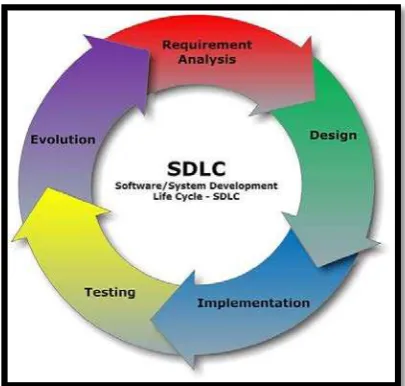
The project methodology used to develop this application is a System Development Life Cycle (SDLC). This methodology was chosen because it fits the approach for developing the system which relies on techniques that produce deliverables intended. SDLC presents guidance for selecting approriate methods, techniques and tools based on the specific requirements for the project. With this approach, project is desired to move consecutively according to steps planned for each phase. The phases involved for this project are requirements planning, design, implementation, testing and evolution.
3.2 System Development Phases
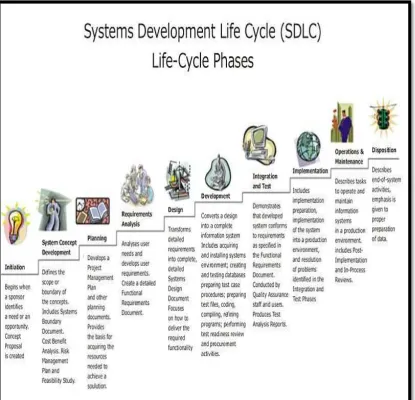
The System Development Life Cycle framework provides a sequence of activities for system designers and developers to follow. It consists of a steps or phases in which each phase of the SDLC uses the results of the previous one. A System Development Life Cycle (SDLC) adheres to important phases that are essential for developers, such as planning, analysis, design, and implementation, and are explained in the diagram. It include evalution of present system, information gathering, feasibility study and request approval.