WIFI BASED HD SIGNAGE CONTROLLER
SYAFIQUL SYAZWAN BIN JANSANI @ MOHD ASRI
This Report Is Submitted In Partial Fulfillment of Requirements For The Bachelor Degree in Electronic Engineering (Computer Engineering)
Fakulti Kejuruteraan Elektronik dan Kejuruteraan Komputer Universiti Teknikal Malaysia Melaka
v
ACKNOWLEDGEMENT
vi
ABSTRACT
Wi-Fi Based HD Signage Controller is a smart, effective and cheap solution to develop digital signage. A small controller board is embedded into any type of display panel such as CRT, VGA, DVI, HDMI and composite make it versatile and easier to use by connecting the display cable to the display panel. Instead of a simple architecture, this product is also an improvised version of existing digital signage products with extra features. The operation are may cover large area, using Wide Area Network (WAN) and smaller area using Local Area Network (LAN). All the data and processing are taking place in an encrypted secure channel make it safe in term of security. The system is consisting of a server (any single display panel embedded with Wi-Fi Based HD Signage Controller) that will operate remotely and local client (Windows PC) with software for user interfacing. The application software is easy to use with simple Graphical User Interface (GUI) with many functions. Users can transfer and synchronize video files, play videos and creating text videos in the single layout of software interface. One of the best features of this product that it supports High Definition (HD) video quality. Wi-Fi Based HD Signage Controller is currently a green solution for environmental pollution caused advertising materials and Cathode Ray Tube (CRT) glass. In addition, it can be an alternative to cheap and fast advertising and announcement. Wi-Fi Based HD Signage Controller is identified to have significant benefits to our lives. It is a simple and easy, green solution, affordable and yet has a high potential commercial value.
vii
ABSTRAK
viii
TABLE OF CONTENTS
TITLE PAGE
PROJECT TITLE i
REPORT AUTHORIZATION FORM ii
DECLARATION iii SUPERVISOR’S DECLARATION iv DEDICATION v WIFI BASED HD SIGNAGE CONTROLLER ... i
SYAFIQUL SYAZWAN BIN JANSANI @ MOHD ASRI ... i
ACKNOWLEDGEMENT ... v
ABSTRACT ... vi
ABSTRAK ... vii
TABLE OF CONTENTS ... viii
TABLE OF FIGURES ... xi
ABBREVIATIONS... xiv
CHAPTER I ... 1
I 1.1 Project Overview ... 1
II 1.2 Problem Statement ... 2
III 1.3 Objectives ... 2
IV 1.4 Scope Of The Project ... 2
V 1.5 Project Significance ... 3
ix
VI 2.1 Introduction ... 4
VII 2.2 Existing Digital Signage System ... 4
VIII 2.3 Related Theoretical Review ... 6
2.3.1 Effectiveness Measures of Digital Signage ... 6
2.3.2 Digital Signage Technologies ... 9
IX 2.4 Digital Signage Standard ... 9
X 2.5 Raspberry Pi as Video Advertising Controller ... 13
XI 2.6 Concerto Digital Signage ... 16
XII 2.7 Summary ... 19
CHAPTER III ... 20
XIII 3.1 The System Architecture ... 20
XIV 3.2 Hardware Design ... 23
3.2.1 Raspberry Pi Setup ... 23
3.2.2 Get IP address using if command ... 29
3.2.3 Remote connection through Putty ... 30
3.2.4 Setting the static IP ... 31
3.2.5 Automatic log on upon boot up ... 32
3.2.6 LCD display modification ... 32
XV 3.3 Software Development ... 36
3.3.1 Write Bash script using Putty ... 36
3.3.2 WinSCP library for .NET Environment ... 37
3.3.3 Develop Visual Basic VB.NET application using Visual Studio ... 37
3.3.4 Graphical User Interface (GUI) Design ... 38
3.3.5 WinSCP library integration ... 38
3.3.6 Creating text using designer tools ... 44
x
CHAPTER IV ... 47
XVII 4.1 Introduction ... 47
XVIII 4.2 System testing on client side ... 47
XIX 4.3 System testing on server side ... 57
XX 4.4 Summary ... 59
CHAPTER V ... 60
XXI 5.1 Introduction ... 60
XXII 5.2 Conclusion ... 60
XXIII 5.3 Future Works ... 61
XXIV 5.4 Summary ... 61
REFERENCES ... 62
APPENDIX ... 63
XXV 5.5 Appendix A ... 63
xi
TABLE OF FIGURES
NO. TITLE PAGES
Figure 2. 1: Wall-like display ... 6
Figure 2.2: Simulated environment ... 7
Figure 2.3: System Framework ... 7
Figure 2. 4: HD contents display using PC clustering ... 8
Figure 2. 5: Seperation and compaction ... 8
Figure 2. 6: Digital signage reference system ... 11
Figure 2. 7: IPTV-based digital signage architecture ... 12
Figure 2. 8: Digital signage application and client ... 12
Figure 2. 9: Designed System Architecture... 14
Figure 2. 10: Server and clients application architecture ... Error! Bookmark not defined. Figure 2. 11: Digital signage application and client ... 16
Figure 2. 12: Bash script for testing web server load... 17
Figure 2. 13: Raspberry Pi Concerto client mounted behind ... 19
Figure 3. 1: WHiBiC operation……….. 21
Figure 3. 2: WHiBiC implementation ... 22
Figure 3. 3: Flowchart design ... 22
Figure 3. 4: SD Card drive directory ... 24
Figure 3. 5: Raspbian image file selection ... 25
Figure 3. 6: Reading the Raspbian image file ... 25
Figure 3. 7: Raspbian image file is being written into the SD Card ... 26
Figure 3. 8: Installation process done ... 26
xii
Figure 3. 10: Password setting to change the default password ... 28
Figure 3. 11: Enable SSH connection in server ... 28
Figure 3. 12: Getting initial ip address ... 29
Figure 3. 13: Setting Remote SSH connection client through Putty... 30
Figure 3. 14: Shell environment through remote client ... 30
Figure 3. 15: Setting the static ip for server ... 31
Figure 3. 16: Static ip assigned to server... 31
Figure 3. 17: Setup to enable automatic log on ... 32
Figure 3. 18:.LCD monitor disassembly ... 33
Figure 3. 19: Tools used in drilling holes, wiring and soldering procedures. ... 33
Figure 3. 20: LCD monitor main parts ... 34
Figure 3. 21: View inside the steel cage ... 34
Figure 3. 22: Rear view of the LCD monitor with HDMI cable connected to the monitor. ... 35
Figure 3. 23: Rear view of the LCD monitor ... 35
Figure 3. 24: Writing a looping Bash script ... 36
Figure 3. 25: GUI design of client system ... 38
Figure 3. 26: WinSCP SSH connection ... 39
Figure 3. 27: VB.NET coding for SSH connection ... 39
Figure 3. 28: VB.NET coding to reboot server ... 40
Figure 3. 29: File listing boxes for sync ... 41
Figure 3. 30: Declaration of server and client home directory ... 41
Figure 3. 31: File listing for server and client sides (part 1) ... 41
Figure 3. 32: File listing for server and client sides (part 2) ... 42
Figure 3. 33: Sync menu selection ... 42
Figure 3. 34: Sync algorithm ... 43
Figure 3. 35: Coding to execute the server script ... 43
Figure 3. 36: Area for creating text video ... 44
Figure 3. 37: Background color selection ... 44
Figure 3. 38: Text color selection ... 45
xiii
Figure 3. 40: Image to video conversion (part 1) ... 46
Figure 3. 41: Image to video conversion (part 2) ... 46
Figure 4. 1: Testing connection to the server 48 Figure 4. 2: Refresh status ... 48
Figure 4. 3: Output after refresh ... 49
Figure 4. 4: Create text video in a provided box ... 49
Figure 4. 5: Background color selection ... 50
Figure 4. 6: Text color selection ... 50
Figure 4. 7: Text size selection ... 51
Figure 4. 8: Preview the text created ... 51
Figure 4. 9: Setup the video length ... 52
Figure 4. 10: Text to video conversion is done... 52
Figure 4. 11: Refresh status ... 53
Figure 4. 12: Updated file listings ... 53
Figure 4. 13: Video sync status... 54
Figure 4. 14: Refresh status ... 54
Figure 4. 15: Refresh status ... 55
Figure 4. 16: Sync result ... 55
Figure 4. 17: Stop the running script ... 56
Figure 4. 18: Play the updated videos... 56
Figure 4. 19: The output video ... 57
Figure 4. 20: The second text video ... 58
Figure 4. 21: Example of advertising video ... 58
xiv
ABBREVIATIONS
WHiBiC Wi-Fi Based HD Signage Controller
Wi-Fe Wi_Fi For Everything
Wi-Fi Wireless Fidelity
SSH Secure Shell
SFTP Secure File Transfer Protocol
PHP Hypertext Preprocessor
LED Light Emitting Diode
HD High Definition
LCD Liquid Crystal Display
IoT Internet of Thing
CDN Content Delivery Network
WLAN Wireless Local Area Network
LAN Local Area Network
WAN Wide Area Network
VB Visual Basic
CPU Central Processing Unit
RAM Random Access Memory
1
CHAPTER I
1.1 Project Overview
Digital signage technology has been discovered since twenty years ago. In last ten years, digital signage technology is advancing. Digital signage technology begins with LED signs that form alphabetical letters to display messages. In current technology, many application and modification has been applied to digital signage. The interface is so interactive with creative and attractive design. Some are built with larger screen to attract people looking at it. Amazingly, image processing technology is also being applied in digital signage to process information captured by the camera. Digital signage is available anywhere. We can see at shopping mall, hospital, office, sidewalks, etc. It is available in wide range of screen size depending on its application.
2
control the disposal of CRT glass into landfills. This is because the Lead in the CRT glass is chemically hazardous to the environment. The management of waste CRT display is now uncontrolled. By recycling the old CRT display and embed it with Wi-Fi Based HD Signage Controller help to sustain our green environment and prevent from environmental pollution.
The concept of the project is simple. Everyone can own one and use it easily with full control. Although the application part is easy, but the design and development part is quite complicated. The brief explanation, procedures, testing results and discussion will be discussed in detail later in this report..
1.2 Problem Statement
The existing digital signage is not affordable by public citizen due to it‟s price, complexity and limited user control over the multimedia contents.
Environmental pollution become worse and unmanaged. Advertising material waste such as poster, banner, paper and dangerous chemical waste Lead are contributing to environmental pollution in the landfills.
1.3 Objectives
To develop a prototype of cheap and simple digital signage controller that can be connected to any display panel.
To promote the use of green technology product to prevent environmental pollution
1.4 Scope Of The Project
The scope of the work mainly relates to computer engineering field including the following tasks:
3
2. Software development in VB.NET environment using variety of additional tools and extensions.
1.5 Project Significance
4
CHAPTER II
LITERATURE REVIEW
2.1 Introduction
In this chapter, all the related literature reviews are provided and the fundamental concept of Wi-Fi based HD digital signage is explained briefly as well as the additional research on useful theories such as high definition (HD) controller using Raspberry Pi, Secure Shell (SSH) File Transfer Protocol (SFTP) and FFmpeg encoding. The existing technology of digital signage is introduced in the early section of this chapter and followed by theoretical studies on how to establish a client-server communication using encrypted SSH session. Then, futher studies continue on how to turn Raspberry Pi into a video advertising control system. Next, a research is conducted on ffmpeg video encoding for video encoding purpose. At the end of this chapter, all the literature reviews are summarized.
2.2 Existing Digital Signage System
5
shapes with different screen sizes. Advancement in network and multimedia technologies allow a large network of digital signage installation in many facilities and buildings. Digital signage helps people to convey and receive information and easily available at public places. In Montreal, Canada, a digital signage solution company namely iGotcha launched the first interactive windows display at Garage‟s flagship Montreal store. The interactive window signage is accessible 24/7 consists of 60-inch image projected onto an interactive touch foil affixed to the inside of the window. It displays interactive option menu that allows user to access detail of product information. Sometime it displays photos of available fashion and promotional videos[1]. Digital signage also installed at shopping malls, hospitals and buildings to provide information related to bussiness, products and services. It is widely used by corporates and advertisement provider. Sometimes it can be a government‟s digital city project .
According to researchers from Creative Content Research Laboratory of Electronics and Telecommunications Research Institute in Daejon, Korea, digital signage is defined as a network system of digital displays that are centrally connected and addressable for targeted information, entertainment, merchandizing and advertisement [2]. Yackey defines a digital signage as any form of business communication where a dynamic messaging device is used to take the place of, or supplement, other forms of messaging. Also a digital signage is considered as a form of Out Of Home (OOH) advertising that appears on some types of digital display. Considering its application areas, we consider it as an innovative medium for diverse service areas such as corporate, retail, large and small
6
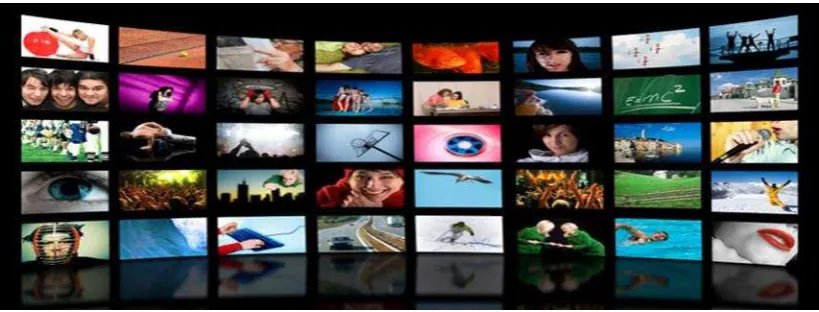
Figure 2. 1: Wall-like display
2.3 Related Theoretical Review
This section present studies and research of the theoretical review on the effective measurement of Raspberry Pi and the its technologies .
2.3.1 Effectiveness Measures of Digital Signage
7
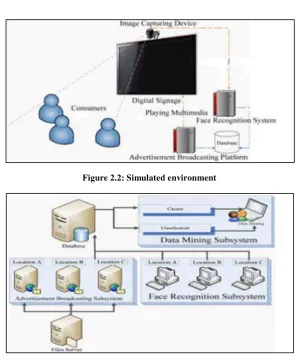
Figure 2.2: Simulated environment
Figure 2.3: System Framework
8
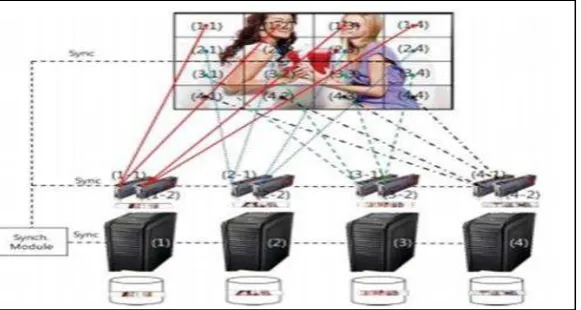
panel (1.1, 1.2). Full contents displayed on 16 panels should be totally synchronized. Figure 2.4 depicts the full contents should be separated, encoded and stored according to information of PC clustering and panel structure.
Figure 2. 4: HD contents display using PC clustering
9
2.3.2 Digital Signage Technologies
IT technologies are used in digital signage to provide services such as: Digital display device: The ultra HD image and moving pictures are utilized in digital signage systems because of the depreciation of display panel such as LCD, LED and Plasma display. The significant display manufacturers, such as Samsung, LG, NEC, Sony and Panasonic, are producing the display panels from small size one to over 100 inches one.
Digital content: Digital content is created with a variety of formats such as image, moving picture, flash, apps, and so on. POPAI (Point of Purchase Advertising International), the global association for marketing retail, established the standards for content formats of a digital signage.
Network: As a digital signage should efficiently deliver, update and manage the contents at the central server, the network needs to support such functions associated with the content. The network can be implemented many types, such as FTP,
WebDAV, cache server, CDN (Contents Delivery Network) and cloud server. Software solution: The role of software solution is very crucial in digital signage system. The main features of the software solution are as follows: encoding, decoding, control display schedule, interface between display device and central server, synchronization, display layout, separate display region, and so on.
2.4 Digital Signage Standard
Several organizations proposed the technical standards of digital signage system for providing the solution of interoperability. In this section, we have summarized three standards issued by POPAI (Point of Purchase Advertising International), ITU-T and W3C.
POPAI Standards
10
reference system. Like any other industrial standards, the POPAI reference model is developed to satisfy the following requirements: adaptability, manageability,
extensibility, scalability and easy implementation. POPAI standards have three major documents to define screen media format, RS-232C device and play log standards [5][6][7].
Screen Media Formats: The aim of Screen media formats is to establish a baseline set of standard formats for digital media. They enable the terminal devices of digital signage to accurately display contents. They define the codec for audio, video, still image, vector and container formats. Today HTML 5 is considered more appropriate than POPAI screen media formats.
RS-232 Control Standards: RS-232 control standards are intended for establishing the commands based on RS-232 to control the display device. However, as the participation of industrial companies is not clear and the display devices that do not support RS-232 has appeared in the market, the standards define the digital control commands in place of establishing protocol among devices.