15.1 November 2003, v1 © Copyright IBM Corporation 2003
deeper
Business Consulting Services
© Copyright IBM Corporation 2003
Business Add-In’s
ABAP | Confidential | 15_BAdl v1 .ppt | 10/29/2003
2 © Copyright IBM Corporation 2003
Lesson Objectives
After completing this lesson you will be able to :
Understand what Business Add In’s (BAdIs) are
Define BAdIs
Implement BAdIs
Use BAdIs
Create an implementation for an existing SAP BAdI
Create Multiple Use BAdIs
15.3 November 2003, v1 © Copyright IBM Corporation 2003
ABAP | Confidential | 15_BAdl v1 .ppt | 10/29/2003
3 © Copyright IBM Corporation 2003
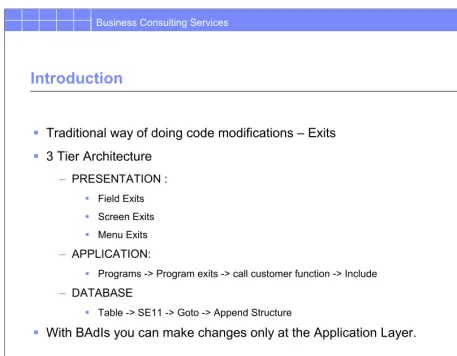
Introduction
Traditional way of doing code modifications – Exits
3 Tier Architecture
– PRESENTATION :
Field Exits
Screen Exits
Menu Exits
– APPLICATION:
Programs -> Program exits -> call customer function -> Include
– DATABASE
Table -> SE11 -> Goto -> Append Structure
With BAdIs you can make changes only at the Application Layer.
• The traditional way of doing code modifications was via User exits.
ABAP | Confidential | 15_BAdl v1 .ppt | 10/29/2003
4 © Copyright IBM Corporation 2003
BAdIs
Business Add-Ins are a new SAP enhancement technique based on ABAP Objects
They can be inserted into the SAP system based on specific user requirements
Business Add-Ins should be considered generalized Business Transaction Events that can be used to bundle program, menu and screen enhancements into a single add-in.
Each Business Add-In has :
– at least one Business Add-In definition
– a Business Add-In interface
– a Business Add-In class that implements the interface
• In order to enhance a program a Business Add-In must first be defined • Subsequently two classes are automatically generated :
– An interface with ‘IF_EX_’ inserted between the first and second characters of the BAdI name
– An adapter class with ‘CL_EX_’ inserted between the first and second characters of the BAdI name.
15.5 November 2003, v1 © Copyright IBM Corporation 2003
ABAP | Confidential | 15_BAdl v1 .ppt | 10/29/2003
5 © Copyright IBM Corporation 2003
BAdI Enhancement options
In Business Add-Ins, all the components of an enhancement option are grouped together
– Program Enhancements: Functional enhancement of the program are defined in the form of interface methods and can be used with or without Menu
Enhancements or Screen Enhancements
– Menu Enhancements: Function codes can be entered for a BAdI for the corresponding menu entries in the user interface definition.
ABAP | Confidential | 15_BAdl v1 .ppt | 10/29/2003
6 © Copyright IBM Corporation 2003
Defining BAdIs
Enter BADI name
Click on CREATE SE18
• To define a BAdI use Sap Menu -> Tools -> ABAP Workbench -> Utilities -> Business Ad-Ins -> Definition
15.7 November 2003, v1 © Copyright IBM Corporation 2003
ABAP | Confidential | 15_BAdl v1 .ppt | 10/29/2003
7 © Copyright IBM Corporation 2003
Defining BAdIs – Attributes
Enter short text
BADI class is automatically created
• When a BAdI is created, BADI class gets automatically created with the suffix ‘CL_EX_’ after the first character of the BAdI name.
• Package : Specifies the Package in which this BAdI resides.
• Multiple use : With this option you can have multiple implementations for the same BAdI • Filter-Dependent : Business Add-Ins may be implemented depending on a specific filter value (example, country-specific versions: Distinct implementations of the BAdI can be created for each country). A filter type must be entered when defining your
ABAP | Confidential | 15_BAdl v1 .ppt | 10/29/2003
8 © Copyright IBM Corporation 2003
BADI Definition - Save
Enter Package name
15.9 November 2003, v1 © Copyright IBM Corporation 2003
ABAP | Confidential | 15_BAdl v1 .ppt | 10/29/2003
9 © Copyright IBM Corporation 2003
Defining BAdIs
Package name populated
BAdI class created
ABAP | Confidential | 15_BAdl v1 .ppt | 10/29/2003
10 © Copyright IBM Corporation 2003
Defining BAdIs - Interface
BADI Interface is created automatically
To edit double click on the interface
• An interface is created automatically with the suffix ‘IF_EX_’ after the first character of the BAdI name
15.11 November 2003, v1 © Copyright IBM Corporation 2003
ABAP | Confidential | 15_BAdl v1 .ppt | 10/29/2003
11 © Copyright IBM Corporation 2003
Defining BAdIs – Interface methods
Method name
Method type
• Specify the methods in the Class Builder for the interface
• Instance methods can access all of the attributes of a class, and can trigger all of the events of the class
• Static methods can only access static attributes and trigger static events
ABAP | Confidential | 15_BAdl v1 .ppt | 10/29/2003
12 © Copyright IBM Corporation 2003
Defining BAdIs – Interface methods - parameters
Import and Export parameters
• The Import/Export parameters for the method are specified in the ‘Parameters’ section • The type specifies whether the parameter is an Importing, Exporting, Changing or
Returning parameter.
• Check the Optional field if it is not a mandatory parameter
15.13 November 2003, v1 © Copyright IBM Corporation 2003
ABAP | Confidential | 15_BAdl v1 .ppt | 10/29/2003
13 © Copyright IBM Corporation 2003
Defining BAdIs – Exceptions
Exceptions
• You can specify any exceptions in the Exceptions section.
ABAP | Confidential | 15_BAdl v1 .ppt | 10/29/2003
14 © Copyright IBM Corporation 2003
BADI Implementation
SE19
Enter Implementation name
Click on create
Enter the BAdI Definition name
• To create an implementation, proceed as follows:
– Choose ABAP Workbench-> Utilities-> Business Add-Ins (transaction SE19) from the SAP menu
– Enter a name for the implementation and choose Create.
15.15 November 2003, v1 © Copyright IBM Corporation 2003
ABAP | Confidential | 15_BAdl v1 .ppt | 10/29/2003
15 © Copyright IBM Corporation 2003
BAdI Implementation
Double click on the method to modify method code
• During implementation creation, a class for implementing the enhancement's interface is also created
ABAP | Confidential | 15_BAdl v1 .ppt | 10/29/2003
16 © Copyright IBM Corporation 2003
Implementing BAdIs: Method implementation
Modify the method code within the METHOD/ENDMETHOD
statements and activate
15.17 November 2003, v1 © Copyright IBM Corporation 2003
ABAP | Confidential | 15_BAdl v1 .ppt | 10/29/2003
17 © Copyright IBM Corporation 2003
Using a BAdI
• When a BAdI is created, the enhancement manager automatically generates a class that implement the interface
• In order to be able to call static methods, you must declare the corresponding class in ABAP Objects using the ‘class … definition load’ statement
• In the example having created a BAdI for division, you can program the call for the BAdI in the following manner:
– Create an Interface Reference Variable in the program ‘L_BADI_INSTANCE’ – Perform the statement ‘call method cl_exithandler …’ using the BAdI and the
interface reference variable.
ABAP | Confidential | 15_BAdl v1 .ppt | 10/29/2003
18 © Copyright IBM Corporation 2003
Create an Implementation for an SAP provided BAdI
Find the corresponding BAdI for the SAP transaction
Create a custom Implementation for the BAdI
From the methods available in the BAdI and select the appropriate method
Enter custom code in the method and activate
15.19 November 2003, v1 © Copyright IBM Corporation 2003
ABAP | Confidential | 15_BAdl v1 .ppt | 10/29/2003
19 © Copyright IBM Corporation 2003
Finding a BAdI – Transaction VD02
Select System->Status from the drop down menu
• To find a BAdI for any SAP transaction do the following: – Click on System->Status
– Double click on the program name
– Once inside the program search for ‘CL_EXITHANDLER=>GET_INSTANCE’. Make sure the radiobutton – In main program is checked
– A list of all the programs with call to the BAdIs will be listed.
– The export parameter ‘EXIT_NAME’ for the method GET_INSTANCE of class CL_EXITHANDLER will have the user exit assigned to it.
ABAP | Confidential | 15_BAdl v1 .ppt | 10/29/2003
20 © Copyright IBM Corporation 2003
Finding a BAdI – Transaction VD02
15.21 November 2003, v1 © Copyright IBM Corporation 2003
ABAP | Confidential | 15_BAdl v1 .ppt | 10/29/2003
21 © Copyright IBM Corporation 2003
Finding a BAdI – Source program
ABAP | Confidential | 15_BAdl v1 .ppt | 10/29/2003
22 © Copyright IBM Corporation 2003
Finding a BAdI – Search results
Three BAdIs used in this program. Double click required BAdI to see the source code
15.23 November 2003, v1 © Copyright IBM Corporation 2003
ABAP | Confidential | 15_BAdl v1 .ppt | 10/29/2003
23 © Copyright IBM Corporation 2003
Finding a BAdI – Call to a BAdI in the source code
BAdI being used
ABAP | Confidential | 15_BAdl v1 .ppt | 10/29/2003
24 © Copyright IBM Corporation 2003
Finding a BAdI – Interface reference to the BAdI
Interface reference Variable defined
15.25 November 2003, v1 © Copyright IBM Corporation 2003
ABAP | Confidential | 15_BAdl v1 .ppt | 10/29/2003
25 © Copyright IBM Corporation 2003
Using an SAP BAdI – Create a Custom Implementation
Enter the name of the BAdI
• To create a custom implementation for an SAP defined BAdI do the following: – Go to transaction SE19
– Enter a name for the BAdI – Hit the ‘Create’ button
– The BAdI definition selection popup will be displayed
ABAP | Confidential | 15_BAdl v1 .ppt | 10/29/2003
26 © Copyright IBM Corporation 2003
BAdI Implementation – Attributes
Enter description
15.27 November 2003, v1 © Copyright IBM Corporation 2003
ABAP | Confidential | 15_BAdl v1 .ppt | 10/29/2003
27 © Copyright IBM Corporation 2003
BAdI Implementation – Interface methods
Click on the interface tab to view the available methods
Double click on method SAVE_DATA to modify it
• In the interfaces tab you will find a list of methods included in the BAdI Interface
ABAP | Confidential | 15_BAdl v1 .ppt | 10/29/2003
28 © Copyright IBM Corporation 2003
BAdI Implementation – Class builder
Enter custom code
• In our example we have chosen the SAVE_DATA method to enter our code changes • Double clicking on the SAVE_DATA method takes us into the class builder
• You can enter your code changes between the method, endmethod statements
15.29 November 2003, v1 © Copyright IBM Corporation 2003
ABAP | Confidential | 15_BAdl v1 .ppt | 10/29/2003
29 © Copyright IBM Corporation 2003
BAdIs – Execute the Change customer transaction
Change name of Customer Click on SAVE button
VD02
• Go into the change customer transaction VD02 and change the name of the customer • Click on the SAVE button.
ABAP | Confidential | 15_BAdl v1 .ppt | 10/29/2003
30 © Copyright IBM Corporation 2003
BAdI Implementation – Invoked by VD02
Custom code for method invoked via BAdI CUSTOMER_ADD_DATA
• A break point is hard-coded into the method SAVE_DATA. • Execute transaction VD02 and change the customer address.
15.31 November 2003, v1 © Copyright IBM Corporation 2003
ABAP | Confidential | 15_BAdl v1 .ppt | 10/29/2003
31 © Copyright IBM Corporation 2003
Multiple Use BAdIs
Single Use Business Add-Ins
– Do NOT select the Multiple use checkbox from the Administration tab when defining a Single Use BAdI
– BAdI has a single Implementation
– Similar to procedures
– Return values can be expected
– Can use importing, changing and returning parameters
– N/A
– A single implementation will be triggered by the application program
Multiple Use Business Add-Ins
– Select the Multiple use checkbox from the Administration tab when creating the BAdI definition
– BAdI has multiple implementations
– Similar to event calls
– Cannot expect return values
– Can use importing and changing parameters
– For multiple implementations there is no sequence control because at the time of BAdI definition it does not know which implementation will be active
ABAP | Confidential | 15_BAdl v1 .ppt | 10/29/2003
32 © Copyright IBM Corporation 2003
Multi Use BAdIs – CUSTOMER_ADD_DATA Definition
Multiple use Button checked SAP defined BAdI – CUSTOMER_ADD_DATA
15.33 November 2003, v1 © Copyright IBM Corporation 2003
ABAP | Confidential | 15_BAdl v1 .ppt | 10/29/2003
33 © Copyright IBM Corporation 2003
CUSTOMER_ADD_DATA
Create a second implementation for BAdI CUSTOMER_ADD_DATA
Specify BAdI name Click on CREATE
ABAP | Confidential | 15_BAdl v1 .ppt | 10/29/2003
34 © Copyright IBM Corporation 2003
Multi Use BAdIs – Interface method SAVE_DATA
Double click on method SAVE_DATA
15.35 November 2003, v1 © Copyright IBM Corporation 2003
ABAP | Confidential | 15_BAdl v1 .ppt | 10/29/2003
35 © Copyright IBM Corporation 2003
Multi Use BAdIs – Modify method SAVE_DATA
Enter custom code for method SAVE_DATA
ABAP | Confidential | 15_BAdl v1 .ppt | 10/29/2003
36 © Copyright IBM Corporation 2003
Multi Use BAdIs – View implementations for BAdI
SE18
Displays list of Implementations Select to display list of Implementations for BAdI CUSTOMER_ADD_DATA
• To view all implementation for BAdi CUSTOMER_ADD_DATA go to the BAdI definition in se18. Click on Implementation->Display.
• A list of all the Implementations is displayed.
• You can CREATE, CHANGE, DISPLAY and DELETE Implementations from here. • Both BAdIs will be triggered when the customer data is modified in transaction VD02
15.37 November 2003, v1 © Copyright IBM Corporation 2003
ABAP | Confidential | 15_BAdl v1 .ppt | 10/29/2003
37 © Copyright IBM Corporation 2003
Filter Dependent BAdIs
Business Add-Ins can be implemented based on a specific filter value
ABAP | Confidential | 15_BAdl v1 .ppt | 10/29/2003
38 © Copyright IBM Corporation 2003
Filter Dependent BAdIs – BAdI Definition
SE18
Click checkbox for Filter Dependent BAdIs
Enter Filter type
• A filter type can be a data element or a structure. A data element must fulfill the following criteria:
– The data element's domain may contain a maximum of 30 characters and must be of type Character.
15.39 November 2003, v1 © Copyright IBM Corporation 2003
ABAP | Confidential | 15_BAdl v1 .ppt | 10/29/2003
39 © Copyright IBM Corporation 2003
Filter Dependent BAdIs – BAdI Definition
Double click on the Interface to add parameters and methods Enter text
ABAP | Confidential | 15_BAdl v1 .ppt | 10/29/2003
40 © Copyright IBM Corporation 2003
Filter Dependent BAdIs – Interface - Method Definition
15.41 November 2003, v1 © Copyright IBM Corporation 2003
ABAP | Confidential | 15_BAdl v1 .ppt | 10/29/2003
41 © Copyright IBM Corporation 2003
Filter Dependent BAdIs – Interface – Parameter Definition
FLT_VAL parameter preset for method Create parameter to
export tax rate
ABAP | Confidential | 15_BAdl v1 .ppt | 10/29/2003
42 © Copyright IBM Corporation 2003
Filter Dependent BAdIs – Implementation
Create BAdI Implementation
15.43 November 2003, v1 © Copyright IBM Corporation 2003
ABAP | Confidential | 15_BAdl v1 .ppt | 10/29/2003
43 © Copyright IBM Corporation 2003
Filter Dependent BAdIs – BAdI Implementation
SE19
Select a value from the search help or enter a valid value Click on button to create an entry for filter value
ABAP | Confidential | 15_BAdl v1 .ppt | 10/29/2003
44 © Copyright IBM Corporation 2003
Filter Dependent BAdIs – BAdI Implementation
Double click on the Method to enter source code
15.45 November 2003, v1 © Copyright IBM Corporation 2003
ABAP | Confidential | 15_BAdl v1 .ppt | 10/29/2003
45 © Copyright IBM Corporation 2003
Filter Dependent BAdIs – Method code
Enter code for the Method to calculate the tax rate based on the company code in Parameter FLT_VAL Save and activate
• The parameter FLT_VAL will have the company code value passes to the implementation.
ABAP | Confidential | 15_BAdl v1 .ppt | 10/29/2003
46 © Copyright IBM Corporation 2003
Filter Dependent BAdIs – Source code to Invoke BAdI
Call BADI from within the program The Tax rate is returned