IX
Operating
Systems
Operating systems provide the software interface between the computer and its appli-cations. This section covers the analysis, design, performance, and special challenges for operating systems in distributed and highly parallel computing environments. Much recent attention in operating system design is given to systems that control embedded computers, such as those found in vehicles. Also persistent are the particular challenges for synchroniz-ing communication among simultaneously executsynchroniz-ing processes, managsynchroniz-ing scarce memory resources efficiently, and designing file systems that can handle massively large data sets.
80 What Is an Operating System? Raphael Finkel
Introduction • Historical Perspective • Goals of an Operating System • Implementing an
Operating System • Research Issues and Summary
81 Thread Management for Shared-Memory Multiprocessors Thomas E. Anderson, Brian N. Bershad, Edward D. Lazowska, and Henry M. Levy Introduction • Thread Management Concepts • Issues in Thread Management • Three Modern Thread Systems • Summary
82 Process and Device Scheduling Robert D. Cupper
Introduction • Background • Resources and Scheduling • Memory Scheduling • Device Scheduling • Scheduling Policies • High-Level Scheduling
• Recent Work and Current Research
83 Real-Time and Embedded Systems John A. Stankovic
Introduction • Underlying Principles • Best Practices • Research Issues and Summary 84 Process Synchronization and Interprocess Communication Craig E. Wills
Introduction • Underlying Principles • Best Practices • Research Issues and Summary 85 Virtual Memory Peter J. Denning
Introduction • History • Structure of Virtual Memory • Distributed Shared
Memory • The World Wide Web: Virtualizing the Internet • Conclusion 86 Secondary Storage and Filesystems Marshall Kirk McKusick
Introduction • Secondary Storage Devices • Filesystems
87 Overview of Distributed Operating Systems Sape J. Mullender Introduction • Survey of Distributed Systems Research • Best Practice 88 Distributed and Multiprocessor Scheduling Steve J. Chapin
and Jon B. Weissman
Introduction • Issues in Multiprocessor Scheduling • Best Practices • Research Issues and Summary
80
What Is an Operating
System?
Raphael Finkel University of Kentucky
80.1 Introduction 80.2 Historical Perspective
Open Shop Organization •Operator-Driven Shop
Organization • Offline Loading• Spooling Systems • Batch Multiprogramming • Interactive Multiprogramming • Graphical User Interfaces (GUIs) •Distributed Computing
80.3 Goals of an Operating System
Abstracting Reality • Managing Resources • User Interface
80.4 Implementing an Operating System
Processes • Virtual Machines• Components of the Kernel
80.5 Research Issues and Summary
80.1 Introduction
In brief, anoperating systemis the set of programs that control a computer. Some operating systems you may have heard of are Unix (including SCO UNIX, Linux, Solaris, Irix, and FreeBSD); the Microsoft family (MS-DOS, MS-Windows, Windows/NT, Windows 2000, and Windows XP); IBM operating systems (MVS, VM, CP, OS/2); MacOS; Mach; and VMS. Some of these (Mach and Unix) have been implemented on a wide variety of computers, but most are specific to a particular architecture, such as the Digital Vax (VMS), the Intel 8086 and successors (the Microsoft family, OS/2), the Motorola 68000 and successors (MacOS), and the IBM 360 and successors (MVS, VM, CP).
Controlling the computer involves software at several levels. We distinguish kernel services, library services, and application-level services, all of which are part of the operating system. These services can be pictured as inFigure 80.1. Applications are run by processes, which are linked together with libraries that perform standard services such as formatting output or presenting information on a display. The kernel supports the processes by providing a path to the peripheral devices. It responds to service calls from the processes and interrupts from the devices.
This chapter discusses how operating systems have evolved, often in response to architectural advances. It then examines the goals and organizing principles of current operating systems. Many books describe operating systems concepts [4–6,17–19] and specific operating systems [1,2,9–11].
80.2 Historical Perspective
Devices
Processes Libraries
Kernel
Interrupts Service calls
FIGURE 80.1 Operating system services.
80.2.1 Open Shop Organization
The earliest computers were massive, extremely expensive, and difficult to use. Users would sign up for blocks of time during which they were allowed “hands-on” exclusive use of the computer. The user would repeatedly load a program into the computer through a device such as a card reader, watch the results, and then decide what to do next.
A typical session on the IBM 1620, a computer in use around 1960, involved several steps in order to compile and execute a program. First, the user would load the first pass of the Fortran compiler.
This operation involved clearing main store by typing a cryptic instruction on the console typewriter; putting the compiler, a 10-inch stack of punched cards, in the card reader; placing the program to be compiled after the compiler in the card reader; and then pressing the “load” button on the reader. The output would be a set of punched cards called “intermediate output.” If there were any compilation errors, a light would flash on the console, and error messages would appear on the console typewriter. If everything had gone well so far, the next step would be to load the second pass of the Fortran compiler just like the first pass, putting the intermediate output in the card reader as well. If the second pass succeeded, the output was a second set of punched cards called the “executable deck.” The third step was to shuffle the executable deck slightly, load it along with a massive subroutine library (another 10 inches of cards), and observe the program as it ran.
The facilities for observing the results were limited: console lights, output on a typewriter, punched cards, and line-printer output. Frequently, the output was wrong. Debugging often took the form of peeking directly into main store and even patching the executable program using console switches. If there was not enough time to finish, a frustrated user might get a line-printer dump of main store to puzzle over at leisure. If the user finished before the end of the allotted time, the machine might sit idle until the next reserved block of time.
The IBM 1620 was quite small, slow, and expensive by our standards. It came in three models, ranging from 20K to 60K digits of memory (each digit was represented by 4 bits). Memory was built from magnetic cores, which required approximately 10 microseconds for a read or a write. The machine cost hundreds of thousands of dollars and was physically fairly large, covering about 20 square feet.
80.2.2 Operator-Driven Shop Organization
programs directly. Instead, users would submit their runs, and the operator would run them as soon as possible. Each user was charged only for the amount of time the job required.
The operator often reduced setup time by batching similar job steps. For example, the operator could run the first pass of the Fortran compiler for several jobs, save all the intermediate output, then load the second pass and run it across all the intermediate output that had been collected. In addition, the operator could run jobs out of order, perhaps charging more for giving some jobs priority over others. Jobs that were known to require a long time could be delayed until night. The operator could always stop a job that was taking too long.
The operator-driven shop organization prevented users from fiddling with console switches to debug and patch their programs. This stage of operating system development introduced the long-lived tradition of the users’ room, which had long tables often overflowing with oversized fan-fold paper and a quietly desperate group of users debugging their programs until late at night.
80.2.3 Offline Loading
The next stage of development was to automate the mechanical aspects of the operator’s job. First, input to jobs was collectedofflineby a separate computer (sometimes called a “satellite”) whose only task was the transfer from cards to tape. Once the tape was full, the operator mounted it on the main computer. Reading jobs from tape is much faster than reading cards, so less time was occupied with input/output. When the computer finished the jobs on one tape, the operator would mount the next one. Similarly, output was generated onto tape, an activity that is much faster than punching cards. This output tape was converted to line-printer listings offline.
A smallresident monitorprogram, which remained in main store while jobs were executing, reset the machine after each job was completed and loaded the next one. Conventions were established for control cards to separate jobs and specify their requirements. These conventions were the beginnings of command languages. For example, one convention was to place an asterisk in the first column of control cards, to distinguish them from data cards. The compilation job we just described could be specified in cards that looked like this:
*JOB SMITH The user's name is Smith.
* PASS CHESTNUT Password so others can't use Smith's account * OPTION TIME=60 Limit of 60 seconds
* OPTION DUMP=YES Produce a dump if any step fails.
*STEP FORT1 Run the first pass of the Fortran compiler. * OUTPUT TAPE1 Put the intermediate code on tape 1.
* INPUT FOLLOWS Input to the compiler comes on the next cards.
... Fortran program
*STEP FORT2 Run the second pass of the Fortran compiler. * OUTPUT TAPE2 Put the executable deck on scratch tape 2. * INPUT TAPE1 Input comes from scratch tape 1.
*STEP LINK Link the executable with the Fortran library. * INPUT TAPE2 First input is the executable.
* INPUT TAPELIB Second input is a tape with the library. * OUTPUT TAPE1 Put load image on scratch tape 1.
*STEP TAPE1 Run whatever is on scratch tape 1. * OUTPUT TAPEOUT Put output on the standard output tape. * INPUT FOLLOWS Input to the program comes on the next cards.
... Data
The resident monitor had several duties, including: r Interpret the command language
r Perform rudimentary accounting
This last duty is an early example of information hiding and abstraction: programmers would direct output to cards or line printers but, in fact, the output would go elsewhere. Programs called subroutines provided by the resident monitor for input/output to both logical devices (cards, printers) and physical devices (actual tape drives).
The early operating systems for the IBM 360 series of computer used this style of control. Large IBM 360 installations could cost millions of dollars, so it was important not to let the computer sit idle.
80.2.4 Spooling Systems
Computer architecture advanced throughout the 1960s. (We survey computer architecture inSection II.) Input/output units were designed to run at the same time the computer was computing. They generated an interrupt when they finished reading or writing a record instead of requiring the resident monitor to track their progress. As mentioned, an interrupt causes the computer to save some critical information (such as the current program counter) and to branch to a location specific to the kind of interrupt. Device-service routines, known asdevice drivers, were added to the resident monitor to deal with these interrupts.
Drums and, later, disks were introduced as a secondary storage medium. Now the computer could be computing one job while reading another onto the drum and printing the results of a third from the drum. Unlike a tape, a drum allows programs to be stored anywhere, so there was no need for the computer to execute jobs in the same order in which they were entered. A primitiveschedulerwas added to the resident monitor to sort jobs based on priority and amount of time needed, both specified on control cards. The operator was retained to perform several tasks:
r Mount data tapes needed by jobs (specified on control cards, which caused request messages to appear on the console typewriter).
r Decide which priority jobs to run and which to hold.
r Restart the resident monitor when it failed or was inadvertently destroyed by the running job. This mode of running a computer was known as aspooling system, and its resident monitor was the start of modern operating systems. (The word “spool” originally stood for “simultaneous peripheral operations on line,” but it is easier to picture a spool of thread, where new jobs are wound on the outside, and old ones are extracted from the inside.) One of the first spooling systems was HASP (the Houston Automatic Spooling Program), an add-on to OS/360 for the IBM 360 computer family.
80.2.5 Batch Multiprogramming
Spooling systems did not make efficient use of all the hardware resources. The currently running job might not need the entire main store. A job performing input/output causes the computer to wait until the input/output finishes. The next software improvement, which occurred in the early 1960s, was the introduction ofmultiprogramming, a scheme in which more than one job is active simultaneously.
Under multiprogramming, while one job waits for an input/output operation to complete, another can compute. With luck, no time at all is wasted waiting for input/output. The more simultaneous jobs, the better. However, acompute-boundjob (one that performs little input/output but much computation) can easily preventinput/output-boundjobs (those that perform mostly input/output) from making progress. Competition for the time resource and policies for allocating it are the main theme ofChapter 82.
Multiprogramming also introduces competition for memory. The number of jobs that can be accom-modated at one time depends on the size of main store and the hardware available for subdividing that space. In addition, jobs must be secured against inadvertent or malicious interference or inspection by other jobs. It is more critical now that the resident monitor not be destroyed by errant programs, because not one but many jobs suffer if it breaks. InChapter 85, we examine policies for memory allocation and how each of them provides security.
mounts, those that need long execution, etc. Each batch might have different priorities and fee structures. Some batches (such as large-memory, long-execution jobs) can be scheduled for particular times (such as weekends or late at night). Generally, only one job from any batch can run at any one time.
Each job is divided into discrete steps. Because job steps are independent, the resident monitor can separate them and apply policy decisions to each step independently. Each step might have its own time, memory, and input/output requirements. In fact, two separate steps of the same job can be performed at the same time if they do not depend on each other. The termprocesswas introduced in the late 1960s to mean the entity that performs a single job step. The operating system (as the resident monitor may now be called) represents each process by a data structure sometimes called aprocess descriptor,process control block, orcontext block. The process control block includes billing information (owner, time used), scheduling information, and the resources the job step needs. While it is running, a process may request assistance from the kernel by submitting a service call across theprocess interface. Executing programs are no longer allowed to control devices directly; otherwise, they could make conflicting use of devices and prevent the kernel from doing its work. Instead, processes must use service calls to access devices, and the kernel has complete control of thedevice interface.
Allocating resources to processes is not a trivial task. A process might require resources (such as tape drives) at various stages in its execution. If a resource is not available, the scheduler might block the process from continuing until later. The scheduler must take care not to block any process forever.
Along with batch multiprogramming came new ideas for structuring the operating system. The kernel of the operating system is composed of routines that manage central store, CPU time, devices, and other resources. It responds both to requests from processes and to interrupts from devices. In fact, the kernel runs only when it is invoked either from above, by a process, or below, by a device. If no process is ready to run and no device needs attention, the computer sits idle.
Various activities within the kernel share data, but they must not be interrupted when the data is in an inconsistent state. Mechanisms forconcurrency controlwere developed to ensure that these activi-ties do not interfere with each other.Chapter 84introduces the mutual-exclusion and synchronization problems associated with concurrency control and surveys the solutions that have been found for these problems. The MVS operating system for the IBM 360 family was one of the first to use batch multipro-gramming.
80.2.6 Interactive Multiprogramming
The next step in the development of operating systems was the introduction ofinteractive multipro-gramming, also calledtimesharing. The principal user-oriented input/output device changed in the late 1960s from cards or tape to an interactive terminal. Instead of packaging all the data that a program might need before it starts running, the interactive user is able to supply input as the program wants it. The data can depend on what the program has produced thus far. Among the first terminals were teletypes, which produced output on paper at perhaps ten characters per second. Later terminals were called “glass teletypes” because they displayed characters on a television screen, substituting electronics for mechanical components. Like a regular teletype, they could not back up to modify data sitting earlier on the screen. Shortly thereafter, terminals gained cursor addressibility, which meant that programs could show entire “pages” of information and change any character anywhere on a page.
user and all the files he or she creates. This identifier helps the kernel decide whom to bill for services and whether to permit various actions such as modifying files. (We discuss files inChapter 86and protection inChapter 89.)
During a session, the user imagines that the resources of the entire computer are devoted to this terminal, although many sessions may be active simultaneously for many users. Typically, one process is created at login time to serve the user. That first process, which is usually a command interpreter, may start others as needed to accomplish individual steps.
Users need to save information from session to session. Magnetic tape is too unwieldy for this purpose. Disk storage became the medium of choice for data storage, both short term (temporary files used to connect steps in a computation), medium term (from session to session), and long-term (from year to year). Issues of disk space allocation and backup strategies needed to be addressed to provide this facility. Interactive computing was sometimes added into an existing batch multiprogramming environment. For example, TSO (“timesharing option”) was an add-on to the OS/360 operating system. The EXEC-8 operating system for Univac computers also included an interactive component.
Later operating systems were designed from the outset to support interactive use, with batch facilities added when necessary. TOPS-10 and Tenex (for the Digital PDP-10), and almost all operating systems developed since 1975, including Unix (first on the Digital PDP-11), MS-DOS (Intel 8086), OS/2 (Intel 286 family [10]), VMS (Digital VAX [9]), and all their descendents, were primarily designed for interactive use.
80.2.7 Graphical User Interfaces (GUIs)
As computers became less expensive, the time cost of switching from one process to another (which happens frequently in interactive computing) became insignificant. Idle time also became unimportant. Instead, the goal became helping users get their work done efficiently. This goal led to new software developments, enabled by improved hardware.
Graphics terminals, first introduced in the mid-1970s, have led to the video monitors that are now ubiquitous and inexpensive. These monitors allow individual control of multicolored pixels; a high-quality monitor (along with its video controller) can display millions of pixels in an enormous range of colors. Pointing devices, particularly the mouse, were developed in the late 1970s. Software links them to the display so that a visible cursor reacts to physical movements of the pointing device. These hardware advances have led tographical user interfaces(GUIs), discussed inChapter 48.
The earliest GUIs were just rectangular regions of the display that contained, effectively, a cursor-addressable glass teletype. These regions are called “windows.” The best-known windowing packages were those pioneered by MacOS [15] and the later ones introduced by MS-Windows, OS/2 [10] and X Windows (for UNIX, VMS, and other operating systems [12]). Each has developed from simple rectangular models of a terminal to significantly more complex displays.
Programs interact with the hardware by invoking routines in libraries that know how to communicate with the display manager, which itself knows how to place bits on the screen. The early libraries were fairly low-level and difficult to use; toolkits (in the X Windows environment), especially ones with a fairly small interpreted language (such as Tcl/Tk [13] or Visual Basic), have eased the task of building good GUIs. Early operating systems that supported graphical interfaces, such as MacOS and MS-Windows, provided interactive computing but not multiprogramming. Modern operating systems all provide multiprogram-ming as well as interaction, allowing the user to start several activities and to switch attention to whichever one is currently most interesting.
80.2.8 Distributed Computing
Computers can be connected together by a variety of devices. The spectrum ranges from tight coupling, where several computers share main storage, to very loose coupling, where a number of computers belong to the same international network and can send one another messages.
The ability to send messages between computers opened new opportunities for operating systems. Individual machines become part of a larger whole and, in some ways, the operating system begins to span networks of machines. Cooperation between machines takes many forms.
r Each machine may offernetwork servicesto others, such as accepting mail, providing information on who is currently logged in, telling what time it is (quite important in keeping clocks synchro-nized), allowing users to access machines remotely, and transferring files.
r Machines within the samesite(typically, those under a single administrative control) mayshare file systemsin order to reduce the amount of disk space needed and to allow users to have accounts on multiple machines. Novell nets (MS-DOS), the Sun and Andrew network file systems (UNIX), and the Microsoft File-Sharing Protocol (Windows XP) are examples of such arrangements. Shared file systems are an essential component of anetworked operating system.
r Once users have accounts on several machines, they want to associate graphical windows with sessions on different machines. The machine on which the display is located is called athin client of the machine on which the processes are running. Thin clients have been available from the outset for X Windows; they are also available under Windows 2000 and successors.
r Users want to execute computationally intensive algorithms on many machines in parallel. Mid-dleware, usually implemented as a library to be linked into distributed applications, makes it easier to build such applications. PVM [7] and MPI [14] are examples of such middleware.
r Standardized ways of presenting data across site boundaries developed rapidly. The File-Transfer Protocol (ftp) service was developed in the early 1970s as a way of transferring files between machines connected on a network. In the early 1990s, thegopherservice was developed to create a uniform interface for accessing information across the Internet. Information is more general than just files; it can be a request to run a program or to access a database. Each machine that wishes to can provide a server that responds to connections from any site and communicate a menu of available information. This service was superseded in 1995 by theWorld Wide Web, which supports a GUI to gopher, ftp, and hypertext (documents with links internally and to other documents, often at other sites, and including text, pictures, video, audio, and remote execution of packaged commands). Of course, all these forms of cooperation introduce security concerns. Each site has a responsibility to maintain security if for no other reason than to prevent malicious users across the network from using the site as a breeding ground for nasty activity attacking other sites. Security issues are discussed inChapter 77throughChapter 79.
80.3 Goals of an Operating System
During the evolution of operating systems, their purposes have also evolved. At present, operating systems have three major goals:
1. Hide details of hardware by creating abstractions. 2. Manage resources.
3. Provide a pleasant and effective user interface. We address each of these goals in turn.
80.3.1 Abstracting Reality
implemented as a subroutine or as a library of subroutines) that hides lower-level details and provides a set of higher-level functions. Programs that use abstraction can safely ignore the lower-level (physical) details; they need only deal with the higher-level (virtual) structures.
Why is abstraction important in operating systems? First, the code needed to control peripheral devices is often not standardized; it can vary from brand to brand, and it certainly varies between, say, disks and tape drives and keyboards. Input/output devices are extremely difficult to program efficiently and correctly. Abstracting devices with a uniform interface makes programs easier to write and to modify (e.g., to use a different device). Operating systems provide subroutines calleddevice driversthat perform input/output operations on behalf of programs. The operations are provided at a much higher level than the device itself provides. For example, a program may wish to write a particular block on a disk. Low-level methods involve sending commands directly to the disk to seek to the right block and then undertake memory-to-disk data transfer. When the transfer is complete, the disk interrupts the running program. A low-level program needs to know the format of disk commands, which vary from manufacturer to manufacturer and must deal with interrupts. In contrast, a program using a high-level routine in the operating system might only need to specify the memory location of the data block and where it belongs on the disk; all the rest of the machinery is hidden.
Second, the operating system introduces new functions as it abstracts the hardware. In particular, operating systems introduce the “file” abstraction. Programs do not need to deal with disks at all; they can use high-level routines to read and write disk files (instead of disk blocks) without needing to design storage layouts, worry about disk geometry, or allocate free disk blocks.
Third, the operating system transforms the computer hardware into multiple virtual computers, each belonging to a different process. Each process views the hardware through the lens of abstraction; memory, time, and other resources are all tailored to the needs of the process. Processes see only as much memory as they need, and that memory does not contain the other processes (or the operating system) at all. They think that they have all the CPU cycles on the machine, although other processes and the operating system itself are competing for those cycles. Service calls allow processes to start other processes and to communicate with other processes, either by sending messages or by sharing memory.
Fourth, the operating system can enforce security through abstraction. The operating system must secure both itself and its processes against accidental or malicious interference. Certain instructions of the machine, notably those that halt the machine and those that perform input and output, are moved out of the reach of processes. Memory is partitioned so that processes cannot access each other’s memory. Time is partitioned so that even a run-away process will not prevent others from making progress.
For security and reliability, it is wise to structure an operating system so that processes must use the operating system’s abstractions instead of dealing with the physical hardware. This restriction can be enforced by the hardware, which provides severalprocessor states. Most architectures provide at least two states: theprivileged stateand thenon-privileged state.
Processes always run in non-privileged state. Instructions such as those that perform input/output and those that change processor state cause traps when executed in non-privileged state. Traps save the current execution context (perhaps on a stack), force the processor to jump to the operating system, and enter the privileged state. Once the operating system has finished servicing the trap or interrupt, it returns control to the same process or perhaps to a different one, resetting the computer into non-privileged state.
The core of the operating system runs in privileged state. All instructions have their usual, physical meanings in this state. The part of the operating system that always runs in privileged state is thekernel of the operating system. It only runs when a process has caused a trap or when a peripheral device has generated an interrupt. Traps do not necessarily represent errors; usually, they are service calls. Interrupts often indicate that a device has finished servicing a request and is ready for more work. The clock interrupts at a regular rate in order to let the kernel make scheduling decisions.
service-call design over a procedure-call design is that it allows access to kernel operations and data only through well-defined entry points.
Not all operating systems make use of non-privileged state. MS-DOS, for example, runs all applications in privileged state. Service calls are essentially subroutine calls. Although the operating system provides device and file abstractions, processes may interact directly with disks and other devices. One advantage of this choice is that device drivers can be loaded after the operating system starts; they do not need special privilege. One disadvantage is that viruses can thrive because nothing prevents a program from placing data anywhere it wishes.
80.3.2 Managing Resources
An operating system is not only an abstractor of information, but also an allocator that controls how processes (the active agents) can access resources (passive entities).
Aresourceis a commodity necessary to get work done. The computer’s hardware provides a number of low-level resources. Working programs need to reside somewhere in main store (the computer’s memory), must execute instructions, and need some way to accept data and present results. These needs are related to the fundamental resources ofmemory,CPU time, andinput/output. The operating system abstracts these resources to allow them to be shared.
In addition to these physical resources, the operating system creates virtual, abstract resources. For example,filesare able to store data. They abstract the details of disk storage.Pseudo-files(i.e., objects that appear to be data files on disk but are in fact stored elsewhere) can also represent devices, processes, communication ports, and even data on other computers.Socketsare process-to-process communication channels that can cross machine boundaries, allowing communication through networks such as the Internet. Sockets abstract the details of transmission media and network protocols.
Still higher-level resources can be built on top of abstractions. Adatabaseis a collection of information, stored in one or more files with structure intended for easy access. Amailboxis a file with particular semantics. Aremote file, located on another machine but accessed as if it were on this machine, is built on both file and network abstractions.
The resource needs of processes often interfere with each other. Resource managers in the operating system include policies that try to be fair in giving resources to the processes and allow as much computation to proceed as possible. These goals often conflict.
Each resource has its own manager, typically in the kernel. The memory manager allocates regions of main memory for processes. Modern operating systems use address translation hardware that maps between a process’svirtual addressesand the underlyingphysical addresses. Only the currently active part of a process’s virtual space needs to be physically resident; the rest is kept on backing store (usually a disk) and brought in on demand. The virtual spaces of processes do not usually overlap, although some operating systems also providelight-weight processes that share a single virtual space. The memory manager includes policies that determine how much physical memory to grant to each process and which region of physical memory to swap out to make room for other memory that must be swapped in. For more information on virtual memory, seeChapter 85.
The CPU-time manager is called thescheduler. Schedulers usually implement a preemptive policy that forces the processes to take turns running. Schedulers categorize processes according to whether they are currently runnable (they may not be if they are waiting for other resources) and their priority.
The file manager mediates process requests such as creating, reading, and writing files. It validates access based on the identity of the user running the process and the permissions associated with the file. The file manager also prevents conflicting accesses to the same file by multiple processes. It translates input/output requests into device accesses, usually to a disk, but often to networks (for remote files) or other devices (for pseudo-files).
Although we usually treat processes as autonomous agents, it is often helpful to remember that they act on behalf of a higher authority: the humanuserswho are physically interacting with the computer. Each process is usually “owned” by a particular user. Many users may be competing for resources on the same machine. Even a single user can often make effective use of multiple processes.
Each user application is performed by a process. When a user wants to compose a letter, a process runs the program that converts keystrokes into changes in the document. When the user mails that letter electronically, a process runs a program that knows how to send documents to mailboxes.
To service requests effectively, the operating system must satisfy two conflicting goals: 1. To let each process have whatever resources it wants
2. To be fair in distributing resources among the processes
If the active processes cannot all fit in memory, for example, it is impossible to satisfy the first goal without violating the second. If there is more than one process, it is impossible on a single CPU to give all processes as much time as they want; CPU time must be shared.
To satisfy the computer’s owner, the operating system must also satisfy a different set of goals: 1. To make sure the resources are used as much as possible
2. To complete as much work as possible
These latter goals were once more important than they are now. When computers were all expensive mainframes, it seemed wasteful to let any time pass without a process using it, or to let any memory sit unoccupied by a process, or to let a tape drive sit idle. The measure of success of an operating system was how much work (measured in “jobs”) could be finished and how heavily resources were used. Computers are now far less inexpensive; we no longer worry if computers sit idle, although we still prefer efficient use of resources.
80.3.3 User Interface
We have seen how operating systems are creators of abstractions and allocators of resources. Both of these aspects center on the needs of programmers and the processes that execute programs. But many users are not programmers and are uninterested in the process abstraction and in the interplay between processes and the operating system. They do not care about service calls, interrupts, and devices. Instead, they are interested in what might be termed the “look and feel” of the operating system.
The user interacts with the operating system through theuser interface. Human–computer interaction is covered in detail inSection Vof this Handbook. Here we will only point out some highlights.
The hardware for user interfaces has seen rapid change over the past 50 years, ranging over plugging wires into a plugboard (e.g., IBM 610, 1957), punching cards and reading printouts (IBM 1620, 1959), remote teletype (DEC PDP-10, 1967), monochrome glass teletypes (around 1973), monochrome graphics terminals with pointing devices (Xerox PARC’s Alto computer, around 1974), color video CRTs (around 1980), and LCD displays (late 1980s).
User-interface software has steadily changed as well. Interactive text editors (WYLBUR and TECO, around 1975) replaced punched paper cards. Interactive command languages replaced job-control lan-guages. Programming environments integrating editing, compiling, and debugging were introduced as early as 1980 (Smalltalk) and are still in heavy use (MetroWerks Code Warrior; Microsoft Visual Studio). Data entry moved from line-oriented to forms-based (by 1980) to Web-based (1995). Many user interfaces are now navigated without needing a keyboard at all; the user clicks a mouse to move to the next step in a process. Voice-activated commands are also gaining in popularity.
80.4 Implementing an Operating System
As mentioned, the core of the operating system is thekernel, a control program that functions in privileged state, reacting to interrupts from external devices and to service requests and traps from processes. In general, the kernel is a permanent resident of the computer. It creates and terminates processes and responds to their requests for service.
80.4.1 Processes
Each process is represented in the kernel by a collection of data called theprocess descriptor. A process descriptor includes such information as:
r Processor state: stored values of the program counter and registers, needed to resume execution of the process.
r Scheduling statistics, needed to determine when to resume the process and how much time to let it run.
r Memory allocation, both in main memory and backing store (disk), needed to accomplish memory management.
r Other resources held, such as locks or semaphores, needed to manage contention for such resources. r Open files and pseudo-files (devices, communication ports), needed to interpret service requests
for input and output.
r Accounting statistics, needed to bill users and determine hardware usage levels.
r Privileges, needed to determine if activities such as opening files and executing potentially dangerous service calls should be allowed.
r Scheduling state: running, ready, waiting for input/output or some other resource, such as memory. The process descriptors can be saved in an array, in which case each process can be identified by the index of its descriptor in that array. Other structures are possible, of course, but the concept ofprocess numberis across operating systems. Some of the information in the process descriptor can be bulky, such as the page tables. Page tables for idle processes can be stored on disk to save space in main memory.
Resuming a process, that is, switching control from the kernel back to the process, is a form ofcontext switching. It requires that the processor move from privileged to unprivileged state, that the registers and program counter of the process be restored, and that the address-translation hardware be set up to accomplish the correct mappings for this process. Switching back to the kernel is also a context switch; it can happen when the process tries to execute a privileged instruction (including the service call instruction) or when a device generates an interrupt.
Hardware is designed to switch context rapidly. For example, the hardware may maintain two sets of registers and address translation data, one for each privilege level. Context switches into the kernel just require moving to the kernel’s set of registers. Resuming the most recently running process is also fast. Resuming a different process requires that the kernel load all the information for the new process into the second set of registers; this activity takes longer. For that reason, aprocess switchis often more expensive than two context switches.
80.4.2 Virtual Machines
Under this organization, the process interface is called avirtual machinebecause it looks just like the underlying machine. The kernel of such an operating system is called avirtualizing kernel. Each virtual machine runs its own ordinary operating system.
We examine virtual operating systems in some detail because they elucidate the interplay of traps, context switches, processor states, and the fact that a process at one level is just a data structure at a lower level. Virtualizing kernels were first developed (IBM VM, early 1970s) to allow operating system designers to experiment with new versions of an operating system on machines that were too expensive to dedicate to such experimentation. More importantly, virtualizing kernels allow multiple operating systems to run simultaneously on the same machine to satisfy a wide variety of users.
This idea is still valuable. The Wine program emulates the Win32 environment (used by Windows XP) as it runs as a process under UNIX, allowing a Unix user who has Windows programs to run them at the same time as other applications. Mach emulates Unix and can accept modules that emulate other operating systems as well. This emulation is at the library-routine level; service calls are converted to messages directed to a UNIX-emulator process that provides all the services. The NT [3] and OS/2 [10] operating systems for Intel computers also provide for virtual machines running other operating systems. In a true virtualizing kernel, the hardware executes most instructions (such as arithmetic and data motion) directly. However, privileged instructions, such as the halt instruction, are just too dangerous to let processes use directly. Instead, the virtualizing kernel must run all processes in non-privileged state to prevent them from accidentally or maliciously interfering with each other and with the kernel itself.
To let each process P imagine it has control of processor states, the kernel keeps track of the virtual processor state of each P, that is, the processor state of the virtual machine that the kernel emulates on behalf ofP. This information is stored inP’s context block inside the kernel. All privileged instruc-tions executed by P cause traps to the kernel, which then emulates the behavior of the hardware on behalf ofP.
r IfP is in virtual non-privileged state, the kernel emulates a trap forP. This emulation putsPin virtual privileged state, although it is still running in physical non-privileged state. The program counter forPis reset to the proper trap address withinP’s virtual space.
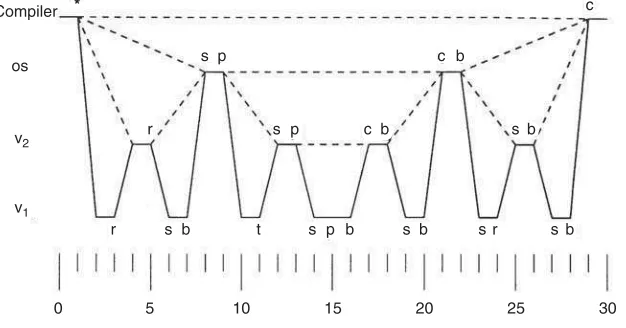
r IfPis in virtual privileged state, the kernel emulates the action of the instruction itself. For example, it terminatesP on a halt instruction, and it executes input/output instructions interpretively. Some dangerous instructions are particularly difficult to emulate. Input/output can be very tricky. Address translation also becomes quite complex. A good test of a virtualizing kernel is to let one of its processes be another virtualizing kernel. For example, consider Figure 80.2, in which there are two levels
of virtualizing kernel,V1andV2, above which sits an ordinary operating system kernel,OS, above which
a compiler is running.
The compiler executes a single service call (marked “∗”) at time 1. As far as the compiler is concerned, OSperforms the service and lets the compiler continue (marked “c”) at time 29. The dashed line at the level of the compiler indicates the compiler’s perception that no activity below its level takes place during the interval.
From the point of view ofOS, a trap occurs at time 8 (marked by a dot on the control-flow line). This trap appears to come directly from the compiler, as shown by the dashed line connecting the compiler at time 1 and theOSat time 8.OSservices the trap (marked “s”). For simplicity, we assume that it needs to perform only one privileged instruction (marked “p”) to service the trap, which it executes at time 9. Lower levels of software (whichOScannot distinguish from hardware) emulate this instruction, allowing OSto continue at time 21. It then switches context back to the compiler (marked “b”) at time 22. The dashed line fromOSat time 22 to the compiler at time 29 shows the effect of this context switch.
The situation is more complicated from the point of view ofV2. At time 4, it receives a trap that tells
it that its client has executed a privileged instruction while in virtual non-privileged state.V2therefore
reflects this trap at time 5 (marked “r”) back toOS. Later, at time 12,V2receives a second trap, this time
because its client has executed a privileged instruction in virtual privileged state.V2services this trap by
emulating the instruction itself at time 13. By time 17, the underlying levels allow it to continue, and at time 18 it switches context back toOS. The last trap occurs at time 25, when its client has attempted to perform a context switch (which is privileged) when in virtual privileged state.V2services this trap by
changing its client to virtual non-privileged state and switching back to the client at time 26.
V1has the busiest schedule of all. It reflects traps that arrive at time 2, 10, and 23. (The trap at time
23 comes from the context-switch instruction executed byOS.) It also emulates instructions for its client when traps occur at times 5, 14, 19, and 27.
This example demonstrates the principle that each software level is just a data structure as far as its supporting level is concerned. It also shows how a single privileged instruction in the compiler becomes two privileged instructions inOS, which becomes four inV2and eight inV1. In general, a single privileged
instruction at one level might require many instructions at its supporting level to emulate it.
80.4.3 Components of the Kernel
Originally, operating systems were written as a single large program encompassing hundreds of thousands of lines of assembly-language instructions. Two trends have made the job of implementing operating systems less difficult. First, high-level languages have made programming much easier. For example, more than 99% of the Linux variant of Unix is written in C. Complex algorithms can be expressed in a structured, readable fashion; code can be partitioned into modules that interact with each other in a well-defined manner, and compile-time typechecking catches most programming errors. Only a few parts of the kernel, such as those that switch context or modify execution priority, need to be written in assembly language.
Second, the discipline of structured programming has suggested a layered approach to designing the kernel. Each layer provides abstractions needed by the layers above it. For example, the kernel can be organized as follows:
r Context- and process-switch services (lowest layer) r Device drivers
r Resource managers for memory and time r File system support
r Service call interpreter (highest layer)
The concept of layering allows the kernel to be small, because much of the work of the operating system need not operate in a protected and hardware-privileged environment. When all the layers listed above are privileged, the organization is called amacrokernel. UNIX is often implemented as a macro-kernel.
If the kernel only contains code for process creation, inter-process communication, the mechanisms for memory management and scheduling, and the lowest level of device control, the result is amicrokernel, also called a “communication kernel.” Mechanisms are distinct from policies, which can be outside the kernel. Policies decide which resources should be allocated in cases of conflict, whereas mechanisms carry out those decisions. Mach [16] and QNX [8] follow the microkernel approach. In this organization, services such as the file system and policy modules for scheduling and memory are relegated to processes. These processes are often referred to asservers; the ordinary processes that need those services are called their clients. The microkernel itself acts as a client of the policy servers. Servers need to be trusted by their clients, and sometimes they need to execute with some degree of hardware privilege (for example, if they access devices).
The microkernel approach has some distinct advantages:
r It imposes uniformity on the requests that a process might make. Processes need not distinguish between kernel-level and process-level services because all are provided via messages to servers. r It allows easier addition of new services, even while the operating system is running, as well as
multiple services that cover the same set of needs, so that individual users (and their agent processes) can choose whichever seems best. For example, different file organizations for diskettes are possible; instead of having many file-level modules in the kernel, there can be many file-level servers accessible to processes.
r It allows an operating system to span many machines in a natural way. As long as inter-process communication works across machines, it is generally immaterial to a client where its server is located.
r Services can be provided by teams of servers, any one of which can help any client. This organization relieves the load on popular servers, although it often requires a degree of coordination among the servers on the same team.
A microkernel also has some disadvantages. It is generally slower to build and send a message, accept and decode the reply (taking about 100s), than to make a single service call (taking about 1s). However, other aspects of service tend to dominate the cost, allowing microkernels to be similar in speed to macrokernels. Keeping track of which server resides on which machine can be complex. This complexity may be reflected in the user interface. The perceived complexity of an operating system has a large effect on its acceptance by the user community.
Recently, people have begun to speak ofnanokernels, which support only devices and communication ports. They sit at the bottom level of the microkernel, providing services for the other parts of the microker-nel, such as memory management. All the competing executions supported by the nanokernel are called threads, to distinguish them fromprocesses. Threads all share kernel memory, and they explicitly yield control in order to let other threads continue. They synchronize with each other by means of primitive locks or more complex semaphores. For more information on processes and threads, seechapters 93and97.
Although the trend toward microkernels is unmistakable, macrokernels are likely to remain popular for the forseeable future.
80.5 Research Issues and Summary
high privilege state. The recent trend has been toward increasingly integrated graphical user interfaces that encompass the activities of multiple processes on networks of computers. These increasingly sophisticated application programs are supported by increasingly small operating system kernels.
Current research issues revolve mostly around networked operating systems, including network proto-cols, distributed shared memory, distributed file systems, mobile computing, and distributed application support. There is also active research in kernel structuring, file systems, and virtual memory.
Defining Terms
The following terms may have more general definitions than shown here, and often have other narrow technical definitions. This list indicates how the terms have been used in this chapter.
Abstraction: An interface that hides lower-level details and provides a set of higher-level functions. Batch multiprogramming: Grouping jobs into batches based on characteristics such as memory
require-ments.
Client: A process that requests services by sending messages to server processes.
Command interpreter: A program (usually not in the kernel) that interprets user requests and starts computations to fulfill those requests.
Commands: Instructions in a job-control language.
Compute-bound: A process that performs little input/output but needs significant execution time. Concurrency control: Means to mediate conflicting needs of simultaneously executing threads. Context block: Process descriptor.
Context switching: The action of directing the hardware to execute in a different context (kernel or process) from the current context.
Database: A collection of files for storing related information.
Device driver: An operating-system module (usually in the kernel) that deals directly with a device. Device interface: The means by which devices are controlled.
File: A named, long-term repository for data. ftp: The file-transfer protocol service.
Gopher: A network service that connects information providers to their users.
Graphical user interface: Interactive program that makes use of a graphic display and a mouse. Input/output: A resource: ability to interact with peripheral devices.
Input/output-bound: A process that spends most of its time waiting for input/output.
Integrated application: An application that agrees on data formats with other applications so they can use each other’s outputs.
Interactive multiprogramming: Multiprogramming in which each user deals interactively with the com-puter.
Job: A set of computational steps packaged to be run as a unit.
Job-control language: A way of specifying the resource requirements of various steps in a job.
Kernel: The privileged core of an operating system, responding to service calls from processes and inter-rupts from devices.
Lightweight process: A thread.
Macrokernel: A large operating-system core that provides a wide range of services. Mailbox: A file for saving messages between users.
Memory: A resource: ability to store programs and data.
Microkernel: A small privileged operating-system core that provides process scheduling, memory man-agement, and communication services.
Middleware: Program that provides high-level communication facilities to allow distributed computa-tion.
Multiprogramming: Scheduling several competing processes to run at essentially the same time. Nanokernel: A very small privileged operating-system core that provides simple process scheduling and
Network services: Services available through the network, such as mail and file transfer.
Network service: A facility offered by one computer to other computers connected to it by a network. Networked operating system: An operating system that uses a network for sharing files and other
re-sources.
Non-privileged state: An execution context that does not allow sensitive hardware instructions to be executed, such as the halt instruction and input/output instructions.
Offline: Handled on a different computer.
Operating system: A set of programs that controls a computer.
Operator: An employee who performs the repetitive tasks of loading and unloading jobs. Physical: The material upon which abstractions are built.
Physical address: A location in physical memory.
Pipeline: A facility that allows one process to send a stream of information to another process. Privileged state: An execution context that allows all hardware instructions to be executed.
Process: A program being executed; an execution context that is allocated resources such as memory, time, and files.
Process control block: Process descriptor.
Process descriptor: A data structure in the kernel that represents a process. Process interface: The set of service calls available to processes.
Process number: An identifier that represents a process by acting as an index into the array of process descriptors.
Process switch: The action of directing the hardware to run a different process from the one that was previously running.
Processor state: Privileged or non-privileged state.
Pseudo-file: An object that appears to be a file on the disk but is actually some other form of data. Remote file: A file on another computer that appears to be on the user’s computer.
Resident monitor: A precursor to kernels; a program that remains in main store during the execution of a job to handle simple requests and to start the next job.
Resource: A commodity necessary to get work done.
Scheduler: An operating system module that manages the time resource. Server: A process that responds to requests from clients via messages.
Service call: The means by which a process requests service from the kernel, usually implemented by a trap instruction.
Session: The period during which a user interacts with a computer.
Shared file system: Files residing on one computer that can be accessed from other computers. Site: The set of computers, usually networked, under a single administrative control.
Socket: An abstraction for communication between two processes, not necessarily on the same machine. Spooling system: Storing newly arrived jobs on disk until they can be run, and storing the output of old
jobs on disk until it can be printed.
Thin client: A program that runs on one computer that allows the user to interact with a session on a second computer.
Thread: An execution context that is independently scheduled, but shares a single address space with other threads.
Time: A resource: ability to execute instructions. Timesharing: Interactive multiprogramming.
User: A human being physically interacting with a computer.
User identifier: A number or string that is associated with a particular user. User interface: The facilities provided to let the user interact with the computer. Virtual: The result of abstraction; the opposite of physical.
Virtual machine: An abstraction produced by a virtualizing kernel, similar in every respect but perfor-mance to the underlying hardware.
Virtualizing kernel: A kernel that abstracts the hardware to multiple copies that have the same behavior (except for performance) of the underlying hardware.
World Wide Web: A network service that allows users to share multimedia information.
References
[1] Ed Bott, Carl Siechert, and Craig Stinson.Microsoft Windows XP Inside Out. Microsoft Press, deluxe edition, 2002.
[2] Daniel Pierre Bovet and Marco Cesati.Understanding the LINUX Kernel: From I/O Ports to Process Management. O’Reilly & Associates, 2000.
[3] Helen Custer.Inside Windows NT. Microsoft Press, 1993.
[4] William S. Davis and T. M. Rajkumar.Operating Systems: A Systematic View. Addison-Wesley, fifth ed. 2000.
[5] Raphael A. Finkel.An Operating Systems Vade Mecum. Prentice Hall, second edition, 1988. [6] Ida M. Flynn and Ann McIver McHoes.Understanding Operating Systems. Brooks/Cole, 2000. [7] Al Geist, Adam Beguelin, and Jack Dongarra, Eds. PVM: Parallel Virtual Machine: A Users’ Guide
and Tutorial for Network Parallel Computing (Scientific and Engineering Computation). MIT Press, 1994.
[8] D. Hildebrand. An architectural overview of QNX. Proc. Usenix Workshop on Micro-Kernels and Other Kernel Architectures, pages 113–126, 1992.
[9] Lawrence J. Kenah and Simon F. Bate.VAX/VMS Internals and Data Structures. Digital Equipment Corporation, 1984.
[10] Michael S. Kogan and Freeman L. Rawson. The design of operating system/2. IBM Journal of Research and Development, 27(2):90–104, June 1988.
[11] Samuel J. Leffler, Marshall Kirk McKusick, Michael J. Karels, and John S. Quarterman.4.3BSD UNIX Operating System. Addison-Wesley, 1989.
[12] Adrian Nye.Xlib Programming Manual. O’Reilly & Associates, third edition, 1992. [13] John K. Ousterhout.Tcl and the Tk Toolkit. Addison-Wesley, 1994.
[14] Peter Pacheco.Parallel Programming with MPI. Morgan Kaufmann, 1997.
[15] David Pogue and Joseph Schorr.Macworld Macintosh SECRETS. IDG Books Worldwide, 1993. [16] Richard Rashid. Threads of a new system.UNIX Review, pages 37–49, August 1986.
[17] Abraham Silberschatz, Peter B. Galvin, and Greg Gagne.Operating Systems Concepts. John Wiley & Sons, sixth ed. 2001.
[18] William Stallings.Operating Systems: Internals and Design Principles. Prentice Hall, fourth edition, 2000.
81
Thread Management
for Shared-Memory
Multiprocessors
Thomas E. Anderson University of Washington
Brian N. Bershad University of Washington
Edward D. Lazowska University of Washington
Henry M. Levy University of Washington
81.1 Introduction
81.2 Thread Management Concepts
Address Spaces, Threads, and Multiprocessing • Basic Thread Functionality
81.3 Issues in Thread Management
Programmer Issues • Operating System Issues • Performance
81.4 Three Modern Thread Systems 81.5 Summary
81.1 Introduction
Disciplined concurrent programming can improve the structure and performance of computer programs on both uniprocessor and multiprocessor systems. As a result, support forthreads, or lightweight processes, has become a common element of new operating systems and programming languages.
A thread is a sequential stream of instruction execution. A thread differs from the more traditional notion of a heavyweight process in that it separates the notion of execution from the other state needed to run a program (e.g., an address space). A single thread executes a portion of a program, while cooperating with other threads that are concurrently executing the same program. Much of what is normally kept on a per-heavyweight-process basis can be maintained in common for all threads in a single program, yielding dramatic reductions in the overhead and complexity of a concurrent program.
Concurrent programming has a long history. The operation of programs that must handle real-world concurrency (e.g., operating systems, database systems, and network file servers) can be complex and difficult to understand. Dijkstra [1968] and Hoare [1974, 1978] showed that these programs can be simplified when structured as cooperating sequential threads that communicate at discrete points within the program. The basic idea is to represent a single task, such as fetching a particular file block, within a single thread of control, and to rely on the thread management system to multiplex concurrent activities onto the available processor. In this way, the programmer can consider each function being performed by the system separately, and simply rely on automatic scheduling mechanisms to best assign available processing power.
programs to improve performance, as well as structure. Moderately increasing a uniprocessor’s power can require substantial additional design effort, as well as faster and more expensive hardware com-ponents. But, once a mechanism for interprocessor communication has been added to a uniprocessor design, the system’s peak processing power can be increased by simply adding more processors. A shared-memory multiprocessor is one such design in which processors are connected by a bus to a common memory.
Multiprocessors lose their advantage if this processing power is not effectively utilized. If there are enough independent sequential jobs to keep all of the processors busy, then the potential of a multiprocessor can be easily realized: each job can be placed on a separate processor. However, if there are fewer jobs than processors, or if the goal is to execute single applications more quickly, then the machine’s potential can only be achieved if individual programs can be parallelized in a cost-effective manner. Three factors contribute to the cost of using parallelism in a program:
r Thread overhead:The work, in terms of processor cycles, required to create and control a thread must be appreciably less than the work performed by that thread on behalf of the program. Other-wise, it is more efficient to do the work sequentially, rather than use a separate thread on another processor.
r Communication overhead:Again in terms of processor cycles, the cost of sharing information between threads must be less than the cost of simply computing the information in the context of each thread.
r Programming overhead:A less tangible metric than the previous two, programming overhead reflects the amount of human effort required to construct an efficient parallel program.
High overhead in any of these areas makes it hard to build efficient parallel programs. Costly threads can only be used infrequently. Similarly, if arranging communication between threads is slow, then the application must be structured so that little interthread communication is required. Finally, if managing parallelism is tedious or difficult, then the programmer may find it wise to sacrifice some speedup for a simpler implementation. Few algorithms parallelize well when constrained by high thread, communication, and programming costs, although many can flourish when these costs are low.
Low overhead in these three areas is the responsibility of the thread management system, which bridges the gap between the physical processors (the suppliers of parallelism) and an application (its consumer). In this chapter, we discuss the issues that arise in designing a thread management system to support low-overhead parallel programming for shared-memory multiprocessors. In the next section, we describe the functionality found in thread management systems.Section 81.3discusses a number of thread design issues. InSection 81.4, we survey three systems for shared-memory multiprocessors, Windows NT [Custer 1993], Presto [Bershad et al. 1988], and Multilisp [Halstead 1985], focusing our attention on how they have addressed the issues raised in this chapter.
81.2 Thread Management Concepts
81.2.1 Address Spaces, Threads, and Multiprocessing
An address space is the set of memory locations that can be generated and accessed directly by a program. Address space limitations are enforced in hardware to prevent incorrect or malicious programs in one address space from corrupting data structures in others. Threads provide concurrency within a program, while address spaces provide failure isolation between programs. These are orthogonal concepts, but the interaction between thread management and address space management defines the extent to which data sharing and multiprocessing are supported.
to protect against malicious users; software errors can crash the system but at least are localized to one user, one machine.
Even single-user systems can have concurrency, however. More sophisticated systems, such as Xerox’s Pilot [Redell et al. 1980], provide only one address space per machine, but support multiple threads within that single-address space. Because any thread can access any memory location, Pilot provides a compiler with strong type-checking to decrease the likelihood that one thread will corrupt the data structures of another.
Other operating systems, such as Unix, provide support for multiple-address spaces per machine, but only one thread per address space. The combination of a Unix address space with one thread is called a Unixprocess; a process is used to execute a program. Since each process is restricted from accessing data that belongs to other processes, many different programs can run at the same time on one machine, with errors confined to the address space in which they occur. Processes are able to cooperate by sending messages back and forth via the operating system. Passing data through the operating system is slow, however; only parallel programs that require infrequent communication can be written using threads in disjoint address spaces.
Instead of using messages to share data, processes running on a shared-memory multiprocessor can communicate directly through the shared memory. Some Unix systems allow memory regions to be set up as shared between processes; any data in the shared region can be accessed by more than one process without having to send a message by way of the operating system. The Sequent Symmetry’s DYNIX [Sequent 1988] and Encore’s UMAX [Encore 1986] are operating systems that provide support for multiprocessing based on shared memory between Unix processes.
More sophisticated operating systems for shared-memory multiprocessors, such as Microsoft’s Win-dows NT and Carnegie Mellon University’s Mach operating system [Tevanian et al. 1987] support multiple-address spacesandmultiple threads within each address space. Threads in the same address space com-municate directly with one another using shared memory; threads comcom-municate across address space boundaries using messages. The cost of creating new threads is significantly less than that of creating whole address spaces, since threads in the same address space can share per-program resources. Figure 81.1 illustrates the various ways in which threads and address spaces can be organized by an operating system.
![FIGURE 82.2UNIX process priorities (adapted from Bach [1]).](https://thumb-ap.123doks.com/thumbv2/123dok/3928868.1872288/40.612.162.451.97.191/figure-unix-process-priorities-adapted-from-bach.webp)
![FIGURE 82.3A sketch of the I/O subsystem (adapted from Lister [50]).](https://thumb-ap.123doks.com/thumbv2/123dok/3928868.1872288/44.612.139.477.95.219/figure-a-sketch-i-o-subsystem-adapted-lister.webp)
![FIGURE 84.5Peterson’s solution of mutual exclusion for two processes. Based on statements of the algorithm inTanenbaum [2001].](https://thumb-ap.123doks.com/thumbv2/123dok/3928868.1872288/90.612.109.502.93.296/figure-peterson-solution-exclusion-processes-statements-algorithm-intanenbaum.webp)