14
Managing MySQL Security
An important component of administering any database is ensuring that only those users that you want to be able to access the database can do so, while preventing access by all other users. Not only should you be able to control who can log on to the MySQL server, but you should be able to determine what actions authenticated users can take once they connect to the server. All RDBMS products support some level of security in order to protect the data stored in their systems’ databases — and MySQL is no exception.
When a user logs on to a MySQL server, MySQL permits the user to perform only approved opera-tions. MySQL security is managed through a set of tables and privileges that determine who can establish a connection to the MySQL server, from what host that connection can be established, and what actions the user (from the specified host) can take. In this chapter, you learn how this system is set up and how you can add user accounts or remove them from the tables. You also learn how to permit users to perform certain actions, while preventing them from taking other actions. To facilitate your ability to configure MySQL security, this chapter provides information about the following topics:
❑ The MySQL grant tables, including the user, db, host, tables_priv, and columns_priv tables
❑ The process used to authenticate connections to the MySQL server and to verify the privi-leges necessary to perform various operations
❑ The statements necessary to manage MySQL user accounts, including the GRANT, SHOW GRANTS, SET PASSWORD, FLUSH PRIVILEGES, REVOKE, and DROP USERstatements
The Access Privilege System
access MySQL, from which computers that access is supported, what actions those users can perform, and on which database components those actions can be performed. For example, the grant tables allow you to specify which users can view data in a particular table and which users can actually update that data. In this section, you learn about each of the five grant tables and how those tables are used to authenticate users and determine what operations they can perform.
Working with the grant tables and MySQL security is only one aspect of securing a MySQL installation. You should also ensure the security of the MySQL-related files and the network used to access data in the MySQL databases. A discussion about security specific to your operating system or your network is beyond the scope of this book. For information about system and network security, consult the appropriate product and system documentation.
MySQL Grant Tables
When you install MySQL, five grant tables are added to the mysql database. These tables — user, db, host, tables_priv, and columns_priv — each perform a specific role in either authenticating users or determining whether a particular action can be carried out. Each table contains two types of columns:
❑ Scope columns:Columns in a grant table that determine who has access to the MySQL server and the extent, or scope, of that access. Depending on the grant table, the scope columns can include the user account name, the host from which that user connects, the user account’s pass-word, or, when appropriate, the name of a specific database, table, or column.
❑ Privilege columns:Columns in a grant table that determine what operations can be performed by the user identified in the scope columns. For most grant tables, the privilege columns define the level of access a user account has to the data and the extent to which the user can manipu-late that data or allow others to access and manipumanipu-late that data. The user table also includes privilege columns that permit administrative operations, require encrypted connections, and specify limits on connections. The default value for most privilege columns is N (for no,or false). When a privilege is assigned to a user, the value in the related privilege column is set to Y (for
yes,or true).
Through the use of privileges, all five tables participate in the process of determining whether a user can perform a particular operation. (An operation refers to an event such as issuing a SELECTstatement to view data in a table or a CREATE TABLEstatement to create a table.) Later in the chapter, in the section MySQL Privileges, you learn about the different types of privileges and how they’re supported by the grant tables. After that (in the section MySQL Access Control), you learn how the grant tables and privileges are used to authenticate connections to the MySQL server and to permit various types of operations. First, though, you take a closer look at each grant table.
The user Table
The user table is the primary grant table in the mysql database. The table controls who can connect to MySQL, from which hosts they can connect, and what global privileges they have. A global privilege is one that applies to the MySQL server or to any database in the system. For example, a global privilege might be used to allow a user to view data in every table in every database or to allow the user to dis-play a list of the current processes running.
In MySQL, a user is identified not only by the user account name, but also by the host from which the user connects. For example, [email protected]is considered a different user from [email protected]. MySQL uses this method so that users with the same name but from different domains are not treated as the same user. When you come across a reference to a user in MySQL, that reference is usually referring to that user in association with a particular host (or with any host, if that is how the user account is set up). As you progress through this chapter, you learn how this user/host association is used in authenticating a user and in authorizing certain operations.
As with the other grant tables, the user table contains scope columns and privilege columns. Unlike the other grant tables, though, the user table is the only table that contains different types of privilege columns. The following list describes the different types of columns in the user table:
❑ Scope columns:Includes the Host, User, and Password columns. When a connection is initiated, the connection must be made from the host specified in the Host column. In addition, the user account name used for the connection must match the value in the User column, and the pass-word provided when the connection is initiated must match the value in the Passpass-word column. A connection is permitted only if all three values match.
❑ Data-related privilege columns:Includes those privilege columns that permit data-related operations that are global in scope. There are 11 data-related privilege columns. A privilege granted at this level applies to all tables in all databases. There are also two additional data-related privilege columns that are not currently supported, but they should be supported in later releases of MySQL.
❑ Administrative privilege columns:Includes those privilege columns that permit administrative operations to the MySQL server. There are eight administrative privilege columns.
❑ Encryption-related privilege columns:Includes the ssl_type, ssl_cipher, x509_issuer, and x509_subject columns, which define whether a user account requires a secure connection and define the nature of that connection.
❑ Connection-related privilege columns:Includes the max_questions, max_updates, and max_connections columns, which define whether a limit should be placed on the number of queries, the number of data updates, and the number of connections that can be made in an hour.
To give you an idea of how the user table is configured, assume that you have a user account named user1 that can connect from the domain1.comdomain. You can execute a SELECTstatement similar to the following to view how that user is listed in the user table:
SELECT Host, User, Select_priv, Process_priv, ssl_type, max_updates FROM user
WHERE User=’user1’;
+---+---+---+---+---+---+ | Host | User | Select_priv | Process_priv | ssl_type | max_updates | +---+---+---+---+---+---+ | domain1.com | user1 | N | N | ANY | 0 | +---+---+---+---+---+---+ 1 row in set (0.01 sec)
There are, of course, many more privileges than are shown here, but this should give you an idea of how MySQL stores user account information in the user table. As you can see, the host from which the user should connect, the name of the user account, and the columns for each privilege that can be applied globally are listed.
Every MySQL user is listed in the user table, whether or not he or she is assigned privileges in that table or any other grant table. The user table provides the widest scope in a MySQL implementation, followed by the db and host tables. If a user is not listed in the user table, that user cannot connect to MySQL.
The db Table
The purpose of the db table is to assign database-specific privileges to users. Any privileges applied in the db table are specific to the specified database. If privileges are assigned to a user for multiple databases, a row is added to the db table for each database, and privileges are then assigned for that row. (If the privileges should apply to all databases, the privileges are assigned in the user table.)
As with the other grant tables, the db table includes scope columns and privilege columns. The following list provides an overview of these columns:
❑ Scope columns:Includes the Host, Db, and User columns. For the privileges in this table to apply, the connection must be made from the host specified in the Host column, and the user account name used for the connection must match the value in the User column. If the host column is blank, then the privileges also defined in the host table are applied. Any privileges assigned in the db table apply only to the database specified in the Db column.
❑ Privilege columns:Includes those privileges that can be applied at the database level. These are the 11 related privileges (the same as those you see in the user table) used to permit data-related operations. There is an additional data-data-related privilege column that is not currently supported, but it should be supported in later releases of MySQL.
To get a better sense of the db table, assume that the user1 account has been assigned privileges specifi-cally on the test database. You can then use a SELECTstatement to view information about that user account:
SELECT Host, Db, User, Select_priv, Update_priv FROM db
WHERE User=’user1’;
The statement retrieves information from the three scope columns (Host, Db, and User) and from two of the privilege columns (Select_priv and Update_priv), as shown in the following results:
+---+---+---+---+---+ | Host | Db | User | Select_priv | Update_priv | +---+---+---+---+---+ | domain1.com | test | user1 | Y | N | +---+---+---+---+---+ 1 row in set (0.00 sec)
As you can see, the Host value is domain1.com, the Db value is test, and the User value is User1. As a result, the privileges assigned in this row are applied to the user1 account when that account connects from domain1.com. In addition, the privileges apply only to the test database. You can, of course, retrieve more privilege columns than those shown here. If a privilege is assigned to the account, a value of Y is displayed in the columns; otherwise, a value of N is displayed.
The db table works in conjunction with the host table. If the Host column in the db table is blank, MySQL checks the host table to determine whether any privileges apply to a specific database from a specific host.
The host Table
The host table is associated with the db table and is checked only when a user is listed in the db table but the Host column is blank. The combination of these two tables allows you to apply privileges to a user who connects from multiple hosts. For example, if a user named SarahW connects to MySQL from big.domain1.comand little.domain1.com, you can add the user to the db table, with a blank host value, and then add the two hosts to the host table, specifying the same database name in the SarahW row of the db table and in the big.domain1.comand little.domain1.comrows of the host table. When MySQL sees the blank host value in the db table, it looks in the host table for a Host value that matches the hostname of the connection. If there’s a match, the privileges from the db table and the host table are compared to determine whether an operation is permitted. The matching privileges in both tables must be set to Y for the operation to be permitted. (You learn more about this process in the section “MySQL Access Control” later in the chapter.)
The host table, as with other grant tables, includes scope columns and privilege columns. Because the host table works in conjunction with the db table, it is the only grant table that does not include a User column. The following list describes the columns in the db table:
❑ Scope columns:Includes the Host and Db columns. For the privileges in this table to apply, the Host column in the db table must be blank, and the connection must be made from the host specified in the Host column of the host table. Any privileges assigned in the host table apply only to the database specified in the Db column of the host table.
❑ Privilege columns:Includes those privileges that can be applied at the database level for user accounts accessing the databases from specific hosts. These are the same 11 data-related privilege columns that you find in the user and db tables. The privileges are combined with the applicable privileges in the db table to permit authorized operations. There is an additional data-related privilege column that is not currently supported, but it should be supported in later releases of MySQL.
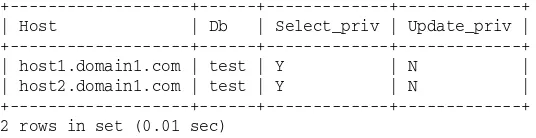
To better understand how user accounts are added to the host table, suppose that you want to allow user1 to connect from the host host1.domain1.comor from host2.domain1.comdomains. You add a row for each host in the host table. To then view the rows added to the table, you can use a SELECT statement similar to the following:
SELECT Host, Db, Select_priv, Update_priv FROM host
As you can see, the SELECTstatement retrieves values from the two scope columns (Host and Db) and two of the privilege columns, as shown in the following results:
+---+---+---+---+ | Host | Db | Select_priv | Update_priv | +---+---+---+---+ | host1.domain1.com | test | Y | N | | host2.domain1.com | test | Y | N | +---+---+---+---+ 2 rows in set (0.01 sec)
The results include only the Host and Db scope columns, but not a User scope column because one isn’t included in the host table. The host table contains the same 11 data-related privilege columns that are in the db and user tables (12 data-related columns if you include the unsupported column).
The host table is different from other grant tables in that user account information and privilege settings are not configured in the same way as the other tables. Later in the chapter you learn that the GRANT state-ment is the primary method that you should use to add users to your system and to assign privileges. At the same time, the REVOKEstatement is the primary method that you should use to revoke privileges. The host table, however, is not affected by the GRANTstatement or the REVOKEstatement, which means that, if you plan to use the host table, you must set up the privileges manually, which is a less efficient method to use than the GRANTand REVOKEstatements and which is more prone to errors.
This problem can be exacerbated if multiple users connect from the same hosts. You must ensure that the entries in the host table can be applied to all users in such a way that, when those privileges are com-pared with the privileges in the db table, each user can perform the necessary operations, without being able to perform unauthorized operations. As a result of these issues, few MySQL implementations use the host table.
The tables_priv Table
The tables_priv table is specific to table-level privileges. Any privileges assigned in this table apply only to the table specified in the tables_priv table. The following list describes the columns in the tables_priv table:
❑ Scope columns:Includes the Host, Db, User, and Table_name columns. For the privileges in this table to apply, the connection must be made from the host specified in the Host column, and the user account name used for the connection must match the value in the User column. Any privi-leges assigned in the tables_priv table apply only to the table specified in the Table_name column, as it exists in the database specified in the Db column.
❑ Privilege columns:Includes the Table_priv column and the Column_priv column. The Table_priv column defines the privileges applied at the table level. The Column_priv column defines the privileges applied at the column level.
Note that the tables_priv table also includes the Grantor and Timestamp columns, but they are currently unused. It is assumed that future releases of MySQL will make use of these columns.
To better understand how the tables_priv table stores user account data, assume that user1 has been assigned table- and column-level privileges. You can use a SELECTstatement similar to the following to retrieve data from the tables_priv table about that user:
SELECT Host, Db, User, Table_name, Table_priv, Column_priv FROM tables_priv
WHERE User=’user1’;
The statement includes the four scope columns (Host, Db, User, and Table_name) and the two privilege columns (Table_priv and Column_priv). As you learn in the next section, the privilege columns in the tables_priv and columns_priv tables work differently from the privilege columns in the other grant tables. When you execute the SELECTstatement, your results should be similar to the following:
+---+---+---+---+---+---+ | Host | Db | User | Table_name | Table_priv | Column_priv | +---+---+---+---+---+---+ | domain1.com | test | user1 | Books | Select | Update | +---+---+---+---+---+---+ 1 row in set (0.00 sec)
As you can see, the scope columns include not only the host, user, and database (as you saw in the db table) but also the name of the table. As a result, any privileges assigned to this user account in this table are specifically for the Books table.
The tables_priv table works in conjunction with the columns_priv table. If the Column_priv column in the tables_priv table contains a value, MySQL checks the columns_priv table for specifics about the privileges that apply to the individual columns.
The columns_priv Table
The columns_priv table shows the privileges associated with individual columns. When a user is listed in the tables_priv table and the columns_priv table, the privileges specified in the Column_priv column of the columns_priv table are applied to the columns, and the privileges specified in the Table_priv col-umn of the tables_priv table are applied to the table as a whole. The following list describes the colcol-umns in the columns_priv table:
❑ Scope columns:Includes the Host, Db, User, Table_name, and Column_name columns. For the privileges in this table to apply, the connection must be made from the host specified in the Host column, and the user account name used for the connection must match the value in the User column. Any privileges assigned in the columns_priv table apply only to the column specified in the Column_name column, as it exists in the table specified in the Table_name column, which exists in the database specified in the Db column.
❑ Privilege columns:Includes the Column_priv column, which defines the privileges applied at the column level.
Note that the columns_priv table also includes the Timestamp column, but is currently unused. It is assumed that future releases of MySQL will make use of this column.
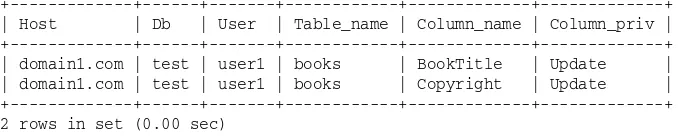
In the previous example, you saw how the user1 account appears in the tables_priv table. Now you can use a SELECTstatement to retrieve information about that account in the columns_priv table:
SELECT Host, Db, User, Table_name, Column_name, Column_priv FROM columns_priv
As you can see, the statement retrieves data from the scope columns (Host, Db, User, Table_name, and Column_name) and the privilege column (Column_priv), as shown in the following results:
+---+---+---+---+---+---+ | Host | Db | User | Table_name | Column_name | Column_priv | +---+---+---+---+---+---+ | domain1.com | test | user1 | books | BookTitle | Update | | domain1.com | test | user1 | books | Copyright | Update | +---+---+---+---+---+---+ 2 rows in set (0.00 sec)
Each row in the columns_priv table assigns privileges to a specific column. The columns_priv table is the most granular of all the tables, in terms of assigning privileges to users. When MySQL authorizes a user to perform an operation, however, all applicable grant tables are examined, starting with the user table and working down to the columns_priv table. For example, if a user is granted select privileges on a table, but update privileges on only one column in the table, the user can still retrieve data from the entire table, but update data only in that one column. The following section takes a closer look at the different privileges supported by MySQL.
MySQL Privileges
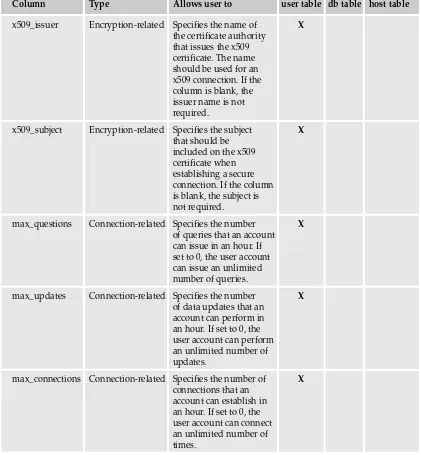
The user, db, and host tables contain columns that each represent individual privileges. All three tables include the data-related privileges, which deal specifically with managing data. As you saw previously, only the user table contains privileges that are specific to administration and connectivity. The following table describes the privileges that can be assigned in the user, db, and host tables, and it shows which tables contain which privileges.
Column Type Allows user to user table db table host table
Select_priv Data-related Query data in a X X X
database.
Insert_priv Data-related Insert data in a X X X
database.
Update_priv Data-related Update data in a X X X
database.
Delete_priv Data-related Delete data from a X X X
database.
Create_priv Data-related Create a table in a X X X
database.
Drop_priv Data-related Remove a table X X X
from a database.
Reload_priv Administrative Reload the data in X
the grant tables in MySQL.
Column Type Allows user to user table db table host table
Shutdown_priv Administrative Shut down the X
MySQL server.
Process_priv Administrative View a list of X
MySQL processes.
File_priv Administrative Export data from X
a database into a file.
Grant_priv Data-related Grant privileges X X X
on database objects.
Index_priv Data-related Create and delete X X X
indexes in a database.
Alter_priv Data-related Alter database objects. X X X
Show_db_priv Administrative View all databases. X
Super_priv Administrative Perform advanced X
administrative tasks.
Create_tmp_table_priv Data-related Create temporary X X X
tables.
Lock_tables_priv Data-related Place locks on tables. X X X
Repl_slave_priv Administrative Read binary logs for X a replication master.
Repl_client_priv Administrative Request information X about slave and
master servers used for replication.
ssl_type Encryption-related Specifies whether X
a secure connection is required. If required, the column specifies the type of secure connection.
ssl_cipher Encryption-related Specifies the cipher X
method that should be used for a connection. If the column is blank, no special cipher method is required.
Column Type Allows user to user table db table host table
x509_issuer Encryption-related Specifies the name of X the certificate authority
that issues the x509 certificate. The name should be used for an x509 connection. If the column is blank, the issuer name is not required.
x509_subject Encryption-related Specifies the subject X that should be
included on the x509 certificate when establishing a secure connection. If the column is blank, the subject is not required.
max_questions Connection-related Specifies the number X of queries that an account can issue in an hour. If set to 0, the user account can issue an unlimited number of queries.
max_updates Connection-related Specifies the number X of data updates that an
account can perform in an hour. If set to 0, the user account can perform an unlimited number of updates.
max_connections Connection-related Specifies the number of X connections that an
account can establish in an hour. If set to 0, the user account can connect an unlimited number of times.
The privileges are listed in this table in the order they appear in the user table. Because permissions in the user table are applied globally, it is the only table that contains all privileges. The more granular the privileges, the fewer privileges there are, which is reflected in the grant tables. For example, the user table has more privilege columns than the db table, which is more granular than the user table.
Some of the grant tables also include the Execute_priv and the References_priv, neither of which are currently supported. It appears that the Execute_priv will be related to stored procedures when they’re implemented in MySQL, and the References_priv will be related to foreign keys.
All the data-related and administrative privilege columns in the user, db, and host tables are configured with the ENUMdata type and assigned the values N or Y, with N being the default. When a permission is granted to an account, the value is changed to Y. For the encryption-related and connection-related columns, the data types vary, depending on the type of data that can be inserted in those columns. In the “Managing MySQL User Accounts” section later in the chapter, you learn how to use the GRANT state-ment to insert values in these columns.
Privileges are assigned differently in the tables_priv and columns_priv tables than they’re assigned in the user, db, and host tables. The tables_priv table includes the Table_priv and Column_priv columns, and the columns_priv table includes only the Column_priv column. Each of these columns is configured with the SETdata type, which means that a set of values is defined for each column. One or more of those values can be inserted in the columns. The following table lists the values included with each column.
Column Privilege values
Table_priv Select, Insert, Update, Delete, Create, Drop, Grant, Index, Alter
Column_priv Select, Insert, Update
Both columns also include a References privilege, but that privilege currently is not used by MySQL.
The values in the Table_priv and Column_priv columns have their counterparts with some of the data-related privilege columns you find in the user, db, and host tables. The names of the values clearly indicate to which privileges they are related. For example, the Select value has its counterpart with the Select_priv column in the user, db, and host tables. In both cases, the privilege allows the specified user to retrieve data from a database.
MySQL Access Control
When MySQL permits a user to conduct various operations in the MySQL environment, it first authenti-cates those connections to allow access to the MySQL server, and then it verifies the privileges assigned to that user account to determine whether the requested operations are permitted.
Authenticating Connections
The first step in allowing a user to access the MySQL server is to ensure that the user has that access. If access is permitted, MySQL authenticates the connection. The connection is authenticated only if the Host value in the user table matches the name of the host from which the connection is being estab-lished. In addition, the username used for the connection must match the value in the User column, and if a password is required, the password supplied for the connection must match the value in the Password column. If the parameters supplied by the connection match all the applicable values in the user table, the connection is permitted.
This does not mean, though, that any password is acceptable. It means that the user must supply a blank password. For example, if the user specifies the -poption when launching MySQL and then is prompted for a password, the user should simply press Enter and not enter any password.
If you expect to allow anonymous users or plan to allow users to connect from any host, you must plan your user table carefully to ensure that the right user is associated with the correct privileges. To plan your user accounts, you should keep in mind how MySQL accesses the user table:
1.
When the MySQL server starts, data from the user table is copied to memory in sorted order.2.
When a client attempts to log on to the server, the user account is checked against the sorted user data in memory.3.
The server uses the first applicable entry to authenticate a user, based first on the Host value and then on the User value.MySQL first sorts the user table according to the Host column and then according to the User column. For the Host column, specific values are listed first, followed by less specific values, such as those that use the percentage wildcard. Rows that have the same value in the Host column are then sorted according to the value in the User column, again, with the specific values listed first and the least specific (a blank) last.
This sorting is important because MySQL, when authenticating a user, first checks the Host column for a match and then checks the User column. Whichever row in the user table provides the first match, that is the user account used to authenticate the user and subsequently assign privileges to that user. If there are no wildcards in the host column and no blanks in the User column, MySQL simply matches the host-name and userhost-name to the Host and User values and authenticates the user. The use of wildcards and blanks in the Host and User column, however, can result in a user being incorrectly authenticated.
To help illustrate the implications of the user table sorting, take a look at the following result set, which shows the Host and User values from the user table in a MySQL installation:
+---+---+ | Host | User | +---+---+ | % | root | | domain1.com | user1 | | localhost | | | % | | +---+---+ 4 row in set (0.01 sec)
As you saw earlier, when the user table is copied to memory, the data is sorted according to the Host and User columns, as shown in the following result set:
+---+---+ | Host | User | +---+---+ | domain1.com | user1 | | localhost | | | % | root | | % | | +---+---+ 4 row in set (0.01 sec)
Notice that the rows that contain the percentage wildcard in the Host column are the last rows. The per-centage represents the least specific type of host, so it appears last. Now suppose that the root user attempts to log in from the local computer. According to the user table, there is only one entry for the root account: root@%. In theory, this would mean that the root account can log in from any host, including the local computer. When the user logs on, MySQL first checks the Host column and finds the first match, which is the localhost value. MySQL then checks the User column and finds only a blank value, indicating that anonymous users are permitted, which is also a match. As a result, the root account is logged on as an anonymous user, rather than the primary administrator. This means that the root user is now operating under the privileges granted to the anonymous user rather than to the root user.
One way to get around this situation is to create two entries in the user table for a specified user, as is done for the root user when you install MySQL. In Windows, the root user can log on as root@localhostor as root@%, and in Linux, the root user can log on as root@localhostor as root@<host>, where <host>is
the name of the local computer. This way, even if the percentage wildcard is used for the Host value or a blank is used for the User value, MySQL can still identify the root account. By including an entry specifi-cally for localhost, anonymous users can be permitted, but the specified accounts are still protected. As a result, when the root user logs on, there are now two rows for localhost. These two rows are then sorted first by the root user and then by the anonymous users. A blank value is always at the end of the list. The root user is then logged on with the correct privileges.
If anonymous accounts are allowed to access the MySQL server, normally passwords would not be permitted. This can even further complicate the user who is inadvertently treated as an anonymous user. For example, if a user tries to log on as root and supplies a password, but MySQL treats that user as anonymous, the password is interpreted as an incorrect value because MySQL is expecting a blank password. As a result, the connection is denied.
By ensuring that the user table has the necessary entries for each user, users can be correctly logged on to the MySQL server. The operations that the user can perform are still limited to those permitted by the privileges associated with that user account.
Verifying Privileges
After MySQL authenticates a user, it checks the privileges associated with that user account to determine what operations the user can perform. When verifying privileges, MySQL first checks the user table. If privileges have not been granted to the account in the user table, MySQL checks the db table and, if appropriate, the host table. If privileges have not been granted at the database level, MySQL checks the tables_priv table, and, if appropriate, the columns_priv table. If, after checking all applicable tables, the operation is not permitted, the operation fails.
MySQL drills down through the grant tables (from the user table down to the columns_priv table) only as far as necessary. For example, if a user logs on to the MySQL server and tries to perform an administrative action, MySQL checks only the user table because only that table contains administrative privileges.
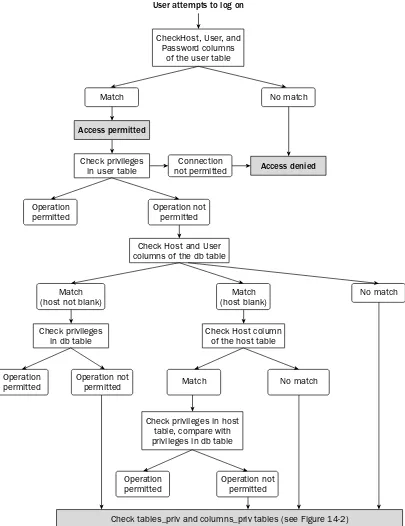
Figure 14-1
User attempts to log on
CheckHost, User, and Password columns
of the user table
No match Match
Connection not permitted Access permitted
Access denied
Operation not permitted Operation
permitted
Check privileges in user table
Match (host not blank)
Operation not permitted Operation
permitted
Check privileges in db table
Match (host blank)
No match Match
No match
Check Host column of the host table
Operation not permitted Operation
permitted
Check privileges in host table, compare with privileges in db table
Check tables_priv and columns_priv tables (see Figure 14-2) Check Host and User
columns of the db table
The following steps describe the process that MySQL follows when verifying privileges:
1.
The user or the application initiates a connection, supplying a hostname, username, and pass-word, if a password has been assigned to the user account. For users or applications attempting to log on anonymously, only the hostname is provided.2.
If no match is found in the Host, User, and Password columns of the user table, access is denied. If a match is found, access to the MySQL server is permitted.3.
MySQL then checks the privileges in the user table. If the connection exceeds the connections-per-hour limit, access is denied. If the connection does not meet any encryption-related privi-leges assigned to the connection, access is denied. Otherwise, the operation being requested by the connection is compared to the data-related and administrative privileges defined in the user table. For example, if the connection attempts to execute a SELECTstatement, the SELECT privi-lege is checked to see whether a SELECTstatement operation is permitted.4.
If the privileges permit the operation, MySQL carries out that operation. If the privileges do not permit the operation, MySQL checks the db table:❑ If the connection hostname and username match the values in the Host and User columns of the db table, MySQL checks the privileges in that table. If the privileges per-mit the operation for the specified database, MySQL carries out that operation. If the privileges do not permit the operation, MySQL checks the tables_priv and
columns_priv tables. (See Figure 14-2.)
❑ If the username matches the value in the User column of the db table and the Host col-umn for that table is blank, MySQL checks the Host colcol-umn of the host table. If the con-nection hostname matches the value in the Host column, MySQL checks the privileges in the host table and compares them to the privileges in the db table. If the privileges permit the operation for the specified database, MySQL carries out that operation. If the privileges do not permit the operation, MySQL checks the tables_priv and
columns_priv tables. If the connection hostname does not match the value in the Host column of the host table, MySQL checks the tables_priv and columns_priv tables.
❑ If the connection hostname and username do not match the values in the Host and User columns of the db table, MySQL checks the tables_priv and columns_priv tables.
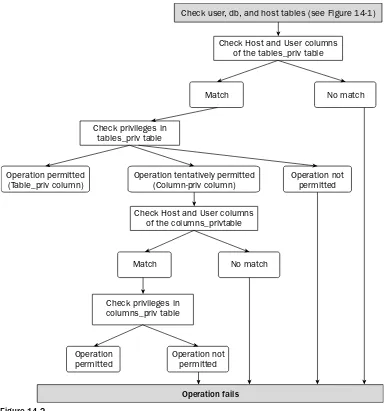
If, after checking the db and host tables, MySQL reaches a point when it still cannot determine whether to permit the operation, it checks the tables_priv table and, if necessary, the columns_priv table. Figure 14-2 illustrates the process that MySQL uses to check these two tables. This process is a continuation of the privilege checking shown in Figure 14-1.
MySQL first checks to see whether the connection hostname and username are listed in the Host and User columns of the tables_priv table. If there is a match, MySQL checks the privileges in that table. If there is no match, the operation fails.
If MySQL does match the hostname and username to the values in the tables_priv table, MySQL takes one of the following steps:
Figure 14-2
❑ If the privileges in the Column_priv column of the tables_priv table permit the operation, MySQL checks the columns_priv table:
❑ If the hostname and username match the values in the Host and User columns of the columns_priv table, MySQL checks the privileges in the Column_priv column of the columns_priv table. If the privileges permit the operation, MySQL carries out the operation. If the privileges do not permit the operation, the operation fails.
❑ If the hostname and username do not match the values in the Host and User columns of the columns_priv table, the operation fails.
❑ If the privileges in the tables_priv table don’t permit the operation, the operation fails. Check user, db, and host tables (see Figure 14-1)
No match Match
Check Host and User columns of the tables_priv table
Operation permitted (Table_priv column)
Operation tentatively permitted (Column-priv column)
No match Match
Operation not permitted
Check Host and User columns of the columns_privtable
Operation not permitted Operation
permitted
Check privileges in columns_priv table
Operation fails Check privileges in
tables_priv table
As you can see, there are many places in the authorization process at which an operation can succeed or fail. As a result, it’s important that you set up your user accounts with great care to ensure that those users who should have access can log on to the server and perform the necessary operations and that those users who should not have access are prevented from logging on to the MySQL server or viewing or modifying data in the MySQL databases.
Managing MySQL User Accounts
MySQL provides a number of SQL statements that allow you to manage your user accounts. By using these statements, you can add user accounts to your system and grant privileges to those accounts. You can also view the privileges that have been assigned to a user account, or you can change the password for that account. In addition, the statements allow you to revoke privileges and drop users from your system. In this section, you learn about these SQL statements and how they can be used to secure your MySQL installation effectively.
Adding Users and Granting Privileges
You can add a user account to your system and assign privileges to that account by using the GRANT statement, which allows you to perform both operations in a single statement. Although you can insert account information directly in the grant tables, the GRANTstatement is easier and is less likely to result in errors that can occur if information is added in different grant tables that conflict with each other. Once you have added a user account and assigned privileges to that account, you can use the SHOW GRANTSstatement to view details about that account.
Using the GRANT Statement
Now that you have an overview of how the grant tables are used to authenticate users and associate privileges with those users, you’re ready to look at how you actually create a user account and assign privileges to the account. To perform both operations, you should use the GRANTstatement, which is shown in the following syntax:
GRANT <privilege> [(<column> [{, <column>}...])] [{, <privilege> [(<column> [{, <column>}...])]}...] ON {<table> | * | *.* | <database>.*}
TO ‘<user>’@’<host>’ [IDENTIFIED BY [PASSWORD] ‘<new password>’]
[{, ‘<user>’@’<host>’ [IDENTIFIED BY [PASSWORD] ‘<new password>’]}...] [REQUIRE {NONE | SSL | X509 | {<require definition>}]
[WITH <with option> [<with option>...]]
<require definition>::=
<require option> [[AND] <require option>] [[AND] <require option>]
<require option>::= {CIPHER ‘<string>’} | {ISSUER ‘<string>’} | {SUBJECT ‘<string>’}
<with option>::= {GRANT OPTION}
As with other SQL statements, the GRANTstatement is made up of multiple clauses and options, some of which are optional and some of which are required. As you’re learning about each of these clauses and you start creating your own GRANTstatements, you should keep in mind that the MySQL server treats some scope column values as case sensitive (whether or not they’re treated this way by your operating system). The following table shows the case sensitivity of each scope column.
Column Case sensitive?
Host No
User Yes
Password Yes
Db Yes
Table_name Yes
Column_name No
When working with the GRANTstatement, you want to ensure that you enter User, Password, Db, and Table_name values exactly as you intend for them to be treated once the account is created.
When you use the GRANTstatement to set up a user account, the statement adds the necessary data to the grant tables. Whenever you create an account, a row is added to the user table. Whether rows are added to other grant tables depends on the level at which the privileges are being granted (for example, a global level versus a database level). In addition to using the GRANTstatement to add the necessary rows to the grant tables, you can also use INSERTstatements to add the necessary data. Using INSERT state-ments can be far more cumbersome and prone to error. For that reason, using a GRANTstatement is the recommended method for adding user accounts to your system. Now take a look at how to create the required clauses in your GRANTstatement.
Defining the Mandatory Clauses of the GRANT Statement
If you refer back to the GRANTstatement syntax, notice that there are three required clauses: the GRANT clause, the ONclause, and the TOclause. In this section, you learn how to define each of these clauses.
Defining the GRANT Clause
The GRANTclause determines the type of privileges that should be assigned to the user account. As the following syntax shows, you can specify one or more privileges, and you can specify one or more col-umn names with each privilege:
GRANT <privilege> [(<column> [{, <column>}...])] [{, <privilege> [(<column> [{, <column>}...])]}...]
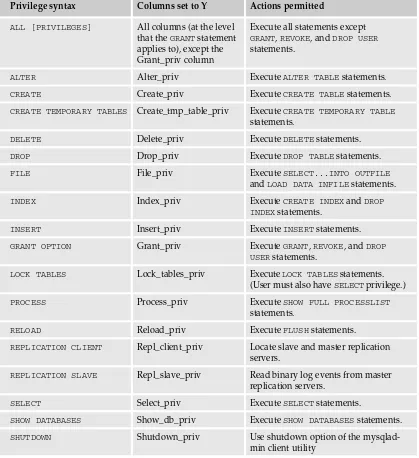
Each privilege is associated with a privilege column in the user, db, or host table or with one of the privi-leges listed in the Table_priv or Column_priv columns of the tables_priv and columns_priv tables. The following table describes all the privileges that you can use (in place of the <privilege> placeholder) available to the GRANT statement. The table also shows the privilege column that is associated with that
privilege. For the tables_priv and columns_priv table, the privilege name is associated with the appro-priate option in the Table_priv and Column_priv columns. For example, the INSERTprivilege is associ-ated with the Insert column option.
Privilege syntax Columns set to Y Actions permitted
ALL [PRIVILEGES] All columns (at the level Execute all statements except that the GRANTstatement GRANT, REVOKE, and DROP USER applies to), except the statements.
Grant_priv column
ALTER Alter_priv Execute ALTER TABLEstatements.
CREATE Create_priv Execute CREATE TABLEstatements.
CREATE TEMPORARY TABLES Create_tmp_table_priv Execute CREATE TEMPORARY TABLE statements.
DELETE Delete_priv Execute DELETEstatements.
DROP Drop_priv Execute DROP TABLEstatements.
FILE File_priv Execute SELECT...INTO OUTFILE
and LOAD DATA INFILEstatements.
INDEX Index_priv Execute CREATE INDEXand DROP
INDEXstatements.
INSERT Insert_priv Execute INSERTstatements.
GRANT OPTION Grant_priv Execute GRANT, REVOKE, and DROP
USERstatements.
LOCK TABLES Lock_tables_priv Execute LOCK TABLESstatements. (User must also have SELECTprivilege.)
PROCESS Process_priv Execute SHOW FULL PROCESSLIST
statements.
RELOAD Reload_priv Execute FLUSHstatements.
REPLICATION CLIENT Repl_client_priv Locate slave and master replication servers.
REPLICATION SLAVE Repl_slave_priv Read binary log events from master replication servers.
SELECT Select_priv Execute SELECTstatements.
SHOW DATABASES Show_db_priv Execute SHOW DATABASESstatements.
SHUTDOWN Shutdown_priv Use shutdown option of the
mysqlad-min client utility
Privilege syntax Columns set to Y Actions permitted
SUPER Super_priv Execute CHANGE MASTER, KILL, PURGE
MASTER LOGS, and SET GLOBAL state-ments; use the debug command of the mysqladmin client utility; and connect to MySQL server even if max_connec-tions system variable limit has been reached.
UPDATE Update_priv Execute UPDATEstatements.
USAGE No columns affected No actions permitted. Option used to add user with no privileges or to update user options not related to privileges.
You might have noticed that not all privileges are represented here. The encryption-related and connection-related privileges are assigned in different clauses, which are described later in the chapter.
When you specify privileges in the GRANTclause, you simply include the privilege name and, if applica-ble, the column names, enclosed in the parentheses. If you include more than one privilege, they must be separated with commas. If you include more than one column for a privilege, the column names must be separated by commas.
Defining the ON Clause
After you define the GRANTclause, you can define the ONclause, shown in the following syntax:
ON {<table> | * | *.* | <database>.*}
The ONclause specifies to which tables or database the GRANTstatement applies. As you can see, the clause includes four options. The option you choose determines the level at which the privileges are applied. The following list describes how the options can be used for each level:
❑ Global:Use the double wildcard (*.*)option to specify that the privileges should apply to the MySQL server and to all databases and their tables. You can also use the single wildcard (*) option if no database is active when executing the GRANTstatement; otherwise, the single wild-card option applies only to the active database.
❑ Database:Use the <database>.*option to specify that the privileges should apply to the
spec-ified database as a whole and to all tables in that database. You can also use the single wildcard (*)option if a database is active; otherwise, the single wildcard option applies globally.
❑ Table:Use the <table>option to specify that the privileges should apply only to that table. The
option is usually preceded by the database name and a period. For example, the books table in the test database is referred to as test.books.
❑ Column:Use the <table>option to specify that the privileges should apply only to that table,
as is the case when assigning table-level privileges. To make the GRANTtable column-specific, the <table>option should be used in conjunction with the columns specified in the GRANT
clause.
You can use a single GRANTstatement if you want to grant privileges at both the table level and at the column level. To do so, specify column names in the GRANTclause only for those columns that should be associated with privileges at the column level. Do not specify column names for the other privileges so that those privileges are applied to the table as a whole. If you want to grant privileges that combine other levels (for example, a SELECTprivilege at a global level and a DELETEprivilege at a table level), you should use separate GRANTstatements.
Defining the TO Clause
The final required clause that you must include in your GRANTstatement is the TOclause, which is shown in the following syntax:
TO ‘<user>’@’<host>’ [IDENTIFIED BY [PASSWORD] ‘<new password>’]
[{, ‘<user>’@’<host>’ [IDENTIFIED BY [PASSWORD] ‘<new password>’]}...]
As the syntax illustrates, you can assign privileges to one or more users, as long as you separate each pair of user definitions with a comma. For each user account, you must specify a username, hostname, and optionally a password. When assigning values in the TOclause, keep the following guidelines in mind:
❑ Host:The host from which the user will be connecting. You can specify a hostname, an IP address, or localhost. You can use the percentage (%) and underscore (_) wildcards in your host-name. The percentage wildcard indicates that any number of any character can be used. The underscore wildcard indicates that any single character can be used. You can use the percentage wildcard with no other values to indicate that any host is acceptable.
❑ User:The username associated with the user account that is being created. You cannot use wild-cards, but you can use a blank, which indicates that anonymous users are permitted access.
❑ Password:The password associated with the user account that is being created. You cannot use wildcards, but you can use a blank. If a blank is used, users must supply a blank password when logging on to the server. When you use a GRANTstatement to create a password, the pass-word is automatically encrypted when it is saved to the user table.
When you assign a password to a user, you must precede the password with the IDENTIFIED BY sub-clause. In addition, the password, just like the user and host values, should be enclosed in single quotes.
Now that you have seen how the syntax is defined for the GRANT, ON, and TOclauses, you’re ready to take a look at some examples that put all these clauses together.
Creating a Basic GRANT Statement
The first example GRANTstatement creates a user account and grants global-level privileges to that account:
GRANT ALL ON *.*
In this statement, the GRANTclause includes one privilege (ALL). The ALLprivileges grants all privileges to the user except those that allow the user to grant and revoke privileges. The ONclause includes the double wildcard (*.*)option, which indicates that the privileges being assigned to this user are at the global level. The TOclause specifies the username (user1) and the hostname (domain1.com). The clause also includes the IDENTIFIED BYsubclause, which defines the password pw1on the user account.
In order to grant privileges to another user, you must have the necessary privileges. This means that, when you’re user account was created, it must have been created with the GRANT OPTION. This option is discussed later in the chapter.
To sum up the GRANTstatement, you can say that user1, connecting from domain1.com, can perform all tasks on all tables and databases except for granting and revoking privileges. In addition, user1 must supply the pw1 password when logging on to the MySQL server. If you want to view how this account would be added to the user table (the table associated with global privileges), you can use a SELECT statement similar to the following:
SELECT host, user, select_priv, update_priv FROM user WHERE user=’user1’;
The statement retrieves only two of the privilege columns, both of which are data-related privileges, as shown in the following results:
+---+---+---+---+ | host | user | select_priv | update_priv | +---+---+---+---+ | domain1.com | user1 | Y | Y | +---+---+---+---+ 1 row in set (0.00 sec)
The next example is far more limited in scope than the previous example. The GRANTstatement grants SELECTand UPDATEprivileges on all tables in the test database, as shown in the following statement:
GRANT SELECT, UPDATE ON test.*
TO ‘user1’@’domain1.com’ IDENTIFIED BY ‘pw1’;
Note that user1 is used as the name in all the example GRANTstatements in this chapter, but you can assume that, for the purpose of these examples, that a new account is being created when each GRANT
statement is issued.
As you can see, the GRANTclause includes the SELECTand UPDATEprivileges, the ONclause specifies that the entire test database is affected, and the TOclause identifies [email protected]. A password has also been assigned to this account. The statement, then, allows user1 to connect to the MySQL server from the domain1.com host. The user must supply the pw1 password and can issue only SELECTand UPDATEstatements against the tables in the test database.
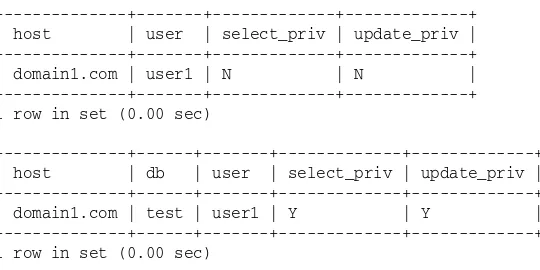
Because the GRANTstatement is specific to a database, you can use the following SELECTstatements to see how the user account would be added to the user and db tables:
SELECT host, user, select_priv, update_priv FROM user WHERE user=’user1’; SELECT host, db, user, select_priv, update_priv FROM db WHERE user=’user1’;
The SELECTstatements return results similar to the following:
+---+---+---+---+ | host | user | select_priv | update_priv | +---+---+---+---+ | domain1.com | user1 | N | N | +---+---+---+---+ 1 row in set (0.00 sec)
+---+---+---+---+---+ | host | db | user | select_priv | update_priv | +---+---+---+---+---+ | domain1.com | test | user1 | Y | Y | +---+---+---+---+---+ 1 row in set (0.00 sec)
As you can see, user1 is listed in the user table but is assigned no privileges. (Each privilege column has an N as a value.) The user, however, is also listed in the db table, which shows that the user has been assigned privileges on the test table. (Each privilege column has Y as a value.) Next you look at an example that creates table-level privileges. The table used in the example is shown in the following table definition:
CREATE TABLE Books (
BookID SMALLINT NOT NULL PRIMARY KEY, BookTitle VARCHAR(60) NOT NULL, Copyright YEAR NOT NULL
)
ENGINE=INNODB;
You can assume that the Books table has been added to the test database. Now take a look at a GRANT statement that assigns table-level privileges on the Books table:
GRANT SELECT, UPDATE ON test.Books
TO ‘user1’@’domain1.com’ IDENTIFIED BY ‘pw1’;
As you can see, the example is nearly identical to the previous example GRANTstatement; however, the ONclause now specifies a table as well as a database, so the statement is now applied at the table level, rather than the database level. As a result, the user account is added to the tables_priv table rather than the db table. To view how the user account is added to the grant tables, you can use a SELECTstatement similar to the following:
SELECT host, user, select_priv, update_priv FROM user WHERE user=’user1’; SELECT host, db, user, table_name, table_priv, column_priv
The statements return results similar to the following:
+---+---+---+---+ | host | user | select_priv | update_priv | +---+---+---+---+ | domain1.com | user1 | N | N | +---+---+---+---+ 1 row in set (0.00 sec)
+---+---+---+---+---+---+ | host | db | user | table_name | table_priv | column_priv | +---+---+---+---+---+---+ | domain1.com | test | user1 | books | Select,Update | | +---+---+---+---+---+---+ 1 row in set (0.00 sec)
As you can see, the user table is unchanged from the results returned by the previous example, but notice the results returned from the tables_priv table. The table includes the hostname, database name, username, and table name. In addition, the Table_priv column includes the two privilege values (Select and Update) as they were assigned in the GRANTstatement. As the results indicate, the user can execute SELECTand UPDATEstatements against the Books table in the test database.
Now take a look at an example GRANTstatement that assigns column-level privileges:
GRANT SELECT, UPDATE (BookTitle, Copyright) ON test.Books
TO ‘user1’@’domain1.com’ IDENTIFIED BY ‘pw1’;
The only difference between this statement and the previous example is that the UPDATEprivilege includes columns names (BookTitle and Copyright). This means that the user can update only those columns and no other columns in the table. As a result, the user has now been added to the columns_priv table. To demonstrate this, you can use the following SELECTstatements to retrieve data from the user, tables_priv, and columns_priv tables:
SELECT host, user, select_priv, update_priv FROM user WHERE user=’user1’; SELECT host, db, user, table_name, table_priv, column_priv
FROM tables_priv WHERE user=’user1’;
SELECT host, db, user, table_name, column_name, column_priv FROM columns_priv WHERE user=’user1’;
The statements should return results similar to the following:
+---+---+---+---+ | host | user | select_priv | update_priv | +---+---+---+---+ | domain1.com | user1 | N | N | +---+---+---+---+ 1 row in set (0.00 sec)
+---+---+---+---+---+---+ | host | db | user | table_name | table_priv | column_priv | +---+---+---+---+---+---+ | domain1.com | test | user1 | books | Select | Update |
+---+---+---+---+---+---+ 1 row in set (0.00 sec)
+---+---+---+---+---+---+ | host | db | user | table_name | column_name | column_priv | +---+---+---+---+---+---+ | domain1.com | test | user1 | books | BookTitle | Update | | domain1.com | test | user1 | books | Copyright | Update | +---+---+---+---+---+---+ 2 rows in set (0.00 sec)
Once again, the results returned from the user table remain unchanged from the previous two examples. Notice that the Column_priv column of the tables_priv table now includes the Update value. (The value has been removed from the Table_priv column.) In addition, two rows have been added to the columns_priv table, one for each column. As you can see, the Update privilege has been assigned to each column, but the user still retains the Select privilege at the table level.
Defining the REQUIRE Clause
The REQUIREclause determines whether a secure connection is required when connecting to the MySQL server and, if so, the degree to which that connection should be secured. Secure connections are imple-mented in MySQL through the use of the Secure Sockets Layer (SSL) protocol, which is a protocol that uses encryption algorithms to protect data that is sent over unsecured connections, such as the Internet. To make connections even more secure, MySQL supports the use of the x509 standard, an industry stan-dard that relies on the use of certificates to help authenticate the identity of a user trying to connect to a MySQL server. Companies referred to as certificate authoritiesissue the certificates that verify the authen-ticity of the user trying to establish a connection.
To support secure connections between clients and the MySQL server, your system must be configured to support the SSL protocol and the x509 standard, as necessary. A discussion of these topics is beyond the scope of this book. The purpose of this section is merely to demonstrate how to create user accounts that require secure connections. For specific system configuration information, refer to the appropriate product documentation as well as the MySQL Web site (www.mysql.com).
To use the REQUIREclause in your GRANTstatement, you must specify one or more options, as shown in the following syntax:
[REQUIRE {NONE | SSL | X509 | {<require definition>}]
<require definition>::=
<require option> [[AND] <require option>] [[AND] <require option>]
<require option>::= {CIPHER ‘<string>’} | {ISSUER ‘<string>’} | {SUBJECT ‘<string>’}
As you can see, you can specify NONE, SSL, X509, or one or more of the options available to the <require definition>placeholder. The following list describes each of these options:
❑ SSL:Specifies that a secure connection is required, but that it can be any type of SSL connection. This option is associated with the ssl_type column in the user table. If the SSLoption is used in the REQUIREclause, the ANYvalue is added to the column.
❑ X509:Specifies that a secure connection is required and that the connection requires a valid x509 certificate. This option is associated with the ssl_type column in the user table. If the X509 option is used in the REQUIREclause, the x509value is added to the column.
❑ CIPHER ‘<string>’:Specifies the cipher method that should be used for the SSL connection. Cipher methods are based on standards that specify how data is to be encrypted. This option is associated with the ssl_type and ssl_cipher columns in the user table. If the CIPHER ‘<string>’ option is used in the REQUIREclause, the SPECIFIEDvalue is added to the ssl_type column, and the <string>value is added to the ssl_cipher column.
❑ ISSUER ‘<string>’:Specifies the name of the certificate authority that issues the x509 certifi-cate. The name should be used for an x509 connection. This option is associated with the ssl_type and x509_issuer columns in the user table. If the ISSUER ‘<string>’option is used in the REQUIREclause, the SPECIFIEDvalue is added to the ssl_type column, and the <string> value is added to the x509_issuer column.
❑ SUBJECT ‘<string>’:Specifies the subject that should be included on the x509 certificate when establishing a secure connection. This option is associated with the ssl_type and x509_subject columns in the user table. If the SUBJECT ‘<string>’option is used in the REQUIREclause, the SPECIFIEDvalue is added to the ssl_type column, and the <string>value is added to the x509_subject column.
If you specify the NONE, SSL, or X509option, you can specify only one of these options. For the last three options (CIPHER, ISSUER, and STRING), you can specify one or more, in any order. Optionally, if you specify more than one of these three options, you can separate them with the ANDkeyword. If you don’t separate them with the ANDkeyword, then you simply separate them with a space or line break (no comma). Now take a look at an example of a GRANTstatement that uses a REQUIREclause:
GRANT SELECT, UPDATE (BookTitle, Copyright) ON test.Books
TO ‘user1’@’domain1.com’ IDENTIFIED BY ‘pw1’ REQUIRE SSL;
As you can see, the REQUIREclause includes the SSLoption, which indicates that an SSL connection is required, but there are no restrictions placed on the nature of the SSL connection. Once you execute the GRANTstatement, you can use the following SELECTstatement to view the user account information that is added to the user table:
SELECT user, ssl_type, ssl_cipher, x509_issuer, x509_subject FROM user WHERE user=’user1’;
The statement returns results similar to the following:
+---+---+---+---+---+ | user | ssl_type | ssl_cipher | x509_issuer | x509_subject | +---+---+---+---+---+ | user1 | ANY | | | | +---+---+---+---+---+ 1 row in set (0.00 sec)
As the results show, the encryption-related permission columns are empty except for the ssl_type column, which contains a value of ANY. Now take a look at what happens if you modify the GRANT statement:
GRANT SELECT, UPDATE (BookTitle, Copyright) ON test.Books
TO ‘user1’@’domain1.com’ IDENTIFIED BY ‘pw1’ REQUIRE SUBJECT ‘test client cert.’
AND ISSUER ‘Test C.A.’;
Now the REQUIREclause includes the SUBJECTand ISSUERitems. If you run the SELECTstatement again, you should see results similar to the following:
+---+---+---+---+---+ | user | ssl_type | ssl_cipher | x509_issuer | x509_subject | +---+---+---+---+---+ | user1 | SPECIFIED | | Test C.A. | test client cert. | +---+---+---+---+---+ 1 row in set (0.00 sec)
As you can see, the ssl_type column contains the SPECIFIEDvalue, and the x509_issuer and the x509_subject columns include the string values that you specified in the GRANTstatement.
Defining the WITH Clause
The last clause in the GRANTstatement is the WITHclause, which allows you to specify whether a user can grant and revoke privileges as well as allowing you to specify connection-related privileges, as shown in the following syntax:
[WITH <with option> [<with option>...]]
<with option>::= {GRANT OPTION}
| {MAX_QUERIES_PER_HOUR <count>} | {MAX_UPDATES_PER_HOUR <count>} | {MAX_CONNECTIONS_PER_HOUR <count>}
As the syntax shows, the WITHclause can include from one to four options. The following list describes each of these options:
❑ GRANT OPTION:Specifies that users can execute GRANT, REVOKE, and DROP USERstatements. Using this option in this clause has the same effect as using the option in the GRANTclause. Grant privileges are applied to the user at the level that the GRANTstatement is applied (as defined in the ONclause) and to the limit that the grantor is permitted access to the system. This option sets the Grant_priv column in the user, db, or host table or adds the Grant value to the Table_priv column of the tables_priv table. (Using the GRANT OPTIONin the WITHclause achieves the same results as using the GRANT OPTIONas a privilege in the GRANTclause.)
❑ MAX_UPDATES_PER_HOUR <count>:The number of data modifications permitted in an hour. The number is added to the max_updates column of the user table. If the option is not specified, the default value is 0, which indicates that an unlimited number of updates are permitted.
❑ MAX_CONNECTIONS_PER_HOUR <count>:The number of connections permitted in an hour. The number is added to the max_connections column of the user table. If the option is not specified, the default value is 0, which indicates that an unlimited number of connections are permitted.
When you create a GRANTstatement that includes the WITHclause, you simply specify the options and, if appropriate, specify a value. You do not need to separate the options with a comma. For example, the following GRANTstatement specifies the MAX_QUERIES_PER_HOURand MAX_UPDATES_PER_HOUR options, setting the value of each to 50:
GRANT SELECT, UPDATE ON test.*
TO ‘user1’@’domain1.com’ IDENTIFIED BY ‘pw1’
WITH GRANT OPTION MAX_QUERIES_PER_HOUR 50 MAX_UPDATES_PER_HOUR 50;
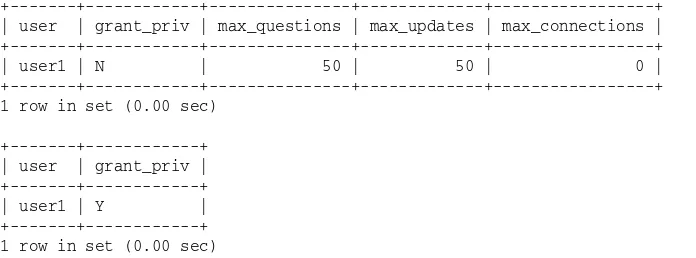
As the statement shows, the connection-related values are added to the applicable columns in the user table. The other privileges are assigned at the database level. To verify this, you can run the following SELECTstatements:
SELECT user, grant_priv, max_questions, max_updates, max_connections FROM user WHERE user=’user1’;
SELECT user, grant_priv FROM db WHERE user=’user1’;
The statements return results similar to the following:
+---+---+---+---+---+ | user | grant_priv | max_questions | max_updates | max_connections | +---+---+---+---+---+ | user1 | N | 50 | 50 | 0 | +---+---+---+---+---+ 1 row in set (0.00 sec)
+---+---+ | user | grant_priv | +---+---+ | user1 | Y | +---+---+ 1 row in set (0.00 sec)
As you can see, the account as it appears in the user table has not been granted the GRANT OPTION privi-lege, but the max_questions and max_updates columns each contain 50. If the user tries to exceed this number of queries or updates, the operations are not allowed. The results returned by the SELECT state-ment also show that the user has been added to the db table, where the GRANT OPTIONprivilege has been assigned.
Once you add a user to your system, it is often useful to view what privileges have been assigned to that user. This is helpful in troubleshooting connections and in changing privileges — or revoking them. To view the privileges that have been assigned to a user, you can use SELECTstatements to retrieve all columns for all grant tables, which is a very cumbersome process. However, you can also use the SHOW GRANTSstatement, which is a far more efficient method to use to display a user’s privileges.
Using the SHOW GRANTS Statement
The SHOW GRANTSstatement displays information about a specific user account. To use the statement, you must include the SHOW GRANTS FORkeywords, followed by the username and hostname, as shown in the following syntax:
SHOW GRANTS FOR ‘<user>’@’<host>’
As you can see, the syntax for a SHOW GRANTSstatement is very basic. You want to be sure that, when specifying the username and hostname, you enclose each name in single quotes and you separate the names with the at symbol (@). For example, the following SHOW GRANTSstatement displays the user account information for [email protected]:
SHOW GRANTS FOR ‘user1’@’domain1.com’;
When you execute this statement, you should receive results similar to the following:
+---+ | Grants for [email protected] | +---+ | GRANT USAGE ON *.* TO ‘user1’@’domain1.com’ IDENTIFIED BY PASSWORD
‘*2B602296A79E0A8784ACC5C88D92E46588CCA3C3’ WITH MAX_QUERIES_PER_HOUR 50
MAX_UPDATES_PER_HOUR 50 | | GRANT SELECT, UPDATE ON ’test’.* TO ‘user1’@’domain1.com’ WITH GRANT OPTION | +---+ 2 rows in set (0.00 sec)
The first row returned by the SHOW GRANTSstatements displays information from the user table. In the previous results, this row is broken over three lines, but what you actually see depends on your system. In this case, the row begins with the GRANT USAGE ONkeywords. Usage is a privilege option that indicates that no privileges have been set for that account. Whenever a user account has not been assigned global data-related or administrative privileges, the USAGEoption is used. If global privileges have been granted, those privilege options are displayed. The first row also displays the username, hostname, and encrypted password. If encryption-related or connection-related privileges have been assigned to an account, they’re displayed after the username, hostname, and password. For this user, the MAX_QUERIES_PER_HOURand MAX_UPDATES_PER_HOURprivileges are displayed, which are associated with the max_questions and max_updates columns, respectively.
If the SHOW GRANTSstatement returns more than one row, those additional rows display details about nonglobal privileges. For example, the second row returned by the preceding SHOW GRANTSstatement indicates that the SELECTand UPDATEprivileges have been granted on the test database (test.*) and that the GRANT OPTIONhas been assigned at the database level. If table or column level privileges had been assigned to this user, they would also be returned by the SHOW GRANTSstatement.
Try It Out
Adding Users to the DVDRentals Database
The following steps describe how to add users to the DVDRentals database and assign privileges to those users:
1.
Open the mysql client utility. If the mysql database is not the active database, type the following command, and press Enter:use mysql
You should receive a message indicating that you switched to the mysql database.
2.
The first user account that you create is named myuser1, which is allowed to connect only from the local computer. Execute the following SQL statement at the mysql command prompt:GRANT SELECT, UPDATE (EmpFN, EmpMN, EmpLN) ON DVDRentals.Employees
TO ‘myuser1’@’localhost’ IDENTIFIED BY ‘mypw1’ WITH MAX_CONNECTIONS_PER_HOUR 25;
You should receive a message indicating that the state