back of his head, behind Christopher Robin. It is, as far as he knows, the only way of coming downstairs,
but sometimes he-feels that there really is another way, if only he could stop bumping for a moment and think of it.
Published by Microsoft Press A Division of Microsoft Corporation One Microsoft Way
Redmond, Washington 98052-6399 Copyright © 1998 by Steve McConnell
All rights reserved. No part of the contents of this book may be reproduced or transmitted in any form or by any means without the written permission of the publisher. Library of Congress Cataloging-in-Publication Data
McConnell, Steve.
Software Project Survival Guide: how to be sure your first important project isn't your last / Steve McConnell.
p. cm. Includes index. ISBN 1-57231-621-7
1 Computer software—Development—Management. I. Title. QA76.76.D47M394 1997
005.1'06R'4--dc21 97-37923
CIP Printed and bound in the United States of America. 10 11 12 13 14 15 QMQM 2 1 0
Distributed to the book trade in Canada by Penguin Books Canada Limited. A CIP catalogue record for this book is available from the British Library.
Microsoft Press books are available through booksellers and distributors worldwide. For further information about international editions, contact your local Microsoft Corpora-tion office Or contact Microsoft Press InternaCorpora-tional directly at fax (425) 936-7329. Visit our Web site at mspress.microsoft.com.
Microsoft, Microsoft Press, Visual Basic, Visual C++, Windows, and Windows NT are registered trademarks of Microsoft Corporation. Java is a trademark of Sun Microsystems, Inc. Other product and company names mentioned herein may be the trademarks of their respective owners.
Frontispiece from WINNIE-THE-POOH by A.A. Milne, illustrated by E.H. Shepard. Copyright 1926 by E.P. Dutton, renewed 1954 by A.A. Milne. Used by permission of Dutton Children's Books, a division of Penguin Books USA Inc.
Acknowledgments vi
Preliminary Survival Briefing vii
THE SURVIVAL MIND-SET
1 Welcome to Software Project Survival Training 3 2 Software Project Survival Test 11
3 Survival Concepts 19 4 Survival Skills 35
5 The Successful Project at a Glance 51
SURVIVAL PREPARATIONS
6 Hitting a Moving Target 73 7 Preliminary Planning 858 Requirements Development 113
9 Quality Assurance 125 10 Architecture 143 11 Final Preparations 155
SUCCEEDING BY STAGES
12 Beginning-of-Stage Planning 173 13 Detailed Design 187
14 Construction 199 15 System Testing 215 16 Software Release 221 17 End-of-Stage Wrap-Up 237
Acknowledgments
As an experiment, I posted draft chapters of this book on my Internet Web site and invited readers to comment on them. Many people downloaded the chapters, and they contributed literally thousands of insightful review com-ments. The diversity of viewpoints was tremendous (bordering on over-whelming), and the book is more readable, cohesive, practical, and useful as a result.
Thanks first to the people who reviewed the whole manuscript. These people include Robert C. Burns (The Boeing Company), Lawrence Casey, Alan Brice Corwin (Process Builder), Thomas Duff, Mike Cargal, Pat Forman (Lynden), Manny Gatlin, Marc Gunter, Tom Hill, William Horn, Greg Hitchcock, Grant McLaughlin, Mike Morton, Matt Peloquin, David Roe, Steve Rinn, Andre Sintzoff, Matthew J. Slattery, and Beth Weiss.
I am also grateful to the people who commented on significant sections of the book, including Ray Bernard (Ray Bernard Consulting and Design), Steven Black, Robert Brown, Jacob L. Cybulski, Tom Gilb, Dick Holland, Gerard Kilgallon, Art Kilner, Steve Kobb, Robert E. Lee, Pete Magsig, Hank Meuret (Meuret Consulting), Al Noel, Karsten M. Self, Rob Thomsett, and Gregory V, Wilson.
Other people commented on one or more details of the manuscript, and I've listed those people where appropriate in the "Notes" section at the end of the book.
It was a pleasure to see the staff at Microsoft Press transform the raw material of my manuscript into finished form. Special thanks to Victoria Thulman, project editor, for her wonderful forbearance and resiliency in accommodating an author who has opinions about every facet of book pro-duction. Thanks to Kim Eggleston for the book's spare, elegant design, and to the rest of the Microsoft Press staff, including David Clark, Abby Hall, Cheryl Penner, and Michael Victor.
About two million people are working on about 300,000 software projects in the United States at this time.1 Between one third and two thirds of those projects will exceed their schedule and budget targets before they are delivered. Of the most expensive software projects, about half will eventually be canceled for being out of control. Many more are canceled in subtle ways—they are left to wither on the vine, or their sponsors simply declare victory and leave the battlefield without any new software to show for their trouble. Whether you're a senior manager, an executive, a software client, a user representative, or a project leader, this book explains how to prevent your project from suffering these consequences.
Software projects fail for one of two general reasons: the project team lacks the knowledge to conduct a software project successfully, or the project team lacks the resolve to conduct a project effectively. This book cannot do much about the lack of resolve, but it does contain much of the knowledge needed to conduct a software project successfully.
The message of the Software Project Survival Guide is that software projects survive not because of detailed technical considerations like "thunking layers" but for much more mundane reasons. Software projects succeed or fail based on how carefully they are planned and how deliber-ately they are executed. The vast majority of software projects can be run in a deterministic way that virtually assures success. If a project's stakehold-ers undstakehold-erstand the major issues that determine project success, they can ensure that their project reaches a successful conclusion. The person who keeps a software project headed in the right direction can be a technical manager or an individual software developer—it can also be a top manager, a client, an investor, an end-user representative, or any other concerned party.
WHO SHOULD READ THIS BOOK
This book is for anyone who has a stake in a software project's outcome.
TOP MANAGERS, EXECUTIVES, CLIENTS,
INVESTORS, AND END-USER REPRESENTATIVES
Nonsoftware people are commonly given responsibility for overseeing the development of a software product. These people have backgrounds in sales, accounting, finance, law, engineering, or some other field. They might not have any formal authority to direct the project, but they will still be held accountable for seeing that the project goes smoothly. At a minimum, they are expected to sound an alarm if the project begins to go awry.
If you're in this group, this book will provide you with a short, easily readable description of what a successful project looks like. It will give you many ways to tell in advance whether the project is headed for failure or success. It will also describe how to tell when no news is good news, when good news is bad news, or when good news really is good news.
PROJECT MANAGERS
Preliminary Survival Briefing
TECHNICAL LEADERS, PROFESSIONAL
DEVELOPERS, AND SELF-TAUGHT PROGRAMMERS
If you're an expert in technical details, you might not have had much exposure to the big-picture issues that project leaders need to focus on. In that case, you can think of this book as an annotated project plan. By providing an overview of a successful software project, this book will help you make the transition from expert technician to effective project leader. You can use the plan described in this book as a starting point, and you can tailor its strategies to the needs of your specific projects. If you've read Rapid Development, the first part of this book will be about half review for you. You might want to skim Chapters 1 through 5, read the end of Chapter 5 carefully, skim Chapter 6, and then begin reading carefully again starting with Chapter 7.
KINDS OF PROJECTS THIS BOOK COVERS
The plan will work for business systems, broad-distribution shrink-wrap software, vertical market systems, scientific systems, and similar programs. It is designed for use on desktop client/server projects using modern develop-ment practices such as object-oriented design and programming. It can easily be adapted for projects using traditional development practices and main-frame computers. The plan has been designed with project team sizes of 3 to 25 team members and schedules of 3 to 18 months in mind. These are considered to be medium-sized projects. If your project is smaller you can scale back some of this book's recommended practices. (Throughout the book, I point out places you can do that.)
This book is primarily intended for projects that are currently in the planning stages. If you're at the beginning of the project, you can use the approach as the basis for your project plan. If you're in the middle of a project, the Survival Test in Chapter 2 and the Survival Checks at the end of each chapter will help you determine your project's chance of success.
specific project it might not be the optimum way. The extremely knowledge-able technical leader will usually be knowledge-able to come up with a better, fuller, more customized development plan than the generic one described here. But the plan described here will work much better than a hastily thrown together plan or no plan at all, and no plan at all is the most common alternative.
The plan described in the following chapters has been crafted to address the most common weaknesses that software projects face. It is loosely based on the "key process areas" identified by the Software Engineering Institute (SEI) in Level 2 of the SEI Capability Maturity Model. The SEI has identified these key processes as the critical factors that enable organizations to meet their schedule, budget, quality, and other targets. About 85 percent of all organizations perform below Level 2, and this plan will support dramatic improvements in those organizations. The SEI has defined the key process areas of Level 2 as follows:
Project planning
Requirements management Project tracking and oversight Configuration management Quality assurance
Subcontract management
This book addresses all of these areas except subcontract management.
THIS BOOK'S FOUNDATION
In writing this book, I have kept three primary references at my elbow that have been invaluable resources, in addition to the many other resources I've drawn from. I've tried to condense the contents of these three references and present them in the most useful way that I can.
Preliminary Survival Briefing
is a godsend. This book is available free on the Internet at http:// www.sei.cmu.edu/or from the National Technical Information Service (NTIS) branch of the U.S. Department of Commerce in Springfield, Virginia.
The second reference is the NASA Software Engineering Laboratory's (SEL's) Recommended Approach to Software Development, Revision 3. The SEL was the first organization to receive the IEEE Computer Society's Process Achievement Award. Many keys to the success of its process are described in the Recommended Approach. Whereas the SEI's document describes a set of practices without showing how to apply them to a specific project, the Recommended Approach describes a structured sequence of practices. The two volumes together form a complementary set. This book is also available free on the Internet at http://fdd.gsfc.nasa.gov/seltext.himl.
The final "book" at my elbow has been my own experience. I am writ-ing not as an academician who wants to create a perfect theoretical frame-work, but as a practitioner who wants to create a practical reference that will aid me in my work and my clients in theirs. The information drawn together here will make it easier for me to plan and conduct my next project and easier to explain its critical success factors to my clients. I hope it does the same for you.
Survival prospects for software projects are
often poor, but they do not need to be. The first
step in surviving a software project is being sure
O
ur standards for software product performance are unbelievably exacting compared to our standards for software project performance. The software user community expects software products to run for hours without crashing, executing millions of source code instructions with few or no errors. But the software development community expects far less from its projects. Users and clients might complain if a project is delivered one month, three months, or six months late, if it's hard to use, or if it lacks a few critical functions. But if the bulk of the planned software product is deliv-ered at all—at any cost—ever—most software consumers will consider that project to be a success. We have suffered so many failed projects that the only outcome we really consider to be a failure is total collapse.The upper echelons of the software industry have understood for many vears what is needed to perform at a much higher level than is currently practiced. A successful project should be one that meets its cost, schedule, and quality goals within engineering tolerances and without padding its schedule or budget. After detailed plans have been made, the current state of the art supports meeting project goals within plus or minus 10 percent or better. This level of performance is currently within the reach of the average software project manager, and in many cases can be substantially influenced by project "outsiders"—upper managers, executives, clients, investors, and end-user representatives.
As chief software engineer at Construx Software Builders, I have been asked to review many failed projects. To the trained eye, the reasons for fail-ure are usually apparent. Failfail-ure of medium-size software projects (those with 20,000-250,000 lines of source code) is almost always avoidable. Moreover, I have found that software projects can be optimized to meet any of several goals: shortest schedule, least cost, best quality, or any other goal. Not all of these goals can be achieved simultaneously, and the approach described in this book strikes a careful balance among these objectives so that a high-quality product can be delivered according to an efficient schedule at moderate cost.
SURVIVAL NEEDS
1 Welcome to Software Project Survival Training
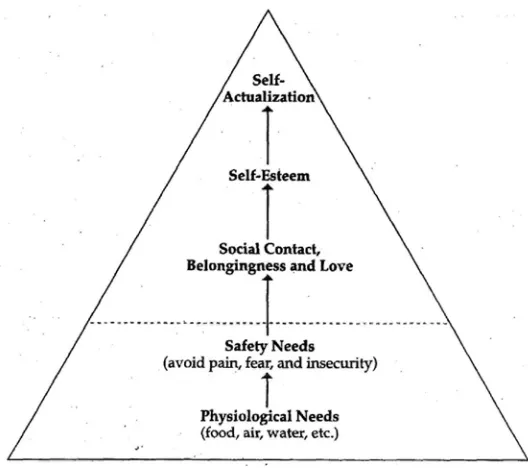
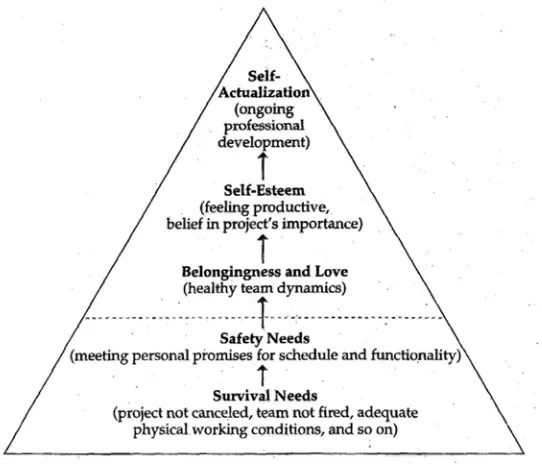
lower motives to higher ones. The lowest level needs are called "survival needs," because they address physical needs that must be satisfied for a human being to exist at all. The lower motives, which are illustrated in Fig-ure 1-1 as the motives below the dashed line, must be satisfied before we can progress to the higher motives. Thus physiological needs for food, air, and water must be satisfied before we can be motivated by the need for "belongingness" and love, self-esteem, or self-actualization.
A project team must be satisfied that the project can be completed at all, for example, before it will begin to worry about whether it will be completed within plus or minus 10 percent of its schedule and budget targets. A project team must be capable of delivering software on time before it will become capable of optimizing a software project to meet an aggressive schedule with a limited budget—and advance the state of the art all at the same time.
As Figure 1-2 illustrates, the needs of the software project hierarchy are not exactly the same as the needs of individual project participants. A devel-oper, for example, will typically prioritize his or her individual self-esteem above the need for healthy team dynamics. But the project typically has a greater need for healthy team dynamics than it has a need for the high self-esteem of individual team members.
This book focuses on the lower levels of the software project need hi-erarchy, reaching into the higher levels mainly when a higher-level need must be addressed before a lower-level need can be satisfied.
1 Welcome to Software Project Survival Training
SURVIVAL RIGHTS
A struggling project threatens each party's survival needs. The customer worries whether the project will be delivered too late to serve its intended purpose, delivered at prohibitive cost, or delivered at all. The manager worries whether the customer will cancel the project and make him look like a failure, or whether the developers are even capable of completing the project. The developer worries whether she will lose her job or be forced to sacrifice hundreds of hours of leisure time to show she is committed to the project. In each of these circumstances, the individuals retreat to the lower levels of the project need hierarchy—focusing on the safety need of meeting their personal promises. But this reaction causes the individuals to abandon the higher levels of the pyramid that must be exercised to achieve top quality and productivity.
As Thomas Hobbes observed in the 17th century, life under mob rule is solitary, poor, nasty, brutish, and short. Life on a poorly run software project is solitary, poor, nasty, brutish, and hardly ever short enough. The first step toward surviving a software project is for all parties to agree to treat one another in a civilized way. I've summarized some of the rules of civili-zation as they apply to software projects in the form of a "Customer's Bill of Rights." (In some cases, the project will not have a customer per se. In those cases, these rights may belong to the product manager, marketing representative, or end-user representative instead of the customer.)
1. To set objectives for the project and have them followed
2. To know how long the software project will take and how much it will cost 3. To decide which features are in and which are out of the software 4. To make reasonable changes to requirements throughout the course of the
project and to know the costs of making those changes 5. To know the project's status clearly and confidently
The rights I'm most familiar with are the rights enumerated in the United States Bill of Rights. Those rights are not just "nice to have" but are essential to the operation of a representative democracy. Similarly, these software project rights do not just make a software project more enjoyable; they are required for it to work at all.
Another software project concept aligned with the United States Bill of Rights is the assumption that one person's software project rights are another person's software project responsibilities. We all enjoy the right to free speech, but the price we pay for that right is tolerating other people's right to free speech, even when we disagree with what they say or find it offensive. On a software project, customers must pay for their rights by respecting the project team's rights, which are listed here.
1. To know the project objectives and to clarify priorities.
2. To know in detail what product I'm supposed to build and to clarify the product definition if it is unclear.
3. To have ready access to the customer, manager, marketer, or other person responsible for making decisions about the software's functionality.
4. To work each phase of the project in a technically responsible way, especially to not be forced to start coding too early in the project.
5. To approve effort and schedule estimates for any work that T will be asked to perform. This includes the right to provide only the kinds of cost and sched-ule estimates that are theoretically possible at each stage of the project; to take the time needed to create meaningful estimates; and to revise estimates whenever the project's requirements change.
6. To have my project's status reported accurately to customers and upper management.
7. To work in a productive environment free from frequent interruptions and distractions, especially during critical parts of the project.
1 Welcome to Software Project Survival Training
SURVIVAL CHECKS
Survival Checks appear at the end of each chapter. They refer to project characteristics that you can check from outside the project to gauge the health of the project.
Keys to success are marked with a thumbs-up symbol
that exhibit these characteristics are headed for success. Potential pitfalls are indented and marked with a bomb symbol
characteristics are at risk.
j.
Projects that exhibit these Projects
The agreement in principle is not followed in practice. The project team's survival needs are being met.
A short test can assess a software
project's health. If the test indicates
im-T
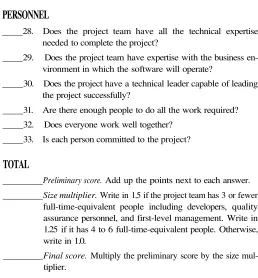
his chapter contains a test you can use to assess a project's chances of successful completion. Will it be delivered on time and within bud-get? Will it be a glorious achievement or an embarrassing mistake? The work you do on this test can help you find out.SURVIVAL TEST QUESTIONS
Give the project 3 points for each "yes" answer. Give the project partial credit if you feel that is most accurate—for example, give it 2 points for "probably" and 1 point for "kind of, but not really." If the project is in the early stages, answer the questions based on the project plans. If the project is well under-way, answer the questions based on what has actually happened on the project. The section following the test explains how to interpret the score.1
SURVIVAL TEST
REQUIREMENTS
1. Does the project have a clear, unambiguous vision state-ment or mission statestate-ment?
2. Do all team members believe the vision is realistic? 3. Does the project have a business case that details the
busi-ness benefit and how the benefit will be measured? 4. Does the project have a user interface prototype that
realis-tically and vividly demonstrates the functionality that the actual system will have?
5. Does the project have a detailed, written specification of what the software is supposed to do?
6. Did the project team interview people who will actually use the software (end users) early in the project and con-tinue to involve them throughout the project?
1, This test is available in electronic form on the Survival Guide Web site. The site address is
2 Software Project Survival Test
PLANNING
7. Does the project have a detailed, written Software Devel-opment Plan?
8. Does the project's task list include creation of an installa-tion program, conversion of data from previous versions of the system, integration with third-party software, meet-ings with the customer, and other "minor" tasks?
9. Were the schedule and budget estimates officially updated at the end of the most recently completed phase?
10. Does the project have detailed, written architecture and design documents?
11. Does the project have a detailed, written Quality Assur-ance Plan that requires design and code reviews in addi-tion to system testing?
12. Does the project have a detailed Staged Delivery Plan for the software, which describes the stages in which the soft-ware will be implemented and delivered?
13. Does the project's plan include time for holidays, vacation days, sick days, and ongoing training, and are resources al-located at less than 100 percent?
14. Was the project plan, including the schedule, approved by the development team, the quality assurance team, and the technical writing team—in other words, the people respon-sible for doing the work?
PROJECT CONTROL
15. Has a single key executive who has decision-making au-thority been made responsible for the project, and does the project have that person's active support?
17. Does the project have well-defined, detailed milestones ("binary milestones") that are considered to be either 100 percent done or 100 percent not done?
18. Can a project stakeholder easily find out which of these bi-nary milestones have been completed?
19. Does the project have a feedback channel by which project members can anonymously report problems to their own managers and upper managers?
20. Does the project have a written plan for controlling changes to the software's specification?
21. Does the project have a Change Control Board that has fi-nal authority to accept or reject proposed changes? _ 22. Are planning materials and status information for the
project—including effort and schedule estimates, task as-signments, and progress compared to the plan thus far— available to every team member?
23. Is all source code placed under automated revision control? 24. Does the project environment include the basic tools needed to complete the project, including defect tracking software, source code control, and project management software?
RISK MANAGEMENT
25. Does the project plan articulate a list of current risks to the project? Has the list been updated recently?
_, 26. Does the project have a project risk officer who is respon-sible for identifying emerging risks to the project? , 27. If the project uses subcontractors, does it have a plan for
2 Software Project Survival Test
PERSONNEL
28. Does the project team have all the technical expertise needed to complete the project?
29. Does the project team have expertise with the business en-vironment in which the software will operate?
30. Does the project have a technical leader capable of leading the project successfully?
31. Are there enough people to do all the work required? 32. Does everyone work well together?
33. Is each person committed to the project?
TOTAL
Preliminary score. Add up the points next to each answer. Size multiplier. Write in 1.5 if the project team has 3 or fewer full-time-equivalent people including developers, quality assurance personnel, and first-level management. Write in 1.25 if it has 4 to 6 full-time-equivalent people. Otherwise, write in 1.0.
Final score. Multiply the preliminary score by the size mul-tiplier.
INTERPRETING THE SURVIVAL TEST
This is a difficult test for most projects; many will score less than 50 points. Table 3-1 on the following page explains how to interpret the score.
90+ A project with this score is virtually guaranteed to succeed in Outstanding all respects, meeting its schedule, budget, quality, and other
targets. In terms of Chapter 1's project needs hierarchy, such a project is fully "self-actualized."
80-89 A project at this level is performing much better than average. Excellent Such a project has a high probability of delivering its software
close to its schedule, budget, and quality targets.
60-79 A score in this range represents a better-than-average level of Good software development effectiveness. Such a project stands a
fighting chance of meeting either its schedule or its budget target, but it probably won't meet both.
40-59 This score is typical. A project with this score will likely Fair experience high stress and shaky team dynamics, and the
software will ultimately be delivered with less functionality than desired at greater cost and with a longer schedule. This kind of project stands to experience the greatest benefit from applying the plan described in this book.
< 40 A project with this score has significant weaknesses in the At Risk major areas of requirements, planning, project control, risk
management, and personnel. The primary concern of a project in this category should be whether it will finish art all.
2 Software Project Survival Test
Survival Check
The project scores at least 60 on the Survival Test.
The project scores less than 60, but corrective actions are planned to improve its score.
Well-defined development processes are important and
neces-sary elements of software project survival. With well-defined
processes, software personnel can spend most of their time on
productive work that moves the project steadily toward
comple-tion. With poorly planned processes, developers spend a lot of
their time correcting mistakes. Much of the leverage for project
success is contained in upstream activities, and knowledgeable
atten-B
efore you begin a mission, you are briefed about its most important characteristics. This chapter describes the critical factors that contribute to software mission success.THE POWER OF "PROCESS"
This book is about using effective software development processes. The phrase "software processes" can mean a lot of different things. Here are some examples of what I mean by "software processes:"
Committing all requirements to writing.
Using a systematic procedure to control additions and changes to the software's requirements.
Conducting systematic technical reviews of all requirements, de-signs, and source code.
Developing a systematic Quality Assurance Plan in the very early stages of the project that includes a test plan, review plan, and defect tracking plan.
Creating an implementation plan that defines the order in which the software's functional components will be developed and integrated.
Using automated source code control.
Revising cost and schedule estimates as each major milestone is achieved. Milestones include the completion of requirements analysis, architecture, and detailed design as well as the comple-tion of each implementacomple-tion stage.
These processes are beneficial in ways that will shortly become apparent.
NEGATIVE VIEW OF PROCESS
3 Survival Concepts
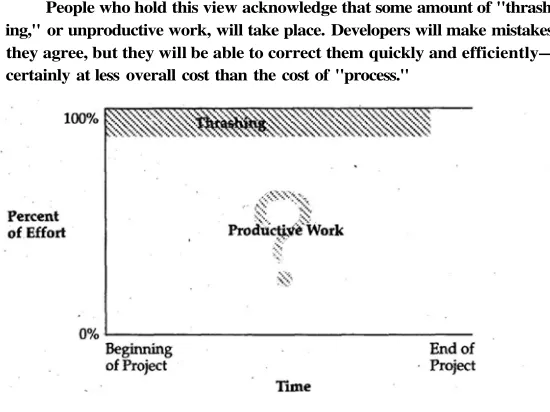
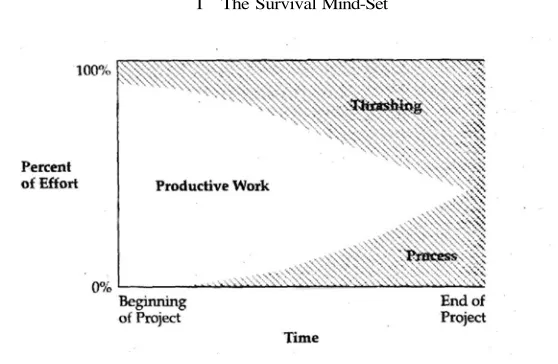
People who hold this view acknowledge that some amount of "thrash-ing," or unproductive work, will take place. Developers will make mistakes, they agree, but they will be able to correct them quickly and efficiently— certainly at less overall cost than the cost of "process."
FIGURE 3-1 Mistaken perception that ignoring process increases the proportion of pro-ductive work on projects.
This point of view has intuitive appeal. At the beginning of a project (shown by the darker shaded areas), a focus on process certainly does take time away from productive work. If that trend continued throughout a project (shown by the lighter shaded areas), it wouldn't make sense to spend much time on process.
Software industry experience with medium-size projects, however, has revealed that the trend shown in Figure 3-2 does not continue throughout the project. Projects that don't pay attention to establishing effective pro-cesses early on are forced to slap them together later, when slapping them together takes more time and does less good. Here are some scenarios that illustrate why earlier is better:
Change control. In the middle of the project, team members infor-mally agree to implement a wide variety of changes that are di-rectly proposed to them by their manager or customer. They don't begin controlling changes systematically until late in the project. By that time, the scope of the product has expanded by 25 to 50 percent or more, and the budget and the schedule have expanded accordingly.
Quality assurance. Projects that don't set up processes to eliminate defects in early stages fall into extended test-debug-reimplement-retest cycles that seem interminable. So many defects are reported by testing that by the end of the project, the "change control board" or "feature team" may be meeting as often as every day to priori-tize defect corrections. Because of the vast number of defects, the software has to be released with many known (albeit low priority) defects. In the worst case, the software might never reach a level of quality high enough for it to be released.
3 Survival Concepts
Defect tracking. Defect tracking isn't set up until late in the project. Some reported defects are not fixed simply because they are for-gotten, and the software is released with these defects even though they would have been easy to fix.
System integration. Components developed by different develop-ers are not integrated with one another until the end of the project. By the time the components are integrated, the interfaces between components are out of synch and much work must be done to bring them back into alignment.
Automated source code control. Source code revision control isn't established until late in the project, after developers have begun to lose work by accidentally overwriting the master copies of their own or one another's source code files.
Scheduling. On projects that are behind schedule, developers are asked to reestimate their remaining work as often as once a week or more, taking time away from their development work.
When a project has paid too little early attention to the processes it will use, by the end of a project developers feel that they are spending all of their time sitting in meetings and correcting defects and little or no time extend-ing the software. They know the project is thrashextend-ing. When developers see they are not meeting their deadlines, their survival impulses kick in and they retreat to "solo development mode," focusing exclusively on their personal deadlines. They withdraw from interactions with managers, customers, testers, technical writers, and the rest of the development team, and project coordination unravels.
FIGURE 3-3 Real experience of projects that pay little attention to process. As the project environment becomes increasingly complicated, thrashing and process both increase.
In this pattern, projects experience a steady increase in thrashing over the course of a project. By the middle of the project, the team realizes that it is spending a lot of time thrashing and that some attention to process would be beneficial. But by then much of the damage has been done. The project team tries to increase the effectiveness of its process, but its efforts hold the level of thrashing steady, at best. In some cases, the late attempt to improve the project's processes actually makes the thrashing worse.
The lucky projects release their software while they are still eking out a small amount of productive work. The unlucky projects can't complete their software before reaching a point at which 100 percent of their time is spent on process and thrashing. After spending several weeks or months in this condition, such a project is typically canceled when management or the customer realizes that the project is no longer moving forward. If you think that attention to process is needless overhead, consider that the overhead of a canceled project is 100 percent.
PROCESS TO THE RESCUE
3 Survival Concepts
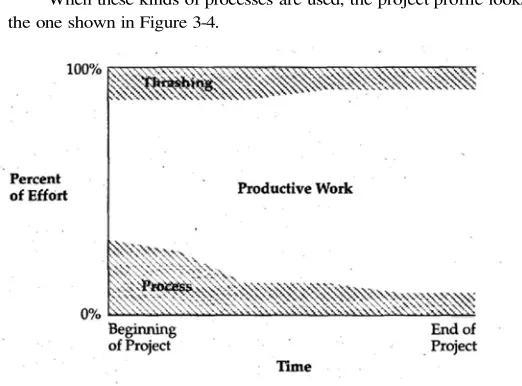
When these kinds of processes are used, the project profile looks like the one shown in Figure 3-4.
FIGURE 3-4 Experience of projects that focus early attention on process. As the team gains experience with its processes and fine tunes them to the working environment, the time spent on process and thrashing both diminish.
During the first few weeks of the project, the process-oriented team will seem less productive than the process-phobic team because the level of thrashing will be the same on both projects, and the process-oriented team will be spending a significant amount of its time on processes.
By the middle of the project, the team that focused on process early will have reduced the level of thrashing compared to the beginning of the project, and will have streamlined its processes. At that point, the process-phobic team will be just beginning to realize that thrashing is a significant problem and just beginning to institute some processes of its own.
An investment made in process at the beginning
of the project produces large returns
later in the project.
Organizations that have explicitly focused on improving their devel-opment processes have, over several years, cut their time-to-market by about one-half and reduced their costs and defects by factors of 3 to 10. Over a 5-year period, Lockheed cut its development costs by 75 percent, reduced its time-to-market by 40 percent, and reduced its defects by 90 percent. Over a 6.5-year period, Raytheon tripled its productivity and realized a return on investment (ROI) in process improvement of almost 8 to 1. Bull HN realized an ROI of 4 to 1 after 4 years of software process improvement efforts, and Schlumberger realized an ROI of almost 9 to 1 after 3.5 years of software process improvement. NASA's Software Engineering Laboratory cut its average cost per mission by 50 percent and its defect rate by 75 percent over an 8-year period while dramatically increasing the complexity of software used on each mission. Similar results have been reported at Hughes, Loral, Motorola, Xerox and other companies that have focused on systematically improving their software processes.
Here's the best news: Can you guess the average cost of these improve-ments in productivity, quality, and schedule performance? It's about 2 percent of total development costs—typically about $1,500 per developer per year.
PROCESS vs. CREATIVITY AND MORALE
One of the common objections to putting systematic processes iri place is that they will limit programmers' creativity. Programmers do indeed have a high need to be creative. Managers and project sponsors also have a need for projects to be predictable/to provide progress visibility, and to meet sched-ule, budget, and other targets.
3 Survival Concepts
certainly possible to create an oppressive environment in which program-mer creativity and management goals are placed at odds, and many com-panies have done that, but it is just as possible to set up an environment in which those goals are in harmony and can be achieved simultaneously.
Companies that have focused on process have found that effective pro-cesses support creativity and morale. In a survey of about 50 companies, only 20 percent of the people in the least process-oriented companies rated their staff morale as "good" or "excellent." In organizations that paid more atten-tion to their software processes, about 50 percent of the people rated their staff morale as good or excellent. And in the most process-sophisticated organiza-tions, 60 percent of the people rated their morale as good or excellent.
Programmers feel best when they're most productive. Good project leadership establishes a clear vision and then puts a process framework into place that allows programmers to feel incredibly productive. Programmers dislike weak leadership that provides too little structure because they end up working at cross purposes and, inevitably, are forced to throw away huge chunks of their work. Programmers appreciate enlightened leadership that emphasizes predictability, visibility, and control.
The appropriate response to the so-called contradiction between pro-cess and creativity is that none of the propro-cesses described in this book will limit programmers' creativity in any way that matters. Most provide a sup-porting structure that will free programmers to be more creative about the technical work that matters and free them from the distractions that typically consume their attention on poorly run projects.
TRANSITIONING TO A SYSTEMATIC PROCESS
The least sophisticated process typically looks like this: 1. Discuss the software that needs to be written.
2. Write some code.
3. Test the code to identify the defects. 4. Debug to find root causes of defects. 5. Fix the defects.
6. If the project isn't done yet, return to step 1.
This book describes a more sophisticated and more effective software process. One obstacle to creating a systematic software process is that project teams are afraid they will err on the side of having too much process—that their process will be overly bureaucratic and create too much overhead for the project. This is typically not a significant risk for several reasons:
A project that uses the approach described in this book will have a fairly sophisticated process without incurring much overhead. Software projects are often larger than they at first appear. Far more projects err on the side of too little process than too much. Starting with too much process and loosening some of the pro-cesses later on, if needed, is easier than starting with too little process and trying to add additional processes once a project is under way.
The cost and schedule penalty for having too much process is far smaller than the penalty for having too little process, for reasons 1 will explain next.
UPSTREAM, DOWNSTREAM
Good software processes are designed to root out problems early in the project. This concept is important enough to discuss in some detail.
3 Survival Concepts
I have found that this distinction between "upstream" and "down-stream" is a fundamentally useful way to think about a software project. The work developers do early in the project is placed into a stream and has to be fished back out later in the project. If the early work is done well, the work that's fished out later is healthy and contributes to project success. If the early work is done poorly, the work that's fished out later can severely impair the project. In extreme circumstances, it can prevent the project from ever get-ting finished.
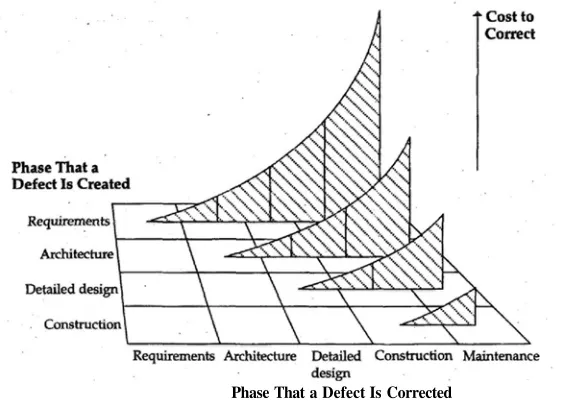
Researchers have found that an error inserted into the project stream early—for example, an error in requirements specification or architecture— tends to cost 50 to 200 times as much to correct late in the project as it does to correct close to the point where it was originally put into the stream. Fig-ure 3-5 illustrates this effect.
Phase That a Defect Is Corrected
One sentence in a requirements specification can easily turn into sev-eral design diagrams. Later in the project, those diagrams can turn into hundreds of lines of source code, dozens of test cases, many pages of end-user documentation, help screens, instructions for technical support person-nel, and so on.
If the project team has an opportunity to correct a mistake at require-ments time when the only work that has been done is the creation of a one-sentence requirements statement, it makes good sense for the team to correct that statement rather than to correct all the various manifestations of the inadequate requirements statement downstream. This idea is sometimes called "phase containment," and refers to the detection and correction of defects in the same phase in which the defects are introduced.
Successful project teams create their own
opportunities to correct upstream problems
by conducting thorough, careful reviews of
requirements and architecture.
Because no code is generated while the upstream activities are con-ducted, these activities might seem as though they are delaying "the real work" of the project. In reality, they are doing just the opposite. They are laying the groundwork for the project's success.
Erring on the side of too much process will marginally increase the project's overhead, but erring on the side of too little allows defects to slip through that must be corrected at 50 to 200 times the efficient cost of correct-ing them. For this reason, the smart money errs on the side of too much process rather than on the side of too little.
CONE OF UNCERTAINTY
3 Survival Concepts
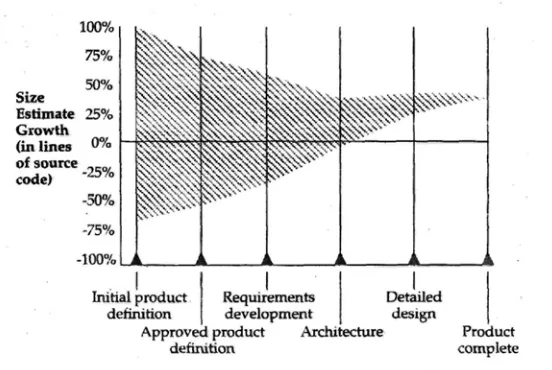
Early in the project, a project team addresses the large issues like whether to support Windows NT and the Macintosh or just Windows NT, and whether to provide fully customizable reports or fixed format reports. In the middle of the project, a project team addresses medium-size issues, such as how many subsystems to have, how in general to handle error-processing, and how to adapt a printing routine from an old project to the current project. Late in the project, a project team addresses small issues, such as which technical algorithm to use and whether to allow the user to cancel an operation when it's partway complete. As the cone of uncertainty in Figure 3-6 suggests, soft-ware development is a process of continuous refinement, which proceeds from large grain to small grain, from large decisions to small decisions. The time burned on a software project is the time required to think through and make these decisions. Decisions made at one stage of the project affect the next set of decisions.
FIGURE 3-6 Cone of uncertainty. Decision-making on a software project progresses from large grain to small grain. The project team can't know much about the decisions to
Before the project team has actually made the first set of decisions, it can only make the most general educated guess about the decisions that will be made later in the project. After the set of decisions at one level of granu-larity have been made, a team can make pretty accurate estimates of the kinds of decisions that will need to be made at the next level of granularity. The project team makes the best decisions it can at the large-grain level, but sometimes unforeseen (and unforeseeable) issues at the fine-grain level percolate back up to a larger context, and the need to cancel an operation when it's partway complete means that the project team has to redesign a routine, a module, or a subsystem.
If you want to understand what software development is all about, you need to understand that the project team has to think through and make all the decisions in one stage before it can know enough about the next stage even to estimate the work involved in it.
IMPLICATIONS FOR PROJECT ESTIMATION
The cone of uncertainty has strong implications for software project estima-tion. It implies that it is not only difficult to estimate a project accurately in the early stages, it is theoretically impossible. At the end of the requirements development phase, the scope of the project will be determined by myriad decisions yet to be made during architecture, detailed design, and construc-tion. The person who claims to be able to estimate the impact of those myriad decisions before they are actually made is either a prophet or not very well informed about the intrinsic nature of software development.
3 Survival Concepts
Early in the project you can have
firm cost and schedule targets
or a firm feature set, but not both.
Survival Check
Project leadership understands the critical role of well-defined processes and supports them.
The project's processes are generally oriented toward detecting as many problems upstream as possible.
Software projects are inherently complex, and complex projects
cannot succeed without careful planning. A well-planned
project will be actively controlled, its progress will be visible,
and its people will be given the support they need to do the
project's work. Software projects are also inherently risky, and
they cannot succeed without active risk management.
Involv-ing users in the project early and continuously, strivInvolv-ing to hold
maintain-Small projects can succeed through sheer force of will and a bit of luck. Medium and large projects require a more systematic approach. This chapter outlines some of the skills needed to ensure that a medium-size project succeeds.
PLANNING
Many technical workers would rather do technical work than spend time planning. Many technical managers do not have sufficient training in tech-nical management to feel confident that their planning will improve the project's outcome. Since neither party really wants to do the planning, it often doesn't get done.
But failure to plan is one of the most critical mistakes a project can make. Because of the upstream/downstream effect described in the last chapter, effective planning is needed to resolve problems upstream, at low cost, rather than downstream, at high cost. The average project spends about 80 percent of its time on unplanned rework—fixing mistakes that were made earlier in the project.
Success in software development depends on making a carefully planned series of small mistakes in order to avoid making unplanned large mistakes. Exploring four design alternatives and discarding three of them amounts to making three small mistakes. Not doing enough design work and rewriting the code three times amounts to making three large mistakes. Because fixing upstream defects downstream costs 50 to 200 times as much as fixing them upstream, carefully orchestrated projects jump at the chance to fix as many mistakes as possible at the bargain price of 1 /50 to 1 /200 their potential cost.
4 Survival Skills
EXAMPLES OF SOFTWARE PLANNING
How does a project team plan a project so that it can deliver software on a budget? Here are some of the specific features of a well-planned project:
A Software Development Plan. This plan maps a course for the project. Committing the plan to writing allows the project's stake-holders to refer to the plan throughout the project.
Project estimates. Project estimates provide a foundation for project plans. A careful estimate leads to scoping the project ap-propriately, which in turn leads to budgeting, staffing, and sched-uling the project appropriately. A shoddy estimate can undercut the project in all these respects, making it difficult to complete the project successfully and impossible to complete it efficiently. Revised estimates. Revised estimates created at the end of each major phase of the project allow for mid-course corrections and help to keep the project on solid footing.
A Quality Assurance Plan. A Quality Assurance Plan that includes both technical reviews and testing assures that the project will not succumb to a costly and defect-ridden test, debug, and correction cycle.
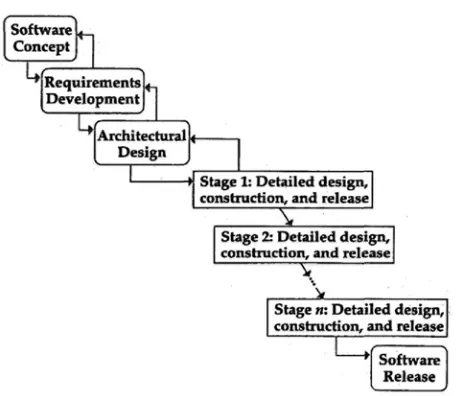
A Staged Delivery Plan. A Staged Delivery Plan defines the order in which the software will be constructed. It ensures that the soft-ware solution is developed to both maximize the value to the customer at each stage and minimize the risks to the project. In addition to the explicit planning activities I just listed, several of a software project's other major activities are also planning activities, though they aren't usually thought of that way.
Requirements development. Requirements development identifies in detail the problem that the project team is trying to solve. It amounts to planning to solve the right problem.
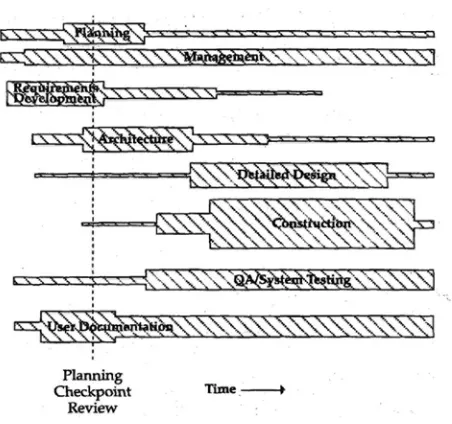
PLANNING CHECKPOINT REVIEW
Planning is so critical to the success of a project that some experts report that a project's ultimate success or failure is determined as early as 10 percent of the way through the project. Whether the exact number is 10 percent or some other number, very early in the project the project team should have pro-duced a user interface prototype, detailed requirements, and a detailed project plan including careful cost and schedule estimates. That information can be used to make a "go/no go" decision about the project.
TWO-PHASE FUNDING APPROACH
One problem with software project funding in some organizations is that project managers have to ask for funding for the entire project before they have had a chance to complete much exploratory work. Such funding requests inevitably miss the mark because too little is known about the desired software to support creation of meaningful cost and schedule estimates. The software industry's experience is that estimates created at this early stage of a project are often off by as much as a factor of 4 on either the high or low side.
A better approach is for the project manager to request funding in two major phases. The project manager first requests funding for the exploratory phase during which the first 10 to 20 percent of the project is completed. At the end of that phase, the project team holds a Planning Checkpoint Review. In conjunction with that review, senior management or the customer makes a go/no go decision, and then the project manager requests funding for the remainder of the project. At this point the project cost could still vary greatly from the estimate, but the exploratory work that has been done will bring that variation down from a factor of 4 either way to more like plus or minus 50 percent.
PREPARING FOR THE PLANNING CHECKPOINT REVIEW
Before the Planning Checkpoint Review can be held, the following materi-als, which are discussed in this book, need to be available:
Name of project's key decision maker Vision statement
4 Survival Skills
Preliminary effort and schedule estimates Top 10 Risks List
User Interface Style Guide Detailed User Interface Prototype User Manual/Requirements Specification Software Quality Assurance Plan Detailed Software Development Plan
If these materials are not available, holding the Planning Checkpoint Review is pointless because there won't be enough information at hand to determine the project's viability. If the project team continues to be unable to create these materials, which support the Planning Checkpoint Review, it is safe to assume that the project is not being run effectively and faces a great risk of failure.
The exact amount of time required to create these materials will vary depending on how much work is needed to identify the software's require-ments. In circumstances in which end users know exactly what software they want built, this period might take only 10 percent of the software's total development schedule. In more typical cases, creating these materials might take 10 to 20 percent of the total development schedule. On some projects, the hardest part of the job is helping the end users figure out what they want built, and so occasionally this part of the project can take 25 percent of the total development schedule or more. The initial funding request and plans for the Planning Checkpoint Review should take this variability in require-ments work into account.
AGENDA FOR THE PLANNING CHECKPOINT REVIEW
The Planning Checkpoint Review should focus on the following topics: Is the original product concept still viable?
Will it be possible to develop a product that matches the project's vision statement?
up-Have users and developers been able to agree on a detailed User Interface Prototype?
Is the User Manual/Requirements Specification complete and stable enough to support further development work?
Is the Software Development Plan complete and adequate to support further development work?
What is the estimated cost of completing the project? What is the estimated schedule for completing the project?
The work completed during the first 10 to 20 percent of the project should be sufficient to answer these questions, and the answers to these questions should give the client or top management enough information to decide whether to fund the second phase of the project.
MAJOR BENEFITS OF THE PLANNING CHECKPOINT REVIEW
Breaking software project funding into two major phases helps software organizations in at least three ways. First, it gives the organization an oppor-tunity to look at canceling a project as a positive decision. We tend to view any canceled project as a failure, but a project canceled when it is only 10 to 20 percent complete should be considered a resounding success. Canceling one project that ultimately goes nowhere after it is 10 to 20 percent complete instead of 80 to 90 percent complete can pay for the exploratory phases of a lot of other projects.
Second, deferring the bulk of the funding request until after the project is 10 to 20 percent complete provides for much more reliable funding re-quests for the bulk of the project.
4 Survival Skills
A special kind of planning is risk management. Anyone who has been through a medium or large software project knows first-hand that dozens of things can go wrong. The most successful projects take active steps to avoid succumbing to such problems. You might be an optimist, but with software projects, as the saying goes, you can hope for the best but you should prepare for the worst.
Several of the most serious software project risks are directly related to planning:
Failure to plan
Failure to follow the plan that has been created
Failure to revise the plan when project circumstances change Not practicing active risk management on a software project is tan-tamount to ignoring decades of experience in which the software industry has learned thousands of times that software development is a high-risk activity. Many risks can be prevented or minimized by performing active risk management. Many of those same risks can cripple a project if not actively addressed.
The practices contained in this book's survival strategy (and discussed throughout the rest of the book) have been chosen because they involve less risk than alternative practices, or because they promote detection and con-trol of other kinds of project risks. You don't really have a choice about whether to practice risk management on a software project. As Tom Gilb says, if you don't actively attack the risks on a software project, they will actively attack you.
PROJECT CONTROL
One theme of this book is that software projects can be controlled to meet their schedule, budget, and other targets. To some people, the idea of "con-trolling" a project sounds almost inhumane. They think it refers to control-ling the people on the project, and it conjures up images of an oppressive
The opposite of "controlling" a project is having a
project that is literally out of control.
For some reason people think that it is somehow possible to have a project that is under control without anyone or any group of people actually controlling it. Both my brain and my experience tell me that is impossible. Controlling a project refers to controlling the project itself, not to con-trolling the people. Here are some examples of what I mean by "control":
Choosing a software life cycle model, such as the staged delivery model used in this book, to provide a framework for the project's technical work.
Managing changes to requirements so that only necessary changes are accepted.
Setting design and coding standards so that the designs and source code produced are consistent with each other.
Creating a detailed plan for the project so each developer's work contributes to the goals of the project and doesn't conflict with other developers' work.
Control is not something that happens as a by-product of good tech-nical work. Control needs to be built into the project explicitly through ac-tive project management and continuous, ongoing control activities. Specific activities are discussed throughout the rest of the book.
PROJECT VISIBILITY
4 Survival Skills
Here are examples of activities that contribute to visibility: Using a vision statement or goals to set broad objectives for the project. If you don't know where you want the project to go, it probably won't go there.
Holding a Planning Checkpoint Review after the project is 10 percent complete to determine whether the project is viable and should be completed.
Regularly comparing actual performance against planned perfor-mance to determine whether the plan is working, corrective ac-tion needs to be taken, or the plan needs to be modified. Using binary milestones to determine whether tasks are done or not done. Milestones are considered either "100 percent done" or "100 percent not done," because allowing that little step from "100 percent done" to "90 percent done" has historically been found to reduce the quality of the status information from "very good" to "awful."
Driving the product to a releasable state periodically to help de-termine the product's true condition and control its quality level. Revising estimates at the end of each project phase to support improved plans based on more information and better under-stood planning assumptions.
Many project teams have found the hard way that good visibility is not something they get automatically. If you want good visibility, the project team has to plan it into the project from the start, and if you want a success-ful project, you have to have good visibility.
PEOPLEWARE
quality. Or it will ship without the spark of inspiration that differentiates a merely passable product from a great one. Or a substantial part of the de-velopment team will quit within a few weeks of releasing the product.
Tom DeMarco and Timothy Lister popularized the term "peopleware" to refer to software management practices that recognize the importance of the human role in software development. If you are not a software developer, some of the most important peopleware guidelines might surprise you. Align Developers' Interests with Work Assignments
As a general rule, the single greatest motivator for an individual software developer is the alignment of interests with assigned work. Developers who find their work interesting are highly motivated, and those who find their work boring are demotivated. After 15 years of research, Robert Zawacki re-ported that about 60 percent of a developer's productivity comes from the match up between the job and the person. For best productivity, developers must be assigned to jobs they find stimulating.
Some people are motivated by impossible goals.
Because developers pride themselves on being
realistic, they tend to be demotivated by goals
that are far out of reach.
Show Developers That You Sincerely Appreciate Them
Like everyone else, developers like to be appreciated. If the project sponsors show they sincerely appreciate the developers, the developers' commitment to the project will tick up a notch. If developers think the display of appre-ciation is phony or manipulative, their commitment will tick down. Don't try to motivate developers with cheerleading campaigns, impossible challenges, or monetary rewards.
Provide Thinking-Oriented Office Space
4 Survival Skills
him, "Albert, we need that theory of relatively nowl Hurry up!" Since soft-ware developers aren't as smart as Albert Einstein, they need an even more supportive work environment.
Avoid Open Work Bays
A claim that surfaces from time to time is that open work bays encourage communication on software projects. The problem is that open work bays encourage incidental, unstructured communication that hurts productivity. Beneficial, incidental communication can be encouraged more effectively by installing a soda machine in a place where developers can bump into each other when they're not trying to concentrate on problems that demand their complete concentration. The claim in favor of the communication benefit arising from open work bays has an intuitive appeal but doesn't bear close examination, and the software research data indicates clearly that develop-ers are most productive in one- or two-pdevelop-erson offices.
For example, studies have found that productivity levels of develop-ers who work in private, quiet, one- or two-pdevelop-erson offices can be as much as 2.5 times as great as the productivity levels of developers who work in open work bays or cubicles. Software development is a deeply intellectual activity. It's hard to be intellectually effective with phones ringing, announce-ments blaring over the public address system, and people walking up to your cubicle every few minutes to ask questions on various topics.
The job of the average manager requires a shift in
focus every few minutes. The job of the average
software developer requires that the developer not
shift focus more often than every few hours.
improve their environments, incrementally by letting developers work oc-casionally in private conference rooms, wear head phones to cut down on distractions, or work at home. Organizations that cannot find a way to pro-vide developers with a quiet, private environment free from interruptions will have no choice but to adjust their productivity expectations sharply downward.
USER INVOLVEMENT
User involvement is critical to a software project in several respects. First, building software successfully hinges on building a product that end users will use and like. Software developers are notorious for crafting technically elegant solutions to problems that users don't care about. Marketers are notorious for overloading a software product with so many features that users can't find the few features they really need.
Second, there really is little magic involved in developing software products that users love. The project team simply needs to ask the users what they want, show them what they intend to build, and ask them how they like it— then listen carefully until they fully understand both the stated and unstated elements of the users' responses.
The project team may have to work at fully understanding what the user is asking for. Likewise, users might have to work at understanding how the project will come together—users must understand that the mock-ups developers show them to solicit their input are nowhere close to being the real software. Even identifying who "the user" is can be difficult. All these issues are discussed more in Chapter 8.
4 Survival Skills
Because of this dynamic of late-discovery-of-user-needs followed by compromise-between-user-desires-and-schedule-and-budget, projects that involve users early on tend to deliver products that are thought by users to have higher quality than projects that do not involve users early on. Exter-nally, the software better fits user needs and expectations, which is one kind of quality. Internally, the software contains fewer defects because there have been fewer changes in direction, and the product architecture, design, and implementation have been more stable. If the perceived user needs change throughout the project, internal software quality will degrade rapidly as developers are forced to cobble unforeseen functionality onto an existing framework that is ill-suited to support it.
In addition to early involvement, users need to be involved on an on-going basis. Only rarely do software projects hit upon a really good solution on the first attempt. Typically, a software project must generate several ver-sions of a user interface prototype before the users sit up and say, "Yes, that is the software I want." A good, mature user interface prototype can move a project most of the way toward delivering what end users want, but usabil-ity aspects of the software are inevitably refined as the software itself is developed. Building user-oriented checkpoints into the project helps the team make a set of small, inexpensive, mid-course corrections rather than one large, expensive correction at the end of the project. (This book's use of staged deliveries provides for such a series of mid-course corrections.)
User involvement doesn't have to break the bank. In Usability Engineer-ing, Jakob Nielsen points out that the benefit-to-cost ratio is highest when about 3 usability testers are used. (The benefit-to-cost ratio remains positive up to about 15 testers.)
In 1994, the Standish Group conducted a review of more than 8000 software projects. Their review concluded that end-user involvement was the most significant project success factor. Among failed projects, lack of user input was the most significant failure factor. Experts in rapid development of computer software have stated that ready access to end users is one of the most critical success factors in rapid development projects.
PRODUCT MINIMALISM
In terms of the complexity of software components and their functionality, successful development of a software project requires a "less is more" ori-entation from requirements time through release. Because software develop-ment work is so develop-mentally taxing, it becomes critical that people working on the project take active steps to make the project as simple as possible rather than needlessly complicated. Feature specifications, designs, and implemen-tation should all emphasize simplicity. Many developers are attracted to complexity, so their tendency is sometimes to make the problem more com-plicated rather than less comcom-plicated. But success depends on finding ways to simplify the project.
Developers who look for the most straightforward ways to accomplish the project's objectives eliminate huge amounts of complexity and therefore huge numbers of errors. Most features can be implemented using a 2-hour, day, week, or month approach. Developers should start with the 2-hour approach, which will tend to be the simplest, most straightforward, and least error-prone version. If that version has been implemented and still isn't sufficient, developers can implement the next simplest version—the 2-day version—to see whether that's sufficient to meet software requirements. These numbers shouldn't be taken literally; sometimes, the simplest version of a complex feature will take days or weeks. In any case, developers should make a practice of proceeding from simple to complex, not the opposite.
The French writer Voltaire commented that an essay was finished not when there was nothing more to add, but when there was nothing more to take away. The default movement on a software project should be in the direction of taking elements of the software away to make it simpler rather than adding elements to make it more complex.