Vol 38 - (1/2015)
“People often represent the weakest link in the security chain and are chronically responsible for the failure of security systems. ”
Bruce Schneier, Secrets and Lies
Panduan Ibu Bapa: Keselamatan Rangkaian Sosial untuk anak-anak
Intrusion Attempt: Who’s knocking your door
ii
Level 5, Sapura@Mines No. 7 Jalan Tasik The Mines Resort City 43300 Seri Kembangan Selangor Darul Ehsan Malaysia.
T: +603 8992 6888 F: +603 8992 6841 E: [email protected] Customer Service Hotline:
1 300 88 2999 www.cybersecurity.my
Cyber999 Help Centre | My CyberSecurity Clinic |
Professional Development (Training & Certification) |
Product Evaluation & Certification (MyCC) |
Information Security Management System Audit and Certification (CSM27001) | Malaysia Trustmark | Security Assurance | Digital Forensic & Data Recovery | Malaysia Computer Emergency Response Team (MyCERT) | Security Management & Best Practices | Cyber Security Research |
CyberSAFE (Cyber Security Awareness for Everyone)
WELCOME MESSAGE FROM THE CEO OF CYBERSECURITY MALAYSIA
Today we are looking at the 38th edition of eSecurity Bulletin, which is rich with information and knowledge packed within the 34 bi-lingual articles written by our employees. The articles are a good mix of virtual and physical security issues, presented from the legal, technical, organisational and social perspectives. Through the articles, readers would gain valuable knowledge and insights that only our employees with so many years of working experience in this niche and unique ield could come up with.
“It has been famously argued that information is power and,
therefore, should never be shared. The Sept. 11 attacks
showed the fatal laws in that logic. Our nation is becoming
safer every day because we are aware that information
increases in power only when it is shared.”
(Dennis C. Blair, the former United States Director of National Intelligence).
If you agree with Blair that information is power and that power increases when shared, kindly share this e-Security Bulletin freely. With the increase in the power of information, we hope to also increase the number of people beneiting from the e-Security Bulletin. Insya-Allah.
Thank you,
Dr. Amirudin Abdul Wahab
PUBLISHED AND DESIGNED BY READERS’ ENQUIRY
CyberSecurity Malaysia,
Outreach and Corporate Communications, Level 5, Sapura@Mines, No.7 Jalan Tasik, The Mines Resort City, 43300 Seri Kembangan
EDITORIAL BOARD
Chief Editor Dr. Zahri bin Yunos
Editor
Lt. Col Mustaffa bin Ahmad ( Retired )
Internal Reviewers
1. Dr. Solahuddin bin Shamsuddin 2. Lt. Col Sazali bin Sukardi (Retired) 3. Pn. Sabariah binti Ahmad
4. Pn. Zaleha binti Abd Rahim 5. En. Rosly bin Yahil
6. En. Ruhama bin Mohammed Zain 7. Pn. Ramona Susanty Ab Hamid 8. Pn. Azira Abd Rahim
1. Steganography Series: Colour Palettes ...1
2. Online Fraud: A review of Current Trends and Mitigation Methods to Reduce the Threat Necessary? ...5
3. Intrusion Attempts – Who's Knocking Your Door ...10
4. The Selfie Phenomenon ...15
5. 6 Simple Tips to Stay Safe on Instagram ...17
6. Essential Ingredients for Successful Information Security Management System (ISMS) Implementation – Not a ‘One Solution Fits All’. ...20
7. Mobile Devices vs Malware ...23
8. Basic Mathematics in Cryptography ...25
9. Famous Cryptologists Around The World ...28
10. Designing a Secured Office Premise from a Physical Security Perspective ...31
11. ISO/IEC 27001: Have you Chosen the Correct Measurements? ...34
12. The Importance of Job Analysis in Certification Examination ...36
13. Generation Y (Gen Y) Online Behavior ...39
14. What Organizations Need to Know About Distributed Denial-of-Service (DDOS) Attacks ...41
15. Security of Software Products and their Procurement Process ...43
16. Security Vetting ...46
17. Open Source Intelligence: Extracting Meaningful Insight from Publicly Available Sources ....48
18. The Knowledge and Skills Supporting the Role and Responsibilities of an Information Security Analyst ...51
19. Social Engineering in Malaysia ...54
20. The Rapid Spread of Misinformation Online ...58
21. Product Tampering: Business Continuity and Regaining Trust ...61
22. PDPA 2010: Know Your Rights ...67
23. ADAB of a Digital Citizen: PART 1 ...68
24. Consumer Protection in the e-transaction ...70
25. How to Deal With Tracking Cookies ...72
26. What is Practical About Technical Writing? ...75
27. Panduan Ibubapa : Keselamatan Rangkaian Sosial untuk Anak-Anak ...75
28. Keganasan Siber di Malaysia : Analisis Liberalisme Institusionalisme ...78
1
Steganography Series: Colour Palettes
By | Abdul Alif Bin Zakaria, Nor Azeala Mohd Yusof, Liyana Chew Binti Nizam Chew
Introduction
Steganography comes from the Greek word “Steganos,” which means covered or secret and “graphy” that means writing or drawing [1]. Therefore, steganography literally means covered writing. In other words, steganography is the hiding of secret messages within ordinary messages and their extraction at the destination. Basic steganography models contain three elements, namely the cover object, message and stego key. The object is also known as a carrier, in which a message is embedded and serves to hide the existence of the message. The object can be in the form of an image, text, audio or video. A message is the data whose secrecy a sender wishes to maintain. It can be in the same form as a cover object. A stego key functions as a password that ensures only a receiver who knows the key will be able to read the message from the cover object. A cover object with a secretly embedded message is thus called a stego object. Colour is one of the basic building blocks of image creation, which is the most common cover object used to hide messages. Therefore, this article addresses the colour palette, which is an important steganography element used to hide information in images.
Hiding Information in Images
The decrease in the price of image manipulation devices has led to an increasing number of high quality images presented in digital form. Current workstation monitor technology has an average resolution of 100 dpi (dots per inch), fax quality ranging from 200 to 400 dpi, low-cost laser and inkjet printers producing between 300 and 720 dpi or even 1200 dpi as well as scanners [2].
Audio, video and images are stored in computers as files. These files may be in different formats. However, a general image is an array of numbers that represent the intensity level of each pixel comprising the image. A colour image is represented by arrays for each of the three primary colours, which are red, green and blue. By superimposing the three arrays, each pixel, being a sum of those three colours, will produce a coloured image.
Digital images are typically stored in either 24-bit (true colour) or 8-24-bit files (colour palette).
24-bit pictures have better resolution; thus, the file size would be larger and there would be more space available to hide information. 3 bytes are used to represent each pixel (1 byte for each colour) in 24-bit images. These 3 bytes can be represented as hexadecimal, decimal or binary values. An FFFFFF sequence represents a combination of 100% green, 100% red and 100% blue that will produce white. This combining method is applied to each pixel in order to create an image. Information can be hidden by embedding secret messages into image pixels depending on the method implemented by users.
Colour Palettes
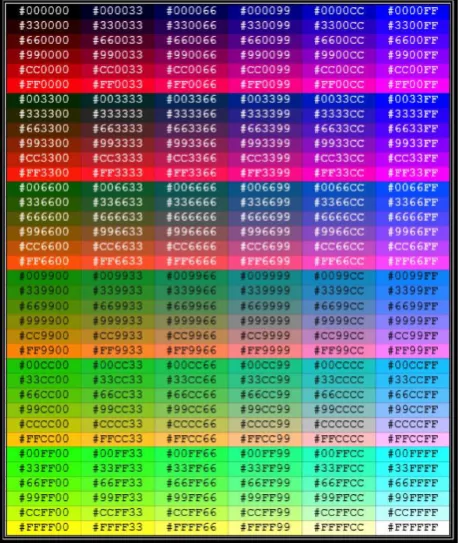
In computer graphics, a palette is either a given finite set of colours for the management of digital images (a colour palette), or a small on-screen graphical element for choosing from a limited set of choices. Table 1 and Table 2 are examples of a Standard Line Colour Palette and Named Colour Palette [3] for reference. Further explanations of colour palettes are given herein.
1. The total number of colours that a given system is able to generate or manage (though, due to video memory limitations, it may not be able to display them all simultaneously):
• Full palette: For example, high-colour displays are said to have a 16-bit RGB palette.
2. The limited selection of colours that can be displayed simultaneously:
a) On the whole screen:
2
• Selected colours: In this case, the colour selection, generally from a wider, explicitly available full palette, is always chosen by software, user or program. For example, the standard VGA display adapter is known to provide a palette of 256 simultaneous colours from a total of 262,144 (218) different colours.
• Default palette or system palette: The given selected colours have been officially standardized by a body or corporation, for example the well-known Web-safe colours (216 colours) for use with Internet browsers, or the Microsoft Windows default palette.
b) On an individual image:
• Colour map or colour table: A limited colour selection is stored inside a given indexed colour image file, e.g. GIF. • Image palette or image colours: A limited
colour selection is assumed to be the full list of colours the given digital image has, even when the image file does not employ indexed colour pixel encoding.
3. The underlying hardware that may be used to hold simultaneous colours:
a) Hardware palette or Colour Look-Up Table (CLUT): In order to display colours, the selected colours’ values must be loaded in the colour hardware registers of the display subsystem. For example, the hardware registers of the Commodore Amiga are known both as the colour palette and the CLUT, depending on the sources.
Table 1: Standard Line Colour Palette
Table 2: Named Colour Palette
RGB Colour Space
The red, green and blue (RGB) colour space is widely used throughout computer graphics. Red, green and blue are the three primary additive colours (individual components are added together to form a desired colour) and are represented by a three-dimensional, Cartesian coordinate system as shown in Figure 1 [4]. The indicated diagonal of the cube with equal amounts of each primary component represents various grey levels. Table 3 contains the RGB values for 100% saturated colour bars -- a common video test signal.
Figure 1: RGB Colour Cube
3
and design. A system that is designed using the RGB colour space can benefit from a large number of existing software routines, since this colour space has been around for a number of years.
However, RGB is not very efficient when dealing with "real-world" images. Each of the three RGB components needs to be of equal bandwidth to generate any colour within the RGB colour cube. The result of this is a frame buffer with the same pixel depth and display resolution for each RGB component. Processing an image in the RGB colour space is usually not the most efficient method. To modify the intensity or colour of a given pixel, the three RGB values must be read from the frame buffer, the intensity or colour calculated, the desired modifications performed, and the new RGB values calculated and written back to the frame buffer. A system that has access to an image stored directly in the intensity and colour format would make some processing steps faster.
Indexed Colour
Indexed colour is a technique to manage image colours in a limited manner, in order to save RAM and video memory buffer space, file storage space, telecom bandwidth and to speed up display refresh and telecom transfers. Instead of storing and managing every primary colour component of every pixel, the most representative colours, or the fixed hardware colours, are grouped into a limited size palette. This palette is an array of colour elements, in which each element (a colour) is indexed by its position. Pixels do not contain full colour components but only their index in the palette, which is sometimes referred to as pseudo-colour (Figure 2) [5].
Figure 2: Colour Map
This technique saves a lot of storage space and transmission time. A true colour of the RGB colour palette has 16,777,216 (224) different possible colours and each pixel needs 24 bits, or 3 bytes. A typical 640×480 VGA resolution true-colour uncompressed image needs 640×480×3 = 921,600 bytes (900 KiB). By limiting the image colours to 256, every pixel needs only 8 bits or 1 byte, so the example image now needs only 640×480×1 = 307,200 bytes (300 KiB) plus 256×3 = 768 additional bytes to store the palette map (assuming 24-bit RGB), approximately one-third of the original size. Smaller palettes such as 4-bit (16 colours) and 2-bit (4 colours) can pack the pixels even more (to 1/6 or 1/12), obviously at the cost of colour accuracy. For little images such as icons or very simple graphics, to reproduce real-life images this loss of colour availability becomes more of a problem. Some clever tricks like combining colour quantization, anti-aliasing and dithering can approximate indexed 256-color images to the original images.
Indexed colour has been widely used in early personal computers and display adapters' hardware to reduce cost. Notable computer graphics systems that extensively use pseudo-colour palettes include EGA and VGA (for IBM PC compatibles), the Atari ST and Amiga's OCS and AGA.
Similarly, image file formats used to encapsulate images are for instance PCX and GIF along with a header. Raw image data stored in palette colour maps also emerged in the 1980s. Current image file formats, such as BMP, TIFF and PNG allow indexed colour modes, generally up to 16 or 256 (four or eight bits per pixel). These file formats commonly support some compression scheme, enhancing their ability to store the indexed colour images in smaller file sizes. Table 4 shows the general structure of an index-colour image. Basic image properties (such as image type, image size, palette offset) are stored in ‘Image Header’. The colours that comprise the image are in ‘Palette’. Table 5 [6] shows a common palette entry structure of a grey-level image. Each palette entry consists of an index and a colour. The number of palette items is related to the NOC of an image, for instance a 256 colour (8-bit) BMP image holds 256 palette entries. The ‘Image Data’ part holds all image indices.
Normal Range White Yellow Cyan Green Magenta Red Blue Black
R 0 to 255 255 255 0 0 255 255 0 0
G 0 to 255 255 255 255 255 0 0 0 0
B 0 to 255 255 0 255 0 255 0 255 0
4
Image Header Palette Image Data (Index)
Table 4: Structure of an Index-colour Image
Index Colour
Table 5: Palette Entry
Colour Look-up Table (CLUT)
CLUT is a hardware resource of the display subsystem that serves different purposes. One of the purposes is to hold the colour values for a given palette in some indexed colour graphic mode (let’s say 320×200 with 256 colours, often used for computer videogames). Today, CLUTs are used mainly to perform gamma and colour temperature calibrations by hardware. Although the term ‘colour look-up table’ was coined in the display hardware design field (as machines always came first), it has been imported to the software jargon as a near synonym of palette too; but in these cases, it can mean not only the colour map of an indexed colour image but also any intermediary look-up table that maps one colour onto another, regardless of the indexed or true colour used. In order to avoid confusion, the term CLUT is preferred for the colour hardware registers and palettes for software colour maps when both are employed in the same study.
Grayscale images
Grayscale images do not usually need palettes. The pixel values can be stored directly in the grey level in a given range (0 to 15, 0 to 255), so image files that deal with greyscale images usually do not store a palette colour map for this purpose. But when displayed with colour devices, it is often necessary to synthesize a greyscale colour map to manage the image properly (either by loading the colour hardware registers/CLUT or by converting the image to RGB in RGB video memory). Some image file formats, such as BMP, implement greyscale by storing a greyscale palette made with full RGB values.
Colour Depth
Colour depth denotes how many bits are employed to store colour information in the image pixels: the more colours managed, the more bits that are employed. The pixel's bit patterns can be interpreted as whole integer numbers (which is the case for colour image indices) or by assigning some bits for colour-related management, such as relative intensities for every primary red-green-blue in RGB true colour images. Indexed colour palette sizes often have up to 2 raised to some power entries, which easily match pixel depth bit patterns: 22 = 4, 24 = 16 or 28 = 256 as the most common choices. High colour uses RGB full palettes with either 15-bit or 16-bit depth, while true colour uses RGB full palettes of 24-bit depth or greater.
Conclusion
Colour palettes are vital components in the formation of image files. It is important for users to understand the structure of colour palettes if they were to build steganography applications to hide information in image files. Good colour palette management will reduce cost and increase the efficiency of steganography implementation in computer systems. In the next steganography series, another steganography component will be presented to help readers gain a better understanding of steganography overall.
References
[1] Zakaria A.A. 2010. Steganography: Secure Information Hiding. E-Security. 24: 26-28. http:// www.cybersecurity.my/data/content_files/12/781. pdf
[2] Popa R. 1998. An Analysis of Steganographic Techniques. The “Politehnica” University of Timisoara. http://citeseerx.ist.psu.edu/viewdoc/download?doi= 10.1.1.88.9413&rep=rep1&type=pdf
[3] Brettschneider G.D. Color Palettes. http:// www.gerolf.org/doc/color/color.pdf
[4] Color Spaces. http://www.compression.ru/ download/articles/color_space/ch03.pdf
[5] Color. OpenGL Programming Guide. http:// www.glprogramming.com/red/chapter04.html
5
Online Fraud: A review on Current Trend
and Mitigation to Reduce the Threat
By | Kilausuria binti Abdullah, Faiszatulnasro Mohd Maksom, Md Sahrom Abu
Introduction
In today’s world, it is common to use Internet technology in handling business services and payment transactions. The swift rate of information technology usage has improved the accessibility of information and more people are involved in online transactions, regardless of age, gender and status. Almost everyone has accepted the rapidness of online commercial business, particularly in Malaysia. However, in dealing with commercial business various parties are also involved, such as clients, suppliers, banks, third-party payments, etc. In the real scenarios of today, fraudsters could be either of the parties involved, including the business owner. Fraudsters normally create fake identities for business process arrangements.
Fraud Definition
Fraud is defined as an act that is deceptive, or of trickery, or an act perpetrated to gain unfair profit from a victim. This includes any transaction activities that are planned not to be paid such as misappropriation of assets [1]. Perpetrators take money by cheating clients, suppliers, or partners through demanding certain amounts of money. As a result, victims will proceed to pay, even though the goods or services have not yet been delivered. Fraudsters may commit such fraud by involving intelligence gathering and identity theft. Further, stolen identities are used to commit fraud like buying goods and services, applying for credit cards and loans, or taking over someone’s valid accounts [2]. On the other hand, general online fraud offences may include phishing, unauthorized transactions, illegal investments, impersonation and spoofing activities [3].
Fraud Triangle
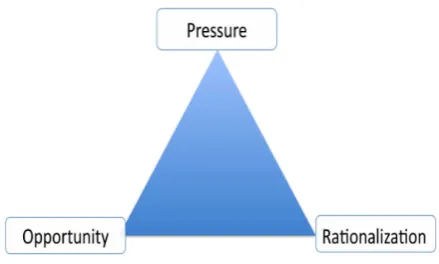
Based on the fraud triangle, three factors contribute to people committing fraud: pressure, opportunities and rationalization [4].
Figure 1: The Fraud Triangle
These three elements exist in an organization and inluence each individual differently. The fraud triangle provides a valuable framework to analyze individual fraudulent behavior and has been adopted in auditing standards.
Fraud Categories
Internet fraud mirror fraud perpetrated over the phone or through mail. This fraud scheme uses one or more Internet components such as chat rooms, e-mail, message boards and websites to present fraudulent solicitation to prospective victims, to conduct fraudulent transactions, or to transmit the proceeds of fraud to financial institutions or others connected with the scheme. All of these tools are relatively cheap and available at fraudsters’ fingertips.
Numerous fraud activities are carried out by fraudsters. This section reviews the most common types of fraud on the Internet nowadays. These types of fraud occur in daily business for the regular Internet and e-mail user.
1.
Job scam
6
2.
Online scam
The scammer uses online services to present fraudulent solicitation to prospective victims, conduct fraudulent transactions, or transmit the proceeds of fraud to financial institutions or others connected with the scheme. Online scams can occur in chat rooms, via e-mail, message boards or websites.
3.
419 scam
The Nigerian, or 419 scam is one of the most common types of fraudulent e-mails currently hitting inboxes. Nigerian scam messages can also arrive via fax or letters. The messages generally claim that your help is needed to access a large sum of money, usually many millions of dollars. In fact, this money does not exist. The messages are an opening gambit designed to draw potential victims deeper into the scam. Those who initiate a dialogue with the scammers by replying to a Nigerian scam message will eventually be asked for advance fees supposedly required to allow the deal to procede.
4. Phishing
The perpetrators attempt to steal confidential personal data such as usernames, passwords and credit card details by using Phishing techniques. Perpetrators usually use spoofed e-mail messages in combination with fake websites to deceive people. Phishing perpetrators can hijack trusted and well-known brand names of banks, credit card companies, online retailers and so on [3].
5.
Fraud Purchase
Fraud purchase occurs when a perpetrator approaches a merchant and proposes a business transaction. The perpetrator will perhaps use a stolen or fake credit card for the payment. As a result, merchants do not get paid for the sale. Merchants who accept credit cards may receive a chargeback for the transaction and lose money as a result.
Fraud Statistics
Figure 2: MyCERT Fraud Incidence Statistics (1997-2013)
Figure 2 shows the total fraud incidents recorded by MyCERT from 1997 to 2013. In general, the total incidents are increasing almost every year.
Figure 3: MyCERT statistics of the most reported fraud cases
Figure 3 shows five of the most common fraud incidents reported to MyCERT. Fraud Phishing was the most frequently reported for three consecutive years and the online scam was the second most common. The steady numbers indicate the overall view that perpetrators are still easily carrying out unlawful activities, most of which are disseminated through e-mail because it is easy and costless.
7
Current Trends
There are various methods of online fraud employed by perpetrators to commit such computer crime. Perpetrators would use one or a combination of methods in order to proceed with fraud agendas.
1. Manipulating third-party payment
transactions
Based on a case study, one of the methods used by perpetrators is manipulating third-party payment transactions. This method is mostly used in the online scam and fraud purchase category. The perpetrator could manipulate third-party payment transactions in different ways. Some of the techniques are:
a. Email the victim with a third-party payment selected by the perpetrator.
The content of the email will provide information about the payment and an attached receipt as proof that payment has been made. Perpetrators will use similar email addresses or the same email address, which contains the particular third-party payment name to assure the victim.
b. Email the victim a receipt as proof of payment made
Perpetrators notify victims that payment has been made via the respective bank/wire transfer using a fake receipt.
2. Impersonation of victim identity
Perpetrators can gather much information about the victim and possibly involve either internal or external employees. Identity theft is the act of using others’ personal information [5]. This method is mostly used in fraud purchases and job scams. The perpetrator will impersonate the victim and use their identity to communicate with the victim’s client. The client will receive an email from the perpetrator who is now claiming to be the legit individual. The client victim will proceed to do business with the perpetrator without knowing the truth. For job scams specifically, the perpetrator will impersonate the one responsible for recruiting new staff in order to gain the victim’s trust to apply for that job.3. Email spoofing to instruct or direct
payment to the perpetrator’s account
Some perpetrators will spoof victims’ emails in order to communicate with the victims’ clients.Other than spoofing, the perpetrator will create a similar email account that is supposedly used by the victim in order to communicate with the victims’ clients. After communication is established, the victim’s client needs to proceed with the payment. Usually, the perpetrator will send another email consisting of a new bank account, claiming that the previous account is under maintenance or giving any other logical pretext.
4. Fake business identity
One of the methods applied by perpetrators to hide or conceal themselves from being easily traced is to use fake business identities. The information about the company itself is fake, including the company’s website, address and contact person. Some perpetrators will create fake websites to make the victim’s clients believe the company exists and is real.
5. Falsification of business documents
Information is an important resource for governments and industries [6]. Alteration or destruction of confidential data is a common objective for perpetrators when committing online fraud. Perpetrators falsify relevant documents in order to gain the trust of victim clients, by using fake invoices, receipts, company information, etc. However, perpetrators will use real information regarding the contact person in the document.
6. Geolocation
The majority of fraud incidents involve different geolocation strategies, for example if a victim is in Malaysia the perpetrator’s information is outside Malaysia. If the victim is outside of Malaysia, the perpetrator will use a payment method that is available in Malaysia. Furthermore, there are incidents involving geolocations between East and West Malaysia. One of the ways to prevent online fraud is to use a geolocation tool [7]. Geolocation tools allow the identification of connections from IP addresses that are different from the ones habitually used by clients, IP addresses that occur at unusual times and anonymized IP addresses.
Mitigation
8
are suggested to prevent fraudulent activities based on fraud incidence case studies:
A. Control weaknesses
The approach of controlling weakness requires looking into potential for fraud by examining the key controls, which can be taken advantage of as control weaknesses, and analyzing how fraudsters manipulate a control that may not work properly [8]. Besides, organizations should implement and enforce policies and standard operating procedures to avoid any information breaches of organizational assets, personal privacy of employees and misconduct of employees based on the organization’s code of ethics. An organization must adhere to its specific checks or audits of the entire assets in order to achieve its business goals. [9]. Individuals must understand and have security awareness and concern regarding information security, including personal data protection.
B. Information security policies
Information security policies should be implemented and monitored in each organization to prevent and reduce information security breaches and identity theft. In conjunction with enforcing information security policies, the confidentiality, integrity and availability of information can also be preserved.
C. Classification of information
All information assets within the organization along with personnel information should be classified prior to publishing or storing. Besides policies, the classification of information would prevent misuse of information and access by unauthorized parties or individuals.
D. Protecting electronic data and
infrastructure
ICT information, including digital data should be protected against intrusion by hackers. Technology tools, such as biometrics and encryption can be used to protect digital data. Business owners need to ensure that infrastructure is protected against security breaches [10].
E. Risk Assessment Analysis
An organization and individuals must perform risk assessment analysis to understand business threats and how to prevent threats in order to achieve the business goals or objectives.
F. Best practices
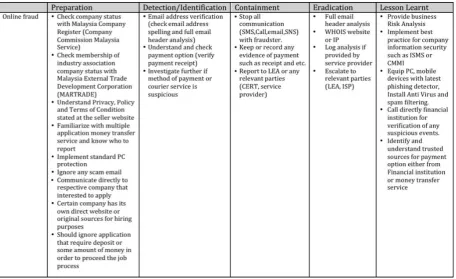
There are a number of best practices or guidelines that users ought to know and implement regarding online fraud incidence. The details of best practices and handling of each incident are described in Table 2.
9
Summary
Fraud incidence is becoming increasingly sophisticated along with new technology and multiple methods deployed every day. Aside from using new technology, the easiest way to commit fraud is by attacking humans via social engineering techniques. Fraudsters will manipulate human trust for profit from fraudulent activities. Besides the current trends employed by perpetrators, profound research should be done on particularly targeted victims, such as buyers, sellers, suppliers, third-party payment services and business market players in order to prevent more victims from being subject to fraud. Other than implementing fraud detection and prevention systems, it is extremely important to educate users about fraud activities. Users should understand and increase their knowledge to protect themselves from being victimized. By using online technology to do online activities such as chatting on social sites, shopping, uploading and downloading photos, etc. end users must familiarize themselves and manage each application’s setting to secure their activities. Apart from end users, buyers or suppliers of e-commerce products should follow best practices, such as implementing and enforcing information security policies in their companies to prevent information leakage, improper information handling and so on.
References
1. Ghosh, M. (2010). Telecoms fraud. Computer Fraud & Security, 2010(7), 14–17. doi:10.1016/S1361-3723(10)70082-8
2. http://www.actionfraud.police.uk/fraud_ protection/identity_fraud
3. http://www.mycert.org.my/en/services/ report_incidents/cyber999/main/detail/799/ index.html
4. Dellaportas, S. (2013), Conversations with inmate accountants: Motivation, opportunity and the fraud triangle. Accounting Forum 37 (2013) 29-39
5. Tryfonas, B. T., Ph, D., Thomas, P., & Owen, P. (2006). ID Theft : Fraudster Techniques for Personal Data Collection, the Related Digital Evidence and Figures and Examples.
6. Thomas C. Richards, A historical prospective of computer related fraud, ACM SIGSAC Review, v.4 n.3, p.15-25, Summer 1986 [doi>10.1145/1058414.1058418]
7. Forte, D. V. (2008). Using geolocation to prevent online fraud. Computer Fraud & Security, 2008(11), 19–20. doi:10.1016/S1361-3723(08)70165-9
8. Coderre, D. G. (2009). Computer-aided fraud prevention and detection: A step-by-step guide. Hoboken, N.J: John Wiley & Sons
9. Whitman M.E. , Mattord H.J., Principles of Incident Response and Disaster Recovery, Course Technology Press, Boston, MA, 2007
10
Intrusion Attempt – Who's Knocking Your
Door
By | Kilausuria binti Abdullah
Introduction:
An intrusion attempt is a potential for a deliberate unauthorized attempt to enter either a computer, system or network to access information and manipulate information or render a system unreliable or unusable. Even though security parameters are built around a home that is equipped with the current or latest security tools, one must also monitor the possibility of someone trying to knock the door down. Despite this, a successful attempt may have hazardous impact not only on a system but also the organization’s reputation.
Types of Intrusion Attempts:
In general, intrusion attempts refer to any activity of someone trying to, or successfully breaching an individual’s, entity’s or nation’s computers. In this report, intrusion attempts are categorized into three forms as follows:
1) Port scanning
the act of systematically scanning a computer's communication ports. Since a port is a place where information goes into and out of a computer, port scanning identifies open doors to a computer. Port scanning has legitimate uses in managing networks but can also be malicious in nature if someone is looking for a weakened access point to break into a computer.
2) Login brute force
the systematic, exhaustive testing of all possible methods that can be used to break a security system. For example, in cryptanalysis, this entails trying all possible keys in the key space to decrypt a ciphered text, or trying to automate an SSH login (username and password attack).
3) Vulnerability probes
the automated process of proactively identifying possible vulnerabilities of the computing systems in a network in order to determine if and where a system can be exploited and/or threatened.
Intrusion attempts are basically received by victims, servers, networks, systems and computers. Such incidents are usually captured in the logfile of the victim’s infected machine. For example, the host has performed a complete network scan and is trying to connect to SSH (Secure Shell, TCP port 22) through a user account login service. The incident handler will verify the intrusion attempt log. Once the intrusion attempt log is validated, the incident handler will inform the IP domain/ owner and ISP provider of that particular IP address. The IP domain/owner and ISP provider will subsequently need to verify the intrusion attempt logfiles for further investigation and action.
11
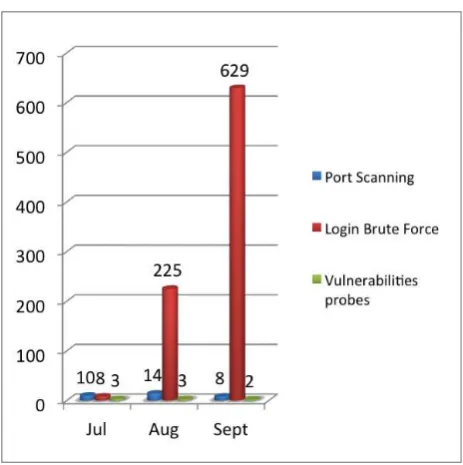
In the 3rd quarter of 2014, a total of 902 incidents were reported to CyberSecurity Malaysia under the Intrusion Attempt category as shown in Table 1 and Graph 1.
Graph 1: Intrusion Attempts in Q3 (Jul-Sept) 2014
Comparison of Intrusion
Attempt Analysis
In Quarter 3 2014, a total of 902 incidents were received in the Intrusion Attempt Report as shown in Table 2 and Graph 2.
Intrusion Attempt Report Q3 (Jul-Sept) 2014
Jul Aug Sept TOTAL
Port Scanning 10 14 8 32
Login brute force
8 225 629 862
Vulnerability probes
3 3 2 8
TOTAL 21 242 639 902
Table 2: Intrusion Attempts in Q3 (Jul-Sept) 2014
Note: The statistics relect the number of incident tickets.
Graph 2: Intrusion Attempts in Q3 (Jul- Sept) 2014
Most intrusion attempt incidents in Q3 2014 were login brute force, as shown in Table 3 and Graph 3.
Type of Intrusion Attempt Total
Port Scanning 32
Login brute force 862
Vulnerability probes 8
Table 3: Total Intrusion Attempt Incidents by Category
Graph 3: Percentage of Intrusion Attempt Incidents by Category
From the above graph it can be seen that the majority of intrusion attempt incidents involved are login brute force, representing 96% compared to other intrusion attempt categories. The remaining intrusion attempt categories are port scanning (3%) and vulnerability probes (1%).
12
Intrusion Attempt Report Q3 (Jul-Sept) 2013
Intrusion Attempt Categories
July Aug Sept TOTAL
Port Scanning 0 2 7 9
Login brute force
1 0 1 2
Vulnerability probes
0 1 3 4
TOTAL 1 3 11 15
Table 4: Intrusion Attempts for Q3 (July-Sept) 2013
Note: The statistics relect the number of incident tickets.
Graph 4: Intrusion Attempts for Q3 (July-Sept) 2013
Most of the intrusion attempt incidents for Quarter 3 2013 involved port scanning, as shown in Table 5 and Graph 5.
Type of Intrusion Attempt Total
Port Scanning 9
Login brute force 2
Vulnerability probes 4
Table 5: Total Incidents of Intrusion Attempts for Q3 2013 by Category
Graph 5: Percentage of Intrusion Attempt Incidents for Q3 2013 by Category
The above graph indicates that the majority of intrusion attempt incidents involved port scanning, which represents 60% compared to other categories. The remaining categories are vulnerability probes (27%) and login brute force (13%).
According to the statistics above, intrusion attempt incidents from the 3rd quarter 2013 to the 3rd quarter 2014 increased from 15 to 902 cases.
In-depth Analysis of Intrusion
Attempts in Q3 2014
In the 3rd quarter of 2014, the major type of intrusion attempts discovered based on the incidents reported is login brute force. The number of intrusion attempts discovered in this quarter are listed in Table 6 and Graph 6 below.
Intrusion Attempt Sub-categories
July Aug Sept TOTAL
Login brute force -- manually launched
0 0 0 0
Login brute force -- unknown
7 223 626 856
Login brute force -- automatically launched
1 2 1 4
Port scanning -- search open port
5 9 5 19
Port scanning -- unknown
5 5 2 12
Vulnerability probes -- malware spreading
0 0 0 0
Vulnerability probes -- manually using tools
0 0 0 0
Vulnerability probes -- unknown
3 3 2 8
Table 6: Percentage of Intrusion Attempt Incidents by Sub-category
13
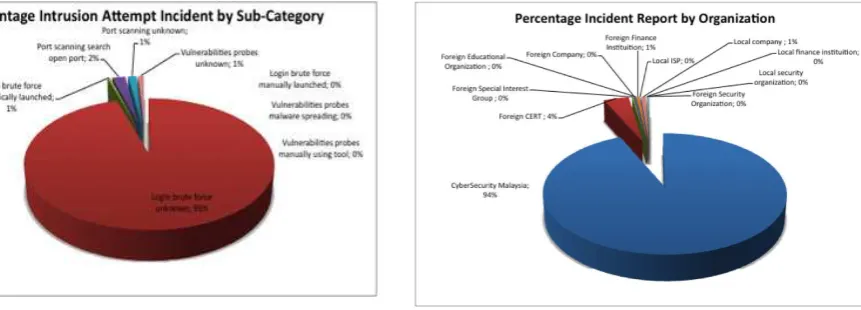
Graph 6: Percentage of Intrusion Attempt Incidents by Sub-category
A total of 902 incidents were reported in the Intrusion Attempt Report for Q3 2014. These were reported from various organizations and categorized under various intrusion attempt sub-categories. The most frequently reported incidents were from CyberSecurity Malaysia, followed by other Computer Emergency Response Teams (foreign CERT) and other organizations as shown in Table 7 and Graph 7.
Reports From TOTAL
CyberSecurity Malaysia 843
Foreign Computer Emergency Response Teams 37
Foreign Special Interest Groups 2
Foreign Companies 2
Foreign Educational Organizations 1
Foreign Finance Institutions 4
Local ISP 1
Local Companies 7
Local Finance Institutions 1
Local Security Organizations 1
Foreign Security Organizations 2
Table 7: Figures on Intrusion Attempts Based on Organization Reports
Graph 7: Percentage of Intrusion Attempts Based on Organization Reports
Most incidents of intrusion attempts reported were by CyberSecurity Malaysia, comprising 94% of the total reported incidents. Foreign Computer Emergency Response Teams (foreign CERT) contributed about 4% while local companies and foreign finance institutions both represented 1% respectively.
For Quarter 3 2014, most intrusion attempt incidents were reported by CyberSecurity Malaysia and were login brute force -- unknown, and port scanning -- unknown.
Graph 8: Sub-categories of Intrusion Attempts Based on Organization Reports
14
Login Brute Force Description:
Login brute force is a password-guessing type of attack of the unauthorized access attempt kind. A brute force attack can be recognized by reviewing the operating system’s security log. If such attack happens when an attacker attempts to log in to the system at any time and fails to do so, an event message is written in the operating system’s security log. This attempt is generally meant to discover a password by systematically trying every possible combination of letters, numbers, and symbols until the one correct combination that works is discovered. A good target of brute force attacks is a website that requires user authentication. Brute force attacks can put user accounts at risk and also lood sites with unnecessary traffic. These attacks are easy to detect but not so easy to prevent. For example, HTTP brute force tools can relay requests through a list of open proxies. Although each request appears to come from a different IP address, this attack cannot be simply prevented by blocking the IP address. Some tools will try a different username and password on each attempt, therefore a single account cannot be simply locked out for failed password attempts.
Impact of Discovered Intrusion
Attempts
The impact of reported intrusion attempts that can affect systems includes:
1. An attacker may attempt to discover a weak password by systematically trying every possible combination of letters, numbers and symbols until they discover the one correct combination that works.
2. By using port scan tools, attackers could determine a system’s weaknesses and the best method for an attack. The negative impact of port scans are numerous and range from wasting resources, to network congestion, and enabling future, more serious attacks.
Best Practices/Recommendations
for Prevention:
There are several techniques to consider for defeating a brute force login attack:
• Advanced users who want to protect their accounts from attack should be given the option to be allowed to login only from certain IP addresses.
• Assign unique login URLs to blocks of users, so that not all users can access the site from the same URL.
• Use a CAPTCHA to prevent automated attacks.
• Instead of completely locking out an account, place it in lockdown mode with limited capabilities.
• Well-chosen passwords are effective at defeating brute force login attacks. It is prudent to implement a security policy that requires users to change their passwords on a regular basis.
Therefore, it is useful for system administrators and other network defenders to detect login brute force attacks in order to recognize precursors for serious attacks.
Conclusion
15
The Selfie Phenomenon
By | Yang Kalsum Bt Ibrahim, Rozila Ramli
Introduction
"Selfie" is a new buzzword being used today.It is one of the most popular ways of taking self-portraits with a hand-held smartphone camera [1]. Since the advent of smartphones equipped with quality cameras and preview screens, a large number of individuals have all been taking pictures of themselves for various purposes [1]. In the early days, selfies or photographic self-portraits started as taking pictures in front of a mirror or with the camera placed on a nearby object or tripod. Using current technologies, selfies are easily taken with a digital camera or a front-facing smartphone, tablet or webcam.
As painted in social media, selfies are increasingly attracting media attention and sociological scrutiny. Selfies are also becoming a useful tool to post self-portraits to social media such as Instagram and Facebook, whereby the tendency is to engage in adding and receiving Likes and comments on photos from others.
Both the good and bad sides of selfies are mentioned below.
The Good Side of Selfies
1. Capturing good angles
Selfies are usually lattering and made to appear casual. Holding the camera a bit higher than the head makes one’s eyes look bigger [2], nose appear sharper and the best features are highlighted, such as chest and cleavage.
2. "The cult of the selfie celebrates regular people"
According to Pamela Rutledge, faculty director of the media psychology program at the Massachusetts School of Professional Psychology, "There are many more photographs available now of real people than models." [3]
3. It allows control of your image online
People who like having the power to choose how they look enjoy taking selfies as their appearance online can be controlled.
4. Mini boost of confidence
With cute pictures and positive comments received on appearance, selfies have a way of making us feel great about ourselves.
5. Capturing Memorable Moments
Selfies can be taken anytime, anywhere without assistance from anyone.
The Bad Side of Selfies
1. Reveal Locations
Selfies show locations of where people are and when they are there. Location is key, as often people only take selfies when they are at a place where they want to be seen. The intention is to impress others or to share, especially joy, with absent friends or loved ones, so the viewers might in future go to the same places and do the same things. However, such posting allows unscrupulous people to learn more about one’s whereabouts and use that advantage to stalk and cause mischief.
2. Show Information about Friends
People typically take selfies with friends [4]. Inadvertently, information about friends is also revealed, further widening the circle of people placed at risk.
3. Inform of Routine Activities
Selfies inform viewers of a person’s habits or routine activities and the sort of pursuits they enjoy. For example, people often post selfies of themselves shopping and trying on new outfits for the benefit of receiving feedback from friends. Sometimes, they are at a gym to show friends they are enjoying a workout. In doing so, they are actually providing information on the places they frequent and the regular activities they do. This information can be used to track down the people who had posted the selfies and used to cause harm in many ways.
4. Are People at Home?
16
people’s comings or goings so that they can predict the times and for how long people leave their homes; then they use these times to burglarize homes.
5. What People Look Like
Another danger selfies pose is regarding what people look like. The common practice of strict adherence to the protection or privacy of personal details is compromised when selfies are posted for the ‘world’ to see. These photos posted for the sole purpose of fun [5] can be used against the people whose selfies have been displayed.
6. Names of People on Display
When a selfie is taken with co-workers and at a place of work, some photos may display not only the name of the company these people work for, but also the names of the co-workers, sometimes solely from the name tags that many, today, have to wear on their clothing. This could subject the people in the selfies to becoming victims of a wide range of offences against them. They can include crimes such as identity theft and blackmail to steal trade secrets.
7. ‘Unlattering Details of Family Members’
Selfies that include family members can become a bone of contention between the person who has posted them and the reluctant family members. This is especially true when family members are being shown at their best. It becomes particularly more sensitive when selfies are posted without the permission of those in the photos.
Points to Ponder
To summarize, the selfie is one of the indispensable tools for human development and progress. However, people need be aware of the dangers of selfies as they are posting personal information on social media sites. Posting selfies may lead to cyber harassment or cyber bullying. Cyber bullying, cyber stalking, and sexual, religious and racial harassment are done through social media. However, much of the harassment is often the result of people disclosing their real identity and personal details, mainly pictures, either voluntarily or unwittingly.
With selfies, it has become common for people to not think twice before taking pictures and posting them online. Some precautions to be taken are avoiding photos that reveal locations
and that are immodest or potentially offensive [6].
References
[1]Bruno, Nicola, et al. "‘Selies’ Reveal Systematic Deviations from Known Principles of Photographic Composition." Art & Perception 2.1-2 (2014): 45-58.
[2]“How to Take Good Selies”. http://www. wikihow.com/Take-Good-Selies.
[3]Melissa Walker. “The Good, the Bad, and the Unexpected Consequences of Selie Obsession”. http://www.teenvogue.com/advice/2013-08/ selie-obsession.
[4]“Taking a Selie: The Psychological Experience”. http://nobullying.com/ eight-selie-danger-signs-everyone-should-be-aware-of/.
[5]Elise Moreau. “What is a Selie?”. http:// w e b t r e n d s . a b o u t . c o m / o d / M o b i l e We b -Beginner/a/What-Is-A-Selie.htm.
17
6 Simple Tips to Stay Safe on Instagram
Introduction
In the digital era and technology of today, social media is one of the many ways to connect people in the virtual world. Social media has exploded in recent years, connecting people in both personal and professional contexts. No doubt it makes communicating with others even easier. Remarkably, it is FREE! Simply connect to the Internet, then a variety of social media is ready to accommodate fresh ideas.
Among the current popular social media is the Instagram application. Based on Wikipedia, Instagram is a portmanteau of Instant Telegram, an online mobile photo-sharing, video-sharing and social networking service that enables users to take pictures and videos, and share them on a variety of social networking platforms, such as Facebook, Twitter, Tumblr and Flickr. Instagram was launched in October 2010. This application has rapidly gained popularity with over 100 million active users as of April 2012 and over 300 million as of December 2014.
Although there is nothing inherently dangerous about Instagram, things that may be worrying are typical issues as with all social media, such as unpleasant behavior among peers and inappropriate photos or videos that could harm reputation or attract the wrong kind of attention.
If you are Instagram users, let’s take a look at the best ways to stay safe and secure on Instagram.
1. Keep your account safe
Passwords are the first layer of defence against cyber criminals. If you do not want to expose your account to the biggest risks, ensure strong passwords and do not use the same password for all your online accounts. It is also a good practice to change your password regularly. It may be uncomfortable, but it will make you less worried and your account more secure.
Since the Instagram account uses your e-mail address as a username, you must also ensure your e-mail account is safe. Anyone who can access your e-mail can probably also access your Instagram account.
If you are using other phones or computers to access Instagram, make sure to log out of the account once finished. Observe for any changes or unusual activities with your account. In case your account has been hacked and you are no longer able to log in, please immediately make a report to the Instagram Help Center.
18
2. Change the privacy settings
for your photo feed
If you want to share your photos and videos only with friends or family and do not want them to be seen by everyone, edit your Instagram profile. Make sure the ‘Posts are Private’ option is turned on. This will ensure that only approved friends/ followers will see your photos and videos. However, if you decide to share your Instagram shots on Facebook or Twitter, double-check which social services are selected on the final confirmation page before clicking the “Share” button.
Please bear in mind that it is common for people to take pictures from other accounts and use them as their own. Photos or videos posted online may be copied, altered, and shared with many people without your knowledge or consent.
3. Block followers you do not
know
In case you want to remove or block any followers, choose the ‘Block User’ option. When applying the blocking feature, the blocked person cannot view your posts or search for your Instagram account.
A rule of thumb is if you do not know a person in real life, then you probably should not accept them as a follower.
4. Do not expose your location
Instagram offers an additional nice feature which allows pinning any photo you choose to "map images" and it can be viewed from your profile. This feature can show your friends where you are on vacation, but you may want to think twice before sharing your home address or the location of your friend's house, for instance. Before sharing photos or videos on Instagram, avoid mentioning the exact location where you took a certain photo or video. However, if you already posted your location in a previous post, remove the location you added to your photos by wiping off your photo map. In the ‘Photo Map’ option, make the necessary changes in order to remove the added location from your photos.
5. Keep your profile information
private
19
Do not expose too much personal information, especially your profile information in the Instagram bio. The only detail that needs to be exposed in your profile is your Instagram username. This also applies when adding hashtags to photos or videos posted online. For example, do not mention your real name or children’s real names in the hashtag, as the personal information could be used against you.
6. Share photos only with specific
Instagram followers
A new feature in Instagram called “Instagram Direct” lets you pick and choose Instagram friends or followers who can see your latest photos or videos posted in Instagram. The post would not appear in the feed, search or your profile. The people you have sent the post to will get a notification. If someone you are not following sends you a photo or video on Instagram, it will go to your requests so you can decide if you want to view it.
This private photo or video sharing feature helps to only share certain photos or videos with specific followers. This is an additional layer in staying safe on Instagram.
Conclusion
Besides the 6 simple tips mentioned above, there are additional general guidelines to follow before posting on Instagram. Among of them are:
• Do not post sensitive information next to your photos.
• Do not post provocative or violent photos or videos
• Do not post photos or videos of other people without their permission
• Do not engage in online bullying
As an Instagram user, you have the option to be private. Although not many security options are available in Instagram, there are a few to be aware of in order to avoid cyber criminals. Instagram is a fun way to share your life through photos and videos. The important thing to know is how to stay safe in the community.
References
1. Wikipedia. http://en.wikipedia.org/wiki/ Instagram
2. Instagram Help Center. https://help. instagram.com
3. The Essential 5 Step Guide to Secure Your Instagram Account. https://heimdalsecurity. com/blog/essential-guide-instagram/
4. Increasing Your Instagram Protection + Securing Your Instagram Account. http:// www.swayamdas.com/how-to-secure-your-instagram-account.html
20
Essential Ingredients for Successful
Information Security Management System
(ISMS) Implementation – Not a ‘One Solution
Fits All’.
By | Rafidah Abdul Hamid
Introduction
There are numerous reasons for the high interest in information security. The need for standardization, demand for regulators and market demand are among the reasons. While interest is on the rise, experience shows that managing information security is not an easy task. Information security can be achieved by implementing a suitable set of controls including policies, processes, procedures, organizational structures and software and hardware security mechanisms. The process of establishing, implementing, monitoring, reviewing and improving controls requires an organization to continuously identify and maintain all changes in the business environment, security threats, industry best practices and legal requirements.
The Information Security Management System (ISMS) has been widely accepted as a systematic approach to managing information security and is implemented in many countries. Statistics by the Department of Standards Malaysia [1] reports that 201 organizations in Malaysia are ISMS-certified by its two accredited certification bodies as of January 2015. With the growing importance of ISMS, organizations are always seeking for the best ways to effectively implement ISMS. While critical success factors of ISMS implementation vary, this article emphasizes the leadership aspect and competency of the personnel involved in ISMS as two critical factors that can effectively contribute to ISMS effectiveness.
Main Ingredients in Successful
ISMS Implementation
As ISMS involves comprehensive processes in managing security, there is no one immediate solution, or one solution fits all, that can be deployed to achieve successful implementation, even if hiring consultants for ISMS implementation or using audit tools to assess the organization’s compliance. This section discusses two main factors or aspects
that an organization should prioritize when establishing, implementing, maintaining and planning to continually improve their ISMS.
ISMS implementation in Malaysia has been a national concern since the start of adopting BS7799-2:2002 as an international standard. A pilot program was jointly conducted by SIRIM QAS International Sdn. Bhd. and CyberSecurity Malaysia in 2013. The program aimed to provide assistance to organizations with an ISMS audit to gauge the levels of ISMS compliance in the participating organizations. The audit came at the heel of a pilot project with 10 organizations participating to have their selected services/operations certified based on the BS 7799-2:2002 standard. An article titled “ISMS Pilot Program Experiences: Benefits, Challenges & Recommendations” published in CyberSecurity Malaysia’s E-Security bulletin in 2003 [2] provides details of this program and discusses the various benefits and challenges faced by these organizations during their ISMS implementation. The article also includes some recommendations to smoothen the ISMS implementation process.
Apart from the recommendations for the successful implementation of ISMS during its initial implementation in Malaysia as stated in the article, CyberSecurity Malaysia provides an additional guideline on ISMS implementation. The guideline was produced in 2013 under the title “ISMS Implementation Guideline: A practical approach’ [3]. It states some of the critical success factors that an organization should be aware of when implementing ISMS as follows:
a. Commitment and support from the top management should be obtained prior to implementation and continuously throughout the implementation.
21
the organization’s approach to information security risk management.
c. Information security policies and procedures are communicated promptly to all levels of personnel, from management to the front desk to ensure no misunderstandings or lack of information amongst personnel.
d. Activities designed for ISMS are supported with various creative mechanisms and approaches so that ‘willingness to change’ is visible and accepted by all levels of personnel.
e. Personnel involved in ISMS implementation should be equipped with relevant competencies and skills.
f. Awareness programs to all relevant personnel and entities are held consistently and continuously to create a security culture where all fully understand their security roles and responsibilities.
g. Active monitoring and continuous improvements are crucial to ensuring that risks and/or incidents are dealt with promptly, as well as ensuring that all necessary tasks are performed without delay.
All the factors mentioned above are definitely important and very much inter-related in driving successful ISMS implementation in any organization. The following section elaborates on the leadership aspects and competency of the personnel involved in ISMS implementation.
Leadership in ISMS Implementation
The guideline mentions that commitment and support from the top management should be obtained prior to implementation and continuously throughout implementation. This is very true as management usually has specific goals for the organization, which should be communicated clearly to the ISMS implementer to ensure that ISMS implementation is aligned with the organization’s strategy and business objectives and requirements. Support from management is crucial as it will lead to other important factors, such as allocation of resources like manpower and financial needs for ISMS implementation.
In Malaysia, some initiatives from government agencies have fortunately provided the ‘push factors’ for organizations to embark on ISMS implementation. The most significant initiative was the cabinet directive issued on 24th February 2010 for ISMS to be implemented
in Critical National Information Infrastructure (CNII) agencies. The directive states that CNII entities should be certified in three years with certification scope covers the information security management in the operating areas that deliver the critical services and products to the nation. This directive is observed as one of the factors that motivates and encourages management support and commitment for ISMS implementation in many organizations in Malaysia, at least for first-time certification. However, while it is always challenging to address this issue for continuous implementation in particular, setting up a firm Information Security Management Committee in the early stages of ISMS implementation is one of the mechanisms to address the leadership issue in ISMS. This committee is able to ensure continuous support and commitment by defining roles and responsibilities of those involved in ISMS implementation.
Competency of Personnel
Another important factor that should be prioritized is the competency of personnel involved in ISMS implementation. As there is increasing need for organizations to protect their information, the need for personnel with the right competency to protect information has also elevated.
22
are facing numerous regulatory requirements as well as the need to manage risk, it is crucial for them to have information security personnel with the appropriate skills and competency to ensure that information assets are protected from unauthorized use, systems are available, and the continued integrity of information and processes is assured. It is also imperative that security professionals in leadership positions have the practical security and business experience to be able to address the changing protection needs of organizations [5].
Following top management approval of initiating ISMS implementation, specific roles and responsibilities should be established for personnel who are involved in ISMS. Personnel should be aware of their responsibilities and the authority they possess within the scope of the responsibility. Therefore, it is important for organizations to equip their personnel with appropriate knowledge and skills in information security areas and also to be able to measure their competency. This definitely emphasizes the need for personnel competency plans and continuous measurement of personnel competency.
Conclusion
Critical success factors for ISMS implementation definitely vary and very much depend on other factors, such as an organization’s size, core operations, financial resources, etc. However, similar concerns arise with respect to managing an organization’s information security. Nonetheless, certain mechanisms exist to ensure the successful implementation of ISMS in organizations. This article emphasized leadership issues and competency of personnel involved in ISMS implementation as key aspects that can drive successful ISMS implementation in an organization.
References
1. Department of Standard Malaysia ‘Statistic on ISMS Certiied Organizations’, Retrieved April 2015 from http://www.jsm.gov.my/statistics#. VSH8vdyUffI
2. CyberSecurity Malaysia, ISMS Implementation Guideline: A practical Approach, 2013
3. CyberSecurity Malaysia, ‘ISMS Pilot Program Experiences: Beneits, Challenges & Recommendation’, 2003
4. 'Information Security Magazine', Retrieved March 2013 from http://www.infosecurity- magazine.com/view/23928/demand-for- information-security-professionals-remains-strong-says-isc/
23
Mobile Devices vs Malware
By | Kamarul Baharin Khalid
As mobile devices become smarter, malware is also becoming increasingly sophisticated. Today, malware not only attacks computers but also targets mobile devices. Most people have mobile devices and the majority tend to store personal information there, like contact numbers, schedules, reminders, notes, etc., and even passwords and credit card information. Such private information is attractive to criminals, hence making mobile devices the next best target for malware attacks.
Malware, short for MALicious softWARE, is any software used to disrupt computer system operation, gather sensitive information, or gain access to private computer systems. Malware can be designed to steal information or spy on computers for an extended period without the users’ knowledge, or it may be designed to cause harm, sabotage, or extort payment (ransom).
Mobile malware first emerged in 2004 on Symbian OS smartphones. The first mobile malware was called Cabir, which used the common communication method of mobile devices for sending files using Bluetooth connection. When a device was infected, it would continuously search for all other Bluetooth devices with open Bluetooth connection and try to send a “.SIS” malware installer file to the other mobile devices. If the user was unaware of this malware and was trying to receive such files and install them on their Symbian OS mobile device, the device would then become infected. Initially, Cabir was quite harmless and only displayed the word “Caribe” while spreading via Bluetooth connection. Later, other hackers modified it to steal contact information from users’ mobile devices. Such modified malware even sent premium SMS messages to certain numbers and charged users on their SMS bill. This mutation essentially harmed mobile device users.
Mobile device sales boomed in 2010 with two major mobile device OSs, namely Apple iOS and Google Android OS. Apple iOS is just another mobile device Operating System, which is based on Mac OS. Android OS is another mobile device OS based on the Linux kernel. Hackers saw more potential on these new platforms, particularly Google Android OS, causing mobile malware to explode in 2011 when Android OS mobile devices were being sold and used by
almost 50% of mobile device users.
Mobile malware often disguises as a legitimate application to deceive users to install it. It is distributed through the Internet via mobile browsers, social network programs, messaging applications and also app stores. Mobile malware can either install itself without user consent or it can be installed by mobile users themselves without being aware. Installed mobile malware then performs its main function without users’ knowledge or permission. Mobile malware objectives are almost the same as those of computer malware, ranging from spying to key logging, test messaging, phishing, unwanted marketing (adware) and fraud. The types of mobile malware that are quite similar to computer malware are as follows:
1. Spyware and Adware: This type of malware secretly gathers private information about mobile device users. Information collected might include contact numbers, locations, messaging habits, browser history, user preferences and downloads. This information is then sent to a third party or probably the owner of the spyware itself. Sending the information uses up the mobile device user’s personal data connection, either a mobile data plan (3G/4G) or Wireless network (WiFi).
2. Trojans and Viruses: These types of malware attach themselves to harmless or legitimate applications and get installed together. Once installed, these malware carry out their malicious actions. They will try to hijack the browser and cause the device to automatically send unauthorized premium rate SMS or capture the users’ login credential information from other applications like social networks, online banking, app stores, etc. They may also affect smartphones by simply annoying users, to causing smartphones to become highly destructive to not repairable at all. Some may try to root the devices and gain access to users and system files in the mobile devices or memory cards.