Oracle® Fusion Middleware
Using ActiveCache
11
g
Release 1 (10.3.5)
E16517-03
April 2011
Oracle Fusion Middleware Using ActiveCache, 11g Release 1 (10.3.5) E16517-03
Copyright © 2007, 2011, Oracle and/or its affiliates. All rights reserved.
This software and related documentation are provided under a license agreement containing restrictions on use and disclosure and are protected by intellectual property laws. Except as expressly permitted in your license agreement or allowed by law, you may not use, copy, reproduce, translate, broadcast, modify, license, transmit, distribute, exhibit, perform, publish, or display any part, in any form, or by any means. Reverse engineering, disassembly, or decompilation of this software, unless required by law for interoperability, is prohibited.
The information contained herein is subject to change without notice and is not warranted to be error-free. If you find any errors, please report them to us in writing.
If this software or related documentation is delivered to the U.S. Government or anyone licensing it on behalf of the U.S. Government, the following notice is applicable:
U.S. GOVERNMENT RIGHTS Programs, software, databases, and related documentation and technical data delivered to U.S. Government customers are "commercial computer software" or "commercial technical data" pursuant to the applicable Federal Acquisition Regulation and agency-specific supplemental regulations. As such, the use, duplication, disclosure, modification, and adaptation shall be subject to the restrictions and license terms set forth in the applicable Government contract, and, to the extent applicable by the terms of the Government contract, the additional rights set forth in FAR 52.227-19, Commercial Computer Software License (December 2007). Oracle USA, Inc., 500 Oracle Parkway, Redwood City, CA 94065.
This software is developed for general use in a variety of information management applications. It is not developed or intended for use in any inherently dangerous applications, including applications which may create a risk of personal injury. If you use this software in dangerous applications, then you shall be responsible to take all appropriate fail-safe, backup, redundancy, and other measures to ensure the safe use of this software. Oracle Corporation and its affiliates disclaim any liability for any damages caused by use of this software in dangerous applications.
Oracle is a registered trademark of Oracle Corporation and/or its affiliates. Other names may be trademarks of their respective owners.
iii
Contents
Preface
... vDocumentation Accessibility ... v Conventions ... v
1
Introduction and Roadmap
1.1 Document Scope and Audience... 1-1 1.2 Guide to This Document... 1-1 1.3 Related Documentation... 1-1 1.4 New and Changed Features in This Release... 1-2
2
About ActiveCache
2.1 Adding Session State Persistence and Management ... 2-1 2.2 Accessing Java Persistence API (JPA) Entities in the Data Cache ... 2-1
3
Accessing Data Caches from Applications
4
Accessing and Retrieving Relational Data
v
Preface
This preface describes the document accessibility features and conventions used in this guide—Using ActiveCache.
Documentation Accessibility
Our goal is to make Oracle products, services, and supporting documentation accessible to all users, including users that are disabled. To that end, our
documentation includes features that make information available to users of assistive technology. This documentation is available in HTML format, and contains markup to facilitate access by the disabled community. Accessibility standards will continue to evolve over time, and Oracle is actively engaged with other market-leading
technology vendors to address technical obstacles so that our documentation can be accessible to all of our customers. For more information, visit the Oracle Accessibility Program Web site at http://www.oracle.com/accessibility/.
Accessibility of Code Examples in Documentation
Screen readers may not always correctly read the code examples in this document. The conventions for writing code require that closing braces should appear on an
otherwise empty line; however, some screen readers may not always read a line of text that consists solely of a bracket or brace.
Accessibility of Links to External Web Sites in Documentation
This documentation may contain links to Web sites of other companies or
organizations that Oracle does not own or control. Oracle neither evaluates nor makes any representations regarding the accessibility of these Web sites.
Access to Oracle Support
Oracle customers have access to electronic support through My Oracle Support. For information, visit http://www.oracle.com/support/contact.html or visit
http://www.oracle.com/accessibility/support.html if you are hearing impaired.
Conventions
The following text conventions are used in this document:
Convention Meaning
italic Italic type indicates book titles, emphasis, or placeholder variables for which you supply particular values.
1
Introduction and Roadmap 1-1
1
Introduction and Roadmap
The following sections describe the contents and organization of this guide—Using ActiveCache:
■ Section 1.1, "Document Scope and Audience"
■ Section 1.2, "Guide to This Document"
■ Section 1.3, "Related Documentation"
■ Section 1.4, "New and Changed Features in This Release"
1.1 Document Scope and Audience
This document is a resource for:■ Application developers who want to develop and configure applications using ActiveCache features, such as the ability to use a simplified approach for accessing Coherence data caches from WebLogic Server applications.
■ Administrators who want to use WebLogic management tools, such as the Administration Console, Node Manager, and WebLogic Scripting Tool (WLST), to create, configure, control, and monitor Coherence cache servers and Coherence clusters.
1.2 Guide to This Document
■ This chapter, Chapter 1, "Introduction and Roadmap," describes the organization of this document.
■ Chapter 2, "About ActiveCache," provides an overview of ActiveCache features.
■ Chapter 3, "Accessing Data Caches from Applications," explains how to use ActiveCache with applications running on WebLogic Server.
■ Chapter 4, "Accessing and Retrieving Relational Data," describes how to use ActiveCache with TopLink Grid’s relational-to-object mapping capabilities to cache relational data.
1.3 Related Documentation
For additional information, see the following Coherence and WebLogic Server documents:
Coherence
New and Changed Features in This Release
■ Developer’s Guide for Oracle Coherence
■ Client Guide for Oracle Coherence
■ Tutorial for Oracle Coherence
■ User's Guide for Oracle Coherence*Web
WebLogic Server
■ Oracle Fusion Middleware Developing Applications for Oracle WebLogic Server
■ Oracle Fusion Middleware Using Clusters for Oracle WebLogic Server
■ Oracle Fusion Middleware Oracle WebLogic Server Administration Console Help
1.4 New and Changed Features in This Release
In this release of WebLogic Server, you can use the WebLogic Server Administration Server, via the Administration Console or WLST, along with the java-based Node Manager, to control (start, stop, and restart), configure, and monitor stand-alone Coherence cache servers.
2
About ActiveCache 2-1
2
About ActiveCache
WebLogic Server includes features that allow deployed applications to easily use Coherence data caches, and seamlessly incorporate Coherence*Web for session management and TopLink Grid as an object-to-relational persistence framework. Collectively, these features are referred to as ActiveCache.
ActiveCache is employed by applications running on WebLogic Server and provides replicated and distributed caching services that make an application's data available to all servers in a Coherence data cluster. ActiveCache provides direct access by
applications to data caches, either through resource injection or component-based JNDI lookup, and lets you display, monitor, create, and configure Coherence clusters using the WebLogic Server Administration Console and WLST. New features in this release let you control (start, stop, and restart), configure, and monitor stand-alone Coherence cache servers using the WebLogic Server Administration Server, via the Administration Console or WLST, along with the java-based Node Manager.
Using ActiveCache with WebLogic Server instances enables you to create a data tier dedicated to caching application data and storing replicated session state. This is separate from the application tier—the WebLogic Server instances dedicated to running applications. ActiveCache technology allows the application tier to efficiently communicate with the data tier and cache data in it. For more information, see
Section 3.2, "Choose the ActiveCache Deployment Topology."
2.1 Adding Session State Persistence and Management
Using Coherence*Web with ActiveCache enables you to provide Coherence-based HTTP session state persistence to applications running on WebLogic Server.
Coherence*Web enables HTTP session sharing and management across different Web applications, domains, and heterogeneous application servers. Session data can be stored in data caches outside of the application server, thus freeing application server heap space and enabling server restarts without losing session data.
For information on using Coherence*Web with WebLogic Server applications, see the User's Guide for Oracle Coherence*Web.
Accessing Java Persistence API (JPA) Entities in the Data Cache
TopLink Grid allows JPA Entity caching. This lets you support very large, shared grid caches that span cluster nodes. Calls for JPA Entities cached in ActiveCache result in a get operation on the associated data cache. If the data cache does not contain the object, then the database is queried.
TopLink Grid enables you to direct queries to ActiveCache. If the desired query result is not found in the cache, it can be read from the database and then placed in the cache, making it available for subsequent queries. The ability of ActiveCache to manage very large numbers of objects increases the likelihood of a result being found in the cache, as read operations in one cluster member become immediately available to others.
Writing JPA Entities to the database is also made possible by TopLink Grid. Applications can directly write JPA Entities to the database, then put them into the data cache (so that it reflects the database state), or put JPA Entities into the data cache, and then have the data cache write them to the database.
3
Accessing Data Caches from Applications 3-1
3
Accessing Data Caches from Applications
Using ActiveCache, applications can easily access Coherence data caches. ActiveCache provides a @Resource annotation that allows a Coherence NamedCache cache object to be identified and dynamically injected into a servlet or EJB. As an alternative to resource injection, applications using ActiveCache can use a component-based JNDI tree to look up the NamedCache.
3.1 Developing Applications to Use ActiveCache: Main Steps
The following steps summarize the procedure for using ActiveCache with applications running on WebLogic Server.
1. Choose the cluster topology on which your applications will run. See Section 3.2, "Choose the ActiveCache Deployment Topology."
2. Specify the configuration for the Coherence caches that your applications will use. See Section 3.3, "Create and Configure a Data Cache."
3. Add code in your Web application to access the Coherence caches. You can use either JNDI lookup or resource injection to access a Coherence NamedCache cache object. See Section 3.4, "Access the Data Cache from your Application."
4. Store the cache configuration file with the application. Where you store the file depends on how you want the caches to be visible to the deployed applications. See Section 3.5, "Locate the Cache Configuration File."
5. Determine how the server will access the cache configuration file when it starts. See Section 3.6, "Access the Cache Configuration on Server Startup."
6. Coherence clusters are classloader-scoped. Where you deploy coherence.jar in the classloader hierarchy determines how cluster membership is handled. See Section 3.7, "Package Applications and Configure Coherence Cluster Scope."
7. Adjust preconfigured cluster values for your deployed applications, if necessary. You can use WLST or the WebLogic Server Administration Console to configure some cluster-related values. See Section 3.8, "Create and Configure Coherence Clusters."
8. Start the stand-alone Coherence cache servers. See Section 3.9, "Start a Cache Server."
9. Use one of the several methods to start WebLogic Server. See Section 3.10, "Start WebLogic Server."
Choose the ActiveCache Deployment Topology
3.2 Choose the ActiveCache Deployment Topology
Clusters are used to harness multiple computers to store and manage data, resources, and services, usually for reliability and scalability purposes. Coherence clusters store and manage an application's objects and data. All of the data that is inserted into Coherence data caches is accessible by all the servers in the application’s Coherence cluster that share the same cache configuration.
ActiveCache can be employed for several different combinations of application and data tiers, or cluster topologies. Different cluster topologies can be formed by mixing WebLogic Server instances and stand-alone Coherence cache servers, here defined as Coherence data servers running on JVM instances dedicated to maintaining data.
■ In the In-Process topology, all WebLogic Server instances (employing ActiveCache) in the cluster are storage-enabled. In this case, storage-enabled means that these servers will provide cache storage and back-up storage; you do not have to create a separate data tier. The applications and the data caches are collocated; each server instance can serve requests and cache data.
This topology is supported mainly for development and testing. By storing the session data in-process with the application server, this topology is very easy to get up and running quickly for development and testing. This topology is not recommended for production use.
■ In the Out-of-Process topology, you use stand-alone Coherence cache servers to host the data. Configure the WebLogic Server instances to be storage-disabled; they are used to serve requests. This topology creates a true, separate data tier, and further reduces overhead for the WebLogic Server instances that are processing requests.
■ The WebLogic Out-Of-Process topology is a slight variation on the Out-of-Process topology. In this topology, storage-enabled WebLogic Server instances replace the stand-alone Coherence cache servers. You have a mixture of storage-enabled and storage-disabled WebLogic Server instances. In this topology requests and data are also segregated to their own servers; thus, latency for processing requests is reduced.
3.3 Create and Configure a Data Cache
ActiveCache can be configured to use any of the cache types supported by Oracle Coherence. For an in-depth discussion on Coherence caches and their configuration, see Create and Use Coherence Caches in the Developer’s Guide for Oracle Coherence.
3.4 Access the Data Cache from your Application
Applications that run on WebLogic Server 10.3.3 or later, can use ActiveCache to access a data cache. The data cache is represented by the Coherence NamedCache cache object. This object is designed to hold resources that are shared among members of a Coherence cluster. These resources are managed in memory, and are typically composed of data that is also stored persistently in a database, or data that has been assembled or calculated. Thus, these resources are referred to as cached.
Locate the Cache Configuration File
Accessing Data Caches from Applications 3-3 Your application can obtain a NamedCache either by resource injection or by lookup in a component-scoped JNDI resource tree. The lookup technique can be used in EJBs, servlets, or JSPs. The resource injection technique can be used only by servlets or EJBs.
To Obtain the NamedCache by Resource Injection
A @Resource annotation can be used in a servlet or an EJB to dynamically inject the
NamedCache. This annotation cannot be used in a JSP. The name of the cache used in the annotation must be defined in the Coherence cache configuration file,
coherence-cache-config.xml.
Example 3–1 illustrates a resource injection of the NamedCachemyCache.
Example 3–1 Obtaining a NamedCache by Resource Injection
...
@Resource(mappedName="myCache") com.tangosol.net.NamedCache nc; ...
To Obtain the NamedCache by JNDI Lookup
A component-scoped JNDI tree can be used in EJBs, servlets, or JSPs to reference the
NamedCache.
To use a component-scoped JNDI lookup, define a resource-ref of type
com.tangosol.net.NamedCache in either the web.xml or ejb-jar.xml file. Example 3–2 illustrates a <resource-ref> stanza that identifies myCache as the
NamedCache.
Example 3–2 Defining a NamedCache as resource-ref for JNDI Lookup
...
3.5 Locate the Cache Configuration File
The location where you store the cache configuration file determines the cache scope; that is, the visibility of the caches to deployed applications. The cache scope defines a Coherence node. A Coherence node can be a single server process (WebLogic Server instance (running Coherence) or stand-alone Coherence cache server), WebLogic
Note: It is not recommended that you store remote EJB references in Coherence named caches, nor should you store them in
Coherence*Web-backed HTTP sessions.
Locate the Cache Configuration File
Server application (EAR), or application module (Web application). There can be many data caches within a single Coherence node.
There are three options for cache visibility:
■ Application server-scoped—all deployed applications in a container become part of one Coherence node. Caches will be visible globally to all applications deployed on the server.
■ EAR-scoped—all deployed applications within each EAR become part of one Coherence node. Caches will be visible to all modules in the EAR. For example, this could be a recommended deployment if all of the modules must share the same cache.
■ WAR-scoped—each deployed Web application becomes its own Coherence node. Caches will be visible to the individual modules only. For example, this could be a recommended deployment for a stand-alone WAR deployment or stand-alone EJB deployment.
Note: The cache configuration must be consistent for both WebLogic Server instances and stand-alone Coherence cache servers.
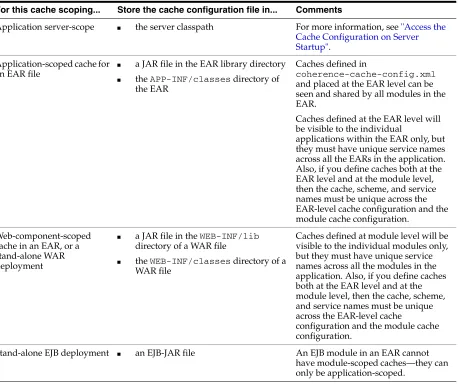
Table 3–1 Cache Configuration File Location Based on Cache Scoping
For this cache scoping... Store the cache configuration file in... Comments
Application server-scope ■ the server classpath For more information, see "Access the Cache Configuration on Server Startup".
Application-scoped cache for an EAR file
■ a JAR file in the EAR library directory ■ the APP-INF/classes directory of
the EAR
Caches defined in
coherence-cache-config.xml
and placed at the EAR level can be seen and shared by all modules in the EAR.
Caches defined at the EAR level will be visible to the individual
applications within the EAR only, but they must have unique service names across all the EARs in the application. Also, if you define caches both at the EAR level and at the module level, then the cache, scheme, and service names must be unique across the EAR-level cache configuration and the module cache configuration. directory of a WAR file
■ the WEB-INF/classes directory of a WAR file
Caches defined at module level will be visible to the individual modules only, but they must have unique service names across all the modules in the application. Also, if you define caches both at the EAR level and at the module level, then the cache, scheme, and service names must be unique across the EAR-level cache
configuration and the module cache configuration.
Package Applications and Configure Coherence Cluster Scope
Accessing Data Caches from Applications 3-5
3.6 Access the Cache Configuration on Server Startup
The server must be able to access the cache configuration file on startup. There are two ways to do this:
■ Place the cache configuration file in the server classpath, or
■ Declare the cache configuration file location in the server startup command with the tangosol.coherence.cacheconfig system property. For more
information on this property, see the Developer’s Guide for Oracle Coherence.
Example 3–3 illustrates the tangosol.coherence.cacheconfig system property in a sample cache server startup command.
Example 3–3 Declaring the Cache Configuration File in a Server Startup Command
java -server -Xms512m -Xmx512m
-cp <Coherence installation dir>/lib/coherence.jar -Dtangosol.coherence.management.remote=true
-Dtangosol.coherence.cacheconfig=WEB-INF/classes/coherence-cache-config.xml
-Dtangosol.coherence.session.localstorage=true com.tangosol.net.DefaultCacheServer
If you are working with two (or more) applications, it is possible that they could have two (or more) different cache configurations. In this case, the cache configuration on the Coherence cache server must contain the union of these configurations. This allows the applications to be supported in the same cache cluster. Note that this is valid only for stand-alone cache servers.
3.7 Package Applications and Configure Coherence Cluster Scope
Coherence clusters are a group of Coherence nodes that share a group address which allows them to communicate. Coherence clusters are classloader-scoped according to where you place the coherence.jar file in the classloader hierarchy. Coherence clusters can be:
■ application server-scoped—the entire JVM acts as a single Coherence cluster.
■ EAR-scoped—each application can be a Coherence cluster.
■ WAR-scoped—each Web module within an application can be a Coherence cluster.
The packing and configuration options for these three scoping scenarios are described in the following sections:
■ Section 3.7.1, "Configuring Application Server-Scoped Coherence Clusters"
■ Section 3.7.2, "Configuring EAR-Scoped Coherence Clusters"
■ Section 3.7.3, "Configuring WAR-Scoped Coherence Clusters"
3.7.1 Configuring Application Server-Scoped Coherence Clusters
With this configuration, all deployed applications on WebLogic Server instances that are directly accessing Coherence caches become part of one Coherence cluster. Caches will be visible to all applications deployed on the server. This configuration produces the smallest number of Coherence nodes in the cluster (one for each WebLogic Server instance).
Package Applications and Configure Coherence Cluster Scope
To Use Coherence Data Caches with Application Server-Scoped Coherence Clusters
1. Edit your WebLogic Server system classpath to include coherence.jar and WL_ HOME/common/deployable-libraries/active-cache.jar in the system classpath. The active-cache.jar should be referenced only from the
deployable-libraries folder in the system classpath and should not be copied to any other location.
2. (Optional) If you want to configure Coherence cluster properties, create a
CoherenceClusterSystemResourceMBean and reference it in the
ServerMBean. You can use the WebLogic Server Administration Console or WLST to create and reference the MBean. See
createServerScopedCoherenceSystemResource in Example 3–9.
3.7.2 Configuring EAR-Scoped Coherence Clusters
With this configuration, all deployed applications within each EAR become part of one Coherence cluster. Caches will be visible to all modules in the EAR. For example, this could be a recommended deployment if all the modules must share the same
Coherence node. It can also be a recommended configuration if you plan on deploying only one EAR to an application server.
This configuration produces the next smallest number of Coherence nodes in the cluster (one for each deployed EAR). Since the Coherence library is deployed in the application's classpath, only one copy of the Coherence classes is loaded for each EAR.
Since all Web applications in the EAR share the same cluster configuration, all Web applications in the EAR will be affected if one of them misbehaves. EAR-scoped Coherence clusters reduce the deployment effort as no changes to the application server classpath are required.
To Use Coherence Caches with EAR-Scoped Coherence Clusters 1. Use either of the following methods to deploy the coherence.jar and
active-cache.jar files as shared libraries to all of the target servers where the application will be deployed.
■ Use the WebLogic Server Administration Console to deploy coherence.jar and active-cache.jar as shared libraries. See "Install a Java EE Library" in the Oracle Fusion Middleware Oracle WebLogic Server Administration Console Help.
As an alternative to the Administration Console, you can deploy the JAR files on the command line. The following are sample deployment commands:
java weblogic.Deployer -username <> -password <> -adminurl <> -deploy coherence.jar -name coherence -library -targets <>
java weblogic.Deployer -username <> -password <> -adminurl <> -deploy active-cache.jar -name active-cache -nostage -library -targets <>
■ Copy coherence.jar and active-cache.jar to the EAR APP-INF/lib folder of the application. However, the preferred way is to deploy them as shared libraries.
Package Applications and Configure Coherence Cluster Scope
Accessing Data Caches from Applications 3-7
Example 3–4 coherence and active-cache JARs Referenced in the weblogic-application.xml File
<weblogic-application> ...
<library-ref>
<library-name>coherence</library-name>
</library-ref> ...
<library-ref>
<library-name>active-cache</library-name>
</library-ref> ...
</weblogic-application>
3. (Optional) If you want to configure Coherence cluster properties, create a
CoherenceClusterSystemResourceMBean and reference it as a
coherence-cluster-ref element in weblogic-application.xml file. This element allows the applications to enroll in the Coherence cluster as specified by the CoherenceClusterSystemResourceMBean attributes.
Example 3–5 illustrates a sample configuration. The myCoherenceCluster
MBean in the example is of type CoherenceClusterSystemResourceMBean.
Example 3–5 coherence-cluster-ref Element for EAR-Scoped Clusters
<weblogic-application> ...
<coherence-cluster-ref> <coherence-cluster-name> myCoherenceCluster
</coherence-cluster-name> </coherence-cluster-ref> ...
</weblogic-application>
To Define a Filtering Classloader for Application-Scoped Coherence Clusters If coherence.jar is placed in the application server classpath, you can still configure an EAR-scoped cluster by defining a filtering classloader. This is described in the following steps:
1. Place coherence.jar in the application classpath.
2. Configure a filtering classloader in the EAR file.
The filtering classloader is defined in the <prefer-application-packages>
stanza of the weblogic-application.xml file. Example 3–6 illustrates a sample filtering classloader configuration. The package-name elements indicate the package names of the classes in the coherence.jar and
active-cache.jar.
Example 3–6 Configuring a Filtering Classloader
Package Applications and Configure Coherence Cluster Scope
...
</weblogic-application>
3.7.3 Configuring WAR-Scoped Coherence Clusters
With this configuration, or if you want only one application to use Coherence caches, each deployed Web application becomes its own Coherence cluster. Caches will be visible to the individual modules only. For example, this could be a recommended deployment for a stand-alone WAR deployment or stand-alone EJB deployment.
If you are deploying multiple WAR files, note that this configuration produces the largest number of Coherence nodes in the cluster—one for each deployed WAR file that uses coherence.jar. It also results in the largest resource utilization of the three configurations—one copy of the Coherence classes are loaded for each deployed WAR. On the other hand, since each deployed Web application is its own cluster, Web applications are completely isolated from other potentially misbehaving Web applications.
To Use Coherence Caches with WAR-Scoped Coherence Clusters
1. Use the WebLogic Server Administration Console to deploy coherence.jar and
active-cache.jar as shared libraries to all of the target servers where the application will be deployed. See "Install a Java EE Library" in the Oracle Fusion Middleware Oracle WebLogic Server Administration Console Help.
As an alternative to the Administration Console, you can also deploy the JAR files on the command line. The following are sample deployment commands:
java weblogic.Deployer -username <> -password <> -adminurl <> -deploy coherence.jar -name coherence -library -targets <>
java weblogic.Deployer -username <> -password <> -adminurl <> -deploy active-cache.jar -name active-cache -nostage -library -targets <>
2. Import coherence.jar and active-cache.jar as optional packages in the
manifest.mf file of each module that will be using Coherence.
As an alternative to using the manifest file, copy coherence.jar and
active-cache.jar to each WAR file's WEB-INF/lib directory.
Example 3–7 illustrates the contents of a sample manifest.mf file.
Example 3–7 Referencing coherence and active-cache JAR Files in the manifest.mf File
Manifest-Version: 1.0
Extension-List: coherence active-cache coherence-Extension-Name: coherence active-cache-Extension-Name: active-cache
3. (Optional) If you want to configure Coherence cluster properties, create a
CoherenceClusterSystemResourceMBean and reference it as a
coherence-cluster-ref element in weblogic.xml or
weblogic-ejb-jar.xml file.
Create and Configure Coherence Clusters
Accessing Data Caches from Applications 3-9 Example 3–8 illustrates a sample configuration for WAR-scoped clusters in the
weblogic.xml file. The myCoherenceCluster MBean is of type
CoherenceClusterSystemResourceMBean.
Example 3–8 coherence-cluster-ref Element for WAR-Scoped Clusters
<weblogic-web-app> ...
<coherence-cluster-ref> <coherence-cluster-name> myCoherenceCluster
</coherence-cluster-name> </coherence-cluster-ref> ...
</weblogic-web-app>
3.8 Create and Configure Coherence Clusters
Using WLST or the Administration Console, you can create and configure a Coherence cluster, and select WebLogic Server instances or clusters on which the cluster
configuration will be accessible.
The createCoherenceClusterMBean.py WLST script shown in Example 3–9 configures three Coherence clusters, including a server-scoped configuration that gets deployed to the Administration Server (myserver).
Use the following sample command to invoke WLST and run the script:
java -Dadmin.username=weblogic -Dadmin.password=welcome1 -Dadmin.host=localhost
This script configures three Coherence Cluster System Resource MBeans and deploys them to the admin server
"""
def createCoherenceSystemResource(wlsTargetNames, coherenceClusterSourceName):
name = coherenceClusterSourceName # start creation
print 'Creating CoherenceClusterSystemResource with name '+ name cohSR = create(name,"CoherenceClusterSystemResource")
cohBean = cohSR.getCoherenceClusterResource() cohCluster = cohBean.getCoherenceClusterParams() cohCluster.setUnicastListenAddress("localhost") cohCluster.setUnicastListenPort(7001)
cohCluster.setUnicastPortAutoAdjust(true)
# you can set up the multicast port or define WKAs cohCluster.setMulticastListenAddress("231.1.1.1") cohCluster.setMulticastListenPort(8001)
Create and Configure Coherence Clusters
name = coherenceClusterSourceName # start creation
print 'Creating CoherenceClusterSystemResource with name '+ name cohSR = create(name,"CoherenceClusterSystemResource")
cohBean = cohSR.getCoherenceClusterResource() cohCluster = cohBean.getCoherenceClusterParams() cohCluster.setUnicastListenAddress("localhost") cohCluster.setUnicastListenPort(7002)
cohCluster.setUnicastPortAutoAdjust(true)
# you can set up the multicast port or define WKAs
cohWKAs = cohCluster.getCoherenceClusterWellKnownAddresses() cohWKA = cohWKAs.createCoherenceClusterWellKnownAddress("wka1") cohWKA.setName("wka1")
cohWKA.setListenAddress("localhost") cohWKA.setListenPort(9001)
serverBean.setCoherenceClusterSystemResource(cohSR) cd("../..")
def createCustomCoherenceSystemResource(wlsTargetNames, coherenceClusterSourceName, tangosolOverrideFile):
name = coherenceClusterSourceName # start creation
cohSR = getMBean("/CoherenceClusterSystemResources/"+name) if cohSR == None:
print 'Creating CoherenceClusterSystemResource with name '+ name cohSR = create(name,"CoherenceClusterSystemResource")
cohSR.importCustomClusterConfigurationFile(tangosolOverrideFile)
Create and Configure Coherence Clusters
Accessing Data Caches from Applications 3-11
TARGETS = [ 'myserver' ]
print "Starting the script ..." try :
connect(ADMIN_NAME, ADMIN_PASSWORD, ADMIN_URL) edit()
startEdit()
createCoherenceSystemResource(TARGETS, 'cohSystemResource') createServerScopedCoherenceSystemResource(TARGETS,
'serverScopedCohSystemResource')
createCustomCoherenceSystemResource(TARGETS, 'customCohSystemResource',TANGOSOL_OVERRIDE) save()
activate(block="true") disconnect()
print 'Done configuring the Coherence Cluster System Resources' except:
dumpStack() undo('true','y')
For Administration Console procedures, see "Configure Coherence" in the Oracle Fusion Middleware Oracle WebLogic Server Administration Console Help.
Cluster-related values are stored in a descriptor file in the WebLogic Server configuration repository:
DOMAIN_
HOME/config/coherence/CoherenceClusterSystemResourceName/Coheren
ceClusterSystemResourceName-####-coherence.xml, where DOMAIN_HOME
is the location in which you installed your WebLogic Server domain, such as
d:/oracle/MW_HOME/user_projects/domains/domain_name.
For example, C:\Oracle\Middleware\user_projects\domains\base_
domain\config\coherence\cohSystemResource\cohSystemResource-0759 -coherence.xml.
Alternatively, you can configure properties that are not specified for the cluster by configuring them in a custom configuration file, for example,
tangosol-coherence-override.xml, shown in Example 3–10.
Example 3–10 tangosol-coherence-override.xml
<?xml version='1.0'?>
<!--This operational configuration override file is for use with Coherence in a development mode.
-->
<coherence xml-override="/tangosol-coherence-override.xml"> <cluster-config>
<multicast-listener>
<time-to-live system-property="tangosol.coherence.ttl">4</time-to-live> <join-timeout-milliseconds>3000</join-timeout-milliseconds>
</multicast-listener>
<packet-publisher> <packet-delivery>
<timeout-milliseconds>30000</timeout-milliseconds> </packet-delivery>
Start a Cache Server
Use WLST to import the custom cluster configuration file (also shown in Example 3–9, see createCustomCoherenceSystemResource) or the WebLogic Server
Administration Console. See "Import a custom cluster configuration" in the Oracle Fusion Middleware Oracle WebLogic Server Administration Console Help.
3.9 Start a Cache Server
Stand-alone Coherence cache servers are dedicated JVMs responsible for storing and managing all cached data. The senior node (which is the first node) in a Coherence data cluster can take several seconds to start; the start up time required by subsequent nodes is minimal. Thus, to optimize performance, you should always start a
Coherence cache server before starting WebLogic Server instances. This will ensure that there is minimal (measured in milliseconds) startup time for applications using ActiveCache. Any additional Web applications that use ActiveCache are guaranteed not to be the senior data member, so they will have minimal impact on WebLogic Server startup.
3.9.1 Starting Cache Servers Using Node Manager
As of WebLogic Server 10.3.4, you can use the WebLogic Server Administration Server, via the Administration Console or WLST, and java-based Node Manager to manage and monitor the life cycle of stand-alone Coherence cache servers.
Note: If you specify cluster-related properties by importing a custom configuration file, the properties specified in the file must not be the same properties that were specified using WLST or the WebLogic Server Administration Console.
Note: Whether you start the cache servers first or the WebLogic Server instances first, depends on the cluster topology you are employing.
■ If you are using In-Process topology (all storage-enabled
WebLogic Server instances employing ActiveCache), then it does not matter which WebLogic Server instances you start first.
■ If you are using Out-of-Process topology (storage-disabled WebLogic server instances and stand-alone cache servers), then start the cache servers first, followed by the WebLogic Server instances.
Start a Cache Server
Accessing Data Caches from Applications 3-13 Node Manager is a WebLogic Server utility that lets you start, stop, and automatically restart servers remotely. Node Manager must run on each computer that hosts the Coherence server instances that you want to control with Node Manager.
Prerequisite steps for using Node Manager to start cache servers are:
1. Configure Node Manager to start servers.
See "General Node Manager Configuration" in the Oracle Fusion Middleware Node Manager Administrator's Guide for Oracle WebLogic Server.
2. Start Node Manager.
You can start Node Manager manually at a command prompt or with a script. See "Starting Node Manager" in the Oracle Fusion Middleware Node Manager
Administrator's Guide for Oracle WebLogic Server.
To use WLST to start Node Manager:
c:\>java weblogic.WLST
wls:/offline> startNodeManager()
For more information about using WLST with Node Manager, see "Node Manager Commands" in Oracle Fusion Middleware WebLogic Scripting Tool Command Reference.
On Windows, you can use a shortcut on the Start menu to start Node Manager (WebLogic Server > Tools > Node Manager).
Coherence cache server log files and cache server-specific Node Manager information files are located under DOMAIN_HOME/servers_coherence/COHserver_name/, where DOMAIN_HOME is the location in which you installed your WebLogic Server domain, such as d:/oracle/MW_HOME/user_projects/domains/domain_name,
and COHserver_name is the name of the Coherence cache server.
3.9.1.1 Starting Cache Servers from the Administration Console
To use the Administration Console to start a Coherence cache server, see "Start Coherence Servers from the Administration Console" in the Oracle Fusion Middleware Oracle WebLogic Server Administration Console Help.
3.9.1.2 Starting Cache Servers with WLST
The startCoh.py WLST script shown in Example 3–11 starts a stand-alone Coherence server, COH_server1.
Use the following sample command to invoke WLST and run the script:
java weblogic.WLST d:/temp/startCoh.py
Example 3–11 startCoh.py
props = System.getProperties()
ADMIN_NAME = props.getProperty("admin.username") if ADMIN_NAME == None: ADMIN_NAME = 'weblogic'
ADMIN_PASSWORD = props.getProperty("admin.password") if ADMIN_PASSWORD == None : ADMIN_PASSWORD = 'welcome1'
ADMIN_HOST = props.getProperty("admin.host") if ADMIN_HOST == None : ADMIN_HOST = 'localhost'
Start a Cache Server
if ADMIN_PORT == None : ADMIN_PORT = '7001'
ADMIN_URL = "t3://" + ADMIN_HOST + ":" + ADMIN_PORT
COH_SERVER = props.getProperty("server")
if COH_SERVER == None : COH_SERVER = 'COH_server1'
connect(ADMIN_NAME, ADMIN_PASSWORD, ADMIN_URL)
domainRuntime()
lifecycle = getMBean('/CoherenceServerLifeCycleRuntimes/' + COH_SERVER) seconds = 5
print("starting: " + COH_SERVER);
print("before state:" + lifecycle.getState()) lifecycle.start()
print("after state:" + lifecycle.getState()) java.lang.Thread.sleep(seconds * 1000) print("after state:" + lifecycle.getState())
disconnect()
You can use the stopCoh.py WLST script, shown in Example 3–12, to shut down the same Coherence cache server.
Example 3–12 stopCoh.py
props = System.getProperties()
ADMIN_NAME = props.getProperty("admin.username") if ADMIN_NAME == None: ADMIN_NAME = 'weblogic'
ADMIN_PASSWORD = props.getProperty("admin.password") if ADMIN_PASSWORD == None : ADMIN_PASSWORD = 'welcome1'
ADMIN_HOST = props.getProperty("admin.host") if ADMIN_HOST == None : ADMIN_HOST = 'localhost'
ADMIN_PORT = props.getProperty("admin.port") if ADMIN_PORT == None : ADMIN_PORT = '7001'
ADMIN_URL = "t3://" + ADMIN_HOST + ":" + ADMIN_PORT
COH_SERVER = props.getProperty("server")
if COH_SERVER == None : COH_SERVER = 'COH_server1'
connect(ADMIN_NAME, ADMIN_PASSWORD, ADMIN_URL)
domainRuntime()
lifecycle = getMBean('/CoherenceServerLifeCycleRuntimes/' + COH_SERVER) seconds = 5
print("forceShutdown: " + COH_SERVER); lifecycle.forceShutdown()
print("after state:" + lifecycle.getState())
Start WebLogic Server
Accessing Data Caches from Applications 3-15
3.9.2 Starting Cache Servers Using a Startup Script
Alternatively, to start Coherence cache servers without using the WebLogic Server Administration Server, use the following steps:
1. Create a script for starting a Coherence cache server. The following is a very simple example of a script that starts a storage-enabled cache server to use with ActiveCache. This example assumes that you are using a Sun JVM. See JVM Tuning in the Developer’s Guide for Oracle Coherence for more information.
java -server -Xms512m -Xmx512m
-cp <Coherence installation dir>/lib/coherence.jar -Dtangosol.coherence.management.remote=true
-Dtangosol.coherence.cacheconfig=WEB-INF/classes/cache_configuration_file -Dtangosol.coherence.session.localstorage=true
com.tangosol.net.DefaultCacheServer
In this example, cache_configuration_file refers to the cache configuration in the coherence-cache-config.xml file. The cache configuration defined for the cache server must be the same as the configuration defined for the application servers which run on the same Coherence cluster.
2. Start one or more Coherence cache servers using the script described in the previous step.
3.9.3 Restarting Cache Servers Using Node Manager
Coherence cache servers write life cycle information (status) to DOMAIN_ HOME/servers_coherence/COHserver_
name/data/nodemanager/COHserver_name.state. Node Manager monitors this file and other files in that directory to detect whether the cache server is running or not, and depending on its status (a clean shutdown generates a different final state than a crash or a startup failure), whether to re-start it.
In addition, if you restart the Node Manager, it also takes into consideration the value of the CrashRecoveryEnabled property, which you can specify in the
weblogic.nodemanager.NodeManager startup command or define in the
nodemanager.properties file, located under WL_HOME/common/nodemanager, where WL_HOME is the location in which you installed WebLogic Server. For more information, see "Node Manager and System Crash Recovery" and "Reviewing nodemanager.properties" in the Oracle Fusion Middleware Node Manager Administrator's Guide for Oracle WebLogic Server.
3.10 Start WebLogic Server
WebLogic Server provides several ways to start and stop server instances. The method that you choose depends on whether you prefer using the Administration Console or a command-line interface, and on whether you are using Node Manager to manage the
Note: If the Node Manager is not running (if it goes down or is not yet started), cache servers will report their state as unknown. In addition, cache servers will report their state as unknown if the Node Manager has never been used to start the server, for example, upon initial creation. This is because cache server life cycle status is only determined by the Node Manager retrieving the information from the
DOMAIN_HOME/servers_coherence/COHserver_
Monitor Coherence Cluster Properties
server's life cycle. For detailed information, see "Starting and Stopping Servers" in Oracle Fusion Middleware Managing Server Startup and Shutdown for Oracle WebLogic Server. For a quick reference, see "Starting and Stopping Servers: Quick Reference."
By default, a WebLogic Server instance employing ActiveCache starts in
storage-disabled mode. To start the WebLogic Server instance in storage-enabled mode, include the command-line property
-Dtangosol.coherence.session.localstorage=true in the server startup command.
For more information, see "Using the weblogic.Server Command Line to Start a Server Instance" in the Oracle Fusion Middleware Command Reference for Oracle WebLogic Server.
3.11 Monitor Coherence Cluster Properties
The WebLogic Server Administration Console displays run-time monitoring
information for Coherence clusters associated with a particular application or module, such as cluster size, members, and version. For more information, see "Monitoring Coherence Clusters" in the Oracle Fusion Middleware Oracle WebLogic Server
4
Accessing and Retrieving Relational Data 4-1
4
Accessing and Retrieving Relational Data
TopLink Grid marries the standardization and simplicity of application development using the Java Persistence API (JPA) with the scalability and distributed processing power of Oracle’s Coherence Data Grid. Developers can leverage their investment in JPA and take advantage of the scalability of Coherence. Standard JPA applications interact directly with their primary data store, typically a relational database, but with ActiveCache, TopLink Grid developers can choose to store some or all of their domain model in the Coherence data grid.
4.1 Using TopLink Grid with Application Server-Scoped Coherence
Clusters
If you are using TopLink Grid to store JPA Entities in Coherence caches, follow these steps:
1. Follow the instructions in Section 3.7.1, "Configuring Application Server-Scoped Coherence Clusters" to include coherence.jar and active-cache.jar in the system classpath.
2. Edit your WebLogic Server system classpath to include toplink-grid.jar in the system classpath.
4.2 Using TopLink Grid with EAR-Scoped Coherence Clusters
If you are using TopLink Grid to store JPA Entities in Coherence caches, follow these steps:
1. Follow the instructions in Section 3.7.2, "Configuring EAR-Scoped Coherence Clusters" to deploy the coherence.jar and active-cache.jar files as shared libraries.
2. Use either of the following methods to deploy toplink-grid.jar as a shared library.
■ Use the WebLogic Server Administration Console or the command line to deploy toplink-grid.jar as a shared library.
java weblogic.Deployer -username <> -password <> -adminurl <> -deploy toplink-grid.jar -name toplink-grid -library -targets <>
If you deploy toplink-grid.jar as a shared library, refer to it in the
weblogic-application.xml file as a library-ref. Example 4–1 illustrates the toplink-grid.jar referenced in the
Using TopLink Grid with WAR-Scoped Coherence Clusters
Example 4–1 Reference to toplink-grid.jar in the weblogic-application.xml File
<weblogic-application> ...
<library-ref>
<library-name>coherence</library-name>
</library-ref> ...
<library-ref>
<library-name>active-cache</library-name>
</library-ref> <library-ref>
<library-name>toplink-grid</library-name>
</library-ref> ...
</weblogic-application>
■ Copy toplink-grid.jar to the application EAR’s APP-INF/lib folder. However, the preferred way is to deploy it as a shared library.
4.3 Using TopLink Grid with WAR-Scoped Coherence Clusters
If you are using TopLink Grid to store JPA Entities in Coherence caches, follow these steps:
1. Follow the instructions in Section 3.7.3, "Configuring WAR-Scoped Coherence Clusters" to deploy the coherence.jar and active-cache.jar files.
2. Use the WebLogic Server Administration Console or the command line to deploy
toplink-grid.jar. The following is a sample command line:
java weblogic.Deployer -username <> -password <> -adminurl <> -deploy toplink-grid.jar -name toplink-grid -library -targets <>
3. Import toplink-grid.jar as an optional package in the manifest.mf file of each module that will be using Coherence. As an alternative, you can copy it to each of the application WAR’s WEB-INF/lib directories.
Example 4–2 illustrates a sample manifest file.
Example 4–2 Manifest File with coherence, active-cache, and toplink-grid
Manifest-Version: 1.0
Extension-List: coherence active-cache toplink-grid coherence-Extension-Name: coherence