
11 Arrays
Suppose that, in the example on children's heights (example in 8.5.1), we had wanted to get details of all children whose heights were more than two standard deviations from the mean. (These would be the tallest 5% and the smallest 5% of the children).
We would have had problems. We couldn't have identified these children as we read the original data. All the data have to be read before we can calculate the standard deviation and the mean. We could use a clumsy mechanism where we read the data from file once and do the first calculations, then we "rewind the file" and read the data values a second time, this time checking each entry against the mean. (This scheme sort of works for files, but "rewinding" a human user and requesting the rekeying of all interactive input is a less practical proposition.)
Really, we have to store the data as they are read so we can make a second pass through the stored data picking out those elements of interest.
But how can these data be stored?
A scheme like the following is obviously impractical:
int main() {
double average, stand_dev;
double height1, height2, height3, height4, …, height197, height198, …
height499, height500;
cout << "Enter heights for children" << endl;
cin >> height1 >> height2 >> height3 >> … >> height500;
Quit apart from the inconvenience, it is illogical. The program would have had to be written specifically for the data set used because you would need the same number of variables defined, and input statements executed, as you have values in your data set.
Collections of data elements of the same type, like this collection of different heights, are very commonly needed. They were needed back in the earliest days of programming when all coding was done in assembly language. The programmers of
11
The beginnings in assembly language programs
the early 1950s got their assemblers to reserve blocks of memory locations for such data collections; an "assembler directive" such as
HEIGHTS ZBLOCK 500
would have reserved 500 memory locations for the collection of heights data. The programmers would then have used individual elements in this collection by writing code like:
load address register with the address where heights data start add on "index" identifying the element required
// now have address of data element required
load data register from address given in address register
By changing the value of the 'index', this code accesses different elements in the collection. So, such code inside loops can access each element in turn.
Such collections were so common that when FORTRAN was introduced in 1956 it made special provision for "arrays". Arrays were FORTRAN's higher level abstraction of the assembler programmers' block of memory. A FORTRAN programmer could have defined an array using a statement like:
DIMENSION HEIGHTS(500)
and then used individual array elements in statements like:
HEIGHTS(N) = H;
…
IF(HEIGHTS(I) .LT. HMAX) GOTO 50
…
The definition specifies that there are 500 elements in this collection of data (numbered 1 to 500). The expressions like HEIGHTS(N) and HEIGHTS(I) access chosen individual elements from the collection. The integers N and I are said to "index" into the array. The code generated by the compiler would have been similar to the fragment of assembler code shown above. (The character set, as available on the card punches and line printers of the 1950s and 1960s, was limited, so FORTRAN used left ( and right ) parentheses for many purposes including array indexing; similarly a text string such as .LT. would have had to be used because the < character would not have been available.)
As languages evolved, improved versions of the array abstraction were generally adopted. Thus, in Pascal and similar 1970s languages, arrays could be defined to have chosen subscript ranges:
heights : array [1..500] of real;
… High level languages
and "arrays"
Arrays with bounds checks and chosen subscript ranges
Arrays 285
ch_table : array['a'..'z'] of char;
Individual array elements could be accessed as before by subscripting:
heights[n] := h;
…
if(heights[i] > hmax) hmax := heights[i];
The compilers for these languages generally produced more complex code that included checks based on the details of the subscript range as given in the definition. The assembly language generated when accessing array elements would typically include extra instructions to check that the index was in the appropriate range (so making certain that the requested data element was one that really existed). Where arrays were to be used as arguments of functions, the function declaration and array definition had to agree on the size of the array. Such checks improve reliability of code but introduce run-time overheads and restrict the flexibility of routines.
When C was invented, its array abstraction reverted more to the original assembly language programmer's concept of an array as a block of memory. This was partly a consequence of the first version of C being implemented on a computer with a somewhat primitive architecture that had very limited hardware support for "indexing".
But the choice was also motivated by the applications intended for the language. C was intended to be used instead of assembly language by programmers writing code for components of an operating system, for compiler, for editors, and so forth. The final machine code had to be as efficient as that obtained from hand-coded assembly language, so overheads like "array bounds checking" could not be countenanced.
Many C programmers hardly use the array abstraction. Rather than array subscripting, they use "pointers" and "pointer arithmetic" (see Part IV) to access elements. Such pointer style code is often closely related to the optimal set of machine instructions for working through a block of memory. However, it does tend to lose the abstraction of an array as a collection of similar data elements that can be accessed individual by specifying an index, and does result in more impenetrable, less readable code.
The C++ language was intended to be an improvement on C, but it had to maintain substantial "backwards compatibility". While it would have been possible to introduce an improved array abstraction into C++, this would have made the new language incompatible with the hundreds of thousands of C programs that had already been written. So a C++ array is just the same as a C array. An array is really just a block of memory locations that the programmer can access using subscripting or using pointers;
either way, access is unchecked. There are no compile time, and no run time checks added to verify correct usage of arrays; it is left to the programmer to get array code correct. Inevitably, array usage tends to be an area where many bugs occur.
C's arrays
C++'s arrays
11.1 DEFINING ONE DIMENSIONAL ARRAYS
Simple C++ variables are defined by giving the type and the name of the variable.
Arrays get defined by qualifying the variable name with square brackets [ and ], e.g.:
double heights[500];
This definition makes heights an array with 500 elements. The terms vector and table are often used as an alternative names for a singly subscripted array like heights.
The low-level "block of memory" model behind C's arrays is reflected in the convention that array elements start with 0. The definition for the heights[] array means that we can access heights[0] ... heights[499]. This is natural if you are thinking in terms of the memory representation. The first data element is where the heights array begins so to access it you should not add anything to the array's address (or, if you prefer, you add 0).
This "zero-base" for the index is another cause of problems. Firstly, it leads to errors when adapting code from examples written in other languages. In FORTRAN arrays start at 1. In Pascal, the programmer has the choice but zero-based Pascal arrays are rare; most Pascal programs will use 1-based arrays like FORTRAN. All the loops in FORTRAN and Pascal programs tend to run from 1..N and the array elements accessed go from 1 .. N. It is quite common to find that you have to adapt some FORTRAN or Pascal code. After all, there are very large collections of working FORTRAN routines in various engineering and scientific libraries, and there a numerous text books that present Pascal implementations of standard algorithms. When adapting code you have to be careful to adjust for the different styles of array usage.
(Some people chicken out; they declare their C arrays to have N+1 elements, e.g.
double X[N+1], and leave the zeroth element, X[0], unused. This is OK if you have one dimensional arrays of simple built in types like doubles; but you shouldn't take this way out for arrays of structures or for multidimensional arrays.)
A second common problem seems just to be a consequence of a natural, but incorrect way of thinking. You have just defined an array, e.g. xvals[NELEMENTS]:
const int NELEMENTS = 100;
double xmax;
double xvals[NELEMENTS];
double ymax;
…
So, it seems natural to write something like:
xvals[NELEMENTS] = v; // WRONG, WRONG, WRONG
Of course it is wrong, there is no data element xvals[NELEMENTS]. However, this code is acceptable to the compiler; the instructions generated for this assignment will be
"Vector "or "table"
Array index starts at zero!
Defining one dimensional arrays 287
executed at run-time without any complaint. The value actually changed by this assignment will be (probably) either xmax, or ymax (it depends on how your compiler and, possibly, link-loader choose to organize memory). A program with such an error will appear to run but the results are going to be incorrect.
In general, be careful with array subscripts!
You should use named constants, or #defined values, when defining the sizes of arrays rather than writing in the number of array elements. So, the definitions:
const int MAXCHILDREN = 500;
…
double heights[MAXCHILDREN];
are better than the definition given at the start of this section. They are better because they make the code clearer (MAXCHILDREN has some meaning in the context of the program, 500 is just a "magic number"). Further, use of a constant defined at the start of the code makes it easier to change the program to deal with larger numbers of data values (if you have magic numbers, you have to search for their use in array definitions and loops).
Technically, the [ and ] brackets together form a [] "postfix operator" that modifies a variable in a definition or in an expression. (It is a "postfix operator"
because it comes after, "post", the thing it fixes!) In a definition (or declaration), the []
operator changes the preceding variable from being a simple variable into an array. In an expression, the [] operator changes the variable reference from meaning the array as a whole to meaning a chosen element of the array. (Usually, you can only access a single array element at a time, the element being chosen using indexing. But, there are a few places where we can use an array as a whole thing rather than just using a selected element; these will be illustrated shortly.)
Definitions of variables of the same basic type can include both array definitions and simple variable definitions:
const int MAXPOINTS = 50;
…
double xcoord[MAXPOINTS], xmax, ycoord[MAXPOINTS], ymax, zcoord[MAXPOINTS], zmax;
This defines three simple data variables (xmax, ymax, and zmax), and three arrays (xcoord, ycoord, and zcoord)each with 50 elements.
Arrays can be defined as local, automatic variables that belong to functions:
int main() {
double heights[MAXCHILDREN];
…
Constants in array definitions
The [] operator
Local and global arrays
Local (automatic)
But often you will have a group of functions that need to share access to the same array data. In such situations, it may be more convenient to define these shared arrays as
"global" data:
double xcoord[MAXPOINTS], ycoord[MAXPOINTS], zcoord[MAXPOINTS];
void ScalePoints(double scaling) {
// change all points entries by multiplying by scaling for(int i=0;i<MAXPOINTS;i++) {
xcoord[i] *= scaling;
ycoord[i] *= scaling;
… }
void RotatePointsOnX(double angle) {
// change all points to accommodate rotation about X axis // by angle
…
Variables declared outside of any function are "globals". They can be used in all the other functions in that file. In fact, in some circumstances, such variables may be used by functions in other files.
You can arrange things so that such arrays are accessible by the functions in one file while keeping them from being accessed by functions in other files. This "hiding" of arrays (and simple variables) is achieved using the static qualifier:
static double xccord[MAXPOINTS];
static double ycoord[MAXPOINTS];
static double zccord[MAXPOINTS];
void ScalePoints(double scaling) {
…
Here, static really means "file scope" – restrict access to the functions defined in this file. This is an unfortunate use of the word static, which C and C++ also use to mean other things in other contexts. It would have been nicer if there were a separate specialized "filescope" keyword, but we must make do with the way things have been defined.
Some of you will have instructors who are strongly opposed to your use of global data, and even of file scope data. They have reasons. Global data are often a source of problems in large programs. Because such variables can be accessed from almost anywhere in the program there is no control on their use. Since these data values can be changed by any function, it is fairly common for errors to occur when programmers Global
static qualifier
"file scope"
Caution on using
"globals" and "file scope" variables
Defining one dimensional arrays 289
writing different functions make different assumptions about the usage of these variables.
However for small programs, file scope data are safe, and even global data are acceptable. (Small programs are anything that a single programmer, scientist, or engineer can create in a few weeks.) Many of the simple programs illustrated in the next few chapters will make some use of file scope and/or global data. Different ways of structuring large programs, introduced in Parts IV and V, can largely remove the need for global variables.
11.2 INITIALIZING ONE DIMENSIONAL ARRAYS
Arrays are used mainly for data that are entered at run time or are computed. But sometimes, you need arrays that are initialized with specific data. Individual data elements could be initialized using the = operator and a given value:
long count = 0;
long min = LONG_MAX;
long max = LONG_MIN;
Of course, if we are to initialize an array, we will normally need an initial value for each element of the array and we will need some way of showing that these initializing values form a group. The grouping is done using the same { begin and } end brackets as are used to group statements into compound statements. So, we can have initialized arrays like:
short grade_points[6] = { 44, 49, 64, 74, 84, 100 };
char grade_letters[6] = { 'F', 'E', 'D', 'C', 'B', 'A' };
As shown in these examples, an array definition-initialization has the form:
type array_name [ number_elements ] = { initial_val , initial_val , ..., initial_val
} ;
The various initializing values are separated by commas. The } end bracket is followed by a semicolon. This is different from the usage with compound statements and function definitions; there you don't have a semicolon. Inevitably, the difference is a common source of minor compilation errors because people forget the semicolon after the } in an array initialization or wrongly put one in after a function definition.
Generally, if an array has initial values assigned to its elements then these are going to be constants. Certainly, the marks and letter grades aren't likely to be changed when the program is run. Usually, initialized arrays are const:
const short grade_points[6] = { 44, 49, 64, 74, 84, 100 };
const char grade_letters[6] = { 'F', 'E', 'D', 'C', 'B', 'A' };
You don't have to provide initial values for every element of an array. You could have a definition and initialization like the following:
double things[10] = { 17.5, 19.2, 27.1 };
Here, things[0], things[1], and things[2] have been given explicit initial values;
the remaining seven t h i n g s would be initialized to zero or left uninitialized.
(Generally, you can only rely on zero initialization for global and file scope variables.) There aren't any good reasons why you should initialize only part of an array, but it is legal. Of course, it is an error to define an array with some specified number of elements and then try to use more initial values than will fit!
Naturally, there are short cuts. If you don't feel like counting the number of array elements, you don't have to. An array can be defined with an initialization list but no size in the []; for example:
int mystery[] = { -3, 101, 27, 11 };
The compiler can count four initialization values and so concludes that the array is mystery[4].
Seems crazy? It is quite useful when defining arrays containing entries that are character strings, for example a table of error messages. Examples are given in 11.7.
11.3 SIMPLE EXAMPLES USING ONE-DIMENSIONAL ARRAYS
11.3.1 Histogram
Lets get back to statistics on childrens' heights. This time we aren't interested in gender specific data but we want to produce a simple histogram showing the distribution of heights and we want to have listed details of the tallest and smallest 5% of children in the sample.
Specification:
1. The program is to read height and gender values from the file heights.dat. The height values should be in the range 100 … 200, the gender tags should be m or f.
The gender tag information should be discarded. The data set will include records for at least ten children; averages and standard deviations will be defined (i.e. no need to check for zero counts).
Example: histogram 291
2. The input is to be terminated by a sentinel data record with a height 0 and an arbitrary m or f gender value.
3. When the terminating sentinel data record is read, the program should print the following details: total number of children, average height, standard deviation in height.
4. Next the program is to produce a histogram showing the numbers of children in each of the height ranges 100…109 cm, 110…119 cm, …, 190…199 cm. The form of the histogram display should be as follows:
100 | 110 |*
120 |***
130 |*******************
…
5. Finally, the program is to list all heights more than two standard deviations from the mean.
Program design
The program breaks down into the following phases:
get the data
calculate mean and standard deviation print mean and standard deviation produce histogram
list extreme heights
Each of these is a candidate for being a separate function (or group of functions).
The main data for the program will consist of an array used to store the heights of the children, and a count that will define the number of children with records in the data file. The array with the heights, and the count, will be regarded as data that are shared by all the functions. This will minimize the amount of data that need to be passed between functions.
The suggested functions must now be elaborated:
get_data
initialization – zeroing of some variables, opening file loop reading data, heights saved, gender-tags discarded mean
use shared count and heights array, loop summing values
calculate average
Preliminary design
Decision in favour of
"shared" data
First iteration through design
std_dev
needs mean, uses shared count and heights array calculate sum of squares etc and calculate
standard deviation histogram
use shared count and heights array, also need own array for the histogram
zero out own array
loop through entries in main array identifying appropriate histogram entry to be incremented loop printing histogram entries
extreme_vals
needs to be given average and standard deviation uses shared count and heights array
loop checking each height for extreme value main
get_data
m = mean(), print m (+ labels and formatting) sd = std_dev(), print sd
histogram
extreme_vals(m,sd)
The "get_data" and "histogram" functions both appear to be moderately elaborate and so they become candidates for further analysis. Can these functions be simplified by breaking them down into subfunctions?
Actually, we will leave the histogram function (though it probably should be further decomposed). Function getdata really involves two separate activities – organizing file input, and then the loop actually reading the data. So we can further decompose into:
open_file
try to open named file,
if fail terminate program read_data
read first data (height and gender tag) while not sentinel value
save height data read next data get_data
initialize count to zero call open_file
call read_data
The ifstream used for input from file will have to be another shared data element because it is used in several functions.
Second iteration, further decomposition into simpler functions
Example: histogram 293
Third iteration, finalize shared data, derive function prototypes The final stage before coding involves definition of i) constants defining sizes for
arrays, ii) shared variables, and iii) the function prototypes.
const int MAXCHILDREN = 500;
static double s_heights[MAXCHILDREN];
static short s_count;
static ifstream s_input;
void open_file(void);
void read_data(void);
void get_data(void);
double mean(void);
double std_dev(double mean);
void histogram(void);
void extreme_vals(double mean, double sdev);
int main();
The shared data have been defined as static. As this program only consists of one source file, this "file scoping" of these variables is somewhat redundant. It has been done on principle. It is a way of re-emphasising that "these variables are shared by the functions defined in this file". The names have also been selected to reflect their role; it is wise to have a naming scheme with conventions like 's_' at the start of the name of a static, 'g_' at the start of the name for a global.
Implementation
The file organization will be:
#include <stdlib.h>
#include <iostream.h>
#include <fstream.h>
#include <math.h>
#include <assert.h>
const int MAXCHILDREN = 500;
static double s_heights[MAXCHILDREN];
static short s_count;
#included headers
Definitions of constants and static (shared) variables
static ifstream s_input;
void open_file(void) {
… }
void read_data(void) {
… }
…
int main() {
…
return 0;
}
The open_file() routine would specify the options ios::in | ios::nocreate, the standard options for a data input file, in the open() call. The ifstream should then be checked to verify that it did open; use exit() to terminate if things went wrong.
void open_file(void) {
s_input.open("heights.dat",ios::in | ios::nocreate);
if(!s_input.good()) {
cout << "Couldn't open the file. Giving up."
<< endl;
exit(1);
} return;
}
The read_data() routine uses a standard while loop to read and process input data marked by a terminal sentinel record, (i.e. read first record; while not sentinel record { process record, read next record }). The data get copied into the array in the statement s_heights[s_count] = h;.
void read_data(void) {
double h;
char gender_tag;
s_input >> h >> gender_tag;
while(h > 0.0) {
if(s_count < MAXCHILDREN) s_heights[s_count] = h;
else Function definitions
main()
open_file()
read_data()
Store data element in array
Example: histogram 295 if(s_count == MAXCHILDREN)
cout << "Ignoring some "
"data records" << endl;
s_count++;
s_input >> h >> gender_tag;
}
if(s_count>MAXCHILDREN) {
cout << "The input file contained " << s_count
<< " records." << endl;
cout << "Only the first " << MAXCHILDREN <<
" will be processed." << endl;
s_count = MAXCHILDREN;
}
s_input.close();
}
Note the defensive programming needed in read_data(). The routine must deal with the case where there are more entries in the file than can be stored in the array. It can't simply assume that the array is large enough and just store the next input in the next memory location because that would result in other data variables being overwritten. The approach used here is generally suitable. When the array has just become full, a warning gets printed. When the loop terminates a more detailed explanation is given about data elements that had to be discarded.
Because it can rely on auxiliary functions to do most of its work, function get_data() itself is nicely simple:
void get_data(void) {
s_count = 0;
open_file();
read_data();
}
The mean() and std_dev() functions both involve simple for loops that accumulate the sum of the data elements from the array (or the sum of the squares of these elements). Note the for loop controls. The index is initialized to zero. The loop terminates when the index equals the number of array elements. This is required because of C's (and therefore C++'s) use of zero based arrays. If we have 5 elements to process, they will be in array elements [0] ... [4]. The loop must terminate before we try to access a sixth element taken from [5].
double mean(void) {
double sum = 0.0;
for(int i=0; i<s_count; i++) sum += s_heights[i];
return sum / s_count;
}
Report if data discarded
get_data()
mean() and std_dev()
double std_dev(double mean) {
double sumSq = 0.0;
for(int i=0; i<s_count; i++)
sumSq += s_heights[i]*s_heights[i];
return sqrt((sumSq - s_count*mean*mean)/(s_count-1));
}
Function histogram() is a little more elaborate. First, it has to have a local array.
This array is used to accumulate counts of the number of children in each 10cm height range.
Assumptions about the particular problem pervade the routine. The array has ten elements. The scaling of heights into array indices utilizes the fact that the height values should be in the range 100 < height < 200. The final output section is set to generate the labels 100, 110, 120, etc. Although quite adequate for immediate purposes, the overall design of the routine is poor; usually, you would try to create something a little more general purpose.
Note that the local array should be zeroed out. The main array of heights was not initialized to zero because the program stored values taken from the input file and any previous data were just overwritten. But here we want to keep incrementing the counts in the various elements of the histo[] array, so these counts had better start at zero.
The formula that converts a height into an index number is:
int index = floor((s_heights[i] - 100.0)/10.0);
Say the height was 172.5, this should go in histo[7] (range 170 ... 179); (172.5- 100)/10 gives 7.25, the floor() function converts this to 7.
The code uses assert() to trap any data values that are out of range. The specification said that the heights would be in the range 100 … 200 but didn't promise that they were all correct. Values like 86 or 200 would result in illegal references to histo[-2] or to histo[10]. If the index is valid, the appropriate counter can be incremented (histo[index] ++ ; – this applies the ++, increment operator, to the contents of histo[index]).
Note the "nested" for loops used to display the contents of the histo[] array. The outer loop, with index i, runs through the array elements; printing a label and terminating each line. The inner loop, with the j index, prints the appropriate number of stars on the line, one star for each child in this height range. (If you had larger data sets, you might have to change the code to print one star for every five children.)
void histogram(void) {
int histo[10];
for(int i = 0; i < 10; i++) histo[i] = 0;
histogram()
Nested for loops
Initialize elements of local array to zero
Example: histogram 297 for(i = 0; i < s_count; i++) {
int index = floor((s_heights[i] - 100.0)/10.0);
assert((index >= 0) && (index < 10));
histo[index]++;
}
cout << "Histogram of heights : " << endl;
for(i=0;i<10; i++) {
cout << (10*(i+10)) << " |";
for(int j = 0; j<histo[i]; j++) cout << '*';
cout << endl;
} }
The function that identifies examples with extreme values of height simply involves a loop that works through successive entries in the heights[] array. The absolute value of the difference between a height and the mean is calculated and if this value exceeds twice the standard deviation details are printed.
void extreme_vals(double mean, double sdev) {
double two_std_devs = sdev*2.0;
cout << "Heights more than two standard deviations from"
" mean: " << endl;
int n = 0;
for(int i=0;i<s_count;i++) {
double diff = s_heights[i] - mean;
diff = fabs(diff);
if(diff > two_std_devs) {
cout << i << " : " << s_heights[i] << endl;
n++;
} }
if(n==0)
cout << "There weren't any!" << endl;
}
Note the introduction of a local variable set to twice the standard deviation. This avoids the need to calculate sdev*2.0 inside the loop. Such a definition is often not needed. If two_std_devs was not defined, the test inside the loop would have been if(diff > sdev*2.0) …. Most good compilers would have noticed that sdev*2.0 could be evaluated just once before the loop; the compiler would have, in effect, invented its own variable equivalent to the two_std_devs explicitly defined here.
Because the real work has been broken down amongst many functions, the main() function is relatively simple. It consists largely of a sequence of function calls with just a little code to produce some of the required outputs.
Convert value to index and verify
Nested for loops
int main() {
get_data();
double avg = mean();
double sd = std_dev(avg);
cout << "Number of records processed : " << s_count <<
endl;
cout << "Mean (average) : " << avg << endl;
cout << "Standard deviation :" << sd << endl;
histogram();
extreme_vals(avg, sd);
return 0;
}
11.3.2 Plotting once more
The plotting program, presented in section 10.11.2, can be simplified through the use of an array.
We can use an array to hold the characters that must be printed on a line. Most of the characters will be spaces, but the mid-point character will be the '|' axis marker and one other character will normally be a '*' representing the function value.
The changes would be in the function PlotFunctionValue(). The implementation given in section 10.11.2 had to consider a variety of special cases – the '*' on the axis, the '*' left of the axis, the '*' to the right of the axis. All of these special cases can be eliminated. Instead the code will fill an array with spaces, place the '|' in the central element of the array, then place the '*' in the correct element of the array; finally, the contents of the array are printed. (Note the -1s when setting array elements to compensate for the zero-based array indexing.)
void PlotFunctionValue(double value, double range) {
int where = floor(value/range*HALF) + HALF;
char line_image[WIDTH];
for(int i=0;i<WIDTH;i++) line_image[i] = ' ';
line_image[HALF-1] = '|';
if((where>0) && (where < WIDTH)) line_image[where-1] = '*';
for(i=0;i<WIDTH;i++)
cout << line_image[i];
cout << endl;
Determine element to be set Define array and fill with blanks
Place centre marker Place value mark provided it is in range Print contents of character array
Example: plotting once more 299 return;
}
This version of PlotFunctionValue() is significantly simpler than the original The simplicity is a consequence of the use of more sophisticated programming constructs, in this case an array data structure. Each new language feature may seem complex when first encountered, but each will have the same effect: more powerful programming constructs allow simplification of coding problems.
11.4 ARRAYS AS ARGUMENTS TO FUNCTIONS
The functions illustrated so far have only had simple variables as arguments and results.
What about arrays, can arrays be used with functions?
Of course, you often need array data that are manipulated in different functions. The histogram example, 11.3.1, had a shared filescope (static) array for the heights and this was used by all the functions. But use of filescope, or global, data is only feasible in certain circumstances. The example in 11.3.1 is typical of where such shared data is feasible. But look at the restrictions. There is only one array of heights. All the functions are specifically designed to work on this one array.
But, generally, you don't have such restrictions. Suppose we had wanted histograms for all children, and also for boys and girls separately? The approach used in 11.3.1 would have necessitated three different variations on void histogram(void); there would be c_histogram() that worked with an array that contained details of the heights of all children, b_histogram() – a version that used a different filescope array containing the heights for boys, and g_histogram() – the corresponding function for processing the heights of girls. Obviously, this would be unacceptably clumsy.
Usually, you will have many arrays. You will need functions that must be generalized so that they can handle different sets of data, different arrays. There has to be a general purpose histogram() function that, as one of its arguments, is told which array contains the data that are to be displayed as a histogram. So, there needs to be some way of "passing arrays to functions".
But arrays do present problems. A C (C++) array really is just a block of memory.
When you define an array you specify its size (explicitly as in x_coord[100] or implicitly as in grades[] = { 'f', 'e', 'd', 'c', 'b', 'a' };), but this size information is not "packaged" with the data. Arrays don't come with any associated data specifying how many elements they have. This makes it more difficult for a compiler to generate instructions for functions that need argument arrays passed by value (i.e. having a copy of the array put onto the stack) or that want to return an array.
A compiler might not be able to determine the size of the array and so could not work out the amount of space to be reserved on the stack, nor the number of bytes that were to be copied.
Limitations of shared global and filescope data
Reasons for
restrictions on arrays as arguments to functions
No arrays as value arguments or as results
The authors of the first C compilers decided on a simple solution. Arrays can't be passed by value. Functions can not return arrays as results. The language is slightly restricted, but the problems of the compiler writer have gone. What is more, a prohibition on the passing of arrays as value arguments or results preemptively eliminated some potentially inefficient coding styles. The copying operations involved in passing array arguments by value would have been expensive. The doubling of the storage requirement, original plus copy on the stack, could also have been a problem.
This decision restricting the use of arrays with functions still stands. Which makes C, and therefore C++, slightly inconsistent. Simple variables, struct types (Chapter 16), and class instances (Chapter 19) can all be passed by value, and results of these type can be returned by functions. Arrays are an exception.
When an array is passed as an argument to a function, the calling routine simply passes the address of the array; i.e. the caller tells the called function where to find the array in memory. The called function then uses the original array. This mechanism, where the caller tells the called function the address of the data, is called pass by reference.
As well as passing the array, the calling function (almost always) has to tell the called function how many elements are in the array. So most functions that take arrays are going to have prototypes like:
type function_name(array argument, integer argument)
For example, we could take the mean() function from 11.3.1 and make it more useful.
Instead of
double mean(void); // finds mean of data in s_heights we can have
double mean(double data_array[], int numelements);
This version could be used any time we want to find the mean of the values in an array of doubles. Note, the array argument is specified as an "open array" i.e. the []
contains no number.
double mean(double data_array[], int numelements) {
double sum = 0.0;
for(int i=0; i<numelements; i++) sum += data_array[i];
return sum / numelements;
}
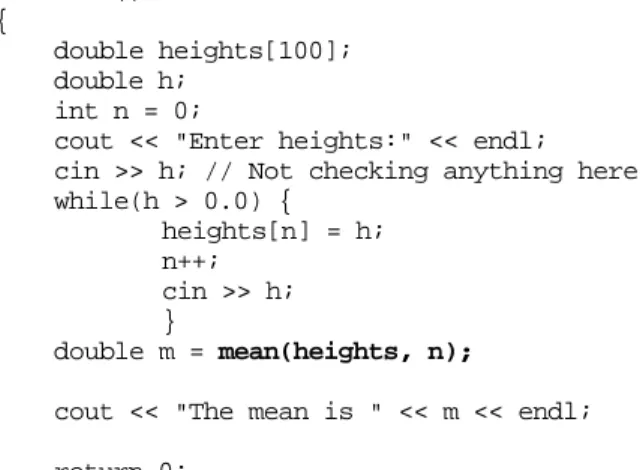
This improved version of mean() is used in the following code fragment:
Arrays are always passed by reference
Arrays as arguments to functions 301
int main() {
double heights[100];
double h;
int n = 0;
cout << "Enter heights:" << endl;
cin >> h; // Not checking anything here while(h > 0.0) {
heights[n] = h;
n++;
cin >> h;
}
double m = mean(heights, n);
cout << "The mean is " << m << endl;
return 0;
}
Figure 11.1 illustrates the stack during a call to mean(). The hexadecimal numbers, e.g. , shown are actual addresses when the program was run on a particular machine.
By convention, data addresses are always shown in hexadecimal ("hex").
The instruction sequence generated for the call m = mean(heights, n) would be something like:
load register with the address of array heights (i.e. address of heights[0])
store in stack
load register with value of n store in stack
subroutine call
load register with value in return slot of stack store in m
clean up stack
The instructions in function mean() would be something like:
load an address register a0 with contents of first argument slot of stack frame load integer register d0 with contents of
second argument slot of stack frame zero contents of double register f0
zero second integer register d1 loop
compare integer registers d0 and d1 if contents equal jump to end
Function call with array as argument
"Stack frame" for int main()
"Stack frame" for double mean()
heights[0]
0xeffff390
5 Arguments values on stack Space left for result Housekeeping info sum
860 170
"Stack Frame"
register holds this address
144 130 136 162
0 162
heights[99]
h
5 n
Address 0xeffff390
Address argument on stack specifies start of array
Figure 11.1 Stack with when calling double mean(double data_array[], int numitems).
copy content d1 to register d2 multiply d2 by 8
copy content of a0 to address register a1 add content of d2 to a1
add double from memory at address a1 to register f0 add 1 to d1
jump to loop end
convert integer in d0 to double in f1 divide f0 by f1
store f0 in return slot of stack frame
This code uses the array identified by its address as provided by the calling routine.
Typically, it would hold this "base" address in one of the CPU's address registers. Then when array elements have to be accessed, the code works out the offset relative to this base address to get the actual address of a needed element. The data are then fetched from the memory location whose address has just been determined. (The bit about
"multiplying an integer index value by 8" is just part of the mechanics of converting the index into a byte offset as needed by the hardware addressing mechanisms of a machine. Programmers may think in terms of indexed arrays, machines have to use
Arrays as arguments to functions 303
byte addresses so these have to be calculated. The value of the 'multiplier', the 8 in this code, depends on the type of data stored in the array; for an array of longs, the multiplier would probably be 4. The operation wouldn't actually involve a multiplication instruction, instead the required effect would be achieved using alternative quicker circuits.)
const and non const arguments
The function mean() doesn't change the data array it is given; it simply reads values from that array. However, functions can change the arrays that they work on. So you could have the function:
void change_cm_to_inches(double h[], int n) {
// I'm too old fashioned to be happy with cm, // change those height values to inches for(int i = 0; i < n ; i++)
h[i] /= 2.54;
}
If called with the heights[] array, this function would change all the values (or, at least, the first n values) in that array. (Coding style: no return – that is OK in a void function, though I prefer a function to end with return; the smart h[i] /= 2.54; – it is correct, I still find it easier to read h[i] = h[i] / 2.54.)
Function mean() treats its array argument as "read only" data; function change_cm_to_inches() scribbles all over the array it was given. That is a substantial difference in behaviour. If you are going to be calling a function and giving it an array to work with, you would usually like to know what is going to happen to the contents of that array.
C++ lets you make this distinction explicit in the function prototype. Since mean() doesn't change its array, it regards the contents as – well constant. So, it should state this in its prototype:
double mean(const double data_array[], int numelements);
As well as appearing in function declarations, this const also appears where the function is defined:
double mean(const double data_array[], int numelements) {
double sum = 0.0;
… }
The compiler will check the code of the function to make certain that the contents of the array aren't changed. Of course, if you have just declared an argument as const, it is unlikely that you will then write code to change the values.
The main advantage of such const (and default non const) declarations is for documenting functions during the design stage. In larger projects, with many programmers, each programmer works on individual parts and must make use of functions provided by their colleagues. Usually, all they see of a function that you have written is the prototype that was specified during design. So this prototype must tell them whether an array they pass to your function is going to be changed.
11.5 STRINGS: ARRAYS OF CHARACTERS
Sometimes you want arrays of characters, like the grade symbols used in one of the examples on array initialization:
const char grade_letters[6] = { 'F', 'E', 'D', 'C', 'B', 'A' };
The example in 11.8.2 uses a character array in a simple letter substitution approach to the encryption of messages. If you were writing a simple word processor, you might well use a large array to store the characters in the text that you were handling.
Most arrays of characters are slightly specialized. Most arrays of character are used to hold "strings" – these may be data strings (like names of customers), or prompt messages from the program, or error messages and so forth. All these strings are just character arrays where the last element (or last used element) contains a "null"
character.
The null character has the integer value 0. It is usually represented in programs as '\0'. All the standard output routines, and the string library discussed below, expect to work with null terminated arrays of characters. For example, the routine inside the iostream library that prints text messages uses code equivalent to the following:
void PrintString(const char msg[]) {
int i = 0;
char ch;
while((ch = msg[i]) != '\0') { PrintCharacter(ch); i++; } }
(The real code in the iostream library uses pointers rather than arrays.) Obviously, if the message msg passed to this function doesn't end in a null character, this loop just keeps printing out the contents of successive bytes from memory. Sooner or later, you are going to make a mistake and you will try to print a "string" that is not properly terminated; the output just fills up with random characters copied from memory.
You can define initialized strings:
"null character"
Strings 305
const char eMsg1[] = "Disk full, file not saved.";
const char eMsg2[] = "Write error on disk.";
The compiler checks the string and determines the length, e.g. "Write … disk." is 20 characters. The compiler adds one for the extra null character and, in effect, turns the definition into the following:
const char eMsg2[21] = { 'W', 'r', 'i', 't', 'e', ' ', 'e', 'r', 'r', 'o', 'r', ' ', 'o', 'n', ' ', 'd', 'i', 's', 'k', '.', '\0'
};
If you want string data, rather than string constants, you will have to define a character array that is going to be large enough to hold the longest string that you use (you have to remember to allow for that null character). For example, suppose you needed to process the names of customers and expected the maximum name to be thirty characters long, then you would define an array:
char customername[31];
(Most compilers don't like data structures that use an odd number of bytes; so usually, a size like 31 gets rounded up to 32.)
You can initialize an array with a string that is shorter than the specified array size:
char filename[40] = "Untitled";
The compiler arranges for the first nine elements to be filled with the character constants 'U', 'n', …, 'e', 'd', and '\0'; the contents of the remaining 31 elements are not defined.
Input and output of strings
The contents of the character array containing a string, e.g. filename, can be printed with a single output statement:
cout << filename;
(The compiler translates "cout takes from character array" into a call to a PrintString() function like the one illustrated above. Although filename has 40 characters, only those preceding the null are printed.)
cin >> character array
The input routines from the iostream library also support strings. The form "cin gives to character array", e.g.:
cin >> filename;
is translated into a call to a ReadString() function which will behave something like the following code:
void ReadString(char target[]) {
char ch;
// Skip white space ch = ReadCharacter();
while(ch == ' ')
ch = ReadCharacter();
// read sequence of characters until next space int i = 0;
while(ch != ' ') { target[i] = ch;
i++;
ch = ReadCharacter();
}
// Terminate with a null target[i] = '\0';
}
The input routine skips any leading "whitespace" characters (not just the ' ' space character, whitespace actually includes things like tab characters and newlines). After all leading whitespace has been consumed, the next sequence of characters is copied into the destination target array. Copying continues until a whitespace character is read.
Of course there are no checks on the number of characters read! There can't be. The compiler can't determine the size of the target array. So, it is up to the programmer to get the code correct. An array used in an input statement must be large enough to hold the word entered. If the target array is too small, the extra characters read just overwrite other variables. While not a particularly common error, this does happen; so be cautious. (You can protect yourself by using the setw() "manipulator". This was illustrated in section 9.7 where it was shown that you could set the width of an output field. You can also use setw() to control input; for example, cin >> setw(5) >>
data will read 4 characters into array data, and as the fifth character place a '\0'.) The iostream library code is written with the assumption that any character array filled in this way is going to be used as a string. So, the input routine always places a null character after the characters that were read.
With "cin >> array", input stops at the first white space character. Sometimes, it is necessary to read a complete line containing several words separated by spaces. There is an alternative input routine that can be used to read whole lines. This routine, Caution, area where
bugs lurk
getline()
Strings 307
getline(), is part of the repertoire of things that an istream object can do. Its prototype is (approximately):
getline(char target[], int maximum_characters, char delimiter = '\n');
Function getline() is given the name of the character array that should hold the input data, a limit on the number of characters to read, and a delimiter character. A call to getline() has a form like:
cin.getline(target, 39, '\n');
(read this as "cin object: use your getline function to fill the array target with up to 39 characters of input data").
The delimiter character can be changed. Normally, getline() is used to read complete lines and the delimiter should be the '\n' character at the end of the line. But the function can be used to read everything up to the next tab character (use '\t' as the delimiter), or any other desired character. (Caution. The editors used with some development environments use '\r' instead of '\n'; if you try reading a line from a text data file you may not find the expected '\n'.)
Characters read from input are used to fill the target array. Input stops when the delimiter character is read (the delimiter character is thrown away, it doesn't get stored in the array). A null character is placed in the array after the characters that were read.
The integer limit specifies the maximum number of characters that should be read.
This should be one less than the size of the target array so as to leave room for the null character. Input will stop after this number of characters have been read even though the specified delimiter has not been encountered. If input stops because this limit is reached, all unread characters on the input line remain in the input buffer. They will probably confuse the next input operation! (You can clear left over characters by using cin.ignore() whose use was illustrated earlier in section 8.2.)
The string library and the ctype functions
There is a standard library of routines for manipulating strings. The header file string.h contains declarations for all the string functions. Some of the more commonly used functions are:
strcpy(char destination[], const char source[]);
strncpy(char destination[], const char source[], int numchars);
strcat(char target[], const char source[]);
strncat(char target[], const char source[], int numchars);
int strcmp(const char firststring[], const char secondstring);
string.h
int strncmp(const char firststring[], const char secondstring, int num_chars_to_check);
int strlen(const char string[]);
(These aren't the exact function prototypes given in the string.h header file! They have been simplified to use only the language features covered so far. The return types for some functions aren't specified and character arrays are used as arguments where the actual prototypes use pointers. Despite these simplifications, these declarations are
"correct".)
The following code does not compile:
char baskin_robertson[50]; // Famous for ice creams cout << "Which flavour? (Enter 1..37) : ";
int choice;
cin >> choice;
switch(choice) {
case 1: baskin_robertson = "strawberry"; break;
case 2: baskin_robertson = "chocolate"; break;
…
case 37: baskin_robertson = "rum and raisin"; break;
default: baskin_robertson = "vanilla"; break;
}
If you try to compile code like that you will get some error message (maybe "lvalue required"). In C/C++, you can not do array assignments of any kind, and those "cases"
in the switch statement all involve assignments of character arrays.
You can't do array assignments for the same reason that you can't pass arrays by value. The decision made for the early version of C means that arrays are just blocks of memory and the compiler can not be certain how large these blocks are. Since the compiler does not know the size of the memory blocks, it can not work out how many bytes to copy.
However, you do often need to copy a string from some source (like the string constants above) to some destination (the character array baskin_robertson[]). The function strcpy() from the string library can be used to copy strings. The code given above should be:
switch(choice) {
case 1: strcpy(baskin_robertson, "strawberry"); break;
…
default: strcpy(baskin_robertson, "vanilla"); break;
}
Function strcpy() takes two arguments, the first is the destination array that gets changed, the second is the source array. Note that the function prototype uses the You can't assign
arrays:
strcpy()
Strings 309
const qualifier to distinguish between these roles; destination[] is modified so it is not const, source[] is treated as read only so it is const.
Function strcpy() copies all the characters from the source to the destination, and adds a '\0' null character so that the string left in the destination is properly terminated.
(Of course, there are no checks! What did you expect? It is your responsibility to make certain that the destination array is sufficient to hold the string that is copied.)
Functions strncpy() copies a specified number of characters from the source to the destination. It fills in elements destination[0] to destination[numchars-1]. If the source string is greater than or equal to the specified length, strncpy() does not place a '\0' null character after the characters it copied. (If the source string is shorter than the specified length, it is copied along with its terminating null character.) You can use strncpy() as a "safe" version of strcpy(). If your destination array is of size N, you call strncpy() specifying that it should copy N-1 characters and then you place a null character in the last element:
const int cNAMESIZE = 30;
…
char flavour[cNAMESIZE];
…
strncpy(flavour, othername, cNAMESIZE-1);
flavour[cNAMESIZE-1] = '\0';
The strcat() function appends ("catenates") the source string onto any existing string in the destination character array. Once again it is your responsibility to make sure that the destination array is large enough to hold the resulting string. An example use of strcat() is:
char order[40] = "pizza with ";
…
strcat(order,"ham and pineapple");
changes the content of character array order from:
pizza with \0...
to:
pizza with ham and pineapple\0...
Function strncat() works similarly but like strncpy() it transfers at most the specified number of characters.
Function strlen() counts the number of characters in the string given as an argument (the terminating '\0' null character is not included in this count).
These functions compare complete strings (strcmp()) or a specified number of characters within strings (strncmp()). These functions return 1 if the first string (or
strcat()
strlen() strcmp() and strncmp()
first few characters) are "greater" than the second string, 0 if the strings are equal, or -1 if the second string is greater than the first.
The comparison uses the "collating" sequence of the characters, normally this is just their integer values according to the ASCII coding rules:
32: ' ' 33: '!' 34: '"' 35: '#' 36: '$' 37: '%' 38: '&' 39: ''' 40: '(' 41: ')' 42: '*' 43: '+' 44: ',' 45: '-' 46: '.' 47: '/' 48: '0' 49: '1' 50: '2' 51: '3' 52: '4' 53: '5' 54: '6' 55: '7' 56: '8' 57: '9' 58: ':' 59: ';' 60: '<' 61: '=' 62: '>' 63: '?' 64: '@' 65: 'A' 66: 'B' 67: 'C'
…
86: 'V' 87: 'W' 88: 'X' 89: 'Y' 90: 'Z' 91: '[' 92: '\' 93: ']' 94: '^' 95: '_' 96: '`' 97: 'a'
…
…
For example, the code:
char msg1[] = "Hello World";
char msg2[] = "Hi Mom";
cout << strcmp(msg1, msg2) << endl;
should print -1, i.e. msg1 is less than msg2. The H's at position 0 are equal, but the strings differ at position 1 where msg2 has i (value 105) while msg1 has e (value 101).
Another group of functions, that are useful when working with characters and strings, have their prototypes defined in the header file ctype.h These functions include:
int isalnum(int); // letter or digit?
int isalpha(int); // letter?
int iscntrl(int); // control character int isdigit(int); // digit?
int islower(int); // One of 'a'…'z'?
int ispunct(int); // Punctuation mark?
int isspace(int); // Space
int isupper(int); // One of 'A'…'Z"?
int tolower(int); // Make 'A'…'Z' into 'a'…'z' int toupper(int); // Make 'a'…'z' into 'A'…'Z' int isprint(int); // One of printable ASCII set?
Collating sequence of characters
ctype
11.6 MULTI-DIMENSIONAL ARRAYS
You can have higher dimensional arrays. Two dimensional arrays are common. Arrays with more than two dimensions are rare.
Two dimensional arrays are used:
Multidimensional arrays 311
for all kinds of tables, e.g. a spreadsheet:
Week 1 2 3 4 5 6 7
Salesperson 1 2 3 4 5
12 6 10 9 23 9 11 12 4 18 13 9 8 7 19 8 4 6 6 13 3 2 7 7 15 9 11 13 10 19 0 0 0 0 0
to represent physical systems such as electronic interactions between atoms in a molecule:
π1
π2 π3
π4 π-Orbital overlap integrals
1.00 0.52 0.08 0.01 0.52 1.00 0.44 0.08 0.08 0.44 1.00 0.52 0.01 0.08 0.52 1.00
or something like light intensities in a grey scale image (usually a very large 1000x1000 array):
200 200 180 168 100 … … 160
200 190 180 170 99 … … 155
200 194 170 … …
…
…
10 10 …
10 8 4 … … 10
and in numerous mathematical, engineering, and scientific computations, e.g calculating coordinates of the positions of objects being moved:
sx 0 0 0
0 sy 0 0
0 0 sz 0
![Figure 11.1 Stack with when calling double mean(double data_array[], int numitems).](https://thumb-ap.123doks.com/thumbv2/123dok/11579289.0/20.892.311.751.109.481/figure-stack-calling-double-mean-double-array-numitems.webp)
