General IT Security Plan
Solutions in this chapter:
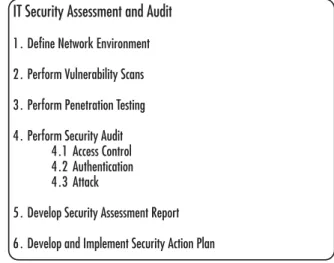
■ IT Security Assessment and Audit
■ Authentication
■ Access Control
■ Auditing
■ Attacks
■ Assessment and Audit Report
■ General IT Security Project Parameters
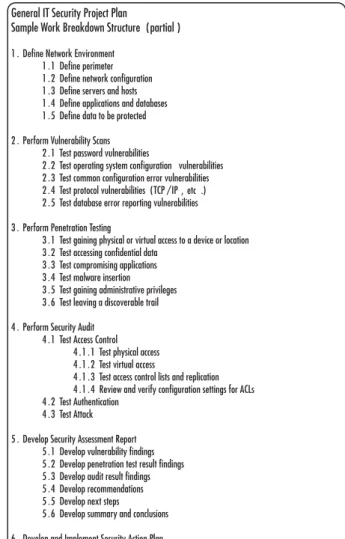
■ General IT Security Project Plan
Chapter 10
Summary
Solutions Fast Track
Introduction
In this chapter, we provide the framework for creating a general
Information Technology (IT) security project as part of your overall cor- porate IT security project plan strategy. As with all of the individual secu- rity area projects (ISAPs) discussed in this book, this is intended to be a template to use as a starting point.You might be wondering what a “gen- eral” IT security project plan consists of. In this chapter, we’ll discuss the security assessment and auditing function in great detail. Most corporate IT security plans start with a thorough assessment so that the problem statement can be developed. As discussed in Chapter 9, you might per- form your assessment as one of the major objectives of your corporate project, or you might implement the assessment as a separate project whose results feed into your corporate IT security project plan. Either way, your planning begins with an assessment, which is covered in detail here. We also look at access control, authentication, and attacks, and how to build a project plan that addresses these core areas.
IT Security Assessment and Auditing
For the purposes of this chapter, let’s define assessment as the act of testing network security to determine the strength of current security measures. Furthermore, let’s define auditing as the act of examining, recording, and evaluating security configurations. Clearly these two activi- ties should work in tandem. If all you do is run some tests against your network, you’ve performed an assessment that might yield important information. However, if your test misses some critical area, you’re still vulnerable. If you perform an audit, you might see that your server con- figuration is air-tight. Again, you might miss a vulnerability caused by the interaction of security in one network system (e.g., servers) and another network system (e.g., firewalls or routers).These two activities are, in a sense, two sides of the same coin and together they provide as complete a picture of your network security as possible. Let’s begin by talking about assessments.
People are always the weakest link in security.Take the recent cases of hackers getting into corporate credit card databases. In many of these recent stories, someone on the inside of the organization made a poor decision (whether malicious or not) about how to handle the data, resulting in a vulnerability that was exploited by an outsider. Social engi- neering, lack of awareness of security best practices, and malicious intent are ranked very high on the list of vulnerabilities from the people per- spective. Assessing your vulnerabilities from a people perspective should include these methods.
Processes are the security processes maintained by the company from top to bottom. Vulnerabilities occur because IT security processes, such as analyzing key network traffic, are poorly defined or poorly executed.
Corporate policies with regard to security processes often fall behind known threats and fail to address new threats. A good example is having a policy about reporting new or unexpected equipment found on or near one’s desk. Since rogue wireless networks are easy to install, if employees are not vigilant about investigating new or unusual equipment (they often assume someone from IT put it there), there is a risk. In addition, if IT policy doesn’t specifically define a procedure for installing new equip- ment, you are losing an opportunity to maintain security. It’s a two-sided process. IT should define clear procedures for how things will work, so that users can be educated as to standard operating procedures. Both groups can therefore keep an eye out for rogue or unusual activity that falls outside standard policies and procedures. In addition, processes such as how employees are removed from access control lists when they leave the organization, should be part of the assessment to ensure standard pro- cedures maintain strong security.
Technology vulnerabilities are the most tangible of the three vulnerabil- ities and are the ones that most people in IT start out looking for. While these are found in abundance in technical trade magazines and Web sites, don’t make the mistake of thinking that the most important vulnerabili- ties are those with the actual technology. While important, they are part of this triad of people, process and technology that, when addressed holis- tically, gives your network the highest possible security. In many ways,
assessments, access control, authentication, and auditing address all three aspects of security.There are technology assessments and risk assessments, both of which are discussed in this section.
Business Intelligence…
Lingo
For what it’s worth, the National Security Agency (NSA) and the National Institute of Standards and Technology (NIST) use slightly different lingo.
They use management (people), operations (process), and technology. In How to Cheat at IT Project Managementand throughout this companion book, we use the terms people, process, and technology, which are slightly different but the intent is the same.
We can also look at security through a layered approach. In fact, the more ways you parse out your environment, the more likely you are to find vulnerabilities. In Figure 10.1, you can see that your first line of defense consists of your policies, procedures, and user awareness.These form the foundation of all network security, because people and process are two of the three major components of security.The physical environ- ment includes physical access to equipment and the general security of the facility. If a hacker gains legitimate (though unauthorized) access to someone’s desk and is able to root around amongst all the sticky notes to find a username and password, you essentially have wasted all those thou- sands (or millions) of dollars on protecting the network from outside attack. Finally, there are both physical and virtual security elements related to the perimeter, the internal network, servers and hosts, applications and databases, and the data itself.The virtual elements include all the ways someone could access this information from outside the organization, while the physical elements include the ways someone could physically access these components.
Figure 10.1Layered Approach to Network Security
Perimeter or Boundaries
First, you should define your perimeter and determine where your border areas are. (Some people use the term “perimeter,” and others prefer the term “boundaries.”) Be clear that the perimeters or boundaries are either physical or logical.The port of a router is a physical boundary.
A network segment is a physical boundary.The Internet Protocol (IP) subnet is a logical boundary.The responsibility for securing data from Point A to Point B is a logical boundary. Next, you should define the components that protect your perimeter, which typically include firewalls, routers, proxy servers, and Demilitarized Zones (DMZ’s), to mention a few. After user awareness and adherence to policies and procedures, your perimeter defense is often your first line of defense against external attacks. Remember, many attacks or security breaches are internal, so an obsessive fixation with just the perimeter is not going to keep your net- work safe.
Corporate and IT Policies, Procedures and Training Physical Security Environment
Perimeter
Network Configuration
Servers and Hosts
Applications and Databases
Data
Internal Network
How your network is configured and segmented is of great interest to hackers, because once they learn this, they can navigate easily through your entire internal network. Information regarding the segmentation and addressing of network segments as well as the presence and configuration of any network intrusion detection systems (IDS), would also be a real bonus for a hacker, and would provide a great jump start to many types of intrusive attacks.
Servers and Hosts
Information about the types, locations, and numbers of servers and hosts (for our purposes, any non-server network device with an IP address,) is great information for a hacker.This is an area where a fair amount of effort is expended to harden the devices against attack. System hardening includes tasks such as disabling unused protocols and ports, removing unused applications, implementing access control and authentication requirements, maintaining up-to-date anti-virus, anti-spyware applica- tions, maintaining up-to-date operating systems and applications, and per- forming ongoing and meaningful intrusion detection and auditing
functions.
Applications and Databases
Applications and databases are also common targets for attackers. If a hacker can gain access to an application, he or she might be able to modify data, insert data, or steal data.The same holds true for a database application except that with databases, there is often a wealth of informa- tion a hacker would really like to get their hands on. In addition, some- times the objective is to simply corrupt the database to cause financial or political problems for the company.Think of a database used for an online application in which a hacker changes the product pricing or inserts bad language into the product description.Think of a database that becomes corrupted, and mailings regarding the results of Human
Immunodeficiency Virus (HIV) testing are mailed to people’s work
addresses instead of home addresses.The list of possibilities is endless, and part of your assessment should be how the data could be corrupted and what the potential implications of such a result would be.
Data
Ultimately, hackers want data of all kinds. Sometimes the hacker doesn’t know exactly what data he or she wants, but they’ll take whatever they can get their hands on. Sometimes there’s a ripple effect to data acquisi- tion. A hacker might start with just the name of a technical contact listed in the WHOIS database for a Uniform Resource Locator (URL). He then uses that information to call the company and, through social engi- neering, convince the technical contact to give him the username and password for the account on the hosting company’s Web site. He or she then logs on and installs some tracking software. Now, every time a cus- tomer logs into his or her account on your Web site, the bad guy gets instant access. Clearly, this is just one type of data a hacker can use, but you can see how it can ripple down into your organization.
Unfortunately, there is a lot of public information out there on both publicly and privately owned companies.There is no way to avoid that.
However, a good rule of thumb is to only disclose required information, and to verify the entity you are disclosing the information to. Let’s look at some of the kinds of data a hacker might put to use.
Contact Information
As mentioned, various kinds of contact information can be extremely useful to attackers.They can use it to represent themselves as an employee or agent of the company, or they can use it to talk to the internal contact directly, pretending to be a legitimate external representative of a service provider. Employee names, mailing addresses, e-mail addresses, and phone numbers are excellent resources for social engineering.
Business Information
Who are your company’s business partners? Who are your vendors, sup- pliers, and contractors? This information is also extremely helpful for an attacker, because it can be used to impersonate people with legitimate ties to your company. In addition, if your company is acquiring or divesting another company or division, it creates security holes that can be
exploited by an attacker who is aware of this activity.
Extranet and Remote Access
While extranets and remote access channels are great tools for employees and vendors for a variety of purposes, unfortunately they are also magnets for hackers. Especially vulnerable are accounts used by external business partners, which typically use weak or default passwords. Unused or for- gotten modems are another great source of unauthorized remote access.
Valid User Accounts
To a hacker, valid user accounts with passwords are the mother lode, but even just a valid user account is a great starting point. It provides the attacker with information about the format of your user accounts and allows them to quickly figure out other valid user names based on the con- tact information provided. Some companies use a different username
format than their e-mail addresses to protect the user login format infor- mation (e.g., your e-mail address format might be first initial_lastname@
yourcompany.comwhereas your user login information might be first
name_middle initial_first four letters of your last name. While it’s a bit more dif- ficult for users to remember, they’ll quickly get the hang of it. It won’t nec- essarily prevent a hacker from figuring out your username format, but it might slow them down a bit. It might also help you to see any attempts at brute-force attacks, if they follow the format for your e-mail addresses and not your standard username format.
If an attacker has a valid user account and can figure out the format, he or she can then start a brute-force attack to crack the password.Thus, protecting user account formats is one half of the equation; the other half is requiring strong passwords.
System Configuration
System configuration information is also extremely valuable to an
attacker, because he or she can determine what types of attacks to launch.
If someone knows you’re running Microsoft Windows Server 2003, he or she can specifically attack vulnerabilities of those systems, including exploiting systems that have not been kept up-to-date with critical secu- rity patches. An example of this can be found at www.netcraft.com.
Business Intelligence…
Deterrence Tactics
An alarm on your car doesn’t prevent it from being stolen, it simply deters the would-be thief. They have to think twice about whether or not they can boost your car before someone pays attention to the alarm.
Similarly, protecting your corporate data from attacker reconnaissance missions is not going to increase your security, it will simply help deter would-be hackers. Putting up barriers wherever you can without impeding your own business processes (or without unduly impeding users) reduces the chances that an attacker will select your network as a target. In the end, your layered security systems are what will protect you, but why not make it as difficult as possible for a would-be attacker to get any helpful information?
Types of Security Assessments
There are various types of assessments you can perform on your overall network security. We’re not going to go into complete detail here,
because these topics are large and ever-changing. However, there are two major categories worth addressing: vulnerability scanning and pen testing.
Vulnerability Scanning
Vulnerability scanning slices both ways.You’re doing it to keep the bad guys out and the bad guys are doing it to find a way in. From the IT administrator’s perspective, the goal of vulnerability scanning is to identify devices on the network that are open to known vulnerabilities. Despite your best efforts, there will always be new vulnerabilities discovered, and your activities in this area will likely be almost non-stop. However, you have to begin from a known starting point, and performing vulnerability scanning begins with addressing the obvious first. Also, keep in mind that vulnerabilities encompass people, processes, and technology, so be sure to look at all three areas when addressing vulnerabilities. It doesn’t matter how locked down your systems are if you have a power user lose a laptop or hand out a password to someone posing as an IT staffer. Also, keep in mind that penetration (pen) testing is not useful for scanning for vulnera- bilities if the system hasn’t been secured. Other methods are more pro- ductive on the front end; pen testing can be more helpful on the back end after security measures have been implemented.
Enumeration
The most common type of vulnerability scanning is done using software tools that attempt to enumerate, or list, all of the network components.
Enumeration includes scanning to identify network segments, IP ranges, IP addresses, network configuration, names, addresses, and version num- bers for network devices, protocols, ports, versions, users, groups, directo- ries, patches, updates and any other information about the network.
Enumeration is possible because system vulnerabilities lead to unautho- rized exposure of important system information and because system capa- bilities are actually designed to help administrators manage networked systems, which also helps attackers. When vulnerabilities exist, they allow for exposure of information that can be exploited by an attacker.
Security Mistakes
Most organizations have a lot of data stored in various locations, directo- ries, and servers across the enterprise. Are you absolutely sure each of those areas is properly secured? Systems are often configured to replicate settings from the top of the hierarchy down through the lower layers of the directory or file hierarchy. Did those settings replicate properly? Were the original settings correct, or were mistakes replicated throughout the organization as well? These kinds of security mistakes can create huge security holes; therefore, vulnerability scanning should look for weak passwords, incorrect user, file, or folder permissions, default configura- tions, and unused features that should be disabled. In addition to errors, you also need to ascertain whether any settings have been altered or modified by a user within your organization. If a user’s permissions were accidentally misconfigured, he or she may have had the ability (even if for a short time) to increase their permission levels or even create a new user account for themselves.
Known Vulnerabilities
Known vulnerabilities are the first things exploited by attackers, but they’re also addressed by software makers through patches and updates. While a vulnerability might become known before a patch is available, often the patch is available before the attacker finds your network and your vulnera- bility. Such was the case in 2003, when the Blaster virus hit many corporate networks.The patch had been available for about three weeks before the attack occurred, but many organizations’ computers were not patched; best estimates place the infection rate at about 500,000 computers. Patching and updating are important in addressing known vulnerabilities, and since 2003, most organizations have developed better systems for patch and update management. Microsoft has new tools available, including the automatic update feature on desktop systems and the Microsoft Security Baseline Analyzer tool that allows you to scan for known vulnerabilities from a Microsoft systems perspective. Some scanning tools look for registry settings to determine whether or not the system is up-to-date, and more extensive
programs attack the system via the known vulnerabilities to see how it responds. A wide variety of tools are readily available and are usually a good investment for companies of all sizes. However, remember, these tools are also available to the bad guys.
Common Attacks
Vulnerability scanning has to look at both sides of the equation. Are known vulnerabilities addressed? Are known attacks addressed? There are many known attacks and attack methods that should be addressed in your security assessment. It’s not enough to cover known vulnerabilities; it’s possible that if you simulate attacks on your network you may uncover previously unknown vulnerabilities. Not all vulnerabilities can be patched or updated. Some vulnerabilities are the result of the interaction of two or more network components or systems.Therefore, it’s important that you include common attack scenario testing in your security assessment.
Pen Testing
Pen testing by itself proves nothing. So what if you can penetrate an inse- cure network? It’s akin to walking in the open front door of a house; it doesn’t tell you if the locks work. Second, pen testing is by no means comprehensive. In fact, it is like a laser; it goes directly at a particular target in a very focused manner. It will give you a result based on a spe- cific circumstance, but it won’t give you a broad overview of your net- work security. If you’re going to use pen testing as a tool, start with the
“low hanging fruit”; in other words, make sure the front door is locked, and then work your way up from there. Performing pen testing after a security project is far more useful than doing it beforehand, so be sure you understand when and why you’d use pen testing in IT security pro- jects. Be clear about what the results of a pen test will tell you, not what you assume they’ll tell you. As an assessment tool, pen testing should be limited in scope (e.g., if you believe some specific part of your network is locked down you might perform a pen test on that area to verify your assumption).
Pen testing can be a tricky area, because you essentially have to hack your own network. So, before you head off to do a pen test, make sure you have the appropriate sign-off from corporate executives.The last thing you need is for you or one of your staff to be falsely accused of attacking the network when, in fact, you were legitimately testing the security of the network. Having a security testing plan in hand and get- ting sign off from your project sponsor is the best way to ensure there are no negative repercussions. Also keep in mind that an inexperienced pen tester could cause unintended problems ranging from minor to severe.
Think carefully about how and when these tests should be carried out and by whom. If you retain an outside firm to perform this type of testing, be sure they come well-recommended and with the appropriate credentials and a spotless reputation. Also, make sure that they sign the appropriate paperwork to shield you and them from liability. Finally, keep in mind that many companies think that hiring an outside firm to “just do the pen testing” is sufficient. What they fail to realize is that per- forming pen testing absent other security planning and implementation activities, can actually lay the company wide open for legal liability. If you are aware of the problem but do not take “reasonable care” in addressing it, you could be worse off than not knowing about the vulnerability in the first place.
Keep in mind that the ultimate goal of pen testing is to obtain admin- istrator-level privileges.Therefore, your testing should start from the same place as an outsider—without a username or password. Pen testing usually tries to exploit known vulnerabilities first, so this is a logical place to start. Not all vulnerabilities can be addressed, however. Remember, there is a limit to what you can protect and what you should protect. In keeping the balance between security and cost and security and reason- able business operations, you will probably find yourself making conscious trade-offs between security and other business objectives.Therefore, you may have to be creative and find alternate ways to address vulnerabilities besides simply closing and locking the door on them.
There are various methodologies you can use to perform a pen test.
Here’s one to get you started:
1. Think like the attacker. Determine how the attacker would most likely try to attack your network.This normally begins by
locating all publicly available information on the target and using that information as a starting point.
2. Locate vulnerabilities and areas of weakness. Use the elements in Figure 10.1 to ensure you’re looking across the entire enterprise.
3. Determine all the ways (currently known) a hacker could exploit the vulnerabilities and weaknesses found in Step 2.
4. Determine which assets might be attacked to access, alter, or destroy data based on the likely attack scenarios defined in Step 1 and the vulnerabilities identified in Step 2.
5. Determine whether an attack can be detected. If you are per- forming a pen test, determine if you were able to detect the attack, either in real-time or in retrospect.
6. Determine the attack footprint.The attack footprint is the size of the target. If you’re shooting an arrow, it’s harder to hit the stem of a plant than the side of a barn.The same holds true for your network. Determine how big a target you’re providing.
7. Analyze results, formulate remediation strategy, and implement.
Risk Assessment
We know there is a trade-off between total security and total risk.There are financial and operational trade-offs that every organization must
make. In the risk assessment phase of your audit, you need to look at your risks in four specific categories:asset protection, threat prevention, legal liabili- ties, and costs.This is a good time to sit down with key stakeholders, including your executive sponsor or team, your financial, legal, human resources, and operational experts to determine what your company’s spe- cific risks are. As mentioned in Chapter 5, your IT security project plan team membership will likely change as you move through the phases of
your project. Risk assessment is a part of the initial definition stage, and should include all of the key stakeholders you can think of. At this point, it might be better to invite too many people to attend this meeting rather than too few. Anyone who finds their participation is not needed can opt-out, but you want to avoid forgetting a key player who can help you and your IT team perform a thorough risk assessment.
The risk assessment itself should be thorough; skimp here and you will likely end up with a less-than-optimal security solution. Even if your company can’t afford to implement all the recommended security solu- tions, at least you’ll have a thorough assessment of what’s needed.This may be important later on, because if a security breach does occur, you can point to documentation showing that your assessment indicated the breached area was a risk (which might save your job down the line).
However, rather than be right later on, use the results of the assessment to pro-actively push for a bigger budget and implement those changes now.
If there’s documentation showing that you were aware of the potential security risk and did not implement a solution, your firm might have a huge legal and financial liability on its hands. So, the thorough assessment cuts both ways. It gives you the data you need to make your case for appropriate funding, but it can also be used by attorneys to prove your company was aware of the risk and chose not to act.
Risk Assessment: Asset Protection
As we have continually stressed throughout this book, you have to find the right balance between protecting corporate assets and the cost of doing so. In any network assessment scenario, you should begin by understanding what you’re trying to protect and why.You may have ade- quately addressed this issue during your overall IT corporate security planning process. If so, you should review the data, assumptions, and out- comes at this stage to ensure your conclusions are still relevant and cor- rect.Things change so quickly in most corporate environments, that a quick review of previous assessment data is almost always a good use of your time.You should review what data is on your corporate network and what needs to be protected.This is also a good time to find out what
is on your corporate network that perhaps should not be. If you recall the case studies from Chapter 1, it’s not uncommon for corporate networks to store confidential data on the corporate network, such as credit card numbers or social security numbers.
In addition to discovering what is on your network (and what’s there but shouldn’t be), you also need to assess the relative value of that data.
While it can be argued that all corporate data is valuable, some data is clearly more valuable than other types of data. Remember that you need to think like a hacker to make these assessments. A list of nuts, bolts, and cable lengths are not worth as much in value as personal data such as credit card numbers, social security numbers, and bank access codes. Correlate the data on your network with the perceived value of the data to an outsider, to understand the relative risk to your network.This will help you determine how much security is appropriate for your specific situation.
A good example of this is a home wireless network. Most people using home wireless networks for things such as logging onto their online brokerage account or doing some online shopping with a credit card, do not secure them.This data is transmitted in an unsecured manner from their laptop or wireless device to their wireless access point, and then to the router or cable modem and out to the Internet. How likely is it that a hacker is going to grab that data? If you live in a dense urban setting where a hacker can sit in a nearby coffee shop and peruse wireless data like yours, then the likelihood is high. If you live in a more suburban or rural setting where it would be difficult for someone to get close enough to receive your wireless signal, the risk drops significantly. If you’re in an urban setting and you run an unsecured wireless network, your risk is probably four times higher than someone in a more rural setting.That said, your overall risk is still about 50 times lower than that of any corpo- rate network, because a hacker would have to sift through a fair amount of mundane wireless traffic at someone’s home before being able to grab usernames, passwords, and so forth; the upside potential for that hacker is minimal. Why go after a single person’s data if you can access thousands or millions of people’s data? Looking at the risk/reward proposition from a hacker’s perspective will help you assess the relative value of your assets
and what level of protection is warranted. Keep in mind there is always the hacker of convenience, who hacks because he or she can, whether there is a big payoff or not.
Sensitive Data
Sensitive data is defined differently from one company to the next. What’s sensitive at one company may not be sensitive at another. However, in most companies, there are clearly segments of data that are sensitive and, therefore, your security audit should identify those areas. As part of your corporate security project plan definition stage, you must clearly under- stand how sensitive your corporate data is. It goes beyond the legal impli- cations and into the business aspects. Lists of customers, vendors, suppliers, or employees can be sensitive, especially if you’re in a medical setting.
Trade secrets, formulas, and research and development (R&D) data can be extremely sensitive, especially in industries that work in leading edge or groundbreaking areas.This is a great place to get feedback and input from the various departments in your company. Ask them what data they work with that they would not wanted posted on a Web site or printed in a newspaper.That usually gets people’s attention and helps them to begin looking at the data they work with on a daily basis from a slightly different perspective. Here’s a quick list of data typically considered sensitive:
■ Customer databases
■ Employee lists
■ Identity information (e.g., customer, employee, vendor)
■ Credit card or other financial data
■ Health information
■ Intellectual property
■ Trade secrets
■ R&D
Remember, too, that there are two ways sensitive data is at risk. First, it can be stolen and used inappropriately by your competition, your
employees, or by those who can gain financially from the data. Second, it can be compromised. Imagine the damage that could be done if a publicly held corporation’s financial statements were changed without the com- pany’s knowledge, just before being released to the Securities and Exchange Commission (SEC) or just before a major announcement. Sensitive data must be protected from theft and from modification. Keep that in mind when you’re looking at your corporate IT security auditing plans.
Network Services and Business Operations
Sometimes an attacker is less interested in stealing or compromising data than they are in disrupting business operations (e.g., shutting down a Web site through a Denial of Service (DOS) attack, or corrupting a customer database or modifying financial statements). Whether it’s the external link (Web site) or the internal network, some hackers are simply looking to undermine the availability of the network.There are numerous areas to look for vulnerabilities in business and network operations.The following is a list to start with; your organization may have additional operations that need to be included on this list.
■ Internet connectivity
■ Web site connectivity
■ Web-based applications
■ Database services
■ Directory services
■ File services
■ E-mail services
■ Virus and intrusion prevention and detection services
■ Custom application services
■ Voice over IP (VoIP) services
Take an inventory of the various ways your company uses the net- work and electronic communications to understand the vulnerabilities
that your corporate IT security project plan should address. More than likely, you’ll want to create ISAPs to address the various categories, because smaller projects are more manageable.
Risk Assessment:Threat Prevention
Threat prevention starts with the IT security project problem statement.
What problems are we trying to solve with this project? In other words, what threats do we perceive that we need to address? What is the com- pany trying to protect through these security measures? What kinds of threats are likely or possible? Are you most concerned about an attack, a theft, or a breach and which is most likely to occur? Answering these questions will help you define your problem and your outcome state- ments, and will also help form a solid foundation for your corporate IT security project plan.
Because past security measures may be in place, there is not always a direct relationship between the importance of data and the threat to that data. If you process credit card transactions through a third-party com- pany, you do not store the credit card data any longer than it takes to transmit it to that third-party company. Also, if all of your transactions are conducted using a secure Internet protocol (Hyper Text Transfer Protocol Secure sockets [HTTPS] and so forth), the risk of credit card data being stolen from your company is fairly low. When looking at your threats and vulnerabilities, you should rank both the importance (the relative financial value) of the data and the relative threat or risk to that data.You want to make sure your most important data is properly secured while also ensuring that your biggest vulnerabilities are addressed. By identifying vulnerabilities and their likelihood of occurrence, you can create a priori- tized list that will help you make smart decisions should you be forced to choose to implement only a portion of your total corporate IT security strategy. If you need to stage your corporate IT security project imple- mentation to meet the financial needs of the company (e.g., breaking it down into phases that can be funded each fiscal quarter), this prioritized list can also help you decide which projects should be addressed during each phase of funding.
Denial of Service
A DOS attack is usually launched at a company’s Web site with the clear intention of making it unavailable to legitimate users. However, a DOS attack can also be launched in a variety of ways to deny service to Web sites, Internet access, network access, or wireless network access. When looking at your vulnerability to a DOS attack, don’t just look at the risk to your Web site; look at the risk to any network component that pro- vides vital business service that could be attacked.
Unauthorized Access
The threat of unauthorized access to network resources comes in various forms, all of which must be considered. It’s important to assess any points of entry (e.g., the Web site, any dial-in communications that are still
enabled (remember, you may not use dial-in access any more, but you may still have modems with live phone lines connected to your servers that have never been removed); network login and wireless access points are the most common. In addition, unauthorized access can be gained through various protocols being left open including Simple Network Management Protocol (SNMP), telnet, serial ports, and a variety of Transmission
Control Protocol (TCP)/IP ports. Using default settings on routers and wireless access points also leaves you vulnerable to unauthorized access, as does providing more lenient access to users and user accounts than
needed. Finally, there is the issue of social engineering that is often suc- cessfully used on sophisticated IT staff and unsuspecting users alike, in order to gain access to legitimate network credentials and to unauthorized.
Identity Theft
Identity theft is on the rise and while most people assume it happens as a result of online fraud, there are numerous ways identity theft can occur.
However, we confine our discussion of identity theft to the kinds most likely to occur within the business environment. As we’ve repeatedly dis- cussed, any company that collects, stores, or transfers credit card data can be a source of identity theft. In addition, companies that collect, store, or
transfer other personal information including names with addresses, social security numbers, and various account numbers (mortgage, brokerage account, bank account, insurance, and so on) can also be a source for information used to steal someone’s identity. It’s also important to secure employee’s personal data including the above-mentioned information, because even a company with 50 employees is a decent coup for someone attempting identity theft.
Individual consumers must take steps to secure and protect their per- sonal information when interacting with businesses; however, even then there are limits to what a consumer can do.Take the well-publicized cases discussed in Chapter 1.Those are clear indicators that businesses are the more likely target for identity theft, since hackers would clearly like to get their hands on 100,000 names and not just one or two. It’s critical that you take an inventory of the data your company collects, stores, and transfers, and identify any data that could be used to perpetrate identity theft on your consumers, your employees, or any other individuals your company deals with.
Personal Information Exposure
Personal information exposure can be the source of identity theft, but it’s not exactly the same thing. Exposure of personal information could be private or personal data that would not necessarily facilitate identity theft but some other type of harm. For example, suppose a medical supply company’s list of people and their associated medical problems was stolen and that the information was made public.That information couldn’t be used to steal someone’s identity, but it could reveal other personal infor- mation that customers don’t want to share. If your company has any sort of sensitive information including age, marital status, vacation schedules, alarm codes, and so forth, your firm could be liable if that information is stolen and used in any malicious way. A recent episode of a new televi- sion program featured a group of robbers that broke into an architectural firm and stole blueprints to a bank. While such a robbery would be out- side your control, if a hacker broke into your network and stole the elec-
tronic blueprints to someone’s home, another company, or a financial institution, your company could be held liable for a related robbery.
At the risk of redundancy, review all of the data your company stores, even data that appears to be useless to outsiders, and think about how that data could be used if it fell into the wrong hands.
Credit Card Fraud
We’ve talked extensively about personal information and we’ve referred repeatedly to credit card information as some of the most sensitive infor- mation companies work with. For most hackers, the bigger the potential gain, the more desirable the target.Therefore, any company that runs an online store is clearly a more interesting target than a home computer.
Online stores use secure Web protocols to ensure personal information, including credit card data, is secure when the user data is transmitted via the Internet to the company’s Web site. Many smaller e-commerce sites use a third-party credit card processing company to handle the entire credit card transaction so that the data never sits on the company’s server for more than the time it takes to authorize the transaction. Still, there is a vulnerability there. Hackers can compromise the Web site, redirect Web traffic, spoof the URL, send bogus e-mail that appears to be from your company and your Web site, redirect users to an alternate URL; the list goes on and on. Also, keep in mind that the threat is increased if you have an unsecured wireless network connected to your wired network. Any hacker than can gain access through the wireless network can work his or her way onto the wired network and into your credit card data.
Corporate Trade Secrets or Competitive Data
We can become so focused on personal user data such as social security numbers or credit card numbers, we might easily overlook corporate trade secrets or competitive data.There’s a long list of information that can be considered trade secrets or competitive data.The list for your company will be very specific to the business you’re in. We’ve included a generic list to help prompt your own investigation of data that could be considered confidential to your company.These include:
■ Customer or employee databases (used to steal customers or employees)
■ E-mails among employees discussing confidential matters
■ E-mails among executives discussing company secrets, financial status, or future plans
■ Competitive information
■ Formulas for products and descriptions of soon-to-be released products
■ Design specifications, engineering specifications, and technical diagrams or drawings for current or new products
■ Confidential reports, audits, or memoranda
■ Personnel files, performance reviews, pay rates
■ Financial reports
■ Source code for software projects
■ Marketing or technical project plans
Unfortunately, due to the variety of data listed here, it’s often difficult to definitively point to one or two network locations where this type of sensitive information exists. Usually, it’s spread across the enterprise in department-level folders, on e-mail servers, and on individual desktops and laptops. As part of your corporate IT security planning process, you may decide to designate specific locations for this type of sensitive data, to be sure it’s properly backed up on a regular basis, and so that you can control, monitor, and audit access to these files. In addition, pay special attention to executives and others who might have access to sensitive information and who travel with laptops.There have been several well- known cases of laptops with confidential or sensitive data being stolen from hotel rooms, locked cars, and airports. In some cases, the thief is just after the laptop. In worst case scenarios, these thefts constitute industrial espionage and are intended to garner trade secrets from a competitor or to steal plans, information, or other sensitive data.
Malicious Data Insertion
Malicious data insertion is a huge problem that is on the rise. Part of the reason is the increase in Internet usage and in the collaboration of mali- cious software (malware) writers. Hackers are getting along well these days, working together to create bigger corporate security headaches.
Malicious data insertion is a risk to every computer on the planet, save those that (for some reason) are completely isolated from the Internet.
The risk to individual user computers is clear: malware can steal user names and passwords, track where you go on the Internet, capture your instant messaging, and copy your e-mail. Pretty scary stuff. In the corpo- rate environment, that problem is multiplied by the number of hours the average user is on the network, the type of data carried on the corporate network, and the number of potential “back doors” available to hackers.
Rootkits are one of the most malicious and growing forms of mali- cious data insertion (see the following sidebar), but they’re not the only problems. Viruses, worms, corrupted or modified data, illegal, illicit, or unethical data can all be inserted into your network. We often think of security as preventing unwanted intrusion, which it is, but we sometimes forget that when the bad guys get in, they often want to leave something on your computer so they can continue to siphon data.
In addition, this malicious code can cause computers to become unstable which can result in thousands of lost hours and dollars trying to recover from these incidents. Some viruses or malware are intended to do nothing more than cause the computer to run slowly, generate errors, become unstable, or simply not boot.
Malicious data can also involve inserting bad, erroneous, or illegal data into the company’s network.Think about the last time you shopped online: almost every online store uses some sort of database to present product information, including product name, description, specifications, and price. What if a hacker inserted data into that database so that the pricing was wrong, or a competitor’s products were displayed, or the company’s President’s social security number was displayed instead of the
product number? In some cases, hackers are pulling a prank; in others, they want to create serious problems and may specifically target a com- pany they want to disrupt.
Business Intelligence…
Malware Threat Rises
An article written by Matt Hines in an April 2006 issue of eWeek.com is titled Rootkits, Smarter Hackers Pose Growing Security Threats. The article points to a study released by anti-virus maker, McAfee, on the growing sophistication of hackers and malware writers. According to the article, “Factoring into the issue, and the continued maturation of malicious attacks on enterprise systems, is the growing tendency toward collaboration among hackers.” McAfee said its research indicates that the use of so-called ‘stealth technologies’ has jumped by over 600 per- cent during the last three years.”
If you’re not already aware, a rootkit is a set of software tools typ- ically used by an attacker to hide unauthorized activity on the computer, and to evade anti-virus program detection. The tools are intended to conceal processes, files, or data running on the computer in order to evade detection. The issue made headlines in 2005, when Sony BMG music CDs placed a rootkit on Microsoft computers in order to prevent CD copying.
A recent report by Microsoft, the biggest target for hackers, announced it was practically impossible in some cases to get rid of a rootkit. In a separate eWeek.com article, Ryan Naraine reported that Mike Danseglio, program manager in the Security Solutions group at Microsoft, stated at a presentation at the InfoSec World conference that,
“When you are dealing with rootkits and some advanced spyware pro- grams, the only solution is to rebuild from scratch. In some cases, there really is no way to recover without nuking the systems from orbit.” In fact, when a branch of the U.S. government discovered over 2,000 user computers infected with a rootkit, it had no viable way to quickly scrub those systems and reinstall the operating system.
Continued
As malware threats rise, it’s even more important to train users, lock down systems, and have a solid plan in place for wiping out systems and starting from scratch if malware can’t be removed in any other way.
Be sure your audit looks for these problems as part of your project plan, and as part of your ongoing security operations. (See http://www.
eweek.com/article2/0,1895,1949650,00.asp, http://www.eweek.com/
article2/0,1895,1945782,00.asp.)
Equipment Theft or Damage
The threat of equipment theft or damage should be carefully assessed and is typically addressed through physical security planning; how buildings, offices, servers, and other network resources are physically secured.
Obviously, some items are easier to steal or break than others. It’s pretty hard to sneak out of a building with a desktop computer under your coat, but a blade server, router, or laptop is much easier.Your threat assess- ment should include taking a look at your physical premises to determine how easy (or hard) it would be for someone (insider or outsider) to steal or damage equipment. Network, communication, Web, database, and application servers would be at the top of the list and should be physically secured. Beyond servers, there are plenty of network resources that, if stolen or damaged, could hinder or halt business operations. Items such as routers, gateways, hardware firewalls, and network storage devices are crit- ical to daily operations, and should be included in your physical security assessment.
Risk Assessment: Legal Liabilities
You may need executive or legal input to understand the company’s legal liabilities, so make sure you have the right people involved in this assess- ment. For example: A specialty food distribution company sells to other businesses and directly to consumers through an online Web store.The company carries an inventory of about 5,000 products and its product catalog is available online. It keeps track of various data (e.g., business cus- tomers’ purchase orders, order history, returns, and so forth.; consumer names, addresses, phone numbers, and order history; and vendor order
history, stocking levels, pricing, transportation costs, and discounts. It pro- cesses credit cards through a third-party credit card processing company, and does not store credit card numbers, expiration dates, or related data.
What are the company’s legal liabilities? On the vendor side, they’re pretty low because the data is probably not very interesting to most hackers (excluding industrial espionage). On the customer side, the busi- ness customer’s order numbers, order history, and purchase order numbers are also not particularly useful to a hacker, unless someone wants a list of customers. Again, not particularly useful or lucrative data to go after.
Finally, the consumer data (e.g., credit card information, expiration dates, names, addresses, phone numbers, and so forth. What’s the liability here?
If the company has a secure connection to the credit card processing company, and if they never store that data, then the liability is more lim- ited than if they inappropriately store credit card data in order to do a bit of “data mining.” However, the security of the transmission between the credit card processing Web site and the company Web site should be assessed, as should the overall security of the Web site itself.
As you can see, by looking at your business processes from the hacker’s perspective, you can better determine where your legal liabilities lie and how best to address them. It’s important to understand what a hacker might go after and what the legal liabilities are in each of those scenarios.
Make sure you also understand what, if any, legal protection your firm has in the event of a breach, and what impact a breach might have on your organization such as blacklisting your domain name due to unauthorized spamming stemming from a breach. Make sure to include your firm’s legal representative in this discussion, to make sure you haven’t over- looked any legal elements. For a more detailed look at legal liabilities, pick up another Syngress title,Network Security Evaluation: Using the NSA IEM (see Chapter 5).
Third-party Attacks
Third party attacks are most common in the wireless arena, where an attacker (usually a spammer) sends unsolicited e-mail via your network connection. It’s simple enough once an attacker gains access through an
unsecured wireless network connection. In those cases, it is your net- work’s IP address that will be tagged as the source of this spam, even though no one from your company actually sent the e-mail. Many states are instituting legal and financial penalties for spamming, and your com- pany could be found liable for spam it never sent. Beyond the possible legal and financial penalties, your networks’ IP address could be black- listed or shutdown due to this type of activity, unless you have some way of proving you were the victim of a third-party attack. Even then,
restoring order and connectivity can be extremely difficult. Another growing and disconcerting kind of attack are zombie nets, which are Distributed Denial of Service (DDOS) attacks.
Illegal Data Insertion
We talked about malicious data insertion, but we didn’t specifically discuss the legal liabilities that can come from it (as opposed to malware, rootkits, and so on).There are two ways illegal data ends up on your network.
First, stolen content could be placed on your network from an attacker who gains unauthorized access to the network.They may place stolen data there in order to blackmail the company, to embarrass the company, or to get the company in legal hot water. Suppose a hacker (or disgrun- tled employee) places unlicensed, stolen software on your network and then reports your company to the authorities? Suppose a competitor’s blueprints or technical drawings end up on your network and it is somehow discovered? These kinds of activities may not steal your data, but they can certainly disrupt business operations, cost a lot of money, and create significant legal liabilities.
Risk Assessment: Costs
At some point in every project planning process, you should ask the question, “What if we do nothing?”The reason for this is to avoid solving a problem that doesn’t need to be solved. In the case of corporate IT security, you shouldn’t just “do nothing,” but if you start from there and
work your way up, you can begin to understand what is required and what might be optional, since you’re likely to have to make trade offs at some point.
Once you’ve decided to implement corporate IT security, you’ll need to include the initial and ongoing costs of securing the network to your cost estimates. If you already have an IT security solution installed, you’ll have to address the cost of both the ongoing (in place) IT security, and the new security initiatives.Your costs include securing the network data, securing the network connection, securing network communications, and securing end-user devices (laptops, Personal Digital Assistants [PDA’s]).
You will continually have to balance operational security with operational efficiency and security costs with remediation costs.
In addition to these implementation costs, you need to assess the cost of a network security breach to the organization. If the network is com- promised, how much will it cost you to repair the damage? What are the costs of remediation, legal defense, and possibly marketing and public relations to address a potential breach? Finally, you need to look at the cost/benefit analysis to determine how all the potential costs of a breach compare to the cost of securing the network in the first place.Though the answer almost always comes out in favor of pro-active security solu- tions, you need to be comfortable with your analysis so that you can defend it to your executive team or project sponsor.
People
When performing a risk assessment and looking at costs, you need to start with the people needed to design, implement and maintain security.
Without the right people in place, your costs (or schedule) can mush- room and you can still end up with a network full of security holes.
Critically assess your team’s skill set and be brutally honest with yourself about the skills your team has and the skills it lacks. Hiding your head in the sand won’t change the cost of the project but it will change the out- come if you don’t have the needed skills. As mentioned earlier, hiring an outside security consultant can be costly but the quality of the result can end up saving you time and money on the other end of the project. If an
outside consultant isn’t warranted or affordable, you’ll need to find alter- native ways of gaining the expertise you need at a reduced cost.That might involve training current staff (which still leaves them at the early stage of the learning curve), hire a well-qualified temporary employee (which comes with the danger that he or she will open a back door into your network), or hire a full-time employee with the requisite skills. It’s going to cost you no matter which way you approach it, so you might as well find your best alternatives early in the process. It’s usually an invest- ment that’s well worth it.
Training
As part of your security assessment, you’ll need to look at the training needs of the entire organization related to security. As we’ve stated, secu- rity is not a one-time activity; it takes the awareness, attention, and com- pliance of all network users to help ensure a secure network. As such, there are a variety of training activities that will probably be needed and which should be assessed early in the planning process.
■ Installation and Configuration Equipment that is improperly installed and configured creates a huge security hole.Think of all the wireless routers out there using the default administrator username and password. IT staff may require vendor-specific training on equipment, especially servers, routers, and firewalls, among others. Remember that training provides the necessary knowledge to IT staff, but there’s no substitute for hands-on experience.
■ Network Operations Training The ongoing operations of the network is where security is monitored, maintained, and managed once the security plans have been implemented.Therefore, as part of the assessment, it’s important to begin identifying what
ongoing operations are required to maintain security once it’s established. It’s important for those responsible for managing the day-to-day network operations to be well-versed in secure opera- tions, and to be well-trained in operational issues. Whenever pos-
sible, send your employees to vendor-sponsored training on the equipment you use. It’s a great way to ensure your employees are well-trained on network equipment, and a great way for your employees to learn about the latest tips, trick, and threats from the instructor or other class participants.
■ End-user Training End-user training is often overlooked in the security planning process, yet we all know that users can be the first line of defense. When users understand the threats that exist, they can actively participate in keeping the network secure. For instance, if employees understand that downloading files from unknown sources (and some known sources) can result in mal- ware being installed, they tend to be a bit more cautious about downloads. If they understand that an unusually slow computer or altered files can be a sign of virus, worm, or malware infection, they can quickly report it rather than disregard it. Also keep in mind that each company should have policies in place regarding safe and approved computer behavior. Each employee should be trained in these policies and ideally should have to acknowledge, in writing, that they will comply with these policies. While training can be a significant expense, the upside is that properly trained users are less likely to put the network or the company’s data at risk. We know the cost of remediation is very high both in real dollar costs and in lost productivity.The cost of training is almost always offset by the real reduction in security risks.
Equipment
When performing a risk assessment and looking at costs, it’s important to include equipment—both equipment that needs to be protected and equipment that protects the network. Equipment that needs to be pro- tected are all network servers, routers, switches, hubs, firewalls, desktops and mobile devices (your list might be longer).These devices need to be physically protected from theft, damage or unauthorized use. In addition, these devices need to be protected from remote attack such as data inser-
tion, data manipulation, or data theft. On the other side of the spectrum is the equipment you use to protect your network, including firewalls, isolated network segments (and the equipment used to create those sub- nets), routers, and more.
Sometimes it’s helpful to look at what network level (data link, net- work, application, and so forth) your equipment is operating and how it needs to be protected. In other cases, it might be more helpful to look at your network map and determine where security is needed.
Regardless of the security solution you’re working on (corporate IT security or one of the individual security area plans), you’re probably going to have to buy software or hardware to complement your security efforts.You can harden your servers, disable unused TCP/IP ports, set up auditing, and tighten access controls but you still need firewalls, anti-virus, anti-spyware, and other security systems to complement those efforts.
Again, be sure you do a thorough inventory and assessment before sitting through any company’s sales presentations. Define your goals, your needs, and your parameters first, then sit through the presentations. Companies will almost always try to up-sell you. Sometimes that’s a good thing because they add value to the process; however, other times it’s just about making more money. If you are clear about the equipment and the solu- tions you need before you sit down and talk with anyone, you’re more likely to purchase just the solutions you need, not the ones the company wants to sell you.
Time
When IT staff members are on salary, there’s a tendency to forget that time is money. IT security can take up tremendous amounts of time in many different areas, and the risk assessment and the associated costs should include the cost of people’s time. When planning the time for the risk assessment and the security plan implementation, include tasks such as:
■ Equipment specification development
■ Equipment purchase (direct purchase or through a bid process such as Request for Quote [RFQ])
■ Equipment set up, staging, testing, configuration, and installation
■ Integrating security solutions into existing infrastructure (plan- ning, staging, testing, implementing)
■ Maintenance, operations, and recovery procedures
■ Baseline testing and documentation
■ Security policies and procedures
■ Vendor contract negotiation and contract management
Time is a cost that should be captured within your assessment and in your project plan. When you delineate your project’s tasks, you’ll capture the estimated duration (how long you’ll allow for the task to be com- pleted) so you can create a project schedule. Depending on how your company works, you may also be required to capture labor costs. In these cases, you’ll need to estimate the time (effort) it will take to complete a task, and calculate the labor cost based on the wages of those who will be completing the task. Add tasks like those in the above bulleted list, so that you don’t inadvertently underestimate your labor costs in both the assess- ment and project implementation phases.
Impact Analysis
How much would it cost your business to be down for one hour? One day? One week? As part of your risk assessment, you need to identify your critical business systems and processes that most impact your busi- ness revenues, your assets, and your clients or customers.These should be ranked in order of direct and indirect costs. It’s not enough to merely determine that you’d lose $54,000 per hour of revenue. What is the cost in terms of lost productivity, IT staff time spent on remediation,
employees unable to access critical data, and the press getting wind of your security breach? Identify your business systems, evaluate the impact of an outage, and prioritize them so you can focus your attention on addressing the most critical aspects first.You can use a model like the one shown earlier (in Figure 10.1) as an aid in defining your impact analysis.
Since you’re likely to implement your security plan as a corporate IT security plan with smaller individual plans incorporated, you can choose to implement the most critical ISAPs first.This reduces your security risks quickly while providing a comprehensive approach to corporate security. As we’ve discussed throughout this chapter, the potential impact goes far beyond the financial impact and can include:
■ Immediate financial loss
■ Long-term financial loss
■ Loss of customer confidence
■ Industry or market loss of confidence
■ Bad press or intensive press scrutiny/investigation
■ Regulatory, statutory, or legal investigation
■ Shareholder scrutiny or lawsuits
There are companies that perform impact analysis as part of their con- sulting services, but in many cases, you can perform this assessment your- self or with help from key members of your company.The analysis should include identifying the most critical business processes across your entire company (not just the headquarters or location you’re most familiar with). After identifying these critical business processes, you should iden- tify the maximum outage your company can afford to sustain before it severely impacts the well-being of the company. According to the Gartner Group, 50 percent of all businesses that suffer a data loss due to attack or system failure went out of business within three years of the attack if they failed to restore the lost data within 24 hours.Your impact analysis should include the impact of both a full and partial outage.Your recovery and remediation plans should also be well-documented, so that you are able to recover quickly.Your impact analysis should address the financial, pro- ductivity, and personnel impact of an outage, and you will also need to account for the potential legal liability (and the related financial impact of legal defense and litigation) of a security breach that exposes confidential or personal information.
The impact analysis should also take into account the priority of recovery. Clearly, when a security breach is discovered, the first priority it to close the gap and secure the network. Once that is accomplished, however, additional work must be done to assess the scope, nature, and impact of the breach. Recovery and remediation plans should be priori- tized based on business impact, so that the most important systems are brought back online as quickly as possible. Sometimes in the heat of the moment, people tend to go after the “low hanging fruit” and focus on the tasks that are easiest or fastest to accomplish. Having an impact anal- ysis and prioritized list at your disposal during these crises can help you focus on getting the most important work done first without having to try to evaluate priorities during an “emergency.”
Public Access Networks
One of the most neglected areas is that of public access security and the impact to business via a breach in this arena. Here’s the most common scenario: A busy VP of Marketing is traveling to an important client meeting. She’s waiting in an airport for her flight and is waiting for one of her staff to make a key revision in the presentation she’s making at the client site. She fires up her laptop and checks her e-mail. While online, she opens another document, makes a few changes, and saves it. She logs off, saves the updated presentation to her laptop, turns off the computer, and boards her plane. It all sounds innocent enough until she checks into her hotel room and fires up the laptop. Now she finds that she can’t logon to her e-mail account. She gets a message saying username or pass- word is invalid. She contacts the IT help desk but it’s after hours and she gets a recording and the option to page someone. She’s very tired, it’s been a long day so she lets it go until morning. What she doesn’t know is that sitting in the airport was someone just waiting for someone else (the VP of Marketing in this case) to log onto an unsecured wireless network that appeared to be the airport network.The bad guy now has her corpo- rate username and password, which happens to be the same for her e- mail.The bad guy now has access to everything on her corporate network, and he’s been reading her e-mail while she is in meetings.
Because she’s a fairly high level corporate employee, chances are good her user account has permission to access highly confidential material.
Certainly she (and now the bad guy) have access to marketing plans and projections, financials, and more.
Most IT staff will focus intently on the impact to business operations if the corporate network is attacked directly, but the scenario described is becoming more commonplace. When looking at the potential impact, look at all of the ways your company’s employees connect to corporate data and look at the potential impact of these means of access.
Legal Implications
We discussed the legal implications at great length, so we won’t repeat that here other than to say that it should be abundantly clear to you by now that there are significant legal aspects to IT security that must be assessed and addressed in a clear, thoughtful, and intelligent way.The future of your company literally depends on how well you do your job in this area. No pressure.
After performing a thorough risk assessment, audit, and/or impact analysis, you should have a very clear idea of what needs to be secured and what the priorities are. When you looked at the impact of systems outages to your business, you should have developed a prioritized list that would help you in two ways: you know what you need to secure first, and you know where you need to focus your IT resources, including your staff, your budget, and your project planning efforts.You can priori- tize your ISAPs based on this analysis and build them into your corporate IT security plan in a phased manner.This helps by reducing the project scope, schedule, and budget and allows you to focus completely on one particular security area at a time. Granted, not everyone can implement security soluti