Here's a close-up of the front of the Mars car with a Raspberry Pi Zero mounted on top. The power supply is firmly attached to the frame This is a view from the inside.
Warning!
But as a functional exhibit, it's stunning, and what's more, it's open-sourced so anyone can try to make their own. Maybe it will lead to something – maybe people will contact me and it will involve some traveling and meeting new people,” he says.
Martin Spendiff
They were very popular in the 1960s and 1970s, and often placed in bedrooms (for the convenience of having a hot cup once you were woken by the machine's alarm). This writer fondly remembers her late grandmother's Teasmade sitting proudly in a guest bedroom waiting for the odd bed and breakfast guest she would occasionally take into her home.
The coffee stimulus
Right royal cuppa
Cost and maintenance issues with this setup meant they were eager to get involved in RMS Raspberry Pi meteor tracking. Thanks to CCTV and Raspberry Pi, a stargazing duo was able to capture some incredible scenes, discovers Rosie Hattersley.
Mary and Mark McIntyre
Mary and Mark's previous Raspberry Pi projects included a weather station and an all-sky camera that they used with an analog meteor camera, and for which they adapted code to display the findings on their website (see github.com/markmac99). The camera is connected via Ethernet to a Raspberry Pi 3 with 128GB SD card to capture images of passing meteors.
Scanning the skies
03 After the first night's run, you must 'calibrate' the camera's field of view against the stars - see the setup guide. 02 Install the camera in a weatherproof housing on the outside of a building with a good view of the night sky.
Wonders of the universe
If you have a little experience using Raspberry Pi and Linux, the installation is quite simple,” he says. My Pneumonia Detection project is a complete open source system that uses a Raspberry Pi along with a Raspberry Pi camera to run a state-of-the-art embedded machine learning model,” explains Arijit.
Machine learning and X-rays
This allows the device to scan x-rays of the chest and let the user know how much viral or bacterial pneumonia is present in the patient's chest. The full system package would cost you less than $100, including all necessary hardware and software, and it can run virtually anywhere.”.
Pneumonia Detection
The diagnosis is usually made by symptoms, and one of the more common methods of confirmation is an X-ray. Young maker Arijit creates a device that scans these X-rays to detect them more accurately.
Arijit
Pneumonia is a respiratory disease that results from any number of viral or bacterial infections in humans. In the past two years, cases of pneumonia have increased and there is a great need for a low-cost system that can detect pneumonia quickly and accurately.
Positive science
With more testing and learning, the system's accuracy will only increase, hopefully resulting in cheaper and more accessible pneumonia detectors. Rodrigo achieved this by creating a custom cartridge with a Raspberry Pi 3 computer neatly tucked inside.
Rodrigo Alfonso
Instead, it's possible to pick up a Game Boy Advance (GBA) in your hand, run PlayStation games on it, and not so much as pick up a screwdriver on the device itself. Rodrigo Alfonso's Game Boy Advance runs 3D titles made for the PlayStation, but all the magic is in the box, as David Crookes explains.
With great power
By installing and running the RetroPie emulator on the cart and playing a bit of poker with the GBA's Link Port, Rodrigo has been able to stream PSOne games on the Nintendo handheld.
3D or not 3D
There are a number of ways based on Raspberry Pi [boards] inside Game Boy Advance shells, but that's the real extensibility,” he says. Instead, the data from the program on the Raspberry Pi sends the ROM to the GBA via a connecting cable. PlayStation games run through
Snap to it
Sunrise Lamp
Russell Eveleigh
At a pre-programmed time, the Sunrise light will slowly begin to glow to indicate that it is morning. During the night, the light dims and the lamp acts as a night light, so at a predetermined time the Sunrise lamp starts to slowly light up to indicate that it is morning and time to get up, he explains.
Embrace the light
Changing things up
It also has a USB microphone system attached to the head, two speakers attached to the sides, and its most striking feature: an animatronic eye into which a Raspberry Pi camera is mounted. I originally wanted to test offline speech recognition as well, but I haven't had good results.
Technical Function
It also includes a real-time clock, an accelerometer to sense orientation, and a power circuit that turns the robot on and off with the push of a button.
Sean Glendinning
Electric eye
I could make the eye track people in real time and say their names when it saw their faces. The eye upon itself, testing the movement and following this blinking, wandering eye.
Follow along
Rather than forcing viewers to watch in widescreen format, this 43-inch 4K OLED TV can run on the stand, giving viewers the choice of horizontal or vertical video - perfect if you want to switch from a TV series like The Tick to to enjoy the latest shenanigans on TikTok. But instead of going right out and buying one, he tried to make his own version from scratch.
Rotating television
Not only would his television show what was playing on his Android phone, it would also rotate depending on how he was holding his device. I also wanted to buy a Chromecast dongle anyway and decided this was the right time to get started with programming.”.
Anton Suntinger
Steering the project
Round it goes
As soon as the value is equal to the vertical value, a Python script is activated that controls the motor via the GPIO outputs,” says Anton. At the same time, the scope output is adjusted to horizontal mode or portrait mode using the Xrandr command line tool.
FROM ONLY £5
SUBSCRIBE
WITH YOUR FIRST
12-MONTH SUBSCRIPTION Subscribe in print
WORTH
PRACTICAL
PROGRAMMING
WITH RASPBERRY PI
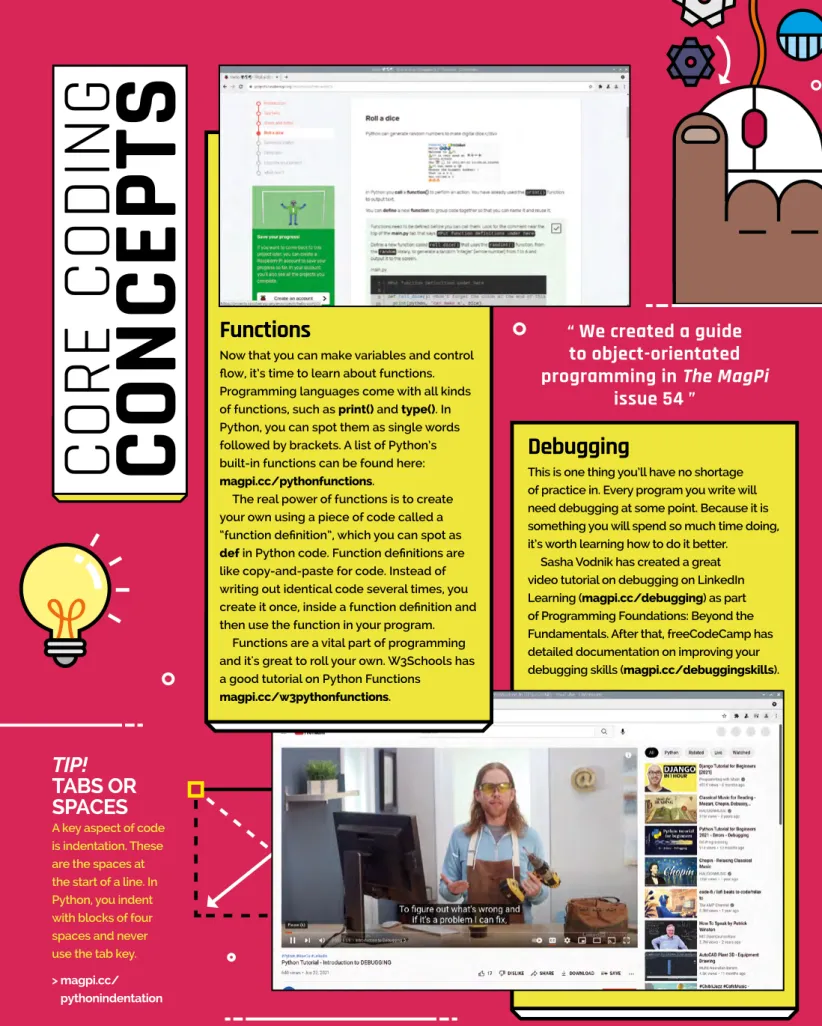
If you recently got a Raspberry Pi, we're pretty sure learning to code is high on your list. We'll discuss key coding concepts and tools, and the resources we found most useful.
SET UP YOUR
ENVIRONMENT
Load up code in Thonny
LANGUAGE
C & C++
Java
HTML & CSS
JavaScript
Complex
Your computer is set up, your IDE is open, and it's time to learn key coding concepts. The good news is that you don't need to learn that much to get started.
CORE CODING
CONCEPTS
Syntax
Variables and data
Flow
TIP! PEP 8
TIP!
Debugging
Functions
We created a guide to object-orientated
TRAINING WEBSITES
Object-orientated programming
It depends on what you are interested in and there are lots and lots of ideas out there. We advise you to pick up a pen and start jotting down ideas, once you get past the first few, your later ideas will start to get interesting.
Build a full-stack website
Make something physical
PICK A
PROJECT
Build an application
Create a game
Making a game is a good way to practise coding
SKILLS
02 Choose your operating system
03 Preparation
01 Get your kit together
PJ Evans
Create your own teletext service
You’ll Need
Top Tip
Zero 2 W from last month’s issue is
04 Check video output
05 Install VBIT2
06 Configuration
07 Start and test
Top Tips
08 Try a different service
09 Add some music
10 Add Twitter!
11 Create your own service
12 What’s next?
01 Connect the ADC
Phil King
Explore the
02 Connect the moisture sensor
03 Moisture level test
05 Liquid level sensor
06 Push notifications
04 Plant pot moisture
07 Plant monitor code
Taking it further
02 Prepare mt32-pi
Orphanides
You can route the audio output of the mt32-pi through the I2S DAC HAT instead of the default 3.5mm audio output. Here, the mt32-pi can output audio via a Raspberry Pi Zero 2 W HDMI cable connected to speakers via an audio extractor, amplifier or AV receiver.
04 Detect a DAC
A better option is an AV receiver or HDMI-carrying hi-fi amplifier with a decent set of speakers connected to it, or an HDMI audio extractor with a 3.5mm or stereo RCA output.
05 Configure mt32-pi.cfg for your DAC
06 Specialist DACs
07 First connections
08 A forest of cables
09 Modern PC configuration
12 Synth breakout
You can optionally add LEDs to the car to act as brake lights, indicators or headlights. This manual is from the Raspberry Pi Foundation and you can find a more detailed guide online at magpi.cc/legocar.
01 Set up the Build HAT
Use LEGO and the Raspberry Pi Build HAT to build a robot car, then program it so you can control it via a Bluetooth connection from your Android phone.
02 Set up the LEGO SPIKE motors
Richard Hayler
Marc Scott
03 Testing Blue Dot
Clicking OK should show a successful pairing of the Raspberry Pi and the Android device. Sometimes you will be asked to confirm a code before you can pair the devices.
04 Testing Blue Dot
05 Control your motors with Blue Dot
06 Assemble your robot
07 Going headless
Mark Calleja
You can then add this single line which will wait for 30 seconds and then run your bt_car.py file. Restart your Raspberry Pi, wait 30 seconds, then use your Blue Dot app on your Android device to connect to and control your car.
Make your own retro platformer
Code your homage to the Rainbow Islands in Python - a vertically scrolling platformer where enemies meet extremely colorful deaths. A rainbow is destroyed when the player character jumps on it, or after a certain amount of time has passed since it was created.
DRAW PLATFORMS
Rainbow Islands: The Story of Bubble Bobble 2, developed for arcades by Taito in 1987, stood out from other platformers thanks to its vertical level design and unique attacks. The player makes his way from the bottom to the top of narrow stages and can throw rainbows that can be used as temporary platforms and as an attack that destroys enemies.
PLAYER PROTOTYPE
Rainbows kill enemies if they collide with them while they are created, or if they fall on top of them while they are destroyed.
Wireframe
The Story of Bubble Bobble 2 – the 1987 classic that we use as the basis for our Python project. The collision is only calculated if the player falls, i.e. if speedY >= 0.
PROTOTYPES
The collision is calculated using Shapely's intersection function between two Shapely geometries: the platform line and the player's bounding box. To avoid missed intersections when the player falls down at high speed, the size of the player's bounding box increases by the speed value.
VERTICAL SCROLLING
ENEMIES
SHOOT RAINBOWS
GAME
PARAMETERS
Now we have a basic prototype for all the main
COLLECTABLES
DESTROY RAINBOWS
PLATFORMS
Each entry of this list contains the platform index and global screen position. The code in Listing16_TestPlatforms.py combines the player and rainbow from Listing10_PrototypeDestroyRainbows.py and the newly created platforms, stored in the new AllPlatforms class.
PLAYER
Since we've drawn some clouds as platforms, it seems appropriate to have the background fade from black to blue as the player goes up. This code also draws the platform collision lines to make sure everything is working as intended.
FULL GAME
COYOTE TIME
The code in Listing26_Collectables.py manages collectibles with two main lists in the Collections class: collectablesFlying and collectibles. FinalGame.py imports all the previous modules, creates the game classes, and calls them on fetch and update.
NEXT STEPS
When an enemy collides with the player, the life count is reduced, the player moves to the starting position, the rainbow count restarts at 1, and all enemies. It handles keyboard input and also handles the levelClear variable: when the player character reaches the top of the platform map, it is set to True and the level ends.
In this guide, we’ve learned how to code a platform
A rainbow will not destroy anything at any other time, but enemies or the player will be affected if they interact with it. When the flying collectible lands on a platform, an element from the collectableNames list is randomly selected.
However, elements in FallingRainbows can destroy enemies if they intersect - this is calculated with the Rectangles Intersect function. When an enemy dies, it drops a collector adding a new item to the collection list Flying at the same enemy position but at a random speed.
FINITE-STATE MACHINES
While programming is a great way to have fun and learn with Raspberry Pi, you can also use it to control things in real life. However, not everything is suitable for all age groups, which can cause a bit of brain fog when trying to think of things to do.
MAKER TOOLS
In the following pages, we will present the kinds of tools that are safe for both younger and older producers.
YOUR MAKER SPACE
03 Storage thoughts
01 Find your space
02 Safety-conscious
Stripping wire with scissors
TOOLS FOR
YOUNG MAKERS
TOOLS
METAL RULER
GOOD SCISSORS
ELECTRONICS STARTER KIT
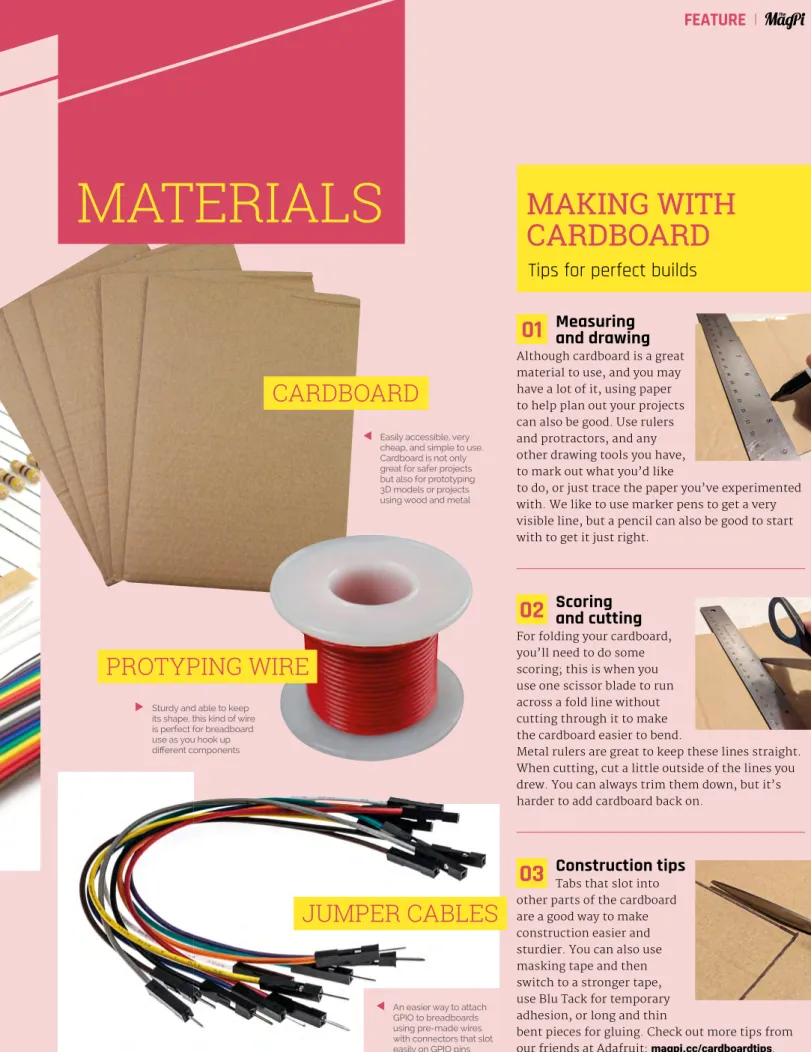
CARDBOARD
PROTYPING WIRE
JUMPER CABLES
01 Measuring and drawing
02 Scoring and cutting
03 Construction tips
TOOLS FOR TEENS
WIRECUTTER
SOLDERING IRON
Model kits
CRAFT KNIFE
3D PRINTER
01 Blender The free 3D modeling program Blender (blender.org) is great for creating your own custom models for 3D printing. 02 TinkerCAD Although TinkerCAD is a bit more basic than Blender, TinkerCAD allows you to create simpler 3D printing files much faster than Blender - especially if you are new to 3D modeling.
03 Combining models
TO PRINT
SOLDER
ELECTRICAL WIRE
While you can stick with the tools and skills from the back pages as long as you want, here are some great tools that will really help.
Carpentry resources
TOOLS FOR ADULTS
TOWER DRILL
WELDER
JIGSAW
HEAT GUN
ROTARY TOOL
Learn to weld
UPGRADES
WORKMATE BENCH
Local maker spaces
VICE
GRIPS AND CLAMPS
Bangle.js 2 is the second iteration of the device, and it replaces the original's circular screen and buttons with a square touchscreen. Bangle.js 2 has a 1.3-inch touchscreen with a single push button on the right side.
Roll your own
B angle.js is a project by Gordon Williams that aims to put hackable smartwatches on the wrists of manufacturers. We got the pink model in for testing and it's a nice watch that your reviewer likes to wear all day.
COMPONENTS
Smartwatches are increasingly becoming part of our digital lives, and as Gordon says: “even if you're an experienced hardware designer, it's hard to make a watch that's reliable and usable in the long term, let alone waterproof and is affordable." On the back sits a four-pin Serial Wire Debug (SWD) port that can be used for connectivity and charging.
SENSORS
The hardware is therefore an inexpensive off-the-shelf device, built on top of Shenzhen Smart Care Technology's SMA Q3 (magpi.cc/smaq3). These devices, purchased en masse by Gordon, are then reverse-engineered and the stock firmware replaced with an open source alternative.
SPECS
Bangle.js 2 comes with a bunch of documentation to help you on your development journey (magpi.cc/banle2docs). There are some tutorials made specifically for Bangle.js 2 and a great community you can contact for support (magpi.cc/banleforum).
10Verdict
Espruino is a JavaScript interpreter for microcontrollers, which seems to fit the Bangle. The tutorial section (magpi.cc/bangle2tuts) has a series of development tutorials, including making an app.
The real fun begins when
And you can develop your apps using Chromium on the Raspberry Pi by accessing Espruino's web-based IDE (espruino.com/ide). Equipped with a short ribbon cable to connect to the GPIO header, the Maker HAT Base makes it easy as you can mount the HAT vertically to the board's GPIO header, just like you would on any other Raspberry Pi model.
Base for electronics
In addition to extending the pins on the Raspberry Pi 400's GPIO header, Cytron's Maker HAT Base has a few tricks up its sleeve. The Maker HAT Base is equipped with quite a bit more functionality, including built-in push buttons, buzzer and mini breadboard plus a female breakout header.
ISSUE #51
OUT NOW
One of the best features of Raspberry Pi and Raspberry Pi Pico is that they are very small, which means you can put them in projects or hide them around your house.
OctoCam
10 Amazing
Digital Orrery
Media centre
Smart doorbell
PiGRRL Zero
PiE-Ink Name Badge
Autonomous Robotics Platform for Pico
Raspberry Pi Smart Watch
Laptop
Raspberry Beret
Tariq Rashid
Coursera
Online courses
Books to read
BEGINNING ARTIFICIAL INTELLIGENCE WITH THE RASPBERRY PI
THE HUNDRED-PAGE MACHINE LEARNING BOOK
HELLO WORLD
INTRODUCTION TO MACHINE LEARNING
LEARN WITH GOOGLE AI
FUNDAMENTALS OF DEEP LEARNING FOR
Alex Glow
Either Archimedes or F3NR1R – Archie because he was my first and because I've gotten so much joy out of connecting with people at Maker Faires and beyond through him. Using the StereoPi – a dual camera setup for the Compute Module – and a long exposure raspistill command, I'm able to draw things in the air with an LED and then see it all as a 3D image.
First Raspberry Pi build
I also have a bunch of Raspberry Pi ad cards that I got at Maker Faire a long time ago that advertise things like Sonic Pi tutorials. Our founders, Ben and Adam, just got together and decided to merge their visions into one venture.
MagPi
Monday
BETTER SAFE THAN SORRY
GPS HAT
Audio Codec HAT
CROWDFUNDING A PROJECT?
Best of the rest!
OPENAUTO PRO
HEART RATE DETECTION
If you are concerned, please contact [email protected] for all subscription queries, including where your free gift may be. However, I didn't have a 2-pin JST connector, so I just connected it to my Raspberry Pi Pico.
Contact us!
ENTHUSIASTS
VISIT CUSTOMPC.CO.UK TO LEARN MORE
ISSUE 222 OUT NOW
Terms & Conditions
Head here to enter: magpi.cc/win
A TONYPI
IN ASSOCIATION WITH HIWONDER
DON’T MISS OUT!
Plus!
DESIGN
CONTRIBUTORS
PUBLISHING
DISTRIBUTION
SUBSCRIPTIONS
THE MAGPI #115 ON SALE 24 FEB
G. Orphanides
G. Orphanides wants you to play and program imaginary retro games