157■Month 4: AdvAnced tActics And cAMpAign integrAtion
7
Month 4: Advanced Tactics and Campaign Integration
Armed with a plan, a corporate presence, a con- tent strategy, and the knowledge you need to run an effective advertising campaign, you can do just about anything you need to do on Facebook.
But if you really want to maximize the benefits of Facebook, you’ll need to integrate your efforts with other Internet marketing activities as well as your traditional marketing work. By bridging the social, online, and offline worlds, you’ll make the biggest impact by reaching customers where they are most comfortable interacting with you.
Chapter Contents
Week 1: Understand Essential Advanced Tactics
Week 2: Learn About Facebook Connect, Widgets, and Fan Boxes
Week 3: Integrate Your Efforts with Multichannel Marketing Week 4: Conduct Advanced Analytics
158
chapter 7:Month 4: AdvAnced tActics And cAMpAign integrAtion■
Week 1: Understand Essential Advanced Tactics
Facebook offers a variety of supporting features that can help with the marketing of your Facebook presence. this week, we’ll cover those that are helpful regardless of the type or purpose of your campaign. some offer direct benefits to your presence, some make you more discoverable, and others provide search engine marketing benefits. the specific tactics you use for your situation will be driven by the level to which you want to integrate Facebook into your marketing approach.
Monday: Master Vanity Names/Usernames
the best way for us to define vanity names for you is to remind you of the unintuitive system Facebook used not too long ago to identify pages and profiles. Before vanity names, your profile page or fan page would have a cryptic UrL like www.facebook .com/pages/boynton-beach-FL/The-Crystal-Garden/23410400382. Who can remember that? As a marketer, you had no opportunity to define the UrL that Facebook would use to point to your presence. it was a branding opportunity wasted, not to mention extremely confusing for customers. that is, it was until just after midnight on June 13, 2009. At that point, Facebook opened up the opportunity for people and organiza- tions to create vanity names to help people quickly navigate to their favorite Facebook destinations.
now think back to the early days of the internet. innovative businesses proudly shared their web address with customers on commercials and printed materials. But it wasn’t as simple as facebook.com. Usually organizations shared their entire UrL with users, and oftentimes it was cryptic and far too long to remember. A few years later, people realized that the http://www. part of the UrL could be assumed and that they could share just the shortened form of their web address. Why is that important in this context? We see the same thing happening with Facebook vanity names now:
www.facebook.com/Tiger: tiger Woods fan page www.facebook.com/history: the history channel www.facebook.com/victoriassecret: victoria’s secret www.facebook.com/xbox: Xbox 360
www.facebook.com/Doritos: doritos
The Aftermath of Facebook Vanity Names
So, what happened when Facebook opened vanity names to the public? According to Facebook representatives, 200,000 vanity names were registered in the first three minutes, and more than 1,000,000 vanity names were claimed in the first hour. Several vanity names almost immediately went up on Assetize (www.assetize.com) for sale! Quite appropriately, the event was later called “a brand grab”!
159■Week 1: UnderstAnd essentiAL AdvAnced tActics
probably the biggest benefit of registering a Facebook presence is search engine optimization—as long as you keep the site alive with fresh content regularly. sites on Facebook tend to get evaluated very favorably by google, Yahoo!, and Microsoft’s Bing. in fact, your Facebook presence may be one of the top results on the major search engines if you register the right vanity name. in some cases, you may prefer to regis- ter a popular or important phrase than a brand name. people will know you by your brand name, but you may also get some search engine benefits by registering the type of business you are in.
Whether or not facebook.com/<company name> becomes the way people find com- panies or brands remains to be seen. But you certainly don’t want to have important terms or names taken, or “squatted”—i.e., held by competitors or by people knowing you’ll eventually pay a lot of money for your vanity name. if you haven’t established a vanity name for your Facebook presence, you should probably drop whatever you are doing right now and do it just to be safe.
All you need is your first 25 fans; then go to http://facebook.com/username. Any fan pages that you are an admin for will be displayed, and you’ll have an opportunity to see whether the username you want to secure is available first before confirming.
give serious thought before clicking that button because, so far, it is not possible to edit the fan page username you choose.
if you have already secured your username for your personal profile and you’ve now decided you would prefer to have that vanity UrL for your fan page, good news, there is a solution. on your personal profile, go to settings, then to Account settings, and then to your username, and click change. You’ll now need to think of an alterna- tive username for your personal profile—perhaps your name plus the word profile or another word or middle initial that would make it just marginally different enough from your fan page vanity UrL.
once you’ve changed your personal profile vanity UrL, you’re now free to use that username for your fan page at http://facebook.com/username.
And for those of you with a valid legal trademark, Facebook offers you some protection. go directly to www.facebook.com/help/#/legal/copyright.php, or contact Facebook through www.facebook.com/help for more information.
Tuesday: Send Updates to Fans
When fans join your Facebook fan page, you automatically have permission to e-mail them. however, messages currently do not go to the regular inbox; rather, they go to a section called “Updates” that is viewable as a choice via your inbox. sending your fans periodic updates is a good practice to keep your fans thinking about your brand and to encourage your fans to come back to engage on your Wall. (keep in mind, content shared on your Wall helps with your search engine optimization.)
You may find that a weekly update to your fans is plenty. these updates may be the same/similar content to what you send to your regular opt-in e-mail list. Just make
Week 1: Understand Essential Advanced Tactics
Facebook offers a variety of supporting features that can help with the marketing of your Facebook presence. this week, we’ll cover those that are helpful regardless of the type or purpose of your campaign. some offer direct benefits to your presence, some make you more discoverable, and others provide search engine marketing benefits. the specific tactics you use for your situation will be driven by the level to which you want to integrate Facebook into your marketing approach.
Monday: Master Vanity Names/Usernames
the best way for us to define vanity names for you is to remind you of the unintuitive system Facebook used not too long ago to identify pages and profiles. Before vanity names, your profile page or fan page would have a cryptic UrL like www.facebook .com/pages/boynton-beach-FL/The-Crystal-Garden/23410400382. Who can remember that? As a marketer, you had no opportunity to define the UrL that Facebook would use to point to your presence. it was a branding opportunity wasted, not to mention extremely confusing for customers. that is, it was until just after midnight on June 13, 2009. At that point, Facebook opened up the opportunity for people and organiza- tions to create vanity names to help people quickly navigate to their favorite Facebook destinations.
now think back to the early days of the internet. innovative businesses proudly shared their web address with customers on commercials and printed materials. But it wasn’t as simple as facebook.com. Usually organizations shared their entire UrL with users, and oftentimes it was cryptic and far too long to remember. A few years later, people realized that the http://www. part of the UrL could be assumed and that they could share just the shortened form of their web address. Why is that important in this context? We see the same thing happening with Facebook vanity names now:
www.facebook.com/Tiger: tiger Woods fan page www.facebook.com/history: the history channel www.facebook.com/victoriassecret: victoria’s secret www.facebook.com/xbox: Xbox 360
www.facebook.com/Doritos: doritos
The Aftermath of Facebook Vanity Names
So, what happened when Facebook opened vanity names to the public? According to Facebook representatives, 200,000 vanity names were registered in the first three minutes, and more than 1,000,000 vanity names were claimed in the first hour. Several vanity names almost immediately went up on Assetize (www.assetize.com) for sale! Quite appropriately, the event was later called “a brand grab”!
160
chapter 7:Month 4: AdvAnced tActics And cAMpAign integrAtion■
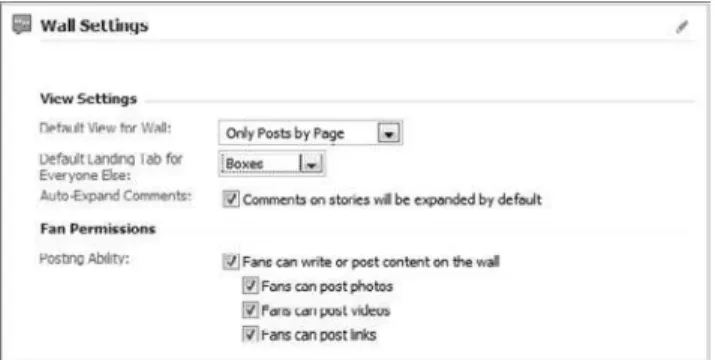
We’ll talk more about applications the next chapter, but for now you can set the default view that people see when they visit your fan page from the fan page settings screen (Figure 7.1).
Figure 7.1 Fan page default view settings
For example custom landing tabs, see the following fan pages:
• www.facebook.com/vw: volkswagen
• www.facebook.com/cocacola: coca cola
• www.facebook.com/Lacoste: Lacoste
• www.facebook.com/buddymedia: Buddy Media
• www.facebook.com/johnassarafpage: John Assaraf
• www.facebook.com/marismith: Mari smith
• www.facebook.com/CarrotCreative: carrot creative (this page also has unique
“fan-only” content).
Thursday: Understand Facebook Fan Page and Third-Party Applications
Facebook offers fan page administrators the option of adding a wide variety of help- ful applications to fan pages. We discussed these applications briefly in chapter 5, but we’ll go over them in more detail here. the following are commonly used applications offered by Facebook for fan page administrators:
Discussion boards here you can allow people to carry on a conversation on your Facebook fan page.
Events this is the destination for scheduling and promoting events on your fan page.
Photos You or your fans can share relevant pictures.
Reviews this is the location of user reviews of your product, brand, business, or organization.
Video Facebook’s video platform is similar to Youtube, vimeo, or other providers.
Notes this is a basic blogging platform that allows users and fan page administrators to sure you change the formatting occasionally and that you use somewhat informal lan-
guage. shorter is usually better in terms of how much to say in your updates.
one suggestion for fan updates is to create a discussion thread and then refer- ence that specific thread (each has a unique UrL) in the update so your fans can click to go directly to the conversation and contribute.
plus, you can target your updates as determined by location, gender, and age.
this could be of particular use to the likes of speakers, musicians, and entertainers who may be giving a presentation/concert at a specific location and want to notify only the fans in that particular area.
if you’re not sure whether your fans are reading your updates, you could always conduct a survey/poll to find out.
Wednesday: Create Custom Tabs on Your Fan Page
in the early days of Facebook, users agreed to run applications that imposed themselves on a Facebook profile. the thought was that users wanted to express themselves not just by sharing information, status updates, links, photos, and so on, but also by run- ning different third-party applications and sharing results with friends.
As time passed, a few things happened. Facebook changed the rules for applica- tion developers along with the propagation of applications on Facebook profiles. the news Feed became the first thing that people logged into every day, making profiles a little less important. And finally, Facebook created a sandbox for all the applications to live. that sandbox is known as Facebook Boxes on both personal profiles and fan pages. however in early 2010, Facebook will be removing the Boxes tab, so the only way users will be able to interact with an application on their profile or on fan pages is via tabs. this change is aimed at helping application developers get more visibility and engagement from the users.
Although additional apps and tabs are largely ignored in the context of a user profile, they can play a significant role in the Facebook fan page. Using Facebook’s powerful application static FBML (available at www.facebook.com/apps/application .php?id=4949752878), you can create entirely customized content for your fans, and non- fans, to see. You can add multiple iterations of static FBML, and each one can have its own unique tab title. plus, you can select which of your tabs you want visitors who are not yet fans to land on.
For example, you may want to display a welcome video greeting, have a sign-up form for a newsletter, or provide persistent rich-media content. custom tabs are a great way to generate the view you want users to have when they visit your page for the first time.
An important point to note is that each tab on your fan page has a unique UrL.
this allows you to direct fans/nonfans to specific tabs on your fan page and perhaps even conduct an A/B test by using a link-shortening service such as bit.ly.
161■Week 1: UnderstAnd essentiAL AdvAnced tActics
We’ll talk more about applications the next chapter, but for now you can set the default view that people see when they visit your fan page from the fan page settings screen (Figure 7.1).
Figure 7.1 Fan page default view settings
For example custom landing tabs, see the following fan pages:
• www.facebook.com/vw: volkswagen
• www.facebook.com/cocacola: coca cola
• www.facebook.com/Lacoste: Lacoste
• www.facebook.com/buddymedia: Buddy Media
• www.facebook.com/johnassarafpage: John Assaraf
• www.facebook.com/marismith: Mari smith
• www.facebook.com/CarrotCreative: carrot creative (this page also has unique
“fan-only” content).
Thursday: Understand Facebook Fan Page and Third-Party Applications
Facebook offers fan page administrators the option of adding a wide variety of help- ful applications to fan pages. We discussed these applications briefly in chapter 5, but we’ll go over them in more detail here. the following are commonly used applications offered by Facebook for fan page administrators:
Discussion boards here you can allow people to carry on a conversation on your Facebook fan page.
Events this is the destination for scheduling and promoting events on your fan page.
Photos You or your fans can share relevant pictures.
Reviews this is the location of user reviews of your product, brand, business, or organization.
Video Facebook’s video platform is similar to Youtube, vimeo, or other providers.
Notes this is a basic blogging platform that allows users and fan page administrators to write notes or blog posts and appear on fans’ news Feeds.
162
chapter 7:Month 4: AdvAnced tActics And cAMpAign integrAtion■
Applications created by Facebook typically have a logo with a similar appear- ance to the one in Figure 7.2, with the Facebook logo at the bottom of the application’s logo. this is the easiest way to tell whether an application was created by Facebook.
it’s an important distinction only insofar as these apps cover the most common sce- narios and tend to get the most usage. so, they are generally mature applications that you can rely upon.
Figure 7.2 Discussion group logo
some but not all of the functionality provided by these applications can be found in Facebook groups. You cannot embed a Facebook application of any kind in a Facebook group. You typically can include any of your applications on your fan page or profile with some minor configuration.
even though Facebook offers a wide range of useful applications for many com- mon marketing scenarios, it doesn’t offer everything you may find useful for your specific situation. this is where third-party applications fit in—they can give you the quickest and most impactful new capabilities for sharing or gathering information from your fans or friends. Usually integration is a series of self-serve steps that don’t require significant intervention, so you can try an app without assistance from your more technical col- leagues. in many cases, third-party applications can be a great alternative to the time and expense of building your own Facebook application, which we’ll cover in chapter 8.
one of our favorite such applications (and one we’ve used several times for cli- ents) is one of a number of polling applications. these apps help you run a simple sur- vey on a Facebook fan page or profile and get feedback from visitors. Although a poll application isn’t necessarily the best way to get statistically valid data, it is a quick way to get feedback to structured questions.
Facebook once offered its own polls application but quietly removed it in late 2008. several third-party application developers have created replacement poll applications to fill the void. the poll application (www.facebook.com/apps/application .php?id=20678178440) works reasonably well for limited purposes and has a large user base. others may be a better fit for your specific situation, such as involver’s poll app (http://involver.com/gallery.html).
these are some other third-party apps you may want to install on your fan page:
Networked Blogs this app allows you to import your regular blog. it can be installed on your personal profile too, and comments port between your profile and fan page (see http://apps.facebook.com/blognetworks).
163■Week 1: UnderstAnd essentiAL AdvAnced tActics
YouTube Badge create a fully customizable widget with your Youtube videos or favorites (see http://apps.facebook.com/youtubebadge).
Facebook’s Twitter app You have 420 characters to create an update on your fan page; by linking your fan page to your twitter account, any time you update content on your fan page, it automatically posts as a tweet on twitter, truncates the post at around 120 characters, and inserts a bit.ly link back to your fan page. (You can choose which content to post as tweets: status update, photos, links, notes, and events.) this can be an extremely effective strategy in terms of growing a large presence quickly on twitter and then using this app to bring your twitter followers onto your fan page. to track stats for any bit.ly link, just paste it into your browser’s address bar and add a + sign at the end (see http://facebook.com/twitter).
Selective Tweet Status if you’re active on twitter.com as well, you may want to choose spe- cific tweets to post as your fan page status update using this app, which works for per- sonal profiles too. note that if you use Facebook’s twitter app, it’s best not to use the selective tweet status app because you’ll end up with double tweets when Facebook posts the same content to twitter (see http://apps.facebook.com/selectivetwitter).
For a suite of fan page apps, see involver.com (http://involver.com) and Wildfire interactive (http://wildfireapp.com). For enterprise-level customization, see Buddy Media (http://buddymedia.com).
When seeking applications that will create a better experience for your fans or friends, be sure to temper your expectations. third-party apps won’t always work exactly as you want them to work—there may be a quirky user interface or a func- tional issue that frustrates you. You get what you pay for!
Friday: Measure the Effectiveness of Posted Content
Your fan page comes with a special analytics tool called insights. When you view your own fan page—or any page you’re an admin for—you’ll see the “insights” box just above your fans. You can see, at a glance, your “post quality” score in terms of num- bers out of 10 and stars out of 5, plus the number of interactions this week. click see All, and you’ll find an array of metrics to view, including gender split, top countries, top cities, top languages, and more. You can drill deeper and see page views, numbers of discussion posts, number of mentions (@ tagging), and so on.
the data available under insights may or may not be of particular use to you.
however, it’s certainly worth keeping an eye on the top-level stats to see how the quality of your posts and interactions are doing over time.
For a third-party analytics tool, see Fan page Analytics (http://fanpageanalytics .com), which provides an interactive map of where your fans are around the world, other fan pages they are members of, and additional useful information.
164
chapter 7:Month 4: AdvAnced tActics And cAMpAign integrAtion■
Personalization Advanced integration of Facebook connect allows website managers to create personalized experiences for site visitors based on Facebook profile data, demo- graphic information, and geographic location.
For more information on Facebook Connect and some of its other features, visit http://developers .facebook.com/connect.php.
Tuesday: Understand the Facebook Connect Authentication Opportunity
in the early days of our programming careers, we specialized in a few key areas. As part of the process of building online communities and internal search engines, we constantly found ourselves having to build what we termed transparent login systems.
these “duct-taped” solutions provided users with a seamless authentication scheme for surfing from one secure website to another one that was built, hosted, and maintained by different teams, organizations, or companies. not only did these schemes address the multiple login issues that came with integrating multiple secure websites, but they also solved issues around server state, or persistence.
As a hypothetical example, say you worked at a health-care portal. it feels like a single site, but in the background there are actually three or four different sites built and maintained by completely different teams. the back-end systems that run these websites do not connect and would never be connected. however, you want to build online communities that require specific personal data from the authenticated user.
these transparent login systems typically consist of a few database tables in a sQL server database that do nothing more than store user login information from all the different sites the user was traveling to and from in our little online partner eco- systems. You could write code that checked to see whether the user in question was allowed access to the data systems from a partner organization that you needed infor- mation from, in order to complete the process of building and displaying a web page.
if granted access by the other system, you log them in via the programming code in a background process as opposed to making them log in manually. this is intended as a solution for a user experience requirement more than anything else. You couldn’t effec- tively cast the illusion that a user was surfing on a single website or portal if they were being required to log in as they traversed different domains.
simply put, authentication is the process of validating that an unknown some- one from a trusted source is who they say they are. so, this process of having to manage users’ authentication schemes became more prevalent as companies and organizations created more complex, interrelated networks of websites. today this issue is not locked behind the firewall of enterprise intranets. We now have legitimate authentication,
Week 2: Learn About Facebook Connect, Widgets, Fan Boxes
We truly believe that history will judge the release and evolution of Facebook connect as one of the most important developments for the internet in the past 10 years. Why is it so important? it’s a bridge between the internet as we’ve known it and the social construct in which we all live. Let’s start by reviewing the basics of Facebook connect, some practical applications, and some of the implications. We’ll also look at widgets and fan boxes, two other options for the integration of Facebook and third-party websites.
Monday: Understand Facebook Connect
Facebook connect is a technology that allows developers to access data contained within Facebook and use that data in an external website, mobile application, or other type of computing device. ok, that may not sound terribly exciting to a marketer, but it truly extends the Facebook experience to the Web and back. it also makes a variety of common social features easy to integrate in an existing website without investments in new code or communications platforms. consumers can enjoy a third-party website with the familiarity of the trusted Facebook platform as a supporting cast member.
Facebook Connect Highlights
When site managers commit to using Facebook connect on their websites, they are making their lives much, much simpler. here is a summary of the features of Facebook connect that may be integrated with an existing or new website:
Single sign-on Users can be authenticated via their Facebook username and password.
this eliminates the need for a site to use its own authentication system, which takes resources to build and maintain.
True identity through Facebook, you can track a user down to a specific Facebook pro- file so you know you’re likely dealing with a real human and not a bot or an anony- mous character who can’t be held responsible for their comments or actions on a website.
Friends and social distribution Facebook connect allows you to pull in a user’s list of friends to show other people who use the website. You can also use the friend list to encourage people to share content, items for purchase, or other information relevant to your orga- nization through Facebook.
Social comments comments, reviews, and discussions have worked for a number of very large companies such as Amazon, Yelp, and others. Facebook connect allows web developers to integrate similar infrastructure into their own sites for the purposes of getting more discussion and repeated visits for a website.
165■Week 2: LeArn ABoUt FAceBook connect, Widgets, FAn BoXes
Personalization Advanced integration of Facebook connect allows website managers to create personalized experiences for site visitors based on Facebook profile data, demo- graphic information, and geographic location.
For more information on Facebook Connect and some of its other features, visit http://developers .facebook.com/connect.php.
Tuesday: Understand the Facebook Connect Authentication Opportunity
in the early days of our programming careers, we specialized in a few key areas. As part of the process of building online communities and internal search engines, we constantly found ourselves having to build what we termed transparent login systems.
these “duct-taped” solutions provided users with a seamless authentication scheme for surfing from one secure website to another one that was built, hosted, and maintained by different teams, organizations, or companies. not only did these schemes address the multiple login issues that came with integrating multiple secure websites, but they also solved issues around server state, or persistence.
As a hypothetical example, say you worked at a health-care portal. it feels like a single site, but in the background there are actually three or four different sites built and maintained by completely different teams. the back-end systems that run these websites do not connect and would never be connected. however, you want to build online communities that require specific personal data from the authenticated user.
these transparent login systems typically consist of a few database tables in a sQL server database that do nothing more than store user login information from all the different sites the user was traveling to and from in our little online partner eco- systems. You could write code that checked to see whether the user in question was allowed access to the data systems from a partner organization that you needed infor- mation from, in order to complete the process of building and displaying a web page.
if granted access by the other system, you log them in via the programming code in a background process as opposed to making them log in manually. this is intended as a solution for a user experience requirement more than anything else. You couldn’t effec- tively cast the illusion that a user was surfing on a single website or portal if they were being required to log in as they traversed different domains.
simply put, authentication is the process of validating that an unknown some- one from a trusted source is who they say they are. so, this process of having to manage users’ authentication schemes became more prevalent as companies and organizations created more complex, interrelated networks of websites. today this issue is not locked behind the firewall of enterprise intranets. We now have legitimate authentication,
166
chapter 7:Month 4: AdvAnced tActics And cAMpAign integrAtion■
usability, and data portability needs on the open internet. these needs can surface on business, social, informational, and educational websites alike.
enter the “identity” movement. these are groups of people who started to look for a standardized way of building open systems to deal with the growing need to man- age identity, access, and control of computer systems across multiple internet properties and domains. Although many solutions have been created that take a healthy stab at solving these problems, none has been standardized. Moreover, the ones that could be considered “standard” and “open” tend to lack the support and/or features that would provide programmers and users alike with a compelling reason to adopt one system over the others en masse.
on May 9, 2008, dave Morin, senior platform manager at Facebook, announced Facebook connect on the Facebook developers blog (http://developers .facebook.com/news.php?blog=1&story=108). Facebook connect, although not open, is Facebook’s answer for a standard authentication service that competes with several
“standard” authentication systems such as oAuth, openid, opensocial, Windows Live id, and others. More details were made public about the set of Apis on July 23, 2008, at Facebook’s annual conference for developers before the system was made available to users in december 2008. the service enables Facebook users to log in to affiliated sites using their Facebook accounts to share information from such sites with their Facebook friends.
the service, also known as a single sign-on service, enables Facebook users to log in to non-Facebook sites using their Facebook account credentials. they can then share information from Facebook with their Facebook friends who use the same non-Facebook website, blog, or social network. Facebook connect’s identity management system should not be confused with models based upon “federated identity,” such as openid.
While most people simply associate authentication services with a unified method of managing their sign-in activity across several websites, Facebook connect does much more than simply letting users log in to a site by validating their identity via their Facebook accounts. When logging in with Facebook connect, users bring their Facebook profile data with them. this means the website or blog they just logged into can allow them to find their friends who also use the same site. Furthermore, they can share information and experiences using the same features as they would on a Facebook application. With Facebook connect, almost every feature that you can build with an application on Facebook can be offered through a third-party website or application using the service.
Wednesday: Decide How You’ll Use Facebook Connect
so, knowing what you now know about Facebook connect, how do you make the most of Facebook connect on your website? First, don’t force it. Facebook connect has a wide variety of features that you can use for your site. some will make sense
167■Week 2: LeArn ABoUt FAceBook connect, Widgets, FAn BoXes
for your site, and others won’t. the good news is that Facebook connect is a bit of a
“grab bag”—you can pick and choose the tools you want and the level of integration you need with the site. You’ll have to learn more about Facebook connect to get a sense of exactly what you should use, or you should speak with someone who has used Facebook connect for their website in the past.
second, make sure the integration of Facebook connect fits into the look and feel of your existing website in a way that adds to the overall experience and does not detract from it. take the site login system, for example. if you don’t have a good rea- son for users to log into your site—through content, personalization, or some other
“carrot”—then users will likely not take the time to log into your site, and your aban- donment rates will skyrocket. Login is a barrier that prevents people from using your site, regardless of how easy it may be.
spend some time also thinking about how you can use Facebook integration through connect as a feature that will make your site more engaging. Are you doing things in a way that will make users recommend your site to friends? Will your site encourage more interaction as a result of Facebook connect integration? At a mini- mum, it should make the job of administering your site and new features considerably easier than building the technologies yourself or integrating third-party solutions.
this is probably also a great time to brainstorm with your web developers about the things you’d like to achieve with connect. Your web developers are the people who are ultimately responsible for the stability and look and feel of your website. these decisions about social features, authentication, and the like, are major decisions that can have a positive impact on your site—but only if everyone is working together.
And finally as we’ve mentioned before, be sure you can collect usage statistics and other numbers that can tell you about the effectiveness of your site before and after the integration of Facebook connect. if you do this, you’ll at a minimum need to use some technical resources to do the integration work. someone is likely to hold you to a high standard when it comes to the outcome of the decision. did you get more users, more page views, more unique visitors, more comments, or more time spent on your website? You should scrutinize every major change you make on your website to better understand how those decisions impact important metrics.
Thursday: Measure the Benefits of Facebook Connect
so, what outcomes should you expect by integrating Facebook connect into your site?
At a minimum, exposing your website through the Facebook channel of more than 350 million people and counting will help your cause. here are a few real possibilities that you may want to measure depending on your specific situation and goals:
Additional traffic By posting parts of your site or user commentary on Facebook, more people will be exposed to your website. And if Facebook continues to grow, this can become a significant part of your internet marketing strategy.
168
chapter 7:Month 4: AdvAnced tActics And cAMpAign integrAtion■
Figure 7.3 Fan box for Mashable
Facebook currently allows three major options for integrating fan boxes into existing websites. Users can attach a fan box to typepad or Blogger (google’s blogging platform). Users can also attach a fan box to an existing website. note that you can’t do this for any fan page you happen to like. You must have administrator privileges for the fan page to add it to a third-party blog or website.
similarly, Facebook allows people and companies to share content via badges.
there are currently three types of badges—profile badges, photo badges, and page badges. these badges typically carry basic information about your presence with a hyperlink so visitors can click the badge and immediately view your Facebook pres- ence. Badges are an interesting way to share that you have a presence on Facebook, but they are limited in that they carry very little information that a visitor can act upon.
they are best used to accentuate a blog’s design or content and not for an official com- pany website in most cases.
Week 3: Integrate Your Efforts with Multichannel Marketing
Facebook and other social media marketing activities are great on their own, but they’re truly at their best when integrated with a variety of other marketing efforts.
put differently, you shouldn’t build a fan page or run advertising on Facebook with the expectation that social media will solve all your marketing problems. You should think Improved satisfaction if people who want to interact with your organization can do so in
a variety of channels such as your website, social media, mobile devices, and so on, they’ll be happier. it stands to reason they’ll view you more favorably, and they’ll be more willing to view future communications in a positive light.
More interactivity with customers giving customers the opportunity to comment on parts of your site and share with Facebook friends will make your brand, product, or organiza- tion part of the social conversation. Facebook connect makes this easy to integrate into an existing site, which can make the site a more attractive destination for users.
encourage conversation, and it will become a virtuous cycle that will give people more of a reason to think about you and talk about you.
More exposure of content/websites if Facebook evolves into a place where people learn about new things, you’ll need exposure there to do effective internet marketing. More expo- sure of your website is a good thing. remember, there is no such thing as bad publicity.
Trust via global privacy settings Facebook connect allows you to forget any concerns you or your customers may have regarding their privacy. connect dictates the rules, and the consumer makes modification via security settings in their Facebook profile. over time, expect Facebook to become more of a trusted entity for managing passwords and security settings over an increasingly social Web.
A great example of Facebook connect in action is the site JibJab.com (http://
jibjab.com), a company started in 1999 that offers humorous customizable digital greeting cards and videos. to quote gregg spiridellis, ceo at JibJab Media, “it took us eight years to reach 1.5 million registered users in the era of e-mail. it took us only five months to acquire the same number of users on Facebook.”
Friday: Understanding Fan Boxes and the Wealth of Facebook Widgets
if Facebook connect is too advanced for your needs, you can always opt for a lighter integration between Facebook and your website. this is where fan boxes and other types of Facebook widgets can be used. they’re not particularly difficult if you can add a few lines of code to your existing website or blog.
not to be confused with Facebook Boxes, a Facebook fan box is a mini-fan page that can be added to an existing website. Figure 7.3 is an example of a fan box for Mashable, a popular blog that we’ve referenced a few times in this book. You’ll notice that it includes the latest content along with the total number of fans for the page and snapshots of a few of the randomly selected fans. All the content referenced in the fan box—both content and user profiles—is hyperlinked so the user can learn more on Facebook. the bottom includes a link that will send the user to the Facebook fan page, where they can choose to be a fan. if you use all the features of the fan box, you’ll need a lot of real estate on your screen.
169■Week 3: integrAte YoUr eFForts With MULtichAnneL MArketing
Figure 7.3 Fan box for Mashable
Facebook currently allows three major options for integrating fan boxes into existing websites. Users can attach a fan box to typepad or Blogger (google’s blogging platform). Users can also attach a fan box to an existing website. note that you can’t do this for any fan page you happen to like. You must have administrator privileges for the fan page to add it to a third-party blog or website.
similarly, Facebook allows people and companies to share content via badges.
there are currently three types of badges—profile badges, photo badges, and page badges. these badges typically carry basic information about your presence with a hyperlink so visitors can click the badge and immediately view your Facebook pres- ence. Badges are an interesting way to share that you have a presence on Facebook, but they are limited in that they carry very little information that a visitor can act upon.
they are best used to accentuate a blog’s design or content and not for an official com- pany website in most cases.
Week 3: Integrate Your Efforts with Multichannel Marketing
Facebook and other social media marketing activities are great on their own, but they’re truly at their best when integrated with a variety of other marketing efforts.
put differently, you shouldn’t build a fan page or run advertising on Facebook with the expectation that social media will solve all your marketing problems. You should think
170
chapter 7:Month 4: AdvAnced tActics And cAMpAign integrAtion■
4. Make sure you can measure unique visitors and conversions of each of these land- ing pages for similar periods of time (campaign, month, week, day, and so on).
5. set a time frame for the campaign along with a budget for each channel.
6. establish a multichannel dashboard that you can use to track the outcomes on a time-series basis.
7. And finally, be sure to collect time-series data for each channel that can be rolled into campaign-wide statistics.
Unique Identifiers for Landing Pages
At a minimum, multichannel campaigns require unique landing pages for tracking results. Be sure that each different thing you try to measure has a distinct URL that is easy for a consumer to enter. There is no point in doing it if the URL is too difficult for a user to enter or if the user can figure out a workaround.
Wednesday: Use A/B and Multivariate Tests in Multichannel Marketing
As the campaign generates statistics, you’ll begin to learn quickly which channels are more effective. Just be sure to measure on a per-unit basis—unique visitors per dollar spent, conversions per dollar spent, and so on. Look out for differences between the visitors and conversions metric as well. some channels may be good at getting people to respond to you but not respond to the call to action!
What we’re doing is essentially setting up an A/B test for multichannel market- ing that can answer some questions for you. is Facebook a cost-effective way to market your company/product/initiative? can you retire or perhaps just deemphasize certain marketing tactics as part of your campaigns? You probably want a few examples of campaigns where you’ve had some success in one channel over another before making broad generalizations. But the technology is indeed there to measure the effectiveness of social media relative to other types of marketing you do. You just have to set it up in the beginning and separate the outcomes so you can have the intelligence you need in order to know what to do in the future. You’ll learn more about this in week 4 later this chapter, when we dive into advanced analytics.
Thursday: Integrate Social Media and Web
in chapter 2, we surveyed the social media landscape and talked about all the different services that are currently available to companies that want to reach out to customers.
to summarize, Facebook and twitter currently dominate the landscape, but a variety of other services can enhance your efforts, reach more customers, and provide search engine optimization benefits.
about the opportunity of reaching hundreds of millions of targetable consumers via interactive, social media and consider how that can enhance existing marketing efforts.
Monday: Review Marketing Collateral
sometimes, the biggest mistake companies make in their social media marketing campaigns is in failing to communicate to customers that they have a social media presence. You’d be shocked at the number of companies that fail to do the basics such as referencing a Facebook fan page or twitter account on printed materials or in pre- sentations. Building it isn’t enough—you have to inform people of your efforts. so, the lowest-hanging fruit is simply to check your existing marketing collateral to see exactly where you aren’t mentioning your social media presence. these pieces of collateral—
print, online, and so on—should be changed to include your social media properties.
things like your Facebook fan page and twitter account are becoming as essential to mention as your organization’s website UrL.
Tuesday: Establish Metrics to Inform Future Multichannel Marketing Decisions
social media can certainly be an enhancement of outbound marketing efforts. if you’re calculating outreach on a “cost per touch” basis, Facebook can be an incredibly effi- cient means of communicating with your customers. But you can’t just say that to col- leagues; you’re going to need numbers to compare social media to offline marketing efforts. so, as we’ve discussed before, although in a different context, measurement is critically important.
For example, let’s assume you are responsible for launching a new product, and you want to inform customers. You have a customer list of 2,000 e-mail addresses, 1,000 physical mailing addresses, and a Facebook fan page with 500 fans for your company. You also want to run a print advertisement in a trade magazine. You have a budget of $10,000 to spend on your launch communication along with a development resource who can make changes on your websites. What do you do? in an ideal situa- tion, data would inform these decisions well before personality or intuition.
Your first priority should be to use the launch and the resources you have to learn as much as you can about the effectiveness of each channel. how do you do this?
You measure how each effort works to get consumers to respond to your call to action.
the following steps are similar to what we did to track the effectiveness of Facebook campaigns but will similarly help you gain intelligence across multiple channels:
1. pick the marketing channels you’d like to use to reach customers.
2. settle on a consistent call to action across your various channels so you’re mea- suring like things in your campaign.
3. set a unique landing page for each effort along with a means for visitors to con- vert to a greater level of commitment (purchase, lead, sign-up, and so on).
171■Week 3: integrAte YoUr eFForts With MULtichAnneL MArketing
4. Make sure you can measure unique visitors and conversions of each of these land- ing pages for similar periods of time (campaign, month, week, day, and so on).
5. set a time frame for the campaign along with a budget for each channel.
6. establish a multichannel dashboard that you can use to track the outcomes on a time-series basis.
7. And finally, be sure to collect time-series data for each channel that can be rolled into campaign-wide statistics.
Unique Identifiers for Landing Pages
At a minimum, multichannel campaigns require unique landing pages for tracking results. Be sure that each different thing you try to measure has a distinct URL that is easy for a consumer to enter. There is no point in doing it if the URL is too difficult for a user to enter or if the user can figure out a workaround.
Wednesday: Use A/B and Multivariate Tests in Multichannel Marketing
As the campaign generates statistics, you’ll begin to learn quickly which channels are more effective. Just be sure to measure on a per-unit basis—unique visitors per dollar spent, conversions per dollar spent, and so on. Look out for differences between the visitors and conversions metric as well. some channels may be good at getting people to respond to you but not respond to the call to action!
What we’re doing is essentially setting up an A/B test for multichannel market- ing that can answer some questions for you. is Facebook a cost-effective way to market your company/product/initiative? can you retire or perhaps just deemphasize certain marketing tactics as part of your campaigns? You probably want a few examples of campaigns where you’ve had some success in one channel over another before making broad generalizations. But the technology is indeed there to measure the effectiveness of social media relative to other types of marketing you do. You just have to set it up in the beginning and separate the outcomes so you can have the intelligence you need in order to know what to do in the future. You’ll learn more about this in week 4 later this chapter, when we dive into advanced analytics.
Thursday: Integrate Social Media and Web
in chapter 2, we surveyed the social media landscape and talked about all the different services that are currently available to companies that want to reach out to customers.
to summarize, Facebook and twitter currently dominate the landscape, but a variety of other services can enhance your efforts, reach more customers, and provide search engine optimization benefits.
172
chapter 7:Month 4: AdvAnced tActics And cAMpAign integrAtion■
hybrid and one-trick pony social networks like Flickr, Youtube, and twitter are the best candidates for integration with Facebook. they don’t really compete with Facebook, yet they have distinct benefits of their own that justify a separate social media presence on those networks. pointing to content on those sites is natural and makes intuitive sense as opposed to posting content that resides on Myspace or another social network similar to Facebook.
But the other benefit of integrating third-party social media services is the search engine optimization (seo) benefits of doing so. search engines are increasingly indexing content that resides in social networks. And all the major social networks have major “search engine juice.” that is, they’re highly regarded as trusted sources of content on the Web. so, cross-posting content from one social network to another can be a very beneficial thing for your standing in search results—at least today. if this behavior gets out of hand, you can expect search engines to change their algo- rithms to deemphasize this as a viable little marketing trick. You can point to Flickr and Youtube pictures and videos by simply adding a link in the status update section of your profile or fan page. twitter is a different story altogether. Facebook offers a twitter application that provides some integration between the two social networks.
Anything you post on a Facebook fan page can also simultaneously post to twitter.
so, you can conveniently maintain both your fan page and a corresponding twitter account entirely through the Facebook fan page interface. interestingly, it doesn’t work the same the other way around—likely because Facebook wants you inside its social network and not another.
Real-Time Messaging: Facebook, Twitter, Google Buzz, or all of the above?
In late summer 2009, Facebook introduced a “Twitter-like” feature of including “@ replies” in the status update. This allows someone to direct a status update to a fellow Facebook user. Users simply type the “@” symbol in the publisher on either a personal profile or fan page and begin typing the name of a friend (or fan page, group, or event), then select the desired person/link from the dropdown menu, with up to six tags per update. The person (or fan page) being tagged gets the same content posted on their wall, thus providing additional real-time activity and vis- ibility for both parties. This is an indication that Facebook is adding more “real-time messaging”
features in Facebook that have been successful for Twitter.
Does that mean that Facebook will turn into Twitter? Probably not. Facebook is a rich canvas of status updates, personal information, pictures, events, and so on. Twitter, on the other hand, continues to build out its infrastructure for real-time short-form messaging of less than 140 characters. This currently gives Facebook the advantage of having a far greater percentage of valid consumer accounts. According to Mashable, a large number of Twitter accounts are either not used or likely spammers.
173■Week 3: integrAte YoUr eFForts With MULtichAnneL MArketing
Add to all of this the February 2010 entry of Google Buzz (buzz.google.com). With Buzz, Google opened up the latent social network available in peoples’ Gmail accounts. Think about it—everyone in your Inbox and Sent Items folder does indeed identify people in your social graph. Feature-wise, Google Buzz is a lot more like Twitter than Facebook. (Or, in fact, Google Buzz could be compared to FriendFeed.com which got acquired by Facebook in 2009: http://
facebook.com/press/releases.php?p=116581). The Google Buzz product is built around status updates much like Twitter, and Google Profiles are, although included, a lower priority in the Google Buzz experience. The big difference between Google Buzz and Twitter is that users have unlimited characters for posting on Buzz, unlike Twitter. Google Buzz also allows you to integrate an existing Twitter account—so all your updates from Twitter can be populated on Google Buzz.
After tens of millions of users tried out Google Buzz within its first 48 hours, popular blogs such as Mashable.com and HuffingtonPost.com were quick to integrate a “Buzz This” button on their sites—see Figure 7.4 below:
Figure 7.4 “Buzz This” button
Nobody has the crystal ball that can tell you exactly what the right move is for real-time messag- ing for your business. Most companies with a social media presence have opted to play it safe and operate on both Facebook and Twitter, and surely we’ll see some companies make a sincere effort to establish a presence on Google Buzz as well. With every new service comes another strategic consideration for you and your business and unfortunately more complexity. It’s just another rea- son to stay informed to see exactly how your marketing time, effort, and money should be spent.
Friday: Explore Special Offers
so, you have your new fancy Facebook fan page, and you aren’t sure what to do with it. We cover several great uses for the fan page in this book. however, you want to focus directly on one particular campaign tactic that has been deployed by others.
We’re talking about using Facebook to promote special offers to fans, using Facebook as the exclusive channel for access to these deals.
hybrid and one-trick pony social networks like Flickr, Youtube, and twitter are the best candidates for integration with Facebook. they don’t really compete with Facebook, yet they have distinct benefits of their own that justify a separate social media presence on those networks. pointing to content on those sites is natural and makes intuitive sense as opposed to posting content that resides on Myspace or another social network similar to Facebook.
But the other benefit of integrating third-party social media services is the search engine optimization (seo) benefits of doing so. search engines are increasingly indexing content that resides in social networks. And all the major social networks have major “search engine juice.” that is, they’re highly regarded as trusted sources of content on the Web. so, cross-posting content from one social network to another can be a very beneficial thing for your standing in search results—at least today. if this behavior gets out of hand, you can expect search engines to change their algo- rithms to deemphasize this as a viable little marketing trick. You can point to Flickr and Youtube pictures and videos by simply adding a link in the status update section of your profile or fan page. twitter is a different story altogether. Facebook offers a twitter application that provides some integration between the two social networks.
Anything you post on a Facebook fan page can also simultaneously post to twitter.
so, you can conveniently maintain both your fan page and a corresponding twitter account entirely through the Facebook fan page interface. interestingly, it doesn’t work the same the other way around—likely because Facebook wants you inside its social network and not another.
Real-Time Messaging: Facebook, Twitter, Google Buzz, or all of the above?
In late summer 2009, Facebook introduced a “Twitter-like” feature of including “@ replies” in the status update. This allows someone to direct a status update to a fellow Facebook user. Users simply type the “@” symbol in the publisher on either a personal profile or fan page and begin typing the name of a friend (or fan page, group, or event), then select the desired person/link from the dropdown menu, with up to six tags per update. The person (or fan page) being tagged gets the same content posted on their wall, thus providing additional real-time activity and vis- ibility for both parties. This is an indication that Facebook is adding more “real-time messaging”
features in Facebook that have been successful for Twitter.
Does that mean that Facebook will turn into Twitter? Probably not. Facebook is a rich canvas of status updates, personal information, pictures, events, and so on. Twitter, on the other hand, continues to build out its infrastructure for real-time short-form messaging of less than 140 characters. This currently gives Facebook the advantage of having a far greater percentage of valid consumer accounts. According to Mashable, a large number of Twitter accounts are either not used or likely spammers.