Remote Logging, Electronic Mail, and File Transfer
The main task of the Internet is to provide services for users. Among the most popular applications are remote logging, electronic mail, and file transfer. We discuss these three applications in this chapter; we discuss another popular use of the Internet, accessing the World Wide Web, in Chapter 27.
26.1 REMOTE LOGGING
In the Internet, users may want to run application programs at a remote site and create results that can be transferred to their local site. For example, students may want to con- nect to their university computer lab from their home to access application programs for doing homework assignments or projects. One way to satisfy that demand and others is to create a client/server application program for each desired service. Programs such as file transfer programs (FTPs), e-mail (SMTP), and so on are currently available. How- ever, it would be impossible to write a specific client/server program for each demand.
The better solution is a general-purp<Dse client/server program that lets a user access any application program on a remote computer; in other words, allow the user to log on to a remote computer. After logging on, a user can use the services available on the remote computer and transfer the results back to the local computer.
TELNET
In this section, we discuss such a client/server application program: TELNET.TELNET is an abbreviation for TErminaL NETwork. It is the standard TCP/IP protocol for virtual terminal service as proposed by the International Organization for Standards (ISO).
TELNET enables the establishment of a connection to a remote system in such a way that the local terminal appears to be a terminal at the remote system.
TELNET is a general-purpose client/server application program.
817
Timesharing Environment
TELNET was designed at a time when most operating systems, such as UNIX, were operating in a timesharing environment. In such an environment, a large computer supports multiple users. The interaction between a user and the computer occurs through a terminal, which is usually a combination of keyboard, monitor, and mouse. Even a microcomputer can simulate a terminal with a terminal emulator.
Logging
In a timesharing environment, users are part of the system with some right to access resources. Each authorized user has an identification and probablY,a password. The user identification defines the user as part of the system. To access the system, the user logs into the system with a user id or log-in name. The system also includes password checking to prevent an unauthorized user from accessing th~ resources. Figure 26.1 shows the logging process.
Figure 26.1 Local and remote log-in
Application programs
Operating system
,/
...
/,, ,
, ,Tenninal r-
a. Local log-in
TELNET
\ I
\ I I
\ I I
'\ 1 • • •1
\ I /
\ I I
\ I I
Application programs
I~;
~~... :;; ~I
server
Operating system
Internet TELNET
client
Operating system
Tenninal
r-~
b. Remote log-in
When a user logs into a local timesharing system, it is called local log-in. As a user types at a terminal or at a workstation running a terminal emulator, the keystrokes are accepted by the terminal driver. The terminal driver passes the characters to the operat- ing system. The operating system, in turn, interprets the combination of characters and invokes the desired application program or utility.
When a user wants to access an application program or utility located on a remote machine, she performs remote log-in. Here the TELNET client and server programs come into use. The user sends the keystrokes to the terminal driver, where the local operating system accepts the characters but does not interpret them. The characters are sent to the TELNET client, which transforms the characters to a universal character set callednetwork virtual terminal (NVT) characters and delivers them to the localTCP/IP protocol stack.
The commands or text, in NVT form, travel through the Internet and arrive at the TCP/IP stack at the remote machine. Here the characters are delivered to the operat- ing system and passed to the TELNET server, which changes the characters to the corresponding characters understandable by the remote computer. However, the char- acters cannot be passed directly to the operating system because the remote operating system is not designed to receive characters from a TELNET server: Itis designed to receive characters from a terminal driver. The solution is to add a piece of software called apseudoterminal driver which pretends that the characters are coming from a terminal. The operating system then passes the characters to the appropriate appli- cation program.
Network Virtual Terminal
The mechanism to access a remote computer is complex. This is so because every com- puter and its operating system accept a special combination of characters as tokens. For example, the end-of-file token in a computer running the DOS operating system is Ctrl+z, while the UNIX operating system recognizes Ctrl+d.
We are dealing with heterogeneous systems.Ifwe want to access any remote com- puter in the world, we must first know what type of computer we will be connected to, and we must also install the specific terminal emulator used by that computer. TELNET solves this problem by defining a universal interface called the network virtual termi- nal (NVT) character set. Via this interface, the client TELNET translates characters (data or commands) that come from the local terminal into NVT form and delivers them to the network. The server TELNET, on the other hand, translates data and commands from NVT form into the form acceptable by the remote computer. For an illustration of this concept, see Figure 26.2.
NVT Character Set NVT uses two sets of characters, one for data and the other for control. Both are 8-bit bytes. For data, NVT is an 8-bit character set in which the 7 lowest-order bits are the same as ASCII and the highest-order bit is O. To send control characters between computers (from client to server or vice versa), NVT uses an 8-bit character set in which the highest-order bit is set to l.
Table 26.1 lists some of the control characters and their meanings.
Figure 26.2 Concept ofNVT
Terminal r,
TELNET client
Internet
TELNET server
Pseudoterminal driver
Data character
Table26.1 Some NVT control characters
Control character
Character Decimal Binary Meaning
EOF 236 11101100 End of file
EOR 239 11101111 End of record
SE 240 11110000 Suboption end
NOP 241 11110001 No operation
DM 242 11110010 Data mark
BRK 243 11110011 Break
IP 244 11110100 Interrupt process
AO 245 11110101 Abort output
AYT 246 11110110 Are you there?
EC 247 11110111 Erase character
EL 248 11111000 Erase line
GA 249 11111001 Go ahead
SB 250 11111010 Suboption begin
WILL 251 11111011 Agreement to enable option WONT 252 11111100 Refusal to enable option DO 253 11111101 Approval to option request DONT 254 11111110 Denial of option request
lAC 255 11111111 Interpret (the next character) as control
Embedding
TELNET uses only one TCP connection. The server uses the well-known port 23, and the client uses an ephemeral port. The same connection is used for sending both data and
control characters. TELNET accomplishes this by embedding the control characters in the data stream. However, to distinguish data from control characters, each sequence of con- trol characters is preceded by a special control character called interpret as control (lAC).
For example, imagine a user wants a server to display a file (filel) on a remote server.
She can type
catfilel
However, suppose the name of the file has been mistyped (filea instead of filel). The user uses the backspace key to correct this situation.
catjllea<backspace>l
However, in the default implementation of TELNET, the user cannot edit locally; the editing is done at the remote server. The backspace character is translated into two remote characters (lAC EC), which are embedded in the data and sent to the remote server. What is sent to the server is shown in Figure 26.3.
Figure 26.3 An example ofembedding
Typed at the remote terminal
Options
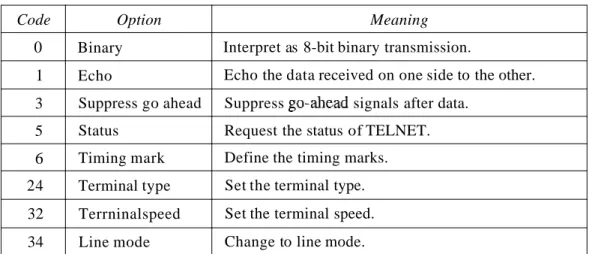
TELNET lets the client and server negotiate options before or during the use of the ser- vice. Options are extra features available to a user with a more sophisticated terminal.
Users with simpler terminals can use default features. Some control characters discussed previously are used to define options. Table 26.2 shows some common options.
Table 26.2 Options
Code Option Meaning
0 Binary Interpret as 8-bit binary transmission.
1 Echo Echo the data received on one side to the other.
3 Suppress go ahead Suppress go-ahead signals after data.
5 Status Request the status of TELNET.
6 Timing mark Define the timing marks.
24 Terminal type Set the terminal type.
32 Terrninalspeed Set the terminal speed.
34 Line mode Change to line mode.
Option Negotiation To use any of the options mentioned in the previous section first requires option negotiation between the client and the server. Four control characters are used for this purpose; these are shown in Table 26.3.
Table 26.3 NVT character set for option negotiation
Character Decimal Binary Meaning WILL 251 11111011 1. Offering to enable
2. Accepting a request to enable WONT 252 11111100 1. Rejecting a request to enable
2. Offering to disable
3. Accepting a request to disable DO 253 11111101 1. Approving an offer to enable
2. Requesting to enable
DONT 254 11111110 1. Disapproving an offer to enable 2. Approving an offer to disable 3. Requesting to disable
A party can offer to enable or disable an option if it has the right to do so. The offering can be approved or disapproved by the other party. To offer enabling, the offer- ing party sends the WILL command, which means "Will I enable the option?" The other party sends either the DO command, which means "Please do," or the DONT command, which means "Please don't." To offer disabling, the offering party sends the WONT command, which means "I won't use this option any more." The answer must be the DONT command, which means "Don't use it anymore."
A party can request from the other party the enabling or the disabling of an option.
To request enabling, the requesting party sends the DO command, which means
"Please do enable the option." The other party sends either the WILL command, which means "I will," or the WONT command, which means "I won't." To request disabling, the requesting party sends the DONT command, which means "Please don't use this option anymore." The answer must be the WONT command, which means "I won't use it anymore."
Example 26.1
Figure 26.4 shows an example of option negotiation. In this example, the client wants the server to echo each character sent to the server. In other words, when a character is typed at the user keyboard terminal, it goes to the server and is sent back to the screen of the user before being processed. The echo option is enabled by the server because it is the server that sends the characters back to the user tenninal. Therefore, the client should request from the server the enabling of the option using DO.
The request consists of three characters: lAC, DO, and ECHO. The server accepts the request and enables the option. Itinforms the client by sending the three-character approval: lAC, WILL, and ECHO.
Suboption Negotiation Some options require additional information. For example, to define the type or speed of a terminal, the negotiation includes a string or a number
Figure 26.4 Example26.1:Echo option
Client Server
==
cu:::u:::J
~
-
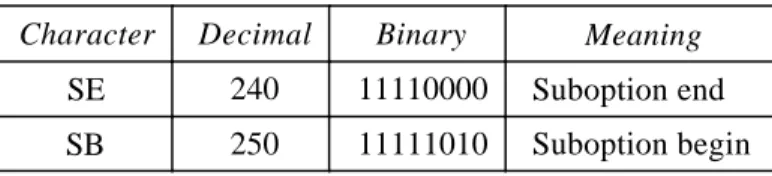
to define the type or speed. In either case, the two suboption characters indicated in Table 26.4 are needed for suboption negotiation.
Table 26.4 NVT character set for suboption negotiation Character Decimal Binary Meaning
SE 240 11110000 Suboption end
SB 250 11111010 Suboption begin
Example 26.2
Figure 26.5 shows an example of suboption negotiation. In this example, the client wants to negotiate the type of the terminal.
Figure 26.5 Example of suboption negotiation
Server
==
cu:::u:::J
E:::3
-
Iwill enable the terminal option
1---1
Terminal type HWrLL~~f---J"~1 Clientr
Do enable terminal option
~---IIAC t~1 Terminal type
1---1
Set the terminal type to "VT"
I
rAC~[!J-~I Terminal type t[}!}~Mode of Operation
Most TELNET implementations operate in one of three modes: default mode, character mode, or line mode.
Default Mode The default mode is used if no other modes are invoked through option negotiation. In this mode, the echoing is done by the client. The user types a
character, and the client echoes the character on the screen (or printer) but does not send it until a whole line is completed.
Character Mode In the character mode, each character typed is sent by the client to the server. The server normally echoes the character back to be displayed on the client screen. In this mode the echoing of the character can be delayed if the transmission time is long (such as in a satellite connection). Italso creates overhead (traffic) for the network because three TCP segments must be sent for each character of data.
Line Mode A new mode has been proposed to compensate for the deficiencies of the default mode and the character mode. In this mode, called the line mode, line editing (echoing, character erasing, line erasing, and so on) is done by the client. The client then sends the whole line to the server.
26.2 ELECTRONIC MAIL
One of the most popular Internet services is electronic mail (e-mail). The designers of the Internet probably never imagined the popularity of this application program. Its architecture consists of several components that we discuss in this chapter.
At the beginning of the Internet era, the messages sent by electronic mail were short and consisted of text only; they let people exchange quick memos. Today, electronic mail is much more complex. It allows a message to include text, audio, and video. It also allows one message to be sent to one or more recipients.
In this chapter, we first study the general architecture of an e-mail system including the three main components: user agent, message transfer agent, and message access agent. We then describe the protocols that implement these components.
Architecture
To explain the architecture of e-mail, we give four scenarios. We begin with the simplest situation and add complexity as we proceed. The fourth scenario is the most common in the exchange of email.
First Scenario
In the first scenario, the sender and the receiver of the e-mail are users (or application programs) on the same system; they are directly connected to a shared system. The administrator has created one mailbox for each user where the received messages are stored. Amailboxis part of a local hard drive, a special file with permission restrictions.
Only the owner of the mailbox has access to it. When Alice, a user, needs to send a message to Bob, another user, Alice runs auser agent (VA) program to prepare the message and store it in Bob's mailbox. The message has the sender and recipient mail- box addresses (names of files). Bob can retrieve and read the contents of his mailbox at his convenience, using a user agent. Figure 26.6 shows the concept.
This is similar to the traditional memo exchange between employees in an office.
There is a mailroom where each employee has a mailbox with his or her name on it.
Figure 26.6 First scenario in electronic mail
VA: user agent
System
When Alice needs to send a memo to Bob, she writes the memo and inserts it into Bob's mailbox. When Bob checks his mailbox, he finds Alice's memo and reads it.
When the sender and the receiver of an e-mail are on the same system, we need only two user agents.
Second Scenario
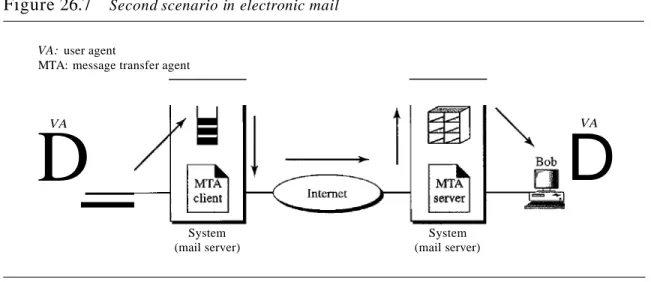
In the second scenario, the sender and the receiver of the e-mail are users (or application programs) on two different systems.The message needs to be sent over the Internet. Here we needuser agents(VAs) andmessage transfer agents(MTAs),as showninFigure 26.7.
Figure 26.7 Second scenario in electronic mail
VA: user agent
MTA: message transfer agent
VA
D
System (mail server)
System (mail server)
VA
D
Alice needs to use a user agent program to send her message to the system at her own site. The system (sometimes called the mail server) at her site uses a queue to store messages waiting to be sent. Bob also needs a user agent program to retrieve messages stored in the mailbox of the system at his site. The message, however, needs to be sent through the Internet from Alice's site to Bob's site. Here two message transfer agents are needed: one 'client and one server. Like most client/server programs on the Internet, the server needs to run all the time because it does not know when a client will ask for a
connection. The client, on the other hand, can be alerted by the system when there is a message in the queue to be sent.
When the sender and the receiver of an e-mail are on different systems, we need two VAs and a pair ofMTAs (client and server).
Third Scenario
In the third scenario, Bob, as in the second scenario, is directly connected to his system.
Alice, however, is separated from her system. Either Alice is connected to the system via a point-to-point WAN, such as a dial-up modem, a DSL, or a cable modem; or she is con- nected to a LAN in an organization that uses one mail server for handling e-mails-all users need to send their messages to this mail server. Figure 26.8 shows the situation.
Figure 26.8 Third scenario in electronic mail
MTA
VA Alice client
[ja.[j ,,
,,
LANmWA;\\
,, ,
II a
I~~
System (mail server)
VA:user agent
MTA: message transfer agent
System (mail server)
Alice still needs a user agent to prepare her message. She then needs to send the message through the LAN or WAN. This can be done through a pair of message transfer agents (client and server). Whenever Alice has a message to send, she calls the user agent which, in tum, calls the MTA client. The MTA client establishes a connection with the MTA server on the system, which is running all the time. The system at Alice's site queues all messages received. It then uses an MTA client to send the messages to the system at Bob's site; the system receives the message and stores it in Bob's mailbox.
At his convenience, Bob uses his user agent to retrieve the message and reads it. Note that we need two pairs of MTA client/server programs.
When the sender is connected to the mail server via a LAN or a WAN, we need twoVAs and two paIrs of MTAs (clIent and server).
Fourth Scenario
In the fourth and most common scenario, Bob is also connected to his mail server by a WAN or a LAN. After the message has arrived at Bob's mail server, Bob needs to retrieve it. Here, we need another set of client/server agents, which we call message access agents (MAAs). Bob uses an MAA client to retrieve his messages. The client sends a request to the MAA server, which is running all the time, and requests the transfer of the messages. The situation is shown in Figure 26.9.
Figure 26.9 Fourth scenario in electronic mail
MTA
UA Alice client
DaD
\\
LANOCW~'\
\\
\
\
~ ~
a
UA: user agent
MTA: message transfer agent MAA: message access agent
MAA
client Bob UA
D&·D , ,
,
/lAhWAN
, , ,
There are two important points here. First, Bob cannot bypass the mail server and use the MTA server directly. To use MTA server directly, Bob would need to run the MTA server all the time because he does not know when a message will arrive. This implies that Bob must keep his computer on all the time if he is connected to his system through a LAN.Ifhe is connected through a-WAN, he must keep the connection up all the time. Neither of these situations is feasible today.
Second, note that Bob needs another pair of client/server programs: message access programs. This is so because an MTA client/server program is apush program:
the client pushes the message to the server. Bob needs apullprogram. The client needs to pull the message from the server. Figure 26.10 shows the difference.
Figure 26.10 Push versus pull in electronic email
MTA MTA
client server
D
Client pushes messagesD
»
MAA MAA
client server
D
Client pulls messagesD
0(
When both sender and receiver are connected to the mail server via a LAN or a WAN, we need two VAs, two pairs of MTAs (client and server), and a pair of MAAs
(client and server). This is the most common situation today.
User Agent
The first component of an electronic mail system is the user agent (VA). Itprovides service to the user to make the process of sending and receiving a message easier.
Services Provided by a User Agent
A user agent is a software package (program) that composes, reads, replies to, and for- wards messages. Italso handles mailboxes. Figure 26.11 shows the services of a typical user agent.
Figure 26.11 Services of user agent
User agent
I
I I I I I
Composing Reading Replying to Forwarding Handling
messages messages messages messages mailboxes
Composing Messages A user agent helps the user compose the e-mail message to be sent out. Most user agents provide a template on the screen to be filled in by the user.
Some even have a built-in editor that can do spell checking, grammar checking, and
other tasks expected from a sophisticated word processor. A user, of course, could alter- natively use his or her favorite text editor or word processor to create the message and import it, or cut and paste it, into the user agent template.
Reading Messages The second duty of the user agent is to read the incoming mes- sages. When a user invokes a user agent, it first checks the mail in the incoming mailbox.
Most user agents show a one-line summary of each received mail. Each e-mail contains the following fields.
1. A number field.
2. A flag field that shows the status of the mail such as new, already read but not replied to, or read and replied to.
:). The size of the message.
4. The sender.
5. The optional subject field.
Replying to Messages After reading a message, a user can use the user agent to reply to a message. A user agent usually allows the user to reply to the original sender or to reply to all recipients of the message. The reply message may contain the original mes- sage (for quick reference) and the new message.
Forwarding Messages Replying is defined as sending a message to the sender or recipients of the copy. Forwarding is defined as sending the message to a third party. A user agent allows the receiver to forward the message, with or without extra comments, to a third party.
Handling Mailboxes
A user agent normally creates two mailboxes: an inbox and an outbox. Each box is a file with a special format that can be handled by the user agent. The inbox keeps all the received e-mails until they are deleted by the user. The outbox keeps all the sent e-mails until the user deletes them. Most user agents today are capable of creating customized mailboxes.
User Agent Types
There are two types of user agents: command-driven and GUI-based.
Command-Driven Command-driven user agents belong to the early days of electronic mail. They are still present as the underlying user agents in servers. A command-driven user agent normally accepts a one-character command from the keyboard to perform its task. For example, a user can type the character r, at the command prompt, to reply to the sender of the message, or type the character R to reply to the sender and all recipients.
Some examples of command-driven user agents are mail, pine, and elm.
Some examples of command-driven user agents aremail, pine,andelm.
GUI-Based Modem user agents are GUI-based. They contain graphical-user inter- face (GUI) components that allow the user to interact with the software by using both the keyboard and the mouse. They have graphical components such as icons, menu
bars, and windows that make the services easy to access. Some examples of GUI-based user agents are Eudora, Microsoft's Outlook, and Netscape.
Some examples of GUI·based user agents areEudora, Outlook, and Netscape.
Sending Mail
To send mail, the user, through the UA, creates mail that looks very similar to postal mail.Ithas an envelope and a message (see Figure 26.12).
Figure 26.12 Format of an e-mail
Behrollz Forouzan De Anza College Cupertino, CA 96014
Sophia Fegan Com-Net
Cupertino, CA 95014
a. Postal mail
Mail From: [email protected] v0-
RCPT To: [email protected] ;:;0 :>
~l::
From: Behrouz Forouzan ...
TQ:Sophia Fegan '0v
Date:liS/OS cdtlJ
Subject: Network ::c
tlJ O/j cd'"
DearMs. Fegan: '"v
We wanttoinform you that ;;S our network is working pro- '0:>-.
perlyafter the last repair. Il:I0 Yours truly, .
Behrouz Porouzan b. Electromc mall
Envelope The envelope usually contains the sender and the receiver addresses.
Message The message contains the header and the body. The header of the message defines the sender, the receiver, the subject of the message, and some other information (such as encoding type, as we see shortly). The body of the message contains the actual information to be read by the recipient.
Receiving Mail
The user agent is triggered by the user (or a timer). Ifa user has mail, theVA informs the user with a notice. Ifthe user is ready to read themail.alist is displayed in which each line contains a summary of the information about a particular message in the mail- box. The summary usually includes the sender mail address, the subject, and the time the mail was sent or received. The user can select any of the messages and display its contents on the screen.
Addresses
To deliver mail, a mail handling system must use an addressing system with unique addresses. In the Internet, the address consists of two parts: a local part and a domain name, separated by an @ sign (see Figure 26.13).
Figure 26.13 E-mail address
Address of the mailbox on the mail server
@
The domain name of the mail server
Local Part The local part defines the name of a special file, called the user mailbox, where all the mail received for a user is stored for retrieval by the message access agent.
Domain Name The second part of the address is the domain name. An organization usually selects one or more hosts to receive and send e-mail; the hosts are sometimes called mail serversor exchangers. The domain name assigned to each mail exchanger either comes from the DNS database or is a logical name (for example, the name of the organization).
Mailing List
Electronic mail allows one name, an alias, to represent several different e-mail addresses; this is called a mailing list. Every time a message is to be sent, the system checks the recipient's name against the alias database; if there is a mailing list for the defined alias, separate messages, one for each entry in the list, must be prepared and handed to the MTA.Ifthere is no mailing list for the alias, the name itself is the receiving address and a single message is delivered to the mail transfer entity.
MIME
Electronic mail has a simple structure. Its simplicity, however, comes at a price. It can send messages only in NVT 7-bit ASCII format. In other words, it has some limita- tions. For example, it cannot be used for languages that are not supported by 7-bit ASCII characters (such as French, German, Hebrew, Russian, Chinese, and Japanese).
Also, it cannot be used to send binary files or video or audio data.
Multipurpose Internet Mail Extensions (MIME) is a supplementary protocol that allows non-ASCII data to be sent through e-mail. MIME transforms non-ASCII data at the sender site to NVT ASCII data and delivers them to the client MTA to be sent through the Internet. The message at the receiving side is transformed back to the original data.
We can think of MIME as a set of software functions that transforms non-ASCII data (stream of bits) to ASCII data and vice versa, as shown in Figure 26.14.
Figure 26.14 MIME
User
Non-ASCII code
7-bit NVT ASCII
7-bit NVT ASCII
User
Non-ASCII code
7-bit NVT ASCII
MIME defines five headers that can be added to the original e-mail header section to define the transformation parameters:
1. MIME-Version 2. Content-Type
3. Content-Transfer-Encoding 4. Content-Id
5. Content-Description
Figure 26.15 shows the MIME headers. We will describe each header in detail.
Figure 26.15 MIME header
E-mail header
MIME-Version:1.1 Content-Type: type/subtype
Content-Transfer-Encoding: encoding type MIME headers Content-Id: message id
Content-Description: textual explanation of nontextual contents
MIME-Version This header defines the version of MIME used. The current version is 1.1.
Content-Type This header defines the type of data used in the body of the message.
The content type and the content subtype are separated by a slash. Depending on the subtype, the header may contain other parameters.
CDBtent-
'I)pe:
~Jsubtjl;pe;parameters> .MIME allows seven different types of data. These are listed in Table 26.5.
Table 26.5 Data types and subtypes in MIME
Type Subtype Description
Text Plain Unformatted
HTML HTML format (see Chapter 27)
Mixed Body contains ordered parts of different data types Multipart Parallel Same as above, but no order
Digest Similar to mixed subtypes, but the default is message/
RFC822
Alternative Parts are different versions of the same message RFC822 Body is an encapsulated message
Message Partial Body is a fragment of a bigger message External-Body Body is a reference to another message
Image IPEG Image is in IPEG format
GIF Image is in GIF format
Video MPEG Video is in MPEG format
Audio Basic Single-channel encoding of voice at 8 kHz Application PostScript Adobe PostScript
Octet-stream General binary data (8-bit bytes)
Content-Transfer-Encoding This header defines the method used to encode the messages into Os and Is for transport:
::,
i·:.~on~~Tta~~;ltne{)~iIlg:<tyti,~.,o~, 'The five types of encoding methods are listed in Table 26.6.
Content-Id This header uniquely identifies the whole message in a multiple-message environment.
Table 26.6 Content-transfer-encoding
Type Description
7-bit NVT ASCII characters and short lines 8-bit Non-ASCII characters and short lines
Binary Non-ASCII characters with unlimited-length lines Base-64 6-bit blocks of data encoded into 8-bit ASCII characters Quoted-printable Non-ASCII characters encoded as an equals sign followed
by an ASCII code
Content-Description This header defines whether the body is image, audio, or video.
Content-Description:<description>
Message Transfer Agent: SMTP
The actual mail transfer is done through message transfer agents. To send mail, a system must have the client MTA, and to receive mail, a system must have a server MTA. The formal protocol that defines the MTA client and server in the Internet is called the Simple Mail Transfer Protocol (SMTP).As we said before, two pairs of MTA client/server programs are used in the most common situation (fourth scenario). Figure 26.16 shows the range of the SMTP protocol in this scenario.
Figure26.16 SMTP range
SMTP SMTP
13~~ceiver , ,
, ,
" LANorWAN
, , , , sende~ a._I ~
,,, ,
LANorWAN "
, , ,,
Mailserver Mailserver
SMTP is used two times, between the sender and the sender's mail server and between the two mail servers. As we will see shortly, another protocol is needed between the mail server and the receiver.
SMTP simply defines how commands and responses must be sent back and forth.
Each network is free to choose a software package for implementation. We discuss the mechanism of mail transfer by SMTP in the remainder of the section.
Commands and Responses
SMTP uses commands and responses to transfer messages between an MTA client and an MTA server (see Figure 26.17).
Figure 26.17 Commands and responses
Commands MTA
client Responses serverMTA
Each command or reply is terminated by a two-character (carriage return and line feed) end-of-line token.
Commands Commands are sent from the client to the server. The fonnat of a command is shown in Figure 26.18.Itconsists of a keyword followed by zero or more arguments.
SMTP defines 14 commands. The first five are mandatory; every implementation must support these five commands. The next three are often used and highly recommended. The last six are seldom used.
Figure 26.18 Commandformat
Keyword: argument(s)
The commands are listed in Table 26.7.
Table 26.7 Commands
Keyword Argument(s) HELO Sender's host name MAIL FROM Sender of the message
RCPTTO Intended recipient of the message
DATA Body of the mail
QUIT RSET
VRFY Name of recipient to be verified NOOP
TURN
EXPN Mailing list to be expanded
HELP Command name
Table 26.7 Commands (continued)
Keyword Argument(s)
SEND FROM Intended recipient of the message SMOLFROM Intended recipient of the message SMALFROM Intended recipient of the message
Responses Responses are sent from the server to the client. A response is a three- digit code that may be followed by additional textual information. Table 26.8 lists some of the responses.
Table 26.8 Responses
Code Description
Positive Completion Reply 211 System status or help reply
214 Help message 220 Service ready
221 Service closing transmission channel 250 Request command completed
251 User not local; the message will be forwarded Positive Intermediate Reply
354 Start mail input
Transient Negative Completion Reply 421 Service not available
450 Mailbox not available
451 Command aborted: local error
452 Command aborted: insufficient storage Permanent Negative Completion Reply 500 Syntax error; unrecognized command 501 Syntax error in parameters or arguments 502 Command not implemented
503 Bad sequence of commands
504 Command temporarily not implemented 550 Command is not executed; mailbox unavailable 551 User not local
552 Requested action aborted; exceeded storage location 553 Requested action not taken; mailbox name not allowed 554 Transaction failed
As the table shows, responses are divided into four categories. The leftmost digit of the code (2, 3, 4, and5)defines the category.
Mail Transfer Phases
The process of transferring a mail message occurs in three phases: connection estab- lishment, mail transfer, and connection termination.
Example 26.3
Let us see how we can directly use SMTP to send an e-mail and simulate the commands and responses we described in this section. We use TELNET to log into port 25 (the weIl- known port for SMTP). We then use the commands directly to send an e-mail. In this example, [email protected] is sending an e-mail to himself. The first few lines show TELNET try- ing to connect to the Adelphia mail server.
After connection, we can type the SMTP commands and then receive the responses, as shown below. We have shown the commands in black and the responses in color. Note that we have added, for clarification, some comment lines, designated by the "=" signs. These lines are not part of the e-mail procedure.
$ teJnetmail.adelphia.netJ5~
Trying68.168.78.100 ••• ,
Co~nected
ro
~~.ad.elp~~~et\6~~1~~;~8!1~).,======== c\lnnection EStablishment' -- :===,==::::=
220 mta13.auelphia.net
SMTP
serverreadyFri,6Aug
2004 ...- HELOmaP-.a9~lphia.net.. '250
mtal3:.adeJphia.net.==-=::::=====
MailTrallSferR~T TO~fOl'(1nzanb.@aa~pbia.net
. f50Recipie~t<forouzanbW'adelpbia.llet~Ok DATA
354 Ok SenddataendiQg~:with<CRLF>.<CRLF>
})~~lD: lt~ro~.~
..'
' C < .. .. '.. TO:
F'orotJzan::: : .. .. ..Tfiisis atest~age
to'show SMTPin action...
~-==...:
--==
ConneetIDn Termination=:=:==- ==:..:.-.-
:::!:---::::::, .. 250Message[email protected]
QUIT , .
• ' \ 0 •.221mta:13~ade]phia.ntit SMTP~ servcJ;., " .closing cOl1l1ection, ,
COOnection closedbyforeign host:.
Message Access Agent: POP and IMAP
The first and the second stages of mail delivery use SMTP. However, SMTP is not involved in the third stage because SMTP is apushprotocol; it pushes the message from
the client to the server. In other words, the direction of the bulk: data (messages) is from the client to the server. On the other hand, the third stage needs a pull protocol; the client must pull messages from the server. The direction of the bulk data is from the server to the client. The third stage uses a message access agent.
Currently two message access protocols are available: Post Office Protocol, version 3 (POP3) and Internet Mail Access Protocol, version 4 (IMAP4). Figure 26.19 shows the position of these two protocols in the most common situation (fourth scenario).
Figure 26.19 POP3 and IMAP4
I SMTP
Alic~
[I
sende~
.... .. ..
LANorWAN ....
.. .. .. ..
Mail server
SMTP
POP3
IMAP4
I
(]~~b
~eiver
;
;
;;
;;LANorWAN
;
;;
;
Mail server
POP3
Post Office Protocol, version 3 (POP3) is simple and limited in functionality. The client POP3 software is installed on the recipient computer; the server POP3 software is installed on the mail server.
Mail access starts with the client when the user needs to download e-mail from the mailbox on the mail server. The client opens a connection to the server on TCP port 110.
It then sends its user name and password to access the mailbox. The user can then list and retrieve the mail messages, one by one. Figure 26.20 shows an example of down- loading using POP3.
POP3 has two modes: the delete mode and the keep mode. In the delete mode, the mail is deleted from the mailbox after each retrieval. In the keep mode, the mail remains in the mailbox after retrieval. The delete mode is normally used when the user is working at her permanent computer and can save and organize the received mail after reading or replying. The keep mode is normally used when the user accesses her mail away from her primary computer (e.g., a laptop). The mail is read but kept in the system for later retrieval and organizing.
IMAP4
Another mail access protocol is Internet Mail Access Protocol, version 4 (IMAP4).
IMAP4 is similar to POP3, but it has more features; IMAP4 is more powerful and more complex.
Figure 26.20 The exchange of commands and responses in POP3
Mail server Bob's computer
POP3 is deficient in several ways. It does not allow the user to organize her mail on the server; the user cannot have different folders on the server. (Of course, the user can create folders on her own computer.) In addition, POP3 does not allow the user to partially check the contents of the mail before downloading.
IMAP4 provides the following extra functions:
o
A user can check the e-mail header prior to downloading.o
A user can search the contents of the e-mail for a specific string of characters prior to downloading.o
A user can partially download e-mail. This is especially useful if bandwidth is limited and the e-mail contains multimedia with high bandwidth requirements.o
A user can create, delete, or rename mailboxes on the mail server.o
A user can create a hierarchy of mailboxes in a folder for e-mail storage.Web-Based Mail
E-mail is such a common application that some websites today provide this service to anyone who accesses the site. Two common sites are Hotmail and Yahoo. The idea is very simple. Mail transfer from Alice's browser to her mail server is done through HTTP (see Chapter 27). The transfer of the message from the sending mail server to the receiving
mail server is still through SMTP. Finally, the message from the receiving server (the Web server) to Bob's browser is done through HTIP.
The last phase is very interesting. Instead of POP3 or IMAP4, HTTP is normally used. When Bob needs to retrieve his e-mails, he sends a message to the website (Hotmail, for example). The website sends a form to be filled in by Bob, which includes the log-in name and the password. Ifthe log-in name and password match, the e-mail is transferred from the Web server to Bob's browser in HTML format.
26.3 FILE TRANSFER
Transferring files from one computer to another is one of the most common tasks expected from a networking or internetworking environment. As a matter of fact, the greatest volume of data exchange in the Internet today is due to file transfer. In this section, we discuss one popular protocol involved in transferring files: File Transfer Protocol(FTP).
File Transfer Protocol (FTP)
File Transfer Protocol (FTP) is the standard mechanism provided by TCP/IP for copying a file from one host to another. Although transferring files from one system to another seems simple and straightforward, some problems must be dealt with first. For example, two systems may use different file name conventions. Two systems may have different ways to represent text and data. Two systems may have different directory structures. All these problems have been solved by FTP in a very simple and elegant approach.
FTP differs from other client/server applications in that it establishes two connec- tions between the hosts. One connection is used for data transfer, the other for control information (commands and responses). Separation of commands and data transfer makes FTP more efficient. The control connection uses very simple rules of communi- cation. Wc need to transfer only a line of command or a line of response at a time. The data connection, on the other hand, needs more complex rules due to the variety of data types transferred. However, the difference in complexity is at the FTP level, not TCP.
For TCP, both connections are treated the same.
FTP uses two well-known TCP ports: Port 21 is used for the control connection, and port 20 is used for the data connection.
FTP uses the services of TCP.Itneeds two TCP connections.
The well-known port 21 is used for the control connection and the well-known port 20 for the data connection.
Figure 26.21 shows the basic model of FTP. The client has three components: user interface, client control process, and the client data transfer process. The server has two components: the server control process and the server data transfer process. The control connection is made between the control processes. The data connection is made between the data transfer processes.
Figure 26.21 FTP
t
UserUser interface
Client Server
The control connection remains connected during the entire interactive FTP ses- sion. The data connection is opened and then closed for each file transferred. Itopens each time commands that involve transferring files are used, and it closes when the file is transferred. In other words, when a user starts an FTP session, the control connection opens. While the control connection is open, the data connection can be opened and closed multiple times if several files are transferred.
Communication over Control Connection
FTP uses the same approach as SMTP to communicate across the control connection. It uses the 7-bit ASCII character set (see Figure 26.22). Communication is achieved through commands and responses. This simple method is adequate for the control con- nection because we send one command (or response) at a time. Each command or response is only one short line, so we need not worry about file format or file structure.
Each line is terminated with a two-character (carriage return and line feed) end-of-line token.
Figure 26.22 Using the control connection
Local code
,";,ConttO:( , ,
',;;:t't9C~~" ' Client
NVTASCII Control connection
Local code
'C6ntrol
" prt-icess
" '
Server
Communication over Data Connection
The purpose of the data connection is different from that of the control connection. We want to transfer files through the data connection. File transfer occurs over the data connection under the control of the commands sent over the control connection. How- ever, we should remember that file transfer in FTP means one of three things:
o
A file is to be copied from the server to the client. This is calledretrieving aft/e. It is done under the supervision of the RETR command,o
A file is to be copied from the client to the server. This is called storing aft/e. Itis done under the supervision of the STOR command.o
A list of directory or file names is to be sent from the server to the client. This is done under the supervision of the LIST command. Note that FTP treats a list of directory or file names as a file. Itis sent over the data connection.The client must define the type of file to be transferred, the structure of the data, and the transmission mode. Before sending the file through the data connection, we prepare for transmission through the control connection. The heterogeneity problem is resolved by defining three attributes of communication: file type, data structure, and transmission mode (see Figure 26.23).
Figure 26.23 Using the data connection
Local data type and structure
Client
File type, data structure, and transmission mode
are defined by the client Local data type and structure Data lTIlnSfe! .~----...r
process Server
File Type FTP can transfer one of the following file types across the data connection:
an ASCII file, EBCDIC file, or image file. TheASCII fileis the default format for trans- ferring text files. Each character is encoded using 7-bit ASCII. The sender transforms the file from its own representation into ASCII characters, and the receiver transforms the ASCII characters to its own representation. If one or both ends of the connection use EBCDIC encoding (the file format used by IBM), the file can be transferred using EBCDIC encoding. The image file is the default format for transferring binary files.
The file is sent as continuous streams of bits without any interpretation or encoding.
This is mostly used to transfer binary files such as compiled programs.
Data Structure FTP can transfer a file across the data connection by using one of the following interpretations about the structure of the data: file structure, record structure, and page structure. In thefile structureformat, the file is a continuous stream of bytes. In therecord structure,the file is divided into records. This can be used only with text files.
Inthepage structure,the file is divided into pages, with each page having a page number and a page header. The pages can be stored and accessed randomly or sequentially.
Transmission Mode FTP can transfer a file across the data connection by using one of the following three transmission modes: stream mode, block mode, and compressed mode. Thestream modeis the default mode. Data are delivered from FTP to TCP as a continuous stream of bytes. TCP is responsible for chopping data into segments of appropriate size.Ifthe data are simply a stream of bytes (file structure), no end-of-file is needed. End-of-file in this case is the closing of the data connection by the sender. If the data are divided into records (record structure), each record will have a I-byte end- of-record (EOR) character and the end of the file will have a I-byte end-of-file (EOF) character. In block mode, data can be delivered from FTP to TCP in blocks. In this case, each block is preceded by a 3-byte header. The first byte is called the block descriptor; the next 2 bytes define the size of the block in bytes. In the compressed mode,if the file is big, the data can be compressed. The compression method normally used is run-length encoding. In this method, consecutive appearances of a data unit are replaced by one occurrence and the number of repetitions. In a text file, this is usually spaces (blanks). In a binary file, null characters are usually compressed.
Example 26.4
The following shows an actual FTPsession for retrieving a list of items in a directory. The col- ored lines show the responses from the server control connection; the black lines show the com- mands sent by the client. The lines in white with a black background show data transfer.
$ ftp voyager.deanza.tbda.edu
Connected to voyager.deanza.tbda.edu.
220(vsFTPd1.2.1)
530Please login with USER and PASS.
Name (voyager.deanza.tbda.edu:forouzan): forouzan 331Please specify the password.
Password:
230Login successful.
Remote system type is UNIX.
Using binary mode to transfer files.
ftp> Is reports
227Entering Passive Mode(153,18,17,11,238,169) 150Here comes the directory listing.
drwxr-xr-x 23027 411 4096 Sep 24 2002 business drwxr-xr-x 23027 411 4096 Sep 24 2002 personal drwxr-xr-x 23027 411 4096 Sep 24 2002 school 226Directory sendOK.
ftp>quit 221 Goodbye.
1. After the control connection is created, the FIP server sends the 220 (service ready) response on the control connection.
2. The client sends its name.
3. The server responds with 331 (user name is OK, password is required).
4. The client sends the password (not shown).
5. The server responds with 230 (user log-in is OK).
6. The client sends the list command Os reports) to find the list of files on the directory named report.
7. Now the server responds with 150 and opens the data connection.
8. The server then sends the list of the files or directories (as a file) on the data connection.
When the whole list (file) is sent, the server responds with 226 (closing data connection) over the control connection.
9. The client now has two choices. It can use the QUIT command to request the closing of the control connection, or it can send another command to start another activity (and eventually open another data connection). In our example, the client sends a QUIT command.
10. After receiving the QUIT command, the server responds with 221 (service closing) and then closes the control connection.
Anonymous FTP
To use FfP, a user needs an account (user name) and a password on the remote server.
Some sites have a set of files available for public access, to enable anonymousFTP.To access these files, a user does not need to have an account or password. Instead, the user can use anonymous as the user name and guest as the password.
User access to the system is very limited. Some sites allow anonymous users only a subset of commands. For example, most sites allow the user to copy some files, but do not allow navigation through the directories.
Example 26.5
We show an example of anonymous FTP. We assume that some public data are available at intemic.net.
$ftpintemic.net
Connected to internic.net 220 Server ready
Name: anonymous
331 Guest login OK, send "guest".as password'
.Password~guest . . .
-ftp>pwd"
257 'I'is current directory jip>1s
:200-0K
150 Opening ASCII mode bin
...
ttp>
close
221 Goodbye ftp>quit
26.4 RECOMMENDED READING
For more details about subjects discussed in this chapter, we recommend the following books and sites. The items in brackets [...] refer to the reference list at the end of the text.
Books
Remote logging is discussed in Chapter 18 of [For06] and Chapter 26 of [Ste94].
Electronic mail is discussed in Chapter 20 of [For06], Section 9.2 of [PD03], Chapter 32 of [Com04], Section 7.2 of [Tan03], and Chapter 28 of [Ste94]. FTP is discussed in Chapter 19 of [For06], Chapter 27 of [Ste94], and Chapter 34 of [Com04].
Sites
The following sites are related to topics discussed in this chapter.
o
www.ietf.org/rfc.htrnl Information about RFCsRFCs
The following RFCs are related to TELNET:
.~.:131~ 3~0, 393:i;4itj;'~~$.:,4~2;i·~,~4~S~$13f:529,,;~~2, ~~S; ~&6;.:$99;i~6~~.b79,7()t,'<7{)2,103" "
128~1Q4,:78~}g~8,~~4;~5;~j.&4~bas~ i~~~;;;.
.,." .',.: "...' .. .. ,. .,,,
" , " ~ ~ ~ ~, ~,,~,,~--:~-/,',0-' ,-,','~~ ~', :," o ' Y ' ~o~,~'oo; ;
The following RFCs are related to SMTP, POP, and IMAP:
'/196/221, 224,~18".~;ij.::5$:sl;1$('~2~;7~(1;!f)6~82i;9j4~974;t041;1081"lO~2;::1~Z5;
'1.400';f.4~6:·
:14:26.
:1£it2~;:f{j5'2;:'",
<;l*i(~i:',>f7'l.5:i'¥34'
'174iY'r'~J:;j/'}67:lS6~r 1810·~();:tS':;'':2~6:201t~;"~~~:::~~:11r2~SO: '2'f~2~;2OC~~';1~~:f~l~~i:~3$9::~~~~g~'~Q;:' ," '';.;, '. "',
The following RFCs are related to FTP:
..114;,133;i4j~ 16.3.,:rii:.'~~~
•.
2~~.Z4i;;zS~,25~~~;~~t i~~h~,81~,2~l.~54:~85~41i:;414,Ai~,;'
··430··4~;~:448;·:463;'if.~~:~18:':1J:~6:505~°00'5'S4Z~~3;~24,630:61iO;'69t·765,·91j··9S~···
;"
o:'}(;3k
t1:S§~;'?~~8~~~~1~::;.J;;~1;;'/ ;,;:~;.~.,.~;•. ;
~.:·;:;·t:;;;..
' ; ; ; ; < ' ; ' > : . ,",.' . . .;. .~ DNS is discussed in [AL98], chapter 17 of [For06], section 9.1 of [PD03], and section 7.1 of [Tan03].26.5 KEY TERMS
alias
anonymous FTP ASCII file block mode body
character mode compressed mode control character control connection data connection
default mode domain name envelope file structure
File Transfer Protocol (FTP) header
image file
Internet Mail Access Protocol, version 4 (IMAP4)
line mode local log-in local part
message access agent (MAA) message transfer agent (MTA)
Multipurpose Internet Mail Extensions (MIME)
network virtual terminal (NVT) option negotiation
page structure
Post Office Protocol, version 3 (POP3) record structure
remote log-in
Simple Mail Transfer Protocol (SMTP) stream mode
suboption negotiation
terminal network (TELNET) timesharing
user agent(VA)
26.6 SUMMARY
o
TELNET is a client/server application that allows a user to log on to a remote machine, giving the user access to the remote system.o
TELNET uses the network virtual terminal (NVT) system to encode characters on the local system. On the server machine, NVT decodes the characters to a form acceptable to the remote machine.o
NVT uses a set of characters for data and a set of characters for control.o
In TELNET, control characters are embedded in the data stream and preceded by the interpret as control (lAC) control character.D
Options are features that enhance the TELNET process.o
TELNET allows negotiation to set transfer conditions between the client and server before and during the use of the service.D
A TELNET implementation operates in the default, character, or line mode.1. In the default mode, the client sends one line at a time to the server.
2. In the character mode, the client sends one character at a time to the server.
3. In the line mode, the client sends one line at a time to the server.
D
Several programs, including SMTP, POP3, and IMAP4, are used in the Internet to provide electronic mail services.D
In electronic mail, theVAprepares the message, creates the envelope, and puts the message in the envelope.D
In electronic mail, the mail address consists of two parts: a local part (user mailbox) and a domain name. The form is localpart@domainname.o
In electronic mail, Multipurpose Internet Mail Extension (MIME) allows the transfer of multimedia messages.o
In electronic mail, the MTA transfers the mail across the Internet, a LAN, or a WAN.o
SMTP uses commands and responses to transfer messages between an MTA client and an MTA server.o
The steps in transferring a mail message are 1. Connection establishment·2. Mail transfer
3. Connection termination
o
Post Office Protocol, version 3 (POP3) and Internet Mail Access Protocol, version 4 (IMAP4) are protocols used for pulling messages from a mail server.o
One of the programs used for file transfer in the Internet is File Transfer Protocol (FTP).o
FTP requires two connections for data transfer: a control connection and a data connection.o
FTP employs NVT ASCII for communication between dissimilar systems.o
Prior to the actual transfer of files, the file type, data structure, and transmission mode are defined by the client through the control connection.o
Responses are sent from the server to the client during connection establishment.o
There are three types of file transfer:1. A file is copied from the server to the client.
2. A file is copied from the client to the server.
3. A list of directories or file names is sent from the server to the client.
o
Anonymous FTP provides a method for the general public to access files on remote sites.26.7 PRACTICE SET
Review Questions
1. What is the difference between local and remote log-in in TELNET?
2. How are control and data characters distinguished in NVT?
3. How are options negotiated in TELNET?
4. Describe the addressing system used by SMTP.
5. In electronic mail, what are the tasks of a user agent?
6. In electronic mail, what is MIME?
7. Why do we need POP3 or IMAP4 for electronic mail?
8. What is the purpose of FTP?
9. Describe the functions of the two FTP connections.
10. What kinds of file types can FTP transfer?
11. What are the three FTP transmission modes?
12. How does storing a file differ from retrieving a file?
13. What is anonymous FTP?
Exercises
14. Show the sequence of bits sent from a client TELNET for the binary transmission of11110011 00111100 11111111.
15. IfTELNET is using the character mode, how many characters are sent back and forth between the client and server to copy a file named file1to another file named file2 using the commandcp file 1 file2?
16. What is the minimum number of bits sent at the TCP level to accomplish the task in Exercise IS?
17. What is the minimum number of bits sent at the data link layer level (using Ethernet) to accomplish the task in Exercise 15?
18. What is the ratio of the useful bits to the total bits in Exercise 17?
19. Interpret the following sequences of characters (in hexadecimal) received by a TELNET client or server.
a. FFFB 01 b. FFFEOI c. FFF4 d. FFF9
20. A sender sends unformatted text. Show the MIME header.
21. A sender sends a IPEG message. Show the MIME header.
22. Why is a connection establishment for mail transfer needed if TCP has already established a connection?
23. Why should there be limitations on anonymous FTP? What could an unscrupulous user do?
24. Explain why FTP does not have a message format.
Research Activities
25. Show the sequence of characters exchanged between the TELNET client and the server to switch from the default mode to the character mode.
26. Show the sequence of characters exchanged between the TELNET client and the server to switch from the default mode to line mode.
27. In SMTP, show the connection establishment phase from [email protected] to [email protected].
28. In SMTP, show the message transfer phase from [email protected] to [email protected].
The message is "Good morning my friend."
29. In SMTP, show the connection termination phase from [email protected] to [email protected].
30. What do you think would happen if the control connection were accidentally severed during an FTP transfer?
31. Find the extended options proposed for TELNET.
32. Another log-in protocol is called Rlogin. Find some information about Rlogin and compare it with TELNET.
33. A more secure log-in protocol in UNIX is called Secure Shell (SSH). Find some information about this protocol.