
• Tidak ada hasil yang ditemukan

Web-Teaching, 2nd Edition - MEDIA SABDA

N/A
N/A
Protected

Academic year: 2024

Membagikan "Web-Teaching, 2nd Edition - MEDIA SABDA"

Copied!
415
0
0

Teks penuh

Branching against the teacher's voice Hardware and Software; Platform compatibility by replacing teachers with machines.

Promotion of Self-Regulated Learning

Creating and Managing Web Sites

Course Supplements

College and K-12 Courses

Informal Education: Museums, Organizations

Using Databases

Automated Testing

Advanced Interactivity

Weblets, CD-ROMs, Intranets

Security Issues

Equity And Legal Issues

Multimedia Classrooms; Lecturing

Web-Teaching

We also emphasize the internet's metacognition, the core skills that help us know what to do. In addition to text and images, I was able to use the WWW to distribute software from my course pages. One was to give readers an idea of ​​the nature of the pieces currently available for instructors to play with when delivering web-based instruction.

Chapter 3, "Overview of Multimedia," begins a few points about multimedia with an overview of the types of media available on the WWW. To make the WWW work for you, you need to have an idea of ​​how. It addresses strategies for supporting student-student and student-teacher discussion using the WWW.

I hope that a lot of good research will be done so that in a later edition of this book, Chapter 10 will grow and improve more than any other. One is to create a subset of the WWW (an incomprehensible move given what the web is and what it does), and the other is to create CD-ROMs to store material, especially movies and large media files.

Introduction *

Introduction

In 1957, the Soviet Union surprised the world with the launch of the very first space satellite, Sputnik. Mark Andreessen worked at the University of Illinois and was one of the driving forces behind the creation of Mosaic, a browser program that turns the vision of the Web into a practical application. While Mosaic provided insight into the possibilities of the Web, the Web's true potential emerged with the first release of Netscape Navigator software.

An interesting description of the web is that it is a new way of publishing, an alternative to books and magazines. This book will not provide you with all the technical tools needed to create learning materials. One of the early discoveries about the Web is that students tend to print out material for later reading—and as a result lose access to a lot of information.

For example, with the spread of online teaching, the success of the experience for different audiences will be revealed. 4 letters are appended to the file name in what is called the extension, information about the nature of the data in the file.
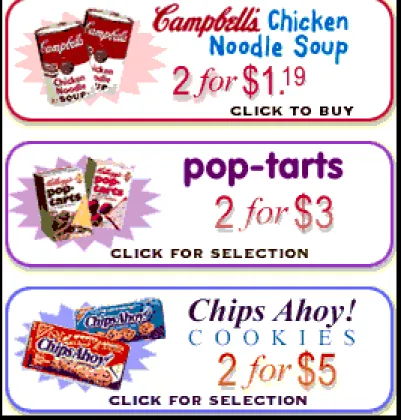
Figure 1.01. Web commerce extends into traditional arenas. An example is ordering groceries over  the Internet
Figure 1.01. Web commerce extends into traditional arenas. An example is ordering groceries over the Internet

Research on Teaching; Web Issues

Courseware *

Software for Managing Web Courses

We will attach current versions of the HTML documents and images and pass them back and forth. Even with the fastest processors and Internet connections at your school, the transfer speed for digital video and audio is still at the mercy of the daily traffic on the Internet itself. In many cases, using the software that creates the data requires purchasing a developer version of the plug-in or helper.).

Because the browser uses a plug-in architecture, computer programmers working for chemists can tailor their special needs to the overall power of the browser application. The window on the left is the display of the web page, the window on the right is the source of the page, and the window at the bottom is an example of a 'properties' window. An example of an HTML tagged file that would create a web-based version of the previous paragraph.

Plain, unrelated text is likely to be the very beginning of your website design. Links to other websites can be included in the body of the text or isolated in references at the end of the text. 34;View" in the browser menu, you can display the HTML source on the local screen.

In . lt;HEAD> document area. The header is usually followed by a tag that marks the beginning of the visually displayed document. The body closing tag and the HTML code itself will appear at the end of the document.

Links in a web browser can make quite a bit of difference – with a link in one part of a document linking to another part of the same document. The user clicks on a linked text string and the screen images change, showing a different part of the same document. If page formatting is critical to your teaching application, Adobe Acrobat {U06.16} software can provide a viable solution.

The National Science Foundation's FastLane {U06.17} reporting system, for example, uses .pdf files everywhere. Web submission {U06.16} is extremely easy to implement and uses the MIME extension system.

Figure 5.04. Window of ICQ {U05.12} messaging software. This screen suggests that two persons  are available to exchange messages with dbrooks, kcrippen, and 48142211
Figure 5.04. Window of ICQ {U05.12} messaging software. This screen suggests that two persons are available to exchange messages with dbrooks, kcrippen, and 48142211

MAIL (FOR PROCESSING FORMS) * THE LAST MINUTE *

One dimension focuses on the nature of the task of creating active learning environments, and the other on the tools available to help accomplish this task. In the online version, by moving the pointer (cursor) to the underlined word and clicking the mouse, the definition of the word appears. Since the publication of the first edition of Online Teaching, it has become clear that virtually any subject can be covered online.

Creating a form is a matter of choosing to insert the form element or dragging an icon for the desired form element onto your document, the coding is done automatically. A companion figure can either be the subject of the question or be a helpful clue. Once this is entered by the user and submitted in one point of a form, all subsequent documents (consisting of exams and exams with answers) identify the user by name.

This information is made available to the program that performs the tasks of generating or evaluating the exam (Figure 7.08). The form is configured so that, as shown in the screenshot at the bottom, two of the four HIDDEN items are displayed directly on the client-side form. That is, checking one of the buttons precludes checking any other button in the family.

There are no clues about using this form input element; experienced users have encountered them more than once (Figure 7.13). One of the selections can be made the default selection by marking it SELECTED in the HTML code. RESET creates a button that clears all form inputs except HIDDEN and resets any preselected options to their default values.

Most of the time the user gets sent a form fresh from the server and never gets to use this button. The danger with the RESET button is that the student can accidentally delete all answers to. Much of the editing of this book was done by email exchange of attached documents.

Figure 7.01. The arrow cursor on the left suggests no link; the hand cursor on the right suggests a  link, and that clicking will bring about some action – going someplace implied by the image or text
Figure 7.01. The arrow cursor on the left suggests no link; the hand cursor on the right suggests a link, and that clicking will bring about some action – going someplace implied by the image or text

MAIL (FOR PROCESSING FORMS)

Software exists to decode, but using the enctype="text/plain" attribute eliminates the need for decoding. 1998) Hypermedia as a pedagogical technology: a review of the quantitative research literature on student understanding, control and style, Rev. Web-delivered media can be so complex that one must be concerned about cognitive load—and to be sure that a student's cognitive resources are working synergistically rather than antagonistically with the learning material being delivered.

They can be recorded by digital cameras, scanned from photographs, produced on photo CDs, brought in as single images from video sequences, obtained from external sources or produced. Moving images can be produced with animated GIFs, several versions of MPEG (a format related to JPEG), or streaming video; further discussion of moving images appears later in this chapter. Because images are made up of individual pixels on the screen, image files can be extremely large and slow to download.

Lossless compression occurs when every pixel is recorded and the image can be accurately reconstructed from the compressed data. To properly render the large range of colors of the original, more colors than GIF can provide were needed. Interlacing sends the sliced ​​image in alternating order, quickly providing a soft version of the image.

When it is necessary to have a large number of images available, you can minimize download time by creating thumbnail versions of the images (see Figure 8.02). The thumbnail images can be created without worrying about data loss. The user clicks on a hypertext title or even on the thumbnail itself to download the full version. JPEG is a form of lossy compression; the degree of loss may vary when saving in JPEG format.

Since the image compression produced by JPEG is lossy, any image modification must either be performed first. Software that uses the PNG (Portable Network Graphics, pronounced "ping") format can be used to edit para images. PNG serves as the native format for many of the best new graphics programs (eg Fireworks and PhotoShop use PNG and then allow the image to be exported to GIF or JPEG).

Figure 7.17. Web page created to illustrate e-mailing of forms. The form was opened using a

Referensi

Dokumen terkait