BANDWIDTH CONTROL BASED ON IP ADDRESS
By
Y AAKUB BIN MOHAMAD
FINAL REPORT
Submitted to Information Communication Technology Programme In Partial Fulfillment of the Requirements
For the Degree Bachelor of Technology (Hons) (Information Communication Technology)
Universiti Teknologi Petronas Bandar Seri Iskandar 31750 Tronoh
Perak Darul Ridzuan
©
Copyright 2005 By
Y aakub bin Mohamad, 2005
C v<\W ~vvovk5
1• a "'f
2 \TI\' --1 f,Lsis
CERTIFICATION OF APPROVAL
BANDWIDTH CONTROL BASED ON IP ADDRESS
Approved by:
By
Yaakub bin Mohamad
A final report submitted to the
Information Communication Technology Programme Universiti Teknologi PETRONAS
In partial fulfillment ofthe requirement For the Degree Bachelor of Technology (Hons)
(Information Communication Technology)
Mr. Suhaimi Abdul Rahman Project Supervisor
UNIVERSITI TEKNOLOGI PETRONAS TRONOH, PERAK
July 2005
CERTIFICATION OF ORIGINALITY
This is to certify that I am responsible for the work submitted in this project, that the
original work is my own except as specified in the references and acknowledgements,
and that the original work contained herein have not been undertaken or done by
unspecified sources or persons.
ABSTRACT
This report provides an insight of problem identification, related secondary data (literature reviews), the possible approach in completing the project and the result/discussion arguments. The progress of the project are also been projected in this report. It can be referred to the diagrams, testing results and some comparisons that will be later discuss in depth. The proposed method is based on the current situation that every network is experiencing which is the congested problem as a result of some phenomenon that occurs such as the bottleneck problems and ip spoofing. Upon the completion of this project, it is expected to deliver a fair distribution of network bandwidth to the users. It is practically done by controlling the bandwidth usage from a dedicated server and a resource locator so that the abuser can be pin-pointed and the whereabouts can also be determined. A network policy is also being implemented here with the integration of the PHP language, the MySQL as the main data storage and also the GIS application such as the mapserver for the resource locator part. This paper will also focus on the security part and data visualization from the result.
ACKNOWLEDGEMENTS
Firstly, the author would like to thank Allah for giving the strength and guidance throughout all the difficulties throughout the project and also for completing the author's journey of getting a degree of education.
The author's appreciation to Mr. Mohd Nordin Zakaria as the IT/IS Final Year Project Coordinator and Mr. Suhaimi bin Abdul Rahman as the author's project supervisor.
Without their management and coordination, the flow of this project might not be as expected.
Special thanks to the author's father Mohamad bin Chik and mother Haminah bte Mohd who supported him from behind especially during the completion of his degree in UTP.
The author's appreciation goes to his family and relatives for giving support and guidance unimaginable.
Lastly the author would like to thank his friends who had been supportive during the
period of this project held. Their helps, ideas and support would never be forgotten. Not
to forget to all others who have help in the project directly and indirectly and might not
be mentioned here.
TABLE OF CONTENTS
Chapter I INTRODUCTION ... I 1.1 Project Background ... I
1.2 Problem Statement ... 2
1.2.1 Problem Identification ... 2
1.2.2 Significant of the Project ... 4
1.3 Objective and Scope of Study ... 5
1.3.1 Objectives ... 5
1.3.2 Scope of study ... 5
1.3.3 Feasibility of the Project within Time and Scope ... 6
CHAPTER 2 LITERATURE REVIEW AND THEORY ... 8
2.1 Why a bandwidth manager is important? ... 8
2.2 How P2P affect the networks' Quality of Service (QoS)? ... 9
2.3 Does Anonymity Issues is a Big Deal? ... 10
2.3.1 What isAnonymity? ... IO 2.3.2 Identity Theft and Network Attacks ... !! 2.3.2.1 JP Spoofing ... II 2.3.2.2 NetworkAttacks ... 12
2.4 Data Privacy ... 13
CHAPTER 3 METHODOLOGY ... 15
3.1 Procedure Identification ... IS 3.1.1 Identification of Problem Domain ... !? 3 .1.2 Knowledge Acquisition ... 19
3 .1.3 History Taking ... 20
3.2 Tools Required ... 21
3 .3 Building the Bandwidth Control System ... 22
3.3.1 Establishing the MySQL database connection ... 22
3.3.2 Creating the MySQL database using PhpMyAdmin ... 25
3.3.3 Setting up the CCProxy Server ... 28
3.3 .3 .I Extracting and Installing the CCProxy ... 28
3.3.4 Setting up the NProbe Collector ... 29
3.3.5 User Representation ... 30
3.3.6 Development of User Interface and User Integration ... 32
3.3.7 Validation and Verification ... 33
3 .3. 8 Testing ... 3 3
CHAPTER 4 RESULT AND DISCUSSION ... 35
4 .I Findings ... 3 5 4.2 Result and Discussion ... 3 7 CHAPTER 5 CONCLUSION AND RECOMMENDATION ... 41
5 .I Conclusion ... 41
5 .2 Recommendation ... 4 2 REFERENCES ... 43
Appendix A GANT CHART ... 44
Appendix B SAMPLE OF QUESTIONNAIRE ... 45
Appendix C PROJECT EXECUTION DIAGRAM ... 47
Appendix D NETWORK DIAGRAM ... 48
Appendix E SAMPLE DATA COLLECTED ... 49
Appendix F PROJECT SCREENSHOTS ... 50
LIST OF FIGURES
Figure I BandCIP Evolutionary Development Lifecycle ... 16
Figure 2 The Number of Users Having Connectivity Problems ... 17
Figure 3 Information Desire to have in BandCIP ... 18
Figure 4 Flow Chart of Knowledge Acquisition Process for BandCIP ... 19
Figure 5 The Database Connection Page ... 23
Figure 6 Data Dictionary for BandCIP ... 24
Figure 7 Login Prompt ... 25
Figure 8 PhpMy Admin Home page ... 26
Figure 9 Creating new table ... 26
Figure 10 Database Structure Representation ... 27
Figure 11 Record Insertion Validation Process ... 28
Figure 12 BandCIP system flow from user's perspective ... 31
Figure 13 BandCIP system flow from administrator's perspective ... 32
Figure 14 Result of Testing Done on 10 Students ... 38
Figure 15 Project Gantt Chart ... 44
Figure 16 Project Execution Diagram ... 4 7 Figure 17 Project Architecture ... 48
Figure 18 Sample NProbe Data ... 49
Figure 19 Login Page ... 50
Figure 20 Home Page (Administrator) ... 50
Figure 21 Protocol Summary ... 51
Figure 22 Traffic Distribution ... 51
Figure 23 Message Center ... 52
Figure 24 Administration Page ... 52
Figure 25 User Data Page ... 53
Figure 26 Change Password Page ... 53
Figure 27 Log File ... 54
Figure 28 Home Page (Users) ... 54
Figure 29 UTP map (GIS application) ... 55
Figure 30 CCProxy Page ... 55
Figure 31 Setting up the open ports ... 56
CHAPTER!
INTRODUCTION
The Bandwidth Control Based on IP Address is a system developed to assist user in monitoring network performance and problems. It acts as guidance giving users detailed information about the network users from the input collection. The Bandwidth Manager [1] is enhanced with user interfaces; server scripting and GIS application to ease user in understanding the project objectives. The details of the project thoroughly touched in this chapter.
1.1 Project Background
Currently, all network users (students and staffs) in Universiti Teknologi Petronas are using the local area network (LAN) topology for both data sharing and communication purposes by using various kind of applications. But some of the applications are very harmful to the network and can create congested phenomena.
Most of the users are not aware of this problem and continued using the applications.
But recently, there are users (students) that are stealing the current student's bandwidth space. They are freely doing such activities because there no user identification or user detection. Based on that occasion, network administrator needs to find the best solution in order to manage the network bandwidth usage that is gradually increasing from time to time.
Further more, the Bandwidth Control Based on IP address (BandCIP) provides both Internet access and monitoring tools to the users in Universiti Teknologi Petronas so that the "anonymity user" problems can be resolved. The author's consent is to provide the best possible Internet access within the current bandwidth space. As in many other networking environments, Internet access is controlled by several factors such as the capacity that have been set for Internet surfing and also for local intranet usage. Although the speeds of LAN s and the Internet backbone are in the order of a
Gb/s, the low capacity in Internet bandwidth often means that dozens of users have to share 64kb/s of bandwidth. The result is that all the users are frustrated, and much of the bandwidth is being sucked by unidentified users. Providing enough bandwidth to satisfy all users is financially infeasible, so the author approached the problem from the angle that bandwidth is a fixed resource, which should be managed to maximize the benefit. By doing some research on the current technology, many individuals consider that the cost of bandwidth is dropping rapidly; therefore this problem will only be temporary. However, the author observes that although the cost of bandwidth has reduced, at the same time, the demand for bandwidth has increased. The net result has remained an insufficiency of bandwidth, and can be expected to be so in the future [2]. As the majority of the incoming traffic is for web access (forthis paper, the author consider ftp to be part of the web), the management of web traffic at the application layer (and above) are being concentrated. The author used several techniques to manage the bandwidth; (I) Caching, to avoid repeated fetching of data, (2) Content Limitation for maximum connections that can be access at a single time and (3) Bandwidth Allocation, to assign bandwidth to units and user groups. This project will also offer a lot of benefits to the network administrator in order to monitor and control the network from any irrelevant attributes that may congest and obstruct the network bandwidth from fully utilized by only one user. Other than that, it will also provide the network administrator with information regarding the network bandwidth user such their personal data and history log in each virtual pipe.
1.2 Problem Statement
This section will cover the 'Why' and 'How' questions for this project. It briefly clarify and tells story behind the project such as problems identification and significant of the project.
1.2.1 Problem Identification
As the networks expand, more routers are needed to separate users into broadcast and collision domains and provide connectivity to other LANs. One major drawback of using the local area network (LAN) topology is that this adds latency, which essentially delays the transmission of data. This is caused by the process involved in
routing data from one LAN to another. A router must use more of the data packet to determine destinations and route the data to the appropriate end node. UTP area has extended to larger surrounding in which the buildings are provided with their own LANs and each of them is located according to respective residential villages. By the interconnections of various local area networks (LANs), the topology expands to another stage which is called wide area network (WAN). A wide area network (WAN) coves a large geographical area, may require the crossing public right-of- ways and may relay at least in part on circuits provided by a common carrier [2]-[3].
Typically, a wide area network (WAN) consists of a number of interconnected switching nodes. A transmission from any one device is routed through there internal nodes to the specified destination devices. The broadcast domain are typically bounded by routers and they are using the Dynamic Host Configuration Protocol (DHCP) that provides a mechanism for allocating IP addresses dynamically so that addresses can be reused when hosts no longer needs them [3].
By assigning IP to user via DHCP, it will increase the user violation aspect in which the anonymity of identification here would be widely spread. Difficulties occurred in finding the "abusive" user with respective location with respect to the network problems keeps that on arising during the usage of internet and other network application. This is due to the problem of assigning static IP by the users. There is an option in which here in UTP, users can assign their IP either using the DHCP (dynamic IP) or manually configured their own IP (static IP). Here, Geographical Information System (GIS) will take place in which the data been inserted must be parallel with the location that has been defined in the GIS map. The proposed solution is hoped able to resolve the problem faced by the network administrator by pinpointing actual location and information about the users.
The identification or user awareness on the network congestion also brings havoc because normally there are no such mechanisms being implemented in small network and for this scenario, in the residential village network. So the needs of implementing such policy are essential in maintaining a safe network and also for precaution purposes.
The other question is about the availability of the administrator whether they can
- -
respond to the student request or not. Can they reach their users if any problems happen right at time of at least within a day of report logged? There are normal questions about the network problems in UTP asked by the students such as:
•
•
•
•
Why can't my computer reach the gateway?
Why can I ping this computer, but can't connect on it?
Why my network card is working but I can't connect to the net?
Why my IP Address suddenly disappear?
These kinds of questions are always flashing in their mind when the author discusses about the administrator's availability problems.
1.2.2 Significant of the Project
Difficulties on managing the bandwidth distribution are one of the main problems that the network administrators are facing currently. The user anonymity problem gives them a headache because it is hard to detect the specific user and then retrieve the detailed information about the network user since user internet protocol (IP) address can always been changed and it is been automatically assigned by the Dynamic Host Configuration Protocol (DHCP). This is where Bandwidth Control Based on Internet Protocol (IP) address takes place in which the proposed solution is hoped able to resolve the problem faced by network administration and students in order to use the network bandwidth fairly. The user anonymity problem is expected to be resolved by logging the Internet Protocol (IP) address values to a specific user account. This will increase the security part because the IP address value has been bind with a specific user account. User accounts here usually hard to modify and even though there are ways to implement internet protocol (IP) fraud such as Machine Access Code (MAC) address spoofing and internet protocol (IP) spoofing, but it just will take a lot more time to do so. Hence, the security issues can be overcome and it is expected that the Internet access is more obtainable to the network users
1.3 Objective and Scope of Stndy
Objective and scope of study is a key direction of this project. It contains goals to be achieved at the end of this project; scope will be covered as well as expected time of project development. The system should at least able to fulfill three (3) of objectives that will be briefly explained throughout this chapter.
1.3.1 Objectives
The objective of study to be achieved as follows:
Bandwidth Monitoring application may benefit users and network administrator in several ways, such as:-
1. To monitor the attributes and elements from the network users that consume most of the bandwidth in the network and produce a statistical report based on the set of data been collected.
2. To create a standard network policy and specific requirements that requires user to follow.
3. To aid and provide the network administrator with detail information about the possible "network abuser" based on the data been stored from the network.
1.3.2 Scope of study
For the system, the users are being categorized based on their bandwidth requirements when they surf the internet. By studying the characteristics of web sites, most of the sites containing large, multimedia content had low academic significance (e.g., "adult" sites). Most technical sites, on the other hand, were low on graphics, and had more textual content which took time to read. It is concluded that a small average bandwidth (of the order of 1 Kbytes/s) was sufficient to provide access to a large percentage of useful websites. However, some useful websites required larger amounts of bandwidth to use effectively. File downloading, in almost all cases, is not time-critical. A delay of I hour in downloading a file is only a minor inconvenience.
With a little forward planning, almost all file downloads could be scheduled overnight. Therefore file downloads, defined as accessing large files (say over
I OOkB), and may be given low priority. For each category of users, the author allocated an amount of bandwidth during peak hours. During off-peak hours, when sufficient bandwidth is available, users should be able to use as much bandwidth as they need. Users are also encouraged file downloading at night, by providing a user- friendly interface to schedule downloads. Since this system is only for web (including ftp) access, it is implemented it as part of a web proxy. By using a transparent proxy, users are automatically served by the proxy for all web access. The CCProxy server is chosen as the base of this system. Many of the features that are required were configured directly in CCProxy and others were implemented by modifying the software. Below are the main techniques that will be used in the system development phase.
• Caching
Web caching [2] is the storage of recently accessed pages locally, and delivery of subsequent requests for pages from the local cache rather than the original web site.
The prime objective of caching is to improve user response time, but it also reduces the load on the long-distance links. Caching is widely used on the Web, and can provide bandwidth savings of up to 40%. A hierarchy of caches may be used to increase the effective cache size and thus improve the hit rate. Push caching attempts to place content in a cache before it is requested, either by looking at other caches, or by predicting usage.
• Content Limitation and Bandwidth Restriction
The range of accessible content may be restricted in several ways: (1) by limiting the sites accessible to a limited list, (2) by preventing access to sites on a "stop list", or (3) by restricting access based on file type, size, or needed bandwidth. The first method would be useful for providing material for a course. The second would not be appropriate in a university setting. The third is incorporated into the system both explicitly and implicitly, as described below.
1.3.3 Feasibility of the Project within Time and Scope
This project can be deemed as technically feasible as the scope of the project is limited to the solving common congestion problems that occur in UTP only. There is no relative cost related to the project as the expert system can be developed using
open source applications that are available in the Internet. There are also adequate resources available to support the project, such as books, online resources, lecturers and UTP IT staffs. The time frame given to complete the project is also sufficient.
The Gantt chart produced (see appendix A) indicates the time allocated for each task it serves as guidance for project execution
CHAPTER2
LITERATURE REVIEW AND THEORY
2.1 Why a bandwidth manager is important?
According to Graham Vorster (May 18, 2004),
"Bandwidth management is a key that becoming one of the most critical factors in ensuring the success and optimizations of company assets and ultimately, building a strong security fortress. As more companies move to client-server networking, Internet/intranet browsing and today's GUI-based applications consume a significant portion of available bandwidth. This can affect the performance of mission-critical activities such as security [1]."
It is becoming obvious that bandwidth management is one of the most critical factors in ensuring the success of a corporate intranet as a strategic business tool, with true bandwidth usage monitoring and control at the departmental and application level vital for implementing an effective traffic policy. As more companies move to client- server networking, Intemet/intranet browsing and today's GUI-based applications consume a significant portion of the available bandwidth and this can affect performance of mission critical activities.
With the increase in the use of the Internet and intranet as and integral part of business strategy, today's network managers face diverse traffic management considerations such as:
• How can they guarantee users and business-critical applications adequate bandwidth?
• Can bandwidth be adjusted to meet the requirements of individuals on a flexible and time-sensitive basis?
• Can they accurately assign bandwidth charges to the appropriate users and departments?
• How can they manage the use of intranets over expensive WAN links?
• Have they reached the bandwidth capacity of their network?
• How can they use their network efficiently to save investments in new bandwidth and new networking equipment?
• Can they validate the quality of service provisioned by their ISP?
2.2 How P2P affect the networks' Qnality of Service (QoS)?
When the Internet was first being created, there was no perceived need for a QoS application. So in fact the entire internet ran on a "best effort" system. There were four "type of service" bits and three "precedence" bits provided in each message, but they were largely unused. There are many things that can happen to packets as they travel from origin to destination and they result in the following problems, as seen from the point of view of the sender and receiver:
I. Dropped packets - the routers might fail to deliver (drop) some packets if they arrive when their buffers are already full. Some, none, or all of the packets might be dropped, depending on the state of the network, and it is impossible to determine what happened in advance. The receiving application must ask for this information to be retransmitted, possibly causing severe delays in the overall transmission.
2. Delay - it might take a long time for a packet to reach its destination, because it gets held up in long queues, or takes a less direct route to avoid congestion.
Alternatively, it might follow a fast, direct route. Thus delay is very unpredictable.
3. Out-of-order delivery- when a collection of related packets are routed through the Internet, different packets may take different routes, each resulting in a different delay. The result is that the packets arrive in a different order to the one with which they were sent. This problem necessitates special additional protocols responsible for rearranging out-of-order packets once they reach their destination.
4. Error - sometimes packets are misdirected, or combined together, or corrupted, while en route. The receiver has to detect this and, just as if the packet was dropped, ask the sender to repeat it.
During the last years, the use of Peer-to-peer (P2P) applications for file exchange has increasingly gained fame. P2P traffic component of the global Internet traffic has
been growing. P2P file sharing applications build up a virtual network of hosts (peers) able to communicate with each other without following the classical client-server architecture. Instead, each peer has the same functionalities as the other peers so that the traffic load is distributed among the connected users. In some P2P networks, a special role is assigned to a set of hosts (super peers) which coordinate the operation.
P2P file sharing applications generate an intensive amount of traffic as they tend to exploit all available link capacity in the underlying network. Traffic is generated both in downstream and upstream direction. This can have a significant impact on the increasing of network congestion and reducing the capacity available for other applications, such as interactive web and other multimedia applications [4]. As a result, interactive application are adversely affected as the high network congestion may significantly increase the network delay and hence the application response time.
Therefore, it will increase the network problem that the users will be facing.
2.3 Does Anonymity Issues is a Big Deal?
In this section the author wants to grab the readers' attention on the anonymity issues.
What can be the actual impact to the network if the network administrator cannot lock or knew their users? Below are the explanations and discussions about those aspects.
2.3.1 Whatis Anonymity?
Dingledine and Mathewson (2004) discuss the relationship between usability, configurability and security in anonymising networks.
"A communication system is said to provide sender anonymity
if
the recipient of a message cannot determine the identity of the sender, and recipient anonymityif
the sender cannot determine the identity of the recipient. Sender-recipient unlinkability means that no observer can determine whether a given sender and recipient have communicated" [5].In the case of interactive protocols, the terms initiator and responder may be more relevant than sender and recipient; the terms publisher and reader are sometimes used for non-interactive protocols. In general, the practical implications of anonymity for various parties depend on the protocol that is being anonymous. For example, the initiator of an HTTP exchange is the reader (or information consumer), while the initiator of an SMTP exchange is the writer (or information producer).
Here, the anonymous users can simply make network attacks to the network without any hesitation because they know that they are hard to trace and some of them are
"invisible".
2.3.2 Identity Theft and Network Attacks
This section explains the identity theft techniques and the network attacks types that are widely used in the network environment currently. The results from the attacks done by the "unidentified users" in the network can lead to illegal remote root access to other individual systems. This is actually their main objective and after gaining root access/administrator's access and taking over existing terminal and login connections, intruders can make tampering data and other sorts of modification to the system.
2.3.2.1 IP Spoofing
One of the most popular identity theft techniques currently been used is the IP spoofing. IP spoofing involves forging the source address of an IP packet in order to impersonate an internet host or disrupt its communications (e.g. by resetting TCP connections). Blind spoofing means sending forged packets without being able to see the responses; non-blind spoofing is only possible when the attacker is on the path taken by the victim's packets, e.g. the same LAN segment as one of the endpoints [6].
To gain access, intruders create packets with spoofed source IP addresses. This exploits applications that use authentication based on IP addresses and leads to
unauthorized user and possibly root access on the targeted system. It is possible to route packets through filtering-router firewalls if they are not configured to filter incoming packets whose source address is in the local domain. It is important to note that the described attack is possible even if no reply packets can reach the attacker.
Examples of configurations that are potentially vulnerable include
• routers to external networks that support multiple internal interfaces
• routers with two interfaces that support sub netting on the internal network
• proxy firewalls where the proxy applications use the source IP address for authentication
The IP spoofing attacks are also been described in two papers: 1) "Security Problems in the TCP/IP Protocol Suite" by Steve Bellovin, published in _Computer Communication Review_ vol. 19, no. 2 (April1989) pages 32-48; 2) "A Weakness in the 4.2BSD Unix TCP/IP Software" by Robert T. Morris.
2.3.2.2 Network Attacks
S. Savage, N. Cardwell, D. Wetherall, and T. Anderson explore the behaviour ofTCP when the receiver misbehaves in order to cause the sender to transmit as quickly as possible. As well as defeating congestion control, this could be used as part of a denial of service attack on the sender [7]. Three (3) attacks are described. In the (i) ACK division attack, multiple acknowledgements are sent for each segment received, with each ACK acknowledging a different part of the segment. TCP's congestion window is enlarged whenever an ACK acknowledges new data, but acknowledgements use byte granularity while the congestion window is measured in segments.
The (ii) duplicate ACK attack exploits TCP's fast recovery algorithm, which increases the size of the congestion window whenever three duplicate ACKs are
received. Finally, (iii) optimistic ACK works by sending acknowledgements for segments that have not been received yet. This fools the sender into thinking that the round-trip time is lower than it is, so it transmits more quickly. This last attack can lead to data loss because a segment may be dropped after it has been acknowledged, in which case it is impossible to ask for it to be retransmitted. This may be unimportant, however, if the goal of the attack is to saturate the sender's connection.
That is why from the authors' personal opinion it is important the anonymity problem should be overcome so that the network administrator can have fully control of the network conditions, although they (the network administrator) can just simply limit all the network access but it is not an effective way to maintain a fair network bandwidth distribution.
2.4 Data Privacy
Data privacy refers to the evolving relationship between technology and the legal right to, or public expectation of privacy in the collection and sharing of data [8].
Privacy problems exist wherever uniquely identifiable data relating to a person or persons are collected and stored, in digital form or otherwise. Improper or non- existent disclosure control can be the root cause for privacy issues. The most common sources of data that are affected by data privacy issues are:
• Personal information
• Account information
• Network information
The challenge in data privacy is to share data while protecting the personally identifiable information. Consider the example of health data which are collected from hospitals in a district; it is standard practice to share this only in the aggregate.
The idea of sharing the data in the aggregate is to ensure that only non-identifiable data are shared.
The legal protection of the right to privacy in general and of data privacy in particular varies greatly around the world.
The Universal Declaration of Human Rights states in its article 12 that:
"No one shall be subjected to arbitrary interference with his privacy, family, home or correspondence, or to attacks upon his honour and reputation.
Everyone has the right to the protection of the law against such interference or attacks".
Increasingly, as heterogeneous information systems with different privacy rules are interconnected, technical control and logging mechanisms (policy appliances) will be required to reconcile, enforce and monitor privacy policy rules (and laws) as information is shared across systems and to ensure accountability for information use.
CHAPTER3 METHODOLOGY
Methodology is important in implementing a system or any kind of project because it acts as guideline starting from the early stage up to hand over. Methodology uses might be differed depending on purpose of the system, scope, objective and timeframe. Choosing a methodology is very critical and need to be set as one of priorities during the initialization of the project. Throughout this chapter, it will cover type of methodology use, the implementation and fitness of methodology to the system.
3.1 Procedure Identification
Nowadays, systems are so big and complex that teams of architects, analysts, programmers, testers and users must work together to create the millions of lines of custom-written code that drive success to the project creation. To manage this, a number of system development life cycle (SDLC) models have been used; waterfall, fountain, spiral, build and fix, rapid prototyping, incremental, and synchronize and stabilize.
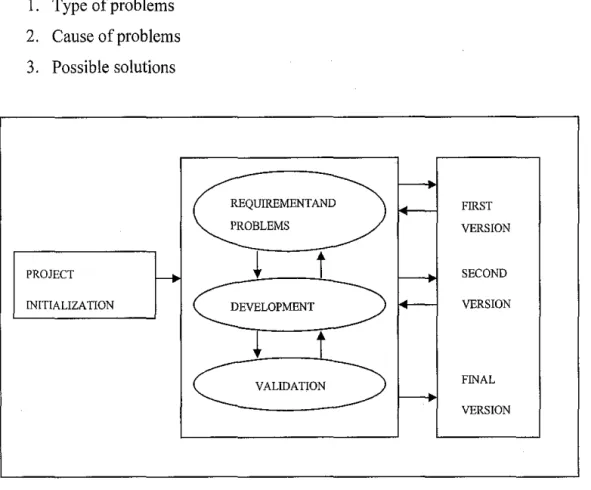
Evolutionary prototyping is the methodology chose for this project. This methodology is excellent when requirements are constantly changing. It is useful when it is not sure what kind of architecture will support the product or what, exactly, will be needed to implement/code it. The emphasis is initially on the core of the system which consists of the lower level functions of the system that are unlikely to be changed by experts' feedback. This reduces the potential risk, and aids in costing and performance estimation. The methodology so-called "BandCIP Evolutionary Prototyping" is the adjustment of Evolutionary Prototyping whereby the method is the same but the implementation might be different depending on time and scope of project.
It starts with the project guideline whereby study of project and target user is identified before the requirements and problems identification can be done. The specification here means information gathered is specified to the project objective before the initial version is developed. After that, the specification is re-analyzed through finding articles, interviewed with the UTP IT Department staffs, gathering information from students using random survey and then it will be mixed and analyzed the information at the development stage before the second version is developed. All the information is formed and divided into three (3) categories as below:
1. Type of problems 2. Cause of problems 3. Possible solutions
PROJECT INITIALIZATION
REQUIREMENT AND PROBLEMS
DEVELOPMENT
VALIDATION
FIRST VERSION
SECOND VERSION
FINAL VERSION
Figure 1 BandCIP Evolutionary Development Lifecycle
3.1.1 Identification of Problem Domain
Researches and survey on second year and third year UTP students reveals that there is a need to address the problems as follows:
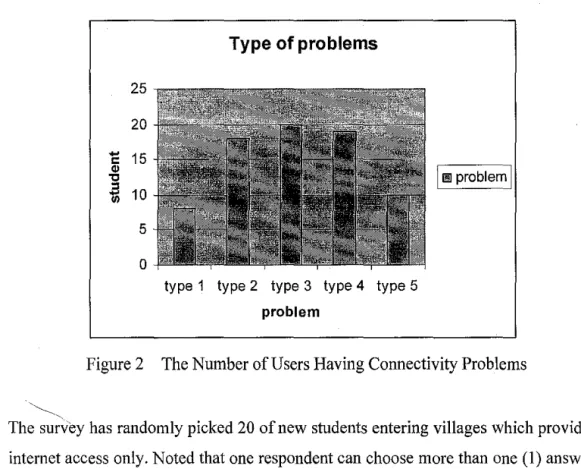
I. Type I: Can access the IRC but cannot connect to the net 2. Type 2: Cannot access the internet but network is ok 3. Type 3: Network instable- IP suddenly disappears 4. Type 4: Suddenly loss connection to the net 5. Type 5: Do not have network connectivity at all
The number of student having the problems stated above can be interpreted on graph as shown below:
·~.
25 20 1:
.,
15't1 ~ 10
5 0
Type of problems
type 1 type 2 type 3 type 4 type 5 problem
IIi!
problemI
Figure 2 The Number of Users Having Connectivity Problems
The survey has randomly picked 20 of new students entering villages which provided internet access only. Noted that one respondent can choose more than one (I) answer.
From the graph, we can see that problem type 3 is the most problems faced while type I is the smallest. The graph also told that respondents having almost all the problems stated above at least one per semester. They also reported that there is no even a semester they get fully connected at all. They all agreed that the major problem is due to unstable network in UTP itself. Overall, they are satisfied with the services
provided by UTP as compared to other local universities, which no internet access provided in their hostel specifically in their room.
From the observation it is found that new students are not familiar about network connectivity in UTP especially its configuration. Sometimes the problems arise is not because network itself but at theirs'. The respondents claim that they as new users quite hard to find someone to help them out due to the unavailability of admin to come and sees what actually happening to their computer and also they are shy to ask seniors. However, there are sometimes the problems are from admin side. From the interview with IT Staff, the problem sometimes come from UTP side but it is actually the technical part like switches are not functioning, some of the cable unplugs, software corrupted and etc. But most of the time, they claims that the problems always come from student side whereby their computer are unable to get connection due to incorrect configurations, incompatible hardware and software, or the computer running very old version.
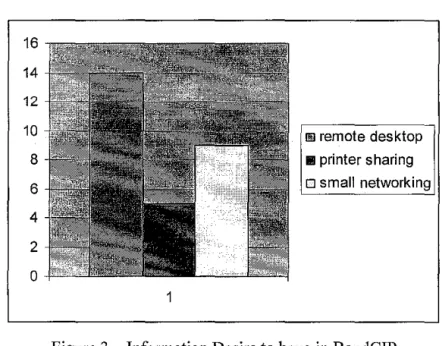
The survey reveals that the respondents would like to know about topic as follow:
1. Remote desktop 2. Printer sharing
3. Small/ home networking
The result is interpreted on graph as follows:
16 14 12
10 8 6 4 2 0
1!1 remote desktop 111 printer sharing o small networking
Figure 3 Information Desire to have in BandCIP
From the graph, the system only manages to accommodate for the remote desktop techniques and small networking. BandCIP will teach them to remote desktop from lab for ease them to do presentation whereby they do not have to bring their CPU anymore providing the applications intended to use have already installed at PC lab (all in text explanation). For it is the same also for the small networking setup. This is to limit the network architecture modification and also to give absolute control to the network administrator to maintain the network.
3.1.2 Knowledge Acquisition
Knowledge Acquisition is done after requirements and problems identified. The knowledge obtained to develop BandCIP through the knowledge acquisition process as shown in figure 5 below:
Literature review in Network Administration, User Anonymity, and Network Attacks/QoS
l
Prepare interview sessions/ Send Questionnaires
l
Collect network information from the internet, students (seniors), IT staffs, books, journals
l
Interpret and analyze the information for knowledge representation
1
Insert knowledge into the project implementation
Figure 4 Flow Chart of Knowledge Acquisition Process for BandCIP
The knowledge acquisition begins with a literature study on bandwidth management systems that have been developed and been using till today. With a literature review, interview to get expertise opinion and knowledge of managing users and identifying their common problems is prepared. Interview is conducted with two (2) UTP IT
staffs to seek their input and knowledge, obtain characterization of the student situations and receive further inputs. During the interview sessions, several questions have been asked and reviewed as follows:
I. What kind of problems always happens when managing users?
2. Do the problems come from user or admin?
3. What approach do admin use given a situation?
4. What cause the problems?
5. How fast the feedback once the report is logged?
The collected information is reviewed and analyzed. The compilations of interview and questionnaires results have been done and divided it into types of problems, causes and possible solutions. This process provides an effective way of how the knowledge will be organized and represented. After that, the problem-solving concepts is established whereby it will be translated in a form of decision tree before transforming into the 'production rules' in the knowledge base using BandCIP.
Knowledge acquisition is an evolving step as it requires modification of the knowledge base during the development period.
3.1.3 History Taking
Students who have been living in hostel for more than three (3) years have been experiencing network connectivity. Therefore, they have their own ways in handling common problems, which have been taken into the research
to
be put in the knowledge base. From administrator itself, they also have their own approach in handling the problem that they normally will check all the connections up to the core switches until there is no error found, they will go back to the student PC.Administrator has already assigned automatic IP address once student connect the cable to the port by using the Dynamic Host Configuration Protocol (DHCP) [3]. But what will happen is computer student unable to detect the network configuration, which in turn they will start to change to the static IP address and enter incorrect number. Sometimes users seem to use wrong cable; use cross cable instead of straight cable. Another common problem is when user installs new application that has
destructed network connectivity due to the incompatibility factor. Repeated problems facing by users have made this system advisable to the new students to use it.
3.2 Tools Required
There are hardware and software tools that were used to build the system. The hardware needed to build the system is as follows:
I. Computer with minimum requirements of:
• 128MB of
RAM
• CPU of 1.60 GHz
• Hard Disk Storage of 20GB
2. Network Peripherals
• Dual speed hub or switch.
• Unshielded Twisted Pair (UTP) Network cables.
While for the software required is as follows:
I Apache and PHP Language- (Web Server + Server Side Scripting)
The interfaces for this project will be created using the PHP Languages and the Apace as the web server. This is to implement the client-server architecture user remote control techniques. The Apache web server is being used because most of the open source application is using the apache as their main web server.
2 MySQL- Database Server
The MySQL database are being used for storage purposes in which here the MySQL database are used for storing the data that will be collected by the NProbe throughout the controlled environment.
3 NProbe- Traffic Collector
As what been mentioned above, this application are being used as a traffic meter that collects the data about the network performance. It will include that source ip, destination ip, the total packet sent, total bytes received and vice versa. The process of fetching the network data and updating the database
information will be continuously and it will be defined in the job scheduling tasks.
4 UNIX or Linux OS.
The Linux operating system IS being used here because the NProbe distribution package is being offered in the Linux. bin. It shows that the application can only be implemented in Linux environment only. This operating system also been executed by using the Virtual Machine workstation (VMware).
3.3 Building the Bandwidth Control System
3.3.1 Establishing the MySQL database connection
Throughout the development of BandCIP, this system will use open source application such as the Linux Operating System (Linux OS) and the NProbe data collector as the traffic meter. It will also use the Geographical Information Server (GIS) application as the resource locator. The development starts with connecting the database that has been created with the system. The example as follows:
$server = "localhost";
$username = 11fOOt11;
$password="";
$database= "my_domain";
The symbol "$" here means that it is a variable declaration in PHP Language. Here, there are four ( 4) main parts in the database initialization which are the server been used, the usemame in the server, the password and lastly the chosen/created database in MySQL. For the current project, the database password had been disable for testing purposes. The MySQL database then has been connected using the PHP codes which are;
$connection
=
mysql_connect($host, $user, $password) or die ("Cannot connect to the MySQL server". mysql_errorO);mysql_select_db("akub") or die ("Cannot select database" . mysql_errorO);As for the connection part, the PHP codes are using the MySQL adapter for connecting and retrieving the data. Below is the result when the database have been successfully created and connected.
Fllo f~! " ' " fol'<ll'l~ Tool< flei>
~"•ok· C) l!!j@'J;'?,),JJ-"''1-.'f"""'rl<"0'S·~ @·L)~fj.~
""" '
Databas~ Connecttud!l
Figure 5 The Database Connection Page
The database selection in this PHP-MySQL page has been created earlier by using two (2) ways which are;
1. MySQL command prompt
ii. PhpMyAdmin application.
The technique that has been chosen is by using the PhpMyAdmin application which is much more efficient and time saving. This application is also an open-source project which have been successfully installed and ready to use. The databases creations are user define and the properties of the table are referring to the data that has been collected for this project. All the attributes creations and tables condition can be define by inserting the row and columns in the PhpMyAdmin interfaces. This
will be explained throughout this project report. They are several tables that have been created by the author in this project which are:
No Table Name Attribute Data type length
I T flows ipSrc varchar
12
ipDst Varchar
12
pktSent biglnt
20
bytesSent biglnt
20
startTime Int 11
endTime Int 11
srcPort Int II
dstPort Int 11
tcpFlags Int II
Proto Int 11
tos Int 11
2
Als_inbox, messageiD Smallint6
Als _ oldmessag
Adres Varchar
20
es
Sender Varchar
20
Als_outbox
Date Received Datetime
Title Varchar
30
Message Text
isRead Tinyint 4
3
Als_signup Usemame Varchar20
Password Varchar
20
Mailadres Varchar
100
Actnum Varchar
20
Userlevel Tinyint 4
Sign update Varchar
16
Lastlogin Varchar
16
Lastloginfail Bigint
20
numloginfail tinyint 4
Figure 6 Data Dictionary for BandCIP
3.3.2 Creating the MySQL database using PhpMyAdmin
This open source application can access through the existing MySQL account using PhpMyAdmin using the link provided. Below is the author's path to his database domain name.
http://localhost:8080/phpmyadmin/
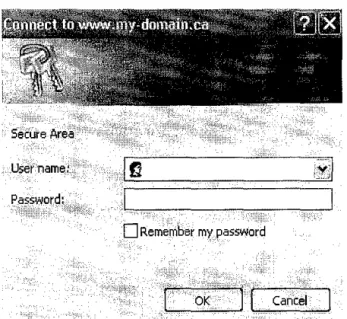
By clicking the path as stated above, a dialog box will prompt for a username and password. This will be the username and password that has been created earlier during the installation of this software.
Us8r'namE!:
0
Remember my _passwordr
OKrl
CancelFigure 7 Login Prompt
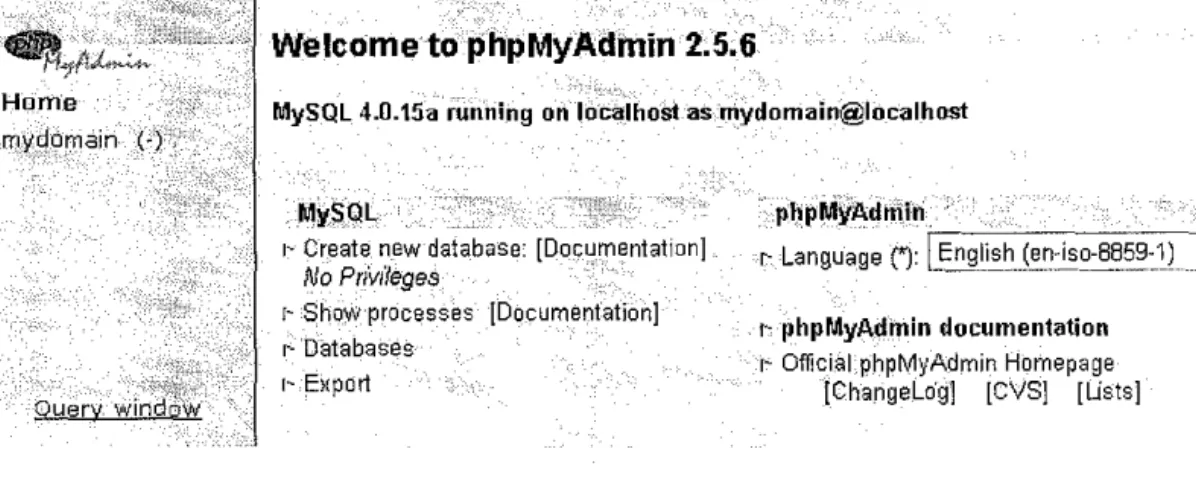
Once logged in, a PhpMyAdmin screen appears as shown in Figure 7.
3.3.2.1 Creating a table in the database
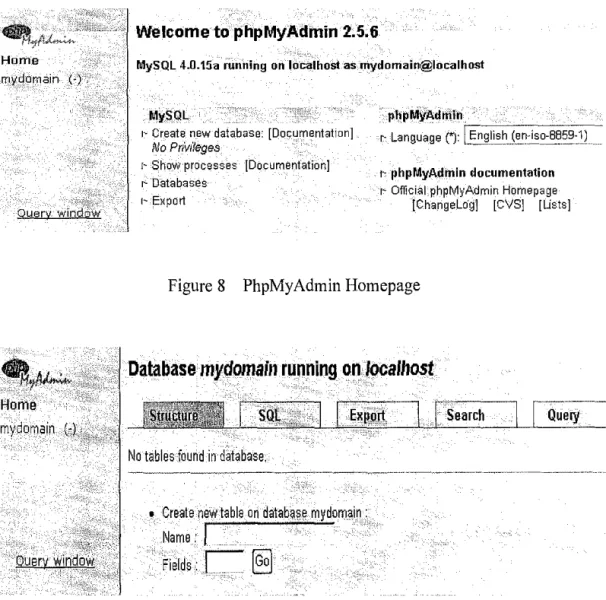
The left-hand frame (Figure 8) in PhpMyAdmin is used for navigation. The database displayed here (in this case called mydomain) is the database that will be used throughout the project development. Click on the database the navigation frame and a new window will appear on the right hand side.
Welcome to phpMyAdmin 2.5.6
MySQL 4.0.15a running on lo'calhost as rriydomain@localhost
My~Ql
r~ Create new database: [Documentation]
No PrivdegefJ
r~ Show·processes [Document'ation]
r-Databases
r~ Export
· p~pMyAdmin.
c Language('): r-[_E-n-gl~is-h .. -~.~-.n--i_s-o:_-88-__ 5-~--_1)-__ -_
t-phpMyAdinin documentation r- OfficiaLphpMyAdmin Homepage
[Changelog] ICVS] lUsts]
Figure 8 PhpMyAdmin Homepage
Database mydomain running on localhost
No tables found in database.
• Create new table on datab0
se
my domain : Name:Fields.:
C §)
Figure 9 Creating new table
For testing purpose, the author has created a table in the database, called "people".
The author has used the Create new table feature. Then, type in the name of the new table into the Name: people, and the number of columns in the table ( 4) into Fields:
This explanation is only designed to show the basic testing activities that have been done php/MySQLIPhpMyAdmin functions. Then, the delete function can be done by using the Drop function. Click Go and the interfuce will show you the table and its properties that have been created
3.3.2.2 Inserting values into a table in the database
Now for the inserting data into the MySQL database using the PhpMy Admin application. First of all, the information must be entered by following the attributes that has been defined in Figure 10.
The Length value indicates the maximum allowable length of characters for input.
There are many different values that can be set for Type but it must follow the types that have been defined in MySQL [11]. The Types specified in this example isn't the most efficient, but just used for the purposes of this explanation (this is actually the testing period in this project development). The "id" field, which will be used as a Primary key for this table, has been set to auto_increment, saving network administrators from having to having to type in the next number in sequence when inputting/updating records. Set the Default to O.Once the data have been entered, click Save. A screen like this will appear (refer to Figure 11) showing that the record is saved to the people table. So the data is now has been stored successfully into the MySQL database.
Database mydmnain -Table people running on localhost
Insert as a new row ,
@Go Qa~~,t-~ .. 'preyiou·90P3~!9e
--.-And--"' -or·<>>.> . - . - · -- -- - ---<>;<:;<:; •• >·:;?-;;i®.,-lgie·rt _a~·6t·~:~PW~®~:fow
.•
[~ojJ}:lesetJ
Figure 10 Database Structure Representation
Database mydomaln ~Table people running ~n locaJhOs"t
"'
t..._ Check All I Uncheck All With aelecled: !a' 'II'
ndexas: [Documentation]
Key1'11une Tyfu• Caidil1111it)' ACti,~fl: •,field,
PRIMARY PRIMARY oltaonarlle
telephone birthday :::reate an index on [ 1 - - columns fGo1
Space usage:
TYpe·.:· ·:ufiag~.
Data 0 Bytes
lndoiic. 1 ,024. syi~:s:
:TPt~~;;;;;kl:g4! ·sYfi~
Row Statistic:
St~~ter,_ieritS Vallill- .. ,
Format fixlid
_Ro-#S::::"::t>A_: ·;:T' -:q
NeKt Al,ltc,indeK- 1
;Craaj)Q'Qr;::) ~:!W.iiT~,~Oo~-1 -~62_:"27:PM La~t _update_ J~rl26, 2004 ~ti3:27 PM
Figure II Record Insertion Validation Process
3.3.3 Setting up the CCProxy Server
3.3.3.1 Extracting and Installing the CCProxy
• Run the latest version installation program on the server (in this case, the personal computer)
• After installation, CCProxy will initially execute with the default settings. The default settings are enough to realize the basic functions oflnternet sharing.
• Continue by configuring clients with the aid of "Guide for Client Proxy Configuration". Your clients will then be able to can access the Internet via CCProxy.
3.3. 3.2 Configuring the open ports and services
The author needs to use a cascading proxy because he cannot get connected to the internet directly.
In this case, he had used the UTP student network tree (160.0.226.208) to be cascaded with the BandCIP application. The following is the main attributes that must be setup in order to get the Internet connection.
"Proxy Address": fill in the address of upper proxy server.
"Proxy Protocol": Cascading proxy of CCProxy supports HTTP, HTTPS, and SOCKSS protocols. This means that, once any of these three protocols is valid for local server, the upper proxy server can work as cascading proxy.
Note: When choose HTTP as cascading proxy protocol, user(s) can only visits web pages. But if user(s) choose HTTPS or SOCKSS as the cascading protocol, user(s) can proxy for web browsing, receiving mails, CuteFTP etc. However, some functions of ICQ or sending mails will be limited. All the screenshots can be viewed at the appendices section
3.3.4 Setting up the NProbe Collector
Both UNIX and Win32 versions are developed under a single source-code tree, and require a library called libcap, which can also be downloaded from the official homepage www.ntop.org .In the supported UNIX platforms, after having downloaded ntop' s source code and installed libcap, ntop should be compiled and installed:
# cd /ntops-directory/ntop-1.3
# sh .!configure
#make
# make install
#exit
If ntop has been downloaded in binary format, the installation process depends on the package manager being used. As mentioned before, the Win32 version of ntop is distributed for free in a binary demo with limited capture capability. The full version in binary form is distributed under payment, and full snapshot versions are available
at ntop's ftp site, under ftp://ftp.ntop.org/pub/local/ntop/snapshots/. After the installation, ntop should be executed (by a user with super-user access), and will start capturing packets from the network. When activated in web-based mode, ntop features its own internal web server (set to a specific port on the start-up).
Therefore, it will be possible to access the software with a web browser through the URL http://hostname:portnumber/.The current version of ntop supports plug-ins, as an extension mechanism. The administrator is allowed to extend ntop's functionality with extra-features. Examples of plug-ins are ICMP, ARP/RARP and WAP plug-ins.
Those can be installed optionally, and started-up selectively during ntop initialization.
3.3. 5 User Representation
After the creation and insertion phase has been done, the system should be able to follow the flow shown as follows;
The flow shown described flow of the system once user entering it. Firstly, users will be prompted to welcome message before he can enter into the system (PHP Graphical User Interface). After that, user(s) can choose the options available on the top of page. If user(s) is having some email alerts from the network administrator, user(s) can either reply or try to connect the internet. The emails that have been sent to the users are ideally using the intranet features. So if the user(s) cannot connect to the Internet, they have to check the notifications from the administrator and respond quickly to the notifications or else they will be banned from the network (if it is too serious). Finally, ifuser(s) have made justification and clarification (responding to the email), it is up to the network administrator's judgments to decide what the action could be taken.
NO
OPENING PAGE
EMAIL ALERTS
GIVE RESPONDS AND JUSTIFICATIONS
SATISFY
YES
RECONNECT INTERNET NETWOK
ENTER
INTRANET
Figure 12 BandCIP system flow from user's perspective
As for the network administrator, user(s) must first login into the system so that they can view the result and the network log. And with the access level, they can also try to locate the users in the network by using the Geographical Information System (GIS) application. The network administrators are supposedly able to send sms via the network but currently the system is still on testing phase and it still not possible to activate the feature. They can also set the bandwidth distribution by using the CCProxy Server that has been integrated in this system.
NO
OPENING PAGE
VIEW REPLIES AND NEWWORK CONDITIONS
LOCATE USER
SUCCESS
ENTER
INTRANET
TAKE ACTIONS
RECONNECT INTERNET NETWOK
Figure 13 BandCIP system flow from administrator's perspective
3.3. 6 Development of User Interface and User Integration
The systems will be viewed via internet browser that required at least the intranet connection. There are actually 2 main users for this system which are the students and the network administrator. The main idea is to produce a statistical graph report for both the users so that they can view what are the activities that they have done which can contribute to the congested network. So the privilege that has been set-up for this system will determine the access level that each of the users in this system. Ideally the network administrator can use every feature in BandCIP such as;
i. Network Monitoring ii. GIS Locator
n1. Message Sending
Because the existence of different access level, the page content are hidden from the normal users so that they cannot alter or made data tampering on the records.
3.3. 7 Validation and Verification
Verification and validation occur during the entire development process but at the end of the development before the final version release, there will be one validation phase to authenticate the system functionality as well as its usability. Verification proves that the models within the program are true relationship and ensure that the knowledge is accurately imitated. This stage is very important as it will ensure later that the system conform to the requirement and meet the objective of the project. The project is being decomposed into 3 main stages which are:
1. User Registration Phase 2. Bandwidth Allocation
3. Data Retrieval and Cron Services
Although some part of network administration quite hard to define as many interpretations made by the authors, network administrators around the world but the scope is verified accordingly. Performance verification of BandCIP aims to ascertain how well the system accomplishes its intended role as in the actual networking practice.
3.3.8 Testing
BandCIP system reliability is one of the most important issues in network-based systems. Reliability ensures that the system delivers the results with consistency, accuracy and integrity. Therefore, the testing need to be done with careful and should be taken as the most prior in the development of bandwidth management system. The testing was done with three (3) different groups of people shows below:
1. Users (new students) 2. UTP IT staff
3. Student (seniors)
The above groups are chosen because of the following reasons:
I. User; new students
They are system's target user. The system aims to help this group of users to solve their problems particularly in connectivity problems.
2. UTP IT Staff
They are person whom administrating and managing UTP network. They are responsible and should be able to solve the problems encountered at students' sides. This group of people is targeted to have highly knowledge in networking.
3. Student (seniors)
This group of people is expected to have knowledge and experiences in handling connectivity in hostel. Their knowledge is essential because they normally know what actually happen if this thing happens and what to do to solve it. At this moment, focus will be mainly at this group due to the experiences having.
4.1 Findings
CHAPTER4
RESULT AND DISCUSSION
Throughout the development and implementation of this project, observation and analysis have been done mainly after the first (1) beta version released. At first, it is hard to identify the scope of project because the name itself is very big as well as the understanding of network administration might be differed. Therefore, the author had decided to narrow down the scope to only managing user particularly in troubleshooting of connectivity problems at users' side (in a small, controlled environment). This decision is made due mainly of the following reasons:
1. Policy of UTP 'secrecy' that cannot reveals information made the system limited to student only. (At first, the system plan to help staffs as welT)
2. UTP is in the process of making big changes in network makes them very busy and cannot allocate time for this subject matter. Therefore, the system unable to get their knowledge at the max. Only quarter of the solutions is provided by them, the rest is based on try and error done by experienced students.
As added value, the system would have additional information on printer sharing and remote desktop as discussed in chapter two (2) and three (3). First (1) prototype version released to clarify the problems. The prototype was undergone two parties;
student and UTP IT staff. The problems then clarified, several flaws identified that are as follows:
1. Unnecessary information and problems are incorrectly placed.
2. Problems in updating data stored in the databases.
3. Students did not understand the system at all.
4. The system was not reached its objective.
Therefore, the second (2) versions will be released to encounter the above problems which have been clarified by student and supervisor. This version had been modified in terms of scope and also information mainly about troubleshooting of network hardware at UTP sides. At student side, they able to understand the functionalities of the system and successfully used it. From the observation during the testing and validation of the systems, some of the problems unable to solve mainly because of the following factors:
I. Network itself currently under maintenance.
2. Unknown problems from students' computer.
3. Viruses might be detected lead to ban ofiP accessing the network.
4. The network unable to assign an IP to the computer.
5. Instability of UTP network mainly due of sudden increase of client especially at peak time.
Noted that the problems stated above is only assumption made based on information and study during the validation and testing phase.
Currently, the first version is released within 4 months due mainly of rapid changes has been made; from the system up to the redefined scope of the project. The system then re-tested and re-validated before being presented and commented by the lecturers during internal exhibition (pre-edx). This version was undergone testing similar like cognitive walkthrough approach that aims to evaluate its usability. In this case, this testing was done to not only evaluate its usability but also its usefulness.
Approximately, 10 students randomly chosen to test the system whereby they need to try by simply answering a set of questions. The testing was done at different time and location but the problems and result have been noted down and discussed later.
During the testing, several flaws and limitations are found and noted. Some of the flaws and limitations are as follows:
I. The system helps users only about 20%. Therefore it is not guarantee that the system will help the user to be connected with the internet at the maximum speed of connection (100 Mbps).
2. The system contains very little information that users think should be added more.
3. The system do help user to access internet (students) and set the bandwidth (administrator) but sometimes the solution only works at a small area (not the whole UTP).
4.