Online Student Advisory System
By
Norfazila Hashim
Dissertation submitted in partial fulfillment of the requirements for the
Bachelor of Technolgy (Hons) (Business Information System)
JULY 2005
University Teknologi PETRONAS
Bandar Sri Iskandar 31750 Tronoh
CERTIFICATION OF APPROVAL
ONLINE STUDENT ADVISORY SYSTEM
By
Norfazila Hashim
A project dissertation submitted to the Information Technology Programme
Universiti Teknologi PETRONAS In partial fulfillment of the requirement for the
BACHELOR OF TECHNOLOGY (Hons) (BUSINESS INFORMATION TECHNOLOGY)
Approved by,
(Miss Shakirah Mohd Taib)
UNIVERSITI TEKNOLOGI PETRONAS TRONOH, PERAK
July 2005
u
CERTIFICATION OF ORIGINALITY
This is to certify that I am responsible for the work submitted in this project, that the original work is my own except as specified in the references and acknowledgements, and that the original work contained herein have not been undertaken or done by
unspecified sources or persons.
NORFAZILA HASHIM
ABSTRACT
The advancement of technology provides massive benefit to human beings. With the aid of technology, many things that were lately thought impossible are now made possible such as internet. This project related to the internet application, is called Online Student
Advisory System, Currently in most university is using traditional or manual studentadvisory process and procedure which hold responsible to be tedious and time consuming. Alternatively there is rising trend in implementing online student advisory
system that potentially better. The goal of this project is to come out with more efficientand effective student advisory system. Along the way, few objectives and scope ofstudy have been set up which are to provide SMS alert system, enable user to track the activities performed, allow messaging and submitting report online. The project should minimize thus saving energy and time directed by all personnel involves in this advisory system in order to be more effective. The development ofthis project will follow Rapid Application Development (RAD) methodology which consists of four phases;
Requirements and Planning, User Design, Construction and Cutover phase.
Implementation and accomplishment of this project can positively be stepping-stone toward development of actual Online Student Advisory System in most university.
Importance finding of this project is level of response and acceptance of user toward the development of online student advisory system.
IV
S<-)M -S". -it, ".\ j
ACKNOWLEDGEMENT
Alhamdullilah, finally the author had completed her Final Year Project (FYP). The author would like to take this opportunity to express her appreciation to the following persons, who has contributed to this project through their help, suggestions, and
constructive critics.
The biggest appreciation forwarded to Miss Shakirah Mohd. Taib. First of all, author would like to send her appreciation for Miss Shakirah for her willingness to become author's supervisor. The author also would like to express her heartfelt gratitude to her supervisor, Miss Shakirah who continuously monitored her progress while guiding and advising her for the whole duration of this project. Her courage and generosity had inspired author in so many ways. Thank you for being such aninspiring supervisor.
Appreciation is also extended to Mr. Justin Devaraj, Puan Mazeyanti Mohd. Ariffin and Mr. Low Tan Jung for their information and useful comments for this project
development during Pre-EDXpresentation.
The author also would like to thank her parents and friends, for their continuous support
and encouragement. Last but not least, everyone else who have provided constructive
comments, inspiration and support to help the author complete her project successfully.
TABLE OF CONTENT
CERTIFICATION OF ORIGINALITY CERTIFICATION OF APPROVAL
ABSTRACT . . . .
ACKNOWLEDGEMENT .
CHAPTER 1:
CHAPTER 2:
INTRODUCTION .
1.1 Background of Study .
1.2 Problem Statement
1.2.1 Problem Identification
1.2.2 Significant of the Project 1.3 Objectives of the Project
1.4 Scope of Study 1.4.1 Online System 1.4.2 Tracking Activities 1.4.3 Alert System . 1.4.4 Online Report.
1.4.5 Online Message
LITERATURE REVIEW .
2.1 Mentoring System is Powerful
2.2 Mentoring System Need to Organize Efficiently 2.3 Online System is the Best Method for
Mentoring System . . . .
vi
n
iii iv
v
1 2 2 3 4
4 5 6 6 7
CHAPTER 3:
CHAPTER 4:
2.4 Development of Online Student Advisory System 10 2.5 ASP.Net Combines Extraordinary Developer
Productivity with Performance, Reliability and
Deployment . . . 10
2.6 MySQL Relational Database Management .
System is an Open Source and Easy to Use . 11
2.7 SMS is Convenient . . . . 12
METHODOLOGY
3.1 Procedure Identification . . . 13
3.1.1 Phase 1 - Requirement Planning . 14 3.1.2 Phase 2 - User Design . . 15
3.1.3 Phase 3 - Construction . . 16
3.1.4 Phase 4 - Cutover . . . 16
3.2 XPPlslVJtJse,d . . . .
3.2.1 Microsoft Visual Studio.Net with ASP.Net .
Web Application . . . 17
3.2.2 MySQL Administrator . . 17
3.2.3 MySQL Query Browser . . 18
RESULT AND DISCUSSION 4.1 Evaluation
4.1.1 System Evaluation
4.1.2 Evaluation Procedure
4.2 Result and Findings .
19 20 20 21
CHAPTER 5:
REFERENCES APPENDICES
4.3 Discussion . . . .
4.3.1 User Satisfaction on the Design 4.3.2 Effectiveness of the System .
CONCLUSION .
5.1 Conclusion .
5.2 Project Implementation Challenges .
5.3 Recommendation
v i n
28 29 32
34 35 36
38 39
LIST OF FIGURES
Figure 3.1: Rapid Application Development Process.
Figure 4.1: Result of Evaluation Regarding Text Style, Text Colour, Background
Colour and Colour Combination.
Figure 4.2: Result of Evaluation Regarding Design, Content and Layout of The
System.
Figure 4.3: Result ofEvaluation Regarding Functionality ofOnline Student Advisory
System.
Figure 4.4: Result ofEvaluation Regarding Effectiveness ofOnline Student Advisory
System.
Figure 4.5: Result ofEvaluation Regarding Effectiveness ofOnline Student Advisory
System as Overall.
Figure 4.6: Print Screen ofOnline Student Advisory System Main Page.
Figure 4.7: Print Screen of Academic Centre Main Page.
Figure 4.8: Print Screen of Advisor Main Page.
Figure 4.9: Print Screen of Student Main Page.
LIST OF TABLES
Table 4.1:
Table 4.2:
Table 4.3:
Table 4.4:
Data Gathered From the Evaluation Regarding Content, Design, Layout,
Style and Colour.
Data Gathered From the Evaluation Regarding Functionality and
effectiveness of Online Student Advisory System.Mean, Mod and Median of Content, Design, Layout, Style and Colour.
Mean, Mod and Median of Functionality and Effectiveness of Online Student Advisory System.
••/:. ..:. i>: '/...rue .MLkiJt:; ..:.= . . .
CHAPTER 1 INTRODUCTION
1.1 Background of Study
Students have traditionally been encouraged to look to teachers or lecturers for guidance.
Indeed, in school, college or university, mentoring often occurred through teachers or lecturer handpicking selected student and guides them for enhancing their performance
and self confidence.
Mentoring, by definition is a process of forming a relationship between a more experienced, seasoned and wiser person who helps a less experienced person develop in some specified capacity. It is about guiding and clarifying, and offering opinions, advice and referral contacts. Numerous studies have concluded that mentoring relationships are a significant factor in succession planning, skill and career development.
The advancement of technology provides massive benefit to human beings. People use technology to improve their ability to do work. Technology such as internet is everywhere and can make life easier and better. Through technology, people communicate better. Technology allows people to make more and better products. Same
as mentoring, it will betterthrough the use of technology. It is betterto make it online in order to develop more effective mentoring system to all personnel involve.^Lhi-Ilk.; ,n.i:
1.2 Problem Statement
Currently in most university is using manual mentoring system which mostly called student advisory system. The system basically is been implemented to guide the foundation and first year students and also students that are under probation and, under
probation and warning. This system is a little bit tedious and time consuming. Using this
system, students are encouraged to always meet their advisor discussing their problem especially problem in academic. The advisor needs to know the academic performanceand progress of their students. Other than that, the advisor needs to submit report manually to Academic Centre. The Academic Centre always faces difficulty in tracking
performance and activities perform of the students. Also, most lecturers make Academic Centre as a middleman by complaining about the student's performance to them because they do not know whose their advisor is. This would basically cause an ineffectiveness of the system itself.
1.2.1 Problem Identification
Some of the problems that have been identified based on UTP Traditional Student Advisory System are:
1) Student will show little awareness of participating in a Student Advisory System.
2) Advisor may not have time to meet with the student regularly to discuss about the problem faces by the student.
3) Some student has difficulty in expressing their problem face to face with others including their advisor.
4) Advisor may not have time to submit report manually to Academic Centre.
5) Academic Centre cannot keep track the participation of the students and advisors and activities that they have performed under this system.
6) Academic Centre always becomes middleman between lecturer and advisor in
Due to the reason above, author interested on making the Student Advisory System more effective by make it online. Author will concentrated in how to make the system more
effective than the current or traditional system.Several questions also need to be answered:
• How the process of match and preparethe students and advisor should be done?
• How to develop a practical and effective student advisory system?
• What's the best way to measure the effectiveness of the system?
1.2.2 Significant of the project
The main objective of this project is to develop an effective online student advisory system in a way to improve traditional student advisory system in most university. In order to improve the current system, the development will be focusing on how to make it
more practical and effective.
Before the development can successfully carried out, the current Student Advisory System need to be analyze, then only the author can have better understanding on the problem faces by the current system'ih"'gaining knowledge that might help in improving
the process and procedure of the traditional system.Implementation of Online Student Advisory System can be beneficial to many universities including University Teknologi PETRONAS (UTP). This system will
provide a fast and friendly alternative to the students, advisor and Academic Centre staff that involve in the advisory system.This online system aims at helping many universities in revolutionize traditional student advisory system, which can be proved be tedious and time-consuming. Moreover, the system will help reduce the opportunity cost, so affected parties such as advisor can channel the resource free to other meaningful work.
1.3 Objectives of the Project
The objectives of this project are:
1) To implement a tool to facilitate the Student Advisory System that have been
implemented in university by tracking the activities perform under the system.
2) To create aneffective system by providing short message (SMS) alert to the user.
3) To create an effective system by allowing submitting report and message online.
4) To create a good and reliable design system by applying a well known database
management system and programming language.1.4 Scope of Study
1.4.1 Online System
In this project, author will come out with the online system as the output. The online
system which is web based application will be developing using Visual Studio.Net with ASP.Net programming language. The main users of the system are Academic Centre staff, advisors and students. Thus, the system should come out with three differentinterfaces for these three main users. The online system will provide basic information
to user about what the Student Advisory System is all about to make them understand about the system.The system also will enable all users to search for the selected student in order to know who their advisor is and also view others student that are under the same advisor. This will overcome the last problem that have been identified which is Academic Centre
always becomes middleman between lecturer and advisor in reporting the student's
performance. By knowing who are advisor of the specific student, lecturer or other staff can make complain directly to their advisor without involving the Academic Centrestaff.
(!.(•». -v-
For Academic Centre, the system will provide an access to register for new advisors or students and delete the registered students or advisors. The system also will enable them to view the detail of registered advisor along with their students. The registration of the advisor should be done first before the registration ofthe students. Student registrations being done by choosing from list of registered lecturers or managements staff that will be assign to them as their advisor. Both registrations is using default password. Other than that, the system should also give an access for Academic Centre to post new bulletin and delete the unwanted bulletin that have been posted. The bulletin can be
posted to either all users or all advisors or all students.
The advisor will have an access to update their personal information such as their extension and email address so that it is easier for their students and Academic Centre to
contact them. They will know how many students that have been assign to them and view their student's details. The students also have an access to update their profile and
can view their advisor details.
1.4.2 Tracking Activities
The advisors have an authority to set up new meeting with their students and record the
activities that they will perform. They can view all the meeting that they have set up including the meeting that have been done. This record will appear to their students when they login to this system, so the students will be ready to perform that activities
during the meeting.The online system will enable the staff from Academic Centre to keep track the
activities perform by the advisor and their students. The staff can monitor the activities
being performed during the meeting for all advisor and students after login to this
system. These enable the.Academic Centre to know whether the advisor and the students
really participate or not in the Student Advisory System.
1.4.3 Alert System
Alert System will be set in the Online Student Advisory System. There are two alert system that will be embedded in this system which are short message (SMS) alert and
alert in the web site itself.
Alert in the website will be providing to Academic Centre, advisor and student. For Academic Centre, there is an alert for new report being submitted by the advisor once login. The staff of an academic centre can just click to the alert link in order to view the details of the report. They also can view all of the report being submitted for all students by all advisors. The alert will disappear from Academic Centre main page once the user read the report. For advisor and student, there is an alert for new meeting that have been set up by the advisor and alert for new message being posted. Same as Academic Centre, they can just click to the alert link to view the details either for meeting or message. The alert for meeting will disappear once the date of the meeting has past. While alert for message will disappear once the user already read it.
SMS Alert will be providing just for advisor and student. An SMS will automatically send to the advisors and students once the advisor set the meeting. An SMS will be send again during the day of the meeting1 to notify both advisor and student about meeting of the day.
1.4.4 Online Report
The online system also will enable report to be submitted online. The form to submit the report will be providing in the system. So, every advisor will come out with standardize format of report. The advisor just need to fill in the form and click submit button. This online report will make the life of Academic Centre and advisor easier. The advisors no more need to submit the report manually to Academic Centre and no more to create the
1.4.5 Online Message
With the existence ofthe Online Student Advisory System, advisor and students can post
message online. This scope can overcome the problem being identified which areadvisor may not have time to meet with the student regularly to discuss about the problem faces by the student and some student has difficulty in expressing their problem
face to face with others including their advisor.With online message, the student can write down the problem they faces and waiting for their advisor to reply. The advisor also can comment about their student performance in the message. The students no more need to meet with their advisor regularly. Both student and advisor can post new subject of the message and reply for the subject that
have been posted to them. Even mobile message or SMS is more effective than this online message, but still it is very useful because most advisors did not want their hand phone number to be known by their students..,<,,>'•.;!
CHAPTER 2 LITERATURE REVIEW
2.1 Mentoring System is Powerful
Mentoring is a process of forming a relationship between a more experienced, seasoned and wiser person (mentor) that helps a less experienced person (mentee or protege who is not the mentor's direct report) develop in some specified capacity [1]. In easy word we can define that mentoring system is provide a special help to the specific person in a special manner.
More specifically, Sue Dion added that the mentoring system will ultimately define, infuse, coordinate and advise practices of mentoring, coaching, technical assistance and consultation as professional development strategies into and across all teams that comprise the overall Professional [2]. She makes a claim based on her experience as an administrator staff at ConcordiaUniversity where she involve in mentoring project.
Susan Weinschenk describes mentoring as it is targeted and focused time. She may look that mentoring system in deeply and technically challenge that may require a special task to perform it. She added that like ^laser-beam, mentoring focuses on particular issues, skills and/or knowledge. Mentoring is extremely powerful because it is targeted, involves the use of a highly expert, can be used precisely when it is needed, and involves the people who need it most [3].
2.2 Mentoring System Need to Organize Efficiently
Referring to [4], the authors have suggested that mentoring can best be understood by focusing on 10 behaviours that mentors perform-teaching, guiding, advising, counselling, sponsoring, role modelling, validating, motivating, protecting, and
communicating.
These behaviours taken together constitute what's generally thought of as mentoring.
However these behaviours will not been attained if its not systematize in efficient and effective manner. Efficiency mean the people involved in mentoring system feel easy and comfortable to the process ofthe mentoring system itself. This is because the using
of paper to communicate with people would cause mislead information. Effective mean
the result ofthe outcome is on expectation where information is not hiding to any people
who might need it.
Student performance in this case should be available at any time with a latest updated.
It's appropriate to the Chris Ike opinion that the compelling motive was to contribute
constructive service to the academic and professional community to share common
interests and aspirations among all members [5],2.3 Online System is the Best Method for Mentoring System
Across the nation, the access to and use of information and communication technologies is growing at an exponential rate. This explosion of the Internet is changing the way we
communicate within businesses, politics, in education and in the home. {Catherine A.
Emery stated that online mentoring appears to offer solutions to the logistical problems that may have prevented the success of more traditional face-to-face mentoring relationships [6]. It permits for communication with people on a range that is unfeasible
in face to face communication.
9
Most ofthe existing studies conducted of online mentoring programs look at the use of asynchronous communication, such as email or message boards. In addition, most ofthe reviewed mentoring programs were situated within the classroom context. Although these programs are structurally different from one another, reports of the program
outcomes are surprisingly similar.
2.4 Development of Online Student Advisory System.
Online Student Advisory System is a web based system. This system is use by Academic Centre, Advisor and Students. It is used as a tool to facilitate the Student Advisory System that already been implemented in most school, collage and university. It was developed using Active Server Pages.Net (ASP.Net) programming language and MySQL as the databases. Microsoft Visual Studio.Net has been used to ease the design interface phase. While for the development of the database, MySQL Administrator and Query Browser are used to ease the author create and query the database.
2.5 ASP.Net combines extraordinary developer productivity with performance,
reliability and deployment.
ASP.Net programming language is the suitable programming language in developing Online Student Advisory System. It is because, ASP.Net combines extraordinary developer productivity with performance, reliability, and deployment [7].
ASP.Net helps developer deliver real world web applications in record time. It makes
building real world web applications dramatically easier. ASP.Net server controls
enable an HTML like style of declarative programming that let developer build great
pages with far less code compare to classic ASP. Best of all, ASP.Net pages work in all
browsers including Netscape, Opera, and Internet Explorer.ASP.Net lets developer leverage their current programming language skills by giving unprecedented flexibility in choice of language. There is a great tool support this
programming language. Instead of notepad, developer can use Visual Studio.Net with added productivity of Visual Basic style development to the web.
ASP.Net is much faster than classic ASP. It can serve more users with the same
hardware. It will automatically detect any changes, dynamically compile the files if needed, and store the compiled results to reuse for subsequent requests. It also consist rich output caching, which means, when there is more than one user requests the same page, ASP.Net serves the cached result from memory without re-executing the page.
ASP.Net enhanced reliability by automatically detect and recovers from errors to ensure
the application is always available to users. ASP.Net also provides easy deployment and migration path. It will dramatically simplify installation of the application. With ASP.Net, developer can deploy an entire application as easily as an HTML page.
Developer does nothave to migrate the existing applications to start using ASP.NET.
2.6 MySQL Relational Database Management System is an open source and
easy to use.
According to Paul Dubois and Stefan Hinz [8], there are several reasons why most developer chooses MySQL. One of it is MySQL software is an Open Source and the
Database Server is very fast, reliable, and easy to use. Open Source means that it ispossible for anyone to use and modify the software. MySQL, the most popular Open Source SQL database management system, is developed, distributed, and supported by
MySQL AB. MySQL AB is a commercial company, founded by the MySQL developers. It is a second generation open source company that unites open source values and methodology with a successful business model. Another reason why most developer chooses MySQL are the MySQL software is dual licensed. Users can choose to use the MySQL software as an open source or free software product under the terms of the GNU General Public License or can purchase a standard commercial license and MySQL Server works in client/server or embedded systems.
11
•Mhi-
2.7 SMS is Convenient
Dr. Subrahmaniam Karuturi state that SMS is convenient and cost effective for a number of reasons [9]. When we compare it with the cost of airtime for voice calls or wireless
web access, SMS is a real bargain. SMS is known colloquially as 'text messaging', is a
massive phenomenon in Europe and Asia, particularly among young user in the 12-22 age [10].According Tom Celements, he agreed that the benefits of SMS to subscribers center on convenience, flexibility, and seamless integration of messaging services and data access
[11]. From this perspective, the primary benefit is the ability to use the mobile phone as
an extension of the computer.
From [12], the website articles stated that SMS is a relatively simple messaging system provided by the mobile phone networks. SMS messages are supported by GSM, TDMA and CDMA based mobile phone networks currently in use. Although services based on
SMS have been feasible for many years,' the recent mobile phone penetration and large
scale adoption of the existing services by users have made the SMS based services even more attractive to service providers.. v.tLl iii.,:
CHAPTER 3 METHODOLOGY
3.1 Procedure Identification
The methodology being used in the development of the prototype of the project is Rapid Application Development (RAD). RAD methodology emphasizes extensive user involvement in a rapid and evolutionary construction of working process of a system to accelerate the system development process. RAD helps in decreasing time needed to implement information systems radically through speedy development and shorter
schedules.
RAD aims to analyze business process rapidly, design a viable system solution through
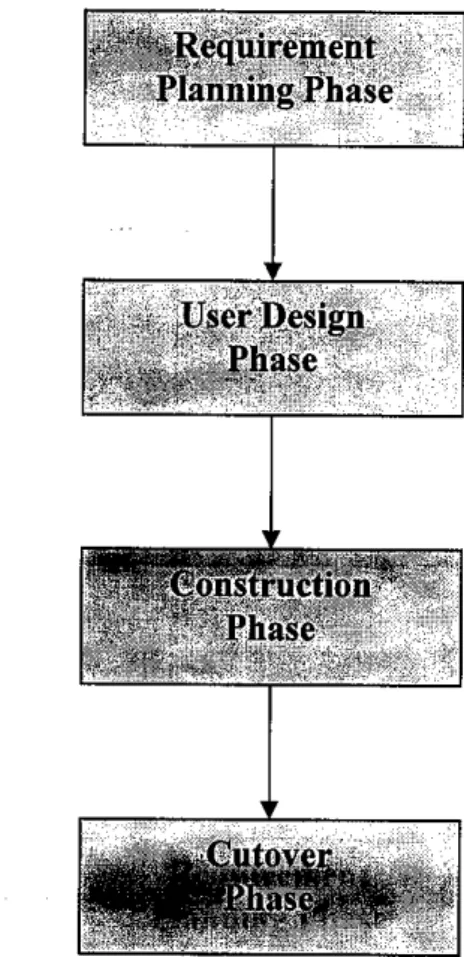
intense cooperation between users and developers as well as to get the finished application into the hands of users quickly. This methodology relies on extensive user involvement, Joint Application Design session, prototyping, integrated CASE tools and code generators.RAD methodology consists of four (4) phases: Requirements Planning Phase (Analysis), User Design Phase (Design), Construction (Detailed design and code generation) and Cutover (Installation and Handover). This project will go through all phases. The
following diagram depicts the relationships between stages in the RAD process.
13
^Requirement Planning Phase
User Design
Phase
iMftiffiriir i ii
( "11*11 Ili-IHUI Phase
Cutover
Figure 3.1: Rapid Application DevelopmentProcess
3.1.1 Requirements Planning Phase (Analysis)
It is also known as the Concept Definition Stage. During this first phase of RAD, the
author identified the objectives of this project and the requirement specification
including hardware and software requirements of the system for the prototype. The
author also identified the high-level process decomposition that determines the functionsof the prototype as well as the area it will support. In addition, the scope of the project
was identified in these phases, which are online system, tracking activities, alert system,
online report and online message as the area of study.The author has to ensure there is a need of having the prototype and demonstrate that the prototype able to work as expected. Besides, the author also identified the potential or key users of the system. Author determined the tasks and activities that will be incorporated throughout the project with respect to time frame given. Possible cost and risks associated with this project were also outlined. In addition, the author spent a lot of time throughout this analysis phase by conducting many readings and studies on various research papers, journals, white papers, articles and relevant websites covering the mentoring programme, online system, tools and programming language used and related
areas.
3.1.2 User Design Phase (Design)
This phase is also known as Functional Design Stage where design and refine involved.
In this stage, the outcomes from the analysis phase were reviewed and revised in term of scope, objectives, data models and reports. Initial design using prototyping also was started. Based on findings of research and studies during analysis phase, the author had come out with system's framework to provide initial views on the designing of the application.
Installation and configuration of software were also done during this phase by using Microsoft Visual Studio.Net, MySQL Administration and MySQL Query Browser. The designations of the application such as the story board, page banner, layout and Entity Relationship Diagram (ERD) have been done. This has given basic idea of what the system or prototype will look like insthe'construction phase.
15
3.1.3 Construction (Detailed Design and Code Generation)
This phase is usually known as Development Stage. During the development, detailed
design is done using suitable design tool and the design is translated into code via codegenerator. Adjustments and necessary modifications will be made. The system's
prototype will be implemented module by module with respect to functionalities and features developed.The changes will be done during design as the codes will be regenerated and optimized.
Number of users will be selected to validate and test the system comprising the screens layout and also the functions of the prototype itself. Usability will be done on every
subsystem to ensure that the system's prototype is easy to use. Testing will be done on the features and functionalities to ensure they are operational.3.1.4 Cutover (Installation and Handover)
Cutover or Deployment Stage involves various activities towards the implementation
fully functional prototype into real environment. These include final user testing and training, data conversion, and the implementation of the application. The system is put
into real operation and is ready to be widely-used by all end-users. The system is the modified version as the result from feedback during testing. In this phase, the system isalready fully tested as final documentation is prepared to guide end-users in using the
system. The system is expected to function correctly and is capable of meeting the user requirements.Applying RAD as the chosen methodology has provided the author with various advantages. RAD tools are easy to learn and promote good design of a user-friendly interface. Furthermore, RAD allows for quick testing and debugging of a system as it provides early visibility through prototyping. In addition, RAD also offers greater
3.2 Tools Used
3.2.1 Microsoft Visual Studio.Net with ASP.Net Web Application
Visual Studio.Net provides the tools need to design, develop, debug, and deploy ASP.Net Web Applications. To efficiently manage the items that are required by development effort, such as references, data connections, folders, and files, Visual Studio .Net provides two containers which are solutions and projects. An interface for viewing and managing these containers and their associated items is provided as part of the Integrated Development Environment (IDE). Building, debugging, and testing are key activities in developing and finishing robust applications, components, and services.
The tools provided with Visual Studio.Net are designed to allow author to control build configurations, identify and resolve errors efficiently. ASP.Net combines extraordinary developer productivity with performance, reliability, and deployment. It helps author deliver real world web applications in record time, serves more users with the same hardware, ensures the application are always available to users and extend application reach to new customers and partners.'- •" ! •
3.2.2 MySQL Administrator
MySQL Administrator is a powerful visual administration console that enables author to easily administer their MySQL environment and gain significantly better visibility into how the databases are operating. By using MySQL Administrator, author will be able to achieve higher database availability through improved management, reduce errors through visual database administration and deliver a more secure environment through easier privilege management. It also enables author to easily perform all the command line operations visually including server configuration, administering users, and dynamically monitoring database performance.
17
3.2.3 MySQL Query Browser
MySQL Query Browser is the easiest visual tool for creating, executing, and optimizing SQL queries for MySQL Database Server. It gives author a complete flexibility to visually build, analyze and manage queries. Developer can use the visual tools or can maintain complete control by hand coding the query. It provides an easy way to use web browser like interface that gives instant access to all of the Query Browser's functionality. And also, the Script Editor inside it provides a robust interface for creating, editing, and debugging large SQL scripts that involve multiple SQL statements.
CHAPTER 4
RESULT AND DISCUSSION
This chapter summarizes the evaluation of the product, result and findings of the evaluation and discussion of the project. The discussion covers the result and output of the Online StudentAdvisory System.
4.1 Evaluation
An evaluation has been performed on Online Student Advisory System. This evaluations being done at the end of the project development when the project is done. Selection is made to particular users among student from various backgrounds of course. Heuristic evaluation has been applied for the evaluation.
Heuristic evaluation is the most popular of the usability inspection methods. Heuristic evaluation is done as a systematic inspection of a user interface design for usability. The goal of heuristic evaluation is to find the usability problems in the design so that they can be attended to as part of an iterative design process.
Several step to perform the^euristip evaluation:
1. Plan evaluation 2. Choose evaluators 3. Review the heuristics 4. Conducting the evaluation
5. Analyzing the results .,...,., , •
19
4.1.1 Online Student Advisory System Evaluation
Evaluation of complete product is conducted among UTP students in their own
residential collage. This kind of evaluation is similar to field study evaluation where this
style takes the evaluator out into the user's natural environment in order to observe the
system in action. In this environment, user will expose with interruptions and feeling as
in real situation where they usually surfthe internet everyday.For that the author has selected ten students from various courses. This evaluation is
done in order to determine the effectiveness of the online system comparing to the
traditional system of Student Advisory System. It also was being done to determine the effectiveness of using mobile phone in providing alert to the user, effectiveness oftracking activities, online report and online message. Questions generally base on user satisfaction on the interface and useragree ness on the functionality and effectiveness of
the system.
4.1.2 Evaluation Procedure
The step for conducting the testing^are:ii.v-1 .ii. v . •..
1. Tenusers basically the students are taken to be as subject for the testing.
2. Each of the users is given time (not specific) to browse and use the website in the natural environment that is hostel or study environment.
3. Each of the students is given a set of questionnaire to answer.
First of all, the respondents are given opportunity to browse the website. No specific time is given for each respondent. The testing being done at the student's residential room, which is consider as their natural environment because most of their time of
surfing the internet are in this environment. This will give respondents feeling of comfort and familiarity as they are used to the environment.
20
After they finish browse and use the website, they were given a set of question to be answered. The response gather from the questionnaire is more specific and easy to
analyze. The questionnaire was design in two different sections. The first section is for content, layout and design. The respondents were asked to indicate their satisfaction in
term of the design factors such as text colour and style, background colour and layout.
The second section is for the functionality and effectiveness of the system. Respondents
were asked to indicate their level of agreements on the statement provided.4.2 Result and Findings
From the evaluation conducted, all data collected were analyzed to get the result. The result being analyzed using the bar chart from the data gathered during valuation and from some calculation that the author done. Following are the details of the result.
Design. Content
& Layout
Strongly
Dissatisfied
Somewhat Dissatisfied
Neither Satisfied
, Nor Dissatisfied
Somewhat Satisfied
Strongly
Satisfied
Number ofRespondent
Design 0 1 3 4 2
Content 0 0 2 5 3
Layout 0 0 4 4 2
Text Colour 0 1 3 5 1
Text Style 0 2 1 6 1
Background Colour 0 1 3 4 2
Colour Combination 0 1 3 5 1
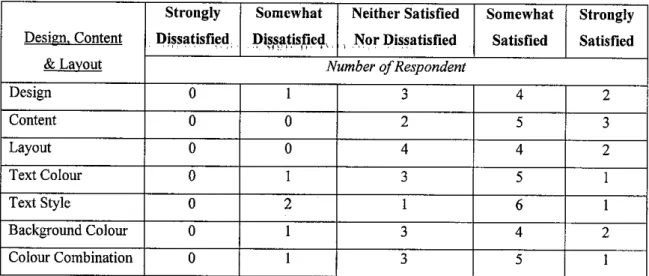
Table 4.1: Data Gathered From the Evaluation Regarding Content, Design, Layout, Text and Colour
21
Functionality &
Effectiveness
Strongly Disagree
Somewhat
Disagree
Neither Agree Nor Disagree
Somewhat
Agree
Strongly Agree Number ofRespondent
Enhance Participation 0 0 2 5 3
Enhance Interaction 0 0 0 7 3
Save Time 0 0 0 5 5
Make Life Easier 0 0 0 5 5
EffectiveTracking Activities 0 0 2 4 4
Effective Alert System 0 0 3 3 4
Effective Online Report 0 0 2 3 5
EffectiveOnline Message 0 0 2 5 3
Overall Effective 0 0 0 6 4
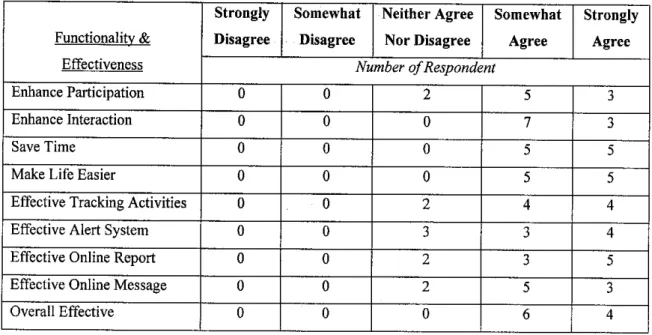
Table 4.2: Data Gathered From the Evaluation Regarding Functionality and Effectiveness of Online Student Advisory System.
Table 4.1 and 4.2 is both tables for data gathered from the evaluation. Table 4.1 shows data gathered regarding content, design, layout, text colour, text style, background colour and colour combination. While table 4.2 shows data gathered regarding
functionality and effectiveness of the Online Student Advisory System. The functionality
is enhancing user participation, enhance interaction between student and advisor, save the time consumed and make life of the user easier. The effectiveness being evaluated based on the tracking activities, alert system, online report, online message and thesystem as the whole.
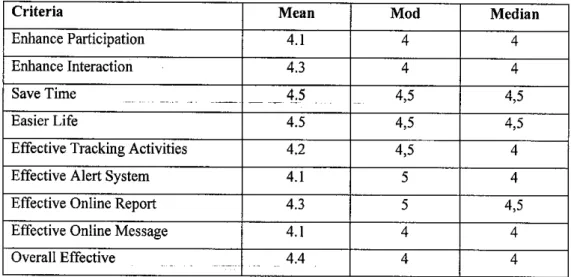
From the above data gathered, Mead Mod and Median were calculated. From table 4.3 and 4.4 below, we can see mod and median of all criteria is almost the same. This is
because data gathered are not distributed equally among the answer. Meaning that, there is no respondent who choose answer 1 which is strongly dissatisfied and also a little number of respondent answeri 2 which isi somewhat dissatisfied.
The mean is being calculated in other to know the average answer for all of the criteria.
The most average answer for all criteria regarding the design, content, layout, text and
colour is between 3.5 and 3.9 which are considered neither dissatisfied nor satisfied.
While for functionality and effectiveness evaluation, author found that, most average
answer for all criteria is 4, somewhat agree.
Criteria Mean Mod Median
Design 3.7 4 4
Content 4.1 4 4
Layout 3.8 3,4 4
Text Colour 3.6 4 4
Text Style 3.6 4 4
Background Colour 3.7 4 4
Colour Combination 3.6 4 4
Table 4.3: Mean, Mod and Median of Content, Design, Layout, Text and
•' -H > I lit' ..I, I'TiU'l III ll"^lluil; , ,l
Colour
Criteria Mean Mod Median
Enhance Participation 4.1 4 4
Enhance Interaction 4.3 4 4
Save Time 4,5 . 4,5 4,5
Easier Life 4.5 4,5 4,5
Effective Tracking Activities 4.2 4,5 4
Effective Alert System 4.1 5 4
Effective Online Report 4.3 5 4,5
Effective Online Message 4.1 4 4
Overall Effective 4.4 4 4
Table 4.4: Mean, Mod and Median of Functionality and Effectiveness of Online Student Advisory System
23
7-
6-
5-
4-,
Color and Style Evaluation
"ftf- -
-Jl-
Strongly Dissatisfied Somewhat Dissatisfied Neither Satisfied Nor Somewhat Satisfied
Dissatisfied
• • * _ . *
Strongly Satisfied
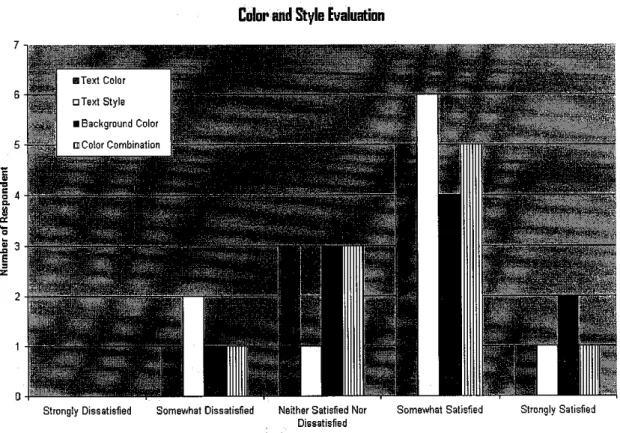
Figure 4.1: Result of Evaluation Regarding Text Style, Text Colour, Background
Colour and Colour Combination.
Figure 4.1 shows the result of four criteria of the web site tested which are text colour, text style, background colour and colour combination. Here we can see that for each of the criteria, the highest answer choose by respondents is 4, somewhat satisfied. For text colour, 10% out of total number of respondent strongly satisfied, 50% of the respondent are somewhat satisfied, 30% of the respondents !are neither dissatisfied nor satisfied and the remaining are somewhat dissatisfied . As for the text colour, 10% of the respondent strongly satisfied, 60% of the respondents are somewhat satisfied, 10% of the respondents are neither dissatisfied nor satisfied and 10% are somewhat dissatisfied. For background colour, out of total number of respondent, 20% strongly satisfied, 40% are somewhat satisfied, 30% of the respondents are neither dissatisfied nor satisfied and 10% are somewhat dissatisfied. Meanwhile, for the colour combination, 10% strongly
Design, Content and Layout Evaluation
Strongly Dissatisfied Somewhat Dissatisfied Neither Satisfied Nor Somewhat Satisfied Dissatisfied
Strongly Satisfied
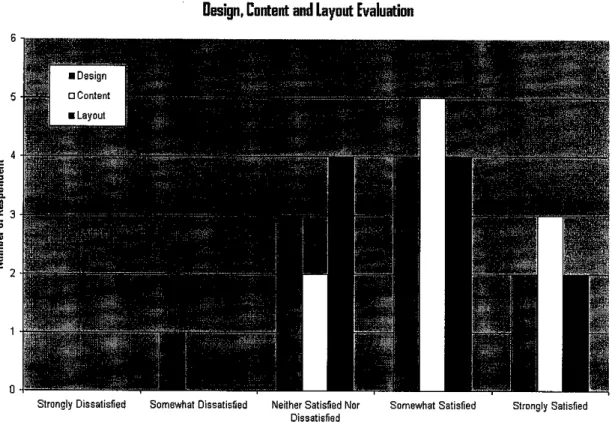
Figure 4.2: Result of Evaluation Regarding Design, Content and Layout of the
System.
Figure 4.2 shows results regarding another three criteria of the web site tested which are designs, content and layout. Same with figure 4.2, we can see that for each of the criteria, the highest answer is 4, somewhat satisfied. For design, 20% out of total number of respondent strongly satisfied, 40% of the respondents are somewhat satisfied, 30% of the respondents are neither dissatisfied nor satisfied and 10% are somewhat dissatisfied.
As for the content, 30% of the respondent strongly satisfied, 50% of the respondents are somewhat satisfied and the remaining of the respondents neither dissatisfied nor satisfied. While for the layout, out of total number of respondents, 20% strongly satisfied, 40% are somewhat satisfied and 40% are neither dissatisfied nor satisfied.
25
Functionality Evaluation
•Ifiafl
Strongly Disagree Somewhat Disagree Neither Agree Nor Somewhat Agree Strongly Agree
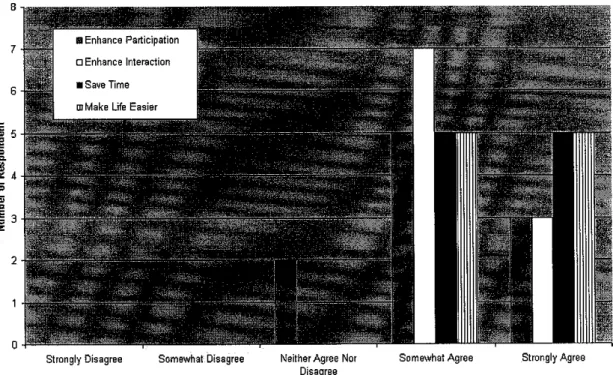
Figure 4.3: Result of Evaluation Regarding Functionality of Online Student Advisory System.
Figure 4.3 shows results regarding functionality of Online Student Advisory System.
There are four criteria being questioned during the evaluation. The criteria are enhancing participation, enhance interaction, save time and make life easier. The highest answer for
; i -is-
most of the criteria is 4 which is somewhat agree except for save time and make life easier. For enhancing participation, 30% out of total number of respondent strongly agree, 50% of the respondents are somewhat agree and the remaining are neither disagree nor agree. For enhance interaction, 30% of the respondent strongly agree and 70% of the respondents are somewhat agree. While for both save time and make life easier, half of the respondents are strongly agree and another half are somewhat agree.
As we can see here, no respondents was answered for 1, strongly disagree and 2,
somewhat disagree.
Effectiveness Evaluation
Strongly Disagree Somewhat Disagree Neither Agree Nor Somewhat Agree Strongly Agree
Figure 4.4: Result of Evaluation Regarding Effectiveness of Online Student Advisory System.
Figure 4.4 show results regarding effectiveness of Online Student Advisory System.
Again, there are four criteria being questioned during the evaluation. The criteria are based on scope of study which is tracking activities, alert system, online report and online message. The first statement in the questionnaire is about the effectiveness of tracking activities. For that, 40% out of total number of respondent strongly agree, 40%
of the respondents are somewhat agree and the remaining are neither disagree nor agree.
For the second statement which is about the effectiveness of the alert system, 40% of the respondent strongly agree, 30% of the respondents are somewhat agree and 30% are neither disagree nor agree. As for the effectiveness of online report, out of total number of respondents, 50% strongly agree, 30% are somewhat agree and 20% are neither disagree nor agree. While for effectiveness:of online message, 30% strongly agree, 50%
are somewhat agree and 20% are neither disagree nor agree. Same with figure 4.3, no respondents was answered for 1, strongly disagree and 2, somewhat disagree.
27
Strongly Disagree
Overall Effectiveness Evaluation
Somewhat Disagree Neither Agree Nor Disagree
Somewhat Agree StronglyAgree
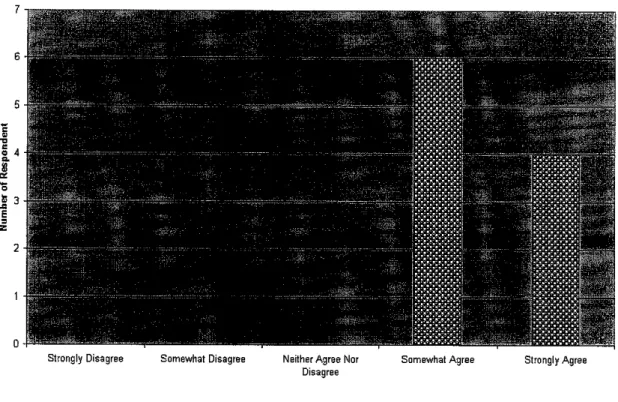
Figure 4.5: Result of Evaluation Regarding Effectiveness of Online Student Advisory System as Overall.
Figure 4.5 show results regarding effectiveness of the Online Student Advisory System as a whole. The statement being questioned to the respondents are 'Overall, the online student advisory system is effective and efficient'. For that, 40% out of total number of respondent strongly agree and 60% of the respondents are somewhat agree.
4.3 Discussion
Web and internet technology is normally related to elements in Human Computer Interaction (HCI). In designing and developing a website or a system, elements in the HCI must take into consideration. Two important element of HCI related will be
discussed in this section.
4.3.1 User Satisfaction on the Design
User satisfaction on the design can be measured based on evaluation result. The result is
categorized in terms of design, content, layout, text and colour. The are basically three text style being used in the system which are Times New Roman, 1942 Report and Agency FB. Font style of 1942 Report is used for the title. Even the font style is same in
every page, but, the font colour is different according to usertype.Every page, basically there is three combination of colour. For the main page, the
combinations of colour being used are navy blue, lavender and soft blue. As foracademic centre page, the combinations of colour being used are mint cream and grey.
The combination colours for advisor are olive, azure and soft green. While for the student, the colour being choose are teal, light cyan and soft blue. Before discussing further about it, Figure 4.6, 4.7, 4.8 and 4.9 show some print screen of the system. This
will make the readers clear about the user acceptance of the interface that will be discuss in the next page.infeUMiarx Mm
311L L &.T lH $QARD
' " " " » *.cl*ssrrAAU"- ut- i*j*sjlr r u n njiiunnGL*
IJi.^iP^f:;;'i| -Silecl User's Type- |?f|
^•%4 "! • ' *&& : 'V
ID: 1 1
;'
| |
| Login I
, Lffimul] Online iStudent
"^i^^L-j A-&A$i!63is2f^*''1 ^u-Ojuaw Student Advisoty System havebeenlaunch Vi Stud tslSTtti You now can view the advisor ofthe student bykey intheir
9/29/2005 Thi Jifd student's id You also can view others students under that
advisor.
Figure 4.6: Print Screen of Online Student Advisory System Main Page
29
•in •'.• I- iW&XH BjiSJIEli'^Ki-"1 '£•'.-,-
M M f f t a
MAIN MEW?
^.MHTMjjev^
£M*££2!A
u*^r-inirtw ^cj-ujcnsnir- u r iwvtsu r u n i v n u n n w w
ACADEMIC C&NTHft Welcome, Wan Nor Manizah
AdvisorContact Details
Shakirah Mohd Taib JaSeAhmad ""
Twat<4in A Anr Faizal Ahmad Fadal Ahmad Kamil Mahmood
f i - t » — -n.i t -n.,.1.1:
Alert
You have! new report
• -H-: - fClick-Herel
Extension Email 7497
7409 7495 7405 7476 741!
[email protected] [email protected] izzatdin@petronas. com.ray [email protected] kamilmh@petronas. com.my [email protected]
Figure 4.7: Print Screen of Academic Centre Main Page
{M44xiiBffi»tm
MAIN MENU
Welcome, Shakirah Mohd Taib
BULLETIN BOARD
AJDV^SOH
Alert
You have Inext meting
rClickHerel
Date Title Details
9/29/2005Viewing StudentsWith Ther Advisor
Younow canviewme advisorof the student by keyintheirstudent's id You also can view others students under that advisor
9/20/2005ReportSubmission •*'-' For missemester, toe report can be submitted through the form that have been provided in thisweb site
6/7/2005 Launch Online Student
Advisory System Online Student Advisory System have been launch.
IMIgxiifiKiyjten
Mh
MAIN MENU
i n a t - t n i n w t c ^ i / t n s m r u r i w y u r u n T u r t u n n u i r i
. h-j-j.j.u i v t -j- 'STUDMTT
Welcome, Norfazila Hashim
BUU.GTI H BOARD
9/29/2005 Viewing Students With
Thler Advisor
Younowcan viewme advisorofthe student by key intheirstudent's id.
You also can view others students under that advisor.
6/7/2005 Launch Online. Student .
Advisory System. Online Student AdvisorySystem have beenlaunch.
Figure 4.9: Print Screen of Student Main Page
A good and reliable design system is also one of the objectives of this project. The author needs to apply a well known database management system and programming language which are MySQL and ASP.Net. MySQL are open source software, extensive online documentation and compatible with many different operating systems. While ASP.NET helps author deliver real world web applications in record time, serves more users with the same hardware and ensures the application are always available to users.
For development phase, the author did the testing by run the web application in Internet Explorer using Internet Information Services (IIS) Web Server.
According to data gathered, the highest answers chose by respondents regarding the content, design, layout, text and colour is 4, somewhat satisfied. These show that, most of the respondents are satisfied with the interface of the website. Although there is also small number of respondent answer for 2, somewhat dissatisfied, but still as an overall the respondent are satisfied with the website design and the objective to create a good and reliable system have been achieved.
:i .,| ... aSP \]r' 31.
4.3.2 Effectiveness of Online Student Advisory System
In scope of the study, the system expected to function correctly and capable of meeting the scope mentioned, which are developing an online system, enable tracking activities, set in alert system, allow submitting report online and provide online messaging. As an overview, Online Students Advisory System is a system as whole. The development of alert system, online report and message is only a portion of this system in order to make it more effectives compareto ordinary web application.
The main focus of the Online Student Advisory System is making the traditional system more efficient and effective in order to improve and overcome the problem faced. The system being develop need to embedded the SMS alert system and providing online report and discussion to the users in order to come out with an effective system.
Moreover, the system is expected to be as a tool to facilitate the system by enabling the systemadministrator (Academic Centre) to keep track the activities performed under this system. With this online system, it is easier for Academic Centre to manage the Student Advisory System efficiently.
On this project, the effectiveness will be value highly by evaluating the system among number of users. According to result and finding of the evaluation state previously, only 20% of respondents answered for 3, neither agrees nor disagrees for the effectiveness of tracking activities, alert system and online message. While for effectiveness of alert system, only 30% answer for 3 neither agrees nor disagree. The remaining of the respondents answer for 4, somewhat agree and 5, strongly agree.
Meaning that, more than 30% of the respondent are agree with the effectiveness of all the criteria. It show that most of the respondents from the survey agree that the Online Student Advisory System is effective as it can give lot of advantages to the users, such as save their time and energy andsmake* their life easier on participating in student
Referring to figure 4.5, 60%"out of total number of respondent answer for 4, somewhat agree and the remaining 40% answer for 5, strongly agree. This show that all of the respondents agree that, as overall, the Online Student Advisory System is effective.
On overall, it can be concluded that the objective being stated in the introduction which are to implement a tool to facilitate the Student Advisory System that have been implemented in university by tracking the activities perform under the system, to create an effective system by providing short message (SMS) alert to the user and to create an effective system by allowing submitting report and message online have been achieved.
33
CHAPTER 5 CONCLUSION
5.1 Conclusion
Online Student Advisory System is a structured portal with the purpose to improving the current traditional system in order to guide the foundation and first year students and also students who are under probation and under probation and warning especially in their academic. This system helps them in enhancing their performance in study and also their self confidence. With this online system, the problem of time consuming, ineffectiveness of the system and others problem that have been identified by author previously can be overcome.
The establishment of Online Student Advisory System is more on referring to the use of internet or intranets which ever available to the user especially to the personnel involve in this system like students, advisors and Academic Centre staff. The uses of the portal have taken the important role in overcoming the possible problem of the traditional
system.
Compare to traditional system, the online system is more effective. The Online Student Advisory System consist an advance function such as providing alert system, online report and online discussion. Other than that, its enable the Academic Centre to keep track the activities perform by the advisor and its students under this system.
In designing a website, some HCI issue is taken into consideration. Focus is given to acceptance, functionality and most importance is effectiveness of the system. For completion of this project, evaluation is done to collect data from users by distributing
students as the evaluators. The evaluation is done in the hostel environment to give them a natural and familiar environment. Analyzing the data from the evaluation enable the author to predict the user acceptance and agree of the functionality and effectiveness of the system.
As the project reach towards the end, project objective have been achieved. User's acceptance, functionality and effectiveness of the product are being questioned during the evaluation. From the result, it is concluded that, with the implementation of the Online Student Advisory System, the problem being stated in problem statement and identification will be overcome as it can give many advantages to the user.
5.2 Project Implementation Challenges.
My first planned on implementation of the website is to provide real time discussion
threat for both advisor and student. But the real time online discussion was not successful due to time constraint. The author actually still learns about the programming language during the development of the web site.
Even though the author manage to achieve other scope of study for the project such as online report, alert system arid tracking activities, but, coding for real time discussion is too difficult for her as a beginner programmer. So, the author come out with an idea to replace the online discussion with online message. In the online message, student and
advisor also can communicate online but not in real time condition.
MySQL database is license free and»can foe* install to any computer to being used for any purpose except for the profit making where it need to buy the license. The installation of MySQL is very east despite to its capability to support a large and robust database application.
35
The author faces^difficuTty wheiTMySQL software caMoT create database instance. She
had tried several times to create the database instance. The database instance finally
successfully created when she made some configuration to her computer security and setting. However this problem might not occurred if MySQL database is installed on dedicated computer.5.3 Recommendation
This project is look as easy as name of the topic but not in the progress and its
development. There are many aspects should be considered in order to make the system
run properly as in real system. Thus, author should hold the project very carefully by clearly define every requirements before proceed to the construction phase. Otherwise the problem will occur.In globalization world nowadays, there is nothing possible to make with the system that linkage to each other. With an objective to make the system efficient and effective, the system is recommended to be link'with Course Registration Unit, Exam Unit and Residential Collage Unit System of the university.
With this linkage, the information needed by Academic Centre can be attaining easier and faster. For instance, it is easier to detect the result of the students, so that, the academic centre and.i advisor, caninknow ithat the students need to give special consideration compare to others. The information such as course being registered by the student for the semester is also easier to achieve. This could be implemented by applying the best security method and limit the user's access privilege to Student Advisory System that link to Course Registration Unit, Exam Unit and Residential Collage Unit System.
Development tools like Visual Studio.Net and MySQL that used to develop web based application is essential to student to grasp. Even though the tools are very crucial but it did not give difficulty rather than the process of the system in order to provide the system that effective and satisfaction.
Student must be able to make a program that can be used to develop their application if they want to achieve project objectives. Otherwise they might face a difficulty to explain their product functionality with the incomplete application. Given that the main objectives of Final Year Project is to offer them an experience in developing real system, that different than standard group project.
Selection of devices and tools should be plan carefully especially to novice user whom unable to catch up new things fast. Student should able to provide a prototype of system by using any devices that appropriate'to the project. For the application that required data transfer between mobile phone to computer, student should used serial data cable that compatible with the phone model. Otherwise they might use infrared or Bluetooth embedded mobile phone to communicate with computer.
37