Research Grant and Postgraduate Student Management System
David Kee Yen Chee
Bachelor of Computer Science with Honors (Computational Science)
2020
RESEARCH GRANT AND POSTGRADUATE STUDENT MANAGEMENT SYSTEM
DAVID KEE YEN CHEE
This project is submitted in partial fulfilment of the requirements for the degree of Bachelor of Computer Science with Honors
(Computational Science)
Faculty of Computer Science and Information Technology UNIVERSITI MALAYSIA SARAWAK
2020
GERAN PENYELIDIKAN DAN PELAJAR POSTGRADUATE SISTEM PENGURUSAN
DAVID KEE YEN CHEE
Projek ini merupakan salah satu keperluan untuk
Ijazah Sarjana Muda Sains Komputer dan Teknologi Maklumat (Sains Komputan)
Fakulti Sains Komputer dan Teknologi Maklumat UNIVERSITI MALAYSIA SARAWAK
2020
i
ii Declaration
I hereby declare that this project work is done by me under the supervision of Dr Chiew Kang Leng. The results and contents embodied in this project are original work and have not been submitted for the award of any degree.
………. ……….
(David Kee Yen Chee) Date David Kee Yen Chee
David Kee Yen Chee 5/7/2020
iii
Acknowledgement
I would like to express my great appreciation to those who provided me their assistance in completing this report. First, I would like to offer my special gratitude to my final year project supervisor, Dr Chiew Kang Leng, for his patient and willingness to provide guidance and suggestions for this project.
Moreover, I would like to thank my project examiner, Dr Mohamad Imran bin Bandan, for his guidance and valuable suggestions in the completion and preparation of this project.
Lastly, I wish to thank my parents and my friends for their support, cooperation and encouragement for completing this project.
iv
Table of content
Declaration ... ii
Acknowledgement ... iii
Table of content ... iv
List of Figure ... vii
List of Table ... ix
Abstract ... x
Abstrak ... xi
Chapter 1 Introduction... 1
1.1 Introduction ... 1
1.2 Problem Statement ... 1
1.3 Scope ... 2
1.4 Objective ... 2
1.5 Brief Methodology ... 3
1.6 Significance of Project ... 4
1.7 Project Schedule ... 4
1.8 Expected Outcome ... 5
1.9 Thesis Outline ... 6
1.10 Summary ... 6
Chapter 2 Literature Review ... 7
2.1 Introduction ... 7
2.2 Review for Reporting System ... 8
2.2.1 The Unimas Portal ... 8
2.2.2 Manage Engine Exchange Reporter Plus ... 10
2.2.3 Hotelogix Smart Hoteliering ... 12
v
2.3 Review for The Data Input Method ... 14
2.3.1 The Unimas Portal ... 14
2.3.2 The Outlook Registration ... 14
2.3.3 EGibBSN Customer Service Portal ... 18
2.4 Comparison between Existing Systems. ... 19
2.5 Tools and Technologies ... 22
2.5.1 Front-End Development ... 22
2.5.2 Back-End Development ... 22
2.6 Summary ... 23
Chapter 3 Requirement Analysis and Design ... 24
3.1 Introduction ... 24
3.2 Project Methodology ... 25
3.2.1 System Requirement Phase ... 25
3.2.2 System Design Phase ... 26
3.2.3 Development Phase ... 55
3.2.4 Testing Phase ... 55
3.2.5 Deployment Phase ... 55
3.3 Summary ... 56
Chapter 4 Implementation and Testing ... 57
4.1 Introduction ... 57
4.2 Installation for Development Tool ... 57
4.3 Implementation of The Prototype ... 59
4.3.1 Implementation of Sign-In and Sign-Up ... 59
4.3.2 Implementation of Research Grant ... 61
... 62
4.3.3 Implementation of Postgraduate Management ... 65
4.3.4 Implementation of Generating Report... 68
vi
4.4 Testing ... 69
4.4.1 Functional Testing ... 69
4.4.1.1 Sign-In and Sign-Up... 70
4.4.1.2 Research Grant ... 71
4.4.1.3 Postgraduate Management ... 72
4.4.1.4 Generating Report ... 73
4.4.2 Non-Functional Testing... 74
4.5 Conclusion ... 76
Chapter 5 Conclusion and Future Work ... 77
5.1 Introduction ... 77
5.2 Achievement... 78
5.3 Limitation ... 79
5.4 Future Work ... 80
5.5 Conclusion ... 81
References ... 82
Appendix A ... 83
vii List of Figure
Figure 1.1 : Incremental method ... 3
Figure 1.2 : Grant Chart ... 4
Figure 2.1: Weekly report ... 8
Figure 2.2 : Report details ... 9
Figure 2.3 : Reporting for Manage Engine Exchange Reporter Plus ... 10
Figure 2.4 : Message by body keyword ... 11
Figure 2.5 : Report for Hotelogix ... 12
Figure 2.6 : Report according to arrival time ... 13
Figure 2.7 : Edit correspondence ... 14
Figure 2.8 : Login ... 15
Figure 2.9 : Personal details ... 16
Figure 2.10 : Validation ... 17
Figure 2.11 : Policy owner information ... 18
Figure 3.1 : Use Case Diagram ... 27
Figure 3.2 : Sequence diagram for login ... 37
Figure 3.3 : Sequence diagram for add new grant ... 38
Figure 3.4 : Sequence diagram for update grant ... 39
Figure 3.5 : Sequence diagram for update progress and close project... 40
Figure 3.6 : Sequence diagram for register student ... 41
Figure 3.7 : Sequence diagram for update student detail ... 42
Figure 3.8 : Sequence diagram for generate report ... 43
Figure 3.9 : Class Diagram ... 44
Figure 3.10 : Main Page for the Management System ... 45
Figure 3.11 : Interface for New Grant ... 46
Figure 3.12 : Interface for Update Grant ... 47
Figure 3.13 : Interface for Register Student. ... 48
Figure 3.14 : Interface for Student List. ... 49
Figure 3.15 : Interface for Student Statistic. ... 50
Figure 3.16 : Interface Generate Report. ... 51
Figure 3.17 : Interface for Account Setting. ... 52
Figure 3.18: Interface for Register. ... 53
Figure 3.19: Interface for User List. ... 54
Figure 4.1: The localhost is setup in MySQL Workbench. ... 58
Figure 4.2: The connection for the database. ... 58
Figure 4.3: The Register Page and the Login Page. ... 59
Figure 4.4: User Login. ... 60
Figure 4.5: User Register. ... 60
Figure 4.6: Create New Grant. ... 61
Figure 4.7: Edit Grant Information. ... 61
Figure 4.8: Search Grant Information. ... 62
Figure 4.9: Delete Grant Information. ... 62
Figure 4.10: The Interface for The Grant List. ... 63
Figure 4.11: The Interface for the Edit Grant Information. ... 63
Figure 4.12: The Interface for The Search Function. ... 64
Figure 4.13: The Interface for The Delete Grant Information. ... 64
Figure 4.14: Register New Student in Postgraduate Management. ... 65
viii
Figure 4.15: Update Student Information. ... 65
Figure 4.16: Search Student Information. ... 66
Figure 4.17: Delete Student Information. ... 66
Figure 4.18: The Interface for Student List. ... 67
Figure 4.19: The Progress Report of Research Grants. ... 68
Figure 4.20: The PDF Report of The Progress Report of Research Grants. ... 68
Figure 4.21: The Postgraduate Statistic Report. ... 69
Figure 4.22: Result from the section A. ... 74
Figure 4.23: Result from the section B ... 75
ix List of Table
Table 2.1: Comparison table between existing system for the reporting function ... 19
Table 2.2: Comparison Table Between Existing System for the data input method ... 20
Table 3.1: Use Case Description of Register Admin Account. ... 28
Table 3.2: Use Case Description of Sign In ... 29
Table 3.3: Use Case Description of New Grant ... 30
Table 3.4: Use Case Description of Update Grant ... 31
Table 3.5: Use Case Description of Update Progress ... 32
Table 3.6: Use Case Description of Close Grant ... 33
Table 3.7: Use Case Description of Register Student ... 34
Table 3.8: Use Case Description of Student Statistics ... 35
Table 3.9: Use Case Description of Generate Report ... 36
Table 4.1: Test Case of Sign in and Register Function... 70
Table 4.2: Test Case of Add, Delete, Update and Search Function in Research Grant. ... 71
Table 4.3: Test Case of Add, Delete, Update and Search Function in Postgraduate Management. ... 72
Table 4.4: Test Case of Generate Report function. ... 73
Table 5.1: The Comparison Between Objective and Achievement. ... 78
x Abstract
Currently, the information for Research Grant and postgraduate student are recorded manually.
Therefore, the data did not keep updated from time to time and the data will easy to get lost. Hence, the project's aim is to create a management system to manage the information for research grants and postgraduate students. This management system will able to register a new grant and the grant information that registered are able to be edited and updated the progress. Besides, postgraduate student statistics will also able to keep track of this management system. All the postgraduate student’s detail will store completely in the system. Lastly, the project will able to generate reports depends on research grants and postgraduate students.
xi Abstrak
Pada masa ini, maklumat yang berkaitan dengan geran penyelidikan dan prasiswazah telah direkodkan secara manual. Hal ini demikian kerana, data yang sedia ada tidak dapat dikemaskini dari semasa ke semasa dan boleh menyebabkan data tersebut hilang. Oleh itu, matlamat projek ini adalah untuk mewujudkan satu sistem pengurusan bagi mengemaskini maklumat yang berkaitan tentang geran penyelidikan dan prasiswazah. Sistem pengurusan ini bertujuan untuk membuat pendaftaran geran baru dan maklumat tersebut dapat dikemaskini dalam system pengurusan ini. Selain itu, statistik atau maklumat yang berkaitan dengan prasiswazah dapat juga dijejaki sewaktu menggunakan sistem pengurusan ini. Tambahan pula, semua perincian yang berkaitan tentang prasiswazah akan disimpan sepenuhnya dalam system ini. Akhir sekali, projek ini dapat menghasilkan laporan bergantung kepada geran penyelidikan dan prasiswazah.
1
Chapter 1 Introduction
1.1 Introduction
Research grants are available by various institutions to help in funding research efforts made by individuals, universities and other related group of people.
Grants can be divided into a few categories such as Internal grants, External grants, Chair Fund and so on. Each of the category of grants can be divided into a different type of grants.
For instance, Chair Fund can be divided into “Tun Openg Chair”, “Tun Zaidi Chair” and so on.
Status of the research grants can be divided into four categories which are the project is completely closed, the project still in progress, already expired, closed with terms and conditions or postponement. All these information needs to be tracked because faculty research grants normally take at least two to five years to carry on. Currently, grants are managed manually which is the conversion paper file keeping by the management.
Meanwhile, students who are pursuing Master or PhD level might have some personal issues which causes them to suspend their academic study or even give up their education.
Besides, Universities Malaysia Sarawak (UNIMAS) opens registration for Master or PhD level for Faculty Computer Science and Information Technology (FCSIT). During Master or PhD level registration, all the information of students such as their personal information, supervisor and research title are recorded manually.
1.2 Problem Statement
Currently, all the details of research grants are stored manually which is using MS-Excel, MS-Word and printed copy. The idea of this project is to reduce the workloads of the administration in recording the details of research grants. This system will help them to keep
2
track of the number of rejected and accepted research grants. Besides, it can record the progress of the research and the amount of the research grants.
Besides, the information of new intake of Master and PhD level students such as their student id, name, email, research title and supervisor are recorded by manual approach. Since the information of the students is recorded manually using paperwork, the paperwork may be damaged, lost or misplaced easily. Therefore, this management system is effective in terms of documenting the information.
To solve the listed problems, postgraduate and research grants management system is designed to replace the manual approach to achieve better efficiency.
1.3 Scope
The postgraduate and research grants management system is a web system which is developed only for the faculty management team. The users are faculty dean and deputy dean only. This system can record the details of postgraduate students according to their years. This system is designed to add, edit and generate the report.
1.4 Objective
1) To develop a web-based system for research grant.
2) To develop a web-based system for postgraduate management.
3) To generate report for postgraduate statistics, and progress report of research grants.
3 1.5 Brief Methodology
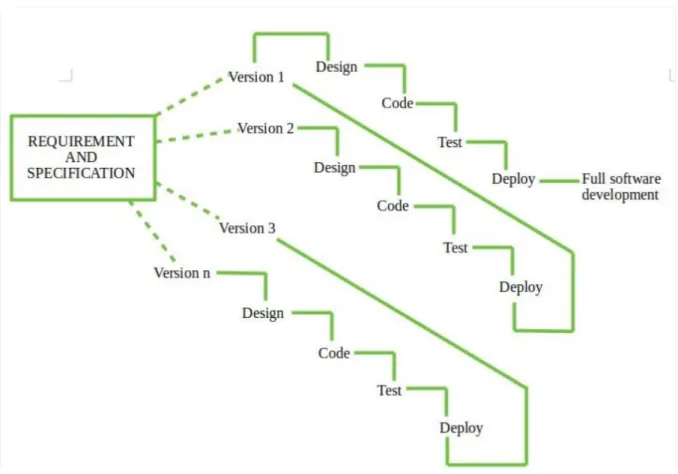
This project will use the Incremental Model and it is a combination of one or more waterfall Models Incremental Model, Project requirements are divided into multiple modules and each module is developed separately (Naveen, 2015). The developer will divide the system into different parts of this method. These parts consist of four main phases, which are requirement phase, design and development, testing and deploying.
Figure 1.1 : Incremental method (Software Engineering | Incremental process model, n.d.)
For the requirement phase, all the requirements of the system are identified and documented.
After that, the developer will categorise all the system needs into multiple linear sequential phases. The second phase is the design and development phase. In this phase, the system architecture is designed according to the system requirements. All the system functional design
4
and development are completed in this phase. For the testing phase, all the functionality and non-functionality will be tested. After the testing phase, the developer will undergo the final phase which is the deploying phase. During deploying phase, all the system that has been designed and developed in the previous phases will be implemented.
1.6 Significance of Project
The significance of this project is to ensure all the postgraduate and research grant information are stored accurately and systematically.
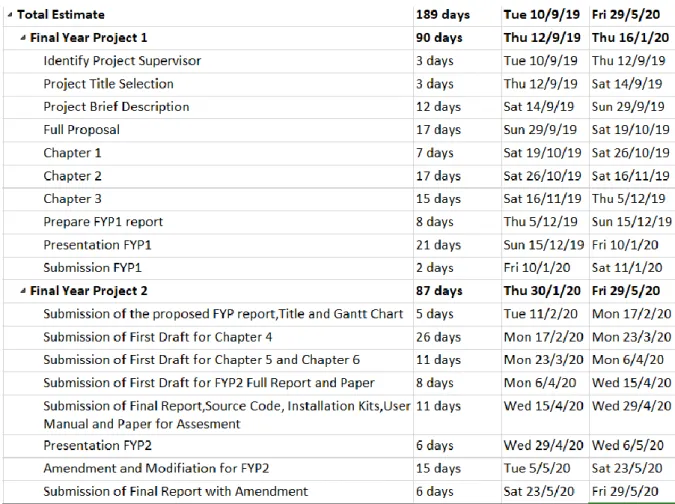
1.7 Project Schedule
Figure 1.2 : Grant Chart
5 1.8 Expected Outcome
A web system that manages all the postgraduate and research grants information. This system can display the student statistics which are education level and student status, student education level by year and student status by year. This system can generate report for the grant progress and student postgraduate statistics.
6 1.9 Thesis Outline
➢ Chapter 1: This chapter will explain the idea of this project including introduction of this project, problem statements, scope, objectives, brief methodology, significance of the project and expected outcome of this project.
➢ Chapter 2: This chapter will review and make comparisons between the reviewed existing applications to give a clearer vision for the project design.
➢ Chapter 3: Requirements will be collected, and design phase will be carried out in this chapter.
➢ Chapter 4: Deployment will be discussed in this chapter. Besides that, testing and debugging will be carried out and explained in this chapter.
➢ Chapter 5: The conclusion for this project will be stated and future improvement will be discussed in this chapter.
1.10 Summary
This chapter explained the fundamental idea of this proposed system and focused on the project requirements. The problem statements, objectives, project scope, project significant and expected outcome are described to have a clearer image on the requirement of the system.
The methodology, project schedule, and project outline are illustrated for planning and scheduling of projects.
7
Chapter 2 Literature Review
2.1 Introduction
This chapter will discuss the existing system or application that already published or developed in this market which are related to the proposed system. The main objective of this literature review is to understand more about the theoretical base of the proposed project in doing the development phase.
A good management system must involve a way to generate a good report. The design of the database is also quite important to generate a good report. Because we need to collect enough information from user so that we can generate a good report. Besides, user-friendly also occupies one of the factors. In order to achieve user-friendly achievements, the design for the management system is accounted for a big role. The existing system or application will be reviewed in this chapter to understand the favour of the user more effectively.
8 2.2 Review for Reporting System
The main point of the chapter is to review the similar existing system. For my Postgraduate and Research Grant management system report part, I would like to use The Unimas Portal, Manage Engine Exchange Reporter Plus and Hotelogix Smart Hoteliering for my review.
2.2.1 The Unimas Portal
The Unimas Portal system (The Unimas Portal, n.d.) has a part for the student to update their industrial training information. The system has included weekly report. This weekly report is used to record what student do in their industrial training as shown in Figure 2.1
Figure 2.1: Weekly report (The Unimas Portal, n.d.)
Figure 2.1shows the report is updated because a green tick is shown below the day. The green tick will show out you have the information on that particular column and when the column is empty, the green tick will disappear, it can remind the user the data is empty, but not necessarily need to be updated in the report system. The view logbook button is in blue colour and that is for showing the details of what the user has done in his/her industrial training each week.
9
Figure 2.2 : Report details (The Unimas Portal, n.d.)
Figure 2.2 shows after the interface view logbook. The system will hide the daily task and just show the number of weeks and the submission date. The detail for the daily task will show after clicking the view detail.
I. Review on strength of The Unimas Portal system
This system has a good interface as shown in figure 2.1. This can show all the titles (day 1 until day 7) according to the date (week 1) and allow users to view the detail to get more information.
II. Review on weakness of The Unimas Portal system
This system has a weakness that is after users click view detail in figure 2.2, it still hides the detail and need to click again view detail to show out the detail for the day.
10 2.2.2 Manage Engine Exchange Reporter Plus
This Manage Engine Exchange Reporter Plus system (Exchange Mailbox Size Reports, 2019) has a function that able to generate the mailbox report. This function able to generate a report according to the mailbox size, status and content.
Figure 2.3 : Reporting for Manage Engine Exchange Reporter Plus (Exchange Mailbox Size Reports, 2019)
Figure 2.3above shows the report for the mailbox size that includes the extract current mailbox size of Exchange users and able to view the graphical representation of the top Exchange mailbox based on the size. This reporting function is good to see clearly about the Exchange user’s detail based on the size.