HUMAN SAFETY ANDRIOD APPLICATION
BY
MD. SALAHUDDIN ID: 151-15-4670
AND
MD. AHSAN HABIB ID: 151-15-5355
This Report Presented in Partial Fulfillment of the Requirements for the Degree of Bachelor of Science in Computer Science and Engineering.
Supervised By SAMIA NAWSHIN
Lecturer
Department of CSE
Daffodil International University Co-Supervised By
MD. AZIZUL HAKIM Lecturer
Department of CSE
Daffodil International University
DAFFODIL INTERNATIONAL UNIVERSITY DHAKA, BANGLADESH
DECEMBER 2018
©Daffodil International University i
APPROVAL
This Project titled “HUMAN SAFETY ANDROID APPLICATION”, submitted by Md. Salahuddin, ID No: 151-15-4670 and Md. Ahsan Habib, , ID No: 151-15-5355 to the Department of Computer Science and Engineering, Daffodil International University, has been accepted as satisfactory for the partial fulfillment of the requirements for the degree of B.Sc. in Computer Science and Engineering (BSc) and approved as to its style and contents. The presentation has been held on December, 2018.
BOARD OF EXAMINERS
Dr. Syed Akhter Hossain Chairman
Professor and Head
Department of Computer Science and Engineering Faculty of Science & Information Technology Daffodil International University
Dr. Sheak Rashed Haider Noori Internal Examiner Associate Professor& Associate Head
Department of Computer Science and Engineering Faculty of Science & Information Technology Daffodil International University
Md. Zahid Hasan Internal Examiner
Assistant Professor
Department of Computer Science and Engineering Faculty of Science & Information Technology Daffodil International University
Dr. Mohammad Shorif Uddin External Examiner
Professor
Department of Computer Science and Engineering Jahangirnagar University
©Daffodil International University ii
DECLARATION
We hereby declare that, this project has been done by us under the supervision of Samia Nawshin, Lecturer, Department of CSE, and Daffodil International University. We also declare that neither this project nor any part of this project has been submitted elsewhere for award of any degree or diploma.
Supervised by:
Samia Nawshin Lecturer
Department of CSE
Daffodil International University
Co- Supervised by:
Md. Azizul Hakim Lecturer
Department of CSE
Daffodil International University Submitted by:
Md. Salahuddin ID: 151-15-4670 Department of CSE
Daffodil International University
Md. Ahsan Habib ID: 151-15-5355 Department of CSE
Daffodil International University
©Daffodil International University iii
ACKNOWLEDGEMENT
First we express our heartiest thanks and gratefulness to almighty God for His divine blessing makes us possible to complete the final year project/internship successfully.
We really grateful and wish our profound our indebtedness to Samia Nawshin, Lecturer, Department of CSE Daffodil International University, Dhaka. Deep Knowledge & keen interest of our supervisor in the field of “Android Application” to carry out this project. His endless patience ,scholarly guidance ,continual encouragement , constant and energetic supervision, constructive criticism , valuable advice ,reading many inferior draft and correcting them at all stage have made it possible to complete this project.
We would like to express our heartiest gratitude to Dr. Syed Akhter Hossain, Professor and Head, Department of CSE, for his kind help to finish our project and also to other faculty member and the staff of CSE department of Daffodil International University.
We would like to thank our entire course mate in Daffodil International University, who took part in this discuss while completing the course work.
Finally, we must acknowledge with due respect the constant support and patients of our parents.
©Daffodil International University iv
ABSTRACT
This project is on "Human Safety". Human Safety is a big question in Bangladesh. This is an android based application which needs an android device to run and helps the sufferer in need to emergency help in their critical moment. The aim of the application is to assist the user in finding their relatives or closed people on which time he badly needed them. Using all entire users will be able to get desired feedback. In the development of this application the most essential elements were an android device and an android application development tool. The development of this application is described in the project report.
After development session of this application we have tested it by different user and found it to be a well builds application which works perfectly.
©Daffodil International University v
TABLE OF CONTENTS
CONTENS PAGE
Approval i
Declaration ii
Acknowledgements iii
Abstract
List of figures
iv vii
CHAPTER
Chapter 1: Introduction 1-2
1.1 Introduction 1
1.2 Motivation 1.3 Objectives
1.4 Expected Outcome 1.5 Report Layout Chapter 2: Background 2.1 Introduction 2.2 Related Works
2.3 Comparative Studies 2.4 Scope of the Problem 2. 5 Challenges
Chapter 3: Requirement Specification 3.1 Business Process Modeling
3.2 Requirement Collection and Analysis 3.3 Use Case Modeling and Description
1
1
2
2
3-5
3
3
4
5
5
5-10
6
7
7
©Daffodil International University vi
3.4 Logical Data Model 3. 5 Design Requirements Chapter 4: Design Specification 4.1 Front-end Design 4.2 Back-end Design
4.3 Interaction Design and UX 4.4 Implementation Requirements Chapter 5: Implementation and Testing 5.1 Implementation of Database
5.2 Implementation of Front-end Design 5.3 Implementation of Interactions 5.4 Testing Implementation
5.5 Test Results and Reports
Chapter 6: Conclusion and Future Scope 6.1 Discussion and Conclusion 6.2 Scope for Further Developments
REFERENCES
9 10 11-28 11 15 18 28 29-39 29 34 36 38 39 40 40 40
41
©Daffodil International University vii
LIST OF FIGURES
FIGURES PAGE NO
Figure 3.1: Business Process Model 4
Figure 3.2: Use Case Model Figure 3.3: Logical Data Model Figure 4.1: Slash Page Screen Figure 4.2: Login Page Screen Figure 4.3: Signup Page Screen Figure 4.4: Update Password Screen Figure 4.5: Guardian Information Screen Figure 4.6: Process of pulling DB file Figure 4.7: Show table name in DB Figure 4.8: User_Details in DB Browser Figure 4.9: Guardian_info in DB Browser Figure 4.10: Mobile home screen
Figure 4.11: Human Safety icon Figure 4.12: Launch Activity
Figure 4.13: Message successfully sent Figure 4.14: Division Name Option Figure 4.15: District Name Option Figure 4.16: Thana‟s Contact List Figure 4.17: Toolbar
Figure 4.18: Share app with Figure 4.19: User Feedback Figure 4.20: About Page Figure 4.21: Help Page Figure 4.22: Logout Activity
Figure 4.23: UI Design of Human Safety Figure 4.24: Rescue me app UI Design.
11 PAGE 6 7 9 11 12 13 14 15 16 17 17 18 18 19 19 20 21 21 22 23 23 24 24 25 25 26 27
©Daffodil International University viii FIGURES
Figure 5.1: Create android application project Figure 5.2: Providing Application details Figure 5.3: Providing Minimum SDK Figure 5.4: Selecting empty activity Figure 5.5: Creating DB table and row
Figure 5.6: Creating constructor and pass context Figure 5.7: table Creating syntax
Figure 5.8: Upgrading table Creating syntax Figure 5.9: Fetching Data from DB
Figure 5.10: Slash screen XML code Figure 5.11: Slash screen JAVA code Figure 5.12: Login page XML code Figure 5.13: Login page JAVA code
Figure 5.14: Power button pressing XML code Figure 5.15: Power button pressing JAVA code Figure 5.16: Send Message JAVA code
Figure 5.17: Run Application Figure 5.18: No error in Logcat
PAGE 29 30 30 31 32 33 33 33 34 34 35 35 36 37 37 38 39 39
©Daffodil International University 1
CHAPTER 1 Introduction
1.1 Introduction
Nowadays we are going to technology and besides of technology, all the things are updated. Technology has gifted us so many things but one of the most important things is Smartphone, without a smart phone we could not think any moment. For that whole world are in our hands. From any area, a man can see what they want to see. In our smart phone, we use so many apps for the different purpose. There are so many apps based on smart phone operating system like as Android, IOS, and Windows. Our Human Safety app is based on an Android operating system. It mainly containing location sends a message to your specific user or guardian on any emergency problem.
1.2 Motivation
Kidnapping, Abduction and forced disappearances is happening everyday in our life.
According to a [10] Dhaka-based human rights group Odhikar, at least 402 people have become victim of forced disappearance from 2009 to 2017. According to the report of a [11] domestic human rights organization, 82 people were forcefully disappeared from January to September in 2014 Mobile phone is the wonder of modern science and day by day it is increasing highly. Today we are totally involved in using mobile phone. No one can not thinking without using a mobile phone. We want to remove this kind of criteria by developing this app.
1.3 Objectives
1. Analyses relative data for this kind of problem.
2. Giving more user friendly interface so that it becomes easy to use for everyone.
3. Use live server to store data and show the data live and fast.
4. Finally developing a prototype of mobile application for the system which works properly.
5. Users can easily use the system.
©Daffodil International University 2 1.4 Expected Outcome
After completing this project user get a user friendly User Interface and an usable android app. This app helps people in their critical moment when nobody present around them.
So, user can get help by using this app.
When user in their critical moment and phone in their hand if they press power button 4 times a message is send their guardian number with user location.
If user failed to press power button 4 times and phone is not their hand, they can get help by use their voice command and if the phone is their bag they can get help by throwing their bag.
1.5 Report Layout
We add the layout, to complete our report. The process of layout is adding something in a short form to show the whole process in a short time. We also use layout because we want to show the all of our work in a short form. So that the viewer‟s easily can take a look clears description of our full report. Chapter 1 describes of the objective of this thesis, motivation and expected outcome of this thesis. Chapter 2 is about the background, challenges and related work. Chapter 3 is about the requirements specifications of this project. Chapter 4 is about the design specifications of our project.
Chapter 5 is about the implementation and testing. Chapter 6 describes conclusion and the future scope of our project. In Appendix we give some source code of our project.
We also include the References.
©Daffodil International University 3
CHAPTER 2 Background
2.1 Introduction
The concept of human safety represents a powerful, but controversial, attempt by sections of the academic and policy community to redefine and broaden the meaning of safety.
Human safety is about safety for the people, rather than of states or governments. As such, it has generated much debate. Critics wonder whether such an approach would widen the boundaries of security studies too much, and whether „securitizing‟ the individual is the best way to address the challenges facing the international community from the forces of globalization.
2.2 Related Work
After so many researches we found some app similarly work like our app. Let‟s discuss about their states and circumstances. The first work in Bangladesh about this type of app is “Rescue me”, “Self protect”.
“Rescue me” is an app in Bangladesh. From this what we get is given below:
After installing “Rescue me” app, First we see a screen with a logo and in bottom a continue Button. After hit continue button, they show a display to provide six digit codes to login. But we don‟t know where these six digit pins come from.
“Self protect” is also an app in Bangladesh. From this what we get is given below:
After installing self protect app, we see there a Sign in option and Sign Up option. If someone in critical moment if user press power button 4 times a message is send to his guardian number with his location.
©Daffodil International University 4 2.3 Comparative Studies
App Name Human Safety Self Protect Rescue Me
Size 15.86 MB 23.31 9.73
User Interface More friendly Friendly Less friendly Field verification Every field is
verified.
Every field is verified.
Not understandable Main Task Press power button 3
times to get help
Press power button 3 times to get help
Not understandable Police Contact Have police contact
of all Thana all over Bangladesh
There is no police contact
There is no police contact Include Location Send Location in
emergency time
Send Location in emergency time.
Not understandable
Working Accuracy Perfectly work all functionality
Perfectly work all functionality
Not understandable
Is Sms Send perfectly?
yes yes Not reachable
Is Sms include current location
yes yes Not understandable
Is GPS, Mobile Data or Wifi Need?
In order to get accurate location, you must have to use GPS, Mobile Data or
Wifi
In order to get accurate location, you must have to use GPS, Mobile Data or
Wifi
May be
Is Sms sending to Police?
No Yes Not reachable
After research we found that every app has its own specialty and there are some different between them and us.
©Daffodil International University 5 In “Rescue me” app, they are design is not user friendly. After installing this app, you
don‟t know how to use it.
But our app is very user friendly and anyone can use it that who is having general knowledge in English. Every step in our app is very simple. So user can use it smoothly.
In “Human Safety app” user can get Bangladesh all Thana‟s OC contact list. It is very helpful for user in their emergency time.
In “Self protect” app, there user inter interface is so-so but not very understandable. If user press power button then a message will send in police and their guardian number.
But in our app we use more feature to help user when they are in critical moment. We also use shaking and voice command in our app.
2.4 Scope of the problems
After discussing the features and comparison studies we understand that some features are similar and some are not. The problems we found which is not similar to other app.
In our app, If user want to login they have to sign in and provide guardian information. If user in critical moment they can get help by pressing power button 4 times and if not possible, they get help by their voice command.
In our app, user can easily feedback and their opinion about our app. User can share our app and if user want they can log out any time from our app.
2.5 Challenges
The main challenge of this project is to develop a system that will be reducing a portion of this kind of problem. And also help the sufferer, whose are suffering this problem daily.
The challenge of this thesis are presenting below.
● Complete the full system successfully.
● Make the system as more as user friendly.
● Make something new.
● User can get the help in critical moment android apps.
©Daffodil International University 6
CHAPTER 3
Requirement Specification
3.1 Business Process Modeling
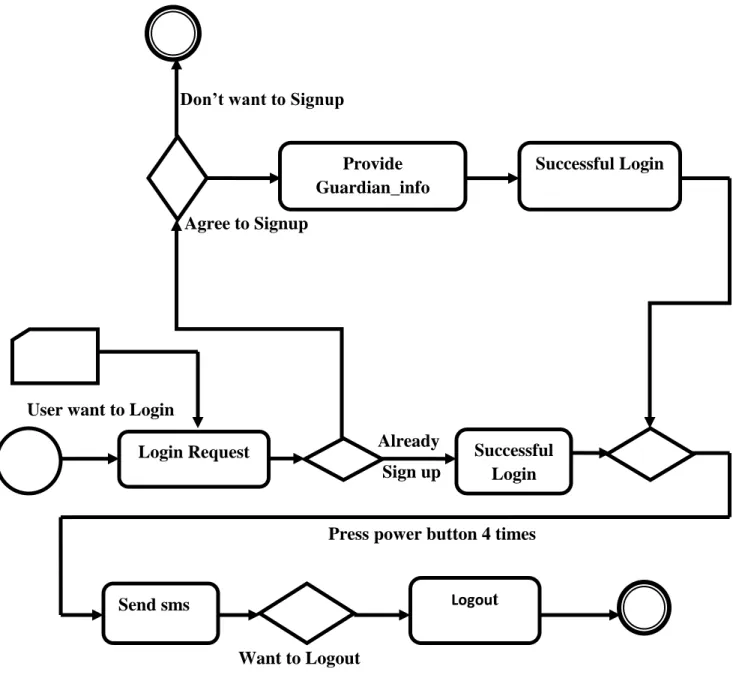
According to our mobile application we prepare Business Process Model. The Business Process Model of our mobile application are shown in figure 3.1
Don’t want to Signup
Agree to Signup
User want to Login
Already Sign up
Press power button 4 times
Want to Logout
Figure 3.1: Business Process Model
Login Request Successful
Login
Send sms Logout
Provide Guardian_info
Successful Login
©Daffodil International University 7 3.2 Requirement Collection and Analysis
Requirement is the needed things that will use for developing in missing people for their safety and the system specification is, to run the system, which configuration are need.
Before starting the execution at first we collect the requirement from some people from them. But we need to specific those requirements. Some requirement were not important, some of optional. We include only that requirement which is very important to maintain press power button four times [1].
3.3 Use Case Modeling and Description
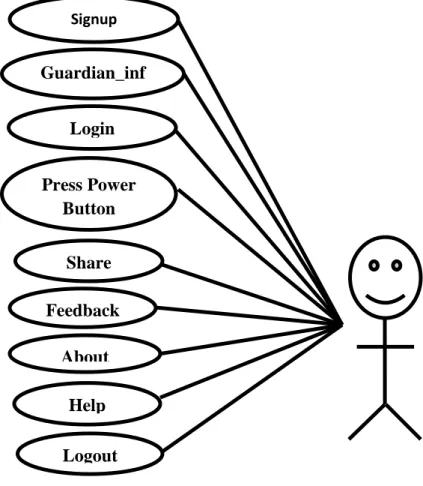
According to our mobile application we prepare use case model. The use cases of our mobile application are shown in figure 3.2.
Figure 3.2: Use Case Model.
Signup Guardian_inf
o Login Press Power
Button Share Feedback
About Help Logout
©Daffodil International University 8 Use Case Description:
Use case name: Sign up Actor: User
Pre-condition: None
Primary path: 1. Tap the “SignUp” button.
Exceptional path: None
Use case name: Guardian_info Actor: User
Pre-condition: SignUp
Primary path: 1. Tap the “Save Guardian information” button.
Exceptional path: None Use case name: Login Actor: User
Pre-condition: SignUp
Primary path: 1. Tap the “Login” button.
Exceptional path: None
Use case name: Press power button Actor: User
Pre-condition: Login
Primary path: 1. Tap the “Press power button four times”.
Exceptional path: None
Use case name: App Share Actor: User
Pre-condition: Login
Primary path: 1. Tap the “Share” button.
Exceptional path: None
Use case name: Feedback
©Daffodil International University 9 Actor: User
Pre-condition: SignUp
Primary path: 1. Tap the “Feedback” button.
Exceptional path: None Use case name: Logout Actor: User
Pre-condition: Login
Primary path: 1. Tap the “Logout” button.
Exceptional path: None 3.4 Logical Data Model
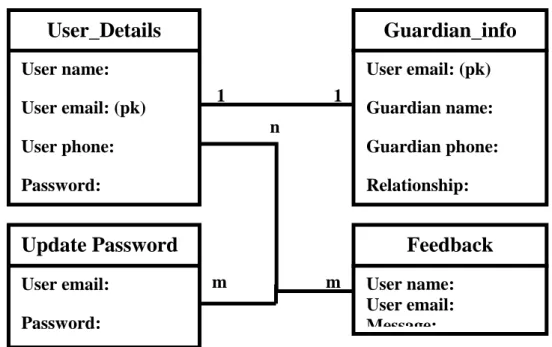
A logical data model or logical schema is a data model of a specific problem domain expressed independently of a particular database management product or storage technology but in terms of data structures such as relational tables and columns, object- oriented classes, or XML tags. According to our mobile application we prepare Logical data model [2]. The Logical data of our mobile application are shown in figure 3.3.
1 1 n
m m
Figure 3.3: Logical Data Model.
User_Details
User name:
User email: (pk) User phone:
Password:
Guardian_info
User email: (pk) Guardian name:
Guardian phone:
Relationship:
Update Password
User email:
Password:
Feedback
User name:
User email:
Message:
©Daffodil International University 10 3.5 Design Requirements
For implementing the apps as like our design requirement we need some required property. Basically here we discuss about those required property here.
1. XML language.
2. Gather all Icons.
3. Adobe Photoshop.
4. Adobe illustrator.
5. Gather all Thana‟s number.
©Daffodil International University 11
CHAPTER 4 Design Specification
4.1 Front-end Design
It‟s all about what a user able to see. It's may be buttons, images, layout, input field etc.
To design these components in android you need XML and Android programming.
Therefore these programming are called front-end programming [3].
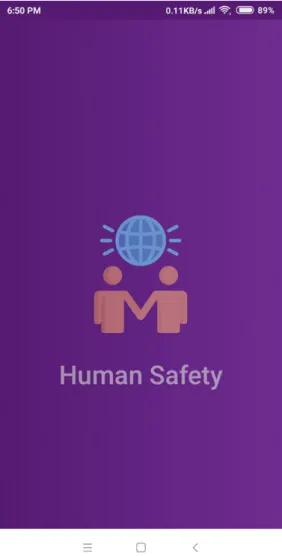
In our application Firstly, user can see a slash screen. Slash Screen is show when every time user launch this app. This is shown in figure 4.1.
Figure 4.1: Slash Page Screen.
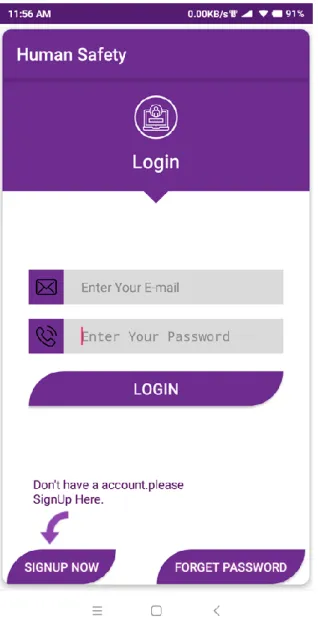
©Daffodil International University 12 After launching slash screen, user can see a Login screen. User can Login by using
registered email and password. This is shown in figure 4.2.
Figure 4.2: Login Page Screen.
In Login Screen user can see a Signup Button. If user is Signup before then he can directly Login but if not he has to Signup first. In sign up page user can‟t empty the field during signup. In Signup page, there is a Back Button in top left corner. This is shown in figure 4.3.
©Daffodil International University 13 Figure 4.3: Signup Page Screen.
Sometimes users forget their password. When user in Login page he also can see a Forget Password Button. If a user forgets his password he can update his password by using his email. This is shown in figure 4.4.
©Daffodil International University 14 Figure 4.4: Update Password Page Screen.
Once user Signup then next you have to provide guardian information. User can‟t empty the field during providing guardian information. Without providing guardian info Signup will not complete. So, user must have to provide guardian info after Signup. This is shown in figure 4.5.
©Daffodil International University 15 Figure 4.5: Guardian Information Page Screen.
4.2 Back-end Design
Backend of anything is not visible to general user or administrator. It can be a piece of code or a program running on the server machine to serve the user needs [3]. Database is also a part of backend. Suppose, a user requested to log in with his credentials from the personal computer (front end) and the data went to server to check the credentials. Now, the backend will check the credentials and decide whether a user to be allowed or not.
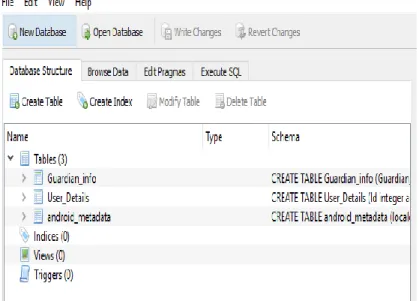
©Daffodil International University 16 In our project database application has 2 tables. One is for user and other table is for store
guardian information. For seeing SQLite stored data we have to use DB Browser for SQLite.
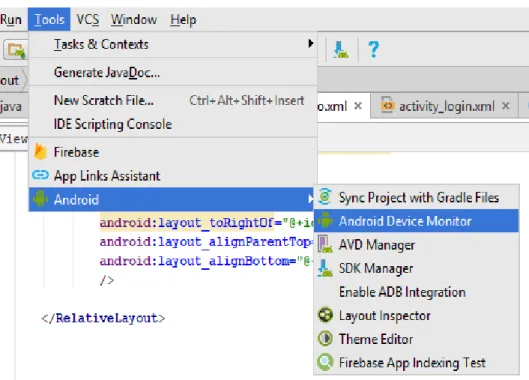
Firstly we have to pull a “.db” file and pulling step is Tools-> Android -> Android Device Monitor. This is shown in figure 4.6.
Figure 4.6: Process of Pulling DB File from Android Studio.
Android Device Monitor gives you a new file then first we have to select our desire app name. Then click data folder click on it and full your file from right up corner. After pulling “.db” file, we have to open it in DB Browser. After open “.db” file, we see our two tables and table name is respectively “User_Details” table and “Guardian_info”
table. This is shown in figure 4.7.
©Daffodil International University 17 Figure 4.7: Show table name in DB.
Go to “Browse Data”, in order to see table data or table details. Firstly, we select
“User_Details” table. This is shown in figure 4.8.
Figure 4.8: User_Details in DB Browser.
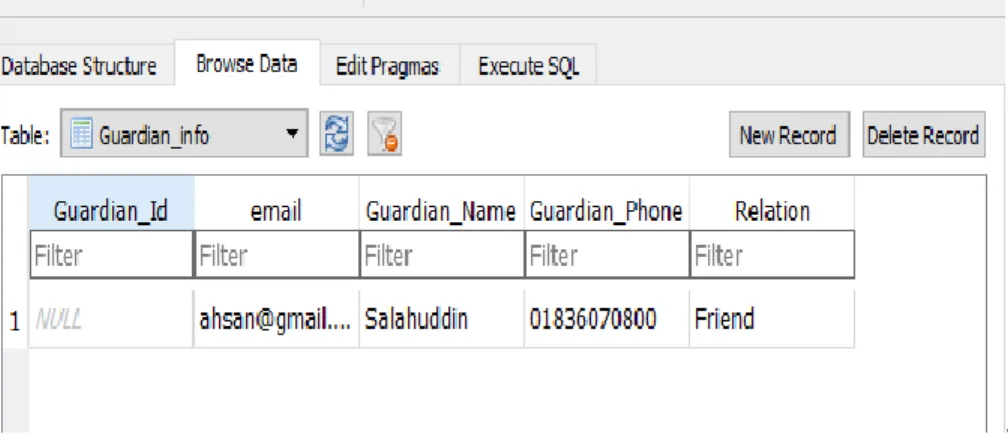
Go to “Browse Data”, in order to see table data or table details. Firstly, we select
“Guardian_info” table. This is shown in figure 4.9.
©Daffodil International University 18 .
Figure 4.9: Guardian_info in DB Browser.
4.3 Interaction Design and UX
An interaction model is that binds all component of the apps together .User interact with an activity and got required information actually it interact with user and apps properly.
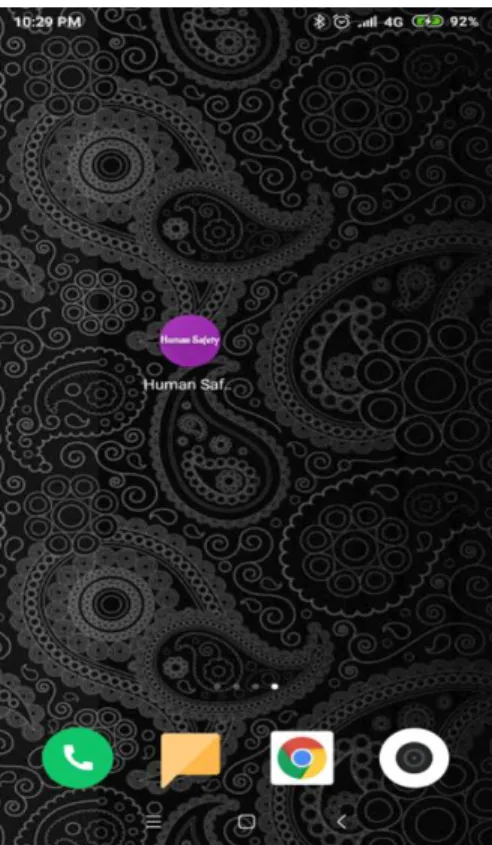
In our apps user can interact with all component properly. The mobile home screen, Human Safety icons are shown respectively in figure 4.10, 4.11.
Figure 4.10: Mobile home screen.
©Daffodil International University 19 Figure 4.11: Human Safety icon.
After successfully Login, we can see our launch activity. This is shown in figure 4.12.
Figure 4.12: Launch Activity.
©Daffodil International University 20 Now if user press power button four times then a toast will shoe if message is send. This
is shown in figure 4.13.
Figure 4.13: Message successfully sent.
In the bottom side, there is a button “BD POLICE CONTACT”. In our emergency time or any critical moment we need nearest Thana‟s contact number but we don‟t find this contact easily. In order to solve this problem we provide all Thana‟s OC phone number in our app. This phone number is categorized by Davison, District and Thana Name.
So, if user needs any Thana‟s contact, he has to just tap this button. After tap this button, user have to choose their desire Division. After choosing Division name, then user have to choose their district name. And finally, tapping district name, they will get their desire all Thana‟s OC contact Number. The Division Name Option, District Name Option, Thana‟s Contact List are shown respectively in figure 4.14, 4.15, 4.16.
©Daffodil International University 21 Figure 4.14: Division Name Option.
Figure 4.15: District Name Option.
©Daffodil International University 22 Figure 4.16: Thana‟s Contact List.
In Toolbar option, User also can see “Share”, “Feedback”, “Help”, “About” and
“Logout” option.
If user taps “Share App” option, then he can share this app via Messenger, Imo, Facebook, SMS, Gmail and Drive etc. User can also give their opinion about this app. In
“About” option, user can know about the developer in this app and any user who want make app he can contact with developer. “Help” option, Developer provide the instruction that how to use this app. Finally if users want to logout from this app, he can logout by tapping “Logout” option.
Toolbar, Share App With, User Feedback, About Page, Help Page are shown respectively in figure 4.17, 4.18, 4.19, 4.20, 4.21, 4.22 After Logout, users directly go to login page.
©Daffodil International University 23 Figure 4.17: Toolbar.
Figure 4.18: Share App With.
©Daffodil International University 24 Figure 4.19: User Feedback.
Figure 4.20: About Page.
©Daffodil International University 25 Figure 4.21: Help Page.
Figure 4.22: Logout Option.
©Daffodil International University 26 Basically UX design for an apps is contained all sides with the user interaction with the
apps and its all kinds of service that provide by the apps.
The first requirement of an apps UX design is provide the best service to the user and the design should be simple as possible.
In the Human Safety apps the UX design is so simple and the user must get the proper help by using the apps. The app is so simple that a person just has to press power button four times to get help. This app‟s has a wonderful view all the button shape and style is handsome looking that gives an amazing user experience. User interface design of
“Human Safe” is shown in Figure 4.23.
Figure 4.23: UI Design of Human Safety.
1. If users press the power button four times in critical moment then their guardian got a message with user location.
2. But user first must enable Power Button Facility.
3. User can share this app.
©Daffodil International University 27 4. Users can Feedback to developer about this app.
5. In Help page they got some rules about how to maintain this app properly.
There are many other apps about Human Safety are available in market in present time on android platform. Other apps is not user friendly UI and even after install this kind of app user don‟t know how to use it. But our app is very user friendly and anyone can use it.
After lunching this installed app you don‟t guess how to maintain this app. One of the applications is shown in figure 4.24.
Figure 4.24: Rescue me app UI Design.
©Daffodil International University 28 4.4 Implementation Requirements
For implementing the apps as like our design requirement we need some required property. Basically here we discuss about those required property here.
Tools [9]:
1. JDK
2. Android Studio.
Collecting information:
1. We browsed internet.
2. We read some books.
3. Follow some other application about Human Safety.
Programming language:
1. Java language.
2. XML language.
©Daffodil International University 29
CHAPTER 5
Implementation and Testing
5.1 Implementation of Database
Android is a mobile operating system developed by Google, based on a modified version of the Linux kernel and other open source software and designed primarily for touch screen mobile devices such as smart phones and tablets. For implementing android database we can use SQL, MYSQL, SQLite and Oracle database. In our project, we use SQLite database. SQLite is an open source SQL database that stores data to a text file on a device. Android comes in with built in SQLite database implementation. SQLite supports all the relational database features. In order to access this database, you don't need to establish any kind of connections for it like JDBC, ODBC e.t.c [5].
Database application making step:
i. Create new project
For creating new project we taped on the File -> New ->Android Application Project [8].
This is shown in figure 5.1.
Figure 5.1: Create android application project.
©Daffodil International University 30 We taped on “Next” button, it moved to the next step. Here we provided the “Application
Name”, “Project Name”, “Package Name”, ”Company domain” and “Project Location”.
This is shown in figure 5.2.
Figure 5.2: Providing application name, project name, package name and Project Location.
In the next steps, we have to mark Phone and tablet. We have to also provide minimum SDK [7] and tap onto “Next” Button. This is shown in figure 5.3.
Figure 5.3: Providing Minimum SDK.
©Daffodil International University 31 Then we select “Empty Activity” and tap onto “Next Button”. This is shown in figure
5.4.
Figure 5.4: Selecting Empty Activity.
After that we provide our “Activity Name” and “Layout Name” and tap onto “Finish Button”. So, Main Activity and Layout is now ready to create our database.
Database Package:
The main package is “android.database.sqlite” that contains the classes to manage your own databases.
Database Creation:
In order to create a database you just need to call this method “openOrCreateDatabase”
with your database name and mode as a parameter. It returns an instance of SQLite database which you have to receive in your own object. Its syntax is given below-.
SQLiteDatabase mydatabase = openOrCreateDatabase ("your database name", MODE_PRIVATE, null);
©Daffodil International University 32 After that we create a public class name as “DatabaseHelper” and this class extends
SQLiteOpenHelper class. We can create multiple tables inside this database. This is shown in figure 5.5.
Figure 5.5: Creating Database and Table and Row Name.
And for further using database, we must have to create a object of SQLiteDatabase and Syntax-
SQLiteDatabase sqLiteDatabase = this.getWritableDatabase();
Create and Drop Table:
After that we create a public constructor in order to pass context. This is shown in figure 5.6.
©Daffodil International University 33 Figure 5.6: Creating constructor and pass context.
Next we declare table and table row name; we have to create table command syntax in onCreate method. This is shown in figure 5.7.
Figure 5.7: Table creating Syntax.
In upgrade Database we use onUpgrade method with some parameter. This is shown in figure 5.8.
Figure 5.8: upgrading Table creating Syntax.
©Daffodil International University 34 Database Fetching:
We can retrieve anything from database using an object of the Cursor class. We will call a method of this class called rawQuery and it will return a result set with the cursor pointing to the table [5]. We can move the cursor forward and retrieve the data. This is shown in figure 5.9.
Figure 5.9: Fetching Data from Database.
5.2 Implementation of Front-end Design
In our application first launch a slash screen. Slash screen XML code is shown in figure 5.10.
Figure 5.10: Slash Screen XML Code.
©Daffodil International University 35 In slash screen Java Code, we use Animation and pass code inside Thread class. Slash
screen JAVA code is shown in figure 5.11.
Figure 5.11: Slash Screen JAVA Code.
After that, user can see a Login page. Login Page some part XML code is shown in figure 5.12.
Figure 5.12: Login Page XML Code.
©Daffodil International University 36 In Login page user also can access SignUp page and forget Password page. Login page
Java part implementation is shown in figure 5.13.
Figure 5.13: Login Page JAVA Code.
5.3Implementation of Interactions
The user can interact with the app in many ways. They can tap, power button press in particular times, and "Button-press" items. When one of these occurs, this is called an
"event". Therefore we want to set the app to listen for particular events occurring on particular UI items. In critical times user can get help by pressing power button 4 times.
The power button pressing XML code is shown in figure 5.14.
©Daffodil International University 37 Figure 5.14: Power Button pressing XML Code.
The power button pressing counting is inside a public method onReceive JAVA code is shown in figure 5.15.
Figure 5.15: Power Button press counting Java Code.
©Daffodil International University 38 After pressing power button user guardian get a message and its JAVA code is shown in
Figure 5.16.
Figure 5.16: sendMessage method Java Code.
5.4Testing Implementation
The testing usability is very much important part for releasing a mobile application. It is pre-release step of mobile application. So, we went to (field) several users in our country for testing our mobile application. Most of the users said to us this application is user friendly. The users were happy for that this application used without connection of internet. But for accurate location user must have to on their Mobile data or wifi.
We run this application. This is shown in Figure 5.17.
©Daffodil International University 39 Figure 5.17: Run application.
Next check Logcat from android studio there is no error in our app. This is shown in Figure 5.18.
Figure 5.18: No error in Logcat.
5.5 Testing Result and Reports
Software testing is used to find out system errors and warnings. We tested our application functionally in real android device and android studio emulator. We checked all activities, button and text form as design requirements. They worked properly .We also entered valid and invalid data as input and saw expected result.
©Daffodil International University 40
CHAPTER 6
Conclusion & Future Scope
6.1 Discussion and Conclusion
Now a day‟s, android operating system is most popular in smart device. Thinking quality is depending on in different person. Human Safety is android based mobile application.
This application is very useful and effective for user in critical moment and when there is no one around to help them. In this project anything can be changed in any time as per user requirement and feedback. This Application is very user friendly UI design, so that user can easily use this application. We also tested usability of our application. We tried a lot to develop this project. This application has beautiful features for user in their critical moment. In critical moment, if the phone is in user hand they can get help by pressing power button four times. So that, patient can easily get help from this application.
6.2 Scope for Further Developments
We know that nothing is permanent in this world and anything can be change in any time.
In information and communication technology change can be occur in any time and it‟s depend on user feedback. In future it can be done to include some features developed in our project and solve all limitation.
This Application can be based on finder people purpose in our country.
We add Shaking and voice command.
UI design will be more easy and user interactive and add Bangla Language.
We will add a people personal information and more accurate pure information.
Also can be used in CID crime sector.
After adding more features, this application looks more users friendly and useful and user can easily rescue from their unexpected critical moment.
©Daffodil International University 41
REFERENCE
[1] Martin Maguire, Nigel Bevan, “User Requirements Analysis”, 2002, Page 91-92. [ Last Access 18-10- 18] at 12:00am.
[2] Logical Data Model Available: <<https://en.wikipedia.org/wiki/Logical_data_model>> [Last Access 21-10-18] at 11:00pm.
[3] Front-end design and Back-end design Available: <<https://www.quora.com/Which-programming- languages-are-front-end-and-which-ones-are-back-end-for-Android-applications>> [Last Access 23-10-18]
at 9:00pm.
[4] Interaction Design Available: <<https://code.tutsplus.com/tutorials/android-sdk-user-interaction-- mobile-20342>> [Last Access 25-10-18] at 10:00pm.
[5] About Android <<https://en.wikipedia.org/wiki/Android_(operating_system)>> [last Access 27-10-18]
at 11.34 pm.
[6] Database creation and Database Fetching Available:
<<https://www.tutorialspoint.com/android/android_sqlite_database.htm>> [Access 27-10-18] at 11.34 pm.
[7] Java JDK <<http://www.oracle.com/technetwork/java/javase/downloads/index-jsp- 138363.html>>
[last Access 2-11-18] at 11.34 pm.
[8] Android Studio: <<https://developer.android.com/studio/index.html?gclid=CIG1- fzc4tACFYSEaQodNRsCVg>> [last Access 11-11-18] at 05.34 pm.
[9] Android Tools <<https://developer.android.com/studio/index.html>> [last Access 20-10-18] at 7.45 pm
[10] Dhaka-based human rights group Odhikar:
<<https://en.wikipedia.org/wiki/Forced_disappearance_in_Bangladesh>> [last Access 20-11-18] at 2.45 pm.
[11] Domestic human rights organization:
<<https://en.wikipedia.org/wiki/Forced_disappearance_in_Bangladesh>> [last Access 20-11-18] at 2.45 pm.