Automation of Thesis Management
by
Abdullah Ar Rafi 17301084
Sk. Sarafat Hossain Ehad 17301047
A thesis submitted to the Department of Computer Science and Engineering in partial fulfillment of the requirements for the degree of
B.Sc. in Computer Science
Department of Computer Science and Engineering Brac University
May 2022
©2022. Brac University All rights reserved.
Declaration
It is hereby declared that
1. The thesis submitted is my/our own original work while completing degree at Brac University.
2. The thesis does not contain material previously published or written by a third party, except where this is appropriately cited through full and accurate referencing.
3. The thesis does not contain material which has been accepted, or submitted, for any other degree or diploma at a university or other institution.
4. We have acknowledged all main sources of help.
Student’s Full Name & Signature:
Abdullah Ar Rafi 17301084
Sk. Sarafat Hossain Ehad 17301047
Approval
The thesis/project titled “Automation of Thesis Management” submitted by
1. Abdullah Ar Rafi (17301084)
2. Sk. Sarafat Hossain Ehad (17301047)
Of May, 2022 has been accepted as satisfactory in partial fulfillment of the require- ment for the degree of B.Sc. in Computer Science on May 29,2022.
Examining Committee:
Supervisor:
(Member)
Arif Shakil Lecturer
Department of Computer Science and Engineering Brac University
Head of Department:
(Chair)
Sadia Hamid Kazi
Chairperson and Associate Professor Department of Computer Science and Engineering
Brac University
Abstract
At present, the idea of managing thesis or project work, or any work of that sort for a student and keeping track of all the due works with a rapidly paced deadline is often gruesome. For instructors and supervisors, these become a nightmare during a busy semester along with their other responsibilities to review all papers and the registration process. Thus, we propose a system that can achieve simplicity while completing these tiresome works for both students and instructors, a system that can handle the entire process from registration to defence and everything in between with ease. This project aims to help supervisors to track the activities and guide the teams who are under their supervision. Also to help those teams to stay connected and submit their works to get feedback. The system will be used by clients (thesis team and supervisors) and controlled by organisational administrators. The admin will be able to restrict the number of users. They can also restore information in case of a serious breakdown. The system requires a stable internet connection in order to function properly because it is a cloud based system. The key functionalities include: getting registered as a member, creating or joining rooms, communicating, submitting files and getting grades or feedback many more.
Keywords: Thesis Management; Project Management; Thesis; Automation; Man- agement System; Java; Android; Firebase
Acknowledgement
Firstly, all praise to the Almighty Allah for whom our thesis have been completed without any major interruption.
Secondly, to our supervisor Arif Shakil sir for his kind support and advice in our work. He helped us whenever we needed help.
Thirdly, Our honourable panel chair Dr. Muhammad Iqbal Hossain & the members of the judging panel namely Faisal Bin Ashraf, Salman Sayeed Khan & A. M. Esfar- E-Alam . Though our paper was not accepted there, all the reviews they provided proved to be a tremendous help later in our works.
And finally to our parents without their throughout support it may not be possible.
With their kind support and prayer we are now on the verge of our graduation.
Table of Contents
Declaration i
Approval ii
Abstract iii
Acknowledgment iv
Table of Contents v
List of Figures vii
List of Tables viii
1 Introduction 1
1.1 Forewords . . . 1
1.2 Research Problems . . . 2
1.3 Research Objectives . . . 3
2 Literature Review 6 2.1 Automation in Academia . . . 7
2.2 Modules of a Complete Thesis Automation System . . . 7
2.3 Design Principle: Why SOLID? . . . 9
2.4 Why XML for Designing? . . . 10
2.5 Why Prototyping Model? . . . 11
2.6 Why Native Approach? . . . 12
2.7 Why Java? . . . 13
2.8 Why Firebase as Database . . . 14
3 Work Plan 15 4 System Design Methodology 17 4.1 Use Case Diagram . . . 17
4.2 Entity Relationship Diagram . . . 19
4.3 Activity Diagram . . . 20
5 Structure of the Database 21
6 Business Logic of the System 25 6.1 Two Factor Authentication . . . 25 6.2 Different Users and Roles . . . 25 6.3 Cloud Based Database . . . 26
7 Conclusion 27
Bibliography 29
List of Figures
4.1 Use Case Diagram . . . 18 4.2 Entity Relationship Diagram . . . 19 4.3 Activity Diagram . . . 20
List of Tables
2.1 Comparison between popular SDLC . . . 12 2.2 Native App vs Web App . . . 13 2.3 Java vs Kotlin . . . 14
Chapter 1 Introduction
1.1 Forewords
The Internet has been playing a vital role in connecting not only the people but also private, public, academic, business, and government networks. By breaking down the geographical barriers, communication has become more efficient, cost-effective and fast. The development of information technology (IT) is increasing rapidly. It has become a liability for every type of organisation. The strangest yet most effec- tive discovery that this pandemic of Covid-19 has brought to the table is the idea of conducting academia online. Let us not get confused here, online activities were crucial in the field of academics prior to these dismal times, but it is during the pandemic we have seen that online academia has grown to the fullest. Also, we have seen that universities can provide quality education online.
In the world of the Internet and developed IT facilities, automation has become a liability for various works. Automation is a technology that reduces human interven- tion in processes. It is done by following predetermined decision criteria, subprocess relationships, and related actions. Humans can be substituted by automation for doing menial or repetitive tasks. In this modern world, we are using automation in several areas such as manufacturing, transport, utilities, defense, facilities, opera- tions and mainly in information technology. The impact of automation is increasing rapidly in the IT(information technology) domain. The usage of advanced artificial intelligence (AI) and machine learning (ML) is evolving in this field.
The problem with conducting research-based works offline such as evaluating the papers, providing feedback and other remarks is that it takes a lot of hassle which might cause a lack of productivity and waste of time. Due to this, we often mis- manage our schedule which becomes a shackle that holds us back to deliver the best performance.
However, there is an efficient workaround that can overcome this hassle. For exam- ple, if a paper needs approval or quick checking it can be sent and reviewed over a platform that is robust, secure and rapid. This can save a significant amount of
time on both ends, time that can be given to other segments of the task at hand.
In addition, the existing solutions we have available now do not have full-scale sup- port for automating these processes of conducting complex research. Managing hard copies of papers is a time consuming and tiresome task. It might also leave unchecked mistakes which makes the process error-prone. Furthermore, if the hard copy has multiple versions with different updates and fixes, it becomes a nightmare to keep track of all this.
To remedy this situation, a platform can be useful that will offer quick checking of scripts and copies. This platform will be able to handle multiple submissions as version control and keep track of the history and the time those were submitted.
Parties involved can make changes to those files which will make them feel they are in control of their documents.
1.2 Research Problems
Here we are selecting BRAC University as the area. To complete the degree, every student has to finish a thesis or project or internship. It can be done as a group or individually. There are 3 steps to completing the project/thesis. In every step, there are many submissions, meetings, getting feedback from supervisors and so on.
To perform those important tasks, there are no official platforms. For this, students and supervisors have to use 3rd party platforms. students and supervisors have to use more than one platform for their features. From a survey[1], the most commonly used platforms are discussed below:
• Facebook Groups: On Facebook, we can create groups then we can add our group members and supervisor. Here we have a dashboard or feed and we can post our queries to which group members can see and comment.
But the problem is, those posts get shuffled. It is not organised. there are no features for arranging meetings, sharing screens and so on.
• Messenger: Messenger is a part of Facebook. Here we can create groups and chat with each other. We can share pictures, videos and files. We can arrange meetings as well as share our screens.
but the problem is there is only one room for every discussion. This can be confusing while discussing any topic. there is no option to cheat on more than one channel.
• Discord: Discord consists of a lot of features. we can create different chan- nels for voice chat, and text as well can share screens. We can easily manage meetings and share files in different formats.
But the problems are that there is no feature like the TO-DO list, we can share files but there is no feature for evaluation or feedback on each submis- sion. The lack of a dashboard can create confusion while doing large projects.
• Slack: There are similarities between Slack and Discord in terms of features.
It provides functionalities like screen sharing, voice calls, creating separate channels and many more.
However, there is no dashboard and evaluation system in slack, the same prob- lem that Discord has. Thus, slack is incompatible with large scale project/thesis management.
• Classroom: Classroom is useful for sharing resources and links to documents.
It has a feature that allows us to post threads and comment on them. This is useful for small scale communication.
But for managing any projects or heavy work it has no useful features. It can be used as a dashboard or notice board only.
• Trello: Trello has an organized dashboard system that comes in handy to keep track of tasks that are in progress. Users can create cards and customize them as per their needs. The interface is clean and easy. It has a progress meter checklist and file sharing functionality.
But, one key feature that Trello lacks is the in-built chatting system. There is no voice call support and similar features that allow us to communicate in real-time.
• Zoom: Zoom is very popular for arranging meetings. We can arrange meetings as well as share our screen or camera footage, voice or text chat and so on.
But the problems are, that it is difficult to share files, if we want to store them then we have to download them, and histories are not stored. For this, we have to record the meeting.
• Google Meet: Google meet is almost similar to zoom. Most of the features are the same. Since they are both similar products they offer nothing new to the market.
From the brief discussion of those popular platforms, we think that none of them has all the features we need. There are lackings in each of them. This is why most students and supervisors have to use more than one platform to perform different tasks. With using so many 3rd party platforms, it becomes difficult to manage and organize different versions of research papers and other resources and documents.
1.3 Research Objectives
This project aims to develop a system that helps students and supervisors to stay connected as well as organize their work. Our project will be filled with all the
necessary features which are not available on a single platform. some of the main objectives of this project are given below:
1. To design a system where users can log in with their credentials.
2. To design a system where teams can select group leaders and divide work among them.
3. To design a system where users can set goals for their allocated works related to their topic.
4. To design a system where users can see their progress in one go.
5. To design a system where users can modify their uploaded files and see the changes made within them.
6. To design a system where users can delete any files that they think are not necessary anymore.
7. To design a system where users can see each evaluated file and check the feedback and grades.
8. To design a system where users can join in groups.
9. To design a system where users can chat.
10. To design a system where users can arrange meetings over a voice call or video call and share their screen.
11. To design a system where users can share and store files based on their priority.
12. To design a system that will allow users to create and edit different versions of their documents and keep track of it.
13. To design a system where users can create To-Do lists.
14. To design a system where users can see their progress at a glance with ease.
15. To design a system where supervisors or instructors can evaluate multiple files and provide feedback.
16. To design a system where data is secured and protected.
17. To design a system that is fast and robust.
18. To design a system that can handle multiple requests at one unit time.
19. To design a system that can withstand malicious attacks of evildoers 20. To design a system where every action of a user is recorded.
21. To design a system that allows supervisors to be in control.
23. To design a system that will remind the students before important deadlines.
24. To design a system that can restore a connection in a time of emergency.
25. To design a system that can implement automation features. Such as checking main points, checking word count for each, and checking the formatting of the entire document via using AI and ML.[4]
Chapter 2
Literature Review
Technology is changing the world rapidly. Not only during the lockdown but also before this period, more and more students were interested in learning new skills online. Most of the students were dependent on free sources like Youtube for tutorial lessons. But nowadays most of the universities and other organisations are designing courses for online learning. Day by day not only students but also graduate stu- dents are willing to enroll courses online for self development. Many organisations like Coursera, Udemy, EdX and others are selling professional online courses for their users. Also, personal assistance service is very common nowadays. At present we can hire someone to learn anything online from other parts of the world. The online learning industry is projected to pass$370 billion by 2026. At the time of the pan- demic of Covid-19, all the universities continued their education online. Most of the universities provided live lectures online. On the other hand, a significant number of universities provided recorded lectures for the students. And lecturers of the univer- sity provided QA sessions for students to solve their personal questions and queries.
For this reason students and lecturers have to depend on different platforms for different tasks. Communication is the key point here. Most of the platforms don’t have sufficient features for students and lecturers for communication. For example we have to use a specific platform for live classes and for submission we have to depend on another platform. Again for grading we are using a different platform.
During the final project or thesis, we need to communicate with our supervisors frequently. Also, we need to submit papers for feedback. It can be a hassle if we use so many platforms at the same time for every specific task. Also it will be very hard to organise everything perfectly because there can be more than 2 members in a group. In the research problem part we have discussed the problems of various platforms like Facebook groups, discord, slack and other famous platforms. None of them can fulfil the requirements that we need to communicate with students and lecturers As well as organising submissions. So we need a system that can fulfil all the requirements specifically for education. A system that can be used for communi- cation, submission, grading, feedback, online discussions, announcement and others at the same time. The online education industry is growing day by day. It can save a lot of time. After the pandemic we can agree that online discussions and meetings are more effective than physical meetings. Also nowadays we don’t need to submit hard copies for reviews. We can submit soft copies to get feedback easily without wasting time to travel from here to there. It is high time to develop a system like this to help students and their supervisors to do projects or final papers in groups
and also to organise their papers.
2.1 Automation in Academia
According to [7], almost 63 percent of the best universities worldwide are using automation tools and most universities are now using technology to drive their pro- cesses and data analysis to guide their decision-making. It helps them to improve efficiency. Jobs like the Admission process, Attendance, School Maintenance Pro- cesses, Course Evaluation, Payrolls, and Course registration are already done with automation. Also most of the universities are using their own system for commu- nication. Taking appointments from a lecturer and meeting him at that exact time can be a hassle for a group of students. Also submitting hard copies of papers and going back to check the grades can be a hassle too. So it is necessary to conduct the meetings and discussions online to save our time. Especially at the time of the final project or thesis, students need to communicate with the supervisors frequently for reviews and feedback. It can be significantly useful if we have a system like this to fulfil the communication and the submission parts at the same time. It can save you lots of time and hassle and increase the efficiency of any project. By using this system a student can have discussion at any time and any place. So this is how our system can be useful in academia.
2.2 Modules of a Complete Thesis Automation System
Application module is a logical container related to a particular task. In our sys- tem each of the specific operations or tasks are each of different modules. In this section we are going to discuss some of the specific models which we can implement to fulfil the requirement of the communication process and the submission of the files. Usually we use a lot of different platforms for each task. Here we can make a list of models and implement all of them in our system to make it work. A short description of each of the modules are given below.
1. User Creation: Our system is similar to a social media application. Here each of the users will have a different and unique profile and they will be joining and communicating with each other as a specific student or supervisors or panel members. This is why it is necessary to register as a user before using this application. At the time of the registration they will have to fill in their personal information like their full name, email, phone number, the role of the user and so on. After the registration process the verification part will start and the admin will approve themselves as a user of the system.
2. Login Authentication: After the registration process a OTP code will be sent to that phone number to verify the identity of a user and a security code will be sent to the email for verification. After the authentication part, a user
can officially login to the system. Our system will have two step verification.
After entering the username and the password a OTP code will be sent to the phone number to verify if the exact client is using the system or not. It can assure that just knowing the password is not enough to log in. It can prevent dishonest persons from using other accounts. Also it can save users from getting hacked.
3. Dynamic User (Student, Supervisor Panel Member): We already discussed that this system is designed for communication purposes of students and supervisors. Also getting grades from supervisors and panel members. So here we need three types of users as a client for this system. They are students, supervisors and panel members. According to their role they will have limits to perform actions in the system. Suppose a supervisor and panel member can provide grades but a student can only submit files. This is why We need different types of users.
4. Room Creation: In a thesis group there will be more than two members and one supervisor. So there must be a private room for them to communicate.
Supervisors will be able to create rooms and add specific students in the group to communicate. There, group members can do various operations according to their roles. Other students or supervisors will not have access to another room without permission. But a panel member will be able to have access to any rooms to check the submission. So that they can provide grades.
5. Room Type: Usually a student needs 1 year to complete a thesis or project.
The thesis is divided into three categories in 3 semesters. They are pre thesis 1, pre thesis 2 and the final thesis. So there should be room categories for each of them. So that users can understand in which stage the group is in. It can be very useful for panel members while checking the papers or the submissions.
So in our system we need three types of rooms.
6. Chat(One to One): Users should be able to send messages to a specific user for personal conversations. It can be student to Supervisor or supervi- sor to student or student to student. So that without providing unnecessary notifications to other users, we can have conversations with a specific person.
Suppose if a student wants to communicate with one of his team members only, they can have a conversation without involving the supervisor. So that users can have their privacy.
7. Chat(Many to Many): This feature is important for group conversation or discussions. After creating a room, the supervisor should be able to add a group of students. They will have a common section to have conversation in a group. So that everyone can be a part of the conversation. Suppose a supervisor is providing some useful information about writing papers, and all the students can see and have conversation at the same time to share their ideas. This feature will be available in every room. Without a room no one will be able to have group conversations.
8. File Submission: After writing the paper, students will be able to submit their file in PDF format. There will be a section only for students to upload
PDF. Students will be able to submit more than one file. The files will maintain serial, so that users can identify the latest files. Only the students and the supervisor and all the panel members will be able to view this file.
9. Grading Feedback: After submitting the files in the file submission section, supervisors and the panel members will be able to view those files. There will be different sections for grades. One is for the supervisor and the other one is for the panel member. Also there will be a feedback section for both of them. When the student will check, they will be able to see a grade from the supervisor as well as a grade from the panel member. Also feedback from the supervisor and the remarks from the panel member.
10. Noticeboard: There will be a notice board section. Only supervisors can set announcements and students can only view. Students will not have permission to set or use this notice board. They can only view. This feature can be useful for providing announcements and deadlines for students.
11. Personal User Status: All the users of the system will be able to set their personal user status. While experiencing the user interface we will be able to see the profiles of the users of a room. After clicking on the profile picture they will be able to see their personal status. Suppose a supervisor is missing or late for a meeting. The supervisor can update his personal status if any problem occurs. So that students can understand why their supervisor was not present. This can be very useful for letting others know about your condition.
2.3 Design Principle: Why SOLID?
Robert C Martin aka Uncle Bob introduced five principles for the object-oriented programming paradigm to SOLID is one of the most popular design principles for an object-oriented language. It is an acronym that bundles five key principles of software design and implementation. These principles are:
1. Single Responsibility Principle 2. Open Closed Principle
3. Liscov Substitution Principle 4. Interface Segregation Principle 5. Dependancy Inversion Principle
The SOLID principle was designed to combat the problem of software becoming un- maintainable and nightmares for developers. The goal was to reduce dependencies and allow developers to change one area of software without impacting others. These principles ensure the stability and maintainability of software. These principles are discussed briefly below.
Single Responsibility Principle: According to [8], Single-Responsibility Prin- ciple is that a class should have one and only one reason to change. This means a
class should be responsible for doing only one task. It makes the software easier to implement and prevents unexpected side effects of future changes. For example, the requirements of software change over time. When a change of requirement occurs developers need to change or modify certain functionalities. If a class has multiple responsibilities it becomes complicated to maintain or change certain features. As a result, the whole system breaks and becomes unstable. So, following this principle and making one class for one task saves a lot of headaches. Following this principle also makes code easier to read and understand. It saves time because it needs fewer test cases while testing and the code will be more stable because it will have fewer dependencies.
Open Close Principle: According to Robert C Martin [6], it is the most impor- tant principle of object-oriented design. It says, Software entities(classes, modules, functions etc) should be open for extension but closed for modification. It means a developer should be able to add new functionality without changing the existing code.
Liskov Substitution Principle: This principle states that, if Class A is a sub- type of Class B we should be able to replace Class B with Class A without disrupting the behaviour of our program.[9] This can be achieved by overriding the methods or by sharing the same interface. An overridden method of a subclass needs to accept the same parameter values as the method of the superclass. And the return value of a method of the subclass must match the return value of a similar method of the superclass. Failing to do so will raise an exception. In short, the passed parameters and return values should match in overridden methods of subclass and superclass.
Interface Segregation Principle: Clients should not be forced to depend upon interfaces that they do not use. [5] It means it is better to implement smaller inter- faces rather than large and complex interfaces. Building new interfaces that serve best to fulfil the requirements rather than using the predefined complex interfaces can make code more readable and maintainable. The goal is to reduce the com- plexity by splitting the software into multiple, independent parts. It also ensures a maintainable codebase.
Dependency Inversion Principle: The dependency Inversion Principle states, Larger interfaces should be split into smaller ones. By doing so, we can ensure that implementing classes only need to be concerned about the methods that are of inter- est to them[9]. This principle offers a way to decouple software modules. Simply put, the dependency inversion principle means that developers should depend on abstractions, not on concretions.
2.4 Why XML for Designing?
Similar to HTML, XML is a markup language where X stands for Extensible. It is used for storing and formatting data along with the structure. Unlike HTML where tags are pre-defined, XML allows users to define their own tags as per their needs. It is used for storing “self-defining” data. Meaning the structure of data is embedded
and interpreted by all types of programming languages without any complexities.
XML is convenient for a number of different functionalities it offers. Such as trans- ferring data, formatting documents, web searches, creating layouts and storing con- figuration data and many more. App layouts in Android are created in XML. It helps to render pixel perfect user interface and a smooth user experience. Common Android layouts include the Linear Layout, which tells the app to align the con- tent on the screen horizontally or vertically, the Frame Layout, which is designed to contain other layouts dynamically, and the List layout, which displays items you can scroll through[13]. This is why it is convenient to use XML to design android applications. And that is why we have choose XML as our design language.
2.5 Why Prototyping Model?
Our system is designed for communication, submissions, conducting online meet- ings, providing feedback, providing grades, organising papers and so on. We may need to add new features according to modern times and technology. To keep pace with the rapidly growing technology we may need to upgrade our system. Many new features may be needed to fulfil the needs of the future education system. This is why we need to choose a model that can help us to develop this system in a way that it can help us to add or edit the system easily within a short period of time.
Compared to other models, the Prototyping model is very flexible in design. Errors can be detected very easily. if any functionality is missing then we can detect it easily. If any new requirements are received or found then it’s easier to add them to this approach. If a developer wants to, then he can reuse the skeleton of an existing project. Also, the Prototyping Model is ideal for an online system. Integrating new requirements is very well understood. Most importantly, users are actively involved in the development phase. Below is the comparison of why Prototyping is better than any other models for our project [14]:
Prototyping Waterfall Agile
This model is very flexi- ble in design.
This model is not flexi- ble.
Agile is a flexible methodology.
Errors can be detected and solved very easily.
Errors from the previ- ous stage are hard to de- tect and not possible to solve.
Bugs are solved in each sprint, so fewer chances to find any error at the end.
Prototyping Waterfall Agile If any functionality is
missing then we can de- tect and add it easily.
All the requirements are pre-determined at the beginning.
Agile methodology caters for the ever- changing requirements.
Developers can reuse the skeleton for other projects.
Every project has to be started from scratch.
Hard to reuse the skele- ton.
Ideal for an online sys- tem.
Ideal for consistent and predictable projects.
Works well when the product vision or features are not well- defined.
Users are actively in- volved in the develop- ment phase.
Users are not actively in- volved in the develop- ment phase.
Product owners and scrum masters are highly pressurized in this methodology.
Table 2.1: Comparison between popular SDLC
2.6 Why Native Approach?
Application development is a huge field. For our first stage, we are willing to develop on a single platform. Mobile traffic and users are increasing rapidly. Hence, it is convenient to develop a system that will be reachable by the users all the time. To be specific, most mobile companies are using android as their operating system. So, designing a system for android will bring more value to the users. It can be expected to be more fruitful than the other alternative in the beginning phase of our system.
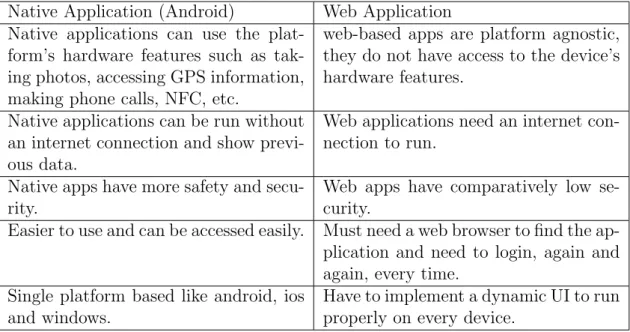
From our initial requirements analysis, we have seen that the majority of people prefer to use mobile applications rather than desktop applications for communica- tion. For example, Facebook is popular because it can be accessed through mobile applications. Facebook can be accessed on a desktop through browsers but a major- ity of the people access Facebook from mobile applications. Hence, a native system is more likely to be popular than a desktop application because it is easy to check the phone in any situation[11]. A brief comparison between native and web application are given below:
Native Application (Android) Web Application Native applications are faster and more
responsive.
Web applications are slower and less re- sponsive than Native applications.
Native apps can store data in both local storage and cloud or server.
Web applications store data in the cloud or server only.
Native Application (Android) Web Application Native applications can use the plat-
form’s hardware features such as tak- ing photos, accessing GPS information, making phone calls, NFC, etc.
web-based apps are platform agnostic, they do not have access to the device’s hardware features.
Native applications can be run without an internet connection and show previ- ous data.
Web applications need an internet con- nection to run.
Native apps have more safety and secu- rity.
Web apps have comparatively low se- curity.
Easier to use and can be accessed easily. Must need a web browser to find the ap- plication and need to login, again and again, every time.
Single platform based like android, ios and windows.
Have to implement a dynamic UI to run properly on every device.
Table 2.2: Native App vs Web App
2.7 Why Java?
Java is popular for developing android applications by using Android SDK (Software Development Kit). Other programming languages like C, C++, Scala kotlin are also used to develop android applications. Java is the most preferred and most used programming language. Java is a class-based simple, object-oriented, robust, secure and high level programming language. For features and performance, java is a very common and popular language for android application development. Also, the community for java developers is huge. Also, many libraries and tools of java make developer’s lives easier to develop applications[12]. Here is why we are using Java for our project rather than Kotlin, the new official language for android[10].
Java Kotlin
Java is easier to learn and understand. Kotlin is a newer language compared to Java and it has a steep learning curve.
Android itself is built on Java, so there is a smooth developing experience.
Though Kotlin has great support and compatibility for Android, it is still de- veloping.
Java libraries are the most reliable and stable.
The Kotlin community is still young and learning.
Resources in terms of developing an- droid apps.
Resources are limited.
Java compiles faster, letting developers code more in less time.
Kotlin shows a slower compilation speed than Java in most cases.
Java Kotlin Java apps are lighter and more com-
pact, resulting in a faster app experi- ence.
Kotlin apps perform slower compared to Java in some cases.
Java is multi-platform, practically ev- ery device on earth can run Java.
Kotlin has no such support yet.
Table 2.3: Java vs Kotlin
2.8 Why Firebase as Database
Firebase is a mobile platform that helps us quickly develop high-quality apps, and grow our user base. Firebase is made up of complementary features that we can mix and match to fit our needs. The concept of firebase is simple. When building a client-side application, Firebase can turn this into a serverless app in no time. it also has built-in security rules that make it a trusted data and server handler. As we are developing a communication-based application, here are some top features of firebase we are focusing on[2].
1. Firebase User Authentication: Firebase has a built-in authentication sys- tem. We can use both mobile numbers and email for registration. Also, we can implement 2 step verification mode to make our application more secure.
Also, the firebase authentication system can send a verification code to any mobile number or email for verification. This is how it can make the task very easy and secure. We can save a lot of time.
2. Firebase Database Firebase database is ideal for storing user data like chat messages, user details and other metadata. So we can easily make social media applications without making the database complicated.
3. Firebase Cloud Messaging Firebase Cloud Messaging aka FCM is the tool that enables the application to chat with other clients in real-time. It waits for new messages from the clients to sync. It can send both notification messages and data messages. It supports 3 ways of messaging, single devices, groups of devices, or devices subscribed to topics.
4. Firebase Cloud Storage Firebase database is cloud-based. So we don’t need any local server. Also, there is no maintenance. For this, the application is reluctant to crash frequently. Also, it can be used to store user-generated content like the profile picture, multimedia messages, etc.
5. Firebase Remote Config: Firebase remote config is the tool that allows the developers to change the behaviour and appearance of the app without requiring users to download the app update. It works by setting keys and values from the console resulting in the changed behaviour and looks of the app. This feature allows the developers to quickly roll out an update and test their app.
Chapter 3 Work Plan
We have divided our project into some major parts. We will follow those steps to complete the development of our system. From the starting to the end, we will fol- low the Prototyping Model in Software Engineering for this project. Prototyping is the Software Development Life Cycle in which a prototype is built according to the initial requirements and then is tested and reworked until an acceptable prototype is achieved. Brief discussion and activities of each step are following [3]:
1. Requirements gathering and analysis: As we already discussed that our audiences are students and faculties. We have interviewed some of our audi- ence and gathered their opinions as well as requirements. We have filed the most relevant opinions. We have analysed them and defined them in detail to start the prototype of our project. As we are following the Prototyping Model, we will interview more students and faculties to know about their expectations during the development of our system. After analysing, we will plan to build our second prototype.
2. Quick design: In this stage, we will develop a simple design of the system.
It is not a complete design of the system but a brief idea of the system to the user. This design will help us to develop the prototype of the system. This system will be a web application that will be hosted on the cloud.
At first, by using XML, we will construct a skeleton that will help to vi- sualise the overall structures and User Interface (UI) of the system. Here we will use a lightweight database like firebase.
3. Build a Prototype: At this point, we have a list of all the features that we need to implement. Based on all these by using Java we will write the codes of all the activities of every function and feature. After creating all the functions we will connect them to the manifest and so on. Thus it completes our back end design.
We are selecting firebase as a database management system. We will orga- nize data into our system. We already know firebase is a parent-child based
system. We will design our database and implement it in the console.
We will use Java as our programming language and we know Java is ideal for building android applications. Java officially supports firebase in the an- droid studio.
Then we can connect our project to any 3rd party platform to check the percentage of plagiarism. Also, we will use other APIs to increase the number of features. We can also extend the functionalities by using third party API.
4. Refining prototype: At this stage, we have our prototype. We will present this prototype to our audience and supervisor to collect feedback and sug- gestions. Then we will analyse all the suggestions and additional expected requirements for later prototypes and we will update the features accordingly.
5. Implement Product and Maintain: After finishing the final prototype, we will run a trial period for a certain time to ensure the quality and working features of the system. If the trial is successful then the service will be de- ployed.
Chapter 4
System Design Methodology
4.1 Use Case Diagram
In our use case we have three actors. They’re Students, Supervisors, and Panel members.
Users who are already registered on the platform can log in with their email ID and OTP. On the other hand, the unregistered users are asked to do their registra- tion first. But before registering they have to collect information if they are eligible or not. Students who have discrete permission from their respective departments are only eligible to register on the platform.
While in the registration process, users have to fill their information and choose the category of the user. They can be students, teachers or panel members. After completing the registration, a user is allowed to perform certain actions according to their roles.
A supervisor can create rooms and add a group of students in a room to com- municate with each other and submit the documents. Whereas, a student can join those rooms and continue their thesis/project management and panel members can view any rooms and view documents. Also they can provide a grade of documents.
In the document section there are two types of grades. One grade is provided by the supervisor and the other one is provided by the panel members. So this is how three types of members can play different roles and actions. The user case diagram for our project is given below so show all the processes of all types of users.
Figure 4.1: Use Case Diagram
4.2 Entity Relationship Diagram
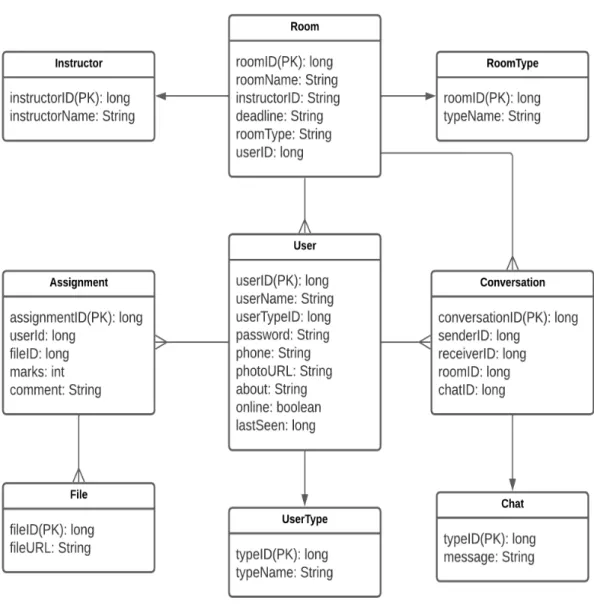
An ER diagram is a means of visualizing how the information a system produces is related. A few components include entities, actions, attributes, etc. Here the first step is to login through an unique id every user gets. Other credentials in- clude name, password, phone number and OTP.. From that logged info it gets a permission category determined on credentials, and becomes a user of the system.
Permission category determines what level of access it has over the system. The user then gets a unique id assigned and has names, address, e-mail stored. Then supervisors can create rooms and students can join those rooms. There they can perform various actions according to their roles. Also we can have a user category called panel members, who are allowed to view any file from any room. Also they can provide grades.
Figure 4.2: Entity Relationship Diagram
4.3 Activity Diagram
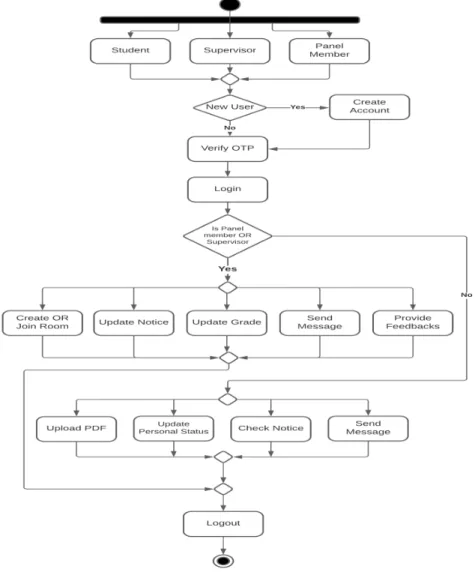
An activity diagram is defined as a UML diagram that focuses on the execution and flow of the behavior of a system instead of implementation.
The activity diagram that we used shows that the supervisors,students and panel members have to register after a verification process. Then supervisors can create rooms and students can join those rooms. However, students can not create rooms.
Supervisors can create multiple rooms for different groups of students. There they can perform various actions according to their roles. Panel members are similar users like supervisors. But panel members can view everything. They have access to view any file from any group. So that they can grade every file from every group.
In the diagram we can see all the different roles of different users.
Figure 4.3: Activity Diagram
Chapter 5
Structure of the Database
We can define the structure of Database from the ER diagram of our project. From the diagram we can see we have nine classes. They are user, instructor, room, roomType, assignment, conversation, file, userType, chat. All of these classes have their own attributes. The brief discussion about the attributes and the classes are discussed below.
• User: This class will be responsible for storing all the personal information for a specific user of the system. There are various attributes to store various types of data of a user. A specific user can submit more than one assignment.
This is why the user class and assignment class have one to many relationship.
You can have countless conversations. For this reason the user class and con- versation class have one to many relationships. For this prototype of a project a user can join only one room at a time this is why user class and room class have many to one relationship. Also there will be a relation between user and user type. The user type defines the type of user the user class is holding. A short description of all the variables of this class is given below.
1. userID(PK): This variable will be responsible for storing the unique ID of every user. Also this is a primary key of the class. And the data type for this variable is long.
2. userName: This variable will be responsible for storing the full name of the user. the data type of this variable is string.
3. userType: We already know there are three types of users in our system.
They are students, supervisors and panel members. This variable will be responsible to store which type of user a specific member is. Datatype for this variable is long.
4. password: This variable will store the password for a specific user for login. The datatype of this variable is string.
5. phone: This variable will Store the phone number of the user. The datatype of this variable is string.
6. photoURL: Every user will have a profile picture. This variable will be responsible for storing the URL of the photo. The data type for this variable is string.
7. about: This variable will store a short description for every user. The datatype of this variable is string.
8. online: This variable will represent if the user is online or not. The data type for this variable is Boolean.
9. lastSeen: This variable will represent the time when the user was online.
The time will be counted in MS. The datatype type of this variable is long.
• UserType: As we already know there will be Three Types of users in our system. This class will represent and hold the data of the types. A short description of all the variables of this class is given below.
1. typeID(PK): This is the primary key for this class. This variable will hold a specific ID for a specific user type. The data type for this variable is long.
2. typeName: This variable will be responsible to hold that type name.
Here we have students, supervisors and panel members. The data type for this variable is string.
• Conversation: This class will be responsible for storing all the datas of con- versation between the users. If any user sends any images or PDF files in the conversation window this table also stores the URL of those files. In a room there will be countless chats between uses. This is why there is one to many relationship between rooms and conversation. Also there will be countless chats between users which are one to one. This is why there will be a one to many relationship between users and conversation class. Relationship between conversation class and chat class for organizing the datas. A short description of all the variables of this class are given below.
1. conversationID(PK): This variable will be responsible for holding the unique ID for every conversation. The data type of this variable is long. Mainly there will be two types of conversation. One to one conversation between two users and the other one is conversation between group members. Also this is the primary key of this class.
2. senderID: This variable will be responsible for holding the ID of the sender. The datatype of this variable is long.
3. receiverID: The receiver’s ID will be stored in this variable. The datatype of this variable is long.
4. roomID: This variable will store the room ID where the conversation is running. It can be one to one conversation or one to many conversations.
5. chatID: There will be a unique ID for every message. So, this variable will store a unique ID for each of those messages from a specific user.
The data type of this variable is long.
• Chat: This class will be storing every single message from a conversation.
the variables of the class is given below.
1. typeID(PK): This variable responsible for storing the unique ID for each of the messages from a conversation. The datatype of this variable is long.
2. message: This variable will store single messages from a conversation.
The date type of this variable is string.
• Assignment: Students will submit PDF or other files. The responsibility of this assignment class is to store all the necessary datas of those files. Students will be able to submit a lot of assignments. This is why there will be one to many relationships between assignment class and the user class. A short description of all the variables from this class is given below.
1. assignmentID(PK): Is responsible for storing a unique ID for each assignment. The data type of this variable is long.
2. fileID: Is responsible for storing the unique ID of the sender. The datatype of this variable is long.
3. userID: It will be responsible for storing the ID of each of the files. The datatype of this variable is long.
4. marks: Supervisors will be able to provide grades for each of the sub- missions. This variable will store those grades. The data type for this variable is integer.
5. comments: Also supervisors will be able to provide comments and feed- back on every submission from a student. This variable will store those feedbacks. The datatype of this variable is string.
• File: Responsibility of this file class is storing all the necessary data for every single file. By using this class, the assignment class will be able to find the location of the file. Single assignment may need one or more files. This is why there will be one to many relationship between assignment class and file class.
A short description of all the variables of this class are given below.
1. fileID(PK): This variable will hold a unique ID for every single file.
The datatype of this variable is long.
2. fileURL: This variable will store the location of those files. Main use of this variable is to store the URL of files submitted by students. The data type of this variable is string.
• Room: Supervisors will be able to create room to communicate with a group of students. In this class we will store all the necessary datas of a room. In a room there will be more than one student and at least one supervisor. This is why we have a one to many relationship between the room class and the user class. Also there will be a relationship with the room type class and Instruc- tor class. Both of those two classes are the child class of room class. A short
description of all the variables from this class is given below.
1. roomID(PK):Every room will have a unique room ID. The responsi- bility of this variable is to store a unique ID for every single room. The data type for this variable is long.
2. roomName: Every single room will have a unique and different name.
This variable will be responsible for storing the name of the room. The datatype for this variable is string.
3. instructorID: This variable will store the ID of the supervisor who was the creator of the room. The data type for this variable is long.
4. deadline: Every room will have a duration or a countdown. After that certain time the room will be archived. This variable will be responsible for storing the date of that moment. The data type for this variable is string.
5. userID: This variable will be responsible for or storing the IDs of the users. The data type for this variable is long.
6. roomType: We already know we have three types of rooms. They are pre thesis 1, pre thesis 2 and final thesis. This variable will be responsible for storing that type. The data type for this variable is string.
• RoomType: Room type is the child class of room class. This table will store all the types of rooms a user can create. For this project, we have three types of rooms. They are pre thesis 1, pre thesis 2 and the final thesis. All the types of room will be stored in this class. If we want we can define new room types in future if needed. A short description of all the variables in this class are given below.
1. roomID(PK): This variable will store the room ID. The data type for this variable is long. This variable is also the primary key of this class.
2. typeName: This variable will be responsible for storing the name of rooms. Here we have three types of rooms.
• Instructor: Instructor class is the child class of room class. This class will be responsible for storing all the necessary information of the creator of any room. A short description of all the variables given below.
1. instructorID(PK): This will be stored in the room creator’s ID. It’s the primary key of this class. The Data type of this variable is long.
2. instructorName: This variable will be stored the name of the room’s creator. The data type for this variable is string.
Chapter 6
Business Logic of the System
In this section, we are going to discuss why our system can fill the needs and why you should choose our system. We would like to describe this in three main points.
They are the following:
1. Two-factor authentication 2. Different users and roles 3. Cloud-based databases
Now let’s have a quick discussion about each of those.
6.1 Two Factor Authentication
Here we use both email and phone numbers for authentication and registration for every user. Hence, our system is very secure for login. Just knowing the password is not enough for login for an outsider. The client must use the OTP which will be sent to their phone. After logging in from a specific device, the system will re- main logged in until the client logs out from that account. So, clients don’t need to log in again and again and verify them by using the OTP code unless they log out.
6.2 Different Users and Roles
Our application can have three main types of users. These categories are Panel members, Supervisors and Students. Panel members can grade the papers submit- ted to the respective rooms. Supervisors can create rooms and add students to those rooms. They can also start a voice call. They can grade the submitted files and provide feedback. Supervisors can also make announcements or notices. Students can join the rooms and have conversations among them. Moreover, they can submit their assignments and files. They can also post their status and let others know in case of emergency in the form of stories. These stories can be seen by everyone.
6.3 Cloud Based Database
In Section 2.8, we have already discussed why we have chosen Firebase as our database. Firebase is cloud-based architecture. So, we do not need to worry about any local server. It can save a lot of time, money and hassle. The servers are less likely to crash thus ensuring the reliability and stability of users’ data. For using a cloud based database we don’t need to set up a local server, so we don’t need any physical place for servers.
Chapter 7 Conclusion
The problem we have right now to manage the project or thesis work online is that no platform has full-scale integration of features that enables us to do so. For example, various platforms can perform various jobs that are needed to conduct thesis work completely but we feel the lack of a full-featured app or everything in one place.
Hence we are trying to create a bridge that will help students and supervisors to fill the gap that is currently existing in the field of thesis management. As we have selected BRAC University as our problem region, we observe that there is no official platform to conduct the thesis program online. So, we think our proposed project can fill the gap between our university and other institutions in the field of project management.
Bibliography
[1] F. ¨Oz¸cakir, M. F. Erko¸c, and S¸. ¨Oz¸cakir, “The use of social media in education:
A review of recent research,” in International Conference on the Future of Education, 2015, pp. 1–7.
[2] S. Aicardi,4 reasons why google’s firebase is essential if you have business app, Last Accessed May 2022, 2016. [Online]. Available: https : / / www . semrush . com / blog / 4 - reasons - why - google - s - firebase - is - essential - if - you - have - a - business-app-1-1-1/.
[3] R. Nacheva, “Prototyping approach in user interface development,” Jun. 2017.
[4] E. Peruffo, “Automation of work: Literature review,” The Computer Journal, 2017.
[5] T. Janssen, Solid design principles explained: Interface segregation with code examples, 2018. [Online]. Available: https://stackify.com/interface-segregation- principle/.
[6] ——, Solid design principles explained: The open/closed principle with code examples, 2018. [Online]. Available: https://stackify.com/solid-design-open- closed-principle/.
[7] A. Abratiguin,Why automation for universities is a must-have, 2019. [Online].
Available: https://www.cazoomi.com/blog/why-automation-for-universities- is-a-must-have/.
[8] T. Janssen, Solid design principles explained: The single responsibility princi- ple, 2021. [Online]. Available: https://stackify.com/solid-design-principles/.
[9] S. Millington, A solid guide to solid principles, Last Modified May, 2021. [On- line]. Available: https://www.baeldung.com/solid-principles.
[10] H. Atha, Java vs kotlin – which should you choose for android development, Retrieved May 22, 2022, August 2018. [Online]. Available: https : / / www . moveoapps.com/blog/java-vs-kotlin/.
[11] S. Gupta, Mobile app vs. web app: What’s the difference? Retrieved May 22, 2022, July 2020. [Online]. Available: https : / / www . springboard . com / blog / design/mobile-vs-website-app/#:∼:text=A%20web%20app%20is%20an,the%
20two%20in%20this%20guide.
[12] M. Kaczorowski, Java vs. kotlin: Which one to pick while building an android app? Retrieved May 22, 2022, October 2020. [Online]. Available: https : / / www.ideamotive.co/blog/java-vs-kotlin-which-one-to-pick-while-building-an- android-app.
[13] S. Miller,What is xml used for? Updated March, 2022, August 2021. [Online].
Available: https://www.codecademy.com/resources/blog/what-is-xml-used- for/#:∼:text=Every%20layout%20in,can%20scroll%20through.
[14] Waterfall model vs prototyping model, UKEssays, November 2018. [Online].
Available: https://www.ukessays.com/essays/computer- science/waterfall- model-vs-prototyping-model-computer-science-essay.php?vref=1.