Citizen Health Information System
Submitted By:
S.M Tanvir Hossain Antu ID: 152-35-1289
ThisProjectreport has been submitted in fulfillment of the requirements for the Degree of Bachelor of Science in Software Engineering.
Department of Software Engineering
Daffodil International University Dhaka, Bangladesh
Fall 2018
© Daffodil International University II
ACKNOWLEDGEMENT
First, I express my heartiest thanks and gratefulness to almighty Allah for His divine blessing for making me possible to complete this project successfully.
I feel grateful to and wish my profound indebtedness to Ms. Fatama Binta Rafiq, Lecturer, Department of Software Engineering, Daffodil International University, Dhaka. His endless patience, scholarly guidance, continual encouragement, constant and energetic supervision, constructive criticism, valuable advice, reading many inferior drafts and correcting them at all stage have made it possible to complete this project.
I would like to thank to theSquare Hospital, which gives me the idea and motivate me to build such platform for the Doctor and Patient.
Finally, I must acknowledge with due respect the constant support and patients of my parents.
ABSTRACT
Being a human we fall in diseases in our lifetime. In that time we go to Doctor for help, Doctor generally gives us some test and some medicine. We take medicine, test and get well soon. For our future we need to keep that test report and medicine information. Now keeping that test report and medicine information in a safe place is a tough job. If we can keep that information in a safe place there comes another problem it's not available for everywhere and every time. And also in our country we do not have any digital report that which diseases is more Active in our country and which diseases how much that active right now. To solve this problem, I have Create a web platform where patient can save their medical information. In that platform where doctor can easily access and find patient full medical information. Finally we can analyze our full country’s health information and create a specific health report about our country.
TABLE OF CONTENT
1
1.1 Project Overview 1
1.2 Project Purpose 1
1.2.1 Background 1
1.2.2 Benefits & Beneficiaries 2
1.2.3 2
1.3 Stakeholders 2
1.4 Project Schedule 3
1.4.1 Gantt Chart 3
1.4.2 3
Chapter 2: Software Requirement Specification 4
2.1 Functional Requirements 4
2.2 Data Requirements 5
2.3 Performance Requirements 5
2.3.1 Speed and Latency Requirements 5
5
2.4 5
2.4.1 Reliability Requirements 5
2.4.2 Availability Requirements 6
2.4.3 6
2.4.4 Safety-Critical Requirements 6
2.5 6
2.5.1 Maintenance Requirements 6
2.5.2 Supportability Requirements 6
6
2.5.4 Scalability or Extensibility Requirements 7
7
2.6.1 7
2.6.2 7
2.6.3 Privacy Requirements 7
7
2.7.1 Ease of Use Requirements 7
2.7.2 Personalization and Internationalization Requirements 8 2.7.3 Understandability and Politeness Requirements 8
2.7.4 Accessibility Requirements 8
8
8
2.8 Look and Feel Requirements 8
8
2.8.2 Style Requirements 8
9
2.9.1 Expected Physical Environment 9
2.9.2 Requirements for Interfacing with Adjacent Systems 9
9
2.9.4 Release Requirements 9
9
9
2.10.2 Standards Requirements 9
Chapter 3: System Analysis 10
10
3.2 Use Case Description 11
3.2.1 Log in 11
3.2.2 Registration 11
11
3.2.4 12
3.2.5 View Dashboard 12
3.2.6 13
13
3.3 Activity Diagram 14
15
3.4.1 System Sequence Diagram for Patient 15
3.4.2 System Sequence Diagram for Doctor 16
3.4.3 System Sequence Diagram for Moderator 17 Chapter 4: System Design Specification 18
18
4.2 Database Design Diagram 19
4.3 Development Tools & Technology 20
4.3.1 Frontend Language & Libraries 20
20
4.3.3 20
4.3.4 Version Control System 20
Chapter 5: System Testing 21
5.1 Introduction 21
5.1.1 Blackbox Testing 21
5.1.1.1 Test Patient Module 21
5.1.1.2 Testing Doctor Module 23
5.1.1.3 Testing Moderator Module 27
28
6.1 User Manual (Patient, Doctor, Moderator) 28
28
6.1.2 Signup Page (Patient) 28
29
29
30
30
31
31
32
6.1.10 Doctor Dashboard 32
6.1.11 Doctor Update Profile 33
6.1.12 Doctor Search Patient 33
6.1.13 Get Patient 34
6.1.14 Ask For Access Code 34
6.1.15 Doctor Patient Diseases List 35
6.1.16 Doctor Patient Prescription View 35
6.1.17 Moderator Login 36
6.1.18 Moderator Report Dashboard 36
6.1.19 Moderator Add Diseases Name 37
38
38
7.2 Limitations 38
7.3 Strength of the System 38
7.4 Future Scope 38
Chapter 1 - Introduction
1.1 Project Overview
We human are fall in diseases. In that diseases time we go to Doctor for help, Doctor generally gives us some test and some medicine. We take medicine, test and get well soon. For our future we need to keep that test report and medicine information. Now keeping that test report and medicine information in a safe place is a tough job. If we can keep that information in a safe place there comes another problem it's not available for everywhere and every time. My goal is to create a web platform where patient can save their medical information. In that platform where doctor can easily access and find patient full medical information. Finally we can analyze our full country’s health information and create a specific health report about our country.
1.2 Project Purpose
1.2.1 Background
We have no current system in our country but also have some private hospital how store patient diseases information but which is not for government or public accessible and also those are not communicate in one place as a result patient have no track about his full life diseases information which is totally meaningless for store report where patient or other doctor cannot able to access those report.
1.2.2 Benefits & Beneficiaries
When a patient meet with a Doctor and give his email id, then the Doctor send a access request to patient if patient accept this request then Doctor can easily find,
● How many Diseases you have in your lifetime
● How many Medicine you take in lifetime
● How many Doctor you meet in your lifetime
● How many Test Report you have in lifetime
● You’re on going diseases information
● Create a specific health report about our full country or specific area.
On the other hand, there is a Moderator how to have a moderator panel where he can see the full report about Diseases info in our country like, how many time a Diseases happen to people. Also ongoing diseases list that active diseases counting.
1.2.3 Goals
Develop a system which will give honest measurement for each patient who will provide right information about diseases. Medical system and doctor will face less to create precipitation and will get a trustful system to make a right decision for a patient. Overall it will be beneficial for whole national medical system and other institutions as well.
1.3 Stakeholders
● PatientandDoctorare the main stakeholders who will use the app
● Moderatorupdate diseases name and monitor diseases status
1.4 Project Schedule
1.4.1 Gantt Chart
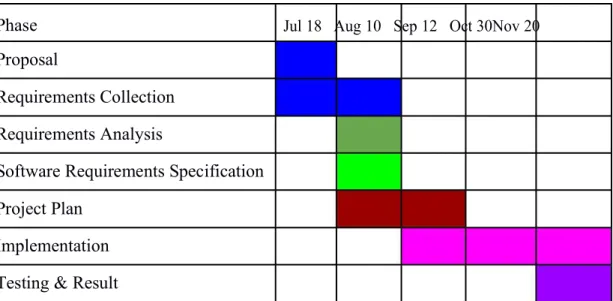
Gantt chart shows the timeline of the project’s workflow from start to end in the sense of months.
Here each steps of the project has been proposed with specific timeline.
Phase Jul 18 Aug 10 Sep 12 Oct 30Nov 20
Proposal
Requirements Collection Requirements Analysis
Software Requirements Specification Project Plan
Implementation Testing & Result
Table 1.4.1 Gantt chart of Citizen Health Information System
1.4.2 Release Plan/Milestone
Here project plan is shown in the table with specific dates.
Phase Start Date End Date Working Days
Proposal 1 July 10 July 5 days
Requirements 20 July 4 August 10 days
Collection
Requirements 7 August 20 August 12 days
Analysis
Software 21 August 5 September 15 days
Requirements Specification
Project Plan 6 September 16 September 10 days Implementation 16 September 5 November 35 days Testing & Result 10 November 20 November 7 days
Total 1 July 20 November 94 days
Table 1.4.2 Release Plan/Milestone of Citizen Health Information System
Chapter 2: Software Requirement Specification
After analyzing the requirements of the problematic area based on them a system design and specified required software development process and test plan will be choose.
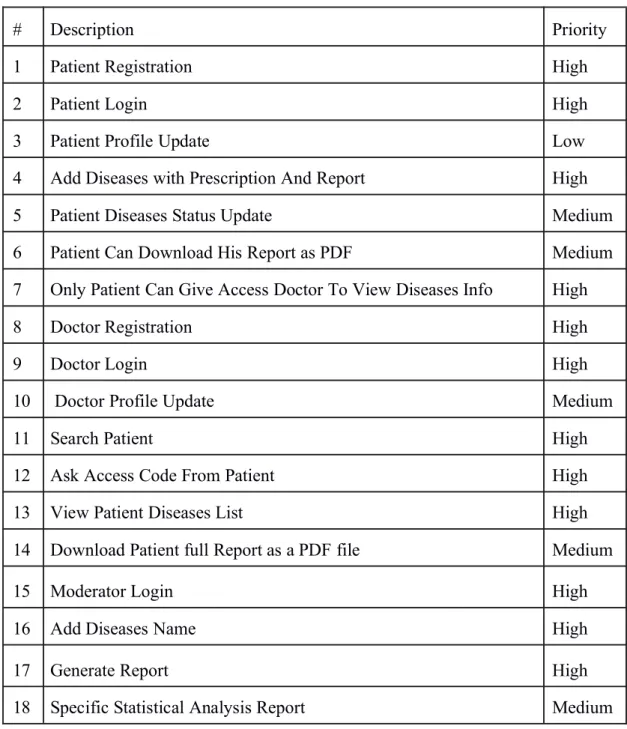
2.1 Functional Requirements
# Description Priority
1 Patient Registration High
2 Patient Login High
3 Patient Profile Update Low
4 Add Diseases with Prescription And Report High
5 Patient Diseases Status Update Medium
6 Patient Can Download His Report as PDF Medium
7 Only Patient Can Give Access Doctor To View Diseases Info High
8 Doctor Registration High
9 Doctor Login High
10 Doctor Profile Update Medium
11 Search Patient High
12 Ask Access Code From Patient High
13 View Patient Diseases List High
14 Download Patient full Report as a PDF file Medium
15 Moderator Login High
16 Add Diseases Name High
17 Generate Report High
18 Specific Statistical Analysis Report Medium
Table 2.1: Functional Requirements
2.2 Data Requirements
# Description Priority
1 When patient update something on the app it will updated real time High 2 Patient must have to fill up all the fields to get the proper benefit High
Table 2.2: Data Requirements
2.3 Performance Requirements
2.3.1 Speed and Latency Requirements
# Description Priority
1 The system should load the data from the server in maximum 15 Described seconds
Table 2.3.1 Speed and Latency Requirements
2.3.2 Capacity Requirements
# Description Priority
1 App should serve 10000 request at a time High 2 Prescription or report Image size should be less than 1MB High
Table 2.3.2 Capacity Requirements
2.4 Dependability Requirements
2.4.1 Reliability Requirements
# Description Priority
1 App should not crush while patient updating diseases information High 2 Doctor cannot get access without patient access code High
Table 2.4.1 Reliability Requirements
2.4.2 Availability Requirements
# Description Priority
1 App should work continuously High
2 The app should show patient and doctor what they want to view High Table 2.4.2 Availability Requirements
2.4.3 Robustness or Fault-Tolerance Requirements
# Description Priority
1 If app has been crushed it should auto recovered if not, it should High not take more than hour
Table 2.4.3 Robustness or Fault-Tolerance Requirements
2.4.4 Safety-Critical Requirements
No visible safety-Critical Requirements
2.5 Maintainability and Supportability Requirements
2.5.1 Maintenance Requirements
# Description Priority
1 App should have regular maintenance check Described Table 2.5.1 Maintenance Requirements
2.5.2 Supportability Requirements
# Description Priority
1 The app should support all major web browser and work Described smoothly
Table 2.5.2 Supportability Requirements
2.5.3 Adaptability Requirements
No visible adaptability requirements
2.5.4 Scalability or Extensibility Requirements
# Description Priority
1 The app should support more than 1 million users without any Described problem
Table 2.5.4 Scalability or Extensibility Requirements
2.6 Security Requirements
2.6.1 Access Requirements
# Description Priority
1 Only patient have the rights to access their own details data Described 2 Only authorized doctor will view patient information Described
Table 2.6.1 Access Requirements
2.6.2 Integrity Requirements
# Description Priority
1 Patient and Doctor data can only modified by themselves Described Table 2.6.2 Integrity Requirements
2.6.3 Privacy Requirements
# Description Priority
1 Patient’s data will not be used for other purpose other than for Described the application
Table 2.6.2 Integrity Requirements
2.7 Usability and Human-Interaction Requirements
2.7.1 Ease of Use Requirements
# Description Priority
1 Patient and Doctor should be able to use the app by their own Described without need of any direction
Table 2.7.1 Ease of Use Requirements
2.7.2 Personalization and Internationalization Requirements
No visible Personalization and Internationalization Requirements2.7.3 Understandability and Politeness Requirements
No visible Understandability and Politeness Requirements2.7.4 Accessibility Requirements
# Description Priority
1 Patient and Doctor should access the app whenever they want Described Table 2.7.4 Accessibility Requirements
2.7.5 User Documentation Requirements
No visible User Documentation Requirements
2.7.6 Training Requirements
No visible Training Requirements2.8 Look and Feel Requirements
2.8.1 Appearance Requirements
# Description Priority
1 App user interface should look attractive Described 2 App user interface must be user friendly Described
3 App should be self-descriptive Described
Table 2.8.1 Appearance Requirements
2.8.2 Style Requirements
# Description Priority
1 App should look clean and minimal Described
Table 2.8.2 Style Requirements
2.9 Operational and Environmental Requirements
2.9.1 Expected Physical Environment
No Expected Physical Environment2.9.2 Requirements for Interfacing with Adjacent Systems
No Requirements for Interfacing with Adjacent Systems2.9.3 Projectization Requirements
No Projectization Requirements2.9.4 Release Requirements
# Description Priority
1 App should have specific version for each release Described Table 2.9.4 Release Requirements
2.10. Legal Requirements
2.10.1 Compliance Requirements
# Description Priority
1 The patient and doctor must be aware of the usage of their data Described which scope is only limited to the application
Table 2.10.1 Compliance Requirements
2.10.2 Standards Requirements
No Standards Requirement
Chapter 3: System Analysis
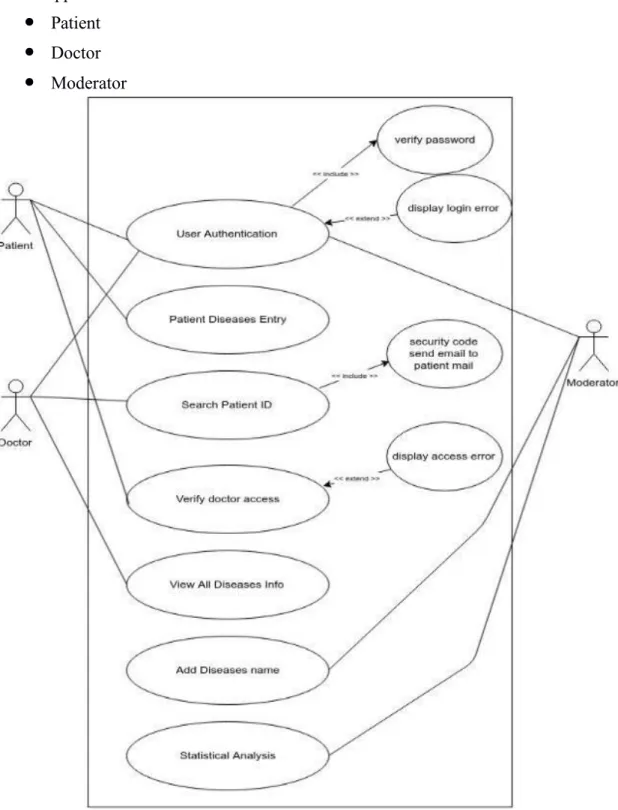
3.1 Use Case Diagram
In this app there is three actor.
● Patient
● Doctor
● Moderator
Figure 3.1 Use Case Diagram of Citizen Health Information System
3.2 Use Case Description
Use case description gives an idea of how each of the use case of the application will work and what it will do in the project. Below use case descriptions are given in table format.
3.2.1
User AuthenticationTitle User Authentication
Goal Patient, Doctor, Moderator login Preconditions Must have to be register user Primary Actor Patient, Doctor, Moderator Secondary Actor N/A
Trigger N/A
Description Each actor must have to register user Table 3.2.1 Log in
3.2.2
Patient Diseases EntryTitle Patient Diseases Entry
Goal Patient Diseases Information Entry Preconditions Must have to login
Primary Actor Patient Secondary Actor N/A
Trigger N/A
Description Patient will entry his full diseases information Table 3.2.2 Registration
3.2.3 Search Patient ID
Title Search Patient ID
Goal Find Patient By Searching ID
Preconditions Must have to login Primary Actor Doctor
Secondary Actor N/A
Trigger N/A
Description Search Patient for view full life diseases information Table 3.2.3 Password Reset
3.2.4 Verify Doctor Access
Title Verify Doctor Access
Goal Stop Unauthorized access
Preconditions Must have to login and have access code Primary Actor Doctor
Secondary Actor N/A
Trigger N/A
Description Only authorized doctor will visit patient full diseases information
Table 3.2.4 Update Profile
3.2.5 View All Diseases Info
Title View All Diseases Info
Goal View Patient Diseases Info
Preconditions Must have to login and have access code Primary Actor Student
Secondary Actor N/A
Trigger N/A
Description View patient full diseases information Table 3.2.5 View Dashboard
3.2.6 Add Diseases Name
Title Add Diseases Name
Goal In list Diseases Name Into System Preconditions Must have to login
Primary Actor Moderator Secondary Actor N/A
Trigger N/A
Description Moderator will list down all diseases name into system Table 3.2.6 View Recommendation
3.2.7 Statistical Analysis
Title Statistical Analysis
Goal View all the report
Preconditions Must have to login Primary Actor Moderator
Secondary Actor N/A
Trigger N/A
Description See statistical diseases report Table 3.2.7 Statistical Analysis
3.3 Activity Diagram
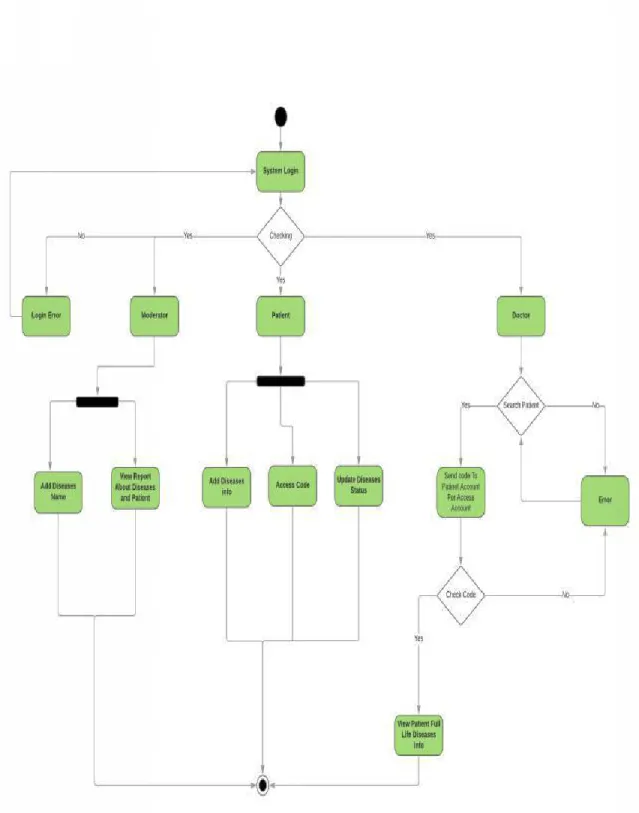
An Activity Diagram gives an overview of the activities in the application. Below an Activity Diagram is drawn to give an overview of my application.
Figure 3.3: Activity Diagram of Citizen Health Information System
3.4 System Sequence Diagram
System Sequence Diagram shows the data flow throughout the application. Below a System sequence diagram is drawn for my project.
Patient:
Figure 3.4.1: System Sequence Diagram of Citizen Health Information System
Doctor:
Figure 3.4.2: System Sequence Diagram of Citizen Health Information System
Moderator:
Figure 3.4.3: System Sequence Diagram of Citizen Health Information System
Chapter 4: System Design Specification
4.1 Class Diagram
In my application there are some classes which have various methods and properties. I have given an overview of my functional classes in a class diagram design format.
Figure 4.1: Class Diagram of Citizen Health Information System
4.2 Database Design Diagram
Database design shows the database of my application. Below my database tables with the attributes are given.
Figure 4.2: Database Design Diagram of Citizen Health Information System
4.3 Development Tools & Technology
4.3.1 Frontend Language & Libraries
● HTML
● CSS
● Bootstrap
● Font Awesome
● JavaScript with jQuery
4.3.2 Backend
● PHP with Codeigniter
● Mysql
4.3.3 Implementation Tools & Platforms
● Visual Studio Code
● Adminer (GUI tools to browse database)
4.3.4 Version Control System
● Github with Git
Chapter 5: System Testing
5.1 Introduction
Without testing it is not possible to trust the system functionality if it works properly or not. We will test the system that has been already built by following testing rules. Every parts of the system will be tested.
5.1.1 Black Box Testing
In Unit testing, here all the system units will be tested according to the test case and if it does not match the expected result, further action will be taken to fix the problem.
● Patient:
No Test Test Steps Test Data Expected Actual Pass /
Scenario Result Result Fail
01 Login 1. Go to patient Pass
(valid login url com & antu Expected
data) 2. Enter email and password 3. Click Submit
02 Login 1. Go to patient As Pass
(Invalid login url om & test logged In Expected data) 2. Enter email and
password 3. Click Submit
03 Patient Try to browse any Cannot As Pass
related patient related URL browse any Expected
URL URL
check and
without redirect to
login Login page.
04 Registra 1. Go to patient [email protected] Registrati As Pass tion registration url om & test & on Expected
2. Enter email, 0154747555 successful 7 , test, male ly
name, phone no,
password, gender 3. Click Submit
05 Registra 1. Go to patient As Pass
tion registration url om & test & Already Expected Same 2. Enter email, 0154747555 Exist
Email name, phone no, 7 , test, male password, gender
3. Click Submit
06 Update 1. Click on Mr. Antu & Informatio As Pass patient update profile 5412412547 n update Expected
account 2. Enter name, 85217 & 09- successful 07-1994, B+, ly
phone, nid, birthday, blood group, antu, password, update antu.jpg profile pic
3. Click Submit
07 Add 1. Click on Add Malaria & I Informatio As Pass Diseases Diseases info already have n Save Expected
Info 2. Select this diseases Successful
& dummy ly diseases name,
diseases status, meet doc name doc name, date, and info &
prescription, report 11-11-2018
&
prescription.j
pg &
report.jpg
08 View 1. Click on view All As Pass
All all diseases list Informatio Expected
Diseases n view
List successful
ly
09 View 1. Click on doctor All As Pass
Doctor info, prescription and Informatio Expected
info, report n view
prescript successful
ion, ly
report
10 Downlo 1. Go to view Prescriptio As Pass
ad PDF prescription and click n Expected
Prescript on download pdf Download
ion and as a pdf
report file
11 Update 1. Click on update Update As Pass
diseases diseases status diseases Expected
status status
12 Log out 1.Click on Logout Log out As Pass
button successful Expected
ly
Table 5.1.1.1 Features to be tested for Patient
● Doctor
No Test Test Steps Test Data Expected Actual Pass /
Scenario Result Result Fail
01 Login 4. Go to doctor Pass
(valid login url l.com & antu Expected
data) 5. Enter email and password
6. Click Submit
02 Login 1. Go to doctor As Pass
(Invalid login url om & test logged In Expected data) 2. Enter email and
password 3. Click Submit
03 Doctor Try to browse any Cannot Not As Pass
related doctor related URL browse any Authorize Expected
URL URL
check and
without redirect to
login Login page.
04 Registrati 4. Go to doctor As Pass
on registration url om & test & on Expected 5. Enter email, 0154747555 successful
7 , test, male ly name, phone no,
password, gender 6. Click Submit
05 Registrati 3. Go to doctor As Pass
on Same registration url om & test & Already Expected Email 4. Enter email, 0154747555 Exist
7 , test, male name, phone no,
password, gender 3. Click Submit
06 Update 1. Go to update Test & Update As Pass Profile doctor profile 0154744788 Successful Expected
2. Enter name, 7 & ly 2154785478 phone no, nid,
Birthday, 2522 &
designation, Professor Of Professional Neurosurger Information, y & MBBS, password, profile pic MS
&
(Surgery) doc.jpg
07 Search 1. Click on antu@gmail. Find As Pass
Patient search patient com Patient Expected 2. Enter patient
email id 3. submit
08 Search 1. Click on Testing@gm Not find As Pass
patient search patient ail.com patient Expected with not 2. Enter Email
register id patient
3. Submit email id
09 Enter 1. Go to search 5214 Access As Pass patient patient id login and Successful Expected
access get code ly
code 2. Enter code 3. Submit
10 Enter 1. Enter wrong 2475 Not As Pass
patient code Access Expected
wrong 2. Submit assess
code
11 Try to hit 1. Hit any Not As Pass
url to patient diseases view Access Expected
view url
patient diseases informati on
12 Every 1. Search patient 5214 Not access As Pass
search again Expected
code 2. submit getting
new
13 View 1. View all patient Access As Pass
Patient info Into the Expected
info disease all
list
14. View 1. View patient View As Pass
Doctor meet doctor info doctor Expected
info 2. click info
15 View 1. Hit view View As Pass
prescripti prescription button prescriptio Expected
on & 2. Hit view n & report
report report button
16 Downloa 1. Click on Download As Pass
d Full download full full Expected
Prescripti prescription pfd prescriptio
on as a button n in a
PDF file marge file
17 Downloa 1. Click on Download As Pass d Full download full report full report Expected
Report as pfd button in a marge
a PDF file
file
18 Log out 1. Click on logout Successful As Pass
button ly Logout Expected
Table 5.1.1.2 Features to be tested for Doctor
● Moderator:
No Test Test Steps Test Data Expected Actual Pass /
Scenario Result Result Fail
01 Login 1Go to moderator Pass
(valid login url l.com & Expected
data) 2. Enter email and admin password
3. Click Submit
02 Login 1. Go to Admin login As Pass
(Invalid url om & test logged In Expected data) 2. Enter email and
password 3. Click Submit
03 Admin Try to browse any Cannot Not As Pass
related Admin related URL browse any Authorize Expected
URL URL
check and
without redirect to
login Login page.
04 Add 1. Click on add HIV Diseases As Pass
Diseases diseases name Name Expected
name Added
05 View 1. Click on view View All As Pass
Disease report diseases Expected
report status and
report
05 Logout 1. Click on logout Successful As Pass
button ly Logout Expected
Table 5.1.1.3 Features to be tested for Moderator
Chapter 6: User Manual
6.1 User Manual (Patient, Doctor, Moderator)
6.1.1 Home Page
This is the home page visitor will see if the come first.
Figure 6.1.1: Home Page
6.1.2 Sign up Page
Patient will be able to sign up from this page.
Figure 6.1.2: Sign up Page (patient)
6.1.3 Login Page
Login Page to login the application by registered patient
Figure 6.1.3: Login Page (For Patient)
6.1.4 Patient Dashboard
After successful login patient will view this dashboard page.
Figure 6.1.4: Patient dashboard
6.1.5 Patient Update Profile
Patient will able to update his profile from here.
Figure 6.1.5: Patient update profile
6.1.6 Patient Diseases Update Page
This is the main page where patient will able to add his diseases information correctly.
Figure 6.1.6: Patient diseases add Page
6.1.7 Patient Diseases List View
After add diseases information patient will able to view his full life diseases information in this page.
Figure 6.1.7: Patient Diseases List View
6.1.8 Patient Prescription View
Patient will able to view his prescription image also able to download as a pdf file
Figure6.1.8: Patient Diseases Image View
6.1.9 Doctor Login
Doctor will able to login from here and also can register for new doctor form here
Figure 6.1.9: Doctor Login
6.1.10 Doctor Dashboard
After successful login doctor will view this dashboard page.
Figure 6.1.10: Doctor Dashboard
6.1.11 Doctor Update Profile
After success full login doctor will about to update his profile.
Figure 6.1.11: Doctor Update Profile
6.1.12 Doctor Search Patient
In this page doctor can search patient by patient email address.
Figure 6.1.12: Doctor Search Patient
6.1.13 Get Patient
Doctor get search patient.Figure 6.1.13: Doctor Get Patient
6.1.14 Ask For Access Code
Doctor ask patient for access code and only proper code will give doctor to access.
Figure 6.1.14: Doctor Ask Access Code
6.1.15 Doctor Patient Disease List
Doctor will able to view patient full life diseases list
Figure 6.1.15: Patient Diseases List
6.1.16 Doctor Patient Prescription view
Doctor will able to view patient full life diseases list and also view prescription.
Figure 6.1.16: Patient Prescription View
6.1.17 Login Page Moderator
Login Page to login the application by registered Moderator
Figure 6.1.17: Moderator Login
6.1.18 Moderator Report Dashboard
After successful login moderator will able to view this diseases report dashboard
Figure 6.1.18: Moderator Login
6.1.19 Moderator Add Diseases Name
In this page moderator will able to add diseases Name
Figure 6.1.19: Moderator Add Diseases
Chapter 7: Project Summary
7.1 Github Link
●
7.2 Limitations
Though this application will help patient and doctor quite well. There is still need a lot of medical data. So the more patient and doctor will use this app the more accurate the app will be helpful.
7.3 Strength of the System
The main goal is to make a central database and that can keep full medical life information.
Where patient or Doctor can easily find his Diseases information, Medicine information, Doctor Information, Test report information anytime anywhere. Also the Moderator can monitor a record about which diseases active more in our country and how many people affected right now. Most of the major objectives of this system already built up by following requirement collection, system analysis and design and by testing it. After that this system becomes ready for production.
System is built on top technology so it is stable, reliable and future maintainable. This system will help our medical system, medical institution, doctor, and patient.
7.4 Future Scope
The system has been developed for research purpose to see how much impact it has. A product has been built without compromising its main goal. If I get support from larger team and government supports this project then lots of advanced and rich feature can be implemented. If the all goals of this project can be implemented with more new goals it will become one of the most popular and grateful project in our country.