© Daffodil International University i
NATURE SAVER
Submitted By
Shah Newaz Al-Amin ID: 151-35-870
Department of Software Engineering Daffodil International University
Supervisor MD. Khaled Sohel
Daffodil International University
Dhaka, Bangladesh
© Daffodil International University ii
© Daffodil International University iii
D ECLARATION
I hereby declare that I have taken this project under the supervision of Md. Khaled Sohel, and Department of Software Engineering, Daffodil International University. I also declare that neither this project nor any part of this report has been submitted elsewhere for award of any degree.
Submitted By:
……...
Name of the Student: Shah Newaz ID: 151 - 35 - 870
Department of Software Engineering
Faculty of Science and Information Technology Daffodil International University
Certified By:
………
Name of the Supervisor: Md. Khaled Sohel Designation: Assistant Professor
Department of Software Engineering
Faculty of Science and Information Technology Daffodil International University
© Daffodil International University iv
ACKNOWLEDGEMENT
First of all we would like to express my cordial gratefulness to Almighty ALLAH for HIS Kindness, for which I successfully completed my project with in time.
While working on this project I have received many invaluable help from a large number of people. I would like to take this opportunity to express my deepest gratitude to everyone who helped me.
I feel grateful to express my boundless honor and respect to my supervisor, MD. Khaled Sohel, Lecturer, Department of Software Engineering, Daffodil International University for his deep knowledge and keen interest in the field of software development that influenced me to carry out of this project. His endless patient help, friendly support, which have guided me throughout my work and showed the path of achievement.
I would like to express my heartiest gratitude to Dr. Touhid Bhuiyan, Professor and Head, Department Of Software Engineering, Daffodil International University for his kind help to finish my project and also to other faculty members, the staff of the SWE Department, Daffodil International University .
And at last but not the least I must acknowledge with due respect the constant support and patience of my family members for completing this project.
© Daffodil International University v
ABSTRACT
Nature Saver is a system that can help stakeholder like, Nurseries to bring and sale their products online. To people to buy trees and equipment and get different kind of services related with gardening as well from online. Gardeners to get jobs remotely from different places. Everyone have to register in the system to see the products and services. For both Nurseries and Buyer have to login in the system to add and buy products as well as offer and to have a service. The payment will be given by cash to buy or to get a service. Admin will be responsible to add Nurseries and will be notified for every hand giving between Nurseries and Buyers. Buyers will be able to choose products from the nearby places, add or to delete a product, ask for different kind of services related with gardening. Nurseries will be able to add their available products in the mean of both trees and equipment to the system and also to choose the availability of a product and services.
© Daffodil International University vi
Table of Content Chapter 01 Introduction 1.1 Motivation ... 1
1.2 About the Project ... 1
1.3 Features ... 2
1.4 Objective of Nature Saver ... 3
1.5 Problem in Existing System ... 3
1.6 Schedule ... 4
1.7 Software Deliverable ... 4
1.8 Scope ... 4
Chapter 2 Feasibility Study
2.1 Introduction ... 52.2 Technical Feasibility ... 5
2.3 Operational Feasibility ... 5
2.4 Economic Feasibility ... 6
Chapter 3 Software Requirement Analysis
3.1 Introduction ... 73.2 Functional Requirements ... 7
3.3 Nonfunctional Requirements ... 8
3.4 Methodology ... 8
3.5 Software Requirement Analysis……… 3.5.1 Objectives/Goals ... 8
3.6 Software Requirement Specification………9-10
© Daffodil International University vii
Chapter 4 System Design and Development
4.1 Introduction ... 114.2 Use Case Diagram ... 11
4.3 DFD Diagram ... 4.3.1 Context Diagram (Level-0 DFD) ... 12
4.4 Entity Relationship Diagram (ERD) ... 13
4.5 Activity Diagram ... 14
Chapter 5 System Interfaces
5.1 Software Language and Framework ...155.2 Development tools and technology ……….15
5.2.1 User Interface Technology ……….15
5.2.2 Implementation tools ……….15
Chapter 6 Output Screens
6.1 Registration …… ... 166.2 Products ... 17
6.3 Product Details... 18
6.4 Cart…………... 19
6.5 Portfolio……..…………... 19
6.6 New Arrivals....………... 20
6.7 Testimonial………... ... 20
Chapter 7 Testing
7.1Importance of Testing ... 217.2 Testing Parts ... …..21
7.3 Testing Environments ... …..21
7.4Test Plan Strategy ... ….22
7.4.1 Unit Testing ... ….22
© Daffodil International University viii
7.4.2Integration Testing ... …..23
7.4.3System Testing ... ….24
7.4.4 Acceptance Testing ... ….25
7.5Test Case ... …..25
7.5.1User Registration Module ... ….26
Chapter 8 Conclusion
8.1 Critical Evolution and Team Attainment ... 278.2 Limitations ... 27
8.5 Reference ... 27
© Daffodil International University ix
List of Figures
Figures Page No Figure 4.2 Use Case… ... 11Figure 4.3.1 DFD-0 Diagram ... 12
Figure 4.4 ER Diagram ... 13
Figure 4.5 Activity Diagram ... 14
Figure 6.1 Registration Page ... 16
Figure 6.2 Products ... 17
Figure 6.3 Products Details ... 18
Figure 6.4Cart ... 19
Figure 6.5Portfolio ... 19
Figure 6.6New Arrivals ... 20
Figure 6.7 Testimonials ... 20
© Daffodil International University 1
Chapter 01
Introduction
1.1 Motivation
Nature Saver is a simple project that has intention to make easier tree plantation from ordering to planting and taking care of gardens. Our aim is to simplify the regular life of the busy people who complains, they wish to have a garden in their balcony or on the roof top but cannot do it for the time in has to be given for this. If we can do this much for them then there is a possibility of reducing carbon percentage in the air as there will be more trees planted. Nature Saver is determined to help people planting trees in every possible places.
1.2 About the Project
This project is aimed to developing an online gardening servicing system. Admin is to add the available Nurseries in the system and an over look to every hand giving between Nurseries and Buyers. Nurseries of different places will add their products and offered services in the system.
And will also be responsible to communicate with the buyer and finalizing the deal. Whereas the buyers will find the nearby place to order, add the available product and services, will finalize the deal with the Nursery. Both will also be allowed to cancel the deal mutually or there will be some extra charge added for the responsible side in their next deal.
© Daffodil International University 2
1.3 Features
Buyer Module:
Registration
Log In
Add or Delete Tree(s) or service(s)
View Order Status
Give Review
Admin Module:
Log In
Add/View/Update Nurseries
View/Update Order Status
View/Update Queries
Get notification
Nursery Module:
Registration
Get Notification
Login
Manage Orders
Add/View/Update Products
© Daffodil International University 3
1.4 Objective of Nature Saver
To create a web app to help its user, all user like admin, nurseries, buyers should automate the system.
To save time for people who are busy but have wish for gardening.
Make easier communication between Nurseries and Buyers.
To increase plants on our planet.
To reduce the effect of global warming.
It may impact the environment.
1.5 Problem in Existing System
Risk of mismanagement. No proper coordination between different Applications and Users.
Advantages:
User friendliness is provided in the application with various controls.
The system makes the overall procedure much easier and flexible.
There is no risk of data mismanagement at any level while the project development is under process.
© Daffodil International University 4
1.6 Schedule
7days 7days 7days 7days 7days 7days 7days 7days 7days 7days
Proposal SRS Designing Coding Testing Finalization
1.7 Software Deliverable
The main deliverables of this project is the complete system and the system document that will include:
Software requirements and specification
Software design document
1.8 Scope
It can be used by any who wants to save time, for Buyers it will be easier for their wish of gardening to be fulfilled.
Not only physically, Nurseries can showcase their product and services on online as well.
On the other hand if user don’t want hassle he/she can use it to ask for everything from tree plantation to taking care of them on online.
© Daffodil International University 5
Chapter 2 Feasibility Study
2.1 Introduction
There are aspects in the feasibility study portion of the preliminary investigation:
Technical Feasibility
Operation Feasibility
Economic Feasibility
2.2 Technical Feasibility
Nature Saver will conjuncts the user and it will provide the easiest way of service to a user who is looking for rapid service. Here, nurseries and buyers will communicate between them and will also be knowledgeable about the status of order and complain. A collection of all data about the Nature Saver will be archived in a website and reach it to stakeholder’s door. By this both party will be benefited with either their product or with desired service. Nature Saver want to do the whole process in automated way for increasing data accuracy. We will try to provide a more secure, fast operational, risk managing, user friendly system which will give you the best service.
2.3 Operational Feasibility
Nature Saver will be operate by a large number of people. There will be so many stakeholder.
Manual system is very slow system, we don’t know when it will be an order of Hand giving between the parties or not. An automated system will notify the admin about it.
© Daffodil International University 6
2.4 Economic Feasibility
Gardener who are now kind of in ignorance will get remote jobs to do. It will impact the economic status of both them and us. We will design our site based on all operational parameters such as reliability, maintainability, supportability, usability, sustainability, affordability. At this time. Our collaboration we can provide the service to the maximum number of stakeholder.
© Daffodil International University 7
Chapter 3
Software Requirement Analysis
3.1 Introduction
For all project we need good requirement specification. If we don’t have then our project can be destroy. For a good application we need this. There are some requirement that use for this application. We need Functional and non-functional requirements. Because all this requirement based with our system.
3.2 Functional Requirements
1. Buyer, login.
2. Add or Delete Tree(s) or service(s) 3. Give Review
4. Buyer to order status.
5. Login of admin account (account creation for admin) 6. Admin can view all resources.
7. Admin can add, delete or edit any resources.
8. Admin get notification/mail.
9. Nursery get notification/mail.
10. Nursery login.
11. Nursery Update product availability.
12. Add or Delete Tree(s) or service(s) 13. Contact
© Daffodil International University 8
3.3 Nonfunctional Requirements
Security:
Personal details and admin, login id & password, Must be remain confidential.
Availability:
The website is available for 24 hours a day. It is always available for stakeholder.
Usability:
It has good graphical user interface. It is user friendly. So user feel easy to use.
Efficiency:
It is efficient for all user. This give better performance for user.
3.4 Methodology:
I used waterfall model. Because, I collected requirement at a time, second time this requirement was not changed.
3.5 Software Requirement Analysis 3.5.1 Objective/Goals
Add new Places (Nursery).
Add new Products.
Add new resource.
Update new resources.
Automatically handle this process.
© Daffodil International University 9
3.6 Software Requirement Specification
Software Requirement Specification is a description of full software system requirements.
Software Requirement Specification describes the behavior of software from user’s point of view.
The specified requirements are shown in following table based on module. The functional requirements and non-functional requirements are following:
Functional and non-Functional Requirements.
SRS id Function Description SRS
Type Priority SRS-01 Buyer All Buyers must register/Login into
this system to use. FR HIGH
SRS-02 Order product or services and give
review. FR HIGH
SRS-03 Add or Delete options should be
given. FR HIGH
SRS-04 Nursery All Nurseries must register/Login into
this system to use. FR HIGH
SRS-05 Nurseries can update products or
services and is availability. FR HIGH
SRS-06 Nurseries can see order status. FR HIGH
SRS-07 Admin management Login admin account(account creation
for admin) FR HIGH
SRS-08 Admin can add, delete, view or edit
any resources. FR HIGH
SRS-09 Notification
Management Admin get notification/mail. FR HIGH
SRS-10 Nursery get notification/mail. FR HIGH
© Daffodil International University 10
SRS-11 Security No one can get access of the admin panel without valid username and password.
NFR HIGH
SRS-12 Availability The website is available for 24 hours a day. It is always available for
stakeholder.
NFR Moderate
SRS-13 Usability It has good graphical user interface. It is user friendly. So user feel easy to use.
NFR Moderate
SRS-14 Efficiency It is efficient for all user. This give
better performance for user. NFR HIGH
© Daffodil International University 11
Chapter 4
System Design and Development
4.1 Introduction
Design is the first step in the development phase for any techniques.
Software system design is important thing for an application. If design is not proper then application could be problematic. System should have good design. Software design is a process to transform user requirements into some suitable form, which helps the programmer in software coding and implementation.
4.2 Use Case diagram
Figure 4.2 Use Case Diagram
© Daffodil International University 12
4.3 Data Flow Diagram (DFD)
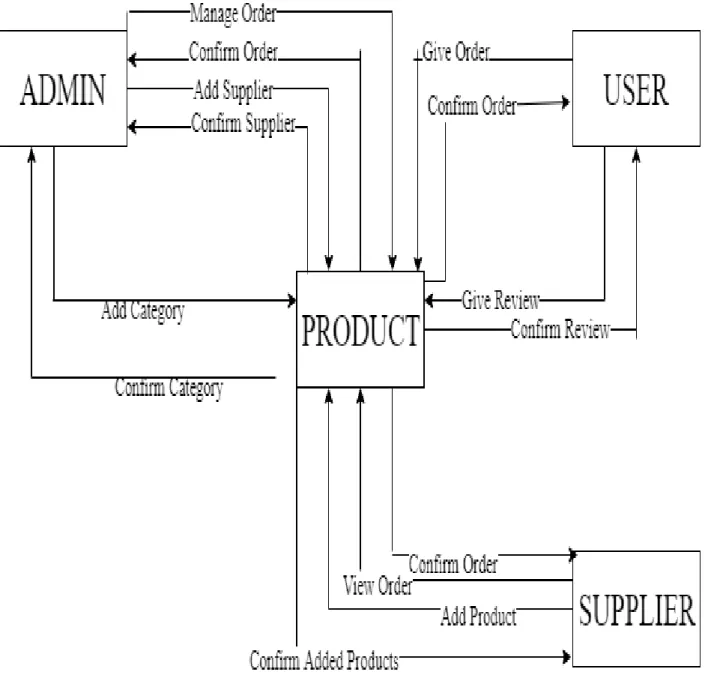
4.3.1 Context Diagram (Level-0 DFD)
Figure 4.3.1 Context Diagram (DFD 0)
© Daffodil International University 13
4.4 Entity Relationship Diagram (ERD)
Fig: ER-Diagram
4.5 Activity Diagram
© Daffodil International University 14
Figure: 4.5 Activity Diagram
© Daffodil International University 15
Chapter 5 System Interfaces
5.1 Software Language or Framework
HTML5
CSS3
Java Script
JQuery
Bootstrap
Php Laravel Framework
5.2 Development Tools and Technology
5.2.1. User Interface Technology
CSS Framework and Bootstrap 4
Font Awesome
5.2.2. Implementation Tools & Platforms
Sublime Text 3
My SQL Server
© Daffodil International University 16
Chapter 6 Output Screens
6.1 User Registration
Figure: 6.1 User Registration
© Daffodil International University 17
6.2 Products
Figure: 6.2 Products
© Daffodil International University 18
6.3 Products Details
Figure: 6.3 Product Details
© Daffodil International University 19
6.4 Cart
Figure: 6.4 Cart
6.5 Portfolio
Figure: 6.5 Portfolio
© Daffodil International University 20
6.6New Arrivals
Figure: 6.6 New Arrivals
6.7 Testimonial
Figure: 6.7 Testimonial
© Daffodil International University 21
Chapter 7 Testing
7.1 Importance of Testing
Testing is used to find errors on application program.
It is used for both validation and verification when developing a product.
It is used to find effective error’s identification.
It makes sure customer satisfaction.
Make sure quality of application and reliability.
7.2 T esting Parts
Nurseries Information (Product add, Order management)
Admin Information (Category and Product add, Order management)
Buyer Information (Registration, Review Product, view Product, Place Order)
7.3 Testing Environment (Hardware/Software Requirements)
Requirement
Test data
Web Application
Database server
Operating System(OS)
Browser
© Daffodil International University 22
7.4 Test Plan Strategy
Test plan strategy is very important part of software development. Now we do following testing:
Unit testing
Integration testing
System testing
Acceptance testing
7.4.1 Unit Testing
Unit testing is a level of software testing where individual units/ components of a software are tested. A unit is the smallest testable part of any software. It usually has one or a few inputs and usually a single output.
.
Unit Testing Case Module:
Test Case ID: TC-01 Module Name: Nurseries Information
Module: Product Entry Test Designed: Shah Newaz
Test Priority: (Low/Medium/High): High Test Date: 30.04.2019
Test Title: Product add, Order management Test Executed By: Shah Newaz Description: Test the system with Product add,
Order management Test Executed Date: 30.04.2019
© Daffodil International University 23
7.4.2 Integration Testing
In Integration Testing, individual software modules are integrated logically and tested as a group.
Integration Testing Case Module:
Test Case ID: TC-02
Module Name: Nurseries Information, Buyer Information
Module: Product add, Order management Test Designed: Shah Newaz Test Priority: (Low/Medium/High): High Test Date: 30.04.2019 Test Title: Product add, Order management,
Registration, Review Product, view Product,
Place Order. Test Executed By: Shah Newaz
Description: Test the system Product add, Order management, Registration, Review
Product, view Product, Place Order. Test Executed Date: 30.04.2019
© Daffodil International University 24
7.4.3 System Testing
System Testing is a black box testing technique performed to evaluate the complete system the system's compliance against specified requirements. In System testing, the functionalities of the system are tested from an end-to-end perspective.
System Testing Case Module:
Test Case ID: TC-03
Module Name: Whole System(Authentication, Product add, Order management,
Category and Product add, Review Product, view Product, Place Order.)
Module: Whole System(Nurseries Information,
Admin Information, Buyer Information) Test Designed: Shah Newaz
Test Priority: (Low/Medium/High): High Test Date:30.04.2019 Test Title: Whole System(Authentication,
Product add, Order management,
Category and Product add, Review Product, view Product, Place Order).
Test Executed By: Shah Newaz
Description: Test the system with Registration, Complain add, view Complain, Resource add,
Status modify, Resource add, Resource modify Test Executed Date: 30.04.2019
© Daffodil International University 25
7.4.4 Acceptance Testing
Acceptance Testing is a level of the software testing where a system is tested for acceptability.
The user tests the system before it is rolled out to be fully used.
Acceptance Testing Case Module:
Test Case ID: TC-04 Module Name: Admin Information Module: Nurseries Information Test Designed: Shah Newaz
Test Priority: (Low/Medium/High): Test Date:30.04.2019 Medium
Test Title: Category and Product add, Order
management Test Executed By: Shah Newaz
Description: Test the system the thing Test Executed Date: 30.04.2019
7.5 Test Case
A test case is a document, which has a set of test data, preconditions, expected results and post conditions, developed for a particular test scenario in order to verify compliance against a specific requirement.
© Daffodil International University 26
7.5.1 User Registration Module Test Case Test Case Unit Test
Module 1: Login
UTC ID UTC-01
UTC Name Test Input Values of Admin Login page
Code Module Login
UTC Description 1. The password textbox must hide input value as
******
2. Enter Invalid username, and then the system displays an error Message.
3. Enter Invalid password, then the system displays an error Message
4. Enter valid username and valid password, it should lead the user to the respected page
Input Values Input 1: someone [Invalid username]
Input 2: 1234 (****)[Invalid password]
Input 3: admin [valid username]
Input 4: admin (****) [valid password]
Expected Output Input 1: false, Input 2: false, Input 3: true,
Input 4: true and redirect to respected page Actual Output Input 1: ✕,
Input 2: ✕, Input 3: ✓,
Input 4: ✓ and lead to respected page Pass/Fail Pass: Complete 4 of 4. Total percent: 100%
© Daffodil International University 27
Chapter 8 Conclusion
8.1 Limitations
The system are not stable this time. It runs in developing process. The security system is not well organized in this phase. It also has some bugs yet to fix.
8.2 Future Scope
As the gardeners in Bangladesh is neglected as person in their job field, this project will be driven toward their access to get remote job for different places through the system.
8.3 Reference
Acceptance Testing,
Available: softwaretestingfundamentals.com/acceptance-testing
Integration testing
Available:www.guru99.com/integration-testing.html
System Testing
Available: www.tutorialspoint.com › Software Testing Dictionary › System Testing
Unit testing
Available: softwaretestingfundamentals.com/unit-testing/