©Daffidil International University
ONLINE AUCTION SYSTEM BY
Shuvo Podder ID: 112-15-1458
AND
Shamima Rashid Sumi ID: 112-15-1352
This Report Presented in Partial Fulfillment of the Requirements for the Degree of Bachelor of Science in Computer Science and Engineering
Supervised By
Narayan Ranjan Chakraborty Senior Lecturer
Department of CSE Daffodil International University
DAFFODIL INTERNATIONAL UNIVERSITY DHAKA, BANGLADESH
AUGUST, 2015
©Daffidil International University
i
©Daffidil International University
ii
©Daffidil International University
iii
ACKNOWLEDGEMENT
First we express our heartiest thanks and gratefulness to almighty God for His divine blessing makes us possible to complete the final year project successfully.
We really grateful and wish our profound our indebtedness to Narayan Ranjan Chakraborty, Senior Lecturer, Department of CSE Daffodil International University, Dhaka. Deep Knowledge & keen interest of our supervisor in the field of “Computer Science & Engineering”
to carry out this project. His endless patience ,scholarly guidance ,continual encouragement , constant and energetic supervision, constructive criticism, valuable advice ,reading many inferior draft and correcting them at all stage have made it possible to complete this project.
We would like to express our heartiest gratitude to Prof. Dr. Syed Akhter Hossain Head, Department of CSE, for his kind help to finish our project and also to other faculty member and the staff of CSE department of Daffodil International University.
We would like to thank our entire course mate in Daffodil International University, who took part in this discuss while completing the course work.
Finally, we must acknowledge with due respect the constant support and patients of our parents. \
©Daffidil International University
iv
ABSTRACT
At present, people need to go to the auction place where auction is held, to buy product by bidding. This type of manual system is time consuming. Moreover, in the traditional system people have to stay physically when auction is held. Now a day internet users are increasing day by day of our country. Considering this situation, we have built an online based auction system.
The primary goal of our project is to reduce complexity of manual system and introduce automated governance. In our system an auctioneer can easily perform auction and others user can bid and buy this item without problem using internet from staying home comfortably. In order to develop this system we need to consider and implement a number of technologies. The development tools is used for this project include HTML5, CSS3, Bootstrap, codeIgniter, Mysql, Javascript, jQuery and Ajax.
In this report we have discussed the technologies which are used to develop the system. This system is user friendly and also be helpful for people.
©Daffidil International University
v
TABLE OF CONTENTS
CONTENTS Page
Board of examiners……….……….. i
Declaration……… ii
Acknowledgement……… iii
Abstract………….……… iv
CHAPTER CHAPTER 1: INTRODUCTION………... 1-4 1.1 Overview………. … 1
1.2 Background……….…. 2
1.3 Manual process of auction……….………... 2
1.4 Disadvantage of manual process……….…. 2
1.5 Proposed system- Online based auction………... 2
1.6 Objective of proposed system……….. 3
1.7 Advantage of online based auction………... 3
1.8 Summary………... 4
CHAPTER 2: REQUIREMENT ANALYSIS……….. 5-10 2.1 Introduction……….. 5
2.2 Requirement analysis……… 5
©Daffidil International University
vi
2.3 High level requirement………. 5
2.3.1 Information about product………. 5
2.3.2 Create user……….…. 6
2.3.3 Create administrator………... 6
2.3.4 Payment system……….. 7
2.3.5 Messaging……… 7
2.3.6 Bidding system……… 7
2.3.7 Search product………. 7
2.3.8 Add product……… 7
2.3.9 Add category……….. 7
2.3.10 Edit information of product………. 7
2.3.11 Show user list……… 7
2.3.12 Show category list……… 8
2.3.13 Show bidder report……….. 8
2.3.14 Show product report……… 8
2.4 Use case model……….... 8
2.4.1 Basic model elements………... 8
2.5 Use case diagram for user……… 9
2.6 Use case diagram for admin……… 10
2.7 Summary……….. 10 CHAPTER 4: DEVELOPMENT TOOLS………..11-15
©Daffidil International University
vii
3.1 Introduction……….. 11
3.2 Front- end………. 11
3.2.1 HTML5………..… 11
3.2.2 CSS3……….… 11
3.2.3 Bootstrap………..…….… 12
3.3 Back-end……….…. 12
3.3.1 codeIgniter………...…. 12
3.4 Database……….. 12
3.4.1 Mysql……… 12
3.4.2 Javascript……….…. 13
3.4.3 jQuery……….. 13
3.4.4 Ajax……….. 14
3.5 Summary………. 15
CHAPTER 4: IMPLEMENTATION AND TESTING………..16-27 4.1 Introduction………. 16
4.2 Homepage of website……….. 16
4.3 Registration and login……….. 17
4.4 Admin activity………. 17
4.4.1 Add category……… 17
4.4.2 Add product………. 18
4.4.3 Edit information of product………... 19
©Daffidil International University
viii
4.4.4 Show user list……….. 20
4.4.5 Show category list……….….. 21
4.5 Show report………... 22
4.5.1 Show product report……….. 22
4.5.2 Show bidder report……… 23
4.6 Search product……….. 24
4.7 Bid product……….. 25
4.8 User activity……….. 27
4.9 Result……… 27
CHAPTER 5: CONCLUSION……… 28
5.1 Conclusion……….... 28
5.2 Shortcomings……….... 28
5.3 Future work……….. 28
RFERENCES………... 29
©Daffidil International University
ix
LIST OF FIGURES
Figures Page
Figure 2.1: Use case diagram for User……….. 9
Figure 2.2: Use case diagram for Admin……….…. 10
Figure 4.1: Home page of website……….... 16
Figure 4.2: User registration……….… 17
Figure 4.3: Add category……….……. 18
Figure 4.4: Add product……….. 19
Figure 4.5: Edit information………. 20
Figure 4.6: User list……….. 21
Figure 4.7: Category list……….….. 22
Figure 4.8: Product report……….… 23
Figure 4.9: Bidder report……….. 24
Figure 4.10: Search product………... 25
Figure 4.11: Bid product……….. 26
Figure 4.12: Pop up message………..………... 27
©Daffidil International University
1
CHAPTER 1 INTRODUCTION
1.1 Overview
Project work helps to increase the thinking ability and gather knowledge in respective area.
Only text book can not satisfy the thirsty of knowledge. Real life project makes a person effective and efficient. This is a web based project titled “Online Auction system”. It’s a web site for the sole purpose of performing auction through internet using personal computer (PC).
The website is already created on the server so the users won’t have to bother using this site one in his PC. He only needs a PC, an internet connection and a browser to surf the web. The user can then easily perform auction of any type of items staying home without an intermediary service over the internet without having any problem.
1.2 Background
As the Internet is spread all over the world everyone uses internet on their Personal computer or smart phone, the online auction will be most popular because they can perform auction at stay home securely and comfortably. Online auction is the process whereby auctioneer can sell or buy any types of items. So with the rapid increase of smart phone or PC users the usages of website application is also growing. People are eagerly waiting to use new web application on their smart phone or PC. In many cases the web applications are actually replacing manual work through internet. The popularity of web application is increasing.
1.3 Manual Process of auction
An Auction is a process where property is sold at a specific time and place to the highest bidder.
When auctioneers want to auction any type of item, they fix a starting price, the bidders start to bid from the starting low price. The auctioneer will raise the bid amount every time until there
©Daffidil International University
2
are no more bids on that item. Then they will sell the item to the person who call the highest bid.
If you want to buy one or two items in which you are interested, you don’t need to stay for the entire auction. You can bid over the phone from your own home or placing a member that called an absentee bid.
Before starting of the auction there occur a preview period. The preview period can occur the day before the auction or a few hours before the start of the auction. As a result everyone gets a chance to see what is going to sale, they can check the condition of the item and decide which item they will bid. If a bidder wish he can registers and reserves a seat in advance for auction while he is in preview period.
1.4 Disadvantage of manual process
Manual process creates many problems now a days.
It gets more time to maintain the process, so it’s a time consuming process.
It’s a costly process.
Lengthy process.
Noisy environment.
Need more physical involvement
Data and information are manually are stored which is not secure.
Lots of physical space required for storage.
If the weather be bad at the time of the auction it can have a significant impact on the results.
1.5 Proposed system- online auction
As internet spread all over the world, people may auction through internet. From this idea we have built up a website- online auction system.
©Daffidil International University
3
An online auction is an auction which is held over the internet. Online auction system is an automated web based system. In our system an auctioneer can easily auction an item and others user can bid and buy this item without problem. To get this facility he needs a computer with internet connection. And now a day’s internet connection is very economical in our country which is a vital point for our project.
To perform auction of an item the auctioneer must be logged in and upload the picture and information about the item. The auctioneer has to set a primary or starting price, from that price the users can bid. No one can bid the low price than the auctioneer set up. Then the image of product will be appeared in the browser window and others user can see the picture and bid it.
The highest bidder can get the item by paying. He can pay hand to hand or by using online payment system such as Bcash, Mcash, Ucash etc. Product delivery may be home delivery or hand to hand delivery. If the user wants home delivery he has to pay vehicle cost. Without login a user can see only items from category and others information, they can’t bid.
1.6 Objective of proposed system
To make auction for auctioneer easier and time saving we are about to make an online auction website. Our project is about making a site of Online auction for general people who can perform auction of items using internet. The modern world is growing too fast. Keeping it in mind we are trying to make such a website where auctioneer can perform auction of an item.
1.7Advantage of online auction
Online tendering is a method of standardizing the procurement process
Easy to monitoring bidders
Easy comparison of bids
Reducing paperwork, postage, photocopy
Save valuable time
Ease to communicate to multiple bidders at a time
The biding environment is secured
©Daffidil International University
4
Better proficiency in the process
If anyone wish he can submit more than one bid at a time
The auctioneer can add multiple photos with different view
If an item becomes popular, bidders can bid the higher price up from starting price.
1.8 Summary
Actually we are looking for something new for Bangladesh perspective. Finally we select online based auction system as our project topic. Though such system is not available in Bangladesh it is very much popular in outside world. As our country is progressing in the ICT sector, Online based Auction plays a vital role in human life style. Moreover most of the people are getting busy day by day, they didn’t attend auction physically as they were wished. That’s why we make an Online based auction system that will be helpful for people.
©Daffidil International University
5
CHAPTER 2
REQUIREMENT ANALYSIS
2.1 Introduction
A requirement is a special design that is physical and functional need. It is a statement that recognizes a necessary symptom, efficiency, characteristic, or quality of a system for it to gain value and effectiveness to an organization, customer, internal user, or other stakeholder [1]. To recognized business requires or scopes, the requirements should be documented, chargeable, endurable, testable.
2.2 Requirement analysis
Requirement analysis emphasizes those tasks that determine the conditions to meet for a new or altered product. Requirements analysis is critical to the success of a systems or software project.
2.3 High level requirement
Elimination of manual process: The online system will invalidate the manual process.
It also reduces paperwork
Authentication: All users have to login before do their task.
Check bid status: Users will check their current products bid status.
2.3.1 Information About products
A user can search any kind of products to bid from category over internet to get information using online based auction system by logging. They can choose one or multiple items which they are interested to bid.
©Daffidil International University
6 2.3.2 Create User
For using this system a user must be created or registered otherwise he can’t do auction or bid or buy. To complete this task a general blank form needs to be filled with user information, email ID, user ID and password. When anyone wants to create an account fill the form, an e mail will be sent containing a verification link or code to his providing email address. If the user verifies his account by the verification code, the account will be created otherwise not. A user can modify the entered data or information about him. Administrator has all the rights to delete any user and create them.
2.3.3 Create Administrator
The Administrator has all the rights to manage system. For doing this he must be login with a valid user id and password. Then he can add or delete item category, change system information, approve any item information, delete or add user, block a user, verify user account, delete a bidder post etc in the database.
2.3.4 Payment System
For purchasing items a bidder can pay hand to hand or online payment system. If he wants to pay through online system he must have a mobile banking account. Buyer must have the sufficient balance and given the requirement information. After successful purchase the amount will go to the owner account from user account.
2.3.5 Messaging
Users can send message or email to admin for his queries. Admin also reply back to the users.
There will be also FAQ option which is Frequently Asked Question, anyone can ask question without logging and admin and others user can reply for the query.
2.3.6 Bidding system
User can bid his desired products. When he shows category list or searches product, he can bid.
If a bidder wants to bid a product he must bid with a higher amount than the last bid. The bidder has to be registered otherwise he doesn’t bid.
©Daffidil International University
7
After finishing bid, a pop message will be shown on window. When he will click on the ‘Ok’
button of the pop up message, a mail will be sent to the user email address containing the item name, item ID and bidding price. This is more secured process.
2.3.7 Search product
Anyone can search any product from category. Just he has to write the name of category, then all products of this category will be appeared with details on product name, category, minimum bid price, and image on the website. Also he can show bid option but logged in required to bid.
2.3.8 Add product
Admin or users can add a product. He will write product name, select category, minimum bid price, and description. An image of the product has to be uploaded for bidders who want to buy this product.
2.3.9 Add category
Admin will be able to add category. If admin wants to add a new category he can perform this operation easily. After completion this task admin will see a completion message.
2.3.10 Edit information of a product
User will be able to edit information of an uploaded product. To edit information of a product, the user who uploaded the product image, goes to ‘show my product’ option then edit the information or delete the image.
2.3.11 Show user list
There will be an option so that admin can see the user list. The user who is active or inactive, admin can see user status from the user list.
©Daffidil International University
8 2.3.12 Show category list
Admin, user and viewer can see category list so that user and viewer easily can find out which types of item will upload in this website. Admin can understand which types of items are not uploaded, he can update the list easily because of seeing category list.
2.3.13 Show bidder report
User and admin will see the bidder report. From this report they also can see who will bid more than others that means they can see the quantity of bid numbers. The report will be sorted by the quantity of bid numbers. The bidder who bid more than other bidders, the name of the highest bidder will show at the top of list then others.
2.3.14 Show product report
There will have an option of product report. Admin and user can see this report. From this report they also can see which products will be bided more than others that mean they can see the quantity of bid numbers of products. The report will be also sorted by the quantity of bid numbers. The product which will be bided more than other products, the name of the highest bided product will show at the top of list then others.
2.4 Use case model
How different types of users interact with the system that’s defined by a use-case model. As such, it narrates the goals of the users, the interactions between the users and the system, and the needed attitudes of the system in satisfying these goals.
2.4.1 Basic model elements
The use-case model has element to make a model. Some basic model elements are following:
©Daffidil International University
9
Actor: A model component illustrates each actor. The actors name is properties and short description.
Use Case: A model component illustrates each use case. The use case name and use case specification is properties.
Associations: The relationships between actors and the use cases are described by the associations in which they participate. This relationship is referred to "communicates- association" [2].
2.5 Use case diagram of user
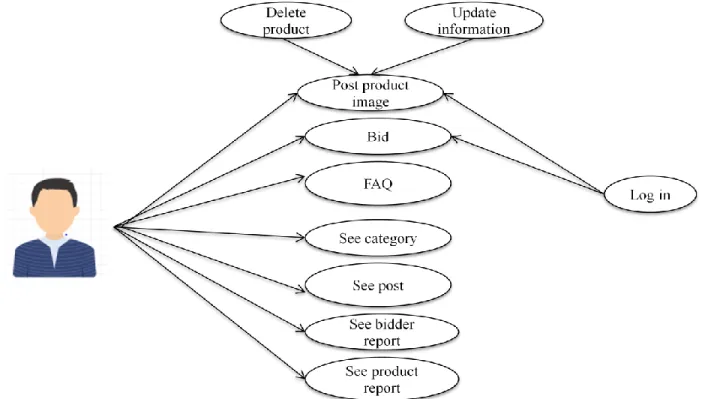
In this use case diagram we describe about an actor which is User. Users can see post, category, bidder report, product report and do comment in FAQ option without login. He can also bid on his desired products, post products, update information, delete post but to do this task he must be registered and logged in. Figure 2.1 shows the use case diagram of user.
Fig: 2.1: User use case diagram
©Daffidil International University
10 2.6 Use case diagram of Admin
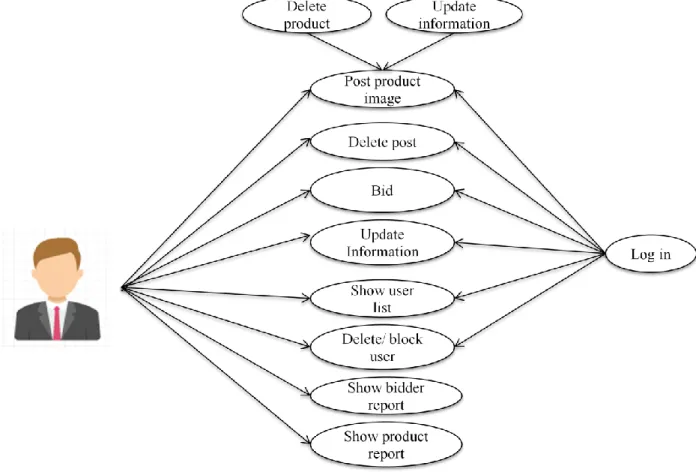
The System admin can post a product, delete product, update information, bid, show user list, delete or block a user. All action can be done after login. Admin also can see bidder report and product report without login. Figure 2.2 shows the system admin use case diagram.
Fig 2.2: Admin use case diagram
2.7 Summary
In this chapter we have discussed about the overall online based auction system where a user can register, bid and buy product. Here we have also discussed about requirement which in badly needed for our online based system.
©Daffidil International University
11
CHAPTER 3
DEVEPOLMENT TOOLS
3.1 Introduction
Online auction system is followed totally dynamic web based rule. In this system, we used some web programming languages. The following software, tools & frameworks were selected and used for accomplishing the project:
Front end: HTML5, CSS3, Bootstrap Back end: PHP Codeigniter
Database
:
Mysql, Javascript,
Jquery,Ajax3.2 Front-end 3.2.1 HTML5
Hyper Text Markup Language is referred to as HTML which is a core technology markup language of the Internet used for structuring and presenting content for the World Wide Web. It is a programming language. The purpose of a web browser is to read HTML documents and compose them into visible or audible web pages. To create our system, we used HTML5. The final and complete fifth revision of the HTML standard of the World Wide Web Consortium is HTML5 which is published in October, 2014 [3].
3.2.2 CSS3
CSS stands for Cascading Style Sheets is a language used to describe the look and formatting of a document written in a markup language. It is a way for Web developers to define the look and feel of their Web pages since CSS was first developed in 1997. It is a very powerful and
©Daffidil International University
12
important tool for the Web site developer. CSS is getting separation from HTML and can be used with any XML-based markup language. It is easy to maintain sites, share style sheets and tailors pages after the separation of HTML from CSS to different environments [4].
3.2.3 Bootstrap
To create a website and web applications, Bootstrap is a free and open-source collection. It makes HTML and CSS based design templates because it is used for typography, structure, buttons, navigation and other interface components. The main purpose of Bootstrap is to make easy the way to develop dynamic websites and web application. Both HTML5 and CSS3 is supported by Bootstrap, in such a way it was programmed. Bootstrap creates an interface for the user that is a front end framework, unlike the server-side code which be placed on the server [5].
3.3 Back-end
3.3.1 PHP CodeIgniter
CodeIgniter is a powerful PHP framework for people who build web sites using PHP and who need a simple and scoured toolkit to make full featured web application. It provides a rich set of libraries which is needed task and also supplies a simple interface and logical structure which help to access these libraries so that the developer may develop project much faster than he could using these libraries and this is the main goal of it. CodeIgniter minimize the amount of code which you need to make a project so that you can focus on your project [6].
3.4 Database 3.4.1 Mysql
MySQL is developed, distributed and supported by Oracle Corporation. It’s the most popular and widely used open source SQL database management system.
©Daffidil International University
13
SQL stands for Structured Query language and is used for communicating with the database.
It’s a standard language for relational data management system according to American National Standards Institute (ANSI).
A database is a collection of structured data. A database management system is needed to add, access, delete and process data in a computer database.
MySQL in a nutshell:
Database management system
Databases are relational
Open source
Database server is fast, reliable, scalable and also easy to use
Server works in client/server or imbedded systems
Large number of contributed software available [7][8].
3.4.2 Java script
JavaScript is a programming language which is used to create web pages. It is a lightweight, prototype based, explained, object-oriented language including first class functions. For web pages, it is also known as the multi-paradigm scripting language. However many non browser environments also contain java script.
It runs on the client side of the web pages. It is used to design how the web pages treat on the incident of an event. It is easy to learn and broadly used to control web pages attitude [9].
3.4.3 jQuery
jQuery is a JavaScript framework. The purpose of jQuery is to make it much easier so that you can use easily JavaScript on a website. As jQuery takes a lot of the functionality, it explains as an abstraction layer. We can call with a single line of code instead of writing many lines of JavaScript to gain and wraps it into functions. JQuery doesn’t replace JavaScript, although it
©Daffidil International University
14
offers some syntactical shortcuts. When you write jQuery remains still JavaScript while the code you write[10].
Why jQuery
It helps to develop the performance of the application.
It helps to develop most browser suitable web page.
Without writing many of lines of codes, it supports to implement UI related critical functionality.
It is fast.
It is extensile – jQuery can be elaborated to implement customized attitude.
No need to learn fresh new syntaxes to use jQuery, just need to know simple JavaScript syntax is enough.
Simple and cleaner code, no need to write several lines of codes to achieve complex functionality.
3.4.4 Ajax
AJAX stands for Asynchronous JavaScript and XML. It is a new technique to create faster, better, and more interactive web applications in which XML, HTML, CSS, and Java Script is helped. For dynamic content display, Ajax uses CSS for presentation, XHTML for content, along with JavaScript and Document Object Model. Using synchronous requests, conventional web applications send information to and from the sever. That means when you fill out a form and hit submit, and you will get directed to a new page with new information from the server.
When you hit submit, JavaScript will create a request to the server, explain the results and update the current screen. In the sense, the user would never know that anything was even sent to the server. XML is usually used as the format to receive server data, although any type of format can be used including plain text [11].
©Daffidil International University
15 3.5 Summary
In this chapter we have discussed about the platforms and technical object that used in our entire project. Basically we used PHP CodeIgniter to develop our web site. With the help of CSS3 we design and align our website’s TEXT contents and connect the website to MySQL database server for storing and retrieving data from the RDBMS. The overall work is based on PHP CodeIgniter and MySQL which are very popular platform.
©Daffidil International University
16
CHAPTER 4
IMPLEMENTATION AND TESTING
4.1 Introduction
The objective of interface design is to give the detail view of the interface. First of all we made a sketch diagram of the overall procedure on the paper. Then divide the whole work into different parts to make it simple and easy. After that select the suitable platform include language and database server. Finally design and developed the application.
4.2 Homepage of the web site
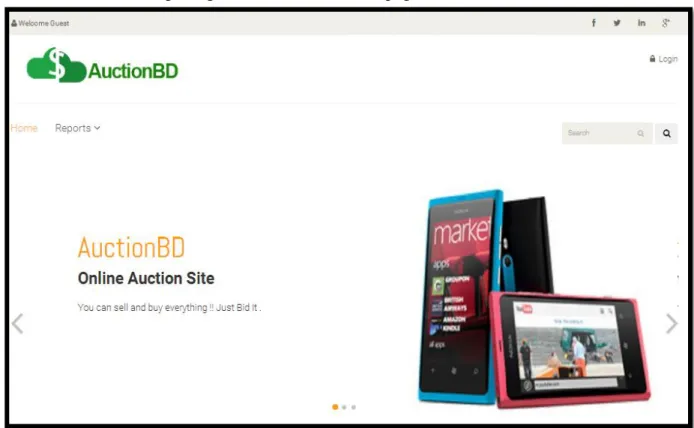
This is the figure of the home page of our website. From this page any user can choose his path where he wants to go. Figure 4.1 shows the homepage of the website.
Figure 4.1: Home page of website
©Daffidil International University
17 4.3 User registration and login
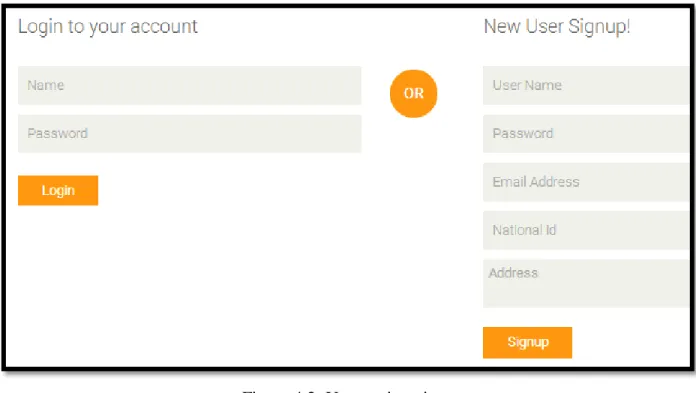
If a user wants to use this web site he has to be registered. Otherwise he doesn’t be able to perform any task. To register a user has to provide a valid username, password, email address, national ID number and present address. Figure 4.2 shows the system of user registration and login.
Figure 4.2: User registration
4.4 Admin activity
Admin can add category, add product, edit product information, see user list, see category list, show bidder report and product report. All operation is required to log in.
4.4.1 Add category
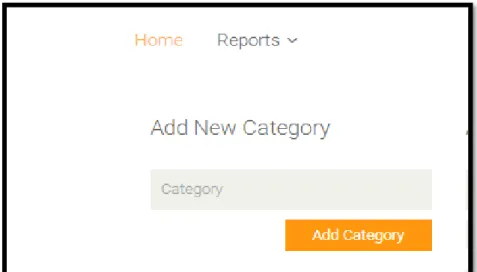
If admin wants to add a new category he can perform this operation easily. To perform this operation at first he has to click add product option then there will be appeared add category
©Daffidil International University
18
option. Here he writes the category name on the new category option then click add category.
After completion this task admin can see a completion message. Figure 4.3 shows the system of add category.
Figure 4.3: Add category
4.4.2 Add product
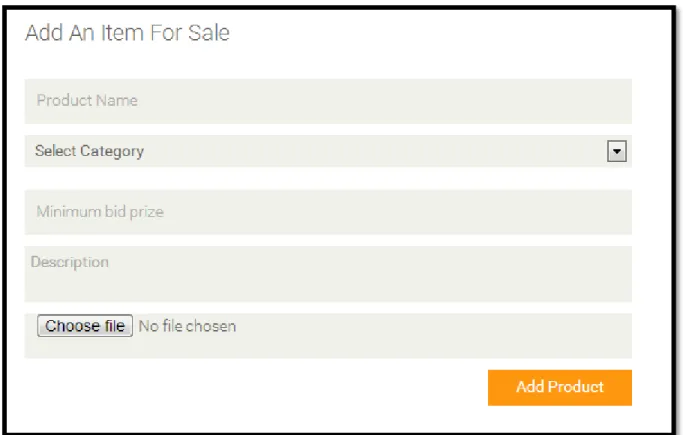
When admin adds a product, he writes product name, selects category, minimum bid price, and description. An image of the product has to be uploaded for bidders who want to buy this product. Finally click add product option, the image will be displayed on the web page. Figure 4.4 shows the system of add product.
©Daffidil International University
19
Figure 4.4: Add product
4.4.3 Edit information of a product
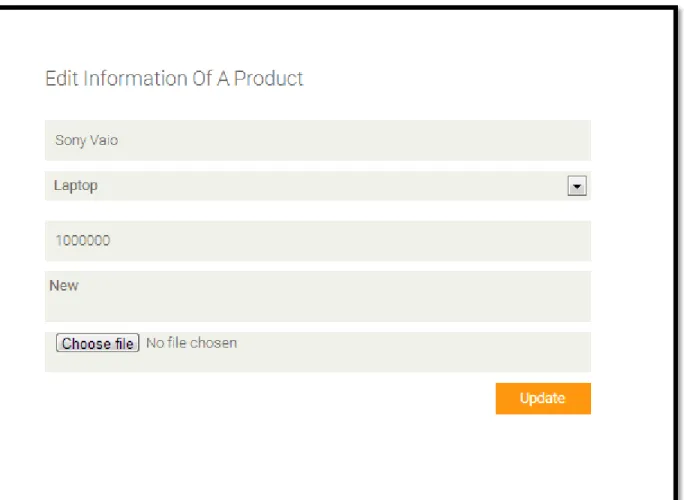
To edit information of a product the admin or user who uploaded the product image, goes to
‘show my product’ option then edit the information or delete the image. Figure 4.5 shows the system of edit information of product.
©Daffidil International University
20
Figure 4.5: Edit information
4.4.4 Show user list
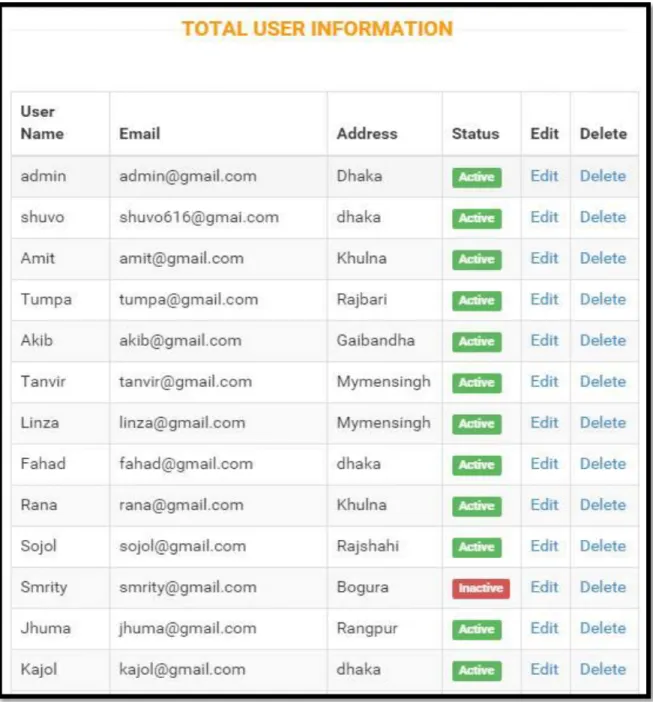
Only admin can see the user list. He can edit or delete any user. To do this task, go to ‘show user list’ option, click in it, users list will be appeared. Admin has to be logged in to see user list otherwise he can’t see user list. Figure 4.6 shows the user list.
©Daffidil International University
21
Figure 4.6: User list
4.4.5 Show category list
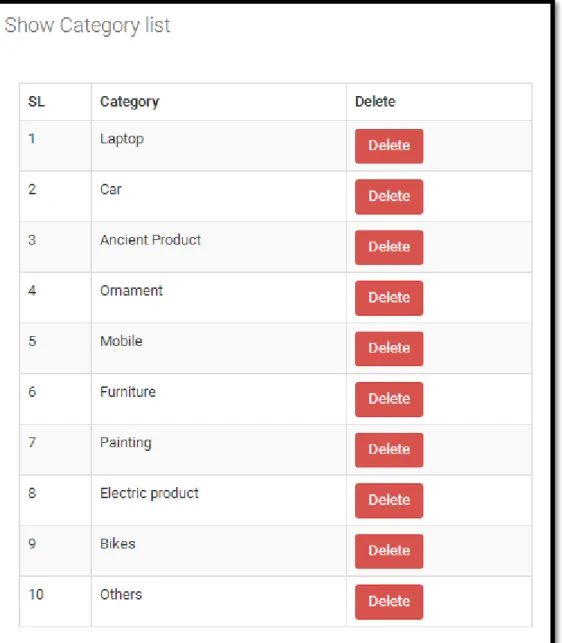
Admin also see category list and add category. He just clicks on “show user list option” he can sees user list easily. Figure 4.7shows the system of category list.
©Daffidil International University
22
Figure 4.7: Category list 4.5 Show report
There is two type of report. These are product report and bidder report. Admin and user can see these reports.
4.5.1 Show product report
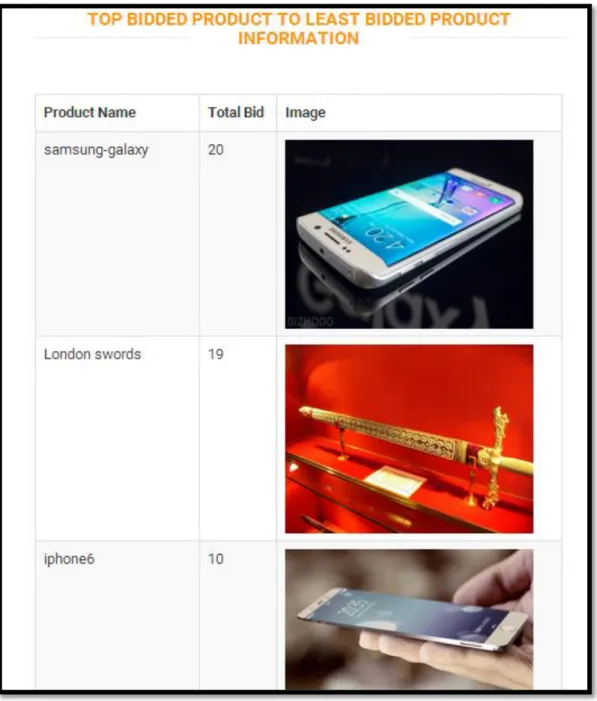
Admin can see the product report. The report will be sorted by the amount of bid on a product.
©Daffidil International University
23
If one product gets more bid than others product it will be sorted first then the lower bid product will be appeared. Figure 4.8 shows the image of product report.
Figure 4.8: Product report
4.5.2 Show bidder report
There is a bidder report. This report will be shown a bidder history in which it will be cleared
©Daffidil International University
24
that who bid most than other bidders. This report can be printed from ‘export’ option. Figure 4.9 shows the system of bidder report.
Figure 4.9: Bidder report
4.6 Search product
Anyone can search any product from category. Just write the name of category, the all products of this category will be appeared with details on product name, category, minimum bid price, and image on the website. Also show bid option but logged in required to bid.
©Daffidil International University
25 Figure 4.10 shows the image of search product.
Figure 4.10:Search product
4.7 Bid product
User can bid his desired products. But he needs to log in. when he shows category list or searches product, he can bid. In bid option there will be appeared the product image, price, availability, condition and last bid price. If a bidder wants to bid a product he must bid with a higher amount than the last bid. The bidder has to be registered otherwise he doesn’t bid. Figure 4.11 shows the system of bid product.
©Daffidil International University
26
Figure 4.11 Bid product
After finishing bid, a pop message is shown on window. When he clicks on the ‘Ok’ button of the pop up message, a mail will be sent to the user email address containing the item name, item ID and bidding price. Figure 4.121 shows pop up message.
©Daffidil International University
27
Figure: 4.12: Pop up message 4.8 User activity
User can add product, delete product, update information of the product, bid products, can show report of highest bidders and report of highest bided product, search for product, export or print reports. How a user can add product, update information, show category, show report, search product, bid product that is already explained on 4.4.2, 4.4.3, 4.4.5, 4.6 and 4.7 respectively and the figures are 4.4, 4.5, 4.7, 4.8, 4.9, 4.10, 4.11 respectively.
4.9 Result
Finally our online system is done. Here admin and user can perform there operation successfully which is our project requirement. Now anyone can perform online based auction using our system. It has very friendly interface. The bidders can bid easily at stay home and save valuable time. So we can say that the online based auction system is an elegant and time saving system rather than current manual system people followed.
©Daffidil International University
28
CHAPTER 5 CONCLUSION
5.1Conclusion
Recently internet has become very common which is used every time by people. Internet is used through desktop, laptop, tab and smart phone which can be found in the hands of a great number of people in the world. The documented online auction project is actually an attempt to establish a system by which the users can perform auction through online. It is a challenging project because it’s a new idea. At starting we didn’t know how the interface would be.
Though it’s challenging to build up a new project, we have built it. We think it is the first online auction system. There is no online auction system in our country except our project.
The auctioneer who wants to auction a products he can perform this task within a few minutes instead of his being absence using this online system through internet. No need to attend physically that’s why the valuable time will be saved. In this time he can do any other important job.
5.2 Shortcomings
User can’t pay through online paymet system like paypal, debit or credit card. They also can’t use this system on smart phone as mobile app. There is no scope to use bangla fonts. It only writes in english.
5.3 Future Work
As people like to use smart phone, we will develop the system so that they can use this system on their smart phone as mobile application. Moreover payment system will be easier than present system because it will be online payment system. User can pay using online payment system like paypal, debit or credit card. In future we establish an option to convert english to bangla fonts. So that people can use our system easily of our country.
©Daffidil International University
29 References:
[1] Requirement analysis, available at, <<en.wikipedia.org/wiki/Requirement>> Last access on 15 May, 2015 at 10.00am
[2] Use case Model, available at,
<<epf.eclipse.org/wikis/openup/core.tech.common.extend_supp/guidances/concepts/use_case_model_CD178 AF9.html>> Last accessed on 20 May at 9pm
[3] HTML, available at, << "HTML5 is a W3C recommendation". W3C Blog. 28 October 2014. Retrieved28 October 2014 >>, Last Accessed on 25 May, 2015 at 11.00pm
[4] CSS, available at, <<www.w3.org/standards/webdesign/htmlcss>>, Last accessed on 10 June, 2015 at 3.00pm
[5] Bootstrap, available at , <<en.wikipedia.org/wiki/Bootstrap_(front-end_framework)>> Last accessed 15 June, 2015 at 1.00pm
[6] PHP CodeIgniter, available at, <<www.phpframeworks.com/php-
frameworks/index.php?id=9+CodeIgniter>>, Last accessed 16 June, 2015 at 1.00am
[7] MySQL, available at, <<www.sqlcourse.com/intro.html>>, Last accessed on 18 June, 2015 at 12.30 am [8] MySQL <<dev.mysql.com/doc/refman/4.1/en/what-is-mysql.html>> Last accessed on 18 June, 2015 at
1.00am
[9] JavaScript, available at <<developer.mozilla.org/enUS/docs/Web/JavaScript/About_JavaScript>> , Last accessed on 25 June at 10.00pm
[10] jQuery, available at, << www.jquery-tutorial.net/introduction/what-is-jquery/>> , Last accesses on 2 July, 2015 at 2.00am
[11] AJAX, available at << www.tutorialspoint.com/ajax/what_is_ajax.htm >>, Last accessed on 3 July, 2015 at 11.00am