OWNCAR – SELF DRIVE CAR IN DHAKA BY
MD. RAFIUL HUDA ID: 171-15-9258
MAHMUDUL HASAN MARUF ID: 171-15-9115
AND
MD. JAKIUL RASHID KHAN ID:171-15-8554
This Report Presented in Partial Fulfillment of the Requirements for the Degree of Bachelor of Science in Computer Science and Engineering
Supervised By Md. Sadekur Rahman
Assistant Professor Department of CSE Daffodil International University
Co-Supervised By Md. Tarek Habib Assistant Professor Department of CSE Daffodil International University
DAFFODIL INTERNATIONAL UNIVERSITY
DHAKA, BANGLADESH JANUARY 2021
©Daffodil International University i
APPROVAL
This project titled “Own Car - Self Drive Car in Dhaka”, submitted by Md. Rafiul Huda ID:171- 15-9258, Mahmudul Hasan Maruf ID:171-15-9115 and Md. Jakiul Rashid Khan ID:171-15-8554 to the Department of Computer Science and Engineering, Daffodil International University has been accepted as satisfactory for the partial fulfillment of the requirements for the degree of B.Sc.
in Computer Science and Engineering and approved as to its style and contents. The presentation has been held on 27 January 2021.
BOARD OF EXAMINERS
_______________________
Dr. Touhid Bhuiyan Professor and Head
Department of Computer Science and Engineering Faculty of Science & Information Technology Daffodil International University
Chairman
_____________________
Gazi Zahirul Islam Assistant Professor
Department of Computer Science and Engineering Faculty of Science & Information Technology Daffodil International University
Internal Examiner
©Daffodil International University ii
____________________________
Raja Tariqul Hasan Tusher Senior Lecturer
Department of Computer Science and Engineering Faculty of Science & Information Technology Daffodil International University
Internal Examiner
____________________________
Dr. Dewan Md. Farid Associate Professor
Department of Computer Science and Engineering United International University
External Examiner
©Daffodil International University iii
DECLARATION
We hereby declare that, this project has been done by us under the supervision of Md. Sadekur Rahman, Assistant Professor, Department of CSE, Daffodil International University. We also declare that neither this project nor any part of this project has been submitted elsewhere for award of any degree.
Supervised by:
_____________________
Md. Sadekur Rahman Assistant Professor Department of CSE
Daffodil International University Co-Supervised by:
_____________________
Md. Tarek Habib Assistant Professor Department of CSE
Daffodil International University
©Daffodil International University iv
Submitted by:
_____________________
Md. Rafiul Huda ID: -171-15-9258 Department of CSE
Daffodil International University
_____________________
Mahmudul Hasan Maruf ID: -171-15-9115
Department of CSE
Daffodil International University
____________________
Md. Jakiul Rashid Khan ID: -171-15-8554
Department of CSE
Daffodil International University
©Daffodil International University v
ACKNOWLEDGEMENT
First, we express our heartiest thanks and gratefulness to almighty God for His divine blessing makes me possible to complete the final year project successfully.
We really grateful and wish our profound our indebtedness to Md. Sadekur Rahman, Assistant Professor, Department of CSE Daffodil International University, Dhaka. Deep Knowledge &
keen interest of our supervisor in the field of web development influenced us to carry out this project. His endless patience, scholarly guidance, continual encouragement, constant and energetic supervision, constructive criticism, valuable advice, reading many inferior drafts and correcting them at all stage have made it possible to complete this project.
We would like to express our heartiest gratitude to Dr. Touhid Bhuiyan, Head, Department of CSE, Daffodil International University, Dhaka, and for his kind help to finish our project and also to other faculty member and the staff of CSE department of Daffodil International University.
We would like to thank our entire course mate in Daffodil International University, who took part in this discuss while completing the course work.
Finally, we must acknowledge with due respect the constant support of our parents.
©Daffodil International University vi
ABSTRACT
In this day’s people need to go many places in same day. Many working professionals, students, businessman, entrepreneurs need to go to different locations in Dhaka in a day for their tasks.
Usually, they use ride sharing apps or hire a taxi cap and have to pay extra for waiting in a place.
This is an expensive option to commute. It is more reliable and safer for a self-drive car in Dhaka.
You do not need to worry about waiting charges and you use the car as much as you need. You can explore Dhaka after work at your leisure. People may need to go outside the city or various places in the route. But there is no option to do that without own car. We would like to drive different to different locations with different people. We want different types of environment while traveling. When we are with friends, we want to do some fun, with family we want privacy, spacious and safety. The ride sharing company’s driver are busy to finish the trip driving unsafely and breaking the driving rules. When we want a small refreshment with our school friends and our relatives but the seat capacity is lower because driver himself wasting a seat. We also have social pressure of buying a car. To solve this kind of problem we have developed a project which name is OwnCar. Owncar is solving the problem by making online self-drive car booking system in Dhaka affordable.
OwnCar is an online platform where people can hire a car and drive themselves. You can book a self drive car at your fingertips using OwnCar. Owncar have given freedom and privacy to the customers. Customers don’t need t worry about drivers’ salary, garage fee, maintenance cost. Owncar has made the car driving very affordable and convenience.
©Daffodil International University vii
TABLE OF CONTENTS
CONTENT PAGE NO
Board of examiners i
Declaration iii
Acknowledgements v
Abstract vi
CHAPTER PAGE NO CHAPTER 01: INTRODUCTION 1-3 1.1 Introduction 01
1.2 Motivation 01
1.3 Objectives 02
1.4 Expected Outcome 02
1.5 Report Layout 03
CHAPTER 02: BACKGROUND 4-6 2.1 Introduction 04
2.2 Related Works 04
2.3 Comparative Studies 04
2.4 Scope of the Problem 06
2.5 Challenges 06
CHAPTER 03: REQUIREMENT SPECIFICATION 7-18 3.1 Business Process Modeling 07
3.2 Requirement Collection and Analysis 07
3.3 Use Case Modeling and Description 08
3.4 Logical Data Model 14
©Daffodil International University viii
3.5 Design Requirements 14
3.6 Gantt Chart 16
3.7 Sequence Diagram 17
3.8 Data Flow Diagram 18
CHAPTER 04: DESIGN SPECIFICATION 19-22 4.1 Front-end Design 19
4.2 Back-end Design 20
4.3 Interaction Design and UX 21
4.4 Implementation Requirements 22
CHAPTER 05: IMPLEMENTATION AND TESTING 23-37 5.1 Implementation of Database 23
5.2 Implementation of Front-end Design 25
5.3 Implementation of Interactions 36
5.4 Testing Implementation 36
5.5 Test Results and Reports 37
CHAPTER 6: CONCLUSION AND FUTURE SCOPE 38-40 6.1 Discussion and Conclusion 38
6.2 Scope for Further Developments 38
6.3 Limitations 39
REFERENCES 40
APPENDIX 41
©Daffodil International University ix
LIST OF FIGURES
FIGURES PAGE NO
Figure 3.1: BPM of how a User Post a Booking in this System. 07
Figure 3.2: Use Case Diagram of System 10
Figure 3.3: Class Diagram 14
Figure 3.4: Flow chart of the system. 15
Figure 3.5: Gantt Chart 16
Figure 3.6: Sequence Diagram 17
Figure 3.7: Data Flow Diagram 18
Figure 4.1: Request lifecycle 20
Figure 4.2: System DBMS tables 21
Figure 4.3: The 7 Factors that Influence User Experience 21
Figure 5.1: Implementation of users table 23
Figure 5.2: Implementation of booking table 23
Figure 5.3: Implementation of cars table 23
Figure 5.4: Implementation of brand table 24
Figure 5.5: Implementation of pages table 24
Figure 5.6: Implementation of feedback table 24
Figure 5.7: Implementation of subscriber table 24
Figure 5.8: Home page 25
Figure 5.9: User Registration Page 26
©Daffodil International University x
Figure 5.10: User Login Page 27
Figure 5.11: User Dashboard 27
Figure 5.12: Admin Dashboard 28
Figure 5.13: Manage Booking Page 29
Figure 5.14: User Post a booking request Page 29
Figure 5.15: Users Previous Booking 30
Figure 5.16: Testimonial Page 30
Figure 5.17: Contact and Query Page 31
Figure 5.18: Car List Page 31
Figure 5.19: All User Page 32
Figure 5.20: Add Vehicle Page 32
Figure 5.21: All Case List Page 33
Figure 5.22: Page Details Manager Page 33
Figure 5.23: Contact Details Update Page 34
Figure 5.24: Admin Car Brand Manage page. 34
Figure 5.25: Admin Subscriber Manage page. 35
Figure 5.26: Admin Manage Queries page. 35
©Daffodil International University 1
CHAPTER 01 Introduction 1.1 Introduction
The capital of Bangladesh, Dhaka is a city which never sleeps. People are busy doing their tasks in a day. It has many entertainment and shopping options.
The biggest problem in Dhaka is people cannot commute easily. Traffic jam is a major problem in this city and it kills time evert single day. If you have a self-drive can then you can use the most of our time. If you need a car but do not plan to buy then OwnCar is the best solution to rent and drive a car yourself. OwnCar allows you to book a self-drive car easily online.
1.2 Motivation
Behind building this system there are many things that motivated us. We love road trip and we just don’t like reaching the destination rather enjoy the journey and especially road trip outside the Dhaka city. We want that, anywhere anytime for any reason we can stop and live that moment.
But we can’t do that in any ride sharing app and we don’t have our own car. We wanted to feel the pleasure of driving a whole new wide range of cars for our different moods. No company provide the chance to drive our own.
People may need to go outside the city or various places in the route. But there is no option to do that without own car.
We want different types of environment while traveling. When we are with friends, we want to do some fun, with family we want privacy, spacious and safety. The ride sharing company’s driver are busy to finish the trip driving unsafely and breaking the driving rules. When we want a small refreshment with our school friends and our relatives but the seat capacity is lower because driver himself wasting a seat.
According to the information of BTRC that the total number of internet users has reached 80.829 million [1] so we thought if we make an online platform from where a user can easily find a self-
©Daffodil International University 2
drive car. Finally, we had been an enthusiast of making something for the mobile platform. From our love, endeavor, desperation, enthusiasm towards web app development using most advanced php framework Laravel considered a good reason we concentrated on this project.
1.3 Objectives
The objectives of our project are point out below.
● To solve Bangladesh’s urban commuting problem.
● To solve traffic jam problem by increasing 20% more usage of car’s capacity.
● To remove the social pressure of buying a car.
● To ensure a stress-free car booking experience.
● To save transportation cost.
● To provide dependable and readily available transportation service.
● To save time.
1.4 Expected Outcome
OwnCar is an online platform that not only saves time but also gives fast outcomes. The transportation expense will be lower. It will decrease the traffic jam. People won’t feel the pressure of buying new car. It can solve the urban commuting problem in our country basically in Dhaka.
It can be a profitable business. The company can be listed in fortune 500 company.
By using this platform, a client can easily choose a car and drive himself.
This system has following features:
● Client can easily choose a car.
● Client can get his/her desired car within a short time.
● Client can hire a car through online based on cars expertise.
● At first no Need to communicate physically.
● They can give feedback each other after a complete ride.
©Daffodil International University 3
1.5 Report Layout
The report is divided into five chapters. Each chapter deals with the different aspects of
"OwnCar- self-drive car in Dhaka”. Each chapter has various parts explaining in detail.
● Chapter 1: Introduction
This chapter discusses the important theoretical concepts behind our project. Here also discusses our project motivation, objectives and expected outcomes.
● Chapter 2: Background
This chapter discusses our project related works, comparative studies and scope of the problem.
● Chapter 3: Requirement Specification
This chapter discusses our project Business Process Modeling, requirement collection and analysis, use case modeling and description, logical data model and design requirements.
● Chapter 4: Design Specification
This chapter discusses our project front-end design, back-end design, interaction design and UX and implementation requirements.
● Chapter 5: Implementation and Testing
This chapter discusses about the Implementation of database, front-end design, interactions, testing. Also discuss about test results and reports.
● Chapter 6: Conclusion and Future Scope
This chapter discusses about the conclusion and future scope of our project.
©Daffodil International University 4
CHAPTER 02 Background 2.1 Introduction
OwnCar is an online-based web Application. In this chapter we have compared the existing web application and services with our web application. Future scope of the application is explained here. Our target and the challenges we faced to build this system are described here.
2.2 Related Works
Some web applications are to book a car to rent by using website but none of them are giving car to drive by user. The other web applications based on specific car rent company. Our web application fully focuses on user’s problem to hire their desired car for driving. Any services provide to hire a car online they just show the car details and we have make this process online.
We are giving the opportunity to drive car themselves.
2.3 Comparative Studies
OwnCar is a web application based on car rent management for drive themselves system. There are several web applications on this type of management. Using those web applications anyone can rent car from home. OwnCar particularly shaped to make users hassle free. The other available web applications are not work for Bangladeshi people.
©Daffodil International University 5
2.3.1 Comparison with related applications
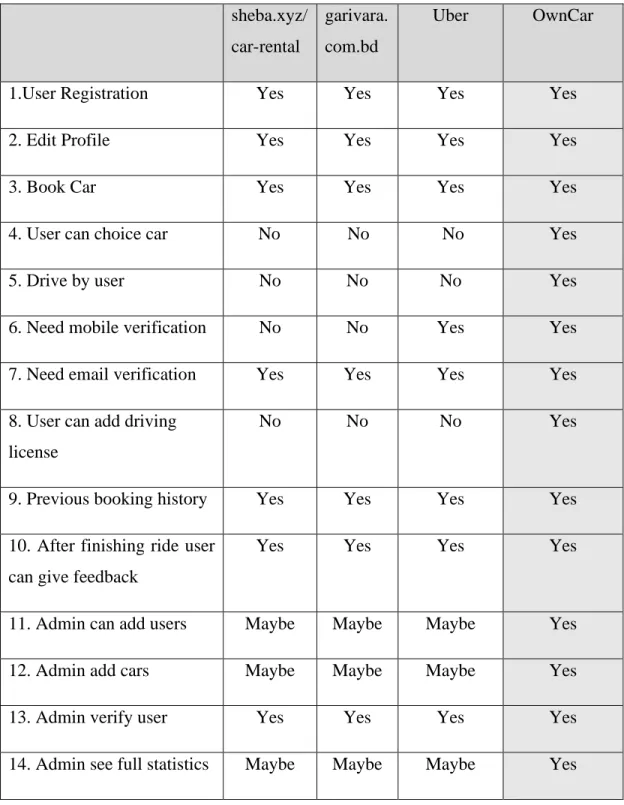
A comparative analysis of some related applications is shown in table 2.1.
Table 2.1: Comparative analysis Table sheba.xyz/
car-rental
garivara.
com.bd
Uber OwnCar
1.User Registration Yes Yes Yes Yes
2. Edit Profile Yes Yes Yes Yes
3. Book Car Yes Yes Yes Yes
4. User can choice car No No No Yes
5. Drive by user No No No Yes
6. Need mobile verification No No Yes Yes
7. Need email verification Yes Yes Yes Yes
8. User can add driving license
No No No Yes
9. Previous booking history Yes Yes Yes Yes
10. After finishing ride user can give feedback
Yes Yes Yes Yes
11. Admin can add users Maybe Maybe Maybe Yes
12. Admin add cars Maybe Maybe Maybe Yes
13. Admin verify user Yes Yes Yes Yes
14. Admin see full statistics Maybe Maybe Maybe Yes
©Daffodil International University 6
2.4 Scope of the Problem
We have collected requirements to build the system. We have followed software development process and completed each part one after another. We have planned for a long month. Planning and time management to build OwnCar is given below.
2.4.1 Time Scheduling
The time scheduling of our project is shown in table 2.2.
Table 2.2: Time Scheduling
Planning 1 Month
Design and Analysis 1 Weeks
Coding 5 Month and 2 Weeks
Testing and Implementation 1 Month
Total 8 Month and 2 Weeks
The Scope is Application Module. OwnCar has 2 Modules. User and Admin.
2.4.2 Target of our Project
To solve such problems to make smoother scheme user to rent a car and drive safely.
2.5 Challenges
The most challenging part was building order system in both user and admin parts. Data synchronization was also taking time to plan. To design the database for the whole system was challenging task.
©Daffodil International University 7
CHAPTER 03 Requirement Specification 3.1 Business Process Modeling
Business process modeling in business process management and systems engineering is the activity of representing processes of an enterprise, so that the current process may be analyzed, improved, and automated [2]. BPM of OwnCar shown in figure 3.1.
Figure 3.1: Business Process Model of how a User Post a booking in this System.
3.2 Requirement Collection and Analysis 3.2.1 Software Requirements
To develop this application, we used following Software Requirements:
● Operating System: Windows 8.1, Windows 10.
● System Design: Visio, draw.io, Lucidchart.
● Language: HTML5, CSS3, JavaScript, JQuery, Ajax, PHP, Laravel.
● Database: Mysql.
● Tools: PhpStorm, Sublime Text 3.
● Debugger: The Laravel Debugger by Barry vd Heuvel.
● Internet Browsers: Microsoft Edge, Firefox, Chrome.
Software Requirements, for running the application:
● Operating System: Any Operating System because it is a Web Application.
©Daffodil International University 8
● Network: Wi-Fi or Cellular Network
● Compatible Browsers: Microsoft Edge, IE10, IE11, Firefox, Safari, Opera, Chrome.
3.2.2 Hardware Requirements
To develop this application, we need the following Hardware Requirements:
● Processor: Intel Core I3
● RAM: 4GB
● Space on disk: minimum 10GB 3.2.3 Functional Requirements
● Graphical User interface which the application user.
● Give ease of understanding to the application through Wi-Fi or cellular network MySQL that stores the data or information to be displayed to the user.
3.3 Use Case Modeling and Description 3.3.1 System Model
● User Module
● Admin Module User Module
Users can do these tasks in this web application.
i. Registration
Users registers them in the system by email verification.
ii. Login
After registration users can login into the system.
iii. Mobile Number Verification
After login to the system users need to verify his/her mobile number.
iv. Edit Profile
Users can edit his/her profile.
v. Booking Car
©Daffodil International University 9
Users can post his/her booking into the system.
vi. Comment
User can also comment on booking.
vii. Feedback
After complete work user can give feedback and rating.
Admin Module
Admin can perform the below operation in this web application.
i. Login
Admin can login into the system.
ii. System Statistics
Admin sees the system statics. Open for total cars, total users, total bookings, recent bookings and recent comments
iii. Add Cars
Admin can add cars.
iv. Add Announcements
Admin can add announcements users.
v. Manage Users
Admin can see all users of this system also can approve, disapprove users.
vi. Add User
Admin can add any types of user.
vii. Manage Bookings
Admin can see all bookings list also can verify booking, unverified booking, edit booking and delete booking.
©Daffodil International University 10
3.3.2 Use Case Diagram and Description
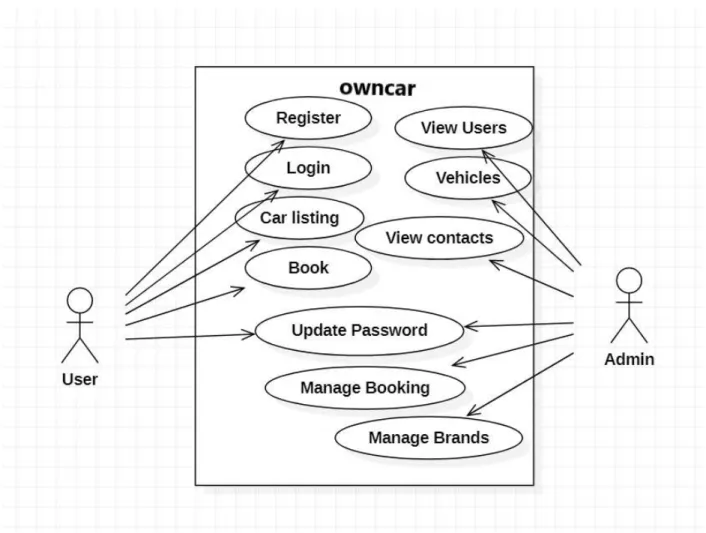
A use case diagram is a graphic depiction of the interactions among the elements of a system [3].
Figure 3.2 shown OwnCar system use case diagram.
Figure 3.2: Use Case Diagram of the system.
©Daffodil International University 11
Actor User Flow of steps
a) This Use case starts when a user enters the system.
b) User can edit his/her profile, booking car, give feedback and rating.
i. Register
Brief Description: User can register the system Actor: User
Flow of steps
a) This use case starts when a user registered the system.
ii. Update Profile
Brief Description: User can update his/her profile information.
Actor: User Flow of steps
a) This use case starts when a user login to the system.
b) User sees profile information and update profile information.
iii. Booking
Brief Description: User can rent car.
Actor: User Flow of steps
a) This use case starts when a user login to the system.
b) User can post booking but to publish booking need to admin approval.
iv. Car Listing
Brief Description: User can see car list.
Actor: User Flow of steps
a) This use case starts when a user login to the system.
b) User can see car list. User can book car from there.
©Daffodil International University 12
v. Give Feedback
Brief Description: User can give feedback.
Actor: User Flow of steps
a) This use case starts when a user login to the system.
b) User can give feedback after successfully complete his drive.
Actor Admin
Login with given id and password Flow of steps
a) Admin can control the system by login to the system.
b) Admin can manage users, car order and see the full system statistic.
i. Add User
Brief Description: Admin can add user.
Actor: Admin Flow of steps
a) This use case starts when an admin login to the system.
b) Admin can add any type of user to the system.
ii. Edit User
Brief Description: Admin can Edit user.
Actor: Admin Flow of steps
a) This use case starts when an admin login to the system.
b) Admin can update existing user information.
v. Add Vehicles
Brief Description: Admin can add vehicles.
Actor: Admin Flow of steps
a) This use case starts when an admin login to the system.
©Daffodil International University 13
b) Admin can add new vehicles and can see details of vehicle.
vi. Manage Booking
Brief Description: Admin can see booking.
Actor: Admin Flow of steps
a) This use case starts when an admin login to the system.
b) Admin can see and update existing booking.
vii. Approve booking
Brief Description: Admin can approve booking.
Actor: Admin Flow of steps
a) This use case starts when an admin login to the system.
b) Admin can approve booking when client post a booking.
c) Admin also can disapprove booking.
viii. Manage Brands
Brief Description: Admin can add or delete a brand.
Actor: Admin Flow of steps
a) This use case starts when an admin login to the system.
b) Admin can edit car brands.
©Daffodil International University 14
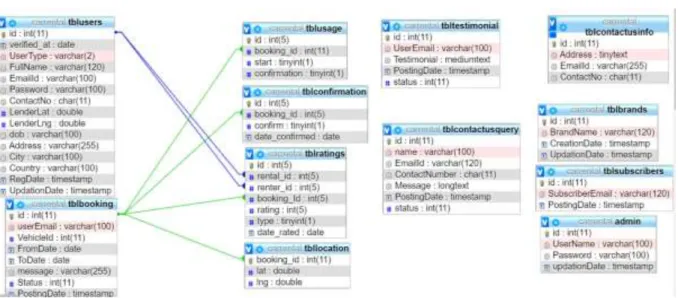
3.4 Class Diagram
The Class Diagram of OwnCar is shown in figure 3.3.
Class Diagram
Figure 3.3: Class Diagram
3.5 Design Requirements
While designing the system of our web application. We have considered the goals that our system is going to be achieved. We make the system very simple and flexible to the users. We have focused to build a good system so that we need to maintenance less. The following figure 3.4 is the flow chart of how we have designed this system.
©Daffodil International University 15
Figure 3.4: Flow chart of the system.
©Daffodil International University 16
3.6 Gantt Chart
The following figure 3.5 is the flow chart of gannt chart we have designed this system.
Figure 3.5: Gantt Chart
©Daffodil International University 17
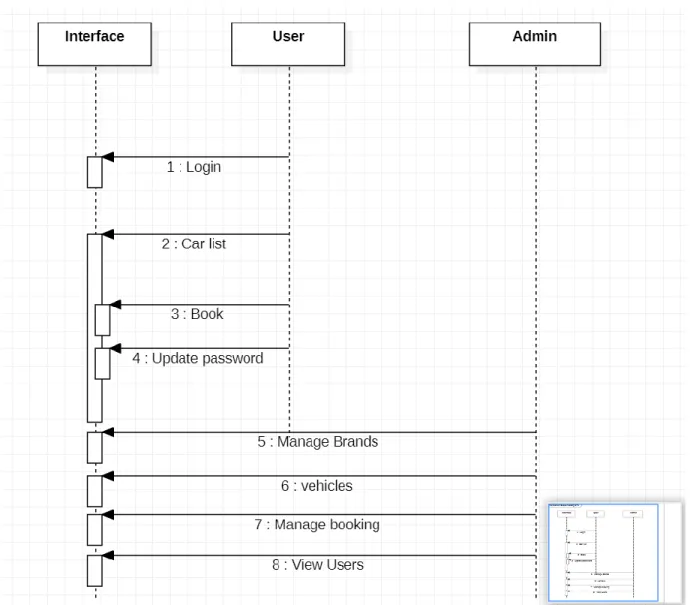
3.7 Sequence Diagram
The following figure 3.6 is the flow chart of sequence diagram of this system.
Figure 3.6: Sequence Diagram
©Daffodil International University 18
3.8 Data Flow Diagram
The following figure 3.7 is the flow chart of data flow diagram
Figure 1.7: Data Flow Diagram
©Daffodil International University 19
CHAPTER 04 Design Specification 4.1 Front-end Design
Front-end Design is the main attraction of an application. It also should be user-friendly. Our application we designed a beautiful front-end Design. We also try to design user-friendly. In front- end design, our Application has following screen shown in Table 4.1.
Table 4.1: Activity list of the system 1. User Registration Screen
2. User Login Screen 3. User Dashboard Screen 4. User My Booking Screen 5. User Feedback Screen 6. User About Us Screen 7. User Car Listing Screen 8. User FAQS Screen 9. User Contact Us Screen 10. User Privacy Screen 11. User Review Screen 12. User Terms of Use Screen 13. Admin Login Screen 14. Admin Dashboard Screen 15. Admin Create Brand Screen 16. Admin Manage Brand Screen 17. Admin Post Vehicle Screen
©Daffodil International University 20
18. Admin Manage Vehicle Screen 19. Admin Manage Booking Screen 20. Admin Manage Testimonials Screen 21. Admin Manage Query Screen 22. Admin Reg Users Screen 23. Admin Manage Pages Screen 24. Admin Update Contact Info Screen 25. Admin Manage Subscribers Screen 4.2 Back-end Design
Our Web Application is Dynamic this function works by using the internet. In back-end, design used database. The internet is a most important role in our application. The user has none access to Back-End Design.
The following figure 4.1 [4] shows how user get output form back-end database.
Figure 4.1: Request lifecycle [4].
©Daffodil International University 21
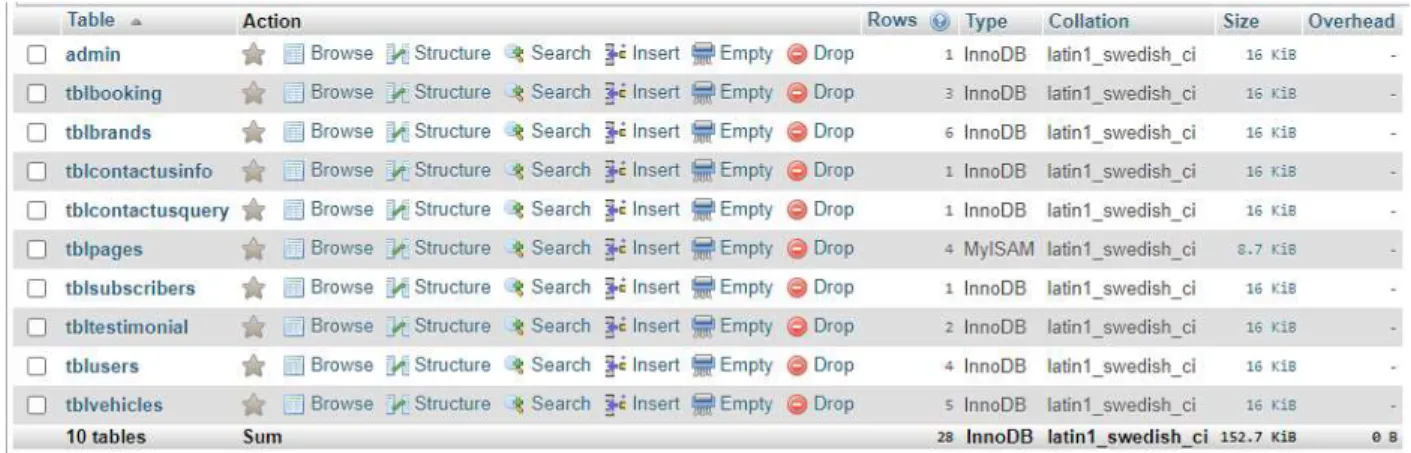
DBMS tables: The following figure 4.2 shown OwnCar DBMS table.
Figure 4.2: System DBMS tables 4.3 Interaction Design and UX
User Experience (UX) is critical to the success or failure of a product in the market. Interaction Design is most important part of User Experience (UX) design. An application fruition depends on User satisfaction. How an application is more attractive to the user is depends on interaction and Design part. In our web application, we used the useful model of Interactive design.
The following figure 4.2 [5] shows There are 7 factors that describe user experience, according to Peter Morville.
Figure 4.3: The 7 Factors that Influence User Experience [5].
Home Screen Interaction Design and UX:
We have designed our Home Screen which is linked with login page and registration page. When the application is open to the user, they show home page. User are two types in our system user and admin. If the user has login id and password, he/she can easily login into the system by click
©Daffodil International University 22
on the Login button. If user don’t have id or password, they must registration in the system as a user.
Dashboard Screen Interaction Design and UX:
We design Dashboard screen for every user. In user dashboard, they can see their profile, edit profile, my booking, car listing, contact, reviews.
In admin dashboard, admin can see the full system statistics, total booking, total reg users, running booking, add brands, add vehicle, vehicle list, all booking list, subscribers list.
Book Now Interaction Design and UX:
In User dashboard, user see a button which name is Book Now. By clicking the button user need to add all specific information about his booking and finally submit the request by clicking on the book now button.
4.4 Implementation Requirements
Implementation Requirement is given below:
1. PhpStorm 2. Sublime Text 3 3. HTML5
4. CSS3 5. JQuery 6. JavaScript 7. Ajax
8. PHP OOP Programming 9. Laravel
10. MySQL
©Daffodil International University 23
CHAPTER 05
Implementation and Testing 5.1 Implementation of Database
To build this system one DBMS (MySQL) were used. MySQL for storing data to the server. Some screenshots of the system database are shown in figure 5.1, 5.2, 5.3, 5.4, 5.5, 5.6, 5.7:
Figure 5.1: Implementation of users table
Figure 5.2: Implementation of booking table
Figure 5.3: Implementation of cars table
©Daffodil International University 24
Figure 5.4: Implementation of brand table
Figure 5.5: Implementation of pages table
Figure 5.6: Implementation of feedback table
Figure 5.7: Implementation of subscriber table
©Daffodil International University 25
5.2 Implementation of Front-end Design
For implementing front-end design of the system used HTML5, CSS3, JQuery, JavaScript, Bootstrap and Ajax. The challenge was more when we just implement the screen and there the perfection was the matters for us. There are some front-end screen given below.
5.2.1 Home Page
Home page, shown in figure 5.8, contains all the links to visit in the system and to perform tasks.
Login and Registration pages are connected to this page actually other pages links will be shown after login into this system.
Figure 5.8: Home page
©Daffodil International University 26
5.2.2 Registration Page
Registration is needed to login the main system. From this page user can register as user just fill- up full name, mobile number, email address. Admin registration handle the site owner only. This feature shown in figure 5.9.
Figure 5.9: User Registration page 5.2.3 Login Page
Login is needed to access the main system. User, Admin and both has the access to enter the main system. No one can access main system without login. If one forgot password then he has to click forgot password or if one can registration newly then he has to click create an account. After login everyone can see their profile for example: A user can see his profile if he login by his user account details, shown in figure 5.10
©Daffodil International University 27
Figure 5.10: User Login Page 5.2.4 User Dashboard Page
After login as client, client can see this page. Dashboard pages is linked with all other internal pages which one is needed for client. In this page on My Booking section will show number of open rides, completed ride, number of completed ride and number of pending rides. And the profile percentage section will show the profile is fully completed or not, shown in figure 5.11.
Figure 5.11: User Dashboard
©Daffodil International University 28
5.2.5 Admin Dashboard Page
After login as admin, admin can see this page. Dashboard pages is linked with all other internal pages which one is needed for admin. In this page admin can see number of total cars, total users, total bookings and total subscriber. Admin can also see recent bookings and recent feedback, shown in figure 5.13.
Figure 5.12: Admin Dashboard
©Daffodil International University 29
5.2.7 Manage Booking Page
After admin login into the system, he/she see booking request in this page, shown in figure 5.14.
Figure 5.13: Manage Booking Page 5.2.8 Post a Booking Page
This page for user. User can post his/her case by fill-up this form from this page, shown in figure 5.15.
Figure 5.14: User Post a booking request Page
©Daffodil International University 30
5.2.9 My Booking Page
This page for User. User can his/her existing booking. Posted booking with booking status complete/pending/ongoing from this page, shown in figure 5.15.
Figure 5.15: Users Previous Booking 5.2.16 Testimonial Page
After completed ride User can submit review which is helpful for future work, shown in figure 5.16.
Figure 5.16: Testimonial Page
©Daffodil International University 31
5.2.16 Contact and Query Page
User can get any query in this page, shown in figure 5.17.
Figure 5.17: Contact and Query Page
5.2.16 Car List Page
From this page user can see all cars here, shown in figure 5.18.
Figure 5.18: Car List Page
©Daffodil International University 32
5.2.18 Admin All User Page
From this page admin can see all users here, shown in figure 5.19.
S
Figure 5.19: All User Page 5.2.19 Admin Add Vehicle Page
From this page admin can add cars and details, shown in figure 5.28
. Figure 5.20: Add Vehicle Page
©Daffodil International University 33
5.2.20 Admin Booking List Page
From this page admin can see all case lists and can manage form here, shown in figure 5.29
Figure 5.21: All Case List Page 5.2.21 Admin Page Manager
From this page admin can update terms and condition, FAQ, about us and Contact details, shown in figure 5.30
Figure 5.22: Page Details Manager Page
©Daffodil International University 34
5.2.21 Admin Contact Details Update Page Admin can update contact details in this page.
Figure 5.23: Contact Details Update Page
5.2.21 Admin Manage Car Brand Page Admin can manage car brands here.
Figure 5.24: Admin Car Brand Manage page.
©Daffodil International University 35
5.2.21 Admin Subscriber Page
Admin can see all the subscribers list and email addresses.
Figure 5.25: Admin Subscriber Manage page.
5.2.21 Admin Manage Contact Queries Page Admin can manage customers queries here.
Figure 5.26: Admin Manage Queries page.
©Daffodil International University 36
5.3 Implementation of Interactions
We design every user part very politely that user what he wants is indeed here. We design very carefully that the design attractive to users. An application Successions where the user can use the application easily and understand the functions of the system. The Satisfaction level of our system is high.
5.4 Testing Implementation
When a system is implemented and test some specific function is called test implementation [6].
We have tested our system several times. Login, Post booking, Browse Cars, user Registration, give testimonials, admin page manager. Test by us at various time. We have tested the following factors:
1. Login System.
2. User Registration System.
3. Admin Registration.
4. User post booking.
5. Add vehicle.
6. Give Feedback.
7. We test the whole system by maintains SDLC method.
5.5 Test Results and Reports
System Testing Table is given below:
Table 5.1: System Testing Table Test
Case Id
Date Tested
Tester Pass/Fail Severity of Defect
Summary Of Defect
Closed Prior to Release?
Comment
1 01.01.202 1
Rafiul Pass Bug in 1 Places
Bug <Yes>
©Daffodil International University 37
5.5.1 User Acceptance Testing
User Acceptance Testing Table is given below:
Table 5.2: User Acceptance Testing Test
Cas e Id
Date Tested
Tester Pass or Fail
Severit y of Defect
Summar y Of Defect
Closed Prior to Release
?
Comment
1 02.01.2021 Rafiul Pass No Defect
No Defect
<Yes>
2 02.01.2021 Mahmu dul
Pass No
Defect
No Defect
<Yes>
©Daffodil International University 38
CHAPTER 06
Conclusion and Future Scope 6.1 Discussion and Conclusion
For the grace of Almighty ALLAH, we have successfully completed our project and documentation. After the long-term of thinking, Discussion, implementation we are in the last session and happy of completion. OwnCar is capable to rent a car online within short time. Our system reduces the hassle of time.
Until now Usually people hire a taxi cab and had to pay huge amount of money.Well, now this problem has changed. Using Owncar people can easily book car and rent the car to drive and go different places. Self-drive car booking in Dhaka is now affordable. The Owncar web platform have solved the problem to rent a car very easily online.
OwnCar – An Online Platform for those who need a car for day long and want some driving experience.
OwnCar is very useful for all the people who need to go different parts of Dhaka city in the same day. Their most valuable time saved by using this platform. We try to reduce some things by our web application.
6.2 Scope for Further Developments
Here is some future plans for the application. Some of the plans are:
1. Develop the payment system.
2. Most advanced tracking system.
3. Neural network driving license detect system.
4. Advance search for car selection option.
5. AI base recommendation for you (Best car for you)
©Daffodil International University 39
6.3 Limitations
Here is some limitations of the application. In order to perform the rent a car capability;
1.Users must login to their own profiles.
2.Guests must create their own accounts.
3.Unless the driving license card is uploaded, the system will not allow to perform the booking and renting capabilities.
4.The system does not allow rent the same car for the same date. If such a consequence happened, the system will give fatal error.The total number of Internet Subscribers in Bangladesh,
©Daffodil International University 40
Refarences
[1] What is business process modeling?
available at <<https://en.wikipedia.org/wiki/Business_process_modeling>>, last accessed on 10-01-2018 at 12:10am.
[2] Definition of use case diagram,
available at <<https://en.wikipedia.org/wiki/Use_case_diagram>>, last accessed on 04-07- 2017 at 08:10am.
[3] Laravel Architecture, available at <<https:// laravel.com>>, last accessed on 13-9-2017 at 12:00pm.
[4] UI/UX Design the 7 factors,
available at <<https://www.interaction-design.org/literature/article/the-7-factors-that- influence-user-experience>>, last accessed on 01-12-2017 at 4:04pm.
[5] Definition of system testing, available at <<
https://en.wikipedia.org/wiki/System_testing>>, last accessed on 13-9-2017 at 12:00pm.
[6] How about using Laravel for your Application?
available at <<https://medium.com/@thinkwik/how-about-using-laravel-for-your- application-4faf08c7ec35>>, last accessed on 13-9-2017 at 12:00pm.
[7] Laravel - The PHP Framework For Web Artisans, Documentation,
available at <<https://laravel.com/docs/5.4>>, last accessed on 31-03-2018 at 10:30am.
[8] Nuruzzaman Milon, Laravel-PHP Web Framework, Published May 2015 [9] Architecture of Laravel Applications,
available at <<http://www.savecontactform7.com/everything-you-need-to-know-about- laravel-framework>>, last accessed on 08-02-2017 at 01:04am.
©Daffodil International University 41
APPENDIX
Appendix A: Project Reflection
As what I have learnt during the work on OwnCar, a high-performance team would be one with high performance and high relationship.
In the beginning we were confident to finish this task. But we think we are very good as a team.
We have different best character and that help us to complete the task.
We are hard working as a team. We are lucky to have good combination on a team. We have worked as a team and finished the task in time.
We have worked very hard and worked together. We have put a lot of efforts to make this project best. We have discussed about the idea of a part and developed together.
After doing this OwnCar project together, we have realized that if the bonding and understanding is good then the performance of the team members are increased. The team can bring best effort.
Lastly, we faced many problems when we developed this project but we solved this problem together. There are some parts of our project was difficult for us to develop but this was possible to complete because of the spirit of our team.
©Daffodil International University 42




![Figure 4.1: Request lifecycle [4].](https://thumb-ap.123doks.com/thumbv2/filepdfnet/11058407.0/31.918.115.736.106.406/figure-4-1-request-lifecycle-4.webp)