Women Security System
(An Android Application)
DAFFODIL INTERNATIONAL UNIVERSITY
DHAKA, BANGLADESH December 2019
DESIGN & DEVELOPMENT OF WOMEN SECURITY SYSTEM
BY
AFSANA TAJNIN AUNI ID: 153-15-627
MALIHA KABIR PEULEE ID:153-15-620
AND
MST TAMIM SARKER TOUSHY ID: 153-15-623
This Report Presented in Partial Fulfillment of the Requirements for the Degree of Bachelor of Science in Computer Science and Engineering
Supervised By Naznin Sultana Assistant Professor Department of CSE
Daffodil International University
DAFFODIL INTERNATIONAL UNIVERSITY
DHAKA, BANGLADESH 10 December 2019
©Daffodil International University i
APPROVAL
This Project titled “WOMEN SECURITY SYSTEM
“,
submitted by Afsana Tajnin Auni (ID:153-15-627), Maliha Kabir Peulee (ID:153-15-620), Mst Tasmim Sarker Toushy (ID:153-15-623) to the Department of Computer Science and Engineering, Daffodil International University, has been accepted as satisfactory for the partial fulfillment of the requirements for the degree of B.Sc. in Computer Science and Engineering (BSc) and approved as to its style and contents.The presentation will be held on 10 December, 2019.
BOARD OF EXAMINERS
Dr. Syed Akhter Hossain Chairman
Professor and Head
Department of Computer Science and Engineering Faculty of Science & Information Technology Daffodil International University
Dr. S M Aminul Haque Internal Examiner
Associate Professor and Associate Head Department of Computer Science and Engineering Faculty of Science & Information Technology Daffodil International University
Saif Mahmud Parvez Internal Examiner
Lecturer
Department of Computer Science and Engineering Faculty of Science & Information Technology Daffodil International University
Dr. Mohammad Shorif Uddin External Examiner
Professor
Department of Computer Science and Engineering Jahangirnagar University
©Daffodil International University
iii
3
ACKNOWLEDGEMENT
Firstly, we would like to thanks to Almighty Allah for the blessings, to make us possible to complete the final year project successfully.
We owe our deep gratitude, to our project Supervisor Naznin Sultana, who showed interest on our project idea and supervised us with her deep knowledge in the field of “Android application”. She supervised us from the beginning to the end of our project work by providing all the information that we needed to carry out this work successfully. We are fortunate enough to get her constant support, proper guideline, constant supervision, valuable and constructive criticism and a lot of patience for checking many inferior drafts, have made this project complete. We want to thank her for her supportive and co-operative behavior. She has given full support and tremendous encouragement from beginning to the end. We cannot express in words how much help and support we have got from her. She has guided us so well every now and then. She never let us feel discouraged with her guide and support.
We heartily thank our Department Head of CSE and also other Faculty members and stuffs of CSE Department of Daffodil International University for their support and help to finish our project. We are deeply thankful to each and every member of Daffodil International University for their constant support.
ABSTRACT
Nowadays the rate of using smartphones have increased rapidly. So, it is easy to use a smartphone for security and safety purposes. This app has been designed to provide security to woman through their smartphones. “Woman Security” is an android application and it can be easily turned on by a click on the app icon, whenever necessity arises. User can communicate with their family and friends, if necessity occurs, by calling them, sending message or e-mail through this app. User can ask help from public by one single click on the button. User can also communicate with the police through the app.
In dangerous situation this app tracks the location of the place through GPS and send location URL to the registered contacts. The unique features of this application are- a user can collect evidence of the occurrence by capturing picture or recording audios, make urgent call to the registered contacts as well as to police from the app instantly. A user can also track his current location and search nearby secured places from the app.
©Daffodil International University
v
TABLE OF CONTENTS
CONTENTS PAGE
Title Page i
Board of Examiners ii
Declaration iii
Acknowledgement iv
Abstract v
Table of contents vi-vii
List of figures viii-ix
CHAPTER
PAGECHAPTER 1: Introduction
1- 31.1 Introduction 1
1.2 Motivation 2
1.3 Objectives 2
1.4 Expected Outcome 2
CHAPTER 2: Background 4–6
2.1 Introduction 4
2.2 Related work 4
2.3 Comparative Studies 5
2.4 Recognizing Multiple Viewpoint 6
2.4 Challenges 6
©Daffodil International University
CONTENT PAGE
CHAPTER 3: Requisite Specification 6-11
3.1 Requirement Collection and Analysis 6
3.2 Use Case Modeling and Description 9
3.3 General Methodology 10
3.5 Design Requirements 11
CHAPTER 4: Design Specification 12-28
4.1 Front-end Design 12
4.2 Interaction Design 29
CHAPTER 5: Implementation and Testing 30-32
5.1 Implementation of Data 30
5.2 Implementation of Front-end Design 31
5.3 Implementation of Interactions 31
5.4 Testing Implementation 32
5.5 Test Results and Reports 32
CHAPTER 6: Conclusion and Future Scope 33
6.1 Limitations and Conclusion 33
6.2 Scope for Further Developments 33
References 34
Plagiarism Result 35
LIST OF FIGURES
FIGURES PAGE NO
Figure 3.3: Use Case model for User & System 9
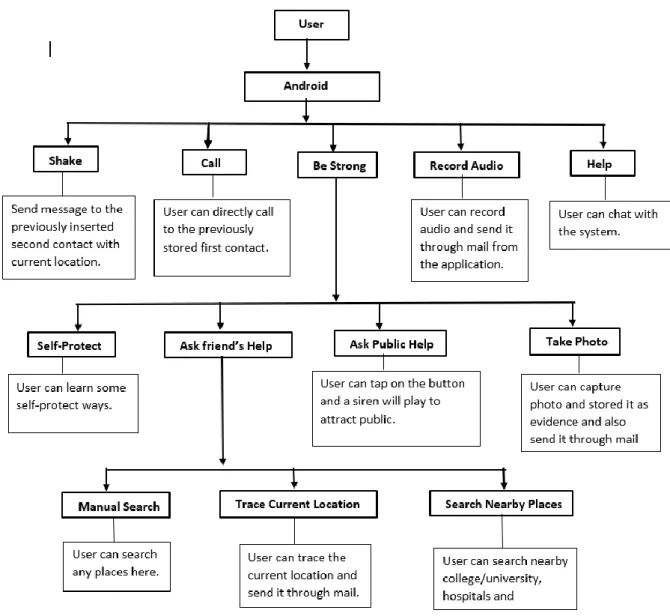
Figure 3.4: General Methodology Diagram 10
Figure 4.1.1: User Login 13
Figure 4.1.3: View Action Page 14
Figure 4.1.4: Be Strong Page 15
Figure 4.1.5: Audio Record Page 16
Figure 4.1.6: Navigation Bar 17
Figure 4.1.7: About Us 18
Figure 4.1.8: Settings Page 19
Figure 4.1.9: Help Page 20
Figure 4.1.10: Location Page 21
Figure 4.1.11: Ask Public Help 22
Figure 4.1.12: Self-Protect Page 23
Figure 4.1.13: Use Something for Protect 24
Figure 4.1.14: Kick & Hit to Protect 25
Figure 4.1.15: Shout & Make Crowd 26
©Daffodil International University
Figure 4.1.16: Punch or Slap to Protect 27
Figure 4.1.17: Spray Can Damage Eyes 28
Figure 5.1: Data Implementation Figure 6.1.1: Plagiarism Report
30 35
CHAPTER 1 Introduction
1.1 Introduction
Android is first complementary and most widely used mobile operating system and platform that has earned much popularity.
Security related Woman Security System is a security related android application specially designed for women in emergency. Everyday user of smartphone is increasing and surprisingly it is increasing rapidly. The number of applications that are available in a smart phone is high and ‘Woman Security System’ will be one of those. It is a personal security application which has been developed to keep women safe 24/7.
It has so many features and all the features are packed for regular use in emergencies. It is a user-friendly application and can be used by anyone by installing it in their phones.
The core intention is to provide the user a fast and easy way to ask for help whenever it is necessary.
The key features of the application are- i. Calling pre-set contacts
ii. Sending message to pre-set contacts iii. Sending email
iv. Collecting evidence by capturing pictures v. Recording Audio
vi. Searching nearest location for help vii. Self-learning
viii. An alarming sound ix. A simple chatbot
©Davf.fodiNl IanvteigrnaatitoionnaBlaUr:niWvehresnityuser click on the navigation bar she can have three
1.2 Motivation
.In Bangladesh, women are facing so many problems regarding security. In our group we are three members and we are also women. We three have to go out and travel on public transport regularly. And truly we also have faced such problems. From our personal experiences and studies on this issue we three have decided to develop an application which helps a woman in necessity and this ‘Woman Security System’ is being designed and developed.
1.3 Objectives
The first and foremost quest of the project is to provide highly effective security related app for the safety of women. The plan of the application is to design a woman tracing process based on GPS within a low cost. Basically, the main motive of the system is to trace current location of the user who is in danger.
1.4 Expected Outcome
After passing maximum part of feasibility case study, we are in a stage that we could imagine.
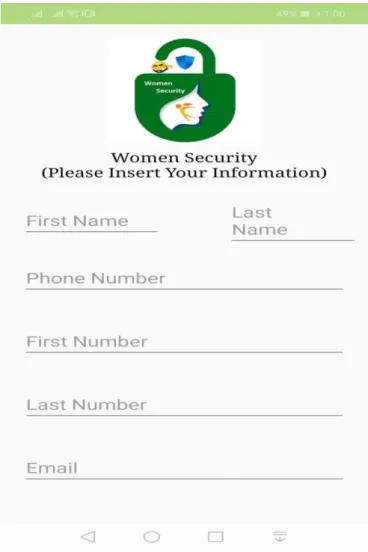
User Sign Up: The user will insert basic information along with two trustable contacts she wants to ask for help later.
Usable Features:
i. Shake: When user shake the phone, the system will send a message that “she is in danger” to the previously saved number.
ii. Call: When user tap on the call button the system will call to the previously saved number.
iii. Be Strong: When user tap on this button she will see some more features like ‘take photo’, ‘ask friend for help’, ‘ask public help’, ‘self-protect’ and ‘send email’.
iv. Record Audio to Trace: When user tap on this button she will see a surface where she can record audio as well as she can store it as an evidence and also send it over email from the app.
choices-
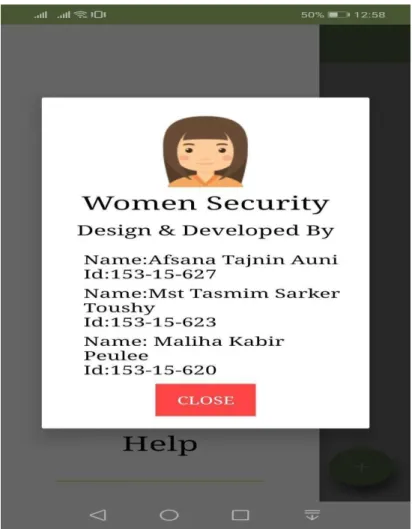
1. About Us: Here, a user can see the information about the developers of the app. Our name and student id is being displayed here.
2. Settings: Here, a user can see the information that she has inserted while opening the app as well as she can update the information form there.
3. Help: Here, a user can chat with a simply modified chatbot.
©DWafefohdaivl eInttreierndaotiuornbael sUt ntoivmeraskiteythe application smooth and user friendly. In spite
CHAPTER 2 Background
2.1 Introduction:
In this chapter, we will try to give an overall idea about the background work of the project
“Women Security System”.
To develop such a system, a huge quantity and variety of knowledge is required to meet the expected outcome. A ton of researches is required in such development. There have been uncountable challenges to unravel.
We have seen lot of works about the idea and we collected the lacking of each work and after that we have decided what will be the best work that we should we do.
2.2 Related Works:
There are several applications found on Internet. They serve more likely equivalent dimensions too. More or less every works are same and there is no significant differences.
Such applications are-
• Women Safety
• Chilla
• Femme
Women Safety: Women Safety app has features like- sending location, audio to preset numbers and mail but these features do not work properly moreover it has no call option.[1]
Chilla: Chilla works when a woman shouts loudly or scream and then it tracks the location and send message. Basically, if any loud sound occurs it will work so it has this limitation.
Femme: Femme is basically a hardware and it is costly and difficult to find.[2]
2.3 Comparative Studies:
of this, our Women Security System have both advantages and disadvantages.
They are-
Advantage:
1. Our system is developed for women security purposes.
2. It’s an android based application.
3. It is user friendly.
Disadvantage
:1. To use the application internet availability is must.
©Daffodil International University
2.3 Recognizing Multiple Viewpoint
Different stakeholders perform totally different actions. Stakeholder’s read purpose 1. User friendly System.
2. Error free System.
2.4 Challenges
We faced few challenges while developing the project as the concept was a bit challenging. The main challenge was to use the google map in our app. As android has made so many restrictions and permissions so we faced difficulties to overcome these.
However, thanks to the Almighty “Allah” that we have successfully completed our project.
CHAPTER 3
Requirement Specification 3.1 Requirement Collection and Analysis
For generalizing our application, we have to define all categories of the current women security system Applications. To develop such a system, a huge amount of information is needed to predict and figure out all the expectation that will occur.
Strategies for e-learning differ from platform to platform. These differences are amplified in different stages. So, lot of researches is needed in such development.
Foremost an efficient plan was needed. There were lots of challenges to solve. Here is the technical requirement of our system.[4]
3.1.1 Server Requirement
Android Studio, Java, Java Script, PHP J Query
A JavaScript library which is rich featured, quick to use and small is termed as J Query. It makes things like hypertext markup language, event handling, animation, And Ajax abundant less complicated with an API which is easy to use works across a large number of browsers.
JavaScript
A mostly used scripting language is called JavaScript. All the codes of JavaScript are written into an HTML page. When a user needs to call a HTML page he/she sends request to the browser with the script then script gets distributed and browser shows the result to the user.
©Daffodil International University Java
Java is the widely used artificial language to design or work for android development system. Java provides network to use an application or system not only on one laptop but also on numerous laptops at a time. It is basically a platform to use for designing or developing any application.
Android Studio
Android Studio is that the official integrated development atmosphere (IDE) for Google's mechanical man software system, designed on Jet Brains' IntelliJ plan software system and designed specifically for mechanical man development. It’s obtainable for transfer on Windows, mac OS and operative system primarily based operating systems. It is a replacement for the Eclipse mechanical man Development Tools (ADT) because the primary IDE for native mechanical man application development.
PHP
PHP stands for Hypertext Preprocessor. It is originally designed for web development. It was created by Rasmus Lerdorf in 1994. But now The PHP Group produced the php reference implementation. PHP originally stood for Personal Home Page, but it now stands for the recursive initialize PHP: Hypertext Preprocessor. PHP code could be executed with a command line interface (CLI), embedded into HTML code, or it can be used in combination with various web template systems, web content management systems, and web frameworks. PHP code is usually processed by a PHP interpreter. It is implemented as a module in a web server or as a Common Gateway Interface (CGI). The web server combines the results of the interpreted and executed PHP code, which may be any type of data, including images, with the generated web page. PHP can be used for many programming tasks outside the web context, such as standalone graphical applications and robotic dronecontrol.
User
System
3.2 Use Case Modeling and Description
In order to describe the system’s functionality in a systematic way we use UML diagram or use case diagram. It shows the process of a system horizontally.
3.3 Use Case Model (User & System)
The preliminary form of an underdeveloped software is termed as Use Case diagram.
Use case diagram shows the behavior of what happen not how. After specification use cases can be marked both as a textual way and a visual way. The main benefit of a use case diagram that it helps us to think and see from user’s perspective and thus it becomes easier to develop the system.
©Daffodil International University
3.4 General Methodology
Fig 3.5: General Methodology Diagram.
3.5 Design Requirements
Design requirement is the front-end view of our system. While developing our security system we have kept in mind that, we need to reach our goal with designing the system by the following criteria:
1. Make the app easy for user.
2. Make the app compatible.
3. Efficiency 4. Easy to access 5. Searching
6. Optimize performance 7. Maintain security
©Daffodil International University
CHAPTER 4 Design Specification
4.1 Front-end-Design:
Front-end design is basically the front view of our system that can be viewed by a user.
.
User Interface (UI)
In order to make the UI interesting and smooth we have used these following - Java Scripts
J Query
Tables, Button, Forms, Images Button group
Dropdown
Environment Setup Navigation
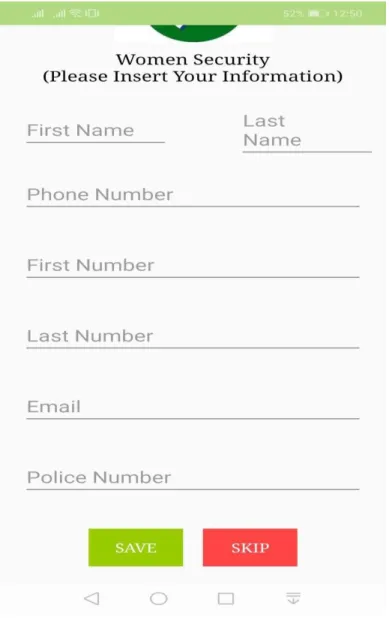
4.1.1 User Login
After installing the application User needs to fill up the information form.
While inserting information user must provide two number along with a valid email.
Fig 4.1.1: User Login
©
4
D.
a1
f.
f3
odB
ile
InS
tet
rr
no
an
tig
onal University4.1.2 View Actions
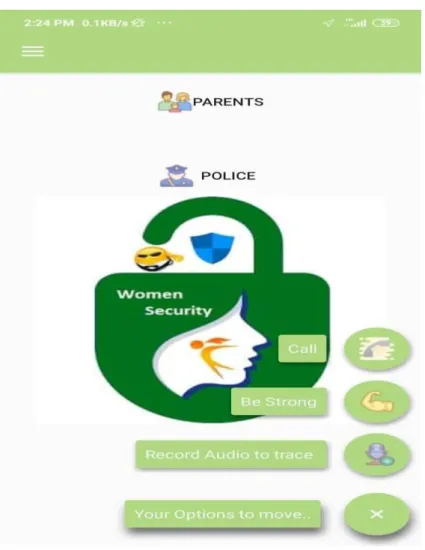
At first a user can see- Parents, Police and floating bIn View Action a user has three options to choose. Like-
1. Call 2. Be Strong
3. Record audio to trace
Fig 4.1.2: View Action Page
In this page a user has 5 options to choose. They are- 1. Take photo
2. Ask your friend for help 3.Ask public help
4.Self-protect 5.Email
Fig 4.1.3: Be Strong Page
©Daffodil International University
4.1.4 Record Audio to Trace
Here a user can see a button through which she can start recording as well as send the record audio through email.
Fig 4.1.4: Audio Record Page
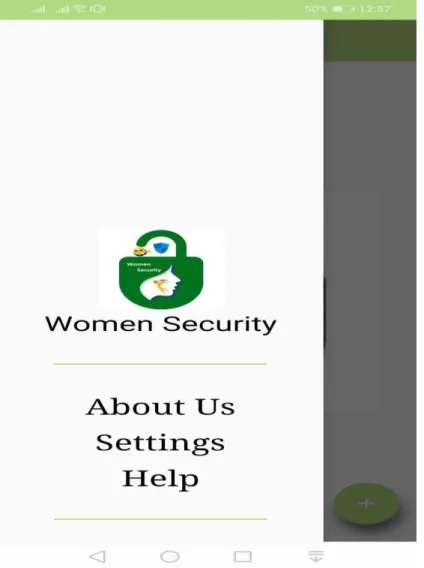
4.1.5 Navigation Bar
When a user clicks on the navigation-bar she can see options. Like- About Us, Settings
&
Help.
Fig 4.1.5: Navigation Bar
©Daffodil International University
Here a user can see the information about us and can know that we have designed and developed the application
Fig 4.1.6 About Us
4.1.7
Settings:
A user can update her inserted information here as she can see the login form here.
Fig 4.1.7: Settings Page
©Daffodil International University
4.1.8 Help
There is a chatbot in this option and user can chat with the chatbot from here.
4.1.8 : Help Page
4.1.9 Ask Your Friend for Help
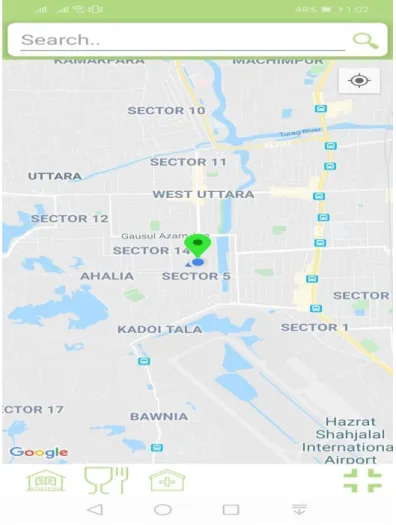
A user can track her current location and send it through mail. Even, she can search nearby hospital, school/college/University, restaurants or any
place she want.
Fig 4.1.9: Location Page
©Daffodil International University
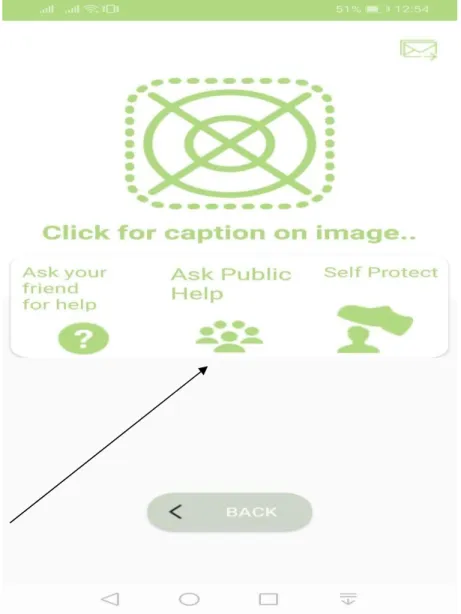
4.1.10 Ask public help
User can see three options and can ask public for help through pressing the buzzer.
Fig 4.1.10: Ask Public Help
4.1.11 Self-Protect
User can learn techniques of self-protection from this page. Like- 1. Use something to protect
2. Kick and hit to protect 3. Shout and make crowd 4. Punch or slap to protect 5. Spray can damage eyes
Fig 4.1.11: Self-Protect Page.
24
it to Protect
niversity
4.1.12 Use Something to Protect
User can learn what type of things she should carry to protect herself from any dangerous situation.
Fig 4.1.12: Use Something for Protect.
4.1.13 Kick and H
©Daffodil International U
User can learn what she should do when it time to hit the attacker and also new techniques.
Fig 4.1.13: Kick & Hit to Protect.
©Daffodil International University
4.1.14 Shout and Make Crowd
If there is no way to fight or run from any dangerous situation what are the steps user can take, is basically described here.
Fig 4.1.14: Shout & Make Crowd.
4.1.15
Punch or Slap to Protect
Fig 4.1.15: Punch or Slap to Protect.
User can learn how to protect herself by punching or slapping when a attacker attacks her.
4.1.16 Spray can Damage Eyes
User can learn what weapons she can carry with her for self-protection. Like-Pepper
©Daffodil International University
Fig 4.1.16: Spray Can Damage Eyes.
4.2 Interaction Design
Our system is going to help women. As now-a-days women are facing difficulties and bad situation on their way of life. Our system will provide security service to them. We can ensure that our system will provide the service with quality and accuracy. User can find friendly, smooth and interacting user interface.
As a woman stays connected with her friends & family through the app, can feel secured and enjoy her daily life without any fear.
©Daffodil International University
CHAPTER 5
Implementation and Testing 5.1 Implementation of Data:
Data implementation is a very important part of any project. It provides information to pages when they call it. Here is screenshot of –
Fig 5.1: Data Implementation.
5.2 Implementation of Interactions
Interaction means actions between two things. In our system, the interaction between a database and the design is a pathway of JavaScript. For server site we use JS. The interaction is very fast and smooth.[5]
5.3 Testing Implementation
5.3.1 Theme Unit Testing
In software development there is a process called Unit Testing. In Unit Testing, we test the
smallest portion of an application. Unit testing is being done individually and independently
for every portion. The testing can be done manually and often it can be done automatically.
We have tested our project’s every single portion and finally we have made it done.
©Daffodil International University
5.4 Test Result and Reports
For testing a system is a formal way test report is generated. It gives a way to justify each and every small parts of the system. In order to make a system efficient testing is needed. It makes the system more accepted to the users. Again, the developers need to know where they need to work more to make the system perfect. A generated test report describes the environment mental condition and shows the test outcomes.
In order to develop an ideal “Women Security Application” we need to test some portions like-
• Performance Testing
• Usability Testing
• Search Result Analysis
• Shake Testing
CHAPTER 6
Limitations and Future Scope
6.1 Limitations and Conclusion
We are very proud to announce that, the system we tend to develop is going to be used for varied system. With the time and progress our system is going to be more helpful application.
In spite of having lots of advantages the system has some limitations as well. We have used free google map API and it has a time period. There is one more limitation of our system which is actually related to google map that we can take screenshot from app but as the API is a free version it does not work properly.
But we can assure that this will be an outstanding project with the passage of time.
6.2 Scope for Further Developments
After developing the project, we are going to show it as our final year project and then we
will place it into some smart use in future. We hope with the quantity of time our system is
going to be used everywhere around the country.
We have planned to improve the limitations like- 1. Use paid google API
2. Update Chatbot
3. Implement a hardware of the project
©Daffodil International University
Reference:
[1] topyaps.com, available at << https://topyaps.com/chilla-app-women-safety/>> [last accessed on 16-11-2019 at 11.00 am].
[2] researchGate.com, available at<<
https://www.researchgate.net/publication/Women_safety_device_and_application-FEMME
>> [Last accessed on 21-11-2019 at 11.50am].
[3] daffodilvarsity.edu.bd, available at
<<https://sites.google.com/daffodilvarsity.edu.bd/picsediu/downloads/>> [Last accessed on 18-11-2019 at 10.20am].
[4] ijsetr.org, available at << http://ijsetr.org/wp-content/uploads/2017/08/IJSETR-VOL-6- ISSUE-8-1241-1243.pdf>> [Last accessed on 19-11-2019].
[5] ijesc.org, available at
<<http://ijesc.org/upload/4c1bdc0297527339c6423e7045879c94.An%20Android%20Based
%20Application%20for%20Women%20Security.pdf>> [Last accessed on 10-11-2019].
Plagiarism Result:
Plagiarism result of our project is:
Fig 6.1.1: Plagiarism Report.