PORTABLE WIRELESS CLOUD STORAGE
UMAR ARRASYID BIN AHMAD ZABIDI
ii BORANG PENGESAHAN STATUS TESIS*
JUDUL: Portable Wireless Cloud Storage SESI PENGAJIAN: 2014/2015
SAYA UMAR ARRASYID BIN AHMAD ZABIDI
mengaku membenarkan tesis (PSM) ini disimpan di Perpustakaan Fakulti Teknologi Maklumat dan Komunikasi dengan syarat-syarat kegunaan seperti berikut:
1. Tesis dan projek adalah hakmilik Universiti Teknikal Malaysia Melaka. 2. Perpustakaan Fakulti Teknologi Maklumat dan Komunikasi dibenarkan
membuat salinan untuk tujuan pengajian sahaja.
3. Perpustakaan Fakulti Teknologi Maklumat dan Komunikasi dibenarkan membuat salinan tesis ini sebagai bahan pertukaran antara institusi pengajian tinggi.
4. **Sila tandakan (/)
_______ SULIT (Mengandungi maklumat yang berdarjah keselamatan atau kepentingan Malaysia seperti yang termaktub di dalam AKTA RAHSIA RASMI 1972)
_______ TERHAD (Mengandungi maklumat TERHAD yang telah ditentukan oleh organisasi/badan di mana penyelidikan dijalankan)
________ TIDAK TERHAD
(TANGDATANGAN PENULIS) (TANDATANGAN PENYELIA) Alamat tetap:_________________
Nama Penyelia
Tarikh:_______________________ Tarikh:______________________
Catatan: *Tesis bermaksud sebagai Laporan Akhir Projek Sarjana Muda (PSM)
iii PORTABLE WIRELESS CLOUD STORAGE
UMAR ARRASYID BIN AHMAD ZABIDI
A project report submitted in partial fulfillment of the requirements for the award of Bachelor of Computer Science (Computer Networking) with Honour
FACULTY OF INFORMATION AND COMMUNICATION TECHNOLOGY UNIVERSITI TEKNIKAL MALAYSIA MELAKA
iv DECLARATION
I hereby declare that the project report entitled PORTABLE WIRELESS CLOUD STORAGE
I hereby certify that this report is my own work and are based on law under the rules set forth Universiti Teknikal Malaysia Melaka (UTeM). It is based from the original project was done by me and it is my own work without copying any source except some of the parts each of which had me explain the source.
STUDENT : _________________________ Date: _______________ (UMAR ARRASYID BIN AHMAD ZABIDI)
v DEDICATION
vi ACKNOWLEGDEMENT
A million thanks to Dr. Norharyati Binti Harum for helping and guidance me through endless obstacles, Alhamdulillah for one it seem an impossible task of developing an Raspberry Pi based hardware and software even though I never learned to make one, but now it just a small matter. The true success of beating the odds really pushes my knowledge boundary even further. Nothing is impossible.
vii ABSTRACT
viii ABSTRACT
ix TABLE OF CONTENTS
CHAPTER SUBJECT PAGE
DECLARATION iv
DEDICATION v
ACKNOWLEGDEMENT vi
ABSTRACT vii
ABSTRAK viii
TABLE OF CONTENTS ix
LIST OF TABLES xii
LIST OF FIGURES xiii
LIST OF ABBREVIATIONS xviii
CHAPTER I INTRODUCTION
1.1 Project Background 1
1.2 Problem Statement 3
1.3 Project Question 3
1.4 Project Objective 4
1.5 Scope 4
1.6 Project Significance 6
1.7 Conclusion 6
CHAPTER II LITERATURE REVIEW
x 2.2 Previous Work/Related Work 8
2.2.1 Cloud Storage 8
2.2.2 Wireless Personal Area Network (WPAN)
9
2.2.3 Raspberry Pi 9
2.2.4 Raspberry Pi Cloud Storage 10 2.3 Critical Review of current problem and
justification
13
2.4 Proposed Solution/further project 18
2.5 Conclusion 20
CHAPTER III METHODOLOGY
3.1 Introduction 21
3.2 Methodology 21
3.2.1 System Development Approach
21
3.2.2 Planning 22
3.2.2.1 Software Requirement 22 3.2.2.2 Hardware Requirement 30
3.2.3 Analysis 32
3.2.4 Design 33
3.2.5 Implementation 34
3.2.6 Testing 34
3.3 Project Milestones 36
3.3.1 Activity Details and Duration 36 3.3.2 Gantt Chart of project 38
3.4 Conclusion 39
CHAPTER IV DESIGN
4.1 Introduction 40
4.2 Network System Architecture 41 4.3 Logical and Physical Design 42
xi
4.3.2 Physical Design 43
4.4 Possible Scenarios 45
4.5 Metric Measurement 47
4.6 Conclusion 49
CHAPTER V IMPLEMENTATION
5.1 Introduction 50
5.2 Environment Setup 50
5.2.1 Hardware Setup 51
5.2.2 Software Setup 54
5.3 Conclusion 74
CHAPTER VI TESTING AND ANALYSIS
6.1 Introduction 75
6.2 Simulation Overview 76
6.3 Analysis and Result 78
6.4 Conclusion 87
CHAPTER VII PROJECT CONCLUSION
7.1 Introduction 88
7.2 Project Summarization 88
7.3 Project Contribution 91
7.4 Project Limitation 92
7.5 Future Works 92
7.6 Conclusion 93
xii LIST OF TABLES
TABLES TITLES PAGE
1.1 Summary of Problem Statement 3
1.2 Summary of Project Question 3
1.3 Summary of Project Objective 5
2.1 Raspberry Pi Model B+ specification 10 2.2 Summary of previous research title with purpose,
description and problem
16
3.1 The details activities of each phase 35 3.2 Activity details and duration of each phase 36
3.3 Gantt chart of the project 38
xiii LIST OF FIGURES
FIGURES TITLES PAGE
2.1 Example of commercial cloud storage 8 2.2 Wireless Personal Area Network (WPAN) 9 2.3 Wireless device that can connect and interact with
Raspberry Pi in WPAN
11
2.4 The basic purpose or aim of the Portable Wireless Cloud Storage
12
2.5 Smart Home Using Wireless Sensor Network and Android Powered Devices by Azfar 'Aizat bin Mohd Isa
13
2.6 The hardware used in Smart home Using Wireless Sensor Network and Android Powered Devices
14
2.7 Pi Cloud stack consisting of 56 raspberry pi. 14 2.8 Experimental model of Low Power NAS and Cloud
drive network diagram overview
15
2.9 Experimental model of Low Power NAS and Cloud Drive based on Raspberry Pi hardware setup
16
2.10 Proposed project for Portable Wireless Cloud Storage 18 3.1 Win32 Disk Imager running on Windows 8.1 22 3.2 ownCloud accessible by web browser 23 3.3 Seafile is an alternative solution for ownCloud that
also can be accessible by web browser
24
3.4 Webmin configuration page, user can use Webmin to install unix service and application packages
xiv 3.5 Raspberry Pi Cloud Storage have a client and server
side scripting
26
3.6 Windows 8.1 Pro Media Center 27
3.7 Raspbian Wheezy running on Raspbian Pi 28 3.8 MySQL Database used for storing user's credential 29 3.9 Core item for Portable Wireless Cloud Storage 30 3.10 Three type of cloud software used in the project 32 3.11 Overall design for Portable Wireless Cloud Storage. 33
4.1 Overall architecture design for Portable Wireless Cloud Storage.
41
4.2 Logical diagram which depicted the Personal Area Network devices can access three type of cloud software
42
4.3 Physical diagram which depicted a more visual details of the Portable Wireless Cloud Storage networking information
43
4.4 Response time is measure when user initiate an http request query for which the cloud will query a response.
45
4.5 Data transfer rate is measure in uploading and
downloading a fixed size data from the cloud software to the user and back
46
4.6 Example of response time graph and data on MySQL Server Query
47
4.7 Example of data transfer rate in a hardware side. The real measurement will be measure in cloud software
48
5.1 Entire hardware setup for configuring and testing Portable Wireless Cloud Storage
51
5.2 Portable Wireless Cloud Storage hardware setup (side view)
52
5.3 Portable Wireless Cloud Storage hardware setup (top view)
52
xv 5.5 Exterior view of the Portable Wireless Cloud Storage 54 5.6 Booting Raspbian Wheezy into SD card using
Win32Disk tool
54
5.7 Raspi-config setting after successful first boot. 55
5.8 Raspbian Wheezy main interface 56
5.9 Connecting to local wireless access point 56 5.10 PuTTy software using SSH for remote configuration 57 5.11 Successful connection from Windows to Raspberry Pi 57
5.12 Get update for Raspberry Pi 58
5.13 Command for installing NTFS format 58 5.14 Mounting folder serverHDD at startup with assigning
permission
58
5.15 Login page to Webmin configuration 60
5.16 Webmin main interface 60
5.17 The folder designated to mount is listed in Disk and Network File system indicating it already mount
61
5.18 Installing MySQL using Webmin service 62 5.19 MySQL Database Server where ownCloud's database
is stored
62
5.20 Creating a new database in MySQL Database Server 63 5.21 Assigning user permission to ownCloud database 63 5.22 Create a new user for ownCloud. This user will act as
administrator
64
5.23 PHP is required as part as ownCloud software requirement
65
5.24 Downloading and installing ownCloud using Webmin’s Software Package
65
5.25 ownCloud installation successful 66
5.26 Creating a folder that will served as ownCloud directory
66
5.27 ownCloud first initial page right after key-in the web address
67
xvi 5.29 ownCloud first time authentication page and main
interface
68
5.30 Download Seafile package from the website server 68 5.31 Create a new directory for Seafile 68 5.32 Unzip the Seafile package and execute setup script 69 5.33 Download and install python script as dependency
software
69
5.34 Execute the seafile.sh and seahub.sh for the first time 70 5.35 Service that need to run in order to access Seafile 70 5.36 Seafile authentication page. Insert user's mail and
password here
71
5.37 Seafile homepage for user 'umar' 72
5.38 Java script for FileServer is running 72 5.39 Client program is running on client's computer 73
6.1 Data transfer rate simulation overview. User upload and download a fixed size file
76
6.2 Test.mp3 file are used to upload and download for all three cloud software testing
77
6.3 Response Times simulation overview. User request query to server and expected a response query
78
6.4 Raspberry Pi Cloud Storage upload and download data transfer rate
79
6.5 Graph generate by NetMeter Evo indicating a data rate spike
79
6.6 ownCloud upload and download data transfer rate 80 6.7 Graph generate by NetMeter Evo for ownCloud data
transfer rate
80
6.8 Seafile upload and download data transfer rate 81 6.9 Graph generate by NetMeter Evo for Seafile data
transfer rate
81
6.10 Cloud software upload and download data transfer rate comparison
83
xvii
6.12 Response times for Seafile 84
6.13 Response times for ownCloud 85
6.14 Bar chart comparison of average response times for three cloud software
xviii LIST OF ABBREVIATIONS
SoC - System on Chip
USB - Universal Serial Bus
HDMI - High-Definition Multimedia Interface
OS - Operating System
iOS - Iphone Operating System
IT - Information Technology
NAS - Network Attach Storage
SDLC - System Development Life Cycle
SD - Secure Digital
RAM - Random Access Memory
AMD - Advance Micro Device
MB - Megabit
GB - Gigabit
TB - Terabit
OTG - On The Go
VGA - Video Graphic Array
mAH - milli Ampere Hour
SATA - Serial Advanced Technology Attachment
RPM - Round Per Minute
SSH - Secured Socket Shell
NMS - Network Monitoring Software PAN - Personal Area Network
LAN - Local Area Network
WAN - Wide Area Network
xix HDTV - High Definition Television
WiFi - Wireless Fidelity
NTFS - New Technology File System (Windows NT)
HDD - Hard Disk Drive
CPU - Central Processing Unit APT - Advanced Packaging Tool TCP - Transfer Control Protocol SDK - Software Development Kit
MBPS - Megabit Per Second
KBPS - Kilobit Per Second
DTR - Data Transfer Rate
HTTP - HyperText Transfer Protocol
MS - Millisecond
1 CHAPTER I
INTRODUCTION
1.1 Project Background
A cheap alternative, ultra-low power consumption and portability of a flexible cloud storage is one of the main requirement for this project. A wireless cloud storage that free from constraint by having a wired all around it and the ability to be carry anywhere and anytime. Raspberry Pi is the suitable hardware to develop a small, power independent, portable and lightweight cloud storage solution. Having a hard disk, Solid State Disk or even flash drive with atrocious electric usage and third party hardware might be the thing in the past. Portable Wireless Cloud Storage is the penultimate solution for home streaming, data storage and much more to come.
2 trying to produce a $39 (approximately RM170) computer specifically designed to show young people what’s inside and to inspire them to write programs to, say, control a microwave oven, manipulate a thermostat, or even create their own video a game. The Raspberry Pi Model B+ [2] is powered by Broadcom SoC running at 700MHz, 512MB soldered on top of the Broadcom chip, 4 USB ports, HDMI port, network port and 3.5mm audio jack. Basically it’s a small fully equipped and ready to use small form factor personal computer. Raspberry Pi is also OS independent which mean it can be used on any Linux operating system such Raspbian Wheezy, Debian OS, Turnkey Linux and etc. A small customizable microcomputer combine with open source capability make this electronic a widely known among tech enthusiastic.
Cloud Storage [3] is a service where data is remotely maintained, managed, and backed up. The service is available to users over a network, which is usually the internet. It allows the user to store files online so that the user can access them from any location via the internet which in this case, a physical device that stored a local data via some sort of Personal Area Network (PAN) made entirely from Raspberry Pi microcomputer. The files can be read and stream to devices capable of receiving a wireless signal from the Raspberry Pi. User can browse, read and write the files, audio, video in real-time environment without having the need to connect to internet 24 hours a day, it’s basically is an offline solution of Do-It-Yourself alternative to Dropbox, Google Drive and vice versa.
3 1.2 Problem Statement
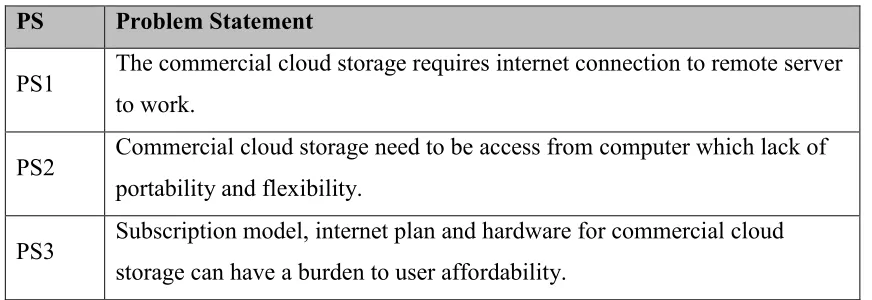
Table 1.1 show the summary of the problem statement.
Table 1.1: Summary of Problem Statement PS Problem Statement
PS1 The commercial cloud storage requires internet connection to remote server to work.
PS2 Commercial cloud storage need to be access from computer which lack of portability and flexibility.
PS3 Subscription model, internet plan and hardware for commercial cloud storage can have a burden to user affordability.
1.3 Project Question
Research Question (PQ1, PQ2 and PQ3) are found based on Problem Statement (PS1, PS2 and PS3). Project question are constructed to identify the problem statement as described in Table 1.2.
Table 1.2: Summary of Project Question PS PQ Project Question
4 PS2 PQ2 How to develop a portable wireless cloud storage using
raspberry pi microcomputer?
PS3 PQ3 Can free, open source and cheap alternative raspberry pi cloud storage solve user’s affordability in long run?
1.4 Project Objective
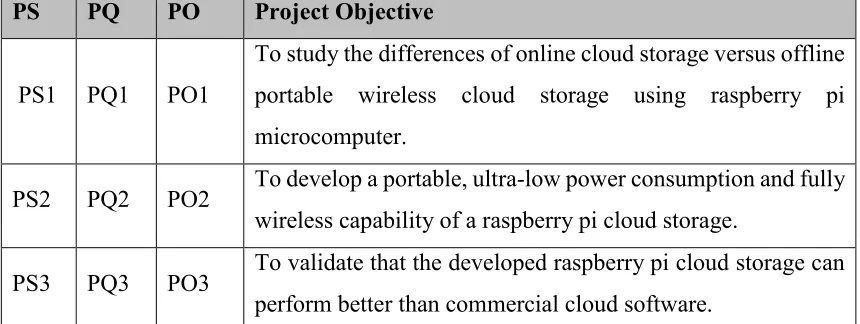
There are three project objective identified for this project which are listed as below and Table 1.4 summarize the objective that can be achieve at the end of this project.
PO1: To study the differences of online cloud storage versus offline portable wireless cloud storage using raspberry pi microcomputer.
This particular study is to shown the fundamental differences between online cloud storage and offline portable wireless cloud storage using raspberry pi microcomputer in term of user’s need.
PO2: To develop a portable, ultra-low power consumption and fully wireless capability of a raspberry pi based cloud storage.
This analysis is to develop a portable wireless cloud storage that can be carry around anywhere and access anytime while maintaining a portable form factor and low energy consumption will suffice the user’s need for offline Portable Wireless Cloud Storage.
5 This study is to validate the custom build cloud software against the third party cloud software in term of performance. The performance metric will be measured in term of data transfer rate and response time. Comparison will be made after all the data have been gathered.
Table 1.3: Summary of Project Objective
PS PQ PO Project Objective
PS1 PQ1 PO1
To study the differences of online cloud storage versus offline portable wireless cloud storage using raspberry pi microcomputer.
PS2 PQ2 PO2 To develop a portable, ultra-low power consumption and fully wireless capability of a raspberry pi cloud storage.
PS3 PQ3 PO3 To validate that the developed raspberry pi cloud storage can perform better than commercial cloud software.
1.5 Scope
The scope of this research for this project are focus on:
1. This project will make use of Raspberry Pi microcomputer advantage of physically small, lightweight and form factor to able to use as portable cloud storage.
2. For this project, the raspberry pi must be able to be access, stream and stored data wirelessly across multiple devices.