Disini kita bisa mengggunakan perangkat lunak untuk
penyelesaian masalah Sinyal-Sistem dengan bahasa pemrograman seperti:
- C
- Delphi
- Java
- Matlab
- Matcad
- dll
Penggunaan Perangkat Lunak untuk Simulasi
Kita pilih salah satu
dalam pelatihan ini
Perintah Help
> > help sin
SI N Sine.
SI N(X) is the sine of the elements of X.
1. Memulai suatu operasi aritmatika
Menghitung volume pada suatu bola dengan jari-jari r= 2.
Anda ingat bahwa persamaan matematik untuk volume suatu bola dengan jari-jari r adalah:
Volume = (4/ 3)
π
r3Anda dapat menyelesaikan dengan mengetik seperti berikut:
3. Bentuk Input
r= 0;
while r< 10
r= input('Masukkan nilai radius: ');
if r< 0,break,end
vol= (4/ 3)* pi* r^ 3;
fprintf('Volume= % 7.3f\ n',vol)
end
5. Membuat Fungsi
Buat fungsi demof_.m dengan mengetik seperti berikut: function y= demof_(x)
y= (2* x.^ 3 + 7* x.^ 2 + 3* x-1)./ (x.^ 2-3* x + 5* exp(-x));
Untuk memanggilnya: x= 0: 1: 10;
y= demof_(x); y
Buat fungsi kedua sbb:
function [ mean,stdv] = mean_stdv(x) n= length(x);
mean= sum(x)/ n;
stdv= sqrt(sum(x.^ 2)/ n-mean.^ 2);
6. Membuat Grafik
% File Name: graph_1.m n= 201;
delx= 10/ (n-1); for k= 1: n
x(k)= (k-1)* delx;
y(k)= sin(x(k))* exp(-0.4* x(k)); end
% plot(x,y)
plot(x,y,'linewidth',4)
title('Grafik yang pertama') xlabel('x'); ylabel('y');
Membuat Grafik Polar
% File Name: graph_3.m t= 0: 0.05: pi+ 0.1;
y= sin(3* t).* exp(-0.3* t); polar(t,y)
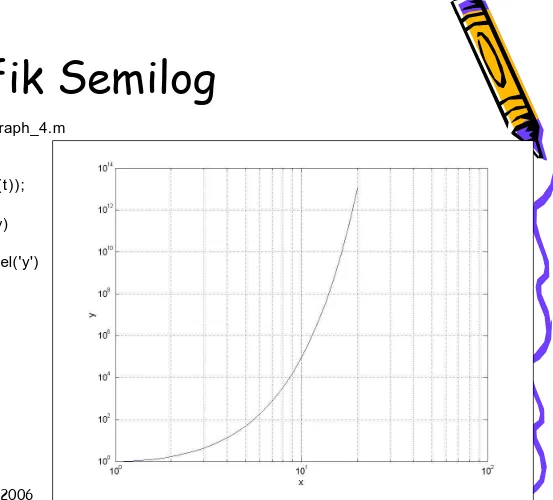
Grafik Semilog
% File Name: graph_4.m t= .1: .1: 3;
x= exp(t);
y= exp(t.* sinh(t)); loglog(x,y)
% semilogy(x,y) grid
Grafik dua fungsi
% File Name: graph_5.m x= 0: 0.05: 5;
y= sin(x); plot(x,y) hold on z= cos(x); plot(x,z,'--')
title('Penggambaran dua fungsi bersamaan') xlabel('sumbu x'); ylabel('y(x) dan z(x)')
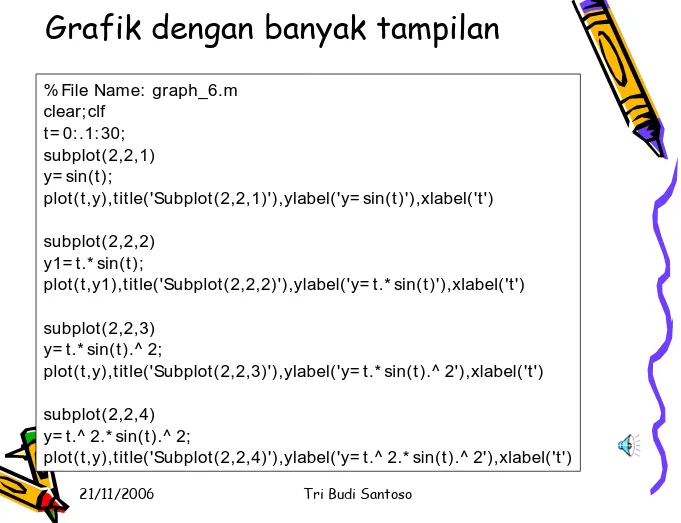
% File Name: graph_6.m
plot(t,y1),title('Subplot(2,2,2)'),ylabel('y= t.* sin(t)'),xlabel('t')
subplot(2,2,3) y= t.* sin(t).^ 2;
plot(t,y),title('Subplot(2,2,3)'),ylabel('y= t.* sin(t).^ 2'),xlabel('t')
subplot(2,2,4)
y= t.^ 2.* sin(t).^ 2;
% File Name: graph_7.m clear,clf
x_title= -2: .2: 2; y_title= -2: .2: 2;
[ x,y] = meshgrid(x_title,y_title); z= x.* exp(-x.^ 2-y.^ 2);
mesh(x,y,z)
title('3-D plot of z= x.* exp(-x.^ 2-y.^ 2)') xlabel('x'); ylabel('y'); zlabel('z');
21/11/2006 Tri Budi Santoso
% Create the figure
fig = figure('Units' , 'points' , 'Position', [ 30 30 380 230] );
% Create the axes and make it so they are cleared when clicked on ax = axes('Units' , 'points', ...
'Position' , [ 30 15 200 200] , ... 'ButtonDownFcn', 'cla');
% Change the viewing angle and cause subsequent plots to be placed % on the same axes
view(3) hold on
% Create the uicontrol pushbuttons
String = { 'Close' , 'Membrane' , 'Peaks' } ;
Call = { 'close(gcf)' , 'cla; surf(membrane)' , 'cla; surf(peaks)' } ; for lp= 1: 3,
ui(lp) = uicontrol('Style' , 'pushbutton', ... 'Units' , 'points', ...
% Notice you will get simple_gui1.m and simple_gui1.mat % To load the figure, type simple_gui1
% To save this figure to an M-file that can be called to recreate the GUI , % you can use either the line
% print(gcf,'-dmfile','simple_gui1') % or