Programmers’ manual for Free Pascal, version 2.0.0
Document version 2.0
May 2005
Contents
0.1 About this document . . . 12
1 Compiler directives 13 1.1 Local directives . . . 13
1.1.1 $Aor$ALIGN: Align Data . . . 13
1.1.2 $ASMMODE: Assembler mode (Intel 80x86 only) . . . 13
1.1.3 $Bor$BOOLEVAL: Complete boolean evaluation . . . 14
1.1.4 $Cor$ASSERTIONS: Assertion support. . . 14
1.1.5 $CHECKPOINTER: Check pointer values. . . 14
1.1.6 $DEFINE: Define a symbol . . . 15
1.1.7 $ELSE: Switch conditional compilation . . . 15
1.1.8 $ELSEC: Switch conditional compilation. . . 15
1.1.9 $ENDC: End conditional compilation . . . 15
1.1.10 $ENDIF: End conditional compilation . . . 15
1.1.11 $ERROR: Generate error message . . . 16
1.1.12 $F: Far or near functions . . . 16
1.1.13 $FATAL: Generate fatal error message . . . 17
1.1.14 $FPUTYPE: Select coprocessor type . . . 17
1.1.15 $GOTO: SupportGotoandLabel . . . 17
1.1.16 $Hor$LONGSTRINGS: Use AnsiStrings . . . 18
1.1.17 $HINT: Generate hint message . . . 18
1.1.18 $HINTS: Emit hints . . . 18
1.1.19 $IF: Start conditional compilation . . . 18
1.1.20 $IFC: Start conditional compilation . . . 18
1.1.21 $IFDEF Name: Start conditional compilation . . . 18
1.1.22 $IFNDEF: Start conditional compilation . . . 18
1.1.23 $IFOPT: Start conditional compilation . . . 19
1.1.24 $IMPLICITEXCEPTIONS: Do not generate finalization code . . . 19
1.1.25 $INFO: Generate info message . . . 19
1.1.26 $INLINE: Allow inline code. . . 19
1.1.28 $Ior$IOCHECKS: Input/Output checking. . . 20
CONTENTS
Motorola 680x0 version . . . 31
1.2.9 $G: Generate 80286 code . . . 32
1.2.10 $INCLUDEPATH: Specify include path. . . 32
1.2.11 $Lor$LOCALSYMBOLS: Local symbol information . . . 32
1.2.12 $LIBRARYPATH: Specify library path.. . . 32
1.2.13 $Mor$MEMORY: Memory sizes. . . 33
1.2.14 $MODE: Set compiler compatibility mode. . . 33
1.2.15 $N: Numeric processing . . . 33
1.2.16 $O: Overlay code generation . . . 33
1.2.17 $OBJECTPATH: Specify object path. . . 33
1.2.18 $PROFILE: Profiling . . . 34
1.2.19 $S: Stack checking . . . 34
1.2.20 $SMARTLINK: Use smartlinking . . . 34
1.2.21 $THREADNAME: Set thread name in Netware. . . 34
1.2.22 $THREADING: Allow use of threads. . . 35
1.2.23 $UNITPATH: Specify unit path. . . 35
1.2.24 $VERSION: Specify DLL version. . . 35
1.2.25 $Wor$STACKFRAMES: Generate stackframes. . . 35
1.2.26 $Yor$REFERENCEINFO: Insert Browser information . . . 36
2 Using conditionals, messages and macros 37 2.1 Conditionals. . . 37
2.1.1 Predefined symbols . . . 38
2.2 Macros . . . 38
2.3 Compile time variables . . . 39
2.4 Compile time expressions. . . 40
2.4.1 Definition . . . 40
2.4.2 Usage . . . 41
2.5 Messages . . . 45
3 Using Assembly language 47 3.1 Intel 80x86 Inline assembler . . . 47
3.1.1 Intel syntax . . . 47
3.1.2 AT&T Syntax . . . 49
3.2 Motorola 680x0 Inline assembler. . . 51
3.3 Signaling changed registers . . . 52
4 Generated code 53 4.1 Units. . . 53
8.4.3 Debugging the heap . . . 86
8.4.4 Writing your own memory manager . . . 87
8.5 UsingDOSmemory under the Go32 extender . . . 89
9 Resource strings 91 9.1 Introduction . . . 91
9.2 The resource string file . . . 91
9.3 Updating the string tables . . . 93
9.4 GNU gettext. . . 94
9.5 Caveat . . . 95
10 Thread programming 96 10.1 Introduction . . . 96
10.2 Programming threads . . . 96
10.3 Critical sections . . . 98
10.4 The Thread Manager . . . 100
11 Optimizations 102 11.1 Non processor specific . . . 102
11.1.1 Constant folding . . . 102
11.1.2 Constant merging . . . 102
11.1.3 Short cut evaluation . . . 102
11.1.4 Constant set inlining . . . 102
11.1.5 Small sets . . . 103
11.1.6 Range checking. . . 103
11.1.7 And instead of modulo . . . 103
11.1.8 Shifts instead of multiply or divide. . . 103
11.1.9 Automatic alignment . . . 103
11.1.10 Smart linking . . . 103
11.1.11 Inline routines . . . 103
11.1.12 Stack frame omission. . . 103
11.1.13 Register variables. . . 104
11.2 Processor specific . . . 104
11.2.1 Intel 80x86 specific. . . 104
11.2.2 Motorola 680x0 specific . . . 106
11.3 Optimization switches . . . 106
11.4 Tips to get faster code. . . 107
11.5 Tips to get smaller code . . . 107
CONTENTS
12.2 Creating a library . . . 108
12.3 Using a library in a pascal program . . . 109
12.4 Using a pascal library from a C program . . . 111
12.5 Some Windows issues. . . 112
13 Using Windows resources 113 13.1 The resource directive$R . . . 113
13.2 Creating resources . . . 113
13.3 Using string tables. . . 114
13.4 Inserting version information . . . 114
13.5 Inserting an application icon . . . 115
13.6 Using a pascal preprocessor. . . 115
A Anatomy of a unit file 117 A.1 Basics . . . 117
A.2 reading ppufiles . . . 117
A.3 The Header . . . 118
A.4 The sections . . . 119
A.5 Creating ppufiles . . . 120
B Compiler and RTL source tree structure 123 B.1 The compiler source tree . . . 123
B.2 The RTL source tree . . . 123
C Compiler limits 125 D Compiler modes 126 D.1 FPC mode . . . 126
D.2 TP mode. . . 126
D.3 Delphi mode. . . 127
D.4 GPC mode. . . 127
D.5 OBJFPC mode . . . 127
D.6 MAC mode . . . 128
E Usingfpcmake 130 E.1 Introduction . . . 130
E.2 Functionality . . . 130
E.3 Usage . . . 131
E.4 Format of the configuration file . . . 132
E.4.1 clean . . . 132
E.4.2 compiler . . . 132
E.4.4 Dist . . . 133
E.4.5 Install . . . 134
E.4.6 Package . . . 134
E.4.7 Prerules . . . 134
E.4.8 Requires . . . 134
E.4.9 Rules . . . 135
E.4.10 Target . . . 135
E.5 Programs needed to use the generated makefile . . . 136
E.6 Variables that affect the generated makefile . . . 136
E.6.1 Directory variables . . . 137
E.6.2 Compiler command-line variables . . . 137
E.7 Variables set byfpcmake . . . 137
E.7.1 Directory variables . . . 138
E.7.2 Target variables . . . 139
E.7.3 Compiler command-line variables . . . 140
E.7.4 Program names . . . 140
E.7.5 File extensions . . . 141
E.7.6 Target files . . . 141
E.8 Rules and targets created byfpcmake . . . 141
E.8.1 Pattern rules . . . 141
E.8.2 Build rules . . . 142
E.8.3 Cleaning rules . . . 142
E.8.4 archiving rules . . . 142
E.8.5 Installation rules . . . 142
E.8.6 Informative rules . . . 143
F Compiling the compiler 144 F.1 Introduction . . . 144
F.2 Before starting . . . 144
F.3 Compiling usingmake . . . 145
F.4 Compiling by hand . . . 146
F.4.1 Compiling the RTL . . . 146
F.4.2 Compiling the compiler . . . 147
G Compiler defines during compilation 149 H Stack configuration 151 H.1 DOS . . . 151
H.2 Linux . . . 151
H.3 Netbsd. . . 151
CONTENTS
H.5 BeOS . . . 151
H.6 Windows . . . 151
H.7 OS/2 . . . 152
H.8 Amiga . . . 152
H.9 Atari . . . 152
1.1 Formats generated by the x86 compiler. . . 25
2.1 Predefined macros. . . 39
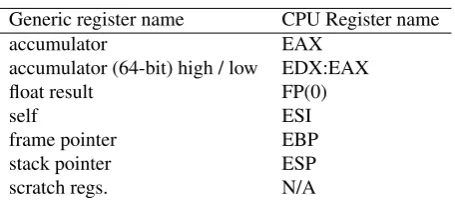
6.1 Intel 80x86 Register table. . . 59
6.2 Motorola 680x0 Register table . . . 59
6.3 Calling mechanisms in Free Pascal . . . 64
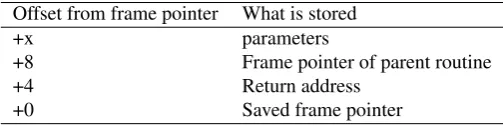
6.4 Stack frame when calling a nested procedure (32-bit processors) . . . 64
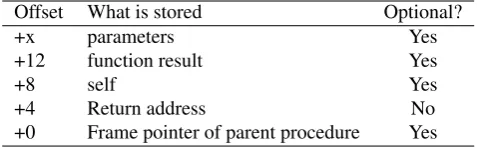
6.5 Stack frame when calling a procedure (32-bit model) . . . 66
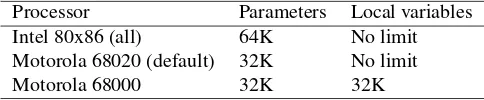
6.6 Maximum limits for processors. . . 67
8.1 Enumeration storage fortpmode . . . 79
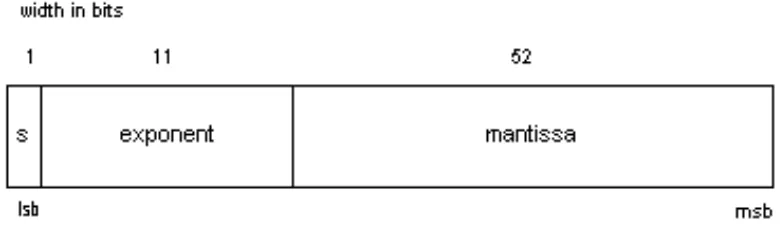
8.2 Processor mapping of real type . . . 79
8.3 AnsiString memory structure (32-bit model) . . . 81
8.4 Object memory layout (32-bit model) . . . 82
8.5 Object Virtual Method Table memory layout (32-bit model). . . 82
8.6 Class memory layout (32-bit model) . . . 83
8.7 Class Virtual Method Table memory layout (32-bit model) . . . 83
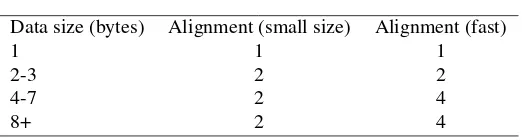
8.8 Data alignment . . . 85
8.9 ReturnNilIfGrowHeapFails value. . . 86
12.1 Shared library support. . . 108
A.1 PPU Header . . . 118
A.2 PPU CPU Field values . . . 118
A.3 PPU Header Flag values . . . 119
A.4 chunk data format . . . 119
A.5 Possible PPU Entry types . . . 120
F.1 Possible defines when compiling FPC . . . 148
G.1 Possible defines when compiling using FPC . . . 149
LIST OF TABLES
G.3 Possible defines when compiling using target OS . . . 150
0.1
About this document
This is the programmer’s manual for Free Pascal.
It describes some of the peculiarities of the Free Pascal compiler, and provides a glimpse of how the compiler generates its code, and how you can change the generated code. It will not, however, provide a detailed account of the inner workings of the compiler, nor will it describe how to use the compiler (described in theUsers guide). It also will not describe the inner workings of the Run-Time Library (RTL). The best way to learn about the way the RTL is implemented is from the sources themselves.
The things described here are useful when things need to be done that require greater flexibility than the standard Pascal language constructs (described in theReference guide).
Since the compiler is continuously under development, this document may get out of date. Wherever possible, the information in this manual will be updated. If you find something which isn’t correct, or you think something is missing, feel free to contact me1.
Chapter 1
Compiler directives
Free Pascal supports compiler directives in the source file. They are not the same as Turbo Pascal directives, although some are supported for compatibility. There is a distinction between local and global directives; local directives take effect from the moment they are encountered, global directives have an effect on all of the compiled code.
Many switches have a long form also. If they do, then the name of the long form is given also. For long switches, the + or - character to switch the option on or off, may be replaced byONorOFF
keywords.
Thus{$I+}is equivalent to{$IOCHECKS ON}or{$IOCHECKS +}and{$C-}is equivalent to{$ASSERTIONS OFF}or{$ASSERTIONS -}
The long forms of the switches are the same as their Delphi counterparts.
1.1
Local directives
Local directives can occur more than once in a unit or program, If they have a command-line counter-part, the command-line argument is restored as the default for each compiled file. The local directives influence the compiler’s behaviour from the moment they’re encountered until the moment another switch annihilates their behaviour, or the end of the current unit or program is reached.
1.1.1
$A
or
$ALIGN
: Align Data
The{$ALIGNdirective can be used to select the data alignment strategy of the compiler for the Mac OS. Only valid in MACPAS mode, it can have the following values:
MAC68K
POWER
RESET
1.1.2
$ASMMODE
: Assembler mode (Intel 80x86 only)
The{$ASMMODE XXX}directive informs the compiler what kind of assembler it can expect in an
asmblock. TheXXXshould be replaced by one of the following:
intel Indicates thatasmblocks contain Intel syntax assembler.
direct Tells the compiler that asm blocks should be copied directly to the assembler file.
These switches are local, and retain their value to the end of the unit that is compiled, unless they are replaced by another directive of the same type. The command-line switch that corresponds to this switch is-R.
The default assembler reader is the AT&T reader.
1.1.3
$B
or
$BOOLEVAL
: Complete boolean evaluation
This switch is understood by the Free Pascal compiler, but is ignored. The compiler always uses shortcut evaluation, i.e. the evaluation of a boolean expression is stopped once the result of the total exression is known with certainty.
So, in the following example, the functionBofu, which has a boolean result, will never get called.
If False and Bofu then ...
This has as a consequence that any additional actions that are done byBofuare not executed.
1.1.4
$C
or
$ASSERTIONS
: Assertion support
The{$ASSERTIONS}switch determines if assert statements are compiled into the binary or not. If the switch is on, the statement
Assert(BooleanExpression,AssertMessage);
Will be compiled in the binary. If teBooleanExpression evaluates toFalse, the RTL will check if the AssertErrorProc is set. If it is set, it will be called with as parameters the
AssertMessagemessage, the name of the file, the LineNumber and the address. If it is not set, a runtime error 227 is generated.
TheAssertErrorProcis defined as
Type
TAssertErrorProc=procedure(const msg,fname:string;lineno,erroraddr:longint); Var
AssertErrorProc = TAssertErrorProc;
This can be used mainly for debugging purposes. Thesystemunit sets theAssertErrorProc
to a handler that displays a message onstderrand simply exits. Thesysutilsunit catches the run-time error 227 and raises anEAssertionFailedexception.
1.1.5
$CHECKPOINTER
: Check pointer values
The{$CHECKPOINTER}directive turns heap pointer checking on (valueON) or off (valueOFF). When heap pointer checking is on and the code is compiled with the-gh(heaptrace) option on, then a check is inserted when dereferencing a pointer. The check will verify that the pointer contains a valid value, i.e. points to a location that is reachable by the program: the stack or a location in the heap. If not, a run-time error 216 or 204 is raised.
CHAPTER 1. COMPILER DIRECTIVES
1.1.6
$DEFINE
: Define a symbol
The directive
{$DEFINE name}
defines the symbolname. This symbol remains defined until the end of the current module (i.e. unit or program), or until a$UNDEF namedirective is encountered.
Ifnameis already defined, this has no effect.Nameis case insensitive.
The symbols that are defined in a unit, are not saved in the unit file, so they are also not exported from a unit.
1.1.7
$ELSE
: Switch conditional compilation
The{$ELSE}switches between compiling and ignoring the source text delimited by the preceding
{$IFxxx}and following{$ENDIF}. Any text after theELSEkeyword but before the brace is ignored:
{$ELSE some ignored text}
is the same as
{$ELSE}
This is useful for indication what switch is meant.
1.1.8
$ELSEC
: Switch conditional compilation
In MACPAS mode, this directive can be used as an alternative to the$ELSEdirective. It is supported for compatibility with existing Mac OS pascal compilers.
1.1.9
$ENDC
: End conditional compilation
In MACPAS mode, this directive can be used as an alternative to the$ENDIFdirective. It is sup-ported for compatibility with existing Mac OS pascal compilers.
1.1.10
$ENDIF
: End conditional compilation
The{$ENDIF}directive ends the conditional compilation initiated by the last{$IFxxx}directive. Any text after theENDIFkeyword but before the closing brace is ignored:
{$ENDIF some ignored text}
is the same as
{$ENDIF}
1.1.11
$ERROR
: Generate error message
The following code
{$ERROR This code is erroneous !}
will display an error message when the compiler encounters it, and increase the error count of the compiler. The compiler will continue to compile, but no code will be emitted.
1.1.12
$F
: Far or near functions
This directive is recognized for compatibility with Turbo Pascal. Under the 32-bit and 64-bit pro-gramming models, the concept of near and far calls have no meaning, hence the directive is ignored. A warning is printed to the screen, as a reminder.
As an example, the following piece of code:
{$F+}
Procedure TestProc;
begin
Writeln (’Hello From TestProc’); end;
begin testProc end.
Generates the following compiler output:
malpertuus: >pp -vw testf Compiler: ppc386
Units are searched in: /home/michael;/usr/bin/;/usr/lib/ppc/0.9.1/linuxunits Target OS: Linux
Compiling testf.pp
testf.pp(1) Warning: illegal compiler switch 7739 kB free
Calling assembler... Assembled...
Calling linker... 12 lines compiled,
1.00000000000000E+0000
One can see that the verbosity level was set to display warnings.
When declaring a function asFar(this has the same effect as setting it between{$F+} ...{$F-}
directives), the compiler also generates a warning:
testf.pp(3) Warning: FAR ignored
The same story is true for procedures declared asNear. The warning displayed in that case is:
CHAPTER 1. COMPILER DIRECTIVES
1.1.13
$FATAL
: Generate fatal error message
The following code
{$FATAL This code is erroneous !}
will display an error message when the compiler encounters it, and the compiler will immediatly stop the compilation process.
This is mainly useful inc conjunction wih{$IFDEF}or{$IFOPT}statements.
1.1.14
$FPUTYPE
: Select coprocessor type
This directive selects the type of coprocessor used to do floating point calculations. The directive must be followed by the type of floating point unit. The allowed values depend on the target CPU:
all SOFT: FPC emulates the coprocessor (not yet implemented).
i386 X87,SSE,SSE2: code compiled withSSEuses the sse to do calculations involving a float of typeSingle. This code runs only on Pentium III and above, or AthlonXP and above. Code compiled withSSE2uses thesseunit to do calculations with the single and double data type. This code runs only on PentiumIV and above or Athlon64 and above
x86-64 SSE64
powerpc STANDARD
arm LIBGCC,FPA,FPA10,FPA11,VFP.
This directive corresponds to the-Cfcommand-line option.
1.1.15
$GOTO
: Support
Goto
and
Label
If{$GOTO ON}is specified, the compiler will supportGotostatements andLabeldeclarations. By default,$GOTO OFFis assumed. This directive corresponds to the-Sgcommand-line option. As an example, the following code can be compiled:
{$GOTO ON}
label Theend;
begin
If ParamCount=0 then GoTo TheEnd;
Writeln (’You specified command-line options’); TheEnd:
end.
1.1.16
$H
or
$LONGSTRINGS
: Use AnsiStrings
If{$LONGSTRINGS ON}is specified, the keywordString(no length specifier) will be treated asAnsiString, and the compiler will treat the corresponding variable as an ansistring, and will generate corresponding code.
By default, the use of ansistrings is off, corresponding to{$H-}. The system unit is compiled without ansistrings, all its functions accept shortstring arguments. The same is true for all RTL units, except thesysutilsunit, which is compiled with ansistrings.
1.1.17
$HINT
: Generate hint message
If the generation of hints is turned on, through the-vhcommand-line option or the{$HINTS ON}
directive, then
{$Hint This code should be optimized }
will display a hint message when the compiler encounters it. By default, no hints are generated.
1.1.18
$HINTS
: Emit hints
{$HINTS ON}switches the generation of hints on. {$HINTS OFF}switches the generation of hints off. Contrary to the command-line option-vhthis is a local switch, this is useful for checking parts of the code.
1.1.19
$IF
: Start conditional compilation
The directive{$IF expr}will continue the compilation if the boolean expressionexprevaluates totrue. If the compilation evaluates to false, then the source is skipped to the first{$ELSE}or
{$ENDIF}directive.
The compiler must be able to evaluate the expression at parse time. This means that variables or constants that are defined in the source cannot be used. Macros and symbols may be used, however. More information on this can be found in the section about conditionals.
1.1.20
$IFC
: Start conditional compilation
In MACPAS mode, this directive can be used as an alternative to the$IFdirective. It is supported for compatibility with existing Mac OS pascal compilers.
1.1.21
$IFDEF Name
: Start conditional compilation
If the symbolNameis not defined then the{$IFDEF name}will skip the compilation of the text that follows it to the first{$ELSE}or{$ENDIF}directive. IfNameis defined, then compilation continues as if the directive wasn’t there.
1.1.22
$IFNDEF
: Start conditional compilation
CHAPTER 1. COMPILER DIRECTIVES
1.1.23
$IFOPT
: Start conditional compilation
The{$IFOPT switch}will compile the text that follows it if the switchswitchis currently in the specified state. If it isn’t in the specified state, then compilation continues after the corresponding
{$ELSE}or{$ENDIF}directive. As an example:
{$IFOPT M+}
Writeln (’Compiled with type information’); {$ENDIF}
Will compile the writeln statement if generation of type information is on.
Remark:The{$IFOPT}directive accepts only short options, i.e. {$IFOPT TYPEINFO}will not be ac-cepted.
1.1.24
$IMPLICITEXCEPTIONS
: Do not generate finalization code
The compiler generates an implicittry...finallyframe around each procedure that needs initial-ization or finalinitial-ization of variables, and finalizes the variables in thefinallyblock. This slows down these procedures (with 5-10frames can be disabled. One should be careful with this directive, because it can lead to memory leaks if an exception occurs inside the routine. Therefore, standard it is set toOFF.
1.1.25
$INFO
: Generate info message
If the generation of info is turned on, through the-vicommand-line option, then
{$INFO This was coded on a rainy day by Bugs Bunny}
will display an info message when the compiler encounters it.
This is useful in conjunction with the{$IFDEF}directive, to show information about which part of the code is being compiled.
1.1.26
$INLINE
: Allow inline code.
The{$INLINE ON}directive tells the compiler that theInlineprocedure modifier should be allowed. Procedures that are declared inline are copied to the places where they are called. This has the effect that there is no actual procedure call, the code of the procedure is just copied to where the procedure is needed, this results in faster execution speed if the function or procedure is used a lot. By default, Inlineprocedures are not allowed. This directive must be specified to use inlined code. The directive is equivalent to the command-line switch-Si. For more information on inline routines, consult theReference guide.
1.1.27
$INTERFACES
: Specify Interface type.
COM Interfaces will descend fromIUnknown. CORBA Interfaces will not have a parent. DEFAULT Currently, this is COM.
1.1.28
$I
or
$IOCHECKS
: Input/Output checking
The{$I-}or{$IOCHECKS OFF}directive tells the compiler not to generate input/output check-ing code in the program. By default, the compiler generates I/O checkcheck-ing code. This behaviour can be controlled globally with the-Ciswitch.
When compiling using the-Cicompiler switch, the Free Pascal compiler inserts input/output check-ing code after every input/output call in the code. If an error occurred durcheck-ing input or output, then a run-time error will be generated. This switch can also be used to avoid this behaviour.
If no I/O checking code is generated, to check if something went wrong, theIOResultfunction can be used to see if everything went without problems.
Conversely,{$I+}will turn error-checking back on, until another directive is encountered which turns it off again.
The most common use for this switch is to check if the opening of a file went without problems, as in the following piece of code:
assign (f,’file.txt’);
See theIOResultfunction explanation inReference guidefor a detailed description of the possible errors that can occur when using input/output checking.
1.1.29
$I
or
$INCLUDE
: Include file
The{$I filename}or{$INCLUDE filename}directive tells the compiler to read further statements from the filefilename. The statements read there will be inserted as if they occurred in the current file.
The compiler will append the .ppextension to the file if no extension is given. Do not put the filename between quotes, as they will be regarded as part of the file’s name.
Include files can be nested, but not infinitely deep. The number of files is restricted to the number of file descriptors available to the Free Pascal compiler.
Contrary to Turbo Pascal, include files can cross blocks. I.e. a block can start in one file (with a
Beginkeyword) and can end in another (with aEndkeyword). The smallest entity in an include file must be a token, i.e. an identifier, keyword or operator.
The compiler will look for the file to include in the following places:
CHAPTER 1. COMPILER DIRECTIVES
3. it will look in all directories specified in the include file search path.
Directories can be added to the include file search path with the-Icommand-line option.
1.1.30
$I
or
$INCLUDE
: Include compiler info
In this form:
{$INCLUDE %xxx%}
wherexxxis one of the following:
DATE Inserts the current date.
FPCTARGET Inserts the target CPU name. (deprecated, useFPCTARGETCPU) FPCTARGETCPU Inserts the target CPU name.
FPCTARGETOS Inserts the target OS name. FPCVERSION Current compiler version number. FILE Filename in which the directive is found. LINE Linenumer on which the directive is found. TIME Current time.
Ifxxxis none of the above, then it is assumed to be the name of an environment variable. Its value will be fetched. As a reult, this will generate a macro with the value of these things, as if it were a string.
For example, the following program
Program InfoDemo;
Const User = {$I %USER%};
begin
Write (’This program was compiled at ’,{$I %TIME%}); Writeln (’ on ’,{$I %DATE%});
Writeln (’By ’,User);
Writeln (’Compiler version: ’,{$I %FPCVERSION%}); Writeln (’Target CPU: ’,{$I %FPCTARGET%});
end.
Creates the following output:
This program was compiled at 17:40:18 on 1998/09/09 By michael
Compiler version: 0.99.7 Target CPU: i386
1.1.31
$I386_XXX
: Specify assembler format (Intel 80x86 only)
This switch selects the assembler reader. {$I386_XXX}has the same effect as {$ASMMODE XXX}, section1.1.2, page13
1.1.32
$L
or
$LINK
: Link object file
The{$L filename}or{$LINK filename}directive tells the compiler that the filefilename
should be linked to the program. This cannot be used for libraries, see section section1.1.33, page 22for that.
The compiler will look for this file in the following way:
1. It will look in the path specified in the object file name. 2. It will look in the directory where the current source file is. 3. it will look in all directories specified in the object file search path.
Directories can be added to the object file search path with the-Fooption.
OnLINUXsystems and on operating systems with case-sensitive filesystems (such asUNIXsystems), the name is case sensitive, and must be typed exactly as it appears on your system.
Remark:Take care that the object file you’re linking is in a format the linker understands. Which format this is, depends on the platform you’re on. Typingldorld -helpon the command line gives a list of formatsldknows about.
Other files and options can be passed to the linker using the-kcommand-line option. More than one of these options can be used, and they will be passed to the linker, in the order that they were specified on the command line, just before the names of the object files that must be linked.
1.1.33
$LINKLIB
: Link to a library
The{$LINKLIB name}will link to a libraryname. This has the effect of passing-lnameto the linker.
As an example, consider the following unit:
unit getlen;
interface {$LINKLIB c}
function strlen (P : pchar) : longint;cdecl;
implementation
function strlen (P : pchar) : longint;cdecl;external;
end.
If one would issue the command
ppc386 foo.pp
where foo.pp has the above unit in itsusesclause, then the compiler would link the program to the c library, by passing the linker the-lcoption.
The same effect could be obtained by removing the linklib directive in the above unit, and specify
-k-lcon the command-line:
CHAPTER 1. COMPILER DIRECTIVES
1.1.34
$M
or
$TYPEINFO
: Generate type info
For classes that are compiled in the{$M+}or{$TYPEINFO ON}state, the compiler will generate Run-Time Type Information (RTTI). All descendent objects of an object that was compiled in the
{$M+}state will get RTTI information too, as well as any published classes. By default, no Run-Time Type Information is generated. TheTPersistentobject that is present in the FCL (Free Component Library) is generated in the{$M+}state. The generation of RTTI allows programmers to stream objects, and to access published properties of objects, without knowing the actual class of the object.
The run-time type information is accessible through theTypInfounit, which is part of the Free Pascal Run-Time Library.
Remark: The streaming system implemented by Free Pascal requires that all streamable components be de-scendent fromTPersistent.
1.1.35
$MACRO
: Allow use of macros.
In the{$MACRO ON}state, the compiler allows to use C-style (although not as elaborate) macros. Macros provide a means for simple text substitution. More information on using macros can be found in the section2.2, page38section. This directive is equivalent to the command-line switch-Sm. By default, macros are not allowed.
1.1.36
$MAXFPUREGISTERS
: Maximum number of FPU registers for
variables
The{$MAXFPUREGISTERS XXX}directive tells the compiler how much floating point variables can be kept in the floating point processor registers on an Intel X86 processor. This switch is ignored unless the-Or(use register variables) optimization is used.
This is quite tricky because the Intel FPU stack is limited to 8 entries. The compiler uses a heuristic algorithm to determine how much variables should be put onto the stack: in leaf procedures it is limited to 3 and in non leaf procedures to 1. But in case of a deep call tree or, even worse, a recursive procedure this can still lead to a FPU stack overflow, so the user can tell the compiler how much (floating point) variables should be kept in registers.
The directive accepts the following arguments:
N whereNis the maximum number of FPU registers to use. Currently this can be in the range 0 to 7.
Normal restores the heuristic and standard behavior. Default restores the heuristic and standard behaviour.
Remark:This directive is valid until the end of the current procedure.
1.1.37
$MESSAGE
: Generate info message
If the generation of info is turned on, through the-vicommand-line option, then
{$MESSAGE This was coded on a rainy day by Bugs Bunny }
will display an info message when the compiler encounters it. The effect is the same as the{$INFO}
1.1.38
$MMX
: Intel MMX support (Intel 80x86 only)
Free Pascal supports optimization for theMMXIntel processor (see also chapter5).
This optimizes certain code parts for theMMXIntel processor, thus greatly improving speed. The speed is noticed mostly when moving large amounts of data. Things that change are
• Data with a size that is a multiple of 8 bytes is moved using themovqassembler instruction, which moves 8 bytes at a time
Remark:MMX support is NOT emulated on non-MMX systems, i.e. if the processor doesn’t have the MMX extensions, the MMX optimizations cannot be used.
WhenMMXsupport is on, it is not allowed to do floating point arithmetic. It is allowed to move floating point data, but no arithmetic can be done. If floating point math must be done anyway, first MMXsupport must be switched off and the FPU must be cleared using theemmsfunction of the
cpuunit.
The following example will make this more clear:
Program MMXDemo;
{ floating point data is used, but we do _no_ arithmetic } for i:=0 to 10000 do
a[i]:=d2; { this is done with 64 bit moves } {$mmx-}
emms; { clear fpu }
{ now we can do floating point arithmetic } ...
end.
See, however, the chapter on MMX (5) for more information on this topic.
1.1.39
$NOTE
: Generate note message
If the generation of notes is turned on, through the-vncommand-line option or the{$NOTES ON}
directive, then
{$NOTE Ask Santa Claus to look at this code}
will display a note message when the compiler encounters it.
1.1.40
$NOTES
: Emit notes
CHAPTER 1. COMPILER DIRECTIVES
By default,{$NOTES}is off.
1.1.41
$OUTPUT_FORMAT
: Specify the output format
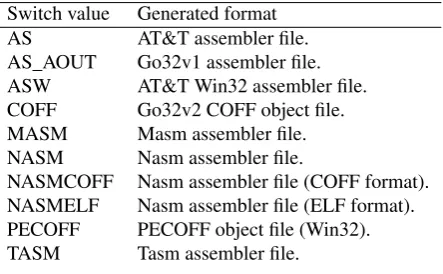
{$OUTPUT_FORMAT format}has the same functionality as the-Acommand-line option: it tells the compiler what kind of object file must be generated. You can specify this switch onlybeforethe
ProgramorUnit clause in your source file. The different kinds of formats are shown in table (1.1).
The default output format depends on the platform the compiler was compiled on.
Table 1.1: Formats generated by the x86 compiler
Switch value Generated format AS AT&T assembler file. AS_AOUT Go32v1 assembler file. ASW AT&T Win32 assembler file. COFF Go32v2 COFF object file. MASM Masm assembler file. NASM Nasm assembler file.
NASMCOFF Nasm assembler file (COFF format). NASMELF Nasm assembler file (ELF format). PECOFF PECOFF object file (Win32). TASM Tasm assembler file.
1.1.42
$P
or
$OPENSTRINGS
: Use open strings
If this switch is on, all function or procedure parameters of type string are considered to be open string parameters; this parameter only has effect for short strings, not for ansistrings.
When using openstrings, the declared type of the string can be different from the type of string that is actually passed, even for strings that are passed by reference. The declared size of the string passed can be examined with theHigh(P)call.
Default the use of openstrings is off.
1.1.43
$PACKENUM
: Minimum enumeration type size
This directive tells the compiler the minimum number of bytes it should use when storing enumerated types. It is of the following form:
{$PACKENUM xxx} {$MINENUMSIZE xxx}
Where the form with$MINENUMSIZEis for Delphi compatibility.xxxcan be one of1,2or4, or
NORMALorDEFAULT.
As an alternative form one can use {$Z1}, {$Z2} {$Z4}. Contrary to Delphi, the default is ({$Z4}).
So the following code
Type
Days = (monday, tuesday, wednesday, thursday, friday, saturday, sunday);
will use 1 byte to store a variable of typeDays, whereas it nomally would use 4 bytes. The above code is equivalent to
{$Z1} Type
Days = (monday, tuesday, wednesday, thursday, friday, saturday, sunday);
1.1.44
$PACKRECORDS
: Alignment of record elements
This directive controls the byte alignment of the elements in a record, object or class type definition. It is of the following form:
{$PACKRECORDS n}
Wherenis one of 1, 2, 4, 16,C,NORMALorDEFAULT. This means that the elements of a record that have size greater thannwill be aligned onnbyte boundaries. Elements with size less than or equal tonwill be aligned to a natural boundary, i.e. to a power of two that is equal to or larger than the element’s size. The typeCis used to specify alignment as by the GNU CC compiler. It should be used only when making import units for C routines.
The default alignment (which can be selected withDEFAULT) is 2, contrary to Turbo Pascal, where it is 1.
More information on this and an example program can be found in the reference guide, in the section about record types.
1.1.45
$Q $OVERFLOWCHECKS
: Overflow checking
The {$Q+} or {$OVERFLOWCHECKS ON} directive turns on integer overflow checking. This means that the compiler inserts code to check for overflow when doing computations with integers. When an overflow occurs, the run-time library will print a messageOverflow at xxx, and exit the program with exit code 215.
Remark:Overflow checking behaviour is not the same as in Turbo Pascal since all arithmetic operations are done via 32-bit or 64-bit values. Furthermore, theInc()andDecstandard system proceduresare
checked for overflow in Free Pascal, while in Turbo Pascal they are not. Using the{$Q-}switch switches off the overflow checking code generation.
The generation of overflow checking code can also be controlled using the-Cocommand line com-piler option (seeUsers guide).
1.1.46
$R
or
$RANGECHECKS
: Range checking
CHAPTER 1. COMPILER DIRECTIVES
The{$RANGECHECKS OFF}switch tells the compiler not to generate range checking code. This may result in faulty program behaviour, but no run-time errors will be generated.
Remark:The standard functionsvalandReadwill also check ranges when the call is compiled in{$R+}
mode.
1.1.47
$SATURATION
: Saturation operations (Intel 80x86 only)
This works only on the intel compiler, and MMX support must be on ({$MMX +}) for this to have any effect. See the section on saturation support (section5.2, page56) for more information on the effect of this directive.
1.1.48
$SETC
: Define and assign a value to a symbol
In MAC mode, this directive can be used to define compiler symbols. It is an alternative to the
$DEFINEdirective for macros. It is supported for compatibility with existing Mac OS pascal com-pilers. It will define a symbol with a certain value (called a compiler variable expression).
The expression syntax is similar to expressions used in macros, but the expression must be evaluated at compile-time by the compiler. This means that only some basic arithmetic and logical operators can be used, and some extra possibilities such as theTRUE,FALSEandUNDEFINEDoperators:
{$SETC TARGET_CPU_PPC := NOT UNDEFINED CPUPOWERPC} {$SETC TARGET_CPU_68K := NOT UNDEFINED CPUM68K} {$SETC TARGET_CPU_X86 := NOT UNDEFINED CPUI386} {$SETC TARGET_CPU_MIPS := FALSE}
{$SETC TARGET_OS_UNIX := (NOT UNDEFINED UNIX) AND (UNDEFINED DARWIN)}
The:=assignment symbol may be replaced with the=symbol.
Note that this command works only in MACPAS mode, but independent of the-Smcommand-line option or{$MACROS }directive.
1.1.49
$STATIC
: Allow use of
Static
keyword.
If you specify the{$STATIC ON}directive, thenStaticmethods are allowed for objects.Static
objects methods do not require aSelfvariable. They are equivalent toClassmethods for classes. By default,Staticmethods are not allowed. Class methods are always allowed.
By default, the address operator returns an untyped pointer. This directive is equivalent to the-Stcommand-line option.
1.1.50
$STOP
: Generate fatal error message
The following code
{$STOP This code is erroneous !}
will display an error message when the compiler encounters it. The compiler will immediatly stop the compilation process.
1.1.51
$T
or
$TYPEDADDRESS
: Typed address operator (@)
In the{$T+}or{$TYPEDADDRESS ON}state the @ operator, when applied to a variable, returns a result of typeˆT, if the type of the variable isT. In the{$T-}state, the result is always an untyped pointer, which is assignment compatible with all other pointer types.
1.1.52
$UNDEF
: Undefine a symbol
The directive
{$UNDEF name}
un-defines the symbolnameif it was previously defined.Nameis case insensitive.
1.1.53
$V
or
$VARSTRINGCHECKS
: Var-string checking
When in the+orONstate, the compiler checks that strings passed as parameters are of the same, identical, string type as the declared parameters of the procedure.
1.1.54
$WAIT
: Wait for enter key press
If the compiler encounters a
{$WAIT}
directive, it will resume compiling only after the user has pressed the enter key. If the generation of info messages is turned on, then the compiler will display the following message:
Press <return> to continue
before waiting for a keypress.
Remark:This may interfere with automatic compilation processes. It should be used for debugging purposes only.
1.1.55
$WARNING
: Generate warning message
If the generation of warnings is turned on, through the-vwcommand-line option or the{$WARNINGS ON}directive, then
{$WARNING This is dubious code}
will display a warning message when the compiler encounters it.
1.1.56
$WARNINGS
: Emit warnings
{$WARNINGS ON}switches the generation of warnings on. {$WARNINGS OFF}switches the generation of warnings off. Contrary to the command-line option-vwthis is a local switch, this is useful for checking parts of your code.
CHAPTER 1. COMPILER DIRECTIVES
1.1.57
$X
or
$EXTENDEDSYNTAX
: Extended syntax
Extended syntax allows you to drop the result of a function. This means that you can use a function call as if it were a procedure. Standard this feature is on. You can switch it off using the{$X-}or
{$EXTENDEDSYNTAX OFF}directive. The following, for instance, will not compile:
function Func (var Arg : sometype) : longint; begin
... { declaration of Func }
end;
...
{$X-} Func (A);
The reason this construct is supported is that you may wish to call a function for certain side-effects it has, but you don’t need the function result. In this case you don’t need to assign the function result, saving you an extra variable.
The command-line compiler switch-Sa1has the same effect as the{$X+}directive. By default, extended syntax is assumed.
1.2
Global directives
Global directives affect the whole of the compilation process. That is why they also have a command-line counterpart. The command-command-line counterpart is given for each of the directives. They must be specifiedbeforetheunitorprogramclause in a source file, or they will have no effect.
1.2.1
$APPID
: Specify application ID.
Used on the PALM os only, it can be set to specify the application name, which can be viewed on the Palm only. This directive only makes sense in a program source file, not in a unit.
{$APPID MyApplication}
1.2.2
$APPID
: Specify application name.
Used on the PALM os only, it can be set to specify the application name which can be viewed on the Palm only. This directive only makes sense in a program source file, not in a unit.
{$APPNAME My Application, compiled using Free Pascal.}
1.2.3
$APPTYPE
: Specify type of application.
This directive is currently only supported on the following targets: Win32, Mac, OS2 and AmigaOS. On other targets, the directive is ignored.
CONSOLE A console application. A terminal will be created and standard input, output and stan-dard error file descriptors will be initialized. In Windows, a terminal window will be created. This is the default.
Note that on Mac OS such applications cannot take command-line options, nor return a result code. They will run in a special terminal window, implemented as a SIOW application, see the MPW documentation for details.
OnOS/2, these applications can run both full-screen and in a terminal window.
LINUXapplications are always console applications. The application itself can decide to close the standard files, though.
FS specifies a full-screen VIO application onOS/2. These applications use a special BIOS-like API to program the screen.OS/2 starts these application allways in full screen.
GUI Specifying the{$APPTYPE GUI}directive will mark the application as a graphical appli-cation; no console window will be opened when the application is run. No stanrdard file descriptors will be initialized, using them (with e.g.writelnstatements) will produce a run-time error. If run from the command-line, the command prompt will be returned immediatly after the application was started.
OnOS/2 and Mac OS, the GUI application type creates a GUI application, as on Windows. On OS/2, this is a real Presentation Manager application.
TOOL this is a special directive for the Mac OS. It tells the compiler to create a tool application: It initializes input, output, stderr files, it can take parameters and return a result code. It is implemented as an MPW tool which can only be run by MPW or ToolServer.
Care should be taken when compilingGUIapplications; theInputandOutputfiles are not avail-able in a GUI application, and attempting to read from or write to them will result in a run-time error.
It is possible to determine the application type of a WINDOWSor AMIGAapplication at runtime. The
IsConsoleconstant, declared in the Win32 and Amiga system units as
Const
IsConsole : Boolean;
containsTrueif the application is a console application,Falseif the application is a GUI applica-tion.
1.2.4
$CALLING
: Default calling convention
This directive allows to specify the default calling convention used by the compiler, when no calling convention is specified for a procedure or function declaration. It can be one of the following values:
CDECL C compiler calling convention. CPPDECL C++ compiler calling convention. FAR16 Ignored, but parsed for compatibility reasons.
FPCCALL Older FPC (1.0.X and before) standard calling convention. If a lot of direct assembler blocks are used, this mode should be used for maximum compatibility.
CHAPTER 1. COMPILER DIRECTIVES
REGISTER Register calling convention.
SAFECALL Safecall calling convention (used in COM): The called procedure/function saves all registers.
STDCALL Windows library calling convention. SOFTFLOAT For ARM processors.
It is equivalent to the-Cccommand-line option.
1.2.5
$COPYRIGHT
specify copyright info
This is intended for the NETWARE version of the compiler: it specifies the copyright information that can be viewed on a module for a Netware OS.
For example:
{$COPYRIGHT GNU copyleft. compiled using Free Pascal}
1.2.6
$D
or
$DEBUGINFO
: Debugging symbols
When this switch is on, the compiler inserts GNU debugging information in the executable. The effect of this switch is the same as the command-line switch-g.
By default, insertion of debugging information is off.
1.2.7
$DESCRIPTION
: Application description
This switch is recognised for compatibility only, but is ignored completely by the compiler. At a later stage, this switch may be activated.
1.2.8
$E
: Emulation of coprocessor
This directive controls the emulation of the coprocessor. There is no command-line counterpart for this directive.
Intel 80x86 version
When this switch is enabled, all floating point instructions which are not supported by standard coprocessor emulators will give out a warning.
The compiler itself doesn’t do the emulation of the coprocessor.
To use coprocessor emulation under DOS go32v2 you must use the emu387 unit, which contains correct initialization code for the emulator.
UnderLINUXand mostUNIX’es, the kernel takes care of the coprocessor support.
Motorola 680x0 version
When the switch is on, no floating point opcodes are emitted by the code generator. Instead, internal run-time library routines are called to do the necessary calculations. In this case all real types are mapped to the single IEEE floating point type.
1.2.9
$G
: Generate 80286 code
This option is recognised for Turbo Pascal compatibility, but is ignored, since the compiler works only on 32-bit and 64-bit processors.
1.2.10
$INCLUDEPATH
: Specify include path.
This option serves to specify the include path, where the compiler looks for include files.{$INCLUDEPATH XXX}will addXXXto the include path.XXXcan contain one or more paths, separated by semi-colons or colons.
For example:
{$INCLUDEPATH ../inc;../i386}
{$I strings.inc}
will add the directories../incand../i386to the include path of the compiler. The compiler will look for the filestrings.incin both these directories, and will include the first found file. This directive is equivalent to the-Ficommand-line switch.
Caution is in order when using this directive: If you distribute files, the places of the files may not be the same as on your machine; moreover, the directory structure may be different. In general it would be fair to say that you should avoid usingabsolutepaths, instead userelativepaths, as in the example above. Only
use this directive if you are certain of the places where the files reside. If you are not sure, it is better practice to use makefiles and makefile variables.
1.2.11
$L
or
$LOCALSYMBOLS
: Local symbol information
This switch (not to be confused with the{$L file}file linking directive) is recognised for Turbo Pascal compatibility, but is ignored. Generation of symbol information is controlled by the$Dswitch.
1.2.12
$LIBRARYPATH
: Specify library path.
This option serves to specify the library path, where the linker looks for static or dynamic libraries.
{$LIBRARYPATH XXX}will addXXXto the library path. XXXcan contain one or more paths, separated by semi-colons or colons.
For example:
{$LIBRARYPATH /usr/X11/lib;/usr/local/lib}
{$LINKLIB X11}
will add the directories/usr/X11/liband /usr/local/libto the linker library path. The linker will look for the librarylibX11.soin both these directories, and use the first found file. This directive is equivalent to the-Flcommand-line switch.
CHAPTER 1. COMPILER DIRECTIVES
1.2.13
$M
or
$MEMORY
: Memory sizes
This switch can be used to set the heap and stacksize. It’s format is as follows:
{$M StackSize,HeapSize}
whereStackSize andHeapSize should be two integer values, greater than 1024. The first number sets the size of the stack, and the second the size of the heap. (Stack setting is ignored under LINUX, NETBSD and FREEBSD). The two numbers can be set on the command line using the-Ch
and-Csswitches.
1.2.14
$MODE
: Set compiler compatibility mode
The{$MODE}sets the compatibility mode of the compiler. This is equivalent to setting one of the command-line options-So,-Sd,-Spor-S2. it has the following arguments:
Default Default mode. This reverts back to the mode that was set on the command-line.
Delphi Delphi compatibility mode. All object-pascal extensions are enabled. This is the same as the command-line option-Sd.
TP Turbo pascal compatibility mode. Object pascal extensions are disabled, except ansistrings, which remain valid. This is the same as the command-line option-So.
FPC FPC mode. This is the default, if no command-line switch is supplied. OBJFPC Object pascal mode. This is the same as the-S2command-line option. GPC GNU pascal mode. This is the same as the-Spcommand-line option.
MACPAS MACPAS mode. In this mode, the compiler tries to be more compatible to commonly used pascal dialects on the Mac OS, such as Think Pascal, Metrowerks Pascal, MPW Pascal.
For an exact description of each of these modes, see appendixD, on page126.
1.2.15
$N
: Numeric processing
This switch is recognised for Turbo Pascal compatibility, but is otherwise ignored, since the compiler always uses the coprocessor for floating point mathematics.
1.2.16
$O
: Overlay code generation
This switch is recognised for Turbo Pascal compatibility, but is otherwise ignored.
1.2.17
$OBJECTPATH
: Specify object path.
This option serves to specify the object path, where the compiler looks for object files.{$OBJECTPATH XXX}will addXXXto the object path.XXXcan contain one or more paths, separated by semi-colons or colons.
For example:
{$OBJECTPATH ../inc;../i386}
will add the directories../incand../i386to the object path of the compiler. The compiler will look for the filestrings.oin both these directories, and will link the first found file in the program. This directive is equivalent to the-Focommand-line switch.
Caution is in order when using this directive: If you distribute files, the places of the files may not be the same as on your machine; moreover, the directory structure may be different. In general it would be fair to say that you should avoid usingabsolutepaths, instead userelativepaths, as in the example above. Only use this directive if you are certain of the places where the files reside. If you are not sure, it is better practice to use makefiles and makefile variables.
1.2.18
$PROFILE
: Profiling
This directive turns the generation of profiling code on (or off). It is equivalent to the-gp command-line option. Default isOFF. This directive only makes sense in a program source file, not in a unit.
1.2.19
$S
: Stack checking
The {$S+}directive tells the compiler to generate stack checking code. This generates code to check if a stack overflow occurred, i.e. to see whether the stack has grown beyond its maximally allowed size. If the stack grows beyond the maximum size, then a run-time error is generated, and the program will exit with exit code 202.
Specifying{$S-}will turn generation of stack-checking code off.
The command-line compiler switch-Cthas the same effect as the{$S+}directive. By default, no stack checking is performed.
1.2.20
$SMARTLINK
: Use smartlinking
A unit that is compiled in the{$SMARTLINK ON}state will be compiled in such a way that it can be used for smartlinking. This means that the unit is chopped in logical pieces: each procedure is put in it’s own object file, and all object files are put together in a big archive. When using such a unit, only the pieces of code that you really need or call, will be linked in your program, thus reducing the size of your executable substantially.
Beware: using smartlinked units slows down the compilation process, because a separate object file must be created for each procedure. If you have units with many functions and procedures, this can be a time consuming process, even more so if you use an external assembler (the assembler is called to assemble each procedure or function code block separately).
The smartlinking directive should be specifiedbeforethe unit declaration part:
{$SMARTLINK ON}
Unit MyUnit;
Interface ...
This directive is equivalent to the-Cxcommand-line switch.
1.2.21
$THREADNAME
: Set thread name in Netware
CHAPTER 1. COMPILER DIRECTIVES
1.2.22
$THREADING
: Allow use of threads.
This directive is obsolete. It is no longer used, and is recognized for backwards compatibility only.
1.2.23
$UNITPATH
: Specify unit path.
This option serves to specify the unit path, where the compiler looks for unit files. {$UNITPATH XXX}will addXXXto the unit path. XXXcan contain one or more paths, separated by semi-colons or colons.
For example:
{$UNITPATH ../units;../i386/units}
Uses strings;
will add the directories../unitsand../i386/unitsto the unit path of the compiler. The compiler will look for the filestrings.ppuin both these directories, and will link the first found file in the program. This directive is equivalent to the-Fucommand-line switch.
Caution is in order when using this directive: If you distribute files, the places of the files may not be the same as on your machine; moreover, the directory structure may be different. In general it would be fair to say that you should avoid usingabsolutepaths, instead userelativepaths, as in the example above. Only use this directive if you are certain of the places where the files reside. If you are not sure, it is better practice to use makefiles and makefile variables.
1.2.24
$VERSION
: Specify DLL version.
On WINDOWS, this can be used to specify a version number for a library. This version number will be used when the library is installed, and can be viewed in the Windows Explorer by opening the property sheet of the DLL and looking on the tab ’Version’. The version number consists of minimally one, maximum 3 numbers:
{$VERSION 1}
Or:
{$VERSION 1.1}
And even:
{$VERSION 1.1.1}
This can not yet be used for executables on Windows, but may be activated in the future.
1.2.25
$W
or
$STACKFRAMES
: Generate stackframes
The{$W}switch directive controls the generation of stackframes. In the on state, the compiler will generate a stackframe for every procedure or function.
In the off state, the compiler will omit the generation of a stackframe if the following conditions are satisfied:
• If the procedure is not anassemblerprocedure, it must not have aasm ...end;block. • it is not a constructor or destructor.
If these conditions are satisfied, the stack frame will be omitted.
1.2.26
$Y
or
$REFERENCEINFO
: Insert Browser information
Chapter 2
Using conditionals, messages and
macros
The Free Pascal compiler supports conditionals as in normal Turbo Pascal. It does, however, more than that. It allows you to make macros which can be used in your code, and it allows you to define messages or errors which will be displayed when compiling. It also has support for compile-time variables and compile-time expressions, as commonly found in Mac OS compilers.
2.1
Conditionals
The rules for using conditional symbols are the same as under Turbo Pascal or Delphi. Defining a symbol goes as follows:
{$define Symbol}
From this point on in your code, the compiler knows the symbolSymbol. Symbols are, like the Pascal language, case insensitive.
You can also define a symbol on the command line. the -dSymboloption defines the symbol
Symbol. You can specify as many symbols on the command line as you want. Undefining an existing symbol is done in a similar way:
{$undef Symbol}
If the symbol didn’t exist yet, this doesn’t do anything. If the symbol existed previously, the symbol will be erased, and will not be recognized any more in the code following the {$undef ...}
statement.
You can also undefine symbols from the command line with the-ucommand-line switch.
To compile code conditionally, depending on whether a symbol is defined or not, you can enclose the code in a{$ifdef Symbol}. . .{$endif}pair. For instance the following code will never be compiled:
{$undef MySymbol} {$ifdef Mysymbol}
DoSomething; ...
Similarly, you can enclose your code in a{$ifndef Symbol} . . .{$endif}pair. Then the code between the pair will only be compiled when the used symbol doesn’t exist. For example, in the following example, the call to theDoSomethingwill always be compiled:
{$undef MySymbol} {$ifndef Mysymbol}
DoSomething; ...
{$endif}
You can combine the two alternatives in one structure, namely as follows
{$ifdef Mysymbol} DoSomething; {$else}
DoSomethingElse {$endif}
In this example, ifMySymbolexists, then the call toDoSomethingwill be compiled. If it doesn’t exist, the call toDoSomethingElseis compiled.
2.1.1
Predefined symbols
The Free Pascal compiler defines some symbols before starting to compile your program or unit. You can use these symbols to differentiate between different versions of the compiler, and between different compilers. To get all the possible defines when starting compilation, see appendixG Remark:Symbols, even when they’re defined in the interface part of a unit, are not available outside that unit.
2.2
Macros
Macros are very much like symbols or compile-time variables in their syntax, the difference is that macros have a value whereas a symbol simply is defined or is not defined. Furthermore, following the definition of a macro, any occurrence of the macro in the pascal source will be replaced with the value of the macro (much like the macro support in the C preprocessor). If macro support is required, the-Smcommand-line switch must be used to switch it on, or the directive must be inserted:
{$MACROS ON}
otherwise macros will be regarded as a symbol.
Defining a macro in a program is done in the same way as defining a symbol; in a{$define}
preprocessor statement1:
{$define ident:=expr}
If the compiler encountersidentin the rest of the source file, it will be replaced immediately by
expr. This replacement works recursive, meaning that when the compiler expanded one macro, it will look at the resulting expression again to see if another replacement can be made. This means that care should be taken when using macros, because an infinite loop can occur in this manner. Here are two examples which illustrate the use of macros:
CHAPTER 2. USING CONDITIONALS, MESSAGES AND MACROS
{$define sum:=a:=a+b;} ...
sum { will be expanded to ’a:=a+b;’
remark the absence of the semicolon} ...
{$define b:=100}
sum { Will be expanded recursively to a:=a+100; } ...
The previous example could go wrong:
{$define sum:=a:=a+b;} ...
sum { will be expanded to ’a:=a+b;’
remark the absence of the semicolon} ...
{$define b=sum} { DON’T do this !!!}
sum { Will be infinitely recursively expanded \dots } ...
On my system, the last example results in a heap error, causing the compiler to exit with a run-time error 203.
Remark:Macros defined in the interface part of a unit are not available outside that unit! They can just be used as a notational convenience, or in conditional compiles.
By default the compiler predefines three macros, containing the version number, the release number and the patch number. They are listed in table (2.1).
Table 2.1: Predefined macros Symbol Contains
FPC_VERSION The version number of the compiler.
FPC_RELEASE The release number of the compiler.
FPC_PATCH The patch number of the compiler.
Remark:Don’t forget that macro support isn’t on by default. It must be turned on with the-Smcommand-line switch or using the{$MACROS ON}directive.
2.3
Compile time variables
In MacPas mode, compile time variables can be defined. They are distinct from symbols in that they have a value, and they are distinct from macros, in that they cannot be used to replace portions of the source text with their value. Their behaviour are compatible with compile time variables found in popular pascal compilers for Macintosh.
A compile time variable is defined like this:
{$SETC ident:= expression}
A second{$SETC }directive for the same variable overwrites the previous value.
Contrary to macros and symbols, compile time variables defined in the Interface part of a unit are exported. This means their value will be available in units which uses the unit in which the variable is defined. This requires that both units are compiled in macpas mode.
The big difference between macros and compile time variables is that the former is a pure text sub-stitution mechanism (much like in C), where the latter resemble normal programming language vari-ables, but they are available to the compiler only.
In mode MacPas, compile time variables are always enabled.
2.4
Compile time expressions
2.4.1
Definition
Except for the regular Turbo Pascal constructs for conditional compilation, the Free Pascal compiler also supports a stronger conditional compile mechanism: The{$if}construct, which can be used to evaluate compile-time expressions.
The prototype of this construct is as follows:
{$if expr}
CompileTheseLines; {$else}
BetterCompileTheseLines; {$endif}
The content of an expression is restricted to what can be evaluated at compile-time:
• Constants (strings, numbers) • Macros
• Compile time variables (mode MacPas only) • Pascal constant expression (mode Delphi only)
The symbols are replaced with their value. For macros recursive substitution might occur. The following boolean operators are available:
=, <>, >, <, >=, <=, AND, NOT, OR, IN
The IN operator tests for presence of a compile-time variable in a set. The following functions are also available:
TRUE Defined in MacPas mode only, it evaluates to True. In other modes, 1 can be used. FALSE Defined in MacPas mode only, it evaluates to False. In other modes, 0 can be used. DEFINED(sym) will evaluate toTRUEif a compile time symbol is defined. In MacPas mode, the
parentheses are optional, i.e.
{$IF DEFINED(MySym)}
CHAPTER 2. USING CONDITIONALS, MESSAGES AND MACROS
{$IF DEFINED MySym}
UNDEFINED sym will evaluate to TRUEif a compile time symbol is not defined, andFALSE
otherwise (mode MacPas only).
OPTION(opt) evaluates toTRUEif a compiler option is set (mode MacPas only). It is equivalent to the{$IFOPT }directive.
SIZEOF(passym) Evaluates to the size of a pascal type, variable or constant.
DECLARED(passym) Evaluates to TRUE if the pascal symbol is declared at this point in the sources, orFALSEif it is not yet defined.
In expressions, the following rules are used for evaluation:
• If all parts of the expression can be evaluated as booleans (with 1 and 0 representingTRUEand FALSE, the expression is evaluated using booleans.
• If all parts of the expression can be evaluated as nuumbers, then the expression is evaluated using numbers.
• In all other cases, the expression is evaluated using strings.
If the complete expression evaluates to’0’, then it is considered false and rejected. Otherwise it is considered true and accepted. This may have unexpected consequences:
{$if 0}
will evaluate toFalseand be rejected, while
{$if 00}
will evaluate toTrue.
2.4.2
Usage
The basic usage of compile time expressions is as follows:
{$if expr}
CompileTheseLines; {$endif}
Ifexprevaluates toTRUE, thenCompileTheseLineswill be included in the source. Like in regular pascal, it is possible to use{$ELSE }:
{$if expr}
CompileTheseLines; {$else}
BetterCompileTheseLines; {$endif}
Ifexprevaluates toTrue,CompileTheseLineswill be compiled. Otherwise,BetterCompileTheseLines
will be compiled.
{$IF expr}
In addition to the above constructs, which are also supported by Delphi, the above is completely equivalent to the following construct in MacPas mode:
{$IFC expr}
that is,IFCcorresponds toIF,ELIFCcorresponds toELSEIF,ELSECis equivalent withELSEC
andENDCis the equivalent ofENDIF. Additionally,IFENDis an equivalent toENDIF:
{$IF EXPR} CompileThis; {$ENDIF}
In MacPas mode it is possible to mix these constructs. The following example shows some of the possibilities:
{$ifdef fpc}
{$if (fpc_version=0) and (fpc_release>6) and (fpc_patch>4)} {$info At least this is version 0.9.5}
{$else}