
A Tutorial on Java Socket Programming
(TCP)
Written By,
Sabrina Zaman; Batch- 19th, Roll: 48
Introduction
The term network programming refers to writing programs that execute across multiple devices
(computers), in which the devices are all connected to each other using a network.
The java.net package provides support for the two common network protocols:
TCP: TCP stands for Transmission Control Protocol, which allows for reliable
communication between two applications. TCP is typically used over the Internet Protocol, which is referred to as TCP/IP.
UDP: UDP stands for User Datagram Protocol, a connection-less protocol that allows for
packets of data to be transmitted between applications.
What Is a Socket?
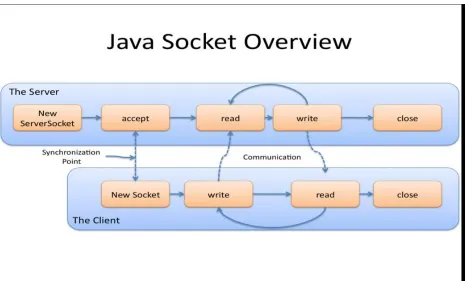
A socket is one end-point of a two-way communication link between two programs running on the network. Sockets provide the communication mechanism between two computers using TCP. A client program creates a socket on its end of the communication and attempts to connect that socket to a server. When the connection is made, the server creates a socket object on its end of the communication. The client and server can now communicate by writing to and reading from the socket.
Socket classes are used to represent the connection between a client program and a server
program. The java.net package provides two classes- Socket and ServerSocket that implement
the client side of the connection and the server side of the connection, respectively.
How does it work?
If everything goes well, the server accepts the connection. Upon acceptance, the server gets a new socket bound to the same local port and also has its remote endpoint set to the address and port of the client. It needs a new socket so that it can continue to listen to the original socket for connection requests while tending to the needs of the connected client.
On the client side, if the connection is accepted, a socket is successfully created and the client can use the socket to communicate with the server.
The client and server can now communicate using I/O streams. Each socket has both an OutputStream and an InputStream. The client's OutputStream is connected to the server's InputStream, and the client's InputStream is connected to the server's OutputStream.
The connection procedure with some code snippets:
method waits until a client connects to the server on the given port.
Socket sc = serverSocket.accept();
3. [Client Side] After the server is waiting, a client instantiates a Socket object, specifying
the server name and port number to connect to.
String serverName = “localhost”; int port = 2300;
Socket client = new Socket(serverName, port);
4. [Client Side] The constructor of the Socket class attempts to connect the client to the
specified server and port number. If communication is established, the client now has a
Socket object capable of communicating with the server.
5. [Server Side] The accept() method returns a reference to a new socket on the server
Now we will create a server-client chat program where multiple clients can connect to the server at once and they can send message to the server any time. The server will receive any
String from the client and transform all the letters of that String to uppercase letters.
The Server Side:
In the server program, a system should be established that can accept any client’s connection request, accept data sent from the client side, process the data and send it back to the client. A server program must maintain two tasks:
1. Accepting client’s connection request
2. I/O related task
These two tasks must be run in parallel manner. To fulfill this condition we must use thread. We will use multithreaded programming. A multithreaded program contains two or more parts that can run concurrently and each part can handle different task. Different threads will be run for different clients.
#1
For the first task, a class can be created to handle it. It will only accept client’s request and start
a new thread for every client. In that thread, the I/O related tasks will be handled. Here’s a sample code for that class, here the class is called the ‘Listener class.’
In the above code, we have implemented the Listener class which will only listen to the client
request and will start a new thread for every client. We did that by ‘t.start()’. This will call the
‘run()’ function of the ‘Worker’ class which is supposed to handle the I/O related task. This task is done in a loop. As we have given ‘true’, it will never stop. So, the server can get client request at any time.
Here, ‘in’ and ‘out’ are two objects to read and write data respectively. ‘sck’ is the socket where the client is connected.
To read data from the client, we call this function- in.readUTF()
To write data to the client, we call this function- out.writeUTF(“data to be sent”)
Here’s the sample code for the ‘Worker’ class:
In the above code, each client’s data are received, processed and then sent back to the client. After that client’s socket is closed.
From the main function, we will only create an object of ‘Listener’ class and then the ‘run()’
method will be called by the code statement- “t.start()”, here t is the object. The program for
‘main()’ function is given below:
Why use thread?
Here, we have used thread. Because we need to make sure that any client can request for connection at any time and get response from the server, so that they do not need to wait for response while the server is handling another client. So, we have started different threads for different clients.
The Client Side:
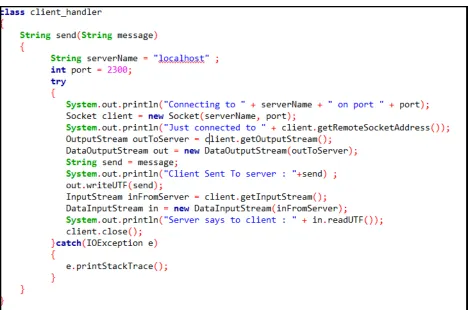
Here we will create a class called client_handler which will act as our client and communicate to the server. It has a method called send() that will do the actual interaction with the server. The method contains a Socket variable named Client that will be used as the socket in the client side which will connect to the socket on the server side for communication. The Socket variable needs to be initialized with the server-name and port number. Here we
used “localhost” as the server-name and 2300 as the port number. We used OutputStream to
Fig. client_handler class
In the main function we created an object of class client_handler and invoked it’s send()
method to send any message to the server from the client.
![[Modul Konsep Jaringan] Bab 13 Socket Programming Lanjutan](data:image/gif;base64,R0lGODlhAQABAIAAAP///wAAACH5BAEAAAAALAAAAAABAAEAAAICRAEAOw==)