Configure
Apache
Server for a
Linux/Unix or
Win32 system
Leverage
Apache
using SSI, CGI, PHP,
Perl, and Java
servlets
Secure
your site
using SSL,
certificate-signing services,
and other tools
A
pache Server 2
Mohammed J. Kabir
and experienced administrators.”
— Elizabeth Zinkann, Sys AdminMagazine Contributing Editor and Review ColumnistBONUS
CD-ROM!
Apache, PHP, Perl,
Tomcat, MySQL, and more
100%
O N E H U N D R E D P E R C E N T C O M P R E H E N S I V E A U T H O R I T A T I V E W H A T Y O U N E E DO N E H U N D R E D P E R C E N T
A
pache Server 2
ible
Author of Red Hat Linux Server
Apache Server 2
Bible
Mohammed J. Kabir
Best-Selling Books • Digital Downloads • e-Books • Answer Networks • e-Newsletters • Branded Web Sites • e-Learning
LIMIT OF LIABILITY/DISCLAIMER OF WARRANTY: THE PUBLISHER AND AUTHOR HAVE USED THEIR BEST EFFORTS IN PREPARING THIS BOOK. THE PUBLISHER AND AUTHOR MAKE NO REPRESENTATIONS OR WARRANTIES WITH RESPECT TO THE ACCURACY OR COMPLETENESS OF THE CONTENTS OF THIS BOOK AND SPECIFICALLY DISCLAIM ANY IMPLIED WARRANTIES OF MERCHANTABILITY OR FITNESS FOR A PARTICULAR PURPOSE. THERE ARE NO WARRANTIES WHICH EXTEND BEYOND THE DESCRIPTIONS CONTAINED IN THIS PARAGRAPH. NO WARRANTY MAY BE CREATED OR EXTENDED BY SALES REPRESENTATIVES OR WRITTEN SALES MATERIALS. THE ACCURACY AND COMPLETENESS OF THE INFORMATION PROVIDED HEREIN AND THE OPINIONS STATED HEREIN ARE NOT GUARANTEED OR WARRANTED TO PRODUCE ANY PARTICULAR RESULTS, AND THE ADVICE AND STRATEGIES CONTAINED HEREIN MAY NOT BE SUITABLE FOR EVERY INDIVIDUAL. NEITHER THE PUBLISHER NOR AUTHOR SHALL BE LIABLE FOR ANY LOSS OF PROFIT OR ANY OTHER COMMERCIAL DAMAGES, INCLUDING BUT NOT LIMITED TO SPECIAL, INCIDENTAL, CONSEQUENTIAL, OR OTHER DAMAGES.
New York, NY 10022 www.hungryminds.com
Copyright © 2002 Hungry Minds, Inc. All rights reserved. No part of this book, including interior design, cover design, and icons, may be reproduced or transmitted in any form, by any means (electronic, photocopying, recording, or otherwise) without the prior written permission of the publisher.
Library of Congress Control Number: 2001092889 ISBN: 0-7645-4821-2
Printed in the United States of America 10 9 8 7 6 5 4 3 2 1
1B/RT/QT/QS/IN
Distributed in the United States by Hungry Minds, Inc.
Distributed by CDG Books Canada Inc. for Canada; by Transworld Publishers Limited in the United Kingdom; by IDG Norge Books for Norway; by IDG Sweden Books for Sweden; by IDG Books Australia Publishing Corporation Pty. Ltd. for Australia and New Zealand; by TransQuest Publishers Pte Ltd. for Singapore, Malaysia, Thailand, Indonesia, and Hong Kong; by Gotop Information Inc. for Taiwan; by ICG Muse, Inc. for Japan; by Intersoft for South Africa; by Eyrolles for France; by International Thomson Publishing for Germany, Austria, and Switzerland; by Distribuidora Cuspide for Argentina; by LR International for Brazil; by Galileo Libros for Chile; by Ediciones ZETA S.C.R. Ltda. for Peru; by WS Computer Publishing Corporation, Inc., for the Philippines; by Contemporanea de Ediciones for Venezuela; by Express Computer Distributors for the Caribbean and West Indies; by Micronesia Media Distributor, Inc. for Micronesia; by Chips Computadoras S.A. de C.V. for Mexico; by Editorial Norma de Panama S.A. for Panama; by American Bookshops for Finland.
For general information on Hungry Minds’ products and services please contact our Customer Care department within the U.S. at 800-762-2974, outside the U.S. at 317-572-3993 or fax 317-572-4002.
For sales inquiries and reseller information, including discounts, premium and bulk quantity sales, and foreign-language translations, please contact our Customer Care department at 800-434-3422, fax 317-572-4002 or write to Hungry Minds, Inc., Attn: Customer Care Department, 10475 Crosspoint Boulevard, Indianapolis, IN 46256.
For information on licensing foreign or domestic rights, please contact our Sub-Rights Customer Care department at 212-884-5000.
For information on using Hungry Minds’ products and services in the classroom or for ordering examination copies, please contact our Educational Sales department at 800-434-2086 or fax 317-572-4005.
For press review copies, author interviews, or other publicity information, please contact our Public Relations department at 317-572-3168 or fax 317-572-4168.
For authorization to photocopy items for corporate, personal, or educational use, please contact Copyright Clearance Center, 222 Rosewood Drive, Danvers, MA 01923, or fax 978-750-4470.
Trademarks:Bible and Hungry Minds are trademarks or registered trademarks of Hungry Minds, Inc. All other trademarks are the property of their respective owners. Hungry Minds, Inc., is not associated with any product or vendor mentioned in this book.
Terri Varveris
Project Editor James H. Russell
Technical Editor Gregory W. Stephens
Copy Editor Richard H. Adin
Editorial Managers Kyle Looper Ami Frank Sullivan
Vice President & Executive Group Publisher
Richard Swadley
Vice President & Group Publisher Bob Ipsen
Editorial Director Mary Bednarek
Project Coordinator Regina Snyder
Beth Brooks Melanie DesJardins Joyce Haughey Betty Schulte Jeremey Unger
Quality Control Technicians Laura Albert
John Greenough Andy Hollandbeck Angel Perez
Media Development Specialist Travis Silvers
Illustrator Kate Shaw
Proofreading and Indexing TECHBOOKS Production Services
Preface
W
elcome to Apache Server 2.0. Chances are that you already have heard about Apache server. In fact, more than 60 percent of all Web administra-tors use Apache. Apache is the most powerful, open-source, Web-server platform in the world.As a practicing Web developer, researcher, and administrator, I find Apache to be the perfect fit for most Web sites. Apache 2.0 is a major revision of Apache server. Apache Group originally created a highly configurable Web server in the first ver-sion, which became popular very fast; in version 2, Apache Group focused on scala-bility, reliascala-bility, and performance. Major code revisions were done to create a very scalable Apache architecture.
Today, Apache stands tall as the most widely used Web platform. Every day an increasing number of corporations accept this open-source marvel into their IT infrastructure. Many large IT companies, such as IBM, have embraced Apache in their product offerings. The future of Apache looks great. Whether you’re new to Apache or are already a practicing Apache administrator, now is the perfect time to get started with Apache 2.0. This book will help you do just that.
How This Book Is Organized
The book has six parts. Very short descriptions of each part follow.
Part I: Getting Started
Part II: Web Site Administration
This part focuses on typical Web administration tasks such as virtual Web-site cre-ation, user authentication and authorization tasks, monitoring, logging, rewriting and redirecting URLs, proxy service, and the like. You learn a great deal there is to know about creating and managing virtual Web sites. You master various methods of user authentication, authorization, and access control techniques. You learn to monitor Web servers and to customize log files for analysis.
Part III: Running Web Applications
This part focuses on the ways in which you can serve dynamic contents using Apache. It covers Common Gateway Interface (CGI), Server-Side Includes (SSI), FastCGI, PHP, mod_perl, and Java servlets. You quickly learn to use these technolo-gies with Apache.
Part IV: Securing Your Web Site
Any computer on the Internet is subject to abuse or attempts of misuse. It is always a good idea to play it safe and to take precautionary measures. In this part, you learn to make your Web sites more secure and resistant to hacker attacks. You are also introduced to the potential risks of running SSI and CGI programs and how to take preventive measures to avoid these risks. You also learn to enable Secure Socket Layer (SSL) service using Apache modules to enable secure e-commerce.
Part V: Running Apache on Windows
Apache on Windows (Win32) platform has become very popular; more and more people are trying Apache on Windows platform. With Apache 2.0, the performance of Apache Web server under this platform has become very promising. In this part, you learn how to install and configure Apache on Win32 platform.
Part VI: Tuning for Performance and Scalability
Conventions Used in This Book
You don’t have to learn any new conventions to read this book. Just remember that when you are asked to enter a command, you need press the Enter or the Return key after you type the command at your command prompt. A monospacedfont is used to denote configuration or code segment.
Also, pay attention to these icons:
The Note icon indicates that something needs a bit more explanation.
The Tip icon tells you something that is likely to save you some time and effort.
The Caution icon makes you aware of a potential danger.
The On The CD-ROM icon clues you in to files, programs, and other goodies that are on the CD-ROM.
The Cross=Reference icon helps you navigate the book better, pointing you to top-ics that are related to the one you’re currently reading about.
Tell Us What You Think of This Book
Both Hungry Minds and I want to know what you think of this book. Please register this book online at the Hungry Minds Web site (www.hungryminds.com) and give us your feedback. If you are interested in communicating with me directly, send e-mail messages to [email protected]. I will do my best to respond promptly.
The Book Web Site
This book has a Web site at http://www.evoknow.com/kabir/apache2. You can visit this Web site for updated contents, errata, and FAQ.
Cross-Reference
On the CD-ROM
Acknowledgments
I
would like to thank the Apache Group for creating the most powerful, extensible, and modular Web server in the world. I give special thanks to Ralf S. Engelschall. Ralf, the author of the mod_rewritemodule, provided a great deal of support in the development of Chapter 9 on URL rewriting rules. The practical examples in that chapter are derived from his personal collection, which keeps growing at his Web site www.engelschall.com/pw/apache/rewriteguide.I also thank the Hungry Minds team, who made this book a reality. It is impossible to list everyone involved but I must mention the following kind individuals:
James Russell, the project development editor, kept this project going. I don’t know how I could have done this book without his generous help and suggestions every step of the way. Thanks James.
Terri Varveris, the acquisitions editor, provided me with this book opportunity and made sure I saw it through to the end. Thanks, Terri.
Contents at a Glance
Preface. . . ix
Acknowledgments . . . xiii
Part I: Getting Started . . . 1
Chapter 1: Apache: The Number One Web Server . . . 3
Chapter 2: Obtaining and Installing Apache . . . 13
Chapter 3: Getting Apache Up and Running . . . 31
Chapter 4: Configuring Apache with Winnt MPM directives . . . 55
Chapter 5: Apache Modules . . . 105
Part II: Web Site Administration . . . 157
Chapter 6: Hosting Virtual Web Sites . . . 159
Chapter 7: Authenticating and Authorizing Web Site Visitors . . . 181
Chapter 8: Monitoring Access to Apache . . . 213
Chapter 9: Rewriting Your URLs . . . 239
Chapter 10: Setting up a Proxy Server . . . 265
Chapter 11: Running Perfect Web Sites . . . 293
Part III: Running Web Applications . . . 319
Chapter 12: Running CGI Scripts . . . 321
Chapter 13: Server Side Includes (SSI) . . . 377
Chapter 14: Configuring Apache for FastCGI . . . 399
Chapter 15: PHP and Apache . . . 421
Chapter 16: Using Perl with Apache . . . 455
Chapter 17: Running Java Servlets and JSP Pages with Tomcat . . . 469
Part IV: Securing Your Web Site . . . 493
Chapter 18: Web Security . . . 495
Chapter 21: Configuring Apache for Windows . . . 579
Part VI: Tuning for Performance and Scalability . . . 591
Chapter 22: Speeding Up Apache . . . 593
Chapter 23: Creating a High-Availability Network . . . 637
Appendix A: HTTP 1.1 Status Codes . . . 705
Appendix B: Understanding Regular Expressions . . . 709
Appendix C: Online Apache Resources . . . 713
Appendix D: What’s on the CD-ROM? . . . 719
Index . . . 723
Contents
Preface. . . ix
Acknowledgments . . . xiii
Part I: Getting Started
1
Chapter 1: Apache: The Number One Web Server . . . 3
Apache Rocks On . . . 4
Apache: The Beginning . . . 5
The Apache Feature List . . . 5
Understanding Apache 2.0 Architecture . . . 7
Multiprocessing modules . . . 7
Filtering I/O . . . 9
New CGI daemon . . . 9
Apache Portable Run-Time . . . 10
Understanding the Apache License . . . 10
Chapter 2: Obtaining and Installing Apache . . . 13
The Official Source for Apache . . . 13
System Requirements . . . 14
Requirements for building Apache from source distribution . . . 14
Requirements for running an Apache Web server . . . 16
Downloading the Software . . . 18
Installing Apache from Source Code . . . 19
Configuring Apache source . . . 19
Advanced configuration options for high-load Web sites . . . 24
Compiling and installing Apache . . . 26
Installing Apache from RPM Binary Packages . . . 30
Keeping Up with Apache Development . . . 30
Chapter 3: Getting Apache Up and Running . . . 31
Configuring Apache . . . 31
Configuring the global environment for Apache . . . 36
Configuring the main server . . . 40
Starting and Stopping Apache . . . 50
Starting Apache . . . 50
Restarting Apache . . . 52
Stopping Apache . . . 52
Chapter 4: Configuring Apache with Winnt MPM
Directives . . . 55
Apache Directive Contexts . . . 56
Server config context . . . 56
Container context . . . 57
Per-directory context . . . 58
General Configuration Directives . . . 59
AccessFileName . . . 59
AddDefaultCharset . . . 60
ContentDigest . . . 60
DefaultType . . . 61
DocumentRoot . . . 61
ErrorDocument . . . 62
<IfDefine> . . . 63
<IfModule> . . . 64
Include . . . 65
Options . . . 65
Port . . . 67
ServerAdmin . . . 68
ServerName . . . 68
ServerRoot . . . 69
ServerSignature . . . 69
ServerTokens . . . 69
SetInputFilter . . . 70
SetOutputFilter . . . 70
Performance and Resource Configuration Directives . . . 70
Controlling Apache processes . . . 71
Making persistent connections . . . 72
Controlling system resources . . . 74
Using dynamic modules . . . 75
Standard Container Directives . . . 76
<Directory> . . . 77
<DirectoryMatch> . . . 78
<Files> . . . 78
<FilesMatch> . . . 79
<Location> . . . 79
<LocationMatch> . . . 80
Virtual Host-Specific Directives . . . 80
NameVirtualHost . . . 80
ServerAlias . . . 82
ServerPath . . . 82
<VirtualHost> . . . 82
Logging Directives . . . 83
LogLevel . . . 84
PidFile . . . 85
Authentication and Security Directives . . . 86
AllowOverride . . . 86
AuthName . . . 87
AuthType . . . 87
HostNameLookups . . . 87
IdentityCheck . . . 88
<Limit> . . . 88
<LimitExcept> . . . 89
LimitRequestBody . . . 89
LimitRequestFields . . . 89
LimitRequestFieldsize . . . 90
LimitRequestLine . . . 90
Require . . . 90
Satisfy . . . 91
ScriptInterpreterSource . . . 92
MPM threaded-Specific Directives . . . 92
CoreDumpDirectory . . . 92
Group . . . 93
Listen . . . 93
ListenBacklog . . . 94
LockFile . . . 94
MaxClients . . . 94
MaxRequestsPerChild . . . 95
MaxSpareThreads . . . 95
MinSpareThreads . . . 95
SendBufferSize . . . 96
StartServers . . . 96
ThreadsPerChild . . . 97
User . . . 97
MPM perchild-Specific Directives . . . 98
AssignUserID . . . 98
ChildPerUserID . . . 98
ConnectionStatus . . . 99
CoreDumpDirectory . . . 99
Group . . . 99
Listen . . . 99
ListenBacklog . . . 100
LockFile . . . 100
MaxRequestsPerChild . . . 100
MaxSpareThreads . . . 100
MaxThreadsPerChild . . . 100
MinSpareThreads . . . 100
NumServers . . . 100
PidFile . . . 101
ScoreBoardFile . . . 101
SendBufferSize . . . 101
StartThreads . . . 101
MPM winnt-Specific Directives . . . 101
CoreDumpDirectory . . . 102
Listen . . . 102
ListenBacklog . . . 102
MaxRequestsPerChild . . . 102
PidFile . . . 102
SendBufferSize . . . 102
ThreadsPerChild . . . 102
MPM prefork Specific Directives . . . 102
CoreDumpDirectory . . . 103
Group . . . 103
Listen . . . 103
ListenBacklog . . . 103
LockFile . . . 103
MaxClients . . . 103
MaxRequestsPerChild . . . 103
MaxSpareServers . . . 103
MinSpareServers . . . 104
PidFile . . . 104
ScoreBoardFile . . . 104
SendBufferSize . . . 104
StartServers . . . 104
User . . . 104
Chapter 5: Apache Modules . . . 105
An Overview of the Modules . . . 105
Environment-Related Modules . . . 106
mod_env . . . 106
mod_setenvif . . . 107
mod_unique_id . . . 109
Authentication and Access Control Modules . . . 109
mod_auth_anon . . . 110
mod_auth_dbm . . . 112
mod_auth_db . . . 116
Dynamic Contents Generation Modules . . . 117
mod_actions . . . 118
mod_ext_filter . . . 122
Content-Type Configuration Modules . . . 124
mod_mime . . . 124
mod_mime_magic . . . 128
mod_negotiation . . . 128
Directory Listing Modules . . . 130
mod_dir . . . 130
mod_autoindex . . . 131
Response Header Modules . . . 137
mod_asis . . . 138
mod_expires . . . 139 mod_cern_meta . . . 141 Server Information and Logging Modules . . . 143 mod_log_config . . . 143 mod_status . . . 143 mod_info . . . 143 mod_usertrack . . . 143 URL Mapping Modules . . . 144 mod_userdir . . . 144 mod_alias . . . 145 mod_speling . . . 148 mod_vhost_alias . . . 149 Miscellaneous Modules . . . 151 mod_so . . . 151 mod_imap . . . 152 mod_file_cache . . . 155 mod_dav . . . 155
Part II: Web Site Administration
157
Chapter 6: Hosting Virtual Web Sites . . . 159
Understanding Apache’s Virtual Hosting Capabilities . . . 159 Setting Up a Virtual Host . . . 161 Name-based virtual hosts . . . 161 IP-based virtual hosts . . . 162 Multiple main servers as virtual hosts . . . 163 Configuring DNS for a Virtual Host . . . 166 Setting User and Group per Virtual Host . . . 169 Managing a Large Number of Virtual Hosts . . . 170 Automating Virtual Host Configuration using mod_perl . . . 171 Generating Virtual Host Configuration By Using the makesite Script . . . 175 Managing Virtual Hosts By Using MySQL with mod_v2h Module . . . 178Authenticating with a Relational Database . . . 195 Using MySQL database server for authentication . . . 196 Using other databases for user authentication . . . 202 Managing Users and Groups in Any RDBM . . . 204 Secure Authenticated Sessions Using Cookies . . . 208
Chapter 8: Monitoring Access to Apache . . . 213
Monitoring Apache . . . 213 Accessing configuration information with mod_info . . . 214 Enabling status pages with mod_status . . . 216 Creating Log Files . . . 221 TransferLog directive . . . 222 LogFormat directive . . . 223 CustomLog directive . . . 223 CookieLog directive . . . 224 Customizing Your Log Files . . . 224 Creating Multiple Log Files . . . 227 Logging Cookies . . . 228 Using Error Logs . . . 230 Analyzing Your Log Files . . . 232 Log Maintenance . . . 234 Using rotatelog . . . 234 Using logrotate . . . 234 Using logresolve . . . 236Content Handling . . . 262 Adding backward compatibility in URLs . . . 262 Creating browser-matched content URLs . . . 262 Creating an HTML to CGI gateway . . . 263 Access Restriction . . . 263 Blocking robots . . . 263 Creating an HTTP referer-based URL deflector . . . 264
Chapter 10: Setting up a Proxy Server . . . 265
Who Should Use a Proxy Server? . . . 265 Understanding Types of Proxy Servers . . . 266 Forward proxy . . . 266 Reverse proxy . . . 267 mod_proxy Directives . . . 268 ProxyRequests . . . 269 ProxyRemote . . . 269 ProxyPass . . . 270 ProxyBlock . . . 270 NoProxy . . . 271 ProxyDomain . . . 271 CacheRoot . . . 272 CacheSize . . . 272 CacheGcInterval . . . 273 CacheMaxExpire . . . 273 CacheLastModifiedFactor . . . 273 CacheDirLength . . . 274 CacheDirLevels . . . 274 CacheDefaultExpire . . . 274 NoCache . . . 275 Configuring an Apache Proxy Server . . . 275 Scenario 1: Connecting a private IP network to the Internet . . . 276 Scenario 2: Caching remote Web sites . . . 276 Scenario 3: Mirroring a Web site . . . 278 Setting Up Web Browsers to use a Proxy . . . 278 Manual proxy configuration . . . 278 Automatic proxy configuration . . . 281 Setting return values for FindProxyForURL . . . 282 Using pre-defined functions in FindProxyForURL . . . 283Using HTTP PUT for Intranet Web Publishing . . . 305 Understanding the directives in mod_put module . . . 306 Compiling and installing mod_put . . . 307 Setting up a PUT-enabled Web directory . . . 307 Setting up a virtual host to use mod_put module . . . 309 Maintaining Your Web Site . . . 310 Online backup . . . 310 Offline backup . . . 311 Standardizing Standards . . . 312 HTML document development policy . . . 312 Dynamic application development policy . . . 314 Giving Your Web Site a User-Friendly Interface . . . 315 Make your site easy to navigate . . . 316 Create an appealing design . . . 316 Remove cryptic error messages . . . 317 Test your Web GUI . . . 317 Promoting Your Web Site . . . 318
Part III: Running Web Applications
319
Chapter 13: Server Side Includes (SSI) . . . 377
What Is a Server Side Include? . . . 377 Configuring Apache for SSI . . . 378 Enabling SSI for an entire directory . . . 379 Enabling SSI for a specific file type . . . 380 Using XBitHack for .htm or .html files . . . 381 Using SSI Commands . . . 382 config . . . 382 echo . . . 385 exec . . . 385 fsize . . . 391 flastmod . . . 391 include . . . 392 printenv . . . 392 set . . . 393 SSI Variables . . . 393 Flow Control Commands . . . 394Chapter 14: Configuring Apache for FastCGI . . . 399
What is FastCGI? . . . 399 Achieving high performance by using caching . . . 401 Scalability through distributed applications . . . 402 Understanding How FastCGI Works . . . 404 Basic architecture of a FastCGI application . . . 406 Different types of FastCGI applications . . . 407 Migrating from CGI to FastCGI . . . 408 Things to keep in mind about migrating . . . 409 Migrating a sample script . . . 410 Setting Up FastCGI for Apache . . . 413 FastCGI directives for Apache . . . 414 Configuring httpd.conf for FastCGI . . . 416Working with PHP . . . 435 Creating a simple command-line PHP script . . . 435 Creating simple PHP Web pages . . . 436 Using a PHP script as a Server-Side Include . . . 437 Using a PHP page for a directory index . . . 438 Using include files . . . 439 Enhancing error handling with PHP . . . 441 Processing Web forms with PHP . . . 441 Creating sessions with PHP . . . 444 Using MySQL with PHP . . . 448 Creating a simple PHP page to access a MySQL database . . . 448 Securing PHP include files . . . 451 Authenticating users with PHP and MySQL . . . 451
Chapter 16: Using Perl with Apache . . . 455
Compiling and Installing mod_perl . . . 455 Running CGI Scripts by Using mod_perl . . . 456 Don’t Reinvent the Wheel . . . 457 Creating mod_perl Module By Using the Perl API for Apache . . . 458 Using CGI.pm to Write mod_perl Modules . . . 462 Preloading Perl Modules to Save Memory . . . 464 Keeping Track of mod_perl Modules in Memory . . . 465 Implementing ASP by Using the Apache::ASP Module . . . 466Chapter 17: Running Java Servlets and JSP Pages with Tomcat . . . 469
Why Use Servlets? . . . 470 Installing Tomcat . . . 471 Installing the latest JDK for Tomcat . . . 471 Installing Tomcat and the mod_jk module . . . 472 Configuring Tomcat . . . 473 Configuring Tomcat for Apache . . . 473 Configuring Tomcat to use the Java Security Manager . . . 477 Configuring Apache for Servlets and JSP . . . 479 Working with Tomcat . . . 483 Disabling Tomcat’s default HTTP service . . . 483 Starting and stopping Tomcat . . . 484 Starting Tomcat with a shell wrapper script . . . 484 Running Java servlets . . . 485Part IV: Securing Your Web Site
493
Choosing a Security Configuration . . . 500 Security policy considerations . . . 500 A sensible security configuration for Apache . . . 502 The Sacrificial Lamb Configuration . . . 509 The Paranoid Configuration . . . 510 Protecting Your Web Contents . . . 511 Content-publishing guidelines . . . 511 Protecting your contents from robots and spiders . . . 512 Logging and Security . . . 515 CustomLog and ErrorLog . . . 515 What to do if you see unusual access in your log files . . . 515 Securing Your CGI Implementation . . . 517 Fending off CGI Risks with smart programming . . . 517 Keeping user input secure . . . 527 Wrapping CGI Scripts . . . 531 Hiding clues about your CGI scripts . . . 536 Using CGI Scanners . . . 537 Reducing SSI Risks . . . 540
Chapter 19: Securing Apache with SSL . . . 543
Introducing SSL . . . 543 How SSL Works . . . 544 Understanding encryption . . . 545 Understanding certificates . . . 547 Setting up SSL for Apache . . . 551 SSL choices . . . 551 Setting up OpenSSL . . . 552 Choosing the mod_ssl module for SSL support . . . 554 Choosing Apache-SSL instead of mod_ssl for SSL support . . . 558 Getting a Certificate . . . 562 Getting a server certificate from a commercial CA . . . 562 Generating a private key . . . 562 Generating a certificate signing request . . . 563 Creating a private certificate authority . . . 564 Accessing SSL pages . . . 565Part V: Running Apache on Windows
567
Chapter 21: Configuring Apache for Windows . . . 579
Windows httpd.conf Syntax . . . 579 Tuning Apache for Performance . . . 580 Testing Apache Configuration . . . 580 Managing Apache with Comanche . . . 581 Configuring Apache for Dynamic Contents . . . 584 Running Perl-based CGI scripts . . . 584 Running mod_perl scripts . . . 585 Running PHP scripts . . . 586 Running ISAPI extensions with mod_isapi . . . 587 UserDir in Windows . . . 588Part VI: Tuning for Performance and Scalability
591
Chapter 23: Creating a High-Availability Network . . . 637
Features of a High-endWeb Network . . . 637 Enhancing DNS Reliability . . . 638 Load Balancing Your Web Network . . . 639 Distributing HTTP requests with Round-Robin DNS . . . 639 Distributing HTTP requests with
hardware load balancers . . . 640 Managing Web Storage . . . 642 RAID, SAN, or Storage Appliances . . . 642 Tuning your hard drives . . . 643 Tuning ext2 Filesystem . . . 647 Increasing reliability with journaling file systems
for Linux . . . 651 Sharing drive space with NFS server . . . 656 Replicating contents among Web servers . . . 664 Using rdist to distribute files . . . 664 Creating a RAM-based file system . . . 668 Creating a Reliable Back-end Network . . . 671 Fortifying Your Web Network . . . 673 Using Tripwire to protect your Web contents . . . 674 Securing Apache using the Linux Intrusion
Detection System (LIDS) . . . 687
Appendix A: HTTP 1.1 Status Codes . . . 705
Appendix B: Understanding Regular Expressions . . . 709
Appendix C: Online Apache Resources . . . 713
Appendix D: What’s on the CD-ROM? . . . 719
Index . . . 723
Getting Started
I
n this part, I show you why Apache is a great Web server; where to get it from, and how to install and configure it. I also get you up to speed with the Apache code directives and the many popular modules that make Apache the most config-urable Web server on the planet.✦ ✦ ✦ ✦
In This Part
Chapter 1
Apache: The Number One Web Server
Chapter 2
Obtaining and Installing Apache
Chapter 3
Getting Apache Up and Running
Chapter 4
The Core and MPM Directives
Chapter 5
The Apache Modules
✦ ✦ ✦ ✦
I
Apache: The
Number One
Web Server
W
elcome to Apache — the number one Web server in the world. If you are toying with the idea of running Apache, you are in the right place! This chapter introduces the Apache way of running a Web server.More than 60 percent of the Web servers in the world use Apache, according to a prominent Web server survey company called Netcraft (www.netcraft.co.uk/Survey/). Netcraft publishes the Top Server statistics periodically. Table 1-1 shows the Top Server statistics that was available at the time of writing this chapter. If you want to put faces to the numbers, you can visit www.apache.org/info/
apache_users.html.
1
1
C H A P T E R
✦ ✦ ✦ ✦
In This Chapter
Understanding why Apache rocks
Boning up on Apache history
Thumbing through the feature set
Looking through Apache architecture
Sorting through the licensing options
Table 1-1
Top Server Statistics by Netcraft
Server Nov 2001 Percent Dec 2001 Percent
Apache 7750275 61.88 8588323 63.34
Microsoft IIS 3307207 26.40 3609428 26.62
iPlanet 431935 3.45 383078 2.83
Zeus 174052 3.45 172352 1.27
Apache Rocks On
What Apache has accomplished is simply amazing! Who knew that an open source Web server could consistently beat two major commercial competitors, Microsoft and Netscape as a Web server platform! Everyone has his or her own reason for why Apache is so popular. Here are mine:
✦Apache is a highly configurable Web Server with a modular design.It is
very easy to extend the capabilities of Apache Web server. Anyone with decent C or Perl programming expertise can write a module to perform a special function. This means that there are tons of Apache modules available for use.
✦Apache is a free, open source technology.Being free is important but not as
important as being open source.
✦Apache works great with Perl, PHP, and other scripting languages. Most
Web applications are still scripts. Perl excels in the script world and Apache makes using Perl a piece of cake with both CGI support and mod_perlsupport.
✦Apache runs on Linux and other Unix systems.Linux used to be an underdog
operating system, which has now found itself in enterprise computing arena. Linux and Apache go hand-in-hand in the enterprise world today. I believe Linux’s acceptance in the business world has made Apache’s entry into such territory easy. However, there are people who would argue that it was Apache’s fame that made Linux find its way into the business world easier. Either way, Apache and Linux is a powerful combination. Other Unix systems such as FreeBSD and Solaris, and the new Mac OS X also play a great role in expanding Apache’s user base horizon.
✦Apache also runs on Windows. Although Apache will run much better on
Apache: The Beginning
Here is a bit of Apache history. In the early days of the Web, the National Center for Super Computing Applications (NCSA) created a Web server that became the num-ber one Web server in early 1995. However, the primary developer of the NCSA Web server left NCSA about the same time, and the server project began to stall. In the meantime, people who were using the NCSA Web server began to exchange their own patches for the server and soon realized that a forum to manage the patches was necessary. The Apache Group was born. The group used the NCSA Web server code and gave birth to a new Web server called Apache. Originally derived from the core code of the NCSA Web server and a bunch of patches, the Apache server is now the talk of the Web server community. In three short years, it acquired the lead server role in the market.
The very first version (0.6.2) of publicly distributed Apache was released in April 1995. The 1.0 version was released on December 1, 1995. The Apache Group has expanded and incorporated as a nonprofit group. The group operates entirely via the Internet. However, the development of the Apache server is not limited in any way by the group. Anyone who has the know-how to participate in the development of the server or its component modules is welcome to do so, although the group is the final authority on what gets included in the standard distribution of what is known as the Apache Web server. This allows literally thousands of developers around the world to come up with new features, bug fixes, ports to new platforms, and more. When new code is submitted to the Apache Group, the group members investigate the details, perform tests, and do quality control checks. If they are sat-isfied, the code is integrated into the main Apache distribution.
The Apache Feature List
One of the greatest features that Apache offers is that it runs on virtually all widely used computer platforms. At the beginning, Apache used to be primarily a Unix-based Web server, but that is no longer true. Apache not only runs on most (if not all) flavors of Unix, but it also runs on Windows 2000/NT/9xand many other desk-top and server-class operating systems such as Amiga OS 3.xand OS/2.
Apache offers many other features including fancy directory indexing; directory aliasing; content negotiations; configurable HTTP error reporting; SetUID execution of CGI Programs; resource management for child processes; server-side image maps; URL rewriting; URL spell checking; and online manuals.
The other major features of Apache are:
✦Support for the latest HTTP 1.1 protocol:Apache is one of the first Web
For example, before HTTP 1.1, a Web browser had to wait for a response from the Web server before it could issue another request. With the emergence of HTTP 1.1, this is no longer the case. A Web browser can send requests in parallel, which saves bandwidth by not transmitting HTTP headers in each request. This is likely to provide a performance boost at the end-user side because files requested in parallel will appear faster on the browser.
✦Simple, yet powerful file-based configuration:The Apache server does not
come with a graphical user interface for administrators. It comes with single primary configuration file called httpd.confthat you can use to configure Apache to your liking. All you need is your favorite text editor. However, it is flexible enough to allow you spread out your virtual host configuration in multiple files so that a single httpd.confdoes not become too cumbersome to manage with many virtual server configurations.
✦Support for CGI (Common Gateway Interface):Apache supports CGI using
the mod_cgiand mod_cgidmodules. It is CGI 1.1 compliant and offers
extended features such as custom environment variables and debugging sup-port that are hard to find in other Web servers. See Chapter 12 for details.
✦Support for FastCGI:Not everyone writes their CGI in Perl, so how can they
make their CGI applications faster? Apache has a solution for that as well. Use
the mod_fcgimodule to implement a FastCGI environment within Apache and
make your FastCGI applications blazing fast. See Chapter 14 for details.
✦Support for virtual hosts: Apache is also one of the first Web servers to
sup-port both IP-based and named virtual hosts. See Chapter 6 for details.
✦Support for HTTP authentication:Web-based basic authentication is
sup-ported in Apache. It is also ready for message-digest-based authentication, which is something the popular Web browsers have yet to implement. Apache can implement basic authentication using either standard password files, DBMs, SQL calls, or calls to external authentication programs. See Chapter 7 for details.
✦Integrated Perl:Perl has become the de facto standard for CGI script
pro-gramming. Apache is surely one of the factors that made Perl such a popular CGI programming language. Apache is now more Perl-friendly then ever before. Using its mod_perlmodule, you can load a Perl-based CGI script in memory and reuse it as many times as you want. This process removes the start-up penalties that are often associated with an interpreted language like Perl. See Chapter 16 for details.
✦Support for PHP scripting:This scripting language has become very widely
used and Apache provides great support for PHP using the mod_phpmodule. See Chapter 15 for details.
✦Java Servlet support:Java servlets and Java Server Pages (JSP) are becoming
✦Integrated Proxy server:You can turn Apache into a caching (forward) proxy
server. However, the current implementation of the optional proxy module does not support reverse proxy or the latest HTTP 1.1 protocol. There are plans for updating this module soon. See Chapter 10 for details.
✦Server status and customizable logs:Apache gives you a great deal of
flexibil-ity in logging and monitoring the status of the server itself. Server status can be monitored via a Web browser. You can also customize your log files to your liking. See Chapter 8 for details.
✦Support for Server-Side Includes (SSI):Apache offers set of server side
includes that add a great deal of flexibility for the Web site developer. See Chapter 13 for details.
✦Support for Secured Socket Layer (SSL):You can easily create an SSL Web
site using OpenSSL and the mod_sslmodule for Apache. See Chapter 19 for details.
Understanding Apache 2.0 Architecture
Apache Server 2.0 makes Apache a more flexible, more portable, and more scalable Web solution than ever before. The new 2.0 releases offer many improvements; the major improvements are discussed in the following sections.
Multiprocessing modules
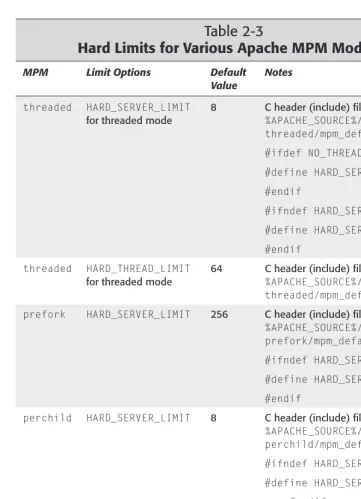
The first major change in Apache 2.0 is the introduction of multiprocessing mod-ules (MPMs). To understand why MPMs are created, you need to understand how Apache worked before. Apache Version 1.3 or earlier used a preforking architecture. In this architecture, an Apache parent process forked a set of child processes, which serviced the actual requests. The parent process simply monitored the children and spawned or killed child processes based on the amount of requests received. Unfortunately, this model didn’t work well under platforms that are not process-centric such as Windows. So, the Apache Group came up with the MPM-based solution.
Each MPM is responsible for starting the server processes and for servicing requests via child processes or threads depending on the MPM implementation. Several MPMs are available. They are discussed in the following sections.
The prefork MPM
If something goes wrong and the child process dies, only a single request is lost. The number of child processes is controlled using a minimum and maximum setting. When the number of requests increases, new child processes are added until the maximum is reached. Similarly, when the requests fall, any extra child processes are killed.
The threaded MPM
This MPM enables thread support in Apache 2.0. This is like the prefork MPM, but instead of each child process having a single thread, each child process is allowed to have a specified number of threads. Each thread within a child process can ser-vice a different request. If Apache starts 30 child processes where each child is allowed to have at maximum 10 threads, than Apache can service 30 ×10 = 300 requests simultaneously.
If something goes wrong with a thread, for example, an experimental module causes the thread to die, then the entire process dies. This means that all the requests being serviced by the threads within the child process will be lost. However, because requests are distributed among threads on separate child processes, it is likely that a child’s death will take down at maximum of 1/nof all the total connec-tion, where npresents the number of all simultaneous connections.
A process is added or removed by monitoring its spare-thread count. For example, if a process has less than the minimum number of spare threads, a new process is added. Similarly, when a process has a maximum number of idle threads, it killed.
All processes run under the same user and group ID assigned to Apache server.
Because threads are more resource efficient than processes, this MPM is very scalable.
The perchild MPM
This is also new in Apache 2.0. In this MPM model a set number of child processes are started with a specified number of threads. As request load increases the pro-cesses add new threads as needed. When request count reduces, propro-cesses shrink their thread counts using a minimum and maximum thread count setting.
The key difference between this module and the threaded MPM is that the process count is static and also each process can run using a different user and group ID. This makes it easy to run different virtual Web sites under different user and group IDs. See Chapter 6 for details.
The winnt MPM
services the request. Also, this module now takes advantage of some Windows-only native function calls, which allows it to perform better than the earlier versions of Apache server on Windows platform.
Filtering I/O
Apache 2.0 now provides architecture for layered I/O. This means that one module’s output can become another module’s input. This filtering effect is very interesting. For example, the output produced by CGI scripts, which is processed by the
mod_cgimodule, can now be handed to the mod_includemodule responsible for
SSIs. In other words, CGI scripts can produce output as SSI tags, which can be pro-cessed before the final output is sent to the Web browser. Many other applications of filtering I/O will be available in the future.
New CGI daemon
Because many of the MPM modules use threads, executing CGI scripts become cumbersome when a thread gets such a request. The mod_cgimodule still works, but not optimally for threaded MPMs, so mod_cgidwas added. The mod_cgid
module creates a daemon process, which spawns CGI processes and interacts with threads more efficiently. Figure 1-1 shows how a CGI request for a script called
myscript.plis serviced.
Figure 1-1: How the CGI daemon works with Apache child processes.
Here is how the CGI scripts are executed:
1.When the CGI request comes to a thread within a child process, it passes the request to the CGI daemon.
Web Browser 1 3
2 myscript.pl Apache Child
Process Apache Child
Process
CGI Daemon Process Apache Child
2.The CGI daemon spawns the CGI script and outputs the CGI script-generated data to the thread in the child process.
3.The thread returns the data to the Web browser.
When the main Apache server starts, it also starts the CGI daemon and establishes a socket connection. So, when a new child process is created, it inherits the socket connection and therefore does not have any need to create a connection to the CGI daemon for each request. The entire process improves CGI execution in the threaded environment.
Apache Portable Run-Time
In furtherance of the Apache Group’s vision to create the most popular Web server in the world, it became clear that Apache’s portability needed to be addressed in Apache 2.0. Prior to the current release, Apache had been dealing with portability internally, which made the code base less manageable. So, Apache Group intro-duced the Apache Portable Run-Time (APR). APR’s purpose is to provide a single C interface to platform-specific functions so that code can be written once.
This enables Apache to run more natively on platforms such as Windows, BeOS, Amiga, and OS/2. Because of APR, many programs, such as ApacheBench, can run on these platforms.
Understanding the Apache License
Free software such as Apache, Perl (Practical Extraction and Reporting Language), and Linux (an x86-based Unix clone operating system) are getting a great deal of press because of Netscape’s decision to make Netscape Communicator, one of the most popular Web browsers, available for free with its Mozilla project. Unfortunately, free software such as Apache, Perl, and Linux do not share the same licensing agreements, and so the media has created some confusion by associating these packages in the same licensing category.
All free software is intended to be, well, free for all. However, there are some legal restrictions that the individual software licenses enforce. For example, Linux, which is made free by GNU Public License (GPL), requires that any changes to Linux be made public. Apache, on the other hand, does not require that changes made to Apache be made public by anyone.
In short, think of Apache as free, copyrighted software published by the Apache Group. It is neither in the public domain nor is it shareware. Also note that Apache is not covered by GPL. The Apache Software License document is listed in
Listing 1-1:
Apache Software License
/* ==================================================================== * The Apache Software License, Version 1.1
*
* Copyright (c) 2000-2001 The Apache Software Foundation. All rights * reserved.
*
* Redistribution and use in source and binary forms, with or without * modification, are permitted provided that the following conditions * are met:
*
* 1. Redistributions of source code must retain the above copyright * notice, this list of conditions and the following disclaimer. *
* 2. Redistributions in binary form must reproduce the above copyright * notice, this list of conditions and the following disclaimer in * the documentation and/or other materials provided with the * distribution.
*
* 3. The end-user documentation included with the redistribution, * if any, must include the following acknowledgment:
* “This product includes software developed by the * Apache Software Foundation (http://www.apache.org/).”
* Alternately, this acknowledgment may appear in the software itself, * if and wherever such third-party acknowledgments normally appear. *
* 4. The names “Apache” and “Apache Software Foundation” must * not be used to endorse or promote products derived from this * software without prior written permission. For written * permission, please contact [email protected].
*
* 5. Products derived from this software may not be called “Apache”, * nor may “Apache” appear in their name, without prior written * permission of the Apache Software Foundation.
*
* THIS SOFTWARE IS PROVIDED “AS IS” AND ANY EXPRESSED OR IMPLIED * WARRANTIES, INCLUDING, BUT NOT LIMITED TO, THE IMPLIED WARRANTIES * OF MERCHANTABILITY AND FITNESS FOR A PARTICULAR PURPOSE ARE * DISCLAIMED. IN NO EVENT SHALL THE APACHE SOFTWARE FOUNDATION OR * ITS CONTRIBUTORS BE LIABLE FOR ANY DIRECT, INDIRECT, INCIDENTAL, * SPECIAL, EXEMPLARY, OR CONSEQUENTIAL DAMAGES (INCLUDING, BUT NOT * LIMITED TO, PROCUREMENT OF SUBSTITUTE GOODS OR SERVICES; LOSS OF * USE, DATA, OR PROFITS; OR BUSINESS INTERRUPTION) HOWEVER CAUSED AND * ON ANY THEORY OF LIABILITY, WHETHER IN CONTRACT, STRICT LIABILITY, * OR TORT (INCLUDING NEGLIGENCE OR OTHERWISE) ARISING IN ANY WAY OUT * OF THE USE OF THIS SOFTWARE, EVEN IF ADVISED OF THE POSSIBILITY OF * SUCH DAMAGE.
Listing 1-1
(continued)
* ==================================================================== *
* This software consists of voluntary contributions made by many * individuals on behalf of the Apache Software Foundation. For more * information on the Apache Software Foundation, please see
* <http://www.apache.org/>. *
* Portions of this software are based upon public domain software
* originally written at the National Center for Supercomputing Applications, * University of Illinois, Urbana-Champaign.
*/
Obtaining
and Installing
Apache
A
lthough compiling your own Apache binaries may seem like a bit of work, it’s worth the effort. As you become more familiar with Apache, you will learn that it is the only Web server that provides virtually all (if not more) of the func-tionalities of a full-blown commercial server, while letting you look at how these functionalities are implemented in the source. I find this aspect of Apache fascinating.For people who are not C programmers but who still need a powerful, free, Web server, however, playing around with a lot of ANSI C code may not exactly be a favorite pastime. Fortunately, there’s nothing to worry about — Apache comes in both source code and in prebuilt binary packages. This chapter discusses installing Apache from source code and from prebuilt binaries.
The Official Source for Apache
Whenever you obtain free software (source code or binary files) from the Internet, make sure you’re not getting it from an unknown Web or FTP site. What I mean by an unknown can be better understood by use of an example. Say you want to obtain free Java-based Web browser software developed by Sun Microsystems. You need to be able to do some sort of authenticity check, which is often difficult on the Internet; therefore, you should stick with sites that are widely used. For example, you don’t want to get it from an FTP site with hostname such as dialup-666.someforeignisp.net.ch; you should probably look for it somewhere on the java.sun.comsite instead, because you can’t be sure that 666.
someforeignisp.net.ch has completely checked the
soft-ware for any hidden dangers. You get the idea.
2
2
C H A P T E R
✦ ✦ ✦ ✦
In This Chapter
Finding the latest Apache source
System requirements for Apache
Downloading the software
Compiling the source
Installing binaries on your system
Keeping up with Apache developments
Lucky for us, Apache developers and supporters made sure an official place was set up for obtaining Apache software. The official Apache Web site is www.apache.org. This site contains the latest stable version of Apache, the latest release version of Apache, patches, contributed Apache modules, and so on. This is where you want to go for all your Apache needs — although you might be directed to a mirror site that is geographically near you to help cut down on bandwidth and network con-gestion. You can also use the Pretty Good Privacy (PGP) signatures offered on the site to verify the authenticity of the source code. If you do not know how to use PGP, check out www.pgp.net.
Windows users: Please read Chapter 20 for details on your platform. This chapter is primary geared towards Unix installation and uses Linux as the sample platform. Instructions in this chapter apply to most Unix systems.
System Requirements
Apache runs on just about any platform in use today, including Linux; FreeBSD; OpenBSD; NetBSD; BSDI; Amiga OS 3.x; Mac OS X; SunOS; Solaris; IRIX; HPUX; Digital Unix; UnixWare; AIX; SCO; ReliantUNIX; DGUX; OpenStep/Mach; DYNIX/ptx; BeOS; and Windows.
Requirements for building Apache
from source distribution
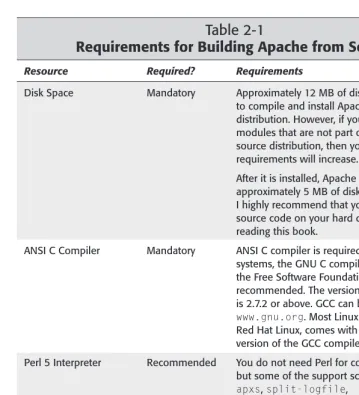
If you are planning on building Apache from source, which is what I highly recom-mend since compiling your own will give you a very lean and mean server, then you need to make sure that your system meets the requirements stated in Table 2-1.
These requirements are for building Apache from the source code only. For run-ning Apache on your system, browse the requirements in the next section.
Table 2-1
Requirements for Building Apache from Source
Resource Required? Requirements
Disk Space Mandatory Approximately 12 MB of disk space is needed
to compile and install Apache from source distribution. However, if you add many modules that are not part of the standard source distribution, then your space requirements will increase.
After it is installed, Apache only needs approximately 5 MB of disk space. However, I highly recommend that you maintain the source code on your hard disk until you finish reading this book.
ANSI C Compiler Mandatory ANSI C compiler is required. For most
systems, the GNU C compiler (GCC) from the Free Software Foundation is highly recommended. The version you should have is 2.7.2 or above. GCC can be found at
www.gnu.org. Most Linux systems, such as Red Hat Linux, comes with the latest stable version of the GCC compiler.
Perl 5 Interpreter Recommended You do not need Perl for compiling Apache,
but some of the support scripts, such as
apxs, split-logfile,
log_server_status, and dbmmanage, which are found in the support subdirectory of your source distribution, are Perl scripts. You need Perl only if you plan to use those scripts. I highly recommend that you install Perl on your system. Perl version 5.003 or above will work fine.
Table 2-1 (continued)
Resource Required? Requirements
Dynamic Shared Object Optional Instead of compiling modules in the Apache
(DSO) support binary itself, you can create dynamic modules
called DSO that can be loaded via the
httpd.conffile at startup. DSO modules enable you to experiment with modules and configurations more freely than compiling everything in httpd. Currently, DSO support is available for Linux, FreeBSD; OpenBSD; NetBSD; BSDI; SunOS; Solaris; IRIX; HPUX, Digital Unix, UnixWare, AIX, SCO, ReliantUNIX, DGUX, Darwin/Mac OS, OpenStep/Mach, and DYNIX/ptx.
Note that an Apache server using a DSO module may be approximately 20 percent slower at startup and approximately 5 percent slower during run time. On top of that, DSO is not always available in all platforms.
Therefore, I do not recommend DSO for a production environment. It is great, however, for experimenting with modules in a development or staging environment.
Requirements for running an Apache Web server
Before displaying the Powered by Apache logo on your Web server, you want to make sure your Web server has enough “power” to run it.Fortunately, Apache does not require massive computing resources to run. It runs fine on a Linux system with 5 to 12MB of hard disk space and 8MB of RAM.
However, just being able to run Apache is probably not what you had in mind. Most likely, you want to run Apache to serve Web pages, launch CGI processes, and take advantage of all the wonderful stuff that the Web has to offer. In that case, you want disk space and RAM size figures that reflect your load requirements. You can go about this in two ways: you can ask someone who runs a similar site with Apache and find out what type of system resources they’re using; or, you can try to figure out your realistic needs after you’ve installed Apache on your system.
number of Apache processes that will be running at peak hours (see the
MaxSpareServersdirective in Chapter 4). This should give you a reasonable
esti-mate of your site’s RAM requirements for Apache. If you plan to run several CGI programs on your Apache server, you have to determine memory usage for these programs as well, and take this additional need into account. One of the ways you can determine your CGI program memory requirements is run the CGI program and use the toputility to watch how much memory it uses and then multiply that amount of memory by the number of CGI requests you need to be able to fulfill simultaneously.
The disk requirements for Apache source or binary files shouldn’t be a concern with most systems because Apache binaries take no more than 1MB of space and the source file is about 5MB. You should really pay attention, however, to the log files that Apache creates, because each log entry takes up approximately 80 bytes of disk space. If you expect to get about 100,000 hits in a day, for example, your Apache access log file may be 8,000,000 bytes. In Chapter 8, you’ll learn how to rotate the log files by emptying or archiving the log file and replacing it with a new one.
Finally, consider whether you have appropriate bandwidth for running a Web server. Estimating bandwidth requirement is not an easy task but you can come up with ballpark figures by doing a bit of math. Here is what you will need:
✦The average Web page size for your Web site:If you don’t know this already,
you can run the following command in your document root directory to find out the average size of your Web pages:
find path_to_doc_root -type f -name “*.html” -ls | \
awk ‘BEGIN{ FILECNT = 0; T_SIZE = 0;} \ { T_SIZE += $7; FILECNT++} \ END{print “Total Files:”, FILECNT, \
“Total Size:”, T_SIZE, \
“Average Size:”, T_SIZE / FILECNT;}’
Don’t forget to replace path_to_doc_rootwith the actual document root direc-tory of your Web site. For example, for a Web site with document root /www/
mysite/htdocs, the above script returns the following output:
Total Files: 332 Total Size: 5409725 Average Size: 16294.4
✦The number of average size Web pages you can serve (assuming that
Apache has no bottlenecks of its own and totally ignoring the bandwidth utilized by incoming requests):For example, say you have an ISDN (128Kbits/sec) connection to the Internet and your average file size is 16K. Because 128 kilobits per second = 128/8 kilobytes per second = 16 kilobytes per second, you can send one average size file per second. If you include the other overhead, such as bandwidth needed for the inbound request traffic, you probably cannot service a request per second. In this case, network overhead becomes a big bottleneck if you wanted to allow N(where N> 1)
simultaneous users to connect to your Web site. For example, if you have an ISDN connection and want to service 12 simultaneous users per second when the average file size is 16K, you need 12 ×ISDN (128 Kbps) connections, which is a T-1 (1.53 Mbps).
Downloading the Software
Before you download the Apache software for the first time, you should note a few things. There’s a good chance that you will find two versions of Apache available: one is an official release version, and one is a beta release version that has the lat-est code and features. For example, if you see an Apache version 2.0.2 and a version called 2.3b3, then the first version is an official release and the second is a beta ver-sion. A third beta such as 2.3b3 (2.3b1 and 2.3b2 came before it) is likely to be sta-ble, but using a beta version is not recommended for a production Web server. To download the version you want, go to www.apache.org/dist/httpd/.
To find the geographically closest Apache mirror server, run the mirror Apache finder script at www.apache.org/dyn/closer.cgi.
This is the distribution directory of the Apache software. Here, you will find both the release and the beta versions of the software in multiple compression packages. For example:
httpd_2.0.4.tar.Z httpd_2.0.4.tar.gz httpd_2.0.4.zip
httpd_2.3b3.tar.gz httpd_2.3b3_win32.exe
These are a few examples of the various types of compression formats that are used to distribute source code. You need to choose the compression format that your system can handle (in other words, make sure you have a utility to decom-press the code). Typically with Linux, all you need are the tar, gnuzip, or gzip
utilities to decompress the files. For example, to decompress the httpd_version.
tar.gzfile (where version is whatever version you have downloaded such as 2.0.4)
on a Linux system, you use the tar xvzf httpd_version.tar.gzcommand. You could also use the gzip -d httpd_version.tar.gz ; tar xvf httpd_version. tarcommand, which will decompress and extract all the files in a subdirectory while keeping the relative path for each file intact.
Self-extracting compressed files are usually created for the Windows version of Apache. Any such file can be extracted by simply running the downloaded file. For Windows-specific installation and configuration details, you should skip the rest of this chapter and read Chapter 20.
The binaries are usually kept in a different directory where each operating system has a subdirectory of its own. Note that if your operating system does not appear in the binaries directory, this does not necessarily mean the operating system is not supported. All it means is that no one in the Apache development group or contri-bution groups have compiled a binary file for your system yet. You are likely to find binaries for the Linux, FreeBSD, Solaris, NetBSD, OS2, AIX, Ultrix, HPUX, and IRIX systems.
Installing Apache from Source Code
Installing Apache by compiling the code from the source distribution is the preferred installation method because it allows you to configure the server to fit your needs. Any binary installation that you download will have someone else’s configuration, which you may not be able to alter to suit your needs.
For example, if you download and install a binary that has CGI support, you may have to live with the CGI support even if you never run CGI programs. If the CGI module is configured as a dynamically shared module, then you can disable it very easily; however, if the support is statically built into a binary, then you’ll just have to live with CGI. If you compile a lean and mean Apache server from the source distribution, however, you get the components that you need with no wasted processes or disk space.
Download the source distribution from the official Apache Web site or from a des-ignated mirror site.
Configuring Apache source
The Apache source distribution comes with a script called configurethat allows you to configure the source tree before you compile and install the binaries. From the Apache source distribution directory, you can run this script as follows:
./configure --prefix=apache_installation_dir
The --prefixoption tells Apache to install the binaries and other necessary
configuration and support files in apache_installation_dir. For example:
./configure --prefix=/usr/local/apache
Here Apache source will be configured so that all the binaries and supporting files will be installed in the /usr/local/apachedirectory.
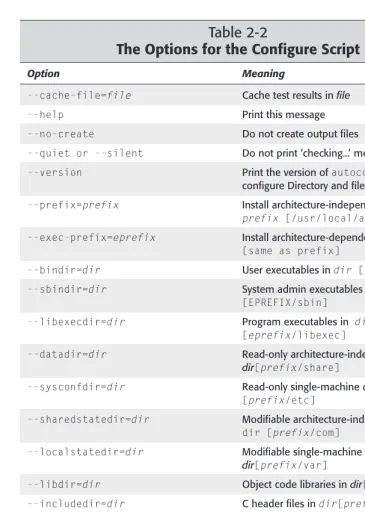
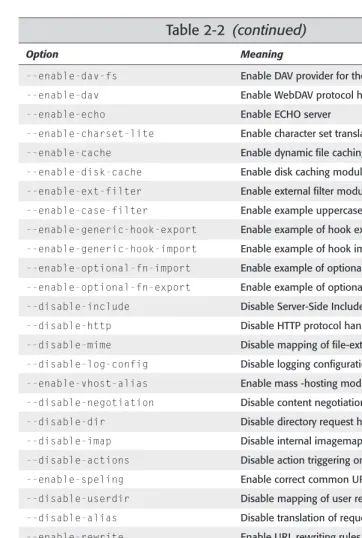
There are many options that you can use with the configurescript. Table 2-2 shows all the configuration options available.
Table 2-2
The Options for the Configure Script
Option Meaning
--cache-file=file Cache test results in file
--help Print this message
--no-create Do not create output files
--quiet or --silent Do not print ‘checking...’ messages
--version Print the version of autoconfthat created configure Directory and filenames:
--prefix=prefix Install architecture-independent files in
prefix [/usr/local/apache2] --exec-prefix=eprefix Install architecture-dependent files in eprefix
[same as prefix]
--bindir=dir User executables in dir [EPREFIX/bin] --sbindir=dir System admin executables in dir
[EPREFIX/sbin]
--libexecdir=dir Program executables in dir
[eprefix/libexec]
--datadir=dir Read-only architecture-independent data in
dir[prefix/share]
--sysconfdir=dir Read-only single-machine data in dir
[prefix/etc]
--sharedstatedir=dir Modifiable architecture-independent data in
dir [prefix/com]
--localstatedir=dir Modifiable single-machine data in
dir[prefix/var]
--libdir=dir Object code libraries in dir[eprefix/lib] --includedir=dir C header files in dir[prefix/include] --oldincludedir=dir C header files for non-GCC in dir
[/usr/include]
--infodir=dir Info documentation in dir[prefix/info] --mandir=dir man documentation in dir[prefix/man] --srcdir=dir Find the sources in dir[configure dir
or ...]
Option Meaning
--program-suffix=suffix Append suffix to installed program names
--program-transform-name=program Run sed (stream editor) program on installed program names
--build=build Configure for building on build
--host=host Configure for host
--target=target Configure for TARGET [TARGET=HOST]
--disable-feature Do not include FEATURE (same as –enable-FEATURE=no)
--enable- feature[=arg] Include feature [arg=yes]
--with-package[=arg] Use package[arg=yes]
--without-package Do not use package(same as
–with-package=no)
--x-includes=dir X include files are in dir
--x-libraries=dir X library files are in dir
--with-optim=flag Obsolete (use OPTIM environment variable)
--with-port=port Port on which to listen (default is 80)
--enable-debug Turn on debugging and compile-time warnings
--enable-maintainer-mode Turn on debugging and compile-time warnings
--enable-layout=layout Enable a directory layout
--enable-modules=module-list Enable one or more named modules
--enable-mods-shared=module-list Enable one or more named modules as shared modules
--disable-access Disable host-based access control
--disable-auth Disable user-based access control
--enable-auth-anon Enable anonymous user access
--enable-auth-dbm Enable DBM-based access databases
--enable-auth-db Enable DB-based access databases
--enable-auth-digest Enable RFC2617 Digest authentication
--enable-file-cache Enable file cache
Table 2-2
(continued)
Option Meaning
--enable-dav-fs Enable DAV provider for the filesystem
--enable-dav Enable WebDAV protocol handling
--enable-echo Enable ECHO server
--enable-charset-lite Enable character set translation
--enable-cache Enable dynamic file caching
--enable-disk-cache Enable disk caching module
--enable-ext-filter Enable external filter module
--enable-case-filter Enable example uppercase conversion filter
--enable-generic-hook-export Enable example of hook exporter
--enable-generic-hook-import Enable example of hook importer
--enable-optional-fn-import Enable example of optional function importer
--enable-optional-fn-export Enable example of optional function exporter
--disable-include Disable Server-Side Includes
--disable-http Disable HTTP protocol handling
--disable-mime Disable mapping of file-extension to MIME
--disable-log-config Disable logging configuration
--enable-vhost-alias Enable mass -hosting module
--disable-negotiation Disable content negotiation
--disable-dir Disable directory request handling
--disable-imap Disable internal imagemaps
--disable-actions Disable action triggering on requests
--enable-speling Enable correct common URL misspellings
--disable-userdir Disable mapping of user requests
--disable-alias Disable translation of requests
--enable-rewrite Enable URL rewriting rules
--disable-so Disable DSO capability
--enable-so Enable DSO capability
--disable-env Clearing/setting of ENV vars
--enable-mime-magic Automatically determine MIME type
--enable-cern-meta Enable CERN-type meta files
Option Meaning
--enable-headers Enable HTTP header control
--enable-usertrack Enable user-session tracking
--enable-unique-id Enable per-request unique IDs
--disable-setenvif Disable base ENV vars on headers
--enable-tls Enable TLS/SSL support
--with-ssl Use a specific SSL library installation
--with-mpm=MPM Choose the process model for Apache to use: MPM={beos threaded prefork spmt_os2 perchild}
--disable-status Process/thread monitoring
--disable-autoindex Disable Directory listing
--disable-asis Disable As-is filetypes
--enable-info Enable Server information
--enable-suexec Set UID and GID for spawned processes
--disable-cgid Disable CGI daemon support
--enable-cgid Enable CGI daemon support
--disable-cgi Disable CGI scripts support
--enable-cgid Enable CGI scripts support
--enable-shared[=pkgs] Build shared libraries [default=no]
--enable-static[=pkgs] Build static libraries [default=yes]
--enable-fast-install[=pkgs] Optimize for fast installation [default=yes]
--with-gnu-ld Assume the C compiler uses GNU lD [default=no]
--disable-libtool-lock Avoid locking (might break parallel builds)
--with-program-name Alternate executable name
--with-suexec-caller User allowed to call SuExec --with-suexec-userdir User subdirectory
--with-suexec-docroot SuExecroot directory
--with-suexec-uidmin Minimal allowed UID
--with-suexec-gidmin Minimal allowed GID
--with-suexec-logfile Set the logfile
--with-suexec-safepath Set the safepath