Virtual Teams:
Getting the Most From
Wikis, Blogs, and Other
Collaborative Tools
M. Katherine Brown
Brenda Huettner
Char James-Tanny. p. cm.
Includes bibliographical references and index ISBN-10: 1-59822-028-4 (paperback) ISBN-13: 978-1-59822-028-5
1. Virtual work teams--Computer network resources. 2. Teams in the workplace--Computer network resources. 3. Business communication--Computer network resources. 4. Project management--Computer network resources.
I. Huettner, Brenda. II. James-Tanny, Char. III. Title.
HD66.2.B76 2006
658.4'022--dc22 2006037027
© 2007, Wordware Publishing, Inc.
All Rights Reserved 1100 Summit Ave., Suite 102
Plano, Texas 75074
No part of this book may be reproduced in any form or by any means without permission in writing from
Wordware Publishing, Inc.
Printed in the United States of America
ISBN-10: 1-59822-028-4 ISBN-13: 978-1-59822-028-5 10 9 8 7 6 5 4 3 2 1 0611
All brand names and product names mentioned in this book are trademarks or service marks of their respective companies. Any omission or misuse (of any kind) of service marks or trademarks should not be regarded as intent to infringe on the property of others. The publisher recognizes and respects all marks used by companies, manufacturers, and developers as a means to distinguish their products.
This book is sold as is, without warranty of any kind, either express or implied, respecting the contents of this book and any disks or programs that may accompany it, including but not limited to implied warranties for the book’s quality, performance, merchantability, or fitness for any particular purpose. Neither Wordware Publishing, Inc. nor its dealers or distributors shall be liable to the purchaser or any other person or entity with respect to any liability, loss, or damage caused or alleged to have been caused directly or indirectly by this book.
Acknowledgments . . . ix
Introduction . . . xi
Part I: Building and Managing a Virtual Team Chapter 1 Understanding Team Dynamics in a Virtual Environment . . . 5
Lifecycle of a Team . . . 6
Characteristics of an Effective Team . . . 9
Shared Team Objective . . . 9
Knowledge . . . 11
Equipment . . . 12
Ability . . . 12
Desire. . . 12
Characteristics of an Effective Team Leader . . . 13
Challenges and Opportunities with Virtual Teams . . . 18
Culture . . . 18
Logistics . . . 20
Communication . . . 21
Project Management . . . 22
Personnel Management . . . 22
Summary . . . 23
Related Resources . . . 24
Chapter 2 Setting Up a Virtual Team. . . 27
Hiring . . . 28
Cost Estimate . . . 107
Tracking Your Progress . . . 108
Incorporating Progress into Your Plan. . . 111
Summary . . . 113
Related Resources . . . 113
Chapter 6 Collaborating and Troubleshooting . . . 115
Working Collaboratively . . . 116
Agile Environments and Virtual Teams . . . 116
Working with Vendors . . . 117
Localization/Translation . . . 119
Components of an RFP . . . 120
Evaluation Checklist . . . 123
Production or Hardware . . . 124
Documentation . . . 124
Contractors/Consultants . . . 125
Challenges for Virtual Teams . . . 126
Do Not Leave Anyone Behind! . . . 126
Managing Conflict within Your Team . . . 131
Summary . . . 136
Related Resources . . . 136
Chapter 7 Conducting Reviews . . . 139
Content Reviews . . . 140
Technical Reviews. . . 142
Get the Right People Involved Early . . . 143
Identify the Review Team . . . 144
Plan and Prepare . . . 145
Provide Clear Objectives and Instructions for Each Review . . . 145
Clearly Identify the Purpose, Audience, and Scope . . 146
Provide Sufficient Time for the Review . . . 147
Manage the Meeting . . . 148
Project Reviews . . . 165
1. Compare the Numbers within Categories and Across Categories . . . 203
2. Look for Trends and Trouble Spots . . . 205
4. Repeat Steps 1 through 3 . . . 207
Summary . . . 208
Related Resources . . . 208
Part II: Evaluating the Tools Chapter 10 Comparing Features, Tools, and More . . . 219
Comparing Tasks and Categories . . . 219
Chapter 11 Installation, Customization, and Security . . . 223
Installing Applications . . . 224
Using Fantastico . . . 225
General Installation Notes . . . 225
Customizing Applications . . . 226
Implementing Security . . . 227
Challenge Emails . . . 227
CAPTCHA . . . 228
Verification . . . 229
Whitelists . . . 229
Role-based Permissions . . . 230
Chapter 12 Collaborative Software Suites . . . 231
Chapter 13 Meeting and Communication Tools . . . 237
Instant Messaging (IM) Applications . . . 238
Customizing IM Applications . . . 240
Adding Security to Instant Messaging . . . 240
IM Applications . . . 241
Web-based Meeting Programs. . . 246
Web-based Meeting Tools . . . 247
Chapter 14 Information Broadcasting Tools . . . 251
Chapter 15 Information Sharing Tools . . . 259
Calendars. . . 260
Calendar Software . . . 260
File Sharing Software . . . 263
Forums and Bulletin Boards. . . 265
Application Sharing. . . 267
Chapter 16 Information Gathering Tools . . . 269
Surveys . . . 270
Project Management . . . 272
Time Tracking . . . 275
Chapter 17 Wikis . . . 277
Chapter 18 RSS Feeds and Other “Push” Technologies . . . 285
Emails, Faxes, and Voice Mails . . . 286
Newsletters . . . 287
RSS . . . 287
Creating and Validating an RSS File. . . 292
Using HTML in RSS and Atom Feeds . . . 294
Applying Formatting to RSS and Atom Feeds. . . 295
Vulnerabilities in RSS Feeds . . . 295
Syndicating an RSS Feed . . . 296
Using an RSS Aggregator . . . 296
Vulnerabilities with Aggregators . . . 298
Appendix A It’s a Wiki Wacky World . . . 301
Appendix B Glossary . . . 341
It has been said that books are not written in a vacuum. A book on the subject of virtual teams by three authors who live in different time zones definitely proves that statement.
We would like to thank Mike Markley, Judy Herr, and our editor, Beth Kohler, for their assistance in reviewing the book. Brian Walker shared information on accessibil-ity for different applications. Thanks also to Paula Berger for her support and advice.
We are also grateful to our friends and colleagues in the Society for Technical Communication and IEEE-Pro-fessional Communication Society for their years of advice, mentoring, support, and encouragement.
and satisfy that urge come from the constant support of friends, family, and colleagues, new and old.
Char thanks her son, Jesse Freeman, for having so many interests and making life so fascinating (not many authors get to keep baby corn snakes warm while
researching the latest application features!), and her hus-band, Jim Freeman, for making our home into a virtual working environment (because otherwise, there would be no “backyard office”). The group at HOT made sure that I knew what was going on in the world when I did not have time to read the latest news sites, and kept me entertained with links, videos, and games. And I truly appreciate all those on my buddy lists who answered questions, provided late-night conversations, and made me laugh… you know who you are.
There are lots of good books available today about how to use collaborative tools like wikis, blogs, RSS, and messaging systems. They usually cover the conceptual basics needed to implement the specific tool, and then go into detail about how to implement and manage the vari-ous tool features. Tools books are often designed for technical people who already have a grounding or experi-ence in what the tool is and why they want to use it.
There are even more good books available about how to manage teams, how to manage projects, and how to manage cross-cultural or international teams. Typically aimed at managers, these books are packed with theory and many good tips on how to get along with various types of people, but are often vague about the specific tools that are available for project management.
describe what kinds of things you can do with these tools, and to show a sampling of how some of the current tools compare to each other in order to help you make better choices.
Part I, “Building and Managing a Virtual Team,” cov-ers the basics of team and project management with particular emphasis on the unique challenges of virtual teams and plenty of cross-references to the tools you need to be successful. Part II, “Evaluating the Tools,” describes the different features of each type of tool, and shows some of the differences (and similarities) between the tools available today.
Caution: New virtual and collaborative tools are being released every day. Rather than attempt a compre-hensive list of all available tools, we have chosen a variety of tools that are representative of the functional-ity that is currently available. Read this book to gain a general understanding of what to look for when evaluat-ing tools, then refer to the references listed throughout the book and to the companion wiki at
www.wikiwackyworld.com for more complete lists of tools.
Appendix B is a glossary of many of the terms used throughout the book.
If you have comments or questions about the book, or about the topic of virtual collaborative tools, go to our wiki site at http://www.wikiwackyworld.com to partici-pate in our growing community. You can email us at [email protected].
Building and
Managing a Virtual
Team
A recent study by the American Business Collaborative found that over 80 percent of the workers surveyed are involved in some way with virtual work teams. These teams include those who work from home, those who work at a customer site, and teams who work in offices across town, across the country, or across the world.
to the IT (information technology) infrastructure or policies to make effective use of such tools.
The chapters in Part I of the book describe the typical steps for planning, setting up, managing, and evaluating a successful virtual team. While the focus is on the team interactions, we also include recommendations for the tools that work well for each step along the way, and cross-reference, where appropriate, with the tools chap-ters in Part II.
n Chapter 1 provides an overview of the way teams
work and how virtual teams may differ from colocated teams.
n Chapter 2 describes the process of setting up a team
and explains the factors that you need to consider when choosing team members.
n Chapter 3 looks at the types of tasks that every team
needs to perform, regardless of project or location, and then offers suggestions on tools that might help with those tasks.
n Chapter 4 discusses issues that may occur once your
project is underway by focusing on improving commu-nication between your team members, even though they may be in different cities, countries, or time zones.
n Chapter 5 looks at ways you can track your progress
and identifies the types of tools available to help you do so.
n Chapter 6 focuses on the interactions between your
team members, addresses some of the things that may go wrong, and offers some suggestions for what you can do to minimize conflict.
n Chapter 7 discusses the different types of reviews you
n Chapter 8 helps you to prepare for the inevitable
changes that occur during the course of any project, whether changes are in your team, the project goals, or the design.
n Chapter 9 discusses ways to measure the success of
your team and to prepare for making your next project even more successful.
Understanding Team
Dynamics in a Virtual
Environment
“
Virtual teams must be especially conscious of theirdynamics. Behavioral clues are spread out not only in space but usually over longer timeframes than they are with comparable collocated teams. Virtual teams need to design for this supercharged eventuality.
Lipnack and Stamps made that observation in the first edi-tion of their book 10 years ago, technology has continued to advance exponentially to where most companies now take email, high-speed Internet access, and instant messaging for granted, and are beginning to devise ways to integrate wikis, blogs, RSS feeds, VoIP (Voice over Internet Protocol), and other collaboration technologies into their daily work.
Not surprisingly, however, the people side of the equa-tion has evolved much more slowly, as evidenced by the fact that most organizational development consultants still use some variation on Bruce Tuckman’s model of team lifecycle, which Tuckman originally developed in 1965. It is important to remember, as we embark on this journey, that technology is at best a tool and a facilitator of efficiency. The best technology in the world cannot fix the oh-so-very human issues that sometimes sabotage even the best teams.
Lifecycle of a Team
Tuckman’s model defines several stages: forming, storm-ing, normstorm-ing, performstorm-ing, testing (added later by Lipnack and Stamps), and adjourning. This model still character-izes most teambuilding theory and practice, in part
because it provides a practical, replicable view of the team lifecycle, and like most natural systems, seems to follow an “S” curve, with easily identifiable periods of stress and conflict (Lipnack and Stamps, 2000). Peter Senge, author
ofThe Fifth Disciplineand other books about applying
As a manager, you can use the team lifecycle to help you determine the most effective course of action in par-ticular situations, so that you can be proactive about managing the natural stress points that occur during the lifecycle.
The stages of the lifecycle are as follows:
n Forming: The “trial balloon” phase. Someone has a
bright idea and starts building interest, sponsorship, and alliances. During this phase, many discussions occur, serving to build support and consensus about the vision. The leader is selected and begins pulling together a team. Toward the end of this phase, you might get a “honeymoon” period. Everyone is excited about the project, getting to know each other, and busy ensuring that all the infrastructure and executive support is in place so that the project can succeed. Managers can harness this initial burst of energy and productivity by setting appropriate expectations, ensuring a clear path free of bureaucratic obstacles, and directing activities.
n Storming: Similar to the first year of marriage, this
stage lays bare all the differences and conflicts about vision, expectations, work style, and communication style. During this phase, the guidelines are honed, compromises are made, and often, real bonding takes place. Managers can help shorten this period of con-flict by facilitating discussions, documenting decisions and guidelines, modeling expected behaviors, ensuring
Chapter
n Norming: Teambuilding begins in earnest as
individ-uals become comfortable with each other and their roles. The team begins identifying “low-hanging fruit,” those activities or solutions that are easy to implement and have a positive impact on the direction and pace of the project. Managers can assist the team by provid-ing opportunities for social interaction and encourag-ing open discussions and creative problem-solvencourag-ing, as well as identifying the “go-to” people for specific activities.
n Performing: The “zone.” The team is working well
together, knows where it is going and how to get there, and works interdependently. Managers can max-imize the benefit of this stage by ensuring that road-blocks get removed, verifying that the team has all the tools it needs to accomplish the tasks, ensuring that the criteria are established and known, and working to delegate tasks appropriately.
n Testing (added by Lipnack and Stamps): The
“verifi-cation” phase. As pieces of the project are completed, they are verified against the specifications and other components of the project. Problems are identified and corrected. Managers can facilitate the testing phase by ensuring that the tools and processes are working cor-rectly and that open communication exists between the developers and the testers.
n Adjourning: The “wrap-up.” The team is finishing its
team members should focus on next. (See Chapter 7 for information on conducting reviews.)
Characteristics of an Effective Team
Most of the work done by companies today is accom-plished by cross-functional teams, many of which are also geographically dispersed and multicultural. But what dis-tinguishes an effective team from one that merely limps along or falls apart? Technology is not enough. Lu Ellen Schafer, in her training program “How to Make Remote Teams Work,” describes five essential components:
n Shared team objective n Knowledge of what to do n Equipment to do it n Ability to do it n Desire to do it
Without all of these components in place, teams will struggle and, ultimately, will fail.
Shared Team Objective
“Only a few things about teams are sure, and one is this: successful teams have clear goals.” So begins the chapter on goal setting in Glenn Parker’s book,Cross-Functional
Teams.Without a shared vision and goals to support that
Chapter
gains ownership of the project, gains synergy, builds cooperation, and reduces the areas of conflict. Parker recommends the SMART approach to goal-setting:
n Specific: Each goal identifies a specific problem that
you are trying to solve. The specificity helps establish a direction and focus. For example, “Company A wants to reduce localization costs.”
n Measurable: You must be able to determine whether
or not you have successfully achieved the goal. For example, “Company A wants to reduce localization costs by 20 percent.”
n Attainable: The team must be able to achieve the
goal. You want the goal to be challenging but achiev-able. You might need to do some research to deter-mine whether the goal is achievable and, if so, in what time frame. For example, reducing localization costs by 20 percent in three weeks is probably not attain-able; however, doing it in the next product release cycle might be.
n Relevant: The goals of the team must mesh with
those of senior management and with the overall cor-porate strategy. For example, if the company’s global-ization strategy targets China as the next new market, and the software product is not double-byte enabled and there are no plans for making it so, the team goals are not aligned with the corporate objectives.
n Time-bound: Without a deadline, the project will
because the team was not given enough time to succeed.
Each goal should be documented and tied to the overall team vision and objective. In addition, the goals should be prioritized, so the team knows which goal is most impor-tant in the event that a trade-off needs to be made.
Knowledge
The team must understand what it needs to do and what the parameters are for doing it. Expectations must be clear and explicit (and preferably documented on the project’s wiki or intranet so everyone has access to them). The team needs to know what standards it is using, as well as which arm of the resource triangle is most flexible:
Chapter
I
quality to get the product out the door on time. Guy Kawasaki is famous for describing this software industry phenomenon of “don’t worry, be crappy” and “churn, baby, churn” in his bookRules for Revolutionaries.
Teams must also know what types of decisions they can make. If a team is not empowered to make a decision that affects the outcome of the project, its members are less likely to take ownership and to be fully engaged. Responsibilities and lines of authority need to be clearly drawn from the beginning of the project.
Equipment
If teams do not have the right tools for the job in the form of equipment, technology, processes, infrastructure, and so on, it does not matter how good the team is; it will not succeed. This axiom is particularly true of virtual teams, which depend on technology to facilitate communication and to manage workflow.
Ability
Besides a clear vision and the right tools, teams need to have the right people with the right mix of abilities. All the technology in the world will not help a team succeed if its members do not have the technical expertise or the time to complete the project. In many cases, managers can provide the necessary training or build research time into the schedule so that team members can learn as they go.
Desire
well you do it.” You can have information, tools, and capa-bility at your disposal, but if you are notwillingto do it, you will fail. In team situations, one or two cynics can derail the entire team. Managers can monitor and coach but cannot instill desire in someone else. Desire must come from within.
Search and rescue personnel have long puzzled over an interesting phenomenon that occurs when people are lost in the wilderness. Often, the lost person is found dead, propped up against a tree or rock, without a scratch on them, as if they had just given up. Other times, a per-son will suffer serious injuries, and yet survive for days or weeks until they are found or rescue themselves. No one really knows why some people have the drive and others do not in these situations. The same is true in team situations.
Where strong desire and determination persist, people can overcome all kinds of adversity, including lack of abil-ity, in order to succeed.
Characteristics of an Effective Team Leader
According to Lipnack and Stamps, “Virtual teams can be successful only if people cooperatively manage the coordi-nation involved in membership and leadership,” meaning that managers must give up the ideas of power and con-trol, and replace them with service leadership. In the old
Chapter
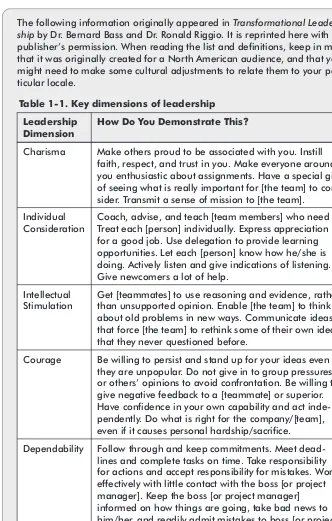
The following information originally appeared inTransformational Leader-shipby Dr. Bernard Bass and Dr. Ronald Riggio. It is reprinted here with the publisher’s permission. When reading the list and definitions, keep in mind that it was originally created for a North American audience, and that you might need to make some cultural adjustments to relate them to your par-ticular locale.
Table 1-1. Key dimensions of leadership
Leadership Dimension
How Do You Demonstrate This?
Charisma Make others proud to be associated with you. Instill faith, respect, and trust in you. Make everyone around you enthusiastic about assignments. Have a special gift of seeing what is really important for [the team] to con-sider. Transmit a sense of mission to [the team]. Individual
Consideration
Coach, advise, and teach [team members] who need it. Treat each [person] individually. Express appreciation for a good job. Use delegation to provide learning opportunities. Let each [person] know how he/she is doing. Actively listen and give indications of listening. Give newcomers a lot of help.
Intellectual Stimulation
Get [teammates] to use reasoning and evidence, rather than unsupported opinion. Enable [the team] to think about old problems in new ways. Communicate ideas that force [the team] to rethink some of their own ideas that they never questioned before.
Courage Be willing to persist and stand up for your ideas even if they are unpopular. Do not give in to group pressures or others’ opinions to avoid confrontation. Be willing to give negative feedback to a [teammate] or superior. Have confidence in your own capability and act inde-pendently. Do what is right for the company/[team], even if it causes personal hardship/sacrifice. Dependability Follow through and keep commitments. Meet
Leadership Dimension
How Do You Demonstrate This?
Flexibility Maintain effectiveness and provide stability while things are changing. See what is critical and function effectively within changing environments. Remain calm and objective when confronted with many and different situations or responsibilities at the same time. When a lot of issues hit at once, be able to handle more than one problem at a time and still focus on the critical things. Be able to “change course” when the situation dictates or warrants it.
Integrity Adhere firmly to a code of business ethics and moral values. Do what is morally and ethically right. Behave in a manner consistent with your professional responsi-bilities. Do not abuse management privileges. Gain and maintain the trust and respect of others. Serve as a consistent role model, demonstrating and supporting corporate policies/procedures, professional ethics, and corporate culture.
Judgment Reach sound and objective evaluations of alternative courses of action through logical and skillful intellec-tual discernment and comparison. Put facts together in a rational and realistic manner to arrive at alternative courses of action. Base assumptions on logic, factual information, and consideration of human factors. Know your authority and be careful not to exceed it. Make use of past experience and information to bring per-spective to present decisions.
Respect for Others
Honor and do not belittle the opinions or work of other people, regardless of their status or position in the organization. Demonstrate a belief in the value of each individual, regardless of their background, etc.
Chapter
True leaders empower their teams by their behaviors (for examples of how these characteristics look when a man-ager is under pressure, watchStar Trek —no, really). True leaders perform the following actions:
n Remove roadblocks.
n Act as an advocate for the team with upper
management.
n Facilitate open, honest communication.
n Model behaviors that they want from the team. n Act instead of react.
n Facilitate decision making and discussions with team. n Recognize the strengths of each team member and
focus those strengths to the benefit of the team.
n See the big picture and communicate each member’s
role in that context.
n Encourage independent thinking and trust their team
to make good decisions.
n Gather team members with complementary skill sets
and draw from the strengths of each member.
n Share leadership appropriately with other team
members.
report for theColumbiaspace shuttle disaster was that upper management did not take seriously the concerns expressed by several project engineers when the foam hit the shuttle.
As teams work together, often informal roles develop. One person might be really good at planning social func-tions, while another person might have an aptitude for troubleshooting. Smart team leaders and managers take advantage of these diverse skills by delegating these tasks to the people who enjoy doing them and who are good at them. Doing so enriches everyone’s experiences and builds ownership. Lipnack and Stamps described the fol-lowing virtual team leader roles, originated by Reuben Harris:
n Coordinator n Designer n Disseminator n Tech-net manager n Socio-net manager n Executive champion
In a virtual team, each of these roles might be played by a different person, or one person might play several of the roles, depending on the size and complexity of the team.
Chapter
Challenges and Opportunities with Virtual
Teams
All teams experience challenges in culture, logistics, com-munication, and so on, but with virtual teams, those challenges are exacerbated by not being in the same room or locale. While this chapter touches on many of the issues, the other chapters in Part I provide additional details and recommendations.
Culture
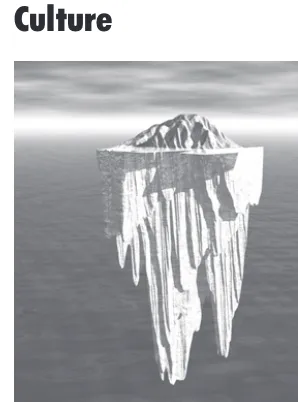
As with the icebergs that float on the ocean, it is not the obvious, visible differences that get even experienced peo-ple into difficulties when working with other cultures, but the nuances that lurk below the surface of most people’s
only in virtual teams, but also within the same locale, office, or social group (and sometimes even within the same family). The structure of the iceberg is a common and apt analogy for describing culture:
n Above the waterline: About 15 percent to 20
per-cent of culture is readily visible. These characteristics include things like language, ethnicity, dress, laws, art, architecture, and other attributes that are immediately obvious when meeting a person from a particular cul-ture or when you set foot in a particular locale that is representative of a culture.
n At the waterline: About 5 percent of culture is on
the edge of one’s awareness. These are things that might not be obvious until they are pointed out, but most people are conscious that they exist and can gen-erally adapt their behavior appropriately. Examples include table manners, level of formality, personal space, hierarchy, and so on.
n Under the surface: About 75 percent to 80 percent
of a culture lurks below the surface of most people’s awareness. These characteristics are the deeply ingrained attitudes, beliefs, prejudices, expectations, and so on that comprise an individual’s world view. In many cases, even people who are self-aware and thoughtful have difficulty articulating and explaining these attributes, precisely because they are so deeply ingrained. These attributes are typically intrinsic to the culture, the things that “everyone knows,” such as the
Chapter
In most situations, you get what you give. If you approach a situation with an open mind, a friendly attitude, and a genuine desire to understand and work with the other person, the other person will respond in kind. When inevi-table misunderstandings occur, have a sense of humor about them and patiently work through the misunder-standing. Encourage your team to stretch beyond individual comfort zones and to learn about and accom-modate cultural differences, while remembering that, at our core, we are more alike than different — we all want food, shelter, clean water, for our children to be better off than we are, and to leave the world a better place than it was when we arrived.
Logistics
With virtual teams, even casual conversations require orchestration and tools. While instant messaging, WebEx, web cams, and other technologies can facilitate communi-cation with the virtual team (see Part II), it is not quite the same as wandering by someone’s office on the way to lunch. When planning a project with a virtual team, you need to be more explicit about everything you do, from communication times and milestones to holiday sched-ules, rules for out-of-office notifications, format for posting to the wiki, and so on.
Internet from her hotel because the hotel was being remodeled and the Internet access was down.
Communication
When people communicate face-to-face, about 70 percent of the information exchanged is nonverbal. This nonverbal information is lost when the people communicating can-not see or hear each other, but must rely on written exchanges. Add to that the increased noise-to-signal ratio inherent in virtual communication, and it is easy to see how minor misunderstandings can escalate into full-blown wars.
Virtual teams must be vigilant about closing the feedback loop, being proactive about communication,
Chapter
I
Project Management
Virtual project managers spend much of their time facili-tating communication among team members and ensuring that processes contribute to team efficiency. While typical project estimates usually include an overall project man-agement charge of about 10 percent to 15 percent of the project cost, virtual teams may require a higher percent-age at the beginning of the project, especially if many team members have never worked virtually before. How-ever, effective project management is vital to ensuring the success of the team.
The advantage of a virtual team from a project man-ager’s perspective is that, with the appropriate tools, the virtual team can take advantage of time zones and holi-day schedules to keep things moving on the project 24/7. For example, if a team member in Europe submits some-thing for review at the end of her day and needs a quick turnaround, the team members in North America, Asia, and Australia/New Zealand can often have a response by the time the European arrives at work the next morning.
Chapter 5 provides tools and best practices for manag-ing virtual projects.
Personnel Management
Supervisors and managers in matrix organizations have an interesting challenge in managing their employees
because the employees often spend more time with their respective project teams than they do with the functional group. The supervisor must depend on the project manag-ers and other reports to assess the employee’s capabilities, needs, and job performance.
“man-traditional management strategies also do not work when the employee is working outside the office, and the super-visor must have a high degree of trust in the employee, as well as being comfortable with a certain lack of control, for this situation to work. Like project managers, supervi-sors with remote employees spend much of their time facilitating communication.
The advantage to the supervisor for having virtual employees is that the employee tends to be highly moti-vated and self-directed. Several studies have also shown that virtual employees tend to be more productive than people who work in an office, probably because they can focus on the work rather than on the politics and distrac-tions of the office.
Chapter 2 provides information on hiring and Chapter 8 offers ideas on integrating new team members.
Summary
“Communicate, collaborate, coordinate, and communicate some more” is the mantra for successful virtual teams. By understanding the team lifecycle, and the characteristics of effective teams and managers, and by working to build a cohesive team environment, virtual teams can be very successful. The remainder of this book delves into specific best practices and tools that you can use to create and manage your own virtual team.
Chapter
Related Resources
Bass, Bernard M., and Ronald E. Riggio.Transformational Leadership. 2nd ed. Mahwah, NJ.: Lawrence Erlbaum Associates, 2005.
Brown, M. Katherine (Kit). Monthly column in Multi-Lingual. 2006.
Buckingham, Marcus, and Donald O. Clifton.Now, Discover Your Strengths. New York: Free Press, 2001.
Gibson, Christina B., and Susan G. Cohen, eds.Virtual Teams That Work: Creating Conditions for Virtual Team Effectiveness. San Francisco: Jossey-Bass, 2003.
Huettner, Brenda P., and Ken Jackson. “How to Hire Technical Writers: A Manager’s Viewpoint.”STC Annual Proceedings, 1996: 109-112.
Katzenbach, Jon R.Teams at the Top: Unleashing the Potential of Both Teams and Individual Leaders. Boston: Harvard Business School Press, 1998.
Kawasaki, Guy, and Michelle Moreno.Rules for Revolution-aries: The Capitalist Manifesto for Creating and
Marketing New Products and Services. New York: HarperCollins, 2000.
Kayser, Thomas A.Team Power: How to Unleash the Collaborative Genius of Work Teams. Burr Ridge, Ill.: Irwin Professional Publishing, 1994.
Parker, Glenn M.Cross-Functional Teams: Working with Allies, Enemies, and Other Strangers. San Francisco: Jossey-Bass, 2003.
Schafer, Lu Ellen. “How to Make Remote Teams Work.” Training materials from a seminar given to
Hewlett-Packard in Palo Alto, Calif., 2000.
Senge, Peter M.The Fifth Discipline: The Art & Practice of the Learning Organization. 2nd ed. New York:
Doubleday/Currency, 2006.
Snyder, Bill. “Teams That Span Time Zones Face New Work Rules.” Stanford Graduate School of Business (http://www.gsb.stanford.edu/news/bmag/ sbsm0305/feature_virtual_teams.shtml), 2003.
Tate, C. W. “The Art of Managing Difficult People.”Nursing Standard. 20 (19; January 2006): 72.
Tuckman, Bruce. “Development sequence in small groups.” Psychological Bulletin. 63 (1965): 384-389.
Chapter
Setting Up a Virtual
Team
“
A company is only as good as the people it can attractand keep. Everything else flows from that, so create an environment to make those people as successful as they can be.
— David Ogilvy, advertising company founder
“
...to know even one life has breathed easier because youhave lived; this is to have succeeded.
In an ideal world, managers would be able to select the tools, personnel, and projects that they want to work on, and would have complete control over all aspects of the effort. In reality, managers must usually work within the confines of the existing organization, infrastructure, and available personnel to meet the project deadlines that upper management imposes, and hire only when they need to fill the gaps in their teams.
Hiring
With virtual teams and teleworking opportunities expand-ing exponentially, managers are increasexpand-ingly faced with hiring employees, contractors, or consultants who will work and live far from the boss’s office. Ideally, managers will bring the top two or three candidates on-site for a final interview and screening. Often, however, managers do not have the opportunity to meet the potential employee or contractor in person, but must rely on prescreening and telephone interviews to determine whether the candidate is a good fit. In such situations, prescreening becomes even more important, and you may want to consider hiring a recruiter or employment agency that is familiar with the locale.
Before You Need to Hire
Before you need to hire someone, you can improve your chances of finding a good fit by doing the following:
n Network with colleagues: Just as networking is
the best way for job seekers to find a job, it is also the best way to find out who is available and who is good at what they do, especially when looking for contrac-tors. Get involved with local professional organiza-tions, chambers of commerce, and so on. Keep a list of the names and specialties of people who are fre-quently recommended (you can set up a secure man-ager’s area of the project wiki or intranet site to store this information). Find out which employment agen-cies and recruiters are the best to work with. Act as a mentor for university students majoring in your disci-pline (even if there is no local university, most
mentorships can be carried out via email and the tele-phone). Agree to requests for informational interviews and keep the person’s résumé on file, even if you do not currently have an opening; you never know when that person might be useful to your organization.
n Track industry trends: Often when one industry
experiences a downturn, others need to hire. Skills are often transferable between industries, and hiring someone from another industry can provide a much-needed injection of new ideas and methodolo-gies into your organization. Business publications,
Chapter
n Investigate and establish relationships with
recruiters and employment agencies:
Researching employment agencies and recruiters in your area before you need them enables you to be proactive about your search for new team members. If you wait until you are in dire straits, you have less room for negotiation and likely will not get as good of a fit. In addition, by doing your homework up front, you can eliminate unscrupulous agencies from the mix and focus on the ones that provide you with excellent service.
Note: Using recruiters and employment agencies can significantly reduce the time required to bring in a quali-fied candidate. However, you need to make sure that you have done your prehiring homework (as detailed below) before engaging an agency.
n Evaluate your needs: What skills do you need on
diverse group. Online surveys work well for gathering information from the team, as do less formal methods, such as instant messaging and teleconferences. And, consider setting up a secure manager’s area of the team wiki to collect and manage the information you gather. (See Chapter 3 for more details on needs analysis.)
n Develop an organizational chart: When setting
up a team, it helps to create an organizational chart so that you can clearly see functional and reporting rela-tionships. Even if you do not have a specific person in mind yet, you can include a spot for that function. The organizational chart also helps you to visualize what skills or functions you might be missing. (See also the section in this chapter titled “Establishing Team Struc-ture and Roles.”)
n Develop a written job description: If the human
resources department does not have a written job description, create one yourself. Doing so will help you clarify what capabilities you need and want for a par-ticular function, as well as help you determine the level of seniority needed to adequately perform those functions. Post the job descriptions for each team func-tion on the wiki.
n Prioritize hiring checklists: No candidate will
have 100 percent of the experiences and skills that you advertise, so determine which skills are must-haves and which ones are good to have but optional. For
Chapter
SWOT Analysis
SWOT analysis stands for Strengths, Weaknesses, Opportu-nities, and Threats. You can use this tool to fairly quickly identify your team, department, or organizational status. The analysis does not have to take long; simply list each area in a text document or on the wiki and make a bulleted list of all the items that belong in each area. Once the analysis is com-plete, you can use the results to compare your current status to where you want to be, using the project plan or corporate strategic plan as the basis for comparison.
n Strengths: These are things that your team does well.
For example, perhaps you have an excellent wiki setup or have great team synergy.
n Weaknesses: These are things that your team does not
do well, or restrictions on things that you are allowed to do. For example, the version control is problematic, or the project files are not easily accessible to everyone on the team.
n Opportunities: These are outside influences that have a
beneficial effect on your team. You typically have no con-trol over when or how they happen, but you can possibly use the occurrence to your advantage. For example, your department gets approved for some capital expenditures that were not in your original budget, or you identify an additional market for your products.
n Threats: These are outside influences that have a
poten-tially negative effect on your team. Like the opportunities, you have no control over when or how threats happen, but recognizing them (or the possibility of them happen-ing) enables you to mitigate their deleterious effects. For example, hurricanes and tsunamis can wipe out infra-structure, or a competitor might release a product very similar to the one that you are working on, or rumors in the company indicate a layoff is imminent.
During the Hiring Process
When hiring virtual team members (or rather team mem-bers who will work virtually — since they actually exist but just work in a different location), managers must rely more heavily on prescreening, reference checks, and other clues to determine how well a candidate will fit with the rest of the team. Behavioral cues, such as proactiveness, ability to follow directions, and attention to detail, are all readily apparent during the initial screening process. Think about how well the candidate performs in these areas as you perform the following tasks:
n Ask for recommended candidates. Before
plac-ing an ad, use your network of colleagues and cowork-ers to identify candidates who might be a good fit. If they meet the requirements and indicate interest, place them in the “to-be-interviewed” folder (which can be an electronic directory or a physical file folder, depending on your preference). If you receive enough candidates this way, you often can avoid having to place an ad, which can give you more choices than you really have time to deal with.
n Be explicit about the résumé/curriculum vitae
(CV) requirements. Different locales have different expectations for what should be included on a résumé or CV, as do different disciplines. Being explicit about your expectations helps to ensure that you receive the information you need to make a good decision, as well
Chapter
n Prescreen. Once you have obtained an adequate
number of résumés or CVs, sort them into Yes, No, and Maybe piles based on their qualifications and what you already know about them from your colleagues. The Yes pile contains the résumés or CVs for the peo-ple you definitely want to interview. The No pile con-tains the résumés or CVs for people who are clearly not qualified for the job (go ahead and send them a rejection letter — you will not hire them for this posi-tion regardless of the rest of the pool). The Maybe pile contains résumés or CVs for people about whom you need more information before deciding (for example, maybe they have most of the experience you want, but are slightly off on one of the skills). Look for errors, omissions, and exaggerations (these may not be imme-diately obvious) in their résumés/CVs and cover let-ters. Identify which ones have bothered to find out about the company (with the Internet, there is really no excuse for not knowing something about the com-pany and showing it in the cover letter). If one of them calls or emails to follow up, mark that on the résumé.
n Search for them on the Internet. Once you have
want to use more than one because different engines contain slightly different information. One caveat — be sure that you are actually reading information about that applicant and not a doppelganger. (For fun, search for your own name and see what comes up.)
n Schedule a telephone interview. Scheduling even
a 30-minute telephone interview can help you see how the candidate will interact with the team, especially if you ask behavioral and scenario-based questions rele-vant to virtual teams (see the sidebar titled “Things to Look for When Hiring for Virtual Teams” later in this chapter for suggestions). Start with the candidates in the Yes pile. You might be able to narrow the list to your top three candidates without needing to access the Maybe pile. Consider using VoIP for this interview, particularly if the candidate is located internationally. Most VoIP is free if both people are using the same ser-vice and within certain restrictions, such as number of people on the call. (See Chapter 4 for more
information.)
n Get work samples, publication lists, or patent
lists, or request a sample project. Depending on the position you are seeking to fill, work samples and lists of previous work can help you figure out what the candidates excel at, as well as where their experiences are focused. In some cases, due to the nature of the samples, candidates may only be able to provide you demonstrations or to bring samples to an in-person
Chapter
other team members who are interviewing candidates can access the information.
n Schedule an in-person or video conference
n Check references. Most people do not ask someone
to be their reference unless they are really sure that the reference will be a good one. Sometimes, however, you can be surprised, especially if you present the questions as open-ended rather than yes/no, so it is a good idea to check the references. And, remember that silence and hesitation sometimes speak volumes. In the United States, lawsuits filed by people who received a poor recommendation from their former employers have caused some companies to develop strict policies about references. In some cases, if you call the human resources department, you will only get the dates of employment and the job title. You can get around this difficulty by requesting personal refer-ences as well.
n Review post-interview behavior. If you have a
couple of candidates who seem equally qualified and have equally excellent references, hire the one who sends a thank-you note, follows up with additional thoughtful questions after the interview, and seems the most proactive in his or her communication. Proactive communication is fundamental to a successful virtual team.
n Make the offer. Most companies get a verbal
indica-tion of acceptance from the candidate and then send out a letter with the specific terms of the offer. Expect to negotiate, particularly if you are dealing with a senior person. Determine what things you are willing
Chapter
line is, and then make your offer somewhere in the middle.
Note: In some countries, negotiation is expected. In others, negotiation is considered unseemly, but giving too low an offer is usually considered insulting. Make sure you know what is appropriate for the locale in which you are hiring. You can find this information in salary surveys done by professional associations, by ask-ing colleagues who work in those areas, or by
researching salaries and business etiquette on the Internet.
Things to Look for When Hiring for Virtual
Teams
Working virtually requires that team members exhibit certain characteristics, such as curiosity, enthusiasm, proactiveness, responsiveness, self-motivation, flexibility, strong work ethic, and self-management. Whether or not the candidate is famil-iar with a particular toolset is less important than whether or not the candidate can work effectively with minimal supervi-sion and has a “can-do” attitude. During the interview, you can assess both the personal qualities and the tools experi-ence of a candidate by observing the following:
n Comfort with technology. Set up the interview using the
technologies that you would use when working with the team, such as VoIP, web cams, email, instant messaging, and so on. It will quickly become apparent how comfort-able the candidates are with working with the technology and how they handle it when things go wrong.
n Response to difficult situations. Here is where the
behavioral and scenario-based questions come into play. These types of questions show you how candidates ana-lyze a situation and what their priorities are. You are looking for responses that indicate the candidates focus on problem-solving, being a team player, and finding the solution that is best for the team. You can sanitize actual occurrences and use them as questions, or make up situ-ations that might happen on your project. Examples include the following:
o Tell me about a time when communication broke down on a team that you were working on. How did you resolve the situation? What was the outcome?
o Walk me through a typical workday for you.
Chapter
o How do you manage distractions when working from
home? From an office? What types of distractions are the most difficult for you to overcome?
o When working virtually, how do you establish a
rap-port with teammates you have never met?
o Pretend you are working on a project and are 30
percent to 40 percent into the project. You suddenly realize that you have gone off course for whatever reason. How do you get back on track?
o Tell me about a time when you and a coworker had
a serious disagreement.
n Probe more deeply. Once the candidate tells the story
you have elicited, ask probing questions that more deeply examine the candidate’s motives and behaviors. If the candidate was being untruthful in the storytelling phase, it will become obvious.
n Look for a demonstrated ability to work remotely.
Ask what experience the candidate has with working remotely. Ask probing questions to determine whether the experience was positive or negative and why. Look for someone who communicates proactively.
Selecting Team Members from within the
Organization
Selecting team members from within your organization follows roughly the same process as hiring someone from outside the company, but tends to be much less formal because you already know something about the people being suggested for the team. You might actually have less say in which existing employees are on your team than you would if you hired someone because other factors, such as availability, priorities, relationship with the func-tional manager, and so on, contribute to the decision.
Establishing Team Structure and Roles
One of the advantages of virtual teams is that team mem-bers tend to focus more on getting the job done than on the office politics and gossip that often derails colocated teams. To facilitate this focus, managers and team leaders must be explicit about expectations, structure, and roles.
Expectations
As a team leader or manager, your expectations, assump-tions, and responses to questions and situations set the
Chapter
Think about and document the following areas when defining your expectations:
n Communication between team members, with upper
management, with functional groups, with customers, and with other employees
n Vision for the project
n Behavioral expectations (e.g., time, how well people
play in the sandbox with each other, conflict manage-ment, and so on)
n Escalation pathways for conflicts and disagreements
that cannot be resolved within the team
n Recognition and reward
n Percentage of available work time that each person
will devote to the project
n Relationship of project to other priorities n Hierarchy
n Percentage of time for billable work and for
adminis-trative work (it is unrealistic to expect much more than 80 percent billable hours, particularly if the job requires intense concentration or creativity)
n Methodology for measuring success (see Chapter 9)
Some expectations may require negotiation with the team, so be prepared to discuss areas of disagreement or misun-derstanding during the initial meeting. Be conscious of conflicts that arise as the project progresses due to unspo-ken or unconscious expectations. As they arise, document team decisions, and ensure that the entire team is aware of the expectation. (See also Chapter 4 for information on communication and Chapter 6 for information on
Structure, Roles, and Responsibilities
The structure of the team and its relationship to the corpo-rate hierarchy forms the framework upon which the roles and responsibilities hang. The structure of the team defines how each functional area will work together, as well as who shows up for reviews, who manages changes, who works with whom, and how often meetings are held. (See Chapter 7 for more about the review process.)
Each member of the team should have a clearly defined and documented role and set of responsibilities for the project. These responsibilities might have signifi-cant overlap with the person’s overall job description. Then again, they might be highly specific to the particular project. For example, one medical company had a major product recall due to a malfunction that was causing seri-ous injury and death. The company pulled its top
performers onto the recall team to address the problem. Team members found themselves performing duties that, while outside their typical responsibilities, were necessary to save lives and to find out how to fix the problem.
Be careful of the “other duties as assigned” state-ments; such phrases tend to be a catch-all and, if you are not careful, can often distract the team from its primary task due to conflicting priorities from project manage-ment and line managemanage-ment.
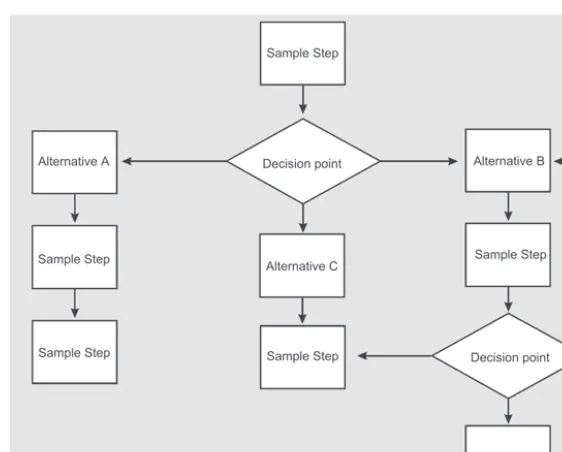
For areas of overlap, be sure to define decision trees to help determine who deals with the issue. (See Figure 2-1.)
Chapter
Leadership
On virtual teams, leadership is shared. While one person might be assigned as the project manager, responsible for the budget and schedule, everyone on the team provides leadership in some area. For example, team members who are experienced with working virtually typically take extra time at the beginning of the project to find ways of estab-lishing rapport with their distant colleagues, and are very proactive about their communication. Other team mem-bers are good at planning teambuilding activities, and connecting people comes naturally to them. Still others are highly competent technically and become the “go-to” person on some aspect of the project.
A good team leader actively encourages these unoffi-cial roles because the team becomes more invested in the
matters. As mentioned in Chapter 1, the leader’s attitude, particularly at the beginning of a project, sets the tone for the entire team. It is important, therefore, that the leader resolve any conflict or doubt about the goals of the pro-ject before setting up the team.
Core Team
The core team on a project typically includes the func-tional leads from each discipline required to complete the project. These team members get involved at the very beginning of the project and stay involved throughout the process. These core team members typically include the following roles and areas of expertise:
n Project manager n Requirements analyst n Design engineer/developer n Documentation
n Localization manager n Marketing
n Regulatory affairs (medical or other regulated
products)
n Testing/quality assurance n Manufacturing/packaging
Depending on the complexity of the project, these core members might have additional people working for or
Chapter
Associated Subject Matter Experts
In addition to the core team members who stay with the project for its duration, subject matter experts (SMEs) might be brought in to assist with specific aspects of the project. These SMEs typically have specialized skills or knowledge that the project team needs to access for a short period of time. Examples include reviewing the final engineering diagrams for electrical issues, providing assis-tance with troubleshooting a particularly complex testing issue, evaluating the ethical issues that arise during a clin-ical trial, and so on. These experts typclin-ically work with the core team members on a specific task and then move on to other work. The core team members are responsible for ensuring that the SMEs have the information that they need to accomplish the tasks assigned to them.
Localization and Other Vendors
as a whole. (See Chapter 6 for more information on work-ing with vendors.)
Setting the Ground Rules
Once you have established the team structure and have identified the core team, it is time to get the project started. The tone and organization of the start phase has lasting implications on how well the entire project goes, so it is imperative that you carefully plan the initial meeting, teambuilding activities, and guidelines for team interac-tion. In addition, if you have members of your team who are not experienced in working virtually or in multicul-tural environments, consider assigning them a mentor who can work with them and guide them as they learn their role. (For information on how to communicate, work with the team, and resolve conflicts during the project, see Chapters 4 and 6.)
Initial Meeting
The initial meeting sets the tone for the project, so during this meeting it is vital to accurately set expectations and ensure that everyone understands the goals, deliverables, and schedule for the project. Perhaps even more impor-tant, however, is the rapport building and teambuilding that occurs.
Chapter
If you absolutely cannot hold the initial meeting in person, try to hold a video conference. From a psychologi-cal and sociologipsychologi-cal standpoint, it is important for people to be able to visualize their teammates so that they can “hear” and “see” the human being on the other side of the email, instant message (IM), or telephone. There is a ten-dency for people to be more blunt, to say things in email that they would never say to someone’s face, and for issues to escalate more quickly when most of the interac-tion is via email or IM if the people involved have never met in person or via telephone. Nothing derails a project faster than flame wars or, conversely, team members feel-ing that their ideas and information are gofeel-ing into a “black hole,” where the recipient never responds to any-thing he or she receives.
Even if you cannot afford to meet in person, allow time during the initial meeting for everyone to introduce themselves and talk about their role on the project. Be creative about teambuilding activities that can be done virtually. (See the “Virtually” section later in this chapter.)
Note: These meetings require preparation if they are to be successful. Be sure to plan enough time in the pro-ject schedule to prepare for the initial meeting.
Agenda for initial meeting (also known as the project kick-off)
n Day 1: The first day should focus on introducing all
the players, providing context to how the team and the project fit into the larger organization, and provid-ing an overview of the project itself. Many companies invest in a teambuilding activity, such as a ropes course, rafting, or other shared experience that
requires team members to work together in an adrena-line-producing activity. If your company cannot spend the money to do such activities, you can set up a few team sports activities or board games to engage the team.Quick Teambuilding Activities for Busy Managers by Brian Cole Miller has some inexpensive activities that require little preparation time. For each activity, Miller identifies the purpose and the desired outcome, as well as what materials you need, and provides instructions on how to conduct the activity. (Note: Choose your activities carefully and be sure to explain the purpose of the activity; if team members think it is silly, they will not participate wholeheartedly, thus defeating the purpose of the activity.)
n Day 2: Now that the team members are comfortable
with each other and have a sense of how their coun-terparts will respond in a stressful situation, it is time to get down to business. Day 2 should be spent estab-lishing the charter, identifying major tasks and mile-stones, scoping, identifying risks, and generally
Chapter
n Day 3: Once the project has been outlined and
under-stood, and everyone has an assigned role/responsibil-ity, you can begin assigning specific action items and due dates, identifying dependencies, and helping the team establish both formal and informal lines of com-munication. If there are IT security requirements for accessing the project web portal, it is a good idea to make sure everyone’s laptop computer is set up cor-rectly and that everyone can access the portal. Before adjourning the meeting, set expectations about the next meeting, identify days and times for project sta-tus meetings, and establish a tentative date for the next milestone meeting.
Teambuilding Activities
A certain amount of teambuilding occurs naturally as people work together on the project. Over time, team members naturally form alliances and make friends. How-ever, even the most extroverted people experience some anxiety early in the team forming process, wondering how the team will work together, whether or not they will be liked, whether they will like the people they are working with, and so on. You can use teambuilding activities to help alleviate this initial reticence and discomfort by con-sciously providing shared experiences and goals.
n Provide a personal welcome to everyone on the team. Make sure that you greet each person as he or she joins the team. For in-person meetings, intro-duce yourself and facilitate introductions of the rest of the team. Identify at least one characteristic or ability that you admire about each individual, and make a point of telling him or her.
n Get the team involved in planning some of
the activities. Ask team members what activities they think would help build team synergy. Then imple-ment them.
n Pick the sides at random for activities. Have
people count off or just assign people to teams. Doing so avoids the nightmare of someone always getting picked last, and keeps people who are already friendly from always being on the same side in an activity, which can cause clique formation. Mixing up the sides for different activities helps to prevent cliquish
behavior.
n Watch for signs of social isolation. Many people
are uncomfortable in group activities, especially if they do not know anyone. Others may lack social graces. Encourage participation from everyone, and if you see one of your team members standing alone during ice-breaker sessions, breaks, or social interactions, make a point of talking to that person for a few minutes. If the opportunity arises, introduce the person to another team member who has similar interests. In the case of
Chapter
n Ensure that everyone has the opportunity to participate equally. Set up the teambuilding activi-ties so that each member of the team has to contribute something to the effort. For example, in a trivia game, you can make the rule that each person has to speak for his or her side at least once during the game.
n Vary the type and duration of the activities.
Some people love trivia, some love drawing, some love athletics. Not everyone is good at everything. Choose a mixture of activities that enables everyone to excel at least part of the time. For example, one consulting company had several writers and only one graphic designer. The graphic designer often felt left out of the word play and trivia games that the writers loved, so the manager devised a modified Pictionary game using Play-Doh. The team loved it, and started playing regu-larly, and the graphic designer felt more included.
n Provide time to socialize casually after the activity. Casual social time enables the team to relive and replay the activity through discussion, stories, teasing, and laughter. Often, this social time provides more bonding than the activity itself.
n Maintain a sense of humor. Someone once said
planning. InQuick Teambuilding Activities for Busy Man-agers, Miller includes several activities that work both in person and virtually.
In Person
In-person teambuilding activities range from a simple introduction game to a ropes course or other adrenaline-producing activity aimed at building trust among team members. Which one you choose depends on your sched-ule, budget, and specific goals. Some of the most common activities include the following:
n Ropes course: Builds trust and teamwork in
physi-cal (and adrenaline-producing) environment.
n Board games: Help people see how others react
under stress and to competition, and how well team members can play together. Games that require team-work, such as Pictionary, Cranium, or Trivial Pursuit, are great.
n Sports: Foster teamwork and camaraderie. Physical
activities help get oxygen to the brain and fuel creativity.
n Scavenger hunts: Foster teamwork,
problem-solving, and creativity.
There are myriad other activities that you can use as teambuilding activities — the possibilities are limited only by your imagination (and budget).
Virtually
Chapter