Volume 21 - (Q4/2009)
Application Of Cryptography By Liyana Chew Bt Nizam Chew &
Norhayati Binti Aziz & Nor Azeala Binti Mohd Yusof [email protected]
[email protected] [email protected]
Common Criteria and National Cyber Security By Norahana Salimin
Improving Organizational Sustainability Through Information Security
By Maslina Daud
Pengurusan Krisis Jamin Kesinambungan Urusan By Nazhalina Nazri
[email protected] Importance of Global IMD Report and CyberSecurity Malaysia Razman Azrai
Kevin Mitnick
Guide to Motion Compensation
(Phase Correlation and Vector Assignment) By Mohamad Faizal Bin Kheli Kuzzaman [email protected]
Elliptic Curve Cryptography By Norul Hidayah &
Nik Azura
[email protected] [email protected]
Cyberdating: How to Have Fun but Stay Safe By Muralidharon
[email protected] Know Your WZC and PNL Threats By Abdul Fuad Abdul Rahman [email protected]
Contributors
“Companies spend millions of dollars on firewalls and secure access devices, and it's money wasted because
none of these measures address the weakest link in the security chain: the people who use, administer and
operate computer systems.”
MyCERT 4th Quarter 2009 Summary Report CyberSecurity Malaysia
USB Port: A culprit to ICT Security? By Zarina Musa
EnCase 101: How EnCase Looks at the Time of the Evidence File [Part 2]
2.
It’s the fourth quarter of 2009 and we are back with lots of interesting articles. Firstly I would like to wish all readers a Happy New Year and Welcome to 2010.
It is indeed great to see so many ideas being brought forward, experiences and knowledge being shared. This will bring about the increase in information sharing. Another year has come to an end. It has been another exciting 12 months where events and activities related to enhancing security measures were organized by Cyber Security Malaysia.
The last quarter saw many security events held in meeting the needs of the security professionals as well as Internet users. In conjunction with the World Computer Security Day on December 1st, CyberSecurity Malaysia held information security networking forum (Infosecurity.my) with the objective for a get together session amongst information security professionals. At this juncture, I would like to thank Y.B. Datuk Dr Maximus Johnity Ongkili, Minister of Science Technology and Innovation, for officiating our new Malware Research Centre on the same day. It is our hope that the research centre able to ensure that Malaysians are adequately prepared and protected from malware given that the threat of malware has social, financial and even emotional repercussions.
We also hosted FIRST Technical Colloquium; a 2-day event comprising of technical talks and hands-on workshops on a wide range computer security topics. With a list of distinguished and experienced cyber security speakers, it was a knowledge filled event for all the participants.
Towards the end of the year, together with National Security Council, Cyberdrill 2009 X-Maya 2 was conducted and it has been a success. More players participated in this round of annual cyber drill and it is hoped for more participation in the upcoming years.
CyberSecurity Malaysia as always is emphasizing on the importance of cyber safety and Internet security among Malaysian Internet users. The key area to bring forward for a better cyber safety is awareness. People need to be responsible for their actions. Good security ethics and best practices must be adopted towards creating a safer cyber security environment.
Cyber Security Malaysia has produced a training calendar for 2010. You are most welcomed to speak to us on your training needs. Please check our website at www.cybersecurity.my for a list of training offered. Also, do visit us for tips on Internet safety and view our newsletter online at www.cybersafe.my.
Once again, we invite all security professionals to contribute to our newsletter. Your valuable knowledge and experiences sharing will definitely benefit our readers.
Thank you and Happy New Year!
Warmest regards,
Lt Col (R) Husin Jazri (Retired) CISSP CEO cryptography, common mistakes by Internet users and many more. I hope these articles can be eye openers as we human being tend to overlook on simple things!
For year 2009, we saw security issues brought up against social networking namely Facebook and Twitter that had raised eyebrows on how secure these networking platforms were. We also saw cyber attacks against developed countries.
With the increasing of Internet users from all levels and sophisticated attacks crackers are getting at, security predictions for 2010 become unpredictable. Only by educating computer and Internet users to be more aware and vigilant will be able to help to counter any possible attacks. It is hoped that CyberSecurity Malaysia through its training and awareness programmes able to have that much effect in minimizing security breaches amongst the users in the country.
Nothing is greater than your contributions and we look forward more contributions in the upcoming year.
Happy New Year!
PUBLISHED BY
PRODUCED BY
PRINTED BY
CyberSecurity Malaysia (726630-U)
Block A, Level 8, Mines Waterfront Business Park No 3, Jalan Tasik, The Mines Resort City 43300 Seri Kembangan
Selangor Darul Ehsan
Equal Media (1590095-D)
Block D-10-3, Plaza Kelana Jaya Jalan SS7/13A, 47301 Petaling Jaya Selangor Darul Ehsan, Malaysia
Tel : +603 7877 8445 Fax : +603 7877 3445
Percetakan Tujuh Lapan Enam Sdn Bhd (564108-K)
No18, Lengkungan Brunei
Ministry of Science, Technology and Innovation (MOSTI) Email: [email protected]
E-Security News Highlights for Q4, 2009 MyCERT 4th Quarter 2009 Summary Report USB Port: A culprit to ICT Security?
EnCase 101: How EnCase Looks at the Time of the Evidence File? [Part 2]
Flash Memory: SLC and MLC Guide to Motion Compensation
(Phase Correlation and Vector Assignment) Elliptic Curve Cryptography
Cyberdating: How to Have Fun but Stay Safe Know Your WZC and PNL Threats
Application Of Cryptography
3.
e-Security News Highlights for Q4, 2009
Top 5 Social Engineering Exploit Techniques (November 15, 2009)
"If you want to hack a corporation fast, Social Engineering (SE) techniques work every time and more often than not it works the first time. I'm talking about in your face, Mano-a-mano, live in the flesh social engineering techniques. Securing the information that is in the human mind is a monumental, colossal, epic, task compared with securing digital data! So it is no surprise that it is also the largest gap in a corporations IT security"
http://www.pcworld.com/article/182180/top_5_social_ engineering_exploit_techniques.html
UK cybersecurity centre starting operations (November 13, 2009)
The government organisation responsible for UK cyberdefence and, where necessary, cyberattack will begin full operations in March. Cyber Security Operations Centre (CSOC), based at GCHQ in Cheltenham, will become fully operational on 10 March, Labour peer Baroness Crawley revealed in a written parliamentary answer on Wednesday.
http://news.zdnet.co.uk/security/0,1000000189,39877965,00.htm
iPhone worm hacker gets death threats, job offers Mixed bug bag for chastened VXer (November 13, 2009)
The creator of the rickrolling iPhone worm has spoken of possible job offers and death threats since the release of the Jesus Phone malware last weekend. Ashley Towns, 21, from Wollongong, New South Wales, Australia, told local media he received both threats and offers of possible work a day after he was identified as the creator of what's been described as the first strain of iPhone malware. The malicious code created by Towns changed the wallpaper of jailbroken iPhone devices it infected to a picture of cheesy '80s pop star Rick Astley.
http://www.theregister.co.uk/2009/11/13/ikee_worm_vxer_ speaks/
UK's cyber warriors go into battle in March onwards (November 12, 2009)
The UK's new cyberwarfare unit will be ready for action on 10 March, according to the government. The Cyber Security Operations Centre (CSOC), located at GCHQ in Cheltenham, will have an initial staff of 19, said Baroness Crawley. CSOC will monitor the internet for threats to UK infrastrucutre and counter-attack when necessary.
http://www.theregister.co.uk/2009/11/12/csoc_date/
How Can Social Networks Become Smarter? (November 16, 2009)
Facebook always seems to be tweaking its users' experience. Over the past couple of years, the site has changed a lot, with designs geared towards sharing content without also encouraging spam and more real-time features and low-effort ways to interact with friends.
http://www.technologyreview.com/blog/editors/24413/?a=f
Researcher Hacks Twittter Using SSL Vulnerability (November 16, 2009)
A security researcher demonstrates how an SSL renegotiation vulnerability made public earlier in November could be exploited to steal Twitter log-in credentials. A security researcher has demonstrated how attackers could use a newly discovered vulnerability in the Secure Sockets Layer protocol to launch an attack on Twitter.
http://www.eweek.com/c/a/Security/Researcher-Demonstrates-SSL-Vulnerability-on-Twitter-291904/
No cyberwar yet, but soon, says firm (November 17,2009) In 2007, a massive denial-of-service hit government and financial servers in Estonia. In 2008, as Russia invaded the former Soviet state of Georgia, attackers cut off communications to the outside world. In 2009, attacks on South Korea and U.S. targets caused consternation.
http://www.securityfocus.com/brief/1037
The FBI Warns Of Pop-Up Security Threats (December 14, 2009) The FBI is warning people about an ongoing threat involving pop-up security messages that appear while they are on the Internet. The messages may contain a virus that could harm users computers, cause costly repairs, or lead to identity theft. The messages contain scareware, fake or rogue anti-virus software that looks authentic.
http://www.securitypronews.com/insiderreports/insider/spn-49 20091214TheFBIWarnsOfPopUpSecurityThreats.html
Smartphones on Wi-Fi vulnerable to security attack (November 17, 2009)
A new report from a mobile security vendor details how the most popular smartp hones, including the iPhone, are very vulnerable to man-in-the-middle attacks, carried out via public Wi-Fi connections. According to the report by SMobile Systems, smartphone users connecting to unencrypted Wi-Fi hotspots can be easily compromised by knowledgeable attackers using an array of existing tools. The authors of the study used those tools to intercept username/password combinations sent from several different smartphones
http://www.networkworld.com/news/2009/111709-smartphones-wifi-security.html?hpg1=bn
Symantec caught out by Conficker (November 17, 2009) Symantec has admitted that it was caught off-guard by Conficker, the computer worm which has infected several million computers across the globe since it struck around a year ago. Speaking at a press conference to discuss the security vendor's predictions for the coming year, Symantec Security Response senior manager Orla Cox said that the firm had overestimated the preparedness of end users to deal with such a threat.
http://www.v3.co.uk/v3/news/2253312/symantec-caught-conficker
Over three quarters of security products fail an initial test and do not adequately perform (November 17, 2009)
A report by ICSA Labs has claimed that nearly 80 per cent of security products fail to perform as intended. The ‘ICSA Labs Product Assurance Report', which is co-authored by the Verizon Business data breach investigations report research team, revealed that the main reason for product failures is because it does not adequately perform as intended. It claimed that the products fail to perform as intended when first tested and generally require two or more cycles of testing before achieving certification
http://www.scmagazineuk.com/over-three-quarters-of-security-products-fail-an-initial-test-and-do-not-adequately-perform/ article/157883/
Cyberstalkers (November 23, 2009) by Nuraina Samad
It seems cyberstalkers are on the rise in Malaysia. And I imagine elsewhere in the world. According to the NST, (quoting Cyber-Security Malaysia, an agency under the Science, Technology and Innovation Ministry), the number of cases in the first 10 months of the year had more than doubled to 151 from 72 last year.
http://nursamad.blogspot.com/2009/11/cyberstalkers.html
4.
MyCERT 4th Quarter 2009 Summary
Report
Introduction
Incidents Trends Q4 2009
This Quarterly summary provides an overview of activities carried out by MyCERT related to computer security incident handling and trends based on security incidents handled by Malaysia CERT (MyCERT), a department within Cybersecurity Malaysia. The summary highlights. The summary highlights statistics of categories of incidents handled by MyCERT in Q4 2009, security advisories released to MyCERT’s constituents, the Malaysian Internet users, and other activities carried out by MyCERT staff. Do take note that the statistics provided in this report reflect only the total number of incidents handled by MyCERT and not elements such as monetary value or repercussion of the incidents. Computer security incidents handled by MyCERT are those that occur or originate within the Malaysian domain or IP space. MyCERT works closely with other local and global entities to resolve computer security incidents.
In Q4 2009, fraud recorded high number of incidents representing 34% out of total incidents handled respectively. Fraud incidents are mostly phishing sites of local and foreign institutions. In Q4 2009, phishing sites and phishing emails handled by MyCERT had increased to 231 compared to 156 phishing sites and phishing emails in the previous quarter. Majority of phishing sites were From October to December 2009, MyCERT, via its Cyber999 service, handled a total of 922 incidents. These incidents were referred to MyCERT by users in it’s constituency, security teams from abroad, in addition to MyCERT’s proactive monitoring efforts.
The following graph shows the total incidents handled by MyCERT in Q4 2009.
Graph 1: Incident Breakdown by Classification in Q4 2009
targeting local brands such as the Maybank2U.com and Cimbclicks.com.
MyCERT handles both the source of the phishing emails as well as the removal of the phishing sites by the affected Internet Service Providers (ISPs).
We also received a small number of reports from victims of phishing scams out there where their money were illegally transferred to third party accounts without their knowledge. However, we advised the victims to refer the matter to the Law Enforcement Agency and to the respective banks for further investigation.
Graph 2: Percentage of Incident Breakdown by Classification in Q4 2009
In Q4 2009, system intrusion had recorded high number of incidents representing 44% out of total incidents handled respectively. System intrusion incidents are generally attributed to web defacements. MyCERT observed that the main cause of defacements were vulnerable web applications.
The following graph shows the breakdown of domains defaced in Q4 2009. Out of the 362 websites defaced in Q4 2009, 70% of them are those with a com and com.my extensions.
Defacers generally target web applications that are prone to SQL injection or sites that are not secured.
5.
Advisories and Alerts
Conclusion Other Activities
In Q4 2009, MyCERT had issued a total of 12 advisories and alerts for its constituency. Most of the advisories in Q4 involved popular end user applications such as Adobe PDF Reader, Adobe Flash, Microsoft Office Power Point, Mozilla Firefox and Microsoft Internet Explorer. Attacker often compromise end users computers by exploiting vulnerabilities in users’ application. Generally, the attacker tricks the user in opening a specially crafted file (i.e. a PDF document) or web page.
Readers can visit the following URL on advisories and alerts released by MyCERT in 2009.
http://www.mycert.org.my/en/services/advisories/ mycert/2009/main/index.html
In Q4 2009, neither crisis nor outbreak was observed. Nevertheless, users and organizations are advised to always take measures to protect their systems and networks from threats. MyCERT encourages Malaysian Internet users to be constantly vigilant of the latest computer security threats. Security is an on going process.
MyCERT staff had been invited to conduct talks and training in various locations in Q42009. The following is a brief list of talks and training conducted by MyCERT in Q4 2009: • October 2009 - Conducted Web Security Training at
Pahang.
• November 2009 – Talk on APCERT & CERT Roles in 24x7 Threat Monitoring at ASEAN Law Enforcement Workshop, Bandung, Indonesia.
• November 2009 – Conducted Incident Response Hands On Training for the National CERT of Oman in Kuala Lumpur.
• December 2009 – Talk on Malicious PDF at FIRST Technical Colloquium in Kuala Lumpur.
• December 2009 – Conducted Web Security Training at FIRST Technical Colloquim in Kuala Lumpur.
• December 2009 – Talk on Automating Uncompressing and Static Analysis of Conficker Worm at Ninth IEEE Malaysia International Conference on Communication 2009 in Kuala Lumpur.
Under the classification of drones and malicious codes, in Q4 2009, MyCERT had handled 15% out of total incidents. Other examples of incidents within these categories are active botnet controller and hosting of malware or malware configuration files.
MyCERT encourages Malaysian Internet users to be constantly vigilant of the latest computer security threats and to contact us for assistance.
Our contact is:
Malaysia Computer Emergency Response Team (MyCERT)
E-mail: [email protected] Cyber999 Hotline: 1 300 88 2999 Phone: (603) 8992 6969 Fax: (603) 8945 3442 Phone: 019-266 5850 SMS: 019-281 3801 http://www.mycert.org.my/
6.
USB Port
A culprit to ICT Security?
Introduction
You just get back from a holiday trip. It was a well-deserved holiday after a long year of hard work. You immediately plug-in your friend’s flash drive which contains all the memorable pictures taken during the holiday into your laptop’s USB port. After spending some time looking at the photos, you then start to work on your new assignment, which involves accessing and handling corporate confidential data. You use the same laptop to login to your online banking website and perform some transactions. A few days later, guess what? Your bank account is broken into. Someone got hold of your online banking user ID and password, and transferred quite a large amount of money for online shopping. It turns out that a few of your friends were also facing the same situation. Can you guess what the cause of the problem was? Yes, somebody had put a malicious program in the flash drive that was happily passed around among your circle of friends who went for the trip. The malicious program had infected the laptop through the USB port. Nowadays, by default, every computer comes with one or more USB ports. It is hard to find one that does not even have one USB port.
A Universal Serial Bus(USB) is a serial bus standard used to connect devices to a host computer. It is intended to replace the many varieties of serial and parallel ports. A single USB port can be used to connect up to 127 peripheral devices at one time, such as mice, modems, keyboards, flash drives, external hard disks, etc. A USB also supports Plug-and-Play installation and hot plugging.
History of the USB:
• USB 1.0 Specification – released in January 1996.It supports data transfer rates of 12 Mbps.
• USB 2.0 Specification – released on April 27, 2000. It supports data rates up to 480 Mbps (Hi-Speed USB). • USB 3.0 Specification – released on November 12, 2008.
It supports data transfer rates of 4 Gbps.
The USB was created to end some problems that people were facing back then (Ref [2]) such as:
i. Modems, some printers, and many other devices like Palm Pilots and digital cameras use the serial port. Computers usually have two serial ports at most. ii. Printers are usually connected to parallel ports, and
most of the time we can find only one parallel port in each computer.
iii. For faster connections, some devices use cards, but card slots inside a computer’s casing are limited and in most cases, installation of software for the cards is not easy.
What is a USB?
Why is it so popular?
The Universal Serial Bus is very popular because it is very convenient, partly because of the Plug-and-Play and hot-plugging support. It gives you a single, standardised, easy-to-use way to connect devices to a computer. Compared to connecting devices via serial, parallel ports, using a USB is much, much simpler.
Besides the convenience of connecting the devices to a computer, USB devices are also very affordable. This further contributes to the wide popularity of USB ports.
If it is so convenient, so easy to use, and affordable to the user, then what is the problem? Actually, that is where the problem lies.
A USB facilitates the use of mass storage devices (flash drives, external hard disks, memory sticks etc), and we tend to connect these devices to our laptop or computer. What if the devices contained viruses, Trojans or other malicious programs? It could lead to risks like data theft, data loss, and interruption of services, while introducing a backdoor into an enterprise’s network. The scenario mentioned at the beginning of this article is just one example; other threats like giving backdoor access into a corporate network could lead to other serious damages. There are a lot of real case scenarios, one of them being the "downadup" worm (also known as "Conficker" and "Kido"). As reported in “Windows virus infects 9m computers” (Ref [10]), it exploits vulnerabilities in unpatched corporate networks and spreads via the Internet through infected USB memory sticks. The malware outbreak was considered one of the worst malware outbreaks in the past five years based on the number of infected machines.
7.
In my opinion, as far as security is concerned, USB is a culprit, because it unquestionably has major security risks, as explained in the previous section.
The risks are further amplified in the wake of tools that make it really easy for anyone to take advantage of people who do not protect their USB ports. For example:
a) USB Switchblade
It is a piece of software (a community based project) that can be copied to a USB flash drive. When connected to a USB port on a computer, it will automatically run its "payload" in the background, without your anti-virus even realising it. The “payload” can be set to copy your passwords and documents, and install back doors into your computer. It can gather sensitive information from the computer such as
:-• System information • All network services
• A list of ports that are listening
• All product keys for Microsoft products on the computer
• The local password database
• The password of any wireless network the computer uses
• All network passwords the currently logged on user has stored on the computer
• Internet Explorer®, Messenger, Firefox, and e-mail passwords
• The Local Security Authority (LSA) secrets, which contain all service account passwords in clear text • A list of installed patches
• A recent browsing history
All of the information is dumped into a log file on the flash drive, and the process takes only about 45 seconds.
b) USB Hacksaw
It is an evolution of the USB Switchblade. When inserted into a computer’s USB port, a Trojan is installed on the computer, which monitors all USB flash drive insertion events. It will then e-mail all contents of flash drives that are inserted into the computer to a configurable email account via an encrypted SMTP connection. A version has been released that enables “payload” to be installed onto any drive, enabling infection to other systems.
No doubt, there exist many tools that make an attacker’s work easier, and “payload” will certainly be more and more damaging over time.
So, is the USB really useful or is it actually a culprit to ICT security?
Countermeasures
There are a few countermeasures that can be implemented to tackle the problems introduced by the widespread use of USB ports. Some of the countermeasures are listed below: a) Seal all USB ports!
Companies can take drastic measures such as permanently sealing USB ports on all company’s computers or making sure that purchased computers don’t come with the ports. This will definitely prevent any usage of USB ports.
b) Block all removable drives
8.
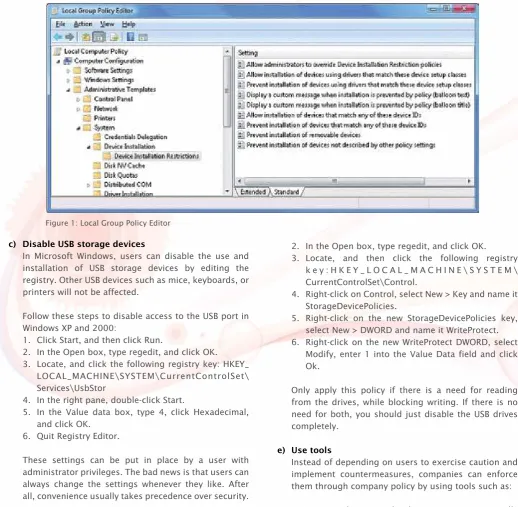
c) Disable USB storage devices
In Microsoft Windows, users can disable the use and installation of USB storage devices by editing the registry. Other USB devices such as mice, keyboards, or printers will not be affected.
Follow these steps to disable access to the USB port in Windows XP and 2000:
1. Click Start, and then click Run.
2. In the Open box, type regedit, and click OK. 3. Locate, and click the following registry key: HKEY_
LOCAL_MACHINE\SYSTEM\CurrentControlSet\ Services\UsbStor
4. In the right pane, double-click Start.
5. In the Value data box, type 4, click Hexadecimal, and click OK.
6. Quit Registry Editor.
These settings can be put in place by a user with administrator privileges. The bad news is that users can always change the settings whenever they like. After all, convenience usually takes precedence over security. To re-enable a disabled port, follow the above steps and change 4 to 3 in the Value data box.
d) Enforce read-only policy on USB drives
Some users might be skeptical to the idea of disabling USB drives. Instead of disabling them completely, we can also make them read-only. We can copy data from the drives, although copying data to the drives is not allowed. This feature comes with Windows Vista and Windows XP Service Pack 2.
Follow these steps to make USB drives read-only: 1. Click Start, and then click Run.
2. In the Open box, type regedit, and click OK.
3. Locate, and then click the following registry k e y : H K E Y _ L O C A L _ M A C H I N E \ S Y S T E M \ CurrentControlSet\Control.
4. Right-click on Control, select New > Key and name it StorageDevicePolicies.
5. Right-click on the new StorageDevicePolicies key, select New > DWORD and name it WriteProtect. 6. Right-click on the new WriteProtect DWORD, select
Modify, enter 1 into the Value Data field and click Ok.
Only apply this policy if there is a need for reading from the drives, while blocking writing. If there is no need for both, you should just disable the USB drives completely.
e) Use tools
Instead of depending on users to exercise caution and implement countermeasures, companies can enforce them through company policy by using tools such as: i. DeviceLock – network administrators can centrally
control uploads and downloads through local computer devices using DeviceLock. Unauthorised users can be prevented access to a wide range of devices, including USB devices.
Combined with third-party encryption products, DeviceLock administrators can centrally define and control encryption policies for storing and retrieving data through removable drives.
ii. MyUSBOnly – a product that can block untrustworthy USB storage devices at any end-points. One interesting feature is that it is able to run invisibly
Figure 1: Local Group Policy Editor
9.
and secretly log all connections/disconnections, and files copied, modified or deleted. It can also send email notifications when someone connects an unauthorised USB device to the computer.
iii. Safend Protector – administrators can not only completely block all storage devices, but can allow them for read-only. It can also do encryption of data. It monitors, blocks, and logs files that are downloaded to or read from these devices. Safend Protector is also an EAL 2 Validated Product conforming to the Common Criteria (ISO/IEC 15408) (Ref [6]). Common Criteria is an internationally recognised ISO standard (ISO/IEC 15408) used by governments and other organizations to assess security functional requirements and security assurance requirements of technology products. f) Built-in security features
Companies can also provide their employees with devices that have built-in security features. These USB drives have features that can protect data securely, quickly and easily. This protection is especially needed to mitigate the risks if the USB drives fall to the wrong hands.
i. SanDisk’s Cruzer Enterprise flash drives include protection at multiple levels and stages, password protection, hardware based encryption, central management, and powerful authentication. It also has anti-malware scanning that examines every file being copied to the USB drive, and prohibits file transfers when it detects infection on a host PC. This will prevent the flash drive from becoming a virus carrier.
As reported in “SanDisk Cruzer Enterprise Flash Drives Earn Certification”, (Ref [7]), “Cruzer Enterprise flash drives are the only USB drives in the world to hold both FIPS 140-2 and Common
Criteria certifications, making them the USB flash drive of choice for organisations that require proven solutions from a leader in secure removable storage.”
ii. IronKey Secure USB – the only USB flash drive validated to meet the stringent Security Level 3 requirements of the FIPS 140-2 standard (Ref [8]). It protects data with strong AES 256-bit hardware encryption. The enterprise version includes central management which can remotely enforce security policies across thousands of IronKey Enterprise drives. It also allows secure device recovery and the ability to remotely disable or destroy drives that are lost, stolen or in the possession of former employees and other unauthorized users.
There are many secure USB drives available in the market today. Companies concerned about security should invest in one that meets its policies and requirements. Having a secure USB drive does not necessarily mean that their security features will be used. Therefore, companies should further define policies to enforce the use of a flash drive’s security features.
Note: Please exercise caution when playing with Microsoft Windows Registry and you might want to get assistance from any system administrator.
10.
[1] USB Implementers Forum Website, http://www.usb.org/developers/docs/ [2] Marshall Brain, “How USB Ports Work”,
http://computer.howstuffworks.com/usb.htm [3] DeviceLock Website,
http://www.devicelock.com/dl/ [4] Safend Protector Website,
http://www.safend.com/65-en/Safend%20Protector. aspx
[5] MyUSBOnly Website,
http://www.myusbonly.com/usb-security-device-control/index.php
[6] Common Criteria Portal,
http://www.commoncriteriaportal.org/
[7] “SanDisk Cruzer Enterprise Flash Drives Earn Certification”, October 2009,
http://www.securitywatch.co.uk/2009/10/30/ s a n d i s k c r u z e r e n t e r p r i s e f l a s h d r i v e s e a r n -certification/
[8] FIPS PUB 140-2, Security Requirements for Cryptographic Modules,
http://csrc.nist.gov/publications/fips/fips140-2/ fips1402.pdf
[9] Iron Key Enterprise Website, http://www.ironkey.com/enterprise
[10] Charles Arthur, “Windows virus infects 9m computers”, January 2009,
http://www.guardian.co.uk/technology/2009/ jan/19/downadup-conficker-kido-computer-infection [11] Elinor Mills, “USB devices spreading viruses”,
November 2008,
http://news.cnet.com/8301-1009_3-10104496-83. html
[12] Jake Shores, “USB Flash Drive Security”, May 2009, h t t p : / / w w w . b r i g h t h u b . c o m / c o m p u t i n g / s m b
-security/articles/2043.aspx
[13] Brett Callow, “How to Enforce a Read-Only Policy on USB Drives”, May 2009,
h t t p : / / w w w . b r i g h t h u b . c o m / c o m p u t i n g / s m b -security/articles/5995.aspx
References Conclusion
USB removable devices are quickly becoming a “must have”. Now almost everyone has one, be it flash drives, external hard drives or many others. It is also becoming a favorite gift for conference attendees. The medium for connection to a PC is via the USB port.
As reported in “USB devices spreading viruses” (Ref [11]), Gunter Ollmann, chief security strategist for IBM's ISS security division said, “Thumb drives aren't the only culprits; any device that plugs into a USB port – including gadgets like lights, fans, speakers, toys, even a digital microscope – can be used to spread malware”. Therefore, we can say that the risks get bigger each time a new device is USB supported.
Normally, people diligently follow security practices like encrypting sensitive information, encrypting emails, updating antivirus softwares, etc, but USB ports are always left unprotected.
11.
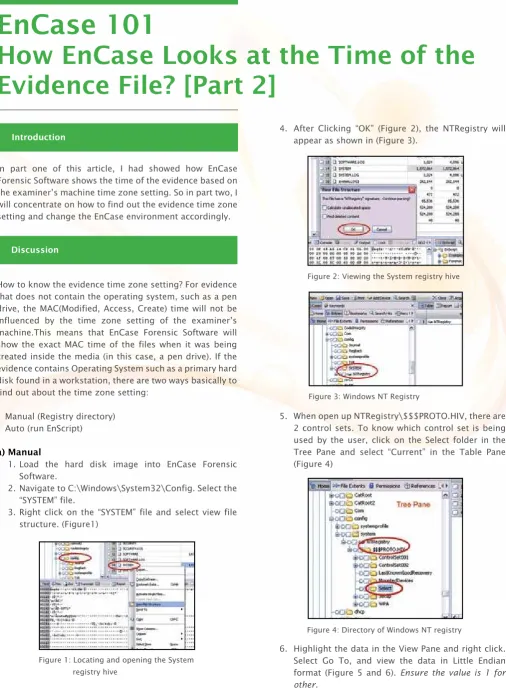
4. After Clicking “OK” (Figure 2), the NTRegistry will appear as shown in (Figure 3).
5. When open up NTRegistry\$$$PROTO.HIV, there are 2 control sets. To know which control set is being used by the user, click on the Select folder in the Tree Pane and select “Current” in the Table Pane (Figure 4)
6. Highlight the data in the View Pane and right click. Select Go To, and view the data in Little Endian format (Figure 5 and 6). Ensure the value is 1 for other.
How to know the evidence time zone setting? For evidence that does not contain the operating system, such as a pen drive, the MAC(Modified, Access, Create) time will not be influenced by the time zone setting of the examiner’s machine.This means that EnCase Forensic Software will show the exact MAC time of the files when it was being created inside the media (in this case, a pen drive). If the evidence contains Operating System such as a primary hard disk found in a workstation, there are two ways basically to find out about the time zone setting:
• Manual (Registry directory) • Auto (run EnScript) a) Manual
1. Load the hard disk image into EnCase Forensic Software.
2. Navigate to C:\Windows\System32\Config. Select the “SYSTEM” file.
3. Right click on the “SYSTEM” file and select view file structure. (Figure1)
Introduction
Discussion
In part one of this article, I had showed how EnCase Forensic Software shows the time of the evidence based on the examiner’s machine time zone setting. So in part two, I will concentrate on how to find out the evidence time zone setting and change the EnCase environment accordingly.
Figure 1: Locating and opening the System registry hive
Figure 2: Viewing the System registry hive
Figure 3: Windows NT Registry
Figure 4: Directory of Windows NT registry
EnCase 101
How EnCase Looks at the Time of the
Evidence File? [Part 2]
12.
7. Now we know that the control set is 1, we will now navigate to the following: NTRegistry/$$$PROTO.HIV/ ControlSet001/Control/TimeZoneInformation.
Figure 5: View Pane menu listing
Figure 6: interpreting “Current” value
Figure 7: Users’s time zone setting
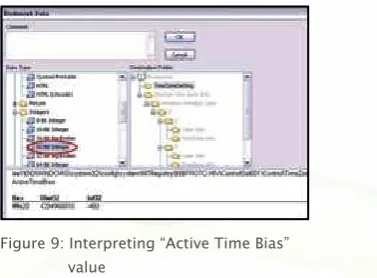
Figure 8: Interpreting “Active Time Bias” value
Figure 9: Interpreting “Active Time Bias” value
Time Zone Properties
Description
Active time Bias This is the number of minutes offset from GMT for the current time setting. This is stored as a 32-bit integer.
Bias This is the number of minutes offset from the GMT for the time zone setting. This is stored as a 32-bit integer.
Daylight Bias The number of minutes offset from the Bias for DST setting. This is stored as a 32-bit integer.
Daylight Name The name in the Unicode of the time zone DST setting.
Daylight Start, Standard Start
Please refer to figure 10. Highlight either start time in the table Pane. Change the View Pane to Hex view. Standard Bias The number of minutes offset from
the Bias for the Standard Time. It is usually zero.
Standard Name The name of the Unicode of the standard time zone setting (Figure 11).
11. Please refer to Table 1 for further conversion of other time zone properties.
Table 1: Time zone properties value format
8. This is the folder where the system keeps all the user’s time zone settings.
9. Select Active time Bias, highlight the data and right click. Select “Bookmark Data” (Figure 8).
13.
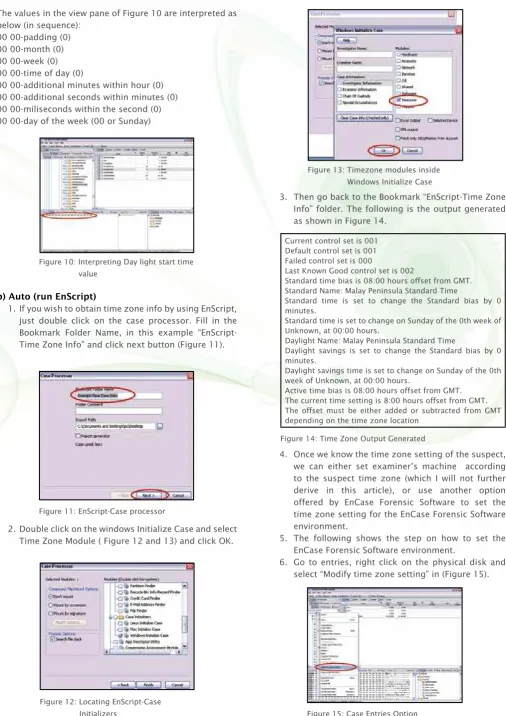
The values in the view pane of Figure 10 are interpreted as below (in sequence):
00 00-padding (0) 00 00-month (0) 00 00-week (0) 00 00-time of day (0)
00 00-additional minutes within hour (0) 00 00-additional seconds within minutes (0) 00 00-miliseconds within the second (0) 00 00-day of the week (00 or Sunday)
b) Auto (run EnScript)
1. If you wish to obtain time zone info by using EnScript, just double click on the case processor. Fill in the Bookmark Folder Name, in this example “EnScript-Time Zone Info” and click next button (Figure 11).
Figure 10: Interpreting Day light start time value
Figure 11: EnScript-Case processor
Figure 12: Locating EnScript-Case Initializers
2. Double click on the windows Initialize Case and select Time Zone Module ( Figure 12 and 13) and click OK.
Figure 13: Timezone modules inside Windows Initialize Case
3. Then go back to the Bookmark “EnScript-Time Zone Info” folder. The following is the output generated as shown in Figure 14.
4. Once we know the time zone setting of the suspect, we can either set examiner’s machine according to the suspect time zone (which I will not further derive in this article), or use another option offered by EnCase Forensic Software to set the time zone setting for the EnCase Forensic Software environment.
5. The following shows the step on how to set the EnCase Forensic Software environment.
6. Go to entries, right click on the physical disk and select “Modify time zone setting” in (Figure 15).
Current control set is 001 Default control set is 001 Failed control set is 000
Last Known Good control set is 002
Standard time bias is 08:00 hours offset from GMT. Standard Name: Malay Peninsula Standard Time
Standard time is set to change the Standard bias by 0 minutes.
Standard time is set to change on Sunday of the 0th week of Unknown, at 00:00 hours.
Daylight Name: Malay Peninsula Standard Time
Daylight savings is set to change the Standard bias by 0 minutes.
Daylight savings time is set to change on Sunday of the 0th week of Unknown, at 00:00 hours.
Active time bias is 08:00 hours offset from GMT. The current time setting is 8:00 hours offset from GMT. The offset must be either added or subtracted from GMT depending on the time zone location
Figure 14: Time Zone Output Generated
14.
7. A list of time zone properties option will be shown in (Figure 16)
EnCase Forensic Software uses examiner’s machine time zone setting to determine the time zone for the evidence file. In order to protect the integrity of the evidence file, a mechanism has been suggested for analyst before performing any analysis on the evidence file.
EnCase ®Computer Forensic II-v6.10pvi (03.16.2009) Copyright ©2009, Guidance Software, Inc.
Process Flow 1: Pre-analysis & Best Practice
Suggestions
Based on my experiment and findings, I would like to propose a pre-analysis and best practice for analyzing evidence as displayed in Process Flow 1.
Conclusion
Reference Start
Obtain Exhibit Image
Image Contains Operating
System?
Find out the time zone setting of the suspect
Change the time zone setting of the EnCase
Forensic Software accordingly
Start Analysis
End
No need to change the time zone setting of the EnCase Forensic
Software
No
Yes Figure 16: Time Properties Option
8. Select the proper time zone by matching the “Details” with the time zone setting found in step 2. In this case, all the time properties found inside the suspect hard disk matches (GMT +8:00) Kuala Lumpur, Singapore. After setting up the right time zone environment, analyst can start analyzing the case.
15.
Flash Memory
SLC and MLC
We store and transfer all kinds of files on our computers – digital photographs, music files, word processing documents, PDFs and countless other forms of media. But sometimes the computer's hard drive isn't exactly the place to store this information. You may make backup copies of files that live off your systems, but if you worry about security, portable storage devices that use a type of electronic memory called flash memory may be the right solution.
Electronic memory comes in a variety of forms to serve a variety of purposes. Flash memory is used for easy and fast information storage in computers, digital cameras and home video game consoles. It is used more like a hard drive than as RAM. In fact, flash memory is known as a
solid state storage device, meaning there are no moving parts – everything is electronic instead of mechanical. Here are a few examples of flash
memory:-• The computer's BIOS chip
• CompactFlash (most often found in digital cameras)
• SmartMedia (most often found in digital cameras)
• Memory Stick (most often found in digital cameras)
• PCMCIA Type I and Type II memory cards (used as solid-state disks in laptops)
• Memory cards for video game consoles Introduction
Technology of flash memory (in SmartMedia cards and Compact Flash cards)
Figure 1: SmartMedia card
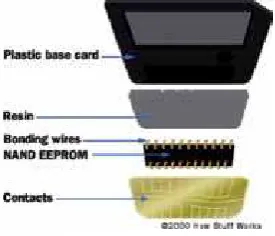
Figure 2: SmartMedia anatomy
As shown in Figure 1, SmartMedia cards are extremely simple as a plane electrode is connected to the flash-memory chip by bonding wires. The flash-memory chip, plane electrode and bonding wires are embedded in a resin using a technique called over-molded thin package (OMTP). This allows everything to be integrated into a single package without the need for soldering.
The OMTP module is glued to a base card to create the actual card. Power and data is carried by the electrode to the flash-memory chip when the card is inserted into a device. A notched corner indicates the power requirements of the SmartMedia card. Looking at the card with the electrode facing up, if the notch is on the left side, the card needs 5 volts. If the notch is on the right side, it requires 3.3 volts.
A SmartMedia anatomy card shown in figure 2 consists of a single NAND flash chip embedded in a thin plastic card, although some higher capacity cards contain multiple, linked chips. It was one of the smallest and thinnest of the early memory cards, only 0.76mm thick, and managed to maintain a favorable cost ratio as compared to the others.
SmartMedia cards lack a built-in controller chip, which kept the cost down. This feature later caused problems, since some older devices would require firmware updates to handle larger capacity cards. The lack of built-in controller also made it impossible for the card to perform automatic wear levelling, a process which prevents premature wearout of a sector by mapping the writes to various other sectors in the card.
SmartMedia cards erase, write and read memory in small blocks (256- or 512-byte increments). This approach means that they are capable of fast, reliable performance while SmartMedia and CompactFlash cards are both well-known
especially as an "electronic film" for digital cameras. Other removable flash-memory products such as Sony's Memory Stick, PCMCIA memory cards, and memory cards for video game systems are also considered an “electronic film” and are simply a form of flash memory.
There are a few reasons to using flash memory instead of a hard
disk:-• It has no moving parts, so it's noiseless. • It allows faster access.
• It's smaller in size and lighter.
16.
How flash memory works
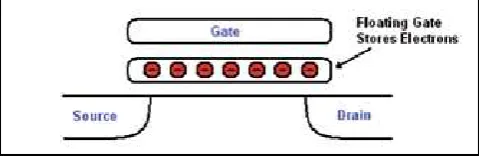
Figure 3: Architecture of SLC cells consist of a single transistor with an additional “floating” gate that can store electrons
Flash Memory stores data in individual memory cells, which are made of floating-gate transistors (refer to Figure 3). Traditionally, one bit of data was stored in each cell, in so-called Single-level cells (SLC) and two states: erased (1) or programmed (0), which is basically a voltage level used to program the SLC memory (refers to Table 1 and Figure 5). SLC memory has the advantage of faster transfer speeds, lower power consumption and higher cell endurance. However, as it stores less data per cell, it costs more per megabyte of storage to manufacture. Due to faster transfer speeds, SLC flash technology is used in high-performance memory cards.
Value State 0 Programmed 1 Erased
Value State
00 Fully Programmed 01 Partially Programmed 10 Partially Erased 11 Partially Erased
Figure 5: SLC voltage reference Table 1: SLC levels
Table 2: MLC levels
Figure 6: MLC voltage reference
On the other hand, CompactFlash cards were developed by Sandisk in 1994 and were different from SmartMedia cards in two important ways:
• They're thicker.
• They utilize a controller chip.
CompactFlash cards consists of a small circuit board with flash-memory chips and a dedicated controller chip, all encased in a rugged shell that is thicker than a SmartMedia card. CompactFlash cards are 43 mm wide and 36 mm long, and come in two thicknesses: Type I cards are 3.3 mm thick, and Type II cards are 5.5 mm thick. *** Note - CompactFlash cards support dual voltage and will operate at either 3.3 volts or 5 volts.
The increased thickness of the card allows for greater storage capacity than SmartMedia cards. CompactFlash sizes range from 8 MB to as much as 100GB. The onboard controller can increase performance, particularly in devices that have slow processors. The case and controller chip add size, weight and complexity to the CompactFlash card when compared to the SmartMedia card.
MLC memory on the other hand, have two bits of data stored per memory cell and four states: erased (11), two thirds (10), one third (01) or programmed (00), which is basically also a voltage level used to program the MLC memory (refer to Table 2 and Figure 6). Multi-level cell (MLC) flash memory stores three or more bits in each cell, with the "multi-level" referring to the multiple levels of electrical charge used to store multiple bits per cell. By storing more bits per cell, multi-level cell memory will achieve lower manufacturing costs, but they have slower transfer speeds, higher power consumption and lower cell endurance than single-level cell memory. MLC flash technology is used mostly in standard memory cards. The bit cell, MBC, is a similar technology to the multi-level cell but stores only two bits per cell.
17.
Table 4 summarises the advantages and disadvantages of SLC flash and MLC flash.
SLC MLC
Table 3: SLC and MLC comparisons
Table 4: Qualities of SLC and MLC
SLC MLC manipulated by the amount of charge put on the floating gate of the flash cell. Placing charge on the floating gate will increase the threshold voltage of the cell. When the threshold voltage is high enough, around 4.0V, the cell will be read as programmed. No charge, or threshold voltage < 4.0V, will cause the cell to be sensed as erased. SLC flash is used in commercial and industrial applications that require high performance and long-term reliability. Some applications include industrial grade Compact Flash cards or Solid State Drives (SSDs).
As seen in Figure 6, a flash cell’s ability to store charge is why MLC technology works. Since the delta between each level has decreased, the sensitivity between each level increases. Thus, more rigidly controlled programming is needed to manipulate a more precise amount of charge stored on the floating gate. In order for a flash cell to be considered MLC technology, the cell must exhibit two the flash. Once again, the amount of charge on the floating gate is what determines the threshold voltage. As seen in figure 6, current MLC technology uses two bits, or four levels. However, it can hold more bits. Equation 1 is a generic equation to determine how many states are needed for the desired bits.
Equation 1 States = 2N
N is equal to the number of desired bits per cell. For example, for a cell to hold three bits, you need eight states equal to: 000, 001, 010, 011, 100, 101, 110, and 111. MLC flash is used in consumer applications that do not require long term reliability such as consumer grade USB Flash drives, portable media players (PMP), and Compact Flash cards.
flash by using the charge placement technology. Thus, MLC has greater densities. The read speeds between SLC and MLC are comparable. Reading the level of the flash cell compares the threshold voltage using a voltage comparator. Thus, the architecture change does not affect sensing. In general, the read speeds of flash are determined by which controller is used.
The endurance of SLC flash is 10 times more than MLC flash. The endurance of MLC flash decreases due to enhanced degradation of Si. This is the main reason why SLC flash is considered industrial grade flash and MLC flash is considered consumer grade flash. Higher temperatures cause more leakage in the cells.
18.
Guide to Motion Compensation (Phase
Correlation and Vector Assignment)
Introduction
1.0 Phase Correlation (PH.CTM)
2.0 Vector Assignment There are now quite a few motion-compensated products
in the market, but not all work in the same way. The purpose of this article is to introduce the surrounding motion estimation by explaining clearly how it works. Different sources from video may demonstrate widely-varying motion characteristics. All types of motion may appear to perform similarly. This article will explain motion characteristics and performance motion compensation systems. Furthermore, this technology will help video forensics analysts to reduce the noise and shake level from the video source in a case investigation.
Phase Correlation is a method to check the similarity of two images with equal size. It can be used for template matching, object tracking, motion estimation, etc. In this article, I will explain the basics and the code to perform Phase Correlation.
Figure 1 shows what happens. If the two fields are the same, there are no phase differences between the two, and all of the frequency components are added with a zero degrees phase to produce a single peak in the centre of the inverse transform. However, if there was motion between the two fields, such as a pan, all of the components will have phase differences, and this results a peak is displaced from the centre of the inverse transform by the distance moved. Phase correlation thus measures the movement between fields, rather than inferring it from luminance matches.
Figure 1: Demonstrate the process of phase correlation techniques where diagram a) shows a single peak in the centre of the inverse transform whereas diagram b) shows a peak displacement from the centre of the inverse transform by the distance moved
Photo 1: Phase Correlation Motion Vector
Benefits of using Ph.CTM Phase Correlation:
i. Immunity to noisy sources – Noise does not correlate. Able to work with archive or amateur shot videos.
ii. Immunity to luminance variations – Frequency domain.
iii. Accurate cut detection – Able to work with edited or multiple camera sequences.
iv. Significant bandwidth savings for downstream MPEG encoding.
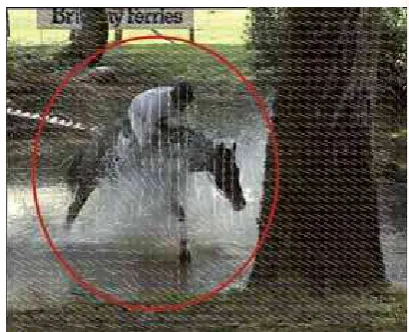
The phase correlation process produces candidate vectors in each window. The vectors from all windows can be combined to obtain an overall view of the motion in the field before attempting to describe the motion of each pixel individually. For example, Photo 1 shows the geometric progression of window vectors, which means the zoom on the moving object is in progress. (Refer to the red circle and the scattered movement of the white lines).
If a zoom is in progress, the vectors in the various windows will form a geometric progression, becoming longer in proportion to the distance from the axis of the zoom as shown in Figure 2. However, if there is a pan, as is seen in Figure 3, there will be similar vectors in all windows. In practice both motions may occur simultaneously.
19.
Conclusion
Reference
Photo 2: Shaky Input
Photo 3: Realigned Stable Output
Photo 4: Reduce noise from the source video
Understanding the workings of video enhancement technology will help video forensics analysts to analyze and produce high quality of digital evidence. It will not only shorten an investigation period but also will help law enforcement officers from reaching a dead end in a criminal investigation.
From the motion compensation systems explained, we can summarise photos 2, 3 and 4 below:
Figure 3: Pan causes similar vectors in all windows Figure 2: Zoom causes geometric progression
of window vectors
[1] http://nashruddin.com/phase-correlation-function-in-opencv.html
20.
This article is to introduce readers to the subject of Elliptic Curve Cryptography. Topics that will be discussed here cover the basics of Elliptic Curve Cryptography and some of the basic mathematical calculations used over the elliptic curve.
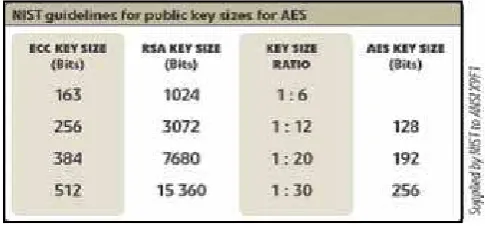
Elliptic Curve Cryptography (ECC) was introduced by Neal Koblitz and Victor S. Miller in 1985. It is an approach to public-key cryptography based on the algebraic structure of the elliptic curve over finite fields. Two advantages of ECC compared to RSA are: ECC is faster than RSA, and ECC uses a smaller key size compared to RSA. This comparison is made at a point where both ECC and RSA provide the same level of security. ECC is better than RSA because it is based on the elliptic curve discrete logarithm problem, a much harder problem than factoring integers. Table 1 shows the comparison of security level in terms of key sizes in ECC and RSA.
Each cryptosystem, is based on a hard mathematical problem, which means it is computationally infeasible to solve. The Elliptic Curve Cryptography relies on the difficulty of solving the discrete logarithm problem for a group of elliptic curves over finite fields such as Galois Fields (GF) and integers modulo a prime number.
An elliptic curve is a plane curve defined by an equation of the form y2 = x3 + ax + b, where a, b, x and y are real numbers. The elliptic curve can be changed with various values of a and b. An elliptic curve over real numbers consists of the points on the corresponding elliptic curve. ECC makes use of the additional operation of elliptic curves.
There are two types of finite fields used in Elliptic Curve Cryptography: fields of the form GF(p) with p as a prime number, and fields of the form GF(2n) with n as a positive integer.
Elliptic Curve Cryptography
Introduction ECC - Elliptic Curve a) GF(p)
The field GF(p) uses numbers from 0 to p-1, and the value of its computations end by taking the remainder on division by p. For example, in GF(11), the field creates the integers from 0 to 10, and every operation within this field will result in an integer between 0 to 10. An elliptic curve with the essential field of GF(p) can be formed by choosing the variable of a and b within the field of GF(p). The elliptic curve includes all points (x,y) which satisfy the elliptic curve equation modulo p where the value of x and y are numbers in GF(p).
Example 1:
y2 mod p = x3 + ax + b mod p has an underlying field of GF(p) if the value of a and b are in GF(p).
An elliptic curve group over GF(p) consists of the points on the corresponding elliptic curve, together with a special point O called the point at infinity. There are many points on an elliptic curve.
For example, lets say we have an elliptic curve over the field GF(p) with the value of a = 3 and b = 7. Then the elliptic curve equation is y2 = x3 +3x + 7.
The nine points which satisfy this equation are:
(1, 0) (5, 2) (5, 9) (8, 2) (8, 9) (9, 2) (9, 9) (10, 5) (10, 6)
All the points above can be achieved using the elliptic curve equation as mentioned before. For example, below is the method on how to get all the points. The point (9, 2) satisfies this equation since: y2 mod p = x3 + 3x + 7 mod p
22 mod 11 = 93 + 3(9) + 7 mod 11 4 mod 11 = 763 mod 11
4 = 4.
21.
Graph 1 shows all the satisfied points.
b) GF(2n)
The field GF(2n) consists of n-bit strings. The regulations for arithmetic on this field can be defined by using a polynomial representation.
An elliptic curve with the essential field of GF(2n) can be formed by choosing the elements of a and b within GF(2n), where b is not equal to 0. Since the outcome of the field GF(2n) has two characteristics which are 0 and 1, the elliptic curve equation is slightly adjusted for binary representation:
y2 + xy = x3 + ax2 + b.
The elliptic curve includes all points (x, y) which satisfy the elliptic curve equation GF(2n) where the value of x and y are elements of GF(2n). An elliptic curve group over GF(2n) consists of the points on the corresponding elliptic curve, together with a point O called the point at infinity. There are finitely many points on an elliptic curve. For this field, the additional operation with bit-string uses an XOR function.
Example 2:
GF(24) defined by using polynomial representation with irreducible polynomial
f(x) = x4 + x + 1
The element g = (0010) is a generator for the field. The powers of g are:
g0 = (0001) g1 = (0010) g2 = (0100) g3 = (1000) g4 = (0011) g5 = (0110) g6 = (1100) g7 = (1011) g8 = (0101) g9 = (1010) g10 = (0111) g11 = (1110) g12 = (1111) g13 = (1101) g14 = (1001) g15 = (0001) Consider the elliptic curve y2 + xy = x3 + g4x2 + 1. Here a = g4 and b = g0 = 1. The point (g5, g3) satisfies this equation over GF(2n):
y2 + xy = x3 + g4x2 + 1
(g3)2 + g5g3 = (g5)3 + g4(g5)2 + 1 g6 + g8 = g15 + g14 + 1
(1100) + (0101) = (0001) + (1001) + (0001) (1001) = (1001)
The 15 points which satisfy this equation are: (1, g13) (g3, g13) (g5, g11) (g6, g14) (g9, g13) (g10, g8) (g12, g12) (1, g6) (g3, g8) (g5, g3) (g6, g8) (g9, g10) (g10, g) (g12, 0) (0, 1)
These points are shown in graph 2:
ECC – Encryption & Decryption
For this part, we will only consider the Elliptic Curve using GF(P). Therefore, the example will employ data from Example 1.
a) Adding
Adding points are obtained by adding all nine points on a curve using the following method.
(x1, y1) + (x2, y2) = (x3, y3)
if x1 ≠ x2 d = (y1 – y2)/(x1 - x2) if x1 = x2 and y1 = y2 d = (3x12 + a)/2y1 x3 = d2 – (x1 + x2)
y3 = d(x1 – x3) – y1
For this example, each point on the curve will provide nine Adding points.
Therefore, there will be 81 Adding points for this GF(11).
Graph 1: Graph showing all nine points using the elliptic curve equation: y2 = x3 + 3x + 7 over GF(11) using a = 3; b = 7.
22.
Conclusion
References
From the discussion above, we know that ECC is important to public key cryptography algorithms and key exchange algorithms because it is based on complex mathematical constructs. For more information about ECC, below are the available books that you can use as references
1. http://www.cacr.math.uwaterloo.ca/ecc/ by Darrel Hankerson, Alfred Menezes, and Scott Vanstone. 2. http://www.hpl.hp.com/research/info_theory/
ellipbook.html by Ian Blake, Gadiel Seroussi and Nigel Smart.
[1] Elliptic Curve Cryptography. http://en.wikipedia.org/ wiki/ Elliptic_curve_cryptography
[3] Elliptic Curve Public Key Cryptosystem By Erik De Win and Bart Preneel
h t t p : / / w w w . s p r i n g e r l i n k . c o m / c o n t e n t / wwjefcpuet8gtu83/fulltext.pdf
[4] An Intro to Elliptical Curve Cryptography
h t t p : / / w w w . d e v i c e f o r g e . c o m / a r t i c l e s /
Doubling points are obtained by multiplying each point on a curve using the following method.
P = (_ , _)
Generator points are obtained by considering the Doubling point which generates point (0, 0) at the last result of (P-1) and has no repetition of the Doubling (8,9). Therefore, the Doubling points are: