Computer Peripherals – Part II
Types of Displays
• Two main types
– CRT (cathode ray tubes)
– LCD (liquid crystal display)
• Related terms
– Monitor or screen
• A display is often called a “monitor” or “screen” • However, the term “monitor” usually refers to the
entire box, where as “screen” often implies just a
Pixels
• A Pixel is a “picture element”
– a single point in a graphic image
– A graphics display is divided into thousands (or millions) of pixels arranged in rows and columns
– The pixels are so close together, they appear connected – The number of bits used to represent each pixel
determines how many colours or shades of grey can be represented
– For a B&W (black and white) monitor, each pixel is represented by 1 bit
Display Size
• Usually specified in “inches”
• Value cited is the diagonal dimension of the
raster -- the viewable area of the display
• E.g., a 15” monitor:
Resolution
• Resolution is the number of pixels on a
screen display
• Usually cited as
n by m
–
n is the number of pixels across the screen
–
m is the number of pixels down the screen
• Typical resolutions range from…
Video RAM Requirements
• Total number of pixels is n
m
• Examples
– 640 480 = 307,200 pixels
– 1,600 1,200 = 1,920,000 pixels
• Video RAM required equals total number of
pixels times the number of bits/pixel
• Examples
– 640 480 8 = 2,457,600 bits = 307,200 bytes = 300 Kbytes
Resolution
Bits per pixel
8 bit 16 bit 24 bit 640 x 480 300 600 900 800 x 600 468.75 937.5 1406.25 1024 x 768 768 1536 2304 1152 x 1024 1152 2304 3456 1280 x 1024 1280 2560 3840 1600 x 1200 1875 3750 5625
Video RAM (KB) Per Image
Aspect Ratio
•
Aspect ratio
is the ratio of the width to height of a
display screen
• For a 640 by 480 display, the aspect ratio is
640:480, or 4:3
• Related terms
– Landscape
• The width is greater than the height
– Portrait
Color Displays
• CRT displays
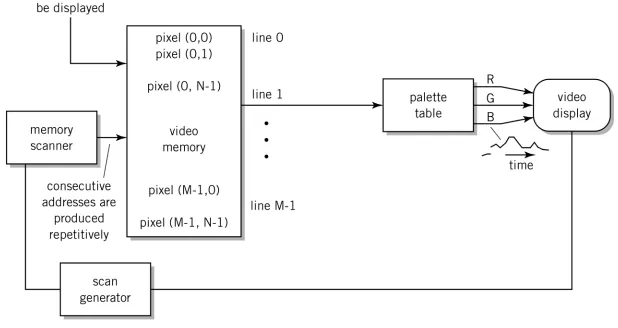
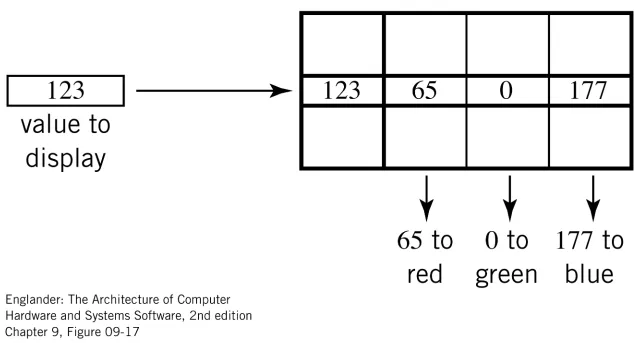
– each pixel is composed of three superimposed dots: red, green, and blue
– Hence, RGB display
– The three dots are created by three separate beams – Ideally, the three dots should converge at the same
point, however, in practice there is a small amount of convergence error, and this makes the pixels appear fuzzy
• LCDs
CRT Display
Operation of a CRT Display
• A CRT display contains a vacuum tube
• At one end are three electron guns, one each for
red, green, and blue
• At the other end is a screen with a phosphorous
coating
• The three electron guns fire electrons at the screen
and excite a layer of phosphor
Operation of an LCD
• Two sheets of polarizing material with a
liquid crystal solution between them
• An electric current passed through the
liquid causes the crystals to align so that
light cannot pass through them
• Each crystal, therefore, acts like a shutter,
either allowing light to pass through or
Dot Pitch
•
Dot pitch
is a measure of the diagonal distance
between phosphor dots (pixels) on a display
screen
• One of the principal characteristics that determines
the quality of a display
• The lower the number, the crisper the image
• Cited in mm (millimeters)
• Typical values range from 0.15 mm to 0.30 mm
• Note
Dot Pitch Image Example
• Q: What is the dot pitch of an image
displayed on a 15” monitor with a
resolution of 640 by 480?
• A:
640
480 Z
1. Z = (6402 + 4802)1/2 = 800
2. 1 mm = 0.039 inch
Dot pitch = 15 / 800 inches = 0.01875 inches
= 0.01875 / 0.039 mm = 0.481 mm
Dot Pitch Illustrated
Pixel
Dot Pitch Image Table
Resolution
Display Size
14” 15” 17” 19” 21” 640 x 480 0.45 0.48 0.54 0.61 0.67 800 x 600 0.36 0.38 0.44 0.49 0.54 1024 x 768 0.28 0.30 0.34 0.38 0.42 1152 x 1024 0.23 0.25 0.28 0.32 0.35 1280 x 1024 0.22 0.23 0.27 0.30 0.33 1600 x 1200 0.18 0.19 0.22 0.24 0.27
Retracing
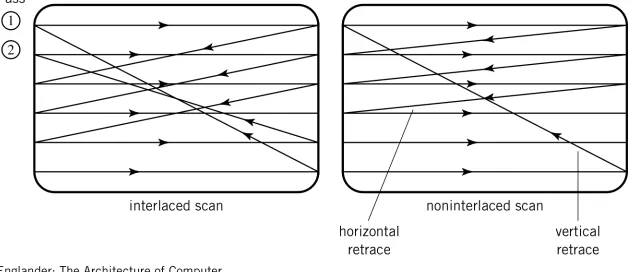
• Retracing is the act of repositioning the
electron beam
• The beam must undergo horizontal retrace
(once per line) and vertical retrace (once per
image)
Vertical retrace
Interlacing
• Interlacing is an image drawing technique
whereby the electron guns draw only half
the horizontal lines with each pass
• The odd lines are drawn on the 1
stpass, the
even lines are drawn on the 2
ndpass
• A non-interlaced imaged is completely
drawn in one pass
Interlacing Animation
Non-interlaced scanning Interlaced scanning
Electron beam “on” (drawing)
Uses of Interlacing
• TVs use interlaced scanning
Figure 9.18 Interlaced versus noninterlaced raster scan
•
Less Demanding on the Monitor •Flickering can be annoyingScan Frequency
• Horizontal scan frequency
– The frequency with which an electron beam moves back-and-forth
– The rate of drawing each line in an image – Typical range: 30-65 kHz
• Vertical scan frequency
– The frequency with which an electron beam moves up-and-down
– Also called vertical refresh rate , refresh rate, vertical frequency, vertical scan rate, or frame rate
Video Frequency
• The frequency at which pixels are drawn on
the display
• Specified as a maximum capability of the
monitor
Display Properties in Windows
• Right click on the desktop (display) and
select Properties
• Click Settings to determine/change the
setting for Colors and Screen area
(Resolution)
• To determine/change screen refresh rate,
click on Advanced, then click on Adapter
Note:
Note:
Varies on different
Video Interfaces (1 of 2)
• Composite video
– Definition: a video interface in which all the colour and sync information is contained in one signal
– Contrast with RGB
– TVs in North America use composite video
• RGB (Red, Green, Blue)
– Definition: a video interface in which the red, green, and blue signals, and the horizontal and vertical sync signals, are separate
Video Interfaces (2 of 2)
• S-video
– A technology for transmitting video signals over a cable by dividing the video information into two
separate signals: one for colour (chrominance, C), and one for brightness (luminance, Y)
– Also called Y/C video
– Televisions (internally) are designed for separate luminance and chrominance signals
RGB Video Standards
• A variety of standards exist for delivering
RGB signals to a video display monitor
• Developed and consolidated by VESA
(Video Electronics Standards Association)
• Examples
– VGA – video graphics adapter
– SVGA – super-VGA
VGA/SVGA/XGA Pinouts
Pin Signal 1 Red
2 Green 3 Blue 4 ID bit 2 5 Ground 6 Red return 7 Green return 8 Blue return 9
-10 Sync return 11 ID bit 0 12 ID bit 1
13 Horizontal sync 14 Vertical sync 15
S-video Pinouts
Pin Signal
1 Ground
2 Ground
3 Y (luminance)
Flat Panel Displays
• A very thin display screen
• Most flat panel displays use LCD
technology
• Other technologies
Computer Peripherals – Part III
Plan
• Printers
• Scanners
• Keyboards
Printers
• Main types:
– Impact
– Laser
– Ink jet
Impact vs. Non-Impact
•
Impact printers
physically transfer a dot or
shape to the paper
• Include dot-matrix, belt, & solid line printers
• Non-impact printers spray or lay down the
image
• Impact printers remain important because
Printers
• Main types:
– Dot matrix (sample impact)
– Laser
How it works
( Impact Type Dot-Matrix )
A print-head moves back-and-forth in front of forms
Dot Matrix Print Head
Front view Side view
Print wires (e.g., 12)
Dot Matrix Impact Printing
Print wire
Ribbon
Paper
Platen
Side view Side view Front view
Specifications
• cps
– characters per second
– Varies by quality of print (e.g., draft vs. final (NLQ))
• lpm
– lines per minute (related to cps)
• Forms
– Maximum number of layers of paper that can by printed simultaneously
– Specified as n-part forms (e.g., 4-part forms)
• mtbf
Dot Matrix Printer Example
Pacemaker 3410 by OKI Data, Inc.
http://www.okidata.com
Specifications
• Printhead wires: 9
• Printhead life: 200 million characters • Print speed:
• near letter quality: 105 cps • utility: 420 cps
• high speed draft: 550 cps • Number of copies: 8
Printers
• Main types:
– Dot matrix
– Laser
Operation of a Laser Printer
• Four steps
– A laser is fired in correspondence to the dots to be printed. A
spinning mirror causes the dots to be fanned out across the drum. The drum rotates to the next line, usually 1000th or 1600th of an inch.
The drum is photosensitive. As a result of the laser light, the drum becomes electrically charged wherever a dot is to be printed.
Laser
Spinning mirror Photosensitive
Top View of Rotating Mirror
Drum Rotating Mirror:
This one has eight faces
Operation of a Laser Printer
2. As the drum continues to rotate, the charged part of the drum passes through a tank of black powder called toner. Toner sticks to the drum wherever the charge is present. Thus, the pattern of toner on the drum matches the image.
Operation of a Laser Printer
3. A sheet of paper is fed toward the drum. A charge wire coats the paper with electrical charges. When the paper contacts the drum, it picks up the toner from the drum
Operation of a Laser Printer
4. As the paper rolls from the drum, it passes over a heat and pressure area known as the fusing system. The fusing system melts the toner to the paper. The printed page then exits the printer.
As the same time, the surface of the drum passes over another wire, called a corona wire. This wire resets the charge on the drum, to ready it for the next page.
Corona wire
Specifications
• ppm
– Pages per minute
– Typically 4-10 ppm
• dpi
– Dots per inch
Laser Printer Example
Laserjet 5000 Series from Hewlett Packard Co.
Printers
• Main types:
– Dot matrix
– Laser
Background
• Inkjet technology was developed in the
1960s
• First commercialized by IBM in 1976 with
the 6640 printer
• Cannon and Hewlett Packard developed
similar technology
How it works
Characters and graphics are 'painted‘ line by line to from a pattern of dots as a print head scans horizontally across the paper. An ink-filled print cartridge is
attached to the inkjet's print head. The print head contains 50 or more ink-filled chambers, each attached to a nozzle. An electrical pulse flows through thin
resistors at the bottom of each chamber. When current flows through a resistor, the resistor heats a thin layer of ink at the bottom of the chamber to more than 900 degrees Fahrenheit for several millionths of a second . The ink boils and forms a bubble of vapour. As the vapour bubble expands, it pushes ink through the nozzle to form a droplet at the tip of the nozzle. The droplet sprays onto the paper.
Plan
• Printers
• Scanners
• Keyboards
How it works
Scanners
• Three main types
Sheet-fed Scanner Example
OfficeJet Series 700 from Hewlett Packard Co
Handheld Scanner Example
QuickScan GP Bar Code Scanner from PSC, Inc.
Plan
• Printers
• Scanners
• Keyboards
Examples
Plan
• Printers
• Scanners
• Keyboards