Networking
A Beginner’s Guide
management, system implementations, and global network consulting for Fortune 1000 companies. He is the author of more than 30 books on a wide variety of computing topics, including operating systems, networking, and both server and desktop
applications. He holds an MBA from Heriot Watt University, and resides in the Silicon Valley area of California with his two daughters.
About the Technical Editor
Networking
A Beginner’s Guide
Sixth Edition
BRUCE
HALLBERG
reproduced for publication. ISBN: 978-0-07-181225-2 MHID: 0-07-181225-3
e-book conversion by Cenveo® Publisher Services
Version 1.0
The material in this e-book also appears in the print version of this title: ISBN: 978-0-07-181224-5, MHID: 0-07-181224-5
McGraw-Hill Education e-books are available at special quantity discounts to use as premiums and sales promotions, or for use in corporate training programs. To contact a representative, please visit the Contact Us pages at www.mhprofessional.com.
Information has been obtained by McGraw-Hill Education from sources believed to be reliable. However, because of the possibility of human or mechanical error by our sources, McGraw-Hill Education, or others, McGraw-Hill Education does not guarantee the accuracy, adequacy, or completeness of any information and is not responsible for any errors or omissions or the results obtained from the use of such information.
All trademarks or copyrights mentioned herein are the possession of their respective owners and McGraw-Hill Education makes no claim of ownership by the mention of products that contain these marks.
TERMS OF USE
vii
At a Glance
Part I
Networking Ins and Outs
1
The Business of Networking . . . 3
2
Understanding Networking . . . 11
3
Understanding Network Cabling . . . 35
4
Understanding Network Hardware . . . 57
5
Making WAN Connections . . . 69
6
Understanding Networking Protocols . . . 85
7
Exploring Directory Services . . . 105
8
Connections from Afar:
Remote Network Access . . . 117
9
Securing Your Network . . . 135
10
Network Disaster Recovery . . . 151
11
Network Servers: Everything You Wanted
to Know But Were Afraid to Ask . . . 169
12
Purchasing and Managing Client
Computers . . . 191
Part II
Hands-On Knowledge
14
Installing and Setting Up
Windows Server 2012 . . . 213
15
Administering Windows Server 2012:
The Basics . . . 237
16
Introducing Exchange Server 2013 . . . 261
17
Understanding Other Windows Server 2012
Services . . . 275
18
Installing Linux . . . 285
19
Introduction to Linux Systems
Administration . . . 303
20
Setting Up a Linux Web
Server with Apache . . . 337
21
Introduction to Virtualization . . . 343
Glossary . . . 357
ix
Contents
Acknowledgments . . . xvii
Introduction . . . xix
Part I Networking Ins and Outs 1 The Business of Networking . . . 3
Understanding Networking: The Corporate Perspective . . . 4
What Does the Company Need? . . . 4
How Will the Network Benefit the Company? . . . 5
Understanding Networking Jobs . . . 6
Network Administrator . . . 6
Network Engineer . . . 7
Network Architect/Designer . . . 8
Other Network-Related Jobs . . . 8
Sarbanes-Oxley Act of 2002 . . . 8
2 Understanding Networking . . . 11
Hypertext Transfer Protocol . . . 98
File Transfer Protocol . . . 98
Network News Transfer Protocol . . . 99
Telnet . . . 100
Simple Mail Transfer Protocol . . . 100
Voice over IP . . . 100
Comparing Important Proprietary Protocols . . . 103
Novell’s IPX/SPX . . . 103
NetBIOS and NetBEUI . . . 103
AppleTalk . . . 104
Chapter Summary . . . 104
7 Exploring Directory Services . . . 105
What Is a Directory Service? . . . 106
Forests, Roots, Trees, and Leaves . . . 108
Department of Redundancy Department . . . 109
Learning About Specific Directory Services . . . 110
eDirectory . . . 111
Windows NT Domains . . . 111
Active Directory . . . 112
X.500 . . . 113
LDAP . . . 113
Chapter Summary . . . 115
8 Connections from Afar: Remote Network Access . . . 117
Determining Remote Access Needs . . . 118
What Types of Remote Users Do You Need to Support? . . . . 119
What Types of Remote Access Are Required? . . . 122
How Much Bandwidth Do You Need? . . . 122
Learning Remote Access Technologies . . . 124
Remote Node vs. Remote Control . . . 124
Virtual Private Networks . . . 125
Chapter Summary . . . 133
9 Securing Your Network . . . 135
Understanding Internal Security . . . 136
Account Security . . . 137
Password Security . . . 138
File and Directory Permissions . . . 141
xiii
xv
Contents
Working with Printers . . . 256
Understanding Network Printing . . . 256
Setting Up a Network Printer . . . 257
Chapter Summary . . . 259
16 Introducing Exchange Server 2013 . . . 261
Exchange Server 2013 Features . . . 262
Installing Exchange Server 2013 . . . 263
Setting Up Mailboxes . . . 268
Creating a Mailbox . . . 269
Testing Your Mailbox . . . 272
Chapter Summary . . . 274
17 Understanding Other Windows Server 2012 Services . . . . 275
Exploring DHCP . . . 276
Investigating DNS . . . 277
Understanding Remote Access . . . 279
Exploring IIS . . . 280
Understanding Remote Desktop Services . . . 282
Chapter Summary . . . 283
18 Installing Linux . . . 285
Configuring Computer Hardware for Linux . . . 286
Hardware Compatibility . . . 286
Server Design . . . 287
Server Uptime . . . 288
Dual-Booting Issues . . . 288
Installing Oracle Linux . . . 289
Choosing an Installation Method . . . 289
Starting the Installation . . . 290
Initially Configuring Oracle Linux . . . 295
Logging In to Oracle Linux . . . 298
And You’re Finished! . . . 299
If It Just Won’t Work Right . . . 300
Chapter Summary . . . 301
19 Introduction to Linux Systems Administration . . . 303
Managing Oracle Linux with Graphical Tools . . . 304
Managing Users . . . 304
Changing Root’s Password . . . 307
Mastering Linux Command-Line Basics . . . 310
Working from the Command Line . . . 310
Environment Variables . . . 312
Documentation Tools . . . 313
File Listings, Ownerships, and Permissions . . . 315
File Management and Manipulation . . . 320
Process Manipulation . . . 329
Miscellaneous Tools . . . 333
Chapter Summary . . . 335
20 Setting Up a Linux Web Server with Apache . . . 337
Overview of Apache Web Server . . . 338
Activating Apache Web Server Under Oracle Linux . . . 339
Administering Apache Web Server . . . 340
Stopping and Starting Apache . . . 340
Changing the Apache Configuration . . . 341
Publishing Web Pages . . . 341
Chapter Summary . . . 342
21 Introduction to Virtualization . . . 343
Benefits of Virtualization . . . 344
Introducing Windows Server 2012 Hyper-V . . . 345
Introducing VMware Virtualization Products . . . 346
Introducing Oracle VM VirtualBox . . . 347
Creating a Virtual Machine for Oracle Linux . . . 348
Running Oracle Linux in the Virtual Machine . . . 352
Backing Up Virtual Machine Data . . . 356
Chapter Summary . . . 356
Glossary . . . 357
xvii
Acknowledgments
I
’d like to thank Amy Jollymore for putting this project together. An acquisition editor’s job is rarely an easy one (think “herding cats”), but Amy wasunfailingly pleasant to work with.
Amanda Russell was the editorial coordinator for this book, which means she had the daunting job of ensuring that all of the myriad tasks were tracked and accomplished. Amanda brought to this job an amazing combination of poise and ability.
Sandhya Gola was our project manager, and once the manuscript was written, took charge of managing the overall copyedit process and the production of the book. I’d like to thank Sandhya for her competent work on the project; I enjoyed working with her!
I’d like to also thank Lisa McCoy, who copyedited the entire book. I really appreciate Lisa’s deft improvements to the text of the book.
xix
Introduction
I
’ve run into many people over the years who have gained good—even impressive—working knowledge of PCs, operating systems, applications, and common problems and solutions. Many of these people are wizards with desktop computers. Quite a few of them have been unable to make the transition into working with networks, however, and they have had trouble gaining the requisite knowledge to conceptualize, understand, install, administer, and troubleshoot networks. In many cases, this inability limits their career growth because most companies believe networking experience is fundamental to holding higher-level information technology (IT) positions. And, in fact, networking experience is very important.Certainly, networks can be complicated beasts to learn about. To add to the difficulty, most companies aren’t willing to let people unskilled with networks experiment and learn about them using the company’s production network! This leaves the networking beginner in the difficult position of having to learn about networks by
■ Reading an endless number of books and articles ■ Attending classes
This book is designed for people who understand computers and the rudiments of computer science, but who want to begin an education about networks and networking. I assume you understand and are comfortable with the following topics:
■ How bits and bytes work
■ The notion of binary, octal, decimal, and hexadecimal notation
■ How basic PC hardware works, and how to install and replace PC peripheral components
■ Two or three desktop operating systems in detail, such as Windows, Mac OS, Linux, or Unix
■ Detailed knowledge of a wide variety of application software
The purpose of this book is both to educate and familiarize. The first part of the book discusses basic networking technology and hardware. Its purpose is to help you understand the basic components of networking so you can build a conceptual framework into which you can fit knowledge that is more detailed in your chosen area of expertise. The second part of the book is concerned with familiarizing you with two important network operating systems: Windows Server 2012 and Oracle Linux. In the second part, you learn the basics of setting up and administering these network operating systems, as well as about virtualization.
This book is meant to be a springboard from which you can start pursuing more detailed knowledge in the areas that interest you. Following are some areas that you may wish to continue exploring, depending on your career goals:
■ Small-to-medium network administrator If you plan on building and administering networks with 200 or fewer users, you should extend your knowledge by studying the network operating systems you intend to use, server hardware, client PC administration, and network management. You may find more detailed knowledge of network hardware, like routers, bridges, gateways, switches, and the like, to be useful, but these may not be an important focus for you.
■ Large network administrator If you plan on working with networks with more than 200 users, then you need to pursue detailed knowledge about TCP/ IP addressing and routing and network hardware, including routers, bridges, gateways, switches, and firewalls. Also, in large networks, administrators tend to specialize in certain areas, so you should consider several areas of particular specialization, such as e-mail servers like Microsoft Exchange, or database servers like Oracle or SQL Server.
xxi
Introduction
■ End-user support If your primary job is supporting end users, perhaps with application or client computer support, you may still benefit from a deeper understanding of networking. Client computer applications usually interact with the network, and understanding networks will undoubtedly help you be more effective.
TIP If you’re working toward getting a job in the field of networking, find job postings on the
3
T
his book is a soup-to-nuts beginner’s guide to networking. Before delving into the bits and bytes of networking, which are covered in the rest of the book, you should start by understanding the whys and wherefores of networking. This chapter discusses networking from a business perspective. You’ll learn about the benefits that networking brings a company and the different types of networking jobs available. You’ll also discover how networks are supported from the business perspective, and how you can begin a career in networking. Finally, you’ll learn about the Sarbanes-Oxley Act of 2002 and how its requirements affect networking professionals.Understanding Networking: The Corporate Perspective
To be truly effective in the field of networking, you need to start by understanding networking from the corporate perspective. Why are networks important to companies? What do they accomplish for the company? How can networking professionalsmore clearly meet the needs of the company with the networks that they build and maintain? It’s important to realize that there are no single correct answers to these questions. Every company will have different needs and expectations with regard to their network. What is important is that you learn the relevant questions to ask about networking for your company and arrive at the best possible answers to those questions for your particular company. Doing so will ensure that the company’s network best meets its needs.
What Does the Company Need?
There are many possible reasons that a company might need or benefit from a network. In order to understand your particular company, you should start by exploring the following questions. You may need to ask a variety of different people in the company their perspective on these questions. Some of the managers that you may need to interview include the chief executive officer or owner, the chief financial officer, and the heads of the various key departments within the company, such as manufacturing, sales and marketing, accounting, purchasing and materials, retail operations, and so forth. The range of managers that you interview will depend on the type of business in which the company is engaged.
It’s important that you first start by understanding the business itself and the business-oriented perspectives of these different individuals and the people in their departments. Consider the following questions for each of these key areas of the organization:
■ What is their function for the company?
■ How do their objectives tie into the company objectives?
■ What are the key goals for their function in the coming year? How about in the coming five years?
Chapter 1: The Business of Networking
5
■ How might information technology (IT) play a role in supporting their objectives?
■ What sorts of automation do they think might help them accomplish their objectives?
■ How is the work in their area accomplished? For instance, do most of the employees do mechanical work, like on a production line, or are most of them so-called “knowledge workers” who generate documents, analyze information, and so forth?
■ What are the key inputs for the functional area in terms of information or materials, and what are the key outputs for the functional area? What processes convert the inputs into the outputs?
■ Does the current performance of the network meet their needs? If not, how does it affect them? What level of improved performance is needed, and what benefits will accrue to the company as a whole by addressing them?
■ Do the capabilities of the existing network meet their needs? If not, what capabilities are needed, and how will adding those capabilities benefit their functional area and the company?
Your objective in asking these questions, and others that may occur to you, is to get a good understanding of each functional area: what it does and how it does it, as well as what it wants to be able to do in the future. With this knowledge, you can then start to analyze the impact that the network—or improvements to the existing network— might have in those various areas.
Beginning from a business perspective is absolutely essential. Networks are not built and improved “just because.” Instead, any particular network or network upgrade needs to be driven by the needs of the business. Justifications for networks or improvements to existing networks should clearly show how they are necessary to the proper functioning of the business or how they will play an important role in the company achieving its objectives, consistent with the cost and effort involved.
How Will the Network Benefit the Company?
After getting a good understanding of the company, its objectives, and how it accomplishes its work, you can then analyze different ideas that you may have for the network and how those ideas will benefit some or all parts of the business. In doing so, you need to consider at least the following areas:
■ Are there capabilities that you could add to the network that would provide benefits to the business? For example, if many people in the company are constantly sending faxes (for instance, salespeople sending price quotations to customers), would adding a network-based fax system produce significant productivity benefits? What about other network-based applications? (Chapter 2 lists some common network features that you may want to review to help in answering this question.)
■ What other automation plans exist that will require the support of the network? For example, say you’re the network administrator in a company. What new applications or features will be added to the network that you need to support? Is the company planning on installing some kind of videoconferencing system, for instance? If so, do you know what changes you will need to make to the network to support the system?
■ What needs to be done to the network simply to maintain it? In most companies, file space requirements grow rapidly, even if the business itself isn’t expanding. How much additional storage space does the network need to keep going forward? How many additional servers and other components will be needed to keep the network working smoothly?
Obviously, a list such as the preceding one can’t be exhaustive. The important point is that you need to approach the job of networking first from the perspective of the company and its needs. Within that framework, use your creativity, knowledge, experience, and business and technical acumen to propose and execute a plan for the network. The remainder of this book discusses the information you need to start learning about this important part of any company’s infrastructure.
Understanding Networking Jobs
If you’re planning on entering the field of networking (and this book is designed as a good start for that), it’s important to have some understanding of the various networking jobs that you’re likely to encounter and what they typically require. Of course, actual job requirements will vary widely between companies and for different established networks. Also, companies may have different entry-level opportunities through which you can enter a networking career. That said, the following descriptions are broad overviews of some key jobs.
Network Administrator
Network administrators are responsible for the operations of a network or, in larger companies, for the operations of key parts of the network. In a smaller company that has only one network administrator, duties include the following:
■ Creating, maintaining, and removing user accounts
Chapter 1: The Business of Networking
7
■ Managing the “keys” to the network, such as the administrative accounts and their passwords
■ Managing network security policies
■ Adding new networking equipment, such as servers, routers, hubs, and switches, and managing that equipment
■ Monitoring the network, its hardware, and its software for potential problems and for utilization levels for planning network upgrades
■ Troubleshooting network problems
In larger firms, individual jobs may cover just one or two of the aforementioned bullets. In these cases, the level of expertise in that more narrow set of responsibilities would be expected to be much higher.
Network administrators may also be called system administrators, local area network (LAN) administrators, and other variations on that theme.
Typically, you should have several years’ experience performing network-related duties with a similar network for this job. Certifications such as the Microsoft Certified Solutions Associate/Expert/Master (MCSA/MCSE/MCSM), one of the appropriate Cisco certifications, or one of the appropriate CompTIA certifications can reduce the amount of experience that an employer will require. Employers usually consider these certifications important because they clearly establish that a candidate meets minimum requirements for the networking system in question.
TIP The Computing Technology Industry Association (CompTIA) offers a number of different
vendor-neutral certifications that can help you enter the field of networking. You can learn more about them at http://certification.comptia.org/.
Network Engineer
Network engineers are more deeply involved in the bits and bytes of a network. They are expected to be expert in the network operating systems with which they work, especially in the network’s key hardware, such as its hubs, routers, switches, and so forth. Network engineers are also usually the troubleshooters of last resort, who are brought in to diagnose and fix the most vexing problems that surpass the ability of the network administrator to resolve.
Aside from often holding a degree in electrical engineering or computer science, network engineers typically have at least five years’ experience running and
troubleshooting complex networks. Also, network engineers typically carry certifications from networking equipment companies, such as Cisco’s well-regarded certification program.
Network Architect/Designer
Network architects (sometimes also called network designers) usually work for companies that sell and support networks or for organizations with large networks that are constantly changing and expanding. Essentially, network architects design networks. They need to combine important qualities to be successful. They must know the business requirements that the network needs to meet and have a thorough current understanding of all of the networking products available, as well as how those products interact. Network architects are also important when growing a sophisticated network and helping to ensure that new additions to the network don’t cause problems elsewhere in the network.
Other Network-Related Jobs
There are a wide variety of other network-related jobs, including some that do not involve working directly with the network, such as the job of database administrator. Organizations employ e-mail administrators, webmasters, web designers, network support technicians, and so on. In fact, a dizzying number of different jobs are available in the networking field.
If you’ve chosen to enter the field of networking, it would make sense to spend time browsing job ads for the various networking jobs and to get a sense of what these different types of jobs require. Once you find one that reflects your interests, you can then analyze what additional skills, classes, or certifications you may need to enter one of those jobs. Many opportunities are available. The important thing is to get started and pursue your objectives.
Sarbanes-Oxley Act of 2002
You may be wondering what a law that was passed by the U.S. Congress has to do with the field of networking and why it’s discussed in this book. The reason is that this law has an important impact on the networks of all public companies, and so it’s important for you to understand what all the fuss is about.
The Sarbanes-Oxley Act of 2002 (usually referred to as SOX, pronounced “socks”) was an act sponsored by Senator Sarbanes and Representative Oxley in response to the many cases of corporate wrongdoing that preceded it, such as Enron, Global Crossing, Arthur Andersen, Tyco, and others. The act makes sweeping changes to a number of areas of corporate governance and accounting. One change in particular is likely to impact most networking professionals, especially those involved in day-to-day network operations, such as network administrators.
Chapter 1: The Business of Networking
9
controls—in particular, those system controls that impact important systems the company uses for managing and reporting financial information.
Generally, outside auditors classify company systems as being either within the scope of their audit (“in scope”) or outside the scope of their audit. Systems that are in scope include the company’s accounting system, payroll system, stock administration system, materials management system, shipping system, billing system, banking system, and so forth. The computers and all related hardware and software that perform those functions or host or run the software that performs those functions are also in scope. In addition, other network operations that support those systems may be in scope, such as the network-wide password settings, backup and restore procedures, new and terminated user account management, and so forth.
Accordingly, network administrators for publicly traded companies will need to work closely with their accounting departments to comply with the SOX 404 requirements on an ongoing basis. Doing so will include activities such as the following:
■ Documentation of all user account creation, maintenance, and deactivation activities, including appropriate sign-offs for new, changed, and terminated users of in-scope systems
■ Creation of a change-control system for any systems that the company modifies from time to time, such as an accounting system for which the company uses custom-developed reports or processing programs
■ Documentation of the security settings of the network
■ Documentation of the security settings and user account and password management of the in-scope systems
■ Documentation of routine maintenance activities for in-scope systems
■ Collaboration with the accounting staff and the auditors to prove that all of the controls that are in place are being followed, without exceptions
■ Creation and maintenance of systems (even manual procedural systems) to detect unauthorized changes to any in-scope systems
Obviously, a book about networking cannot fully address all of the factors involved in Sarbanes-Oxley compliance. You should, however, have a general idea of what it is and what is involved. The accounting professionals charged with this important requirement will have more detailed information about the exact steps required for your company.
Chapter Summary
sometimes forget that the reason their function exists is to support the objectives of the company in which they work. The most successful employees of any company keep firmly in mind why they do what they do before they consider how best to do it. Some of the suggestions in this chapter should help you to approach managing and improving a network successfully by keeping in mind the benefits the network brings to the company. Once you know what the company needs, you can then propose the best solutions to solve problems that arise or make appropriate improvements to the network.
This chapter also discussed several broad areas you might consider pursuing in the field of networking. Demand for trained, capable networking people is extremely high, salaries are top-notch, and people working in the networking field have jobs that are— more than most—fun, stimulating, and rewarding in many ways.
Finally, you learned a little about the Sarbanes-Oxley Act of 2002 and how it impacts networking professionals.
11
T
here are a lot of aspects to networking, and this tends to make the subject seem more complex than it really is. This chapter discusses some basic and keynetworking concepts. If you’re new to networking, getting a good understanding of the subjects in this chapter will enable you to build a mental framework into which you can fit more detailed knowledge as it is presented in the remainder of this book. In addition, the rest of this book assumes you’re comfortable with all the concepts presented in this chapter.
Laying the Foundation
Many people who read this book do not come from a technical background. In order to ensure that everyone starts with some important background information, this chapter first will cover some basic computer terminology and knowledge.
Bits, Nibbles, and Bytes
Most people know that computers, at their most fundamental level, work entirely using only 1’s and 0’s for numbers. Each of these numbers (whether it is a 0 or 1) is called a bit, which is short for binary digit. String eight bits together, and you have a byte; string about 1,000 bits together, and you have a kilobit; or you can string about 1,000 bytes together for a kilobyte. A rarely used unit is composed of four bits strung together, called a nibble. Remember this for when you play Jeopardy!
Understanding Binary Numbers
Before you learn about binary numbers, it’s useful to recall a few things about the numbering system that people use on a daily basis. This is called the decimal numbering system or, alternatively, the base-10 numbering system. The decimal numbering system is built using ten different symbols, each of which represents a quantity from zero to nine. Therefore, ten possible digits can be used: 0 through 9. (The base-10 numbering system gets its name from the fact that only ten digits are possible in the system.)
An important part of any numbering system is the use of positions in which the numerical symbols can be placed. Each position confers a different quantity to the number being represented in that position. Therefore, the number 10 in the decimal system represents the quantity ten. There is a 1 in the tens position and a 0 in the ones position. This can also be represented as (1 × 10) + (0 × 1). Now consider the number 541. This number uses the hundreds position as well as the tens and ones positions. It can be represented as (5 × 100) + (4 × 10) + (1 × 1). In English, you could state this number as five hundred plus forty plus one.
Every written number has a least-significant digit and a most-significant digit. The least-significant digit is the one farthest to the right, and the most-significant digit is the one farthest to the left. For binary numbers, people also talk about the least- and most-significant bits, but it’s the same idea.
Chapter 2: Understanding Networking
13
numbering system on ten is completely arbitrary; there is no mathematical reason to favor a base-10 system over any other. You can create numbering systems for any base you like. You can have a base-3 numbering system, a base-11 numbering system, and so on. Humans have come to favor the base-10 system, probably because we have ten fingers and thus tend to think in tens. Computers, on the other hand, have only two digits with which they can work—1 and 0—on and off—so they need to use a different numbering system. The natural numbering system for a computer to use would, therefore, be the base-2 numbering system, and, in fact, that’s what they do use. This system is called the binary numbering system. Computers use only 1’s and 0’s at their most basic level because they understand only two states: on and off. In the binary numbering system, a 1 represents on and a 0 represents off.
Recall that in the decimal numbering system, the position of each number is important. It is the same in the binary numbering system, except that each position doesn’t correspond to powers of 10, but instead to powers of 2. Here are the values of the lowest eight positions used in the binary numbering system:
128 64 32 16 8 4 2 1
So, suppose that you encounter the following binary number:
1 0 1 0 1 1 0 1
You would follow the same steps that you use to understand a decimal numbering system number. In this example, the binary number represents 128 + 32 + 8 + 4 + 1, or 173 in the decimal system. You can also write (or calculate) this number as follows:
(128 × 1) + (64 × 0) + (32 × 1) + (16 × 0) + (8 × 1) + (4 × 1) + (2 × 0) + (1 × 1) So two main things separate the decimal numbering system from the binary numbering system:
■ The binary system uses only 1’s and 0’s to represent every value.
■ The value of digits in the different positions varies.
You might be wondering how you can tell whether you’re reading a binary number or a decimal number. For instance, if you’re reading a book about computers and you see the number 10101, how do you know whether it’s supposed to represent ten thousand one hundred and one or twenty-one? There are several ways that you can tell:
■ Usually, binary numbers are shown with at least eight positions (a full byte), even if the leading digits are 0s.
■ If you’re looking at a bunch of numbers and see only 1’s and 0’s, it’s a pretty good bet that they are binary numbers.
■ Decimal numbers should use commas as you were taught in school. So, the number 10,100 should be read as ten thousand one hundred.
■ Sometimes people put the letter b at the end of a binary number, although this convention isn’t widely followed.
Put all these things together, plus a little common sense, and you’ll usually have no doubt whether you’re reading a binary or decimal value.
Other Important Numbering Systems
Two other important numbering systems that you encounter in the world of networking are octal and hexadecimal. Hexadecimal is far more prevalent than octal, but you should understand both.
The octal numbering system is also called the base-8 numbering system. In this scheme, each position in a number can hold only the numerals 0 to 7. The number 010 in the octal numbering system corresponds to 8 in the decimal numbering system. Octal numbers can be indicated with a leading zero, a leading percent symbol (%), or a trailing capital letter O.
The hexadecimal numbering system is fairly common in networking, and is often used to represent network addresses, memory addresses, and the like. The hexadecimal system (also called the base-16 numbering system) can use 16 different symbols in each
How to Quickly Convert Hexadecimal, Decimal, Octal, and Binary Numbers
The Calculator application that comes with all versions of Windows allows you to convert values quickly between hexadecimal, decimal, octal, and binary. With the calculator open, place it into Programmer mode (older versions of Windows Calculator use the Scientific mode for this purpose). This mode reveals a lot of advanced features in the calculator. In the upper-left area of the calculator, you can now see four option buttons labeled Hex, Dec, Oct, and Bin. These correspond to the hexadecimal, decimal, octal, and binary numbering systems. Just choose which system you want to use to enter a number, and then click any of the other options to convert the number instantly.
Chapter 2: Understanding Networking
15
of its positions. Since we have written numerals for only 0 to 9, the hexadecimal system uses the letters A through F to represent the extra symbols.
Hexadecimal numbers are usually preceded with a leading zero followed by the letter x and then the hexadecimal number. The letter x can be either lowercase or uppercase, so both 0x11AB and 0X11AB are correct. Hexadecimal numbers may also be shown with a trailing letter h, which can be lowercase or uppercase. Rarely, they may be preceded with the dollar sign ($), as in $11AB. Often, you can easily recognize hexadecimal numbers simply by the fact that they include some letters (A to F). For hexadecimal numbers, A equals 10 in the decimal system, B equals 11, C equals 12, D equals 13, E equals 14, and F equals 15.
NOTE Each digit of a hexadecimal number requires 4 bits—a nibble—for storage.
You can determine the decimal value for a hexadecimal value manually using the same method as shown earlier in this chapter for decimal and binary numbers. The hexadecimal position values for the first four digits are as follows:
4096 256 16 1
So, the number 0x11AB can be converted to decimal with the formula (1 × 4096) + (1 × 256) + (10 × 16) + (11 × 1), or 4,523 in decimal.
Basic Terminology to Describe Networking Speeds
The business of networking is almost entirely about moving data from one point to another. Accordingly, one of the most important things that you need to understand about any network connection is how much data it can carry. Broadly, this capacity is called bandwidth, which is measured by the amount of data that a connection can carry in a given period of time.
The most basic measurement of bandwidth is bits per second, abbreviated as bps. Bandwidth is how many bits the connection can carry within a second. More commonly used are various multiples of this measurement, including thousands of bits per second (Kbps), millions of bits per second (Mbps), or billions of bits per second (Gbps).
TIP Remember that bits per second is not bytes per second. To arrive at the bytes per second
when you know the bits per second (approximately), divide the bps number by 8. In this book, bits per second units are written with a lowercase letter b and bytes per second units with an uppercase
B. For example, 56 Kbps is 56 thousand bits per second, and 56 KBps is 56 thousand bytes per second.
hertz (GHz, or gigahertz). For example, a microprocessor running at 2.2 GHz is running at 2.2 billion cycles per second. The electricity in the United States runs at 60 Hz; in Europe, the frequency is 50 Hz.
Hertz and bits per second are essentially the same and are sometimes intermixed. For example, Thin Ethernet cable is said to run at 10 MHz and also to carry 10 Mbps of bandwidth.
Knowing Network Relationship Types
The term network relationship refers to how one computer makes use of another computer’s resources over the network. Two fundamental types of network relationships exist: peer-to-peer and client/server. These two types of network relationships define the logical structure of a network. To understand them better, you might compare them to different business management philosophies. A peer-to-peer network is much like a company with a decentralized management philosophy, where decisions are made locally and resources are managed according to the most immediate needs. A client/server network is more like a company that uses centralized management, where decisions are made in a central location by a relatively small group of people. Circumstances exist where both peer-to-peer and client/server relationships are appropriate, and many networks incorporate aspects of both types.
Both peer-to-peer and client/server networks require certain network layers. Both types require a physical network connection between the computers, use of the same network protocols, and so forth. In these respects, the two types of network relationships are the same. The difference comes in whether you spread the shared network resources around to all the computers on the network or use centralized network servers.
NOTE The mechanics of how a network actually functions are broken down into layers.
The concept of layers and what goes into each layer are described later in this chapter, in the “Understanding the OSI Networking Model” section.
Peer-to-Peer Network Relationships
Chapter 2: Understanding Networking
17
NOTE Even in a pure peer-to-peer network, using a dedicated computer for certain frequently
accessed resources is possible. For example, you might host the application and data files for an accounting system on a single workstation and not use that computer for typical workstation tasks, such as word processing, so that all of the computer’s performance is available for the accounting system. The computer is still working in a peer-to-peer fashion; it’s just used for a single purpose.
Client/Server Network Relationships
In a client/server network relationship, a distinction exists between the computers that make network resources available (the servers) and the computers that use the resources (the clients, or workstations). A pure client/server network is one in which all available network resources—such as files, directories, applications, and shared devices—are centrally managed and hosted, and then are accessed by the client computers. None of the client computers share their resources with other client computers or with the servers. Instead, the client computers are pure consumers of these shared network resources.
NOTE Don’t confuse client/server networks with client/server database systems. While the
two mean essentially the same thing (conceptually), a client/server database is one where the processing of the database application is divided between the database server and the database clients. The server is responsible for responding to data requests from the clients and supplying them with the appropriate data, while the clients are responsible for formatting, displaying, and printing that data for the user. For instance, Windows Server 2012 is a client/server network operating system, while an Oracle or Microsoft SQL Server database is a client/server database system.
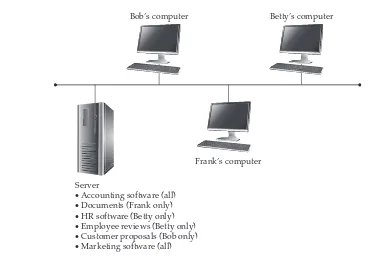
Figure 2-1. A peer-to-peer network with resources spread across computers
Frank’s computer
• Accounting system (shared)
• Documents (private)
Bob’s computer
• Customer proposals (private)
• Marketing software (shared)
Betty’s computer
• HR software (private)
The server computers in a client/server network are responsible for making available and managing appropriate shared resources, and for administering the security of those resources. Figure 2-2 shows how resources would be located in such a network.
Comparing Peer-to-Peer and Client/Server Networks
As mentioned earlier, most networks have aspects of both peer-to-peer and client/server relationships. Before deciding on setting up a network using one or both types of relationships, you should examine their pros and cons and determine how each meets the needs of your company. Consider the following advantages and disadvantages of using each type.
Pros for Peer-to-Peer Networks
Peer-to-peer networks offer a number of advantages, particularly for smaller firms, as follows:
■ Use less expensive computer hardware Peer-to-peer networks are the least hardware-intensive. In a pure peer-to-peer network, the resources are distributed over many computers, so there is no need for a high-end server computer. The impact on each workstation is usually (but not always) relatively minor.
Figure 2-2. A client/server network keeps resources centralized
Frank’s computer
Server
· Accounting software (all) · Documents (Frank only) · HR software (Betty only) · Employee reviews (Betty only) · Customer proposals (Bob only) · Marketing software (all)
Chapter 2: Understanding Networking
19
■ Easy to administer Peer-to-peer networks are, overall, easiest to set up and administer, provided that there aren’t too many computers within the peer-to-peer network. Because each machine performs its own administration—usually for certain limited resources—the effort of administering the network is widely distributed among many different people.
■ No network operating system required Peer-to-peer networks do not require a dedicated network operating system (NOS). You can build a peer-to-peer network using Windows 7 or 8 on all the workstations, or on all Macintosh computers for that matter. These client operating systems include all the features necessary for peer-to-peer networking. Similarly, you can do this with all UNIX- or Linux-based computers (although this is more complicated to set up and maintain).
■ More built-in redundancy If you have a small network, with 10 to 20 workstations each storing some important data, and one fails, you still have most of your shared resources available. A peer-to-peer network design can offer more redundancy than a client/server network because fewer single points of failure can affect the entire network and everyone who uses it.
Cons for Peer-to-Peer Networks
There are also various drawbacks to peer-to-peer networks, particularly for larger networks or for networks that have more complex or sophisticated requirements. The disadvantages include the following:
■ Might impact user’s performance If some workstations have frequently used resources on them, the use of these resources across the network might adversely affect the person using the hosting workstation.
■ Not very secure Peer-to-peer networks are not nearly as secure as client/ server networks because you cannot guarantee that all of the users will appropriately administer their machines. In fact, in a network of any size (say, more than ten people), you can expect that at least a few people will not follow good administration practices on their own machines. Moreover, the most common desktop operating systems used for peer-to-peer networking, like Windows XP or the Macintosh, are not designed to be secure network operating systems.
■ Difficult to back up Reliably backing up all the data scattered over many workstations is difficult, and it is not wise to delegate this job to the user of each machine. Experience shows that leaving this vital task up to users means it will not get done.
Pros for Client/Server Networks
Client/server networks offer the opportunity for centralized administration, using equipment suited to managing and offering each resource. Client/server networks are the type commonly used for networks larger than about ten users, and there are quite a few good reasons for this, as follows:
■ Very secure A client/server network’s security comes from several things. First, because the shared resources are located in a centralized area, they can be administered at that point. Managing a number of resources is much easier if those resources are all located on centralized server computers, as opposed to needing to administer resources across tens or hundreds of computers. Second, usually the servers are physically in a secure location, such as a lockable server room. Physical security is an important aspect of network security, and it cannot be achieved with a peer-to-peer network. Third, the operating systems on which client/server networks run are designed to be secure. Provided that good security and administration practices are in place, the servers cannot be easily “hacked.”
■ Better performance While dedicated server computers are more expensive than standard computer workstations, they also offer considerably better performance, and they are optimized to handle the needs of many users simultaneously.
■ Centralized backup Backing up a company’s critical data is much easier when it is located on a centralized server. Often, such backup jobs can be run overnight when the server is not being used and the data is static. Aside from being easier, centralized backups are also much faster than decentralized backups.
■ Very reliable While it is true that more built-in redundancy exists with a peer-to-peer network, a good client/server network can be more reliable overall. Dedicated servers often have much more built-in redundancy than standard workstations. They can handle the failure of a disk drive, power supply, or processor and continue to operate until the failed component can be replaced. Also, because a dedicated server has only one relatively simple job to do, its complexity is reduced and its reliability increased. Contrast this with a peer-to-peer network, where actions on the part of the users can drastically reduce each workstation’s reliability. For example, needing to restart a PC or a Macintosh every so often is not uncommon, whereas dedicated servers often run for months without requiring a restart or crashing.
Cons for Client/Server Networks
Chapter 2: Understanding Networking
21
■ Require professional administration Client/server networks usually need some level of professional administration, even if they are small. Knowing the ins and outs of a network operating system is important and requires experience and training. You can hire a network administrator, or you can use a company that provides professional network administration services.
■ More hardware-intensive In addition to the client computers, you need a server computer, usually a pretty “beefy” computer with a lot of memory and disk space. Plus, you need a network operating system and an appropriate number of client licenses, which can add at least several thousand dollars to the cost of the server. For large networks, these requirements add tens of thousands of dollars.
In a nutshell, choose a peer-to-peer network for smaller networks with fewer than 10 to 15 users, and choose a client/server network for anything larger. Because most networks are built on a client/server concept, this book generally assumes such a network.
Learning Network Features
Now that you know the two basic ways computers on a network can interact with each other, let’s look at the types of tasks you can do with a network. The following sections discuss common network features and capabilities.
File Sharing
Originally, file sharing was the primary reason to have a network. In fact, small and midsize companies in the mid-1980s usually installed networks just so they could perform this function. Often, this was driven by the need to network their accounting systems. Of course, once the networks were in place, sharing other types of files became easier as well.
File sharing typically involves word-processing files, spreadsheets, and other files to which many people need regular access. It requires a shared directory or disk drive that many users can access over the network, along with the underlying programming logic needed to make sure that more than one person doesn’t make changes to a file at the same time (called file locking). The reason you don’t want multiple people making changes to a file at the same time is that they might both be making conflicting changes simultaneously without realizing it. Most software programs don’t have the ability to allow multiple changes to a single file at the same time and to resolve problems that might arise.
NOTE Most database programs do allow multiple users to access a database simultaneously.
Network operating systems that perform file sharing also administer the security for the shared files. This security can control, with a fine level of detail, who has access to which files and what kinds of access they have. For example, some users might have permission to view only certain shared files, while others have permission to edit or even delete those shared files.
Printer Sharing
A close runner-up in importance to file sharing is printer sharing. While it is true that printers are now so inexpensive that you can afford to put one in every office if you wish, sharing printers among the users on the network is still more economical overall.
Printer sharing enables you to reduce the number of printers you need and also to offer much higher-quality printers. Newer digital copiers—also called multifunction printers (MFPs)—that can handle large print jobs at more than 80 pages per minute and provide special printing features can cost more than $20,000. Sharing such printers among many users makes sense.
Printer sharing can be done in several ways. The most common way is to use print queues on a server. A print queue holds print jobs until any currently running print jobs are finished and then automatically sends the waiting jobs to the printer. Using a print queue is efficient for the workstations because they can quickly print to the print queue and don’t need to wait for the printer itself to process any waiting print jobs.
Another way to share printers on a network is to let each workstation access the printer directly (most printers can be configured so they are connected to the network just like a network workstation). In this case, usually each workstation must wait its turn if many workstations are vying for the printer.
Networked printers that use printer queues have a print server that handles the job of sending each print job to the printer in turn. The print server function can be filled in a number of ways:
■ By a file and print server that is connected either directly or across the network to the printer.
■ By a computer connected to the network, with the printer connected to that computer. The computer runs special print server software to perform this job.
■ Through the use of a built-in print server on a printer’s network interface card (NIC), which contains the hardware necessary to act as a print server. For example, many laser printers offer an option to include a NIC, with a built-in print server, in the printer. This is far less expensive than dedicating a stand-alone computer to the job.
Chapter 2: Understanding Networking
23
Application Services
Just as you can share files on a network, you can often also share applications. For example, if you have the proper type of software license, you can have a shared copy of some applications stored on the network server. When a workstation wants to run the program, it loads the files from the network into its own memory, just as it would from a local disk drive, and runs the program normally. Keeping applications centralized reduces the amount of disk space needed on each workstation and makes it easier to administer the application. (For instance, with some applications, you need to upgrade only the network copy; with others, you also must perform a brief installation for each client.)
Another application service you can host on the network is a shared installation point for applications. Instead of needing to load a CD-ROM onto each workstation to install an application, you can usually copy the contents of the CD-ROM to a folder on a server and then have the installation program run from that folder for each workstation. This makes installing the applications much faster and more convenient.
CAUTION Make sure any applications you host on a network server are licensed appropriately.
Most software licenses do not let you run an application on multiple computers. Even if you need only one actual copy of the application to set up the files on the server, you still must have a license for every user. Different applications have different fine print regarding licensing—some require one license per user, some require one license per computer, some allow your network users to use a copy at home freely, and so forth. Make sure to carefully read the license agreements for your business software and adhere to their terms and conditions.
An extremely valuable and important network resource these days is e-mail. Not only can it be helpful for communications within a company, but it is also a preferred vehicle to communicate with people outside a company.
E-mail systems are roughly divided into two different types: file-based and client/ server. A file-based e-mail system is one that consists of a set of files kept in a shared location on a server. The server doesn’t actually do anything beyond providing access to the files. Connections required from a file-based e-mail system and the outside (say, to the Internet) are usually accomplished with a stand-alone computer—called a gateway server—that handles the e-mail interface between the two systems by using gateway software that is part of the file-based e-mail system.
In a client/server e-mail system, an e-mail server contains the messages and handles all the e-mail interconnections, both within and outside the company. Client/ server e-mail systems, such as Microsoft Exchange and Lotus Notes, are more secure and far more powerful than their file-based counterparts. They often offer additional features that enable you to use the e-mail system to automate different internal business processes, such as invoicing and purchasing.
purchase and maintain. Instead, these companies can use a hosted e-mail solution, such as Google for Domains, Microsoft’s Office 365 for businesses, or Microsoft’s hosted Exchange Server product. There are also many other hosted e-mail services available.
NOTE Hosted e-mail solutions let you use your own domain name.
Remote Access
Another important service for most networks is remote access to the network’s resources. Users use this feature to access their files and e-mail when they’re traveling or working from a remote location, such as a hotel or their home. Remote access systems come in many different flavors. The following are some of the methods used to provide remote access:
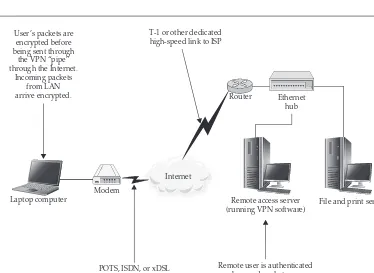
■ Set up a Virtual Private Network (VPN) server on a Windows server, which is then accessed through the company’s Internet connection.
■ Employ a workstation on the network and have users connect using a remote control program like Symantec’s pcAnywhere or Citrix’s GoToMyPC.
■ Set up a dedicated VPN server, connected to the Internet, through which users can access resources on the company network in a secure fashion.
■ Install Windows Terminal Services (on a Windows server) or Citrix
XenDesktop, which allows a single server to host multiple client sessions, each appearing to the end user as a stand-alone computer.
To choose the most suitable remote access solution, you’ll need to consider what the users need to do remotely, the number of users (both in total and at any given time), and how much you want to spend. See Chapter 8 for more information about remote access.
Wide Area Networks
You should think of a wide area network (WAN) as a sort of “metanetwork.” A WAN is simply multiple local area networks (LANs) connected together. This can be accomplished in many different ways, depending on how often the LANs need to be connected to one another, how much data capacity (bandwidth) is required, and how great the distance is between the LANs. Solutions include full-time leased telephone lines that can carry 56 Kbps of data, dedicated DS1 (T-1) lines carrying 1.544 Mbps, DS3 lines carrying 44.736 Mbps, Ethernet connections carrying 100 Mpbs or 1 Gbps, and other forms (like private satellites) carrying even higher bandwidths. You can also create a WAN using VPNs over the Internet. Although this method usually offers inconsistent bandwidth, it’s often the least expensive.
Chapter 2: Understanding Networking
25
As a general rule, if you can design and build a system that doesn’t require a WAN, you’re usually better off, because WAN links are often expensive to maintain. However, the geographic and management structure of a particular company can dictate the use of a WAN.
Internet and Intranet
The Internet has become vital to the productivity of most businesses, and handling Internet connectivity on a network is often an important network service. Many different types of services are available over the Internet, including e-mail, the Web, and Usenet newsgroups.
An Internet connection for a network consists of a telecommunications network connection to an Internet Service Provider (ISP) using a physical connection. Physical connections can range from a leased Digital Subscriber Line (DSL) line up to 1 Gbps Ethernet connection. This line comes into the building and connects to the internal LAN, usually through a dedicated router. The router then routes data packets between the local network and the Internet. Internet security is provided either by filtering the packets going through the router or, more commonly, by adding a firewall system in between the router and the LAN. A firewall system runs on a computer (or has a computer built into it, if it’s an appliance device) and helps you secure your network against various threats.
An intranet, as its name suggests, is an internally focused network that mimics the Internet itself. For example, a company might deploy an intranet that hosts a web server, which stores documents such as employee handbooks, purchasing forms, and other information that the company publishes for internal use. Intranets can also host other Internet-type services, such as File Transfer Protocol (FTP) servers or Usenet servers, or these services can be provided by other tools that offer the same functionality. Intranets usually are not accessible from outside the LAN (although they can be) and are just a much smaller version of the Internet that a company maintains for its own use.
Understanding the technologies, services, and features of the Internet is complex. You can learn much more about some of the hardware that makes the Internet work in Chapter 4.
DEFINE-IT! xAN
Network Security
Any time you share important and confidential information on a network, you need to carefully consider the security of those resources. Users and management must help set the level of security required for the network and the different information it stores, and they need to participate in deciding who has access to which resources.
Network security is provided by a combination of factors, including features of the network operating system, the physical cabling plant, the network connection to other networks, the features of the client workstations, the actions of the users, the security policies of management, and how well the security features are implemented and administered. All these factors form a chain, and any single weak link in the chain can cause it to fail. Security failures can have severe consequences, so network security is usually an extremely important part of any network. For a more detailed discussion of network security, see Chapter 9.
Understanding the OSI Networking Model
The Open Systems Interconnection (OSI) model defines all the methods and protocols needed to connect one computer to any other over a network. It is a conceptual model, used most often in network design and in engineering network solutions. Generally, real-world networks conform to the OSI model, although differences exist between the theory and actual practice in most networks. Still, the OSI model offers an excellent way to understand and visualize how computers network to each other, and it is required knowledge for anyone active in the field of networking. Just about all employers expect networking professionals to be knowledgeable about the OSI model, and it comes up on most networking certification tests. This might be a very dry topic, but it’s important to learn!
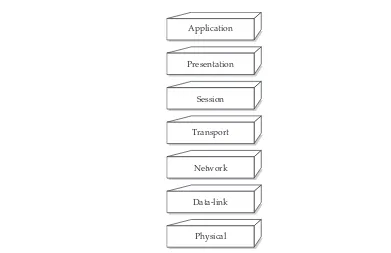
The OSI model defines a basic framework for how modern networks operate. It separates the methods and protocols needed for a network connection into seven different layers. Each higher layer relies on services provided by a lower layer. If you were to think about a desktop computer in this way, its hardware would be the lowest layer, and the operating system drivers—the next-higher layer—would rely on the lowest layer to do their job. The operating system itself, the next-higher layer, would rely on both of the lower layers working properly. This continues all the way up to the point at which an application presents data to you on the computer screen. Figure 2-3 shows the seven layers of the OSI model.
NOTE The OSI model is sometimes called the seven-layer model. It was developed by the
International Standards Organization (ISO) in 1983 and is documented as Standard 7498.
Chapter 2: Understanding Networking
27
Physical Layer
The bottom layer, Layer 1, is called the physical layer. It defines the properties of the physical medium used to make a network connection. The physical layer specifications control the lowest level at which data is actually moved between nodes on the physical network. It can be a tangible physical medium, such as a network cable, or it can also be radio waves if that is how the data is carried. The physical layer also includes any devices that make up the physical connection between two networked computers, and so things like routers, switches, satellite antennas, and so forth are part of the physical layer.
The physical connection can be either point to point (between two points) or multipoint (between many points, such as from one point to many others), and it can consist of either half-duplex (one direction at a time) or full-duplex (both directions simultaneously) transmissions. Moreover, the bits can be transmitted either in series or in parallel. (Most networks use a serial stream of bits, but the OSI model allows for both serial and parallel transmission.) The specification for the physical layer also defines the cable used, the voltages carried on the cable, the timing of the electrical signals, the distance that can be run, and so on.
Application
Presentation
Session
Transport
Network
Data-link
Physical
Data-Link Layer
The data-link layer, Layer 2, defines standards that assign meaning to the bits carried by the physical layer. It establishes a reliable protocol through the physical layer so the network layer (Layer 3) can transmit its data. The data-link layer typically includes error detection and correction to ensure a reliable data stream. The data elements carried by the data-link layer are called frames. Examples of frame types include X.25 and 802.x (802.x includes both Ethernet and Token Ring networks).
The data-link layer is usually subdivided into two sublayers, called the logical link control (LLC) and media access control (MAC) sublayers. If used, the LLC sublayer performs tasks such as call setup and termination (the OSI model can be applied to telecommunications networks as well as LANs) and data transfer. The MAC sublayer handles frame assembly and disassembly, error detection and correction, and addressing. The two most common MAC protocols are 802.3 Ethernet and 802.5 Token Ring. Other MAC protocols include 802.12 100Base-VBG, 802.11 Wireless, and 802.7 Broadband.
NOTE All network interface cards have unique MAC addresses burned into them. Every company
who makes NICs must register with the Institute of Electrical and Electronics Engineers (IEEE), who assigns blocks of unique MAC addresses to each manufacturer.
On most systems, the software drivers for the NIC perform the work done at the data-link layer, and usually NICs are considered part of the data-link layer.
Network Layer
The network layer, Layer 3, is where a lot of action goes on for most networks. The network layer defines how data packets get from one point to another on a network and what goes into each packet. The network layer uses different packet protocols, such as Internet Protocol (IP) and Internet Protocol Exchange (IPX). These packet protocols include source and destination routing information. The routing information in each packet informs the network where to send the packet to reach its destination and tells the receiving computer from where the packet originated.
The network layer is most important when the network connection passes through one or more routers, which are hardware devices that examine each packet and, from their source and destination addresses, send the packets to their proper destination. Over a complex network such as the Internet, a packet might go through ten or more routers before it reaches its destination. On a LAN, a packet might not go through any routers to get to its destination, or it might go through one or more.