LEARNING OBJECTIVESS After reading this chapter, you will be able to answer the following questions:
1. What is IT infrastructure and what are its components?
2. What are the stages and technology drivers of IT infrastructure
evolution?
3. What are the current trends in computer hardware platforms?
4. What are the current trends in software platforms?
5. What are the challenges of managing IT infrastructure and management solutions?
CHAPTER OUTLINE
5.1 IT INFRASTRUCTURE Defining IT Infrastructure Evolution of IT Infrastructure
Technology Drivers of Infrastructure Evolution 5.2 INFRASTRUCTURE COMPONENTS
Computer Hardware Platforms Operating System Platforms Enterprise Software Applications Data Management and Storage
Networking/Telecommunications Platforms Internet Platforms
Consulting and System Integration Services 5.3 CONTEMPORARY HARDWARE PLATFORM
TRENDS
The Emerging Mobile Digital Platform Grid Computing
Virtualization Cloud Computing Green Computing Autonomic Computing
High-Performance and Power-Saving Processors
5.4 CONTEMPORARY SOFTWARE PLATFORM TRENDS Linux and Open Source Software
Software for the Web: Java and Ajax
Web Services and Service-Oriented Architecture Software Outsourcing and Cloud Services 5.5 MANAGEMENT ISSUES
Dealing with Platform and Infrastructure Change Management and Governance
Making Wise Infrastructure Investments 5.6 HANDS-ON MIS PROJECTS
Management Decision Problems
Improving Decision Making: Using a Spreadsheet to Evaluate Hardware and Software Options
Improving Decision Making: Using Web Research to Budget for a Sales Conference
LEARNING TRACK MODULES
How Computer Hardware and Software Work Service Level Agreements
The Open Source Software Initiative
Comparing Stages in IT Infrastructure Evolution Cloud Computing
Chapter 5
IT Infrastructure and Emerging Technologies
Interactive Sessions:
New to the Touch
Is Green Computing Good for Business?
163 he Bay Area Rapid Transit (BART) is a heavy-rail public transit system that connects
San Francisco to Oakland, California, and other neighboring cities to the east and south. BART has provided fast, reliable transportation for more than 35 years and now carries more than 346,000 passengers each day over 104 miles of track and 43 stations. It provides an alternative to driving on bridges and highways, decreasing travel time and the number of cars on the Bay Area’s congested roads. It is the fifth busiest rapid transit system in the United States.
BART recently embarked on an ambitious modernization effort to overhaul stations, deploy new rail cars, and extend routes. This modernization effort also encompassed BART’s information technology infrastructure. BART’s information systems were no longer state-of-the art, and they were starting to affect its ability to provide good service. Aging homegrown financial and human resources systems could no longer provide information rapidly enough for making timely decisions, and they were too unreliable to support its 24/7 operations.
BART upgraded both its hardware and software. It replaced old legacy mainframe applica- tions with Oracle’s PeopleSoft Enterprise applications running on HP Integrity blade servers and the Oracle Enterprise Linux operating system. This configuration provides more flexibil- ity and room to grow because BART is able to run the PeopleSoft software in conjunction with new applications it could not previously run.
BART wanted to create a high-availability IT infrastructure using grid computing where it could match computing and storage capacity more closely to actual demand. BART chose to run its applications on a cluster of servers using a grid architecture. Multiple operating environments share capacity and computing resources that can be provisioned, distributed, and redistributed as needed over the grid.
In most data centers, a distinct server is deployed for each application, and each server typically uses only a fraction of its capacity. BART uses virtualization to run multiple applica- tions on the same server, increasing server capacity utilization to 50 percent or higher. This means fewer servers can be used to accomplish the same amount of work.
With blade servers, if BART needs more capacity, it can add another server to the main system. Energy usage is minimized because BART does not have to purchase computing
T
capacity it doesn’t need and the blade servers’ stripped down modular design mini- mizes the use of physical space and energy.
By using less hardware and using existing computing resources more efficiently, BART’s grid environment saves power and cooling costs.
Consolidating applications onto a shared grid of server capacity is expected to reduce energy usage by about 20 per- cent.
Sources:David Baum, “Speeding into the Modern Age,” Profit, February 2010; www.bart.gov, accessed June 5, 2010; and Steve Clouther, “The San Francisco Bay Area Rapid Transit Uses IBM Technology to Improve Safety and Reliability,” ARC Advisory Group, October 7, 2009.
B
ART has been widely praised as a successful modern rapid transit system, but its operations and ability to grow where needed were hampered by an outdated IT infrastructure. BART’s management felt the best solution was to invest in new hardware and software technologies that were more cost-effective, efficient, and energy-saving.The chapter-opening diagram calls attention to important points raised by this case and this chapter. Management realized that in order to keep provid- ing the level of service expected by Bay Area residents, it had to modernize its operations, including the hardware and software used for running the organization. The IT infrastructure investments it made had to support BART’s business goals and contribute to improving its performance. Other goals included reducing costs and also “green” goals of reducing power and materials consumption.
By replacing its legacy software and computers with blade servers on a grid and more modern business software, BART was able to reduce wasted computer resources not used for processing, use existing resources more efficiently, and cut costs and power consumption. New software tools make it much easier to develop new applications and services. BART’s IT infrastuc- ture is easier to manage and capable of scaling to accommodate growing processing loads and new business opportunities. This case shows that the right hardware and software investments not only improve business perfor- mance but can also contribute to important social goals, such as conservation of power and materials.
5.1 IT I NFRASTRUCTURE
n Chapter 1, we defined information technology (IT) infrastructureas the shared technology resources that provide the platform for the firm’s specific information system applications. IT infrastructure includes investment in hardware, software, and services—such as consulting, education, and training—that are shared across the entire firm or across entire business units in the firm. A firm’s IT infrastructure provides the foun- dation for serving customers, working with vendors, and managing internal firm business processes (see Figure 5-1).
Supplying U.S. firms with IT infrastructure (hardware and software) in 2010 is estimated to be a $1 trillion industry when telecommunications, networking equipment, and telecommunications services (Internet, telephone, and data transmission) are included. This does not include IT and related business process consulting services, which would add another $800 billion. Investments in infrastructure account for between 25 and 50 percent of information technology expenditures in large firms, led by financial services firms where IT investment is well over half of all capital investment (Weill et al., 2002).
DEFINING IT INFRASTRUCTURE
IT infrastructure consists of a set of physical devices and software applications that are required to operate the entire enterprise. But IT infrastructure is also a set of firmwide services budgeted by management and comprising both human and technical capabilities. These services include the following:
I
FIGURE 5-1 CONNECTION BETWEEN THE FIRM, IT INFRASTRUCTURE, AND BUSINESS CAPABILITIES
The services a firm is capable of providing to its customers, suppliers, and employees are a direct function of its IT infrastructure. Ideally, this infrastructure should support the firm’s business and information systems strategy. New information technologies have a powerful impact on business and IT strategies, as well as the services that can be provided to customers.
• Computing platforms used to provide computing services that connect employees, customers, and suppliers into a coherent digital environment, including large mainframes, midrange computers, desktop and laptop computers, and mobile handheld devices.
• Telecommunications services that provide data, voice, and video connectivity to employees, customers, and suppliers.
• Data management services that store and manage corporate data and provide capabilities for analyzing the data.
• Application software services that provide enterprise-wide capabilities such as enterprise resource planning, customer relationship management, supply chain management, and knowledge management systems that are shared by all business units.
• Physical facilities management services that develop and manage the physical installations required for computing, telecommunications, and data management services.
• IT management services that plan and develop the infrastructure, coordinate with the business units for IT services, manage accounting for the IT
expenditure, and provide project management services.
• IT standards services that provide the firm and its business units with policies that determine which information technology will be used, when, and how.
• IT education services that provide training in system use to employees and offer managers training in how to plan for and manage IT investments.
• IT research and development services that provide the firm with research on potential future IT projects and investments that could help the firm
differentiate itself in the marketplace.
This “service platform” perspective makes it easier to understand the business value provided by infrastructure investments. For instance, the real business value of a fully loaded personal computer operating at 3 gigahertz that costs about $1,000 or a high-speed Internet connection is hard to under- stand without knowing who will use it and how it will be used. When we look at the services provided by these tools, however, their value becomes more apparent: The new PC makes it possible for a high-cost employee making
$100,000 a year to connect to all the company’s major systems and the public Internet. The high-speed Internet service saves this employee about one hour per day in reduced wait time for Internet information. Without this PC and Internet connection, the value of this one employee to the firm might be cut in half.
EVOLUTION OF IT INFRASTRUCTURE
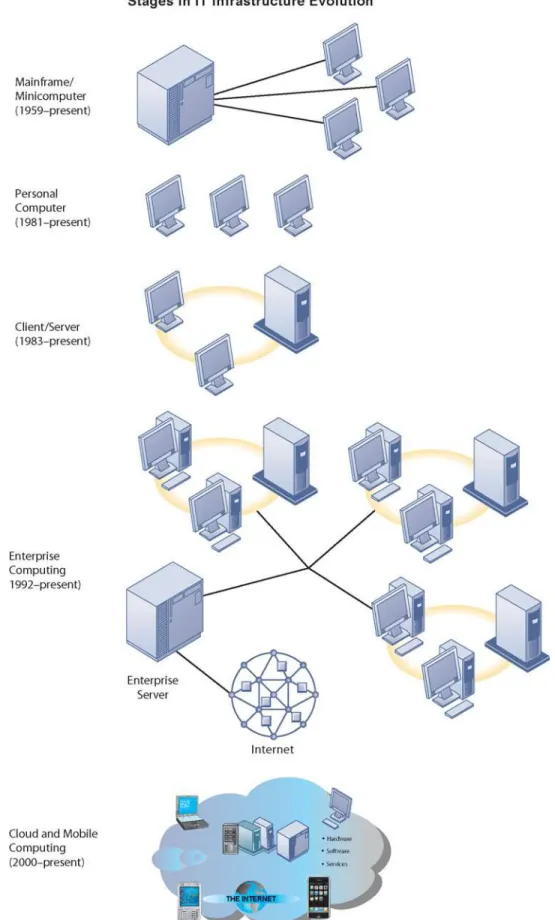
The IT infrastructure in organizations today is an outgrowth of over 50 years of evolution in computing platforms. There have been five stages in this evo- lution, each representing a different configuration of computing power and infrastructure elements (see Figure 5-2). The five eras are general-purpose mainframe and minicomputer computing, personal computers, client/server networks, enterprise computing, and cloud and mobile computing.
Technologies that characterize one era may also be used in another time period for other purposes. For example, some companies still run traditional mainframe systems or use mainframe computers as massive servers supporting large Web sites and corporate enterprise applications.
FIGURE 5-2 ERAS IN IT INFRASTRUCTURE EVOLUTION
Illustrated here are the typical computing configurations characterizing each of the five eras of IT infrastructure evolution.
G e n e r a l - P u r p o s e M a i n f r a m e a n d M i n i c o m p u t e r E r a : ( 1 9 5 9 t o P r e s e n t )
The introduction of the IBM 1401 and 7090 transistorized machines in 1959 marked the beginning of widespread commercial use of mainframecomputers.
In 1965, the mainframe computer truly came into its own with the introduction of the IBM 360 series. The 360 was the first commercial computer with a power- ful operating system that could provide time sharing, multitasking, and virtual memory in more advanced models. IBM has dominated mainframe computing from this point on. Mainframe computers became powerful enough to support thousands of online remote terminals connected to the centralized mainframe using proprietary communication protocols and proprietary data lines.
The mainframe era was a period of highly centralized computing under the control of professional programmers and systems operators (usually in a corpo- rate data center), with most elements of infrastructure provided by a single vendor, the manufacturer of the hardware and the software.
This pattern began to change with the introduction of minicomputers produced by Digital Equipment Corporation (DEC) in 1965. DEC minicomput- ers (PDP-11 and later the VAX machines) offered powerful machines at far lower prices than IBM mainframes, making possible decentralized computing, customized to the specific needs of individual departments or business units rather than time sharing on a single huge mainframe. In recent years, the minicomputer has evolved into a midrange computer or midrange server and is part of a network.
P e r s o n a l C o m p u t e r E r a : ( 1 9 8 1 t o P r e s e n t )
Although the first truly personal computers (PCs) appeared in the 1970s (the Xerox Alto, the MITS Altair 8800, and the Apple I and II, to name a few), these machines had only limited distribution to computer enthusiasts. The appear- ance of the IBM PC in 1981 is usually considered the beginning of the PC era because this machine was the first to be widely adopted by American busi- nesses. At first using the DOS operating system, a text-based command lan- guage, and later the Microsoft Windows operating system, the Wintel PCcom- puter (Windows operating system software on a computer with an Intel microprocessor) became the standard desktop personal computer. Today, 95 percent of the world’s estimated 1.5 billion computers use the Wintel standard.
Proliferation of PCs in the 1980s and early 1990s launched a spate of personal desktop productivity software tools—word processors, spreadsheets, electronic presentation software, and small data management programs—that were very valuable to both home and corporate users. These PCs were standalone systems until PC operating system software in the 1990s made it possible to link them into networks.
C l i e n t / S e r v e r E r a ( 1 9 8 3 t o P r e s e n t )
In client/server computing, desktop or laptop computers called clients are networked to powerful server computers that provide the client computers with a variety of services and capabilities. Computer processing work is split between these two types of machines. The client is the user point of entry, whereas the server typically processes and stores shared data, serves up Web pages, or manages network activities. The term “server” refers to both the software application and the physical computer on which the network software runs. The server could be a mainframe, but today, server computers typically are more powerful versions of personal computers, based on inexpensive chips and often using multiple processors in a single computer box.
The simplest client/server network consists of a client computer networked to a server computer, with processing split between the two types of machines.
This is called a two-tiered client/server architecture. Whereas simple client/server networks can be found in small businesses, most corporations have more complex, multitiered(often called N-tier) client/server architec- tures in which the work of the entire network is balanced over several different levels of servers, depending on the kind of service being requested (see Figure 5-3).
For instance, at the first level, a Web serverwill serve a Web page to a client in response to a request for service. Web server software is responsible for locating and managing stored Web pages. If the client requests access to a cor- porate system (a product list or price information, for instance), the request is passed along to an application server. Application server software handles all application operations between a user and an organization’s back-end business systems. The application server may reside on the same computer as the Web server or on its own dedicated computer. Chapters 6 and 7 provide more detail on other pieces of software that are used in multitiered client/server architec- tures for e-commerce and e-business.
Client/server computing enables businesses to distribute computing work across a series of smaller, inexpensive machines that cost much less than minicomputers or centralized mainframe systems. The result is an explosion in computing power and applications throughout the firm.
Novell NetWare was the leading technology for client/server networking at the beginning of the client/server era. Today, Microsoft is the market leader with its Windows operating systems (Windows Server, Windows 7, Windows Vista, and Windows XP).
E n t e r p r i s e C o m p u t i n g E r a ( 1 9 9 2 t o P r e s e n t )
In the early 1990s, firms turned to networking standards and software tools that could integrate disparate networks and applications throughout the firm into an enterprise-wide infrastructure. As the Internet developed into a trusted communications environment after 1995, business firms began seriously using the Transmission Control Protocol/Internet Protocol (TCP/IP) networking
FIGURE 5-3 A MULTITIERED CLIENT/SERVER NETWORK (N-TIER)
In a multitiered client/server network, client requests for service are handled by different levels of servers.
standard to tie their disparate networks together. We discuss TCP/IP in detail in Chapter 7.
The resulting IT infrastructure links different pieces of computer hardware and smaller networks into an enterprise-wide network so that information can flow freely across the organization and between the firm and other organiza- tions. It can link different types of computer hardware, including mainframes, servers, PCs, mobile phones, and other handheld devices, and it includes public infrastructures such as the telephone system, the Internet, and public network services. The enterprise infrastructure also requires software to link disparate applications and enable data to flow freely among different parts of the business, such as enterprise applications (see Chapters 2 and 9) and Web services (discussed in Section 5.4).
C l o u d a n d M o b i l e C o m p u t i n g E r a ( 2 0 0 0 t o P r e s e n t )
The growing bandwidth power of the Internet has pushed the client/server model one step further, towards what is called the “Cloud Computing Model.”
Cloud computing refers to a model of computing that provides access to a shared pool of computing resources (computers, storage, applications, and services), over a network, often the Internet. These “clouds” of computing resources can be accessed on an as-needed basis from any connected device and location. Currently, cloud computing is the fastest growing form of computing, with global revenue expected to reach close to $89 billion in 2011 and nearly $149 billion by 2014 according to Gartner Inc. technology consul- tants (Cheng and Borzo, 2010; Veverka, 2010).
Thousands or even hundreds of thousands computers are located in cloud data centers, where they can be accessed by desktop computers, laptop computers, netbooks, entertainment centers, mobile devices, and other client machines linked to the Internet, with both personal and corporate computing increasingly moving to mobile platforms. IBM, HP, Dell, and Amazon operate huge, scalable cloud computing centers that provide computing power, data storage, and high-speed Internet connections to firms that want to maintain their IT infrastructures remotely. Software firms such as Google, Microsoft, SAP, Oracle, and Salesforce.com sell software applications as services delivered over the Internet.
We discuss cloud computing in more detail in Section 5.3. The Learning Tracks include a table on Stages in IT Infrastructure Evolution, which compares each era on the infrastructure dimensions introduced.
TECHNOLOGY DRIVERS OF INFRASTRUCTURE EVOLUTION
The changes in IT infrastructure we have just described have resulted from developments in computer processing, memory chips, storage devices, telecommunications and networking hardware and software, and software design that have exponentially increased computing power while exponentially reducing costs. Let’s look at the most important developments.
M o o r e ’ s L a w a n d M i c r o p r o c e s s i n g P o w e r
In 1965, Gordon Moore, the directory of Fairchild Semiconductor’s Research and Development Laboratories, an early manufacturer of integrated circuits, wrote in Electronics magazine that since the first microprocessor chip was introduced in 1959, the number of components on a chip with the smallest
manufacturing costs per component (generally transistors) had doubled each year. This assertion became the foundation of Moore’s Law. Moore later reduced the rate of growth to a doubling every two years.
This law would later be interpreted in multiple ways. There are at least three variations of Moore’s Law, none of which Moore ever stated: (1) the power of microprocessors doubles every 18 months; (2) computing power doubles every 18 months; and (3) the price of computing falls by half every 18 months.
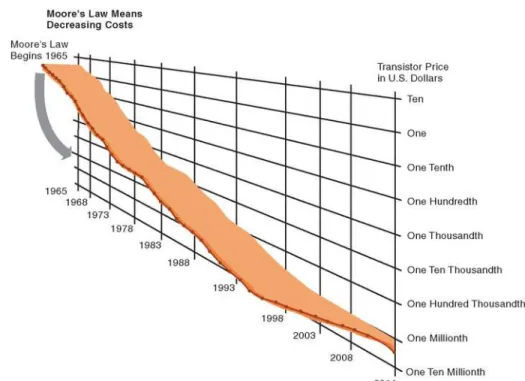
Figure 5-4 illustrates the relationship between number of transistors on a microprocessor and millions of instructions per second (MIPS), a common measure of processor power. Figure 5-5 shows the exponential decline in the cost of transistors and rise in computing power. In 2010 for instance, and Intel 8-Core Xeon processor contains 2.3 billion transistors.
Exponential growth in the number of transistors and the power of processors coupled with an exponential decline in computing costs is likely to continue. Chip manufacturers continue to miniaturize components. Today’s transistors should no longer be compared to the size of a human hair but rather to the size of a virus.
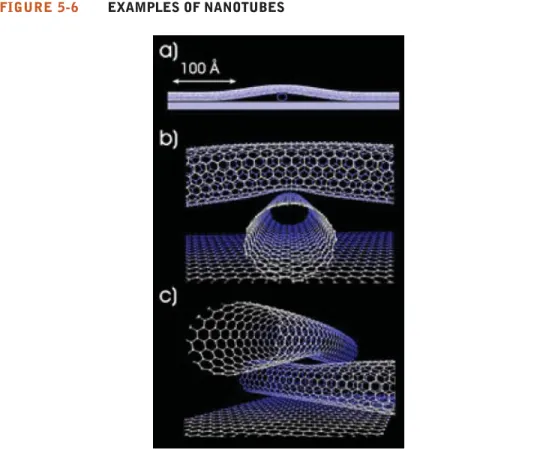
By using nanotechnology, chip manufacturers can even shrink the size of transistors down to the width of several atoms. Nanotechnologyuses individ- ual atoms and molecules to create computer chips and other devices that are thousands of times smaller than current technologies permit. Chip manufac- turers are trying to develop a manufacturing process that could produce nanotube processors economically (Figure 5-6). IBM has just started making microprocessors in a production setting using this technology.
T h e L a w o f M a s s D i g i t a l S t o r a g e
A second technology driver of IT infrastructure change is the Law of Mass Digital Storage. The world produces as much as 5 exabytes of unique informa- tion per year (an exabyte is a billion gigabytes, or 1018bytes). The amount of digital information is roughly doubling every year (Lyman and Varian, 2003).
Fortunately, the cost of storing digital information is falling at an exponential
FIGURE 5-4 MOORE’S LAW AND MICROPROCESSOR PERFORMANCE
Packing over 2 billion transistors into a tiny microprocessor has exponentially increased processing power. Processing power has increased to over 500,000 MIPS (millions of instructions per second).
Sources: Intel, 2010; authors’ estimate.
FIGURE 5-6 EXAMPLES OF NANOTUBES
Nanotubes are tiny tubes about 10,000 times thinner than a human hair. They consist of rolled up sheets of carbon hexagons and have the potential uses as minuscule wires or in ultrasmall electronic devices and are very powerful conductors of electrical current.
FIGURE 5-5 FALLING COST OF CHIPS
Packing more transistors into less space has driven down transistor cost dramatically as well as the cost of the products in which they are used.
Source: Intel, 2010; authors’ estimates.
rate of 100 percent a year. Figure 5-7 shows that the number of kilobytes that can be stored on magnetic media for $1 from 1950 to the present roughly dou- bled every 15 months.
M e t c a l f e ’ s L a w a n d N e t w o r k E c o n o m i c s
Moore’s Law and the Law of Mass Storage help us understand why computing resources are now so readily available. But why do people want more comput- ing and storage power? The economics of networks and the growth of the Internet provide some answers.
Robert Metcalfe—inventor of Ethernet local area network technology—
claimed in 1970 that the value or power of a network grows exponentially as a function of the number of network members. Metcalfe and others point to the increasing returns to scale that network members receive as more and more people join the network. As the number of members in a network grows linearly, the value of the entire system grows exponentially and continues to grow forever as members increase. Demand for information technology has been driven by the social and business value of digital networks, which rapidly multiply the number of actual and potential links among network members.
D e c l i n i n g C o m m u n i c a t i o n s C o s t s a n d t h e I n t e r n e t
A fourth technology driver transforming IT infrastructure is the rapid decline in the costs of communication and the exponential growth in the size of the
FIGURE 5-7 THE COST OF STORING DATA DECLINES EXPONENTIALLY 1950–2010
Since the first magnetic storage device was used in 1955, the cost of storing a kilobyte of data has fallen exponentially, doubling the amount of digital storage for each dollar expended every 15 months on average.
Sources: Kurzweil 2003; authors’ estimates.
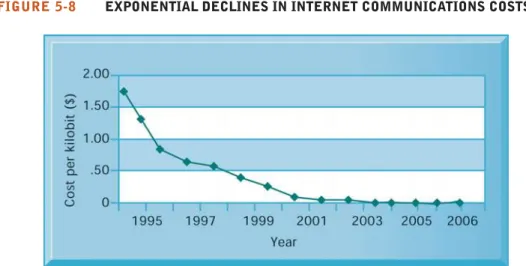
Internet. An estimated 1.8 billion people worldwide now have Internet access (Internet World Stats, 2010). Figure 5-8 illustrates the exponentially declining cost of communication both over the Internet and over telephone networks (which increasingly are based on the Internet). As communication costs fall toward a very small number and approach 0, utilization of communication and computing facilities explodes.
To take advantage of the business value associated with the Internet, firms must greatly expand their Internet connections, including wireless connectiv- ity, and greatly expand the power of their client/server networks, desktop clients, and mobile computing devices. There is every reason to believe these trends will continue.
S t a n d a r d s a n d N e t w o r k E f f e c t s
Today’s enterprise infrastructure and Internet computing would be impossible—
both now and in the future—without agreements among manufacturers and widespread consumer acceptance of technology standards. Technology standards are specifications that establish the compatibility of products and the ability to communicate in a network (Stango, 2004).
Technology standards unleash powerful economies of scale and result in price declines as manufacturers focus on the products built to a single standard.
Without these economies of scale, computing of any sort would be far more expensive than is currently the case. Table 5-1 describes important standards that have shaped IT infrastructure.
Beginning in the 1990s, corporations started moving toward standard comput- ing and communications platforms. The Wintel PC with the Windows operating system and Microsoft Office desktop productivity applications became the stan- dard desktop and mobile client computing platform. Widespread adoption of Unix as the enterprise server operating system of choice made possible the replace- ment of proprietary and expensive mainframe infrastructures. In telecommunica- tions, the Ethernet standard enabled PCs to connect together in small local area networks (LANs; see Chapter 7), and the TCP/IP standard enabled these LANs to be connected into firm-wide networks, and ultimately, to the Internet.
FIGURE 5-8 EXPONENTIAL DECLINES IN INTERNET COMMUNICATIONS COSTS
One reason for the growth in the Internet population is the rapid decline in Internet connection and overall communication costs. The cost per kilobit of Internet access has fallen exponentially since 1995. Digital subscriber line (DSL) and cable modems now deliver a kilobit of communication for a retail price of around 2 cents.
Source: Authors.
TABLE 5-1SOME IMPORTANT STANDARDS IN COMPUTING
STANDARD SIGNIFICANCE
American Standard Code for Information Made it possible for computer machines from different manufacturers to exchange Interchange (ASCII) (1958) data; later used as the universal language linking input and output devices such as
keyboards and mice to computers. Adopted by the American National Standards Institute in 1963.
Common Business Oriented Language An easy-to-use software language that greatly expanded the ability of programmers to (COBOL) (1959) write business-related programs and reduced the cost of software. Sponsored by the
Defense Department in 1959.
Unix (1969–1975) A powerful multitasking, multiuser, portable operating system initially developed at Bell Labs (1969) and later released for use by others (1975). It operates on a wide variety of computers from different manufacturers. Adopted by Sun, IBM, HP, and others in the 1980s, it became the most widely used enterprise-level operating system.
Transmission Control Protocol/Internet Suite of communications protocols and a common addressing scheme that enables Protocol (TCP/IP) (1974) millions of computers to connect together in one giant global network (the Internet).
Later, it was used as the default networking protocol suite for local area networks and intranets. Developed in the early 1970s for the U.S. Department of Defense.
Ethernet (1973) A network standard for connecting desktop computers into local area networks that enabled the widespread adoption of client/server computing and local area networks, and further stimulated the adoption of personal computers.
IBM/Microsoft/Intel Personal The standard Wintel design for personal desktop computing based on standard Intel Computer (1981) processors and other standard devices, Microsoft DOS, and later Windows software.
The emergence of this standard, low-cost product laid the foundation for a 25-year period of explosive growth in computing throughout all organizations around the globe. Today, more than 1 billion PCs power business and government activities every day.
World Wide Web (1989–1993) Standards for storing, retrieving, formatting, and displaying information as a worldwide web of electronic pages incorporating text, graphics, audio, and video enables creation of a global repository of billions of Web pages.
5.2 I NFRASTRUCTURE C OMPONENTS
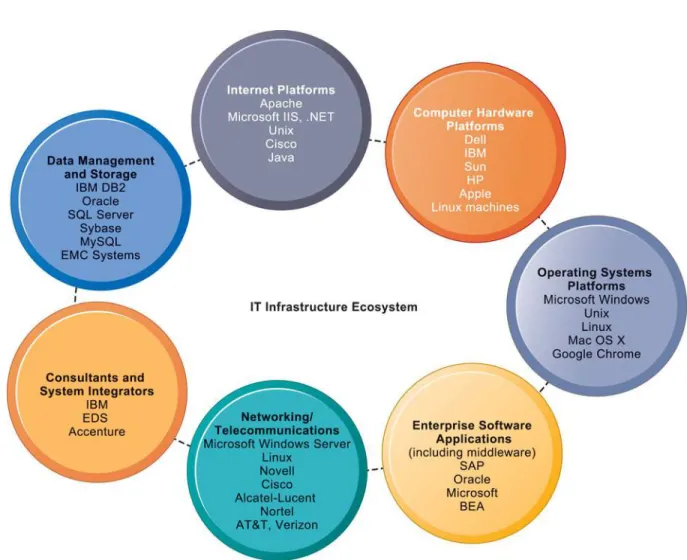
IT infrastructure today is composed of seven major components. Figure 5-9 illustrates these infrastructure components and the major vendors within each component category. These components constitute investments that must be coordinated with one another to provide the firm with a coherent infrastructure.
In the past, technology vendors supplying these components were often in competition with one another, offering purchasing firms a mixture of incompati- ble, proprietary, partial solutions. But increasingly the vendor firms have been forced by large customers to cooperate in strategic partnerships with one another. For instance, a hardware and services provider such as IBM cooperates with all the major enterprise software providers, has strategic relationships with system integrators, and promises to work with whichever database products its client firms wish to use (even though it sells its own database management software called DB2).
COMPUTER HARDWARE PLATFORMS
U.S. firms will spend about $109 billion in 2010 on computer hardware. This component includes client machines (desktop PCs, mobile computing devices such as netbooks and laptops but not including iPhones or BlackBerrys) and
server machines. The client machines use primarily Intel or AMD micro- processors. In 2010, there will be about 90 million PCs sold to U.S. customers (400 million worldwide) (Gartner, 2010).
The server market uses mostly Intel or AMD processors in the form of blade servers in racks, but also includes Sun SPARC microprocessors and IBM POWER chips specially designed for server use. Blade servers, which we discussed in the chapter-opening case, are ultrathin computers consisting of a circuit board with processors, memory, and network connections that are stored in racks.
They take up less space than traditional box-based servers. Secondary storage may be provided by a hard drive in each blade server or by external mass-stor- age drives.
The marketplace for computer hardware has increasingly become concen- trated in top firms such as IBM, HP, Dell, and Sun Microsystems (acquired by Oracle), and three chip producers: Intel, AMD, and IBM. The industry has collectively settled on Intel as the standard processor, with major exceptions in the server market for Unix and Linux machines, which might use Sun or IBM Unix processors.
FIGURE 5-9 THE IT INFRASTRUCTURE ECOSYSTEM
There are seven major components that must be coordinated to provide the firm with a coherent IT infrastructure. Listed here are major technologies and suppliers for each component.
Mainframes have not disappeared. The mainframe market has actually grown steadily over the last decade, although the number of providers has dwindled to one: IBM. IBM has also repurposed its mainframe systems so they can be used as giant servers for massive enterprise networks and corporate Web sites. A single IBM mainframe can run up to 17,000 instances of Linux or Windows server software and is capable of replacing thousands of smaller blade servers (see the discussion of virtualization in Section 5.3).
OPERATING SYSTEM PLATFORMS
In 2010, Microsoft Windows comprises about 75 percent of the server operating system market, with 25 percent of corporate servers using some form of the Unixoperating system or Linux, an inexpensive and robust open source rela- tive of Unix. Microsoft Windows Server is capable of providing enterprise-wide operating system and network services, and appeals to organizations seeking Windows-based IT infrastructures (IDC, 2010).
Unix and Linux are scalable, reliable, and much less expensive than main- frame operating systems. They can also run on many different types of proces- sors. The major providers of Unix operating systems are IBM, HP, and Sun, each with slightly different and partially incompatible versions.
At the client level, 90 percent of PCs use some form of Microsoft Windows operating system(such as Windows 7, Windows Vista, or Windows XP) to man- age the resources and activities of the computer. However, there is now a much greater variety of operating systems than in the past, with new operating systems for computing on handheld mobile digital devices or cloud-connected computers.
Google’s Chrome OSprovides a lightweight operating system for cloud com- puting using netbooks. Programs are not stored on the user’s PC but are used over the Internet and accessed through the Chrome Web browser. User data resides on servers across the Internet. Microsoft has introduced the Windows Azureoperating system for its cloud services and platform. Androidis a mobile operating system developed by Android, Inc. (purchased by Google) and later the Open Handset Alliance as a flexible, upgradeable mobile device platform.
Conventional client operating system software is designed around the mouse and keyboard, but increasingly becoming more natural and intuitive by using touch technology. IPhone OS, the operating system for the phenomenally popu- lar Apple iPad, iPhone, and iPod Touch, features a multitouch interface, where users use their fingers to manipulate objects on the screen. The Interactive Session on Technology explores the implications of using multitouch to interact with the computer.
ENTERPRISE SOFTWARE APPLICATIONS
In addition to software for applications used by specific groups or business units, U.S. firms will spend about $165 billion in 2010 on software for enterprise applications that are treated as components of IT infrastructure. We introduced the various types of enterprise applications in Chapter 2, and Chapter 9 pro- vides a more detailed discussion of each.
The largest providers of enterprise application software are SAP and Oracle (which acquired PeopleSoft). Also included in this category is middleware software supplied by vendors such as BEA for achieving firmwide integration by linking the firm’s existing application systems. Microsoft is attempting to move into the lower ends of this market by focusing on small and medium- sized businesses that have not yet implemented enterprise applications.
I N T E R A C T I V E S E S S I O N : T E C H N O L O G Y
When Steve Jobs first demonstrated “the pinch”—the two-finger gesture for zooming in and out of photos and Web pages on the iPhone, he not only shook up the mobile phone industry—the entire digital world took notice. The Apple iPhone’s multitouch features dramatized new ways of using touch to interact with software and devices.
Touch interfaces are not new. People use them every day to get money from ATMs or to check into flights at airport kiosks. Academic and commercial researchers have been working on multitouch technology for years. What Apple did was to make multitouch more exciting and relevant, popularizing it just as it did in the 1980s with the mouse and the graphical user interface. (These had also been invented elsewhere.)
Multitouch interfaces are potentially more versatile than single-touch interfaces. They allow you to use one or more fingers to perform special gestures that manipulate lists or objects on a screen without moving a mouse, pressing buttons, turning scroll wheels, or striking keys. They take different actions depending on how many fingers they detect and which gestures a user performs. Multitouch gestures are easier to remember than commands because they are based on ingrained human move- ments that do not have to be learned, scientists say.
The iPhone’s Multi-Touch display and software lets you control everything using only your fingers.
A panel underneath the display’s glass cover senses your touch using electrical fields. It then transmits that information to a LCD screen below it. Special software recognizes multiple simultaneous touch points, (as opposed to the single-touch screen, which recognizes only one touch point.) You can quickly move back and forth through a series of Web pages or photos by “swiping,” or placing three fingers on the screen and moving them rapidly sideways. By pinching the image, you can shrink or expand a photo.
Apple has made a concerted effort to provide multitouch features in all of its product categories, but many other consumer technology companies have adopted multitouch for some of their products.
Synaptics, a leading supplier of touchpads for laptop makers who compete with Apple, has announced that it is incorporating several multitouch features into its touchpads.
NEW TO THE TOUCH
Microsoft’s Windows 7 operating system sports multitouch features: When you pair Windows 7 with a touch-screen PC, you can browse online newspa- pers, flick through photo albums, and shuffle files and folders using nothing but your fingers. To zoom in on something on the screen of a multitouch-com- patible PC, you would place two fingers on the screen and spread them apart. To right-click a file, touch it with one finger and tap the screen with a second.
A number of Microsoft Windows PCs have touch screens, with a few Windows laptops emulating some of the multitouch features of Apple computers and handhelds. Microsoft’s Surface computer runs on Windows 7 and lets its business customers use multitouch in a table-top display. Customers of hotels, casinos, and retail stores will be able to use multitouch finger gestures to move around digital objects such as photos, to play games, and to browse through product options. The Dell Latitude XT tablet PC uses multitouch, which is helpful to people who can’t grasp a mouse and want the functionality of a traditional PC. They can use a finger or a stylus instead. The Android operating system for
smartphones has native support for multi-touch, and handsets such as the HTC Desire, Nexus One, and the Motorola Droid have this capability.
Hewlett-Packard (HP) now has laptops and desktops that use touch technology. Its TouchSmart computer lets you use two fingers at once to manipu- late images on the screen or to make on-screen gestures designating specific commands without using cursors or scroll bars. To move an object, you touch it with a finger and drag it to its new location.
Sliding your finger up and down or sideways smoothly scrolls the display.
The TouchSmart makes it possible for home users to engage in a new type of casual computing—
putting on music while preparing dinner, quickly searching for directions before leaving the house, or leaving written, video, or audio memos for family members. Both consumers and businesses have found other uses as well. According to Alan Reed, HP’s vice president and general manager for Business Desktops, “There is untapped potential for touch technology in the business marketplace to engage users in a way that has never been done before.”
C A S E S T U D Y Q U E S T I O N S
1. What problems does multitouch technology solve?
2.What are the advantages and disadvantages of a multitouch interface? How useful is it? Explain.
3.Describe three business applications that would benefit from a multitouch interface.
4.What management, organization, and technology issues must be addressed if you or your business was considering systems and computers with multitouch interfaces?
Chicago’s O’Hare Airport integrated a group of TouchSmart PCs into “Explore Chicago” tourist kiosks, allowing visitors to check out a virtual Visitor’s Center. TouchSmart computing helped an autistic student to speak to and communicate with others for the first time in the 14 years of his life.
Without using the TouchSmart PC’s wireless
keyboard and mouse, users can hold video chats with remote workers through a built-in Webcam and microphone, access e-mail and the Internet, and manage contacts, calendar items, and photos.
Touch-enabled PCs could also appeal to elemen- tary schools seeking an easy-to-use computer for students in early grades, or a wall-mountable infor- mation kiosk-type device for parents and visitors.
Customers might use touch to place orders with a retailer, conduct virtual video service calls, or to teach or utilize social networking for business.
1. Describe what you would do differently on your PC if it had multitouch capabilities. How much difference would multitouch make in the way you use your computer?
It’s too early to know if the new multitouch inter- face will ever be as popular as the mouse-driven graph- ical user interface. Although putting ones fingers on the screen is the ultimate measure of “cool” in the cell phone market, a “killer application” for touch on the PC has not yet emerged. But it’s already evident that touch has real advantages on devices where a mouse isn’t possible or convenient to use, or the decades-old interface of menus and folders is too cumbersome.
Sources:Claire Cain Miller, “To Win Over Today’s Users, Gadgets Have to be Touchable,” The New York Times, September 1, 2010;
Katherine Boehret, “Apple Adds Touches to Its Mac Desktops,” The Wall Street Journal, August 4, 2010; Ashlee Vance, “ Tech Industry Catches Its Breath,” The New York Times, February 17, 2010; Kathy Sandler, “The Future of Touch,” The Wall Street Journal, June 2, 2009; Suzanne Robitaille, “Multitouch to the Rescue?” Suite101.com, January 22, 2009; and Eric Lai, “HP Aims TouchSmart Desktop PC at Businesses,” Computerworld, August 1, 2009.
M I S I N A C T I O N
DATA MANAGEMENT AND STORAGE
Enterprise database management software is responsible for organizing and managing the firm’s data so that they can be efficiently accessed and used.
Chapter 6 describes this software in detail. The leading database software providers are IBM (DB2), Oracle, Microsoft (SQL Server), and Sybase (Adaptive Server Enterprise), which supply more than 90 percent of the U.S. database software marketplace. MySQL is a Linux open source relational database product now owned by Oracle Corporation.
The physical data storage market is dominated by EMC Corporation for large- scale systems, and a small number of PC hard disk manufacturers led by Seagate, Maxtor, and Western Digital.
Digital information is estimated to be growing at 1.2 zettabytes a year. All the tweets, blogs, videos, e-mails, and Facebook postings as well as traditional cor- porate data add up in 2010 to several thousand Libraries of Congress (EMC Corporation, 2010).
With the amount of new digital information in the world growing so rapidly, the market for digital data storage devices has been growing at more than 15 percent annually over the last five years. In addition to traditional
disk arrays and tape libraries, large firms are turning to network-based storage technologies. Storage area networks (SANs) connect multiple storage devices on a separate high-speed network dedicated to storage. The SAN creates a large central pool of storage that can be rapidly accessed and shared by multiple servers.
NETWORKING/TELECOMMUNICATIONS PLATFORMS
U.S. firms spend $100 billon a year on networking and telecommunications hardware and a huge $700 billion on networking services (consisting mainly of telecommunications and telephone company charges for voice lines and Internet access; these are not included in this discussion). Chapter 7 is devoted to an in-depth description of the enterprise networking environment, including the Internet. Windows Server is predominantly used as a local area network operating system, followed by Linux and Unix. Large enterprise wide area networks primarily use some variant of Unix. Most local area networks, as well as wide area enterprise networks, use the TCP/IP protocol suite as a standard (see Chapter 7).
The leading networking hardware providers are Cisco, Alcatel-Lucent, Nortel, and Juniper Networks. Telecommunications platforms are typically provided by telecommunications/telephone services companies that offer voice and data connectivity, wide area networking, wireless services, and Internet access. Leading telecommunications service vendors include AT&T and Verizon (see the Chapter 3 opening case). This market is exploding with new providers of cellular wireless, high-speed Internet, and Internet telephone services.
INTERNET PLATFORMS
Internet platforms overlap with, and must relate to, the firm’s general network- ing infrastructure and hardware and software platforms. U.S. firms spent an estimated $40 billion annually on Internet-related infrastructure. These expen- ditures were for hardware, software, and management services to support a firm’s Web site, including Web hosting services, routers, and cabling or wireless equipment. A Web hosting servicemaintains a large Web server, or series of servers, and provides fee-paying subscribers with space to maintain their Web sites.
The Internet revolution created a veritable explosion in server computers, with many firms collecting thousands of small servers to run their Internet operations. Since then there has been a steady push toward server consolida- tion, reducing the number of server computers by increasing the size and power of each. The Internet hardware server market has become increasingly concentrated in the hands of IBM, Dell, and HP/Compaq, as prices have fallen dramatically.
The major Web software application development tools and suites are supplied by Microsoft (Microsoft Expression Web, SharePoint Designer, and the Microsoft .NET family of development tools); Oracle-Sun (Sun’s Java is the most widely used tool for developing interactive Web applications on both the server and client sides); and a host of independent software developers, includ- ing Adobe (Flash and text tools like Acrobat), and Real Media (media software).
Chapter 7 describes the components of the firm’s Internet platform in greater detail.
CONSULTING AND SYSTEM INTEGRATION SERVICES
Today, even a large firm does not have the staff, the skills, the budget, or the necessary experience to deploy and maintain its entire IT infrastructure.
Implementing a new infrastructure requires (as noted in Chapters 3 and 14) significant changes in business processes and procedures, training and educa- tion, and software integration. Leading consulting firms providing this exper- tise include Accenture, IBM Global Services, HP Enterprise Services, Infosys, and Wipro Technologies.
Software integration means ensuring the new infrastructure works with the firm’s older, so-called legacy systems and ensuring the new elements of the infrastructure work with one another. Legacy systems are generally older transaction processing systems created for mainframe computers that continue to be used to avoid the high cost of replacing or redesigning them. Replacing these systems is cost prohibitive and generally not necessary if these older systems can be integrated into a contemporary infrastructure.
5.3 C ONTEMPORARY H ARDWARE P LATFORM T RENDS
The exploding power of computer hardware and networking technology has dramatically changed how businesses organize their computing power, putting more of this power on networks and mobile handheld devices. We look at seven hardware trends: the emerging mobile digital platform, grid computing, virtualization, cloud computing, green computing, high-performance/power- saving processors, and autonomic computing.
THE EMERGING MOBILE DIGITAL PLATFORM
Chapter 1 pointed out that new mobile digital computing platforms have emerged as alternatives to PCs and larger computers. Cell phones and smartphones such as the BlackBerry and iPhone have taken on many func- tions of handheld computers, including transmission of data, surfing the Web, transmitting e-mail and instant messages, displaying digital content, and exchanging data with internal corporate systems. The new mobile platform also includes small low-cost lightweight subnotebooks called netbooks optimized for wireless communication and Internet access, with core computing functions such as word processing; tablet computers such as the iPad; and digital e-book readers such as Amazon’s Kindle with some Web access capabilities.
In a few years, smartphones, netbooks, and tablet computers will be the primary means of accessing the Internet, with business computing moving increasingly from PCs and desktop machines to these mobile devices. For example, senior executives at General Motors are using smartphone applica- tions that drill down into vehicle sales information, financial performance, manufacturing metrics, and project management status. At medical device maker Astra Tech, sales reps use their smartphones to access Salesforce.com customer relationship management (CRM) applications and sales data, checking data on sold and returned products and overall revenue trends before meeting with customers.
GRID COMPUTING
Grid computing, involves connecting geographically remote computers into a single network to create a virtual supercomputer by combining the computa- tional power of all computers on the grid. Grid computing takes advantage of the fact that most computers use their central processing units on average only 25 percent of the time for the work they have been assigned, leaving these idle resources available for other processing tasks. Grid computing was impossible until high-speed Internet connections enabled firms to connect remote machines economically and move enormous quantities of data.
Grid computing requires software programs to control and allocate resources on the grid. Client software communicates with a server software application.
The server software breaks data and application code into chunks that are then parceled out to the grid’s machines. The client machines perform their traditional tasks while running grid applications in the background.
The business case for using grid computing involves cost savings, speed of computation, and agility, as noted in the chapter-opening case. The chapter- opening case shows that by running its applications on clustered servers on a grid, BART eliminated unused computer resources, used existing resources more efficiently, and reduced costs and power consumption.
VIRTUALIZATION
Virtualization is the process of presenting a set of computing resources (such as computing power or data storage) so that they can all be accessed in ways that are not restricted by physical configuration or geographic location.
Virtualization enables a single physical resource (such as a server or a storage device) to appear to the user as multiple logical resources. For example, a server or mainframe can be configured to run many instances of an operating system so that it acts like many different machines. Virtualization also enables multiple physical resources (such as storage devices or servers) to appear as a single logical resource, as would be the case with storage area net- works or grid computing. Virtualization makes it possible for a company to handle its computer processing and storage using computing resources housed in remote locations. VMware is the leading virtualization software vendor for Windows and Linux servers. Microsoft offers its own Virtual Server product and has built virtualization capabilities into the newest version of Windows Server.
B u s i n e s s B e n e f i t s o f V i r t u a l i z a t i o n
By providing the ability to host multiple systems on a single physical machine, virtualization helps organizations increase equipment utilization rates, conserv- ing data center space and energy usage. Most servers run at just 15-20 percent of capacity, and virtualization can boost server utilization rates to 70 percent or higher. Higher utilization rates translate into fewer computers required to process the same amount of work, as illustrated by BART’s experience with vir- tualization in the chapter-opening case.
In addition to reducing hardware and power expenditures, virtualization allows businesses to run their legacy applications on older versions of an operating system on the same server as newer applications. Virtualization also facilitates centralization and consolidation of hardware administration. It is now possible for companies and individuals to perform all of their computing work using a virtualized IT infrastructure, as is the case with cloud computing.
We now turn to this topic.
CLOUD COMPUTING
Earlier in this chapter, we introduced cloud computing, in which firms and individuals obtain computer processing, storage, software, and other services as a pool of virtualized resources over a network, primarily the Internet. These resources are made available to users, based on their needs, irrespective of their physical location or the location of the users themselves. The U.S. National Institute of Standards and Technology (NIST) defines cloud computing as having the following essential characteristics (Mell and Grance, 2009):
• On-demand self-service:Individuals can obtain computing capabilities such as server time or network storage on their own.
• Ubiquitous network access:Individuals can use standard network and Internet devices, including mobile platforms, to access cloud resources.
• Location independent resource pooling:Computing resources are pooled to serve multiple users, with different virtual resources dynamically assigned according to user demand. The user generally does not know where the com- puting resources are located.
• Rapid elasticity: Computing resources can be rapidly provisioned, increased, or decreased to meet changing user demand.
• Measured service:Charges for cloud resources are based on amount of resources actually used.
Cloud computing consists of three different types of services:
• Cloud infrastructure as a service: Customers use processing, storage, networking, and other computing resources from cloud service providers to run their information systems. For example, Amazon uses the spare capacity of its IT infrastructure to provide a broadly based cloud environment selling IT infrastructure services. These include its Simple Storage Service (S3) for storing customers’ data and its Elastic Compute Cloud (EC2) service for running their applications. Users pay only for the amount of computing and storage capacity they actually use.
• Cloud platform as a service:Customers use infrastructure and program- ming tools hosted by the service provider to develop their own applications.
For example, IBM offers a Smart Business Application Development & Test service for software development and testing on the IBM Cloud. Another example is Salesforce.com’s Force.com, described in the chapter-ending case study, which allows developers to build applications that are hosted on its servers as a service.
• Cloud software as a service:Customers use software hosted by the vendor on the vendor’s hardware and delivered over a network. Leading examples are Google Apps, which provides common business applications online and Salesforce.com, which also leases CRM and related software services over the Internet. Both charge users an annual subscription fee, although Google Apps also has a pared-down free version. Users access these applications from a Web browser, and the data and software are maintained on the providers’ remote servers.
A cloud can be private or public. A public cloudis maintained by an exter- nal service provider, such as Amazon Web Services, accessed through the Internet, and available to the general public. A private cloud is a proprietary network or a data center that ties together servers, storage, networks, data, and applications as a set of virtualized services that are shared by users inside a company. Like public clouds, private clouds are able to allocate storage, computing power, or other resources seamlessly to provide computing resources on an as-needed basis. Financial institutions and health care
providers are likely to gravitate toward private clouds because these organiza- tions handle so much sensitive financial and personal data. We discuss cloud security issues in Chapter 8.
Since organizations using cloud computing generally do not own the infra- structure, they do not have to make large investments in their own hardware and software. Instead, they purchase their computing services from remote providers and pay only for the amount of computing power they actually use (utility computing) or are billed on a monthly or annual subscription basis.
The term on-demand computing has also been used to describe such services.
For example, Envoy Media Group, a direct-marketing firm that offers highly- targeted media campaigns across multiple channels, including TV, radio, and Internet, hosts its entire Web presence on Azimuth Web Services. The “pay as you go” pricing structure allows the company to quickly and painlessly add servers where they are needed without large investments in hardware. Cloud computing reduced costs about 20 percent because Envoy no longer had to maintain its own hardware or IT personnel.
Cloud computing has some drawbacks. Unless users make provisions for storing their data locally, the responsibility for data storage and control is in the hands of the provider. Some companies worry about the security risks related to entrusting their critical data and systems to an outside vendor that also works with other companies. There are also questions of system reliability.
Companies expect their systems to be available 24/7 and do not want to suffer any loss of business capability if their IT infrastructures malfunction. When Amazon’s cloud went down in December 2009, subscribers on the U.S. east coast were unable to use their systems for several hours. Another limitation of cloud computing is the possibility of making users dependent on the cloud computing provider.
There are some who believe that cloud computing represents a sea change in the way computing will be performed by corporations as business computing shifts out of private data centers into cloud services (Carr, 2008). This remains a matter of debate. Cloud computing is more immediately appealing to small and medium-sized businesses that lack resources to purchase and own their own hardware and software. However, large corporations have huge investments in complex proprietary systems supporting unique business processes, some of which give them strategic advantages. For them, the most likely scenario is a hybrid computing model where firms use their own infrastructure for their most essential core activities and adopt public cloud computing for less-critical systems or for additional processing capacity during peak business periods.
Cloud computing will gradually shift firms from having a fixed infrastructure capacity toward a more flexible infrastructure, some of it owned by the firm, and some of it rented from giant computer centers owned by computer hard- ware vendors.
GREEN COMPUTING
By curbing hardware proliferation and power consumption, virtualization has become one of the principal technologies for promoting green computing. Green computing or green IT, refers to practices and technolo- gies for designing, manufacturing, using, and disposing of computers, servers, and associated devices such as monitors, printers, storage devices,
and networking and communications systems to minimize impact on the environment.
Reducing computer power consumption has been a very high “green”
priority. As companies deploy hundreds or thousands of servers, many are spending almost as much on electricity to power and cool their systems as they did on purchasing the hardware. The U.S. Environmental Protection Agency estimates that data centers will use more than 2 percent of all U.S.
electrical power by 2011. Information technology is believed to contribute about 2 percent of the world’s greenhouse gases. Cutting power consumption in data centers has become both a serious business and environmental challenge. The Interactive Session on Organizations examines this problem.
AUTONOMIC COMPUTING
With large systems encompassing many thousands of networked devices, computer systems have become so complex today that some experts believe they may not be manageable in the future. One approach to dealing with this problem is to employ autonomic computing. Autonomic computing is an industry-wide effort to develop systems that can configure themselves, optimize and tune themselves, heal themselves when broken, and protect themselves from outside intruders and self-destruction.
You can glimpse a few of these capabilities in desktop systems. For instance, virus and firewall protection software are able to detect viruses on PCs, automatically defeat the viruses, and alert operators. These programs can be updated automatically as the need arises by connecting to an online virus protection service such as McAfee. IBM and other vendors are starting to build autonomic features into products for large systems.
HIGH-PERFORMANCE AND POWER-SAVING PROCESSORS
Another way to reduce power requirements and hardware sprawl is to use more efficient and power-saving processors. Contemporary microprocessors now feature multiple processor cores (which perform the reading and execution of computer instructions) on a single chip. A multicore processor is an integrated circuit to which two or more processor cores have been attached for enhanced performance, reduced power consumption, and more efficient simultaneous processing of multiple tasks. This technology enables two or more processing engines with reduced power requirements and heat dissipa- tion to perform tasks faster than a resource-hungry chip with a single process- ing core. Today you’ll find dual-core and quad-core processors in PCs and servers with 8-, 10-, 12-, and 16-core processors.
Intel and other chip manufacturers have also developed microprocessors that minimize power consumption. Low power consumption is essential for prolonging battery life in smartphones, netbooks, and other mobile digital devices. You will now find highly power-efficient microprocessors, such as ARM, Apple’s A4 processor, and Intel’s Atom in netbooks, digital media players, and smartphones. The A4 processor used in the latest version of the iPhone and the iPad consumes approximately 500–800 milliwatts of power, about 1/50 to 1/30 the power consumption of a laptop dual-core processor.
Computer rooms are becoming too hot to handle.
Data-hungry tasks such as video on demand, down- loading music, exchanging photos, and maintaining Web sites require more and more power-hungry machines. Power and cooling costs for data centers have skyrocketed by more than 800 percent since 1996, with U.S. enterprise data centers predicted to spend twice as much on energy costs as on hardware over the next five years.
The heat generated from rooms full of servers is causing equipment to fail. Some organizations spend more money to keep their data centers cool than they spend to lease the property itself. It’s a vicious cycle, as companies must pay to power their servers, and then pay again to keep them cool and opera- tional. Cooling a server requires roughly the same number of kilowatts of energy as running one. All this additional power consumption has a negative impact on the environment and as well as corporate operating costs.
Some of the world’s most prominent firms are tackling their power consumption issues with one eye toward saving the environment and the other toward saving dollars. Google and Microsoft are building data centers that take advantage of
hydroelectric power. Hewlett-Packard is working on a series of technologies to reduce the carbon footprint of data centers by 75 percent and, with new software and services, to measure energy use and carbon emissions. It reduced its power costs by 20 to 25 percent through consolidation of servers and data centers.
Microsoft’s San Antonio data center deploys sensors that measure nearly all power consumption, recycles water used in cooling, and uses internally- developed power management software. Microsoft is also trying to encourage energy-saving software practices by charging business units by the amount of power they consume in the data enter rather than the space they take up on the floor.
None of these companies claim that their efforts will save the world, but they do demonstrate recognition of a growing problem and the
commencement of the green computing era. And since these companies’ technology and processes are more efficient than most other companies, using their online software services in place of in-house software may also count as a green investment.
IS GREEN COMPUTING GOOD FOR BUSINESS?
PCs typically stay on more than twice the amount of time they are actually being used each day.
According to a report by the Alliance to Save Energy, a company with 10,000 personal computer desktops will spend more than $165,000 per year in electricity bills if these machines are left on all night. The group estimates that this practice is wasting around
$1.7 billion each year in the United States alone.
Although many companies establish default PC power management settings, about 70 percent of employees turn these settings off. PC power management software from BigFix, 1E
NightWatchman, and Verdiem locks PC power settings and automatically powers PCs up right before employees arrive for work in the morning.
Miami-Dade County public schools cut the time its PCs were on from 21 hours to 10.3 hours daily by using BigFix to centrally control PC power settings.
City University of New York adopted Verdiem’s Surveyor software to turn off its 20,000 PCs when they are inactive at night. Surveyor has trimmed 10 percent from CUNY’s power bills, creating an annual savings of around $320,000.
Virtualization is a highly effective tool for cost-effective green computing because it reduces the number of servers and storage resources in the firm’s IT infrastructure. Fulton County, Georgia, which provides services for 988,000 citizens, scrutinizes energy usage when purchasing new information technology. It used VMWare virtualiza- tion software and a new Fujitsu blade server
platform to consolidate underutilized legacy servers so that one machine performs the work that was formerly performed by eight, saving $44,000 per year in power costs. These efforts also created a more up-to-date IT infrastructure.
Experts note that it’s important for companies to measure their energy use and inventory and track their information technology assets both before and after they start their green initiatives. Commonly used metrics used by Microsoft and other companies include Power Usage Effectiveness, Data Center Infrastructure Efficiency, and Average Data Efficiency.
It isn’t always necessary to purchase new
technologies to achieve “green” goals. Organizations can achieve sizable efficiencies by better managing the computing resources they already have.
I N T E R A C T I V E S E S S I O N : O R G A N I Z AT I O N S
1. What business and social problems does data center power consumption cause?
2.What solutions are available for these problems?
Which are environment-friendly?
3.What are the business benefits and costs of these solutions?
4.Should all firms move toward green computing?
Why or why not?
Health insurer Highmark initially wanted to increase its CPU utilization by 10 percent while reducing power use by 5 percent and eventually by 10 percent. When the company inventoried all of its information technology assets, it found that its information systems staff was hanging onto “dead”
servers that served no function but continued to consume power. Unfortunately, many information systems departments still aren’t deploying their existing technology resources efficiently or using green measurement tools.
Programs to educate employees in energy conser- vation may also be necessary. In addition to using
Perform an Internet search on the phrase “green computing” and then answer the following questions:
1. Who are some of the leaders of the green comput- ing movement? Which corporations are leading the way? Which environmental organizations are playing an important role?
2.What are the latest trends in green computing?
What kind of impact are they having?
3.What can individuals do to contribute to the green computing movement? Is the movement worth- while?
energy-monitoring tools, Honda Motor Corporation trains its data center administrators how to be more energy efficient. For example, it taught them to decommission unused equipment quickly and to use management tools to ensure servers are being optimized.
Sources: Kathleen Lao, “The Green Issue,” Computerworld Canada, April 2010; Matthew Sarrell, “Greening Your Data Center:
The Real Deal,” eWeek, January 15, 2010; Robert L. Mitchell, “Data Center Density Hits the Wall,” Computerworld, Jan