LEARNING OBJECTIVESS After reading this chapter, you will be able to answer the following questions:
1. What are the objectives of project management and why is it so essential in developing information systems?
2. What methods can be used for selecting and evaluating informa- tion systems projects and aligning them with the firm’s business goals?
3. How can firms assess the business value of information systems projects?
4. What are the principal risk factors in information systems projects?
5. What strategies are useful for managing project risk and system implementation?
CHAPTER OUTLINE
14.1 THE IMPORTANCE OF PROJECT MANAGEMENT
Runaway Projects and System Failure Project Management Objectives 14.2 SELECTING PROJECTS
Management Structure for Information Systems Projects
Linking Systems Projects to the Business Plan Critical Success Factors
Portfolio Analysis Scoring Models
14.3 ESTABLISHING THE BUSINESS VALUE OF INFORMATION SYSTEMS
Information System Costs and Benefits Real Options Pricing Models
Limitations of Financial Models 14.4 MANAGING PROJECT RISK
Dimensions of Project Risk
Change Management and the Concept of Implementation
Controlling Risk Factors Designing for the Organization Project Management Software Tools 14.5 HANDS-ON MIS PROJECTS
Management Decision Problems
Improving Decision Making: Using Spreadsheet Software for Capital Budgeting for a New CAD System
Improving Decision Making: Using Web Tools for Buying and Financing a Home
LEARNING TRACK MODULES
Capital Budgeting Methods for Information System Investments
Information Technology Investments and Productivity
Enterprise Analysis (Business Systems Planning)
Chapter 14
Managing Projects
Interactive Sessions:
DST Systems Scores with Scrum and Application Life Cycle Management
Motorola Turns to Project Portfolio Management
527 he Coca-Cola Company is the world’s leading owner and marketer of nonalcoholic
beverage brands and the world’s largest manufacturer, distributor, and marketer of concentrates and syrups used to produce nonalcoholic beverages. Coke sells its con- centrates to independent bottlers in 200 countries. Arguably, Coke is the most valuable brand in the world. In fact, Coke owns 12 brands that sell more than $1 billion a year. It’s corporate branding handle in 2010 is “Open happiness.” Coke revenues were $30.9 billion in 2009.
Coca-Cola Bottling Co. Consolidated (“Coke Bottling”) is the second largest Coca-Cola bottler in the United States. The company operates in 11 states in the Southeast and has revenues of
$1.5 billion. The company has hundreds of projects under management at any point in time.
Coke Bottling had been using an older project management software tool to coordinate these projects, but by 2010 it lacked many of the features that good project managers want. Not all projects in the company used the system, and information about these projects was spread across many legacy systems. The software could not track cost elements, such as labor and material cost, in one repository. Senior management wanted cost details and capital require- ments for projects that could not be delivered. Project teams would typically need to go back and ask senior management for more money because projects routinely exceeded their budgets. Time and money were wasted gathering data from several locations and performing ad hoc analyses on spreadsheets. The software was unable to report on compliance of projects with various federal laws, including Sarbanes-Oxley.
Management wanted a new project management tool that could track all projects in the firm, utilize existing SAP databases and reporting tools, and integrate with its Microsoft Server environment. Coke Bottling chose the Microsoft Office Enterprise Project Management (EPM) Solution, which includes Microsoft Office Project Portfolio Server 2007, Microsoft Office Project Server 2007, and Microsoft Office Project Professional 2007. The hope was to simplify the firm’s software footprint to consist primarily of SAP and Microsoft products and thereby reduce maintenance costs.
The EPM is integrated with Windows SharePoint Services so that users can update project information, manage documents, and track risks and issues using common SharePoint sites, known as project workspaces. For training employees and help implementing the system, Coke Bottling hired Project Solutions Group, a consulting and training firm in Marlborough, Massachusetts.
PROJECT MANAGEMENT SYSTEM
T
A number of benefits have flowed from this choice of project management software.
For the first time, the company has a centralized repository of the cash flow and capital requirements of projects. This helps reduce its financing costs. With the EPM solution, managers can request the amount of capital they need with a high degree of accuracy from the start of a project. The firm can manage its human resources and schedules more effectively because it now knows who is working on which projects. Based on the
number of hours people spend on tasks, resource managers can see whether they have the right spread of resources, and they can take decisive and informed action by seeing where people are spending their time.
The firm also implemented a Project Gate methodology that consists of five gates: qualify need, define, design, build/test, and deploy/measure. In the past, managers just used checklists to manage projects, and there was no consistency across projects or managers. The gate methodology ensures all projects go through the same management process. To ensure enterprise-wide implementa- tion of its new EPM solution, Coke Bottling created a new project management office to bring consistency and structure to all the firm’s projects.
Sources:Microsoft Corporation, “Microsoft Case Studies. Coca-Cola Bottling Co. Improves Project Cost Reporting,” August 2009, www.microsoft.com/casestudies, accessed November 5, 2010; Microsoft Corporation, “Microsoft Enterprise Project Management (EPM) Solution.”
www.microsoft.com/project., accessed November 5, 2010; and The Coca-Cola Company, Form 10K for the Fiscal Year Ending December 31, 2009, filed with the Securities and Exchange Commission, February 26, 2010.
O
ne of the principal challenges posed by information systems is ensuring they deliver genuine business benefits. Many information systems pro- jects don’t succeed because organizations incorrectly assess their business value or because firms fail to manage the organizational change surrounding the introduction of new technology.Coke Bottling’s management knew this when it implemented its enterprise project management system. The new system involved an enterprise-wide change in management and organizational behavior, in addition to careful introduction of an entire set of software tools. Coke Bottling succeeded in this project because it took a balanced view of the management, organizational, and technical changes needed.
The chapter-opening diagram calls attention to important points raised by this case and this chapter. Coke Bottling manages several hundred projects each year.
The existing software was unable to account for costs, predict financial needs, comply with federal regulations and due diligence requests, and allocate resources efficiently. This increased the likelihood of project failure, and raised the costs of company operations. The company was able to improve project inventory man- agement by implementing an enterprise-wide project management software tool that was tightly integrated with its existing enterprise database environment and its desktop software. Management was wise enough to also change the organiza- tion by creating a Project Management Office, and develop a new set of manage- ment practices to ensure the software performed up to expectations.
14.1 T HE I MPORTANCE OF P ROJECT M ANAGEMENT
here is a very high failure rate among information systems projects.
In nearly every organization, information systems projects take much more time and money to implement than originally anticipated or the completed system does not work properly. When an information system does not meet expectations or costs too much to develop, companies may not realize any benefit from their information system investment, and the system may not be able to solve the problems for which it was intended. The development of a new system must be carefully managed and orchestrated, and the way a project is executed is likely to be the most important factor influencing its outcome. That’s why it’s essential to have some knowledge about managing information systems projects and the reasons why they succeed or fail.
RUNAWAY PROJECTS AND SYSTEM FAILURE
How badly are projects managed? On average, private sector projects are underestimated by one-half in terms of budget and time required to deliver the complete system promised in the system plan. Many projects are delivered with missing functionality (promised for delivery in later versions). The Standish Group consultancy, which monitors IT project success rates, found that only 29 percent of all technology investments were completed on time, on budget, and with all features and functions originally specified (Levinson, 2006). A 2007 Tata Consultancy Services study of IT effectiveness reported sim- ilar findings (Blair, 2010). Between 30 and 40 percent of all software projects are
“runaway” projects that far exceed the original schedule and budget projections and fail to perform as originally specified.
As illustrated in Figure 14-1, a systems development project without proper management will most likely suffer these consequences:
• Costs that vastly exceed budgets
• Unexpected time slippage
• Technical performance that is less than expected
• Failure to obtain anticipated benefits
The systems produced by failed information projects are often not used in the way they were intended, or they are not used at all. Users often have to develop parallel manual systems to make these systems work.
The actual design of the system may fail to capture essential business requirements or improve organizational performance. Information may not be provided quickly enough to be helpful, it may be in a format that is impossible to digest and use, or it may represent the wrong pieces of data.
T
FIGURE 14-1 CONSEQUENCES OF POOR PROJECT MANAGEMENT
Without proper management, a systems development project takes longer to complete and most often exceeds the allocated budget. The resulting information system most likely is technically inferior and may not be able to demonstrate any benefits to the organization.
The way in which nontechnical business users must interact with the system may be excessively complicated and discouraging. A system may be designed with a poor user interface. The user interface is the part of the system with which end users interact. For example, an online input form or data entry screen may be so poorly arranged that no one wants to submit data or request information. System outputs may be displayed in a format that is too difficult to comprehend.
Web sites may discourage visitors from exploring further if the Web pages are cluttered and poorly arranged, if users cannot easily find the information they are seeking, or if it takes too long to access and display the Web page on the user’s computer.
Additionally, the data in the system may have a high level of inaccuracy or inconsistency. The information in certain fields may be erroneous or ambigu- ous, or it may not be organized properly for business purposes. Information required for a specific business function may be inaccessible because the data are incomplete.
PROJECT MANAGEMENT OBJECTIVES
A project is a planned series of related activities for achieving a specific business objective. Information systems projects include the development of new information systems, enhancement of existing systems, or upgrade or replacement of the firm’s information technology (IT) infrastructure.
Project managementrefers to the application of knowledge, skills, tools, and techniques to achieve specific targets within specified budget and time constraints. Project management activities include planning the work, assessing risk, estimating resources required to accomplish the work, organizing the work, acquiring human and material resources, assigning tasks, directing activities, controlling project execution, reporting progress, and analyzing the results. As in other areas of business, project management for information systems must deal with five major variables: scope, time, cost, quality, and risk.
Scopedefines what work is or is not included in a project. For example, the scope of project for a new order processing system might be to include new modules for inputting orders and transmitting them to production and account- ing but not any changes to related accounts receivable, manufacturing, distrib- ution, or inventory control systems. Project management defines all the work required to complete a project successfully, and should ensure that the scope of a project does not expand beyond what was originally intended.
Time is the amount of time required to complete the project. Project management typically establishes the amount of time required to complete major components of a project. Each of these components is further broken down into activities and tasks. Project management tries to determine the time required to complete each task and establish a schedule for completing the work.
Cost is based on the time to complete a project multiplied by the cost of human resources required to complete the project. Information systems project costs also include the cost of hardware, software, and work space. Project management develops a budget for the project and monitors ongoing project expenses.
Quality is an indicator of how well the end result of a project satisfies the objectives specified by management. The quality of information systems projects usually boils down to improved organizational performance and decision making. Quality also considers the accuracy and timeliness of information produced by the new system and ease of use.
Risk refers to potential problems that would threaten the success of a project.
These potential problems might prevent a project from achieving its objectives by increasing time and cost, lowering the quality of project outputs, or prevent- ing the project from being completed altogether. Section 14.3 describes the most important risk factors for information systems.
14.2 S ELECTING P ROJECTS
Companies typically are presented with many different projects for solving problems and improving performance. There are far more ideas for systems projects than there are resources. Firms will need to select from this group the projects that promise the greatest benefit to the business. Obviously, the firm’s overall business strategy should drive project selection.
MANAGEMENT STRUCTURE FOR INFORMATION SYSTEMS PROJECTS
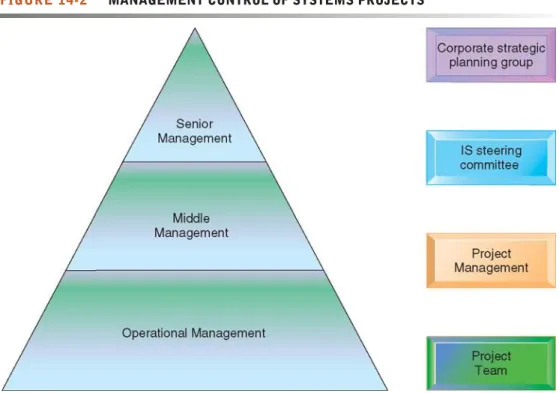
Figure 14-2 shows the elements of a management structure for information systems projects in a large corporation. It helps ensure that the most important projects are given priority.
At the apex of this structure is the corporate strategic planning group and the information system steering committee. The corporate strategic planning group is responsible for developing the firm’s strategic plan, which may require the development of new systems.
The information systems steering committee is the senior management group with responsibility for systems development and operation. It is composed of
FIGURE 14-2 MANAGEMENT CONTROL OF SYSTEMS PROJECTS
Each level of management in the hierarchy is responsible for specific aspects of systems projects, and this structure helps give priority to the most important systems projects for the organization.
department heads from both end-user and information systems areas. The steer- ing committee reviews and approves plans for systems in all divisions, seeks to coordinate and integrate systems, and occasionally becomes involved in select- ing specific information systems projects.
The project team is supervised by a project management group composed of information systems managers and end-user managers responsible for oversee- ing several specific information systems projects. The project team is directly responsible for the individual systems project. It consists of systems analysts, specialists from the relevant end-user business areas, application programmers, and perhaps database specialists. The mix of skills and the size of the project team depend on the specific nature of the system solution.
LINKING SYSTEMS PROJECTS TO THE BUSINESS PLAN
In order to identify the information systems projects that will deliver the most business value, organizations need to develop an information systems plan that supports their overall business plan and in which strategic systems are incorporated into top-level planning. The plan serves as a road map indicating the direction of systems development (the purpose of the plan), the rationale, the current systems/situation, new developments to consider, the management strategy, the implementation plan, and the budget (see Table 14-1).
The plan contains a statement of corporate goals and specifies how informa- tion technology will support the attainment of those goals. The report shows how general goals will be achieved by specific systems projects. It identifies specific target dates and milestones that can be used later to evaluate the plan’s progress in terms of how many objectives were actually attained in the time frame specified in the plan. The plan indicates the key management decisions concerning hardware acquisition; telecommunications; centralization/decen- tralization of authority, data, and hardware; and required organizational change. Organizational changes are also usually described, including manage- ment and employee training requirements, recruiting efforts, changes in busi- ness processes, and changes in authority, structure, or management practice.
In order to plan effectively, firms will need to inventory and document all of their information system applications and IT infrastructure components. For projects in which benefits involve improved decision making, managers should try to identify the decision improvements that would provide the greatest additional value to the firm. They should then develop a set of metrics to quantify the value of more timely and precise information on the outcome of the decision (see Chapter 12 for more detail on this topic).
CRITICAL SUCCESS FACTORS
To develop an effective information systems plan, the organization must have a clear understanding of both its long- and short-term information requirements.
The strategic analysis, or critical success factors, approach argues that an organization’s information requirements are determined by a small number of critical success factors (CSFs)of managers. If these goals can be attained, success of the firm or organization is assured (Rockart, 1979; Rockart and Treacy, 1982). CSFs are shaped by the industry, the firm, the manager, and the broader environment. For example, CSFs for the automobile industry might include styling, quality, and cost to meet the goals of increasing market share and raising profits. New information systems should focus on providing infor- mation that helps the firm meet these goals.
TABLE 14-1 INFORMATION SYSTEMS PLAN 1. Purpose of the Plan
Overview of plan contents
Current business organization and future organization Key business processes
Management strategy
2. Strategic Business Plan Rationale Current situation
Current business organization Changing environments Major goals of the business plan Firm’s strategic plan
3. Current Systems
Major systems supporting business functions and processes Current infrastructure capabilities
Hardware Software Database
Telecommunications and Internet Difficulties meeting business requirements Anticipated future demands
4. New Developments New system projects
Project descriptions Business rationale
Applications’ role in strategy New infrastructure capabilities required
Hardware Software Database
Telecommunications and Internet 5. Management Strategy
Acquisition plans Milestones and timing Organizational realignment Internal reorganization Management controls Major training initiatives Personnel strategy 6. Implementation Plan
Anticipated difficulties in implementation Progress reports
7. Budget Requirements Requirements Potential savings Financing Acquisition cycle
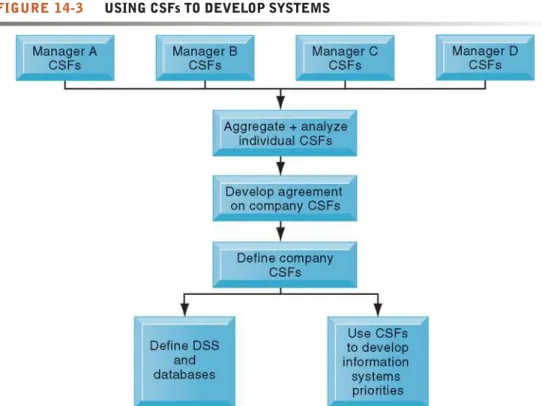
The principal method used in CSF analysis is personal interviews—three or four—with a number of top managers identifying their goals and the resulting CSFs. These personal CSFs are aggregated to develop a picture of the firm’s CSFs. Then systems are built to deliver information on these CSFs. (For the method of developing CSFs in an organization, see Figure 14-3.)
Only top managers are interviewed, and the questions focus on a small number of CSFs rather than requiring a broad inquiry into what information is used in the organization. It is especially suitable for top management and for the development of decision-support systems (DSS) and executive support systems (ESS). The CSF method focuses organizational attention on how information should be handled.
The method’s primary weakness is that there is no particularly rigorous way in which individual CSFs can be aggregated into a clear company pattern. In addi- tion, interviewees (and interviewers) often become confused when distinguishing between individualand organizationalCSFs. These types of CSFs are not necessar- ily the same. What may be considered critical to a manager may not be important for the organization as a whole. This method is clearly biased toward top man- agers, although it could be extended to elicit ideas for promising new systems from lower-level members of the organization (Peffers and Gengler, 2003).
PORTFOLIO ANALYSIS
Once strategic analyses have determined the overall direction of systems devel- opment, portfolio analysis can be used to evaluate alternative system projects. Portfolio analysis inventories all of the organization’s information systems projects and assets, including infrastructure, outsourcing contracts,
FIGURE 14-3 USING CSFs TO DEVELOP SYSTEMS
The CSF approach relies on interviews with key managers to identify their CSFs. Individual CSFs are aggregated to develop CSFs for the entire firm. Systems can then be built to deliver information on these CSFs.
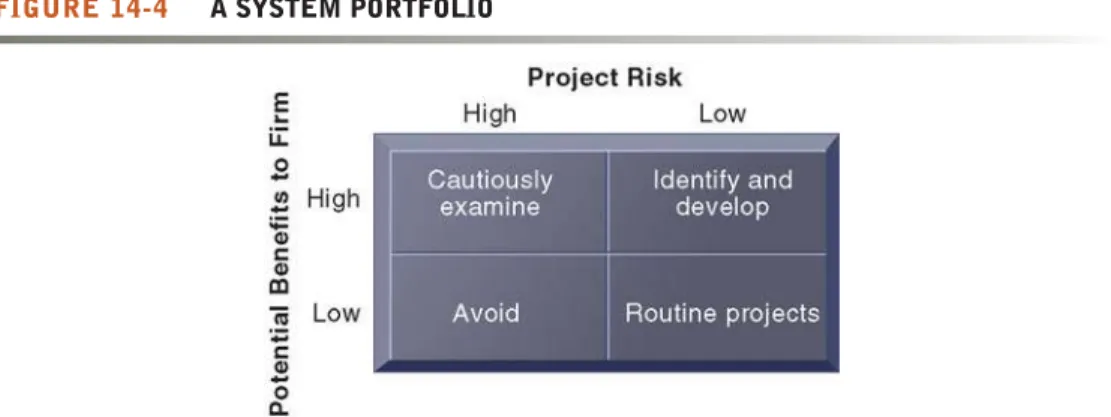
and licenses. This portfolio of information systems investments can be described as having a certain profile of risk and benefit to the firm (see Figure 14-4) similar to a financial portfolio.
Each information systems project carries its own set of risks and benefits.
(Section 14-4 describes the factors that increase the risks of systems projects.) Firms would try to improve the return on their portfolios of IT assets by balancing the risk and return from their systems investments. Although there is no ideal profile for all firms, information-intensive industries (e.g., finance) should have a few high-risk, high-benefit projects to ensure that they stay current with technology. Firms in non-information-intensive industries should focus on high-benefit, low-risk projects.
Most desirable, of course, are systems with high benefit and low risk. These promise early returns and low risks. Second, high-benefit, high-risk systems should be examined; low-benefit, high-risk systems should be totally avoided; and low-benefit, low-risk systems should be reexamined for the possibility of rebuild- ing and replacing them with more desirable systems having higher benefits. By using portfolio analysis, management can determine the optimal mix of invest- ment risk and reward for their firms, balancing riskier high-reward projects with safer lower-reward ones. Firms where portfolio analysis is aligned with business strategy have been found to have a superior return on their IT assets, better align- ment of IT investments with business objectives, and better organization-wide coordination of IT investments (Jeffrey and Leliveld, 2004).
SCORING MODELS
A scoring modelis useful for selecting projects where many criteria must be considered. It assigns weights to various features of a system and then calculates the weighted totals. Using Table 14-2, the firm must decide among two alternative enterprise resource planning (ERP) systems. The first column lists the criteria that decision makers will use to evaluate the systems. These criteria are usually the result of lengthy discussions among the decision- making group. Often the most important outcome of a scoring model is not the score but agreement on the criteria used to judge a system.
Table 14-2 shows that this particular company attaches the most importance to capabilities for sales order processing, inventory management, and warehousing. The second column in Table 14-2 lists the weights that decision
FIGURE 14-4 A SYSTEM PORTFOLIO
Companies should examine their portfolio of projects in terms of potential benefits and likely risks.
Certain kinds of projects should be avoided altogether and others developed rapidly. There is no ideal mix. Companies in different industries have different profiles.
makers attached to the decision criteria. Columns 3 and 5 show the percentage of requirements for each function that each alternative ERP system can provide. Each vendor’s score can be calculated by multiplying the percentage of requirements met for each function by the weight attached to that function.
ERP System B has the highest total score.
As with all “objective” techniques, there are many qualitative judgments involved in using the scoring model. This model requires experts who under- stand the issues and the technology. It is appropriate to cycle through the scoring model several times, changing the criteria and weights, to see how sensitive the outcome is to reasonable changes in criteria. Scoring models are used most commonly to confirm, to rationalize, and to support decisions, rather than as the final arbiters of system selection.
14.3 E STABLISHING THE B USINESS V ALUE OF
I NFORMATION S YSTEMS
Even if a system project supports a firm’s strategic goals and meets user information requirements, it needs to be a good investment for the firm. The TABLE 14-2 EXAMPLE OF A SCORING MODEL FOR AN ERP SYSTEM
ERP ERP ERP ERP
SYSTEM A SYSTEM A SYSTEM B SYSTEM B
CRITERIA WEIGHT % SCORE % SCORE
1.0 Order Processing
1.1 Online order entry 4 67 268 73 292
1.2 Online pricing 4 81 324 87 348
1.3 Inventory check 4 72 288 81 324
1.4 Customer credit check 3 66 198 59 177
1.5 Invoicing 4 73 292 82 328
Total Order Processing 1,370 1,469
2.0 Inventory Management
2.1 Production forecasting 3 72 216 76 228
2.2 Production planning 4 79 316 81 324
2.3 Inventory control 4 68 272 80 320
2.4 Reports 3 71 213 69 207
Total Inventory Management 1,017 1,079
3.0 Warehousing
3.1 Receiving 2 71 142 75 150
3.2 Picking/packing 3 77 231 82 246
3.3 Shipping 4 92 368 89 356
Total Warehousing 741 752
Grand Total 3,128 3,300
value of systems from a financial perspective essentially revolves around the issue of return on invested capital. Does a particular information system invest- ment produce sufficient returns to justify its costs?
INFORMATION SYSTEM COSTS AND BENEFITS
Table 14-3 lists some of the more common costs and benefits of systems.
Tangible benefits can be quantified and assigned a monetary value.
Intangible benefits, such as more efficient customer service or enhanced decision making, cannot be immediately quantified but may lead to quantifi- able gains in the long run. Transaction and clerical systems that displace labor and save space always produce more measurable, tangible benefits than management information systems, decision-support systems, and computer- supported collaborative work systems (see Chapters 2 and 11).
TABLE 14-3 COSTS AND BENEFITS OF INFORMATION SYSTEMS
COSTS Hardware
Telecommunications Software
Services Personnel
TANGIBLE BENEFITS (COST SAVINGS) Increased productivity
Lower operational costs Reduced workforce Lower computer expenses Lower outside vendor costs Lower clerical and professional costs Reduced rate of growth in expenses Reduced facility costs
INTANGIBLE BENEFITS Improved asset utilization Improved resource control Improved organizational planning Increased organizational flexibility More timely information
More information
Increased organizational learning Legal requirements attained Enhanced employee goodwill Increased job satisfaction Improved decision making Improved operations Higher client satisfaction Better corporate image
Chapter 5 introduced the concept of total cost of ownership (TCO), which is designed to identify and measure the components of information technology expenditures beyond the initial cost of purchasing and installing hardware and software. However, TCO analysis provides only part of the information needed to evaluate an information technology investment because it does not typically deal with benefits, cost categories such as complexity costs, and “soft” and strategic factors discussed later in this section.
C a p i t a l B u d g e t i n g f o r I n f o r m a t i o n S y s t e m s
To determine the benefits of a particular project, you’ll need to calculate all of its costs and all of its benefits. Obviously, a project where costs exceed benefits should be rejected. But even if the benefits outweigh the costs, additional finan- cial analysis is required to determine whether the project represents a good return on the firm’s invested capital. Capital budgeting models are one of several techniques used to measure the value of investing in long-term capital investment projects.
Capital budgeting methods rely on measures of cash flows into and out of the firm; capital projects generate those cash flows. The investment cost for informa- tion systems projects is an immediate cash outflow caused by expenditures for hardware, software, and labor. In subsequent years, the investment may cause additional cash outflows that will be balanced by cash inflows resulting from the investment. Cash inflows take the form of increased sales of more products (for reasons such as new products, higher quality, or increasing market share) or reduced costs in production and operations. The difference between cash out- flows and cash inflows is used for calculating the financial worth of an invest- ment. Once the cash flows have been established, several alternative methods are available for comparing different projects and deciding about the investment.
The principal capital budgeting models for evaluating IT projects are: the payback method, the accounting rate of return on investment (ROI), net pre- sent value, and the internal rate of return (IRR). You can find out more about how these capital budgeting models are used to justify information system investments in the Learning Tracks for this chapter.
REAL OPTIONS PRICING MODELS
Some information systems projects are highly uncertain, especially invest- ments in IT infrastructure. Their future revenue streams are unclear and their up-front costs are high. Suppose, for instance, that a firm is considering a $20 million investment to upgrade its IT infrastructure—its hardware, software, data management tools, and networking technology. If this upgraded infra- structure were available, the organization would have the technology capabili- ties to respond more easily to future problems and opportunities. Although the costs of this investment can be calculated, not all of the benefits of making this investment can be established in advance. But if the firm waits a few years until the revenue potential becomes more obvious, it might be too late to make the infrastructure investment. In such cases, managers might benefit from using real options pricing models to evaluate information technology investments.
Real options pricing models (ROPMs) use the concept of options valuation borrowed from the financial industry. An optionis essentially the right, but not the obligation, to act at some future date. A typical call option, for instance, is a financial option in which a person buys the right (but not the obligation) to purchase an underlying asset (usually a stock) at a fixed price (strike price) on or before a given date.
For instance, let’s assume that on October 15, 2010, you could purchase a call option for $14.25 that would give you the right to buy a share of P&G com- mon stock for $50 per share on a certain date. Options expire over time, and this call option has a maturity date in December. If the price of P&G stock does not rise above $50 per share by the end of December, you would not exercise the option, and the value of the option would fall to zero on the strike date. If, however, the price of P&G common stock rose to, say, $100 per share, you could purchase the stock for the strike price of $50 and retain the profit of
$50 per share minus the cost of the option. (Because the option is sold as a 100-share contract, the cost of the contract would be 100 × $14.25 before com- missions, or $1,425, and you would be purchasing and obtaining a profit from 100 shares of Procter & Gamble.) The stock option enables the owner to ben- efit from the upside potential of an opportunity while limiting the downside risk.
ROPMs value information systems projects similar to stock options, where an initial expenditure on technology creates the right, but not the obligation, to obtain the benefits associated with further development and deployment of the technology as long as management has the freedom to cancel, defer, restart, or expand the project. ROPMs give managers the flexibility to stage their IT invest- ment or test the waters with small pilot projects or prototypes to gain more knowledge about the risks of a project before investing in the entire implemen- tation. The disadvantages of this model are primarily in estimating all the key variables affecting option value, including anticipated cash flows from the underlying asset and changes in the cost of implementation. Models for determining option value of information technology platforms are being devel- oped (Fichman, 2004; McGrath and MacMillan, 2000).
LIMITATIONS OF FINANCIAL MODELS
The traditional focus on the financial and technical aspects of an information system tends to overlook the social and organizational dimensions of information systems that may affect the true costs and benefits of the invest- ment. Many companies’ information systems investment decisions do not adequately consider costs from organizational disruptions created by a new system, such as the cost to train end users, the impact that users’ learning curves for a new system have on productivity, or the time managers need to spend overseeing new system-related changes. Benefits, such as more timely decisions from a new system or enhanced employee learning and expertise, may also be overlooked in a traditional financial analysis (Ryan, Harrison, and Schkade, 2002).
14.4 M ANAGING P ROJECT R ISK
We have already introduced the topic of information system risks and risk assessment in Chapter 8. In this chapter, we describe the specific risks to information systems projects and show what can be done to manage them effectively.
DIMENSIONS OF PROJECT RISK
Systems differ dramatically in their size, scope, level of complexity, and organi- zational and technical components. Some systems development projects are
more likely to create the problems we have described earlier or to suffer delays because they carry a much higher level of risk than others. The level of project risk is influenced by project size, project structure, and the level of technical expertise of the information systems staff and project team.
• Project size. The larger the project—as indicated by the dollars spent, the size of the implementation staff, the time allocated for implementation, and the number of organizational units affected—the greater the risk. Very large-scale systems projects have a failure rate that is 50 to 75 percent higher than that for other projects because such projects are complex and difficult to control.
The organizational complexity of the system—how many units and groups use it and how much it influences business processes—contribute to the complexity of large-scale systems projects just as much as technical
characteristics, such as the number of lines of program code, length of project, and budget (Xia and Lee, 2004; Concours Group, 2000; Laudon, 1989). In addi- tion, there are few reliable techniques for estimating the time and cost to develop large-scale information systems.
• Project structure. Some projects are more highly structured than others. Their requirements are clear and straightforward so outputs and processes can be easily defined. Users know exactly what they want and what the system should do; there is almost no possibility of the users changing their minds.
Such projects run a much lower risk than those with relatively undefined, fluid, and constantly changing requirements; with outputs that cannot be fixed easily because they are subject to users’ changing ideas; or with users who cannot agree on what they want.
• Experience with technology. The project risk rises if the project team and the information system staff lack the required technical expertise. If the team is unfamiliar with the hardware, system software, application software, or database management system proposed for the project, it is highly likely that the project will experience technical problems or take more time to complete because of the need to master new skills.
Although the difficulty of the technology is one risk factor in information systems projects, the other factors are primarily organizational, dealing with the complexity of information requirements, the scope of the project, and how many parts of the organization will be affected by a new information system.
CHANGE MANAGEMENT AND THE CONCEPT OF IMPLEMENTATION
The introduction or alteration of an information system has a powerful behavioral and organizational impact. Changes in the way that information is defined, accessed, and used to manage the organization’s resources often lead to new distributions of authority and power. This internal organizational change breeds resistance and opposition and can lead to the demise of an otherwise good system.
A very large percentage of information systems projects stumble because the process of organizational change surrounding system building was not properly addressed. Successful system building requires careful change management.
T h e C o n c e p t o f I m p l e m e n t a t i o n
To manage the organizational change surrounding the introduction of a new information system effectively, you must examine the process of implementa- tion. Implementationrefers to all organizational activities working toward the adoption, management, and routinization of an innovation, such as a new
information system. In the implementation process, the systems analyst is a change agent. The analyst not only develops technical solutions but also redefines the configurations, interactions, job activities, and power relation- ships of various organizational groups. The analyst is the catalyst for the entire change process and is responsible for ensuring that all parties involved accept the changes created by a new system. The change agent communicates with users, mediates between competing interest groups, and ensures that the organizational adjustment to such changes is complete.
T h e R o l e o f E n d U s e r s
System implementation generally benefits from high levels of user involve- ment and management support. User participation in the design and operation of information systems has several positive results. First, if users are heavily involved in systems design, they have more opportunities to mold the system according to their priorities and business requirements, and more opportunities to control the outcome. Second, they are more likely to react positively to the completed system because they have been active participants in the change process. Incorporating user knowledge and expertise leads to better solutions.
The relationship between users and information systems specialists has traditionally been a problem area for information systems implementation efforts. Users and information systems specialists tend to have different back- grounds, interests, and priorities. This is referred to as the user-designer com- munications gap. These differences lead to divergent organizational loyalties, approaches to problem solving, and vocabularies.
Information systems specialists, for example, often have a highly technical, or machine, orientation to problem solving. They look for elegant and sophisti- cated technical solutions in which hardware and software efficiency is optimized at the expense of ease of use or organizational effectiveness. Users prefer systems that are oriented toward solving business problems or facilitat- ing organizational tasks. Often the orientations of both groups are so at odds that they appear to speak in different tongues.
These differences are illustrated in Table 14-4, which depicts the typical concerns of end users and technical specialists (information systems designers) regarding the development of a new information system. Communication problems between end users and designers are a major reason why user requirements are not properly incorporated into information systems and why users are driven out of the implementation process.
Systems development projects run a very high risk of failure when there is a pronounced gap between users and technical specialists and when these groups continue to pursue different goals. Under such conditions, users are often
TABLE 14-4 THE USER-DESIGNER COMMUNICATIONS GAP
USER CONCERNS DESIGNER CONCERNS
Will the system deliver the information I need for my work? How much disk storage space will the master file consume?
How quickly can I access the data? How many lines of program code will it take to perform this function?
How easily can I retrieve the data? How can we cut down on CPU time when we run the system?
How much clerical support will I need to enter data into the system? What is the most efficient way of storing these data?
How will the operation of the system fit into my daily business schedule? What database management system should we use?
driven away from the project. Because they cannot comprehend what the tech- nicians are saying, users conclude that the entire project is best left in the hands of the information specialists alone.
M a n a g e m e n t S u p p o r t a n d C o m m i t m e n t
If an information systems project has the backing and commitment of manage- ment at various levels, it is more likely to be perceived positively by both users and the technical information services staff. Both groups will believe that their participation in the development process will receive higher-level attention and priority. They will be recognized and rewarded for the time and effort they devote to implementation. Management backing also ensures that a systems project receives sufficient funding and resources to be successful. Furthermore, to be enforced effectively, all the changes in work habits and procedures and any organizational realignments associated with a new system depend on man- agement backing. If a manager considers a new system a priority, the system will more likely be treated that way by his or her subordinates.
C h a n g e M a n a g e m e n t C h a l l e n g e s f o r B u s i n e s s P r o c e s s R e e n g i n e e r i n g , E n t e r p r i s e A p p l i c a t i o n s , a n d M e r g e r s a n d A c q u i s i t i o n s
Given the challenges of innovation and implementation, it is not surprising to find a very high failure rate among enterprise application and business process reengineering (BPR) projects, which typically require extensive organizational change and which may require replacing old technologies and legacy systems that are deeply rooted in many interrelated business processes. A number of studies have indicated that 70 percent of all business process reengineering projects fail to deliver promised benefits. Likewise, a high percentage of enterprise applications fail to be fully implemented or to meet the goals of their users even after three years of work.
Many enterprise application and reengineering projects have been under- mined by poor implementation and change management practices that failed to address employees’ concerns about change. Dealing with fear and anxiety throughout the organization, overcoming resistance by key managers, changing job functions, career paths, and recruitment practices have posed greater threats to reengineering than the difficulties companies faced visualizing and designing breakthrough changes to business processes. All of the enterprise applications require tighter coordination among different functional groups as well as extensive business process change (see Chapter 9).
Projects related to mergers and acquisitions have a similar failure rate.
Mergers and acquisitions are deeply affected by the organizational characteris- tics of the merging companies as well as by their IT infrastructures. Combining the information systems of two different companies usually requires consider- able organizational change and complex systems projects to manage. If the inte- gration is not properly managed, firms can emerge with a tangled hodgepodge of inherited legacy systems built by aggregating the systems of one firm after another. Without a successful systems integration, the benefits anticipated from the merger cannot be realized, or, worse, the merged entity cannot execute its business processes effectively.
CONTROLLING RISK FACTORS
Various project management, requirements gathering, and planning method- ologies have been developed for specific categories of implementation
problems. Strategies have also been devised for ensuring that users play appro- priate roles throughout the implementation period and for managing the organizational change process. Not all aspects of the implementation process can be easily controlled or planned. However, anticipating potential implemen- tation problems and applying appropriate corrective strategies can increase the chances for system success.
The first step in managing project risk involves identifying the nature and level of risk confronting the project (Schmidt et al., 2001). Implementers can then handle each project with the tools and risk-management approaches geared to its level of risk (Iversen, Mathiassen, and Nielsen, 2004; Barki, Rivard, and Talbot, 2001; McFarlan, 1981).
M a n a g i n g Te c h n i c a l C o m p l e x i t y
Projects with challenging and complex technology for users to master benefit from internal integration tools. The success of such projects depends on how well their technical complexity can be managed. Project leaders need both heavy technical and administrative experience. They must be able to anticipate problems and develop smooth working relationships among a predominantly technical team. The team should be under the leadership of a manager with a strong technical and project management background, and team members should be highly experienced. Team meetings should take place frequently.
Essential technical skills or expertise not available internally should be secured from outside the organization.
Fo r m a l P l a n n i n g a n d C o n t r o l To o l s
Large projects benefit from appropriate use of formal planning tools and formal control toolsfor documenting and monitoring project plans. The two most commonly used methods for documenting project plans are Gantt charts and PERT charts. A Gantt chartlists project activities and their corresponding start and completion dates. The Gantt chart visually represents the timing and duration of different tasks in a development project as well as their human resource requirements (see Figure 14-5). It shows each task as a horizontal bar whose length is proportional to the time required to complete it.
Although Gantt charts show when project activities begin and end, they don’t depict task dependencies, how one task is affected if another is behind sched- ule, or how tasks should be ordered. That is where PERT chartsare useful.
PERT stands for Program Evaluation and Review Technique, a methodology developed by the U.S. Navy during the 1950s to manage the Polaris submarine missile program. A PERT chart graphically depicts project tasks and their interrelationships. The PERT chart lists the specific activities that make up a project and the activities that must be completed before a specific activity can start, as illustrated in Figure 14-6.
The PERT chart portrays a project as a network diagram consisting of num- bered nodes (either circles or rectangles) representing project tasks. Each node is numbered and shows the task, its duration, the starting date, and the comple- tion date. The direction of the arrows on the lines indicates the sequence of tasks and shows which activities must be completed before the commencement of another activity. In Figure 14-6, the tasks in nodes 2, 3, and 4 are not depen- dent on each other and can be undertaken simultaneously, but each is depen- dent on completion of the first task. PERT charts for complex projects can be difficult to interpret, and project managers often use both techniques.
These project management techniques can help managers identify bottle- necks and determine the impact that problems will have on project comple-
FIGURE 14-5 A GANTT CHART
The Gantt chart in this figure shows the task, person-days, and initials of each responsible person, as well as the start and finish dates for each task. The resource summary provides a good manager with the total person-days for each month and for each person working on the project to manage the project successfully. The project described here is a data administration project.
tion times. They can also help systems developers partition projects into smaller, more manageable segments with defined, measurable business results. Standard control techniques can successfully chart the progress of the project against budgets and target dates, so deviations from the plan can be spotted.
I n c r e a s i n g U s e r I n v o l v e m e n t a n d O v e r c o m i n g U s e r R e s i s t a n c e
Projects with relatively little structure and many undefined requirements must involve users fully at all stages. Users must be mobilized to support one of many possible design options and to remain committed to a single design.
External integration tools consist of ways to link the work of the imple- mentation team to users at all organizational levels. For instance, users can become active members of the project team, take on leadership roles, and take charge of installation and training. The implementation team can demonstrate its responsiveness to users, promptly answering questions, incorporating user feedback, and showing their willingness to help (Gefen and Ridings, 2002).
Participation in implementation activities may not be enough to overcome the problem of user resistance to organizational change. Different users may be affected by the system in different ways. Whereas some users may welcome a new system because it brings changes they perceive as beneficial to them, FIGURE 14-6 A PERT CHART
This is a simplified PERT chart for creating a small Web site. It shows the ordering of project tasks and the relationship of a task with preceding and succeeding tasks.
others may resist these changes because they believe the shifts are detrimental to their interests.
If the use of a system is voluntary, users may choose to avoid it; if use is mandatory, resistance will take the form of increased error rates, disruptions, turnover, and even sabotage. Therefore, the implementation strategy must not only encourage user participation and involvement, but it must also address the issue of counterimplementation (Keen, 1981). Counterimplementation is a deliberate strategy to thwart the implementation of an information system or an innovation in an organization.
Strategies to overcome user resistance include user participation (to elicit commitment as well as to improve design), user education and training, management edicts and policies, and better incentives for users who cooperate.
The new system can be made more user friendly by improving the end-user interface. Users will be more cooperative if organizational problems are solved prior to introducing the new system.
The Interactive Session on Organizations illustrates some of these issues at work. Software firm DST Systems had trouble managing its projects because it had a high level of technical complexity and needed more powerful tools for planning and control. DST also needed buy-in from end users. As you read this case, try to determine how DST’s selection of software development methods addressed these problems.
DESIGNING FOR THE ORGANIZATION
Because the purpose of a new system is to improve the organization’s perfor- mance, information systems projects must explicitly address the ways in which the organization will change when the new system is installed, including installation of intranets, extranets, and Web applications. In addition to proce- dural changes, transformations in job functions, organizational structure, power relationships, and the work environment should be carefully planned.
Areas where users interface with the system require special attention, with sensitivity to ergonomics issues. Ergonomicsrefers to the interaction of people and machines in the work environment. It considers the design of jobs, health issues, and the end-user interface of information systems. Table 14-5 lists the organizational dimensions that must be addressed when planning and imple- menting information systems.
Although systems analysis and design activities are supposed to include an organizational impact analysis, this area has traditionally been neglected.
An organizational impact analysis explains how a proposed system will
TABLE 14-5 ORGANIZATIONAL FACTORS IN SYSTEMS PLANNING AND IMPLEMENTATION
Employee participation and involvement Job design
Standards and performance monitoring
Ergonomics (including equipment, user interfaces, and the work environment) Employee grievance resolution procedures
Health and safety
Government regulatory compliance
Companies like DST Systems have recognized the value in Scrum development to their bottom lines, but making the transition from traditional develop- mental methods to Scrum development can be challenging. DST Systems is a software development company whose flagship product, Automated Work Distributor (AWD), increases back-office efficiency and helps offices become paperless. DST was founded in 1969 and its headquarters are in Kansas City, Missouri. The company has approximately 10,000 employees, 1,200 of whom are software devel- opers.
This development group had used a mixture of tools, processes, and source code control systems without any unified repository for code or a stan- dardized developer tool set. Different groups within the organization used very different tools for soft- ware development, like Serena PVCS, Eclipse, or other source code software packages. Processes were often manual and time-consuming. Managers were unable to easily determine how resources were being allocated, which of their employees were working on certain projects, and the status of spe- cific assets.
All of this meant that DST struggled to update its most important product, AWD, in a timely fashion.
Its typical development schedule was to release a new version once every two years, but competitors were releasing versions faster. DST knew that it needed a better method than the traditional “water- fall” method for designing, coding, testing, and integrating its products. In the waterfall model of software development, progression flows sequen- tially from one step to the next like a waterfall, with each step unable to start until the previous step has been completed. While DST had used this method with great success previously, DST began searching for viable alternatives.
The development group started exploring Scrum, a framework for agile software development in which projects progress via a series of iterations called sprints. Scrum projects make progress in a series of sprints, which are timeboxed iterations no more than a month long. At the start of a sprint, team members commit to delivering some number of features that were listed on a project’s product
DST SYSTEMS SCORES WITH SCRUM AND APPLICATION LIFE CYCLE MANAGEMENT
backlog. These features are supposed to be com- pleted by the end of the sprint—coded, tested, and integrated into the evolving product or system. At the end of the sprint, a sprint review allows the team to demonstrate the new functionality to the product owner and other interested stakeholders who provide feedback that could influence the next sprint.
Scrum relies on self-organizing, cross-functional teams supported by a ScrumMaster and a product owner. The ScrumMaster acts as a coach for the team, while the product owner represents the business, customers, or users in guiding the team toward building the right product.
DST tried Scrum with its existing software development tools and experienced strong results.
The company accelerated its software development cycle from 24 to 6 months and developer productiv- ity increased 20 percent, but Scrum didn’t work as well as DST had hoped with its existing tools.
Processes broke down and the lack of standardiza- tion among the tools and processes used by DST prevented Scrum from providing its maximum benefit to the company. DST needed an application life cycle management (ALM) product that would unify its software development environment.
DST set up a project evaluation team to identify the right development environment for them. Key factors included cost-effectiveness, ease of adoption, and feature-effectiveness. DST wanted the ability to use the new software without significant training and software they could quickly adopt without jeopardizing AWD’s development cycle. After considering several ALM products and running test projects with each one, DST settled on CollabNet’s offering, TeamForge, for its ALM platform.
CollabNet specializes in software designed to work well with agile software development methods such as Scrum. Its core product is TeamForge, an integrated suite of Web-based development and collaboration tools for agile software development that centralizes management of users, projects, processes, and assets. DST also adopted CollabNet’s Subversion product to help with the management and control of changes to project documents, programs, and other information stored as computer
I N T E R A C T I V E S E S S I O N : O R G A N I Z A T I O N S
1. What were some of the problems with DST Systems’ old software development environment?
2.How did Scrum development help solve some of those problems?
3.What other adjustments did DST make to be able to use Scrum more effectively in its software pro- jects? What management, organization, and tech- nology issues had to be addressed?
files. DST’s adoption of CollabNet’s products was fast, requiring only 10 weeks, and DST developers now do all of their work within this ALM platform.
TeamForge was not forced on developers, but the ALM platform was so appealing compared to DST’s previous environment that developers adopted the product virally.
Jerry Tubbs, the systems development manager at DST Systems, says that DST was successful in its attempts to revamp its software group because of a few factors. First, it looked for simplicity rather than complicated, do-everything offerings. Simpler wasn’t just better for DST—it was also less expensive than some of the alternatives. DST also involved
developers in the decision-making process to ensure
Search the Internet for videos or Web sites explaining Scrum or agile development. Then answer the following questions:
1. Describe some of the benefits and drawbacks of Scrum development.
2.How does Scrum differ from other software development methodologies?
3.What are the potential benefits to companies using Scrum development?
that changes would be greeted enthusiastically. Last, by allowing developers to adopt ALM software on their own, DST avoided the resentment associated with mandating unwelcome change. DST’s move from waterfall to Scrum development was a success because the company selected the right development framework as well as the right software to make that change a reality and skillfully managed the change process.
Sources:Jerry Tubbs, “Team Building Goes Viral,” Information Week, February 22, 2010; www.collab.net, accessed August 2010; Mountain Goat Software, “Introduction to Scrum - An Agile Process,”
www.mountaingoatsoftware.com/topics/scrum, accessed August 2010.
C A S E S T U D Y Q U E S T I O N S M I S I N A C T I O N
affect organizational structure, attitudes, decision making, and operations.
To integrate information systems successfully with the organization, thorough and fully documented organizational impact assessments must be given more attention in the development effort.
S o c i o t e c h n i c a l D e s i g n
One way of addressing human and organizational issues is to incorporate sociotechnical designpractices into information systems projects. Designers set forth separate sets of technical and social design solutions. The social design plans explore different workgroup structures, allocation of tasks, and the design of individual jobs. The proposed technical solutions are compared with the proposed social solutions. The solution that best meets both social and techni- cal objectives is selected for the final design. The resulting sociotechnical design is expected to produce an information system that blends technical efficiency with sensitivity to organizational and human needs, leading to higher job satisfaction and productivity.
PROJECT MANAGEMENT SOFTWARE TOOLS
Commercial software tools that automate many aspects of project management facilitate the project management process. Project management software typically features capabilities for defining and ordering tasks, assigning resources to tasks, establishing starting and ending dates to tasks, tracking progress, and facilitating modifications to tasks and resources. Many automate the creation of Gantt and PERT charts.
Some of these tools are large sophisticated programs for managing very large projects, dispersed work groups, and enterprise functions. These high-end tools can manage very large numbers of tasks and activities and complex relation- ships.
Microsoft Office Project 2010 has become the most widely used project management software today. It is PC-based, with capabilities for producing PERT and Gantt charts and for supporting critical path analysis, resource allocation, project tracking, and status reporting. Project also tracks the way changes in one aspect of a project affect others. Project Professional 2010 provides collaborative project management capabilities when used with Microsoft Office Project Server 2010. Project Server stores project data in a central SQL Server database, enabling authorized users to access and update the data over the Internet. Project Server 2010 is tightly integrated with the Microsoft Windows SharePoint Services collaborative workspace platform.
These features help large enterprises manage projects in many different locations. Products such as EasyProjects .NET and Vertabase are also useful for firms that want Web-based project management tools.
Going forward, delivery of project management software as a software service (SaaS) will make this technology accessible to more organizations, especially smaller ones. Open source versions of project management software such as Project Workbench and OpenProj will further reduce the total cost of ownership and attract new users. Thanks to the popularity of social media such as Facebook and Twitter, project management software is also likely to become more flexible, collaborative, and user-friendly.
While project management software helps organizations track individual projects, the resources allocated to them, and their costs, project portfolio management software helps organizations manage portfolios of projects and dependencies among them. The Interactive Session on Management describes how Hewlett-Packard’s project portfolio management software helped Motorola Inc. coordinate projects and determine the right mix of projects and resources to accomplish its strategic goals.
INTERACTIVE SESSION: MANAGEMENT
Motorola Inc. is a large multinational technology company based in Schaumburg, Illinois, specializing in broadband communications infrastructure, enterprise mobility, public safety solutions, high- definition video, mobile devices, and a wide variety of other mobile technologies. Motorola earned $22 billion in revenue in 2009, with 53,000 employees worldwide. Motorola has grown organically through mergers and acquisitions, and consequently has thousands of systems performing various functions throughout the business. Motorola knew that if it could better manage its systems and its projects, it could drastically lower its operating costs. In today’s weakened economic climate, saving money and increasing efficiency have become more important than ever.
Motorola is organized into three major segments.
The Mobile Devices segment of the business designs, manufactures, sells, and services wireless handsets, including smartphones. Motorola expects to face increasingly intense competition in this segment from a growing number of challengers hoping to cash in on the smartphone craze. Motorola’s Home and Networks segment develops infrastructure and equipment used by cable television operators, wire- less service providers, and other communications providers, and its Enterprise Mobility Solutions seg- ment develops and markets voice and data commu- nications products, wireless broadband systems, and a host of applications and devices to a variety of enterprise customers.
Weak economic conditions had driven Motorola’s numbers down across all major segments of the busi- ness. The company used the downturn to review its business in depth to locate areas where it could become more efficient. Motorola first analyzed each of its business functions in terms of its importance and value to the business. Then, it analyzed the com- plexity and cost of that function. For example, engi- neering at Motorola is very important to the com- pany’s success, and differentiates it from its competitors. Engineering is also one of Motorola’s most complicated and costly business functions.
Motorola repeated this analysis for all of its busi- ness functions, and then determined which areas required adjustment. Processes that were not as critical to the company’s success, but were still highly complex and costly became candidates to be
MOTOROLA TURNS TO PROJECT PORTFOLIO MANAGEMENT
scaled down. Processes that were critical to the company but poorly funded were candidates for better support. After performing this exercise, Motorola hoped to automate many of the manage- ment tasks that it had classified as less complex, but the sheer size of the company made automation challenging.
Motorola has 1,800 information systems and 1,500 information systems employees who are responsible for 1,000 projects per year. The company also outsources much of its IT work to outside contrac- tors, further increasing the number of regular users of its systems. Managing that many workers is difficult and often leads to inefficiency. Many of the company’s employees were working on similar projects or compiling the same data sets, unaware that other groups within the company were doing the same work. Motorola hoped to identify and eliminate these groups, also known as “redundant silos” of activity within the company, both to cut costs and increase productivity. Management also hoped to prioritize resource usage so that projects that were most valuable to the company received the resources they needed to be successful first.
Motorola’s managers hoped to achieve their goals of automating processes and lowering operating costs by adopting HP’s Project and Portfolio
Management Center software, or HP PPM. This soft- ware helps managers compare proposals, projects, and operational activities against budgets and resource capacity levels. All of the information Motorola gathered from its process analysis is located in a central location with HP PPM, which also serves as the centralized source of other critical information such as the amount of investment dollars used by a process and the priorities of business requests coming through Motorola’s systems. HP PPM allows Motorola’s IT employees and managers quick and easy access to any and all data pertaining to the company’s business
processes.
HP PPM allows Motorola to govern its entire IT portfolio using a broad array of tools, including objective prioritization; multiple levels of input, review, and approval; and. real-time visibility into all areas of the business. HP PPM users have up-to-the- minute data on resources, budgets, forecasts, costs, programs, projects, and overall IT demand. HP PPM
C A S E S T U D Y Q U E S T I O N S
1. What are some of the challenges Motorola faces as a business? Why is project management so critical at t