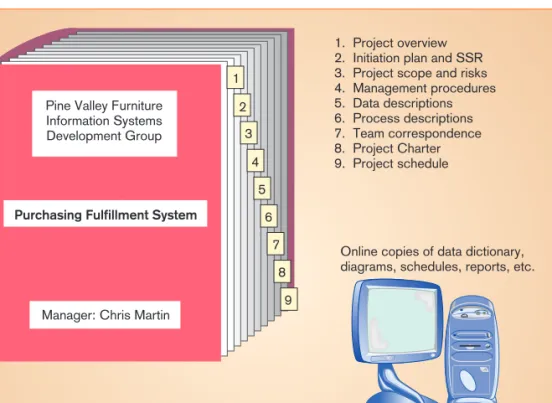
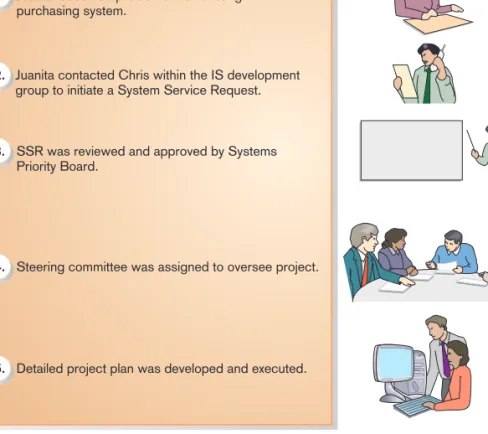
A graphic view of the five steps followed during the project initiation of the Purchases Fulfillment System. The purpose of this activity is to understand the content and complexity of the project.
Executing the Project
Project Execution: The third phase of the project management process, where the plans created in the preceding phases (project initiation and planning) are put into action. At the end of the project planning phase, a review of the Baseline Project Plan is performed to double-check all information in the plan. If the project gets ahead (or behind) schedule, you may need to adjust resources, activities, and budgets.
The project manager is responsible for keeping all stakeholders - system developers, managers and customers - informed of the project's status. Project Closure: The final phase of the project management process that focuses on the completion of a project. This section describes your role as a project manager during the execution of the Baseline Project Plan.
Closing Down the Project
The ease with which the project can be managed is significantly influenced by the quality of previous project phases. If you develop a high-quality project plan, the project is much more likely to be executed successfully. At project closing, it is also important to notify all interested parties that the project has been completed and to finalize all project documentation and financials so that a final review of the project can be conducted.
After you have closed the project, final project reviews should be conducted with management and clients. The focus of this final activity is to ensure that all contractual terms of the project have been met. Now that you understand the project management process, the next section describes the specific techniques used in developing systems for representing and planning activities and resources.
REPRESENTING AND SCHEDULING PROJECT PLANS
As a project manager, you must be prepared to handle potential negative personnel issues, such as termination, especially if the project was not successful. The objective of these reviews is to determine the strengths and weaknesses of the project deliverables, the processes used to create them, and the project management process. Project managers also use text reports that describe resource usage by task, project complexity, and cost allocation to control activities.
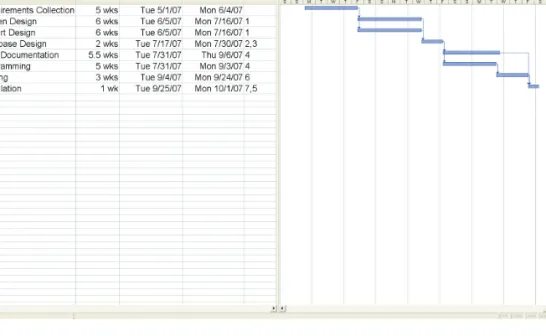
Sooner or later, the activity duration shown in column 2 of Figure 3-19 may be updated. Making such a change also changes a Gantt chart or network diagram used to represent the project tasks. This allows the project manager to easily determine how changes in task duration affect the project completion date.
Representing Project Plans
The Microsoft Project for Windows screen summarizes all project activities, their duration in weeks, and their scheduled start and finish dates. Critical Path Scheduling: A scheduling technique in which the order and duration of the sequence of task activities directly affects the project completion date. For example, Figure 3-19 shows a screen from Microsoft Project for Windows that summarizes all project activities, their duration in weeks, and their scheduled start and finish dates.
Most project managers use computer-based systems to help develop their graphical and textual reports. A network diagram showing activities (represented by circles) and the sequence of those activities (represented by arrows). Because of this, it is used more often than Gantt charts to manage projects such as information systems development, where variation in the duration of activities is the norm.
Calculating Expected Time Durations Using PERT
PERT (Program Evaluation Review Technique): A technique that uses optimistic, pessimistic and realistic time estimates to calculate the expected time for a particular task. Commercial project management software such as Microsoft Project helps you use PERT to make expected time estimates. Additionally, many commercial tools allow you to adjust the weighting of optimistic, pessimistic, and realistic completion times.
Constructing a Gantt Chart and Network Diagram at Pine Valley Furniture
Slack time: The amount of time an activity can be postponed without delaying the project. However, nodes that are not on the critical path can be deferred (for a period of time) without delaying the final completion of the project. To determine the critical path, Jim calculated the earliest and latest expected completion times for each activity.
The earliest expected completion time for the last project activity represents the time expected to complete the project. The latest expected completion time (TL) refers to the time in which an activity can be completed without delaying the project. Total slack refers to the amount of time a task can be delayed without delaying project completion.
USING PROJECT MANAGEMENT SOFTWARE
To find the values for the TL of each activity, Jim started at activity 8 and set TLequal to the last TE (22 weeks). The slack time for each activity is equal to the difference between the latest and earliest expected completion times (TL#TE). Besides the possibility of multiple critical paths, there are actually two types of slack possible.
Slack time refers to the amount of time a task can be delayed without delaying the early start of any task that immediately follows. Understanding free and total slack allows the project manager to better identify where trade-offs can be made if the project plan needs to be changed. However, much can be done with systems such as Microsoft Project, as well as publicly owned and shareware systems.
Establishing a Project Starting Date
Project management tools are available to run on IBM-compatible PCs, Macintosh, and larger mainframe and workstation-based systems. These systems differ in the number of task activities supported, complexity of relationships, system processing and storage requirements, and, of course, cost. Prices for these systems can range from a few hundred dollars for PC-based systems to more than $100,000 for large-scale multi-project systems.
For example, numerous shareware project management programs (eg, Minuteman, Delegator, and Project KickStart) can be downloaded from the World Wide Web (eg, at www.download.com). We now illustrate the types of activities you would perform when using project management software. Microsoft Project for Windows is a project management system that has consistently received high reviews in computer publication reviews (see www.microsoft.com and search for "project"—also, if you search the web, there are many very helpful tutorials for improving your Microsoft Project skills).
Entering Tasks and Assigning Task Relationships
Selecting a Scheduling Method to Review Project Reports
The focus of this chapter was on the management of information systems projects and the role of the project manager in this process. The third phase of the project management process in which the plans created in the previous phases are put into action. The final stage of the project management process that focuses on completing a project.
Which of the four phases of the project management process do you find most challenging? Prepare a list of the strengths you would bring to the project as its manager. Describe to him each of the project team communication methods listed in Table 3-2.
Object-Oriented Analysis and Design
UNIQUE CHARACTERISTICS OF AN OOSAD PROJECT
Project Management
Continuous project management and planning Continuous project management and planning Continuous project management and planning.
Define the System as a Set of Components
One result of defining the entire system as a collection of components is that components developed earlier in the project are likely to require more rework than those developed later in the project. For example, in the early stages of a project, missing components or a lack of understanding of key architectural features will require components developed early in the project to be significantly modified as the project moves forward to integrate these components into a single, complete system successfully. This means that rework is a natural part of the OOSAD project and you shouldn't be too concerned when it happens.
Complete Hard Problems First
After the core system components are completed, detailed system functions are implemented that help refine key system capabilities. During the final iteration phases, the primary focus is on activities that bring the project to completion (for example, interface refinement, user guides, and training) (see Figure 3-33).
Using Iterations to Manage the Project
Don’t Plan Too Much Up Front
As this understanding is gained over the course of the project, the project manager can make increasingly better predictions and plans. As a result, creating highly detailed plans for all iterations of a project is likely to result in a significant waste of time. The project manager should only be concerned with making very detailed plans for the next iteration or two.
As the project manager learns during the course of the project, he or she will be able to continually refine schedules, time estimates, and resource requirements with better and better estimates (see Figure 3-35).
How Many and How Long Are Iterations?
Project Activity Focus Changes Over the Life of a Project
When managing an OOSAD project, the project manager must define the project as a set of components. An OOSAD project is managed through a series of iterations, and each iteration contains all phases of the system development cycle. Over each iteration, more and more of the system is created (component by component), and more and more is learned about the system being constructed, the capabilities of the development team, and the complexity of the development environment.
As this learning increases over time, the project manager is better able to plan project activities more precisely. An iteration is a fixed period of time, usually around two weeks, but it can be shorter or longer depending on the characteristics of the project. The level and focus of activity across the system development process changes from the start to the end of the project.
BROADWAY ENTERTAINMENT COMPANY, INC
Nigel realized that BEC could take advantage of this cyclical nature of the home video game industry. Due to the convenience that this new service will offer, BEC will be able to maintain its existing customer base while at the same time. Karen Gardner was part of the outside consulting team that built Broadway's first information system in 1986 and 1987.
At a management level, Nigel wanted video transfers in and out of stores and computerized management of all customer accounts. The light pens were also used to read the customer's account number, which was recorded in the bar code on the BEC customer's account card. Table 3-3 BEC lists some of the most active and largest major corporate systems.