C H A P T E R 5
Web-Based Video
In this chapter you will learn about:
The various formats available for Web-based video, the
factors that determine which one to use when, and why Flash is often the best option
The demographics of the viewing audience, what they’re
watching, and why
The reasons why people post videos to video-sharing sites,
how video sites have incorporated other social media tools, and how video is used as part of other social media sites How and why companies are using Web-based video, and
how audiences are responding to these efforts What goes into producing professional videos
Video is one of the fastest growing mediums on the Web. It has captured the attention of millions of viewers who tune in to watch everything from their favorite shows, newscasts, and music videos to movie trailers, home videos, and a wide range of amateur produc- tions. Marketers have jumped on the bandwagon, getting involved in the online video market to help promote their brands to a growing audience that is hungry for new video content.
For video on the Web, the mid-2000s proved to be a perfect storm.
Increased broadband adoption by homes and businesses, faster and more powerful computers, and a new, cross-platform Flash format by Adobe combined with the introduction of video-sharing sites to ignite a wave of excitement in online video. Th ese factors, combined with declining TV viewership, could very well result in online video replacing television as the central means of personal entertainment.
Figuring Out the Format
Since the commercialization of the Web, Internet users have been eagerly waiting to see the promise of video at our fi ngertips fulfi lled.
Predictions of the family TV set becoming the primary source for television viewing and Web surfi ng seemed all but inevitable. How- ever, with dial-up connections that were far too slow to showcase large video fi les and formats that were often incompatible with cer- tain operating systems and browsers, video on the Web languished through most of the 1990s. Th e Web had the dream, but not the drive.
When the social media revolution roared onto the scene in the mid- 2000s, however, online video came back with a vengeance. Now the Web was ready for it and so were the viewers. More importantly, the formatting problems that had plagued video developers wanting to provide the best possible video quality to the widest possible audience were fi nally solved—by the Adobe Flash player. Th e player, which has been around since the 1990s, did not hit critical mass until the 2006 release of version 9, when major upgrades and improvements made Flash the format (.fl v) and player of choice for practically every major video site on the Web.
Before delving too deeply into the Adobe Flash player and why it has become the format of choice, it would be helpful to review the vari- ables that should be considered when deciding on the best format for your needs. We will also take a look at the some of the other formats that are available.
150
Th e following points should be considered when deciding upon the best format for a Web video:
Platform compatibility
• : To gain the widest possible audience, you need to use a format that can be seen by as many computer users as possible.
File size
• : Even with broadband connections, videos fi les can be slow to download, which can cause viewers to lose interest and leave the site. In response to these concerns, developers have cre- ated two methods of delivering video: streaming and progressive download. Each method has its own distinct set of pros and cons;
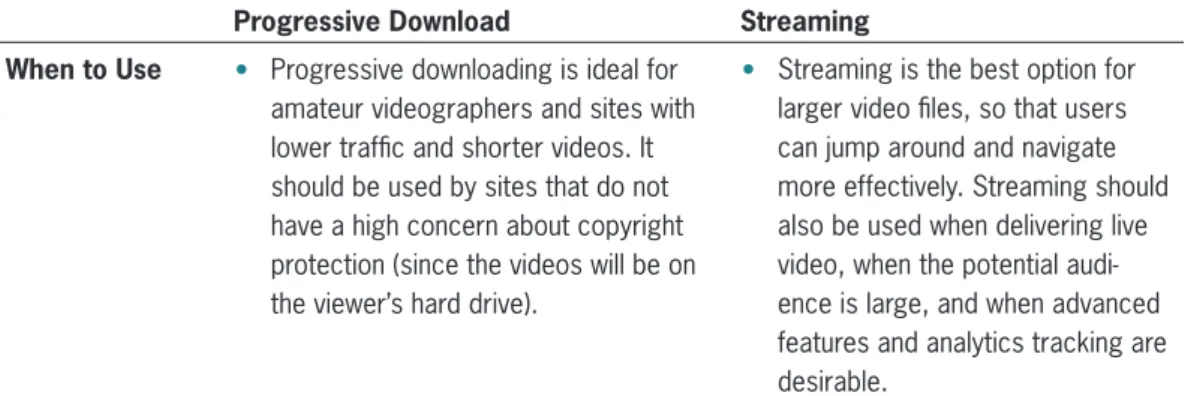
the specifi c requirements of each video project will determine which delivery option is the best choice. Table 5-1 provides a chart that defi nes and compares the two methods. Regardless of the method chosen, keeping fi les sizes as small as possible is benefi cial for the viewer and the developer (large video fi les will use more server storage space).
Video quality
• : Typically, as fi le sizes get smaller, the quality of the image deteriorates. It is important to balance the need to keep fi le size low with the desire to provide content that is sharp enough to keep viewers interested.
Accessibility and cost of conversion software
• : Shooting the
video is the fun part, but it still needs to be edited and converted.
Producers need to consider the cost of editing and conversion soft- ware and whether their computer’s operating system can run that software.
Progressive Download Streaming How it Works
Table 5-1 Defi nitions and a comparison of the progressive download and streaming delivery methods for Web videos. (continues)
Video is housed on a standard Web server and served through an http request, the same way that any Web page would be loaded. The video is downloaded to the viewer’s hard drive before playback, but it starts playing before it is completely downloaded.
Streaming video is not downloaded to a viewer’s hard drive. Streaming videos reside on special streaming servers that must be set up in addi- tion to a Web server. The streaming server creates a unique connection with each viewer and sends the video to the requesting client in small bits, which are discarded immediately after being viewed.
151 Figuring Out the Format
The video ultimately resides on the
•
viewer’s computer so that he or she can watch it multiple times without having to wait for it to download again.
This also allows the user to share the video fi le with others through e-mail or other methods.
This format offers high-quality video
•
and audio playback performance.
The video can reside on and be served
•
through lower cost Web servers.
Streaming videos allow more
•
advanced control, including the capability to detect the viewer’s bandwidth (thus serving the video at the best rate for viewing) and the ability to automatically create thumbnails and short previews.
Streaming videos begin playing
•
very quickly.
Producers that pay for bandwidth or
•
hosting services by the amount of data that is transferred only pay for the bits that the client actually views.
Less disk space is required by the
•
viewer, because the video is not downloaded to the hard drive.
Users can easily jump to any point
•
of the video without having to wait for it to download, and it will begin playing immediately.
Analytics such as how long the video
•
was viewed, whether the viewer jumped to a different point in the video, and how many times the viewer watched the video can be collected.
Live video can be delivered to
•
viewers.
Progressive Download Streaming Pros
Cons
Table 5-1 Defi nitions and a comparison of the progressive download and streaming delivery methods for Web videos. (continues)
Viewers are limited in their abil-
•
ity to fast forward the video until the entire video has been downloaded.
Bandwidth is not allocated to indi-
•
vidual viewers. As more people watch a video simultaneously, the video download will slow, result- ing in a delayed start time for all viewers.
Streaming video has signifi cantly
•
higher costs. It requires expensive streaming servers and a software license for each server.
It is harder for users to pass along
•
streaming video, because the fi le is not downloaded onto the viewer’s hard drive.
(continued)
152
It is also important to gain an understanding of media players before discussing how to determine the appropriate video fi le format for a project. File formats are the way in which videos are encoded;
media players are the software that plays the videos. Often, the media player and fi le format share the same name, thus creating the potential for confusion.
Popular and frequently used media players include:
Flash
•
Windows Media Player (WMP)
•
QuickTime Player
•
RealPlayer
•
Typically, media players come pre-installed on new computers (Table 5-2 shows which media player typically comes pre-installed on which computers). If a media player is not already installed, viewers can download and install it from the Web, usually for free. It is best not to rely on your viewers to download a new player—they are more likely to abandon that particular video altogether.
Media Player PC Mac
Flash X X
WMP X QuickTime X RealPlayer
Table 5-2 A breakdown of which media player is pre-installed on which type of computer.
Progressive downloading is ideal for
•
amateur videographers and sites with lower traffi c and shorter videos. It should be used by sites that do not have a high concern about copyright protection (since the videos will be on the viewer’s hard drive).
Streaming is the best option for
•
larger video fi les, so that users can jump around and navigate more effectively. Streaming should also be used when delivering live video, when the potential audi- ence is large, and when advanced features and analytics tracking are desirable.
Progressive Download Streaming When to Use
Table 5-1 Defi nitions and a comparison of the progressive download and streaming delivery methods for Web videos.
(continued)
153 Figuring Out the Format
Each media player works with diff erent fi le formats. Table 5-3 details the most common fi le formats for video. Table 5-4 shows which player reads which format.
One last piece of the Web video puzzle is the codec, which is a pro- gram used to compress video fi les. In some cases, the codec and the format are the same, such as .wmv or .mpg. Other formats, such as .mov and .avi, are considered container formats, because they can play fi les compressed with a variety of codecs. Some codecs create smaller fi les that take up less space and are easier to transfer via e-mail or upload onto server at the expense of quality playback;
other codecs retain a higher quality playback, but create larger fi les.
File Format Description
.fl v The format name stands for Flash Video. .fl v is the raw fi le created after convert- ing a video from some other fi le format. As of the writing of this book, it is the format of choice because it is the most compatible and because more users have the Flash player installed on their computers than any other player.
.swf .swf stands for ShockWave Flash. This is the extension used when creating stan- dard Flash animations, buttons, and navigation bars. Users must have a Flash player installed in order to see .swf fi les.
.mpg The format abbreviation of MPEG. This format will play on either the QuickTime player or WMP. MPEG has lost favor as Flash’s popularity has risen, because MPEGs are usually larger fi les that cannot be streamed and cannot be created on a Mac without purchasing additional software.
.asf, .wmv Advanced Streaming Format and Windows Media Video, respectively. These Microsoft formats only play on the Windows Media Player, which does not come preinstalled on Macs (Mac users can download WMV version 9, although Micro- soft has stopped creating new upgrades for Macs). Mac users need to purchase additional software to convert other video formats into WMVs.
.mov .mov is the QuickTime format, and plays only in the QuickTime media player. It is a container format, meaning that a number of different codecs can be used for fi le compression. PC users have to download the player to see QuickTime movies.
.mp4 The format name stands for MPEG-4. It can create very small fi le sizes, but the videos cannot be viewed by PC users unless they download the QuickTime player.
.avi The format name stands for Audio/Video Interleaved, which is a container format that can contain video compressed by other codecs.
.rm The RealMedia format. This format does not play on either the QuickTime player or WMV. Viewers need to download the RealMedia player; however, the free version is much less powerful than the fee-based version. There are very few RealMedia movies remaining on the Web.
Table 5-3 The different formats that are used for Web video.
154
WMP WMP9 QuickTime
Flash (for Pc) (for Mac) Player RealPlayer
.fl v X
.swf X X X
.asf X X X
.wmv X X
.avi X Depends on
codec used
.mov X X
.mpg X X X
.mp4 X X X
.rm X
Table 5-4 A breakdown of which media player plays which fi le format.
The Flash (.fl v) File Format: A Closer Look
Deciding which fi le format to choose might seem confusing and intimi- dating, but it is actually very simple. At the risk of sounding like a paid endorsement: Flash is far and away the best format choice. Practi- cally every major video source on the Web utilizes the Flash format, including YouTube, Google Video, Yahoo! Video, and MySpace. Th is underscores the widespread acceptance of this remarkable format.
To understand why the Flash player and format have gained such tremendous popularity, one just has to look at the benefi ts associated with it:
Wide-scale compatibility
• : Because the Flash player comes pre-
installed in both PCs and Macs, practically all Web users can see Flash videos.
Small fi le size
• : Th e Flash format uses its own codec, introduced in Flash 8, to keep fi les sizes very small.
High image quality
• : Th e FLV format is created using a lossy compression method, which means that data is eliminated during the compression in order to reduce the fi le to a much smaller size.
However, Flash does an excellent job of reducing fi les sizes with- out causing too much image quality deterioration.
Multiple delivery options
• : FLV fi les can be created for either
streaming or progressive downloads.
Availability of custom controls
• : With the Flash player, devel-
opers can create their own custom player controls (such as the progress bar that shows the progression of a playing video, the
155 Figuring Out the Format
volume control, and the look, feel, and design of the player frame- work). Th is is a big benefi t artistically and a big step up from play- ers such as WMV and QuickTime, which only play videos in their pre-designed framework.
Full-screen capabilities
• : With just the touch of a button on the
player controls, viewers can switch to watching the video full screen (assuming the developer allows that option).
Friendly start-up screen
• : While other players just show a blank
screen as the video fi les begins to download, the Flash player allows you to customize a fi rst frame, like “Hold on—video will start shortly”, to let the viewer know that the video really is working.
Th e only true downside to using the Flash format is the extra step needed to convert original fi les from .mov, .wmv, or other formats into an .fl v. Fortunately, this extra step is fairly simple and can be accomplished one of two ways:
Use an online service
• : Popular video-sharing Web sites like You- Tube and Google Video allow you to upload video fi les, which the sites will convert to .fl v fi les and host for free. Each video-sharing site has its own pros and cons. Each has its own list of the types of fi les they can convert, how they will treat your videos (putting ads before or after them, for example), allowable fi le size, etc. Make sure you read the specifi cations for a video-sharing site before beginning the upload and conversion process.
Run conversion software from your computers
• : With the
appropriate software, you can also convert videos into the .flv format on your own computer. This option could be the best choice if:
You only intend to display the videos on your own site, and do
•
not want to make them available to the potentially massive audi- ences of a video-sharing site.
You have a lot of videos to convert, and it would be too time-
•
consuming to upload them to a video-sharing site.
Once converted, .fl v fi les can still be uploaded to video-sharing sites.
If you want to display them on your own site, you will need to install a Flash player on your server as well.
A variety of software applications can be used for converting fi les, with the best being the Adobe Flash Professional package. A full list of programs, their costs, and comparisons can be found at the blog site associated with this book. A list of available Flash players can be found here, as well.
156
Who’s Watching What
Like blogging and social networking, Web video viewers have specifi c demographic characteristics, and online audiences are involved in video in a variety of ways. As with any other traditional or online tool, it is important for marketers to understand and analyze these audi- ences in order to reach them eff ectively.
Th e sheer numbers of online viewers is staggering (see Figure 5-1), and is especially remarkable when viewed as a percentage of Internet users as well as a percentage of the entire population (see Figure 5-2).
According to eMarketer, a leading source of marketing research and information, by the end of 2007, nearly 80% of all U.S. Internet users viewed video online at least once a month—that’s over half the popu- lation of the United States, or 154 million people.1 While this fi gure is impressive, the reality is that viewers’ hunger for online video is greater than their ability to properly receive it. As discussed earlier in this chapter, even when compressed, videos can be large fi les—at least when compared to standard graphics and animations. Broadband connections have no doubt contributed greatly to the mainstream adoption of online videos. However, according to the Pew Internet &
American Life Project, less than 45% of all homes had a broadband connection as of February 2007, as shown in Figure 5-3.2 Also accord- ing to Pew, a full 31% of those with no access to broadband at home or at work can be counted among the video consuming audience.3 Th is means that many people are viewing online videos in less than ideal circumstances.
114.3
2006
137.5
2007
154.2
2008
167.5
U.S. Online Video Viewers, 2006–2012 (millions)
2009
176.0
2010
183.0
2011
190.0
2012
Figure 5-1 The number of online video viewers, projected through 2012. S O U R C E : “Internet TV Audience Hits Critical Mass.” eMarketer <www.
emarketer.com> Feb. 2008.
157 Who’s Watching What
Th ese are powerful numbers that make a strong case that online video will eventually replace television as our primary source of entertainment. In fact, people are already beginning to engage in online multitasking. Nearly 80% of online adults have gone online
62.8%
2006 39.7%
73.1%
2007 47.3%
79.5%
2008 52.5%
85.4%
2010 58.9%
86.4%
2011 60.6%
87.6%
2012 62.4%
83.7%
Internet Users Total Population 2009
56.5%
U.S. Online Video Viewers as a Percent of Internet Users and Total Population, 2006–2012
Figure 5-2 The number of online video viewers, projected through 2012. SOURCE: “Internet TV Audience Hits Critical Mass.” eMarketer <www.emarketer.com> Feb. 2008.
Figure 5-3 As of February 2007, less than 45% of all homes had a broadband connection. S O U R C E : “Increased Use of Video Sharing Sites.” Pew Internet & American Life Project, 9 Jan. 2008.
Home Broadband & Dial-Up Penetration (% of adult Americans)
Feb-07
Feb-06
Feb-05
Feb-04
Feb-03
Feb-02
Feb-01
0%
5%
10%
15%
20%
25%
30%
35%
40%
45%
50%
Broadband Dial Up 158
Males Females Males Females Frequency 18–24 18–24 25+ 25+
Once per day or more 33.7% 17.0% 25.4% 13.3%
A couple of times per week 28.8% 26.0% 28.1% 25.9%
Once per week 16.9% 14.4% 12.4% 8.9%
A couple of times per month 10.0% 17.1% 17.1% 21.2%
Once per month 7.5% 15.8% 10.7% 17.5%
Less than once per month 3.1% 8.9% 6.3% 13.3%
Table 5-5 The frequency with which U.S. online video viewers (male and female across age groups) view online videos. S O U R C E : Hallerman, David. “Online Video Content: The New TV Audience.” eMarketer
<www.emarketer.com> 24 Feb. 2008.
while watching TV, and more than a third do so often or always—
most often to search for content completely unrelated to the broad- cast they are watching.4
Like social networking and blogging, the dominant viewing demo- graphic is made up of younger males between the ages of 18–24, 80%
of whom watch online videos at least once a week.5 Table 5-5 shows the frequency with which men and women in diff erent age brackets view online videos. Although younger males lead the way, almost 50% of viewers in all the categories watch online videos once each week or more.6 Th ese statistics, which many experts predict will con- tinue to show an ongoing shift toward more frequent viewing, show the power of combining two of the most powerful mediums ever invented—video and the Internet.
Online viewing audiences can also be segmented into demographics other than age and gender. Defi ned strictly by frequency of viewer- ship, they can be split into groups of heavy, moderate, and light view- ers that each have their own habits and similarities.
Heavy viewers
• : Heavy viewers, which make up the top 20% of all online viewers, watch an astounding 841 minutes (just over 14 hours) of online videos each month—11 times more than moderate viewers and 140 times more than light viewers.7 Interestingly, while YouTube is the top destination for viewers in all three categories, heavy viewers spent much of their time on small niche video sites—sites that serve less than 1% of the entire online population. It is likely that this audi- ence is very discriminating in their video selection.
Moderate viewers
• : Moderate viewers, which make up the next 30% of all on online viewers, average 77 minutes of online video viewing each month.8 Th is group spends much of its time watch- ing videos on broadcast TV sites, such as CBS and ABC. Moderate
159 Who’s Watching What
viewers also visit YouTube frequently, but they do not spend as much time on other general video-sharing sites.
Light viewers
• : Light viewers, defi ned as the remaining 50% of online viewers, spend less than 6 minutes per month watching videos on the Web. Light consumers of online videos tend to be the heaviest consumers of TV, with 46% watching 13 or more hours of TV each week (compared to 39% of moderate viewers and only 30% of heavy viewers).9
Marketers have a better chance of sending the right message to the best audience when they fully understand who is watching what, where, and how often. Th is brings up the next obvious question—with so many diff erent people online watching videos, what are they all watching?
To call the selection of online video diverse is to dramatically under- state the true wealth of online video content. Hundreds of channels of cable or satellite television once seemed overwhelming; however, those viewing options pale in comparison to the 65,000 videos that are uploaded to YouTube alone every day.10 Online videos fall into many of the same categories as would be found on television, such as news, comedy, sports, music, drama, cartoons, politics, and lifestyle. Some categories, however, are unique to the Web. Amateur videos, movie trailers, live concerts, educational/how-to videos, and on-demand clips from a variety of sources help drive audiences online. Table 5-6 shows a table detailing the most popular genres of online videos, and the percentage of online viewers that expressed an interest in each.
Video Genre % of Online Users
News clips 36%
Short video clips or segments 33%
Music videos 32%
Full-length TV shows 28%
Full-length movies 27%
Other people’s personal videos 23%
Live concerts 18%
Live sporting events 16%
Product demonstrations 15%
Some other video category 11%
On demand sporting event 11%
Advertising 4%
Table 5-6 The different genres of online videos, and the percentage of viewers who watch them. S O U R C E : “The Importance of Delivering a Great Online Video Experience.” JupiterResearch, 11 July 2007.
160
Reviewing these fi gures carefully, one can begin to paint a picture of the average Internet user. Online video viewers are most interested in watching news clips to catch up on current events, which is also the primary interest expressed by readers of blogs. Web users, particu- larly those who utilize social media applications, are hungry for infor- mation and want to get to know the world around them. Th is creates opportunities for savvy marketers to reach new audiences by putting their messages where online news is located and by presenting social media users with news and updates about their brands.
Video watchers are also among the most active Internet users in terms of leaving comments online. In 2007, nearly 27 million comments were left on video-sharing sites—averaging 12.6 comments for each new video posted that year (over 1.2 million).11 Th ese numbers are more than just an interesting peek into the activities of online video watchers—they are part of a larger roadmap that helps direct marketers and gives them further insight into their audiences. When people leave comments on a video—or a blog—it means that they are engaged. Th e comment may be positive, negative, jubilant, or angry, but it indicates that the video has captured the viewer’s attention and spurred them to take some action.
Brands and marketers can use information and users’ feedback to help shape their campaigns and craft their messages, which can include more well-defi ned means of triggering an audience to make a purchase.
Video as a Social Media Tool
Online video has become an important part of the social media revo- lution, infi ltrating sites in practically every category and expanding into its own industry. One reason for the popularity of video-sharing sites is that most provide free storage space, so that producers do not need to pay to upload their content. Th e cost of servers and the potential complexities of developing a site capable of showing videos could be an insurmountable barrier for the average user. Video- sharing sites virtually eliminate the costs and hassles for producers and create a central place where viewers can come to watch a variety of videos. Th e increasing volume of videos being uploaded to these sites has also been advanced by the growing number of cell phones and computers with built-in cameras and a reduction in the price of handheld semi-professional video cameras.
People post videos on various sites for many reasons, including:
Marketing
• : Video has long been a mainstay of marketing cam- paigns, with television commercials being the most common application. Th ese commercials often make their way onto video- sharing sites, where people seek out their favorites to watch repeatedly. Marketers also use online video for training purposes,
161 Video as a Social Media Tool
news releases, product announcements, and corporate overviews (videos that show the company history, what they do, and why a consumer should buy from them).
Education
• : Online video provides an eff ective means of educat- ing people on any number of topics. How-to videos typically pro- vide step-by-step instructions on topics such as using a specifi c product or how to program a Web page. Classroom style videos can teach people about specifi c topics important to the marketer’s audience. For example, a pharmaceutical services company might produce and post educational videos about the importance of secure packaging for potential clients.
Fame
• : With video sharing, anyone can be a star. Th rough the Web, people have rushed to fi nd fame using every possible gimmick from producing home music videos and comedy bits to puppet shows and animations. Amateur video has created modern day social media icons such as the Obama Girl, who sang about her crush on U.S. presidential candidate Barack Obama, and Chris Crocker (shown in Figure 5-4). Crocker’s now infa- mous video-taped cry of “Leave Britney alone!” in response to the media’s constant hounding of singer Britney Spears became one of the most heavily viewed videos on YouTube and was shown on practically every news broadcast and late night talk show.
Figure 5-4 The YouTube video of Chris Crocker crying, “Leave Britney alone!”
made him an overnight sensation.
162
Re-broadcast
• : Television is fi nding a new home on the Web, with many popular networks creating sites to rebroadcast popu- lar shows online after they have aired on TV. Th is attracts more viewers to these shows, helping networks increase their appeal to advertisers. Figure 5-5 shows a page of Fox On Demand, where viewers can watch previously run episodes of practically any show in the Fox lineup. With 65% of audiences preferring to watch pro- fessionally produced video content on the Web (as opposed to amateur content),12 re-broadcast is a rapidly growing segment that is servicing a growing need.
Street journalism
• : With a cell phone camera in hand, anyone can be a reporter. Amateur journalists who happened to be in the right place at the right time (or the wrong place at the wrong time, depending upon the situation) have uploaded videos of everything from freak tornados to crimes in progress. In many instances, these street journalists have captured footage that made national and even international news, including the 2007 clip shown in Figure 5-6, in which a heckler was arrested at a John Kerry speech, yelling “Don’t tase me, bro!” as police tried
to subdue him.
Figure 5-5 The Fox On Demand Web site allows viewers to watch previously aired episodes of their favorite shows. A clip from the popular show Family Guy is shown in this fi gure.
163 Video as a Social Media Tool
Th ese reasons and more have brought a herd of viewers to video-shar- ing sites, and in turn, more sites of this nature have been launched. Th e nascent video-sharing industry took center stage of the media spotlight in 2006 with the heavily publicized purchase of YouTube, the clear leader in video-sharing Web sites, by Google for $1.65 billion.13 Th at was an impressive amount to pay for a company that, as of August, 2006 had yet to generate a profi t.14
Video-sharing sites take advantage of social media tools by allow- ing viewers to leave comments on each video, maintain a list of their favorites, and develop their own profi le page that other users can visit. At the same time, other Web sites have used video as part of their social media off erings. Social networking sites like MySpace allow members to upload video to their profi les. In fact, videos have become a primary feature of MySpace. In 2007, MySpace offi cially began a rivalry with YouTube when it launched MySpace TV—a video-sharing network that has a permanent place in MySpace’s pri- mary navigation bar. MySpace TV allows users to upload their videos, which can also be embedded in the user’s own MySpace profi le, and it features a series of channels with more professionally produced content from both outside sources and MySpace itself.
As would be expected in a social media setting, viewers are able to rate and leave comments on all videos, add their favorites to their Figure 5-6 An amateur journalist taped and uploaded this video of a college student being arrested at a John Kerry event. This video became famous for the college student yelling “Don’t tase me, bro!” as police tried to subdue him.
164
MySpace profi le or blog, e-mail a video to a friend, or save it to a per- sonal favorites page to watch again at a later time. Figures 5-7 and 5-8 show screen shots from MySpace TV.
Figure 5-7 The home page for MySpace TV allows users to upload their own videos, watch other user videos, browse videos from a variety of channels, and insert videos into their MySpace profi le.
Figure 5-8 The Prime Time page for MySpace’s video sharing platform lets viewers watch professionally produced content fed in from a variety of other online video sharing sites or from MySpace-produced content.
165 Video as a Social Media Tool
Web-Based Video as a Marketing Tool
In 2007, over 13% of U.S. companies had plans to include online videos as part of their marketing strategy. While this is not an extremely large number, it is impressive when compared to the 2006 fi gure of only 4%.15
Companies often upload videos to video-sharing sites as well as to their own sites. Th ese fi rms gain signifi cant benefi ts from this mar- keting strategy, including:
Better audience retention: People are more likely to stay engaged
•
and remain online if the message is actively communicated to them rather than being presented as copy that must be read.
More eff ective messaging: Video gives marketers the oppor-
•
tunity to present a more complete picture. A single video can illustrate points through more than just scripted words. Th e infl ection and enthusiasm in the presenter’s voice, the graph- ics, animations, camera angles, scene changes, and music all contribute to the overall message. In short, online video allows marketers to generate an emotional connection between the marketer and the viewer.
Improved marketing support: Companies are beginning to build
•
entire Web sites around video-based concepts rather than just incorporating videos into portions of their sites. Clever program- mers, designers, and producers are working together to develop more engaging and interactive experiences for their visitors.
By doing this, they create sites that do far more than promote a product—they make visitors part of that product’s culture. Often, these video-driven sites include other social media applications.
Figure 5-9 shows the video-based Web site for the Geico Cave- men, a popular TV commercial that was spun off into a short- lived TV show. The Web site stars the cavemen in their home, against scenery that is interactive. Users can click on various items around the house for additional applications. Geico Insurance information is quietly woven throughout the site.
Figure 5-10 shows the accompanying social networking site cre- ated to allow cavemen to interact with each other (real people, of course, are invited to create profi les, as well).
166
Figure 5-9 The home page of cavemanscrib.com—a video-based site that is part of the Geico Insurance advertising campaign. Most of the content is presented via video, although portions of the screen are clickable for more information.
Figure 5-10 Part of the Geico caveman concept is a sister site located at iheartcavemen.com. This social networking site allows cavemen and real people to create profi les and interact with one another. The large caveman pictured with the arrow over it (top left) is a video profi le; a Geico ad appears on the right.
167 Web-Based Video as a Marketing Tool
INTERVIEW WITH...
Brian Phalen: Asco Power University
ASCO Power is a business-to-business company owned by Emerson Electric. ASCO manufactures power generators for hospitals, Inter- net data centers, shopping malls, and other facilities that require a constant fl ow of electricity without interruption.
In a competitive market driven by highly educated engineers, ASCO takes an aggressive approach toward maintaining its role as the indus- try leader. Most recently, ASCO has taken this eff ort to the Web, where they have set up ASCO Power University (shown in Figure 5-11), a video-based educational resource. Th e site is designed to educate engi- neers about ASCO and other critical engineering topics that many uni- versities fail to cover.
Brian Phelan is the Director of Marketing Services for ASCO Power, and spoke with me about the online university, its value, purpose, and future.
Figure 5-11 ASCO’s Power University is an online video-based educational resource meant to inform audiences while establishing ASCO as an industry thought-leader.
168
Brian: ASCO Power University is an online educational resource for new engineers who have recently graduated, as well as veteran engi- neers that could benefi t from a refresher course or want to see some of the latest innovations and methods in the electrical industry. Unfor- tunately, many of the engineering schools have stopped teaching the basics that lay the foundation for our entire industry. We’re trying to fi ll that gap, provide insight, and pass on our accumulated knowledge and expertise. From a marketing standpoint, we’re not taking the obvi- ous route of uploading promotional videos about our products and services, why potential customers should choose ASCO, or why our brand is superior. Th ere’s a little of that, but the real value of the Uni- versity is to establish ASCO as the thought and innovation leader in our industry. If an engineer is going to come to us to learn, it stands to reason he’ll come to us when it’s time to buy, as well.
Th e University is free for anyone to use, but we do require visitors to register with us before they can watch any of the educational seg- ments. Th at registration gives us a powerful marketing advantage—we know who’s coming, how often they visit, how long they stay, and we know how and where to reach them. It’s an audience that we know is interested in these topics, and their registration information tells us where to fi nd them. From a marketer’s perspective, you can’t ask for anything better.
Jason: How unique is this to your industry?
Brian: As of now, the Power University is the only one of its kind in an industry that has signifi cantly lagged behind the times. Th is tool puts us far ahead of the curve and confi rms the innovative nature of our company.
Jason: Why did you choose to use video to establish yourself as a thought-leader?
Brian: Th ere’s more to the Power University than video, although video is the central driving force. We went this route because video can capture people’s attention unlike any other medium. Th ese are pretty intricate topics, and having them explained through video is far more eff ective than having someone read fl at copy. Th e fact of the matter is that we’re an entertainment-based society, and video—even educational video—can be entertaining. It also gives us the opportu- nity to weave in illustrations, Flash animations, 3D models, and other resources to make these courses easier to understand.
It’s something that we wouldn’t have been able to do a few years ago, but with the advancements made in online video and the fact that most, if not all, of our prospects and clients now have broadband con- nections, the time is right for us to take advantage of these tools.
Jason: How diffi cult is the University to maintain?
169 Web-Based Video as a Marketing Tool
Brian: Th e maintenance of the site itself is quite simple. We’re using a design and database structure developed by MyPod Studios, which is a Web-based company that generates video-based channels for companies. Th e page structure stays the same, but we can use our own logo and colors to make it our own—much more cost-eff ective than building a site like this on our own. MyPod Studios gives us quite a bit of control over the look and feel of the site, and an easy-to- use back-end administration area that lets us post new content and edit information pretty easily.
Th e hardest or most time-consuming part, really, is the development of the content. Th e diffi culty of content development is inversely proportionate to the benefi t received from it. With video, the benefi t is quite high, but it’s that much harder to produce. For each video—
most of which are between 15 and 30 minutes—we need to deter- mine a viable topic and write content about that topic, which takes research and editing. Th at content needs to be turned into a script, speakers need to be hired and scheduled, as do camera and lighting crews. We need to set a location, which may involve travel. Once the shoot is done, the raw footage still needs to be edited, compressed, and converted to a Flash format for use on the University site. It’s worth the eff ort, but it is eff ort.
Jason: Th e University uses other social media tools along with video.
Tell me about those and how they enhance the user experience.
Brian: Not all the presentations are video. Some of them are Flash animations with a voice-over explaining the content, and some are just PowerPoint presentations that use a voice-over. For each video, users are allowed to post reviews for other users to read, which helps the audience decide which segments are the most valuable to them. Registered users can also save videos into a ‘favorites’ list so that they can return to them easily or send links to friends and coworkers leading them to certain videos. All of these tools work together to create a better, more educational user experience. RSS feeds also let users know when new content has been uploaded.
Jason: What’s the future of the University?
Brian: Our fi rst goal is to continue building content. Once you start gathering an audience, you have to keep the momentum going by adding new content as quickly as possible. What takes 30 minutes for someone to watch can take weeks or months to put together, so it’s a chore. Beyond that, we’re seeing opportunities to expand the Univer- sity into a true ‘university,’ with accreditation programs, certifi cates of course completion, and other such features.
170
Companies also need to understand that marketing through online video can injure a brand if not done properly. Online video watchers have quickly adapted to the methodologies of online video; they have formed strong opinions about how video-sharing sites provide adver- tising and what they fi nd most frustrating. Web surfi ng and frustra- tion often go hand-in-hand, as users who have grown accustomed to receiving information quickly and clearly can easily lose patience when a site does not immediately yield those results.
Marketers who want to use video-sharing sites as a means of adver- tising should be aware that audiences have clear views on the types of ads that they are willing to tolerate. According to a study by JupiterResearch, 80% of all online video watchers are comfortable accepting ads as a necessary means of keeping the content free to view.16 However, it is also clear that the ads they are most willing to accept are those that are the least intrusive. Table 5-7 outlines the types of ad that video watchers like the most and least. Keep in mind that although each video-sharing site will determine its own advertising model (when and where ads are shown), viewers are likely to take any negative feelings out on the brands they are seeing advertised.
% of Viewers that Find Types of Ads on Video Pages this Type of Ad Acceptable Banner ad next to every video clip 32%
Video ad after every video clip 21%
Video ad before every video clip 14%
Small ad in the corner of the currently
playing video 9%
An interactive game ad after every video clip 4%
Will only watch online video if it has no ads at all 20%
Table 5-7 Types of online video ads viewers are most and least willing to tolerate. S O U R C E : “The Importance of Delivering a Great Online Video Experience.” JupiterResearch, 11 July 2007.
Th ese results make it clear that viewers do not want their viewing experience interrupted. Th e ads people are most willing to accept are the ones that have the least impact on the videos themselves.
Th e viewing experience is of utmost importance to online audiences, and marketers need to carefully consider the quality of their content or risk permanently losing their audience. Sixty percent of all viewers will quickly leave a site if the viewing experience is poor, and a quarter of those people are unlikely ever to return to that site.17 Table 5-8 details
171 Web-Based Video as a Marketing Tool
Off the Web: What Goes into Video Production
Professional video production can be among the most complex and exhausting undertakings when it comes to the development of content.
Amateur videographers can put together a simple video by sitting in front of a Web cam, hitting the ‘Record’ button and talking, but mar- keters who want to take advantage of video have a much longer and harder road to travel. Entire books and classes are devoted to teaching the process of video production; the following section provides just a brief glimpse into what it takes to produce a video for the Web:
1. Concept creation: Varying amounts of concept creation will be needed depending on the type of production. TV commer- cials, which usually tell a complete story in just 30 seconds, can require weeks or months of creative concept development to determine the storyline, the messaging, scene, characters, etc. Videos that are more straightforward, for example an announcer or host speaking directly into a camera, take far less creative development.
the most common reasons why people become dissatisfi ed with video sites, whether corporate run or video-sharing. Here too, the biggest reasons have to do with the interruption or delay of the video.
% of Viewers Who Indicate This Source of Frustration Is a Source of Frustration Video was interrupted (stopped for buffering) 44%
Video took too long to begin 35%
Picture quality was poor 32%
Site mandated registration 27%
Video was too slow during playback 22%
Ads inside video were too long or frequent 18%
Playback was interrupted and didn’t automatically restart 16%
Site crashed or froze 15%
Error message received 14%
Viewing required payment 10%
Portions of video were skipped 10%
Figuring out how to play video too confusing 6%
Other reasons 3%
Never felt frustration with online video 15%
Table 5-8 The major sources of frustration viewers have with video sites. S O U R C E : “The Importance of Delivering a Great Online Video Experience.” JupiterResearch <www.jupiterresearch> 11 July 2007.
172
2. Script writing and story boarding: Once the concept has been settled, marketers need to write a script. Typically, scripts not only provide the dialog, they also explain the scene, the reactions of the characters, and their movements. Once approved, a story board, which is an illustrated representation of the script, is developed to show how the video should look and feel. Figure 5-12 provides a sample storyboard.
Figure 5-12 A sample story board for a video shoot.
3. Casting: Usually the people in videos, whether they appear onscreen or perform off -screen as narrators, are paid actors.
Finding the right person to hire can be an arduous task, and it sometimes takes days of seeing numerous models and actors to determine the right person for each role.
4. Location scouting: Most often, video shoots take place in a studio, which is specifi cally meant to accommodate video and fi lm productions. Th ese studios can be adapted to recreate almost any background or scene necessary, and they provide all the equipment needed. In many cases, due to specifi c needs or budget issues, videos must be shot someplace other than in a studio, such as in a warehouse, park, offi ce, or city street. In these cases, the video producers need to scout the location in advance to determine any potential problems that may arise, such as noise from a nearby highway or lighting issues.
173 Off the Web: What Goes into Video Production
5. Shooting: Th e day of the shoot is usually long and hectic.
With the script and storyboard in hand, and actors on site, the crew gets ready for the shoot. Th e crew usually involves one or two cameras and cameramen, lighting engineers, and audio engineers. A make-up artist will often be at the location, to put the proper make-up on the actors and help with make-up and wardrobe issues throughout the day. Th e director will also be present to tell the actors what to do, how to do it, and tell the camera operators how to shoot each scene. Finally, assis- tants will be present to help with all of the details and issues that will inevitably come up, arrange for snacks and lunch, help prep actors, etc. Often, shooting for an entire day might yield little more than a small amount of usable content.
6. Digitizing: Once shot, the video tape created must be digitized—brought into the computer for editing.
7. Graphics: Any graphics that are needed for the video are designed and brought into the computer that will do the editing.
8. Editing: Th e editor takes all of the footage, and, along with the director, decides which scenes to keep and which to discard. When this process is complete, the editor puts the remaining scenes, graphics, and music together into a com- pleted story.
9. Compressing and converting: Once edited and completed, the video is compressed into a small fi le size and converted into the proper format (most likely an .fl v).
10. Uploading: Th e converted fi le is uploaded to the site, refer- enced in the code, and it’s ready to roll.
Th is list barely scrapes the surface of the eff ort that goes into a video production, but as a rising star of the Web, the eff ort is consistently proving worth the eff ort.
Chapter Summary
Many diff erent formats and players are available for presenting
•
online videos. Since 2006, however, the Flash (.fl v) format has been far and away the favorite of video-sharing sites because of its ability to reach a broad audience and compress fi les to small sizes without signifi cantly harming the playback.
Like other forms of social media, the largest audience for Web-
•
based video is younger males, however every other age group 174
watches signifi cant amount of videos, as well. As with blogging, news and current events again top the list of the reasons why people watch online video, underscoring people’s thirst for up-to- date information.
Video has become an important part of the social media revo-
•
lution, appearing not only on video-sharing sites, but on B2B, B2C, and other types of Web sites as well. There are many reasons why people post videos online, including education, marketing, street journalism and the desire for fame, however fleeting.
Amateur video has fl ooded video-sharing sites like YouTube, but
•
marketers must be careful to create high quality, professional pro- ductions. Th ese productions can be very complex, but the results are often worthwhile.
Key Terms
codec—A program used to compress videos into a small size.
container format—A format that can play fi les compressed with a variety of codecs.
lossy—A compression method that eliminates information from a fi le in order to compress the fi le into a smaller size.
media player—Th e software that plays videos online.
player controls—Th e functionality, such as play, pause, stop, and volume, that allows a viewer to control the playback of an online video.
progressive download—A less-expensive way to serve online videos.
Progressive download requires that the video be downloaded to the viewer’s computer; the video will start playing shortly after down- load has begun.
story board—An illustrated, literal interpretation of a video script.
streaming—A method of delivering videos on the Web. Stream- ing video is delivered via a specialized server that creates a unique connection with each viewer and sends the video to the requesting client in small bits.
175 Key Terms
Review Questions
1. Which of the following is the least likely reason why video on the Web is growing so quickly?
Th e rise of broadband connections in the home a.
Th e popularity of cameras built into computers and cell b.
phones
Th e Flash video format c.
Th e decrease in the number of computers loaded with the d.
Real Media Player
2. Which of the following is the least important to consider when deciding on the best video format?
Platform compatibility a.
Video content b.
Video playback quality c.
File Size d.
3. Which of the following is the best delivery method if you expect a large number of people to view your video?
Streaming a.
Progressive download b.
AVI c.
Real Media d.
4. Which of the following is the best delivery option if you want to keep server costs down and allow people to pass along your video to others?
Streaming a.
Progressive download b.
AVI c.
Real Media d.
5. Which format is native only to Macs?
.wmv a.
.mov b.
.avi c.
.rm d.
176
6. What is the main function of a codec?
To ensure that corporate videos accurately promote a.
the brand
To ensure that the video will play on as many computers b.
as possible
To reduce the fi le size of a video c.
To convert fi les to the proper format d.
7. Once you convert a fi le to the Flash (.fl v) format using soft- ware on your own computer, you can no longer upload it to video-sharing Web sites. True or False?
8. Th e percentage of people who watch online videos at least once a month is:
Higher than the number of people who have broadband a.
connections in their home
Roughly the same number of people who have broadband b.
connections in their home
Lower than the number of people who have broadband c.
connections in their home
Not relevant to the number of people who have broad- d.
band connections in their home 9. “Heavy” viewers of online video are the:
Top 10% of all viewers a.
Top 20% of all viewers b.
Top 30% of all viewers c.
Top 50% of all viewers d.
10. One important similarity that the online video audience shares with bloggers is:
A heavy interest in sports information a.
A heavy interest in news and current events b.
Slower connection speeds c.
Mostly female d.
177 Review Questions
11. Th e fact that people tend to leave a lot of comments on specifi c videos indicates that:
People who spend time online are largely bored and have a.
nothing better to do
People really enjoyed that video b.
People felt engaged by the videos they have watched c.
More video-sharing sites are encouraging viewers d.
to leave comments
12. What percentage of online viewers would prefer to watch professionally produced content?
35%
a.
50%
b.
65%
c.
80%
d.
13. Which is the least likely benefi t for a company that uploads videos to its own site or to video-sharing sites?
Improved marketing support a.
Better audience retention b.
Reduced product cost c.
More eff ective messaging d.
14. Once a video is compressed, companies cannot use it on their own site - they need to rely on video-sharing sites to support the upload. True or False?
15. In the online video that made him famous, who did Chris Crocker want the media to leave alone?
Paris Hilton a.
Nicole Ritchie b.
Britney Spears c.
None of the above d.
178
16. What was the main reason for using video as a driving force in the Power University?
Video’s ability to capture people’s attention a.
Reducing development cost b.
Th e ability to explain complex topics c.
Ease of creation d.
17. Which of the following is the main purpose of the ASCO Power University?
Education a.
Entertainment b.
Establishing ASCO as a thought-leader c.
Seeking out new, potential employees d.
18. Viewers do not mind seeing some advertising on video sites, however they do not like it when the ads:
Get in the way of the video-watching experience a.
Appear as banner ads around the video b.
Promote products that they do not use c.
Use the color red, which tends to look blurry on computer d.
monitors
19. A large percentage of viewers who have a bad experience on a video site will:
Stick with it, but are unhappy about it a.
Write negative comments, even on videos that they like b.
Leave the site and surf elsewhere c.
Playing the videos repeatedly in the hopes of slowing d.
down the site
20. In video production, the importance of location scouting is:
To fi nd the best actors for the roles a.
To determine any issues that might arise in advance b.
of the shoot
To determine which format would be best prior to uploading c.
To prepare the tape for digitizing d.
179 Review Questions
Projects
1. Start the video process from scratch. Using a cell phone cam- era, computer camera, or standard digital camera, take a short video of something you fi nd interesting, and upload it to YouTube or some other video-sharing site. Write a two- page paper detailing each step in the process.
2. Using the same video that you shot in Project #1, create either an .fl v, .mov, or .wmv using free conversion software. Program a Web page that allows others to view your video.
3. Find a video-sharing site other than YouTube. In a paper no longer than three pages, analyze the site in terms of:
Types of videos (content) a.
Media player and format used b.
Audience you believe it attracts c.
Other social media tools involved on the site d.
How advertising is presented e.
Critique the site—what do you like about it? What could make it better?
4. Provide lines of code for each of the following:
A .jpg graphic a.
An .mov movie b.
A .wmv movie c.
An .fl v movie d.
How do they diff er from each other?
5. Find a B2B Web site that uses videos. In a two-page paper, describe the company and the site, how the videos are used, and how they improve user experience.
Endnotes
1. “Internet TV Audience Hits Critical Mass.” eMarketer
<www.emarketer.com> Feb. 2008.
2. “Increased Use of Video Sharing Sites.” Pew Internet & American Life Project, 9 Jan. 2008.
3. Ibid.
180
4. “Double Dipping, Typers vs. Talkers and Media Multitasking Stand out as Common Activities.” Harris Interactive commissioned by Blinkx <www.harrisinteractive.com> 28 Feb. 2008.
5. Hallerman, David. “Online Video Content: Th e New TV Audience.”
eMarketer <www.emarketer.com> 24 Feb. 2008.
6. Ibid.
7. “Online Video Users Segments’ Viewing Behavior Varies Widely.”
comScore and Media Contracts <www.comscore.com> 14 Feb. 2008.
8. Ibid.
9. Ibid.
10. “Google Closes Acquisition of YouTube.” YouTube <www.youtube.
com> 13 Nov. 2006.
11. “User Generated Video 2005–2008: Metadata Metrics.” AccuStream iMedia Research <www.accustream.com> 25 Jan. 2008.
12. Madden, Mary. “Online Video.” Pew Internet & American Life Project, 25 July 2007.
13. “Google Closes Acquisition of YouTube.” YouTube ”<www.youtube.
com> 13 Nov. 2006.
14. “YouTube could be a steal at $1 billion.” CNET <www.cnet.com>
24 Aug. 2006.
15. Schweitzer, Tamara. “To Gain Competitive Edge, Companies Turn to Blogs, Video, and Social Networks.” Inc. com <www.inc.com>
10 Aug. 2007.
16. “Th e Importance of Delivering a Great Online Video Experience.”
JupiterResearch <www.jupiterresearch.com> 11 July 2007.
17. Ibid.
181 Endnotes