After a thorough review of existing procedures, the proponent proposed applying digital modernization to the current process. And finally, to the University of the Philippines – The Open University, it is an honor to be called one of your students.
INTRODUCTION
The developed system is built to automate the process of collecting, reviewing and managing applications for internships and the ongoing life cycle of the project. The mentioned system does not include the process of an internship between the officers of the University and the students.
PROJECT DETAILS
Overview
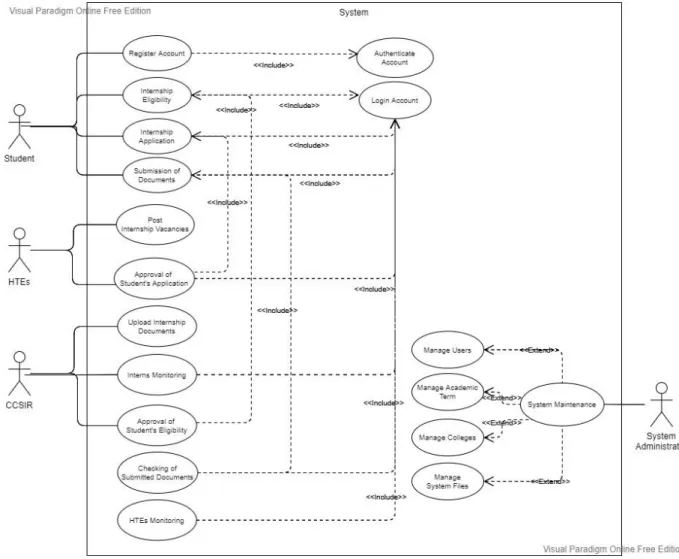
It captures how users will interact with the system and how these modules are connected to each other. The diagram explains the flow of the system and the role of the actors, who are the users, in the system.
Theoretical Framework
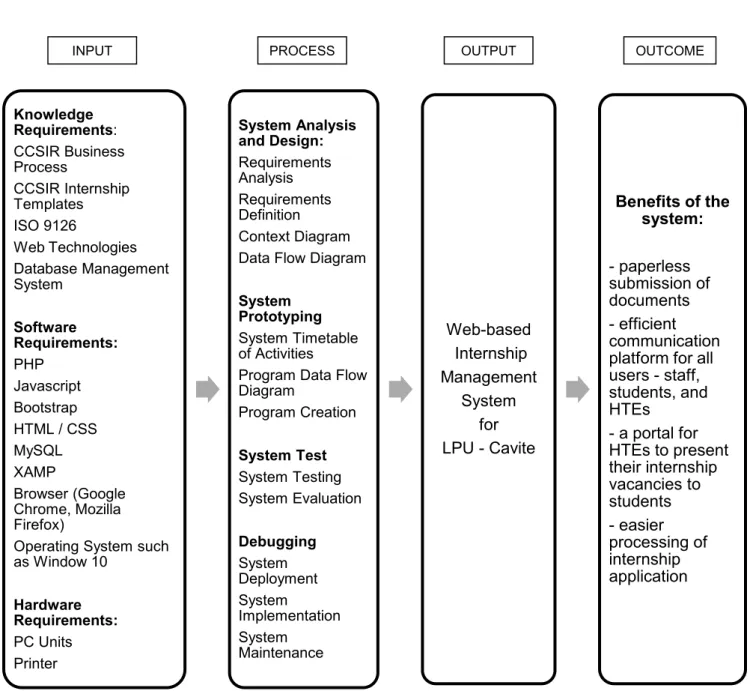
The proponent decides to use this framework to represent the relationship between the variables presented in this project. At this stage, the proponent will now integrate the data from the manual processing system into the proposed system to establish the core of the system.
Technologies Used
The Center may request more features, but it is the developer's responsibility to add them if deemed justified. The proponent must confirm that the system developed meets the objectives stated above and that the outcome of the project solves the Center's problem.
System Design
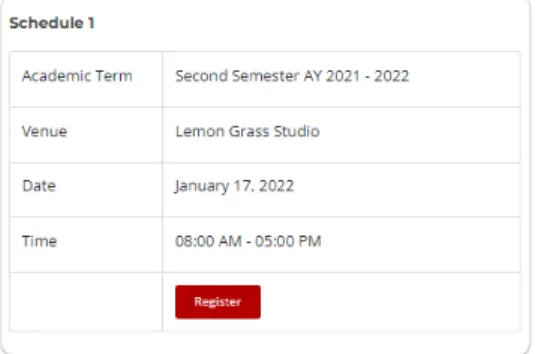
This module allows the Center to upload and modify the internship templates that students will need throughout the program. This module consists of the following: registering for the orientation, requesting internship documents from the University and the HTE, and uploading requirements intended for final submission. Function of the system that allows the student to register his participation in the Orientation and download the certificate immediately afterwards.
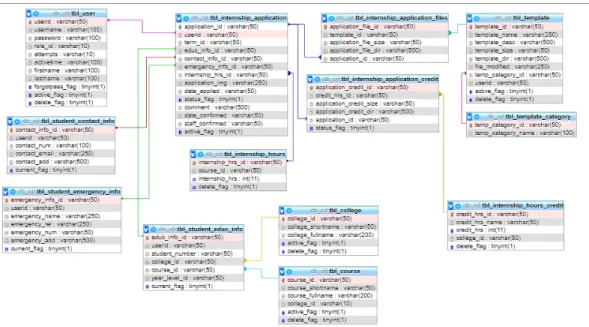
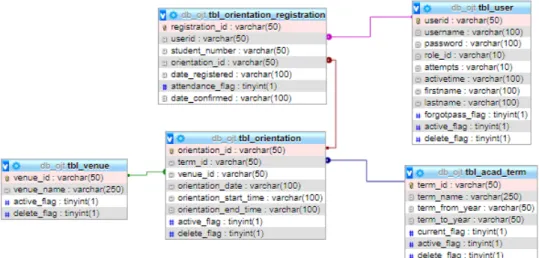
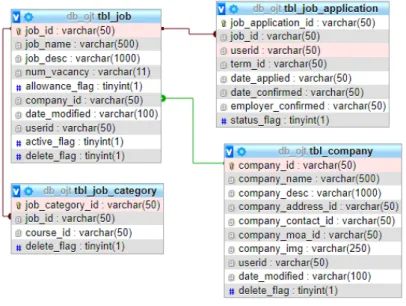
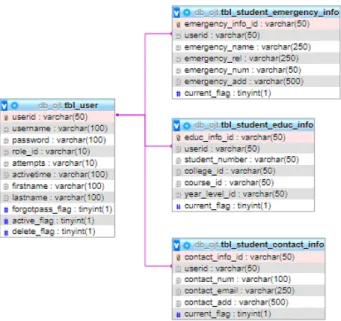
Function of the system that enables the student to submit their profile for internship eligibility along with necessary supporting documents. Function in the system that allows the student to choose between the available internships posted by the affiliated HTEs. Through the use of phpMyAdmin as a third-party tool to "handle the administration of MySQL over the web", the proponent can generate a logical data model of the web-based system.
Displays the data model of the internship application table that connects the user data table and the tables related to internships, such as the internship templates and internship hours. Displays the data model of the internship orientation table that joins the user data table, location data table, and the academic term data table. Display the user data model that has three linked data tables that contain three more linked data tables that expose more relevant information from the student.
Implementation
User Testing
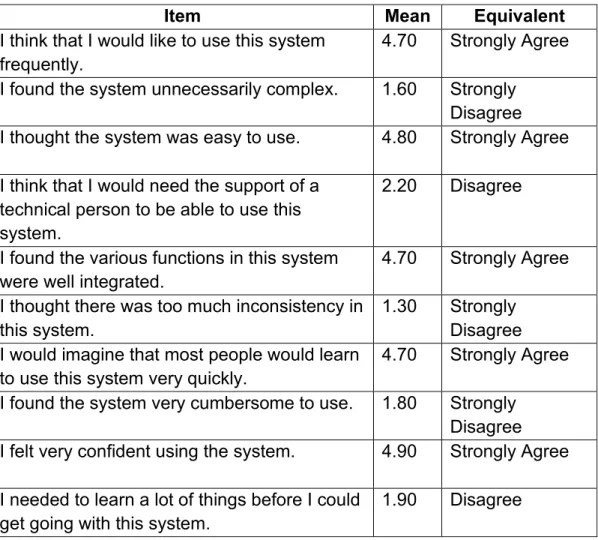
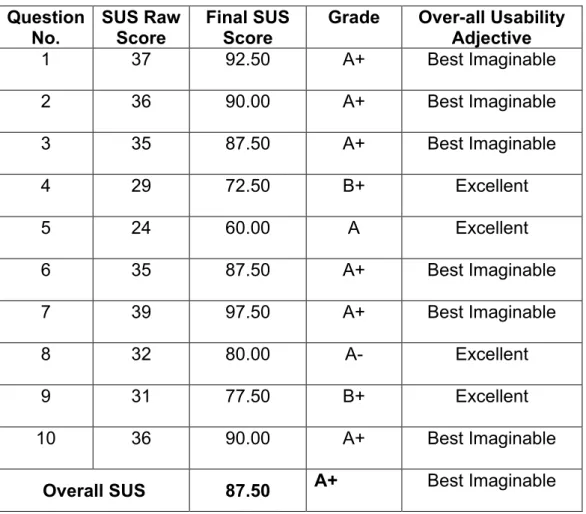
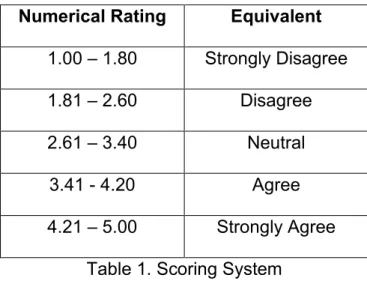
I think I would need support from a technical person to use this system. The usability of the system was evaluated with the SUS questionnaire on a sample population of LPU - Cavite students, Center staff and IT experts. Based on the analysis of Internship Management System scores as rated by the respondents after the system evaluation, the SUS score of 87.50 indicates that the system is at its best possible version.
The respondents/user would not require support from a technical person to use the system. The user will feel confident using the system because it is easy to navigate. It is not necessary to learn many things before the user can start using the system.
Security Testing
As the developed system collects sensitive data of the students and accredited institutions, it will be targeted by the attacks. So the developers have to secure their web applications by performing a series of security tests before the system will be implemented and handed over to the customers. One of the popular security scanners that can protect the sensitive data stored in the system is the open source web application security scanner called OWASP ZAP.
Once a loophole has been exposed, it will generate reports for a possible fix needed to apply to the system. The developer should know that it is best to separate the data from the SQL so that the data is not interpreted as commands. Henceforth, the aforementioned security issues will be handled by the developer before the installation of the system.
It is important to address the following issues firsthand to avoid problems that will arise if left unaddressed.
DISCUSSIONS
Customers will initially hesitate to implement the system, but the findings presented on how the developed system can improve its services to stakeholders will be the turning point of the system. The practice handling process needs to be improved especially with the current situation now. It is not only academic units that should have an opportunity for online advancement, but it is also proven that a web-based management system can improve the practice process.
Nevertheless, despite all the challenges faced by the proponent, it is satisfying to see how the system is well received by customers and satisfied with its performance with some adjustments and further expansions in the future. The proponent decided to give the maintenance of the system to the University's Information and Communication Technology Department (ICTD) as this will be part of the proponent's contribution to the growth of the university. The ICTD has the host server for the university website, so it is only appropriate to link the developed system to the main page for easier maintenance.
Should problems arise in the future, the proponent believes that the system is well documented and easier to revise.
CONCLUSION
The internship management system uses a one-time upload for applications, so respondents suggested that a batch upload would be better. The Practice Management System is designed for PC/Laptop use, which is why the layout mostly looks much better when viewed on a PC/Laptop, but since respondents tested the system on a smartphone, they recommended that the system should also have improved layout for both mobile view and desktop/laptop view. The system is easy to use; there are no redundant questions or any irrelevant elements in the system.
The system is a great help for interns like us, making applications and submitting requirements faster and easier.
FUTURE WORK
Student
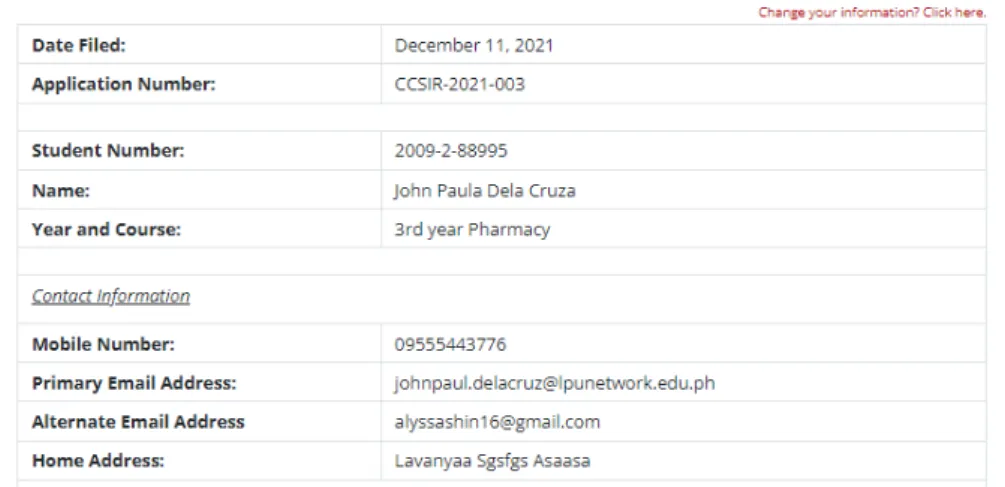
All students who are expected to do an internship next semester must first register their details in the system. After registration, the login details are sent to the student's Office365 account, which is used to log into the system. Once the student confirms participation in the introduction, he/she can proceed with the application for the internship by submitting his/her details and the necessary documents.
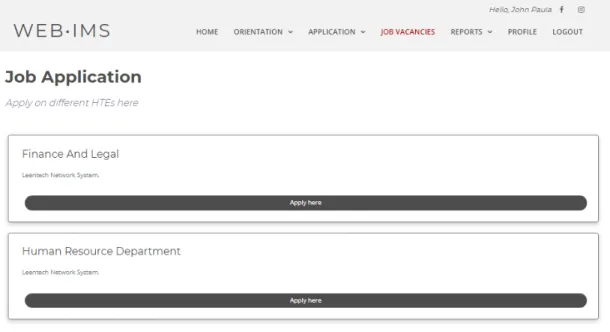
The job application module allows the student to choose from job postings from the accredited host educational institutions that suit the student's program. Students are allowed to apply for various job applications, but it is the employer's discretion to approve it or not. This module gives the students the opportunity to download the internship templates that they need throughout the internship.
Manager / Head of the Center
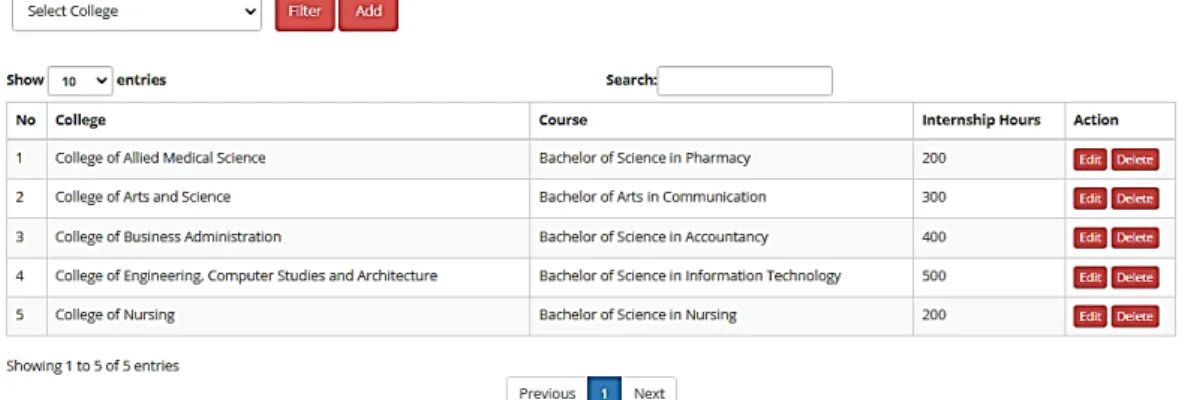
Relatively, this function allows the administrator to pass the data that is allowed to be added from the student's application with the corresponding number of hours. The required fields for this feature help the manager and staff describe the credit to be taken from the application. This module is shown to both the manager and staff of the student guidance planning center, which is the first part of the internship process.
Description of the templates to be uploaded are required fields for this template management function. Details required include the HTE's basic information, terms of the contract and the uploaded Memorandum of Agreement. The figure shows the sample registration form of the HTE to be included in the pool of accredited HTEs displayed in the system.
Once the HTE information is registered in the system, the manager will now create the account credentials of each HTE staff, which is also required to register in the system. The previous picture shows the employer's application form, which contains his basic information and the company he is associated with. This module is similar to the Student Management module (Figure 17), except that it only displays a list of users whose role is University staff/employees.
The staff of the Center
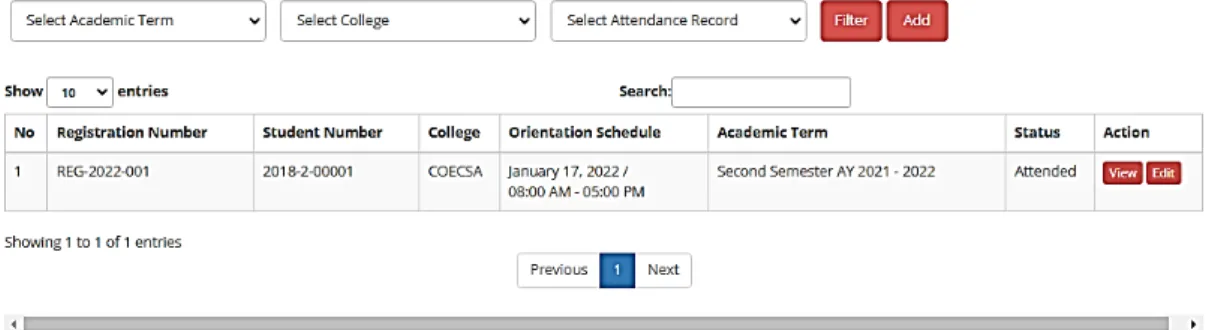
This module will simply allow staff to view the orientation attendance status of a particular student if there is a need to counter. It also gave staff permission to bypass the student's attendance should there be a need to mark its attendance with a proper apology from the student. Unlike the previous module, this function is necessary for the center's approval of whether the submitted documents and information conform to the standard and comply with the policies.
Once the manager has already assigned your account to a specific section or program, the user for this role can now view the students listed on the class list to check their internship status.
Host Training Establishment
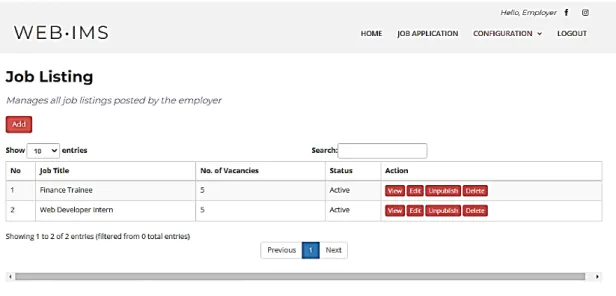
The previous figure shows their active job lists along with the number of applications – approved, pending and rejected – for easier monitoring. Even in this feature, HTE can approve or reject the application based on the information and questions provided.
System Administrator