
DEVELOPMENT OF AN ONLINE NEWS PORTAL: NARAYANGANJ TODAY BY
Mohammad Sagar Raihan ID: 151-15-5261
Department of Computer Science & Engineering
This Report Presented in Partial Fulfillment of the Requirements for the Degree of Bachelor of Science in Computer Science and Engineering
Supervised By Md. Tanvir Rahman
Senior Lecturer Department of CSE
Daffodil International University Co-Supervised By
Farzana Akter
Lecturer
Department of CSE
Daffodil International University
DAFFODIL INTERNATIONAL UNIVERSITY
ASHULIA, SAVAR, BANGLADESH MARCH, 2019
©Daffodil International University ii
APPROVAL
This Project titled “Development of an Online News Portal: Narayanganj Today”, submitted by Mohammad Sagar Raihan ID: 151-15-5261 to the Department of Computer Science and Engineering, Daffodil International University, has been accepted as satisfactory for the partial fulfillment of the requirements for the degree of B.Sc. in Computer Science and Engineering (BSc) and approved as to its style and contents. The presentation has been held on *date*.
BOARD OF EXAMINERS
(Name) Chairman
Designation
Department of CSE [Font-12]
Faculty of Science & Information Technology Daffodil International University
(Name) Internal Examiner
Designation
Department of CSE
Faculty of Science & Information Technology Daffodil International University
(Name) External Examiner
Designation
Department of --- Jahangirnagar University
©Daffodil International University iii
DECLARATION
I hereby declare that, this project has been done by me under the supervision of Md. Tanvir Rahman,Senior Lecturer, Department of CSE Daffodil International University. I also mandate that no degree or diploma has been given to either this or any part of this project somewhere else.
Supervised by:
Md. Tanvir Rahman Senior Lecturer Department of CSE
Daffodil International University Co-Supervised by:
Farzana Akter Lecturer
Department of CSE
Daffodil International University
Submitted by:
Mohammad Sagar Raihan ID: 151-15-5261
Department of CSE
Daffodil International University
©Daffodil International University iv
ACKNOWLEDGEMENT
First we express our heartiest thanks and gratefulness to almighty God for His divine blessing makes us possible to complete the final year project/internship successfully.
We really grateful and wish our profound our indebtedness to Tanvir Rahman, Senior Lecturer, Department of CSE Daffodil International University, Dhaka. Deep Knowledge
& keen interest of our supervisor in the field of “ DEVELOPMENT OF AN ONLINE NEWS PORTAL: NARAYANGANJ TODAY” to carry out this project. His endless patience, scholarly guidance, constant and energetic supervision, constructive criticism, valuable advice, reading and correction of many of the lesser draft have enabled this project at all stages to be completed.
I want to thank Farzana Akter, Lecturer of the department of CSE at Daffodil International University for her kind help in completing our project, as well as other faculty members, and the staff of CSE.
We would like to thank our entire course mate in Daffodil International University, who took part in this discuss while completing the course work.
Finally, we must acknowledge with due respect the constant support and patients of our parents.
©Daffodil International University v
TABLE OF CONTENTS
SL No. Particular Page
No.
Title Fly
i
Approval
ii
Declaration
iii
Acknowledgement
iv
1. Introduction 1-2
1.1 Introduction 1
1.2 Objective of the Study 1
1.3 Development Methodology 1
1.4 Tools 1
1.5 Website Process Model 2
2. System Analysis 3-7
2.1 Organization of the Project 3
2.2 Programming Language 3
2.3 Development Models 4
2.3.1 Water fall Model 4
2.3.2 Prototype Model 5
2.4 Software Testing 7
3. Software Planning & Design 8-9
3.1 Data gathering 8
3.1.1 Documentation 9
3.1.2 Data Flow Diagram 9
4. System Front End Design 12-14
4.1 System Design 12
4.1.1 Use Case Diagram 12
4.1.2 ER-Diagram of Narayanganj Today 13
4.2 Before Start Deign 14
4.2.1 Hardware Requirements 14
4.2.2 Software requirements 14
5. Task Project & Activities 15-26
©Daffodil International University vi
5.1 Activities of the System Development 15
5.1.1 User Specification 15
5.1.2 Admin Pannel 24
5.1.3 Files and Database 26
6. Goals and Limitation of News Portal 27-27
6.1 Goals 27
6.2 Limitations 27
6.3 Future Scope 27
Conclusion 28
References 29
©Daffodil International University vii
List of Figure
SL No. Particular Page
Figure 2.1 Waterfall Model 4
Figure 2.2 Prototype Model. 6
Figure 3.1 Circle. 9
Figure 3.2 Arrow. 9
Figure 3.3 Square. 9
Figure 3.4 Open Rectangle. 10
Figure 3.5 A data flow diagram of Online News Paper of the User &
Admin.
10
Figure 3.6 Sequence Diagram(Admin) 11
Figure 3.7 Sequence Diagram(User) 11
Figure 4.1.1 Use Case Diagram 12
Figure 4.1.2 ER- Diagram 13
Figure 5.1 Home Page. 16
Figure 5.2 Political Page 17
Figure 5.3 International Page. 17
Figure 5.4 National Page 18
Figure 5.5 Sports (Cricket) Page 18
Figure 5.6 Sports (Football) Page 19
Figure 5.7 Entertainment Page 19
Figure 5.8 Entertainment Page 20
Figure 5.9 District News Page 20
Figure 6.0 Feature News Page 21
Figure 6.1 Literature New Page 21
Figure 6.2 Others News Page 22
Figure 6.3 bottom navigation bar 22
Figure 6.4 About US 23
Figure 6.5 Articles sending Process 23
Figure 6.6 Contact Us Page. 24
Figure 6.7 Admin Panel. 25
Figure 6.8 Admin Panel Home Page. 25
Figure 6.9 Files and Database 26
©Daffodil International University viii
List of Abbreviation
ICT- Information Communication and Technology CSS- Cascading Style Sheets
PHP- Hypertext Preprocessor SQL- Structured Query Language DFD- Data-Flow diagram
RAM- Random Access Memory HTML- Hyper Text Markup Language ODBC- Open Database Connectivity ERD- Entity Relationship Diagram
©Daffodil International University ix ABSTRACT
IngeniumBD is one of Bangladesh's reputable IT companies. The project's main objective is to develop a website for the news management. The portal offers a convenient and easy view to learning or knowing the world for the largest population in the world. It is a daily that produces crowds. The idea is to send your news item with your web-based gadget, which the administrator responsible for the mass visualization in the editor panel is responsible for. The portal was created using HTML, PHP & CSS and SQL Server technology.
Chapter One Introduction 1.1 Introduction
Now-a-days we live in age of Information Communication and Technology (ICT). We can’t think a single moment without technology. We need technology help from morning to night. This is the computer technology's revolutionary time. Most of the works are web- based. That's why anyone can access a website at low cost anytime, anywhere, and we can find our expected and most updated website information. Currently, information is one of the world's most valuable resources. We've developed our project to make people aware of it.
1.2 Objective of the Study
The objective of this project is to develop a web application for Online News Paper website that can aware the people
The objective of this project is to provide the daily news.
The objective of this project is to provide the breaking news.
It makes use of various technologies to get required crime oriented information more quickly, easily, colorfully and attractively.
To do this for more widely coverage of distribution and faster dissemination of information in a more timely manner.
Anytime, anywhere, anyone can know about the news or information by internet at low
1.3 Development Methodology
A simple Web development life cycle will be followed. This website will be developed sing the Object Oriented Technology. This would help us for the future expandability as well as increase the robustness of the website. After these modules have been incorporated this website would be very easier to add additional modules in future.
1.4 Tools
The website has been developed on the latest relational database system technology Microsoft Access and Visual Basic 6.0
©Daffodil International University 2 Website name: Narayanganj today
Front End: html, CSS, Laravel Back End: Database Microsoft SQL
1.5 Website Process Model
The website design and development process involves numerous steps. From collecting initial information, creating our website, and finally maintaining our website to keeping it up to date and up-to-date. The exact process varies slightly from designer to developer, but the fundamentals are the same. Information Gathering
Planning
Design
Development
Testing and Delivery
Maintenance
©Daffodil International University 3
Chapter Two System Analysis
2.1 Organization of the Project
In this project we have develop an Online News Paper website. It is a dynamic system. It can be maintain and changed easily because it is based on database. It includes web pages which are produced in real time. These pages include Web scripting code, such as PHP. It is fully secured from unauthorized access. In a word it can say that our Online News Paper website is a completely dynamic website [1].
To create the software, we have worked on all possible types of basic codes used for principle design based on mainly on PHP, CSS and HTML. Here we have used incremental model to create the software. We have collected all kinds of information related to this software from the customer. Actually it is one kind of Customized software products.
The project background model specially designed on the basis of certain web programming language like PHP, MYSQL, CSS etc. In following section here, we are going to give a brief description about this language in this project [1].
2.2 Programming Language [9]
PHP
PHP stands for PHP: Hypertext Preprocessor
PHP is a server-side scripting language, like ASP
PHP scripts are executed on the server
PHP supports many databases (MYSQL, Informix, Oracle, Sybase, Solid,
Generic ODBC, etc.)
PHP is an open source Software
PHP is free to download and use
©Daffodil International University 4 MYSQL
MYSQL is a database server
MYSQL is ideal for both small and large applications
MYSQL supports standard SQL
MYSQL compiles on a number of platforms
MYSQL is free to download and use CSS
Cascading Style Sheets (CSS)
Simple mechanism
Easy for adding style (e.g., fonts, colors, spacing) to Web documents.
2.3 Development Models
There are some Software Process Models these are listed below—
Waterfall model.
Prototype model.
2.3.1 Water fall Model
As far as software development process models are concerned, the waterfall model is probably the oldest and best known model. As important as its role in software testing is the role of the waterfall model in software engineering. Of course, there are a number of other software process models that have been designed and implemented over the years, but what's true is that many of them (in some way or the other) are based on the waterfall model's fundamental principle. [1,2,9].
On that note, let us examine the waterfall model in detail
©Daffodil International University 5 Figure 2.1: Waterfall Model
Advantages of waterfall model:
Simple and usable to reflect.
Easy to manage, because of the rigidity of the model – each phase has specific results and an examination process.
Taking phases one at a time are processed and finished.
Works well on minor projects with very well - understood requirements.
Disadvantages of waterfall model:
When an application is at the testing stage, something that is not well thought out during the concept phase is very difficult to reverse and to change.
Too late in the life cycle no software is produced.
To High risk and insecurity quantities.
Not a good model for complex projects with a focus on objects.
There Poor model for ongoing and protracted projects.
Not suitable for projects where there is a moderate to high risk of change in requirements.
Up The project is short.
©Daffodil International University 6
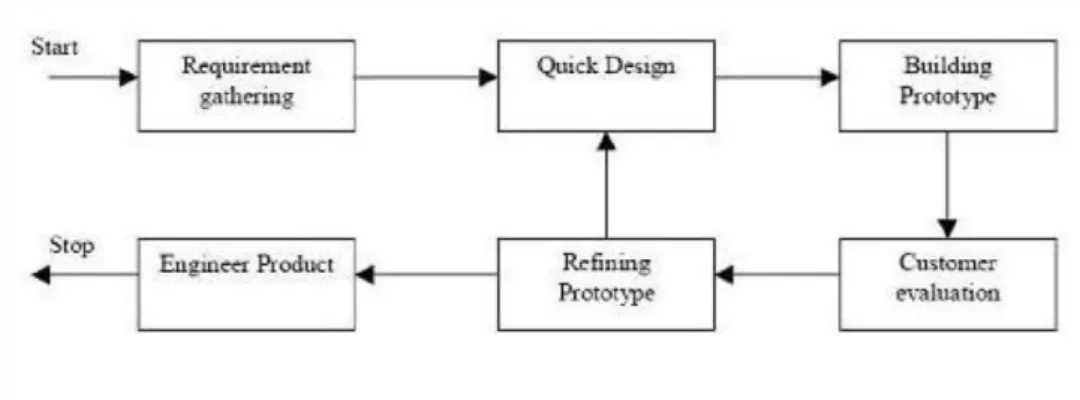
Figure 2.2: Prototype Model.
2.3.2 Prototype Model
The basic idea here is to construct a throwaway prototype to understand the requirements instead of freezing the requirements before a design or coding can proceed. This prototype is developed on the basis of the requirements currently known. The client can get an "actual feel" of the system by using this prototype, as the interactions with the prototype can allow the client to better understand the system requirements. Prototyping is an attractive idea for complicated and large systems to help determine the requirements for which there is no manual process or existing system. The prototypes are not generally complete systems and many of the details are not included in the prototype. [1,2,10].
©Daffodil International University 7
Benefits of Prototype model:
Although this analysis provides a working model of the system, users get a better understanding of the system that is being developed. It is possible to detect errors much earlier.
Quicker user feedback for better solutions is available.
Missing functionality can be easily identified to identify any confusing or difficult function.
Validation of requirements, Quick implementation of application, incomplete but functional.Adverse effects of Prototype model:
Leads the implementation and repair of construction systems.
Practically speaking, this methodology may increase the system's complexity as the system's scope may extend beyond the original plans.
Incomplete application may cause application not to be used as the complete system has been designed.
When to use Prototype model:
Prototype model should be used when the desired system needs to have a lot of interaction with the end users.
Typically, online systems and web interfaces have an excessive number of interactions with end users. A system that allows easy use and requires minimal training for the end user may take sometime to be built.
Prototyping ensures that the end users constantly work with the system and provide a feedback which is incorporated in the prototype to result in a useable system. They are excellent for designing good human computer interface systems.
©Daffodil International University 8
2.4 Software Testing
Software testing process for running a program to detect errors in a program makes it possible to find the errors (which are presumed to occur) in a program. Because the process is destructive. We use the software testing process to develop our project [9,15].
©Daffodil International University 9
Chapter Three
Software Planning & Design
After our departments have approved the feasibility report we tried to understand the system proposed by studying the different operations carried out with the system in detail. System analysis is the study of an existing system to determine its functioning and how it meets the requirements of the user. System analysis provides the basis for system improvements. The analysis includes a study that usually involves establishing a connection with the client and the user of the system for whom the analysis is performed. More of a thinking process, this analysis phase. At this stage the logical aspects of the system have been improved [17].
We have to consider a key question in order to develop the system, "What should be done to solve this problem? 1,2] In this phase, we studied system processes, collected operational data, understand the flow of information, identified weaknesses and developed systems for overcoming system weaknesses in order to achieve the objectives.
We have dealt with this during the analysis phase:
Data gathering
Data analysis
3.1 Data gathering
To complete this project, our supervisors, our respective teachers, friends, students of the department and the Internet first collected necessary data or information. It was difficult, because we have a unique system that does not have the necessary data[9]. It was also costly and took a lot of time and work. We have used certain sources to collect information:
Documentation
&
Onsite observations
©Daffodil International University 10
3.1.1 Documentation
During data gathering we searched related information in Google. We found various procedures, manual, reports, create account forms, loan request form, and many other materials but all information was difficult to assess. We spend lot of time by reading manual or reports.
3.1.2 Data Flow Diagram
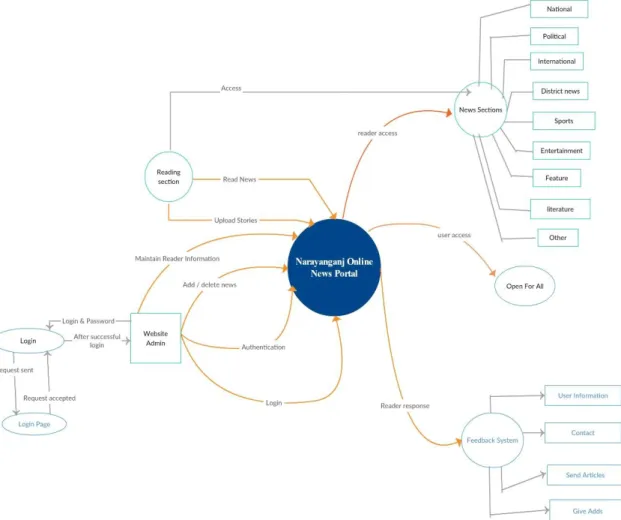
A data flow diagram represents the way data moves through the existing system in a short way. In the design process, we used data flow diagram. The data flow chart makes communication between us and the user easier. DFD displays the type of information to and from the system, the location from which the data is sent and to and the location of data. The information on process timing and on whether processes are running sequentially or in parallel does not appear [11].
Circle
The processes are represented by circle shows what the action take on the data- checking.
A process accepts input data needed for the process to be carried out and produces data that it passes on to another part of the DFD.
Figure 3.1: circle.
Arrow
Arrow defines direction of the data flow. It shows the direction between a data store to another data store, source to processes.
Figure 3.2: Arrow.
Square
Square indicate the source and destination of the system.
Figure 3.3: Square.
Open Rectangle
©Daffodil International University 11 A database is a repository of data here it represented by open-ended box. This information may be stored either temporarily or permanently by admin .Data may be changed or updated.
Figure 3.4: Open Rectangle.
Data flow diagram of Online News Paper for the Admin & User:
Figure 3.5: A data flow diagram of Online News Paper for the Admin & User.
©Daffodil International University 12
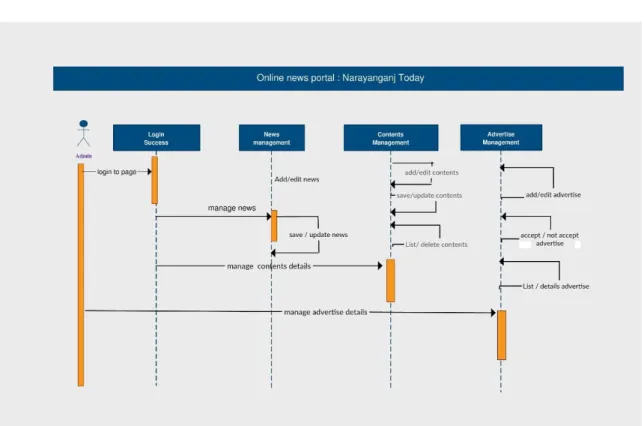
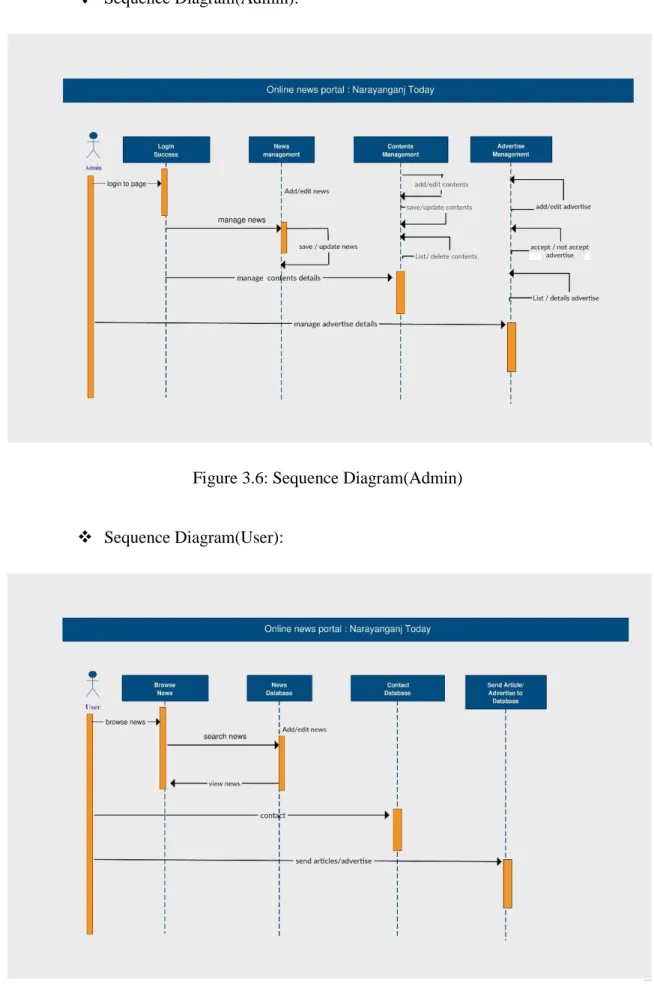
Sequence Diagram(Admin):
Figure 3.6: Sequence Diagram(Admin)
Sequence Diagram(User):
Figure 3.7: Sequence Diagram(User)
©Daffodil International University 13
Chapter Four
System Front End Design
Based on system analysis, the system is built to comply with the user requirements. We move from logical to physical aspects in system design. The requirements identified in the requirements analysis phase are converted into a system design document that accurately describes the system design and can be used in the next stage as an entry in the system development. We have to consider a key question during the design phase: "How should the problem be alleviated?
4.1 System Design
The system design is the most creative and challenging. The system design document describes system requirements, operational environment, system and subsystem architecture, data and files and design, input formats, output layouts, human-machinery interfaces, detailed design, logical processing and external interfaces. [9].
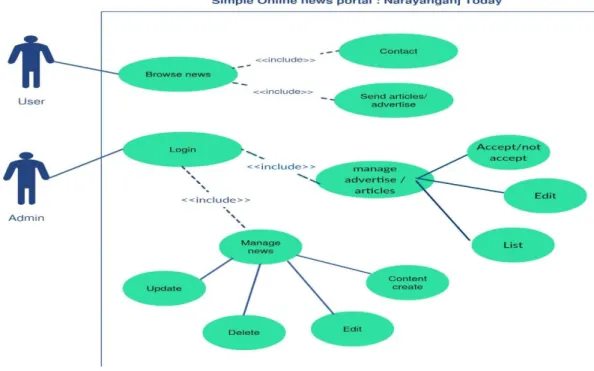
4.1.1 Use Case Diagram
Fig 4.1.1: Use Case Diagram
©Daffodil International University 14
4.1.2 ER-Diagram of Narayanganj Today
Fig 4.1.2: ER-Diagram of Narayanganj Today news portal
©Daffodil International University 15
4.2 Before Start Deign
To make web application for Online News Paper website it is need to select a standard PC that can support XAMPP [1][2].
4.2.1 Hardware Requirements
XAMPP Software installs on a standard PC system. Minimum Hardware Requirements are as follows:
Processor–Celeron(R)Dual–Core [email protected] 1.90 GHz;
Installed Memory (RAM) – at least 350 MB;
System type-32/64 bit Operating System;
Resolution-1080/720;
4.2.2 Software requirements
XAMPP
The Apache distribution with MySQL, PHP and Perl can be easily installed in XAMPP.
The XAMPP can be installed and used very easily - download, extracting and starting.
The distribution for Windows 2000, 2003, XP, Vista, 7, 8 and 10. This version contains:
Apache, MySQL, PHP + PEAR, Perl, mod_php, mod_perl, mod_ssl , php My Admin, Webalizer, Mercury Mail Transport System for Win32 and NetWare Systems v3.32, Ming, FileZilla FTP Server, mcrypt, SQLite, and WEB-DAV + mod_auth_mysql.
Apache 2.4.4
MySQL 5.5.32
PHP 5.4.16
phpMyAdmin 4.0.4
Strawberry Perl 5.16.3.1 Portable
Programming Language
HTML
CSS
Jquery
Raw PHP
©Daffodil International University 16
MySQL
Chapter Five
Task Project & Activities
5.1 Activities of the System Development
We divided system development phase’s activities into three categories. These provide components of the program development phase and include a listing of programs required to achieve the system targets and complete documentation We have 3 types of specifications in order to complete our system development. [10].
These are:
User specification.
Admin specification.
Files and database.
5.1.1 User Specification
The proposed systems are physically developed in this stage. User specification or output specification provides the proposed system goals. User specification stage fulfilled the user need by preparing building blocks of the system .User specification are developed by based on output design. It provides total outlook of the system and offer various features for user [4,18].
©Daffodil International University 17 Image of Home Page:
Figure. 5.1: Home Page [5].
©Daffodil International University 18
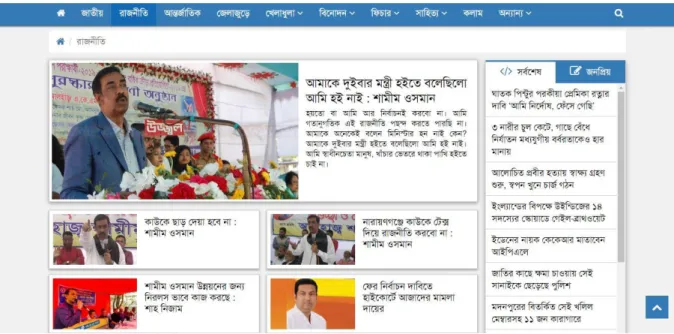
Image Online News Paper Political Page [16]:
Figure 5.2: Political Page.
Online News Paper International Page:
Figure 5.3: International Page [17].
©Daffodil International University 19
Online News Paper National Page:
Figure 5.4: National Page.
Online News Paper Sports Page:
a) Cricket
Fig: 5.5 Sports (Cricket) Page
©Daffodil International University 20
b) Football
Fig: 5.6 Sports (Football) Page
©Daffodil International University 21
Image of Entertainment Page:
Figure: 5.7: Entertainment Page
Figure. 5.8: Entertainment Page.
©Daffodil International University 22
Image of District News of BD:
Figure: 5.9: District News Page
©Daffodil International University 23
Image of Feature Page:
Figure: 6.0: Feature News Page Image of Literature News Page:
Figure 6.1: Literature New Page.
©Daffodil International University 24
Image of Others News Page:
Fig 6.2: Others News Page Image of bottom navigation bar
Fig 6.3: Bottom navigation bar
©Daffodil International University 25
Image of About US
Fig 6.4: About US Image of articles sending Process
Fig 6.5: Articles sending Process
©Daffodil International University 26
Online News Paper Contact Us Page
Fig 6.6: Contact Us Page.
5.1.2 Admin Specification
This is the input panel of the Online News Paper. We have developed this panel so that we can dynamically control the Online News Paper. It is fully secured system. Without being admin or knowing user name and password no one can access it. It is fully protected from unauthorized access [5,7].
©Daffodil International University 27
Image of Admin Panel:
Fig 6.7: Admin Panel.
Image of Admin Panel Home Page:
Fig 6.8: Admin Panel Home Page.
©Daffodil International University 28
5.1.3 Files and Database
We have stored all data in database so that we can dynamically edit, delete all the data [8].
Files and Database:
Fig 6.9: Files and Database
©Daffodil International University 29
Chapter Six
Goals and Limitation of News Portal
6.1 Goals
Easy to access news about Domestically and Internationally
Time to time make update news worldwide
Increases the effectiveness of the day by day news.
6.2 Limitations
Limitations The current system has certain limitations, to which solutions as a future development can be provided:
We don’t manage news reporting system.
Searching system is not more flexible.
Sensibility level could not add.
We didn’t develop the site of advertisement
6.3 Future scope
The future scope of our project is valuable. Our project time duration was only one years. In this time interval we developed our project. It was very difficult to complete project within this time duration. In future if we get chance we will develop this website for large volume. As for other future developments, the following can be done:
We will manage news reporting system.
We can make video conferencing system.
We update our database.
We can Make Searching system more flexible.
Sensibility level could add be added.
©Daffodil International University 30
Conclusion
Online News Portal Narayanganj Today provides the benefits of slick operations, enhanced administration and control and improved profitability. The website increases profits and reduces costs considerable by handling information in an efficient and effective way. It reduces manpower and increases the efficiency of the daily news, maintain data consistency and store the details of viewer information. Main benefits of this project is that it can maintain the whole system very easily and effectively. It also provides proper security of the database and maintains the integrity of the data. In near future, the website will be offline newspaper for the purpose of easy and effective use and cans be marketed commercially for the purpose of proper benefits.
©Daffodil International University 31
References
[1] Ian Sommerville, System Analysis and Design (Dorling kindersley Pvt.Ltd., India, ed.3,2007), pp.12-19. [Eight Edition].
[2] Ian Sommerville: Software Engineering, Eighth Edition (ISBN 13: 978-0-321- 31379-9, ISBN 10:
0-321-31379-8).
[3] online news portal. Available: http://www.google.com/
[4] online news portal. Available:http://www.wikipedia.com [5] online news portal. Available: http://www.prothom-alo.com [6] online news portal. Available: http://www.amardeshonline.com [7] online news portal. Available:http://www.samakal.net -
[8] Web Development of portal. Available: http://tutorialponits.com
[9] Fundamental of Web Development. Available: http://www.webcoachbd.com
[10] Fundamentals of Software Engineering, Rajiv Mall, New Delhi: PHI Learning limited, 2003 [11] Paul Nielsen, SQL Server 2005 Bible. Paul Nielsen, New Delhi: Wiley, 2006
[12] CARINA IHLSTRÖM; MARIA ÅKESSON; an STIG NORDQVIST (2004-07-07). "FROM PRINT TO WEB TO E-PAPER — THE CHALLENGE OF DESIGNING THE E-NEWSPAPER" (PDF).
[13]HTML, and CSS Bible. Bill Karow, Chuck White, Steven M. Schafer Bryan Pfaffenberger, New York: Wiley 2004
[14]http://en.wikipedia.org/wiki/Software_engineering
[15] Schultz, Tanjev (1999). "Interactive Options in Online Journalism: A Content Analysis of 100 U.S.
Newspapers". Journal of Computer-mediated communication.
[16] "News, Politics, Business, Tech and the Arts on Arabian Post - International Post". International Post.
[17] Barthel, Michael (2016-06-15). "Newspapers: Fact Sheet". Pew Research Center's Journalism Project. Retrieved 2016-10-10.
[18] Newman, N., & Levy, D.A.L. (2013). Reuters Institute Digital News Report 2013. Reuters Institute for the Study of Journalism, University of Oxford.
![Figure 5.3: International Page [17].](https://thumb-ap.123doks.com/thumbv2/filepdfnet/10974678.0/28.892.108.786.620.946/figure-5-3-international-page-17.webp)


