This project entitled "ANALYSIS OF HR MODULE FOR ERP SYSTEM", submitted by Meherun Nessa Ferdausi to the Department of Computer Science and Engineering, Daffodil International University, has been accepted as satisfactory for the partial fulfillment of the requirements for the degree of B.Sc . . Department of Computer Science and Engineering Faculty of Natural Sciences and Information Technology Påskelilje International University. We hereby declare that this internship has been conducted by us under the supervision of Mohammad Anisur Rahman, Assistant Professor, Department of CSE Daffodil International University.
Syed Akhter Hossain, Professor and Head and all faculty members, Department of CSE, Daffodil International University for their valuable time spent on needs analysis and evaluation of the internship. I would also like to thank our team mate who worked with me in Advanced ERP (BD) Ltd. To be successful in business, every organization should run through an effective system like the ERP system. The ERP system automates organizational activity with an integrated software application and facilitates the flow of information between all business functions within the boundaries of the organization and also manages the connections.
So to expose myself to practical work with ERP system to gain more confidence and strengthen my knowledge about this effective system, I completed my internship in Advanced ERP (BD) Ltd. Human Resources in ERP system allows you to compare and analyze the features, functions, functions, and services of various enterprise software solutions.
1-2
- Background
- Problem of the existing system
- Internship Goal
- Methodology and Tools
- Conclusion
We face the real problem in the case of a customer because we are not aware of this before. That is why we try to create a solution for them with the ERP system that makes it easier for them. In this modern era, the development of modern science and technology is growing too fast.
We are trying to make a system that can make an organization more efficient and help their customer with flexible communication. And how much an organization is flexible to the demand of their customers and this is a great fact to make the business successful. For this purpose, we want to make proper use of an ERP system that makes an organization more effective and also automated.
It also provides a clear insight into the internship background, problems and solutions to them. After reading this chapter you can easily get an idea about our ERP System Internship.
3-5
- Company Profile
- Vision Statement
- Team Organization
- State-Of-The-Art Products
- Customer’s Satisfaction
- Products
- Conclusion
- Introduction
- Implementation of ERP System
- ERP modeling
- Advantages of ERP System
- Conclusion
Enterprise Resource Planning (ERP) systems integrate internal and external management information across an entire organization that includes finance/accounting, manufacturing, sales and service; customer relations, etc. [5]. ERP systems automate this activity with an integrated software application. Their purpose is to facilitate the flow of information between all business functions within the organization's boundaries and manage relationships with external stakeholders. The basic information of the ERP system is the relevant information about the company's resources, including material, facility, human resources and funds, etc.
ERP modeling is done by analyzing the option within an ERP system to identify the various system functions needed by the end company, in relation to its organizational structure. Which high-level functional areas throughout the system Once a high-level ERP system option is selected for use within the organization, the selection cannot be undone. An ERP system facilitates the flow of information between all business functions within the organization and links with external stakeholders such as customer and supplier systems.
The main goal of implementing an ERP system is to bring together the diverse functions of the organization into one system environment and thereby make operations more efficient. The need for speed and flexibility is just one byproduct of the Internet age.
11-19
- Hypertext Markup Language (HTML)
- Introduction
- Markup
- Elements
- Data types
- Sitemap
- Overview of Sitemap
- Types of Sitemap
- The Importance of Sitemaps
- My Created Site Map
- Microsoft office Visio
- Features
- File format
- Flowchart
- Overview
- Use of Flowchart
- Types of flowchart
- My Created Flow Chart
A sitemap is a visually or textually organized model of a website's content that helps users navigate the site to find the information they are looking for, just as a traditional geographic map helps people find places they are looking for in the real world to search. world. Sitemaps from smaller sites can include every page of the website, while sitemaps from larger sites often only include pages for the main categories and subcategories of the website [10]. Although sitemaps can be organized in different ways, most use an overview form, with pages organized by topic. Although a well-designed website should allow visitors to navigate the entire site without using the sitemap, including a sitemap gives users another way to locate pages.
For this reason, each page listed on a sitemap is typically linked to the page it represents. This allows visitors to quickly jump to any section of a website listed on the sitemap. This is a definition of "site map". A site map is a visual or textual organized model of a website's content that allows users to navigate through the website to find the information they are looking for, just as a traditional geographic map helps people find places they are looking for in real life world.
Sitemaps perform the same service as the layout maps in large shopping centers perform: without them it is possible to explore a complex site by trial and error, but if you want to be sure of finding what you are looking for, the efficient way to do it on is to consult a model of the available resources [11]. If a site is small and uncomplicated, a sitemap may not be necessary, just as a layout map may not be required for shoppers to find their way through small malls. This means that users are able to understand the purpose and theme of the page while also finding the necessary content.
So the site is more likely to be indexed and ranked on the search engine results pages (SERPs). Flowcharts represent certain aspects of processes and are usually supplemented with other types of diagrams. For example, Kaoru Ishikawa defined the flowchart as one of the seven basic quality control tools, along with the histogram, Pareto chart, control sheet, control chart, cause-and-effect diagram, and scatterplot.
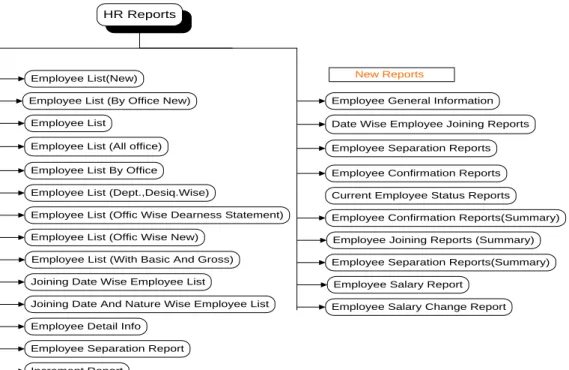
Modern techniques such as UML activity diagrams can be considered extensions of the flowchart. In the 1970s, the popularity of flowcharts as a separate method declined as interactive computer terminals and third-generation programming languages became common tools of the trade, since algorithms can be expressed much more concisely as source code in such a language, and also because designing algorithms using flowcharts were more likely to result in spaghetti code due to the need for gotos to describe arbitrary jumps in the control flow. Employee General Information Date Wise Employee Enrollment Reports Employee Separation Reports Employee Confirmation Reports Current Employee Status Reports Employee Confirmation Reports (Summary) Employee Joining Reports (Summary) Employee Separation Reports (Summary).
![Figure 4.1: A flowchart for Lamp, adapted from [13]](https://thumb-ap.123doks.com/thumbv2/filepdfnet/10926395.0/30.893.217.678.108.437/figure-4-1-flowchart-lamp-adapted-13.webp)
23-58
Introduction
Definition
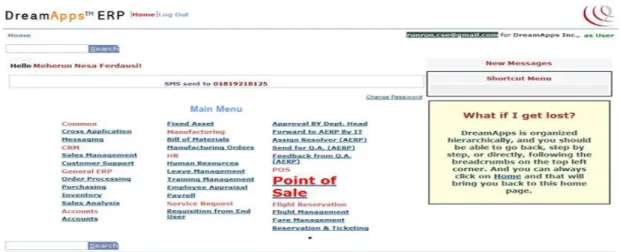
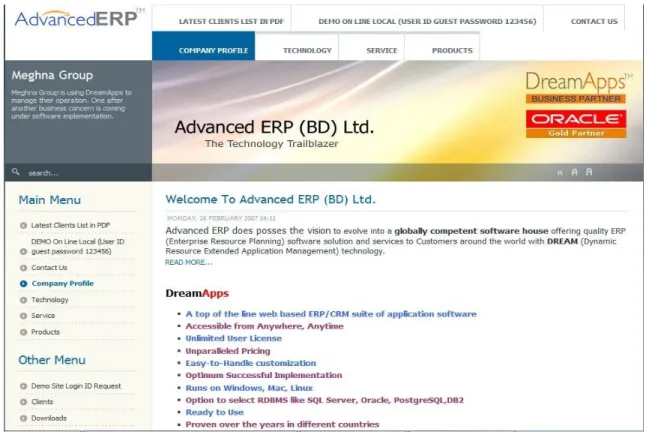
ERP system Home Page
In this option, the salary increase history will be displayed for the employee in the company. In this list you will display the general information about every employee in the company. This list will show the office payslip for the employee in the company XX) Payroll (Top page for Netkontor).
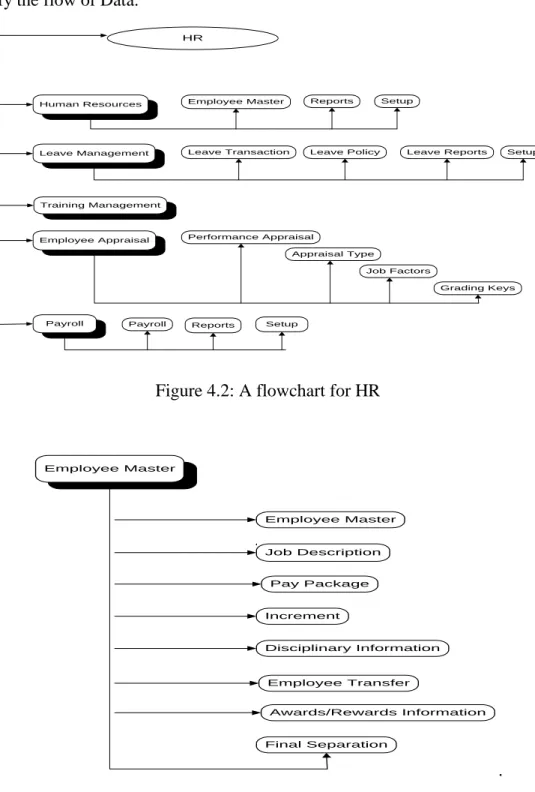
HR
Human Resource
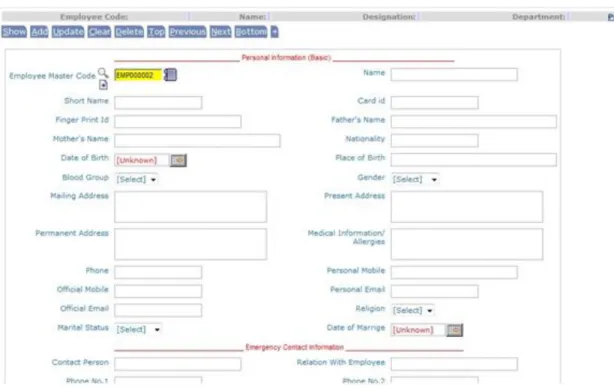
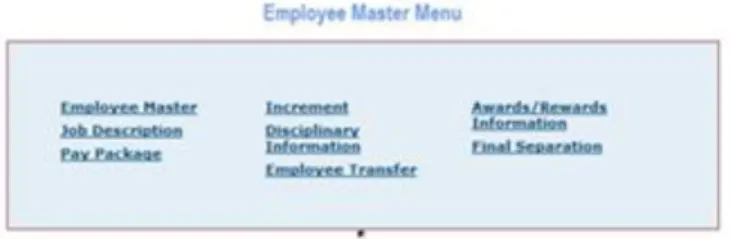
- Employee Master
- a) Employee Master
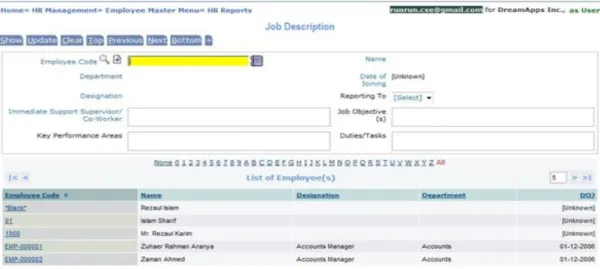
- b) Job description
- c) Pay Package
- d) Increment
- e) Disciplinary Information
- f) Employee Transfer
- g) Awards/Rewards Information
- h) Final Separation
- Report
- a) Employee List (New )
- b) Employee List (By Office New)
- c) Employee List
- d) Employee List (All Office)
- e) Employee List By Office
- f) Employee List (Dept., Desig.Wise)
- g) Employee List (Offic Wise Dearness Statement)
- h) Employee List (Offic Wise New)
- i) Employee List (With Basic And Gross)
- j) Joining Date Wise Employee List
- k) Joining Date And Nature Wise Employee List
- l) Employee Detail Info
- m) Employee Separation Report
- n) Increment Report
- o) Employee General Information
- p) Date Wise Employee Joining Reports
- q) Employee Separation Reports
- r) Employee Confirmation Reports
- s) Current Employee Status Reports
- t) Employee Confirmation Reports (Summary)
- u) Employee Joining Reports (Summary)
- v) Employee Separation Reports (Summary)
- w) Employee Salary Report
- x) Employee Salary Change Report
- Setup
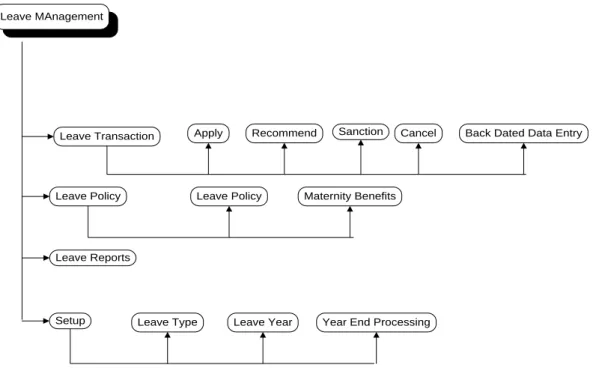
- Leave Management
- a) Leave Transaction
- b) ) Apply
- c) Recommend
- d) Sanction
- e) Cancel
- f) Back Dated Data Entry
- Leave Policy
- a) Leave Policy
- b) Maternity Benefits
- Leave Reports
- Setup
- a) Leave Type
- b) Leave Year
- c) Year End Processing
- Employee Appraisal
- a) Performance Appraisal
- b) Appraisal Type
- c) Job Factors
- d) Grading Keys
- Payroll
- a) Payroll
- b) Payroll Reports
- c) ) Payroll Setup
60-62
13] Flowchart, http://www.breezetree.com/articles/what-is-a-flowchart.htm, last accessed: October 16, 2012.
![Figure 3.1: ERP System, Taken Form [2]](https://thumb-ap.123doks.com/thumbv2/filepdfnet/10926395.0/19.893.175.714.110.401/figure-3-1-erp-system-taken-form-2.webp)