©Daffodil International University
CREATIVE ACADEMY
Submitted by
MONIRUL ISLAM AKAND ID: 171-35-1812
Department of Software Engineering Daffodil International University
Supervised by
Asif Khan Shakir Lecturer (Senior Scale) Department of Software Engineering Faculty of Science & Information Technology
Daffodil International University
Fall – 2020
This project (SWE 431) submitted in fulfillment of the requirements for the degree of BSc in Software Engineering
Copyright© 2021 by Daffodil International University
i ©Daffodil International University
APPROVAL
This project titled “Creative Academy” submitted by Monirul Islam Akand, ID: 171-35-1812 to the department of Software Engineering, Daffodil International University has been accepted as appeasement for the partial fulfillments for the requirements of the degree of B.Sc. in Software Engineering and approved as its style and contents.
ii ©Daffodil International University
DECLARATION
I hereby declare that this project has been done by me under the supervisor of Asif Khan Shakir, Lecturer (Senior Scale), Department of Software Engineering, Daffodil International University. I further declare that this project or any part of this project has not been submitted elsewhere for obtaining a degree.
Supervised by:
___________________________
Asif Khan Shakir Lecturer (Senior Scale)
Department of Software Engineering
Faculty of Science and Information Technology Daffodil International University
Submitted by:
___________________________
Monirul Islam Akand ID: 171-35-1812 Batch: 22nd
Department of Software Engineering
Faculty of Science and Information Technology Daffodil International University
iii ©Daffodil International University
ACKNOWLEDGEMENT
At First, I would like to express my sincere thanks and gratitude to Almighty God who enabled me to complete this project successfully.
I would wish to express my wholehearted gratitude to Dr. Imran Mahmud, Associate Professor and Head In-charge, Department of SWE at Daffodil International University and all the staff for their profound support in completing my project.
I am deeply grateful to Asif Khan Shakir, Lecturer (Senior Scale), Department of SWE, Daffodil International University. His constructive critique, valuable advice, many drafts and corrections at all these stages made this project possible because my supervisor had a deep knowledge and interest in web programming.
Lastly, I am grateful to my parents, family members, all teachers and friends for their understanding, encouragement and unwavering support throughout my studies.
iv ©Daffodil International University
ABSTRACT
The "Creative Academy" is a web-based project that will help IT students take classes in IT courses of their choice online. Students can learn about IT courses from home from this platform. In addition, this system will play an important role in the global epidemic of Covid-19 among students. My system will help students to take IT courses of their choice, watch course videos, read blog posts related to the course, and check the problem. Read the necessary documents and above all the course teacher will provide all kinds of support to them. In Bangladesh, this system will only help IT, students to play a major role in acquiring IT course knowledge.
v ©Daffodil International University
Table of Content
APPROVAL …….………. i
DECLARATION ………. ii
ACKNOWLEDGEMENT……… iii
ABSTRACT……….. iv
TABLE OF CONTENTS…….……… v
LIST OF TABLE………. viii
LIST OF FIGURES……… ix
LIST OF ABBREVIATION …….……….. x
CHAPTER 1: INTRODUCTION ………. 01
1.1 Project Overview…….……….. 01
1.2 Project purpose ……….……… 01
1.2.1 Background ……… 01
1.2.2 Benefits & Beneficiaries………. 02
1.2.3 Goal ……… 02
1.3 Stakeholders ……….……… 02
1.4 Proposed system model….……… 03
1.5 Project schedule……….……… 04
1.5.1 Gantt chart……….. 04
1.6 Release Plan………….………. 04
CHAPTER 2: SOFTWARE REQUIREMENT SPECIFICATION ……….... 05
2.1 Functional Requirements……… 05
2.2 Non-Functional Requirement ….……… 10
2.3 Performance Requirements………….……… 10
2.3.1 Speed and Latency Requirements………. 10
2.3.2 Accuracy Requirements……… 11
2.3.3 Capacity Requirements ………..……….. 11
2.4 Dependability Requirements………….………. 11
2.4.1 Relaiablity Requirements………. 11
2.4.2 Availablity Requirements…….………. 12
2.4.3 Maintability Requirements ….……….. 12
2.5 Security Syatem Requirements……….……….. 12
2.5.1 Access Requirements……….……….... 12
2.5.2 Integrity Requirements…….………. 12
2.5.3 Privacy Requirements……….……… 12
vi ©Daffodil International University
2.6 Usability and Human-Interaction Requirements…….………. 13
2.6.1 Ease of use Requirements………... 13
2.6.2 Understand Ability Requirements……….. 13
2.6.3 Accessibility Requirements……… 13
2.6.4 User Documentation Requirements……… 13
2.6.5 Training Requirements………... 13
2.7 Look and Feel Requirements……….………... 14
2.7.1 Apperance Requirements……… 14
2.7.2 Style Requirements………. 14
2.8 Operational and Environmental Requirements….……… 14
2.8.1 Expected physical Requirements………... 14
2.8.2 The Requirements for Interfacing Adjacent System……….. 14
2.9 Legal Requirements……….……… 14
2.9.1 Complience Requirements……… 14
2.9.2 Standard Requirements……….. 14
CHAPTER 3: SYSTEM ANALYSIS ………. 15
3.1 Use case Diagram……….………. 15
3.2 Use Case Description (for each use case)……….………. 19
3.3 Activity Diagram (for each use case)………….……… 42
3.4 Sequence Diagram……….……… 60
CHAPTER 4: SYSTEM DESIGN SPECIFICATION ……… 67
4.1 ER Diagram……….……….………... 67
4.2 Class Diagram……….……… 68
4.3 Developments Tools & Technology…….……….. 69
4.3.1 User Interface technology…………...……… 69
4.3.2 Implementation Tools and Platforms...……… 69
CHAPTER 5: SYSTEM TESTING ……… 70
5.1 Introduction……….……… 70
5.1.1 Features to be tested……….. 70
5.2 Testing Schedule……….……… 71
5.3 Testing Strategy……….……….. 71
5.3.1 Test Approach……….. 71
5.3.2 Pass or Fail Criteria…….……….. 71
5.4 Test Cases……….……….. 72
5.5 Testing Environment (hardware/software requirements)….……….. 74
vii ©Daffodil International University
CHAPTER 6: USER MANUAL ……… 75
6.1 User manual (Students)……… 75
6.2 User manual (Admin)…….………... 82
6.3 User manual (Teachers)….……… 92
CHAPTER 7: CONCLUSION……….. 95
7.1 GitHub Link……….………. 95
7.2 Project Summary….….………. 95
7.3 Limitation…………..……… 95
7.4 Obstacles & Achievement Obstacles……… 95
7.5 Future Scope…….….……… 95
REFERENCES ………. 96
PLAGIARISM REPORT ………. 97
viii ©Daffodil International University
List of Tables
Point Name of figures Page no
Table 2.1 Functional requirements 05
Table 2.2 Non functional requirements 10
Table 5.1 Features to be tested 70
Table 5.2 Testing Schedule 71
Table 5.3 Test Case 1 72
Table 5.4 Test Case 2 72
Table 5.5 Test Case 3 73
Table 5.6 Test Case 4 74
Table 5.7 Test Case 5 74
ix ©Daffodil International University
List of Figures
Point Name of figures Page no
Figure 1.1 Proposed model diagram 03
Figure 1.2 Gant chart 04
Figure 3.1-3.5 Use case 15-18
Figure 3.6- 3.25 Activity Diagram 42-59
Figure 3.26-3.37 Sequence diagram 60-66
Figure 4.1 ER diagram 67
Figure 4.2 Class diagram 68
x ©Daffodil International University
List of Abbreviations
FR= Functional Requirements
NFR=Non-Functional Requirements
1 ©Daffodil International University
CHAPTER 1 INTRODUCTION
1.1 Project Overview
In the last few years, there have been many far-reaching improvements in the education system of Bangladesh which is beneficial for our country. At present Bangladesh is at a tolerable level but students are leaning towards online classes despite the closure of all educational institutions including schools and colleges.
In addition to special development in the IT sector in the education system of Bangladesh, there is a need to provide specific guidelines for IT courses and to introduce good quality online courses based on the courses. Especially in the IT sector, there will be a need for specialized teaching guidelines related to the core programming language that teachers will handle a particular skill.
Through this system, IT students in Bangladesh will have the opportunity to work online in IT courses as well as project-based work that will bring benefits to their workplace.
1.2 Project Purpose
The "Creative Academy" is a web-based project that will help IT students take classes in the IT course of their choice online. Students will take IT courses from home from this platform. Besides, the system will play an important role in Covid-19's global epidemic students. My system will help students take the IT course of their choice, watch course videos, read blog posts related to the program, and investigate the problem. Read the necessary documents, and above all the course teacher will provide all kinds of support to them. The administrator will be able to make significant changes to the system. In Bangladesh, this system will only help IT, students to play a significant role in acquiring IT course knowledge.
1.2.1 Background
Already I have said that the need for specialized teaching guidelines related to the main programming language especially in the IT sector should be further clarified. Because students move away from the original programming language. Students are moving away from problem-solving, problem testing programs. Some platforms in Bangladesh are not too concerned about programming. I think “Creative Academy” will be a self-reliant platform through which students will get a better direction.
2 ©Daffodil International University 1.2.2 Benefits & Beneficiaries
My proposed project is “Creative Academy” which will basically help IT students, to do IT courses. It is effective in solving many problems at the same time so I think a lot of people are involved in my work at the same time.
➢ Student can enroll any IT Courses.
➢ Student can easily pay payment.
➢ Student can go classroom & see Enroll Courses.
➢ Student can study in core programming languages.
➢ Admin can track easily the visitor & student information.
➢ Student can download & submit problem set, file document.
➢ Admin save all student & teacher Information.
➢ Admin can easily release a new course.
➢ Teacher can easily upload course videos in video platform.
➢ Student
➢ Teacher
➢ Admin
➢ User/Visitor
1.2.3 Goals
My goal is to help IT students by launching online courses and making the payment process easier. Because many students cannot pay easily. Through my project, the admin can easily track the visitor's information and the teacher can easily manage his activities.
So, I just want to help them through my project.
1.3
Stakeholders
In my project, I have defined four stakeholders. They are Student, Teacher, Admin &
Visitor.
1.3.1 Student
Students can choose the courses of their choice through this online course system. He will then be admitted to the registration and course with some information and at the same time, he will enter the course panel with his desired information. He will then study the necessary video tutorials, course materials from the course panel. He will then be able to upload the problem solution and he will also be able to respond to the course.
1.3.2 Teacher
Teachers will play a special role in the online course; they will add course-based modules as well as all the procedures for the students. For example, upload a link to a video tutorial, let the problem be solved, send a message, attach the necessary files.
3 ©Daffodil International University 1.3.3 Visitor
In my system, visitors can only view the course, view the details of the course, read the blog post. However, visitors can ask questions if they want.
1.3.4 Admin
In this system the admin himself will define all the processes for academic purposes when a new course is started and all the information of the visitors will be included in the system. For example, if he wants to start a new course, he will add, save all the data of teachers and students, he can delete some information if he wants.
1.4
Proposed System Model (Transferring Data Using DB Connect )
The diagram below shows how users will communicate with the proposed system:
Figure 1.1: Proposed System model
4 ©Daffodil International University 1.5 Project Schedule
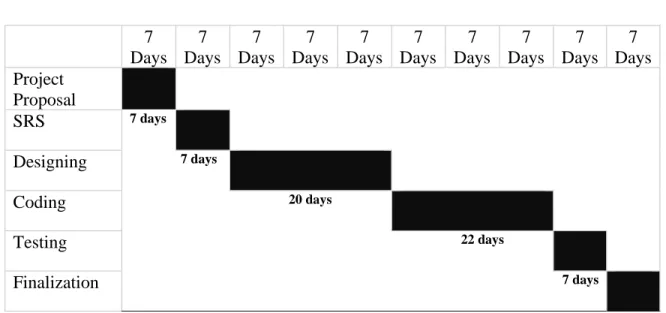
1.5.1 Gantt Chart 7 Days
7 Days
7 Days
7 Days
7 Days
7 Days
7 Days
7 Days
7 Days
7 Days Project
Proposal
SRS 7 days
Designing 7 days
Coding 20 days
Testing 22 days
Finalization 7 days
7 days
Figure 1.2: Gantt chart for creative academy
1.6 Release Plan
After development, this web application “Creative Academy” will be launched on August 05, 2021.
5 ©Daffodil International University
CHAPTER 2
SOFTWARE REQUIREMENT SPECIFICATION
2.1 Functional Requirement
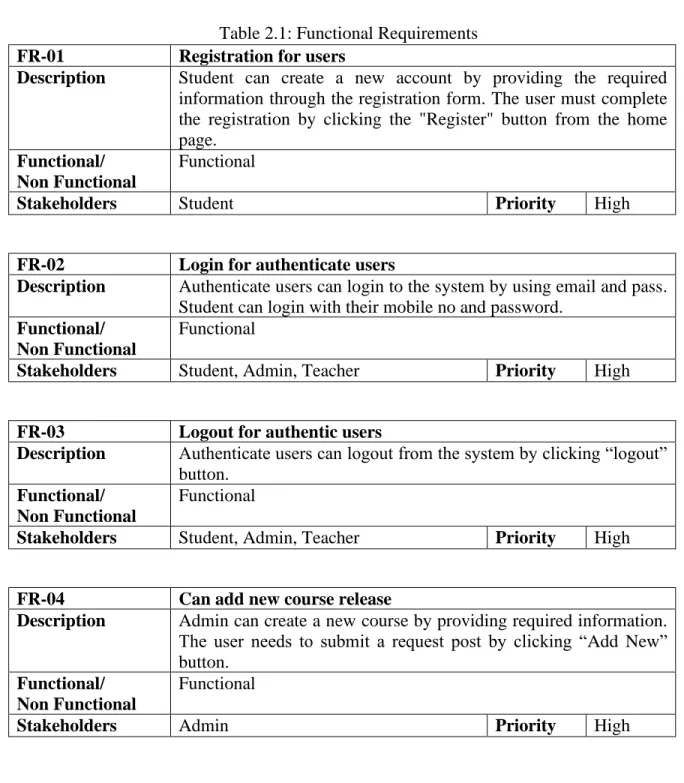
The functional requirement helps to capture the purposeful behavior of the system. so, I discuss about my project's functional requirements.
Table 2.1: Functional Requirements FR-01 Registration for users
Description Student can create a new account by providing the required information through the registration form. The user must complete the registration by clicking the "Register" button from the home page.
Functional/
Non Functional
Functional
Stakeholders Student Priority High
FR-02 Login for authenticate users
Description Authenticate users can login to the system by using email and pass.
Student can login with their mobile no and password.
Functional/
Non Functional
Functional
Stakeholders Student, Admin, Teacher Priority High FR-03 Logout for authentic users
Description Authenticate users can logout from the system by clicking “logout”
button.
Functional/
Non Functional
Functional
Stakeholders Student, Admin, Teacher Priority High FR-04 Can add new course release
Description Admin can create a new course by providing required information.
The user needs to submit a request post by clicking “Add New”
button.
Functional/
Non Functional
Functional
Stakeholders Admin Priority High
6 ©Daffodil International University FR-05 Choose any IT course for enroll
Description Student can choose courses in the Homepage. But all the other courses are on the homepage course page.
Functional/
Non Functional
Functional
Stakeholders Student Priority High
FR-06 Apply for purchase course with payment
Description In order for a student to be enrolled in the course, he / she must make payment and click on confirm purchase button with required information.
Functional/
Non Functional
Functional
Stakeholders Student Priority High
FR-07 Approve to student pending account
Description Requests submitted by students for enrollment in the course will be approved by the admin.
Functional/
Non Functional
Functional
Stakeholders Admin Priority High
FR-08 Go classroom & see the enroll course
Description Students can go to the classroom and see the enrolled courses.
Functional/
Non Functional
Functional
Stakeholders Student Priority High
FR-09 Can add course materials
Description Each course teacher will upload the required video, source code in his course.
Functional/
Non Functional
Functional
Stakeholders Teacher Priority High
FR-10 Can update course materials
Description If the course teacher wants, he can update the course material.
Functional/
Non Functional
Functional
Stakeholders Teacher Priority High
7 ©Daffodil International University FR-11 Can view course materials
Description Students will be able to view the course material according to their needs.
Functional/
Non Functional
Functional
Stakeholders Student Priority High
FR-12 Can track visitor & student IP address
Description Admin will keep track of necessary information of visitors and students. Every time a visitor visits the site, his IP address will be saved. The admin will save the student's login date and time.
Functional/
Non Functional
Functional
Stakeholders Admin Priority High
FR-13 Can add course instructor
Description Admin will include the new course teacher with the teacher's information by clicking the "Add New" button.
Functional/
Non Functional
Functional
Stakeholders Admin Priority High
FR-14 Can view all course instructor
Description Admin can view all course intructor. Admin Can view all course teacher by clicking required button.
Functional/
Non Functional
Functional
Stakeholders Admin Priority High
FR-15 Can view all student information
Description Admin can view all student information. Admin Can view student information by clicking required button.
Functional/
Non Functional
Functional
Stakeholders Admin Priority High
8 ©Daffodil International University FR-16 Can set problem for student
Description The course teacher will upload many types of problems to the students along with the course.
Functional/
Non Functional
Functional
Stakeholders Teacher Priority High
FR-17 Can download & submit solved problem
Description Students can download the problem set by clicking on the
“download button”. Then student can solve the problem and upload the file by clicking the “upload button”.
Functional/
Non Functional
Functional
Stakeholders Student Priority High
FR-18 Can upload blog post
Description Admin
can
upload the new blog post by clicking the “Save Button”.Functional/
Non Functional
Functional
Stakeholders Admin Priority High
FR-19 Can view blog post
Description Students and visitors can view the blog post.
Functional/
Non Functional
Functional
Stakeholders Student, Visitor Priority High
FR-20 Can upload file document
Description Teacher
can
upload file document by clicking the “Upload button”.Functional/
Non Functional
Functional
Stakeholders Teacher Priority High
FR-21 Can view & download file document
Description Students can download the file document by clicking on the
“download button”.
Functional/
Non Functional
Functional
Stakeholders Student Priority High
9 ©Daffodil International University FR-22 Can maintain profile (reset password)
Description The student can change the optional information of his profile.
Functional/
Non Functional
Functional
Stakeholders Student Priority High
FR-23 Can send contact
Description Students and visitors can need to fill in the required fields and click on the “Contact button” if they want to contact.
Functional/
Non Functional
Functional
Stakeholders Student, Visitor Priority High
FR-24 Can view contact
Description Admin can show all the student contact information by clicking required button.
Functional/
Non Functional
Functional
Stakeholders Admin Priority High
FR-25 Can send review
Description Students can need to fill in the required fields and click on the
“Review Send” Button, if they want to contact.
Functional/
Non Functional
Functional
Stakeholders Student Priority High
FR-26 Can view review
Description Student, Admin & Visitor can show all the student review by clicking the required button.
Functional/
Non Functional
Functional
Stakeholders Student, Admin, Visitor Priority High
10 ©Daffodil International University 2.2 Non-Functional Requirement
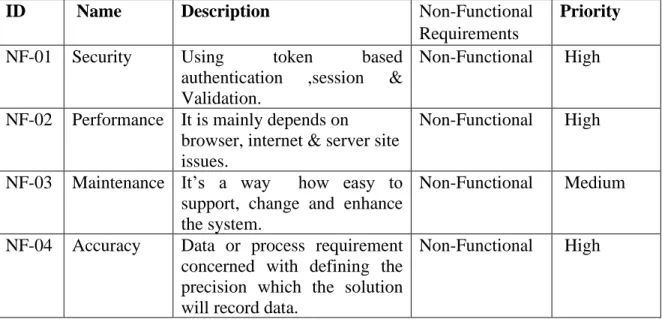
Here, I discuss about my project's non-functional requirements.
Table 2.2: Non-Functional Requirements
ID Name Description Non-Functional
Requirements
Priority NF-01 Security Using token based
authentication ,session &
Validation.
Non-Functional High
NF-02 Performance It is mainly depends on
browser, internet & server site issues.
Non-Functional High
NF-03 Maintenance It’s a way how easy to support, change and enhance the system.
Non-Functional Medium
NF-04 Accuracy Data or process requirement concerned with defining the precision which the solution will record data.
Non-Functional High
2.3 Performance requirements
Performance requirements define how well the system performs under the required condition and fields. It can be justified by measuring the speed of response, throughput, execution time and storage capacity, etc.
2.3.1 Speed and latency Requirements
In some cases, legal requirements will determine the response time. User satisfaction largely depends on the response time to a system. If the system takes more than 10 seconds to load, users will be able to avoid the system.
PR-01 View and post result should be displayed faster
Description When the user wants to see any information and want to manage the posts, the result must be shown in less than 3 or 4 second time period.
Stakeholders Student, Admin, Teacher, Visitor Priority High
11 ©Daffodil International University 2.3.2 Accuracy Requirements
Always should be shown the accurate result for all users. It is not accepted to show any wrong and mismatch information.
PR-02 All Information should be accurate for all user
Description When the user wants to see any information then the system must ensure that the provided information is most accurate information.
Stakeholders Student, Admin, Teacher, Visitor Priority High
2.3.3 Capacity Requirements
We need to create a system that will be able to manage all user, provide accurate information, Handling HTTP requests, including handling databases.
PR-03 This system handle thousands of or much data per month.
Description This system will be able to handle thousands of or much more data per month.
Stakeholders Student, Admin, Teacher, Visitor Priority High
2.4 Dependability Requirements
Dependability is a measure of a system’s services to the users. It is based on some criteria.
Those are-
➢ Reliability
➢ Availability
➢ Maintainability
2.4.1 Reliability Requirements
DR-01 System must provide continuity for well service
Description All the information providing by the system must be reliable.
Stakeholders Student, Admin, Teacher, Visitor Priority High
12 ©Daffodil International University 2.4.2 Availability Requirements
DR-02 The availability of the system to deliver services when requested.
Description The system must be available 24 hours and must be able to services to the user when requested.
Stakeholders Student, Admin, Teacher, Visitor Priority High 2.4.3 Maintainability Requirements
DR-03 Ability for easy maintenance
Description The system should provide the maintenance issue to the user.
Stakeholders Admin Priority High
2.5 Security System Requirements
System security is one of the most important requirements. For the lacking of security service, the data could be manipulated. The system can face cyber-attack like denial-of- service attacks. Some security-related categories are Permission to Access data
• Verification
• Security Information
• Security Policies 2.5.1 Access Requirements
To reduce unauthorized access, there have to be some techniques. They are-
• Strong Access Control Measure
• Maintain an Information Security Policy
• Monitor and Test Networks Regularly
• Build and Maintain a Security Network 2.5.2 Integrity Requirements
Ensure that data and communication are not intentionally corrupted via unauthorized creation, deletion and modification. Use hash or crypt value for sensitive data.
2.5.3 Privacy Requirements
Privacy requirements are mostly needed for the system. Which user has access to which type of data should be defined clearly. For doing this the system can be secured.
13 ©Daffodil International University 2.6 Usability and Human-Interaction Requirements
User experience is one of the most important factors to any system. When I am develops my system, they try to make the system easier. That’s why the system must be easy to use, easy to understand and easy to learn.
2.6.1 Ease of Use Requirements
The system is very easy to use and easy to understand. There is no long process to complete a task. User can complete any task with only a few steps.
2.6.2 Understand Ability and Politeness Requirements
The system can be used by all types of people. The system will not use any term that is not specified in this web application.
2.6.3 Accessibility Requirements
The system’s activities are very user friendly. It is easy to use and understand for the users. There are no access requirements besides those that has been outline in the below:
AR ID AR Name
AR-01 Login as Admin AR-02 Login as Student AR-03 Login as Teacher AR-04 Logout as Admin AR-05 Logout as Student AR-06 Logout as Teacher 2.6.4 User Documentation Requirements
User feedback will be taken and analyzed properly to understand and fulfil their expectations. The requirements will be added to the system after proper analyzation.
2.6.5 Training Requirements
A simple user manual will be provided to the user for training purposes. The system is really easy to understand so extensive training is not required.
EUR-01 The system must be usable for all type of users
Description The system should be usable for the Student, Teacher, Admin. The visitor user can also able to use the system.
Stakeholders Student, Admin, Teacher, Visitor Priority High
14 ©Daffodil International University 2.7 Look and Feel Requirements
User will feel bored to look at a monotonous user interface. Look and feel requirements provide information on how the system will look like and how the user interface or graphical user interface of the system will display to the user.
2.7.1 Appearance Requirements
LFR-01 Mandatory input fields must have visible marking
Description If there is any mandatory input field in any form, the field must have visible marking for the user.
Stakeholders Student, Admin, Teacher, Visitor Priority High
2.7.2 Style Requirements
LFR02 All content must appear within the same format
Description Input field and other view results must be shown in a specific format.
Stakeholders Student, Admin, Teacher, Visitor Priority Medium 2.8 Operational and Environmental Requirements
This requirement focuses on how the users operate the system, include in interfaces and interoperability with other systems. The requirement established how the system can perform under conditions.
2.8.1 Expected Physical Requirements
There are no specific expected physical requirements.
2.8.2 The Requirements for Interfacing Adjacent System
There is no specific interface with adjacent system requirements.
2.9 Legal Requirements
Legal requirements are the rules and regulations set by any institute/organization.
2.9.1 Compliance Requirements
There are no specific compliance requirements.
2.9.2 Standard Requirements
There are no specific compliance requirements.
15 ©Daffodil International University
CHAPTER 3
SYSTEM REQUIREMENT ANALYSIS
3.1 Use Case Diagram
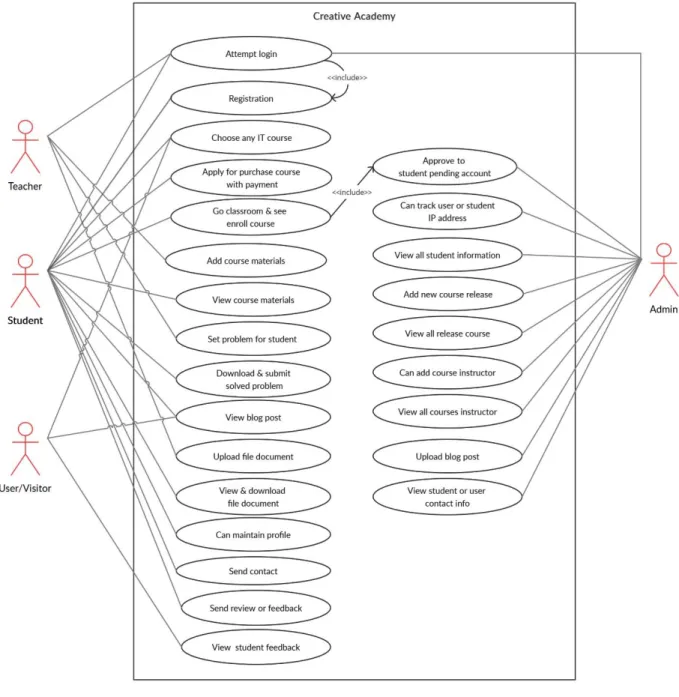
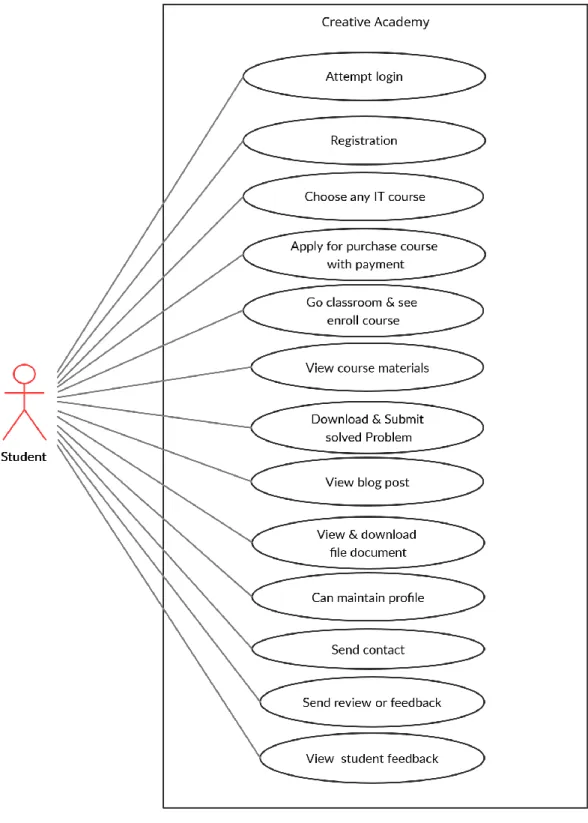
A use case diagram is a representation of a user's interaction with the system that shows the relationship between the user and the different use cases in which the user is involved.
Figure 3.1: Use case diagram for whole system
16 ©Daffodil International University 3.1.1 Use case diagram for student
Figure 3.2: Use case diagram for student
17 ©Daffodil International University 3.1.2 Use case diagram for admin
Figure 3.3: Use case diagram for admin
18 ©Daffodil International University 3.1.3 Use Case diagram for teacher
Figure 3.4: Use case diagram for teacher
3.1.4 Use case diagram for visitor
Figure 3.5: Use case diagram for visitor
19 ©Daffodil International University 3.2 Use Case description
3.2.1 Attempt login
Use Case Login and log out system
Goal System Admin (Creative Academy), Students, Teacher can access the system. And finally, Log out.
Precondition Registration successfully
Success End Condition System Admin (Creative Academy), Students, Teacher can access this system. Can access to user’s Dashboard
Failed End Condition Display login “failed message”
Primary Actor Student, Teacher, Admin Secondary Actor N/A
Trigger Access This System
Description / Main Success Scenario
Step Action
1 System will display the Login page
2 Users fill-up the required fields with correct information
3 Users clicks on the “Login” button 4 Users has logged in successfully Alternative Flows
Step Branching Action
1 The user enters his or her phone no and password
Quality Requirements
Step Requirements
1 When user login then needs to correct phone no for login and password
20 ©Daffodil International University 3.2.2 Registration
Use Case Registration
Goal Users can create an account successfully
Precondition N/A
Success End Condition New account is created Successfully
Failed End Condition Already have an account with the given Phone Number Primary Actor Student, Teacher
Secondary Actor N/A
Trigger Click on the “Register” button
Description / Main Success Scenario
Step Action
1 System will display the Registration page 2 Users fill-up the required/mandatory input fields 3 Users clicks on the “Registration” button
4 Users has registered an account successfully.
Admin can complete teacher’s registration with the same process.
Alternative Flows
Step Branching Action
1 Mandatory / required input fields are not filled in 2 Registration Failed
Quality Requirements
Step Requirements 1 N/A
21 ©Daffodil International University 3.2.3 Apply for purchase course with payment
Use Case Apply for purchase course with payment Goal Student can purchase course successfully
Precondition Should be pay payment (bKash, DBBL) and give the Trx ID in required fields.
Success End Condition New course purchase request Successfully Failed End Condition New course purchase failed
Primary Actor Student Secondary Actor N/A
Trigger Click on the “Purchase Confirm” button.
Description / Main Success Scenario
Step Action
1 System will display the Purchase Details page 2 Users fill-up the required/mandatory input fields 3 Users clicks on the “Purchase Confirm” button 4 Users has purchased course successfully
Alternative Flows
Step Branching Action
1 If the payment track ID is not valid.
2 Course purchase failed Quality Requirements
Step Requirements 1 N/A
22 ©Daffodil International University 3.2.4 Approve to student pending account
Use Case Approve to student pending account
Goal Activating course purchase pending account of student Precondition Should be course purchase request successfully
Success End Condition Student course purchase pending account activated Failed End Condition Failed to pending account
Primary Actor Admin Secondary Actor N/A
Trigger Click on the “Purchase Course Edit” button.
Description / Main Success Scenario
Step Action
1 System will display the Purchase Course page 2 Admin click on the “Purchase Course Edit” button 3 Open a modal and activated pending account 4 Click on the save button and show account active
Alternative Flows
Step Branching Action 1 Data Mismatched 2 Account not activated Quality Requirements
Step Requirements 1 N/A
23 ©Daffodil International University 3.2.5 Choose any IT course
Use Case Choose any IT course
Goal User can mainly choose course and see course details
Precondition N/A
Success End Condition choose course Successfully Failed End Condition User can not choose courses Primary Actor Student, Visitor
Secondary Actor N/A
Trigger Click on the “Course Page” on user site.
Description / Main Success Scenario
Step Action
1 System will display the course page 2 Users can show all IT courses
3 Then finally user can choose any courses
Alternative Flows
Step Branching Action
1 The system is failed to show courses Quality Requirements
Step Requirements 1 N/A
24 ©Daffodil International University 3.2.6 Go classroom & see enroll courses
Use Case Go classroom & see enroll courses
Goal User can go classroom and see all enroll courses Precondition Should be registered user
Success End Condition Successfully go to classroom Failed End Condition Failed to go classroom Primary Actor Student
Secondary Actor N/A
Trigger Click on the “Login” button
Description / Main Success Scenario
Step Action
1 System will display the Login page
2 Users can show the required fields and fill up fields.
Then click the required button.
3 Finally, user can see the classroom with his or her enroll courses.
Alternative Flows
Step Branching Action
1 The system is failed to go classroom Quality Requirements
Step Requirements 1 N/A
25 ©Daffodil International University 3.2.7 Add course materials
Use Case Add course materials
Goal Teacher can add course materials (videos link, source code) successfully.
Precondition Users must be logged in to the system Success End Condition Add course materials properly
Failed End Condition Failed to Add course materials Primary Actor Teacher
Secondary Actor N/A
Trigger Click on the “add new” button
Description / Main Success Scenario
Step Action
1 System will display the course materials page
2 User can click the “add new” button and show open a modal. Then fill up the course materials fields.
3 Finally, user can click the “save” button and see the success massage.
Alternative Flows
Step Branching Action
1 Mandatory / required input fields are not filled in 2 The system is failed to add course materials Quality Requirements
Step Requirements 1 N/A
26 ©Daffodil International University 3.2.8 View course materials
Use Case View course materials
Goal Student go to classroom and see the enroll courses. Click the course then showing the course materials
Precondition Users must be logged in to the system
Success End Condition View course materials (video, source code) properly Failed End Condition Failed to view course materials
Primary Actor Student Secondary Actor N/A
Trigger Click on the “video play” button for see video.
Description / Main Success Scenario
Step Action
1 System will display the “Classroom Home” page 2 User can click the course menu and show open a
course details page. Then can see the course videos in a table.
3 Finally, user can click the “video play” button and see the video
Alternative Flows
Step Branching Action
1 The system is failed to view course materials Quality Requirements
Step Requirements 1 N/A
27 ©Daffodil International University 3.2.9 Add new course release
Use Case Add new course release
Goal User can release a new course properly create for student Precondition Should be registered user and can registered a new teacher
for this new course.
Success End Condition Successfully add a new course Failed End Condition Failed to add a new course release Primary Actor Admin
Secondary Actor N/A
Trigger Click on the “add new” button for add a new course
Description / Main Success Scenario
Step Action
1 System will display a modal for adding a course 2 User can fill up the required information and click the
“save” button.
3 Successfully add a new course
Alternative Flows
Step Branching Action
1 The system is failed to add a new course Quality Requirements
Step Requirements 1 N/A
28 ©Daffodil International University 3.2.10 View all release course
Use Case View all release course
Goal User can view all release course in this system (Creative Academy)
Precondition Users must be logged in to the system Success End Condition Successfully view all release course Failed End Condition Failed to view all release course Primary Actor Admin
Secondary Actor N/A
Trigger Click on the “course” page
Description / Main Success Scenario
Step Action
1 System will display the “course” page 2 User can see all release course in a table 3 Successfully view all release course
Alternative Flows
Step Branching Action
1 The system is failed to view all release course Quality Requirements
Step Requirements 1 N/A
29 ©Daffodil International University 3.2.11 Assign problem for student
Use Case Assign problem for student
Goal User can upload a problem set properly Precondition Users must be logged in to the system Success End Condition Assign problem successfully
Failed End Condition Failed to view course materials Primary Actor Teacher
Secondary Actor N/A
Trigger Click on the “upload” button
Description / Main Success Scenario
Step Action
1 System will display the upload page
2 User can click the upload button and upload the problem document.
3 User can upload assign problem successfully
Alternative Flows
Step Branching Action 1 Data mismatched 2. failed to assign problem Quality Requirements
Step Requirements 1 N/A
30 ©Daffodil International University 3.2.12 Download & submit solved problem
Use Case Download & submit solved problem
Goal User can download and submit problem document successfully
Precondition Users must be logged in to the system
Success End Condition Submit solved problem document upload successfully Failed End Condition Failed to submit solved problem
Primary Actor Student Secondary Actor N/A
Trigger Click on the “submit” button for submit document
Description / Main Success Scenario
Step Action
1 System will display the file upload page 2 User can click the “upload” button 3 User can select the file document
4 Finally, user can click the “submit” button and see the upload success massage.
Alternative Flows
Step Branching Action 1 failed to submit document Quality Requirements
Step Requirements 1 N/A
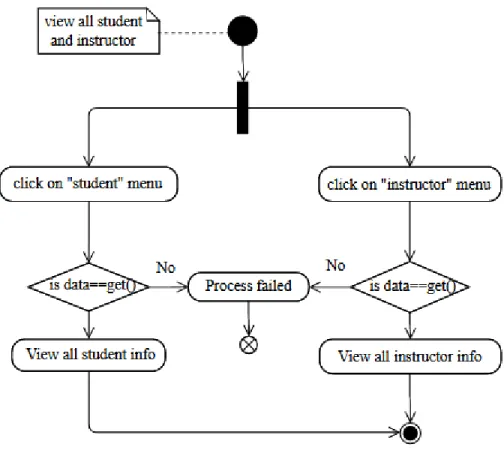
31 ©Daffodil International University 3.2.13 view all student information
Use Case view all student information
Goal User can see all student’s information successfully Precondition Users must be logged in to the system
Success End Condition View all student information properly Failed End Condition Failed to view all student’s information Primary Actor Admin
Secondary Actor N/A
Trigger Click on the “student info” page
Description / Main Success Scenario
Step Action
1 System will display the “student info” page 2 User can see all student’s info in a table 3 Successfully view all student’s info
Alternative Flows
Step Branching Action 1 Data not found
2 The system is failed to view student info Quality Requirements
Step Requirements 1 N/A
32 ©Daffodil International University 3.2.14 view all instructor
Use Case view all instructor
Goal User can see all instructor info successfully Precondition Users must be logged in to the system Success End Condition View all instructor information successfully Failed End Condition Failed to view all instructor information Primary Actor Admin
Secondary Actor N/A
Trigger Click on the “Teacher info” page
Description / Main Success Scenario
Step Action
1 System will display the “Teacher info” page 2 User can see all teacher’s info in a table 3 Successfully view all teacher’s info
Alternative Flows
Step Branching Action 1 Data not found
2 failed to view teacher’s info Quality Requirements
Step Requirements 1 N/A
33 ©Daffodil International University 3.2.15 Upload file document
Use Case Upload file document
Goal User can upload file document successfully Precondition Users must be logged in to the system Success End Condition upload file document successful Failed End Condition Failed to Upload file document Primary Actor Teacher
Secondary Actor N/A
Trigger Click on the “submit” button for upload file document
Description / Main Success Scenario
Step Action
1 System will display the file upload page 2 User can click the “upload” button 3 User can select the file document
4 Finally, user can click the “submit” button and see the upload success massage.
Alternative Flows
Step Branching Action
1 The system is failed to upload file document Quality Requirements
Step Requirements 1 N/A
34 ©Daffodil International University 3.2.16 View and download file document
Use Case View and download file document
Goal User can download file document successfully Precondition Users must be logged in to the system
Success End Condition download document successful Failed End Condition Failed to download file document Primary Actor Student
Secondary Actor N/A
Trigger Click on the “download” button
Description / Main Success Scenario
Step Action
1 System will display the “file document” page 2 User can click the download button
3 Finally, file document download
Alternative Flows
Step Branching Action
1 failed to download file document Quality Requirements
Step Requirements 1 N/A
35 ©Daffodil International University 3.2.17 Upload blog post
Use Case Upload blog post
Goal User can create blog post successfully Precondition Users must be logged in to the system Success End Condition Create blog post successful
Failed End Condition Failed to create blog post Primary Actor Admin
Secondary Actor N/A
Trigger Click on the “add new” button
Description / Main Success Scenario
Step Action
1 System will display a modal for adding a blog post 2 User can fill up the required information and click the
“save” button.
3 Successfully add blog post
Alternative Flows
Step Branching Action 1 failed to create blog post Quality Requirements
Step Requirements 1 N/A
36 ©Daffodil International University 3.2.18 View blog post
Use Case View blog post
Goal User can see all blog post successfully
Precondition N/A
Success End Condition View blog post successfully Failed End Condition Failed to view blog post
Primary Actor Student, Teacher, Admin, Visitor Secondary Actor N/A
Trigger Click on the “blog” page
Description / Main Success Scenario
Step Action
1 System will display the “blog” page 2 User can see all blog post
3 Successfully view blog post
Alternative Flows
Step Branching Action 1 Data not found
2 failed to view blog post Quality Requirements
Step Requirements 1 N/A
37 ©Daffodil International University 3.2.19 Can maintain profile
Use Case Can maintain profile
Goal User can maintain profile successfully Precondition Should be registered user
Success End Condition Can maintain profile successful Failed End Condition Failed to maintain profile Primary Actor Student
Secondary Actor N/A
Trigger Click on the “profile” page
Description / Main Success Scenario
Step Action
1 System will display a modal in profile page
2 User can change his old password and add a new password. Then click the “save” button.
3 User can successfully change his/her profile
Alternative Flows
Step Branching Action
1 The system is failed to user maintain profile Quality Requirements
Step Requirements 1 N/A
38 ©Daffodil International University 3.2.20 Send contact
Use Case Send contact
Goal User can send contact successfully with other users.
Precondition N/A
Success End Condition Send contact successful Failed End Condition Failed to send contact Primary Actor Student, visitor Secondary Actor N/A
Trigger Click on the “send contact” button
Description / Main Success Scenario
Step Action
1 System will display the “contact” page
2 User can fill up the input fields and click the “send contact” button.
3 User can see the massage send success massage
Alternative Flows
Step Branching Action
1 failed to send contact massage Quality Requirements
Step Requirements 1 N/A
39 ©Daffodil International University 3.2.21 View user contact info
Use Case View user contact info
Goal User can view all users contact info successfully
Precondition N/A
Success End Condition View all contact properly Failed End Condition Failed to view user contact info Primary Actor Admin
Secondary Actor N/A
Trigger Click on the “contact” page
Description / Main Success Scenario
Step Action
1 System will display the “contact” page 2 User can see all user contact info 3 Successfully view contact info
Alternative Flows
Step Branching Action
1 failed to view all contact info Quality Requirements
Step Requirements 1 N/A
40 ©Daffodil International University 3.2.22 Send review or feedback
Use Case Send review or feedback
Goal User can send review successfully
Precondition N/A
Success End Condition Send review or feedback successful Failed End Condition Failed to send review
Primary Actor Student Secondary Actor N/A
Trigger Click on the “send review” button
Description / Main Success Scenario
Step Action
1 System will display the “review” page in review modal
2 User can fill up the input fields and click the “send review” button.
3 User can see the massage send review massage
Alternative Flows
Step Branching Action
1 The system is failed to send review massage.
Quality Requirements
Step Requirements 1 N/A
41 ©Daffodil International University 3.2.23 View student review or feedback
Use Case View student review or feedback Goal User can view all users review
Precondition N/A
Success End Condition View all review properly Failed End Condition Failed to view student review Primary Actor Student
Secondary Actor N/A
Trigger Click on the “review” page
Description / Main Success Scenario
Step Action
1 System will display the “review” page 2 User can see all user review
3 Successfully view students review
Alternative Flows
Step Branching Action
1 The system is failed to view students review Quality Requirements
Step Requirements 1 N/A
42 ©Daffodil International University 3.3 Activity Diagram
3.3.1 Login
Figure 3.6: Activity diagram for login
43 ©Daffodil International University 3.3.2 Registration
Figure 3.7: Activity diagram for registration
44 ©Daffodil International University 3.3.3 Apply for purchase course with payment
Figure 3.8: Activity diagram for purchase course with payment
45 ©Daffodil International University 3.3.4 Approve to student pending account
Figure 3.9: Activity diagram for approve to student pending account
46 ©Daffodil International University 3.3.5 Add new course release
Figure 3.10: Activity diagram for add new course release
47 ©Daffodil International University 3.3.6 View all release course
Figure 3.11: Activity Diagram for view all release course 3.3.7 Go classroom & see enroll courses
Figure 3.12: Activity Diagram for Student go classroom & see courses
48 ©Daffodil International University 3.3.8 Add course materials
Figure 3.13: Activity Diagram for add course materials
49 ©Daffodil International University 3.3.9 View course materials
Figure 3.14: Activity Diagram for view course materials
50 ©Daffodil International University 3.3.10 Add Course Instructor
Figure 3.15: Activity Diagram for add course instructor
51 ©Daffodil International University 3.3.11 View all students and instructor info
Figure 3.16: Activity Diagram for view all student & instructor info
52 ©Daffodil International University 3.3.12 Add file document
Figure 3.17: Activity Diagram for add file document
53 ©Daffodil International University 3.3.13 View file document
Figure 3.18: Activity Diagram for view file document
54 ©Daffodil International University 3.3.14 Add blog post
Figure 3.19: Activity Diagram for add blog post
55 ©Daffodil International University 3.3.15 View blog post
Figure 3.20: Activity Diagram for view blog post
56 ©Daffodil International University 3.3.16 Can maintain profile
Figure 3.21: Activity Diagram for student maintain profile
57 ©Daffodil International University 3.3.17 Send contact
Figure 3.22: Activity Diagram for send contact
3.3.18 View contact
Figure 3.23: Activity Diagram for view contact
58 ©Daffodil International University 3.3.19 Add review or feedback
Figure 3.24: Activity Diagram for add review or feedback
59 ©Daffodil International University 3.3.20 View feedback or review
Figure 3.25: Activity Diagram for view review or feedback
60 ©Daffodil International University 3.4 Sequence diagram
3.4.1 Login issue for admin, student and teacher
Figure 3.26: Login issue for admin, student and teacher
3.4.2 Registration & update profile issue for student
Figure 3.27: Registration & update profile issue for student & admin
61 ©Daffodil International University 3.4.3 Course issue for admin and student
Figure 3.28: Course issue for admin and student
3.4.4 Purchase course for admin, student & teacher
Figure 3.29: Purchase Course issue for admin, student & teacher
62 ©Daffodil International University 3.4.5 Teacher issue for admin
Figure 3.30: Teacher issue for admin
3.4.6 Class List issue for student and teacher
Figure 3.31: Class List issue for student and teacher
63 ©Daffodil International University 3.4.7 Add File document issue for student and teacher
Figure 3.32: Add File document issue for student and teacher
3.4.8 Problem solve issue for student and teacher
Figure 3.33: Problem solve issue for student and teacher
64 ©Daffodil International University 3.4.9 Admin dashboard issue for admin
Figure 3.34: Admin dashboard issue for admin
3.4.10 Teacher dashboard issue for teacher
Figure 3.35: Teacher dashboard issue for teacher
65 ©Daffodil International University 3.4.11 Blog issue for admin & student
Figure 3.36: Blog issue for admin & student
3.4.13 Contact issue for admin, student & teacher
Figure 3.38: Contact issue for admin, student & teacher
66 ©Daffodil International University 3.4.14 Review issue for admin & student
Figure 3.39: Review issue for admin & student
67 ©Daffodil International University
CHAPTER 4
SYSTEM DESIGN SPECIFICATION
4.1 Entity Relationship Diagram
Figure 4.1: Entity relationship diagram for Creative Academy
68 ©Daffodil International University 4.2 Class Diagram
Figure 4.2: Class diagram for Creative Academy
69 ©Daffodil International University 4.3 Development Tools and Technology
Tools and technology, I used to build this system is given below – 4.3.1 User Interface Technology
4.3.1.1: HTML, HTML5 4.3.1.2: CSS3, CSS 4.3.1.3: Bootstraps4
4.3.1.3: JavaScript, Font Awesome
4.3.2 Implementation Tools and Platforms 4.3.2.1: Laravel v.7.0
4.3.2.2: jQuery, Ajax 4.3.2.3: Xampp V3.2.4 4.3.2.4: PHPStorm, VS Code 4.3.2.5: Windows cmd