Design and Implementation of Garments Management System
by
Onik Talukder ID: CSE1903018053
Md Soayeb Hosen ID: CSE1903018086 Md. Zubayer Hossain
ID: CSE1901016034 Mst Sova Khatun ID: CSE1903018099
Supervised by Sabrina Tasnim
Submitted in partial fulfillment of the requirements for the degree of Bachelor of Science in Computer Science and Engineering
DEPARTMENT OF COMPUTER SCIENCE AND ENGINEERING SONARGAON UNIVERSITY (SU)
April 2023
Design and Implementation of Garments Management System
by
Onik Talukder ID: CSE1903018053
Md. Soayeb Hosen ID: CSE19013018086 Md. Zubayer Hossain
ID: CSE1901016034 Mst Sova Khatun ID: CSE1903018099
Supervised by Sabrina Tasnim
Submitted in partial fulfillment of the requirements for the degree of Bachelor of Science in Computer Science and Engineering
DEPARTMENT OF COMPUTER SCIENCE AND ENGINEERING SONARGAON UNIVERSITY (SU)
April 2023
Page | ii
APPROVAL
The project titled “Design and Implementation of Garments Management System” submitted by Onik Talukder (CSE1903018053), Md. Soayeb Hosen (CSE1903018086), Md. Zubayer Hossain (CSE1901016034) and Mst Sova Khatun (CSE1903018099) to the Department of Computer Science and Engineering, Sonargaon University (SU), has been accepted as satisfactory for the partial fulfillment of the requirements for the degree of Bachelor of Science in Computer Science and Engineering and approved as to its style and contents.
Board of Examiners
--- Sabrina Tasnim
Assistant Professor
Department of Computer Science and Engineering Sonargaon University (SU)
Supervisor
--- (Examiner Name and Signature)
Department of Computer Science and Engineering Sonargaon University (SU)
Examiner 1
--- (Examiner Name and Signature)
Department of Computer Science and Engineering Sonargaon University (SU)
Examiner 2
--- (Examiner Name and Signature)
Department of Computer Science and Engineering Sonargaon University (SU)
Examiner 3
Page | iii
DECLARATION
We, hereby, declare that the work presented in this report is the outcome of the investigation performed by us under the supervision of Sabrina Tasnim, Assistant Professor, Department of Computer Science and Engineering, Sonargaon University, Dhaka, Bangladesh. We reaffirm that no part of this project has been or is being submitted elsewhere for the award of any degree or diploma.
Countersigned
--- (Sabrina Tasnim)
Supervisor
Signature
--- Onik Talukder ID: CSE1903018053
--- Md Soayeb Hosen ID: CSE1903018086
--- Md. Zubayer Hossain
ID: CSE1901016034
--- Mst Sova Khatun ID: CSE1903018099
Page | iv
ABSTRACT
The work is dedicated to The Garments Management System (GMS) which is a comprehensive software solution designed to streamline and automate various processes involved in the management of garments manufacturing and distribution. This system serves as a centralized platform for managing inventory, sales, production, and other critical operations within the garments industry. The GMS offers a wide range of features to enhance efficiency and productivity in the garments management workflow. It enables efficient tracking and management of inventory, ensuring optimal stock levels and minimizing the risk of stockouts or excesses. The system facilitates the categorization and organization of garments based on various attributes such as size, color, style, and brand, enabling quick and accurate retrieval of products. In terms of sales management, the GMS provides a user-friendly interface for order processing, invoicing, and customer management. It allows businesses to create and maintain customer profiles, track their purchasing history, and generate personalized offers or promotions. This system also supports integration with e-commerce platforms, enabling seamless online sales and order fulfillment.
Furthermore, the GMS offers robust production management capabilities. It assists in planning and scheduling production activities, monitoring progress, and ensuring timely delivery. By tracking production data and generating reports, the system provides valuable insights for optimizing production efficiency, identifying bottlenecks, and making informed decisions. The GMS incorporates advanced analytics and reporting features to provide meaningful insights into various aspects of garments management. It generates reports on sales performance, inventory status, production efficiency, and other key metrics, empowering decision-makers with real-time information for strategic planning and resource allocation.
Page | v
ACKNOWLEDGMENT
At the very beginning, we would like to express my deepest gratitude to the Almighty Allah for giving us the ability and the strength to finish the task successfully within the schedule time.
We are auspicious that we had the kind association as well as supervision of Sabrina Tasnim, Assistant Professor, Department of Computer Science and Engineering, Sonargaon University whose hearted and valuable support with best concern and direction acted as necessary recourse to carry out our project.
We would like to convey our special gratitude to Brig. Gen. (Retd) Prof Habibur Rahman Kamal, ndc, psc, Dean, Faculty of Science and Engineering and special gratitude our honourable departmental head Bulbul Ahamed, (Associate Professor & Head, Department of Computer Science and Engineering) for his kind concern and precious suggestions.
We are also thankful to all our teachers during our whole education, for exposing us to the beauty of learning.
Finally, our deepest gratitude and love to my parents for their support, encouragement, and endless love.
Page | vi
LIST OF ABBREVIATIONS
API Application Programming Interface CMR Customer Managed Relationship CPU Central Processing Unit
CSS Cascading Style Sheets
DBMS Database Management System
DNS Domain Name System
EMS Employee Management System GMR Garments Management System
HR Human Resources
HTML Hyper Text Markup Language HTTP Hyper Text Transfer Protocol
ID Identity
IDE Integrated Development Environment
IP Internet Protocol
IoT Internet of Things PHP Hypertext Preprocessor SQL Structured Query Language
UI User Interface
Page | vii
LIST OF FIGURES
Figure No. Title Page No.
Fig.3.4.1 Use Case Diagram of GMS 14
Fig.3.7.1 Flowchart of Garments Management System 17
Fig.6.3.1 Homepage 31
Fig.6.3.2 About 31
Fig.6.3.3 Notice 32
Fig.6.3.4 Contact 32
Fig.6.3.5 Manage Contact 33
Fig.6.3.6 Career Application Form 33
Fig.6.3.7 Manage Career 34
Fig.6.3.8 Login Page 34
Fig.6.3.9 Dashboard 35
Fig.6.3.10 Manage Employee 35
Fig.6.3.11 Add Customer 36
Fig.6.3.12 Add Supplier 36
Fig.6.3.13 Manage Supplier 37
Fig.6.3.14 Sales Report 37
Fig.6.3.15 Purchase Report 38
TABLE OF CONTENTS
Title Page No.
APPROVAL………. ii
DECLARATION………. iii
ABSTRACT………. iv
ACKNOWLEDGEMENT………... v
LIST OF ABBREVIATION……… vi
LIST OF FIGURES………. vii
CHAPTER 1 INTRODUCTION 1 – 4 1.1 About 1 1.2 Purpose……….. 1
1.3 Scope……….. 1-2 1.4 What is Employee Management……… 2
1.5 What is Employee Management Cooperation……… 2
1.6 Objectives………. 3
1.7 Importance……….. 3-4 1.8 Benefits………... 4
CHAPTER 2 SYSTEM ANALYSIS 5-9 2.1 What is System Analysis……… 5-6 2.2 Why System Analysis is Important……… 6-7 2.3 Requirement Gathering……….. 7-8 2.4 Problem Statement……….. 8
2.5 Use Case Diagram………... 9 CHAPTER 3
SYSTEM DESIGN 10-18
3.1 System Architecture………... 10-11 3.2 Database Design………. 11-12
3.3 User Interface Design………. 13
3.4 Use Case Diagram……….. 14
3.5 Uses of Use Case Diagram……… 15
3.6 Benefits of Use Case Diagram………... 16
3.7 Flowchart of Major Processes……… 17
3.8 Uses of Flowchart………... 17-18 3.9 Benefits of Flowchart………. 18
CHAPTER 4 SYSTEM IMPLEMENTATION 19-24 4.1 What is System Implementation... 19
4.2 Benefits of System Implementation……… 20
4.3 Development Environment……… 20-21 4.4 Technologies Used………. 21
4.5 Real Life Applications of Frontend & Backend Development………. 21-22 4.6 Backend Development……… 22
4.7 Frontend Development………... 22-23 4.8 Integration & Testing………. 23
4.9 Benefits of Integration & Testing……….. 23-24 CHAPTER 5 SYSTEM FEATURES 25-28 5.1 Homepage & About Overview……….. 25
5.2 Contacts……….. 25
5.3 Career………. 26
5.4 User Login & Authentication………. 26-27 5.5 Dashboard Overview……….. 27
5.6 Customer Management………... 28
CHAPTER 6 WEB APPLICATION 29-38 6.1 What is Web Application………... 29
6.2 Benefits of Web Application……….. 29-30 6.3 Guidelines for Developing a Website or Web Application………... 30
6.4 Screenshots of Web Application……… 31-38 CHAPTER 7
SYSTEM DEPLOYMENT 39-41
7.1 Server Configuration……….. 39 7.2 Importance of Server Configuration……….. 39-40 7.3 Database Setup………... 40 7.4 Importance of Database Setup……… 40-41 CHAPTER 8
CONCLUSION 42-43
8.1 Summary of Achievements……… 42 8.2 Limitations……….. 42-43 8.3 Future Enhancements………. 43 REFERENCES………. 44
Page | 1
CHAPTER 1
INTRODUCTION
1.1 About
A garments management system is a software system designed to manage the various processes involved in the operation of a garments manufacturing company. The system typically includes modules for managing orders, production and employee management.
The garments management system provides a centralized platform for managing all aspects of the business, allowing managers to monitor operations, track progress, and make informed decisions.
The system can help improve efficiency, reduce costs, and increase profitability by automating and streamlining various processes, reducing errors and waste, and improving data accuracy and real-time visibility into business operations.
1.2 Purpose
The purpose of this book is to document the development process and features of a Garments Management System software. It aims to streamline the operations of the employee of the garments, including contact with the admin, application for joining the garments, order management, managing the employee data, sales, and reporting.
1.3 Scope
The system focuses on to help manage and streamline the various processes involved in the management of employees in a garments manufacturing company. Some of the key scopes of a garments management system include:
1.Employee information management: This involves managing the employee database, including personal details, employment history, and performance records.
Page | 2 2.Attendance and leave management: This includes tracking employee attendance and managing leaves, ensuring that there are no discrepancies in the payment of salaries.
3.Performance management: This includes setting performance goals and objectives, conducting performance evaluations, and tracking progress.
4.Compliance management: This includes managing compliance with labor laws, health and safety regulations, and other legal requirements.
5.Communication management: This involves facilitating communication between employees, managers, and other stakeholders in the organization.
1.4 What is Employee Management:
Employee management is a practice that helps a manager improve employee productivity and satisfaction to help an organisation reach its goals. Human resources (HR) professionals often use an employee management system (EMS), including recruitment, offboarding and performance management. Using a dedicated EMS can help an HR manager streamline the hiring process and improve workplace efficiency. In this article, we discuss what an employee management systems is, outline its benefits and types and list some examples of employee management software tools.
1.5 What is Employee Management Cooperation:
Employee Management Cooperation, like Collective Bargaining, forms part of what is commonly known as “industrial democracy” or “workers participation” in management. The terms “industrial democracy” or “workers participation” in management simply means democratizing the workplace by empowering the workers, through participation, to be involved in the decision-making process of an organization on matters agreed by the parties and which are mutually beneficial to them.
Employee Management Cooperation is not meant to replace, but rather complement, collective bargaining.[1]
Page | 3
1.6 Objectives
The key objectives of this Garments Management System software are:
Centralize and automate garment employee processes. Enhance employee management and tracking. Streamline order processing. Generate insightful reports for decision-making. Provide accurate and timely reports and analytics for business decision-making. Improve the management of employee information, attendance and leave, payroll, performance, training, and compliance.
1.7 Importance
A garments management system is important for a variety of reasons, including:
1.Streamlined operations: A garments management system can help streamline the various processes involved in the operation of a garments manufacturing company, reducing errors, minimizing waste, and improving overall efficiency.
2.Improved accuracy: By automating processes and providing real-time visibility into business operations, a garments management system can help improve data accuracy, reducing the likelihood of errors and improving decision-making.
3.Cost savings: By optimizing operations, reducing waste, and improving overall efficiency, a garments management system can help reduce costs and increase profitability.
4.Enhanced customer service: A garments management system can help improve customer service by enabling faster order processing, more accurate delivery times, and better communication with customers.
5.Compliance with regulations: By providing tools for managing compliance with labour laws, health and safety regulations, and other legal requirements, a garments management system can help reduce legal and financial risks.
Page | 4 6.Better employee management: A garments management system can help improve employee management by providing tools for managing attendance and leave, payroll, performance, training, and compliance.
1.8 Benefits
Employers rely on garments management systems to help them not only maintain day-to-day workflows, but also solve complex challenges and achieve long-term business objectives.
Some more specific benefits include:
1.Increased productivity: The automation and machine learning capabilities that are common with most garments management systems can help HR departments accomplish more with less effort.
2.Actionable insights: With predictive analytics and benchmark data at their disposal, employers may be able to make more informed workforce decisions and improve their profitability.
3.Secure information: To deter hackers and prevent security breaches, garments management systems typically use multi-factor authentication, data encryption and fraud detection.
4.Compliance support: Some garments management system providers offer global and/or local regulatory monitoring services that can help decrease the risk of fines or penalties for inadvertent non-compliance.
Page | 5
CHAPTER 2
SYSTEM ANALYSIS
2.1 What is System Analysis:
System analysis for GMS, or garment management system, involves the process of understanding and documenting the current business processes and identifying the requirements for implementing the system. This process involves studying the current workflow, identifying areas of improvement, and defining the objectives and goals of the garment management system.
It suggests that current structured methodology effectiveness can be improved by incorporating
‘process’-based and ‘issue’-based methodology components. These require both a shift in the treatment of the user and the development of skills to perform ‘systems analysis’.[2]
Here are the steps involved in system analysis for GMS:
1.Understanding the current business processes: The first step in system analysis is to study the current business processes and identify the areas that need improvement. This involves collecting data on the current workflow, including the types of products, the process of design and development, inventory management, order processing, production planning and scheduling, quality control, sales and distribution, and financial management.
2.Defining the objectives and goals: The next step is to define the objectives and goals of the garment management system. This involves identifying the business requirements and defining the scope of the system. The objectives and goals should be aligned with the organization's overall strategy and vision.
3.Identifying the system requirements: The next step is to identify the system requirements, including hardware and software requirements, data storage and processing requirements, and user requirements. This involves developing use cases, user stories, and other requirements documents.
Page | 6 4.Evaluating technology options: The next step is to evaluate technology options and select the most suitable solution for the organization. This involves researching different software and hardware options, comparing their features, and selecting the one that meets the organization's requirements.
5.Developing a system design: The next step is to develop a system design that outlines the architecture, components, and interfaces of the garment management system. This involves designing the user interface, data architecture, and system integration.
2.2 Why System Analysis is Important
System analysis is an important process in the development of any system, including garment management systems (GMS). It involves a detailed study of the current system or situation, defining the requirements for the new system, and designing the new system. Here are some reasons why system analysis is important:
1.Identifying requirements: System analysis helps in identifying the requirements of the new system. It involves studying the current system, identifying the problems and inefficiencies, and defining the requirements for the new system. This helps in ensuring that the new system meets the needs of the stakeholders and is designed to be efficient and effective.
2.Designing the system: System analysis helps in designing the new system. It involves defining the system's architecture, selecting the appropriate technologies, and designing the user interface.
This helps in ensuring that the system is designed to be scalable, flexible, and adaptable to meet the changing needs of the stakeholders.
3.Minimizing risks: System analysis helps in minimizing the risks associated with system development. It involves identifying potential risks and developing strategies to mitigate them.
This helps in ensuring that the system is developed in a way that minimizes risks and maximizes the chances of success.
4.Improving efficiency: System analysis helps in improving the efficiency of the system. It involves studying the current system, identifying inefficiencies, and designing the new system to be more efficient. This helps in reducing costs, improving productivity, and enhancing customer satisfaction.
Page | 7 5.Enhancing collaboration: System analysis helps in enhancing collaboration between stakeholders. It involves facilitating communication and collaboration between stakeholders, identifying common goals, and ensuring that the new system meets the needs of all stakeholders.
This helps in ensuring that the new system is developed collaboratively and is designed to meet the needs of all stakeholders.
2.3 Requirements Gathering
Requirement gathering for GMS, or garment management system, is a crucial step in the system development lifecycle. It involves understanding the business needs and objectives, identifying the stakeholders, and defining the functional and non-functional requirements of the system. Here are the steps involved in requirement gathering for GMS:
1.Identify stakeholders: The first step is to identify the stakeholders who will be using the system.
This includes designers, developers, production managers, inventory managers, quality control managers, sales and distribution managers, and other relevant personnel.
2.Define business objectives: The next step is to define the business objectives and goals of the system. This includes improving the efficiency of the employee management process, reducing lead times, improving quality control, optimizing inventory levels, and enhancing customer satisfaction.
3.Identify functional requirements: The next step is to identify the functional requirements of the system. This includes the features and functionalities that the system should have to meet the business objectives. For example, the system should have modules for product design and development, inventory management, order processing, production planning and scheduling, quality control, sales and distribution, and financial management.
4.Identify non-functional requirements: The next step is to identify the non-functional requirements of the system. This includes the system's performance, reliability, scalability, security, and usability. For example, the system should be able to handle a high volume of transactions, ensure data integrity and security, and be easy to use for all stakeholders.
Page | 8 5.Prioritize requirements: The next step is to prioritize the requirements based on their importance and feasibility. This involves defining the critical requirements that must be included in the system and identifying the requirements that can be implemented later.
6.Document requirements: The final step is to document the requirements in a requirements specification document. This document should include all the functional and non-functional requirements of the system, along with their priorities, dependencies, and constraints.
2.4 Problem Statement
The problem statement for GMS, or garment management system, can be summarized as follows:
The garment industry is a highly competitive and dynamic industry that requires efficient management of resources, timely delivery of products, and a high level of quality control.
However, traditional methods of managing garment production processes are often manual and paper-based, resulting in a lack of real-time visibility, delays, errors, and inefficiencies. As a result, the garment industry faces challenges such as production delays, quality control issues, inventory management problems, inaccurate demand forecasting, and difficulty in meeting customer expectations.
Furthermore, the global garment industry is becoming increasingly complex, with multiple stakeholders involved in the supply chain, including manufacturers, suppliers, distributors, retailers, and customers. This complexity makes it challenging to manage the production process efficiently and effectively, resulting in increased costs, reduced profitability, and lower customer satisfaction. Therefore, the problem statement for GMS is to develop a comprehensive, integrated, and automated system that can help the garment industry to streamline its production processes, manage inventory levels, monitor quality control, and improve efficiency. The system should be able to provide real-time visibility into the entire supply chain, enabling better decision-making and reducing the risk of errors and delays. Moreover, the system should be scalable, flexible, and adaptable to meet the changing needs of the garment industry and its stakeholders.
Page | 9
2.5 Use Case Diagram
The use case diagram provides a graphical representation of the system's functionalities and interactions with external actors. It illustrates how users and other systems interact with the Garments Management System.
Here are some reasons why use case diagrams are important for GMS:
1.Identifying user requirements: Use case diagrams help in identifying the requirements of the system from a user's perspective. They provide a clear understanding of the actors involved in the system, the actions they perform, and the goals they want to achieve. This helps in ensuring that the system is designed to meet the needs of all stakeholders.
2.Defining system functionality: Use case diagrams help in defining the functionality of the system. They provide a high-level view of the system's features and functionalities, and how they relate to each other. This helps in ensuring that the system is designed to be comprehensive and integrated.
3.Testing and validation: Use case diagrams help in testing and validating the system. They provide a basis for developing test cases that can be used to validate the system's functionality.
This helps in ensuring that the system meets the requirements and objectives of the stakeholders.
4.Communication and collaboration: Use case diagrams help in communication and collaboration between stakeholders. They provide a common language and understanding of the system's functionality, which helps in facilitating communication between stakeholders. This helps in ensuring that the system is developed collaboratively and meets the needs of all stakeholders.
Page | 10
CHAPTER 3
SYSTEM DESIGN
3.1 System Architecture:
The system architecture of the Garments Management System software consists of multiple layers and components to ensure efficient and reliable operation. Here is an overview of the system architecture:
1.Presentation Layer or UI: This layer includes the user interface components, such as web pages or mobile applications, that allow users to interact with the system. It provides a user-friendly interface for managing garments-related tasks.
2.Application Layer: The application layer contains the core logic and functionality of the system.
It handles user requests, contact with the admin, application for joining the garments, order management, managing the employee data, sales, and reporting
3.Database Layer: The database layer stores and manages the system's data. It includes the garments-related data, such as contact records, order details, production data, sales data, and user information. The database management system (DBMS) ensures data integrity, security, and efficient retrieval and storage.
4.Integration Layer: The integration layer facilitates communication and data exchange between the Garments Management System and external systems or third-party applications. It may include APIs, data connectors, or middleware for seamless integration with other systems like financial software, supply chain management systems, or customer relationship management (CRM) systems.
5.Infrastructure Layer: The infrastructure layer comprises the hardware, networking components, and system software required for the Garments Management System to operate. It includes servers, storage systems, network infrastructure, operating systems, and other software dependencies.
Page | 11 Everybody uses a database in some way, even if it is just to store information about their friends and family. That data
might be written down or stored in a computer by using a word-processing program or it could be saved in a spreadsheet. However, the best way to store data is by using database management software. This is a powerful software tool that
allows you to store, manipulate and retrieve data in a variety of different ways.[7]
3.2 Database Design:
For creating the database we are using XAMMP.
XAMPP is a popular software package that includes Apache, MySQL, PHP, and Perl, which is used for developing and testing web applications. XAMMP is free and open-source software, backed-up by a sizable support community. It’s also extremely lightweight, and all the elements required to set up a local web server are contained within a single extractable file.
What’s more, learning how to use XAMPP is relatively straightforward.[3]
Here are the steps to create a database using XAMPP:
1.Start XAMPP: First, start the XAMPP application by double-clicking on the XAMPP icon on the computer.
2.Start MySQL: Once the XAMPP interface opens up, click on the "Start" button in the "Actions"
column next to MySQL. This will start the MySQL database server.
3.Open phpMyAdmin: Click on the "Admin" button in the "Actions" column next to MySQL.
This will open the phpMyAdmin interface, which is a web-based application used for managing MySQL databases.
4.Create a new database: In the phpMyAdmin interface, click on the "Databases" tab at the top of the page. In the "Create database" field, enter a name for the new database and click the "Create"
button.
Page | 12 5.Add tables: Once we have created the database, we can add tables to it. To add a table, click on the name of the database in the left-hand sidebar. Then click on the "Create table" button and enter the name of the table and the fields we want to include.
6.Add data: Once we have created the tables, we can add data to them by clicking on the "Insert"
tab in the phpMyAdmin interface. we can then enter the data we want to add to the table.
That's it! We have now created a database using XAMPP and added tables and data to it. We can use this database for our web application by connecting to it using PHP or other programming languages.
The database design for the Garments Management System plays a crucial role in storing and organizing the system's data efficiently. It includes the following entities:
1.Users: Stores user information, including username & password
2.Customers: Stores details of garments customers, such as customer ID, name, address, company name, and company address.
3.Application form: Tracks the application from outsiders who are interested to join the garments.
4.Products: Stores information about the products. Such as name, packing, generic name, supplier name.
5.Suppliers: Stores information related to suppliers name, address, email, ID, contact number.
Page | 13
3.3 User Interface Design:
The user interface design of the Garments Management System aims to provide an intuitive and user-friendly experience for users. It includes the following considerations:
1.Navigation & Homepage: A clear and consistent navigation menu allows users to access different modules and features of the system easily.
2.Dashboard: The dashboard provides a summary of key information, such as invoice, customers, contact, career, supplier, purchase, report etc.
3.Forms and Input Fields: Well-designed forms and input fields ensure easy data entry and validation, reducing errors and improving data accuracy.
4.Tables and Lists: Displaying data in tables and lists with sorting, filtering, and pagination options makes it convenient for users to view and manage large datasets.
5.Notices: Real-time notice inform users about critical events, such as low inventory levels or pending orders, ensuring prompt action.
6.Responsive Design: The user interface should be responsive and adaptable to different devices and screen sizes, allowing users to access the system from desktops, laptops, tablets, or mobile devices.
Page | 14
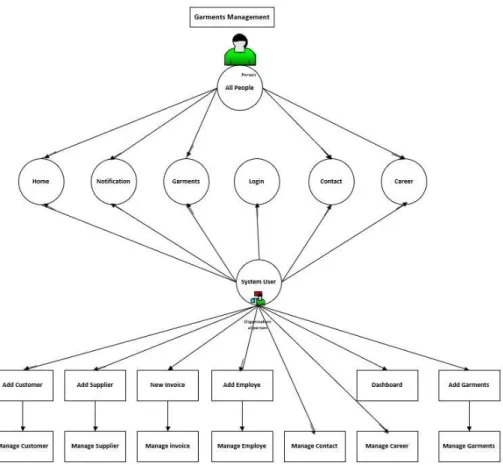
3.4 Use Case Diagram:
Here is a complete use case diagram of garments management system
Fig 3.4.1 : Use Case diagram of GMS
Page | 15
3.5 Uses of Use Case Diagram :
A use case diagram is a visual representation of a system's functionality from a user's perspective.
It shows the actors or users of the system, the various use cases or actions they can perform, and the relationships between them. Use case diagrams are used in many ways, including:
1.Requirements gathering: Use case diagrams are used to gather requirements from stakeholders.
They provide a clear understanding of the actors involved in the system, the actions they perform, and the goals they want to achieve. This helps in ensuring that the system is designed to meet the needs of all stakeholders.
2.System design: Use case diagrams are used in designing the system. They provide a high-level view of the system's features and functionalities, and how they relate to each other. This helps in ensuring that the system is designed to be comprehensive and integrated.
3.Testing and validation: Use case diagrams are used in testing and validating the system. They provide a basis for developing test cases that can be used to validate the system's functionality.
This helps in ensuring that the system meets the requirements and objectives of the stakeholders.
4.Communication and collaboration: Use case diagrams are used in communication and collaboration between stakeholders. They provide a common language and understanding of the system's functionality, which helps in facilitating communication between stakeholders. This helps in ensuring that the system is developed collaboratively and meets the needs of all stakeholders.
5.Documentation: Use case diagrams are used in documenting the system. They provide a visual representation of the system's functionality, which can be used to communicate with stakeholders, developers, and testers. This helps in ensuring that everyone has a common understanding of the system's functionality.
Page | 16
3.6 Benefits of Use Case Diagram :
There are several benefits of using a use case diagram in system development, including:
1.Provides a clear understanding of the system: A use case diagram provides a high-level view of the system's functionality and the relationships between actors and use cases. It helps in providing a clear understanding of the system and its requirements.
2..Helps in identifying and defining requirements: Use case diagrams are used in the requirements gathering process. They help in identifying and defining the system's requirements and ensuring that they are aligned with stakeholders' needs.
3.Facilitates communication and collaboration: A use case diagram provides a common language and understanding of the system's functionality. It helps in facilitating communication and collaboration between stakeholders, including developers, testers, and users.
4.Provides a basis for system design: Use case diagrams provide a basis for designing the system's architecture and functionality. They help in ensuring that the system is designed to meet the requirements and objectives of the stakeholders.
5.Enables testing and validation: Use case diagrams are used in testing and validating the system's functionality. They provide a basis for developing test cases and validating the system's functionality.
6.Improves documentation: Use case diagrams are used in documenting the system's functionality. They provide a visual representation of the system's features and functionalities, which can be used to communicate with stakeholders, developers, and testers.
Page | 17
3.7 Flowchart of Major Processes:
Here is a simplified flowchart representing the major processes in the Garments Management System software:
Fig 3.7.1 : Flowchart of Garments management system
3.8 Uses of Flowchart :
Flowcharts are used in many areas of business and technology to visually represent processes, procedures, and workflows. Some of the common uses of flowcharts are:
1.Process mapping: Flowcharts are used to map out and document a process from start to finish, including all the steps and decision points involved. This helps in identifying inefficiencies and areas for improvement in the process.
2.Software development: Flowcharts are used in software development to describe the logic of an algorithm or program. This helps in understanding the program's functionality and how it operates.
3.Project management: Flowcharts are used in project management to illustrate the flow of tasks and dependencies between different project phases or team members. This helps in visualizing the project's overall timeline and identifying critical paths.
Page | 18 4.Quality control: Flowcharts are used in quality control to identify potential sources of defects or errors in a process. By mapping out a process, it's easier to identify potential problem areas and put in place procedures to prevent errors.
5.Training and documentation: Flowcharts are used in training and documentation to illustrate a process or procedure in a visual way. This helps in improving understanding and retention of information.
6.Decision-making: Flowcharts are used to help make decisions by providing a visual representation of all the possible outcomes and the steps required to reach them. This helps in clarifying complex decision-making processes.
Overall, flowcharts are a useful tool in many different areas of business and technology. They help in documenting processes, illustrating workflows, improving quality control, aiding in decision- making, and facilitating training and documentation.
3.9 Benefits of Flowchart :
Flowcharts have several benefits, including:
1.Clarity: Flowcharts provide a clear and concise representation of a process or system, which makes it easy to understand and interpret. This makes it an excellent tool for communicating complex ideas or processes to others.
2.Simplification: Flowcharts break down complex processes into simple steps, making them easier to understand and follow. This simplification helps in identifying inefficiencies or areas for improvement in a process.
3.Visual representation: Flowcharts are a visual representation of a process or system, which makes it easier to identify patterns, trends, and relationships. This helps in gaining a better understanding of the process and identifying areas for improvement.
4.Standardization: Flowcharts help in standardizing a process or system, which helps in ensuring consistency and quality in the process. Standardization also makes it easier to train new employees or team members on the process.
5.Problem-solving: Flowcharts are used to identify potential problems or bottlenecks in a process, which helps in finding solutions to improve the process. By identifying potential problems or bottlenecks early on, organizations can save time and money.
6.Collaboration: Flowcharts help in facilitating collaboration between team members by providing a shared understanding of the process. This helps in improving communication and decision-making within the team.
Page | 19
CHAPTER 4
SYSTEM IMPLEMENTETION 4.1 What is System Implementation
In the context of a garments management system, system implementation refers to the process of installing and setting up the software and hardware components necessary to operate the system within a garment manufacturing or retail organization.
The implementation process may involve several stages, including:
1.Requirements gathering: Identifying the specific needs of the organization and determining how the system will meet those needs.
2.Design and development: Creating the software and hardware components of the system to meet the requirements identified in the first stage.
3.Testing: Conducting various types of testing to ensure that the system works as intended and meets the requirements of the organization.
4.Installation: Installing the software and hardware components of the system on the appropriate devices and ensuring that they are configured correctly.
5.Training: Providing training to users on how to use the system effectively and efficiently.
6.Data migration: Transferring data from any legacy systems to the new system.
7.Integration: Integrating the new system with any existing systems and processes in the organization.
8.Post-implementation support: Providing ongoing support to users and addressing any issues that arise after the system has been implemented.
Successful implementation of a garments management system can help organizations streamline their operations, improve efficiency, and increase profitability. It is important to plan and execute the implementation process carefully to ensure that the system meets the specific needs of the organization and is adopted effectively by users.
Page | 20
4.2 Benefits of System Implementation
System implementation can provide a number of benefits for organizations, depending on the specific system being implemented and the goals of the organization. Here are some potential benefits:
1.Increased efficiency: Implementing a new system can help streamline processes and reduce manual tasks, leading to increased efficiency and productivity.
2.Improved accuracy: Automated systems can help reduce errors and improve accuracy, particularly in areas such as data entry and calculations.
3.Better decision-making: A well-designed system can provide real-time data and insights that can help managers make better decisions and improve business outcomes.
4.Enhanced collaboration: Systems that are integrated and accessible to all relevant parties can facilitate collaboration and communication across different departments or teams.
5.Increased customer satisfaction: Improved processes and faster response times can lead to higher customer satisfaction and loyalty.
6.Cost savings: Implementing a new system can reduce the need for manual labour, lower maintenance costs, and reduce the risk of errors or losses.
7.Scalability: A well-designed system can accommodate growth and expansion, allowing organizations to scale their operations more easily.
Overall, system implementation can help organizations optimize their operations, reduce costs, and improve their competitive advantage in the marketplace. However, it is important to carefully plan and execute the implementation process to ensure that the benefits are realized and that potential risks or challenges are minimized.
4.3 Development Environment:
The development environment for the Garments Management System software provides a platform for the development team to write, test, and debug the code. It typically includes the following components:
1.Integrated Development Environment (IDE): An IDE such as Visual Studio Code, Eclipse, JetBrains IntelliJ IDEA or Notepad++ provides a development environment with features like code editing, debugging, and version control integration.
Page | 21 2.Operating System: The choice of operating system depends on the development team's preferences and the target deployment environment. Common choices include Windows, macOS, or Linux.
3.Development Tools: Various tools and utilities, such as Git for version control, package managers like npm or pip, and build automation tools like Maven or Gradle, may be used to streamline the development process.
4.4 Technologies Used:
The Garments Management System software utilizes a combination of technologies to build the backend, frontend, and facilitate integration. Some commonly used technologies include:
1.Backend Technologies: The backend development may involve programming languages such as Java, Python, or PHP. Additionally, frameworks like Spring Boot (Java), Django (Python), or Laravel (PHP) can be used for rapid development and efficient management of backend functionalities.
2.Writing PHP scripts to implement the backend functionality: We need to write PHP scripts to implement the backend functionality, such as Homepage menu bar, Career page and its input field, Login page and its users & passwords and so on. We should follow the best practices for PHP development, such as using functions, classes, and error handling.
3.Test and deploy the backend: Once we have implemented the backend functionality, we need to test it thoroughly to ensure that it works as expected. We can use a tool like PHP Unit to automate testing or use a web browser. Once we are satisfied with the testing, we can deploy the backend on a production server.
4.Frontend Technologies: The frontend development typically involves web technologies like HTML, CSS, and JavaScript. Additionally, frontend frameworks like React, Angular, or Vue.js can be employed to create interactive and dynamic user interfaces. We need to write HTML code to implement the frontend functionality using semantic markup, providing alt text for images, and using CSS for styling.
5.Database: Relational databases like MySQL, PostgreSQL, or Oracle can be used to store and manage the system's data. Alternatively, NoSQL databases like MongoDB or Firebase can be employed for specific use cases.
4.5 Real Life Applications of Frontend & Backend Development:
Frontend and backend development are two important components of modern web development.
Here are some real-life examples of applications that use both frontend and backend development:
1.E-commerce websites: E-commerce websites require both frontend and backend development.
The frontend is responsible for creating a user-friendly interface that displays products, allows
Page | 22 customers to search for items, and facilitates the purchasing process. The backend handles the processing of orders, inventory management, and payment processing.
2.Social media platforms: Social media platforms rely on both frontend and backend development to provide a seamless user experience. The frontend is responsible for creating a visually appealing interface that allows users to interact with content, while the backend handles the storage and retrieval of user data, as well as the processing of user actions such as posting comments or sharing content.
3.Online banking systems: Online banking systems require both frontend and backend development to provide a secure and user-friendly experience for customers. The frontend provides an interface for users to view their account balances, transfer funds, and pay bills. The backend handles the processing of financial transactions, as well as the storage and retrieval of account information.
4.Gaming websites: Online gaming websites require both frontend and backend development to provide an immersive gaming experience. The frontend is responsible for creating the user interface and graphics, while the backend handles game logic, matchmaking, and user account management.
5.Travel booking websites: Travel booking websites require both frontend and backend development to provide a seamless booking experience for customers. The frontend provides an interface for users to search for flights, hotels, and rental cars, while the backend handles the processing of reservations and payments.
Overall, frontend and backend development are essential components of modern web development, and are used in a wide range of applications across industries.
4.6 Backend Development:
Back-end development refers to the development of server-side logic that powers websites and apps from behind the scenes. It includes all the code needed to build out the database, server, and application. From database migrations to API integrations to setting up the server-side technologies that make a website tick, a back-end web developer may be the talent you need to get your next web project off the ground.[4]
4.7 Frontend Development:
The website’s front end is everything you see and can interact with using a browser. So, creating this visual part is called front-end development. You could even say that designers creating user interfaces and planning experiences are also front-end developers, as they are working in collaboration on the same part of the project. To create the front end, engineers use the combination of HTML (for basic page structure and content), CSS (for visual editing), and JavaScript (for making websites interactive). The same set of tools is used to create progressive web apps – mobile apps that look and feel like a native one but are created with the use of front-end technologies.
Page | 23 The steps involved in frontend development include:
Designing the user interface layout, including wireframing and prototyping. Implementing the user interface using HTML, CSS, and JavaScript, following best practices for responsive and accessible design. Incorporating frontend frameworks like React, Angular, or Vue.js to build interactive and dynamic user interfaces. Integrating with backend APIs or web services to fetch and update data in real-time. Implementing client-side validations to ensure data integrity and improve user experience.
HTML adds meaning to text by logically dividing it and identifying the role that texts plays on the page. CSS introduces styles and layouts to provide beautiful feels and looks. JS offers great dynamics for making and handling change of the document[5]
4.8 Integration and Testing:
Integration and testing play a crucial role in ensuring the smooth functioning and reliability of the Garments Management System. The steps involved in integration and testing include: Integrating the frontend and backend components to ensure seamless communication and data exchange.
Conducting unit tests to verify the functionality of individual components or modules. Performing integration tests to validate the interaction between different system modules. Implementing automated tests using frameworks like Selenium or Jest to ensure system stability and detect bugs.
Conducting performance testing to assess the system's response time, scalability, and resource usage under different scenarios. Performing security
4.9 Benefits of Integration & Testing:
Integration testing is a type of software testing that aims to verify the interactions and interfaces between different components or modules of a software system. Integration testing can help identify issues and bugs that arise when different components are combined, and ensure that they work together seamlessly as a whole.
Some of the benefits of integration testing include:
1.Detecting issues early: By identifying issues in the interactions between components before the software is released, integration testing can help save time and resources by preventing the need for more extensive testing or rework later on.
2.Improving software quality: Integration testing can help ensure that all components of a software system work together as intended, resulting in a higher quality product overall.
3.Reducing project risk: By identifying issues and bugs early in the development process, integration testing can help reduce the risk of project failure or delays.
4.Enhancing collaboration: Integration testing encourages collaboration between different teams and departments involved in the development process, which can lead to improved communication and more effective problem-solving.
Page | 24 5.Increasing efficiency: By testing the system as a whole, integration testing can help reduce redundant testing efforts and streamline the overall testing process, resulting in faster delivery times and improved efficiency.
Overall, integration testing is a critical component of software development that can help ensure that the final product is of high quality and works as intended, while also improving collaboration and efficiency throughout the development process.
Page | 25
CHAPTER 5
SYSTEM FEATURES 5.1 Homepage & About Overview:
A homepage is the main page of a website that serves as the starting point for navigating the site's content. It typically contains a navigation menu, links to important pages, and an overview of the website's purpose or content. The homepage is often the first impression that a user has of a website, so it's important to make it visually appealing and easy to navigate. The content on the homepage should be organized in a way that highlights the most important information and features of the site, while also providing clear pathways for the user to access other pages. Our Homepage and about page contains all the necessary menu, address & contact info. Additionally we have added a clock.
5.2 Contacts:
A contacts webpage is a web page on a website that provides users with information about how to contact the company or organization behind the website. A contacts webpage typically includes information such as phone numbers, email addresses, physical addresses, and sometimes a contact form that users can fill out to send a message directly to the company. Some key elements of a well-designed contacts webpage include:
1.Clear and easy-to-read contact information: The webpage should present the contact information in a clear and concise way that is easy for users to read and understand.
2.Multiple contact methods: The webpage should provide users with multiple ways to get in touch with the company, such as phone numbers, email addresses, physical addresses, and social media links.
3.Contact form: A contact form is a useful feature that allows users to send a message directly to the company without having to leave the website. The form should be easy to use and include fields for users to enter their name, email address, and message.
4.Hours of operation: If possible, the webpage should include information about the company's hours of operation, so users know when they can expect a response to their message or phone call.
Overall, a well-designed contacts webpage can help users get in touch with a company or organization quickly and easily, which can help build trust and improve customer satisfaction.
Page | 26
5.3 Career:
A career application form is a type of form used by employers to collect information from job applicants during the hiring process. The form typically includes fields for applicants to enter their personal information, employment history, education and qualifications, and any other relevant details that may be required for the job.
Some key elements of a well-designed career application form include:
1.Clear and easy-to-read design: The form should be designed in a way that is easy for applicants to read and understand, with clear headings and labels for each section.
2.Relevant fields and questions: The form should only include fields and questions that are relevant to the job being applied for, to avoid overwhelming applicants with unnecessary information.
3.Instructions and guidance: The form should include clear instructions and guidance for applicants on how to fill out the form, including any specific requirements or instructions for submitting the application.
4.Accessibility: The form should be accessible to all applicants, including those with disabilities, with options for alternative formats or accommodations if needed.
5.Security and privacy: The form should be designed with security and privacy in mind, with appropriate measures in place to protect the personal information of applicants.
Overall, a well-designed career application form can help streamline the hiring process for employers, while also providing a clear and easy-to-use platform for job applicants to submit their information and apply for a job.
5.4 User Login and Authentication:
User Login is the process of creating an account for a user on a website, application, or system.
During the registration process, the user provides personal information such as name, email, and password, and this information is stored in the system's database. Once registered, the user can access the system's features and services. Authentication, on the other hand, is the process of verifying that a user is who they claim to be. This is typically done by requiring the user to provide their login credentials, such as their username and password, before granting access to the system.
User Login and authentication are crucial aspects of any website or application that requires users to log in to access content or services. They provide a layer of security by ensuring that only
Page | 27 authorized users can access sensitive information or perform actions within the system.
Additionally, user registration allows for personalization and customization of the user experience, such as saving user preferences or keeping track of user activity. Overall, user registration and authentication help ensure the security and integrity of a system and the data it contains, and provide a better user experience for those interacting with the system. It has many parts, such as:
1.User Registration: Users can provide their information, such as name, email, and password, to create a new account in the system.
2.User Authentication: Users can log in to the system using their registered email and password.
3.Password Encryption: User passwords are securely encrypted before being stored in the database to ensure data security.
4.Password Recovery: Users can request a password reset in case they forget their password, and a password reset link is sent to their registered email address.
5.User Roles and Permissions: Different user roles, such as administrators, managers, and sales representatives, can be defined with specific permissions and access levels within the system.
5.5 Dashboard Overview:
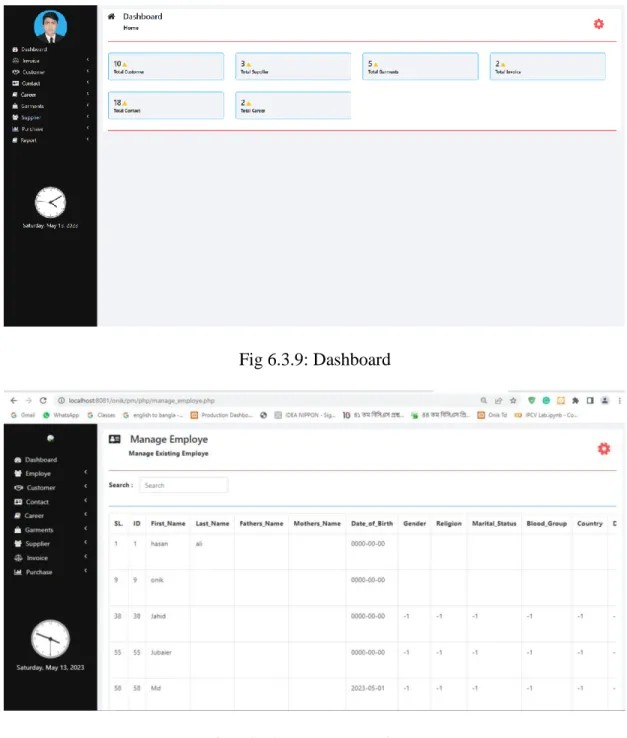
The Dashboard provides an overview of key information and statistics related to the Garments Management System. The main features include:
1.Data Visualization: Presenting relevant data using charts, graphs, and visual elements to provide a quick overview of the system's performance.
2.Supplier Status: Showing the number of pending suppliers list, and canceled orders, along with their value.
3.Customer info: Providing insights of the customers with their basic informations with categories.
4.Purchase Status: Showing the progress and status of ongoing purchase processes with necessary details.
5.Report: Showing the status of sale & purchase Reports in an organized way
6.Notices and Reminders: Displaying important notifications or reminders, such as low inventory alerts or pending tasks, to keep users informed and proactive.
Page | 28 5.6 Customer Management:
Customer Management functionality enables users to manage garments customers within the system. The key features include:
1.Add New Customer: Users can add new customers to the system, providing details such as customer name, contact number, address etc..
2.Manage customers: Customers can be managed into different categories or subcategories for easy interaction.
Page | 29
CHAPTER 6
WEB APPLICATION 6.1 What is Web Application:
A web application, also known as a web app, is a type of software application that is accessed and used through a web browser or a web-based interface. Web applications are designed to run on the internet, and are accessed through a network connection. Web applications can be designed for a variety of purposes, from simple tools such as online calculators or conversion tools, to more complex applications such as social media platforms, e-commerce websites, or project management tools.Some common characteristics of web applications include:
1.Accessible through a web browser: Web applications are accessed through a web browser or a web-based interface, and do not require any additional software to be installed on the user's device.
2.Designed for use on multiple devices: Web applications are designed to be used on a variety of devices, from desktop computers to mobile phones and tablets.
3.Use of web technologies: Web applications are built using web technologies such as HTML, CSS, and JavaScript, and are often designed to run on web servers using server-side programming languages such as PHP, Python, or Ruby.
4.Dynamic and interactive: Web applications can be designed to be dynamic and interactive, allowing users to perform tasks and interact with data in real time.
Overall, web applications offer a number of advantages over traditional desktop applications, including accessibility, cross-platform compatibility, and ease of maintenance and deployment.
Web applications have become increasingly popular in recent years, and are used by businesses and organizations of all sizes for a wide range of purposes.
6.2 Benefits of Web Application:
Web applications have many benefits for businesses and organizations, including:
1.Accessibility: Web applications can be accessed from any device with an internet connection and a web browser, making them more accessible than traditional desktop applications. This means that users can access the application from anywhere, at any time, and on any device.
2.Cross-platform compatibility: Web applications are designed to run on a variety of devices, including desktop computers, laptops, tablets, and smartphones. This means that businesses can
Page | 30 develop a single application that can be accessed by users on multiple platforms, without the need for separate versions of the application for each platform.
3.Lower cost of development: Web applications are often less expensive to develop than traditional desktop applications, as they do not require separate versions for different operating systems and can be developed using open source technologies.
4.Easy maintenance and updates: Web applications are easy to maintain and update, as changes can be made to the application on the server side without the need for users to download or install any updates.
5.Improved collaboration and productivity: Web applications can improve collaboration and productivity by allowing users to work together in real time, regardless of their location or device.
6.Scalability: Web applications can be easily scaled up or down to meet changing business needs, as they can be deployed on cloud infrastructure and can be scaled up or down as needed.
Overall, web applications offer many benefits for businesses and organizations, including improved accessibility, cross-platform compatibility, lower development costs, easy maintenance and updates, improved collaboration and productivity, and scalability.
6.3 Guidelines for Developing a Website or Web Application
The development of many websites is driven by the enthusiasm of designers and implementers : people who are often keen to use the latest technology. Being driven by technology rather than business and customer needs can lead to sites that are slow in execution, complicated to use, and do not achieve the intended results. Ironically, committing to a new technology too early can cause a website to rapidly look dated, either because the technology did not become popular and so stayed in an old form, or because the adoption of the new technology was so expensive that little budget remained for site maintenance. As a general rule, avoid the unnecessary use of technology.
While doing so, also recognise that any technology that has been avoided at some point in a website's lifetime may become vital to the site as the site's needs change, or even as user interface fashion progresses. This idea of change, and the fluidity of the guidelines, is important.
Technology that is unnecessary today may be acceptable or even necessary in a few years’ time . For example, it was once considered inadvisable to use framesor scrolling text. Now, these are less of an issue: frames are supported by most browsers in current use, and users are used to scrolling.[6]
Page | 31
6.4 Screenshots of Web Application:
Fig 6.3.1: Homepage
Fig 6.3.2: About
Page | 32 Fig 6.3.3: Notice
Fig 6.3.4: Contact
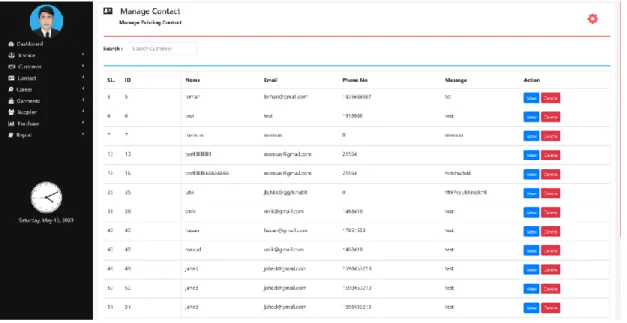
Page | 33 Fig 6.3.5: Manage Contact
Fig 6.3.6: Career Application Form
Page | 34 Fig 6.3.7: Manage Career
Fig 6.3.8: Login Page
Page | 35 Fig 6.3.9: Dashboard
Fig 6.3.10: Manage Employee
Page | 36 Fig 6.3.11: Add Customer
Fig 6.3.12: Add Supplier
Page | 37 Fig 6.3.13: Manage Supplier
Fig 6.3.14: Sales Report
Page | 38 Fig 6.3.15: Purchase Report
Page | 39
CHAPTER 7
SYSTEM DEPLOYMENT 7.1 Server Configuration:
Server configuration involves setting up the hardware and software environment required to host the G